
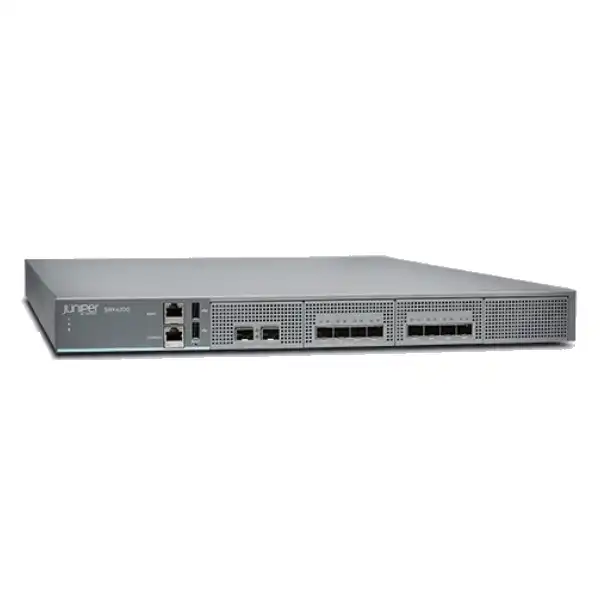
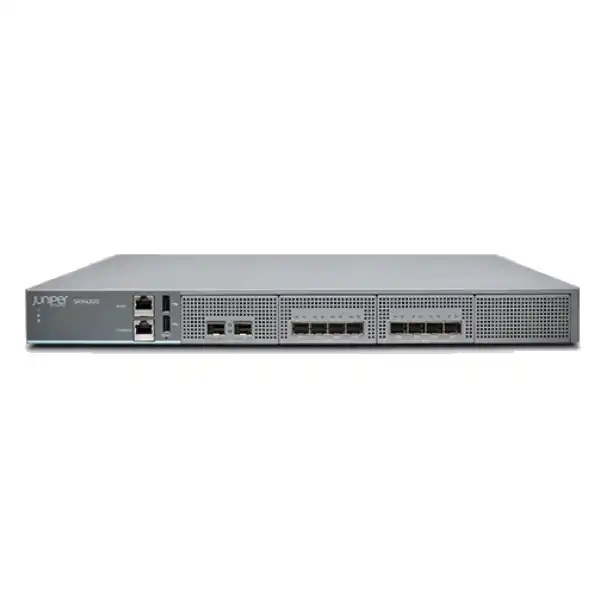
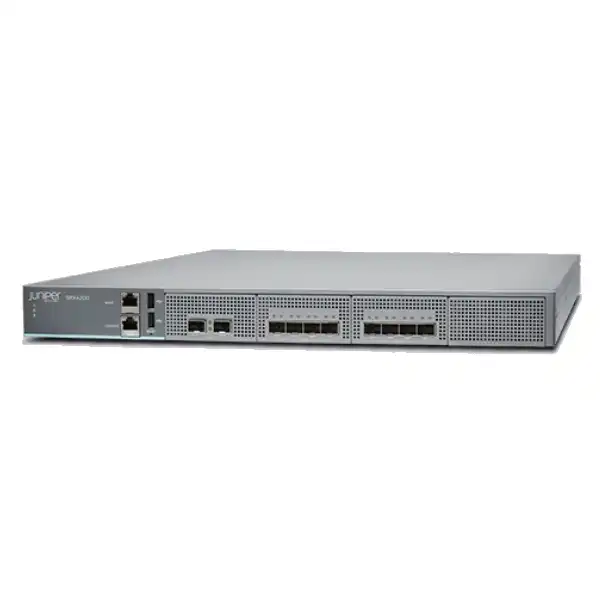
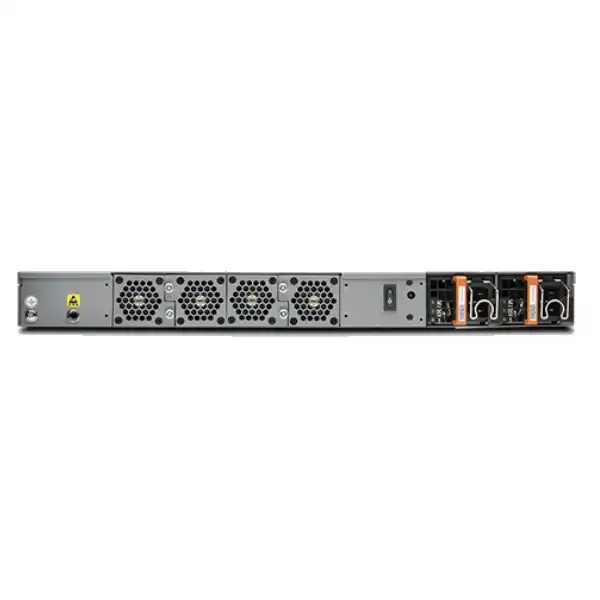
Juniper SRX4200 Firewall Dubai
A high-performance 1U Junos OS services gateway for organizations that need more capacity than branch-class appliances but do not require the interface density and 100GbE scale of larger data-center firewalls. The SRX4200 combines an 80 Gbps maximum firewall-throughput class with eight 1/10GbE SFP+ traffic ports, dedicated high-availability connectivity, redundant power and subscription-enabled next-generation security.
Direct answer: what the Juniper SRX4200 is and when it fits
The Juniper SRX4200 Firewall is a fixed 1U SRX Series services gateway running Junos OS. It is mainly used to secure enterprise campus edges, regional headquarters, data-center connections, internet perimeters, VPN environments and network segments that need substantial session scale with 1GbE or 10GbE optical or copper-transceiver connectivity. Juniper positions the platform as a mid-range firewall rather than a small branch appliance or a high-density 100GbE chassis.
Organizations should consider the SRX4200 when their real traffic profile, security inspection load and growth plan fit within the platform’s interface and inspected-throughput envelope. The headline 80 Gbps figure is a maximum firewall-throughput measurement, not a promise that every security service can run at 80 Gbps simultaneously. VPN, intrusion prevention, application security, URL filtering, malware protection, SSL inspection and advanced-threat services each change the practical sizing calculation. Traffic mix, packet size, encrypted-session rate, concurrent sessions, new-session rate and policy complexity also matter.
The most important factor to confirm before ordering is therefore the required protected throughput with the exact services that will be enabled. Port count alone is not enough. A buyer may have only two 10GbE uplinks but still need a larger platform because of inspection load, encryption, session concurrency or future growth. Conversely, an organization with modest inspected traffic may not need the SRX4200 simply because an 80 Gbps figure appears attractive.
FourTeck can help translate WAN speeds, data-center flows, user and device counts, VPN requirements, interface media, high-availability design, Juniper subscription tier and UAE installation requirements into a quotation that is easier to validate. That is particularly useful when replacing an older SRX, consolidating several security appliances, or deploying a redundant pair where the licensing, optics, cabling and migration scope must be aligned from the start.
Where the SRX4200 sits in the Juniper firewall range
The SRX4200 occupies a useful position for buyers who have moved beyond branch-firewall requirements but are not yet designing around very high interface density or 40/100GbE data-center links. Its physical design is deliberately compact: one rack unit, eight SFP+ traffic ports capable of 1GbE or 10GbE operation, one out-of-band Gigabit Ethernet management interface, dedicated chassis-cluster connectivity, two USB ports and an RJ-45 serial console. The platform uses 64 GB of memory and mirrored solid-state storage, and it is delivered with redundant AC or DC power options. This combination makes it appropriate for controlled enterprise racks where availability matters but space is limited.
The closest family comparison is often the SRX4100. Both platforms use the same general 1U form factor and eight 1/10GbE traffic-port model, but Juniper publishes a 40 Gbps maximum firewall figure and 5 million concurrent sessions for the SRX4100, versus 80 Gbps and 10 million concurrent sessions for the SRX4200. That means an organization whose topology is already well served by eight 10GbE ports may choose between the two primarily on performance, sessions, inspection load and growth rather than physical interface count. If the SRX4100 has adequate headroom after all security services are included, it can be the more proportionate option.
At the other end, the SRX4600 represents a substantial architectural step. Juniper lists a much higher maximum firewall-throughput class and adds 40/100GbE QSFP28 connectivity alongside 10GbE ports. A design that expects 100GbE uplinks, very high session counts or much greater east-west and north-south capacity should therefore compare the SRX4600 or another current Juniper platform rather than trying to force the SRX4200 into a role determined by higher-speed interfaces. The right decision is not simply to buy the largest appliance; it is to choose a platform whose interfaces, security performance, redundancy and lifecycle align with the network architecture.
For Dubai buyers, this family position matters because quotations can look superficially similar when they list only chassis and subscription names. A correct bill of materials must reflect the actual firewall model, AC or DC hardware, compatible optics or DACs, subscription term, support, rack and power environment, and whether one or two appliances are required. A lower chassis price can be misleading if the design later needs additional interfaces or a second migration because the security workload was undersized.
SRX4200 performance: read the benchmark before using the number
Juniper’s current product specification identifies the SRX4200 as an 80 Gbps maximum firewall platform. The current Hardware Compatibility Tool also lists 80 Gbps firewall throughput with 1518-byte traffic and provides separate figures for IMIX, IPsec VPN, application security, next-generation firewall, secure web access and advanced-threat workloads. These distinctions are essential because real enterprise traffic rarely behaves like a single laboratory test. Packet size, protocol distribution, short-lived versus long-lived sessions, TLS activity and enabled security functions all affect achievable performance.
For example, Juniper’s current hardware specification data lists 35 Gbps IPsec VPN throughput using 1400-byte packets and 26 Gbps with IMIX. Application-security performance is published separately, with a higher figure for throughput-oriented HTTP sessions and a lower figure for short-lived connection processing. The platform’s advanced-threat figure is lower again because the test includes a broader inspection stack. This is normal for enterprise firewalls: each additional security function consumes processing resources and changes the path taken by traffic.
Published SRX4200 figures also vary across Juniper pages and revisions. One current hardware source lists 50 Gbps firewall IMIX, while another overview has historically described 40 Gbps IMIX. Juniper’s product page presents IPS and VPN performance using its own specified test profile, while the detailed SRX4100/SRX4200 datasheet uses methodology notes such as RFC2544, throughput sessions and short-lived connection sessions. These are not necessarily contradictions; they are a warning not to mix results from different software releases, feature sets or test methods as though they were directly interchangeable.
| Sizing metric | Published SRX4200 value | Buyer interpretation |
|---|---|---|
| Firewall throughput | Up to 80 Gbps | Use as a top-level platform class, not as inspected application throughput. |
| IPsec VPN | 35 Gbps at 1400B; 26 Gbps IMIX in current hardware data | Important for site-to-site encryption, hub aggregation and encrypted data-center links. |
| Concurrent sessions | Up to 10 million | Useful for dense user, server, IoT and data-center environments where connection count can dominate bandwidth. |
| SSL connections per second | 12,000 | Relevant when encrypted web and application sessions are created at a high rate. |
| IPsec VPN tunnels | 4,075 | Check topology, routing and operational design as well as the raw tunnel maximum. |
| Security policies | Up to 60,000 | Large policy capacity does not remove the need for rule hygiene, zone design and change control. |
A sound sizing exercise starts with measured peak traffic rather than purchased circuit speed alone. Add expected growth, then identify the security services that must stay enabled during peak periods. If SSL inspection, IPS, application identification, URL filtering and malware protection are all part of the intended policy, size against the relevant inspected-workload figure and keep operational headroom. Also model failure conditions: in an active/passive cluster, one appliance may need to carry the entire protected load after failover. Capacity that looks comfortable when two devices are healthy can become marginal if the surviving node is expected to operate near its ceiling.
Ports, optics and traffic distribution
Eight 1/10GbE SFP+ traffic ports
The SRX4200 provides eight onboard SFP+ data interfaces supporting 1GbE or 10GbE operation with compatible transceivers. This is a strong fit when the firewall connects to redundant switches, WAN routers, internet handoffs or data-center fabrics that already use 1G or 10G links. It is less suitable when the architecture requires native 25G, 40G or 100G traffic interfaces.
Optics are a procurement dependency, not an afterthought. Fibre type, wavelength, distance, connector, switch-side optic and link budget must match. Juniper also supports selected direct-attach copper cables for short in-rack or adjacent-rack 10GbE connections.
Dedicated management and HA connectivity
The appliance includes a 1GbE out-of-band management port and dedicated chassis-cluster interfaces. Keeping management traffic separate from production traffic simplifies access control, monitoring and incident handling. Chassis-cluster links are used to synchronize control and state information so failover can preserve sessions where the design and protocols allow it.
The presence of dedicated HA ports does not itself create a resilient firewall service. The switching topology, upstream routing, redundant power feeds, cluster configuration, failure detection and operational testing must all be designed as one system.
CPU-aware port placement
Juniper documents two traffic-port groups: ports 0/0 through 0/3 are associated with one CPU socket, while ports 0/4 through 0/7 are associated with another. Juniper recommends distributing traffic across the groups to avoid concentrating all forwarding load on one side. A two-link design should therefore not automatically choose two adjacent ports simply because that is convenient for cabling.
This detail is easy to miss during migration. Interface mapping should be part of the implementation plan so the final cabling and Junos configuration preserve both logical clarity and balanced processing.
1GbE copper has a specific limitation
Supported Juniper 1GbE copper SFP options operate at 1000 Mbps on this platform; Juniper notes that 10 Mbps and 100 Mbps speeds are not supported on those modules. If an existing handoff is an older Fast Ethernet service, a buyer should not assume the firewall can directly negotiate it through a 1G copper SFP.
That limitation can affect migrations from legacy carrier or industrial links. Confirm the actual handoff speed and media before ordering optics, and use a suitable intermediate switch or carrier change if required.
Security capabilities: what is native and what depends on licensing
The SRX4200 runs Junos OS and provides the routing and security foundation expected from an SRX platform. Juniper’s standard licensing includes the base capabilities used for routing, firewalling, switching, NAT, VPN and MPLS. The appliance can also participate in more advanced security designs that use intrusion prevention, application security, threat intelligence, URL filtering, antivirus, antispam and Advanced Threat Prevention Cloud. The crucial procurement point is that many of those advanced functions are subscription licensed, and the bundle selected determines what is entitled.
Stateful firewall and segmentation
Zone-based policies, NAT, routing and VPN functions form the baseline. The design should map business trust boundaries rather than reproducing an old rule base without review. Internet, server, user, guest, management, partner and cloud paths may need separate zones and logging requirements.
Intrusion prevention
IPS can detect and block traffic matching known exploit patterns and policy-defined signatures. It should be sized as an inspected service, kept current and tuned to the applications actually used by the organization. Blanket activation without change control can create unnecessary noise or disruption.
Application security
Application identification gives policy more context than port numbers alone. It is useful where web applications, collaboration tools, remote-access software and evasive applications share common ports. Licensing and software support should be validated for the intended AppSecure functions.
URL and content controls
Enhanced web filtering, antivirus and antispam belong to higher security bundles rather than the unlicensed base alone. These services can be appropriate at enterprise internet edges, but they also add inspection overhead and policy dependencies that must be included in sizing.
ATP Cloud and SecIntel
Juniper ATP Cloud adds cloud-assisted analysis for known and unknown threats and integrates threat intelligence feeds with enforcement on SRX. Premium bundles can extend capabilities such as malware analysis, adaptive threat profiling, DNS security, encrypted traffic insights and related threat-intelligence functions.
SSL inspection considerations
Decrypting encrypted traffic can materially change performance and operations. Certificate deployment, privacy requirements, excluded applications, unsupported protocols and troubleshooting procedures should be agreed before enabling broad inspection. The business requirement should drive the policy rather than enabling decryption everywhere by default.
Security functionality should therefore be specified as a service stack. Saying “we need IPS” is not enough if the real requirement also includes URL filtering, malware inspection, encrypted traffic visibility and cloud sandboxing. Each function can affect license selection, throughput, logging volume, operational workflow and acceptance testing. A quote that lists only the chassis can be incomplete even when the hardware model itself is correct.
Juniper SRX4200 licensing explained for procurement teams
Juniper supports multiple SRX software-license bundles and subscription terms. The exact commercial naming can evolve, so the safest approach is to start with required functions and then map them to the current orderable SKU. Juniper documentation lists a base Standard entitlement and advanced or premium security tiers. It also describes data-protection and edge-protection bundles for platforms including the SRX4200. Subscription terms can include multi-year options, which means renewal planning belongs in the original purchase decision rather than being left for later.
Standard foundation
Juniper identifies the standard entitlement as the base for routing, firewall, switching, NAT, VPN and MPLS functions. This may be sufficient for organizations that primarily need high-performance stateful security, routing and encryption without the broader threat-prevention stack.
A standard-only design should still account for Junos support, hardware support, logging, configuration management and the operational resources required to maintain security policy.
Advanced tiers
Advanced bundles add functions such as intrusion prevention, application security and security intelligence, with higher variants adding web filtering and antivirus or antispam capabilities. The precise combination must be mapped to the current Juniper licensing guide and the Junos version planned for deployment.
This tier often fits organizations that need next-generation firewall policy and content controls but do not require the full ATP Cloud feature set.
Premium and ATP-oriented tiers
Premium bundles can add ATP Cloud and related advanced-threat capabilities. Juniper documentation describes malware analysis, threat detection, adaptive threat profiling, DNS security, encrypted traffic insights, IoT security and other services within premium combinations depending on bundle generation.
If ATP Cloud is a mandatory control, make that explicit in the quotation request so a standard or advanced-only SKU is not substituted accidentally.
The buyer should also distinguish a feature license from support. A security subscription enables or entitles features; support covers access to vendor assistance and replacement or software rights according to the selected service. They solve different problems and may have different terms. A resilient production deployment may require both an appropriate security bundle and a support level consistent with the organization’s recovery objectives.
For a high-availability pair, do not assume that one subscription automatically covers two physical appliances. Feature licenses are commonly device-specific, and entitlement rules can depend on the exact bundle and deployment. The commercial proposal should explicitly list the number of chassis, the number and term of subscriptions, and the support attached to each relevant serialised unit. This avoids a common situation where the physical HA pair arrives but only one node is fully entitled for the intended services.
Finally, validate software compatibility. The inclusion of a feature in a bundle does not guarantee identical support on every model or every Junos release. Before migration, confirm the target Junos train, required security functions, management platform compatibility and any release-specific limitations. This is particularly important when importing configuration from an older SRX where syntax, defaults, deprecated features or licensing behavior may differ.
High availability, power and hardware resilience
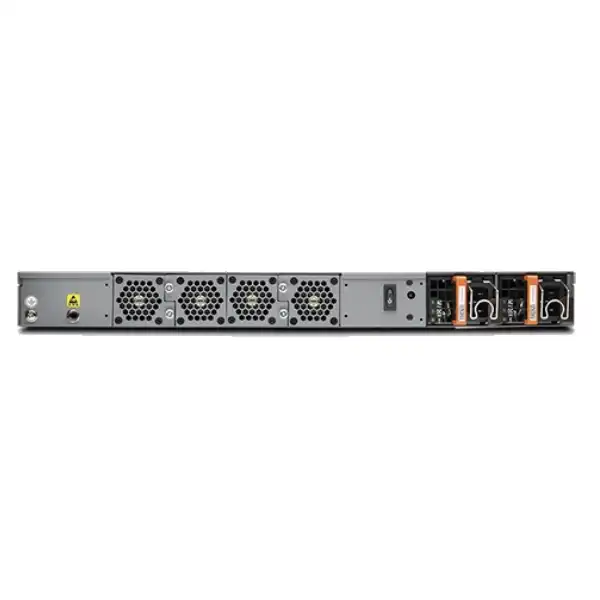
The SRX4200 is designed with several hardware features that support resilient deployment. It ships with two power supplies in either AC or DC variants. Juniper documents each supply as capable of powering the appliance, allowing the remaining supply to carry the load if the other fails or is removed. The power supplies are hot-removable and hot-insertable when redundancy is maintained. This is valuable only if the site design also provides independent power paths where required; plugging both supplies into the same single PDU preserves PSU redundancy but not power-source redundancy.
Cooling uses four rear fan trays, each containing two fans. Juniper states that three fan trays are required for proper airflow and the fourth provides redundancy. The trays are field-replaceable while the system is operating. Air moves from the front of the chassis to the rear, so cabinet design, cable routing and clearance should support that direction. Blocking exhaust space or installing the unit in a poorly ventilated enclosed rack undermines the benefit of redundant fans.
Storage is mirrored. Juniper describes two 240 GB solid-state drives configured as RAID 1, so data is written to both and one drive can remain active if the other becomes inoperable. This is a platform-resilience feature, not a substitute for configuration backups. Junos configuration, license records, certificates, security policy documentation and recovery procedures should be kept in controlled external repositories so the organization can rebuild or replace hardware under support procedures.
For network availability, two SRX4200 appliances can be deployed as a chassis cluster. A useful HA design looks beyond the firewall pair itself. Upstream and downstream switches should avoid single points of failure; routing and link aggregation should converge predictably; monitoring should detect node, interface and path faults; and failover tests should include real application traffic. State synchronization can preserve many sessions, but not every application behaves identically during path changes, so business-critical flows need validation.
In a Dubai data center or enterprise server room, power, cooling and support response should be treated as part of the firewall architecture. If the service is important enough to justify a redundant SRX pair, it is usually also important enough to document PDU diversity, switch redundancy, spare optics, configuration backup, escalation contacts and maintenance windows. High availability is an operational discipline as much as a hardware feature.
Physical specifications and Dubai installation planning
| Item | SRX4200 planning value |
|---|---|
| Form factor | 1U fixed chassis for a standard 19-inch four-post rack or suitable enclosed cabinet |
| Approximate dimensions | 17.48 in wide × 1.75 in high × 25 in deep |
| Approximate weight | About 29 lb / 13.15 kg with two AC power supplies; DC version is slightly lighter |
| Power supplies | Two 650 W AC or two 650 W DC supplies, depending on ordered variant |
| AC input range | Supports low-line and high-line AC ranges documented by Juniper; verify the regional power cord and PDU connection for UAE deployment |
| Operating temperature | 0°C to 40°C |
| Operating humidity | 5% to 90% non-condensing |
| Airflow | Front-to-back cooling; maintain clear intake, exhaust and maintenance space |
The chassis depth is significant for compact cabinets. Juniper’s site guidance calls for a suitable 19-inch rack and adequate front-to-rear clearance in an enclosed cabinet. Before delivery, confirm that the rack has enough usable depth after allowing for power connectors, fibre bend radius, cable management and rear airflow. A cabinet that can physically accept a 25-inch chassis can still be unsuitable if the rear door presses against power cords or blocks hot-air exhaust.
Dubai’s external climate is not the same as the equipment-room environment, but it raises practical questions about cooling continuity. The firewall must operate within the vendor’s ambient specification, so the relevant measurement is the temperature and humidity at the rack intake, not the outdoor temperature. Data centers normally control this carefully; smaller enterprise server rooms should verify cooling capacity during peak load and plan for HVAC faults. Dust management also matters because restricted airflow can increase thermal stress even when the room thermostat appears acceptable.
Grounding is another installation requirement. Juniper instructs installers to connect the chassis to earth ground and use electrostatic-discharge precautions when servicing components. The rack, PDU and electrical installation should therefore be prepared before the change window. For DC deployments, qualified personnel should validate the site’s DC plant, polarity, breaker protection and cabling against the Juniper hardware guide rather than treating the DC model as interchangeable with an AC unit.
The best procurement process confirms physical site details before the firewall ships: rack type, available rack units, cabinet depth, PDU type, voltage, plug type, power-feed diversity, grounding, fibre type, required transceivers, patch leads, cable lengths and management-network availability. These are inexpensive to confirm early and expensive to discover during a weekend migration.
Migration journey: from an existing firewall to the SRX4200
1. Discover the current traffic
Collect peak and average bandwidth, session counts where available, WAN and internet circuit sizes, VPN utilization, major applications, security services, interface media and failure behavior. Do not size only from the old firewall model because the existing device may already be overloaded or may have features disabled for performance reasons.
2. Rationalize security policy
Review zones, objects, NAT, VPNs, application rules, IPS exceptions and obsolete services. Migration is an opportunity to remove unused objects and overly broad rules. A direct one-for-one conversion can preserve years of technical debt and make later troubleshooting harder.
3. Design ports and HA
Map every physical link to a compatible SRX4200 port, confirm transceivers, and distribute traffic across Juniper’s documented port groups. For a cluster, document control, fabric, redundant Ethernet, upstream switching, routing adjacency and management access before rack installation.
4. Build and validate Junos configuration
Prepare the target Junos configuration in a controlled environment. Verify interface addressing, routes, security zones, policy ordering, NAT, VPN proposals, certificates, DNS, NTP, authentication, SNMP or telemetry, logging and administrator access. Validate syntax on the target software release.
5. Execute a controlled cutover
Use a written sequence with pre-checks, ownership, rollback criteria and communication steps. Save the old device state, verify physical link status after each cable move, confirm routing and policy hits, and test critical applications from both internal and external paths.
6. Prove failover and operations
After traffic is stable, test cluster failover, redundant links and management access. Verify that logs reach the required platform, backups are working, licenses are active, security signatures update correctly and the operations team has runbooks for common incidents.
A technically successful migration is not simply one in which packets pass after the change. The target state should also be supportable. That means the configuration is documented, administrators know how to access the appliance during an outage, monitoring can distinguish node and link failures, certificate-expiry dates are tracked, subscriptions are recorded, and a known-good backup exists outside the chassis. These details reduce recovery time long after the installation engineer has left the site.
Management, automation and day-two operations
The SRX4200 can be managed using Junos OS command-line tools and Juniper management platforms. Juniper’s hardware documentation also references J-Web, Junos Space and automation-oriented management, while current Security Director releases list the SRX4200 as a supported firewall. This gives organizations several operating models: direct CLI administration for experienced network-security teams, centralized policy management for multi-device estates, and automation or telemetry integrations for environments that treat network configuration as controlled infrastructure.
Initial configuration is performed on Junos OS. Juniper documents a factory management address on the fxp0 interface and default management services that support secure remote access once credentials and policy are configured. Production onboarding should immediately align the device with the organization’s management standards: unique administrative accounts, centralized authentication where supported, restricted management source networks, strong SSH and HTTPS controls, NTP, DNS, syslog, SNMP or streaming telemetry, configuration archival and role-based privileges.
Centralized management becomes more valuable as the number of firewalls grows. A single SRX4200 can be operated effectively from the CLI, but an estate spanning headquarters, data centers and branches needs consistent policy deployment, audit history, object management and visibility. If Security Director Cloud or on-premises Security Director is planned, verify the supported Junos release before upgrade or migration. A firewall can be perfectly functional on a given software release while a management platform has a narrower compatibility matrix.
Operational readiness should include backup and restore testing, software-upgrade procedure, license-renewal ownership, threat-signature monitoring, alert thresholds, log-retention planning and a method for identifying policy changes. The SRX4200 has substantial capacity, but poor operational discipline can create more risk than a smaller well-managed platform. Day-two processes should therefore be part of the purchase decision, especially when the firewall protects business-critical data-center or internet services.
Practical SRX4200 use cases in UAE enterprise environments
Enterprise internet edge
A headquarters or large campus with multi-gigabit internet access can use the SRX4200 for stateful firewalling, NAT, VPN and subscription-enabled threat controls. The final design should be based on inspected traffic, TLS behavior and session creation rather than internet-circuit speed alone.
Data-center perimeter
The 10GbE interface model suits data centers whose protected north-south connections fit within 1G/10G links. Security zones can separate internet-facing services, application networks, management and partner connections. Environments moving to 40/100GbE should compare a larger platform.
Regional VPN hub
With thousands of supported IPsec tunnels and substantial VPN throughput, the SRX4200 can aggregate encrypted connectivity from branches, partners or cloud networks. Tunnel count is only one dimension; crypto settings, routing scale, failover, NAT traversal and operational monitoring also need design attention.
Campus segmentation core-edge role
Organizations can use the platform to enforce security between major campus zones where 10GbE connectivity is sufficient. This can reduce reliance on simple ACLs for sensitive server, user, guest, OT or partner paths, provided latency, throughput and failure-domain implications are properly modelled.
Secure WAN and SD-WAN designs
SRX platforms support routing and secure WAN functions that can consolidate edge roles. When using the SRX4200 in a wider SD-WAN architecture, confirm the controller or management design, supported Junos release, WAN interface requirements and security subscriptions needed for the desired threat-protection level.
High-availability service edge
A pair can protect workloads that require firewall-node redundancy. The strongest use case is one where the surrounding switches, power and routing are also redundant. Buying two firewalls without eliminating adjacent single points of failure creates an expensive pair around an otherwise fragile path.
When the SRX4200 may be the wrong choice
You need 40/100GbE interfaces
The SRX4200’s traffic interfaces are 1/10GbE SFP+. If the network architecture is already built around 40GbE or 100GbE uplinks, evaluate a platform such as the SRX4600 or another appropriate current model instead of adding external workarounds.
Your inspected workload is too high
A design can fit the 80 Gbps headline but exceed the platform when IPS, application security, web filtering, malware protection or VPN are considered. Use the closest published inspected benchmark and measured traffic profile, then add failover and growth headroom.
You need fewer resources
The SRX4200 may be excessive for a modest branch or smaller office. If the required throughput, sessions, VPN scale and interface count are well below its capabilities, a smaller SRX can reduce capital cost, support cost and operational complexity.
You require PoE or access-switch functions
Juniper’s SRX4200 specification lists no PoE+ ports and no Mini-PIM slots. It is an enterprise firewall/services gateway, not a replacement for a PoE access switch or a modular branch appliance with specialized WAN cards.
Your lifecycle strategy points elsewhere
Hardware, subscription and software lifecycle dates do not always move together. If the project has a long depreciation or support horizon, validate the exact orderable chassis, subscription SKUs, Junos release strategy and support milestones at quotation time rather than assuming every related SKU shares one lifecycle.
SRX4100 vs SRX4200 vs SRX4600: a buyer-focused comparison
| Decision point | SRX4100 | SRX4200 | SRX4600 |
|---|---|---|---|
| Maximum firewall class | 40 Gbps | 80 Gbps | 400 Gbps |
| Concurrent sessions | 5 million | 10 million | 60 million |
| Primary traffic interfaces | 8 × 1/10GbE SFP+ | 8 × 1/10GbE SFP+ | 10GbE plus 40/100GbE options |
| Best comparison trigger | Same 10GbE topology, lower traffic and session requirement | Higher performance while retaining compact 10GbE interface model | Need far more performance, sessions or 100GbE connectivity |
| Procurement caution | Do not undersize inspected services | Do not confuse 80 Gbps firewall with every-service throughput | Higher platform scale can increase power, optics and support cost |
The SRX4200 is most compelling when the network already fits a compact eight-port 10GbE design but needs more performance and session scale than the SRX4100. The SRX4600 becomes a more natural comparison when the architecture itself changes—especially when 40/100GbE connections, much larger session populations or much higher firewall capacity are required. Pricing should be compared at a complete solution level, including subscriptions, support, optics, HA quantity and installation, not just chassis list price.
Procurement checklist for an accurate Dubai quotation
A complete SRX4200 request should give the supplier enough information to distinguish hardware fit from commercial completeness. The following inputs reduce assumptions and help prevent late changes to optics, licenses or support.
If some values are unknown, that is not a reason to guess. FourTeck can use circuit information, firewall logs, current configuration and application requirements to identify the missing sizing inputs. The goal is to make uncertainty visible before purchase rather than discovering it after hardware arrives.
Frequently asked questions about the Juniper SRX4200
Is the SRX4200 really an 80 Gbps firewall?
Juniper classifies the SRX4200 with up to 80 Gbps maximum firewall throughput under a defined test profile. That does not mean every security service processes 80 Gbps. IPsec, next-generation firewall, secure-web and advanced-threat benchmarks are lower because they include more work per session. Size the appliance against the security services you plan to use, not only the largest headline number.
How many network ports does it have?
The SRX4200 has eight onboard 1/10GbE SFP+ traffic ports. It also has a separate 1GbE management port, dedicated high-availability interfaces, console connectivity and USB ports. If a design needs native 25G, 40G or 100G production interfaces, the SRX4200 is not the natural fit and a larger or newer platform should be evaluated.
Are transceivers included?
Do not assume the required optics are included with the chassis. The correct SFP or SFP+ module depends on speed, fibre type, distance and the device at the other end. Juniper publishes a supported-transceiver list for the SRX4200. Quotation should identify each optic explicitly, especially when links mix single-mode, multimode and short DAC connections.
Can it use 1GbE copper SFPs?
Yes, selected supported 1GbE copper transceivers are listed for the platform, but Juniper notes an important limitation: those modules operate at 1000 Mbps and do not support 10 Mbps or 100 Mbps speeds on the SRX4200. Confirm any legacy carrier or device handoff before migration.
Does the SRX4200 include IPS and ATP Cloud?
The platform supports IPS, application security, ATP Cloud, threat intelligence and other advanced services, but entitlement depends on the Juniper license or subscription bundle. The standard software foundation does not automatically mean every advanced threat feature is licensed. State the required functions in the RFQ so the commercial bundle can be mapped correctly.
How many concurrent sessions are supported?
Juniper publishes a maximum of 10 million concurrent IPv4/IPv6 sessions for the SRX4200. Session capacity is important in busy enterprise, data-center and IoT networks because a connection-heavy workload can stress a firewall even when bandwidth is moderate. New-session rate and SSL-session creation should be considered alongside the concurrent maximum.
Can two SRX4200 firewalls run as a high-availability pair?
Yes. The platform provides dedicated chassis-cluster interfaces and supports redundant deployment. A complete HA design also needs redundant upstream and downstream connectivity, appropriate routing or switching behavior, power diversity, synchronized configuration and tested failover. Subscription and support requirements should be confirmed for both physical nodes.
What is the difference between SRX4100 and SRX4200?
They share a similar 1U physical and eight-port 1/10GbE design, but the SRX4200 has materially higher published firewall performance and session capacity. Juniper lists the SRX4100 at 40 Gbps maximum firewall throughput and 5 million sessions, while the SRX4200 is listed at 80 Gbps and 10 million. Compare inspected-service performance as well as the headline figures.
When should I look at the SRX4600 instead?
Compare the SRX4600 when you need a much higher firewall class, 40/100GbE interfaces, far more concurrent sessions or a larger data-center growth envelope. The SRX4200 is attractive when 10GbE connectivity is sufficient and the application fits its inspected-throughput limits. The physical network architecture often makes this decision clearer than the chassis price.
Is AC or DC power better for Dubai deployments?
Neither is universally better. AC is common in enterprise server rooms and many data-center racks, while DC may fit telecom or facilities with an established DC plant. The SRX4200 is offered in both variants with dual supplies. Choose the version that matches the site’s power architecture and confirm the correct regional cabling before delivery.
Can the SRX4200 be managed centrally?
Yes. In addition to Junos OS CLI and local management options, Juniper supports centralized security management platforms. Current Security Director documentation includes the SRX4200 among supported firewalls. Always check the compatibility matrix for the exact Security Director and Junos versions planned for production before upgrading either side.
What information is needed for a Dubai price?
At minimum, provide quantity, AC or DC preference, HA requirement, security subscription features and term, support level, interface media, transceivers, expected protected throughput and whether installation or migration is required. Availability and pricing can vary by exact SKU and commercial term, so a complete bill of materials is more useful than a bare chassis price.
Support, software and lifecycle planning
Enterprise firewall purchases often outlive the software release installed on day one. Junos OS has defined support and upgrade policies, and Juniper publishes hardware and software lifecycle notices separately. The correct operating model is therefore to choose a supported Junos release, document the upgrade path, monitor security advisories and align maintenance windows with business risk. A platform that remains powerful enough for several years can still become difficult to support if software and management dependencies are ignored.
Do not infer the lifecycle of the SRX4200 chassis from the lifecycle of one old subscription SKU, accessory or software bundle. Juniper’s support pages can list end-of-life milestones for individual license bundles and related components independently. At procurement time, validate the exact orderable chassis SKU, the security subscription SKU, support service and intended Junos release. For a project with a five-year or longer horizon, ask how renewals, replacement coverage and software support align with that horizon.
Software upgrades should be treated as planned changes. Review release notes for behavior changes, known issues, supported migration paths and management-platform compatibility. In a chassis cluster, determine whether the target release and design support the desired upgrade method and whether maintenance still requires a traffic-impact window. Test critical features such as IPsec, dynamic routing, security policy, logging and centralized management after upgrade rather than assuming a successful reboot proves application health.
FourTeck can incorporate lifecycle and support questions into the quotation process so the purchase is evaluated as an operating platform rather than a one-time hardware item. That is especially valuable for regulated, customer-facing or always-on systems where a firewall outage has a direct business impact.
Decision recap before you shortlist the SRX4200
Model fit
Choose the SRX4200 when a compact 1U, eight-port 1/10GbE platform fits the topology and the inspected workload remains comfortably inside its real security-performance envelope.
Capacity
Use measured traffic, sessions, VPN, SSL activity and growth. Do not equate 80 Gbps maximum firewall throughput with every-service throughput.
Licensing
Map required functions such as IPS, URL filtering and ATP Cloud to the current Juniper subscription tier and term. Confirm entitlement for every appliance in an HA design.
Compatibility
Validate optics, link speed, Junos release, Security Director version, VPN peers, routing protocols and existing network dependencies before migration.
Installation
Check rack depth, airflow, grounding, PDU connections, power diversity, fibre paths and management access before the change window.
Alternatives
Compare the SRX4100 for lower-capacity 10GbE requirements and the SRX4600 or another suitable model when the architecture needs much higher scale or 40/100GbE.
What FourTeck needs from you for an accurate SRX4200 proposal
You do not need to arrive with a finished design. The most useful starting information is the business requirement and whatever network data is already available. FourTeck can help turn that into a validated bill of materials and deployment scope.
Plan the Juniper SRX4200 around your real Dubai network
The SRX4200 can be an excellent enterprise firewall when its 10GbE interface model, inspected-security performance, licensing and resilience match the requirement. A good proposal should make those dependencies explicit so you can compare the platform confidently with the SRX4100, SRX4600 or another appropriate option. Share your traffic, security services, interface requirements and migration scope to build a quote around the actual deployment rather than a generic chassis bundle.

Reviews
There are no reviews yet.