
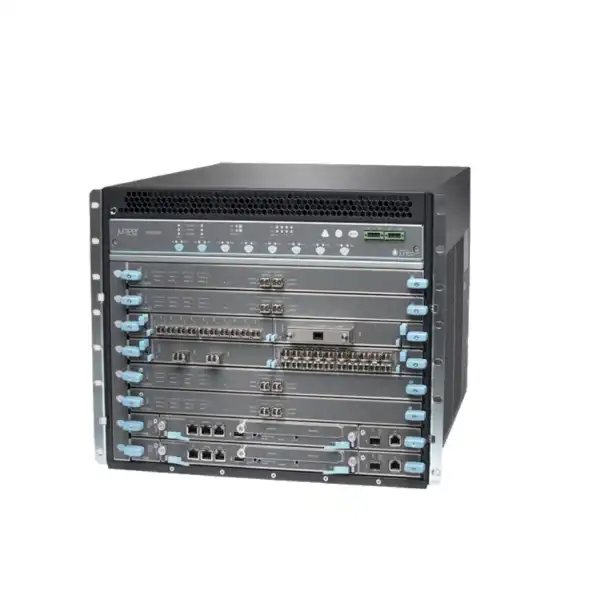
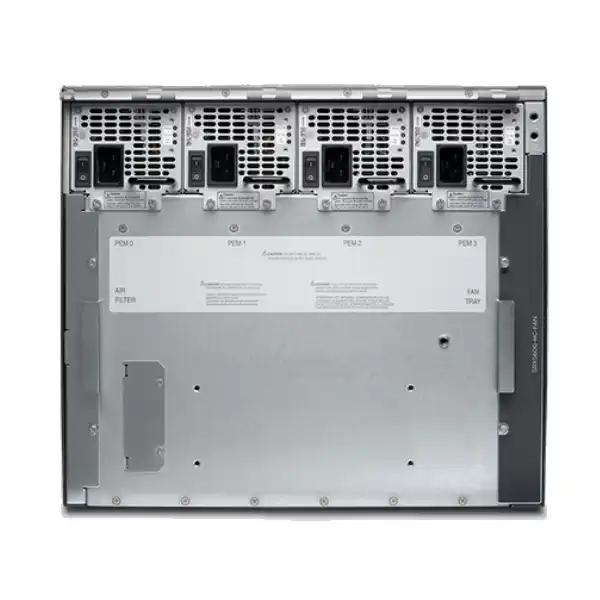
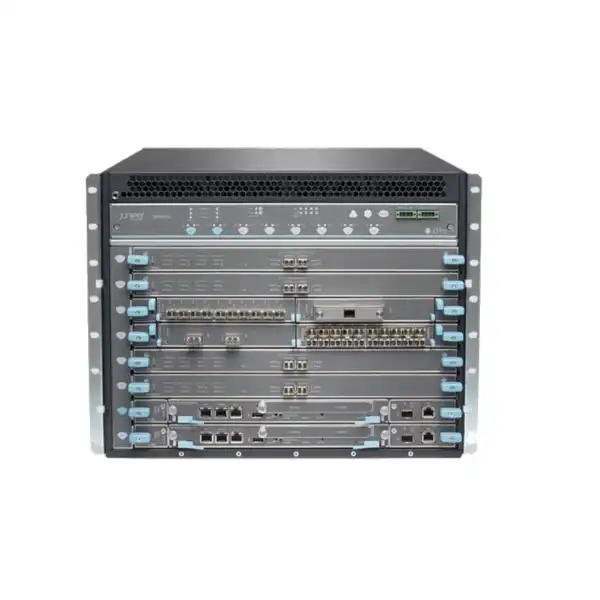
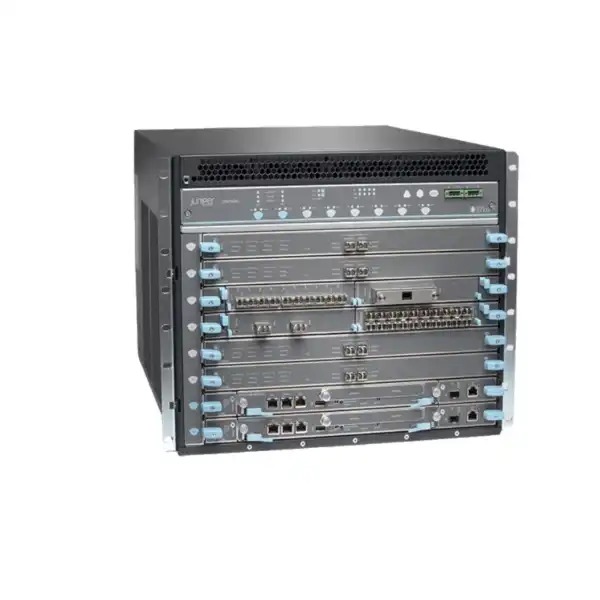
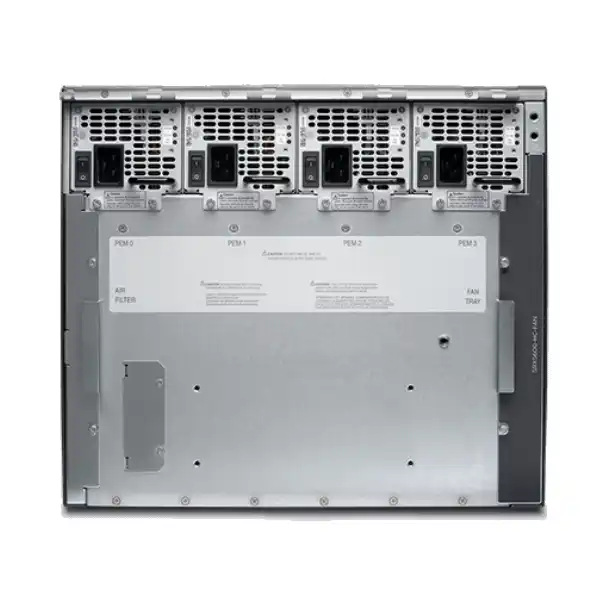
Juniper SRX5600 Firewall in Dubai, UAE
A modular 8U SRX5000 Series security platform built for large enterprise data centers, service-provider infrastructure and other high-session environments where firewall throughput, interface density, resilient hardware and Junos-based operations matter. For new procurement, the most important question is not simply performance: it is whether the exact SRX5600 chassis, cards, software release, licenses and support position are appropriate for the remaining lifecycle of the platform.
Direct answer: what should a buyer know first?
The Juniper SRX5600 is a high-performance, modular SRX5000 Series firewall. The chassis is 8 rack units high and uses replaceable processing, control, power and interface components. Its design lets an organization vary the mix of services-processing capacity and network interfaces rather than purchasing a fixed-port appliance.
It is intended for high-capacity security roles such as data-center perimeter enforcement, internal segmentation, service-provider infrastructure, security-services consolidation, high-scale VPN, and environments with very large connection counts or substantial east-west and north-south traffic.
Organizations already operating SRX5000 infrastructure, maintaining a supported installed base, sourcing compatible replacement hardware, or planning a carefully controlled extension of an existing architecture may still have valid reasons to evaluate an SRX5600. A greenfield buyer should compare it with current Juniper alternatives before committing.
Confirm the exact hardware generation and lifecycle position. The term “SRX5600” alone does not identify the routing engine, switch-control board, services cards, I/O cards, optics, power supplies, Junos release or security subscriptions. Those details determine real capability, compatibility and supportability.
FourTeck can help map traffic targets, interfaces, redundancy, installed Junos environment, licenses, physical power requirements, required accessories and support expectations into a bill of materials, while also identifying when a newer SRX platform is the lower-risk choice.
SRX5600 platform position and architecture
The SRX5600 belongs to Juniper’s SRX5000 family, a chassis-based architecture created for environments in which a fixed appliance can become limiting because processing capacity, interface density and high availability requirements evolve independently. In practical procurement terms, this means the chassis is only one part of the solution. A usable system needs the appropriate control plane, switching fabric, services-processing cards, interface cards, power supplies, cooling components and software. That modularity is one of the platform’s defining strengths, but it also makes configuration control much more important than it is with a small fixed-port firewall.
Juniper describes the SRX5600 chassis as an 8U carrier-class security device with eight card-cage positions. The lower control positions are used by Switch Control Boards, while the remaining positions can accommodate supported services-processing and interface hardware according to the specific card-generation rules. Services Processing Cards provide the compute resources for functions such as stateful firewalling, IPsec and intrusion prevention. I/O Cards and Modular Port Concentrators provide the network interfaces. Flex IOCs allow port modules to be selected for specific interface combinations. Because the platform has existed across several hardware generations, compatibility must be checked at the individual part-number level rather than assumed from the chassis name.
This architecture is useful when a security design needs to add processing without completely redesigning the interface layer, or needs additional interfaces while retaining the same chassis. It is also valuable in installed networks where operational teams already understand Junos OS, existing security policy is built around SRX behavior, and migrations must preserve routing, VPN or segmentation logic. However, modularity creates dependencies: an older routing engine may constrain software choices; a particular switch-control board may be required by a newer line card; and an interface card may require a minimum Junos release. A quotation that lists only “SRX5600 firewall” is therefore not sufficiently precise for a serious deployment.
For Dubai data centers, the architecture also has physical consequences. Eight rack units, substantial maximum system weight, high-capacity AC or DC power options, rear clearance, airflow, cable management and field-replaceable components all have to be planned. This is not a lightweight branch appliance that can be treated as a generic rack accessory. Rack elevation, power-feed design, lifting procedure and maintenance access should be part of the deployment plan before delivery.
Published performance: read the numbers in context
Juniper’s current SRX5400/SRX5600/SRX5800 datasheet publishes a maximum SRX5600 firewall performance figure of 1.44 Tbps under its stated laboratory conditions. The same data set lists approximately 11 microseconds of stateful firewall latency, 269 Gbps IPsec VPN performance using AES-256-GCM with IMIX traffic, 245 Gbps maximum IPS performance, 194 Gbps next-generation data-center firewall performance, 107 Gbps secure web access firewall performance and up to 182 million concurrent sessions. Juniper also publishes sustained new-session figures in the multimillion-per-second range. These values make clear why the SRX5600 was positioned for very high-scale networks rather than conventional office perimeter use.
| Published metric | SRX5600 figure | Buyer interpretation |
|---|---|---|
| Firewall performance, IMIX | Up to 1.44 Tbps | A chassis-scale maximum, not a promise for every card mix or enabled-service profile. |
| Next-generation data-center firewall | 194 Gbps | More relevant than raw firewall throughput when deeper security inspection is part of the design. |
| Secure web access firewall | 107 Gbps | Helps frame designs that inspect web traffic and apply additional security services. |
| IPsec VPN, AES-256-GCM IMIX | 269 Gbps | Useful for encrypted site-to-site or infrastructure use cases, subject to configuration and traffic characteristics. |
| Maximum IPS performance | 245 Gbps | Indicates the effect of intrusion-prevention processing should be sized separately from basic firewall throughput. |
| Maximum concurrent sessions | 182 million | Particularly relevant to carrier-scale, large data-center and highly multiplexed application environments. |
Performance numbers should never be copied directly into a design requirement without understanding the test profile. Juniper explicitly notes that performance, capacity and features are measured in ideal lab conditions and may vary with the Junos OS release and deployment. Packet size, application mix, encryption, IPS signatures, application identification, logging, session behavior, NAT, routing features and policy complexity can all affect practical throughput. The card population also matters because an SRX5600 chassis without sufficient services processing or suitable high-speed I/O cannot deliver a headline chassis figure.
A better sizing method begins with measured or forecasted production traffic, then separates basic firewall demand from encrypted VPN load, threat-inspection load and expected growth. Peak traffic should be distinguished from average traffic, and session rate should be distinguished from session count. A network that creates millions of short-lived connections can stress a firewall differently from one that carries a smaller number of long-lived high-bandwidth flows. For this reason, a correct SRX5600 configuration is a capacity model, not just a chassis selection.
Interfaces, line cards and the real meaning of modular I/O
The SRX5600 can be configured with multiple generations of interface hardware, and that flexibility is central to its value in large networks. Juniper documentation lists support for IOCs, Flex IOCs and MPC-based options, with later generations introducing higher-speed interfaces. Examples across the SRX5000 card family include 10GbE, 40GbE and 100GbE options, while newer IOC4 hardware is designed for substantially higher per-card forwarding capacity. This makes it possible to adapt a chassis to different aggregation, data-center interconnect, service-edge or firewall-transit designs.
A buyer should not translate “supports 100G” into “the quoted chassis includes 100G.” Ports are determined by the actual card part numbers installed or included in the bill of materials. Optical transceivers and cables are separate considerations, and their compatibility has to be checked against the exact Juniper interface card and software support. If a project needs 100GbE QSFP28 optics, 40GbE QSFP+, 10GbE SFP+ or legacy 1GbE connectivity, that requirement should be stated explicitly before a quotation is built. The same applies to connector type, fibre mode, reach, breakout requirements and the upstream switch or router interfaces.
Card-slot rules also matter. Juniper’s hardware guide identifies the lower slots as reserved for control components in SRX5600 configurations, so not every physical slot is available for every interface card. Some line cards have minimum Junos requirements. Others depend on particular generations of Switch Control Board or routing engine. The supported combination must therefore be validated as a system. Mixing independently sourced cards without checking the platform matrix can create an inventory that fits mechanically but cannot operate in the intended software and fabric configuration.
Airflow protection is another seemingly small detail with operational importance. Juniper documentation requires blank panels in unoccupied card-cage slots so cooling air circulates correctly. In a high-power modular chassis, a missing blank is not cosmetic: it can disturb the engineered airflow path. Any refurbished, replacement or spare-chassis purchase should therefore be checked for required blanks, fan tray, filter, cable-management hardware and the correct power components, not only the active cards.
For procurement, the most useful way to specify interfaces is to list every required connection by speed, medium and redundancy role. For example: two independent 100GbE uplinks to a core pair, four 10GbE links for service networks, dedicated cluster fabric links, out-of-band management and spare expansion capacity. That list can then be mapped to supported cards and optics. It is much safer than asking for “an SRX5600 with enough ports,” because the chassis can be assembled in many materially different ways.
Security capabilities and where subscriptions change the design
At its foundation, the SRX5600 runs Junos OS and provides the policy, routing, NAT, VPN and zone-based controls associated with the SRX platform. For a data-center buyer, the important distinction is between base firewall functionality and additional security services that depend on licenses, subscriptions, signature updates or external cloud services. A chassis can be technically functional while still lacking the subscriptions required for the intended intrusion-prevention, application-awareness, web-filtering or advanced-threat workflow.
Stateful firewall and policy
Core SRX use includes zone-based stateful inspection, policy enforcement, NAT and routing. In large networks, policy scale and change-control discipline can be as important as raw throughput.
Intrusion prevention
IPS functions inspect traffic beyond basic connection state. The relevant subscription, signature availability and practical inspected-traffic requirement should be included in both licensing and performance sizing.
Application visibility
Application identification and related controls can make policy more contextual than port-and-protocol rules. Support depends on the chosen license tier and software capabilities.
Threat intelligence and ATP
Juniper licensing options can add security intelligence and ATP Cloud capabilities. These are subscription-dependent services and should be validated against the intended operational workflow.
Web and content controls
Some Flex tiers include web-filtering and antivirus capabilities while others do not. The difference can materially change subscription cost and security-policy design.
IPsec VPN
High published IPsec performance makes the platform relevant to large encrypted infrastructure links, but tunnel count, crypto profile, traffic mix, routing and failover requirements still need separate validation.
Juniper’s SRX licensing documentation identifies Standard, Advanced and Premium models and lists SRX5600 support across multiple Flex tiers. Current licensing references include Advanced 1, Advanced 2, Advanced 3, Premium 1, Premium 2 and Premium 3 in legacy three-tier terminology, alongside newer next-generation Flex structures. The exact feature composition differs by tier. For SRX5400, SRX5600 and SRX5800, Juniper tables show items such as IDP signatures and application-identification signatures in several tiers, while enhanced web filtering, antivirus, antispam and ATP Cloud are included only in selected packages. Subscription terms may be available in multi-year durations depending on the specific SKU.
This is why license selection should begin with security outcomes, not SKU memorization. A buyer who needs only segmentation, routing, NAT and conventional firewall policy may have a different commercial requirement from a buyer who needs active IPS signatures, web reputation, malware controls and cloud-delivered threat intelligence. Likewise, an installed SRX5600 with expired services may still pass base firewall traffic but may no longer deliver the threat-control outcome expected by the security policy. Renewal eligibility and subscription availability therefore need to be confirmed as part of lifecycle planning.
For a used or existing chassis, license transferability and support entitlement deserve particular attention. Do not assume that licenses visible in a previous owner’s configuration can simply be reused. Confirm entitlement through authorized channels and align the software, serial numbers and subscriptions with the intended owner. In a high-availability pair, license mismatch can also create failover problems because a licensed capability that is available on one node may not behave as intended on the other. Matching software rights should be treated as part of HA design, not as an afterthought.
High availability, redundancy and failure-domain planning
The SRX5600 was designed for environments where a single component failure should not automatically become a security outage. Juniper documents redundancy across major hardware elements, including power and switching/control components when the chassis is populated appropriately. At the system level, two SRX firewalls can also be deployed as a chassis cluster so that control state, configuration and session handling can survive node-level failures according to the configured redundancy groups and cluster design.
Chassis clustering is not simply two boxes connected together. Juniper’s cluster documentation states that SRX5000 nodes need matching placement and types of relevant services and I/O cards. The participating devices also need compatible software and license conditions. Control links synchronize configuration and state, while fabric links carry data-plane information needed for cross-node processing and session redundancy. For SRX5600 specifically, Juniper documents support for dual control-link functionality, which can improve resilience of the cluster control path when implemented correctly.
The design should separate failure domains as far as practical. That may mean independent power feeds, separate upstream switches, distinct rack power distribution, redundant optics paths and physically diverse cluster links. A pair of firewalls mounted in the same rack and powered from the same PDU can protect against a chassis failure but not against every rack-level or electrical failure. Similarly, dual uplinks that terminate on the same switch do not provide the same network-path resilience as links split across a properly designed redundant switching pair.
Failover should be tested with the actual routing, NAT, VPN and inspected-service configuration rather than assumed from a clean laboratory setup. Stateful applications, asymmetric routing, external dynamic-routing peers and upstream load balancers may react differently during a node transition. A migration or refresh plan should therefore include controlled failure tests and clear rollback criteria. This becomes even more important near end-of-life because the operational team may have fewer future software choices if an issue appears after the deployment is committed.
Junos OS operations, policy control and management considerations
For organizations already standardized on Juniper, Junos OS can be one of the strongest reasons to retain an SRX5600 in a controlled lifecycle. Routing syntax, operational commands, configuration hierarchy, commit behavior and established automation can reduce the change involved in maintaining or replacing a device inside an existing Juniper estate. The value is especially noticeable where the firewall is doing more than security policy—for example, participating in dynamic routing, maintaining complex IPsec topologies or enforcing segmentation at multiple network boundaries.
Configuration quality matters at this scale. A large session platform can still suffer operational problems if policies are poorly organized, logging is excessive, object groups are inconsistent or routing decisions are ambiguous. Mature deployments normally define naming conventions, policy ownership, change windows, rollback procedures and log-retention responsibilities. Security teams should also determine which events are sent to SIEM platforms and which remain local, because high-volume logging can create storage and analytics costs far beyond the firewall itself.
Automation should be evaluated according to the organization’s change model. Junos supports structured management approaches and can be integrated into broader network automation practices, but every automated change needs the same lifecycle awareness as a manual one. If the SRX5600 must stay on an older Junos release because of hardware compatibility, automation templates developed against newer platforms may require conditional logic or testing. The fact that two devices both run Junos does not guarantee identical feature behavior across generations.
Operational monitoring should include more than interface state. Services-processing utilization, session capacity, new-session rate, flow statistics, cluster status, power and environmental alarms, card health, packet drops and license state are all relevant. When a chassis is being retained near the end of its support window, hardware-health monitoring becomes particularly important because replacement strategy and spare availability can affect recovery time.
A practical support plan should document the exact running Junos release, target release, maintenance-window process, configuration backup method, golden configuration, serial numbers, installed cards and available spares. That information turns an emergency replacement from a discovery exercise into an executable procedure. For organizations with an existing SRX5600, creating this inventory can be more valuable than immediately buying additional hardware without first understanding what is already installed.
Physical installation, rack, power and environmental planning
The physical characteristics of the SRX5600 are significant enough that facilities planning should be part of the firewall project. Juniper publishes a chassis height of 14 inches, corresponding to 8U, a width of approximately 17.45 inches and a chassis depth of roughly 24.5 inches from the front mounting bracket to the rear. The total depth with the cable-management system is approximately 27.75 inches. The bare chassis assembly with midplane, fan tray, filter and cable management is listed at about 65.5 lb, while a maximum configuration can reach approximately 220 lb. Those numbers affect rack choice, safe handling and installation labor.
Power configuration must be matched to the installed hardware. Juniper documents both AC and DC power systems across the platform’s history, with high-capacity supplies required for some later configurations. Its DC documentation shows redundant 2+2 designs and maximum system output levels that vary by supply type. Exact AC input, branch-circuit and plug requirements should be confirmed against the specific power supply part numbers delivered with the chassis, rather than inferred from a generic SRX5600 description.
Data-center teams should confirm rack depth, front and rear service clearance, airflow orientation, available RU space, PDU capacity, cable radius and optic access before equipment arrives. A fully loaded chassis is not something to casually reposition once fibre and copper bundles are dressed. Rack elevation planning also helps keep heavy equipment within a safe lifting zone and prevents cable-management congestion around adjacent systems.
For Dubai deployments, facility temperature is normally controlled by the data center rather than the outside climate, but the regional environment reinforces the need for disciplined cooling and filtration. Power quality, generator/UPS design and maintenance access can be more important than headline firewall performance during a real outage. If the SRX5600 is being installed as replacement hardware in an existing rack, verify that the replacement’s power supplies and fan/cooling components match the deployed chassis generation before arranging a maintenance window.
How to size an SRX5600 without overbuying or underbuilding
Sizing should start with the traffic that will actually traverse the firewall. Collect at least several weeks of interface and flow data where possible, identify peak periods, and distinguish internet traffic from data-center east-west flows, inter-site VPN traffic and application-specific bursts. Add expected growth based on projects that are already funded or reasonably forecast. A nominal 100GbE interface does not mean the firewall must inspect 100 Gbps continuously, just as a current average of 20 Gbps does not prove that a 20 Gbps security design is safe for peaks.
Next, classify the security services that will be enabled. Basic stateful firewalling, IPS, application identification, web controls, SSL proxying and IPsec create different processing profiles. If the design relies on deep inspection, use the relevant security-performance figures rather than the highest raw firewall number. Encrypted traffic is especially important because modern applications can make the percentage of TLS traffic very high. If decryption is required, scope where it is technically and legally appropriate and understand the capacity impact before choosing hardware.
Session behavior deserves its own model. Large web platforms, carrier infrastructure, DNS systems, NAT gateways and API environments may create very high connection rates even when bandwidth is moderate. The SRX5600’s published session capacity is substantial, but session-table size and session-creation rate solve different problems. Capture both current concurrent sessions and peak new sessions per second. Add failover considerations because an HA design may need a surviving node to carry the full required workload after a failure.
Then size the I/O. Count required ports by speed and medium, include HA and management links, and reserve sensible expansion capacity. Ensure the chosen interface cards can forward the required traffic and are supported with the intended services cards, switch-control board and Junos release. If the project needs a large number of 100GbE links, a platform generation with denser native high-speed I/O may be operationally cleaner even if the SRX5600 can technically meet the throughput target.
Finally, compare the remaining lifecycle with the expected service life of the deployment. A platform that is adequate for a one-year transition role may not be appropriate for a new five-year architecture. Capacity headroom is useful, but lifecycle headroom is equally important. For greenfield projects, the business case should include software support, replacement availability, security updates and migration cost—not just the acquisition price of the chassis.
Migration and replacement planning for an installed SRX5600
An existing SRX5600 may be deeply integrated into routing, NAT, VPN, security zones and operational processes. Replacing it therefore requires more than translating firewall rules. Start with discovery. Export the complete configuration, hardware inventory, route tables, interface descriptions, security policies, address books, NAT rules, IPsec settings, dynamic-routing neighbors, logical-system usage, monitoring integration and license information. Compare the running configuration with actual traffic so obsolete objects and unused policies are not automatically carried into the new platform.
Policy migration should preserve intent rather than syntax. A rule that made sense years ago may now be overly broad, duplicated or tied to a retired application. Use the refresh as an opportunity to identify shadowed rules, expired temporary access and network objects whose ownership is unclear. At the same time, avoid making so many unrelated policy changes that the migration becomes difficult to troubleshoot. A phased approach usually separates functional platform migration from later policy optimization.
Interfaces and routing deserve a detailed mapping table. Record every physical and logical interface, VLAN, LAG or aggregated Ethernet relationship, routing instance, static route and dynamic-routing adjacency. Identify dependencies on interface numbering because modular chassis replacements can present different port layouts. If IP addressing can remain unchanged during a cutover, the application impact may be smaller; if addresses or routing topology must change, the migration needs coordination with upstream, downstream and security-monitoring teams.
VPN migration requires special attention to peer compatibility and certificate or key management. Record IKE and IPsec proposals, lifetimes, peer addresses, tunnel interfaces, routing dependencies and external ownership. For third-party partners, arrange validation windows because a technically correct local configuration may still require changes on the remote device. If a certificate authority is involved, confirm expiry, key storage and enrollment procedures well before the maintenance window.
For HA environments, model both the migration and rollback state. Decide whether the cutover is performed as a full pair, one node at a time, or through a parallel network path. Document how sessions will be affected, how routing convergence will occur and how long rollback remains possible. Because the SRX5600 supports very large session counts, even a short outage can affect many clients if the firewall sits at a central data-center boundary.
A lifecycle-driven migration should also consider spare strategy during the transition period. If the installed SRX5600 must remain operational while a newer platform is procured and tested, holding compatible spares for high-risk components may reduce business exposure. The correct spare list depends on the actual card population; generic SRX5600 spares may not match the installed hardware generation. Inventory precision is therefore the first step in a credible migration plan.
Lifecycle and procurement reality in 2026
For buyers evaluating the Juniper SRX5600 in 2026, lifecycle status is a central commercial fact. Juniper’s published SRX Series hardware lifecycle table lists the SRX5600 chassis and a group of associated base components under an end-of-life announcement dated October 6, 2021, with a last-order milestone that has already passed. For that listed group, Juniper publishes later engineering and support milestones through September 15, 2027. Individual parts can have different dates, and some related SKUs are listed separately, so the chassis date should not be applied blindly to every card, license or spare.
This does not mean every existing SRX5600 must be removed immediately. An installed platform can remain valuable when it is stable, appropriately supported, adequately sized and covered by a defined replacement plan. It does mean that a new buyer should understand exactly why the SRX5600 is being purchased. Valid reasons may include matching an existing HA node, replacing a failed chassis, maintaining a standardized installed base during a migration program, adding temporary capacity or sourcing a lab/test system that mirrors production.
The risk profile is different for a greenfield production deployment intended to run for many years. In that case, acquisition cost should be compared with the cost of future migration, the remaining period for vendor support, software availability, vulnerability response, spare availability and staff effort. A lower purchase price can be misleading if the platform must be replaced much earlier than a current-generation alternative. Organizations with formal cyber-security frameworks may also have internal rules preventing new deployment of products after EOL announcement or close to end of support.
When requesting a quotation, specify whether new, vendor-recognized refurbished, partner-refurbished or used hardware is acceptable. Ask for serial-number and entitlement clarity, included components, condition, warranty, return terms and any testing performed. If licenses or support are required, confirm eligibility before the hardware is treated as a viable purchase. A chassis without the correct cards, power supplies or entitlement can be inexpensive but unusable for the intended purpose.
FourTeck’s role should therefore be to help establish configuration and procurement suitability, not simply to push a legacy chassis. Where an SRX5600 is the right answer for an existing environment, the bill of materials should be exact. Where the business is building a new long-life security architecture, a comparison with current Juniper data-center firewall platforms is the more responsible starting point.
Typical use cases and when the SRX5600 may still make sense
Existing data-center perimeter
An organization already using SRX5600 firewalls may need a like-for-like chassis or compatible hardware to preserve a stable architecture while a larger refresh is planned. In this case, matching hardware generation and support status is more important than chasing the lowest price.
HA node replacement
A failed node in an SRX5600 chassis cluster can create a need for replacement hardware that matches the surviving node. Cluster requirements make the exact card placement, card type, software and licensing especially important.
Service-provider security edge
The platform’s high session scale and modular I/O can align with carrier or managed-service environments that already depend on SRX5000 behavior. Lifecycle and spare strategy should be explicit because these environments can have demanding availability objectives.
Migration bridge
A temporary SRX5600 can be justified when it buys time for a controlled migration to a newer platform, especially if the organization already owns compatible cards and operational tooling. The purchase should be tied to a dated transition plan.
Lab and validation environment
A matching lab chassis can help test configurations, upgrades and automation for a production SRX5600 estate. It does not necessarily need the same full performance capacity, but software and component compatibility still need to mirror the scenarios being tested.
Capacity extension during refresh
Where a current chassis has spare compatible slots, selected cards may extend service during a refresh window. This should be evaluated against card lifecycle, software requirements and whether money spent on legacy expansion would be better applied to the replacement platform.
When to compare a newer Juniper firewall instead
A newer platform should be evaluated when the project is greenfield, the expected service life extends materially beyond the SRX5600 support horizon, or the organization requires a hardware and software roadmap with longer runway. Lifecycle alone is not the only reason. Modern platforms may also provide more efficient high-speed interface density, newer processing architecture, simplified licensing alignment, lower rack-space requirements or operational features that are easier to standardize for the next design cycle.
The right comparison is not always “SRX5600 versus the largest current firewall.” Start with the workload. If the measured requirement is far below the SRX5600’s scale, a smaller current platform may be less expensive to power, license and operate while still providing adequate redundancy and growth. If the workload genuinely needs chassis-scale throughput, compare current data-center models on inspected-traffic performance, session behavior, interface requirements and high-availability architecture. Raw firewall throughput should not dominate the decision.
Operational consistency can still favor Juniper even when the specific SRX5600 is not the preferred platform. A migration to a newer SRX family member may preserve Junos knowledge and some design concepts while improving lifecycle runway. The migration effort should nevertheless be validated because configuration syntax, card architecture, supported features and performance behavior can change across generations.
The most balanced procurement approach is to develop two bills of materials when the requirement is uncertain: one that exactly sustains the existing SRX5600 estate, and one that meets the same business requirements on a current platform. Compare acquisition cost, subscriptions, optics, rack and power impact, implementation effort, support term and expected replacement date. That total-cost view is more useful than comparing chassis prices alone.
Procurement checklist for an accurate SRX5600 quotation
| Item to confirm | Why it matters |
|---|---|
| Chassis part number and condition | Determines lifecycle, warranty path, component generation and whether the offer is new, refurbished or used. |
| Routing Engine and Switch Control Board | These control and fabric components influence software and line-card compatibility. |
| Services Processing Cards | Services cards determine real security-processing capacity. Chassis headline performance cannot be assumed without them. |
| I/O cards and port modules | Defines interface speeds, port counts, media types and card-level throughput. |
| Optics and cabling | SFP+, QSFP+ and QSFP28 requirements vary by interface, fibre type, reach and peer device. |
| Power supply type and feed | AC/DC generation, redundancy and connector requirements must match the data-center power design. |
| Junos OS target release | Hardware support, security features and operational compatibility can depend on the release. |
| Security subscriptions | IPS signatures, app identification, web filtering, antivirus and ATP capabilities vary by tier and entitlement. |
| HA requirement | Cluster nodes need coordinated hardware, software, licenses and interconnects. |
| Support and migration horizon | The remaining support period should align with the business purpose and planned replacement date. |
Important buyer warning: “SRX5600” is not a complete bill of materials
Two SRX5600 chassis can have radically different capability. One may have an older control plane, low-capacity services cards and legacy interfaces. Another may use later-generation processing and I/O hardware. Both can legitimately be called SRX5600 systems, but their throughput, port density, software compatibility, power draw and lifecycle risk are not the same. This is why quotations based only on the chassis model can lead to misunderstandings.
For replacement projects, provide a hardware inventory from the existing unit whenever possible. The Junos operational output showing chassis hardware, serial numbers and card locations is far more useful than a photograph of the front panel. For new configurations, provide the desired traffic and interface requirements rather than specifying card part numbers unless the design has already been validated.
If an offer appears unusually inexpensive, check what is excluded. Common omissions can include services cards, optics, licenses, support entitlement, redundant power supplies, routing engine, switch-control board, blank panels or rack accessories. A low headline price is not useful if additional components must be sourced separately under time pressure.
Buyer questions about the Juniper SRX5600
Is the SRX5600 still a powerful firewall?
Yes in raw scale. Juniper’s published figures place it in a very high-throughput class, with up to 1.44 Tbps firewall performance and 182 million concurrent sessions under stated test conditions. Power alone does not make it the correct new purchase in 2026, because lifecycle, inspected-services performance, card population and support horizon must also fit the project.
Is the SRX5600 end of life?
Juniper has announced end-of-life milestones for the SRX5600 chassis and a group of associated components. The lifecycle table currently lists support-related milestones through September 15, 2027 for that chassis group, while other individual parts may have their own dates. The exact part number must be checked.
Can I buy an SRX5600 for a new data center?
It can be procured in some channels, especially as replacement or refurbished hardware, but a new long-life data-center design should compare current Juniper platforms first. If the SRX5600 is selected, the business should understand the support timeline and have a migration date rather than treating the system as an open-ended deployment.
Does the chassis include all interfaces?
No. The SRX5600 is modular. The available ports depend on the installed I/O cards, MPCs, Flex IOCs and related modules. Optics are another separate item. A complete quote must identify the required interface card configuration and transceivers.
How many rack units does the SRX5600 require?
The chassis is 8U high. Juniper publishes a depth of approximately 24.5 inches from the front mounting bracket to the chassis rear and about 27.75 inches including its cable-management system. Confirm actual rack clearance and cable space before installation.
How heavy is a fully configured SRX5600?
Juniper lists approximately 220 lb, or about 100 kg, for a maximum configuration. That weight warrants proper lifting planning and rack assessment. Even the base chassis assembly is substantial, so installation should be handled as data-center equipment rather than a normal appliance swap.
Does it support high availability?
Yes. SRX5000 platforms support chassis clustering, and the SRX5600 has platform-specific HA capabilities including dual control-link support. Cluster design requires matching hardware placement and compatible software and licensing across nodes, plus properly designed control and fabric links.
Do both HA nodes need matching licenses?
They should be aligned for the licensed features the cluster is expected to use. Juniper warns that if two cluster devices do not have identical license sets, a licensed function may not work as intended after failover or configuration synchronization may be affected. License matching is therefore an availability requirement.
What security license should I choose?
Choose according to required services. Juniper’s Flex licensing for SRX5000 platforms differentiates tiers by capabilities such as IDP signatures, application identification, web filtering, antivirus, antispam and ATP Cloud. The correct tier depends on which controls the security policy actually requires and how long the service must remain active.
Can older cards be mixed with newer cards?
Some mixed configurations may be supported, but the answer is card- and software-specific. Juniper publishes compatibility and slot rules for line cards, control boards and Junos releases. Do not assume that any SRX5000 card will work in any SRX5600 configuration simply because the physical form factor appears compatible.
What traffic figure should I use for sizing?
Use the figure that resembles your enabled services. Raw IMIX firewall throughput is not the right design metric for a deployment dominated by IPS, web security, application services or IPsec. Start with production traffic measurements, then apply the relevant inspected-service and session requirements with growth and failover headroom.
Is 1.44 Tbps guaranteed in my configuration?
No. It is a published maximum under Juniper’s test conditions. Actual performance depends on hardware population, Junos release, packet profile, enabled services, encryption, policy and traffic behavior. A design should map measured workload to a validated configuration rather than assume the chassis headline will be achieved in every scenario.
Does the SRX5600 support 100GbE?
Supported SRX5000 interface-card generations include 100GbE options. The exact number and type of 100GbE ports depend on the installed card, and compatible optics must be selected separately. Verify the specific card part number, transceiver, software release and peer equipment before ordering.
Should I buy spare components?
For an installed legacy estate, spares can reduce recovery risk, but they must match the deployed hardware generation. A practical spare strategy may include critical control, services, interface or power components depending on business impact. Compare spare cost with the planned migration date so capital is not trapped in hardware that will soon be retired.
What should I send for a replacement quote?
Provide the output or inventory that identifies chassis, routing engine, switch-control board, services cards, interface cards, power supplies and serial numbers. Add the running Junos release, HA status, required support term and any failed component details. This enables a much more precise match.
Can FourTeck help with migration rather than just hardware?
Yes. A useful engagement can include requirements review, configuration discovery, hardware and licensing comparison, replacement bill of materials, interface mapping and implementation planning. The exact scope should be agreed according to whether the project is a like-for-like replacement, an HA repair or a migration to a newer firewall generation.
Decision recap
The SRX5600 remains a very high-capacity platform, but in 2026 its strongest use case is normally an existing SRX5000 estate, replacement need or controlled transition—not an unquestioned default for a new multi-year design.
Use measured traffic, inspected-service demand, sessions, new-session rate, encryption and failover headroom. Published maximums are useful references but are not substitutes for workload-based sizing.
Base firewall functionality and advanced security services have different entitlement requirements. Align the Flex tier and subscription term with the controls that will actually be enabled.
Chassis, routing engine, control board, services cards, I/O cards, optics and Junos release form one system. Validate the exact combination instead of treating the model name as sufficient.
Plan for 8U rack space, substantial weight, power redundancy, airflow, cable management, optic access and safe handling. Physical readiness is part of deployment success.
The SRX5600 chassis is in an announced EOL lifecycle. Any purchase should have a clear business purpose, entitlement check and migration horizon.
What FourTeck needs for an accurate SRX5600 recommendation or quotation
The more precisely the existing environment or target workload is described, the less risk there is of quoting the wrong card generation, insufficient processing capacity, incompatible optics or unnecessary legacy hardware. The following inputs are the most useful.
New deployment, failed-node replacement, spare, expansion, lab system or migration bridge.
Chassis, RE, SCB, SPC, IOC/MPC, power supplies, optics and card slot positions.
Average and peak throughput, inspected traffic, IPsec load, concurrent sessions and new sessions per second.
Port count, 1/10/40/100GbE speeds, fibre or copper, optic reach and redundancy design.
Running Junos version, desired target version, current subscriptions and required security services.
Standalone or cluster, control/fabric links, upstream switch topology and required maintenance behavior.
Dubai/UAE site, rack details, AC or DC feed, remote-hands availability and maintenance access.
How long the platform must remain in service and when the organization expects to migrate.
Plan the SRX5600 decision around your environment, not the model name
If you are maintaining an installed SRX5600, replacing a failed chassis, building a matching HA node or planning a transition to a newer Juniper firewall, FourTeck can help turn the requirement into a specific configuration and lifecycle-aware recommendation. Share the hardware inventory and traffic goals so the discussion can focus on supported components, security subscriptions, interfaces, power, resilience and the right replacement horizon.

Reviews
There are no reviews yet.