
Enterprise multigigabit access switching for Dubai and UAE networks
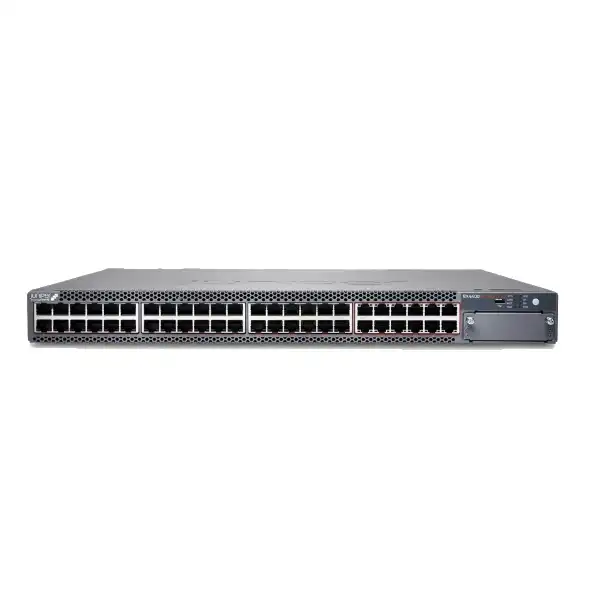
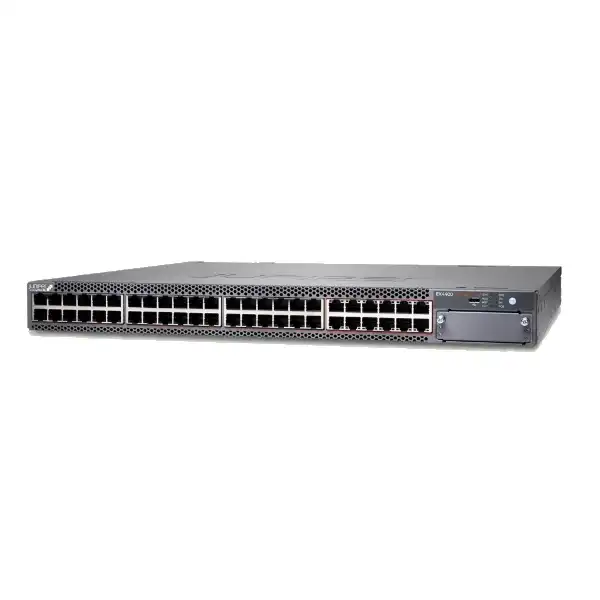
Juniper EX4400-48MXP Ethernet Switch
The Juniper EX4400-48MXP is a high-density 1U multigigabit PoE-bt access switch built for enterprise campuses, high-performance wireless access layers, smart buildings and branch environments that need more than conventional 1GbE edge connectivity. Its mix of 12 ports supporting up to 10GbE, 36 ports supporting up to 2.5GbE, two built-in 100GbE QSFP28 interfaces and a high PoE power ceiling makes it especially relevant where next-generation access points and powered edge devices are increasing both bandwidth and power requirements.
Direct answer: what is the EX4400-48MXP and who is it for?
What it is: the EX4400-48MXP is a fixed 1U Juniper enterprise Ethernet access switch with 48 multigigabit PoE-bt copper ports, two built-in 100GbE QSFP28 ports, redundant power-supply capability, redundant fans and an extension-module slot.
Main use: it is primarily used to connect and power high-density enterprise edge devices such as wireless access points, IP phones, cameras, IoT endpoints, smart-building equipment, workstations and other Ethernet-connected systems while providing a path beyond 1GbE at the access layer.
Who should consider it: organisations refreshing campus or branch switching, especially where Wi-Fi 6E or Wi-Fi 7, high-power PoE devices, 2.5/5/10GbE endpoints, Junos operations, Mist Wired Assurance or Virtual Chassis are part of the network strategy.
Most important factor to confirm: port-speed mix and PoE budget. FourTeck can help determine whether the 12 higher-speed 10GbE-capable access ports, the remaining 2.5GbE-capable ports, PSU arrangement, uplink choice, licenses, optics and support package match the actual deployment.
Why this model stands out in the EX4400 family
The EX4400 family covers several access-switching profiles, including traditional 1GbE copper, fibre-focused variants and multigigabit models. The EX4400-48MXP occupies a specific position: it combines the 48-port multigigabit access layout associated with the EX4400-48MP class with a higher-rated power subsystem designed to support a substantially larger PoE budget. That distinction matters in real network design because a switch can have enough Ethernet ports but still be undersized for the number of high-power access points, cameras, displays, sensors or building systems attached to it.
Its 48 access ports are not all identical in maximum data rate. Twelve RJ-45 PoE-bt ports support 100Mbps, 1Gbps, 2.5Gbps, 5Gbps and 10Gbps operation, while thirty-six RJ-45 PoE-bt ports support 100Mbps, 1Gbps and 2.5Gbps. This asymmetric layout is deliberate and can be efficient when only a subset of endpoints truly needs 5GbE or 10GbE. It lets a network team place the highest-throughput wireless access points, local servers, specialist workstations or other demanding devices on the 12 faster interfaces while using the remaining ports for endpoints whose practical requirement is 2.5GbE or below.
The buyer therefore needs to map endpoint classes to physical ports rather than treating the EX4400-48MXP as forty-eight identical 10GbE copper ports. When a design genuinely needs more than twelve 5/10GbE copper edge interfaces in a single rack unit, a different access architecture or additional switches may be more appropriate. When most devices are 1GbE or 2.5GbE and a smaller group requires 5/10GbE, this port mix can be a strong fit.
Core EX4400-48MXP specifications
| Specification | EX4400-48MXP detail |
|---|---|
| Form factor | Fixed 1U enterprise access switch |
| Access port density | 48 RJ-45 PoE-bt access ports |
| Higher-speed copper ports | 12 × 100M/1G/2.5G/5G/10G PoE-bt ports |
| Additional multigigabit ports | 36 × 100M/1G/2.5G PoE-bt ports |
| Built-in QSFP28 interfaces | 2 × 100GbE QSFP28 ports, usable for Virtual Chassis by default and configurable for network/uplink use as supported |
| Packet switching capacity | 510Gbps unidirectional / 1020Gbps bidirectional |
| Layer 2/Layer 3 throughput | Up to 758 Mpps with 64-byte packets |
| PoE standard | PoE-bt across all 48 access ports, up to 90W per port subject to platform power-budget conditions |
| Maximum platform PoE budget | Up to 3600W with two supported 2000W power supplies under applicable high-voltage conditions |
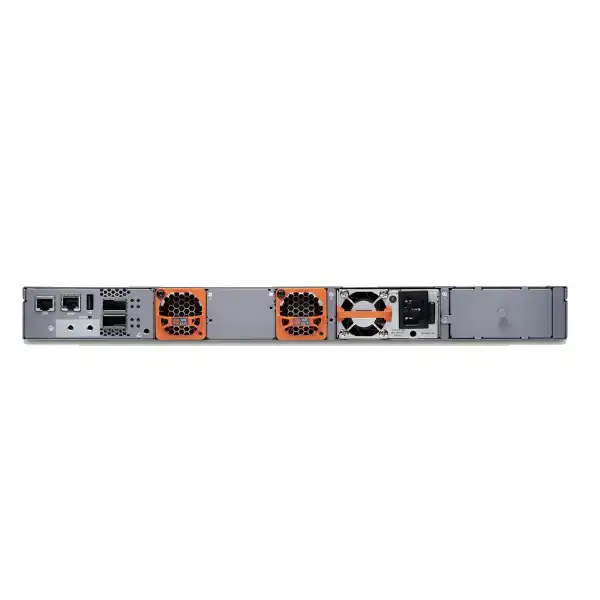
| Power supplies | Two PSU slots; standard EX4400-48MXP is documented with one 2000W AC power supply preinstalled |
| Cooling | Two fan modules, front-to-back airflow on the standard AC model |
| Expansion | Extension module slot supporting options including 1 × 100GbE QSFP28, 4 × 10GbE SFP+ or 4 × 25GbE SFP28 modules |
| Dimensions | Approximately 17.39in wide × 1.72in high × 15.71in deep before installed FRUs; depth increases with PSU, fans and extension module |
| Chassis weight | Approximately 7.35kg without power supply, fan module or extension module installed |
| Operating system and management | Junos OS, with support for Juniper Mist Wired Assurance and cloud-managed operations |
Specifications should be matched to the exact hardware SKU, Junos release, selected power supplies, extension modules, optics, licensing and site electrical conditions used in the final deployment.
Understanding the 48-port multigigabit layout
12 ports up to 10GbE
These interfaces support 100Mbps, 1Gbps, 2.5Gbps, 5Gbps and 10Gbps operation. They are valuable for the subset of edge devices that can exceed 2.5Gbps, including selected high-end wireless access points, local compute appliances and performance-sensitive endpoints. The number twelve is important: if more than twelve attached copper devices require 5GbE or 10GbE simultaneously, the design needs another switch, a different model mix or a revised connection plan.
36 ports up to 2.5GbE
The other thirty-six ports support 100Mbps, 1Gbps and 2.5Gbps. This is well aligned with many modern enterprise endpoints because 2.5GbE can reuse suitable structured copper cabling while giving Wi-Fi access points and capable user devices more headroom than 1GbE. Network planners should still validate the cabling category, distance, patching quality, endpoint negotiation and actual throughput expectations.
All 48 ports support PoE-bt
Every copper access port is designed for PoE-bt, with a maximum value of 90W per port where power conditions allow. That does not mean forty-eight ports can each draw 90W at the same time, because the total platform budget is finite. At the documented 3600W maximum with dual PSUs and suitable high-voltage input, the average available power across forty-eight simultaneously loaded ports is 75W.
PoE planning is the central purchasing decision
The EX4400-48MXP is frequently attractive because of its high PoE ceiling, but the correct way to size it is to create a realistic power inventory rather than assume that the headline maximum will automatically be available. Start with every powered device expected on the switch: access points, cameras, video phones, door controllers, displays, lighting gateways, environmental sensors, building controllers and any other powered endpoint. Record each device’s worst-case or design power requirement, not only its typical idle draw. Then add reasonable headroom for future replacements and higher-power devices.
With one 2000W AC power supply at 220V, Juniper documents a PoE budget of 1650W. With two supported 2000W AC power supplies at 220V, the documented budget rises to 3600W. At 110V, the available PoE budget is much lower, which is why the electrical environment is not a minor installation detail. For deployments in Dubai and the wider UAE, the final design should still confirm the actual supply voltage, PDU rating, plug and power-cord requirements, circuit capacity and redundancy strategy rather than relying only on the nominal regional standard.
The extra PSU can serve two purposes: it can raise the PoE budget and it can provide power redundancy. Those goals are related but not identical. If the connected load depends on nearly the full combined capacity of two PSUs, loss of one PSU may force power prioritisation or leave insufficient power for every endpoint. For a truly resilient design, calculate what must remain powered after a PSU failure. Critical devices can then be assigned priority, or the deployment can be sized so the surviving PSU supports the required essential load.
A quotation should therefore state not just “dual PSU” but the exact PSU count, input power assumptions, intended redundancy policy and estimated PoE load. This avoids buying a high-capacity switch while under-specifying the power architecture that makes its high PoE capability useful.
Built for Wi-Fi 6E, Wi-Fi 7 and high-performance wireless edges
Wireless refresh projects are a strong use case for the EX4400-48MXP because modern enterprise access points can require both multigigabit Ethernet and more power than older PoE generations comfortably provided. A Wi-Fi deployment can become bottlenecked when new access points are connected to a legacy switch that has only 1GbE ports or a limited PoE budget. The EX4400-48MXP addresses both sides of that problem by combining 2.5/5/10GbE-capable copper interfaces with PoE-bt.
The important design task is to match the access point model to the correct switch port. Some APs will be fully served by 2.5GbE, while others may justify 5GbE or 10GbE based on radio capabilities, client density, uplink architecture and expected traffic. Because only twelve ports on the EX4400-48MXP go beyond 2.5GbE, a dense floor with many high-end APs should be mapped carefully. It may still be the right switch if only selected APs require higher than 2.5GbE, but it should not be selected simply because the product name includes “multigigabit.”
Power is equally important. High-end APs may enable or disable radios and features depending on available PoE class. A switch-level budget must therefore be checked against the AP datasheet and deployment profile. Where redundancy is required, consider the PoE budget during a PSU failure, not only during normal two-PSU operation. The goal is to preserve required wireless service during faults rather than achieve the largest possible headline number in normal conditions.
For organisations using Juniper Mist, the EX4400 platform also fits a cloud-managed wired and wireless operational model. This can reduce the separation between switch troubleshooting and user-experience analysis, but the operational benefit depends on the selected licenses, onboarding method, cloud policy and how the existing network team intends to monitor and automate the environment.
100GbE interfaces, Virtual Chassis and uplink design
Two QSFP28 ports are built into the EX4400-48MXP. On EX4400 models in this design family, these ports are configured as Virtual Chassis ports by default. Each QSFP28 port can operate as two logical 50Gbps Virtual Chassis interfaces, creating a 400Gbps Virtual Chassis interconnect when the supported architecture is used. Up to ten EX4400 switches can participate in a Virtual Chassis, allowing multiple physical switches to be managed as one logical device.
Virtual Chassis can simplify operations in access stacks by reducing the number of independently managed devices and enabling a coordinated switching system. It does not eliminate the need for topology design. The cable type, physical switch order, redundancy path, mastership design, software compatibility, maintenance process and failure domains still matter. Buyers should include the required DACs or optics in the bill of materials because Virtual Chassis cabling is not something to assume is bundled with the base switch.
The QSFP28 interfaces can also be configured for network or uplink use rather than their default VCP role. This can be important when the switch needs high-speed aggregation connectivity. However, using ports for uplinks changes how Virtual Chassis is built, so the complete port role plan should be decided before ordering cables and optics. The extension-module slot adds further uplink flexibility with options that include one 100GbE QSFP28 interface, four 10GbE SFP+ interfaces or four 25GbE SFP28 interfaces.
A good access-layer design starts from the upstream architecture: required uplink bandwidth, number of physical links, link redundancy, transceiver reach, fibre type, connector type, aggregation switch interfaces and whether Virtual Chassis is part of the plan. Selecting the switch first and the optics later can produce avoidable compatibility and capacity issues.
Extension-module choices and what they change
EX4400-EM-1C
Provides one additional 100GbE QSFP28 interface. It can be relevant when the design needs another high-speed uplink or a different distribution of QSFP28 connectivity beyond the built-in pair. The actual optic or cable must be selected separately for the intended distance and upstream platform.
EX4400-EM-4S
Provides four 10GbE SFP+ interfaces. This can fit environments where the aggregation layer still uses 10GbE optics or where multiple 10GbE fibre links are required. It may also simplify migration from an existing 10GbE uplink design.
EX4400-EM-4Y
Provides four 25GbE SFP28 interfaces. It is useful when the distribution or core design uses 25GbE and when several medium-speed uplinks are preferable to a single 100GbE link. Confirm optic support and upstream port compatibility as part of the same bill of materials.
The extension slot should be treated as part of the initial architecture even if the module is not purchased on day one. Future use may affect rack cabling, fibre termination, upstream switch selection and growth planning. If an extension module will be added later, reserve the intended fibre paths and validate that the desired module remains supported by the target Junos release and network design.
Junos OS operations and management choices
The EX4400-48MXP runs Junos OS, giving network teams a familiar operational model if they already manage Juniper routing or switching platforms. Configuration can be performed through the Junos CLI, and supported releases also provide J-Web capability. For organisations adopting cloud-managed campus networking, the switch supports Juniper Mist Wired Assurance, which adds a cloud-based operational layer for deployment, monitoring, service-level visibility and troubleshooting workflows.
The management choice should be made deliberately. A team that relies on established CLI automation may value the consistency of Junos configuration and operational commands. A distributed organisation with many branches may prefer cloud onboarding and centralised assurance. Some environments use both approaches, keeping standard Junos skills while using Mist for visibility and experience-led operations. The right method depends on licensing, operational policy, internet reachability, security controls and staff processes.
Before deployment, define the management network, switch hostname convention, out-of-band management IP, default gateway, DNS, authentication method, AAA integration, NTP, logging destinations, SNMP or telemetry strategy, configuration backup process and software-upgrade policy. Initial configuration is only a small portion of lifecycle operations. A switch becomes easier to support when these foundations are standardised across every access closet.
For Mist-managed deployments, onboarding also requires planning claim codes, organisation and site hierarchy, template strategy, switch assignment, firmware policy and the relationship between cloud configuration and any local Junos configuration. That operational design should be agreed before a large rollout so that installation teams are not making one-off decisions at each location.
Layer 2, Layer 3 and campus-fabric role
The EX4400 platform is not limited to simple unmanaged edge connectivity. It provides a full enterprise switching feature set and is positioned for Layer 2 and Layer 3 access roles. The published platform specifications include support for 4093 VLANs, up to 112,000 MAC addresses, jumbo frames up to 9216 bytes, 80,000 IPv4 unicast/multicast routes and 40,000 IPv6 unicast/multicast routes. Those scale figures should be interpreted as platform capability rather than a recommendation to use the access layer as the primary routing core.
In conventional campus designs, the switch can operate as an access layer connecting users and devices into VLANs with uplinks toward distribution or core switches. In more modern designs, the EX4400 supports campus-fabric functions including EVPN-VXLAN. This can help create consistent segmentation and scalable fabric architectures, but fabric adoption introduces design considerations beyond individual switch features: route reflectors, underlay addressing, overlay policy, endpoint mobility, gateway location, authentication, automation and operational ownership.
A fabric capability should not be purchased merely because it sounds future-proof. If the organisation plans a traditional VLAN-based design for the foreseeable future, the EX4400 can still be appropriate based on port, PoE, resiliency and management requirements. If EVPN-VXLAN is a strategic requirement, then switching hardware, licensing, Mist or other control-plane tools, upstream devices and the migration path should be evaluated as a unified architecture.
FourTeck can help translate these feature sets into a practical topology by identifying which functions are required on day one, which may be enabled later and which dependencies must be included in the quotation or implementation scope.
Traffic visibility and operational telemetry
The switch supports traffic-monitoring mechanisms including sFlow, IPFIX and flow-based telemetry. These capabilities matter when network teams need to understand not just whether an interface is up, but what traffic is traversing it, where congestion originates and whether usage patterns have changed. Access-layer visibility is increasingly important because user experience problems can come from many sources: an overloaded uplink, misconfigured endpoint, high broadcast activity, policy mismatch, wireless backhaul saturation or unexpected application traffic.
Telemetry is most useful when it feeds an operational system with a clear retention and alerting strategy. Enabling every possible export without a plan can create more data than the monitoring stack can meaningfully use. Decide which collectors will receive flow data, which interface groups need detailed visibility, how much sampling is appropriate and which events should generate actionable alarms. Integrating switch visibility with a broader observability platform can shorten troubleshooting, but it also requires storage, security and operational ownership.
For Mist environments, wired assurance can complement traditional telemetry by presenting service-level and experience-oriented information. The practical benefit depends on the number of sites, standardisation of switch configurations, licensing and whether operations teams use the resulting insights in their incident process. Buyers should therefore evaluate management features together with the operational model, not as isolated check-box capabilities.
Resilience: redundant PSUs, fans and logical design
The EX4400-48MXP chassis has two power-supply slots and redundant variable-speed fans. The standard AC model is documented with one 2000W AC power supply and two front-to-back fan modules preinstalled. A second supported power supply can be added for greater PoE capacity and redundancy. Hardware redundancy is valuable, but it only protects the service if the surrounding design is equally resilient.
For power resilience, connect redundant PSUs to appropriate independent circuits or PDUs where the facility supports that architecture. If both PSUs feed from the same failed upstream source, the chassis still loses power. For high-PoE deployments, calculate the power available after one PSU fails and prioritise endpoints accordingly. A redundant power supply that cannot sustain critical access points or cameras under fault conditions may provide less resilience than expected.
For network resilience, consider dual uplinks, link aggregation, upstream switch diversity, Virtual Chassis topology and failure-domain boundaries. A single high-speed uplink can provide substantial bandwidth but still represents a physical path risk. Two correctly designed links may be preferable where service continuity is more important than maximum single-link utilisation.
Cooling also has a direction. The standard EX4400-48MXP uses front-to-back airflow, identified by Juniper as airflow-out modules. Rack placement should align with the room’s hot-aisle/cold-aisle strategy. Mixing incompatible airflow patterns in the same rack can undermine thermal management even when the switch itself has redundant fans.
Physical installation and rack planning
The chassis is approximately 1.72 inches high, which fits a standard 1U rack position. Its width is about 17.39 inches before rack-mounting brackets, and the bracket edges extend to a standard 19-inch rack width. Chassis depth is roughly 15.71 inches without field-replaceable units installed, increasing to about 16.93 inches with power supply and fan module and about 17.35 inches when an extension module is also installed. Those measurements need to be considered together with power-cord bend radius, fibre or DAC bend radius and service clearance behind the rack.
The bare chassis weight is approximately 7.35kg without PSU, fans or extension module. Installed weight will be higher once the standard power supply, fan modules, second PSU and uplink module are included. Rack rails, shelf capacity and installer handling procedures should suit the final configuration. The switch also requires protective earthing and an appropriate ESD-aware installation process.
Cable management is especially important on a 48-port multigigabit PoE switch. Forty-eight copper patch leads plus fibre, DACs, console and power can create a dense front and rear rack environment. Use patch panels and horizontal or vertical cable managers that preserve airflow and port visibility. Label both ends of each cable and document the access-point or endpoint assignment, especially the twelve 5/10GbE-capable ports, so that future moves do not accidentally place a high-throughput device on a lower-speed interface.
Installation should also account for UPS capacity, PDU outlet type, circuit load and the higher electrical demand of a switch configured for a 3600W PoE budget. The rack power design is part of the network design in high-power access deployments.
Cabling considerations for 2.5GbE, 5GbE and 10GbE copper
Multigigabit Ethernet is attractive because it can increase access speed without automatically requiring fibre to every endpoint, but the existing copper plant still needs inspection. Actual achievable speed depends on cable category, distance, installation quality, patch-panel condition, patch-cord quality, electromagnetic environment and endpoint capability. A switch port supporting 10GbE does not guarantee that an older or poorly terminated horizontal link will reliably run at 10GbE.
For a refresh project, audit the structured cabling before finalising port-speed assumptions. Identify which outlets serve new high-end access points, which cable category is installed, how long each channel is and whether test records are available. If cabling does not support the desired rate, the switch may negotiate a lower speed. This may be acceptable for some endpoints, but it should be a planned result rather than a surprise after installation.
PoE also interacts with cabling because higher powered endpoints draw more current through the copper pairs. Cable bundles, ambient temperature and connector quality can affect thermal performance. High-power deployments should follow structured cabling and electrical guidance appropriate to the PoE class and environment. In dense ceiling spaces or hot service areas, this is particularly relevant.
If an organisation plans to deploy Wi-Fi 7 APs gradually, it can be useful to identify and certify the specific high-bandwidth cable runs first, then map those runs to the twelve ports that support 5GbE and 10GbE. That gives the migration a clear physical plan and avoids wasting the fastest ports on endpoints that cannot use them.
Licensing, subscriptions and support considerations
Hardware capability and software entitlement are separate procurement topics. The EX4400-48MXP can operate as a Junos-based switch, while cloud-managed and assurance workflows can involve Juniper Mist subscriptions or other software entitlements depending on the chosen operational model. A buyer should not assume that every cloud feature is included indefinitely with the base hardware simply because the switch is described as cloud ready.
The quotation should identify the required software subscription level, term length and number of devices covered. If the organisation already has a Juniper Mist estate, check whether existing subscriptions can be extended or whether new licenses must be purchased for the new switches. Where EVPN-VXLAN, advanced automation or integrations are part of the project, validate the exact license and platform dependencies for the intended design.
Support is also a lifecycle decision. Enterprise switches may remain in service for years, so choose a support level aligned with business criticality, replacement expectations and internal engineering capability. A branch with local spare switches may tolerate a different support response than a headquarters access layer serving thousands of users. Consider software entitlement, technical assistance, hardware replacement, escalation processes and whether local implementation support is required.
FourTeck can prepare a bill of materials that separates base hardware, second PSU, extension module, optics or DACs, licenses, support and implementation. This makes it easier to compare proposals and prevents required items from being hidden inside a single undifferentiated line.
Typical enterprise use cases
High-density wireless floors
Offices, hotels, education campuses and large venues refreshing to high-performance access points can use the multigigabit ports and PoE-bt to avoid the 1GbE access bottleneck. Port mapping is essential where more than twelve APs per switch may require above 2.5GbE.
Smart-building networks
PoE lighting gateways, cameras, IoT sensors, building controllers and other powered infrastructure can create a large aggregate power requirement. The EX4400-48MXP is relevant when the combination of endpoint count and power demand exceeds what a conventional PoE+ switch can comfortably deliver.
Branch or campus access refresh
Organisations replacing older 1GbE access switches can gain multigigabit headroom without moving every copper endpoint to 10GbE. The mixed-speed layout allows the fastest ports to be reserved for devices that benefit from them most.
Mist-managed enterprise edge
Businesses standardising on Juniper Mist can deploy EX4400 switches as part of a cloud-managed wired environment, using central policy and assurance workflows while retaining Junos capabilities for network engineering teams.
High-power camera and security edge
Surveillance deployments with PTZ cameras, heaters, IR illuminators or other high-power peripherals can benefit from PoE-bt. The network team should still calculate aggregate load and fault-state power requirements, especially if the switch is expected to maintain cameras during a PSU failure.
Converged edge services
A single switch may support user devices, phones, access points, cameras and IoT endpoints. The EX4400-48MXP can provide the port density and power required for convergence, provided segmentation, QoS, security policy and uplink capacity are designed for the combined traffic.
When the EX4400-48MXP may be more than you need
A technically capable switch is not automatically the most economical choice. If the environment has mostly 1GbE endpoints, low PoE demand and no near-term plan for high-end wireless, the EX4400-48MXP may provide capacity that remains unused. A lower-power or non-multigigabit EX4400 model may deliver the required Junos and management capabilities with a more appropriate hardware profile.
Similarly, if a site has only a modest number of multigigabit endpoints, a 24-port multigigabit model may fit better than a 48-port switch. The right decision depends on rack space, cable termination count, port growth, redundancy strategy and whether access switches are being standardised across multiple sites.
The EX4400-48MXP earns its place when there is a genuine combination of dense ports, multigigabit demand and significant PoE power. If one of those requirements is absent, compare nearby models rather than treating the highest specification as the default choice.
When a larger or different architecture should be evaluated
The model has twelve access ports capable of 5GbE and 10GbE. If a project expects twenty, thirty or forty high-end copper endpoints that each need more than 2.5GbE, the EX4400-48MXP will require careful distribution across multiple switches. A switch with a different port-speed profile or a fibre-based architecture may be a better fit. The correct comparison is not only ports per chassis but cost per usable high-speed port, uplink demand and cabling design.
Likewise, an access layer that needs more than the available 3600W platform PoE budget should not be forced into a single switch. Distributing powered devices across multiple switches can improve power redundancy and reduce the impact of a single chassis fault. In critical environments, the failure domain may matter more than absolute port density.
For data-centre use, the EX4400 platform can support top-of-rack scenarios, but dedicated data-centre switching platforms may be more appropriate when requirements include very high fibre density, larger buffering, specialised low-latency behaviour or data-centre-specific automation. The supplied product should be evaluated against the actual role rather than used outside its strongest design envelope.
EX4400-48MXP versus nearby EX4400 choices
| Model | Access profile | Best comparison reason |
|---|---|---|
| EX4400-48MXP | 12 ports up to 10GbE + 36 up to 2.5GbE, all PoE-bt, high PoE budget | Best fit when 48-port multigigabit density and very high aggregate PoE power are both required. |
| EX4400-48MP | Similar 12 + 36 multigigabit port mix with a lower power subsystem | Compare when bandwidth needs match the MXP but total PoE demand is lower. |
| EX4400-24MP | 24 multigigabit PoE ports, all capable of higher multigigabit rates | Compare for lower port density or when a larger proportion of ports need 5/10GbE. |
| EX4400-48P | 48 1GbE PoE access ports | Compare when 1GbE is sufficient and multigigabit access adds little business value. |
| EX4400-48XP | 48 1GbE PoE access ports with high PoE capability | Compare when very high PoE power is needed but endpoint data rates remain 1GbE. |
This comparison highlights why model selection should separate bandwidth from power. The EX4400-48MP can have a similar multigigabit port layout but lower total PoE capacity, while the EX4400-48XP can provide high PoE capacity without the same multigigabit access profile. The EX4400-48MXP is the intersection of those two requirements.
Migration from older access switches
A successful switch refresh is more than replacing hardware in the rack. Existing configurations usually contain VLAN assignments, voice VLAN behaviour, spanning-tree settings, LAGs, authentication policy, QoS, SNMP, syslog, ACLs, DHCP protection, multicast settings, PoE priorities, uplink parameters and site-specific exceptions. Before migrating, export and review the existing configuration rather than blindly translating every command. The refresh is a good opportunity to remove obsolete VLANs, standardise naming and correct years of accumulated one-off changes.
Create a port-by-port migration worksheet. For each old switch port, record the connected device, VLAN or authentication policy, PoE requirement, current speed, target EX4400-48MXP port and whether the endpoint requires 5GbE or 10GbE. This is especially important because the new switch has two access-port speed classes. A simple sequential cable move may not place high-bandwidth devices on the correct interfaces.
Uplink migration also deserves planning. Determine whether the existing distribution switch supports the desired 10GbE, 25GbE or 100GbE connectivity and which optics are compatible at both ends. If the project introduces Virtual Chassis, build and test the VC topology before production cutover where possible. Confirm Junos software versions and feature support across all members.
For PoE endpoints, measure or estimate current power use and compare it with the new design. Configure appropriate PoE priorities before moving critical devices. Access points or cameras should not lose service because a switch boots with an incomplete power plan. Where the network is business critical, stage cutovers by closet or floor, keep rollback capability and validate user, voice, wireless, security and management services before proceeding to the next group.
A migration service can include configuration preparation, pre-staging, software validation, rack installation, patching, cutover, testing and documentation. The scope should identify what is included so that the project does not stop at delivery of the hardware.
Security and access-control planning
The access switch is a critical enforcement point because it is where users, phones, access points, cameras and IoT devices first enter the wired network. A new EX4400-48MXP deployment should therefore be integrated with the organisation’s identity and segmentation strategy. Depending on design, this may include 802.1X authentication, MAC-based access, dynamic VLAN assignment, role-based policy, ACLs, DHCP snooping, IP source protection and other Junos security capabilities.
Security features must be tested against real endpoints. Printers, building controllers and legacy IoT devices may not behave like managed user laptops. If network access control is introduced at the same time as the switch refresh, create exception workflows and device onboarding procedures before the migration window. Otherwise the hardware can be functioning correctly while business devices remain blocked by policy.
Management-plane security also matters. Use secure authentication, role-based administrator permissions, central AAA where appropriate, encrypted management protocols, logging and a documented update process. Cloud-managed deployments should additionally define administrator roles, multi-factor authentication policy, organisation ownership and access review. The switch should become part of the security operating model, not only the forwarding infrastructure.
QoS for voice, video and wireless traffic
The published EX4400 specifications provide twelve QoS queues per port, with eight unicast and four multicast queues. This gives the platform mechanisms to differentiate traffic, but good QoS depends on policy. The network must identify which traffic should receive priority, where classification occurs, which markings are trusted and how queues are scheduled under congestion.
Voice traffic is a common starting point, but modern access networks may also carry video collaboration, building-control traffic, telemetry, guest wireless and high-volume cloud applications. Excessive prioritisation can defeat the purpose of QoS by placing too much traffic into preferred queues. Build the policy around real service requirements and end-to-end marking behaviour from endpoint through access, distribution, WAN and internet edge where applicable.
The switch’s high uplink capacity reduces but does not eliminate the possibility of congestion. Forty-eight multigigabit access ports can collectively offer far more edge bandwidth than a small number of uplinks. QoS and capacity planning therefore remain relevant even when individual interfaces are fast.
Performance numbers: how to interpret them
Juniper specifies the EX4400-48MXP at 510Gbps unidirectional and 1020Gbps bidirectional packet switching capacity, with Layer 2/Layer 3 throughput up to 758 million packets per second using 64-byte packets. These are platform maximum figures that show the switch is engineered for a high-performance access role. They should not be translated directly into application throughput expectations for every endpoint.
Real traffic includes protocol overhead, mixed packet sizes, endpoint limitations, cabling conditions, uplink oversubscription and application behaviour. An access point connected at 10GbE will not necessarily deliver 10Gbps to a single user, and a 100GbE uplink does not guarantee 100Gbps end-to-end through upstream firewalls or WAN services. Capacity planning should consider the entire path.
Performance figures are most useful for comparing the switching platform’s forwarding envelope and ensuring that the access switch is not the obvious bottleneck. The rest of the design must still provide enough uplink bandwidth and upstream processing for the traffic expected during busy periods.
What is normally included and what often needs to be ordered
Juniper documents the standard EX4400-48MXP as shipping with two front-to-back fan modules and one 2000W AC power supply. The switch also includes covers for the unused extension-module and second power-supply slots. This base configuration should not be confused with a fully redundant high-PoE deployment. A second power supply is required to reach the documented dual-PSU PoE budget and to provide PSU redundancy.
Virtual Chassis DACs, optical transceivers and the optional extension module are design-dependent and should be specified separately. If the switch will uplink over fibre, the quotation needs the correct transceiver type for speed, fibre medium, wavelength and distance, together with suitable patch leads. If QSFP28 ports are used for Virtual Chassis, specify compatible cabling for the physical stack topology.
Rack accessories, patch cords, console cabling, PDUs and UPS capacity may also be outside the base hardware SKU. For a deployment service, include rack location, cable-management requirements, labeling, configuration, testing and documentation. A complete bill of materials reduces installation-day surprises.
The spare or “-S” variant differs from the standard AC model in shipped components and power-supply expectations, so procurement teams should verify the exact part number rather than abbreviate every request to “EX4400-48MXP.” The suffix can materially change what arrives in the box.
UAE power and procurement note
Juniper’s current EX4400 documentation notes that high-PoE EX4400-48MXP systems are associated with 250V power cords by default and that the maximum 3600W PoE budget depends on dual 2000W power supplies with high-voltage input. For a Dubai or UAE deployment, the procurement team should confirm the exact cord, plug, PDU socket, branch-circuit rating and electrical plan before delivery. “UAE power” is not enough detail for a high-power rack installation.
If a second PSU is being added, decide whether it will connect to the same PDU or a separate power path. Where UPS protection is required, calculate worst-case load rather than typical switch consumption without PoE. The switch itself may consume a modest amount compared with the aggregate powered-device load, so a UPS sized from a legacy switch can be insufficient after a Wi-Fi or camera refresh.
Lead times can vary by hardware SKU, PSU, optics, subscription and support package. An accurate UAE quotation should therefore list each item explicitly and identify any component whose availability affects the deployment date.
Planning for growth without overbuying
Growth planning should focus on the resources that are likely to become constrained: high-speed copper ports, total port count, PoE budget and uplink bandwidth. Buying forty-eight ports for a current requirement of twenty may be sensible if the rack will serve a growing floor. Buying a 3600W PoE design for endpoints that collectively draw only a few hundred watts may be unnecessary unless future wireless or smart-building projects are already planned.
Reserve the twelve 5/10GbE-capable interfaces for endpoints with a realistic need for those speeds. It can be useful to keep one or two unassigned for future high-performance devices. Likewise, reserve some PoE headroom so a new AP or camera model does not require immediate power-system changes. A common planning approach is to design for expected three-to-five-year endpoint growth while avoiding capacity that has no credible use case.
Uplink growth should be considered at the same time. If the access layer is expected to move from a 10GbE uplink today to 25GbE or 100GbE later, the extension-module and built-in QSFP28 options provide a migration path. The upstream switch and fibre plant must support that future rate too, or the access switch’s capability alone will not deliver the upgrade.
A practical sizing method for the EX4400-48MXP
- Count physical endpoints. Record every device that will connect to the switch now and during the expected planning period. Separate user devices, APs, cameras, phones and IoT systems so their requirements can be handled differently.
- Classify data-rate needs. Identify which endpoints need only 1GbE, which can benefit from 2.5GbE and which genuinely require 5GbE or 10GbE. Ensure the last category fits within the twelve higher-speed ports per switch.
- Calculate PoE load. Use the design or maximum power requirement for each powered device. Add headroom and determine the normal and single-PSU-failure requirement.
- Choose uplink bandwidth. Estimate realistic aggregate traffic and decide whether 10GbE, 25GbE or 100GbE connectivity is appropriate. Include redundancy and upstream port availability.
- Decide on Virtual Chassis. If multiple EX4400 switches will operate as one logical system, plan member count, topology, cabling and software compatibility.
- Select management and licenses. Decide whether Junos CLI, J-Web, Mist Wired Assurance or a combined workflow will be used. Include subscription term and support requirements.
- Validate rack and power. Confirm rack depth, airflow, PDU type, circuit capacity, UPS capacity, grounding and cable-management space.
- Build the complete BOM. Include switch, second PSU if required, extension module, DACs, optics, fibre leads, licenses, support and implementation services. A complete BOM is easier to approve and deploy than a base-switch-only quote.
Deployment sequence for a controlled rollout
Operational checks after installation
After cutover, verify more than link lights. Confirm that each endpoint negotiated at the expected data rate and that the switch is delivering the intended PoE class. A new access point connected at 1GbE instead of 2.5/5/10GbE may point to cabling, configuration or endpoint negotiation issues. Likewise, an AP running in a reduced-power mode may indicate insufficient PoE even though the port appears operational.
Review uplink utilisation during peak business hours and check for errors, discards or unexpected traffic concentration. Validate that redundant links or Virtual Chassis paths behave correctly when a component is intentionally taken out of service. For dual-PSU designs, confirm that the switch remains stable and that critical PoE devices continue to operate if one power supply is removed or its upstream feed is interrupted under a controlled maintenance procedure.
Management systems should receive logs, metrics and alerts as designed. If Mist Wired Assurance is used, verify that the switch is correctly assigned to the expected site and that configuration, firmware policy and assurance data are visible. Confirm administrator access and backup methods before closing the project.
Finally, retain a baseline of normal port utilisation, PoE consumption and uplink traffic. Future troubleshooting is easier when engineers can compare an incident against the known healthy state established after installation.
Common procurement mistakes to avoid
Assuming all 48 ports are 10GbE
Only twelve access ports support 5GbE and 10GbE. The other thirty-six top out at 2.5GbE. Port mapping must reflect this difference.
Quoting 3600W without dual-PSU design
The maximum PoE budget depends on supported dual power supplies and high-voltage input conditions. One PSU provides a lower documented budget.
Forgetting optics or VC cables
High-speed interfaces require compatible optics, fibre or DACs. These should be selected according to the actual topology, distance and upstream switch.
Ignoring licensing and support
Cloud management, assurance and support terms need to be included in the commercial comparison rather than treated as an afterthought.
Skipping the cabling audit
Multigigabit performance depends on the installed copper channel. Old or marginal cabling may negotiate below the intended rate.
Sizing only for normal operation
Resilient designs should calculate uplink and PoE capacity after a PSU, link or stack component fails, not only when everything is healthy.
Buyer questions and clear answers
Does the EX4400-48MXP provide 10GbE on every copper port?
No. Twelve ports support up to 10GbE, while thirty-six support up to 2.5GbE. This is one of the most important details to confirm against your endpoint map.
Can every port deliver 90W?
Each access port supports PoE-bt up to 90W, but the chassis has a total PoE budget. With dual PSUs at the supported high-voltage condition, the documented maximum is 3600W, which averages 75W across 48 fully loaded ports.
Does the switch include two power supplies?
The standard AC EX4400-48MXP is documented with one 2000W AC power supply preinstalled and a second PSU slot available. A second PSU should be quoted when higher PoE capacity or redundancy is required.
Can it be managed in Juniper Mist?
Yes. The EX4400 platform supports Juniper Mist Wired Assurance and cloud-managed operations. The required subscription and operating model should be confirmed for the deployment.
Can the 100GbE QSFP28 ports be uplinks?
Yes, they can be configured for network or uplink use. On this EX4400 family they are configured as Virtual Chassis ports by default, so the intended role should be planned before deployment.
How many switches can form a Virtual Chassis?
Juniper documents support for up to ten EX4400 switches in a Virtual Chassis. Topology, compatible software, cabling and failure design still need to be planned.
Is this a good Wi-Fi 7 access switch?
It can be a strong choice where the selected APs require multigigabit Ethernet and high PoE. Confirm each AP’s data-rate and power requirements, because the switch has twelve ports above 2.5GbE.
What should be quoted with the switch?
Depending on the design: second PSU, extension module, optics or DACs, power cords, licenses, support, rack accessories and installation or migration services. The exact list depends on topology and site conditions.
How FourTeck can support a Dubai deployment
FourTeck can help move the discussion from a product code to a complete deployment specification. For a Juniper EX4400-48MXP project, that means reviewing the number and type of connected endpoints, identifying how many need 5GbE or 10GbE, calculating PoE requirements, selecting the correct PSU arrangement, determining uplink speeds and choosing compatible optics or DACs. This reduces the chance of receiving a switch that is technically correct but incomplete for the installation.
For larger UAE rollouts, FourTeck can also help standardise bills of materials across sites while allowing site-specific differences in port count, power demand, fibre distance or rack conditions. Standardisation makes spare planning and operations easier, but it should not force every branch into the same hardware if requirements differ substantially.
Where implementation is required, the scope can include pre-staging, Junos configuration, Mist onboarding, rack installation, uplink integration, Virtual Chassis setup, migration from existing switches, validation and documentation. Final commercial availability, lead time and support options should be confirmed against the exact requested configuration.
Recommended information for an accurate quotation
A precise quote can usually be prepared faster when the technical requirements are supplied with the product request. The following details are especially useful for the EX4400-48MXP because they directly affect PSU count, uplink modules, optics and licenses.
Decision recap: is the EX4400-48MXP the right switch?
What FourTeck needs from you
To prepare a technically complete Juniper EX4400-48MXP quotation for Dubai or another UAE location, send as much of the following information as available. Exact answers are not required for every item; they simply help narrow the bill of materials and avoid unnecessary components.
Build the right EX4400-48MXP configuration for your UAE network
The Juniper EX4400-48MXP is most valuable when its multigigabit port mix, PoE budget, PSU redundancy, uplinks, optics, licenses and management model are matched to a defined network design. FourTeck can help you turn endpoint counts and site requirements into a complete bill of materials and deployment plan rather than a base-switch-only purchase.

Reviews
There are no reviews yet.