
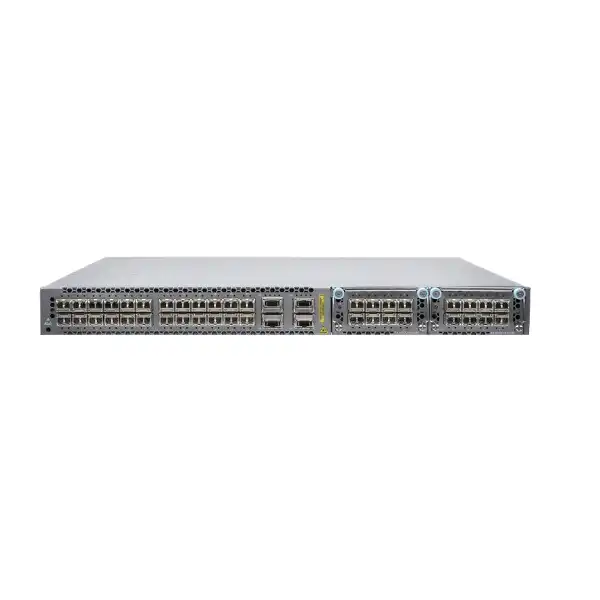
Juniper EX4600 Ethernet Switch Dubai
A high-density 1U 10GbE and 40GbE platform for campus distribution, compact core, aggregation and selected data-centre roles where proven Junos operations, resilient switching and flexible optical connectivity matter more than native 25GbE or 100GbE access.
Direct answer: what the EX4600 is and when it makes sense
The Juniper EX4600 is a fixed 1U Ethernet switch built around a 10GbE and 40GbE port architecture. The standard chassis has 24 SFP+/SFP ports and four QSFP+ ports, plus two expansion bays that can increase 10GbE or 40GbE density. It is primarily used as a campus distribution switch, a small campus core, an aggregation platform, or a top-of-rack or distribution switch in smaller data-centre environments.
Organizations should consider it when their design is centered on fibre or DAC-based 1GbE/10GbE access and 40GbE uplinks, when Junos operational consistency is important, or when Virtual Chassis and advanced Layer 2/Layer 3 features are useful. The most important factor to confirm is not simply “EX4600” but the exact hardware configuration: AC or DC power, airflow direction, expansion modules, transceivers, breakout requirements, Junos feature support and the role the switch must perform in the topology.
FourTeck can help determine whether the EX4600 still fits the required port speeds and growth plan, which chassis variant and accessories are needed, whether an alternative Juniper platform should be compared, and what installation or migration work should be included in a Dubai or UAE quotation.
EX4600 at a glance
Base interfaces
Twenty-four SFP+/SFP ports provide 1GbE or 10GbE optical and DAC connectivity, while four fixed QSFP+ ports provide 40GbE or can be channelized into multiple 10GbE links with suitable breakout cabling.
Expansion model
Two front-panel expansion bays accept an eight-port 10GbE SFP+ module or a four-port 40GbE QSFP+ module, allowing the design to trade higher 10GbE density against more 40GbE capacity.
Performance envelope
Juniper specifies 720 Gbps unidirectional switching capacity, 1.44 Tbps bidirectional capacity and up to 1,071 Mpps Layer 2/Layer 3 throughput with 64-byte packets.
Resiliency
Redundant power supplies are available in standard bundled variants, the chassis uses redundant fan modules, and the platform can participate in Virtual Chassis designs of up to ten EX4600 members.
Management
The switch runs Junos OS, supports console and out-of-band management connectivity, and can be onboarded to Juniper Mist for cloud-managed wired operations where the selected software and service entitlement support the intended workflow.
Best-fit buyer
The platform is most relevant when a network is already standardized on 10GbE server, distribution or uplink connectivity and needs dense fibre interfaces, rather than when the new design is primarily based on native 25GbE, multigigabit copper or 100GbE access.
Technical specifications buyers should verify
The figures below describe the EX4600 platform at a practical purchasing level. Exact feature availability can depend on the specific Junos release, configuration mode, optics and deployed topology, so a quotation should be built from the network requirement rather than from a specification table alone.
| Specification | EX4600 detail |
|---|---|
| Form factor | 1U fixed switch with modular expansion bays |
| Fixed access/uplink ports | 24 SFP+/SFP 1/10GbE ports and 4 QSFP+ 40GbE ports |
| Expansion bays | 2; supported options include EX4600-EM-8F for eight additional 10GbE SFP+ ports or QFX-EM-4Q for four additional 40GbE QSFP+ ports per module |
| Maximum stated interface density | Up to 72 wire-speed 10GbE interfaces when QSFP+ capacity is used with 4x10GbE breakout; up to 12 wire-speed 40GbE QSFP+ ports with suitable expansion modules |
| Switching capacity | 720 Gbps unidirectional / 1.44 Tbps bidirectional |
| Maximum throughput | 1,071 Mpps with 64-byte packets |
| MAC addresses | Up to 288,000 |
| VLANs | Up to 4,096 |
| ARP entries | Up to 48,000 |
| IPv4 routes | Up to 128,000 unicast and 104,000 multicast entries |
| IPv6 routes | Up to 64,000 unicast and 52,000 multicast entries |
| Jumbo frame size | Up to 9,216 bytes |
| QoS queues | 8 queues per port |
| Traffic monitoring | sFlow |
| Dimensions | Approximately 4.37 x 44.09 x 52.02 cm (H x W x D) |
| Weight | Approximately 9.84 kg with power supplies and fans installed |
Why the port architecture matters more than the headline model name
The EX4600 was designed around an optical 10GbE and 40GbE era, and that architecture is still the most important fact to understand when deciding whether it belongs in a new or existing UAE network. The 24 fixed SFP+/SFP interfaces can accept supported 1GbE or 10GbE transceivers and direct-attach copper cables. This gives the switch considerable flexibility for aggregation: a floor or building distribution layer can terminate fibre uplinks from access switches, while a compact data-centre rack can use 10GbE DAC links to servers or appliances where supported distances and connector types are appropriate.
The four fixed QSFP+ interfaces add another dimension. Each can operate as a single 40GbE interface, but the platform also supports using a QSFP+ interface as four independent 10GbE links with suitable breakout cabling. This is why maximum 10GbE density can be much higher than the count of physical SFP+ cages alone. For a buyer, the distinction is important because a logical port count does not automatically tell you how many independent optics, breakout assemblies, patch-panel positions or upstream ports will be required. A design that consumes QSFP+ ports for breakout also reduces the number of physical 40GbE uplinks available for other purposes.
The two expansion bays make the chassis adaptable. An EX4600-EM-8F adds eight 10GbE SFP+ ports, whereas a QFX-EM-4Q adds four 40GbE QSFP+ ports. The modules can be mixed, so a buyer can add one of each if that fits the intended topology. The switch is configured for the QFX-EM-4Q module by default. Juniper also documents that changing between the default 40GbE module type and the 8-port SFP+ module can cause interfaces to go down temporarily because the forwarding hardware is reconfigured. That is not a reason to avoid the expansion capability, but it is a practical maintenance consideration. Expansion changes should be treated as planned network work rather than as a casual live addition.
The physical connector mix also explains when the EX4600 is not the most natural choice. It does not provide a bank of RJ-45 multigigabit access ports for users, Wi-Fi access points or PoE endpoints. It is not primarily a 25GbE or 100GbE access platform. If the project requires dense 25GbE server connectivity, 100GbE leaf-spine uplinks, high-power PoE or newer multigigabit copper access, a current Juniper model designed for those speeds should be compared before committing to the EX4600. The EX4600 is strongest when its 1/10/40GbE architecture matches the installed network and migration plan.
Performance, forwarding scale and what the numbers mean in practice
Juniper specifies 720 Gbps of unidirectional switching capacity and 1.44 Tbps bidirectional capacity for the EX4600, with maximum Layer 2/Layer 3 throughput of 1,071 Mpps using 64-byte packets. Those figures indicate that the platform was engineered for wire-speed high-density switching within its supported interface mix. For an enterprise buyer, however, headline bandwidth is only one part of sizing. The forwarding table, routing design, traffic pattern, oversubscription model, uplink layout and resilience strategy all matter.
The platform supports a large MAC table of up to 288,000 entries, up to 4,096 VLANs and substantial IPv4 and IPv6 routing scale. That makes it suitable for roles that go beyond simple Layer 2 aggregation. A campus distribution layer may need routed access, OSPF or BGP toward the core, policy boundaries, multicast handling, VRFs or large endpoint tables. A small data-centre aggregation design may need many server-facing MAC addresses and multiple routing instances. The EX4600 has the table scale to support sophisticated designs, but the exact consumption of hardware resources depends on the feature combination and Junos implementation.
Jumbo frames up to 9,216 bytes can be useful in storage, virtualization and data-centre environments where the end-to-end path is configured consistently. Enabling a larger MTU on one switch does not automatically make the whole application path jumbo-capable; servers, virtual switches, firewalls, routers and intermediate links must agree on the effective MTU. The same principle applies to QoS. Eight queues per port provide a foundation for traffic prioritization, but a useful QoS design requires classification, marking, scheduling and congestion policies that reflect actual business applications.
sFlow support can provide sampled traffic visibility for capacity planning and anomaly investigation when integrated with a compatible collector. It should be considered part of an operational visibility plan rather than a substitute for full packet capture or application telemetry. In a well-run deployment, forwarding capacity, table scale, telemetry, logs and software health are reviewed together. That is particularly important in a distribution or core role where a problem affects many downstream users.
Campus distribution and compact-core deployment
Juniper positions the EX4600 strongly for campus distribution and small campus core roles. In this part of the network, the switch usually aggregates multiple access switches and carries traffic toward routers, firewalls, data-centre resources, WAN edges or another core layer. The 10GbE SFP+ interfaces are well suited to fibre uplinks from access stacks or wiring closets, while 40GbE QSFP+ links can provide higher-capacity interconnects toward a core or peer distribution device. The exact ratio of downstream 10GbE links to upstream 40GbE capacity should be calculated from real traffic and resilience requirements rather than from port count alone.
For example, a building distribution pair may receive ten or twenty 10GbE uplinks from access switches. If the downstream links are lightly utilized office access connections, a pair of 40GbE core uplinks may provide comfortable headroom. If those links aggregate high-volume engineering, video, storage or wireless traffic, the same uplink design may need additional capacity or a different platform. The useful question is not whether the chassis can physically connect the cables; it is whether the intended failure state still delivers acceptable bandwidth. When one uplink, one peer or one maintenance path is unavailable, the surviving links must carry the required traffic without persistent congestion.
The EX4600 can also simplify operations where the organization already uses Junos. Configuration structure, routing policies, interface naming conventions, monitoring workflows and troubleshooting methods can be standardized across the network. That operational consistency often has more long-term value than a single hardware feature. It reduces the number of different command-line environments engineers must learn and makes it easier to build repeatable templates, change-control processes and monitoring checks.
A campus project should also decide whether the distribution layer remains Layer 2 toward the access layer or uses routed access. That choice affects spanning-tree scope, failure domains, routing adjacency counts, convergence behavior, VLAN extension and operational complexity. The EX4600 supports both switching and routing roles, but the best topology depends on the existing architecture and staff experience. FourTeck can review the current VLAN, routing, uplink and redundancy design before specifying how the EX4600 should be introduced.
Data-centre top-of-rack and aggregation considerations
The EX4600 can serve in top-of-rack and aggregation roles in smaller or lower-density data centres, particularly where servers, security appliances or storage devices still use 10GbE SFP+ or DAC connectivity. A 1U form factor and front-to-back or back-to-front airflow options make it practical for hot-aisle/cold-aisle environments when the correct variant is selected. Direct-attach copper can be economical for short in-rack connections, while optical modules are preferable where distance, electrical isolation or structured fibre cabling is required.
The suitability question becomes more nuanced in a modern server environment. Many new servers and storage systems now use 25GbE as a common host speed, and leaf-spine fabrics frequently use 100GbE or higher uplinks. The EX4600’s native port mix is not optimized for that model. A buyer extending an established 10GbE environment may still find the platform operationally appropriate, but a greenfield data centre should compare the total cost and lifecycle value of a newer switch with native 25/100GbE capability. Using adapters, speed compromises or extensive breakout simply to preserve an older port architecture can create more complexity than it saves.
Where the EX4600 is used in a data-centre network, plan the failure domains carefully. Dual-homed servers or appliances can connect to separate switches using link aggregation or a supported multichassis design. East-west traffic should be mapped so that the inter-switch links and upstream routing remain efficient under both normal and degraded conditions. If EVPN-VXLAN is part of the design, the exact Junos release and feature matrix must be checked because not every conventional Layer 2 feature is supported in the same way inside an EVPN-VXLAN environment.
The data-centre role also increases the importance of maintenance planning. Expansion module changes, Junos upgrades, optical replacements and physical work should be designed around redundant paths. A switch that supports resilient protocols does not by itself make an application resilient; servers, hypervisors, firewalls and upstream routers must have independent connectivity and correct failover behavior.
Virtual Chassis, MC-LAG and high-availability design
EX4600 switches can form a non-mixed Virtual Chassis of up to ten EX4600 members. Juniper also supports mixed Virtual Chassis designs with selected EX4300 models, subject to Junos release and model restrictions. Virtual Chassis allows multiple physical switches to operate as a single logical system for management and control, which can simplify configuration and provide flexible port distribution across members. It is particularly useful in campus environments where multiple aggregation devices need a common operational model.
Virtual Chassis links are created by converting suitable SFP+ or QSFP+ interfaces into Virtual Chassis ports. Juniper recommends 40GbE interfaces for Virtual Chassis interconnects when possible. This introduces a direct capacity tradeoff: interfaces used for the chassis fabric are not simultaneously available as ordinary network uplinks. The physical topology should normally provide resilient inter-member paths, and cable routes should avoid common failure points where practical.
Mixed EX4300/EX4600 Virtual Chassis deployments require more careful version and model validation. Juniper documents support for up to ten total members, but the EX4300-48MP is excluded from the mixed combination with EX4600. Members also need compatible Junos software. An organization considering a mixed chassis because it already owns EX4300 hardware should review the exact installed models and software versions before purchasing additional equipment. A design based on assumptions such as “all EX4300 switches can mix with EX4600” can lead to an avoidable compatibility problem.
MC-LAG provides another option for multichassis link aggregation in applicable network designs. It can be attractive when two switches should remain separate control-plane systems while presenting redundant aggregated links to connected devices. However, architecture matters: Juniper’s EVPN-VXLAN guidance states that MC-LAG is not supported with VXLAN, and EVPN multihoming active-active is used instead in EVPN-VXLAN environments. That is a good example of why a feature list cannot be treated as a promise that every feature can be combined.
For high availability, decide first what failure must be survived: a link, a power supply, a fan, a switch, a software event, a rack, a power feed or a maintenance window. Then choose Virtual Chassis, separate routed peers, MC-LAG or EVPN multihoming according to that failure model. Resilience is an architectural outcome, not a checkbox on the product datasheet.
EVPN-VXLAN: powerful capability with design-specific constraints
Juniper documents EVPN over VXLAN support for the EX4600, enabling the switch to participate in overlay network designs where Ethernet VPN provides the control plane and VXLAN provides data-plane encapsulation. This can be useful for extending Layer 2 segments across an IP fabric, supporting distributed gateway designs, or building more scalable data-centre segmentation than traditional VLAN extension.
The important purchasing lesson is that EVPN-VXLAN support should be evaluated against the exact intended feature combination and Junos version. Platform-specific constraints exist. For example, Juniper documents that MC-LAG is not supported with VXLAN and identifies IGMP snooping limitations for EX4600 in EVPN-VXLAN environments. Other behaviors can also change across software releases. A buyer planning multicast applications, dual-homed endpoints or feature-rich overlays should therefore validate the configuration against the release documentation rather than assuming a generic EVPN design will behave identically on every Juniper switch.
If EVPN-VXLAN is a central requirement for a new deployment, include the overlay architecture, route reflector design, underlay routing, VTEP count, multicast behavior, redundancy model and operational tooling in the pre-sales discussion. The switch hardware is only one component of a fabric. The quality of the design depends on control-plane scale, addressing, routing policy, automation, change control and observability.
Junos OS and Mist management
The EX4600 runs Junos OS, giving network teams the configuration hierarchy, commit model, rollback mechanisms, routing policy framework and operational commands associated with the Juniper ecosystem. For organizations already using Juniper routers, firewalls or switches, a common operational language can simplify training and troubleshooting. Configuration can be managed through the CLI and integrated with automation workflows, while out-of-band management and console access remain important for recovery and initial deployment.
Juniper also positions the EX4600 for onboarding and management through the Mist cloud architecture. Mist Wired Assurance can provide cloud-based operational workflows, service-level insights and automation capabilities for supported switches. The practical value depends on the organization’s management model. A team that wants centralized cloud operations should confirm the required subscriptions, account structure, site design, onboarding method and supported Junos release. A team that operates entirely through local Junos processes may value the platform without using the same cloud workflow.
Before an upgrade or migration, establish the target Junos release based on the exact features in use, supported upgrade path and current security or maintenance recommendations. Do not select a software version only because it is numerically newer. In a Virtual Chassis, release compatibility across members is especially important. Test critical protocols, interface behavior, optics and management integrations before production change windows whenever the network role is business-critical.
Operational readiness should include configuration backup, console access, rollback planning, NTP, DNS, authentication, logging, SNMP or telemetry integration, sFlow if required, alerting and a defined ownership model for software lifecycle. A well-designed switch that is poorly monitored can still become a source of prolonged outages because engineers do not see deteriorating conditions early enough.
Optics, DACs, breakout cables and fibre planning
Transceivers and cables are a major part of an EX4600 bill of materials. The base chassis does not turn into a usable production topology until every link has a compatible physical medium. The 24 SFP+/SFP ports support supported 1GbE and 10GbE transceivers as well as SFP+ direct-attach copper. The QSFP+ ports support 40GbE transceivers, DACs and breakout options. Expansion modules and transceivers are separate ordering decisions, so buyers should avoid comparing chassis prices without comparing the complete optical configuration.
For fibre links, identify the required speed, fibre type, connector, wavelength and distance. Existing multimode fibre may support the target speed over one building span but not another. Single-mode optics may be appropriate for longer campus or inter-building runs. Patch panels, polarity and connector cleanliness also affect implementation quality. The correct optic is selected for the complete path, not only for the switch port.
DAC cables are useful for short equipment-to-equipment runs because they combine the electrical transceiver function with the cable assembly and can reduce cost and power compared with separate optics. They are less appropriate when the route must pass through structured cabling, patch panels or longer distances. Active DAC variants extend reach compared with passive copper, but the supported cable matrix should still be checked.
QSFP+ breakout is valuable when one physical 40GbE cage must provide four independent 10GbE connections. The logical topology must account for each breakout lane. Labelling becomes especially important because one physical cable assembly maps to multiple interfaces. During troubleshooting, engineers need to know which lane corresponds to which downstream device. Breakout also changes how port capacity is counted and may affect which interfaces remain available for 40GbE uplinks or Virtual Chassis links.
Use Juniper’s current Hardware Compatibility Tool when choosing transceivers and cables. This is particularly important with older installed optics or third-party modules because support can vary by part number, hardware revision and Junos release. FourTeck can build the quotation around port-by-port media requirements so the delivered package includes the correct optics, DACs, breakout cables and spares rather than leaving those choices until installation day.
Power, airflow and rack planning are mandatory selection items
The EX4600 family includes AC and DC power variants and both airflow directions. EX4600-40F-AFI and EX4600-40F-AFO are AC models, while EX4600-40F-DC-AFI and EX4600-40F-DC-AFO are DC models. AFI and AFO indicate opposite airflow directions. Choosing the wrong airflow can disrupt hot-aisle/cold-aisle design and create thermal stress even though the switch fits mechanically in the rack.
Juniper warns against mixing AC and DC power supplies, mixing power supplies with different airflow labels, mixing fan modules with opposite airflow, or combining fan and power-supply airflow directions that do not match. This means replacement spares must be selected with the same discipline as the original switch. A generic “EX4600 power supply” description is not sufficient for an operational spare list.
Standard bundled variants include redundant power supplies and redundant fans. Redundant PSUs are most useful when each is connected to an independent power source or PDU so a single upstream electrical failure does not remove both feeds. In a critical rack, confirm connector type, available PDU outlets, UPS capacity and electrical load. For DC installations, confirm the site power standard and qualified installation process.
The chassis is approximately 52 cm deep and weighs about 9.84 kg with power supplies and fans installed. Check rack depth, rail or mounting requirements, cable-management clearance and front/rear service access. Dense SFP+/QSFP+ cabling can create significant cable bundles, so leave enough room to maintain bend radius, identify ports and remove modules without disturbing adjacent links.
How to size an EX4600 deployment
A reliable sizing exercise starts with endpoints and traffic flows rather than with the desired number of switches. List every link that must terminate on the EX4600, including access-switch uplinks, server links, firewall interfaces, routers, storage systems, peer switches, Virtual Chassis connections and out-of-band management. Record the required speed, media, redundancy method and expected peak utilization. This creates an honest port budget.
Next, reserve ports for resilience and growth. A 24-port SFP+ base configuration may appear to support 24 downstream links, but some interfaces may be needed for peer connections, inter-switch links or temporary migration. QSFP+ ports may be consumed by 40GbE core links, breakouts or Virtual Chassis. Expansion slots can recover density, but modules add cost and may affect maintenance behavior. A design that uses every port on day one leaves little room for failure work, temporary parallel links or expansion.
Calculate the oversubscription ratio under both normal and failure conditions. Suppose twelve 10GbE access uplinks feed a distribution switch. Their theoretical aggregate capacity is 120Gbps, but typical office traffic may use only a fraction of that. A single 40GbE upstream link may seem sufficient from average utilization, yet maintenance or a traffic burst could change the picture. If two 40GbE uplinks normally share the load, test whether one 40GbE path can carry acceptable traffic when its peer fails. The correct answer depends on actual application demand and business tolerance for degraded performance.
Routing scale should be sized the same way. The EX4600’s route and MAC capacities are substantial, but table size is not the only consideration. Features such as EVPN, multiple VRFs, multicast and large access domains can consume resources differently. If the design is unusually large or feature-dense, validate it against current Juniper scaling guidance for the target Junos release.
Finally, size the operational environment. Confirm management IP addressing, logging capacity, AAA integration, configuration automation, monitoring, spare optics, spare power/fan requirements and support coverage. Hardware capacity solves only the forwarding problem. A successful production deployment must also be supportable at 2 a.m. when an optic fails or a maintenance change needs to be rolled back.
Migration planning from an existing distribution or core switch
Replacing a distribution or core switch is a dependency-heavy change. Begin with a complete inventory of the existing device: physical ports, VLANs, trunks, link aggregation groups, spanning-tree roles, routed interfaces, dynamic routing protocols, static routes, VRFs, ACLs, multicast features, DHCP relay, QoS, monitoring, authentication, NTP, DNS and management access. Then map each function to the intended EX4600 configuration. This prevents the common error of focusing on visible interfaces while missing control-plane services that users depend on.
Cable migration should be documented port by port. Record the current optic, fibre type, remote endpoint, speed and link aggregation membership. Some existing optics may be reusable if they are supported, while others should be replaced. If the old switch uses copper RJ-45 uplinks, media conversion or a different switch model may be more appropriate than forcing the EX4600 into a role that does not match its interface design.
For a staged migration, build the EX4600 in parallel, apply the target configuration, validate management and routing, then move links in controlled groups. If Layer 2 domains must exist on both old and new systems during transition, control spanning-tree and loop risks carefully. If routing is moved gradually, plan route preference and redistribution so traffic follows the intended path. A rollback plan should identify the precise trigger for reversing the change and the sequence for reconnecting the previous platform.
After cutover, verify more than ping. Check interface errors, optics levels where available, routing adjacencies, MAC learning, ARP/ND, VLAN reachability, application paths, monitoring, logs and redundancy tests. A successful change is one where the network behaves correctly during failure tests as well as during normal traffic.
Licensing, support and software lifecycle questions
A complete EX4600 quotation should distinguish physical hardware from software subscriptions, cloud-management services and support coverage. Junos capabilities available on the platform can depend on software release and entitlement, while Mist cloud management uses its own service model. Buyers should identify which operational features are essential rather than purchasing subscriptions only because they appear on a generic bill of materials.
Support is especially important for infrastructure that carries campus or data-centre aggregation traffic. Clarify the required hardware replacement response, access to software downloads, technical assistance and coverage period. Juniper’s ordering guidance also emphasizes accurate registration and installed-base information for service delivery. Serial numbers, installation location and ownership records should therefore be maintained as part of commissioning.
Software lifecycle planning should be treated as an ongoing operational responsibility. Keep a record of the approved Junos release, security advisories, feature dependencies and upgrade path. For Virtual Chassis or EVPN deployments, do not change software without reviewing compatibility across members and peers. If the switch is being purchased to extend an older installed base, compare the expected remaining operational life of the complete network against the cost of migrating to a newer platform.
FourTeck can separate the quotation into chassis, expansion modules, optics and cables, support, management subscriptions and implementation services. That makes it easier to compare options and prevents a low chassis-only price from being mistaken for the total deployed cost.
Common EX4600 use cases in Dubai and the UAE
Building distribution
Aggregate multiple fibre-connected access switches in a campus or commercial building. The 10GbE SFP+ ports match common access uplinks, while 40GbE can provide higher-capacity connectivity toward a campus core. The design should reserve capacity for redundant paths and future access expansion.
Small campus core
Use a resilient pair or Virtual Chassis as the routing and aggregation point for a modest campus where 10/40GbE speed is sufficient. Confirm route scale, failure-state throughput and whether the organization prefers a logical chassis or independent routed peers.
Security aggregation
Connect multiple firewalls, secure routers, WAN appliances or monitoring systems using fibre or DAC. This can be useful in security zones where many 10GbE interfaces need to converge before reaching a core. Validate VLAN, routing, MTU and HA requirements across all appliances.
Existing 10GbE data centre
Extend or refresh a server environment that already uses SFP+ 10GbE connectivity. The EX4600 is more compelling when reusing a stable 10GbE physical design than when a greenfield requirement calls for 25GbE server interfaces or 100GbE leaf-spine uplinks.
Fibre-rich enterprise aggregation
Organizations with multiple buildings, remote communications rooms or fibre-fed specialist systems may value the high SFP+ density. Optical budget, fibre type, connector standards and patching discipline become major parts of the solution.
Juniper operational standardization
Where network engineers already manage Junos-based infrastructure, the EX4600 can fit established configuration, monitoring and troubleshooting processes. Operational familiarity should still be weighed against the port-speed needs of the next hardware lifecycle.
When the EX4600 may not be the best fit
A balanced recommendation must include the cases where another platform is the better investment. The EX4600 should not be selected simply because it is a high-performance Juniper switch. Its strongest value appears when 10GbE and 40GbE align with the network. If the business needs dense 25GbE server interfaces, 100GbE uplinks, multigigabit copper access, substantial PoE power or a platform designed around newer data-centre speeds, evaluate a newer Juniper family before ordering.
The same applies to small deployments that do not need the EX4600’s scale. If only a handful of 1GbE or 10GbE links are required, a lower-capacity switch may deliver the same business outcome with lower hardware, support and power costs. Overbuying capacity can be as inefficient as underbuying it.
A newer platform may also be preferable when the organization is starting a fresh lifecycle rather than extending an existing installation. Hardware choice should consider the expected life of optics, cabling, software support, management tooling and upstream interfaces. Saving money by matching today’s old links can become expensive if the switch must be replaced again when servers move to 25GbE or the core moves to 100GbE.
FourTeck can compare the EX4600 against a current Juniper alternative using the same port count, redundancy, optic, support and implementation assumptions. That produces a more meaningful comparison than placing two chassis prices side by side.
Dubai procurement and deployment guidance
For a Dubai or UAE deployment, the quotation should identify the exact EX4600 hardware suffix rather than simply “EX4600.” Power type and airflow direction affect the correct SKU. Expansion modules change port density. Optics and DACs depend on distance and fibre infrastructure. Support coverage, Junos requirements and Mist subscriptions may be separate line items. Installation may also require rack work, fibre patching, labeling, configuration migration and testing.
If equipment is being added to an existing rack, provide photographs or a rack elevation, the current switch model, available rack units, PDU type, airflow orientation and cable-entry direction. For fibre, provide the remote endpoint and approximate link distance. For migration, export the current interface and routing configuration where possible. These inputs allow the bill of materials to be built around the site rather than around assumptions.
Availability can vary by exact model, power type, airflow, support term and accessory. A precise requirement is therefore more useful than a generic request for “EX4600 price in Dubai.” The best commercial outcome is a quote that can be installed without discovering missing optics, incompatible airflow or insufficient port density during the change window.
Frequently asked buyer questions
How many fixed ports does the EX4600 have?
The base EX4600-40F platform has 24 SFP+/SFP ports and four QSFP+ ports. The 24 ports support 1GbE or 10GbE connectivity with supported modules or DACs. Each fixed QSFP+ port can operate at 40GbE or be used as four 10GbE interfaces with suitable breakout cabling. Two expansion bays can add more SFP+ or QSFP+ capacity.
Can the EX4600 reach 72 10GbE ports?
Juniper specifies up to 72 wire-speed 10GbE interfaces when the chassis is configured to maximize QSFP+ capacity and those 40GbE interfaces are channelized into 4x10GbE lanes. This is a logical interface count, so the physical cabling uses breakout assemblies. A buyer should plan the required breakout cables, downstream port types and remaining 40GbE requirements before using this maximum-density design.
Does the EX4600 support Virtual Chassis?
Yes. Up to ten EX4600 switches can form a non-mixed Virtual Chassis. Mixed designs with selected EX4300 switches are also supported under specific model and Junos conditions. Interfaces used as Virtual Chassis ports are part of the inter-member fabric, so include them in the port budget. Juniper recommends 40GbE interfaces for Virtual Chassis connections when possible.
Can EX4600 mix with every EX4300?
No. Juniper supports mixed EX4300 and EX4600 Virtual Chassis combinations, but the EX4300-48MP is excluded. Software release compatibility and member roles also matter. If an existing campus already has EX4300 switches, identify each exact model and Junos version before assuming they can be combined into one Virtual Chassis.
What are the EX4600 expansion choices?
The EX4600 has two expansion bays. The EX4600-EM-8F adds eight 10GbE SFP+ ports, while the QFX-EM-4Q adds four 40GbE QSFP+ ports. The two bays can use a mix of module types. Expansion modules and the required transceivers are separate items, and changing module type can temporarily interrupt interfaces because the forwarding hardware is reconfigured.
Does it support redundant power?
Standard EX4600 variants are available with two installed power supplies for redundancy, and both AC and DC models exist. True power-path resilience also depends on connecting the supplies to independent power sources. Power supply and fan airflow must match the chassis direction; AC and DC supplies or opposite airflow parts must not be mixed.
Does the EX4600 provide PoE?
The EX4600 is not a copper PoE access switch. Its primary network interfaces are SFP+/SFP and QSFP+ cages intended for fibre or direct-attach connectivity. If the requirement is to power access points, IP phones, cameras or other Ethernet devices directly from the switch, compare a Juniper access platform designed with PoE-capable copper ports.
Can it be managed through Juniper Mist?
Juniper lists the EX4600 as cloud-manageable and supports onboarding it into the Mist cloud architecture for Wired Assurance workflows. The required subscription, supported Junos release and onboarding method should be confirmed for the project. Organizations can also continue to manage the switch through established Junos operational methods.
Is EVPN-VXLAN supported?
Yes, Juniper provides EVPN over VXLAN configuration support for EX4600. The feature matrix is not unlimited, however. Some combinations have platform constraints; for example, MC-LAG is not used with VXLAN, and Juniper documents an IGMP snooping limitation for EX4600 in EVPN-VXLAN. Validate the target Junos release and exact overlay requirements before deployment.
What must be included in an EX4600 quote?
At minimum, specify the exact AC or DC and AFI or AFO chassis variant, quantity, expansion modules, required SFP/SFP+/QSFP+ optics, DAC or breakout cables, support term, management subscriptions if required, and implementation scope. Include spare optics or power/fan components when operational policy requires local spares.
Is the EX4600 suitable for a new 25GbE data centre?
Usually it should be compared with a newer platform first. The EX4600 is fundamentally a 1/10/40GbE switch. It remains useful where those speeds match the installed environment, but a greenfield server design based on native 25GbE host links and 100GbE fabric uplinks is better evaluated with hardware designed around those interfaces.
Why does airflow direction matter?
Data-centre cooling assumes a predictable path through each device. Installing the opposite airflow direction can recirculate hot exhaust into equipment intakes. EX4600 AFI and AFO variants move air in opposite directions, so the selected switch, power supplies and fans must match the rack’s hot-aisle/cold-aisle orientation.
Decision recap before ordering
Model fit
Confirm that 1/10/40GbE is the right speed architecture for the expected network lifecycle.
Port capacity
Count fixed ports, expansion ports, breakouts, peer links, Virtual Chassis connections and growth reserve.
Physical media
Match every link to supported optics, DACs or breakout cables and confirm fibre type and distance.
Resilience
Define how the design survives link, switch, power, rack and maintenance failures.
Software
Validate the Junos release and feature combinations, particularly for Virtual Chassis and EVPN-VXLAN.
Power and airflow
Select AC or DC and the correct AFI/AFO direction, with matching power supplies and fans.
What FourTeck needs for an accurate EX4600 quotation
A short technical brief is usually enough to turn a generic product enquiry into a usable bill of materials. Provide as many of the following inputs as possible; unknown items can be resolved during the consultation.
Number of switches and whether each will act as distribution, core, aggregation, top-of-rack or spare.
How many 1GbE, 10GbE and 40GbE links are required now and what growth is expected.
Approximate cable distance, fibre type and remote device for each optical connection.
AC or DC requirement, rack airflow direction, PDU type and redundant power-feed expectations.
Standalone, Virtual Chassis, MC-LAG, routed pair or EVPN-VXLAN design, including upstream and downstream peers.
Required support term, replacement expectation, Mist management requirement and implementation services.
Plan the Juniper EX4600 around your actual network
The EX4600 can be an excellent fit for a fibre-heavy 10GbE/40GbE campus or established data-centre environment, but the correct result depends on exact port speeds, optics, expansion modules, redundancy, Junos features, airflow and lifecycle expectations. Share the current topology or intended port list with FourTeck to build a Dubai/UAE quotation that includes the components and implementation scope needed for a production-ready deployment.

Reviews
There are no reviews yet.