
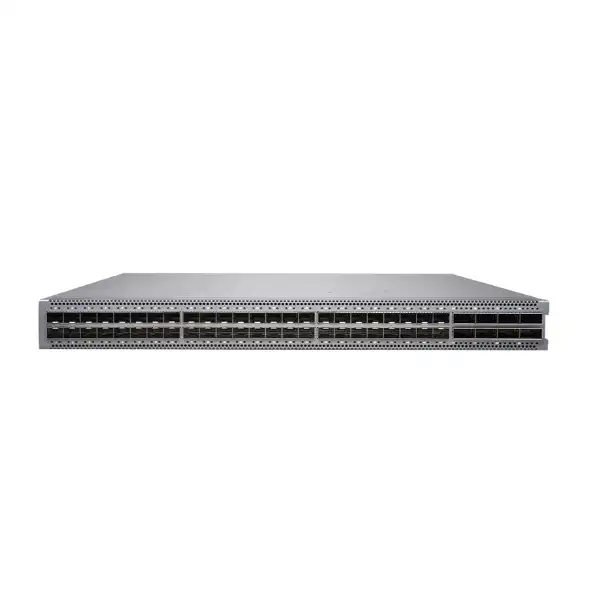
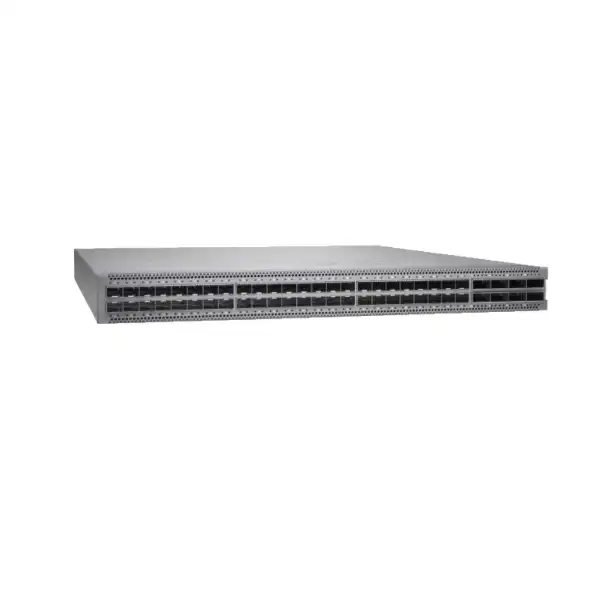
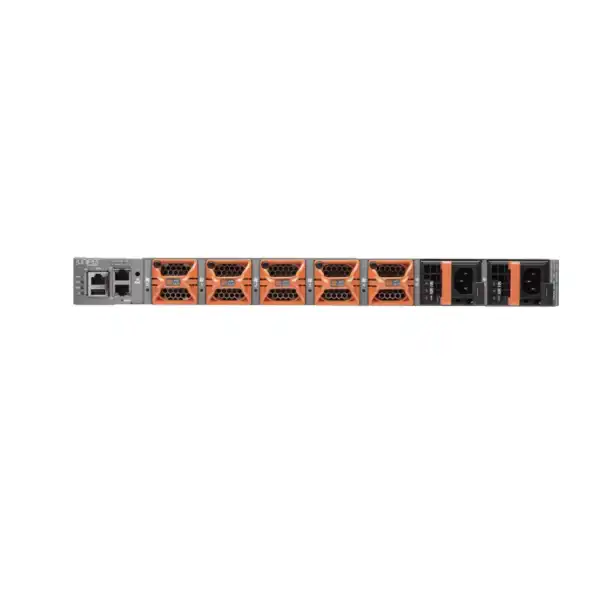
Juniper EX4650 Ethernet Switch in Dubai, UAE
The Juniper EX4650 is a high-density 1U Ethernet switching platform built for demanding campus distribution, aggregation, core and selected data-centre roles. Its combination of 48 SFP/SFP+/SFP28 interfaces and eight QSFP+/QSFP28 interfaces lets one fixed platform bridge 1GbE, 10GbE, 25GbE, 40GbE and 100GbE designs while retaining Junos OS operational consistency.
Fast buyer signals
Port profile: 48 × 1/10/25GbE-capable SFP-family ports plus 8 × 40/100GbE QSFP-family ports.
Form factor: Fixed 1U switch for dense enterprise switching.
Resilience: Dual hot-pluggable power supplies and five fan modules, with defined airflow direction.
Key order check: Exact AC/DC and AFI/AFO model, optics, Junos release and management subscription.
Direct answer: what is the Juniper EX4650 and who should consider it?
The Juniper EX4650 is a fixed-configuration Ethernet switch intended for networks that need substantially more interface speed and forwarding scale than a conventional access switch. It is primarily used at campus distribution or core layers, as an aggregation switch, as a dense fibre-oriented top-of-rack platform, and in architectures where 10GbE and 25GbE server or downstream links need to converge into 40GbE or 100GbE uplinks. The platform runs Junos OS and can also be onboarded into Juniper Mist for cloud-based wired operations when the required subscriptions and supported software releases are in place.
Organisations should consider the EX4650 when the design calls for many SFP/SFP+/SFP28 links, strong Layer 2 and Layer 3 scale, high-speed uplinks, enterprise routing features, EVPN/VXLAN-capable architectures, or the operational benefit of staying within the Juniper EX and Junos ecosystem. It is not automatically the right choice for every campus. A branch or access layer needing large numbers of RJ-45 copper ports or PoE endpoints will normally require a different EX platform, while a very large core may justify a modular chassis or a newer fixed platform with different scale and interface economics.
The most important factor to confirm is the complete deployment bill of materials, not the chassis name alone. Buyers need to identify the exact EX4650-48Y power and airflow variant, optic or DAC requirements per link, whether any QSFP ports will be consumed by Virtual Chassis connections, the required Junos software train, and whether Mist Wired Assurance or Marvis-related subscription functionality is part of the operating model. These choices materially affect compatibility, cabling, rack cooling and quotation accuracy.
FourTeck can help map the requested port speeds, fibre distances, rack airflow, upstream/downstream equipment, redundancy design, licensing term and installation scope into an orderable EX4650 configuration for Dubai and UAE projects. That process is especially valuable when the switch is replacing an older aggregation layer, because existing optics, fibre type, LAG design, routing protocols and maintenance windows can change the final hardware and migration plan.
Where the EX4650 fits in an enterprise network
The EX4650 is best understood as a dense fibre aggregation and distribution platform rather than a general office edge switch. Its strengths become clearer when each interface group is tied to an actual network role.
Campus distribution
In a campus, the EX4650 can aggregate high-speed access or building-distribution links and provide routed connectivity toward a core. The 25GbE-capable downlink density is useful where newer access, wireless aggregation or server-facing requirements outgrow traditional 10GbE designs. The eight 40/100GbE ports provide room for high-bandwidth core or inter-switch connectivity, but the final topology should account for redundancy, oversubscription and any ports used for Virtual Chassis.
Enterprise aggregation
For enterprises with many fibre-attached network devices, security appliances, server blocks or downstream switches, the EX4650 can consolidate numerous 10GbE and 25GbE connections into a smaller number of 100GbE uplinks. This is a common reason to shortlist it when an older aggregation switch has reached interface or forwarding limits but a modular chassis is not required.
Fibre-heavy top of rack
The port mix also suits selected data-centre top-of-rack designs where servers or appliances connect at 10GbE or 25GbE and the rack uplinks at 40GbE or 100GbE. This use case should be validated against the intended Junos feature set, buffer and traffic characteristics, data-centre fabric design, cable reach, and whether a QFX platform would provide a better functional or lifecycle fit.
High-speed core for mid-sized environments
A pair of EX4650 switches can provide a compact routed core for environments whose route, MAC, VLAN, resiliency and uplink requirements fit the platform. The decision should be based on scale and failure-domain design rather than raw port speed alone. Larger networks may prefer a modular core, while smaller sites may gain better economics from a lower-tier fixed switch.
Junos-standardised operations
Organisations already operating Juniper switching, routing or security often value the consistent Junos operational model. Standardised configuration practices, routing policy concepts, telemetry and change processes can reduce operational fragmentation. The benefit is strongest when the network team has an established Junos release policy, tested templates and a defined method for upgrades and rollback.
Mist-managed wired infrastructure
The EX4650 can be onboarded to Juniper Mist for cloud-based wired management. Wired Assurance subscriptions can add visibility, service-level insights and operational workflows. Cloud management is optional to the broader EX4650 value proposition, so buyers should decide whether the switch will be operated primarily through Junos CLI/automation, Mist, or a mixed operational model before subscription SKUs are finalised.
Juniper EX4650 key specifications
| Specification | EX4650 detail | Buyer relevance |
|---|---|---|
| Form factor | Fixed 1U chassis, approximately 44.09 × 4.37 × 52.02 cm (W × H × D). | Dense for distribution racks, but rack depth, rail compatibility and service clearance still need confirmation. |
| Primary interfaces | 48 × SFP/SFP+/SFP28 ports supporting mixed 1GbE, 10GbE and 25GbE operation with supported optics or cables. | Ideal for fibre-heavy aggregation. Verify the exact transceiver and media for every link instead of assuming an existing optic is reusable. |
| High-speed interfaces | 8 × QSFP+/QSFP28 ports for 40GbE or 100GbE, with supported breakout options. | These ports may be uplinks, breakout links or Virtual Chassis ports. Port allocation should be designed before ordering optics. |
| Switching capacity | Juniper datasheet lists 2 Tbps unidirectional / 4 Tbps bidirectional switching capacity; current product specification pages may present the data rate as 2 Tbps. | When comparing vendors, check whether a quoted capacity is one-way or full-duplex aggregate so figures are compared on the same basis. |
| Packet throughput | Datasheet maximum is 2976 Mpps at 64-byte packets; current simplified specification pages may display 1.49 Bpps as a one-direction figure. | Use consistent measurement conventions when comparing products. Real network design should also consider traffic mix, features and oversubscription. |
| MAC scale | Up to 288,000 MAC addresses. | Useful for large Layer 2 domains, but campus design should still avoid unnecessarily broad failure domains. |
| VLANs | Up to 4093 VLAN IDs. | The numerical limit is rarely the only consideration; operational segmentation and routing design matter more than simply maximising VLAN count. |
| Jumbo frames | Up to 9216 bytes. | End-to-end MTU planning is required for storage, overlay and data-centre traffic. One switch supporting jumbo frames does not guarantee path consistency. |
| LAG scale | Datasheet lists up to 80 LAGs and up to 64 ports per LAG. | Actual designs usually use far fewer members; peer capabilities and hashing behaviour should be checked. |
| Virtual Chassis | Up to four EX4650 members from Junos OS 20.1R1 onward; EX4650 cannot form a mixed Virtual Chassis with other switch families. | If using VC, reserve suitable 40/100GbE ports for VCPs and model the resulting uplink capacity. |
| Power supplies | Dual hot-pluggable 650 W AC or DC power supplies, depending on SKU. | Do not mix AC and DC supplies in one chassis. Power feeds should be separated where the site resilience design requires it. |
| Power consumption | Juniper lists about 260 W typical and 450 W maximum. | UPS sizing, PDU loading and cooling calculations should use design values appropriate to the deployed optics and site policy, not only idle figures. |
| Airflow | Front-to-back AFO or back-to-front AFI options, matched across chassis fans and power supplies. | This is a critical order attribute for hot-aisle/cold-aisle racks. Mixing airflow directions can trigger alarms and compromise cooling. |
| Operating environment | Published operating range includes 0°C to 40°C and up to 90% non-condensing relative humidity. | UAE installations require controlled equipment-room conditions; ambient room temperature is not a substitute for validated inlet-air conditions. |
| Management | Junos OS, local management interfaces and support for Juniper Mist cloud onboarding and Wired Assurance. | Define whether operations will be CLI/automation-led, Mist-led or hybrid because this changes subscription, onboarding and governance requirements. |
Understanding the 48 × 10/25GbE port block
The main port bank is one of the defining reasons to choose the EX4650. Forty-eight SFP-family cages support a flexible mix of lower-speed and high-speed connections. In practical terms, that means an aggregation design can keep existing 10GbE fibre links while introducing 25GbE where servers, access layers or appliances need more bandwidth. Supported 1GbE optics can also preserve selected legacy links, which can be useful during phased migration.
The port cage itself does not determine the complete media capability. The installed transceiver, Junos support, fibre type, connector type and link partner all matter. For 25GbE, the EX4650 datasheet describes native 25GbE as fibre-oriented, and Juniper lists supported 25GbE SR and LR optics as well as DAC options. Buyers should specify each link by speed, distance and medium rather than submitting only a total port count. A request for “20 × 25G ports” is not enough if some links are 3 metres within a rack, some are 80 metres over multimode fibre and others are kilometres across single-mode fibre.
When an existing network is being upgraded, optic reuse should be treated as a validation task. Matching physical shape does not prove compatibility. The exact optic part number, optical standard, lane configuration, software release and peer device support all need to align. Reusing qualified optics can save cost, but assuming compatibility can create delayed commissioning, unsupported configurations or links that negotiate incorrectly.
Optics planning questions
- What is the required line rate for each connection: 1G, 10G, 25G, 40G or 100G?
- Is the physical path DAC, multimode fibre or single-mode fibre?
- What is the actual path distance including patching?
- Which connector type and patch-panel standard are already deployed?
- What exact optic or NIC is at the far end?
- Will any QSFP port be broken out into four lower-speed lanes?
- Will any QSFP ports be reserved for Virtual Chassis?
- Does the intended Junos release support the selected optic and feature combination?
- Are spare optics or DACs required for rapid replacement?
Eight 40/100GbE ports: uplinks, breakout and Virtual Chassis trade-offs
The EX4650 includes eight QSFP+/QSFP28 ports that can operate as 40GbE or 100GbE interfaces with supported modules. This high-speed block is what allows the switch to aggregate a large collection of 10GbE or 25GbE links without forcing a modular chassis. In a campus distribution design, these ports may connect to a core pair. In a data-centre design, they may connect to spine switches. In a Virtual Chassis design, some of the same ports can become Virtual Chassis ports. Because these are shared physical resources, the topology must be planned before optics are ordered.
Juniper allows the QSFP ports to be channelised with supported breakout modes. A 40GbE QSFP+ port can provide four 10GbE interfaces, and a 100GbE QSFP28 port can provide four 25GbE interfaces when the supported optics or breakout cables and configuration are used. This can expand the logical 10GbE or 25GbE interface count beyond the 48 front-panel SFP-family ports. Breakout is useful when the switch needs a temporary or permanent concentration of lower-speed links, but it changes cabling density and port-numbering considerations. It can also reduce the number of native 100GbE ports available for upstream capacity.
A simple example illustrates the trade-off. If a pair of EX4650 switches is designed with two 100GbE links between them for Virtual Chassis or inter-switch connectivity and two independent 100GbE uplinks toward the core, those four functions consume a meaningful share of the eight QSFP ports. If the same design also needs breakout connections to several 25GbE devices, the remaining port budget can become tight. The correct answer may be to use more ports, a different redundancy model, or a different platform rather than forcing the original topology.
For this reason, FourTeck treats QSFP allocation as a design input, not as a post-purchase configuration detail. A quotation should ideally identify how many ports are required for upstream routing, peer links, Virtual Chassis, breakout, future growth and spares. This makes the resulting bill of materials more predictable and reduces the chance that the switch is technically powerful enough but physically constrained by how its fastest ports have been allocated.
Performance and scale: reading the numbers correctly
Switching datasheets often present several large performance numbers, and they are easy to compare incorrectly. Juniper describes the EX4650 switching capacity as 2 Tbps unidirectional and 4 Tbps bidirectional. A current simplified specification page may state a 2 Tbps data rate and approximately 1.49 Bpps throughput, while the fuller datasheet states a 2976 Mpps maximum with 64-byte packets. These figures are not necessarily contradictory; vendors often publish one-way and full-duplex aggregate numbers differently. For a fair comparison, the same measurement convention must be used on every platform.
Raw fabric capacity is only one design input. A campus distribution switch may be limited operationally by uplink oversubscription, route scale, convergence requirements, failure-domain design, optic budget or downstream link count long before the headline switching number becomes the issue. Conversely, a data-centre traffic pattern with many simultaneous east-west flows may place greater emphasis on interface utilisation, ECMP, queue behaviour and fabric design. The EX4650 supports eight QoS queues per port and advanced routing capabilities, but the network should still be designed around the application traffic rather than around a single benchmark.
Scale values also need context. The published MAC table size of 288,000 is large for many enterprise environments, yet a campus should not intentionally create a massive Layer 2 domain simply because the hardware can learn that many addresses. Likewise, 4093 VLAN IDs represent the standards-based VLAN range, but the better architecture may use routed boundaries, EVPN/VXLAN segmentation or smaller broadcast domains. Hardware scale protects design headroom; it should not be mistaken for a recommendation to consume every maximum.
The right sizing method starts with the intended topology, then maps expected endpoints, VLANs, routes, multicast state, LAGs, overlay requirements, uplink utilisation and growth. That produces a more defensible decision than selecting the largest number in a datasheet. It also reveals when a lower-cost switch is sufficient or when a modular or newer platform is warranted.
Virtual Chassis on EX4650: benefits and boundaries
Up to four members
Starting with Junos OS 20.1R1, Juniper supports up to four EX4650 switches in one EX4650 Virtual Chassis. Earlier 19.3R1 support began with up to two members. A current deployment should be validated against the selected Junos release and release notes rather than relying only on the minimum release that introduced the feature.
EX4650-only membership
EX4650 switches cannot be combined with other EX switch types in a mixed Virtual Chassis. This is an important migration limitation. An organisation replacing an EX4600 or another platform cannot assume a temporary mixed stack is supported. The migration may need parallel operation, routed interconnection or a staged cutover instead.
No dedicated VCPs
The EX4650 does not have dedicated Virtual Chassis ports. Any of the non-channelised 40GbE or 100GbE ports 48 through 55 can be configured as VCPs. That flexibility is useful, but every VCP consumes a high-speed port that might otherwise have served an uplink or breakout role.
Single logical device
Virtual Chassis can simplify management by making multiple physical members operate as one logical device with coordinated control roles. This may simplify some link aggregation and operational tasks. The benefit should be weighed against the shared failure domain, upgrade method and operational preference for independent routed devices.
Resiliency is architectural
A Virtual Chassis is not a substitute for complete resilience planning. Power feeds, physical paths, upstream routing, maintenance domains, software defects and rack-level failures all remain relevant. Some networks prefer two independent switches with MC-LAG, ESI-LAG or routed ECMP to avoid a shared control plane.
Mist workflow considerations
Juniper Mist supports EX4650 Virtual Chassis workflows and uses preprovisioned Virtual Chassis configuration. Serial numbers and intended member roles should therefore be captured accurately during onboarding. This makes staging discipline and asset information part of the deployment process.
Junos OS operations and feature planning
The EX4650 runs Junos OS, which gives network teams access to a mature configuration and operational model shared across many Juniper routing, switching and security platforms. This consistency is often a major reason to remain with Juniper at the distribution layer. Routing policy syntax, interface constructs, operational commands, rollback behaviour and automation practices can be standardised across a broader infrastructure portfolio.
Feature availability must still be checked by platform and Junos release. A capability appearing in a broad Junos guide does not automatically mean every software train or hardware SKU supports the same scale or behaviour. This matters for EVPN/VXLAN, MPLS, specific routing features, telemetry, security functions and interoperability with other network elements. A production standard should identify the target release, its support status, required feature set and approved upgrade path.
Upgrade planning deserves attention during procurement because a newly purchased switch may not arrive with the exact release standardised in the existing network. Junos supports defined upgrade and downgrade paths, and larger version jumps may require intermediate releases depending on the current and target versions. For a replacement project, the migration plan should therefore include staging, image validation, configuration conversion, rollback preparation and maintenance-window estimates.
Organisations with strict change control may also want a lab or spare unit for preproduction testing. That is particularly useful when the EX4650 will carry routing adjacencies, complex filters, multicast, EVPN or large LAGs. The cost of a controlled validation step is often lower than discovering a behavioural difference during a production cutover.
Software details to include in the design
Target Junos release: Align with organisational standards and supported feature requirements.
Routing protocols: State whether OSPF, BGP, IS-IS, multicast or other functions are required.
Overlay/fabric: Confirm EVPN/VXLAN architecture, control-plane roles and peer compatibility where applicable.
Automation: Identify NETCONF, APIs, templating, Mist or other orchestration expectations.
Security policy: Document filters, control-plane protection and management access requirements.
Maintenance: Define upgrade path, rollback method, configuration backup and outage tolerance.
Juniper Mist Wired Assurance and subscription decisions
Juniper positions the EX4650 as a cloud-manageable switch within the Mist architecture. For organisations adopting Mist across wired and wireless infrastructure, this can bring the distribution switch into a common operational view and support service-level visibility, configuration workflows and troubleshooting tools. The operational value is strongest when the organisation intends to use Mist consistently rather than treating cloud onboarding as an isolated feature on one switch.
Mist functionality is subscription-sensitive. Juniper publishes Wired Assurance subscription families for EX4600 and EX4650 platforms with one-, three- and five-year terms, and options that can include different support bundles. There are also subscription combinations that include Marvis capabilities. Exact subscription part numbers and entitlements change over time, so the quotation should be based on the current Juniper subscription catalogue rather than copied from an old bill of materials.
A buyer who plans to manage the EX4650 locally through Junos OS may not need the same subscription package as a buyer standardising on Mist. Conversely, a customer who expects cloud-based service levels, AI-assisted operations and centralised lifecycle workflows should budget for the correct subscription from the start. The subscription term should align with support and refresh planning where practical, because mismatched renewal dates can create administrative overhead.
The key procurement question is therefore not simply “Does EX4650 support Mist?” It does. The better question is “Which operational outcomes do we expect from Mist, and which current subscription entitlements are required to deliver them?” That answer determines whether the cloud management layer is an optional convenience or an essential part of the network operating model.
Power and airflow: the ordering detail that can stop an otherwise correct deployment
The EX4650 is available in AC and DC variants, and both power types are offered with defined airflow directions. The common orderable family includes EX4650-48Y-AFO and EX4650-48Y-AFI for AC power, plus EX4650-48Y-DC-AFO and EX4650-48Y-DC-AFI for DC environments. AFO means airflow out, normally front-to-back through the chassis. AFI means airflow in, normally back-to-front. The correct choice depends on how the rack and aisle cooling are designed.
Juniper explicitly warns against mixing AC and DC power supplies in one chassis, mixing power supplies with different airflow labels, or mixing fan modules and power supplies with opposing airflow directions. This is more than a cosmetic SKU distinction. Incorrect airflow can recirculate hot exhaust into equipment intakes, raise thermal stress and trigger alarms. In a dense Dubai data room, where the external climate increases the importance of reliable conditioned cooling, rack-level airflow discipline is particularly important even though the switch itself should always operate in a controlled indoor environment.
Each EX4650 ships with redundant power supplies in the relevant model configuration. Juniper describes the 650 W supplies as hot-pluggable and load-sharing, with published typical chassis consumption around 260 W and maximum around 450 W under specified test conditions. Power budgeting should include the broader rack: upstream and downstream switches, firewalls, servers, optical modules, console equipment and cooling overhead. Redundant power only improves availability when the feeds are actually separated into independent PDUs or power paths where the facility design supports that architecture.
The fan system uses five hot-removable modules. Juniper permits only a limited replacement window for a removed fan module before thermal protection becomes a concern, and all five modules should be installed for normal operation. Operational teams should therefore treat spare fan and power strategy as part of support planning rather than assuming any failed FRU can be left absent indefinitely.
Rack, environment and installation requirements
A 1U switch is physically compact, but installation quality still determines long-term reliability. Juniper requires the EX4650 to be installed in an appropriate rack or cabinet in a clean, dry, well-ventilated and temperature-controlled environment. Published dimensions are approximately 17.36 inches wide, 1.72 inches high and 20.48 inches deep, with a weight around 23.7 pounds. The rack plan needs to account not only for chassis depth but also for cable bend radius, optic clearance, rear FRU access and service space.
Cable management is especially important on a platform with 56 high-speed front-panel cages. Dense fibre bundles can block airflow, increase strain on connectors and make maintenance error-prone. Patch leads should be dressed so they do not obstruct intake or exhaust paths. Labels should identify both local port and remote destination. Where breakout cables are used, the labelling scheme should make individual lanes easy to trace because a single QSFP breakout assembly can represent multiple logical interfaces.
Temperature specifications should be interpreted at the equipment operating environment, not at the building level. Juniper publishes an operating range of 0°C to 40°C and requires adequate airflow to dissipate chassis heat. A room thermostat showing an acceptable average does not guarantee every rack intake is within range. Hot spots can occur when exhaust recirculates, blanking panels are missing, cable bundles obstruct ventilation or racks mix front-to-back and back-to-front equipment without a deliberate cooling plan.
The installation method should also preserve access to power supplies and fan modules. Because these components are serviceable from the rear, the rack should not be positioned so tightly against a wall or cable tray that FRU replacement becomes difficult. Where dual power feeds are used, power cords should be routed to avoid accidental simultaneous disconnection and should remain accessible without crossing walkways or blocking components.
For a new UAE deployment, FourTeck can include rack installation, patching, optics placement, base configuration and commissioning in the project scope where required. For an existing rack, a pre-installation check of available U-space, depth, PDU capacity, airflow direction, fibre presentation and upstream ports can prevent avoidable changes during the maintenance window.
EX4650 capability-to-outcome guide
25GbE downlink density
Supports higher server, appliance and access-layer bandwidth without moving every connection to 40/100GbE. This can be a practical intermediate step when 10GbE is becoming restrictive but 100GbE to every endpoint would be excessive.
100GbE aggregation
Provides enough uplink speed for multiple 10/25GbE downstream groups, helping reduce bottlenecks between distribution and core layers when the traffic model justifies the capacity.
EVPN/VXLAN support
Allows the EX4650 to participate in modern fabric and segmentation designs where the relevant feature set and Junos release are validated. The value is architectural flexibility, not merely ticking a protocol checkbox.
MC-LAG and ESI-LAG options
Support alternative high-availability architectures where independent switches are preferred over a single Virtual Chassis control plane. The correct design depends on peer compatibility and operational preference.
sFlow monitoring
Provides traffic visibility for capacity planning and troubleshooting when integrated with appropriate collectors. Monitoring should be part of the operations design rather than enabled without a plan for analysis and retention.
Redundant field-replaceable power
Improves serviceability and reduces exposure to a single PSU failure. Full service resilience still depends on independent electrical feeds, correct airflow and a support process that can replace failed components quickly.
Migration from an existing aggregation or core switch
Replacing an aggregation switch is rarely a simple “move the cables” exercise. The old device may carry VLAN trunks, routed interfaces, first-hop redundancy, dynamic routing, multicast, access control filters, QoS policy, monitoring sessions, LAGs and management dependencies. Some of those functions can be translated directly to the EX4650, while others may be an opportunity to modernise the architecture. A migration worksheet should inventory the existing configuration and map each function to the target design.
Optics are another common migration risk. Existing 10GbE SFP+ modules may be physically compatible with the EX4650 cage, but support depends on the specific part. Existing 40GbE or 100GbE optics may have different reach, lane or breakout behaviour than the new design requires. When a legacy switch is very old, the fibre plant itself should be checked because upgrading from 10G to 25G or 100G may expose limitations in multimode fibre grade, connector cleanliness or path loss.
Routing migrations should preserve adjacency stability and rollback options. A common approach is to stage the EX4650 with management access, base software, VLANs, routing policy and test links before the main cutover. Where the topology allows, old and new platforms can be interconnected temporarily so routes or VLANs are migrated in controlled phases. If the existing device cannot coexist with the new design, the change plan should define a precise rollback point and retain the old configuration until service is verified.
Virtual Chassis migration requires special attention because EX4650 cannot participate in mixed Virtual Chassis with other EX types. An organisation replacing an older EX Virtual Chassis therefore needs a new EX4650-only VC or a different high-availability design. That architectural boundary should be discovered during planning, not during the maintenance window.
Suggested cutover sequence
- Inventory ports, optics, VLANs, routes, LAGs, filters and management services.
- Confirm target EX4650 SKU, airflow, power and optics.
- Standardise and load the approved Junos release.
- Build base configuration and out-of-band management.
- Test optics, breakout, routing and redundancy in staging.
- Back up the old platform and document rollback.
- Move links in a defined dependency order.
- Validate traffic, routing, monitoring and application reachability.
- Retain post-cutover monitoring and a clear acceptance checklist.
When the EX4650 may be a strong fit
The EX4650 is particularly compelling when an enterprise needs a high concentration of fibre-based 10GbE and 25GbE interfaces in a small rack footprint. Examples include a campus distribution layer aggregating multiple buildings, a security zone that connects several high-throughput firewalls and routers, a server aggregation block, or an enterprise core where a pair of compact fixed switches has sufficient route and interface scale. The combination of 48 SFP-family ports and eight 100GbE-capable QSFP ports gives the design a useful balance between endpoint density and uplink bandwidth.
It is also a strong candidate where Junos operational consistency has meaningful value. Teams that already use Juniper routing policy, configuration management, monitoring and support processes can reduce the operational learning curve compared with introducing an unrelated switch operating system. The same applies to organisations adopting Mist across wired infrastructure, provided the subscription model and cloud governance align with organisational requirements.
Finally, the EX4650 can be attractive for phased speed migrations. A network may not be ready to move every link from 10GbE to 25GbE immediately. The mixed-speed interface model allows existing supported links to remain in service while new capacity is introduced. This can reduce disruption and avoid an unnecessary “all at once” cabling transition.
When another switch should be evaluated
A technically capable product is not automatically the best commercial or architectural fit. If the requirement is primarily for RJ-45 access ports with PoE for phones, cameras and wireless access points, the EX4650 is the wrong interface profile. A Juniper access platform with copper and PoE capabilities should be considered instead. The EX4650 belongs higher in the topology or in fibre-dense roles.
If the environment needs significantly more than eight native 100GbE uplinks, very large route scale, modular line-card flexibility or chassis-level redundancy, a modular core or a newer high-capacity fixed platform may provide a better growth path. Similarly, a data-centre fabric that relies on very specific QFX features, buffer behaviour or port combinations should compare the EX4650 directly with appropriate QFX models rather than assuming an EX platform is optimal because the port speeds appear similar.
At the other end of the scale, if a site needs only a handful of 10GbE uplinks and has modest routing demands, the EX4650 may be unnecessarily expensive and complex. A lower-tier fixed EX switch can provide adequate performance with simpler optics and lower power. The decision should be driven by validated capacity, resilience and growth requirements rather than by selecting the highest-performance device available.
Lifecycle policy is another factor. Juniper continues to publish active EX4650 documentation and current Mist subscription references, but lifecycle milestones should always be rechecked at quotation time because enterprise hardware roadmaps evolve. A new project with a long planned service life should compare the EX4650’s current lifecycle position with newer alternatives before final approval.
Procurement checklist for an accurate EX4650 quotation
A reliable quotation needs enough technical detail to identify the correct chassis and every link accessory. The following inputs reduce revisions and help prevent a switch arriving without the optics, power or subscription elements required for commissioning.
1. Exact chassis variant
Specify AC or DC power and AFI or AFO airflow. If uncertain, provide rack airflow direction and existing PDU type so the appropriate SKU can be identified.
2. Port-speed schedule
List the number of 1G, 10G, 25G, 40G and 100G links, including future links expected during the planned service life.
3. Media and distance
For each link, state DAC, multimode or single-mode fibre plus approximate distance and far-end interface. This determines the correct optical standard.
4. Redundancy design
State whether the design uses Virtual Chassis, MC-LAG, ESI-LAG, routed ECMP or independent switches. This changes port allocation and configuration scope.
5. Mist requirement
Confirm whether Wired Assurance and/or Marvis-related subscriptions are required and whether a one-, three- or five-year term is preferred.
6. Services and support
Identify installation, migration, configuration, testing, onsite support, spares and vendor support requirements so hardware and service scope are separated clearly.
Practical use cases in Dubai and the UAE
Multi-building enterprise campus
A headquarters campus may use 10/25GbE fibre from building distribution switches into an EX4650 pair, then 100GbE toward the core or data centre. The design benefits from dense fibre ports while preserving headroom for faster access layers. Fibre distances, path diversity and routing boundaries should be mapped building by building.
Security and internet aggregation
Enterprises with multiple firewalls, WAN routers, load balancers or security appliances can use high-speed SFP28 and QSFP28 links to create a dedicated aggregation layer. The design should isolate failure domains and confirm that peer devices support the intended link speeds, LAG mode and optics.
Private cloud server aggregation
A private cloud with 10/25GbE server or appliance links can use EX4650 as a compact aggregation layer, provided the architecture matches EX feature requirements. If the environment is a large leaf-spine fabric with specialised data-centre requirements, a QFX comparison should be part of the design review.
Hospitality or large venue distribution
Large properties can generate substantial aggregation traffic from access switches, Wi-Fi infrastructure, surveillance and operational systems. EX4650 can provide high-speed fibre aggregation, while access-layer PoE remains on appropriate edge switches. Segmentation and multicast behaviour should be tested for the application mix.
Data-centre interconnect edge
Where a site needs to aggregate several high-speed internal links toward a separate DCI platform, the EX4650 can serve as an enterprise aggregation point. The actual long-distance optical transport should be designed around supported transceivers, transport equipment and latency or resilience requirements.
Technology refresh from 10GbE aggregation
A business that has outgrown 10GbE aggregation can migrate selectively to 25GbE and 100GbE without replacing every downstream link on day one. This phased approach can align network capacity with server, storage and wireless refresh cycles.
Availability, quotation and support considerations in the UAE
Enterprise switch availability can vary by exact SKU, power type, airflow direction, optic part number and support bundle. “EX4650 in stock” is not sufficiently precise if the available unit has the wrong airflow direction or if the required optics have a different lead time. For project planning, the quotation should list the complete manufacturer part numbers and identify any items with separate lead times.
Warranty and support should also be separated from hardware availability. A business-critical distribution switch may justify a support level that provides faster hardware replacement and technical assistance than a lab or noncritical deployment. If the switch is managed through Mist, subscription entitlement and support term should be coordinated with the hardware support plan where possible.
FourTeck can quote the Juniper EX4650 for Dubai and wider UAE projects with compatible optics, DACs, support subscriptions and deployment services based on requirement. For the fastest technical validation, provide the required quantity, exact port-speed schedule, fibre distances, existing peer devices, rack airflow, power type, redundancy method and preferred support term.
Frequently asked questions about the Juniper EX4650
Does the EX4650 have 48 25GbE ports?
The switch has 48 SFP/SFP+/SFP28 cages that can support 1GbE, 10GbE and 25GbE modes with supported optics or cables. Whether all 48 are used at 25GbE depends on the deployed transceivers, software support and peer devices. Juniper describes native 25GbE support as fibre-oriented, so buyers should not assume every copper adapter or third-party optic is supported simply because it fits physically.
How many 100GbE ports are available?
There are eight QSFP+/QSFP28 ports that can operate as 40GbE or 100GbE with supported modules. The practical number available for uplinks may be lower if some ports are configured as Virtual Chassis ports or used for breakout. Port allocation should therefore be determined from the topology rather than assuming all eight remain free for upstream connectivity.
Can 100GbE ports break out to 25GbE?
Yes, Juniper documents support for channelising a QSFP28 interface into four 25GbE lanes using supported breakout cables or optics and the appropriate configuration. Breakout increases logical interface density but consumes the parent QSFP port and affects cabling, labelling and the remaining native 100GbE uplink count.
Can the EX4650 form a Virtual Chassis?
Yes. Juniper supports an EX4650-only Virtual Chassis with up to four members from Junos OS 20.1R1 onward. The EX4650 does not have dedicated Virtual Chassis ports; supported 40/100GbE front-panel ports are configured as VCPs. This consumes high-speed interfaces that may otherwise have been used for uplinks.
Can EX4650 be mixed with another EX model in Virtual Chassis?
No. Juniper states that EX4650 switches cannot be combined with other switch types in a mixed Virtual Chassis. If a migration is coming from an EX4600, EX4300 or another family, plan a staged migration or a separate high-availability architecture rather than expecting a temporary mixed stack.
Does the EX4650 support Juniper Mist?
Yes. Juniper documents Mist onboarding and cloud management for the EX4650. Wired Assurance subscriptions are available for this platform, and current subscription families include different terms and support combinations. Confirm the exact entitlement needed for the intended Mist features rather than treating cloud support as license-free by default.
Is the EX4650 suitable as an access switch?
It can connect endpoints, but it is not a conventional office access switch because its primary interfaces are SFP-family cages and it does not provide the typical dense RJ-45 PoE profile used for phones, cameras and access points. It is usually more appropriate at distribution, aggregation, core or fibre-oriented server layers.
What are the EX4650 airflow options?
The platform is offered with front-to-back AFO or back-to-front AFI airflow. Power supplies and fan modules must match the chassis airflow direction. Juniper warns not to mix opposing airflow components, and the selected direction should match the rack’s hot-aisle/cold-aisle design.
Does the EX4650 use redundant power supplies?
Yes. EX4650 models ship with two power supplies appropriate to the selected AC or DC SKU. Juniper describes them as redundant, load-sharing and hot-pluggable. To gain true electrical resilience, the two supplies should be connected to independent power paths where the facility provides them.
What power consumption should be planned?
Juniper lists approximately 260 W typical and 450 W maximum power consumption under published test conditions. Rack and UPS design should use an engineering allowance appropriate to the installed optics, traffic and environmental policy rather than relying only on a typical figure.
Does EX4650 support EVPN/VXLAN?
Juniper positions the EX4650 with EVPN and VXLAN capabilities and lists it for campus fabric functions. The exact feature set, scale and operational workflow depend on Junos release and architecture. A fabric deployment should therefore be checked against current feature documentation and validated design guidance.
What optics can be used with EX4650?
Juniper lists supported 1GbE, 10GbE, 25GbE, 40GbE and 100GbE optics and DAC options, including common SR and LR families as well as selected longer-reach modules. The correct choice depends on speed, fibre type, distance, connector, peer device and Junos support. The safest procurement method is to quote optics against a link schedule.
Can existing third-party optics be reused?
They should not be assumed compatible. Even if an optic fits the cage and uses the same nominal Ethernet standard, vendor qualification, diagnostics, software support and support policy may differ. For a production deployment, identify the exact optic part numbers and validate them before the cutover.
Is EX4650 suitable for a data-centre leaf?
It can fit selected top-of-rack and aggregation roles, especially where 10/25GbE downlinks and 100GbE uplinks match the server design. A data-centre project should still compare QFX alternatives because specialised fabric requirements, scale, buffer behaviour or port economics may favour a purpose-built data-centre switching platform.
What information is needed to quote an EX4650 in Dubai?
Provide quantity, AC or DC preference, rack airflow direction, required 1/10/25/40/100GbE port counts, fibre types and distances, peer device models, redundancy method, Mist subscription requirement, support term and whether installation or migration services are required. These details allow the chassis, optics, subscriptions and services to be quoted together accurately.
Should I choose EX4650 or a larger core switch?
Choose based on required interfaces, route and MAC scale, resiliency model, growth, lifecycle policy and operational complexity. If eight 100GbE-capable ports and the EX4650 scale are sufficient, a pair can provide a compact solution. If the design needs much higher port density, modular growth or larger control-plane scale, evaluate a larger platform rather than forcing the fixed chassis beyond its intended role.
Decision recap before ordering
Model fit
Use the EX4650 when dense fibre 10/25GbE and 40/100GbE aggregation match the topology. Do not use it as a substitute for a copper PoE access switch.
Capacity
Model actual downstream traffic, uplink oversubscription, route scale and growth. Headline Tbps numbers are only one input into design suitability.
Compatibility
Validate optics, DACs, breakout mode, far-end interfaces, fibre type and Junos software support before assuming existing components can be reused.
Resilience
Choose deliberately between EX4650 Virtual Chassis, MC-LAG/ESI-LAG and routed designs. Each creates a different operational and failure-domain model.
Power and airflow
Order the correct AC/DC and AFI/AFO variant. Matching rack airflow is mandatory for a clean deployment and reliable thermal behaviour.
Licensing and support
Confirm Mist subscription needs, subscription term, Juniper support level and any onsite or migration service requirements as part of the same procurement decision.
What FourTeck needs from the buyer
An accurate EX4650 quotation is easiest when technical and commercial inputs arrive together. The following information lets the hardware, optics, subscriptions and services be sized without unnecessary back-and-forth.
Number of standalone switches or intended Virtual Chassis members.
AC or DC plus front-to-back or back-to-front rack airflow.
Counts of 1G, 10G, 25G, 40G and 100G links, including future capacity.
DAC, multimode or single-mode fibre, link distance and far-end model.
Core/distribution role, VC or dual-switch design, uplink count and routing approach.
Junos-only, Mist Wired Assurance, Marvis requirement and preferred term.
Existing switch model, current configuration complexity and allowable outage window.
Desired vendor support level, spares strategy and onsite assistance.
Plan the Juniper EX4650 around your real port, optics and resilience requirements
The EX4650 is most valuable when its dense 10/25GbE interface bank, 40/100GbE uplinks, Junos capabilities and high-availability options are matched to a clearly defined topology. A correct order starts with the exact power and airflow SKU, then adds validated optics or DACs, software and Mist subscriptions where required, and an installation or migration plan that preserves service continuity.
For a Dubai or UAE quotation, send FourTeck the desired quantity, port-speed schedule, fibre distances, peer device models, rack airflow, power type, redundancy approach and support term. We can then structure the EX4650 hardware, optics, subscriptions and deployment services around the actual network rather than a generic switch bundle.

Reviews
There are no reviews yet.