
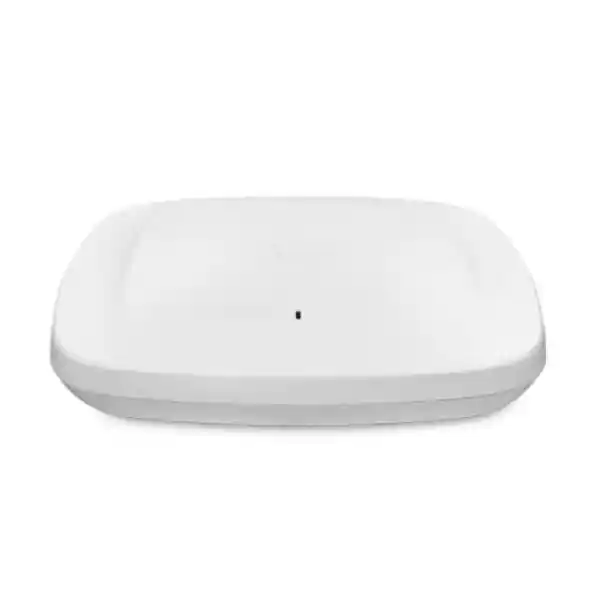
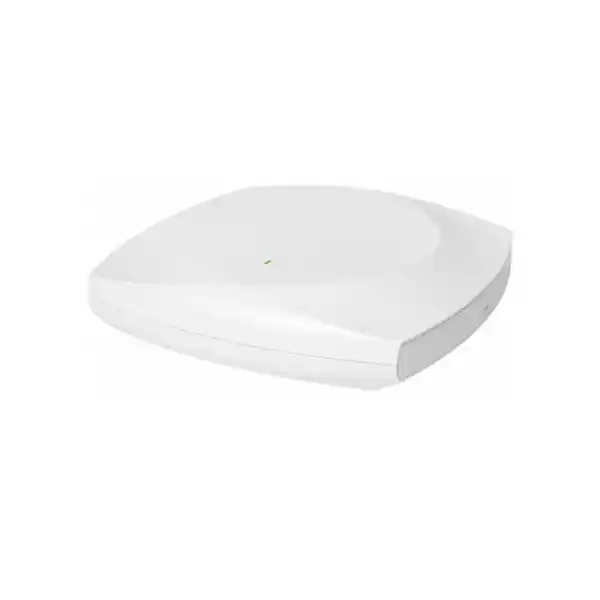
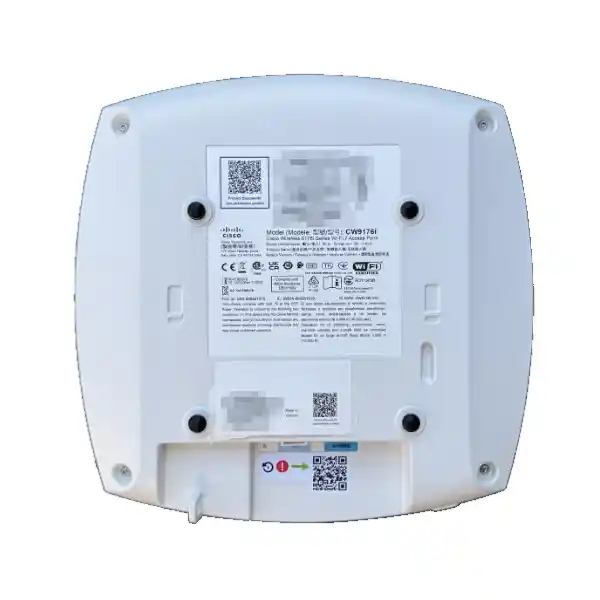
Cisco Meraki CW9176I Wi-Fi 7 Access Point in Dubai
A high-performance indoor access point for organizations planning dense, latency-sensitive and next-generation wireless networks with 4×4 radios, 6 GHz operation, a 10 Gbps multigigabit Ethernet interface and flexible Cisco management choices. The strongest deployments begin with RF design, PoE capacity, switch readiness and licensing alignment—not simply an access-point count.
2.4 / 5 / 6 GHz
4×4 radio capability
10G multigigabit uplink
Direct answer: what the Cisco Meraki CW9176I is and what to confirm first
What it is: the CW9176I is an indoor Cisco Wireless 9176 Series access point with internal omnidirectional antennas, designed around Wi-Fi 7 capabilities and tri-band enterprise WLAN operation.
Main use: it is primarily used where organizations need high-performance wireless connectivity, stronger spectrum utilization, 6 GHz capacity, multi-gigabit wired backhaul and centralized enterprise management.
Who should consider it: offices, campuses, technology companies, education environments, hospitality venues, healthcare facilities, branch networks and other indoor sites where user density, application quality or growth expectations justify a premium Wi-Fi 7 design.
Most important factor to confirm: the access point should not be specified in isolation. The switch must provide appropriate PoE and multigigabit connectivity, licensing and management mode must match the organization’s operational model, and the RF plan must account for client capabilities, local spectrum rules and the physical environment.
What FourTeck can determine: a project review can establish the likely AP quantity, switch and PoE requirements, uplink design, subscription or management considerations, mounting approach, migration sequence and quotation scope for a Dubai or UAE deployment.
Why the CW9176I deserves a design-led buying decision
The Cisco Meraki CW9176I sits in a class of access point where the surrounding infrastructure can determine whether the hardware is used to its full potential. It is easy to look at a Wi-Fi 7 label, a 10 Gigabit Ethernet port and multiple 4×4 radios and conclude that the newest model is automatically the right replacement for an older AP. In practice, enterprise wireless performance depends on the whole path from client device to radio, from AP to access switch, from switching layer to application, and from RF design to operational policy. A strong procurement process therefore starts with the environment and the performance objective rather than with a simple one-for-one hardware swap.
This distinction matters particularly in Dubai, where one project may involve a compact office with high-spec laptops and another may involve a large mixed-use building with concrete walls, meeting rooms, IoT devices, guest traffic and several generations of client hardware. The CW9176I can serve all three major Wi-Fi bands, but usable capacity and roaming quality still depend on channel planning, transmit-power decisions, AP placement, interference, cabling, switch capability and endpoint behavior. A premium AP cannot compensate for weak structured cabling, overloaded PoE budgets or poorly positioned mounting points.
For buyers, that makes the CW9176I less like a commodity radio and more like a building block in a wider wireless architecture. Its strongest value appears when the network is designed to take advantage of the newer spectrum, high spatial-stream capability, advanced Wi-Fi 7 features and a wired uplink capable of carrying the resulting traffic. Where those dependencies are not yet in place, it may still be a sensible future-facing choice, but the business case should distinguish between capabilities available immediately and capabilities that become useful after switch, client or licensing upgrades.
CW9176I core specification snapshot
| Specification area | Buyer-relevant detail |
|---|---|
| Product identity | Cisco Wireless 9176I / CW9176I indoor access point with internal omnidirectional antennas. |
| Wireless generation | Wi-Fi 7 / IEEE 802.11be feature set, with operation across 2.4 GHz, 5 GHz and 6 GHz according to supported configuration and local regulatory availability. |
| Spatial streams | Up to 4×4 MIMO with four spatial streams on the client-serving radios in full-power operation. |
| Channel widths | 20 MHz on 2.4 GHz; 20/40/80/160 MHz on 5 GHz; and up to 320 MHz capability on 6 GHz, subject to regulatory domain, RF design and client support. |
| Key Wi-Fi 7 functions | Features include 4096-QAM, Multi-Link Operation and Multiple Resource Unit allocation, with practical benefit dependent on compatible clients and configuration. |
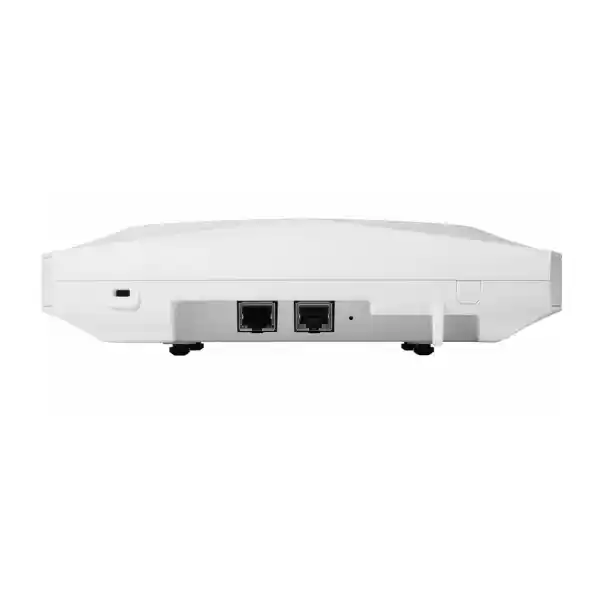
| Wired uplink | One RJ-45 port supporting 100M, 1G, 2.5G, 5G and 10G BASE-T speeds. |
| Power | 802.3bt is the appropriate planning basis for full operation. PoE+ can run the AP with reduced capability; 802.3af is suitable only for limited staging/configuration behavior with radios unavailable. |
| USB | USB 2.0 with up to 9 W when supported by the selected power mode. |
| Additional radios / location functions | Dedicated scanning and IoT capabilities are complemented by integrated Bluetooth Low Energy/IoT, GNSS/GPS and Ultra-Wideband functions in the platform. |
| Physical size | Approximately 9.5 x 9.5 x 2.0 inches (about 24.1 x 24.1 x 5.1 cm), excluding the mount plate. |
| Weight | Approximately 3.4 lb / 1.56 kg. |
Exact regulatory-domain behavior, channel availability, software feature availability and licensing should be confirmed for the UAE project and intended management mode before purchase.
What Wi-Fi 7 changes in a real enterprise environment
More spectrum choices
The addition of 6 GHz gives the design team more room to separate capable modern clients from congested legacy spectrum. This can improve capacity planning, but the gain depends on whether clients support 6 GHz, whether the regulatory domain permits the intended channels, and whether the AP layout creates sufficient 6 GHz coverage. Higher-frequency propagation is not identical to 2.4 or 5 GHz, so an AP count derived from older designs should not be reused without validation.
Wider channels where appropriate
Wi-Fi 7 allows very wide channels, including up to 320 MHz in 6 GHz. Wider channels can raise peak throughput for capable endpoints, but they consume more spectrum and are not automatically the right choice in every dense deployment. Many enterprise designs benefit from balancing channel width against reuse, contention and client distribution rather than maximizing width everywhere.
Multi-Link Operation potential
Multi-Link Operation is one of the most important architectural ideas in Wi-Fi 7 because compatible clients can use links across different bands under supported conditions. The business value can include better latency behavior, resilience and throughput, but it is client- and software-dependent. A CW9176I deployment should therefore be evaluated against the actual laptop, phone, scanner and specialist-device estate rather than assuming every endpoint will use the newest capabilities.
Higher-order modulation
4096-QAM can increase data density when signal quality is sufficiently strong. That is a useful reason to care about AP placement, interference control and client proximity. It should not be read as a guaranteed throughput multiplier across an entire office. Modulation steps fall as RF conditions deteriorate, so a carefully engineered design matters more than a headline modulation figure.
Better use of congested spectrum
Wi-Fi 7 mechanisms such as preamble puncturing and more flexible resource-unit allocation are designed to improve efficiency in complex RF conditions. Their advantage appears when the wider system—AP firmware, client capability, spectrum plan and policy—is aligned. Buyers should evaluate the platform as a modern wireless system rather than as a standalone speed upgrade.
A faster wired edge becomes relevant
A 10G-capable multigigabit port gives the CW9176I room to avoid a 1G wired bottleneck, but it also changes switching requirements. The access layer may need multigigabit copper ports, enough PoE budget and uplinks sized for aggregate wireless demand. For an existing building, cable category and distance should be checked before assuming every drop can negotiate at the preferred rate.
Power is a design dependency, not a small accessory detail
Cisco documents the CW9176I with different behavior according to available PoE. Full-capability planning should be based on 802.3bt power. Under 802.3bt operation, the AP can use 4×4 radios on 2.4 GHz, 5 GHz and 6 GHz, the 10G link and USB support within the published power profile. Under 802.3at PoE+, capability is reduced: the 2.4 GHz radio can operate at 2×2 while 5 GHz and 6 GHz remain 4×4, the wired link is limited to 2.5G and USB is disabled. Under 802.3af, client-serving radios are not available for normal operation, so it should not be treated as an acceptable production power source.
This is one of the most important procurement checks for a retrofit. A switch may technically power an AP yet still prevent the design from using the AP as intended. The PoE calculation must therefore include both per-port capability and the total power budget of the switch or switch stack. An office with twenty CW9176I units has a very different power-planning requirement from a branch with two, and the overall switch budget must allow for other PoE devices such as phones, cameras, sensors and access-control equipment.
Where the access switch cannot supply the right power class, an approved injector may be an option, but injectors add equipment, power sockets, cabling considerations and operational complexity. For a clean enterprise deployment, it is often preferable to align access switching and wireless refreshes where practical. LLDP or Cisco Discovery Protocol should also be enabled as appropriate so the AP and switch can negotiate power correctly.
10G multigigabit uplink: when it matters and what can limit it
The CW9176I includes one copper Ethernet interface that can negotiate at 100 Mbps, 1G, 2.5G, 5G or 10G. That flexibility is valuable during transitions because an organization can deploy the AP on an existing multigigabit access layer and later improve switching where required. However, buyers should distinguish between port capability and effective end-to-end throughput. The AP, cable, switch port, switch backplane, switch uplinks, WAN path, security stack and application servers all contribute to the final experience.
For a high-density office, a 10G edge can be useful because several radios can serve many clients simultaneously. For a small branch with modest internet bandwidth, the same 10G port may provide future headroom rather than an immediate measurable benefit. Neither situation makes the CW9176I inherently right or wrong; it changes how the business case should be explained. A premium AP can still be justified for spectrum, client density, Wi-Fi 7 lifecycle or RF features even if the WAN connection is slower than the local wireless peak.
Cabling deserves specific attention. Existing copper that has worked reliably at 1G should not automatically be assumed to deliver 10G over the same distance and environment. Cable category, termination quality, bundle conditions and link length can affect achievable multigigabit rates. For large deployments, validating representative cable runs before finalizing the switch and AP bill of materials reduces the risk of purchasing a 10G-capable access layer that negotiates below expectations on part of the building.
Radio architecture and RF planning implications
The CW9176I is not simply a three-band AP with one fixed role per radio. Cisco’s platform provides flexible radio operation and dedicated functions for security/RF scanning and IoT. In practical terms, this gives wireless architects room to adapt the design to the client population and local spectrum environment. A site with many modern 6 GHz-capable clients may make different use of the radio resources from a site dominated by older 2.4 GHz equipment or specialized devices.
The presence of 6 GHz does not remove the need for 2.4 and 5 GHz. Many enterprise devices remain tied to older bands, while voice, scanners, printers, building systems and IoT clients may have different capabilities from employee laptops. A good design normally maps client classes to bands and SSIDs deliberately. It may also reduce unnecessary 2.4 GHz cell overlap while using 5 GHz and 6 GHz more aggressively for capable clients.
The integrated internal omnidirectional antenna design makes the CW9176I suitable for common ceiling and wall-mount indoor use cases where broad area coverage is desired. For corridors, warehouses, high ceilings, directional coverage or unusual mounting geometry, the CW9176D1 or another access-point/antenna combination may deserve comparison. Internal antennas simplify installation, but they also mean that coverage shape is largely determined by the AP’s own antenna system and placement.
Cloud management, on-premises management and licensing choices
One of the most important characteristics of newer Cisco wireless hardware is management flexibility. The CW9176I can participate in different operational models, and the licensing choice should match the management experience the customer intends to use. For Meraki cloud-managed deployments, the Meraki Dashboard provides centralized visibility, configuration, reporting and firmware workflows. Cisco also supports on-premises management paths for organizations that prefer controller-based or local management, subject to the selected licensing and platform requirements.
This matters during procurement because hardware alone does not define the final operational model. Cisco’s unified licensing approach for Wi-Fi 7 access points includes licensing options that can determine cloud versus mixed or on-premises management eligibility. Cloud-only term licensing and subscription-based unified licensing should not be treated as interchangeable. The quote should therefore identify the desired management mode first and then select the appropriate license structure and term.
Cloud-managed fit
Organizations that value centralized web-based administration, distributed-site operations, zero-touch style provisioning, cloud visibility and Meraki operational workflows may prefer cloud management. The design should verify organization structure, network segmentation, administrator roles, firmware policy, logging needs and integration requirements before migration.
On-premises fit
Organizations with established Cisco Catalyst controller operations, local management requirements or architecture standards may prefer an on-premises path. That decision should be aligned with controller software, supported versions, network design, operational skills and license model rather than assumed from the AP part number.
License-tier fit
Cisco lists Essential and Advantage feature tiers for Wi-Fi 7 subscription licensing. Advanced functions such as AI-RRM and certain enhanced capture/analytics capabilities may depend on the Advantage tier and software version. The correct tier should therefore be chosen from required features, not merely from price.
Licensing warning for a quotation
Do not request only “CW9176I with license” without defining the management model and feature requirements. Cisco licensing for current Wi-Fi 7 platforms can differ materially from older Meraki purchasing assumptions. A quote should state whether the intended deployment is Meraki cloud-managed, Catalyst/on-premises managed or another supported mode, together with the desired term and feature tier. This prevents a situation in which the access points arrive correctly but the license structure does not support the operational model the IT team expected.
If the organization already owns Cisco or Meraki licensing, the renewal dates, organization structure and migration path should be reviewed. Existing licenses may not map to new hardware in the way the buyer assumes, especially across different licensing generations. For larger projects, license alignment is best treated as a workstream of the migration plan rather than a final line item added after hardware selection.
Security and operational visibility
A modern enterprise WLAN is part of the security architecture, not merely a transport layer. In Meraki-managed operation, Cisco highlights enterprise capabilities such as 802.1X authentication, integration with identity services, Air Marshal wireless intrusion prevention, application visibility and traffic shaping. The dedicated scanning radio helps support RF and security monitoring without relying solely on the client-serving radios. For organizations with security requirements, these functions should be mapped to the authentication design, VLAN or policy segmentation, logging system, guest-access model and incident-response process.
The access point should also be considered alongside firewall and access-control policy. Wireless segmentation only provides the intended security outcome when upstream switching, routing, identity and firewall rules enforce the design. Employee, guest, IoT, voice and contractor traffic may require separate policy treatments. In cloud-managed networks, the dashboard can simplify operational visibility, but the organization still needs disciplined administrator access, change control, MFA practices and alert ownership.
For companies handling regulated data, security review should include how cloud management aligns with internal governance and data-residency expectations, what telemetry is generated, which administrators can access the dashboard, how audit logs are retained and how authentication integrates with corporate identity. Those questions are project-specific and should be resolved before rollout rather than assumed from the access point’s security feature list.
Where the CW9176I can fit well
High-density corporate offices
Open-plan areas, collaboration floors and meeting-room clusters can benefit when many modern endpoints compete for spectrum. The AP’s 6 GHz capability and high-performance radio platform give designers more flexibility, but AP quantity should be based on capacity and attenuation, not just floor area.
Technology and engineering environments
Sites with recent laptops, Wi-Fi 7 development devices, cloud applications and high local data flows are more likely to use the platform’s newer capabilities. A multigigabit access layer may be justified where wireless traffic is expected to exceed legacy edge-network assumptions.
Education and training spaces
Classrooms, labs and training rooms can create synchronized demand as many devices connect and access content together. Capacity design, multicast behavior, application policy and roaming between teaching areas should be considered alongside RF coverage.
Premium hospitality and venues
Hotels, executive hospitality spaces and event areas may require high device counts, guest access, analytics and operational simplicity. Coverage planning must account for room construction, guest mobility, transient users and potentially high peak concurrency.
Healthcare and professional services
Organizations that depend heavily on mobile workflows can value predictable wireless operation and centralized monitoring. Device certification, application latency, segmentation, roaming and clinical or specialist-device compatibility should be verified before relying on 6 GHz or Wi-Fi 7 as a primary design assumption.
When a different access point may be the better choice
The CW9176I is a premium indoor option. It may be more capability than a small branch, lightly used office or mostly legacy-client environment needs. Cisco’s current Wi-Fi 7 family includes models such as the CW9174I and CW9172I, which can suit moderate-density requirements with lower wired-uplink and radio specifications. A lower model may allow the customer to invest more effectively in switching, WAN resilience or additional AP placement instead of paying for capacity that will remain unused.
The CW9176D1 should also be considered where a directional antenna pattern is more appropriate than the CW9176I’s internal omnidirectional design. Long corridors, targeted coverage zones or spaces with specific geometry may benefit from directionality. Conversely, environments needing external antennas, outdoor operation or specialized hazardous-location certifications require a different product family entirely. The indoor CW9176I should not be selected simply because its performance specifications are high.
A model comparison should include more than throughput. Compare antenna form, radio configuration, Ethernet speed, PoE requirements, licensing, mounting, environmental rating, client density, expected lifecycle and the cost of the access-switch upgrades needed to use each AP effectively. In some projects, a slightly lower AP model deployed at the correct density delivers a better user experience than fewer premium APs stretched across too large an area.
Sizing the number of CW9176I access points
There is no responsible universal formula such as one AP per fixed number of square metres. A count that is adequate for basic browsing may be insufficient for real-time collaboration, dense training rooms or location-sensitive applications. Wireless sizing combines coverage, capacity and quality targets. The designer must understand expected concurrency, device count per person, application mix, minimum RSSI targets, roaming behavior, wall attenuation, floor construction and potential interference.
In an office with many glass partitions and open collaborative areas, capacity may drive the AP count before coverage does. In a villa-style office or older concrete building, attenuation may dominate. In a warehouse or industrial environment, ceiling height, metal shelving and moving inventory can create propagation behavior very different from a conventional office. The CW9176I’s internal antennas make placement predictable for standard indoor scenarios, but each layout still needs validation.
For major deployments, a predictive design using accurate floor plans is a strong starting point. Important assumptions should be checked onsite, especially wall materials and existing interference. After installation, validation measurements can confirm that signal, channel use, roaming and performance meet the design objectives. Where the project involves critical voice, video or operational applications, the acceptance criteria should be defined before installation so the commissioning process has measurable targets.
Capacity estimates should also consider the transition period. A new network may initially contain mostly Wi-Fi 5 and Wi-Fi 6 clients, then shift toward Wi-Fi 6E and Wi-Fi 7 over several refresh cycles. A lifecycle-oriented design can reserve growth capacity without overbuilding every area on day one. The access point count, switch port count and PoE budget should all reflect that phased client evolution.
Structured cabling and switch-readiness checklist
Confirm each target switch port can provide the required 802.3bt power for full operation and that the whole switch has enough aggregate PoE budget after phones, cameras and other powered devices are included.
Check whether the access switch supports 2.5G, 5G or 10G copper speeds on the intended AP ports. A 1G switch port can become an avoidable bottleneck in a high-capacity design.
Validate cable category, length, termination and quality. Do not assume every legacy cable run that works at 1G will deliver the selected multigigabit rate reliably.
If many CW9176I units share a switch, confirm the switch uplink and aggregation layer can carry the expected combined wireless traffic without creating a new choke point.
Installation and mounting considerations
Cisco supports common indoor mounting arrangements for the CW9176I, including ceiling and wall installation using the supplied standard mounting hardware. Ceiling tile rail compatibility and junction-box options make the AP practical for conventional office fit-outs. The mounting position should still be chosen for RF performance and serviceability rather than convenience alone. Placing an access point above dense metal obstructions, inside enclosed cabinets or at one edge of the intended coverage zone can undermine the value of the radio platform.
The AP weighs approximately 1.56 kg, so the ceiling or wall substrate and bracket method must be mechanically suitable. Where equipment may be disturbed, physical security options such as the Kensington lock slot and bracket locking arrangements can be considered. Cabling should be dressed so it does not place strain on the Ethernet connector, and installation teams should preserve access for future maintenance.
Power injectors, when used, should be positioned where power and network cabling remain manageable and maintainable. The injector is not simply invisible infrastructure; it introduces another powered device and another potential failure point. In larger projects, switch-based PoE generally creates cleaner monitoring and support because the AP can be power-cycled remotely from the switch and power consumption is visible centrally.
Commissioning should include confirmation of management connectivity, intended firmware, country/regulatory settings, SSID and security policy, radio profile, switch negotiation and monitoring. A visually neat installation is only one part of acceptance. The AP should also be checked from the dashboard or controller to confirm it is receiving the expected power mode and wired link rate.
Migration from an older Meraki or Cisco wireless network
A migration to the CW9176I is a good opportunity to review assumptions that may have accumulated over several wireless generations. Older APs may have been designed around 1G switch ports, PoE+ budgets, dual-band clients and channel plans that predate 6 GHz. Replacing APs one for one without revisiting the RF and switching architecture can preserve old limitations while adding new hardware.
For Meraki environments, the migration plan should identify organization and network structure, template use, SSIDs, VLAN mappings, RADIUS or identity dependencies, RF profiles, traffic-shaping rules, guest access, content filtering, logging and monitoring. Firmware compatibility and license migration should be confirmed in advance. For Catalyst-managed environments, controller support, IOS XE release, policy architecture and AP join procedures require the same discipline.
A staged approach reduces risk. A pilot area can validate client compatibility, PoE negotiation, multigigabit links and application behavior before the full cutover. High-priority client groups such as voice devices, barcode scanners, older IoT hardware and specialist appliances should be tested explicitly. The newest employee laptops are often the easiest clients in a migration; older embedded devices are more likely to expose authentication or band-support constraints.
Migration is also the moment to decide whether SSID count can be reduced, whether segmentation can be improved, and whether policy should move toward identity rather than purely VLAN-based design. The CW9176I can participate in a more capable architecture, but operational simplicity still matters. A network with fewer well-designed SSIDs and clearly owned policies is often easier to support than one that carries every historical wireless network forward indefinitely.
A practical deployment journey
Document coverage, capacity, roaming, application and security goals, plus the client types the network must support.
Use floor plans and onsite information to estimate AP locations, attenuation, density and 6 GHz design behavior.
Check multigigabit ports, PoE class, switch power budgets, copper cabling and upstream capacity.
Select cloud or on-premises management and confirm license tier, term, organization design and feature dependencies.
Test representative users and specialist devices, then roll out by area with rollback planning and change control.
Measure coverage, roaming, link negotiation, client distribution, interference and application performance against agreed acceptance targets.
Client compatibility and the reality of mixed Wi-Fi generations
Most organizations buying the CW9176I will operate a mixed client estate. Wi-Fi 7 access points are designed to serve older standards as well as current clients, but legacy devices do not gain Wi-Fi 7 capabilities simply because the AP supports them. A Wi-Fi 5 endpoint remains a Wi-Fi 5 endpoint; a Wi-Fi 6E device may use 6 GHz but not every Wi-Fi 7 feature; and a modern Wi-Fi 7 laptop may still be limited by driver, operating-system or power-management behavior.
This means client inventory should influence the investment case. If a company is about to refresh hundreds of laptops, deploying a Wi-Fi 7 network ahead of the endpoint refresh can create a useful lifecycle match. If most devices are fixed-function IoT units that only support 2.4 GHz, the business case will rest more on management, capacity, longevity and future growth than on immediate Wi-Fi 7 throughput.
Drivers are particularly important for new wireless generations. Enterprise rollout teams should maintain tested driver versions for major laptop models rather than relying on whatever version shipped from the factory. Problems that appear to be RF issues can sometimes be endpoint-driver issues, especially during early adoption of new bands and features. A pilot group using the actual corporate image gives better evidence than synthetic throughput testing alone.
Specialist endpoints deserve separate acceptance tests. Handheld scanners, VoIP handsets, printers, medical devices, building-management devices and older tablets may have conservative Wi-Fi implementations. Their authentication, roaming and band behavior should be verified before the network is optimized around modern clients. A balanced design supports both the newest devices and the devices the business cannot easily replace.
Application performance: design for the workload, not the speed test
Peak throughput is only one measurement of WLAN quality. Microsoft Teams, Zoom, Webex, softphones and other real-time applications care about latency, jitter, packet loss and roaming stability. Cloud applications care about WAN and firewall performance as well as Wi-Fi. Large local file transfers may benefit directly from higher wireless and wired rates, but internet-bound traffic cannot exceed upstream service and security-processing limits. A useful design therefore starts by classifying workload types and their quality expectations.
For high-density collaboration areas, airtime efficiency and client distribution matter more than the maximum PHY rate of a single device. Proper channel reuse, sensible channel widths, client steering behavior and sufficient AP density can improve the experience of many users simultaneously. In quieter executive areas, the design may prioritize strong 6 GHz coverage and higher per-client performance. The same CW9176I hardware can serve both situations, but the radio settings and AP placement may differ.
Performance acceptance should therefore use realistic scenarios. Measure call quality while users move between APs, test application response during peak occupancy, verify large transfers where relevant, and inspect dashboard/controller health indicators. A single speed-test screenshot near one access point is not a complete validation of an enterprise wireless deployment.
Location, IoT and operational possibilities
Cisco includes dedicated IoT capabilities, GNSS/GPS and Ultra-Wideband functionality in the CW9176I platform. These features can expand the AP’s role beyond conventional client connectivity, particularly where organizations want richer location, asset or sensor-related services. Their presence should be treated as platform potential rather than assumed application functionality. The business case depends on the software, licenses, compatible devices and integration architecture selected for the project.
In retail, hospitality or large enterprise campuses, location analytics can support occupancy understanding, visitor trends or asset workflows when deployed with the appropriate Cisco services. In industrial or healthcare contexts, IoT radios can become part of a broader sensing or device ecosystem. However, each use case introduces requirements around privacy, data governance, application integration and operational ownership. The AP provides infrastructure capabilities; the project still needs a defined outcome and application layer.
For buyers who do not need these functions now, they may still contribute to lifecycle value. A wireless refresh often remains installed for several years, during which location and IoT requirements can evolve. Including them in the architecture review helps avoid the opposite mistake: ignoring available capabilities during procurement and later discovering that the network was never configured, licensed or integrated to use them.
CW9176I versus nearby Wi-Fi 7 options
| Model | General position | When to evaluate it |
|---|---|---|
| CW9176I | High-performance indoor Wi-Fi 7 with internal omnidirectional antennas, 4×4 capability and 10G mGig uplink. | High-density or performance-sensitive areas, larger client growth, 10G-ready access layer, premium lifecycle planning. |
| CW9176D1 | Similar performance class with an integrated directional antenna approach. | Targeted coverage, corridor or directional RF requirements where omnidirectional coverage is not ideal. |
| CW9174I | Wi-Fi 7 internal-antenna model for moderate to high-density environments with lower edge specifications than CW9176I. | Projects that need strong Wi-Fi 7 capability but do not justify a 10G uplink or top-end radio specification at every location. |
| CW9172I | Wi-Fi 7 internal-antenna option for moderate-density deployments with a lower radio/uplink profile. | Branches, standard office zones and cost-sensitive areas where moderate density is more important than maximum capacity. |
A mixed-model deployment can be sensible. High-density rooms may justify CW9176I while quieter areas use a lower model, provided management, RF profiles and operational standards remain coherent. The goal is not to deploy the same premium AP everywhere; it is to match radio capacity and wired-edge investment to the needs of each zone.
Procurement details that affect an accurate Dubai quotation
An accurate quotation needs more than the part number. Quantity is the obvious starting point, but the project should also specify management mode, subscription or license tier, term length, switch model, available PoE class, desired wired speed, mounting environment and installation scope. If the customer expects a turnkey deployment, cabling tests, configuration, migration, onsite survey and post-install validation may all belong in the scope.
Power accessories should be quoted only where needed. Cisco lists compatible 802.3bt injectors, but an injector-based design is different from switch-powered PoE. If injectors are required, local power cords, mounting location and maintenance access should be considered. For large quantities, it may be more efficient to upgrade access switching than to deploy many individual injectors.
The project should also identify any controller, subscription, dashboard or support entitlements required for the chosen operating model. Licensing term and renewal ownership affect the total cost over several years, not just the initial capital purchase. A lower hardware quote with an unsuitable license or underpowered switch can create a higher remediation cost after installation.
For import and delivery planning in the UAE, buyers should verify current lead time, exact regional SKU, warranty/support entitlement and any project-specific procurement conditions at the time of order. Availability can change, so lead time should be treated as a quotation-time fact rather than a permanent product characteristic.
Support, software and lifecycle planning
Cisco lists the Wireless 9176 Series as an orderable platform, and the family remains part of the current Wi-Fi 7 portfolio. Lifecycle planning should still go beyond hardware availability. The organization should define firmware policy, maintenance windows, administrator ownership, alert response, license renewal responsibilities and spare-unit strategy. Cloud-managed environments can simplify firmware workflows, but changes should still be tested where the network supports critical applications.
For a site with many access points, keeping at least one validated spare can reduce replacement time, particularly where the wireless network supports operationally important areas. The spare should be compatible with the same management and license architecture and stored with the required mounting hardware. Configuration restoration is easier when templates, dashboard networks and documentation are maintained consistently.
Support planning should identify who opens Cisco cases, who has access to the Meraki organization or controller, who maintains credentials and how escalation works outside business hours. Wireless issues can cross several domains—RF, switching, DHCP, DNS, authentication, firewall and WAN—so ownership boundaries should be clear. A support contract is most valuable when the operating process around it is defined.
Over the network lifetime, client behavior will change as more Wi-Fi 7 devices enter service. That can justify revisiting channel widths, RF profiles and band strategy after the initial deployment. Wireless optimization is not necessarily a one-time event. The CW9176I’s modern radio platform gives room for that evolution, but ongoing monitoring and periodic review are needed to turn that headroom into practical benefit.
UAE deployment considerations
A Dubai or UAE deployment should use the correct regulatory-domain configuration and approved channels for the location. The presence of 6 GHz capability in the hardware does not mean every channel or power level is universally available. Regulatory rules can evolve, and Cisco software enforces country-specific operation. The intended country must therefore be set correctly and should not be changed as a workaround for channel availability.
Building construction can also influence local projects. Reinforced concrete, fire doors, reflective glazing, decorative metal, lift cores and partition systems can create attenuation patterns that are not obvious from a floor plan. Premium office fit-outs may hide AP locations behind architectural features, but RF performance should take priority over aesthetics where the two conflict. Early coordination between IT, MEP, fit-out and interior-design teams can prevent last-minute compromises.
For companies operating multiple Emirates or regional branches, centralized cloud management can reduce operational travel and improve consistency, but WAN resilience and administrator access remain important. A branch should continue to provide the intended local wireless behavior during ordinary internet disruptions according to the platform design, while management and cloud visibility naturally depend on upstream connectivity.
For broader infrastructure planning, buyers can review FourTeck IT Services UAE for deployment and support services and FourTeck for wider technology coverage. Network-security projects that combine wireless segmentation with firewall policy can also use Firewall Dubai by FourTeck as a related specialist resource.
Common buyer questions about the Cisco Meraki CW9176I
Is the CW9176I a Wi-Fi 7 access point?
Yes. Cisco positions the CW9176I as a Wi-Fi 7 indoor access point. Its 802.11be feature set includes capabilities such as 4096-QAM, Multi-Link Operation and wider 6 GHz channel support. Actual use of those features depends on client capability, software, configuration and regulatory rules.
Does it support 6 GHz?
Yes. The CW9176I includes a 6 GHz client-serving radio. The network design should confirm which 6 GHz channels are available in the UAE and whether the intended client devices support the band. 6 GHz coverage should be modeled rather than assumed from an older 5 GHz layout.
Does the CW9176I need 802.3bt PoE?
For full operation, 802.3bt should be the planning basis. Cisco documents reduced behavior on 802.3at PoE+, including a lower wired link ceiling and disabled USB. 802.3af does not provide normal client-serving radio operation. Switch power capability should therefore be checked before purchase.
Is the Ethernet port really 10 Gigabit?
The single RJ-45 uplink supports rates up to 10G BASE-T as well as 5G, 2.5G, 1G and 100M. Full 10G operation is associated with the appropriate power mode and requires a compatible switch port and suitable cabling. A 10G-capable AP does not guarantee 10G end-to-end application throughput.
Can it be managed in Meraki Dashboard?
Yes. The CW9176I supports Meraki cloud management when deployed with the appropriate management and licensing model. Cisco also provides on-premises management options for this generation of hardware, so the desired operating model should be selected before the license is ordered.
Do I need a Meraki license?
A license is part of the deployment decision, but the exact licensing path depends on whether the AP is cloud-managed or on-premises managed and which feature tier is required. Current Wi-Fi 7 licensing should be quoted specifically for the intended management mode rather than copied from an older MR deployment.
Can I replace an older Meraki AP one for one?
Physically, a one-for-one replacement may sometimes be possible, but it is not the best design assumption. Wi-Fi 7, 6 GHz, higher PoE demand and multigigabit uplinks change the planning model. A new RF design and switch-readiness review can reveal that some locations should move, some AP counts should change and some switch ports need upgrading.
Is the CW9176I suitable for outdoor use?
No. The CW9176I is an indoor access point. Outdoor, harsh-environment or exposed deployments should use a product designed and rated for those conditions.
What is the difference between CW9176I and CW9176D1?
The key buying distinction is antenna pattern. The CW9176I uses internal omnidirectional antennas for broad indoor coverage, while the CW9176D1 is intended for directional coverage scenarios. The correct option depends on room geometry and RF design, not simply on model preference.
Should every office use 320 MHz channels in 6 GHz?
No. Wider channels increase peak capacity for compatible clients but consume more spectrum. Dense enterprise networks may obtain better overall results with narrower channels that improve reuse. Channel width should follow the RF plan and client/application requirements rather than the maximum specification.
Does Wi-Fi 7 automatically improve old client devices?
Older clients can connect according to their supported Wi-Fi generation, but they do not gain Wi-Fi 7 features. The network may still improve because of better AP design, spectrum planning and operational management, yet the endpoint’s own radio capabilities remain a limit.
What information is needed for a UAE quote?
Provide approximate quantity, building type, floor plans if available, user/device count, management preference, license term, existing switch models, PoE capability, installation requirement, migration scope and any performance or roaming objectives. That information allows the hardware, license and service scope to be quoted as a system.
Decision recap: six points that determine whether CW9176I is the right fit
Choose CW9176I when high indoor capacity, internal omnidirectional antennas and a premium Wi-Fi 7 platform match the site. Evaluate CW9176D1 or lower models where antenna pattern or density differs.
Plan for 802.3bt if full radio and 10G behavior is required. Confirm both per-port power and whole-switch PoE budget.
Check multigigabit switch ports, cabling and upstream uplinks. The 10G AP port is valuable only when the wired design can use it.
Define cloud or on-premises management, term and feature tier before ordering. Do not assume older Meraki licensing conventions apply unchanged.
Size for coverage and capacity using actual walls, users, device mix and 6 GHz requirements. Avoid simple one-for-one replacement assumptions.
Pilot representative devices, document settings, assign operational ownership and validate the network after installation against measurable acceptance criteria.
What FourTeck needs from the buyer for an accurate CW9176I proposal
With these inputs, the proposal can distinguish hardware, licenses, access-switch changes, PoE needs, services and support instead of presenting an incomplete AP-only price.
Plan the Cisco Meraki CW9176I as a complete wireless system
For a reliable Dubai deployment, align the CW9176I access points with RF design, 802.3bt power, multigigabit switching, licensing, client capability and migration requirements. A quotation built around those dependencies gives a much clearer view of cost and reduces the risk of discovering switch, cabling or license gaps after the hardware is delivered.

Reviews
There are no reviews yet.