
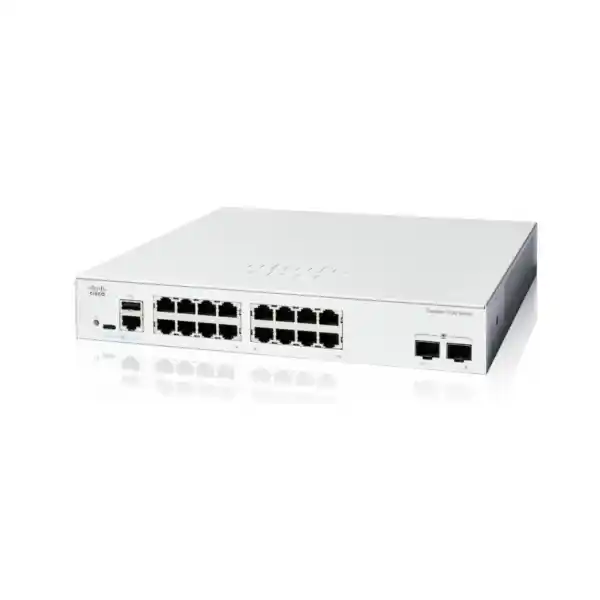
Cisco Catalyst C1200-16T-2G Network Switch Dubai
The Cisco Catalyst C1200-16T-2G is a compact, fanless smart switch built for small and medium business networks that need 16 Gigabit Ethernet access ports, two dedicated 1G SFP uplinks, practical Layer 2 controls, static Layer 3 routing, security policy features and straightforward management without moving into a larger enterprise switching platform.
Its strongest fit is a data-access role: desktop computers, printers, local servers, network appliances, non-PoE endpoints and uplinks to another switch or fibre backbone. It does not provide PoE on its 16 copper ports, so organisations powering IP phones, wireless access points or surveillance cameras directly from the access switch should compare the C1200-16P-2G or another PoE-capable model.
Direct answer for buyers
The C1200-16T-2G is a Cisco Catalyst 1200 Series smart managed Ethernet switch with 16 copper Gigabit data ports and two 1G SFP uplink interfaces. It is rack-mountable, fanless and intended for small and medium business switching rather than high-density campus core use.
It is commonly suited to office access switching, branch networks, server-room edge connectivity, segregated business VLANs, printer and workstation aggregation, and fibre uplinks between cabinets or network zones where 1G uplink bandwidth is appropriate.
Businesses that need more control than an unmanaged switch provides, but do not require a large enterprise chassis, PoE on access ports or 10G uplinks, can consider this model. It is particularly useful where predictable wired access, VLAN segmentation and basic inter-VLAN routing are required.
Confirm the physical and growth requirements before purchase: 16 access ports, data-only copper connectivity, and two 1G SFP uplinks. A deployment that needs PoE or a higher-speed 10G aggregation path should be sized around a different variant.
FourTeck can help validate port count, fibre reach, SFP selection, rack and power requirements, VLAN and IP segmentation, uplink architecture, migration sequence, support scope and whether a PoE or 10G-uplink Catalyst 1200 model is more appropriate for the target Dubai or UAE site.
Where the C1200-16T-2G fits in the Catalyst 1200 family
The Cisco Catalyst 1200 Series is positioned as an affordable smart-switch family for small and medium-sized businesses. The family covers compact and larger access-port counts, data-only and PoE variants, and models with either Gigabit or 10 Gigabit uplinks. Within that portfolio, the C1200-16T-2G occupies a very specific middle position: it supplies enough copper ports for a modest office or branch while retaining two dedicated SFP uplinks, but it avoids the cost and power budget associated with PoE hardware.
That identity matters because the model name can look similar to the C1200-16P-2G. The letter difference is operationally important. The C1200-16T-2G is data only on its RJ-45 ports; the C1200-16P-2G is the corresponding 16-port PoE model and carries a 120 W PoE budget. If the network design includes desk phones, wireless access points, cameras, door controllers or other powered Ethernet devices, a buyer should not assume those devices can be powered by the C1200-16T-2G. They would need separate power, PoE injectors, a downstream PoE switch, or a different switch model.
The two 1G SFP ports also define the intended uplink tier. They are useful for fibre runs to a router, firewall, distribution switch, another cabinet or a remote network area, particularly when electrical isolation or longer distance is desirable. However, they are not SFP+ 10G uplinks. If several high-traffic servers, Wi-Fi 6/6E access points, storage systems or downstream switches will converge through the unit, the uplink requirement should be calculated instead of assuming that two 1G links will remain sufficient.
For a buyer comparing unmanaged and fully managed alternatives, the value proposition sits in the middle. The C1200-16T-2G provides VLANs, spanning tree, link aggregation, security controls, QoS, static routing, monitoring and multiple management methods. That makes it substantially more controllable than a plug-and-play unmanaged switch, while the product family remains aimed at simpler SMB operations rather than the feature and licensing complexity of many large-enterprise access platforms.
Cisco C1200-16T-2G verified specification summary
The following values reflect Cisco Catalyst 1200 Series documentation current in August 2026. They should be used as the technical baseline for this exact product ID, while project quotations should separately confirm optics, patching, installation materials and any support services required for the final deployment.
| Specification | C1200-16T-2G detail |
|---|---|
| Product ID | C1200-16T-2G |
| Total system ports | 18 Gigabit Ethernet interfaces |
| Copper access ports | 16 × 10/100/1000 RJ-45 data ports |
| Uplinks | 2 × 1G SFP |
| Power over Ethernet | No PoE output on this model |
| Switching capacity | 36 Gbps, wire-speed nonblocking |
| Forwarding rate | 26.78 Mpps at 64-byte packets |
| Packet buffer | 1.5 MB, dynamically shared across ports |
| MAC address table | 8,000 addresses |
| Jumbo frame support | Up to 9,000 bytes; default MTU is 2,000 bytes |
| Active VLANs | Up to 255 simultaneously |
| IPv4 static routing | Up to 32 static routes and up to 16 IP interfaces |
| Access control lists | Up to 512 ACL rules with ingress and egress application options |
| QoS queues | 8 hardware queues |
| CPU / memory | Dual-core ARM 1.4 GHz, 1 GB DDR4 DRAM, 512 MB flash |
| Cooling | Fanless |
| Dimensions | 268 × 272 × 44 mm |
| Weight | 1.78 kg |
| Power input | 100–240 V AC, 50–60 Hz, internal universal supply |
| System power, worst case | 10.8 W at 110 V; 11.0 W at 220 V |
| Operating temperature | -5°C to 50°C |
| Operating humidity | 10% to 90% relative, noncondensing |
| MTBF at 25°C | 2,165,105 hours |
| Warranty | Cisco limited lifetime warranty; exact service terms should be confirmed for the purchasing channel and region |
Understanding the 16 copper ports and two SFP uplinks
The 16 RJ-45 interfaces are the main access layer. Each supports 10/100/1000 Ethernet, so a mix of legacy Fast Ethernet devices and current Gigabit endpoints can be connected without forcing every device to operate at the same speed. In a typical office, these ports may serve desktops, printers, thin clients, local file servers, firewalls, routers, building controllers or other Ethernet equipment. Because the ports are data only, the design remains particularly clean when endpoints already have mains power or when another device supplies PoE elsewhere in the network.
The two SFP slots are dedicated Gigabit uplinks, not copper/SFP combo ports. That is an important distinction from certain smaller Catalyst 1200 models. A dedicated SFP design means the fibre interfaces are available separately from the 16 copper ports, allowing all 16 RJ-45 access ports to remain in service while both optical uplinks are used. This can be useful for a primary uplink plus a secondary path, a link to two network zones, or an aggregated uplink where the topology and peer device support the intended configuration.
Cisco lists several compatible 1G transceiver choices across multimode fibre, single-mode fibre and copper media for the Catalyst 1200 family. Examples include MGBSX1 for multimode fibre, MGBLX1 and MGBLH1 for single-mode reach, GLC-SX-MMD and GLC-LH-SMD, and copper modules such as MGBT1 or GLC-TE. The correct optic is not selected solely by the switch model. Fibre type, connector presentation, actual distance, patch-panel construction, existing transceivers at the far end, link budget and environmental conditions all matter.
For a Dubai office with structured copper cabling and a nearby firewall, the SFP interfaces may remain unused initially. For a building with an MDF and one or more IDFs, they may become the most important interfaces in the design because fibre is often preferable between cabinets or floors. In either case, the quotation should distinguish the base switch from optional transceivers and fibre patch leads. An SFP slot does not by itself provide a working fibre connection; the compatible optic and physical media must match at both ends.
The 1G uplink ceiling should also be evaluated against traffic concentration. Sixteen users browsing cloud applications may be comfortable behind a 1G uplink, while a branch with local backups, virtualization traffic, large file transfers, multiple downstream switches or data-intensive media workflows can push a Gigabit aggregation link much harder. When the uplink is the likely bottleneck, moving to a Catalyst 1200 model with 10G SFP+ uplinks may offer more useful headroom than simply adding more access ports.
Performance: what 36 Gbps and 26.78 Mpps mean in practice
Cisco specifies the C1200-16T-2G at 36 Gbps switching capacity and 26.78 million packets per second for 64-byte packets, with wire-speed nonblocking operation. For an 18-port Gigabit design, 36 Gbps corresponds to the aggregate full-duplex switching fabric required to move traffic across all interfaces at their rated line speed. This means the internal switching capability is designed around the port configuration rather than being intentionally oversubscribed inside the chassis.
That does not mean every real deployment will experience 36 Gbps of usable application throughput. End-to-end performance is affected by endpoint network adapters, server storage, TCP behaviour, packet sizes, routing, firewall inspection, uplink capacity, cabling, fibre optics, congestion and any traffic policies configured on the switch. The switch can forward at line rate, but a 1G uplink remains a 1G uplink. Where many access ports communicate with systems upstream of that single link, contention may occur even though the switching fabric itself is not the limiting component.
The 1.5 MB shared packet buffer supports burst handling across the switch. Buffer size should be interpreted together with traffic patterns rather than used as a standalone quality indicator. For normal office workloads, interactive traffic and typical client-server flows, the switch is designed for the SMB access role. Storage-heavy designs, highly bursty east-west traffic or environments with large speed mismatches may deserve a more detailed architecture review, particularly if multiple high-throughput devices converge toward one uplink.
Jumbo frames up to 9,000 bytes are supported, with Cisco documenting a default MTU of 2,000 bytes. Jumbo frames can reduce protocol overhead in selected server, storage or virtualization designs, but they should not be enabled as an isolated switch setting. Every device and network segment along the relevant path must support the chosen frame size, and operational teams need a consistent MTU plan to avoid difficult-to-diagnose fragmentation or reachability problems.
A buyer therefore gets more value by asking whether the access and uplink architecture matches the workload than by focusing only on headline switching capacity. The C1200-16T-2G is technically capable within its 1G port design, but it should not be treated as a substitute for a 10G aggregation switch where server, storage or downstream-switch traffic is expected to exceed Gigabit uplink capacity.
Layer 2 controls for a business access network
VLAN segmentation
The switch supports up to 255 active VLANs simultaneously, including port-based and 802.1Q tagged VLANs. This allows an SMB to separate departments, guest access, management, voice, surveillance or server networks instead of running every endpoint in one broadcast domain. The practical benefit is not just organisation: good segmentation can reduce unnecessary broadcast exposure, improve policy clarity and give the firewall or routing design cleaner trust boundaries.
Spanning tree
Cisco documents support for classic STP, RSTP, MSTP, PVST+ and Rapid PVST+. These technologies are important where redundant links or multiple switches could create a Layer 2 loop. In a small single-switch installation they may appear unnecessary, but they become critical as soon as the access layer expands or dual paths are introduced. The spanning-tree mode should be consistent with the wider network and the expected failover behaviour.
Link aggregation
IEEE 802.3ad LACP is supported, with Cisco specifying up to four link aggregation groups and up to eight ports per group. Aggregation can provide additional logical bandwidth and resilience when both ends support the same design. It should not be confused with automatically doubling the speed of every single flow; traffic distribution depends on hashing behaviour, peer configuration and the mix of sessions crossing the aggregated link.
Multicast control
IGMP snooping versions 1, 2 and 3 and an IGMP querier are supported. These capabilities are useful when multicast video, IPTV, imaging or other group-based traffic is present, because the switch can constrain multicast forwarding to interested receivers instead of flooding traffic unnecessarily across the Layer 2 domain. The multicast design should still be tested end to end where routers, firewalls or multiple VLANs are involved.
Loop protection and diagnostics
Loopback detection, STP loopback guard, cable diagnostics, port mirroring and VLAN mirroring help an administrator troubleshoot common access-layer problems. These tools are especially valuable in offices where patching changes occur frequently. A wrong patch lead or unmanaged downstream switch can create symptoms that look like an internet or firewall problem; local switching diagnostics help narrow the fault domain before wider infrastructure is disturbed.
Static Layer 3 routing: useful, but understand its role
Unlike a basic unmanaged or purely Layer 2 switch, the Catalyst 1200 Series includes Layer 3 static routing. Cisco documents wire-speed IPv4 routing, up to 32 static routes and up to 16 IP interfaces, along with IPv6 routing and Layer 3 interfaces on physical ports, link aggregation groups, VLAN interfaces or loopbacks. This allows the C1200-16T-2G to route selected internal traffic between network segments without sending every packet to an external router.
For a smaller site, that can be valuable when several VLANs need predictable internal communication. A server VLAN and user VLAN, for example, may communicate through switch-based routing while internet-bound traffic continues toward the firewall. The design can reduce unnecessary hairpinning and keep local traffic local. However, static routing is not the same as the dynamic routing, policy control, stateful inspection, advanced telemetry or high-availability functions expected from an enterprise routing or security platform.
The key architectural question is where security policy should be enforced. If two VLANs require strict inspection between them, routing directly on the switch could bypass firewall controls unless ACLs and the overall design are deliberately configured. In contrast, if the VLANs are part of the same trusted environment and only need efficient internal reachability, switch-based static routing may be appropriate. The safest approach is to decide the trust boundaries first, then place gateways and routes accordingly.
DHCP relay and UDP relay support further help in segmented networks where a central DHCP server serves clients across different IP networks. This avoids deploying a DHCP server in every VLAN, but relay addresses, gateway interfaces, ACLs and server scopes must all align. During a migration, the existing DHCP and gateway topology should be documented before interfaces are moved to the new switch, because a technically correct switch configuration can still fail if the upstream addressing plan is inconsistent.
Security controls for an access switch
A managed access switch does not replace a firewall, but it influences how safely endpoints join and move through the LAN. The C1200 platform includes HTTPS management, SSH, RADIUS support, IEEE 802.1X in the authenticator role, port security, storm control, denial-of-service prevention, ACLs and multiple CLI privilege levels. These controls can make a significant difference compared with an unmanaged switch, particularly in shared offices, branch sites or networks with varied trust levels.
IEEE 802.1X is useful where access to a wired port should depend on successful authentication rather than merely having a cable connection. The feature can integrate with RADIUS-based authentication, and Cisco documents guest VLAN and single- or multiple-host modes. The operational dependency is the identity infrastructure: 802.1X needs a correctly designed RADIUS service, endpoint supplicants, certificates or credentials where applicable, fallback policy, and a support process for devices that cannot authenticate normally.
Port security can restrict learned MAC addresses and associate devices more tightly with physical ports. It can be useful for simple access control or to limit accidental expansion through unauthorized downstream switches. MAC-based controls should not be presented as strong identity by themselves because MAC addresses can be changed; their role is best understood as one layer within a wider access-security design.
ACL support extends policy control to traffic entering or leaving the switch. Cisco specifies up to 512 rules with matching options across MAC addresses, VLAN IDs, IPv4 or IPv6 addresses, protocols, TCP/UDP ports, DSCP, ICMP, IGMP and other fields, including time-based ACL capability. This is enough for meaningful access-layer filtering, but rule order, direction and maintenance discipline matter. Poorly documented ACLs can create hidden dependencies that surface only during changes or incident response.
Administrative security should also include practical measures around the product: use HTTPS and SSH instead of unencrypted management where possible, separate management traffic from normal user traffic, restrict who can reach the management interface, use SNMPv3 rather than weaker community-based approaches when monitoring infrastructure supports it, keep firmware current after compatibility review, back up configurations, and maintain an inventory of switch serial numbers, software versions and physical locations.
Quality of Service for voice, video and business applications
Cisco documents eight hardware queues, strict-priority and weighted round-robin scheduling, classification based on port, 802.1p, DSCP and other fields, plus ingress policing and egress shaping. These QoS capabilities matter when the access network carries a mix of real-time and bulk traffic. A voice call or interactive meeting is sensitive to delay and jitter, while a background backup can usually tolerate brief queuing. QoS lets the switch treat those traffic classes differently when congestion occurs.
The C1200 Series also provides a voice VLAN feature and Smartports/Auto Smartports functions that can simplify common endpoint configurations. On this specific data-only model, an IP phone can still carry Ethernet traffic and participate in a voice VLAN if the phone is powered separately, but the switch will not provide the electrical power. That distinction is important because buyers sometimes equate voice-VLAN support with PoE support; they are separate capabilities.
QoS should be designed end to end. Marking traffic on one access switch does not guarantee service quality if the upstream switch, firewall, WAN edge or provider ignores or rewrites those markings. Likewise, strict priority can create starvation risks if overused. The practical deployment approach is to identify genuinely delay-sensitive applications, confirm their marking behaviour, map them into a small number of classes, and validate the same policy across the traffic path.
For a typical Dubai branch using cloud voice or video conferencing, the switch may have plenty of raw bandwidth during normal operation. QoS becomes most valuable during congestion events: large local transfers, backups, software deployment or a busy uplink. A technically simple policy that protects real-time traffic is often easier to support than an elaborate classification scheme with dozens of rarely understood rules.
Management and monitoring options
The Catalyst 1200 family supports several management methods, which helps organisations choose between local administration and more centralised workflows. Cisco documents a built-in browser interface with basic and advanced modes, a scriptable CLI, Cisco Business Dashboard support, Cisco Business mobile app support, Cisco Network Plug and Play, SNMP versions 1, 2c and 3, RMON, syslog, port mirroring, cable diagnostics and multiple file-transfer or firmware-management methods.
Web interface
The built-in HTTP/HTTPS configuration utility provides browser-based setup, wizards, dashboards, maintenance and monitoring. It is a sensible starting point for organisations that want managed-switch functionality without requiring every administrator to work entirely from the CLI. HTTPS should be preferred for routine administration.
CLI and configuration files
The platform includes a scriptable CLI and supports text-editable configurations. This is useful for repeatable branch deployment, change control and troubleshooting, particularly when an administrator wants to compare configurations or use standard templates. CLI privilege levels also help separate basic operational access from full configuration authority.
Cisco Business Dashboard
Cisco Business Dashboard can discover and manage supported SMB network devices, and Cisco documents an embedded probe capability on the switch. This can reduce the need for a separate probe appliance or virtual machine at a small site. The exact operational model should still be matched with the customer’s current monitoring and support process.
SNMP, RMON and syslog
SNMPv3 and syslog provide useful integration points for infrastructure monitoring. RMON and mirroring features support traffic analysis and troubleshooting. Buyers with an existing network-management platform should confirm that the required MIBs, traps, polling methods and alert thresholds are included in their monitoring standard rather than assuming the switch will automatically appear with useful dashboards.
Firmware management deserves specific planning. Cisco supports browser-based upgrade, TFTP and SCP methods and documents dual images for more resilient upgrade handling. Even with dual images, production firmware changes should be backed by a saved configuration, a maintenance window appropriate to the site, release-note review, compatibility checks and a rollback plan. Branch environments with no onsite IT staff benefit from especially clear remote-access and recovery procedures.
Fanless design, power and physical deployment
The C1200-16T-2G is fanless. For a small office, meeting room cabinet, quiet branch, retail back office or other occupied environment, that can be a practical advantage because the switch does not add fan noise. Fanless operation also removes one mechanical cooling component, although the switch still depends on normal ventilation and ambient conditions. Cisco specifies an operating range of -5°C to 50°C and 10% to 90% relative humidity, noncondensing.
The chassis measures approximately 268 mm wide, 272 mm deep and 44 mm high and weighs about 1.78 kg. Cisco describes the model as rack-mountable and includes a mounting kit in the package. Because its width is narrower than a standard 19-inch rack, the supplied mounting hardware and cabinet geometry should be checked during installation planning rather than assuming the chassis itself spans the rack width. Adequate side and rear clearance should be preserved for cables and heat dissipation.
Power is supplied by an internal universal 100–240 V, 50–60 Hz supply. Cisco lists worst-case system consumption at approximately 10.8 W on 110 V and 11.0 W on 220 V, with idle power around 4.3–4.4 W. Those figures are low compared with PoE switches because this model does not deliver endpoint power. In a UPS-backed cabinet, the absence of a PoE load can simplify runtime calculations, but the total UPS design must include all connected network devices, not just the switch.
Dubai deployments require ordinary attention to cabinet cooling even when a switch is fanless. The switch may operate within its published range while the cabinet around it becomes much hotter because of firewalls, routers, UPS systems, servers or poor airflow. Closed wall cabinets, telecom cupboards and back rooms should be assessed as complete thermal environments. Clean power, sensible cable management and reachable patching often contribute more to long-term reliability than simply selecting a fanless switch.
Cisco also documents Energy Efficient Ethernet on copper Gigabit ports, automatic power reduction on inactive links, cable-length-based signal adjustment and the ability to disable LEDs. These features help reduce unnecessary power consumption without changing the basic forwarding role. In practice, the largest energy difference versus a PoE variant comes from not powering endpoints, so the model is most economical when PoE is genuinely unnecessary rather than when separate injectors would have to be installed for many devices.
Critical limitation: this is not a PoE switch
The most common purchasing mistake with this model would be selecting it for endpoints that are expected to receive electrical power through the Ethernet cable. The C1200-16T-2G does not provide PoE on its 16 RJ-45 interfaces. A device can still exchange Ethernet traffic through the switch while using a separate AC adapter or another power source, but the switch itself will not energise an IP phone, camera, access point or other powered device.
This matters particularly in new offices because the network switch is often selected at the same time as wireless, telephony and surveillance. A design may appear to need only 12 or 14 Ethernet ports, making a 16-port switch look ideal, but the power requirement can change the choice completely. If most endpoints are PoE devices, using individual injectors can create extra power bricks, more points of failure, untidy patching and a more complicated UPS plan.
When PoE is required, the C1200-16P-2G is the closest 16-port family comparison, with 16 PoE-capable Gigabit RJ-45 ports and a documented 120 W power budget. That does not automatically mean it is sufficient: the total wattage and per-port requirements of all powered devices must be calculated. High-power cameras or access points can consume a larger share of the budget, so the number of PoE ports and the total PoE budget are separate sizing questions.
Practical use cases in Dubai and the UAE
Small office access layer
A professional office with wired workstations, printers, a firewall and perhaps one or two local servers can use the switch as the primary access layer when fewer than 16 copper connections are needed. VLANs can separate staff, guest, management and server traffic, while an SFP uplink can connect to a building distribution point or another cabinet.
Branch office with centralised services
A branch that uses cloud applications and reaches central systems over a firewall or SD-WAN appliance may need managed local Ethernet more than large switching capacity. The C1200-16T-2G can provide predictable user access, VLANs, QoS and monitoring while the WAN edge handles internet, VPN and security policy. Uplink sizing should reflect the branch circuit and local traffic patterns.
Server-room edge switching
The model can connect management interfaces, appliances, backup devices or ordinary 1G server ports where the traffic profile stays within Gigabit access and uplink requirements. It is less suitable as a high-throughput virtualization or storage aggregation switch when multiple hosts need sustained multi-gigabit east-west traffic or a 10G path toward the core.
Retail and back-office networks
POS terminals, printers, office PCs, management systems and non-PoE devices can be grouped on a managed switch while traffic is separated using VLANs. The fanless design may be useful in smaller occupied back rooms. Security policy should still account for payment systems and other regulated or sensitive devices at the firewall and application layers.
Fibre-linked secondary cabinet
Where a second telecom cabinet needs up to 16 copper access connections, the two SFP interfaces can provide optical connectivity back to the main network. Fibre type, distance, transceiver compatibility, redundancy design and available pathways should be confirmed before ordering optics. A redundant pair of links must also be configured to avoid Layer 2 loops.
Non-PoE network expansion
An existing network may already have separate PoE switching for phones and wireless while needing additional data ports for desktop or infrastructure devices. In that case, a data-only switch can be a more focused expansion option. The design should confirm whether the existing distribution layer has enough uplink capacity and whether the new VLANs are trunked consistently across switches.
When the C1200-16T-2G may not be the right choice
A technically capable switch can still be the wrong procurement choice if it does not match the site. The first reason to select something else is PoE. If the access layer is expected to power phones, cameras or wireless access points, either use a PoE-capable switch or deliberately design another powering method. The second reason is uplink speed. Two 1G SFP ports are appropriate for many SMB networks, but they do not provide the 10G bandwidth available on C1200 models with SFP+ uplinks.
Port growth is another factor. A 16-port switch can be cost-effective for a site with ten or twelve wired endpoints, leaving sensible spare capacity. It can become a false economy when a new office already expects 15 or 16 devices on day one, because adding only two or three endpoints may require another switch. Buyers should count not only users but also printers, access-control panels, uplinks, servers, firewalls, management interfaces, room systems and planned equipment.
The model also should not be mistaken for a full enterprise campus access switch just because it carries the Catalyst name. The 1200 Series is designed for SMB networking with a useful set of managed features. Large organisations that require complex dynamic routing, high-density stacking, advanced campus automation, extensive telemetry, sophisticated redundancy or broader enterprise policy integration should compare the relevant Cisco enterprise switching families rather than assuming a small-business smart switch will satisfy every requirement.
Finally, a high-availability design needs more than one reliable switch. If the entire office depends on a single C1200-16T-2G, that chassis remains a single point of failure even though Cisco publishes a strong MTBF figure and a limited lifetime warranty. Critical sites may need redundant switches, dual uplinks, resilient power, spare hardware or documented replacement procedures. Availability requirements should be stated explicitly during design rather than inferred from the product brand.
Nearby Catalyst 1200 models worth comparing
| Model | Access ports | Uplinks | Best comparison reason |
|---|---|---|---|
| C1200-16T-2G | 16 × 1G data | 2 × 1G SFP | Balanced choice when 16 data-only ports and Gigabit fibre uplinks are enough. |
| C1200-16P-2G | 16 × 1G PoE+ | 2 × 1G SFP | Compare when phones, cameras or wireless access points must be powered from the switch. Cisco documents a 120 W PoE budget. |
| C1200-24T-4G | 24 × 1G data | 4 × 1G SFP | Compare when the site needs more copper capacity or more Gigabit fibre paths but still does not require PoE. |
| C1200-24T-4X | 24 × 1G data | 4 × 10G SFP+ | Compare when uplink throughput and growth matter more than keeping the access switch small. |
| C1200-8T-E-2G | 8 × 1G data | 2 × 1G copper/SFP combo | Compare for a smaller branch where eight access ports are enough and a more compact footprint is preferred. |
The comparison should be driven by the next several years of port and uplink demand, not just today’s patch-panel count. Moving from 16 to 24 ports may cost less than buying a second switch soon after deployment, while moving to 10G uplinks can be justified where downstream aggregation, server traffic or WAN speeds are expected to grow. Conversely, buying a larger PoE model for a simple data-only office can add unnecessary cost and power capacity that never gets used.
Fibre optics, cabling and compatibility decisions
A switch order is complete only when the physical media plan is clear. For copper access, Cisco specifies Category 5e or better for 1000BASE-T. Existing cabling that negotiates only at 100 Mbps, shows errors or fails cable diagnostics may need remediation even if the new switch is working correctly. Patch leads, outlet termination, patch panels and horizontal cabling should all be considered part of the Ethernet path.
For SFP uplinks, choose the transceiver according to the media and distance rather than using a generic “fibre SFP” description. Multimode and single-mode fibres are different media families, and connector type and wavelength must match the link. Cisco lists supported 1G optics including SX and LX/LH options as well as certain copper SFP modules. The far-end device must also support a compatible optic and speed. A transceiver that physically fits the slot is not automatically a supported or working design.
Where an existing fibre link is being reused, record the fibre type, strand count, connector type, patch-panel labels, approximate distance, existing optics and peer device model before quotation. In older buildings, the description in a spreadsheet may not match the fibre actually installed. A light-source/power-meter test or OTDR assessment may be appropriate for questionable links, but the required test method depends on the project rather than the switch itself.
Link aggregation across the two SFP ports can be considered when more aggregate throughput or resilience is required and the far-end switch supports a compatible LAG. This requires a deliberate design because a two-link LAG is not the same as an independent primary/backup pair, and a single traffic flow may remain limited by the hashing outcome. If the real requirement is multi-gigabit performance for single sessions, a model with 10G SFP+ uplinks is a cleaner architectural answer.
Compatibility also includes logical configuration. VLAN tagging on an uplink must match the peer; native or untagged VLAN expectations must be documented; spanning-tree behaviour should be consistent; and management addressing must remain reachable after migration. Most failed switch replacements are not caused by raw Ethernet incompatibility but by missing details in the configuration handover.
Deployment planning for a Dubai office or branch
A small managed switch can be installed quickly when the design is known, but business downtime usually comes from dependencies rather than mounting screws. Before a change window, create a port map showing current endpoint, VLAN, speed, duplex, trunking and uplink information. Record the current management IP, default gateway, DNS and NTP settings, and export the old switch configuration where possible. If the existing network uses static endpoint assignments or unusual VLAN numbering, those details should be preserved or intentionally changed.
Physical preparation should include cabinet space, mounting kit, power socket or PDU position, UPS capacity, patch leads, fibre transceivers, fibre jumpers and labels. The C1200-16T-2G has an internal power supply, so the installer needs a normal AC feed rather than an external power brick for this model. The fanless chassis still needs reasonable ventilation, and front-panel access should remain clear for patching, status LEDs, reset control and the USB Type-C console/file-management interface documented by Cisco.
Configuration can be staged before the migration. Create management access, VLANs, trunks, access-port assignments, spanning-tree preferences, LAGs, static routes, ACLs, SNMP, syslog and NTP settings as needed. Avoid copying an old configuration blindly from another product family: interface names, defaults and command syntax can differ. Instead, translate the intended network behaviour into the supported Catalyst 1200 configuration and validate the result.
During cutover, move uplinks and a small number of test endpoints first when the site permits it. Verify DHCP, DNS, gateway reachability, internet access, internal services and monitoring before migrating the remaining ports. Where VLANs are used, test at least one endpoint in each relevant VLAN. If the switch performs static routing, test both routed and firewall-inspected paths to ensure traffic is crossing the intended gateway.
After migration, save the running configuration, create a backup copy, update the network diagram and asset register, and capture the firmware version and serial number. Operational documentation should show not only which device was installed but also which ports are trunks, which VLANs exist, which SFPs are fitted, where the fibre runs terminate and how the switch is accessed for support. This information materially reduces recovery time during a future incident.
Network migration considerations from an unmanaged switch
Replacing an unmanaged switch with the C1200-16T-2G creates new control opportunities but also introduces configuration choices that did not exist before. The simplest migration is to keep all access ports in one VLAN and use the switch as a managed equivalent, then introduce segmentation in a planned second phase. This can reduce change risk where the customer first wants visibility and remote administration rather than a complete network redesign.
A more ambitious migration may create separate VLANs for staff, servers, guests, voice, cameras and management. That approach can improve organisation and security but affects DHCP scopes, firewall interfaces or subinterfaces, routing, DNS dependencies and any devices that use hard-coded IP addresses. Applications that previously discovered devices by broadcast may also behave differently when endpoints are separated across VLANs. The segmentation plan should therefore include application testing, not just switch configuration.
If the old switch has no configuration export, the physical patching becomes the main source of truth. Label cables before disconnection and map endpoints where possible. Unlabelled cabling is a common cause of avoidable downtime because an installer can reconnect every cable successfully yet place devices into the wrong logical network. The C1200’s managed ports give administrators better visibility after installation, but they cannot infer the intended business role of every unknown cable.
A managed-switch migration is also a good opportunity to remove abandoned links, shut unused ports, define a management VLAN, enable secure administrative protocols, centralise logging and document spanning-tree topology. These measures are not required merely to make the switch forward traffic, but they turn the hardware replacement into an operational improvement instead of recreating the same unmanaged design on a more capable device.
Procurement and quotation guidance
Cisco states that Catalyst 1200 Series products are ordered through distributors and partners rather than directly by end users from Cisco. For a UAE quotation, the switch hardware is only one line item. The project may also require SFP transceivers, fibre or copper patch leads, rack accessories, power distribution, UPS capacity, installation, configuration, migration, testing, documentation and support. A low hardware-only price can therefore be misleading when the buyer actually needs a complete working network change.
Model identity should be confirmed exactly as C1200-16T-2G. Similar family names can create purchasing errors, especially between “T” data-only and “P” PoE variants or between “2G” and models offering 10G SFP+ uplinks. The product ID should appear on the quotation, purchase order and delivery documentation so that the receiving team can verify the supplied unit before installation.
Optics should be quoted by exact part number when fibre uplinks are needed. A statement such as “2 x SFP” on the switch specification describes available slots, not included optical modules. The customer should provide the fibre type and link distance, and the partner should identify the appropriate supported transceiver. Where the far-end switch is from another vendor or a different Cisco family, interoperability and optical specifications need to be checked at both ends.
Support expectations should also be explicit. Cisco documents a limited lifetime warranty and one year of access to the Small Business Support Center for the series, but warranty coverage is not the same as a guaranteed onsite replacement service or a managed support contract. Businesses with strict response-time requirements should request the appropriate commercial support arrangement rather than relying on warranty language alone.
For multi-site customers, procurement consistency can be more valuable than the lowest per-unit price. Standardising the same model, firmware baseline, VLAN templates, monitoring configuration, spare policy and installation documentation across branches can make support easier. The exception is when branches have materially different requirements; forcing every site onto the same 16-port data-only model can create unnecessary compromises in PoE, uplink speed or port count.
Sizing checklist before you order
1. Count every wired endpoint
Include desktops, printers, servers, firewalls, routers, building systems, uplink devices and future connections. Do not size only by employee headcount. A 16-port switch should normally retain useful spare capacity instead of arriving fully occupied.
2. Identify PoE requirements
List every phone, camera, access point or other endpoint that expects power over Ethernet. If several such devices exist, compare a PoE model rather than planning around multiple injectors unless there is a clear reason to do so.
3. Measure uplink demand
Decide whether 1G SFP uplinks are appropriate for the firewall, core, distribution switch or remote cabinet. If large local transfers or downstream aggregation are expected, evaluate a 10G-uplink model before installation.
4. Define segmentation
List the VLANs, subnets, DHCP scopes and firewall zones that the switch must support. Decide which VLANs are switched only, which are routed on the C1200 and which must traverse a firewall for inspection.
5. Confirm fibre details
For each SFP link, record multimode or single-mode fibre, connector presentation, approximate distance, peer device and existing optic if present. This information determines the correct transceiver far more reliably than distance alone.
6. Define support and installation scope
State whether the requirement is supply only, configuration, onsite installation, migration, after-hours cutover, documentation, monitoring integration or ongoing support. The project scope changes the quotation more than the base switch specification does.
Operations, monitoring and lifecycle discipline
Once the switch is in production, routine operational discipline matters more than constant reconfiguration. Start with configuration backups and version control. A saved configuration should be exported after approved changes and stored somewhere accessible during an incident. The backup should be labelled with site, model, date and software version so an engineer can identify which file belongs to which switch.
Monitoring should cover availability, interface state, errors, discards, bandwidth utilisation, environmental alerts where available and notable security or spanning-tree events. SNMPv3 and syslog provide standard integration points. Alert thresholds should reflect normal behaviour: a branch uplink that regularly peaks near 90 percent deserves capacity review, while a user access port reaching line rate during a file transfer may be entirely normal.
Firmware should be reviewed periodically rather than upgraded blindly on every release or ignored for years. Read release notes, identify security fixes, confirm affected features, test where appropriate and schedule changes. Dual-image support improves recovery options, but a site can still experience downtime during reboot or configuration issues. Critical branches should have an approved maintenance process and a remote-access plan that does not depend solely on the switch being changed.
Lifecycle planning also includes capacity. If port utilisation rises steadily, new access points are planned, or internet and server speeds increase, the original 16-port 1G-uplink architecture may no longer be the best fit even though the switch itself remains operational. Reviewing port count and uplink utilisation annually helps identify growth before an emergency expansion is needed.
Cisco’s limited lifetime warranty provides useful hardware protection, but business continuity is an operational design question. A replacement process, spare strategy, supplier relationship and documented configuration can matter more during an outage than the nominal warranty term. Sites with low tolerance for downtime should specify those requirements during procurement so the support model matches the business impact.
Buyer questions about the Cisco Catalyst C1200-16T-2G
Does the C1200-16T-2G provide PoE?
No. This exact model is data only on its 16 RJ-45 ports. It can carry Ethernet traffic for a separately powered phone, access point or camera, but it does not supply electrical power through the Ethernet cable. Buyers needing 16 PoE access ports should compare the C1200-16P-2G and calculate the required power budget.
Are the two uplinks 10 Gigabit?
No. The C1200-16T-2G has two 1G SFP uplinks. Cisco offers other Catalyst 1200 models with 10G SFP+ uplinks, including 24- and 48-port variants. If the access switch will aggregate substantial server, storage or downstream-switch traffic, the uplink requirement should be reviewed before choosing this model.
Can it create VLANs?
Yes. Cisco documents support for up to 255 active VLANs at the same time, with port-based and 802.1Q tagged VLAN capability, management VLAN, guest VLAN and Auto Surveillance VLAN functions. The actual VLAN design should be coordinated with the firewall, router, DHCP scopes and any upstream or downstream switches.
Can the switch route between VLANs?
Yes, within the static-routing capabilities of the platform. Cisco specifies wire-speed IPv4 routing, up to 32 static routes and up to 16 IP interfaces, plus IPv6 routing. The design still needs to decide whether inter-VLAN traffic should be routed locally or sent through a firewall for security inspection.
Is it suitable for IP phones?
It can carry IP voice traffic and provides voice VLAN and QoS capabilities, but an IP phone will need its own power source because this model is not PoE. In a new telephony deployment, a PoE switch is usually operationally simpler when many phones must be powered from the network cabinet.
Is it suitable for wireless access points?
It can carry access-point data traffic, including VLAN trunks where the design requires them, but it will not power the access point. Modern wireless designs may also create more than 1 Gbps of aggregate demand, so both PoE and uplink capacity should be checked before the switch is selected for a wireless-heavy site.
Does it support link aggregation?
Yes. Cisco documents IEEE 802.3ad LACP support, with up to four link aggregation groups and up to eight ports per group. Aggregation requires compatible configuration at both ends, and traffic distribution across member links depends on hashing. It should be designed for aggregate throughput or resilience, not assumed to double every individual session.
Is the switch fanless?
Yes. Cisco lists the C1200-16T-2G as fanless. This makes it attractive for smaller offices and quieter environments, but it still needs normal ventilation and must remain within the published operating temperature and humidity limits. Fanless does not mean the switch can be installed in a sealed, overheated cabinet.
Can it be rack mounted?
Yes. Cisco lists the model as rack-mountable and includes a mounting kit in the package. The chassis is approximately 268 × 272 × 44 mm, so installers should verify the rack and bracket arrangement, leave suitable room for cabling and airflow, and plan the power feed and patch-panel layout before the change window.
Which SFP should be ordered?
There is no single correct SFP for every installation. The answer depends on fibre type, distance, connector presentation, peer device and existing optics. Cisco lists supported 1G multimode, single-mode and copper transceiver options for the family. The optic should be selected only after the physical link has been identified.
Can it be monitored with SNMP?
Yes. Cisco documents SNMP versions 1, 2c and 3 with traps, along with RMON and syslog. SNMPv3 is the preferable choice where the monitoring platform supports it because it offers a stronger security model than older community-string approaches. The required OIDs, traps and alert thresholds should be integrated with the customer’s monitoring standard.
Is it suitable as a core switch?
For a very small network it may perform central switching and static routing, but the model is fundamentally an SMB smart switch with 1G access and 1G uplinks. Networks that need high-throughput aggregation, advanced dynamic routing, extensive redundancy, stacking or enterprise campus automation should evaluate a more appropriate core or distribution platform.
FourTeck resources for UAE network projects
For organisations planning network switching, structured cabling, firewall connectivity or broader infrastructure changes in the UAE, FourTeck UAE provides a regional starting point for business technology requirements. Buyers can use the switching requirement as part of a wider review that includes WAN connectivity, security, racks, power, cabling and ongoing support.
Where the C1200-16T-2G will sit behind or beside perimeter security infrastructure, Firewall Dubai by FourTeck is relevant for firewall and network-security projects. The switch and firewall should be designed together when VLAN gateways, inter-VLAN inspection, trunk links or segmented security zones are involved.
Customers that need installation, maintenance, migration or broader infrastructure assistance can also review FourTeck IT Services UAE. A managed-switch purchase becomes much more predictable when the installation scope, change window, documentation, monitoring and post-cutover support are decided before equipment arrives onsite.
For organisations with regional or multi-country technology requirements, FourTeck provides the broader corporate reference point. Multi-site customers should standardise where standardisation improves operations, while still sizing each branch for its actual port count, PoE demand, uplink speed and resilience requirements.
Decision recap: is the C1200-16T-2G the right shortlist model?
What FourTeck needs for an accurate quotation
A useful quotation can be prepared much more accurately when the project inputs describe the intended network rather than only the switch name. The following information helps determine whether the C1200-16T-2G is correct and which accessories or services belong in the scope.
Confirm C1200-16T-2G and the number of units required at each site.
List active wired endpoints and expected additions so spare capacity is intentional.
Identify phones, cameras and access points that expect power from the network.
State peer devices, required speeds, redundancy expectations and whether LACP is planned.
Provide multimode or single-mode type, distance, connectors and existing transceivers.
List VLANs, subnets, DHCP requirements, gateways and firewall inspection boundaries.
Identify Dubai/UAE site, rack position, cabinet constraints and change-window requirements.
Specify supply only, configuration, onsite installation, migration, documentation or ongoing support.
Plan the C1200-16T-2G around the network you actually need
The Cisco Catalyst C1200-16T-2G is a focused choice for managed 1G data access: 16 copper ports, two 1G SFP uplinks, fanless operation, VLANs, static routing, QoS, security controls and practical management. Its limitations are equally clear. It does not provide PoE, and its uplinks are Gigabit rather than 10 Gigabit. A correct purchase therefore depends on endpoint count, power requirements, uplink demand, fibre media and the intended segmentation architecture.
For a new Dubai office, branch refresh or expansion project, provide the current port map, expected growth, PoE device list, fibre details and installation scope. That information makes it possible to determine whether this exact model is the right fit or whether a 24-port, PoE or 10G-uplink Catalyst 1200 alternative will deliver a cleaner long-term result.

Reviews
There are no reviews yet.