
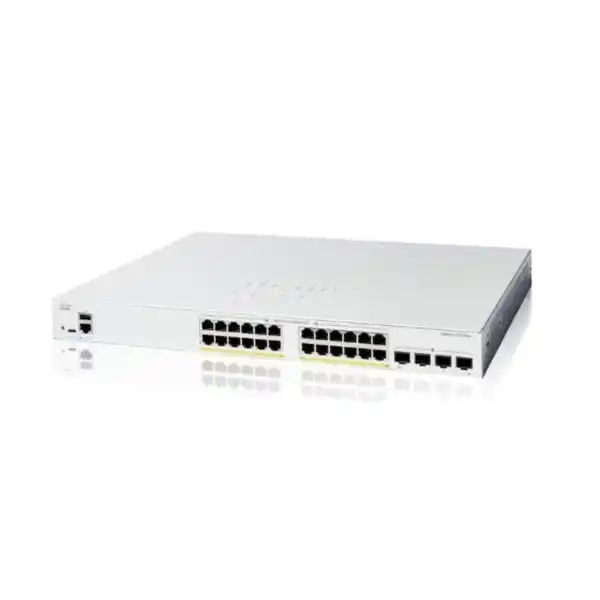
Cisco Catalyst C1200-24T-4G Network Switch Dubai
The Cisco Catalyst C1200-24T-4G is a 24-port Gigabit Ethernet smart managed switch with four 1G SFP uplinks, a fanless 1U rack-mountable chassis, Layer 2 switching, static Layer 3 routing, VLANs, ACLs, QoS, link aggregation, IPv4/IPv6 support, and secure management. It is designed for business networks that need dependable wired access and fibre uplinks without PoE on the access ports.
Direct answer for buyers evaluating the C1200-24T-4G
The Cisco Catalyst C1200-24T-4G is a managed Gigabit Ethernet access switch in the Catalyst 1200 family. It provides twenty-four 10/100/1000BASE-T RJ-45 ports for wired endpoints and four dedicated 1 Gigabit SFP ports for uplinks. The model is mainly used to connect desktop computers, printers, servers, storage appliances, firewalls, routers, wireless infrastructure that has its own power source, building systems, and other Ethernet devices while giving administrators business-oriented control over VLANs, spanning tree, link aggregation, access policies, traffic priority, monitoring, and static IP routing.
It is most appropriate for small and medium organisations, branch offices, schools, clinics, retail operations, professional offices, light industrial sites, hospitality back-office networks, and structured cabling environments that need 24 non-PoE Gigabit access ports. The most important factor to confirm is not simply the port count: buyers should verify whether connected devices need PoE, whether 1G SFP uplinks provide enough aggregate bandwidth, which fibre type and transceiver reach are required, and whether the planned routing and resiliency design fits the feature set of a smart managed access switch.
FourTeck can help determine whether this exact data-only model is the right fit, whether a C1200 PoE variant is necessary, whether a 4X model with 10G SFP+ uplinks is more suitable, which SFP modules and fibre patching are needed, how VLANs and uplinks should be arranged, and what installation or migration work should be included in a Dubai or UAE quotation.
Exact model identity and where it fits in the Catalyst 1200 family
C1200-24T-4G is an exact Cisco product identifier, not a generic description for any 24-port Catalyst switch. The model name contains useful purchasing clues. “24T” identifies twenty-four copper Gigabit Ethernet data ports, while “4G” identifies four Gigabit-class SFP uplinks. The absence of “P” or “FP” matters because this model does not provide a PoE budget for powered endpoints. Likewise, “4G” must not be confused with “4X”: the C1200-24T-4X family member uses four 10 Gigabit SFP+ uplinks and therefore suits networks that expect substantially more uplink traffic or higher-speed aggregation.
Within a typical office wiring design, the C1200-24T-4G sits at the access layer. It can terminate horizontal copper runs from workstations and other wired devices, then connect upstream through one or more SFP links to a router, firewall, aggregation switch, server segment, fibre distribution frame, or another switch. Because the uplinks are dedicated rather than shared combo ports, using an SFP link does not consume one of the twenty-four RJ-45 access ports. That is useful when a buyer actually needs the full copper port count.
The model is particularly attractive when quiet operation matters. Cisco lists the C1200-24T-4G as fanless. In a proper rack or cabinet with suitable environmental conditions, the lack of a fan removes fan noise and one common mechanical wear component. Fanless should not be interpreted as permission to install the switch in an unventilated or excessively hot enclosure; thermal design of the cabinet still matters, especially in UAE sites where communications rooms can experience elevated ambient temperature if cooling is inadequate.
This family position also explains when the model is not the best choice. If access points, IP phones, cameras, door controllers, or other devices are expected to receive power from the switch, a PoE-capable C1200 variant should be evaluated. If multiple VLANs will push sustained traffic through the uplink, large file transfers regularly cross the access layer, or the switch will aggregate several busy downstream switches, four 1G SFP uplinks may be too restrictive and a 10G-uplink model can be a better design decision.
Verified C1200-24T-4G hardware and performance specification
| Specification | C1200-24T-4G detail | Buyer implication |
|---|---|---|
| Access ports | 24 × 10/100/1000 Gigabit Ethernet RJ-45 | Suitable for up to 24 directly attached copper Ethernet links before considering downstream expansion. |
| Uplinks | 4 × 1G SFP | Confirm optics, fibre type, distance, connector path and whether 1G uplink speed is adequate. |
| Switching capacity | 56 Gbps | Matches the bidirectional line-rate capacity of twenty-eight 1G interfaces in this model. |
| Forwarding rate | Approximately 41.67 Mpps for 64-byte packets | Designed for nonblocking wire-speed switching within the published platform capacity. |
| Packet buffer | 1.5 MB aggregate, dynamically shared | Bursty traffic still requires sensible uplink sizing and queue design; buffer size does not eliminate congestion. |
| Form factor | Rack-mountable, 445 × 240 × 44 mm | Fits a standard 19-inch rack environment as a 1U-class switch. |
| Weight | About 2.63 kg | Useful for rack planning, shipping and remote-site installation logistics. |
| Cooling | Fanless | Quiet operation, while normal cabinet airflow and temperature control remain important. |
| Power input | Internal universal 100–240V AC, 50–60 Hz | No separate external brick is expected for this model; confirm UAE rack power and UPS provision. |
| PoE | Not provided on the 24 RJ-45 access ports | Powered endpoints require their own power source, injectors, or a PoE-capable alternative switch. |
These specifications are important because they define the physical and performance envelope of the exact product. A quotation that merely says “24-port Cisco managed switch” is not sufficiently precise: uplink speed, PoE capability, chassis format and feature set can materially change the right SKU, installation design and price.
Port architecture: 24 copper access links plus four dedicated 1G SFP uplinks
The central purchasing reason for choosing the C1200-24T-4G is its port mix. The twenty-four RJ-45 ports support 10/100/1000 Mbps Ethernet, making the switch compatible with common Gigabit copper endpoints and older devices that negotiate at Fast Ethernet where appropriate. For new structured cabling, Category 5e or better is the practical baseline for 1000BASE-T, with Category 6 or better commonly selected in modern office installations for cable-quality margin and future planning.
The four SFP slots operate at 1 Gigabit. They can be used for fibre uplinks between floors, communications rooms, buildings or network zones, or with supported copper SFP modules where a particular topology calls for them. Optics are a separate design item rather than something to assume from the switch alone. A multimode link across a building may use different modules and fibre than a long single-mode campus link, and bidirectional optics have pairing requirements that must be planned correctly. The switch model therefore answers only one part of an uplink question; the end-to-end media path has to be specified as well.
Four uplink slots give topology flexibility. One organisation may use a single SFP uplink and keep three slots reserved for future links. Another may build an LACP bundle where the upstream platform and network design support the same aggregation. A branch could dedicate one uplink to the core, one to a server or distribution segment, and another to a separate network path. The correct arrangement depends on spanning-tree design, failure domains, traffic patterns and the capabilities of the upstream device. Simply inserting four optics does not automatically create 4 Gbps of usable end-to-end bandwidth; links need the appropriate logical configuration, and a single flow may still be constrained by hashing behaviour within an aggregate.
The main limitation is straightforward: these are 1G SFP uplinks, not 10G SFP+. A 24-port access switch can easily serve many endpoints that individually use modest bandwidth, so a 1G upstream link may be completely reasonable in a typical office. However, an environment with frequent large backups, centralised storage, high-resolution video movement, heavy workstation-to-server traffic, virtualisation hosts or several downstream access switches can create sustained uplink contention. That is where the C1200-24T-4X deserves comparison.
When FourTeck prepares a deployment, useful uplink information includes the number of fibre paths, current switch at the far end, SFP type already standardised in the network, fibre mode, connector and patch-panel arrangement, approximate distance, desired redundancy, expected traffic load and whether the new switch must join an existing LACP or spanning-tree topology. These details prevent an otherwise correct switch from arriving with the wrong transceivers or an unsuitable uplink plan.
Switching performance, congestion and practical sizing
Cisco publishes a 56 Gbps switching capacity and a forwarding rate of about 41.67 million packets per second for the C1200-24T-4G. Those numbers align with a nonblocking twenty-eight-port Gigabit design under the stated test conditions. They indicate that the switch fabric itself is designed to forward at wire speed across the installed 1G interfaces rather than behave like a low-cost device with a heavily oversubscribed internal backplane.
A nonblocking switch fabric does not mean every network built around the switch will be congestion-free. Most business traffic converges on shared resources: internet gateways, firewalls, servers, storage, cloud access or upstream distribution. Twenty-four access ports can collectively generate more demand than a single 1G uplink can carry. Congestion therefore appears at the output interface or upstream service even though the internal fabric has adequate switching capacity. This is why uplink utilisation, traffic direction and application behaviour matter more to real-world sizing than the switching-capacity headline alone.
The 1.5 MB dynamically shared packet buffer supports normal burst absorption, but buffers are finite. Large microbursts or sustained oversubscription can still lead to queueing and packet loss. Business applications react differently: file transfers may simply slow down, real-time voice and video are more sensitive to latency and loss, and TCP-based workloads can change throughput as congestion develops. Proper QoS and sensible link capacity reduce the risk, but they do not create bandwidth that is not physically present.
For a 20-to-24-user office where most traffic is web, email, cloud applications, printing and ordinary file access, the model can be an efficient access switch. For a design where many high-performance workstations continuously reach central storage, or where the switch will aggregate several busy network segments, the 4G uplinks are a constraint to assess carefully. A larger switching-capacity number on the same access switch will not solve an upstream bottleneck if the chosen uplink remains 1G.
Layer 2 control: VLANs, spanning tree, link aggregation and multicast
The C1200 platform goes well beyond unmanaged Ethernet switching. Cisco documents support for port-based and IEEE 802.1Q VLANs, with up to 255 active VLANs simultaneously. That gives administrators the ability to separate departments, guest traffic, management devices, voice infrastructure, surveillance systems, servers or other logical groups even when they share the same physical switch. VLAN design is especially useful when a firewall or router applies different security rules between segments, or when a network team wants to reduce broadcast domains and make troubleshooting more structured.
Spanning Tree Protocol capabilities include classic STP, Rapid Spanning Tree, Multiple Spanning Tree and Cisco-oriented PVST+/Rapid PVST+ options supported by the series. These features help prevent Layer 2 loops when redundant physical paths exist. Redundancy without spanning-tree control can be dangerous because a loop can amplify broadcasts and destabilise the entire segment. The correct spanning-tree mode, bridge priorities, edge-port treatment and uplink design should therefore be planned rather than left to chance in a multi-switch network.
Link aggregation with IEEE 802.3ad LACP allows multiple physical links to operate as a logical group when both ends support compatible configuration. Cisco specifies up to four groups, with up to eight ports per group on the Catalyst 1200 series. LAGs can improve aggregate bandwidth and offer link-level resilience, but they are not a substitute for understanding traffic distribution. Hashing typically determines which member link carries a given flow, so a single conversation may remain limited by one physical member even while multiple simultaneous flows use the group effectively.
Multicast control is another practical business feature. IGMP snooping can restrict multicast streams to ports that have requested them instead of flooding the traffic everywhere. This can be valuable in networks carrying multicast video, imaging, certain discovery services or specialised business systems. An IGMP querier is also available for Layer 2 multicast domains where no multicast router is present. IPv6 multicast support includes MLD snooping, which serves a similar traffic-control purpose for IPv6 environments.
These Layer 2 functions matter most when they are configured as part of an intentional design. A managed switch does not automatically segment users simply because VLAN features exist. Ports need correct access or trunk membership, allowed VLAN lists need to match upstream configuration, management access should be placed deliberately, and redundant links need a consistent spanning-tree or LAG strategy. For migration from an unmanaged switch, documenting existing connected devices before moving cables helps avoid discovering hidden static addresses, unusual VLAN tagging or legacy dependencies after cutover.
Static Layer 3 routing: useful, but not a full routing platform
Cisco documents wire-speed IPv4 and IPv6 routing capabilities on the Catalyst 1200 series, including IPv4 static routing, up to 32 static routes and up to 16 IP interfaces. Layer 3 interfaces can be configured on physical ports, link aggregation groups, VLAN interfaces or loopback interfaces. DHCP relay and UDP relay functions are also available for designs in which client broadcasts must reach services in another IP domain.
For a small business, this can be enough to route between internal VLANs directly on the switch, keeping local east-west traffic from unnecessarily traversing an internet firewall. For example, a user VLAN and a local printer VLAN may communicate according to switch and network policy while internet-bound traffic still reaches the security gateway. This can improve architectural efficiency when the requirements are straightforward and security policy is deliberately designed.
The limitation is equally important: static routing is not the same thing as a feature-rich enterprise routing stack with dynamic routing protocols, advanced policy routing, large route tables or complex WAN functions. If the site needs sophisticated routing convergence, many prefixes, dynamic topology exchange or deep network-services integration, the routing role should be assigned to a more appropriate router, firewall, Layer 3 core or higher-tier switch.
When switch-based static routing makes sense
- A modest number of internal VLANs with stable network paths.
- Local inter-VLAN traffic that does not need to pass through a firewall for every flow.
- A branch or office with simple routing requirements and centralised internet security.
- A need to reduce dependence on a router for basic internal path selection.
- A design that can be documented clearly and supported by the organisation’s IT team.
Security controls for a managed business access layer
The C1200 series includes multiple controls that help administrators reduce unauthorised network access and limit unnecessary exposure. IEEE 802.1X can use RADIUS authentication so that connected users or devices must be authorised before gaining normal network access. Guest VLAN options and single or multiple host/session modes allow the access policy to be adapted to the endpoint environment. This is a major difference from an unmanaged switch, where connecting a cable often immediately extends the same network to whatever device is attached.
Port security can limit learned MAC addresses and bind source MAC behaviour to access ports, adding another control for predictable endpoint locations. Access Control Lists can match a wide range of Layer 2 through Layer 4 information. Cisco specifies support for up to 512 ACL rules in the series, with matching criteria that include MAC addresses, VLAN IDs, IPv4/IPv6 addresses, protocols, ports and other fields. ACLs can be applied on ingress and egress, and time-based ACLs are supported. This makes it possible to build precise traffic restrictions within the capabilities of the platform.
Storm control helps contain excessive broadcast, multicast and unknown-unicast traffic. STP loopback guard and other loop-protection functions help protect against forwarding loops. Cisco also describes Denial-of-Service attack prevention features and Secure Core Technology, which is intended to preserve processing of management and protocol traffic under heavy traffic conditions. These controls support resilience, but they should not be misrepresented as a replacement for a next-generation firewall. The switch protects and controls access-layer behaviour; a firewall still performs the broader role of security inspection, internet-edge policy, VPN, threat prevention and related security services.
Administrative access can be protected through HTTPS/SSL and SSH rather than relying on insecure clear-text management. RADIUS can authenticate management users, SNMP is available for monitoring, and syslog can send events to central collectors. In an organisation with formal IT operations, these capabilities should be integrated into the wider management model: unique administrator credentials, least-privilege access, protected management VLANs, central logging, configuration backup and firmware maintenance all contribute to a more defensible network.
The security value therefore depends on configuration quality. Buying a managed switch is only the first step. A switch left with weak credentials, broad management exposure and unused access-control features can still create unnecessary risk. FourTeck can scope configuration work separately from hardware supply when the project requires VLAN design, port policy, management hardening, logging or coordination with an existing firewall platform.
Quality of Service for voice, video and latency-sensitive traffic
Cisco documents eight hardware queues, strict-priority and Weighted Round-Robin scheduling, classification based on 802.1p, DSCP and other traffic attributes, and rate-control features. These tools allow network administrators to identify and prioritise traffic classes so that congestion affects less-sensitive applications before it harms real-time traffic. In a mixed office network, voice calls, interactive conferencing or operational control traffic can be treated differently from large downloads or bulk backups.
QoS is most useful when configured end to end. Marking on the switch has limited value if an upstream firewall, router, wireless system or service provider ignores the classification. Likewise, incorrect trust boundaries can allow arbitrary endpoints to mark their own traffic as highest priority. A sensible policy decides where traffic markings are trusted, where they are rewritten, which queues receive priority and what happens during sustained congestion.
For this model in particular, QoS can help manage a busy 1G uplink, but it cannot expand that uplink. If a site routinely needs more than the link can deliver, a 10G-uplink model or a different topology may be the correct solution. QoS should protect important traffic during contention, not be used to justify chronically undersized links.
Management options, monitoring and operational control
The Catalyst 1200 series is designed to be manageable by small and medium businesses without giving up the control expected from a business switch. Cisco provides browser-based management over HTTP/HTTPS, CLI access with secure SSH, SNMP, RADIUS integration, syslog, port mirroring, cable diagnostics, ping, traceroute, time synchronisation and firmware-management functions. A network team can therefore administer the switch directly or incorporate it into a broader monitoring and support workflow.
Cisco Business Dashboard support is particularly relevant in multi-device Cisco small-business environments. The series supports an embedded probe so that the dashboard can discover and monitor compatible devices without requiring a separate probe appliance or virtual machine at every site. This can simplify visibility for a partner or IT team that manages several switches and wireless products. Whether this management model is the best fit depends on the organisation’s existing tooling; some businesses will instead use SNMP-based network monitoring, configuration documentation and central syslog as part of a vendor-neutral operations stack.
Dual firmware images help reduce risk during software maintenance because the switch can retain more than one image for resilient upgrades. Firmware can be updated through the browser and supported file-transfer methods. In production, upgrade planning should still include configuration backup, release-note review, maintenance windows, validation of uplinks and critical services, and a rollback plan. A resilient image mechanism is valuable, but it does not remove the need for change control.
Port mirroring is useful for troubleshooting or packet analysis. An administrator can copy selected traffic to a monitoring port where a diagnostic system captures packets. Cable diagnostics can help identify physical-layer problems in copper runs, reducing the time spent guessing whether a failure is caused by the switch, patch lead, structured cabling or endpoint. RMON groups provide additional visibility into traffic statistics, alarms and events for environments that use those monitoring methods.
IPv4 and IPv6 dual-stack support allows the switch to participate in networks transitioning between addressing models. The management plane supports common IPv6 functions, while routing and ACL features extend into IPv6 as well. Buyers planning a long equipment lifecycle should consider this useful even if most current endpoints remain IPv4-based, because replacing an otherwise suitable access switch purely for IPv6 compatibility later would be unnecessary.
For managed-service or support engagements, the key operational question is ownership. Someone needs to know who changes VLANs, who approves port access, where configuration backups are stored, how alerts are handled, how firmware is maintained and who has administrative credentials. A well-managed C1200-24T-4G is far more valuable than an unmanaged or undocumented switch, but only if these operational responsibilities are clear.
Where the C1200-24T-4G fits well in Dubai and UAE networks
Professional offices
A 24-port floor or office switch can serve desktops, printers, meeting-room equipment and local infrastructure when endpoints have their own power. VLANs can separate staff, guest, management and specialist systems, while SFP uplinks connect back to a core or firewall zone.
Branches and remote sites
The fanless chassis and business management features suit branch cabinets where dependable wired access is needed but enterprise chassis switching would be excessive. Static routing can handle simple internal segmentation while the branch firewall remains responsible for WAN and security services.
Schools and training facilities
Wired classrooms, administration offices, labs and back-office devices can be separated through VLANs. The data-only design is suitable where Wi-Fi access points or phones are powered elsewhere; if those devices need switch-delivered PoE, a PoE variant should replace this model in the shortlist.
Retail and service locations
POS systems, office terminals, printers, digital-signage controllers and back-office equipment can share one managed platform while remaining logically segmented. Fanless operation can also be useful when the switch is installed near occupied areas, provided the enclosure has adequate ventilation.
Small server or equipment rooms
The switch can connect management interfaces, low-to-moderate bandwidth servers, appliances and user networks. If server-to-storage traffic or east-west traffic is heavy, 1G access and uplink limitations should be evaluated before standardising on this model.
Fibre-linked office floors
Four SFP ports are useful when a floor switch needs fibre back to a distribution point or when separate fibre connections are required for redundancy or special segments. The design remains 1G, so higher-throughput floors may be better served by 10G SFP+ uplinks.
Critical limitation: C1200-24T-4G does not provide PoE
The most common model-selection mistake is to focus on “24 ports” and overlook power delivery. The C1200-24T-4G is a data-only switch. An IP phone, wireless access point, IP camera, badge reader, intercom or other PoE endpoint may be able to send Ethernet traffic through the switch, but the switch does not provide the electrical power that a PoE-powered device expects on the network cable.
There are three practical responses. The endpoint can use its own AC adapter if supported; an appropriate midspan injector can provide power separately; or the network can use a PoE-capable switch. For a handful of powered devices, injectors may be reasonable. For an office with many IP phones, cameras or access points, a PoE switch usually provides cleaner cabling, easier UPS protection and centralised power management.
Within the Catalyst 1200 family, buyers can compare 24-port PoE models such as the C1200-24P-4G and C1200-24FP-4G, which differ in PoE budget, as well as 4X versions where 10G uplinks are required. The correct choice depends on the number of powered endpoints, each endpoint’s power class and maximum draw, total PoE budget, uplink requirement, rack power and future expansion. A switch with enough physical PoE ports can still be under-sized if its total power budget cannot support the connected load.
For a Dubai quotation, a simple list of endpoint types and quantities is often enough to eliminate this risk. If the project includes access points, phones, cameras or other powered network devices, FourTeck can calculate whether the data-only C1200-24T-4G remains sensible or whether a PoE model should be specified instead.
SFP selection, fibre compatibility and uplink planning
An SFP slot is a modular interface, so the transceiver must match the physical medium and link at both ends. Cisco lists multiple 1G optics and copper SFP modules for the Catalyst 1200 series, including multimode and single-mode options with different distance ratings. This is why “four SFP uplinks” should never be translated into “four fibre ports ready to connect any fibre.” The switch provides the slots; the optics, fibre patch leads, connector type, remote-side optics and fibre plant determine whether the link will actually come up.
For a short multimode link inside a building, an SX-type transceiver may be appropriate if both ends and the installed fibre support it. For longer single-mode runs, LX/LH or other supported single-mode optics may be required. Bidirectional optics can use one fibre strand but need complementary transmit and receive wavelengths at opposite ends. Copper SFP modules can be useful in special situations, although using standard RJ-45 access ports is generally more straightforward when no dedicated uplink role is needed.
Distance is only one parameter. The fibre type, optical budget, connector cleanliness, patch-panel loss, number of splices, existing transceiver at the far end and vendor support all affect compatibility. A 10 km-rated optic is not automatically the right choice for every single-mode link, and a multimode optic will not solve a link built on incompatible fibre. Where a site already has labelled fibre and known optics, the procurement team should capture those details before ordering replacements or additions.
Redundant uplink designs need additional attention. Two fibre links to the same upstream switch may be aggregated with LACP or controlled by spanning tree, depending on architecture. Two links to different upstream switches require an understanding of whether the upstream pair supports a multi-chassis technology that can present a single logical aggregation. Without that capability, simply configuring both links as one LAG may not be valid. The C1200 switch must fit the whole topology, not just the local rack.
FourTeck can include compatible SFP modules and patch leads in the hardware scope after the fibre environment is known. Useful inputs are link distance, single-mode or multimode fibre, connector format, number of strands, remote switch model, current optic part number if available, whether the link already exists, and whether redundant paths are expected.
Physical installation, power and UAE environmental considerations
The C1200-24T-4G measures approximately 445 mm wide, 240 mm deep and 44 mm high and weighs about 2.63 kg. Cisco identifies it as rack-mountable, and the package contents include a mounting kit. The shallow depth is helpful in many wall-mount and floor-standing network cabinets, but installers should still measure usable rack depth and account for rear power-cable bend radius, front patch-cord management and any door clearance.
The switch uses an internal universal 100–240V AC, 50–60 Hz power supply. For business installations, the relevant question is not only whether the wall power is compatible; the switch should normally be connected to protected rack power and, where uptime matters, a UPS. Because this is a non-PoE switch, its electrical load is far lower than a fully loaded PoE model, but upstream firewalls, routers, ONTs, Wi-Fi controllers, servers and other rack equipment must be included when sizing UPS runtime and power distribution.
Cisco publishes an operating range up to 50°C for the model under standard conditions, with lower limits at higher altitude in certain documentation. UAE deployments still need sensible environmental control. A fanless switch produces heat even though it has no cooling fan; it depends on chassis design and ambient airflow to dissipate that heat. Sealed cabinets in non-air-conditioned storerooms, ceiling voids, outdoor enclosures or sun-exposed locations should not be treated like conditioned data closets.
Installation planning should also cover rack grounding practices, patch-panel labelling, cable organisation, separation of data and power where relevant, spare rack units, fibre-bend radius, access for maintenance and clear device labelling. These basic physical details reduce troubleshooting time throughout the switch’s service life.
A practical implementation journey for the C1200-24T-4G
Document endpoints and traffic
List current devices, port count, any expected growth, PoE requirements, VLANs, uplinks, IP subnets, servers and critical applications. Existing switch configuration and a cable map can reveal dependencies that are easy to miss during a simple hardware replacement.
Define VLANs and uplinks
Decide which endpoints belong to each VLAN, which ports are access or trunks, how management is reached, how the four SFP slots will be used, whether LACP or spanning tree provides redundancy, and where inter-VLAN routing occurs.
Confirm the exact SKU and accessories
Verify C1200-24T-4G rather than a similarly named PoE or 10G-uplink model. Include supported SFPs, fibre or copper patching, rack power accessories, UPS needs, installation services and any spare units or optics required by the organisation.
Build and validate configuration
Set management addressing, credentials, time services, VLANs, trunks, LAGs, security controls, QoS and monitoring before production cutover where practical. Save a configuration backup and document the intended port map.
Migrate methodically
Move uplinks and endpoint groups in a controlled order, validating gateway access, DHCP, DNS, VLAN reachability and critical applications. Keep the previous switch configuration available until the new path is stable and accepted.
Monitor, back up and maintain
Record serial and asset data, monitor interface errors and uplink utilisation, centralise logs where appropriate, keep configuration backups, review firmware periodically and document later port or VLAN changes so support does not depend on memory.
Migration from an unmanaged switch or older Cisco small-business switch
Replacing an unmanaged switch can be simple at the cable level, but it is an opportunity to improve network structure. Before moving connections, identify which ports lead to users, printers, access points, phones, servers, firewalls, routers and downstream switches. A cable that looks like an ordinary endpoint connection may actually be carrying multiple VLANs to another device. Moving it to an access port instead of a trunk can interrupt several services at once.
When migrating from an older managed switch, export or capture the existing configuration and inventory the features in use. VLAN IDs, native VLANs, tagged memberships, LAG groups, spanning-tree priorities, port-security settings, QoS, SNMP communities or users, syslog destinations, management IPs and static routes should all be reviewed. Feature names and configuration syntax may differ between product families, so the old configuration should be translated rather than blindly copied.
A staged migration reduces risk. The new switch can be configured offline, connected to an isolated test port, updated to an approved firmware release, then introduced during a maintenance window. Critical uplinks and services can be validated before every endpoint is moved. If the site has only one switch and no spare path, a rollback plan should preserve the old switch and its cabling order long enough to reverse the change if a hidden dependency appears.
For organisations that are also replacing a firewall, changing IP ranges or reorganising VLANs, it is usually better to treat the work as one network migration project rather than several unrelated hardware swaps. That approach allows routing, DHCP, ACLs, gateway policy and switch configuration to be tested as one system.
C1200-24T-4G vs nearby Catalyst 1200 alternatives
| Model | Access ports | Uplinks | PoE | When to evaluate it |
|---|---|---|---|---|
| C1200-24T-4G | 24 × 1G data | 4 × 1G SFP | No | Best fit when 24 data-only access ports and 1G fibre uplinks are sufficient. |
| C1200-24P-4G | 24 × 1G PoE+ | 4 × 1G SFP | 195W class budget | Compare when phones, access points, cameras or other powered endpoints are part of the project. |
| C1200-24FP-4G | 24 × 1G PoE+ | 4 × 1G SFP | Higher PoE budget | Suitable when many higher-power endpoints make the lower PoE budget insufficient. |
| C1200-24T-4X | 24 × 1G data | 4 × 10G SFP+ | No | Compare when data-only access is correct but 1G uplinks would constrain server, storage or aggregate traffic. |
| C1200-48T-4G | 48 × 1G data | 4 × 1G SFP | No | Consider when a 24-port switch would leave too little room for growth or would require immediate expansion. |
The right comparison depends on the constraint you are trying to solve. More ports do not solve a PoE requirement. PoE does not solve a congested 1G uplink. A 10G uplink does not help if the site only needs a few low-bandwidth endpoints. Matching the model to actual device count, power demand and traffic pattern usually produces a better result than selecting the most feature-rich SKU available.
Licensing, subscriptions and feature expectations
For the Catalyst 1200 series, the core switch-management capabilities are positioned as part of the product rather than as a high-end enterprise switching subscription stack. Even so, buyers should distinguish between the switch’s embedded capabilities and any separate services they may use around it. Centralised monitoring platforms, third-party network-management systems, managed support, cloud services, advanced security platforms or vendor support contracts can have their own commercial terms.
The safest procurement approach is to define the features the organisation expects to use and confirm them against the exact C1200 software release and Cisco documentation at the time of order. A feature supported somewhere in the Catalyst family should not be assumed to behave identically across every Cisco switching platform. Likewise, a feature available through a management application may have operational dependencies that are separate from the hardware itself.
FourTeck quotations can separate the physical switch, optics and accessories from optional installation, configuration, support or managed-service work. This makes it clear which value comes from the hardware and which outcomes depend on additional engineering or ongoing operations.
Procurement questions that improve quotation accuracy
A precise switch quotation starts with a few practical details. First, confirm quantity and location: one switch for a small office is a different project from ten switches across multiple branches. Second, document the connected-device mix and expected growth. Twenty active ports on day one leaves very little room for printers, new staff, temporary devices or future infrastructure if a 24-port model is already close to capacity.
Third, identify powered endpoints. If the list includes IP phones, Wi-Fi access points or cameras, state whether they already have local power or must receive PoE from the switch. Fourth, describe the uplinks. A request for “fibre” is not enough to select optics; the fibre type, distance, connector path and remote device matter. Fifth, explain segmentation and routing expectations so that static routing, VLAN and ACL requirements can be reviewed before deployment.
Sixth, decide what is included in the service scope. Hardware supply alone may be appropriate for an experienced internal IT team. Other buyers may need rack installation, patching, SFP installation, configuration, migration, testing, documentation and after-sales support. Seventh, note any maintenance-window constraints. A business that cannot tolerate a weekday outage needs a different cutover plan from a new office being commissioned before staff arrive.
Finally, state whether the switch must match an existing Cisco standard or management platform. Consistency can reduce operational complexity, but only if the selected model supports the required features and uplink design. These inputs let the quotation address the actual network outcome rather than simply price one box.
Support, warranty and lifecycle planning
Cisco lists the Catalyst 1200 series as an available-order product family and publishes a limited lifetime warranty for the series. Warranty terms should be read together with the applicable regional policy and procurement channel, because replacement process, support entitlement and service response are not the same thing. A warranty may address hardware defects, while operational support covers configuration, troubleshooting and service restoration.
Lifecycle planning should include firmware maintenance, configuration backup, asset records, spare strategy and replacement lead time. Small branch networks sometimes depend on a single access switch, so failure of that unit can disconnect most users even when the firewall and internet service remain healthy. Organisations with strict uptime requirements may keep a compatible spare or design network redundancy rather than relying solely on replacement logistics.
Because Cisco updates software and documentation over time, the recommended release should be verified when staging the switch. Production networks should avoid ad-hoc upgrades without release-note review and testing. The goal is not simply to run the newest image; it is to operate a supported, stable image that addresses relevant defects and security issues while remaining compatible with the deployed configuration.
Frequently asked buyer questions about the Cisco C1200-24T-4G
Is the C1200-24T-4G a managed switch?
Yes. It provides business-oriented management through a web interface and CLI, along with SNMP, VLANs, spanning tree, LACP, ACLs, QoS, monitoring and static Layer 3 routing features. It is substantially more controllable than an unmanaged desktop switch, while remaining positioned for small and medium business networks.
Does the C1200-24T-4G provide PoE?
No. The twenty-four RJ-45 ports are data ports. If IP phones, access points, cameras or other devices require power over Ethernet, use local power/injectors where appropriate or compare a PoE-capable Catalyst 1200 model such as the 24P or 24FP variants.
Are the four uplinks 10 Gigabit?
No. On the C1200-24T-4G, the four uplink slots are 1 Gigabit SFP. Buyers needing 10 Gigabit uplinks should compare the C1200-24T-4X, which retains twenty-four 1G copper data ports but changes the uplinks to 10G SFP+.
Can it route between VLANs?
The Catalyst 1200 series supports static Layer 3 routing, including IPv4 and IPv6 routing functions. Cisco specifies up to 32 IPv4 static routes and up to 16 IP interfaces. This can support straightforward internal inter-VLAN routing, but it should not be confused with a full enterprise dynamic-routing platform.
Is the switch fanless?
Yes. Cisco lists the C1200-24T-4G as fanless, which makes it suitable for quiet environments. The chassis still generates heat and needs appropriate ambient temperature and cabinet ventilation; fanless does not mean the device can be enclosed without airflow.
Can all four SFP ports be used at the same time?
They are dedicated SFP uplinks rather than copper/SFP combo ports, so they are separate from the twenty-four RJ-45 interfaces. How many should be active depends on topology, spanning tree, link aggregation, upstream switch capabilities and traffic design. Redundancy should be configured intentionally.
Which SFP module should I order?
That depends on fibre type, distance, connector path, existing remote-side transceiver and whether the link uses multimode, single-mode, bidirectional or copper media. FourTeck should receive these details before including optics so that the modules match both the switch and the installed link.
Is 56 Gbps switching capacity enough?
For this twenty-eight-interface Gigabit model, the published capacity supports the nonblocking design of the local switch fabric. Real-world performance can still be constrained by a 1G uplink, firewall throughput, server bandwidth or oversubscribed upstream links, so sizing should focus on traffic paths rather than the switch-fabric number alone.
Can it be installed in a standard rack?
Yes. It is a rack-mountable 1U-class switch approximately 445 mm wide, 240 mm deep and 44 mm high. Confirm cabinet depth, front and rear clearance, patch-cord routing, power distribution and ventilation before installation, particularly in compact wall-mounted cabinets.
Should I choose 24 ports or move straight to 48 ports?
Count active devices, planned additions and infrastructure ports rather than only current users. If a 24-port switch would be almost full on installation day, a 48-port model may provide cleaner growth. If the site has fewer endpoints and limited expansion, 24 ports can avoid unnecessary cost and power consumption.
Can the C1200-24T-4G replace a firewall?
No. ACLs, 802.1X, port security and static routing are useful access-layer controls, but they do not make the switch a next-generation firewall. Internet security, VPN, advanced threat inspection and policy enforcement should remain on an appropriate firewall or security platform.
Can FourTeck supply only the switch?
Yes, hardware supply can be quoted separately where the buyer has its own networking team. Installation, SFP selection, rack work, VLAN configuration, migration, documentation and support can also be scoped when the project requires a complete deployment rather than box-only procurement.
Useful FourTeck resources for UAE network buyers
For broader technology supply and infrastructure discussions, visit FourTeck UAE. Organisations that operate across multiple markets can also review FourTeck for general company capabilities.
Projects that need switch installation, cabling coordination, migration or ongoing infrastructure support can be scoped through FourTeck IT Services UAE. If the new access switch is being deployed alongside a security-gateway refresh, Firewall Dubai by FourTeck can help align switching, VLANs and firewall policy as one network design.
Using the switch, optics, cabling and firewall as a coordinated system is particularly useful when the project introduces new VLANs or changes the default gateway. It reduces the risk that each device is configured correctly in isolation but the end-to-end path still fails during cutover.
Decision recap before ordering
Model fit
Choose C1200-24T-4G when 24 data-only Gigabit access ports and four 1G SFP uplinks match the intended topology.
PoE requirement
If multiple endpoints require power from the Ethernet cable, compare a PoE model before purchase rather than adding a collection of injectors later.
Uplink capacity
1G SFP is appropriate for many offices, but sustained server, storage or aggregation traffic may justify the 10G SFP+ 4X model.
Optics and fibre
Select SFPs from the actual fibre mode, distance and remote-side equipment. The switch slots alone do not determine the correct transceiver.
Configuration scope
Define VLANs, trunks, LAGs, static routing, ACLs, QoS, monitoring and management access before the maintenance window where possible.
Installation environment
Confirm rack depth, UPS capacity, ventilation, fibre path, patching and labelling so the fanless switch is installed in a maintainable environment.
What FourTeck needs for an accurate C1200-24T-4G quotation
- Required quantity and deployment location in Dubai or elsewhere in the UAE.
- Current and expected number of wired endpoints.
- Whether any endpoints need PoE from the switch.
- Number of fibre uplinks and whether they require redundancy.
- Fibre type, distance and remote switch model for SFP selection.
- Existing VLANs, IP subnets and routing expectations.
- Need for rack installation, patching or cabinet work.
- Migration scope from an existing switch or network.
- Configuration, documentation and support requirements.
- Any maintenance-window, downtime or compliance constraints.
Plan the right Cisco Catalyst 1200 switch for your Dubai network
The C1200-24T-4G is a strong candidate when a business needs twenty-four managed Gigabit data ports, four 1G SFP uplinks, quiet fanless operation and practical Layer 2 plus static Layer 3 features. The final decision should still be based on PoE demand, uplink traffic, SFP compatibility, VLAN and routing design, rack conditions, migration risk and future growth. Share those requirements with FourTeck to receive a quotation built around the complete deployment rather than the switch alone.

Reviews
There are no reviews yet.