
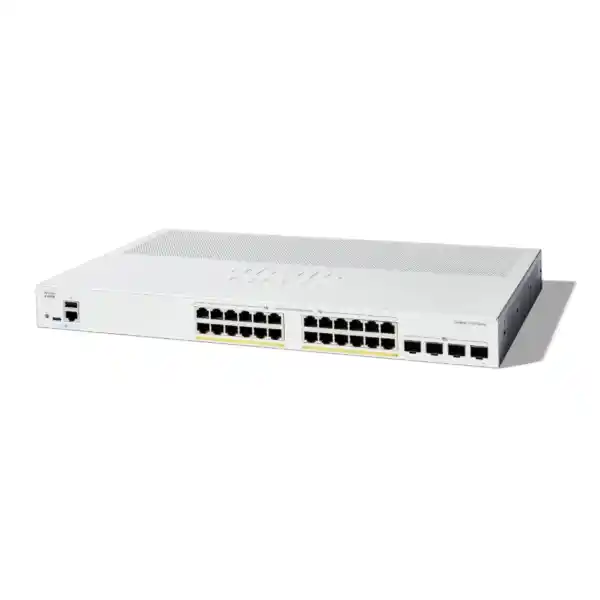
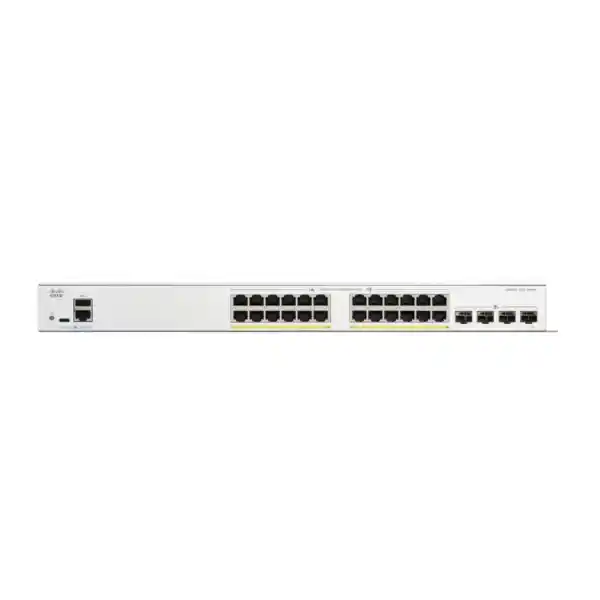
Cisco Catalyst C1300X-24P-4X Network Switch
The Cisco Catalyst C1300X-24P-4X is a high-capacity 24-port Gigabit PoE+ access switch designed for organizations that need more than basic Layer 2 connectivity. It combines a 385 W PoE power budget, four high-speed SFP28 interfaces, wire-speed Layer 3 forwarding, advanced security controls, OSPF routing on the C1300X platform, and hardware stacking for up to eight compatible switches. For UAE offices, schools, hospitality sites, retail environments, warehouses and branch networks, it offers a practical balance between enterprise-style resilience and the operational simplicity expected from the Catalyst 1300 family.
Direct answer: what does this model deliver?
- 24 x 10/100/1000 Ethernet ports with PoE+ support up to 30 W per port.
- 385 W aggregate PoE budget for phones, access points, cameras and edge devices.
- 4 x SFP28 interfaces: 10G uplink operation, with 25G available for stacking.
- 128 Gbps switching capacity and 95.23 Mpps forwarding rate.
- Dynamic Layer 3 routing including OSPFv2 and OSPFv3 on C1300X.
- Hardware stacking of up to eight compatible C1300X units.
Gigabit copper access for users and powered endpoints.
A useful density point for mixed phones, APs and cameras.
Nonblocking wire-speed platform capacity.
Specified at 64-byte packets for high packet-rate workloads.
Why the Cisco Catalyst C1300X-24P-4X matters for UAE network design
Access switching is no longer a simple matter of counting Ethernet sockets. A modern access layer carries voice, Wi-Fi, surveillance, building systems, printers, workstations, thin clients, payment terminals and numerous Internet of Things devices. Many of those endpoints are powered from the switch, several require traffic prioritization, and most belong in different security segments. The access switch must therefore function as a policy enforcement point, a power-distribution platform, a resilient aggregation node and, in many designs, a local Layer 3 routing device.
The Cisco Catalyst C1300X-24P-4X is positioned for exactly this type of environment. Its 24 Gigabit PoE+ interfaces support standard desktop and edge-device connectivity while the four SFP28 cages provide fast fiber or DAC connectivity toward firewalls, server aggregation, distribution switches or other units in the stack. Cisco specifies those SFP28 ports for 10 Gigabit Ethernet uplink operation and allows 25G operation for stacking. That distinction is important during design: the ports should not be advertised as general-purpose 25G data uplinks. For normal uplink traffic, plan them as 10G interfaces; for supported stack interconnects, the C1300X platform can use higher stack speeds.
For Dubai and wider UAE deployments, the 385 W PoE budget is often the decisive specification. It allows a 24-port switch to power a substantial mixed endpoint population without moving immediately to a larger 48-port chassis or a higher-PoE variant. A branch office might combine twenty IP phones with a few wireless access points. A school could serve ceiling APs, classroom phones and selected cameras. A hotel floor could power room phones, corridor APs and operational devices. A retail site could run tills, cameras, phones and local wireless equipment. The correct final sizing still depends on endpoint power draw, startup behavior and desired headroom, but 385 W gives network designers considerably more flexibility than the lower-budget 24-port C1300 PoE models.
FourTeck treats the C1300X-24P-4X as a design component rather than an isolated box. A good quotation should validate transceiver type, fiber distance, PoE load, UPS capacity, rack depth, stack design, routing role, VLAN count, access-control requirements and support expectations. For broader UAE infrastructure planning, customers can also coordinate switching with FourTeck UAE for integrated network projects, or use FourTeck IT Services UAE where implementation, migration, structured troubleshooting and ongoing infrastructure support are part of the requirement.
Hardware architecture and port map
24 Gigabit PoE+ access ports
The access side provides twenty-four 10/100/1000BASE-T interfaces. These are appropriate for conventional enterprise Ethernet endpoints and support PoE+ power delivery up to 30 W per port, subject to the overall 385 W system power budget. The use of standard Gigabit copper is a good fit where endpoint traffic remains below 1 Gbps, which still includes most IP phones, office PCs, printers, security cameras and a large number of wireless or IoT devices.
When attaching access points, check the actual AP Ethernet capability. If a new Wi-Fi platform requires 2.5G or 5G multigigabit access on the wired side, the C1300X-24P-4X is not the multigigabit member of the family. In those designs, a C1300X multigigabit SKU may be more appropriate. This model is strongest when the requirement is a dense field of 1G PoE+ ports with high aggregate PoE capacity and fast uplink/stack connectivity.
Four SFP28 uplink / stack interfaces
The four front-panel SFP28 cages distinguish the C1300X from traditional 1G-uplink access switches. Cisco lists these interfaces as 10G uplinks, with 25G available for stacking only. In a standalone switch, they can provide multiple 10G paths to the distribution layer or firewall, or support fiber connectivity to remote switching zones where copper distance limitations make optical links necessary.
In a stack, those same front-panel high-speed ports become part of the resiliency strategy. Designers can build ring or chain arrangements depending on the deployment, but ring topology is normally preferred when link redundancy matters because loss of one stack path does not automatically isolate downstream members. Port assignment should be documented so technicians know which optics or DACs are carrying production uplinks and which are reserved for stack interconnects.
Control plane resources
Cisco specifies a dual-core ARM processor at 1.5 GHz, 2 GB DDR4 memory for C1300X models and 1 GB SLC flash. The C1300X-24P-4X is also listed with a 3 MB dynamically shared packet buffer. These are control and buffering resources rather than end-user bandwidth figures, but they matter when evaluating management responsiveness, routing scale, logging, monitoring and the ability to sustain mixed traffic patterns.
The switch remains a fixed-form-factor access product, not a modular campus core. Its value comes from combining enterprise-oriented features with predictable access-layer economics. Designs that require massive route tables, large-scale EVPN fabrics, chassis-level supervisors or data-center buffer profiles should be placed on a higher switching tier. For SMB and branch roles, the C1300X feature set is considerably more appropriate and easier to operate.
Console and service access
Cisco lists a standard RJ-45 console port and USB Type-C connectivity. The USB Type-C interface can be used for console access and for convenient file or image management. This is useful during commissioning because field engineers can establish local management without depending on the production LAN already being configured correctly.
A structured deployment procedure should include recording the management IP, administrator policy, firmware baseline, stack member IDs, serial numbers, uplink assignments, VLAN plan and configuration backup location. Console access is most valuable when it is paired with disciplined configuration control. FourTeck commissioning projects can align this information with rack labels, port maps and handover documentation so support teams are not forced to rediscover basic topology during an outage.
Switching performance: 128 Gbps and 95.23 Mpps explained
Cisco specifies the C1300X-24P-4X at 128 Gbps of switching capacity with a forwarding rate of 95.23 million packets per second using 64-byte packets. Cisco also describes the platform as wire-speed and nonblocking. Those numbers are meaningful because they show that the internal switching fabric is dimensioned to handle the aggregate traffic presented by the available interfaces without intentionally oversubscribing the switch fabric.
The 128 Gbps figure corresponds logically to the port mix. Twenty-four 1G ports provide 24 Gbps in one direction, while four 10G interfaces add 40 Gbps, for 64 Gbps of one-way port bandwidth. Ethernet switching-capacity figures conventionally count simultaneous transmit and receive directions, yielding 128 Gbps full-duplex aggregate switching capacity. This does not mean every endpoint will always receive 1 Gbps of application throughput; TCP overhead, endpoint capability, uplink design, server performance, firewall throughput and traffic contention still determine practical application speed. It means the switch fabric itself is not the planned bottleneck when all ports are operating within their interface rates.
The packet-per-second figure is especially relevant for workloads made up of small packets. Voice traffic, telemetry, control traffic and certain transactional workloads can create high packet rates without consuming enormous bandwidth. A forwarding specification of 95.23 Mpps indicates the platform is designed to forward minimum-size frames at line rate for its port configuration. Network designers should still enable appropriate QoS and storm controls so high packet rates from a fault or attack cannot dominate edge resources.
Uplink design remains the practical engineering decision. A single 10G uplink is often enough for a 24-port office access switch because typical users are bursty rather than continuously transmitting at 1 Gbps. However, video-heavy environments, virtualization clusters, backup workflows or dense AP deployments can justify two or more uplinks in an LACP bundle. Redundancy can be more important than aggregate speed: two 10G links terminating on different upstream devices, when the upstream topology supports resilient multi-chassis or stack-based aggregation, can protect the access layer from a single fiber, optic or distribution-port failure.
PoE+ engineering and the 385 W power budget
Do not size PoE by port count alone
Twenty-four PoE+ ports do not mean the switch can necessarily deliver the maximum 30 W on all twenty-four simultaneously. The per-port capability and the total power budget are two separate constraints. The C1300X-24P-4X supports up to 30 W PoE+ per port, but the system PoE budget is 385 W. If all twenty-four ports demanded the full 30 W, theoretical demand would be 720 W, which is above the available budget. Real networks seldom place the same maximum load on every port, so engineers should calculate the expected endpoint draw rather than assume an all-maximum scenario.
A healthy design maintains reserve. If the expected steady-state load is 300 W, the remaining 85 W gives useful allowance for endpoint replacement, startup peaks, future devices and modeling uncertainty. If the estimated load is already close to 385 W on day one, choose a larger PoE budget or distribute endpoints across multiple switches instead of operating without headroom.
Example mixed endpoint calculation
Consider a branch with 14 IP phones averaging 7 W, four Wi-Fi access points budgeted at 22 W each, and six cameras budgeted at 13 W each. The planning load would be approximately 98 W for phones, 88 W for APs and 78 W for cameras, for a total of 264 W. That leaves roughly 121 W of budget for growth, transient demands or endpoint changes. The exact numbers must come from the actual endpoint datasheets and negotiated PoE class, but the exercise demonstrates how a 385 W budget supports realistic mixed estates.
Also include PoE in UPS calculations. A switch that draws modest power with no endpoints attached can require several hundred additional watts when actively powering phones, access points and cameras. For emergency runtime, size the UPS using worst-case or measured production load rather than only the switch’s base electronics consumption.
Operational priority during constrained power
Mission importance should influence port planning. In many networks, voice devices, core wireless APs and security cameras are more operationally important than convenience devices. Document endpoint priorities and use supported PoE management features where appropriate. A port-by-port schedule helps engineers understand which devices can be disconnected or moved if a future expansion brings the aggregate power requirement near the switch budget.
During procurement, identify any devices requiring more than standard PoE+ capability. The C1300X-24P-4X is designed around 30 W PoE+ access. If the endpoint estate includes high-power devices requiring 60 W, 90 W or vendor-specific power arrangements, validate a different switch model before purchase. Avoid solving a power mismatch later with a collection of external injectors unless there is a deliberate design reason.
PoE troubleshooting discipline
When a powered endpoint fails, distinguish between link, authentication and power problems. Check PoE allocation and actual draw, cable condition, negotiated Ethernet speed, LLDP information, VLAN assignment and endpoint boot behavior. A camera that receives power but is placed in the wrong VLAN is not a PoE fault. Conversely, an endpoint that repeatedly resets under load may indicate power or cabling issues even when Ethernet link appears intermittently.
Structured cabling quality matters. Cisco lists Category 5e or better for 1000BASE-T. UAE installations in ceilings, risers and industrial areas should use properly specified cabling, patch panels and termination practices suited to environmental and regulatory requirements. A premium switch cannot compensate for poor copper installation.
Hardware stacking: one logical access system across up to eight switches
Cisco supports hardware stacking on the C1300X family, including the C1300X-24P-4X, with up to eight switches in a stack and up to 400 ports managed as one system. The practical benefit is operational consolidation. Instead of treating several switches as unrelated devices with independent management addresses and isolated configurations, administrators can manage the stack as a coordinated switching system with active/standby control behavior, member numbering and hardware failover features.
Cisco states that products from the same stacking family can be stacked together and that cross-stacking between families is not supported. This matters during expansion. A site that begins with two C1300X-24P-4X units should plan future additions from the compatible C1300X family rather than assume any Catalyst 1300 model can be inserted into the same hardware stack. Procurement documentation should preserve the family distinction so later teams do not buy an incompatible switch based only on the shared “1300” branding.
The C1300X supports ring and chain stacking arrangements. A ring normally provides stronger path resiliency because each member has two directions through the stack topology. A chain can be appropriate where cabling constraints or a staged build make a ring impractical, but designers should understand the failure impact. Stack ports should be cabled with approved optics or direct-attach media compatible with the required interconnect mode and distance. The physical cable route should avoid creating a single point of mechanical failure where both sides of the ring traverse the same vulnerable path.
Stack-aware link aggregation can improve uplink resilience. Cisco supports LAG across multiple units in a stack, which permits physical uplinks to be distributed across different members. For example, one 10G uplink might originate on stack member one and another on member two while participating in a coordinated LAG toward a compatible upstream stack or switch. If one access member fails, the surviving link can preserve upstream connectivity for other stack members, subject to topology and protocol design.
Stacking also improves maintenance planning but does not eliminate change risk. Firmware upgrades, power work and configuration changes should follow a documented procedure. Maintain backups, validate compatibility, confirm stack roles, monitor member status and ensure every unit has stable power. If uninterrupted service is critical, review the full dependency chain: stacked access switches are only one layer, and single firewalls, single WAN routers, single UPS systems or single fiber routes can still create outages.
Layer 2 segmentation, loop prevention and resilient access
A managed access switch earns its place by controlling broadcast domains and enforcing predictable forwarding behavior. The C1300X series supports extensive VLAN functionality, including 802.1Q tagging, port-based VLANs, MAC-based VLANs, protocol-based VLANs, subnet-based VLAN assignment, management VLANs, guest and unauthenticated VLAN workflows, private VLAN capabilities and dynamic VLAN assignment through RADIUS with 802.1X. Cisco lists support for up to 4094 VLAN identifiers, with a reserved internal range noted in the platform specification.
Most UAE business networks should keep the VLAN design simpler than the maximum scale suggests. A typical branch might separate corporate users, voice, wireless management, corporate Wi-Fi, guest Wi-Fi, CCTV, building automation, servers and network management. The goal is not to maximize the number of VLANs; it is to create security and operational boundaries that are easy to understand. Every VLAN should have a purpose, a routing policy, a DHCP strategy and an ownership model.
Spanning Tree protects Layer 2 networks from accidental loops. Cisco lists classic 802.1D STP, Rapid Spanning Tree based on 802.1w, Multiple Spanning Tree using 802.1s, and PVST+/Rapid PVST+ support. In practical deployments, the choice depends on compatibility with upstream switches and the intended topology. RSTP or Rapid PVST+ can converge faster than legacy STP after link changes, while MST can reduce control-plane overhead in environments with many VLANs. The root bridge should be deliberately selected rather than left to chance.
Edge protection features are equally important. BPDU Guard can shut down an access port that unexpectedly receives spanning-tree BPDUs, helping prevent unmanaged switches or incorrect cabling from altering the topology. Root Guard can prevent an edge device from becoming the spanning-tree root. Loopback detection and loop guard provide additional tools against forwarding loops. These controls should be applied using an access-port template so security is consistent rather than dependent on manual per-port memory.
Link Aggregation Control Protocol provides another resiliency tool. Cisco supports IEEE 802.3ad LACP with up to eight link aggregation groups and up to eight ports in a group. LACP can combine links for bandwidth and failover, but it is not a substitute for architecture. Both sides must be configured consistently, hashing means a single flow normally remains on one member link, and a bundle that terminates on a single upstream chassis still has that chassis as a failure domain. When designing dual-path uplinks, consider the capabilities of the upstream switch or stack as carefully as those of the C1300X.
Layer 3 routing: when the access switch can route locally
IPv4 and IPv6 routing
Cisco specifies wire-speed IPv4 and IPv6 routing capabilities on the Catalyst 1300/X family. Layer 3 interfaces can be created on physical ports, link aggregation groups, VLAN interfaces or loopback interfaces. For C1300 10G SKUs and C1300X SKUs, Cisco lists up to 7168 combined dynamic and static IPv4 routes and up to 256 IP interfaces. That gives the C1300X-24P-4X enough routing scale for substantial branch segmentation without forcing all local traffic through an external router.
OSPFv2 and OSPFv3
OSPF is a key C1300X differentiator. Cisco lists OSPFv2 and OSPFv3 support specifically for C1300X SKUs. In a routed branch or campus design, OSPF can advertise local VLAN subnets toward upstream routers and learn remote routes dynamically. This reduces dependence on large static-route tables and allows topology changes to converge automatically. OSPF still requires deliberate area, summarization, authentication and default-route design; dynamic does not mean self-designing.
RIP, PBR and CIDR
The platform supports RIP v2, Classless Inter-Domain Routing and Policy-Based Routing. PBR is useful when traffic must be directed toward a specific next hop based on IPv4 or IPv6 ACL matching rather than the normal routing table. Possible examples include steering selected traffic toward a specialized security appliance or service path. PBR should be used selectively because policy routes can make troubleshooting less intuitive than ordinary destination-based routing.
DHCP server and relay
The switch can operate as an IPv4 DHCP server with multiple pools and options, and it supports DHCP relay across Layer 3 domains. Centralized DHCP is usually preferred in multisite organizations because leases and options are easier to govern, while local DHCP service can be useful for smaller independent branches or specific isolated networks. Relay configuration should be paired with DHCP snooping and clear trusted-port definitions to reduce exposure to unauthorized DHCP servers.
Access-layer security controls
Security at the switching layer is about limiting who can connect, what addresses they can claim, which networks they can reach and whether malformed or malicious traffic can destabilize the infrastructure. The C1300X includes multiple controls that can be combined into an edge-security policy. IEEE 802.1X supports RADIUS authentication and accounting, guest or unauthenticated VLAN handling, multiple host/session modes, time-based operation, dynamic VLAN assignment and MAC authentication scenarios. A switch can also operate as an 802.1X supplicant to another switch for secured extension cases.
DHCP snooping protects against rogue DHCP servers by filtering DHCP messages based on trust relationships and binding information. IP Source Guard can use learned or configured bindings to reject packets whose source address does not belong on a given port. Dynamic ARP Inspection validates ARP behavior against trusted bindings and helps reduce ARP spoofing or man-in-the-middle risk. Cisco groups these capabilities with IP/MAC/port binding concepts so the access layer can make stronger decisions about whether traffic is consistent with the endpoint identity learned on that port.
Private VLAN functionality can isolate endpoints even when they share an IP subnet. This is useful for guest, hospitality, shared-building or device networks where systems should reach a gateway or common service but should not communicate directly with each other. Traditional VLAN segmentation remains important for broader policy boundaries; private VLANs are an additional isolation technique rather than a universal replacement for routed segmentation.
Management traffic should be protected with encrypted administration protocols. Cisco supports SSH for command-line access and HTTPS/SSL for browser management. Separate management VLANs, restricted source addresses, unique administrator credentials, centralized AAA where practical and regular configuration backups reduce operational exposure. Unencrypted legacy management protocols should not be enabled merely because they are familiar.
Switch security should be coordinated with the firewall rather than treated as a competing layer. The access switch can authenticate and segment endpoints, but the firewall normally remains responsible for richer inter-zone security policy, Internet access control, threat inspection, VPN and perimeter services. FourTeck can coordinate C1300X access segmentation with security infrastructure through its Firewall Dubai practice so VLANs, routing boundaries and firewall zones are designed as one system rather than configured independently.
QoS, voice, video and multicast behavior
Converged networks carry traffic with very different sensitivity to delay, jitter and loss. A file transfer can slow down temporarily without becoming unusable, while a voice call becomes noticeably degraded by jitter or packet loss. Wireless control traffic, interactive applications and video may also require predictable treatment. The C1300X family provides Quality of Service controls that allow administrators to classify and prioritize traffic rather than allowing every packet to compete equally during congestion.
Voice VLAN functionality is particularly useful in access networks where IP phones share switch ports with computers. Cisco supports automatic assignment of voice traffic to a voice-specific VLAN and appropriate QoS treatment. The design should still define which device types are trusted to mark traffic. Blindly trusting DSCP markings from every endpoint can allow ordinary users or misconfigured systems to claim high-priority treatment. A disciplined QoS policy normally trusts known infrastructure devices or rewrites markings at the access edge according to application and security policy.
Multicast control is important for video distribution, discovery protocols and certain enterprise applications. Cisco lists IGMP snooping versions 1, 2 and 3, with support for up to 4000 multicast groups on C1300X and specified C1300 10G models. Snooping helps prevent multicast traffic from flooding every port in the VLAN by forwarding streams only where receivers have indicated interest. Source-specific multicast is also supported. This can be valuable in hospitality IPTV, digital signage, surveillance or media networks where uncontrolled multicast would otherwise consume access bandwidth.
QoS cannot create bandwidth that does not exist. It determines who gets preferred treatment when resources are constrained. Therefore, use interface utilization data to decide whether the real answer is prioritization, a faster uplink, a second aggregated uplink or a topology change. Monitoring should verify that queues are not continually dropping lower-priority traffic because a link is chronically undersized.
Management through Cisco Business Dashboard and operational tooling
Cisco positions the Catalyst 1300/X family for streamlined administration through Cisco Business Dashboard and the Cisco Business mobile application, in addition to conventional local switch management. Cisco Business Dashboard can discover, monitor and manage supported Cisco Business, Catalyst 1200 and 1300/X switches, routers and wireless access points. The switch can support an embedded probe, reducing the need to deploy a separate onsite virtual machine or appliance solely for discovery and monitoring.
For smaller IT teams, centralized visibility can reduce the operational cost of maintaining multiple branches. A technician can monitor device status, identify configuration inconsistencies and simplify routine lifecycle tasks without logging individually into every switch. The mobile application is useful for local setup and basic visibility during commissioning. For mature environments, dashboard management should be supplemented by standard operational practices including SNMP monitoring, syslog collection, configuration backups, firmware governance and change records.
A newly installed switch should not be considered complete when the ports merely pass traffic. Build a baseline: set system identity and location, configure NTP, secure administration, create management ACLs, define SNMP and logging targets, label uplinks, document VLANs, configure spanning-tree edge protections, set access-port profiles, establish routing and default path behavior, validate PoE allocation, back up the configuration and record the running firmware version. These steps transform hardware into an operationally supportable network service.
Firmware should be treated as controlled software. Cisco’s C1300X platform receives software releases with fixes and feature updates. Before upgrading a production stack, review release notes for supported SKUs, upgrade requirements and known caveats. Test where practical, retain a rollback strategy and verify the stack after maintenance. A branch network with no configuration backup or documented firmware baseline creates avoidable recovery risk.
Deployment patterns for the C1300X-24P-4X
Branch office access layer
A single C1300X-24P-4X can serve a compact branch with user PCs, IP phones, printers, APs and cameras. Use VLANs to separate corporate users, voice, wireless and security devices. One or two 10G uplinks can connect toward a firewall, router or distribution switch. If the branch routes locally, OSPF can advertise internal networks upstream while the firewall enforces north-south and inter-zone policy as required.
Stacked office or school floor
Two to eight compatible C1300X units can be stacked for higher access density and simplified management. Spread uplinks across different members, build a resilient stack ring and standardize port templates for staff, phones, cameras and APs. A stack can reduce the administrative burden of multiple switches while retaining hardware failover capabilities and coordinated link aggregation.
Hospitality and serviced property
Hotels and serviced buildings frequently need PoE for phones, APs, cameras and operational devices. The 385 W budget gives a useful power envelope for a 24-port footprint. Private VLAN and multicast capabilities can support isolation and video distribution patterns, while 10G fiber uplinks fit vertical-riser designs connecting floor switches to a central communications room.
Retail and distributed outlets
Retail sites may combine POS terminals, voice, cameras, Wi-Fi and local back-office systems. Segmentation is essential because payment-related devices should not share an unrestricted broadcast domain with guest wireless or cameras. The C1300X can provide VLAN and ACL boundaries at the edge while a central or local firewall applies broader policy and secure WAN connectivity.
CCTV and physical-security aggregation
PoE cameras are a natural workload, but surveillance design must account for sustained traffic rather than user-style bursts. Calculate camera bitrates, recording destinations and uplink utilization. Separate surveillance traffic into dedicated VLANs, restrict management access and verify that the NVR or recording server path has sufficient capacity. The 10G uplinks are valuable when many camera streams converge upstream.
Server-room edge and infrastructure access
The C1300X-24P-4X can support management interfaces, appliance connections and 1G infrastructure endpoints in a server room, with fast 10G links to core or distribution. It should not be mistaken for a high-density 10/25/40/100G data-center leaf switch. Where servers require higher-speed interfaces, use an appropriate server-access platform and reserve the C1300X for access and management roles.
A practical sizing method before you order
The best switch is the one whose ports, power, uplinks, routing and management model fit the actual project. Start with a port inventory rather than a model number. List every device that needs copper Ethernet: phones, PCs, printers, cameras, access points, door controllers, kiosks, conference devices, servers, management interfaces and spare capacity. Mark each endpoint as powered or non-powered, and record its maximum or recommended PoE draw.
Next calculate growth. A switch with twenty-four ports should not normally be purchased for a design that already consumes twenty-four ports unless expansion is impossible. Reserve capacity for additions and moves. The correct spare-port target depends on the site, but 15 to 25 percent is a practical planning range for many offices. If twenty-one ports are already committed before installation, a 48-port model or a planned two-switch stack may be operationally cleaner than consuming every interface immediately.
Then calculate PoE. Sum expected endpoint power, add reasonable headroom and compare the result to the 385 W budget. Do not assume every device draws the maximum standard class all the time, but do not use optimistic brochure “typical” numbers without checking startup and worst-case behavior. Where Wi-Fi access points have multiple operating modes, confirm whether reduced input power disables radios, USB ports or other capabilities.
Assess uplink load. User access traffic is generally bursty, so one 10G uplink can support many 1G ports. CCTV, backups, virtualization or dense wireless can create more sustained load. Estimate peak concurrent traffic, then decide whether a single 10G link, dual 10G LACP or separate redundant links are needed. If two links exist only for redundancy, ensure the upstream architecture can actually preserve service if one upstream device fails.
Evaluate Layer 3 requirements. If inter-VLAN routing happens on the switch, define route scale, OSPF neighbors, default routing, ACLs and DHCP relay. If the firewall routes every VLAN, the switch may operate primarily at Layer 2. Neither design is universally correct. Local routing can reduce unnecessary firewall transit for trusted internal flows, while firewall-routed segmentation can provide richer inspection between zones. The security architecture should determine the boundary.
Finally review rack and power constraints. The C1300X-24P-4X is a 1RU rack-mountable switch measuring approximately 444.3 × 270 × 43.94 mm and weighing about 3.96 kg. It uses an internal universal 100–240 V AC, 50–60 Hz power supply. Confirm rack depth, front-to-back airflow conditions, PDU receptacles, UPS capacity and patch-panel placement. Cisco specifies an operating temperature range of -5°C to 50°C, with a minimum 0°C ambient for cold start. UAE equipment rooms still require controlled ventilation and cooling; a high ambient rating is not permission to operate critical electronics in an inadequately cooled enclosure.
Fiber, optics and cabling choices
The four SFP28 cages give the designer flexibility, but the optic must match both the switch capability and the physical fiber plant. For ordinary uplinks, plan 10 Gigabit Ethernet. Short connections inside a rack or adjacent cabinets may use a supported direct-attach cable where appropriate. Multimode fiber is common for short building links, while single-mode fiber is preferred for longer distances and for infrastructure where future reach matters. Never order optics based only on connector shape; verify wavelength, fiber type, speed, distance, DOM requirements and Cisco compatibility.
If existing fiber is reused, inspect its type and condition. OM1, OM2, OM3, OM4 and single-mode plants have different 10G distance capabilities. Old patch cords, mixed fiber grades, dirty connectors and undocumented intermediate panels can cause errors that appear only under load. A fiber link that comes up is not automatically healthy. Check optical receive levels, interface error counters and link stability after installation.
Copper access cabling should be Category 5e or better for 1000BASE-T, as Cisco specifies. In new commercial UAE installations, Cat6 or Cat6A is often chosen to provide improved margin and future capability depending on project standards. PoE adds thermal considerations when many energized cables are bundled, particularly in ceiling spaces and dense pathways. Cable selection and bundle design should comply with local project specifications and recognized cabling standards.
Structured cabling and switch procurement should be coordinated. If a new branch is expected to move toward multigigabit wireless in the next refresh cycle, cabling capable of supporting those speeds can be installed now even if the first switch uses 1G access ports. The switch and cable do not need identical replacement cycles. Designing the passive infrastructure for longer service life can reduce future disruption.
High availability and failure-domain planning
Availability begins by identifying what can fail. At the access layer, common failure domains include the switch itself, power supply input, UPS, stack cable, uplink fiber, optic, upstream distribution switch, firewall, WAN edge and physical cable route. The C1300X’s stacking and link aggregation features can reduce several of these risks, but only when the topology uses them deliberately.
A two-switch stack can place critical endpoints across different members so failure of one unit does not remove every device of a given service. For example, redundant wireless AP coverage zones can be spread across stack members. Dual uplinks can originate from separate members. If downstream servers or appliances support NIC teaming or dual connections, their links can also be distributed. This is more resilient than connecting every critical component to the first switch and using the second only for spare ports.
Power requires the same discipline. Two switches connected to the same single UPS or PDU still share a power failure domain. Where business continuity justifies it, use appropriately designed power distribution and UPS redundancy, keeping in mind that PoE loads significantly affect runtime. Camera-heavy or voice-heavy environments can consume much more UPS energy than the base switch electronics alone.
The C1300X-24P-4X is specified with one fan and acoustic noise around 44.5 dBA at 25°C. Cisco publishes an MTBF value of approximately 368,309 hours at 25°C for this model. MTBF is a statistical reliability metric, not a promise that an individual unit will operate for that many hours. Service design should therefore assume that hardware can fail and include spare strategy, configuration backups and replacement processes appropriate to the organization’s tolerance for downtime.
C1300X-24P-4X versus C1300-24P-4X: do not confuse the model families
| Design point | C1300X-24P-4X | C1300-24P-4X |
|---|---|---|
| Copper access | 24 × 1G PoE+ | 24 × 1G PoE+ |
| PoE budget | 385 W | 195 W |
| High-speed interfaces | 4 × SFP28, 10G uplink and 25G stacking capability | 4 × 10G SFP+ |
| Switching capacity | 128 Gbps | 128 Gbps |
| OSPF | OSPFv2 / OSPFv3 supported on C1300X | Not the C1300X OSPF feature tier |
| DRAM | 2 GB DDR4 | 1 GB DDR4 for C1300 family |
| Packet buffer | 3 MB | 1.5 MB |
The C1300X-24P-4X should therefore be selected when the project specifically benefits from the larger PoE budget, C1300X routing capabilities and enhanced stacking architecture. If a simple office only needs 24 PoE+ ports with a much lower power demand and does not require OSPF, the standard C1300 model can still be a valid design choice. Comparing requirements first prevents overspending while avoiding a switch that is underpowered for the planned endpoint estate.
UAE procurement and deployment considerations
Confirm the exact PID
Cisco product families contain similar names. The target PID is C1300X-24P-4X, not C1300-24P-4X, C1300X-24T-4X or a multigigabit C1300X variant. The “P” indicates the PoE model; “X” in the family name identifies C1300X capabilities. Procurement teams should place the full PID on purchase orders and handover documents.
Match the power cord and rack environment
Cisco uses universal 100–240 V AC input on this platform, but the supplied power cord option must match the UAE installation. Confirm rack mounting, PDU socket type, cabinet depth and available cooling. Cisco notes that 24- and 48-port models include 19-inch mounting brackets unless ordering conditions state otherwise.
Specify optics in the same quotation
A switch quotation without the required optics may be incomplete. State uplink speed, fiber type, distance and connector format. If stacking is planned, include the intended stack media separately. A site with two switches may need uplink optics, stack interconnects and spare transceivers depending on the resilience plan.
Separate hardware from services
Decide whether the project needs supply only or full installation. Configuration, migration, VLAN redesign, routing, firmware upgrades, optics testing, rack work and after-hours cutovers require engineering effort beyond shipping hardware. A clear scope avoids assumptions about what is included in the switch price.
Plan support and replacement
Cisco lists a limited lifetime warranty with return-to-factory replacement and one year of access to the Small Business Support Center for this family. Organizations with stricter recovery objectives should evaluate commercial support, onsite spares or partner-held inventory so replacement timing aligns with business impact.
Document final configuration ownership
The customer should know where backups are stored, who has administrative credentials, how changes are approved and which team monitors alerts. A fully configured stack without ownership documentation becomes difficult to support. Handover should include topology, addressing, VLANs, routes, uplinks, stack cabling and firmware information.
Physical, environmental and reliability specifications
The C1300X-24P-4X is a rack-mountable 1RU switch measuring approximately 444.3 mm wide, 270 mm deep and 43.94 mm high, with a listed unit weight of about 3.96 kg. Its relatively shallow depth makes it suitable for many office communications cabinets, although the final cabinet design must still allow room for power cords, fiber bend radius, copper patching and front/rear airflow.
Cisco specifies internal universal power for 100–240 V AC at 50–60 Hz. Published power figures vary with load because PoE output dominates consumption when powered devices are attached. This is why electrical and UPS sizing should use the planned PoE estate rather than a no-load assumption. In a full PoE environment, the switch can become one of the larger power consumers in the communications rack.
The listed operating temperature range is -5°C to 50°C, with 0°C as the minimum ambient temperature for cold start. Storage temperature is -25°C to 70°C and operating relative humidity is listed at 10% to 90% noncondensing. The UAE climate makes the upper limit look attractive, but equipment-room design should still target a stable, controlled environment. Heat accelerates stress on electronics and batteries, and poor ventilation can create local hot spots significantly above the room thermostat reading.
Cisco lists one fan for this model and approximately 44.5 dBA acoustic noise at 25°C. It is therefore best placed in a communications room or cabinet rather than directly beside users in a quiet office. Thermal load, PoE utilization and ambient temperature can influence fan behavior. When a site has acoustic constraints, incorporate that requirement during switch selection and cabinet placement.
Published certifications include UL 62368, CSA 22.2, CE marking and FCC Part 15 Class A. Project-specific compliance requirements should still be reviewed by the customer or consultant, especially in regulated industries or facilities with their own approved-product lists. General product certification does not replace local project approval processes.
Implementation sequence for a controlled migration
- Discover the existing network. Record switch models, firmware, management addresses, VLANs, trunks, spanning-tree root placement, uplinks, PoE endpoints, port descriptions, routes, DHCP relay, ACLs and monitoring. Do not assume the old configuration is correct simply because it has been in service for years.
- Define the target design. Decide whether the C1300X will operate as Layer 2 access, local Layer 3 distribution or part of a hardware stack. Define VLAN gateways, OSPF or static routing, management plane, QoS, authentication, DHCP snooping and uplink redundancy before touching production.
- Stage the switch offline. Upgrade to the approved firmware release, set identity, management access, time synchronization and monitoring. Build VLANs, trunks and access templates. For stacks, configure member numbering and interconnects in a controlled environment where possible.
- Validate optics and physical interfaces. Confirm every SFP/DAC is recognized, link speed is correct and fiber paths meet optical requirements. Label stack and uplink cables. Verify copper patch leads for critical endpoints.
- Test PoE load. Connect representative phones, APs and cameras. Confirm allocated and measured power is within the 385 W budget with appropriate headroom. Check that devices boot normally and retain full feature operation.
- Perform a controlled cutover. Move uplinks first according to the change plan, then migrate endpoints in logical groups. Validate DHCP, DNS, routing, Internet access, voice registration, wireless AP adoption, camera recording and business-critical application access after each group.
- Check Layer 2 and Layer 3 stability. Confirm spanning-tree root and port states, LACP bundles, route tables, OSPF adjacencies, default routes and ACL hit behavior. Look for interface errors, duplex anomalies, flapping links and unexpected topology changes.
- Verify monitoring and backups. Make sure the management platform sees the switch, SNMP/syslog is functioning and configuration backups are stored. Record final software version and stack status.
- Complete handover. Update diagrams, rack elevations, port schedules and credential ownership. Record any temporary exceptions created during migration and assign dates to remove them. A clean handover prevents temporary workarounds from becoming permanent security gaps.
Frequently asked technical questions
Is the C1300X-24P-4X a Layer 3 switch?
Yes. Cisco positions Catalyst 1300/X as managed enterprise-class Layer 3 switches. The C1300X platform supports IPv4/IPv6 routing, static and dynamic routes, RIP v2, PBR and OSPFv2/v3. Whether those functions should be used depends on the network architecture.
Are the four SFP28 ports usable at 25G for normal uplinks?
Cisco describes them as 10G uplinks with 25G available for stacking only. Therefore, general production uplinks should be designed as 10 Gigabit Ethernet unless Cisco documentation for a specific use case states otherwise.
Can all 24 ports provide 30 W at once?
Each access port can support PoE+ up to 30 W, but the total switch PoE budget is 385 W. Twenty-four ports at the full 30 W would require 720 W, so endpoint demand must be sized against the aggregate budget.
How many C1300X switches can be stacked?
Cisco supports up to eight switches in a C1300/X stack, with C1300X members stacked within the same compatible family. Cross-family stacking is not supported. Ring or chain stack topologies are available.
Does it support OSPF?
Yes. OSPFv2 for IPv4 and OSPFv3 for IPv6 are supported on C1300X SKUs. This is useful for branches where access/distribution switches participate in dynamic routing rather than relying only on static routes.
Is it suitable for Wi-Fi 6 or Wi-Fi 7 access points?
It can power and connect APs that operate within Gigabit Ethernet and PoE+ requirements. If an AP requires 2.5G/5G multigigabit wired access or more than 30 W input to enable full capability, select a compatible multigigabit or higher-power switch model instead.
Can it replace a firewall?
No. It provides Layer 3 routing, ACLs and access security but not the full threat-prevention, VPN, Internet security and application inspection functions of a next-generation firewall. Use the switch and firewall as complementary infrastructure layers.
Is it fanless?
No. Cisco lists one fan for the C1300X-24P-4X with approximately 44.5 dBA acoustic noise at 25°C. Place it in an appropriate communications rack or equipment space rather than assuming silent desktop operation.
What is the switching capacity?
Cisco specifies 128 Gbps switching capacity and 95.23 Mpps forwarding for 64-byte packets. The switch is described as wire-speed and nonblocking for its port configuration.
What warranty does Cisco list?
Cisco lists a limited lifetime warranty with return-to-factory replacement for the Catalyst 1300/X family, together with complimentary one-year access to the Small Business Support Center. Commercial support options may be advisable where recovery objectives are stricter.
When this switch is an especially good fit
The C1300X-24P-4X is a strong choice when a site needs around twenty-four Gigabit endpoints, many of them powered, while also needing resilient 10G uplinks and more capable Layer 3 behavior than an entry-level managed switch. It is particularly attractive when the planned PoE load is above roughly 200 W but remains comfortably within 385 W, because the model can consolidate phones, APs and cameras into one 1RU access platform without immediately requiring a full-power 48-port switch.
It is also appropriate when hardware stacking is important. A growing branch can start with one unit and later expand to compatible C1300X stack members, subject to Cisco family compatibility. Operations teams benefit from single-system stack management, while network architects can distribute uplinks across members and build more resilient access topologies.
Finally, it fits environments where OSPF can simplify branch routing. If multiple VLANs and routed links need dynamic advertisement, the C1300X provides OSPFv2/v3 without moving to a much larger enterprise campus platform. This can be a useful middle ground for schools, hospitality, distributed businesses and midmarket organizations that need serious routing but do not need the scale or software model of a high-end campus core.
When you should choose a different model
Do not choose the C1300X-24P-4X simply because it is a newer Catalyst 1300X model. If the project needs 2.5G or 5G access ports for high-performance Wi-Fi, a multigigabit C1300X SKU is more suitable. If many endpoints require more than 30 W each, use a switch with higher-power PoE standards. If port demand is already near twenty-four, a 48-port model may provide better growth capacity.
Likewise, the switch is not a replacement for a data-center leaf or a large campus core. Its high-speed SFP28 interfaces are used as 10G data uplinks and can reach 25G for stacking, not as a general set of 25G server ports. Networks that require dozens of 10G/25G servers, very deep buffers, modular redundant supervisors, high-density 100G, EVPN/VXLAN fabrics or extremely large routing tables belong on a different switching architecture.
A lower-cost model can also be the correct choice. If the site uses only a handful of PoE phones, has no OSPF requirement and needs no advanced stack plan, the standard C1300 line may meet the requirement. Good network design is not about selecting the maximum specification; it is about matching technical capability to operational need with appropriate growth margin.
Integration with firewalls, servers, voice and wireless infrastructure
The switch sits at the center of many other systems. Firewall integration typically uses one or more tagged 10G links carrying selected VLANs, or routed point-to-point interfaces when the switch performs local inter-VLAN routing. If the firewall is the default gateway for security zones, trunk VLANs toward it and keep Layer 3 SVIs on the firewall. If the switch handles trusted internal routing, use routed links or transit VLANs toward the firewall and advertise internal networks through OSPF or static routes. Either approach can work when policy boundaries are explicit.
Server integration depends on link speed. Many management interfaces, appliance ports and smaller servers still use 1G, while modern virtualization hosts often use 10G or faster. The C1300X has only four high-speed cages and these must also serve uplink or stacking roles, so do not consume them casually for individual servers without evaluating the whole port map. For dedicated compute environments, FourTeck’s Server Dubai practice can help align server NIC, switching and storage-network requirements.
Voice integration benefits from PoE+, voice VLANs, LLDP-based discovery and QoS. Phones should be assigned to a voice subnet with controlled access to call-control services. The switch can supply power and traffic priority while the IP PBX or hosted voice platform provides call processing. Wireless integration follows the same pattern: AP management belongs in a secure infrastructure network, client SSIDs map to appropriate VLANs, and trunking toward APs should be configured according to the wireless design.
CCTV networks should be treated as sustained traffic systems. A collection of cameras may collectively generate hundreds of megabits per second toward NVRs even when individual camera rates appear small. Use separate surveillance VLANs, restrict access to management interfaces and monitor uplink utilization. Because the switch has 10G uplinks, it can aggregate substantial camera traffic, but the recording server, storage system and firewall paths must be sized consistently.
Design notes for VLAN and routing architecture
A clean access design starts with naming. Use VLAN names that describe function rather than temporary project labels. “CORP-USERS,” “VOICE,” “CCTV,” “GUEST-WIFI,” “AP-MGMT” and “NET-MGMT” communicate intent to future engineers. Align IP subnets with those functions and document gateway ownership. Avoid placing management interfaces in a general user VLAN where compromised endpoints can directly probe switch administration.
If the switch routes locally, configure SVIs only where routing is genuinely required. Apply ACLs between sensitive VLANs and decide whether traffic requiring security inspection should be forced through a firewall rather than switched locally. For example, routing between normal corporate users and printers may be acceptable on the switch under ACL control, while traffic from guest Wi-Fi to internal resources should typically be blocked and routed toward the Internet security boundary.
OSPF should be structured. Use stable router IDs, define areas deliberately, control redistribution and summarize routes where the topology supports it. Branch switches normally need a default route toward upstream infrastructure and should advertise only their local subnets rather than accidentally redistributing every learned route. OSPF authentication and passive-interface settings reduce unwanted neighbor formation.
Where static routing is sufficient, keep it simple. A small site may need only a default route from the access switch to the firewall and a few return routes on the firewall. Dynamic routing becomes valuable as alternate paths, multiple routed branches or larger subnet inventories make static maintenance fragile. The existence of OSPF support should not create unnecessary protocol complexity in a topology that does not benefit from it.
Operational monitoring: what to watch after go-live
Interface health
Track link state, negotiated speed, CRC errors, drops, discards and flapping. A rising error counter is often an early indicator of cabling, optics or physical-layer problems. Baseline clean interfaces after installation so later deviations are obvious.
PoE utilization
Monitor total allocated and consumed PoE, per-port demand and devices near class limits. Growth can silently consume the original headroom. Periodic review prevents future endpoint additions from unexpectedly exhausting the 385 W budget.
Uplink bandwidth
Measure utilization and peak bursts on 10G uplinks. Chronic high utilization or queue drops indicate the need for additional bandwidth, traffic engineering or application scheduling. Do not wait for user complaints to identify saturation.
Stack status
Check member health, control roles, stack-link state and topology. A ring that has silently degraded to a chain may still pass traffic but has lost intended redundancy. Monitoring should alert before the second failure causes service impact.
Routing adjacency
For OSPF deployments, monitor neighbor state, route count and unexpected topology changes. Repeated adjacency resets may indicate link instability, MTU issues, authentication mismatches or excessive control-plane disturbance.
Configuration drift
Compare running configuration to approved baselines. Temporary troubleshooting changes, open access ports or relaxed ACLs can persist unnoticed. Scheduled backups and review create an audit trail and improve recovery confidence.
Decision recap: choose the C1300X-24P-4X when these conditions are true
Port fit
Your design needs up to 24 Gigabit copper access ports and does not require multigigabit 2.5G/5G speeds on the user-facing interfaces. The expected port count leaves enough spare interfaces for growth or a clear stack-expansion plan.
Power fit
Your powered endpoints remain within the 385 W aggregate PoE budget with operating headroom. Individual devices fit within PoE+ expectations and do not require 60 W or 90 W high-power standards.
Uplink fit
10G fiber or DAC uplinks meet the upstream bandwidth requirement, and you understand that 25G capability on the SFP28 interfaces is for stacking rather than ordinary data uplinks.
Routing fit
You benefit from advanced Layer 3 features such as OSPFv2/v3, or you want the option to route locally later while using the switch primarily for Layer 2 access today.
Resilience fit
Hardware stacking, multi-unit management or cross-stack LAG provides practical value, and future expansion can remain within the compatible C1300X stacking family.
Operations fit
Your team wants Cisco Business Dashboard/mobile management options plus standard enterprise operations such as VLANs, secure CLI/HTTPS, SNMP monitoring, logging, backups and controlled firmware lifecycle management.
If several of these conditions are false, FourTeck can compare the C1300X-24P-4X against a standard C1300 PoE model, a 48-port C1300X, a multigigabit C1300X, or a higher Cisco campus switching family. The purpose of pre-sales design is to select the smallest architecture that fully meets capacity, power, resilience and growth requirements without creating an early refresh.
Quotation input checklist for an accurate UAE proposal
A useful quotation should include more than the switch model. Send the following information so hardware, optics and engineering scope can be sized together:
Dubai, Abu Dhabi, Sharjah or other UAE location; number of communications rooms; quantity of switches required now and expected within 12–24 months.
Counts of PCs, IP phones, Wi-Fi APs, cameras, printers, door controllers, building systems and any specialized devices.
Endpoint model numbers and expected wattage, particularly APs and cameras. Flag any device requiring more than 30 W.
Fiber type, approximate distance, connector style and whether links terminate on a firewall, core switch, distribution stack or remote cabinet.
Standalone, two-switch resilient stack or larger stack. Include physical separation if switches are in different racks or cabinets.
Number of VLANs, gateway location, static versus OSPF routing, DHCP server location and any inter-VLAN ACL requirements.
Firewall make/model, 802.1X or RADIUS requirement, guest access, CCTV isolation and management-plane restrictions.
Supply only, staging, rack installation, migration, after-hours cutover, documentation, monitoring integration, training or ongoing support.
FourTeck consultation for Cisco C1300X-24P-4X in UAE
FourTeck can supply the Cisco Catalyst C1300X-24P-4X as part of a complete UAE network deployment that includes optics, stack cabling, rack integration, firewall connectivity, VLAN and routing design, PoE validation, migration and handover. The objective is to deliver a switch configuration that matches the endpoint estate and remains understandable to the team that will operate it after installation.
For multi-country organizations, FourTeck can also coordinate infrastructure requirements beyond the UAE through its Africa network practice, while keeping the UAE bill of materials and local implementation plan aligned with the branch architecture. This is useful when the same VLAN, security and switch standards need to be replicated across distributed offices.
Provide the endpoint count, PoE device models, desired uplink medium, firewall model and number of switches. FourTeck can then confirm whether the C1300X-24P-4X is the right fit or whether a 48-port, multigigabit or higher-PoE alternative would produce a cleaner long-term design.
Recommended consultation outputs
- Validated switch and optic bill of materials
- PoE load and expansion margin calculation
- Access VLAN and routing architecture
- Stack and uplink resilience plan
- Firewall and security integration notes
- Migration and rollback sequence
- Port schedule and rack documentation
- Handover and support scope
Technical procurement summary
Model: Cisco Catalyst C1300X-24P-4X. Primary use: managed 24-port Gigabit PoE+ access switching with Layer 3 routing and hardware stacking. Access ports: 24 × 10/100/1000 PoE+. PoE budget: 385 W. High-speed interfaces: 4 × SFP28 used at 10G for uplinks, with 25G capability for stacking. Switching capacity: 128 Gbps. Forwarding: 95.23 Mpps. Routing: IPv4/IPv6, RIP v2, PBR and OSPFv2/v3 on C1300X. Stacking: up to eight compatible same-family switches. Memory: 2 GB DDR4; buffer: 3 MB; flash: 1 GB SLC.
For final ordering, validate the complete Cisco bill of materials, power-cord option, optics, stack interconnect media, support requirement and endpoint PoE calculation. Product specifications and software capabilities can evolve with Cisco documentation and firmware releases, so project sign-off should use the current approved Cisco datasheet and release notes at the time of purchase.

Reviews
There are no reviews yet.