
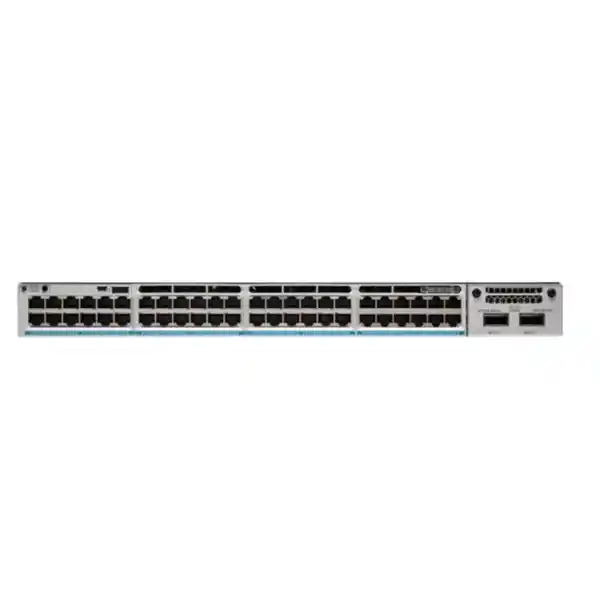
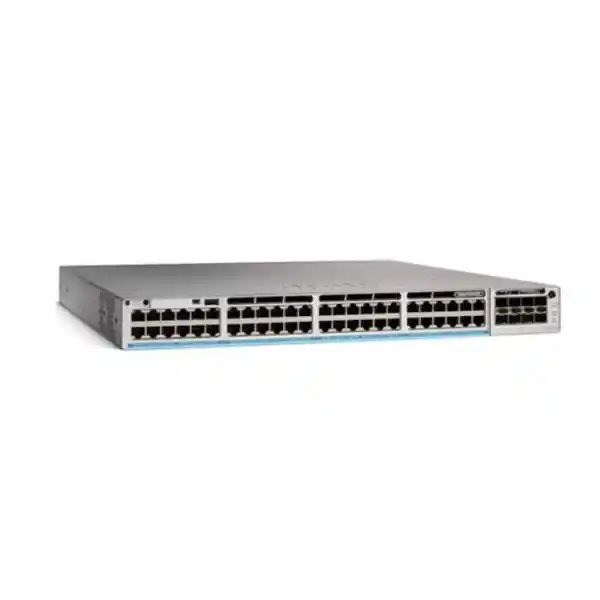
Cisco Catalyst C9300-48UB Network Switch
Higher-scale 48-port Gigabit access switching with Cisco UPOE, deep buffers, modular uplinks, StackWise-480 and resilient enterprise operations for modern UAE networks.
Direct answer: what is the Cisco Catalyst C9300-48UB?
The Cisco Catalyst C9300-48UB is a higher-scale member of the Catalyst 9300 family intended for enterprise access-layer deployments that need forty-eight 10/100/1000 copper interfaces with Cisco Universal Power over Ethernet, modular uplink selection, deep packet buffering and larger forwarding-table scale than standard access configurations. It runs Cisco IOS XE and is designed to participate in a StackWise-480 stack with compatible higher-scale Catalyst 9300 models, while StackPower provides an additional mechanism for resilient power pooling when the deployment is engineered with the required power and stack accessories.
For UAE organizations, that combination is useful where a wiring-closet switch must serve dense endpoint populations without forcing an immediate move to multigigabit access on every port. Typical connected devices include IP phones, access-control readers, video-surveillance endpoints, wireless access points that fit within the port-speed requirement, room systems, digital signage, thin clients, building-management controllers, POS devices and conventional user workstations. The C9300-48UB is particularly attractive when the design requirement is not merely forty-eight powered ports, but higher scale, deeper buffering, modular uplink choice and operational consistency with an existing Cisco campus environment.
Model-specific hardware snapshot
Access interfaces
48 x 10/100/1000 Mbps copper Ethernet ports with Cisco UPOE capability. The C9300-48UB is a Gigabit access model; it should not be confused with C9300 multigigabit SKUs such as the C9300-48UN or C9300-48UXM.
Uplink architecture
Modular uplink slot design lets the network team choose a supported C9300 network module rather than being locked into a fixed uplink type. This is valuable for phased migration from 1G to 10G, 25G or 40G aggregation designs.
Power platform
The default AC power supply for this model is 1100W. Cisco publishes an 822W default PoE budget for the C9300-48UB, with higher aggregate power availability possible in supported redundant power configurations.
Switching performance
Cisco specifies 256 Gbps switching capacity and 190.48 Mpps forwarding rate for the standalone C9300-48UB, rising to 736 Gbps switching capacity and 547.62 Mpps forwarding rate when stacking bandwidth is included.
Higher-scale positioning
The UB platform is categorized as a higher-scale Catalyst 9300 model with deep buffers plus increased MAC, IP and ACL scale. This makes it more suitable for demanding policy-rich access and converged campus environments.
Physical profile
A 1RU form factor keeps rack utilization efficient. Cisco lists a chassis dimension of approximately 1.73 x 17.5 x 16.1 inches before accounting for certain power-supply and cable-clearance configurations, and a listed weight around 17.03 lb / 7.72 kg.
Why the “UB” variant matters in enterprise access design
A campus access switch is often selected by counting ports and checking whether PoE is available. That approach is incomplete for environments where thousands of endpoints, extensive segmentation, large access-control policies or traffic bursts converge on the wiring closet. The C9300-48UB is differentiated by its higher-scale platform characteristics. Cisco positions the higher-scale C9300 models around deeper packet buffering together with increased MAC, IP and ACL resources, helping the switch absorb bursts and maintain policy state in designs that place more operational demand on each access layer device.
Deep buffering is not an excuse for poor uplink sizing, but it can be important when short-lived microbursts occur. A common example is a group of high-resolution cameras simultaneously sending key frames, many user devices pulling software images after a maintenance window, or numerous virtual-desktop clients reconnecting at shift change. The switch still requires adequate uplink capacity, sensible QoS and correct oversubscription ratios, yet additional buffer resources can reduce avoidable drops during transient congestion. In a voice and collaboration network, packet loss created by bursts may become audible even when the long-term average utilization is low. In a surveillance network, loss may affect video quality or create retransmission overhead. In a data-heavy campus, it can lengthen application response times.
The higher-scale platform also becomes relevant when the access layer is expected to participate in richer routing, security and segmentation designs rather than acting as a basic Layer 2 edge. Larger policy and forwarding tables provide additional design headroom. Buyers should still validate the exact software release, feature license and deployment scale against Cisco’s current configuration guides, because maximum values can depend on template, feature combinations and software version. The practical point is that the C9300-48UB is designed for enterprises that want more operational headroom than a commodity forty-eight-port PoE switch can provide.
Forty-eight Gigabit UPOE ports: building a powered access layer
The front-panel access side of the C9300-48UB provides forty-eight copper ports capable of 10/100/1000 Mbps Ethernet and Cisco UPOE power delivery. For network planners, the key distinction is that the access data rate is Gigabit Ethernet. If a project specifically requires 2.5G, 5G or 10G speeds to connected endpoints, a multigigabit Catalyst 9300 variant should be evaluated instead. The C9300-48UB is optimized for environments in which one Gigabit per access port remains sufficient but PoE density, platform scale, modular uplinks and enterprise resilience are priorities.
UPOE can simplify branch and campus infrastructure by carrying both data and device power across structured copper cabling. That allows supported endpoints to be installed without a local AC outlet at every position, which can reduce the coordination required between IT and electrical contractors. The actual power class delivered to a device is determined by the endpoint requirement, negotiated power behavior, switch capability, cable plant and configuration. Engineers should calculate the total wattage requirement rather than assuming that all forty-eight ports can simultaneously consume the highest possible amount. Cisco’s published default PoE budget of 822W is the better starting point for a C9300-48UB with its default 1100W AC supply.
A useful sizing method is to create a PoE schedule that lists every endpoint category, quantity and expected maximum draw. For example, the table may include phones, cameras, badge readers, access points, room devices and IoT gateways. Add a design reserve for future moves, adds and changes, then compare the resulting requirement with the available budget under the selected power-supply architecture. Do not size only to average consumption. Cameras with heaters, PTZ motors or infrared illuminators can draw more power under certain conditions, and wireless access points can alter consumption when radios or USB peripherals are active.
For UAE offices, hotels, schools, hospitals and public-sector facilities, powered edge switching can also support central UPS strategies. If the network rack, switch stack and upstream systems are protected by UPS or generator-backed power, many connected devices can remain operational during a localized mains interruption. This is especially valuable for voice, access control and security endpoints. The full availability outcome, however, depends on the complete power path, including redundant PSUs where required, UPS runtime, cooling, generator transfer, rack power distribution and the endpoint’s own design.
Modular uplinks for 1G, 10G, 25G, 40G and copper multigigabit options
One of the strongest architectural advantages of the C9300-48UB is the replaceable uplink network-module slot. Instead of committing the entire switch lifecycle to one fixed uplink configuration, the deployment can select an uplink module aligned to the current distribution layer and upgrade that module later when the aggregation design changes. Cisco lists the following C9300 network modules for the modular-uplink Catalyst 9300 family.
| Module | Purpose in a C9300 uplink design |
|---|---|
| C9300-NM-4G | Four 1 Gigabit Ethernet SFP slots for legacy or low-bandwidth fiber uplinks. |
| C9300-NM-8X | Eight SFP+ ports supporting 10G and 1G, useful for redundant uplinks, multi-chassis aggregation or high port-count distribution connectivity. |
| C9300-NM-2Y | Two SFP28 slots supporting 25G uplink designs and providing an efficient path when the distribution layer uses 25GbE. |
| C9300-NM-2Q | Two 40 Gigabit Ethernet QSFP+ slots for high-bandwidth aggregation and collapsed-core access use cases. |
| C9300-NM-4M | Four multigigabit copper interfaces for specialized copper uplink or device-connectivity requirements supported by the module. |
Choosing an uplink module should begin with traffic modeling rather than the maximum number printed on a transceiver. Consider the number of active access ports, endpoint traffic patterns, east-west traffic between VLANs, Internet breakout, SaaS usage, backup windows, wireless traffic, surveillance recording flows, voice traffic and growth. A single 10G uplink may be adequate for a moderate office even though the switch has forty-eight 1G access ports, because not every endpoint transmits at line rate at once. A campus with dense video, imaging or large engineering transfers may justify dual 10G, 25G or higher aggregation from the outset.
Optics and cabling must be selected as part of the same bill of materials. Fiber type, reach, connector standard, patching method and compatibility all matter. For new UAE office towers and campuses, OM4 multimode or single-mode fiber is often planned to support future uplink growth, but the correct medium depends on building distances and pathway design. The uplink module does not include every optic required for the project, so quotations should identify network modules, transceivers, patch cords and spare optics explicitly.
StackWise-480: scale the wiring closet as one operational system
The C9300-48UB supports Cisco StackWise-480, which provides a high-bandwidth stack interconnect and allows multiple compatible switches to operate as a coordinated logical system. This can reduce operational complexity because the network team manages a stack rather than treating every access switch as an isolated unit. Stacking also allows access ports and uplinks to be distributed across different physical members, which helps create resilient topologies when the uplink design and endpoint attachment strategy are planned correctly.
Cisco publishes a standalone switching capacity of 256 Gbps and a forwarding rate of 190.48 Mpps for the C9300-48UB. When stacking bandwidth is included, the published switching-capacity figure is 736 Gbps and the forwarding figure is 547.62 Mpps. Those numbers describe platform capability, but real application performance also depends on packet sizes, feature configuration, uplink capacity, forwarding path, QoS, ACLs, endpoint behavior and the wider network architecture.
An important model-specific design rule is that the higher-scale Catalyst 9300 variants must be stacked with compatible higher-scale models. Cisco documentation identifies the C9300-24UB, C9300-24UXB and C9300-48UB as the higher-scale group and notes that mixed stacking with ordinary Catalyst 9300, Catalyst 9300X or fixed-uplink C9300L models is not supported for these higher-scale units. This is particularly important during expansions. A customer may already own C9300-48P or C9300-48U units and assume a new C9300-48UB can simply be inserted into the same stack. The stack compatibility matrix should be checked before ordering.
Stack design also requires physical accessories. StackWise cables are available in different lengths, so the rack layout should be planned before procurement. Closely adjacent switches may use shorter cables, while wider separation in a rack can require longer assemblies. Good rack engineering avoids tightly bending stack cables, blocking fan exhaust or placing cable strain on connectors. For a resilient ring, each stack member must be cabled according to Cisco’s supported topology rather than using ad hoc daisy chains.
Operationally, stacking can make maintenance easier, but it does not eliminate change control. Software compatibility, image version, member priority, reload behavior and failure domains still need to be managed. In critical healthcare, hospitality, financial or government environments, maintenance plans should document expected traffic behavior when a stack member, stack cable, uplink or power source fails.
StackPower and power resiliency planning
Power is a system-level design
The switch’s PoE budget is only one part of availability. A resilient design considers dual power supplies where appropriate, StackPower cabling, UPS architecture, rack PDUs, generator backup, branch electrical circuits and cooling. The goal is to prevent a single power event from removing both switching and powered endpoints.
Use measured PoE demand
Build the bill of materials around endpoint wattage, not just port quantity. A forty-eight-port switch may have only twenty powered endpoints today but still require reserve capacity for future wireless, surveillance or room-system growth. Include seasonal or feature-driven peak consumption where relevant.
StackPower allows supported Catalyst switches to share power resources across a stack power domain, depending on the installed power supplies, topology and configuration. This can improve utilization of available power and can be designed for power-sharing or redundancy objectives. It is not a replacement for proper electrical engineering. If every switch and every endpoint is sized to consume all available capacity simultaneously, the system may not retain enough reserve to survive a power-supply failure. Conversely, a design with appropriate reserve can continue serving priority endpoints while a failed supply is replaced.
For a UAE customer, thermal conditions deserve equal attention. Network switches are installed in air-conditioned communications rooms, but rack inlet temperature can rise quickly when cooling is interrupted. A UPS that keeps the switch running for hours is not useful if the room cannot remove the heat generated by the active equipment. UPS autonomy, generator transfer time, HVAC resilience and environmental monitoring should therefore be reviewed together for critical closets.
Where power continuity is essential, consider classifying endpoints into business priorities. Voice handsets, life-safety-adjacent communications, security cameras and access-control devices may require stronger continuity than convenience devices such as lobby displays. Network policy and physical design can then reflect those priorities, with sufficient power reserve for the most important services.
Cisco IOS XE: enterprise automation, telemetry and operational consistency
The Catalyst 9300 platform runs Cisco IOS XE, giving the C9300-48UB access to a mature enterprise networking operating model with programmable interfaces, structured telemetry, routing, switching, segmentation, policy and security functions. The precise feature set depends on the installed software release, license level and architecture. For procurement, the hardware SKU should therefore be considered together with the chosen Network Essentials or Network Advantage entitlement and any subscription requirements that form part of the solution.
Modern operations teams increasingly avoid relying only on device-by-device command-line changes. IOS XE supports APIs and automation frameworks that can be integrated into standardized provisioning, compliance checking and telemetry workflows. In a large UAE enterprise with dozens of sites, this can reduce configuration drift. A switch can be deployed using a repeatable template for management addressing, AAA, NTP, syslog, SNMP or streaming telemetry, VLANs, access policy, QoS and uplinks instead of manually creating every line.
Automation is most valuable when the organization also has process discipline. Source-controlled templates, staged validation, rollback planning and credential management should accompany programmatic configuration. The fact that a switch can be changed quickly through an API does not mean broad unreviewed changes should be pushed directly into production. Mature teams use testing and observability to verify intended behavior before and after each change window.
Telemetry can help move operations from reactive troubleshooting toward evidence-based capacity management. Interface utilization, errors, discards, queue behavior, CPU, memory, environmental sensors and power consumption can be collected and correlated. If an uplink experiences periodic congestion at 9:00 a.m., the answer may be to change application scheduling, upgrade the uplink or alter traffic engineering rather than blindly replacing the switch. If PoE utilization trends upward as new cameras are added, the operations team can act before the power budget is exhausted.
For organizations already standardized on Cisco, IOS XE consistency also reduces skills fragmentation. The same operational practices can extend across access-layer switches, reducing the amount of platform-specific retraining required. FourTeck can align the C9300-48UB with broader UAE IT services and deployment support where the requirement includes configuration, migration planning or integration around the switching hardware.
Security architecture at the access layer
The access switch is a strategic security enforcement point because virtually every wired endpoint enters the enterprise network through it. A strong C9300-48UB design therefore goes beyond VLAN assignment. Identity, device posture, segmentation, access control, control-plane protection, Layer 2 safeguards and management-plane security should be designed as a coherent system. Features available on Catalyst 9300 and IOS XE can support this architecture, subject to software and license requirements.
At the edge, IEEE 802.1X can be used to authenticate users or devices before granting normal network access. MAB may be used for devices that cannot perform 802.1X, such as some printers, building controllers or specialized appliances. Dynamic policy through an identity platform can assign a role or segment based on who or what connected rather than relying solely on the physical switch port. This matters in flexible offices where users move desks, shared spaces host multiple device types and IoT populations grow rapidly.
Layer 2 attack controls remain important even in a sophisticated campus. DHCP snooping can help establish trusted DHCP behavior, Dynamic ARP Inspection can use that information to reduce certain ARP spoofing risks, and IP Source Guard can restrict traffic based on validated source bindings. Port security, storm control, BPDU Guard and appropriate spanning-tree controls can further reduce accidental or malicious disruptions. The exact combination depends on the network architecture and should be tested with legitimate endpoint behavior before broad enforcement.
Segmentation should reflect business risk rather than only organizational charts. Corporate users, payment systems, cameras, building-management systems, guest networks, phones, printers and operational technology often require different trust levels. VLANs may provide basic separation, while more advanced designs use virtual routing and forwarding, scalable group policy, software-defined access or other segmentation methods. The C9300-48UB’s higher scale can be useful where policy and forwarding tables are substantial, although the full scale must be validated against the chosen feature mix.
The management plane should be protected separately. Use secure administrative protocols, centralized AAA, role-based access where appropriate, trusted management sources, NTP, logging and configuration backups. Disable or restrict services that are not needed. Out-of-band management can be valuable for critical sites because it provides a recovery path when the production forwarding plane is impaired.
Security also depends on lifecycle operations. Hardware with excellent security features can still become vulnerable if software is never updated. Enterprises should maintain an IOS XE software policy, track Cisco advisories, validate target releases in a lab or pilot stack, and schedule controlled upgrades. When the switch forms part of an Internet-facing security architecture, coordination with Firewall Dubai solutions helps ensure access-layer segmentation and perimeter policy are designed together rather than as disconnected projects.
QoS for voice, video, wireless and business-critical applications
Converged access means a single switch can simultaneously carry voice calls, video meetings, surveillance streams, cloud applications, file transfers, software updates and management traffic. These traffic types do not react to congestion in the same way. Real-time voice is sensitive to delay, jitter and loss, while a file transfer generally tolerates delay and simply takes longer. Quality of Service allows the network to classify traffic and apply queueing or congestion policy so that critical real-time traffic is less likely to suffer when an uplink is busy.
Good QoS begins at the trust boundary. An enterprise should decide whether endpoint markings are trusted, remarked or ignored. An IP phone may be a trusted device while a user workstation behind it is not. Wireless controllers or access points may deliver traffic with differentiated markings that should map into the wired QoS policy. Video-surveillance flows may need controlled bandwidth rather than absolute priority because allowing many cameras to dominate a strict-priority queue could harm other applications.
The C9300-48UB’s deeper buffer architecture is beneficial in bursty environments, but buffering and QoS solve different problems. Buffers temporarily absorb contention. QoS determines which traffic is protected or dropped first during congestion. Uplink capacity addresses the underlying bandwidth requirement. A stable design uses all three: adequate bandwidth, sensible queueing and enough buffering for realistic bursts.
Before enabling complex QoS templates, operations teams should baseline actual application behavior. Measure utilization, drops, DSCP markings and peak-hour patterns. Then build a policy that is simple enough to troubleshoot. Excessive classification can create a policy no one understands six months later. For multi-site UAE businesses, a consistent campus and WAN marking strategy is particularly important because application traffic may cross SD-WAN, MPLS, Internet VPN or cloud security services after leaving the C9300 access layer.
Enterprise use cases in the UAE
Corporate campuses
Use forty-eight powered Gigabit ports per closet for phones, desktops, access points and meeting-room devices, while modular high-speed uplinks connect each stack to distribution. The higher-scale architecture is useful when identity policy, segmentation and telemetry are extensive.
Hotels and hospitality
A hospitality network may connect phones, room-control gateways, cameras, IPTV support devices, point-of-sale terminals and operational systems. UPOE and centralized power improve deployment flexibility while stack resiliency helps reduce disruption to guest and back-office services.
Healthcare
Hospitals and clinics need controlled segmentation and dependable access for administrative systems, voice, cameras and many specialized devices. The C9300-48UB can form part of a resilient campus design, but medical-device requirements and clinical risk controls must be validated separately.
Education
Schools and universities can use the model in high-density access closets where user, classroom, security and building systems share the physical switching platform but remain segmented through policy and VLAN architecture.
Retail and branch networks
Larger stores or regional branches may require POS, voice, cameras, access points, digital signage and office devices on one resilient platform. Modular uplinks allow the branch to use the fiber architecture that matches the building or mall infrastructure.
Smart buildings
Converging building systems onto IP creates a larger PoE and segmentation requirement. The switch can serve many controllers and sensors, provided the endpoint data rate, power class, environmental requirements and cybersecurity model are compatible with enterprise Ethernet deployment.
Deployment topology 1: resilient access stack with redundant distribution uplinks
A common enterprise topology uses two or more C9300-48UB switches as a StackWise-480 stack in a floor or building communications room. Endpoint ports are spread across members so a single switch failure affects only the devices physically attached to that member. The stack then uses uplinks from different physical members to a redundant distribution pair. Depending on the campus architecture, the uplinks may use EtherChannel, routed links, multi-chassis aggregation or a software-defined fabric design.
The important principle is physical diversity. Two logical uplinks connected through the same switch member, same fiber tray or same distribution chassis may look redundant in a diagram while still sharing a single failure point. Designers should trace the complete path: access member, uplink port, optic, fiber strand, patch panel, riser pathway, distribution interface, line card, supervisor and power source. Real resiliency comes from eliminating common-mode dependencies that matter to the business.
If the closet has a large PoE load, power diversity matters as much as data uplinks. Dual power supplies can be fed from appropriate independent circuits or PDUs where the facility supports that architecture. StackPower may be added according to Cisco guidelines. The UPS should be sized for actual switch and endpoint consumption, with battery runtime aligned to generator or site-recovery objectives. Network monitoring should generate alerts for PSU failure, stack link failure, temperature thresholds and abnormal PoE demand before a second event causes an outage.
This topology is suitable for UAE corporate towers where multiple floors aggregate into a building distribution layer. It is also applicable to schools, hotels and hospitals with structured equipment rooms. The number of switches in each stack should reflect port count, fault-domain preference, physical rack layout and expansion needs rather than simply filling a stack to the maximum possible size.
Deployment topology 2: policy-rich campus edge
In a policy-rich campus, the C9300-48UB does more than forward VLANs. Each endpoint is identified, classified and placed into the correct logical segment. Corporate laptops may authenticate through 802.1X; phones may use a separate voice domain; cameras, printers and building controllers may use MAB or other onboarding mechanisms; guest or contractor devices may be restricted to Internet-only access. The access layer then applies policy consistently regardless of the physical switch port.
This model benefits from the higher-scale platform because identity-driven networks often consume more ACL and forwarding resources than simple Layer 2 designs. Nevertheless, scale should be validated with the expected number of endpoints, security groups, VLANs, routed interfaces, IPv4/IPv6 entries, multicast requirements and policy entries. Features consume hardware resources differently, and templates or software versions can alter effective limits.
A policy-rich design must also handle exceptions. Printers may have outdated supplicants, cameras may not support enterprise authentication, contractors may bring unmanaged equipment and maintenance staff may require temporary access to building systems. The answer is not to disable access control globally. Instead, define controlled exception workflows with ownership, expiry, monitoring and least-privilege policy. The switch becomes an enforcement point for that process.
Organizations that are building this architecture alongside new servers, identity services or management platforms can coordinate network and infrastructure procurement through Server Dubai infrastructure solutions and FourTeck’s broader enterprise portfolio. The intent is to make switching, compute, authentication and security operate as one design rather than independent hardware purchases.
How to size a C9300-48UB deployment correctly
Accurate switch sizing is a requirements exercise. Start by counting active copper endpoints per closet and then add an expansion factor. Avoid allocating exactly forty-eight active endpoints to every forty-eight-port switch. Spare ports are useful for moves, adds, changes, temporary equipment and replacement during troubleshooting. The reserve percentage depends on the building and expected growth; a rapidly changing office may require more spare capacity than a stable plant room.
Next, classify each port by data rate and PoE demand. If many endpoints require more than 1G access, the C9300-48UB may not be the correct primary model even if its PoE and scale are attractive. Those ports may be better served by a multigigabit C9300 variant. If most devices need only Fast Ethernet or Gigabit, the UB model can be efficient. For PoE, sum realistic maximum power and add reserve. Distinguish phones, APs, cameras and other device classes rather than applying one guessed wattage to every port.
Then calculate uplink demand. Estimate traffic produced by each endpoint category and consider concurrency. Office PCs rarely transmit at 1G continuously, but backup jobs can create synchronized peaks. Cameras generate more predictable sustained flows. Wireless traffic can be bursty and may shift quickly with user behavior. Voice is low bandwidth but latency-sensitive. Cloud applications can create large north-south flows while local servers generate east-west traffic. Model normal peak, known batch windows and future growth.
Choose the uplink network module after that analysis. A four-port 1G module may fit a legacy environment but could limit future growth. The eight-port 10G module provides flexible aggregation and redundancy for many campuses. The two-port 25G module can be a clean match for newer distribution switches using SFP28, while dual 40G uplinks serve designs requiring higher aggregate capacity. The network module, optics and distribution ports should be quoted together so the purchased system is deployable on arrival.
Finally, size licensing and support. Determine whether Network Essentials or Network Advantage is required by the architecture, verify any subscription term, and select Cisco support appropriate to the business’s replacement and technical-assistance expectations. A lower-cost hardware quote that omits required licensing, optics or support is not equivalent to a complete bill of materials.
FourTeck can help consolidate these details into a procurement-ready scope through the FourTeck UAE enterprise technology portfolio, especially where the project includes multiple closets, fiber uplinks, racks, UPS systems, firewalls or server infrastructure.
Licensing: Network Essentials versus Network Advantage
The C9300-48UB is ordered in variants associated with Cisco Network Essentials or Network Advantage. The hardware model remains a C9300-48UB, but the licensed feature level affects what the deployment can use. Cisco ordering conventions commonly distinguish the entitlement with suffixes such as -E and -A. Network Essentials covers a broad base of enterprise switching capabilities, while Network Advantage is intended for designs that require more advanced routing, segmentation and enterprise functions.
The correct choice should be derived from the architecture, not from a preference for the lowest initial price. If the project requires advanced routing, richer segmentation, certain high-scale functions or specific campus-fabric capabilities, Network Advantage may be necessary. If the switch is used as a conventional access layer with a simpler feature requirement, Network Essentials may be appropriate. Because Cisco licensing and software packaging evolve, the final feature matrix should be verified against current Cisco documentation and the exact IOS XE target release before purchase.
Subscriptions also affect procurement planning. The customer should understand the term, renewal requirement, management entitlements and what continues to function if a subscription changes. Separate the concepts of perpetual network-stack capability, software subscription, support service and cloud or management functionality in the bill of materials so budget owners know what is one-time and what is recurring.
For multi-year UAE projects, license alignment is a lifecycle issue. Standardizing on one entitlement level across a campus may simplify operations, while selective use of higher licensing can reduce cost if advanced features are required only in specific roles. The design team should document why each switch role needs its chosen license so future expansions follow the same rationale.
UAE procurement and deployment considerations
Enterprise switching projects in the UAE are shaped by more than the switch specification. Delivery schedules, building access, fit-out phases, rack readiness, structured cabling, fiber availability, electrical circuits, cooling and change windows all influence whether hardware can be installed on time. A technically correct C9300-48UB bill of materials should therefore be tied to the site plan rather than treated as an isolated product order.
Start with the exact SKU and licensing requirement. “C9300-48UB” describes the hardware family, while the orderable configuration may include Network Essentials or Network Advantage and other line items. Confirm whether the requirement is for a factory-configured unit, spare hardware, specific AC power supplies, redundant PSU, network module, StackWise cables, StackPower cables, SSD option, optics, console accessories and service coverage. A quote that lists only the base switch can omit critical deployment components.
Validate rack depth and airflow. The chassis itself is compact for a 1RU enterprise switch, but installed power supplies, power cords, uplink fibers and stack cables need rear clearance. Cable managers should not force tight bends in optical patch cords or stack cables. Access to removable components should be preserved so a PSU or fan can be serviced without dismantling unrelated cabling.
For brownfield sites, survey the existing fiber plant. Check whether uplinks are multimode or single-mode, the connector type, path length, patch-panel condition and available strands. Do not assume an existing 1G SFP can simply be reused for a 10G, 25G or 40G upgrade. The optic, fiber quality and link budget must support the selected speed. Where future expansion is expected, procuring the appropriate network module now can avoid another maintenance window later, even if not every uplink port is immediately populated.
Power engineering should capture local facility realities. Network closets in commercial towers may share UPS or generator infrastructure, while remote branches may depend on local UPS units. Confirm voltage and outlet requirements, PDU capacity, circuit loading and runtime. PoE endpoints increase the total rack power draw because the switch is supplying energy to devices outside the rack. That load must be included when calculating UPS capacity and heat output.
Change-management constraints can affect deployment sequence. A hospital may allow only short maintenance windows; a hotel may need work performed during low occupancy; a retail location may prohibit outages during trading hours. Pre-stage configurations, label stack members, test optics and prepare rollback procedures before arriving at the site. For larger refreshes, pilot one closet and use the findings to refine the standard method before migrating every floor.
FourTeck supports UAE customers that want a coordinated path from product sourcing through network implementation. For organizations with cross-border requirements, the wider FourTeck global technology platform can support broader infrastructure planning while the UAE team handles local deployment considerations.
C9300-48UB versus nearby Catalyst 9300 choices
The C9300 family includes many models, so the C9300-48UB should be selected for its specific combination of forty-eight Gigabit UPOE ports, higher-scale architecture and modular uplinks rather than simply because it is a Catalyst 9300. The comparison below focuses on design intent.
| Model family | Access focus | When it may be preferable |
|---|---|---|
| C9300-48UB | 48 x 1G copper UPOE, higher-scale, deep-buffer platform, modular uplinks | Policy-rich, high-end Gigabit access where scale and buffering matter. |
| C9300-48U | 48 x 1G copper UPOE, standard C9300 scale | General enterprise Gigabit UPOE access where higher-scale UB resources are not required. |
| C9300-48P | 48 x 1G copper PoE+ | When endpoint power needs fit PoE+ and UPOE capability is unnecessary. |
| C9300-48UN | 48-port multigigabit copper with UPOE | Wireless or endpoint designs that require more than 1G access speed on many ports. |
| C9300-48UXM | Mixed multigigabit access including higher-speed ports with UPOE | High-performance access where selected endpoints need 2.5G, 5G or 10G connectivity. |
The biggest procurement error is to assume similar model numbers are interchangeable. A 48UB and 48UN have different access-speed capabilities. A 48UB and 48U have different platform-scale positioning. A 48P uses a different powered-access capability. A proposal should therefore identify the endpoint speed requirement, PoE requirement, stack compatibility and scale requirement before choosing the model.
Operations, maintenance and lifecycle practices
A Catalyst 9300 installation should be treated as a managed platform for its full service life. Start with a documented software baseline. Record the IOS XE release, ROMMON where relevant, boot variables, licensing state, stack membership, serial numbers, network-module type, power supplies and optics. This creates an accurate source of truth for troubleshooting and refresh planning.
Configuration backups should be automated and stored securely. A replacement switch is faster to restore when the team has the current configuration, software image, license information and stack documentation. Backups should include version history so engineers can identify when a change introduced a problem. For regulated environments, change records may also need approval and evidence.
Monitor interface errors, CRC counters, link flaps, discards, queue drops, PoE events, stack status, power-supply status, temperature and fan alarms. High CRC counts can indicate cabling or optic problems rather than switch performance issues. Repeated PoE renegotiation can indicate endpoint or cable problems. Uplink discards can identify capacity constraints that average utilization graphs hide. Monitoring should therefore collect both utilization and fault counters.
Patch management needs a defined cadence. Cisco releases IOS XE updates to add features, resolve defects and address security vulnerabilities. The correct target release is not always the newest image on the day of change; enterprises should select releases that meet their feature and stability requirements, review advisories, test in a representative environment and follow Cisco upgrade guidance. Stacks should be upgraded with awareness of expected traffic impact and failover behavior.
Keep physical spares proportionate to business criticality. Large campuses may hold spare power supplies, optics, stack cables and one compatible switch. A remote branch may rely on contracted replacement coverage instead. The choice depends on acceptable downtime and logistics. In the UAE, same-city sites can often be supported faster than remote international locations, but organizations should still define their required service level instead of assuming parts will always be immediately available.
Finally, review the deployment annually. Port occupancy, PoE demand, uplink peaks, software lifecycle, security policy and endpoint mix change over time. A C9300-48UB installed for phones and PCs may later carry more cameras, building systems or wireless infrastructure. Capacity reviews allow upgrades to be planned before utilization becomes an incident.
Important engineering caveats before ordering
1G access, not multigigabit
The C9300-48UB provides 10/100/1000 access ports. If endpoint designs require 2.5G, 5G or 10G, evaluate a multigigabit Catalyst model.
Higher-scale stack compatibility
Do not assume it can join any existing C9300 stack. Cisco requires the higher-scale models to stack with compatible higher-scale models.
PoE budget is finite
The default published PoE budget is 822W. Endpoint wattage, redundancy and future reserve must be calculated.
Uplink module is a design choice
Confirm the required network module, optics and fiber type. The modular slot is an advantage only when the correct uplink components are included in the BOM.
Detailed procurement checklist for a quotation
A complete quotation should give the customer enough information to deploy the switch without discovering missing infrastructure during the maintenance window. The base product name is only the starting point. The following checklist is a practical way to convert a C9300-48UB request into an implementation-ready bill of materials.
Confirm C9300-48UB hardware, Network Essentials or Network Advantage requirement, software subscription term where applicable, and Cisco service/support level.
Document the installed and redundant power supplies, required PoE budget, StackPower accessories, PDU outlets and UPS runtime requirement.
Choose C9300-NM-4G, C9300-NM-8X, C9300-NM-2Y, C9300-NM-2Q or another supported module based on the actual aggregation plan, then specify optics and patch cords.
Specify the quantity and length of StackWise cables, confirm a supported higher-scale stack design and add StackPower cabling if the power architecture requires it.
Check rack space, depth, airflow, grounding, UPS, fiber plant, copper certification, environmental monitoring and remote-management connectivity.
Define staging, software version, configuration migration, labeling, testing, change window, rollback procedure, monitoring integration and handover documentation.
Decision recap: when the C9300-48UB is the right fit
Choose the Cisco Catalyst C9300-48UB when the access layer needs forty-eight Gigabit copper ports with UPOE, a higher-scale and deep-buffer Catalyst 9300 platform, modular uplink flexibility and StackWise-480 capability. It is a strong fit for enterprise wiring closets where the majority of endpoints need no more than 1G but the network itself demands richer policy, resilient stacking, serious PoE capacity and long-term Cisco operations.
It is particularly appropriate when network designers want higher scale than a standard C9300 access model, or when transient traffic bursts make deep buffering valuable. The modular uplink slot provides a practical lifecycle advantage because the switch can align with 1G, 10G, 25G or 40G aggregation architectures using supported modules, without changing the entire access chassis merely because the distribution layer evolves.
Do not select it solely because the model is a premium Catalyst switch. If the endpoint layer requires multigigabit speeds, choose a multigigabit C9300 family member. If the PoE requirement is modest and higher-scale resources are unnecessary, a different model may reduce cost. If the new unit must join an existing stack, confirm that the stack consists of compatible higher-scale models. The best choice is the model whose access speed, PoE, scale, uplinks, stack behavior and license match the actual architecture.
Quotation input checklist
For an accurate UAE quotation, provide the details below. This prevents unnecessary revisions and allows the switch, power, uplink and licensing components to be sized as one solution.
Emirate/city, number of buildings, number of closets, C9300-48UB quantity, whether the switches are for a new site, expansion or replacement.
Number of PCs, phones, cameras, APs, access-control devices, IoT endpoints and any device requiring more than 1G access.
Device power draw or model numbers, expected future growth, redundancy target and UPS runtime.
Desired 1G/10G/25G/40G speed, number of uplinks, fiber type, distance, optic preference and existing distribution switch model.
Number of members per stack, existing C9300 models if any, rack arrangement and required stack cable lengths.
Required license level, preferred support coverage, staging, configuration, migration, testing and handover scope.
Plan the C9300-48UB as a complete access-layer solution
A production-ready Cisco access deployment includes the switch hardware, the correct license, power design, network module, optics, stack accessories, fiber and copper validation, configuration baseline, monitoring and lifecycle support. FourTeck can help UAE organizations turn the C9300-48UB into a complete implementation scope rather than a stand-alone line item.
Recommended next step
Send the planned switch quantity, endpoint mix, PoE requirement, uplink speed, existing stack models and target license level.
UAE enterprise network consultation


Reviews
There are no reviews yet.