
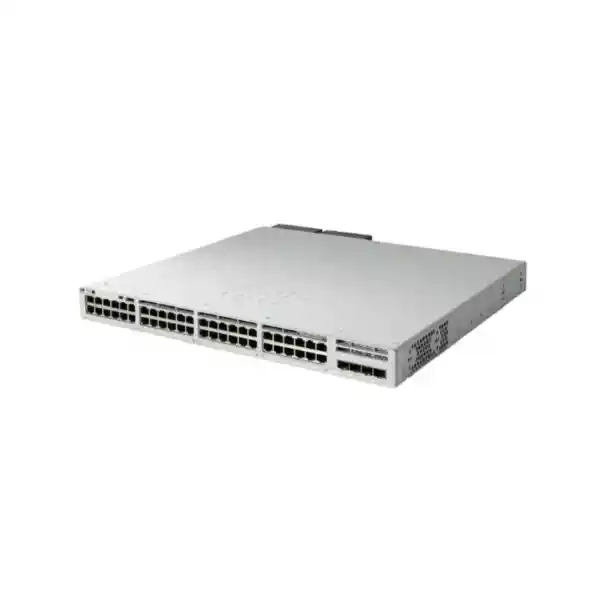
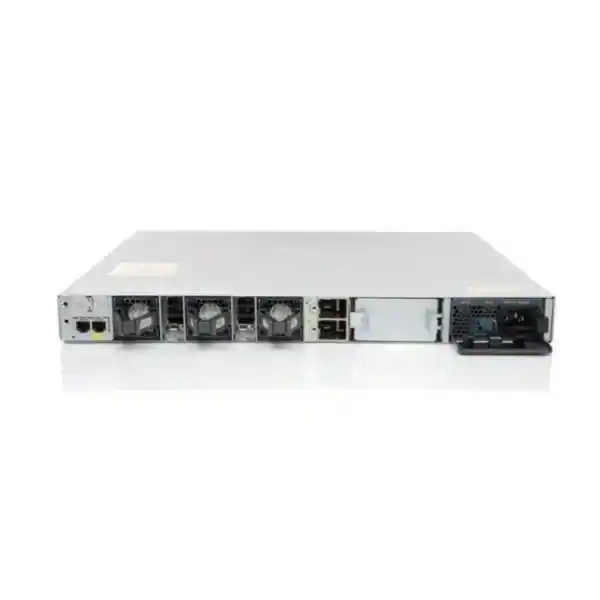
Cisco Catalyst C9300L-48T-4G Network Switch
The Cisco Catalyst C9300L-48T-4G is a fixed-uplink, stackable enterprise access switch engineered for organizations that need a high-density 48-port Gigabit Ethernet edge without Power over Ethernet. Its front-panel access connectivity consists of 48 copper 10/100/1000 Mbps data interfaces, while four fixed 1 Gigabit SFP uplink ports provide fiber or copper transceiver connectivity toward distribution, core, firewall, router, or aggregation layers. The platform combines Cisco IOS XE software, a UADP 2.0 forwarding architecture, optional StackWise-320 data stacking, dual redundant power-supply capability, field-replaceable fans, and enterprise switching scale in a familiar Catalyst operating model.
For UAE buyers, the key design question is not simply whether 48 ports are enough. The more important questions are whether 1G uplinks match the intended oversubscription ratio, whether a data-only platform is appropriate for the endpoint mix, whether StackWise-320 should be included from day one, and which Network Essentials or Network Advantage software entitlement aligns with routing, segmentation, automation, and assurance requirements. FourTeck can help validate those choices before quotation and deployment.
Best suited for
Corporate offices, government facilities, education networks, retail headquarters, warehouses, healthcare administration environments, and branch campuses that need a reliable 48-port wired access layer for non-PoE endpoints. Typical devices include desktops, thin clients, printers, servers, storage-management ports, building-system controllers with external power, security appliances, edge compute nodes, KVM equipment, industrial gateways, and other conventional Ethernet devices.
Not the right choice when
The access switch is expected to power IP phones, Wi-Fi access points, cameras, sensors, badge readers, or other PoE/PoE+ devices. The C9300L-48T-4G is a data-only model. For deployments where endpoint power must come from the switch, specify a PoE-capable Catalyst model rather than adding midspan injectors as a workaround across dozens of ports.
Primary design constraint
Its four uplinks are fixed at 1 Gigabit Ethernet. That is often completely adequate for office access networks with modest northbound utilization, but it is not interchangeable with the C9300L-48T-4X, whose fixed SFP+ uplinks can operate at higher rates. Capacity planning should therefore compare actual endpoint traffic, burst behavior, uplink redundancy, and future growth before the 4G variant is selected.
What the C9300L-48T-4G is designed to do
The Catalyst 9300L family brings enterprise campus switching functions into a fixed-uplink form factor. The C9300L-48T-4G specifically targets access-layer designs where high copper port density matters more than multi-gigabit access or 10 Gigabit uplinks. Each of its 48 access interfaces supports standard 10/100/1000 Mbps Ethernet, which allows a mix of legacy Fast Ethernet devices and modern Gigabit endpoints to coexist while the switch negotiates the appropriate link speed and duplex. Four 1G SFP uplinks are built into the chassis, eliminating the need to choose and purchase a separate network module for basic uplink connectivity.
The fixed-uplink design reduces ordering complexity, but it also makes design discipline important. With a modular-uplink Catalyst model, an organization may change the uplink module later as bandwidth requirements evolve. With the C9300L-48T-4G, the uplink profile is part of the chassis identity. That can be an advantage for standardized branch or office templates where 1G uplinks are already known to be sufficient, because every deployed unit has the same port map. It can be a disadvantage when the access layer is expected to migrate quickly toward 10G aggregation or when large east-west traffic bursts are common.
The platform remains a full enterprise Catalyst switch rather than a basic web-managed edge device. It runs Cisco IOS XE and participates in familiar operational workflows for VLANs, trunks, EtherChannels, spanning-tree design, routed interfaces, access control, QoS, telemetry, authentication, automation, and software lifecycle management. The switch also supports optional StackWise-320, allowing multiple compatible Catalyst 9300L units to operate as one logical stack. This makes the model useful not only for standalone branch closets but also for larger access blocks that need unified management and cross-member resiliency.
Verified hardware and forwarding specifications
| Specification | C9300L-48T-4G | Design meaning |
|---|---|---|
| Access ports | 48 × 10/100/1000 Mbps copper data | Dense wired access, no PoE output |
| Fixed uplinks | 4 × 1G SFP | Fiber or supported copper SFP connectivity at 1G |
| Switching capacity | 104 Gbps standalone | Sized for wire-speed forwarding across the local port set |
| Forwarding rate | 77.38 Mpps standalone | Cisco measurement based on 64-byte IPv4 packets |
| With stacking | 424 Gbps switching / 315.48 Mpps forwarding | Includes stack interconnect contribution |
| Stacking technology | Optional StackWise-320 | Up to eight compatible fixed-uplink members |
| ASIC | 1 × Cisco UADP 2.0 | Programmable enterprise forwarding architecture |
| Packet buffer | 16 MB for 24/48-port Gigabit fixed-uplink models | Shared forwarding resource for handling traffic bursts |
| DRAM / Flash | 8 GB / 16 GB | Supports modern IOS XE operating and image storage requirements |
| MAC address scale | 32,000 | Suitable for large enterprise access domains |
| IPv4 route scale | 32,000 total | 24,000 direct plus 8,000 indirect in Cisco published scale |
| IPv6 routing entries | 16,000 | Supports dual-stack enterprise design at access/distribution boundaries |
| VLAN IDs | 4094 | Broad segmentation namespace |
| Jumbo frames | 9198 bytes | Useful where end-to-end MTU design requires larger frames |
Published platform scale should be treated as an engineering ceiling, not an invitation to design every production network at maximum table utilization. Stable enterprise designs leave operational headroom for convergence, policy expansion, troubleshooting, software features, unexpected endpoint growth, and temporary route or MAC churn.
Port architecture: 48 data ports without PoE
The letter “T” in the model family is important because it identifies a data-only copper configuration. The 48 front-panel access ports provide Ethernet connectivity but do not source electrical power to attached devices. In a conventional office, that distinction may be irrelevant for desktop PCs, printers, servers, and appliances because those devices already have local power supplies. In a converged edge, however, it becomes a decisive requirement. Modern access networks commonly power phones, wireless access points, cameras, intercoms, clocks, IoT sensors, and access-control endpoints over the same twisted-pair cable that carries data. The C9300L-48T-4G cannot provide that power.
This makes the switch particularly attractive where the network designer deliberately separates powered and non-powered endpoints. For example, an organization may reserve a PoE-capable switch stack for Wi-Fi and voice while using C9300L-48T-4G units for user workstations, printers, lab benches, infrastructure management interfaces, or storage-related Ethernet. That split can reduce unnecessary PoE power-supply sizing and simplify electrical load calculations. It can also be useful in server rooms, staging environments, or training facilities where attached endpoints all have independent power and the primary requirement is simply high-density Gigabit access.
From a cabling perspective, the copper interfaces fit standard structured cabling practices used throughout Dubai and the UAE. Cat5e can support Gigabit Ethernet over appropriate distances when installed and certified correctly; Cat6 or better is often preferred for new enterprise builds because it gives stronger margin and better alignment with future upgrades. The switch negotiates standard Ethernet speed with the endpoint, but link quality still depends on patch panels, horizontal cabling, patch cords, bend radius, termination quality, grounding practices, and the overall permanent-link test result.
For greenfield projects, FourTeck recommends documenting port purpose before the bill of materials is frozen. A 48-port chassis appears straightforward, yet real-world occupancy is shaped by reserved ports, spare capacity, dual-homed endpoints, out-of-band management, test ports, and growth. In many projects, an operational target of roughly 75 to 85 percent planned utilization per access switch provides a better long-term result than allocating every port on day one. This gives the operations team room for moves, adds, changes, emergency replacements, temporary troubleshooting, and small departmental expansions without immediate switch replacement.
Understanding the four fixed 1G SFP uplinks
The C9300L-48T-4G has four fixed 1 Gigabit SFP uplink ports. These slots are intended for supported SFP transceivers and are normally used to connect the access switch to distribution switches, core switches, routers, firewalls, metro Ethernet handoffs, or other network infrastructure. Because the uplink speed is 1G, the switch is best matched to access blocks where northbound traffic remains within a predictable envelope. The presence of four uplink ports provides useful topology flexibility: designers can build redundant uplinks, EtherChannels, separate service paths, or dedicated connections for different upstream functions without using access ports for fiber transceivers.
A common campus pattern is two uplinks toward redundant distribution switches. Depending on the upstream architecture, those links may be individual Layer 3 routed links, a Port-channel where the logical topology permits it, or Layer 2 trunks with spanning-tree and gateway redundancy handled upstream. Another pattern uses two links in an EtherChannel toward a single logical upstream system and keeps the remaining SFP ports available for resilience, management, or future expansion. The correct choice depends on the upstream switch pair, multi-chassis EtherChannel capability, routing design, failure domains, and how convergence is expected to occur.
Oversubscription is the key capacity concept. Forty-eight 1G access ports can theoretically represent far more edge bandwidth than four 1G uplinks can carry northbound at the same instant. That is not automatically a problem. Office users rarely transmit at line rate simultaneously, and much traffic may remain local or be bursty. The design becomes risky when many endpoints continuously move large files, perform backups, consume high-bitrate media, access centralized storage, run desktop virtualization, or generate analytics traffic at the same time. In those cases, 10G-capable uplinks should be considered, potentially using the C9300L-48T-4X or another Catalyst model.
Optic selection should be part of the quote, not an afterthought. The distance, fiber type, connector standard, patch-panel path, and upstream transceiver must all be compatible. Short multimode runs inside a building often use different SFP optics than long single-mode campus links. For copper handoffs, supported copper SFP options may be appropriate. FourTeck can validate the transceiver pair, fiber type, and patching path so the switch arrives with an uplink bill of materials that matches the site rather than leaving installers to resolve optic compatibility during commissioning.
UADP 2.0: why the switching architecture matters
Cisco identifies the C9300L-48T-4G as using one UADP 2.0 ASIC. UADP, or Unified Access Data Plane, is Cisco’s programmable forwarding architecture used across Catalyst enterprise platforms. For a network buyer, the practical value is that core functions such as Layer 2 forwarding, Layer 3 routing, access control, quality of service, telemetry, and policy enforcement are implemented in a hardware architecture designed for enterprise switching rather than being treated as bolt-on functions around a basic merchant-silicon feature set.
The ASIC does not mean every feature is unlimited or that every software function runs entirely in hardware. Each forwarding resource has scale boundaries, and certain features consume ternary content-addressable memory, counters, buffers, route entries, flow records, or other shared resources. This is why proper sizing looks at more than raw port count. A switch supporting 32,000 MAC addresses, 32,000 total IPv4 routes, 16,000 IPv6 routes, 5,120 ACL scale entries, 5,120 QoS scale entries, and 64,000 Flexible NetFlow entries may have ample capacity for a normal access layer, yet a highly segmented or telemetry-heavy design can use those resources differently from a simple office LAN.
Cisco publishes a 16 MB packet buffer for the fixed-uplink 24- and 48-port Gigabit models. Buffers help absorb microbursts when multiple ingress interfaces temporarily send traffic toward a smaller number of egress interfaces. This is especially relevant on an access switch where many 1G edge ports may converge onto 1G uplinks. Buffering can smooth brief contention, but it cannot create sustained bandwidth. If a 1G uplink receives 2G of offered traffic for an extended period, queues eventually fill and packets will be dropped according to configured queueing and congestion-management behavior. Capacity planning therefore remains essential even when the platform has robust buffering and QoS.
The architecture also supports wire-speed nonblocking operation for the platform’s published port configuration. In practice, the C9300L-48T-4G is capable of moving traffic efficiently inside the switch, while the network architect decides how much traffic can or should leave the access layer through the fixed uplinks. This separation between local switching capacity and northbound bandwidth is central to choosing the 4G version correctly.
104 Gbps switching capacity
Cisco lists 104 Gbps of standalone switching capacity for the C9300L-48T-4G. This number reflects the aggregate switching fabric capability associated with the chassis configuration. It should not be confused with available WAN bandwidth or with the total bandwidth of the four fixed uplinks. The switch can forward traffic between access ports at line rate while simultaneously servicing uplinks, subject to configured features and actual traffic patterns.
For planning, the more useful question is where traffic terminates. Traffic between two devices on the same switch and VLAN may remain local at Layer 2. Inter-VLAN traffic can be routed by the switch when the design and license permit it. Traffic that must reach centralized services, the internet edge, another building, or another campus block consumes uplink capacity. Understanding these flows is more informative than simply comparing headline switching numbers.
77.38 Mpps forwarding
Cisco publishes a standalone forwarding rate of 77.38 million packets per second for this model, measured with 64-byte IPv4 packets. Packet-per-second performance matters because high rates of small packets can stress forwarding systems differently from a smaller number of large frames. Enterprise application mixes usually contain a range of packet sizes, so the published Mpps figure serves as a standardized benchmark rather than a prediction of exact production throughput.
When StackWise-320 is used, Cisco lists higher aggregate switching and forwarding figures because the stack interconnect is included in the system capacity. This is useful when traffic moves between members, but it does not change the fact that each member’s external 4G uplinks remain 1G per port. Stacking increases architectural flexibility and resiliency; it does not magically convert a 1G uplink into a 10G uplink.
StackWise-320 design for resilient access blocks
Catalyst 9300L fixed-uplink models support optional StackWise-320. With the appropriate stack kit and cables, compatible C9300L units can be connected through dedicated rear stack interfaces and operate as a single logical switch. Cisco supports up to eight members in a StackWise-320 stack. This is one of the most important differentiators between an enterprise Catalyst access platform and basic standalone switching because it simplifies management while enabling topologies that span multiple physical chassis.
A stack can provide a single management plane, coordinated configuration, and cross-member forwarding. It also makes it possible to spread critical downstream or upstream connections across separate physical members. For example, a dual-homed server may connect one NIC to member 1 and another NIC to member 2, or upstream links can originate from different members so the stack retains connectivity if one chassis is removed from service. The exact behavior depends on configuration and protocol design, but the principle is straightforward: stacking turns several access switches into one logical system while preserving physical hardware separation.
For the C9300L family, the stack kit is optional rather than universally included. Cisco documents a C9300L stack kit containing stack adapters and a stack cable, with different cable lengths available. That needs to be reflected in procurement. Ordering two switches without the required stack hardware does not create a StackWise-320 system. Rack elevation also affects cable selection; adjacent units may use a short cable, while installations that deliberately separate members within a rack may require longer approved stacking cables.
Compatibility is another important point. Fixed-uplink C9300L switches are stacked with compatible fixed-uplink family members, not mixed indiscriminately with modular-uplink C9300 models, legacy Catalyst 3850s, or Catalyst 3650s. Migration plans should treat old and new stacks as separate systems during transition rather than assuming that the new C9300L can simply join an older stack. A staged migration normally moves VLAN trunks, routed links, EtherChannels, and endpoints from the existing switch domain to the new stack while maintaining a defined rollback path.
Stacking should be decided before deployment whenever possible because it affects rack layout, port naming, uplink placement, maintenance procedures, software upgrade strategy, and spare policy. A standalone C9300L-48T-4G is perfectly valid for smaller sites, but a two-member or larger stack is often a better operational model in business-critical closets where one logical access layer must survive a chassis outage or maintenance event.
Important distinction: StackWise is not StackPower on this model
The C9300L-48T-4G supports StackWise-320 for data stacking, but Cisco documents StackPower support for the modular-uplink C9300 and C9300X families rather than the C9300L fixed-uplink models. This distinction matters during high-availability planning. A data stack allows several C9300L switches to operate together logically, yet each chassis retains its own local power-supply architecture instead of pooling power across a StackPower cable.
The correct redundancy strategy is therefore to size power locally. Catalyst 9300 Series switches support dual redundant power supplies, and the C9300L-48T-4G ships with a 350W AC supply by default. A second compatible supply can be ordered to improve chassis-level power resilience. In critical UAE sites, the two supplies should normally be fed from independent protected power paths where facility design permits, such as separate UPS outputs or A/B rack PDUs. Redundant PSUs connected to the same failing source do not provide full end-to-end electrical redundancy.
Layer 2 architecture and campus segmentation
At the access layer, most deployments begin with VLAN segmentation. User PCs, printers, building systems, lab equipment, management interfaces, guest devices, and operational technology endpoints should not automatically share one flat broadcast domain simply because they connect to the same physical switch. The C9300L platform supports up to 4094 VLAN IDs and enterprise spanning-tree capabilities, giving designers room to separate traffic according to business function, security policy, location, device class, or operational ownership.
Access ports should be configured deliberately. A standard enterprise template normally defines the intended VLAN, port security or authentication behavior, storm-control policy, spanning-tree edge settings where appropriate, logging expectations, and a description that maps the interface to a room, outlet, endpoint type, or service owner. Unused ports should not simply remain active in an unrestricted state. They can be administratively disabled or placed in a controlled unused VLAN according to organizational standards. Consistent port templates reduce troubleshooting time because operators know what a compliant access interface should look like.
Trunk ports need equal discipline. The allowed VLAN list should reflect actual requirements rather than passing every VLAN everywhere. Native VLAN handling should be standardized. If the access layer is built as a Layer 2 design with gateways upstream, redundant trunks need a clear spanning-tree or multi-chassis aggregation strategy to avoid loops while retaining path redundancy. If the upstream platform supports a logical multi-chassis EtherChannel architecture, a port channel can provide both redundancy and load distribution. Otherwise, spanning tree may intentionally block one physical path until failure.
The switch supports 300 PVST instances and 13,000 spanning-tree virtual ports in Cisco’s published scale, but good architecture minimizes unnecessary Layer 2 diameter rather than chasing maximum scale. Smaller fault domains are easier to understand, converge more predictably, and reduce the blast radius of loops or misconfiguration. For greenfield UAE campus builds, FourTeck can help evaluate whether a routed access design, a traditional Layer 2 access design, or a policy-driven fabric better matches the organization’s operational maturity and application requirements.
Layer 3 routing at the access edge
The Catalyst 9300L family is capable of much more than simple Layer 2 forwarding. Cisco publishes support for 32,000 total IPv4 routes on the fixed-uplink platform category, including 24,000 direct and 8,000 indirect routes, as well as 16,000 IPv6 routing entries and up to 1000 switched virtual interfaces. The exact routing features available in production depend on software licensing and release, but the hardware scale gives organizations flexibility to place Layer 3 boundaries closer to users when that matches the campus design.
A routed access architecture can reduce spanning-tree dependence by making uplinks Layer 3 point-to-point connections. Each access switch or stack can hold local VLAN gateways and advertise those subnets toward distribution or core. This creates smaller failure domains and often enables predictable equal-cost path use. It also changes operational responsibilities: the access layer now participates in routing, so route policy, first-hop gateway placement, IP addressing, DHCP relay, route summarization, and monitoring become part of the switch configuration.
For branch sites, the switch may perform inter-VLAN routing locally while forwarding default or summarized traffic toward a firewall or SD-WAN router. This can keep local traffic local and avoid sending every packet through an upstream device unnecessarily. The design must still respect security policy. If two VLANs require stateful inspection between them, the traffic may need to traverse a firewall even though the switch is technically capable of routing directly. Layer 3 capability should therefore be aligned with security zones, not used simply because it is available.
IPv6 planning deserves equal attention. A dual-stack network requires router advertisements, DHCPv6 policy where applicable, first-hop security, ACL parity, telemetry, and monitoring that understands both protocol families. The C9300L hardware provides substantial IPv6 route scale, but the operational team needs the same process maturity for IPv6 that it applies to IPv4. FourTeck can build the switch as part of a wider campus routing design rather than treating IPv6 as a future checkbox that is left ungoverned.
Access-layer security and identity controls
Enterprise access security begins at the physical port. A switch such as the C9300L-48T-4G can participate in a broader identity and policy architecture where the network evaluates who or what is connecting, places the endpoint into an appropriate segment, and applies controls before broad connectivity is granted. Common enterprise mechanisms include IEEE 802.1X authentication for managed clients, MAC Authentication Bypass for devices that cannot perform 802.1X, role- or policy-based authorization, downloadable ACLs in supported architectures, and integration with identity services such as Cisco ISE.
The value of identity-based access is consistency. Without it, a wall outlet may provide whatever network access the configured switchport happens to allow, regardless of which device is attached. With an identity-aware design, the physical port becomes an enforcement point. A corporate workstation, printer, contractor laptop, and unmanaged device can receive different outcomes even if they connect through the same jack at different times. This is especially valuable in shared office environments, campuses with hot-desking, and facilities where many non-user devices are connected to the LAN.
Traditional Layer 2 protections remain important. DHCP snooping, Dynamic ARP Inspection, IP Source Guard, BPDU Guard, root protection, storm control, and carefully scoped trunking reduce exposure to common local network faults and attacks when configured correctly. Access control lists can limit traffic at Layer 3 or Layer 4 according to policy. Cisco publishes an ACL scale of 5,120 entries for the fixed-uplink Catalyst 9300L/LM category, but the real design should allocate resources prudently and test complex policy sets before widespread rollout.
Security configuration must be matched to endpoint behavior. Printers, badge systems, industrial devices, and embedded controllers may react poorly to aggressive reauthentication or link changes. Some systems use static addresses, hard-coded peers, or unusual discovery protocols. A secure deployment therefore starts with endpoint profiling and business-owner input rather than applying one generic template to every port. FourTeck can stage baseline access security and then help refine exceptions so the final configuration remains controlled without breaking essential services.
QoS, microbursts, and traffic prioritization
Quality of Service is often associated with voice, but its purpose is broader: it defines how traffic should be classified, marked, queued, policed, and scheduled when there is contention. Even though the C9300L-48T-4G does not power IP phones, it may still carry voice packets from independently powered phones, real-time collaboration traffic from PCs, video streams, transactional applications, backup traffic, and management protocols on the same switching infrastructure. Those traffic classes have different sensitivity to delay, jitter, and packet loss.
The 16 MB packet buffer can absorb temporary bursts, while QoS determines what happens when egress demand exceeds available capacity. This is particularly relevant at the fixed 1G uplinks. A large file transfer can attempt to fill an uplink while latency-sensitive traffic needs prompt delivery. Correct classification and queueing can protect critical applications during congestion, but QoS cannot overcome persistent under-sizing. If the uplink is continuously saturated, the durable solution is to reduce demand, redesign traffic paths, or increase capacity using a different uplink architecture.
Cisco publishes 5,120 QoS scale entries for the fixed-uplink platform category. In practical deployments, the goal is usually a small, consistent enterprise policy rather than thousands of bespoke rules. Trust boundaries should be explicit: some endpoints may be trusted to mark traffic, while others should have markings rewritten at ingress. WAN and campus policies should align so that high-priority markings retain meaning across the full path instead of being honored on one segment and discarded on another.
Cisco IOS XE operations, automation, and lifecycle management
The C9300L-48T-4G runs Cisco IOS XE, giving network teams a modern Catalyst operating environment with a broad enterprise feature set and established CLI workflows. Organizations moving from older Catalyst generations will recognize many operational concepts while gaining newer capabilities around programmability, telemetry, model-driven management, and integration with Cisco management platforms. The exact software release should be selected according to Cisco’s current recommended-release guidance, hardware support, required features, interoperability constraints, and the organization’s patching policy.
Configuration management should be treated as a system rather than a collection of hand-edited devices. A well-operated access fleet has a defined golden configuration, version control for templates, a naming standard, management VRF or management-network strategy, AAA configuration, NTP, DNS, syslog, SNMP or streaming telemetry, secure management protocols, login banners, interface descriptions, and backup procedures. Automation tools can then apply or validate those settings consistently across many switches, reducing drift and speeding site rollout.
IOS XE supports programmable interfaces and model-driven approaches that allow network controllers, orchestration systems, and scripts to interact with the switch in structured ways rather than relying exclusively on screen-scraped CLI sessions. This matters in large UAE enterprises with dozens or hundreds of access switches because repetitive manual changes create risk. VLAN additions, SNMP updates, ACL revisions, software compliance checks, and port-state audits can be standardized when the surrounding tools and processes are mature.
Software lifecycle management is equally important. A switch should not remain indefinitely on the image it shipped with simply because it is functioning. Teams need a process for vulnerability review, release assessment, lab testing, maintenance windows, configuration backups, rollback planning, and post-upgrade validation. In a StackWise environment, upgrade strategy should account for stack behavior and business tolerance for interruption. FourTeck’s UAE IT services practice can support staging, configuration, migration, and operational handover for organizations that need more than hardware supply.
Telemetry, NetFlow, and service visibility
A production access switch should be observable. Basic up/down monitoring is not enough for modern enterprise troubleshooting because many user complaints occur while the physical interface remains perfectly operational. Useful visibility includes interface utilization, errors, discards, queue drops, CPU and memory trends, temperature, power-supply state, fan health, spanning-tree changes, EtherChannel status, authentication results, DHCP snooping events, route changes, and application-flow information where enabled.
Cisco publishes support for up to 64,000 Flexible NetFlow entries on the fixed-uplink 24- and 48-port Gigabit platform class. Flow telemetry can help identify which hosts and applications are consuming bandwidth, whether a sudden utilization spike is expected, and which traffic is crossing an uplink during a reported performance event. It is especially useful when the organization needs to distinguish a capacity problem from a routing, application, or endpoint problem.
Monitoring should be designed before an incident occurs. Syslog destinations, time synchronization, telemetry collectors, SNMP credentials or secure alternatives, retention periods, alert thresholds, and dashboard ownership all need to be established. If an uplink reaches 95 percent utilization every afternoon, the operations team should learn that from trending before users begin reporting slowness. If one fan fails, the monitoring system should create an actionable alert while the redundant fan arrangement still protects service. Good telemetry turns the switch from a black box into an auditable part of the infrastructure.
Power, fan redundancy, and hardware serviceability
Cisco specifies a 350W AC power supply as the default for the C9300L-48T-4G. Because the switch is data-only, there is no PoE power budget to size. The supply supports the switching platform itself and the associated hardware. Catalyst 9300 Series switches support dual redundant power supplies; the switch ships with one supply by default, while a second compatible supply can be ordered initially or added later. For business-critical sites, dual supplies are usually preferable because they reduce the chance that a single PSU failure causes a switch outage.
Power redundancy is only as strong as the upstream electrical design. Ideally, each PSU is connected to a separate rack PDU, and those PDUs are backed by independent protected sources or UPS paths where the facility provides them. Connecting both PSUs to the same extension, same PDU, or same unprotected circuit may protect against an individual PSU fault but not against the common upstream failure. The quotation stage should therefore include the intended plug type, PDU connector availability, UPS load, and rack power path.
Cisco also documents three field-replaceable fans with N+1 redundancy in the Catalyst 9300 Series. This improves serviceability because a failed fan can be replaced rather than treating the entire switch as failed hardware. Monitoring should watch fan alarms and temperature status so a degraded state is addressed promptly. Redundancy is a risk-reduction mechanism, not a reason to postpone maintenance after a component failure.
The published chassis weight for the C9300L-48T-4G with its default power supply is approximately 15.41 lb, or 7.0 kg. Chassis dimensions are 1.73 × 17.5 × 16.1 inches, while depth increases when a power supply is installed. This is a 1RU-class enterprise switch and should be mounted in a properly ventilated rack with sufficient rear clearance for power supplies, stack cables, airflow, and service access.
Environmental planning for Dubai and UAE facilities
The UAE’s climate makes facility-level environmental control a practical design concern even when the switch operates inside an air-conditioned building. Cisco’s published normal operating envelope for the relevant power-supply class reaches up to 45°C at lower altitude, with derating at higher elevations and defined short-term exceptional conditions. Relative humidity is specified from 5 percent to 90 percent noncondensing. Those figures are hardware limits, not recommended data-room set points. Enterprise network rooms should be kept far below extreme limits to improve equipment life, maintain predictable fan behavior, and reduce thermal stress.
Common local risks include undersized split air-conditioning units, cooling that is shut down after office hours, blocked rack airflow, high dust loading, open communication-room doors, poorly sealed cable penetrations, and switches installed in cupboards without engineered ventilation. A device that operates normally during commissioning can experience higher intake temperatures later when the room fills with equipment or when building HVAC schedules change. Temperature monitoring at the rack is therefore more useful than relying only on the thermostat elsewhere in the room.
Dust is another concern. Fine airborne particles can accumulate on filters, fans, heat sinks, and vents, increasing thermal resistance and fan workload. The network room should have appropriate housekeeping and filtered conditioned air. Equipment should not be installed directly beneath water lines, near unsealed exterior openings, or in locations where condensation can occur. When switches are used in warehouses or industrial facilities, environmental suitability should be reviewed more carefully because the standard enterprise platform is not a substitute for a ruggedized industrial switch designed for harsher conditions.
Electrical quality matters as well. UPS systems should be sized for the switch fleet, upstream firewalls, routers, controllers, and any related fiber transport devices, not just for one chassis. Battery runtime should reflect the business requirement and generator transfer behavior. In a stacked access design with redundant PSUs, document which PSU feeds which PDU so maintenance staff can replace or isolate a source without accidentally removing power from both sides.
A practical uplink sizing methodology
Choosing between the 4G and higher-bandwidth Catalyst variants should be based on measured or modeled traffic. Begin with endpoint count, but do not stop there. A floor with 40 office users running SaaS applications may create far less sustained northbound traffic than a 20-seat media department transferring large project files to centralized storage. Likewise, a lab with automated imaging or backup jobs can create sharp bursts that saturate 1G uplinks even though the average daily utilization appears low.
First, identify traffic destinations. Local east-west flows between devices on the same switch may never consume the uplink. Traffic between VLANs may stay local if the C9300L performs routing, or it may go upstream if gateways are located elsewhere. Internet traffic goes toward the firewall or WAN edge. File servers in a data center, virtual desktop infrastructure, backup repositories, and centralized voice or video services can generate significant uplink demand. A simple diagram showing endpoint groups and their primary destinations often reveals more than a spreadsheet of port counts.
Second, estimate concurrency and peak behavior. If each of 40 active users averages only 5 Mbps of northbound traffic during a busy period, aggregate demand may be modest. But if several users simultaneously synchronize large cloud folders, join high-definition meetings, and access centralized applications, the burst can be much higher. Add machine-generated traffic such as patching, endpoint backups, software distribution, monitoring, and scheduled data transfers. These background processes often explain why uplinks experience congestion outside obvious business peaks.
Third, design for failure. If two 1G uplinks normally share traffic and one fails, can the remaining path carry the expected peak without unacceptable congestion? If four uplinks are bundled to one upstream logical system, what happens during maintenance on that system? If uplinks are split across two upstream switches, does the topology support active-active forwarding or will spanning tree block one path? Resiliency planning must consider degraded-state capacity, not only normal-state capacity.
Finally, include growth. If the access closet is expected to add users, cameras, Wi-Fi, engineering workstations, or new cloud services, 1G uplinks may become the limiting factor before the 48 access ports are exhausted. In that case, buying a model with faster uplinks can be more economical than replacing the switch early. FourTeck can help compare the C9300L-48T-4G with 10G-uplink alternatives using actual traffic assumptions rather than a generic recommendation.
Deployment topology examples
Standalone branch access
One C9300L-48T-4G connects local users, printers, and infrastructure devices. Two 1G uplinks may connect to a branch firewall, SD-WAN appliance, or resilient distribution layer. This is appropriate where 48 ports cover the site, the business can tolerate a single chassis failure or has a cold spare, and 1G uplink capacity matches the WAN or service demand.
Two-member access stack
Two compatible C9300L switches form a StackWise-320 system for up to 96 copper access ports across two chassis. Uplinks are distributed across members, and critical devices can be dual-connected where supported. The stack is managed as one logical system, reducing configuration overhead while providing better hardware resilience than a single switch.
Layer 2 campus access
The switch carries access VLANs and trunks them to distribution. Default gateways remain upstream. Spanning tree or a supported multi-chassis aggregation design controls redundant paths. This model fits established enterprise networks that centralize policy and routing at the distribution layer and have mature Layer 2 operational procedures.
Routed access
The access switch or stack hosts local SVIs and uses routed uplinks toward distribution. This can reduce Layer 2 fault domains and improve path control, but it requires deliberate routing, summarization, gateway, security, and operations design. License and software-feature requirements should be confirmed before ordering.
Each topology has valid use cases. The correct design depends on the organization’s failure tolerance, upstream architecture, licensing, security segmentation, staff skill set, monitoring tools, and migration constraints. FourTeck does not recommend forcing every site into one template when branch size, application profile, and business criticality differ materially.
Software licensing: Network Essentials vs Network Advantage
Cisco lists the C9300L-48T-4G in both Network Essentials and Network Advantage ordering forms, commonly represented by -E and -A part-number suffixes. The hardware port layout is the same core C9300L-48T-4G platform, but the network software entitlement determines which feature set is available. This is why a purchase request that says only “C9300L-48T-4G” is incomplete for a production quote. The required license tier and any associated subscription choices need to be established from the intended design.
A simple office access layer may not need the same advanced routing, policy, assurance, or automation features as a large campus fabric. Conversely, selecting the lowest license tier purely to reduce initial cost can create an expensive redesign if the network later requires functionality that is outside the purchased entitlement. The safer method is to define the target architecture, routing protocol requirements, segmentation model, controller integrations, observability expectations, and lifecycle-management approach, then map those requirements to Cisco’s current license matrix.
Subscription and entitlement terms can change over the life of a platform, so procurement teams should request a quote that clearly states hardware SKU, network license level, Cisco software subscription term where applicable, support coverage, optics, stack accessories, spare power supplies, and implementation services. This avoids comparing two apparently similar offers that actually contain different licensing or support scope.
FourTeck can prepare the BOM so technical and commercial teams can see the distinction between the base switch, license choice, support entitlement, and accessories. For broader UAE networking procurement and integration, visit FourTeck UAE.
Migration from older Catalyst access switches
Replacing an existing access switch is not just a hardware swap. The old configuration may contain years of accumulated VLANs, trunks, port descriptions, voice settings, QoS policy, authentication exceptions, static MAC entries, storm-control values, ACLs, SNMP strings, syslog servers, local users, TACACS configuration, NTP, spanning-tree tuning, EtherChannels, and undocumented workarounds. Copying that configuration line-for-line into a C9300L can reproduce old mistakes or import syntax that is no longer appropriate.
A better migration starts with discovery. Export the current running configuration, interface status, MAC table, ARP table, VLAN database, trunk state, EtherChannel summary, spanning-tree topology, power usage if the old switch provides PoE, routing table, and monitoring dependencies. Map physical patch-panel ports to switch ports where documentation is weak. Identify dormant interfaces and obsolete VLANs. Confirm whether any endpoints actually depend on PoE before choosing the 48T data-only model.
Next, build a clean target configuration based on current standards. Management addressing, AAA, SSH, SNMP or telemetry, syslog, NTP, DNS, banners, interface templates, VLANs, routing, ACLs, QoS, and security controls should be intentionally defined. The new switch can be staged and tested before it reaches the site. In a stack deployment, stack member numbering, priorities, software versions, stack cabling, and port mappings should be established in the staging area so the on-site window focuses on patch migration rather than basic assembly.
During cutover, move uplinks and critical services in a controlled sequence. Validate gateway reachability, DHCP, DNS, authentication, internet access, internal applications, monitoring, and redundancy after each major step. Keep the rollback path clear until the new system has passed acceptance testing. If the old network uses a different spanning-tree root or gateway location, carefully sequence topology changes to avoid transient loops or black holes.
Finally, preserve operational evidence. Save the final running configuration, software version, serial numbers, optic details, stack topology, rack elevation, port map, test results, and acceptance sign-off. This documentation matters months later when the organization adds a VLAN, replaces a transceiver, investigates an intermittent link, or renews support.
Physical installation and rack planning
The C9300L-48T-4G occupies a standard enterprise rack footprint, but a good installation leaves room for more than the chassis itself. The switch body is approximately 1.73 inches high and 17.5 inches wide. Chassis depth is approximately 16.1 inches, increasing to about 17.7 inches with the default power supply installed. Rear clearance is required for the PSU, power cord, stack adapters and cables, and airflow. Cable managers should not obstruct the front ports or force fiber jumpers into tight bends.
Place access switches close to their patch panels so copper patch leads remain manageable. In dense racks, alternating patch panels and switches can reduce horizontal cable congestion, while dedicated vertical managers help keep bundles clear of cooling paths. Labeling should identify both ends of every uplink and stack cable. Fiber patch leads should be protected from excessive bend radius and should not hang under their own weight from the SFP connector.
If two or more units will form a stack, rack adjacency simplifies stack cabling and troubleshooting. Member numbering should be planned rather than accepted randomly from initial boot. A common convention maps stack member numbers from top to bottom, but consistency with the organization’s standards matters more than the specific order. Uplinks can then be intentionally spread across members so a single chassis maintenance event does not remove all northbound connectivity.
The switch weighs roughly 7.0 kg with its default PSU, so the rack and mounting hardware must be appropriate for enterprise equipment. Network closets should provide secure access, lighting, sufficient working clearance, reliable grounding, and documented rack elevations. These practical details reduce deployment time and lower the risk of accidental disconnection during later maintenance.
Optics and accessory planning
The switch chassis alone is rarely a complete deployment. A production BOM should account for SFP transceivers, fiber patch cords, optional stack kits, stack cables, redundant power supplies, power cords, rack accessories, support coverage, and any console or out-of-band management requirements. The exact list depends on topology. A standalone switch with two single-mode uplinks needs a very different accessory set from a four-member stack using multimode fiber to redundant distribution switches.
SFP selection begins with the physical medium. Multimode fiber, single-mode fiber, and copper all use different transceiver families. Distance, wavelength, connector type, and the optic at the far end must match. Do not assume that every “1G SFP” is interchangeable. Third-party optics may be commercially attractive, but support policy, compatibility, DOM behavior, and future troubleshooting need to be considered. In environments where vendor support is critical, using Cisco-supported optics can simplify fault isolation and TAC interactions.
Stacking accessories must also be explicitly ordered. Cisco’s C9300L stack kit provides the required adapters and a stack cable, with multiple cable-length options. The physical topology normally forms a stack ring so the stack retains a path if one stack link fails. Cable lengths should be chosen based on rack placement before delivery; using the wrong length can create excessive loops or prevent a clean ring when members are not adjacent.
A spare strategy can include one compatible SFP per optic type used widely at the site, a spare fan module where business criticality justifies it, a spare power supply, and in larger fleets a cold-spare switch with appropriate licensing and configuration backup. Spares are most valuable when they are standardized and documented. A random transceiver in a drawer is not helpful if it uses the wrong fiber type or wavelength.
Where the C9300L-48T-4G fits in a modern UAE campus
Many UAE enterprises are modernizing campus networks while simultaneously adopting cloud applications, SD-WAN, zero-trust access, Wi-Fi 6/6E/7, centralized identity, and stronger observability. The C9300L-48T-4G fits the wired edge when most attached devices need conventional Gigabit data connectivity and do not depend on PoE. It can coexist with PoE access switches in the same building, allowing each closet to use the hardware profile that matches its endpoint mix.
A common design places C9300L-48T-4G units on floors dominated by user desktops and printers, while PoE-capable Catalyst switches handle phones, access points, and cameras. Both can feed the same distribution or core layer under a consistent IOS XE operating model. This approach avoids buying unnecessary PoE capacity for ports that will never power a device, while still allowing the network team to standardize monitoring, configuration, authentication, and lifecycle processes across the access estate.
The fixed 1G uplinks are the deciding factor for long-term fit. They are appropriate when traffic studies show that one or more 1G upstream links provide adequate capacity with sensible redundancy. They are less appropriate for access closets supporting high-density wireless aggregation, heavy media traffic, large engineering data sets, virtualization clusters, or large backup windows. Those cases often benefit from 10G or faster uplinks even if individual copper endpoints remain at 1G.
FourTeck can integrate the access layer with perimeter and segmentation platforms sourced through Firewall Dubai, helping ensure the campus switching design and firewall policy are planned as one architecture rather than as disconnected purchases.
Comparing C9300L-48T-4G with nearby Catalyst choices
| Model direction | Access profile | Uplink profile | When to choose it |
|---|---|---|---|
| C9300L-48T-4G | 48 × 1G data only | 4 × 1G SFP fixed | Dense wired access with modest northbound demand and no PoE requirement |
| C9300L-48T-4X | 48 × 1G data only | 4 × 10G/1G SFP+ fixed | Same access density but materially more uplink headroom |
| C9300L-48P-4G | 48 × 1G PoE+ | 4 × 1G SFP fixed | Endpoints need PoE but 1G uplinks remain sufficient |
| Modular-uplink C9300 | Varies by model | Modular uplink options | Greater uplink flexibility, different stacking architecture, or broader future upgrade requirements |
The comparison highlights why the model suffix matters. “48T” tells you the access side is data-only copper, while “4G” tells you the uplink side is four 1G SFP ports. Replacing either part of the model changes the engineering outcome. The C9300L-48T-4X is often the most relevant alternative when the access ports are correct but the 1G uplink ceiling is not.
A procurement team should therefore avoid approving a substitute based only on the words “Catalyst 9300L 48-port.” The exact suffix affects PoE, uplink speed, power supply, optics, cost, and long-term capacity. FourTeck can validate substitutions before purchase so a commercially similar model does not introduce an architectural mismatch.
Branch, office, server-room, and specialized use cases
Corporate office floors: The switch is well suited to desks, printers, meeting-room controllers with independent power, docking stations, and other user-facing wired devices. If phones or APs need PoE, pair it with a dedicated PoE switch or select a PoE Catalyst model instead.
Server and infrastructure management: Many servers have dedicated 1G management interfaces for iDRAC, iLO, CIMC, hypervisor management, or storage administration. A data-only 48-port access switch can provide dense management connectivity, provided the resulting network is properly isolated and resilient. For production server data paths, bandwidth and latency requirements may justify faster switching.
Training rooms and labs: Fixed workstations, test appliances, and lab devices often need independent 1G Ethernet without PoE. A C9300L stack can give high port density with enterprise segmentation and easy reset or reconfiguration between training cohorts.
Warehouse administration: Office PCs, printers, scales, terminals, and locally powered controllers may fit the model, but environmental conditions must remain within enterprise equipment specifications. Areas exposed to heat, vibration, humidity, or dust beyond a standard network room may require industrialized hardware.
Multi-country organizations: Companies headquartered in the UAE sometimes standardize a common Catalyst access design across regional sites. FourTeck can coordinate broader sourcing and architecture through its Africa network and infrastructure channel when the same switching standard needs to extend into African offices, subject to local availability and support requirements.
Common purchasing mistakes to avoid
Assuming 48T provides PoE
It does not. If phones, cameras, or access points require switch-delivered power, choose a PoE-capable model. Confirm every endpoint category before finalizing the BOM.
Treating 4G like 4X
The 4G version provides four 1G SFP uplinks. The 4X model provides faster SFP+ uplink options. They are not equivalent when future aggregation bandwidth matters.
Forgetting the stack kit
StackWise-320 is optional and requires the appropriate adapters and cables. Include stack hardware and correct cable lengths in the initial order when stacking is planned.
Leaving licensing undefined
Network Essentials and Network Advantage are separate ordering directions. Map routing, policy, automation, and assurance requirements to the current Cisco license matrix.
Ordering optics late
SFP type depends on fiber medium, distance, connector, and far-end optic. Validate the complete optical path before the site cutover.
Ignoring degraded-state bandwidth
Redundant uplinks only protect service when the surviving path can carry required traffic. Model capacity after one link or upstream device has failed.
UAE procurement, staging, and support approach
Enterprise switching procurement should connect commercial ordering with technical acceptance. FourTeck can support the process from BOM definition through deployment. The first step is to confirm the exact model, software license tier, support requirement, number of switches, stacking plan, redundant PSU requirement, uplink count, optic type, patch-cord type, and any professional services. This prevents quotations that look complete but omit accessories needed on installation day.
Staging can include visual inspection, serial-number capture, software image alignment, license verification, baseline configuration, stack assembly, interface templating, management connectivity, AAA setup, NTP, syslog, SNMP or telemetry, VLAN creation, routing configuration, and a documented pre-deployment test. When multiple switches are destined for different branches, a standardized staging template reduces site-to-site variation and shortens the on-site window.
For deployment, the engineering team should coordinate rack space, power, fiber availability, maintenance windows, remote application owners, and rollback responsibilities. Critical cutovers benefit from a written method of procedure that lists the old and new port mappings, uplink sequence, validation tests, decision points, and escalation contacts. This is especially important when the switch replaces a production stack carrying many VLANs and services.
After deployment, handover should include the final configuration, software version, serial numbers, support information, topology, stack layout, optic inventory, IP management details, and monitoring confirmation. The objective is not merely to leave the switch forwarding traffic; it is to leave the customer with an operable, documented platform that can be supported over its lifecycle.
FourTeck can supply Cisco networking as part of wider UAE infrastructure projects that include firewalls, routing, servers, voice, Wi-Fi, structured connectivity, and managed support. This integrated approach is particularly useful when the access-layer design must align with security policy, WAN architecture, and application hosting rather than being procured as an isolated hardware line item.
Operational baseline checklist for network teams
A strong deployment starts with a baseline that is repeatable and auditable. The exact commands depend on software release and organizational policy, but the operational intent should be consistent across every C9300L-48T-4G in the estate.
Management plane
Use secure administrative access, centralized AAA where appropriate, role-based privileges, protected management addressing, NTP, DNS, syslog, monitoring, configuration backup, and documented break-glass access. Disable obsolete or unnecessary management services.
Layer 2 controls
Standardize access and trunk templates, VLAN allow lists, spanning-tree edge settings, BPDU protections, storm control, EtherChannel configuration, and treatment of unused ports. Avoid dynamic behaviors that are not part of the design.
Identity and security
Define 802.1X and MAB behavior, fallback policy, device profiling, ACL strategy, DHCP snooping, ARP inspection, source validation, and exception handling. Test non-PC devices before enforcing policy broadly.
Routing and services
Document SVI ownership, routing adjacencies, route summarization, DHCP relay, default routes, VRFs where used, and first-hop gateway design. Ensure IPv6 receives equivalent operational and security controls if enabled.
Observability
Monitor interface utilization, errors, discards, queue drops, CPU, memory, temperature, fans, PSUs, stack state, routing neighbors, authentication failures, syslog events, and flow telemetry where required. Set thresholds based on normal site behavior.
Lifecycle
Track Cisco software advisories, approved releases, support entitlement, backups, spare inventory, maintenance windows, and upgrade test results. Record every production switch’s serial number, location, role, and configuration source of truth.
Capacity planning beyond port count
Port density is the easiest specification to understand, but it is only one dimension of scale. The C9300L fixed-uplink platform category supports 32,000 MAC addresses, 32,000 IPv4 routes, 16,000 IPv6 routing entries, 8,000 multicast routes, 5,120 QoS scale entries, 5,120 ACL scale entries, 64,000 Flexible NetFlow entries, 4094 VLAN IDs, 300 PVST instances, and up to 1000 SVIs. These limits are far beyond the needs of a conventional 48-port office switch, which gives the platform room for enterprise features and stacking.
Nevertheless, scale resources should be treated as shared architectural budgets. Advanced security policy, telemetry, routing, and segmentation can consume hardware resources in ways that differ by feature and software release. An access layer using only a handful of VLANs and static defaults is very different from a policy-rich campus with hundreds of ACL entries, many VRFs, pervasive NetFlow, and large route tables. When a deployment is unusual or approaches published limits, lab validation and Cisco design guidance are appropriate.
The 32,000-MAC scale is especially useful in stacks or large Layer 2 domains where the switch learns addresses beyond its directly connected 48 ports. But a flat VLAN spanning many access switches can still create operational risk even if the MAC table can technically hold all endpoints. Broadcast and unknown-unicast domains, loop exposure, troubleshooting complexity, and convergence behavior should guide segmentation decisions more strongly than maximum table size.
Likewise, the 1000-SVI scale does not mean every access switch should host hundreds of routed interfaces. Route policy, DHCP relay, ACL maintenance, monitoring, and troubleshooting all become more complex as segmentation grows. Good design balances security isolation with operational simplicity and uses automation where large policy sets are genuinely required.
Why FourTeck for Cisco Catalyst switching in Dubai and UAE
FourTeck approaches enterprise switching as an engineering purchase rather than a box-only transaction. For the C9300L-48T-4G, that means confirming that the 48 data-only ports are appropriate, validating 1G uplink capacity, choosing optics for the actual fiber path, determining whether StackWise-320 is required, selecting the correct software entitlement, and including redundancy accessories where business requirements justify them.
The team can also help position the switch inside a broader architecture. Access switching touches identity, firewall policy, WAN design, wireless, IP addressing, server connectivity, monitoring, and operational support. A mis-sized uplink or omitted license can create more disruption than the hardware price suggests. By reviewing these dependencies during the quote stage, the project can reduce late changes and arrive on-site with a more complete bill of materials.
For organizations standardizing across multiple offices, FourTeck can provide naming conventions, configuration templates, staging, serial-number inventories, site-specific port maps, and handover documentation. This supports repeatable branch deployment rather than one-off switch installations. It also makes spares easier to manage because the organization knows which models, optics, stack parts, and software versions are in use.
The result is a deployment aligned with real operational requirements: appropriate hardware, known software, validated uplinks, documented redundancy, measurable performance, and a clear support path. That is more valuable than purchasing the correct chassis but discovering during cutover that the site lacks stack adapters, suitable SFPs, or the required license tier.
Technical questions to answer before requesting the final quote
A precise quote is faster when the network requirements are clear. The following questions determine the switch quantity, accessories, optics, licensing, and services more accurately than a model number alone.
Decision recap: choose C9300L-48T-4G when the design matches these conditions
The Cisco Catalyst C9300L-48T-4G is a strong fit when the access layer needs forty-eight standard Gigabit Ethernet copper ports, attached devices have their own power, one or more 1G SFP uplinks provide enough northbound capacity, and the organization wants enterprise Cisco IOS XE operations with optional StackWise-320. It is particularly effective in office and branch networks where port density, predictable configuration, familiar Catalyst operations, and stackability matter more than multi-gigabit edge speeds or 10G uplinks.
Choose it
When 48 data-only 1G ports are the correct edge density, 4 × 1G SFP uplinks fit the traffic model, StackWise-320 can provide the required resiliency, and the selected software entitlement supports the planned Layer 2, Layer 3, security, and automation functions.
Choose another variant
When the switch must power endpoints, when 10G uplinks are required now or soon, when multi-gigabit access is needed, when harsh industrial conditions exceed enterprise environmental limits, or when a modular uplink architecture is strategically important.
The most expensive switching mistakes are often not failures of hardware quality; they are mismatches between the chosen variant and the application. Confirm PoE, uplink speed, optics, stacking, licensing, and redundancy before purchase. Doing that work at quotation time is faster and less costly than redesigning a live access closet after delivery.
Quotation input checklist
Send the information below with the request for quotation so FourTeck can return a more accurate Cisco Catalyst C9300L-48T-4G UAE bill of materials without unnecessary back-and-forth.
Consult FourTeck for a validated Cisco Catalyst access design
FourTeck can supply the Cisco Catalyst C9300L-48T-4G for Dubai and wider UAE deployments with the accessories, optics, licensing, stacking components, and professional services required for a complete implementation. A pre-sales review can validate whether the fixed 4 × 1G SFP uplink architecture is sufficient, whether a PoE model is needed instead, how many stack members are appropriate, and which software entitlement matches the target feature set.
For new campuses and office refreshes, the team can also review existing switch configurations, map VLANs and uplinks, identify PoE dependencies, stage the replacement system, support maintenance-window cutovers, and provide handover documentation. When the project extends beyond switching, FourTeck can coordinate related firewall, server, wireless, voice, and IT-service requirements through its approved specialist channels.
A successful access-layer purchase should arrive ready for the topology it is expected to serve. Share the endpoint count, uplink destination, fiber details, stack requirement, redundancy target, and license needs so the quotation reflects the actual deployment instead of only the base chassis.


Reviews
There are no reviews yet.