
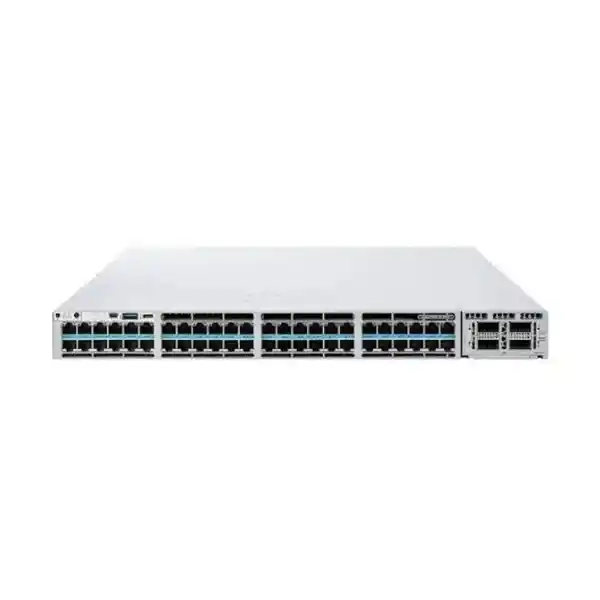
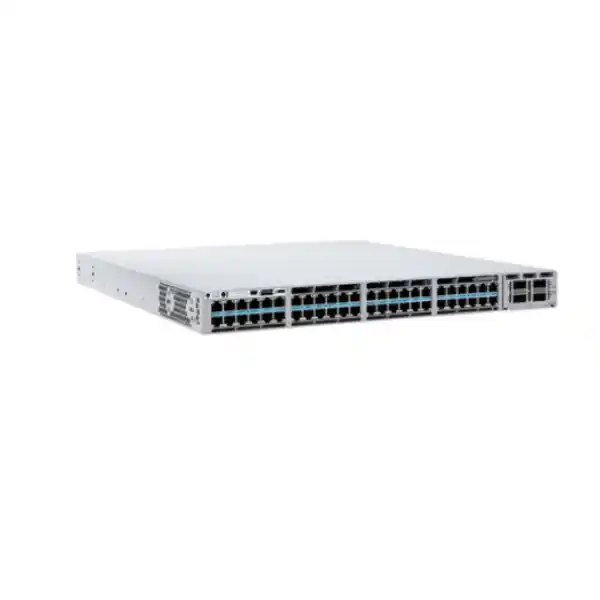
Cisco Catalyst C9300X-48TX Network Switch in UAE
The Cisco Catalyst C9300X-48TX is engineered for organizations that need substantially more access-layer bandwidth than a conventional 1 Gigabit switch can deliver. With forty-eight copper multigigabit data ports capable of 100 Mbps, 1G, 2.5G, 5G and 10G operation, modular uplink choices extending to 100G, StackWise-1T stacking and the security and programmability of Cisco IOS XE, the platform can serve as a high-density enterprise access switch, a high-speed aggregation node, or a compact branch distribution platform. It is especially well suited to environments where modern Wi-Fi, engineering workstations, media systems, virtualization hosts, high-speed storage clients and security appliances are beginning to exceed the practical limits of traditional Gigabit Ethernet.
For buyers in Dubai, Abu Dhabi, Sharjah and other UAE locations, the practical value of the C9300X-48TX lies not only in headline port speed but in design flexibility. The switch is data-only rather than PoE, so it is an intentional choice for endpoints that already have independent power or for aggregation designs where power delivery is unnecessary. That distinction is important when comparing it with C9300X PoE/UPOE+ variants. FourTeck can help align the exact switch, uplink module, software tier, power redundancy, stacking accessories, transceivers and cabling plan with the intended topology instead of treating the chassis as a one-size-fits-all purchase.
Choose the C9300X-48TX when you require forty-eight high-speed copper data ports up to 10G, enterprise-class Layer 2/Layer 3 features, high-capacity stacking and modular uplinks, but do not need PoE from the access ports. For powered phones, access points, cameras or building devices, specify a suitable PoE/UPOE+ Catalyst model instead.
C9300X-48TX at a Glance
Forty-eight RJ-45 data ports support 100M, 1G, 2.5G, 5G and 10G Ethernet rates, allowing mixed-speed endpoint populations on one chassis.
Cisco specifies 1,760 Gbps standalone switching capacity and 1,309 Mpps forwarding for the C9300X-48TX, with higher aggregate figures when stacking is included.
The 9300X family supports high-bandwidth StackWise-1T, enabling multiple physical switches to operate as a resilient logical system when correctly cabled and configured.
C9300X modular network options include 10G multigigabit, 25G, 40G and 100G combinations for campus cores, aggregation blocks and resilient high-speed trunks.
Catalyst 9300X models are specified with 16 GB DRAM and 16 GB flash, supporting a modern IOS XE software environment, telemetry and enterprise control-plane functions.
The C9300X-48TX ships in configurations using a 715W AC supply. Redundant power design should be sized as part of the final bill of materials and rack-power plan.
Why the C9300X-48TX Exists: Access Networks Have Changed
For years, enterprise access networks were designed around a simple assumption: one Gigabit Ethernet port per user or endpoint would be enough, and the access switch would aggregate many of those one-gigabit links into one or two 10G uplinks. That architecture remains valid for many office floors, but high-end campuses increasingly include endpoint classes that can consume multiple gigabits each. Wi-Fi 6 and Wi-Fi 6E infrastructure, high-resolution media editing workstations, CAD and engineering stations, AI development clients, imaging systems, localized storage, network-security appliances and virtualization nodes can all benefit from faster copper Ethernet. The C9300X-48TX responds to that change by bringing multigigabit capability to all forty-eight downlink ports rather than limiting high-speed copper to a small subset.
The benefit is not that every connected device will immediately transmit at 10 Gbps. A well-designed enterprise network rarely operates every port at line rate simultaneously. The benefit is that the access layer no longer becomes an artificial bottleneck for devices that can negotiate above 1G, while slower endpoints can continue to connect at their native rate. This lets network architects preserve the familiar operational model of structured copper cabling and RJ-45 patching while increasing the ceiling available to selected users and devices. It also supports phased migration because 100M, 1G, 2.5G, 5G and 10G endpoints can coexist on the same switch.
That mixed-speed flexibility is particularly relevant in UAE commercial environments where new offices and data-rich departments are often deployed alongside existing infrastructure. A headquarters may have 10G-capable engineering workstations on one floor, 2.5G wireless infrastructure elsewhere, conventional 1G desktops in administration, and a need to aggregate all of them into high-capacity uplinks. Instead of deploying multiple specialist switches, the C9300X-48TX can consolidate many of those roles provided the application does not require PoE from the switch itself.
48-Port 10G Multigigabit Copper Access
Every access port on the C9300X-48TX is built for multigigabit Ethernet, with support for 100 Mbps, 1 Gbps, 2.5 Gbps, 5 Gbps and 10 Gbps operation. In practical deployment terms, this allows an organization to connect a mixture of old and new endpoint types without dedicating separate switches to each speed class. A desktop with a 1G NIC can negotiate at 1G; a wireless access point or appliance with a 2.5G interface can negotiate at 2.5G; and a workstation with a 10GBASE-T adapter can operate at 10G when the cabling channel and endpoint capability support it.
The model is explicitly data-only. It is therefore appropriate where endpoints are self-powered, where PoE is supplied through another architecture, or where the switch is used for aggregation rather than powered edge devices. Buyers should not confuse the C9300X-48TX with the C9300X-48HX, which is designed for high-power UPOE+ deployments. Correctly distinguishing these models prevents one of the most common procurement errors in enterprise switching: selecting sufficient bandwidth but insufficient endpoint power capability.
UADP 2.0sec Hardware Architecture
Cisco positions the Catalyst 9300X copper family on the UADP 2.0sec ASIC architecture. The importance of a purpose-built switching ASIC is that forwarding, policy, telemetry and security functions can be implemented at hardware speed rather than forcing routine packet handling through a general-purpose CPU. For a switch designed to present forty-eight high-speed copper interfaces, this architecture is essential: aggregate interface bandwidth can otherwise exceed what software-only forwarding systems can sustain with predictable latency.
Hardware-assisted capabilities also matter for security. Cisco documents support for MACsec 256-bit encryption across the family and hardware-based IPsec capability on Catalyst 9300X platforms, with the appropriate software and HSEC entitlement required for certain IPsec functions. These capabilities do not replace complete security architecture, but they give network teams more options for protecting traffic between switching domains, infrastructure blocks and routed boundaries without adding a separate encryption appliance at every location.
Performance Architecture and Capacity Planning
Cisco specifies the C9300X-48TX with 1,760 Gbps of switching capacity and 1,309 million packets per second of forwarding performance in standalone operation. Cisco also publishes 2,760 Gbps switching capacity and 2,232 Mpps forwarding performance when stacking is included. These figures provide an engineering reference for the platform, but they should be interpreted correctly. Switching capacity represents the fabric’s ability to move traffic internally; forwarding rate is commonly benchmarked using small packets, which stress packet-per-second processing more heavily than large frames. Real enterprise traffic is a mixture of packet sizes, protocols and burst profiles.
For deployment sizing, the more useful exercise is to model oversubscription from access ports to uplinks. Forty-eight ports operating at 10G each create a theoretical 480 Gbps of one-direction edge demand before considering return traffic. Most campus networks never run all forty-eight at sustained line rate, so the design objective is not automatically to provision 480 Gbps of uplink bandwidth. Instead, architects should classify workloads. Knowledge workers with bursty traffic can tolerate higher oversubscription. Storage, media rendering, backup, virtualization and scientific workflows may demand much lower oversubscription. A C9300X network module can then be selected to match those traffic patterns instead of being chosen only from a price list.
The C9300X-48TX also benefits from the higher buffer allocation Cisco associates with the 48-port 10G multigigabit Catalyst 9300X category: 32 MB of packet buffer. Buffering does not compensate for chronic undersizing, but it helps absorb short bursts and speed transitions, such as several 10G access ports converging on fewer uplinks. Network design should still use QoS, congestion management and appropriate uplink capacity where latency-sensitive traffic competes with large transfers.
Cisco lists 16 GB DRAM and 16 GB flash for Catalyst 9300X, alongside support for thousands of VLANs, large route and policy tables, Flexible NetFlow scale and a substantial number of switched virtual interfaces. Those scale characteristics make the platform suitable not only for simple Layer 2 edge switching but for routed access, segmentation, campus aggregation and policy-enforcement roles where the control-plane and forwarding tables must handle far more state than a basic SMB switch.
Modular Uplink Choices: Design the Backbone Around the Workload
C9300X-NM-8M
Eight 10G/1G multigigabit network-module ports. This option can suit designs that need multiple lower-speed uplinks, service links or copper-facing connectivity rather than a small number of very high-speed backbone links.
C9300X-NM-8Y
Eight 25G/10G/1G interfaces provide flexible fiber uplink density for aggregation designs where 25G is the desired step between 10G access and a 40G/100G campus core.
C9300X-NM-2C
Two 100G/40G ports give the chassis a straightforward path to redundant high-capacity backbone connections while keeping the uplink design operationally simple.
C9300X-NM-4C
Four 100G/40G ports are supported on compatible models including the C9300X-48TX, enabling higher uplink density for demanding aggregation and resilient topology requirements.
Uplink selection should begin with topology, not maximum speed. A pair of 100G links may be ideal for a high-performance campus distribution block, but an enterprise with several independent upstream systems could prefer more numerous 25G interfaces. Likewise, 10G may remain entirely adequate for a user-access deployment where only a small number of client ports exceed 1G. The network module is therefore part of the architecture rather than a cosmetic accessory. The bill of materials should also include the correct optics or DAC/AOC media, fiber type, patch leads, upstream interface compatibility and redundancy design.
StackWise-1T and High-Availability Design
The Catalyst 9300X family supports StackWise-1T, a major differentiator for organizations that want multiple access or aggregation switches to behave as one logical switching system. Stacking can simplify administration by providing a single management plane for the stack, while also enabling cross-stack port-channel designs and reducing the operational complexity that comes from managing each chassis as an isolated device. In environments with many high-speed endpoints, the 1 Tbps-class stacking architecture also gives far more inter-member bandwidth than earlier generations designed around lower access speeds.
A resilient stack should be planned as a complete system. Engineers must consider stack-cable lengths, physical rack placement, cable routing, software compatibility, master/active role behavior, upgrade methodology and power resiliency. Stacking does not eliminate the need for upstream redundancy. A robust deployment commonly distributes uplinks across different stack members and upstream devices so that failure of one member, one uplink module, one cable or one upstream node does not isolate the entire access block. The final topology may use link aggregation, routed uplinks or a fabric design depending on the campus architecture.
Cisco StackPower capabilities can further support resilient power architecture when properly designed with compatible components. Because the C9300X-48TX is data-only, power planning is simpler than on a PoE chassis in one respect: there is no endpoint PoE budget to calculate. However, redundant AC feeds, UPS capacity, rack PDU loading, power-supply sizing and thermal dissipation still need engineering attention. UAE server rooms frequently operate under high ambient outdoor conditions even when the data room itself is cooled, so the supporting electrical and HVAC environment should be designed with local site realities in mind.
Security Capabilities for Modern Enterprise Segmentation
A high-speed access switch has become part of the security architecture, not merely a connectivity device. The Catalyst 9300X platform is designed to participate in policy enforcement, segmentation, encrypted links, identity-aware access and telemetry. Cisco highlights hardware-anchored Secure Boot and Secure Unique Device Identification capabilities that help establish trust in the hardware and software platform. These controls are valuable in enterprise environments where infrastructure authenticity and software integrity are part of a broader zero-trust or regulated security program.
MACsec is particularly relevant for campus designs that need Layer 2 link encryption. Cisco documents AES-256 MACsec support across the Catalyst 9300 family. In practical terms, MACsec can help protect traffic traversing supported Ethernet links where physical interception or untrusted intermediate environments are a concern. Whether MACsec should be enabled on access, uplink or inter-building links depends on the endpoints, feature licenses, key-management design and interoperability requirements. It should be engineered as part of the network security policy rather than enabled without capacity and operational review.
Catalyst 9300X also introduces hardware-based IPsec capability at substantial throughput. Cisco indicates up to 100G IPsec on the 9300X family, with an HSEC key required for the relevant feature. This can be useful where routed encryption is needed at the switching layer, but it should not be interpreted as a universal firewall replacement. Firewalling, threat prevention, remote-access VPN and internet-edge inspection remain distinct functions. FourTeck can help customers integrate the switch with broader network-security solutions through the Firewall Dubai practice when a design requires dedicated next-generation firewall capabilities in addition to Catalyst switching.
Other access-security controls available through the Cisco enterprise software ecosystem can include role-based policy, 802.1X authentication, device profiling integrations, DHCP snooping, dynamic ARP inspection, IP source protection, control-plane policing, ACL enforcement and segmentation through traditional VLAN/VRF methods or software-defined access. The exact feature set and operational workflow depend on the chosen software and management model. During procurement, it is therefore important to specify not just the chassis but the intended security features so the license level, controller integrations and deployment services match the required outcome.
Routing, VLAN and SVI Scale
The 9300X is capable of far more than simple access VLAN switching. Cisco publishes scale for IPv4 and IPv6 routes, multicast routes, QoS entries, ACL entries, VLAN IDs and switched virtual interfaces. For architects, the key question is how much of that scale the actual design consumes. A conventional office floor may use only tens of VLANs and a few local routes. A routed-access campus, multi-tenant building or segmentation-heavy environment can use significantly more interfaces, policies and routes.
Cisco specifies up to 4,094 VLAN IDs and up to 1,000 SVIs on the platform family. The exact route and policy scale depends on the model and template configuration, so a high-scale design should validate forwarding resources before deployment. This is particularly important when combining large routing tables, extensive ACLs, NetFlow, multicast and segmentation features, because hardware resources are finite even on enterprise-class switches.
Jumbo Frames and High-Throughput Workloads
Cisco lists jumbo-frame support up to 9,198 bytes for the Catalyst 9300 family. Jumbo frames can reduce per-packet processing overhead for selected storage, backup, virtualization or data-transfer applications, but only when the complete path supports the configured MTU. A single mismatched device or link can cause fragmentation, drops or difficult troubleshooting.
For this reason, MTU design should be intentional. User VLANs often remain at standard Ethernet frame sizes, while dedicated storage or infrastructure networks may use a larger MTU. When the C9300X-48TX is deployed near servers or storage, test end-to-end path MTU, routing boundaries, firewall interfaces and virtual-switch settings before assuming that enabling jumbo frames at the access switch alone will improve performance.
QoS, Telemetry and Visibility
When forty-eight endpoints can each operate above 1G, quality of service becomes more significant rather than less. Faster links reduce serialization delay, but they do not eliminate congestion where multiple high-rate sources converge on shared uplinks or services. The Catalyst platform supports hardware QoS functions that can classify, mark, queue and schedule traffic according to enterprise policy. A design might prioritize voice signaling, interactive media and critical application traffic while preventing backup, software distribution or large file transfers from consuming every available egress queue during bursts.
Flexible NetFlow and streaming telemetry can provide operational visibility into who is using the network, which applications generate traffic and where congestion develops. Cisco publishes substantial FNF scale for the high-end 48-port 10G multigigabit 9300X class. Flow visibility is valuable for capacity planning because raw interface utilization alone does not reveal which applications, hosts or traffic classes caused a peak. It also helps security teams detect unexpected communication patterns and supports incident investigation when integrated into the appropriate analytics platform.
Telemetry architecture should be designed with collector capacity and operational goals in mind. Exporting every possible statistic at the highest frequency can produce more monitoring traffic and data than the organization can use. A practical design identifies critical interfaces, business services, error counters, queue statistics, environmental sensors and flow records, then chooses sampling and retention policies that support troubleshooting and trending without unnecessary overhead.
Wireless Aggregation and Wi-Fi 6/6E Readiness
Cisco positions the C9300X copper models for secure high-speed access, including environments built around Wi-Fi 6 and Wi-Fi 6E. That positioning reflects an important change in wireless networking: modern access points can exceed one gigabit of wired backhaul throughput, especially under dense multi-user conditions or when several radios are active. Multigigabit Ethernet enables an AP uplink to negotiate at 2.5G, 5G or 10G without forcing the entire building to migrate immediately to fiber at the access layer.
The C9300X-48TX, however, does not provide PoE. This makes it a strong option for wireless aggregation where AP connections terminate through separately powered devices or intermediate PoE access switches, but it is usually not the direct edge choice when dozens of access points must receive power from the switch. For direct AP attachment, a high-power C9300X PoE/UPOE+ model may be more appropriate. This is why wireless projects should calculate both bandwidth and power. A switch that satisfies the multigigabit requirement but cannot power the access points is not an equivalent substitute.
In a larger campus, the C9300X-48TX can also aggregate multiple access-switch uplinks or wireless infrastructure devices into high-capacity 25G/40G/100G backbone links. This role can be especially effective in buildings where the access tier already provides PoE but the distribution layer needs dense high-speed copper for appliances, controllers or local services in addition to fiber uplinks.
Engineering, Media and Power-User Access
High-end workstations are one of the clearest use cases for the C9300X-48TX. CAD, BIM, geospatial, video editing, animation, scientific analysis and software-development users often access large files from shared storage or local data-center services. Moving a workstation from 1G to 10G can materially reduce transfer time when the server, storage, application and uplink path are sized accordingly. The multigigabit switch allows mixed populations so premium users can receive higher bandwidth without forcing every endpoint to use 10G.
Cabling must be validated before promising 10G to every desk. Existing structured copper may support 2.5G or 5G reliably at channel lengths and noise conditions where 10G is not advisable. A site survey should review cable category, patch panels, terminations, pathway conditions and test results. The value of multigigabit negotiation is that the network can use the highest stable rate supported by the complete copper channel.
Server and Appliance Edge Connectivity
Although the Catalyst 9300X family is primarily positioned for enterprise campus switching, a 48-port 10GBASE-T data switch can also be useful for server-edge and appliance connectivity where copper 10G is required. Examples include virtualization hosts, backup appliances, security sensors, media systems, test environments and departmental servers. The main architectural question is whether the campus switching feature set and buffer profile are appropriate for the workload compared with a data-center switching platform.
For production server environments with specialized east-west traffic, storage protocols or very deep buffering needs, a dedicated data-center switch may be preferable. FourTeck can coordinate campus and compute connectivity planning through the Server Dubai portfolio so server NIC speeds, switch ports, optics, redundancy and upstream bandwidth are sized as one system rather than purchased independently.
Campus Access Deployment
In a campus access role, the C9300X-48TX can serve high-bandwidth users and devices on a floor or department while routing or switching traffic toward a distribution layer. A typical design might use VLANs for corporate users, engineering systems, voice devices, building systems, guest services and infrastructure management. Access policies can then control who connects, what network segment is assigned and which traffic classes receive priority. Because the model does not provide PoE, the access endpoints should either be self-powered or connected through a design that supplies power elsewhere.
Where dozens of 10G clients are expected, uplink oversubscription should be calculated explicitly. For example, two 100G uplinks provide far more aggregate headroom than conventional 2 × 10G uplinks, but the correct choice depends on actual simultaneous traffic and redundancy objectives. If most endpoints are 1G with only a few 10G workstations, 25G uplinks may be sufficient. If the switch aggregates media-editing suites or heavy compute clients, 100G uplinks can be justified. The goal is not to eliminate oversubscription entirely; it is to place it where it does not compromise the applications that matter.
A campus deployment should also include an operational plan for configuration templates, software releases, firmware lifecycle, AAA, logging, NTP, SNMP or telemetry, backups and change control. Enterprise switching reliability depends as much on disciplined operations as on hardware specifications. Standardized configurations reduce troubleshooting time and help ensure that security controls remain consistent across multiple sites.
Aggregation and Lean Branch Deployment
Cisco also positions the C9300X copper family for aggregation and lean branch scenarios. In a branch with demanding local workloads, a single high-capacity switch can consolidate workstation, appliance and server connectivity while providing routed uplinks to WAN, firewall and core services. Modular uplinks allow the same chassis to connect upstream at 10G, 25G, 40G or 100G depending on the module. This can reduce platform sprawl when the site needs enterprise switching features but not a full multi-tier campus architecture.
At an aggregation layer, the forty-eight multigigabit copper ports may terminate downstream switches, appliances or high-speed local systems, while fiber modules provide backbone connectivity. Engineers should consider failure domains carefully. Consolidating many services onto one switch increases the impact of a chassis outage, so important deployments should use stacking, redundant uplinks, diverse power feeds and configuration standards that allow rapid service restoration.
A lean branch design also benefits from the platform’s routing, segmentation, security and automation capabilities because those functions can reduce the number of separate infrastructure devices required on site. However, the network switch should not be used to replace a dedicated next-generation firewall where full application inspection, internet security or advanced threat prevention is required. Each layer should perform the functions it is designed to execute well.
Cisco IOS XE, Management and Automation
The Catalyst 9300X runs within Cisco’s IOS XE ecosystem, which provides a programmable and modular operating environment for enterprise switching. For network teams, this means the switch can participate in familiar CLI-based operations while also supporting APIs, model-driven programmability, telemetry and centralized management. Organizations can therefore choose an operational model that ranges from conventional configuration management to automated intent-based workflows.
Automation matters more as switch counts increase. Manually configuring dozens or hundreds of access switches creates variation, delayed changes and higher error rates. Template-based provisioning and centralized policy can improve consistency for VLANs, authentication, QoS, routing and telemetry. A mature automation strategy also treats configuration as controlled data: device intent is documented, reviewed, versioned and validated instead of relying only on an engineer’s terminal history.
Cisco’s management portfolio can provide health dashboards, assurance, client visibility and broader network analytics depending on subscription tier and deployment model. The Catalyst 9300 family can also be ordered or migrated into Meraki cloud-management modes for supported models and software combinations. This flexibility is useful for organizations standardizing operations across distributed branches, but management-mode decisions should be made before procurement because part numbers, feature sets and licensing can differ.
For customers that want assistance with implementation, configuration standards, migration, monitoring or managed support, FourTeck’s IT Services UAE practice can align the hardware purchase with rollout tasks such as pre-staging, VLAN design, routing, AAA, switch hardening, stack configuration, uplink commissioning, documentation and acceptance testing.
Licensing: Essentials, Advantage and Management Choices
Cisco publishes C9300X-48TX ordering variants aligned with Network Essentials, Network Advantage and Meraki management options. The hardware platform may be similar, but the software entitlements determine which advanced routing, segmentation, automation and assurance capabilities are available. This is why a procurement request that simply says “C9300X-48TX” is incomplete for production ordering. The final SKU should reflect the required software level, subscription term and management architecture.
Network Essentials can suit organizations whose requirements are centered on standard enterprise access, common Layer 2 functionality and a defined set of routing features. Network Advantage is generally considered when the design needs more advanced enterprise routing, segmentation or policy capabilities. Exact feature requirements should be mapped against Cisco’s current licensing documentation because software packaging can change over the product lifecycle. The key procurement discipline is to list required features first, then select the entitlement that supports them, rather than choosing a license only by price.
Cisco subscriptions can also affect access to controller-driven automation, assurance and analytics. A customer that intends to deploy software-defined access, advanced network assurance or large-scale centralized operations should identify those requirements early. Likewise, hardware-based IPsec at the capabilities Cisco specifies for Catalyst 9300X requires the relevant security entitlement, including HSEC where applicable. This should be included in the bill of materials when encrypted routed links are part of the design.
FourTeck recommends validating the exact license bundle against the intended IOS XE release, network-management platform and feature list at quotation time. This avoids receiving a switch that is physically correct but operationally constrained by a missing entitlement.
Physical Design, Rack Depth and Power Planning
The C9300X-48TX is a 1RU-class enterprise switch. Cisco specifies chassis dimensions of approximately 1.73 × 17.5 × 19 inches, with overall depth increasing when the default power supply is installed. In metric terms, the chassis is approximately 4.4 × 44.5 × 48.3 cm, and the system with the default power supply extends deeper. Rack-depth planning should therefore include rear cable bend radius, power leads, airflow clearance and the projection of installed network modules and connectors rather than checking only the bare chassis dimension.
Cisco lists a 715W AC default power supply for the C9300X-48TX. This does not mean the switch continuously consumes 715 watts; the power-supply rating describes available supply capacity. Actual consumption depends on configuration, traffic, installed network module, fan operation, software and environmental conditions. Cisco publishes measured power figures under various configurations for engineering purposes. The facility team should size UPS and PDU capacity using the complete rack load, redundancy policy and expected operating conditions rather than a single chassis number.
Because the model is data-only, there is no access-port PoE budget to reserve. That reduces one source of variability compared with PoE switches, but redundant power may still be important. Critical networks should evaluate dual power supplies, independent rack PDUs and UPS-backed feeds. If switches are stacked, power and stack cabling should be routed to avoid a single maintenance activity disconnecting multiple members simultaneously.
Cooling is equally important. High-density 10G copper generates more heat than low-speed access switching. Rack airflow must follow equipment direction, unused rack spaces should be managed properly, and the room should maintain stable temperature and humidity. In UAE deployments, special attention should be paid to dust control and HVAC resilience because external environmental conditions can be severe even when IT rooms are conditioned.
Copper Cabling Requirements for 2.5G, 5G and 10G
A multigigabit switch can negotiate higher rates only when the complete physical channel supports them. This includes horizontal cable, patch panels, keystone modules, patch cords, termination quality, cable bundles and the endpoint NIC. Existing Cat5e or Cat6 infrastructure may support 2.5G or 5G under many conditions, while reliable 10GBASE-T over full structured-cabling distances typically benefits from higher-grade cabling and careful installation. Site conditions, alien crosstalk and channel length matter, so a blanket statement that every existing cable can deliver 10G is not responsible engineering.
Before migrating high-value users to 10G, test representative cable runs with appropriate certification equipment. Identify patching that crosses old intermediate panels, unusually long channels or mixed cable categories. Where the installed plant cannot support 10G reliably, the C9300X-48TX still provides a migration path because the port can operate at a lower multigigabit rate instead of forcing an all-or-nothing decision.
For new UAE office fit-outs, specifying the structured-cabling system together with the network design can reduce later remediation. The switch, patch panels, cable category, workstation NICs and backbone uplinks should be treated as one performance chain. A 10G switch attached to 1G-only endpoints or unsuitable cabling does not create a 10G user experience by itself.
Uplink Optics, DACs and Fiber Planning
Selecting a C9300X network module establishes port speed and interface form factor, but the optical design still requires attention. A 25G, 40G or 100G uplink must use transceivers and fiber appropriate to distance, fiber type, connector system and the upstream device. Short intra-rack or adjacent-rack connections may use direct-attach copper or active optical cables where supported. Building-to-building or floor-to-core links usually use optical transceivers matched to installed multimode or single-mode fiber.
The design should document both ends of every uplink: switch model, module, port speed, transceiver type, fiber type, connector, patch-panel path and far-end interface. This prevents common commissioning problems in which a 100G optic is ordered for one end while the upstream device supports a different lane breakout, reach or connector. When breakout configurations are considered, verify support in the exact network module and software release.
Optical power budget and cleanliness are also operational concerns. High-speed links can be sensitive to contaminated connectors and poor patching. Commissioning should include inspection and cleaning, interface error monitoring and validation of negotiated speed, lane status and link stability. These steps are small compared with the cost of diagnosing intermittent backbone errors after a production migration.
Migration from 1G Catalyst Access Switching
Migrating to the C9300X-48TX is most successful when the project is treated as a controlled change rather than a direct box swap. Begin by documenting the current access switch: VLANs, trunks, routing, spanning-tree roles, port channels, ACLs, DHCP relay, authentication, voice settings, monitoring, management addressing and special interface configurations. Then classify each connected endpoint by speed and power requirement. Any device currently receiving PoE must be accounted for because the C9300X-48TX does not provide endpoint power.
Next, validate the uplink architecture. A new 10G-capable access layer can expose bottlenecks that were hidden behind 1G edge ports. Distribution switches, firewalls, WAN routers and server NICs may need higher-speed interfaces or redesigned link aggregation. Network teams should also review spanning-tree topology or consider routed access where appropriate. Simply replacing edge switches without checking the rest of the path can move congestion upstream rather than eliminating it.
Configuration migration should take advantage of the new platform rather than copying every historical command. Remove obsolete settings, standardize security policy, deploy modern telemetry, confirm software-supported syntax and test authentication before production cutover. When stacking is used, build and validate the stack before moving users. Pre-stage uplink modules, licenses and optics so that the maintenance window is focused on cabling and service validation rather than discovery of missing parts.
After migration, perform acceptance testing at multiple layers: physical link speed, VLAN assignment, DHCP, DNS, gateway reachability, application access, routing convergence, redundancy failover, telemetry, logging, AAA and throughput for representative high-speed clients. A successful migration is measured by stable service and operational visibility, not just green link LEDs.
When C9300X-48TX Is the Right Choice
- You require a large number of copper endpoints above 1G, potentially up to 10G per port.
- The endpoint population is data-only or independently powered.
- You need modular high-speed uplinks, including 25G, 40G or 100G options.
- StackWise-1T and enterprise operational consistency are important.
- You plan to use IOS XE routing, policy, telemetry, security or automation capabilities.
- You want a campus platform with substantial growth headroom for future endpoint bandwidth.
When Another Model May Be Better
- Your primary requirement is PoE, PoE+ or UPOE+ for APs, phones, cameras or IoT devices.
- Most endpoints are permanently limited to 1G and no meaningful high-speed roadmap exists.
- The workload is specialized data-center east-west traffic that is better served by a dedicated data-center switching family.
- You need fixed low-cost uplinks and do not benefit from modular expansion.
- Your rack, cooling or power environment cannot support a high-performance 10GBASE-T platform.
- Your organization prefers a different management architecture that requires a different orderable SKU.
UAE Deployment Considerations
Enterprise infrastructure projects in the UAE often combine new-build office space, existing structured cabling, multi-vendor security platforms and centralized IT operations across several emirates. The C9300X-48TX fits well when local branches or departments need significantly higher LAN bandwidth but the organization wants to retain a common Cisco campus architecture. A proper design should still account for local rack standards, redundant power, UPS runtime, cooling, fiber availability, cable pathways and installation access.
Procurement should distinguish between the base switch, software tier, uplink module, stack accessories, power supplies, optics and services. A quote that lists only the switch chassis can appear attractive but may be incomplete for deployment. For example, a design requiring dual 100G uplinks needs the compatible network module and transceivers; a resilient stack needs stack cables and an agreed topology; advanced features may require specific licensing. FourTeck’s UAE technology portfolio can be used to coordinate the switching component with the rest of the infrastructure bill of materials.
Support planning is equally important. Define who owns Cisco Smart Account administration, software updates, configuration backups, spare strategy and incident escalation. If the switch supports a critical operation, consider whether an on-site spare, higher support tier or redundant stack is justified by the business impact of downtime. The cheapest acquisition path is not always the lowest operational risk.
Organizations that standardize infrastructure across the UAE and additional regions may also want consistent part-number governance and configuration templates. FourTeck’s global technology site can support broader solution coordination where network standards extend beyond a single UAE location.
Detailed Sizing Methodology
Sizing the C9300X-48TX starts with endpoint inventory. List every planned connection and classify it by interface speed, power method, traffic profile, criticality and growth expectation. A high-performance workstation might require 10G and generate long file transfers. A security appliance may require 5G or 10G but only occasional bursts. A management interface might remain at 1G. The fact that all forty-eight ports support multigigabit speeds does not mean the project should assume forty-eight simultaneous 10G flows; the inventory provides a realistic utilization model.
Next calculate access-to-uplink oversubscription. If twenty high-end clients can each sustain 5G during busy periods, the potential load is already 100G before other devices are considered. Two 100G uplinks may offer comfortable headroom and redundancy in that case. If the users are bursty and rarely active simultaneously, two 25G or multiple 10G uplinks may be adequate. The sizing decision should be based on measured or estimated concurrency, not on adding interface labels together.
Third, assess routing and segmentation. Count VLANs, VRFs, SVIs, route prefixes, multicast groups, ACL entries and flow-monitoring requirements. Most installations will be comfortably below platform limits, but large segmentation projects can consume hardware resources quickly. If the switch is intended to act as a distribution device, review routing protocol scale and convergence objectives as well as raw interface capacity.
Fourth, model resilience. Decide whether one switch can be a failure domain or whether the service requires a stack or paired architecture. Identify dual-homed servers and appliances, redundant uplinks, separate power feeds and failover behavior. Resilience has a direct effect on bill of materials: additional chassis, power supplies, modules, stack cables and optics may be required.
Finally, validate physical infrastructure. Confirm rack depth, RU availability, power circuits, UPS capacity, cooling, patching, copper category and fiber routes. This last stage often exposes constraints that are invisible on a logical network diagram. A high-speed switch is only as useful as the physical environment that can support it.
Application-by-Application Design Guidance
High-density office: Most standard office applications do not require 10G per user, but a C9300X-48TX may be justified where a floor includes power users, local high-speed services or a long refresh cycle. In this case, configure most clients at negotiated speed, reserve 5G/10G capability for demanding devices and select uplinks based on aggregate measured traffic.
Engineering and design studio: Large CAD/BIM files, media assets and shared project repositories can make 10G desktop networking valuable. Validate storage throughput, server NICs and uplink bandwidth so the switch is not the only upgraded component. Consider redundant 100G uplinks where multiple high-speed workstations access centralized storage concurrently.
Wireless aggregation: Use the switch where multigigabit bandwidth is required but endpoint power is delivered elsewhere. For direct AP attachment, evaluate a PoE-capable Catalyst model. The uplink module should reflect the total wireless backhaul capacity and expected concurrent client load.
Branch aggregation: Combine high-speed local device connectivity with routed or fiber uplinks to the branch edge. Use segmentation for user, server, voice and management networks. Ensure the firewall and WAN edge can handle the throughput the LAN can now generate.
Server-edge utility network: The 48-port 10GBASE-T density can be attractive for appliances and servers that use copper NICs. Validate whether campus-switch buffer behavior and feature priorities match the workload. For specialized storage fabrics or high-frequency east-west application traffic, compare against dedicated data-center platforms.
Security Design Checklist for the C9300X-48TX
Identity and Access
Define 802.1X, MAB fallback, guest behavior, AAA servers, administrative role separation and secure management access. Determine how unauthorized endpoints are contained rather than simply denied without visibility.
Layer 2 Protection
Plan DHCP snooping, ARP protection, spanning-tree guards, storm control and port-security policies where appropriate. These controls should be standardized through templates to avoid inconsistent edge behavior.
Segmentation
Use VLANs, VRFs, ACLs or software-defined policy to separate business functions. Segmentation should reflect data sensitivity and application flows rather than departmental names alone.
Encrypted Links
Assess MACsec for Ethernet link encryption and hardware-assisted IPsec where routed encryption is required. Validate licensing, interoperability, key management and operational monitoring.
Control Plane
Restrict management access, protect routing protocols, use secure SNMP or telemetry, centralize logs and apply control-plane protections. Infrastructure addressing should not be unnecessarily exposed to user networks.
Lifecycle
Maintain approved IOS XE versions, monitor security advisories, back up configuration, document dependencies and test upgrades in a controlled process. Security posture degrades when software maintenance is treated as an afterthought.
Operational Best Practices
Start with a standardized baseline configuration that covers hostname conventions, management VRF or interface design, AAA, NTP, DNS, logging, secure management protocols, SNMP or telemetry, banner policy, spanning-tree behavior and interface defaults. Consistency reduces troubleshooting time because engineers can assume the same baseline across every switch rather than discovering hidden local variations during an incident.
Use interface descriptions that identify the far-end device and purpose. On a 48-port switch carrying mixed 1G through 10G endpoints, accurate labeling is especially valuable because port speed alone may not reveal why one link is configured differently. Maintain logical diagrams showing stacks, uplinks, port channels and routing boundaries alongside physical rack and patch-panel documentation.
Monitor errors, discards, queue drops, optical levels where available, CPU, memory, temperature, power status and stack health. High bandwidth can hide intermittent physical faults because applications may still appear fast most of the time. Trending error rates and interface counters helps identify degrading cables or optics before they become outages.
Test redundancy periodically. A design is not resilient merely because two uplinks are drawn on a diagram. Verify that traffic reconverges as expected when an uplink, stack member or upstream device is taken out of service. Document the observed behavior and correct any dependency that turns a planned redundant path into a single point of failure.
Common Procurement Mistakes to Avoid
Ordering the TX model when PoE is required: The C9300X-48TX is a data-only switch. If access points, phones, cameras or IoT endpoints require switch-delivered power, select a suitable PoE/UPOE+ model or provide a separate power design.
Forgetting the network module: Modular uplinks provide flexibility, but that means the required uplink interfaces are part of the design. Confirm whether the deployment needs 10G, 25G, 40G or 100G and include the correct C9300X network module.
Ignoring transceivers and cabling: A 100G port is not a complete link. Optics, DAC/AOC, fiber type, connector system and far-end compatibility must all be specified.
Under-sizing licenses: Advanced routing, policy, assurance or encryption requirements can depend on software entitlements. Document features before selecting Network Essentials, Network Advantage or a cloud-managed orderable option.
Assuming all copper runs can do 10G: Multigigabit ports are only one part of the channel. Validate structured cabling and endpoint NICs before promising a 10G experience.
Buying for day-one traffic only: Switches typically remain in service for years. Include realistic headroom for endpoint upgrades, Wi-Fi evolution, additional segmentation and uplink growth so the network does not need premature replacement.
Bill of Materials Planning
A production-ready quotation for the C9300X-48TX should be assembled around the target architecture. The chassis is only the starting point. The BOM may need a Network Essentials or Network Advantage orderable variant, a software subscription, one of the supported C9300X uplink modules, compatible optics or cables, stack cables, additional power supplies, power cords appropriate to the installation, rack accessories and vendor support. Projects that require IPsec should include the relevant security entitlement such as HSEC where required by Cisco.
For stacked deployments, the BOM should be validated per member. Mixing assumptions can create a stack where one chassis lacks the required uplink module or power redundancy. If an architecture uses distributed uplinks across different members, those physical connections and optics should be reflected in the equipment list. Spare strategy should also be explicit: some organizations keep only spare optics and power supplies, while mission-critical sites may keep a complete switch or network module.
FourTeck can quote the switch as part of a broader enterprise network solution rather than as an isolated SKU. This is often the safest procurement approach because the final order can be checked against the topology, speed requirements, power model and licensing plan before purchase approval.
Technical Specifications Summary
| Specification | Cisco Catalyst C9300X-48TX | Design Meaning |
|---|---|---|
| Downlink ports | 48 × multigigabit copper data ports | High-density RJ-45 connectivity for mixed-speed enterprise endpoints. |
| Port speeds | 100M / 1G / 2.5G / 5G / 10G | Supports phased upgrades and heterogeneous endpoint speeds. |
| PoE | No — data-only model | Use self-powered endpoints or select a PoE/UPOE+ Catalyst variant. |
| Uplink architecture | Modular | Choose the network module according to backbone design. |
| Uplink speeds | 10G, 25G, 40G and 100G options | Supports high-capacity campus and aggregation topologies. |
| Switching capacity | 1,760 Gbps standalone | Sized for high-bandwidth multigigabit access. |
| Forwarding rate | 1,309 Mpps standalone | High packet-processing capacity for enterprise traffic. |
| Stacking | StackWise-1T | High-speed logical stacking for scale and resiliency. |
| Packet buffer | 32 MB for the 48-port 10G mGig 9300X class | Helps absorb bursts and fan-in toward shared uplinks. |
| Memory | 16 GB DRAM / 16 GB flash | Supports IOS XE services, telemetry and enterprise control plane. |
| Jumbo frames | Up to 9,198 bytes | Useful for selected high-throughput paths when MTU is consistent end to end. |
| Default AC PSU | 715W AC | Plan rack power, UPS and redundancy around the full configured system. |
| Chassis dimensions | Approx. 1.73 × 17.5 × 19 in | 1RU-class design; installed depth increases with power supply and cabling. |
| Security highlights | MACsec 256-bit, secure boot/SUDI, hardware IPsec capability | Supports secure infrastructure designs when configured with appropriate licenses and policy. |
Performance Expectations in Real Networks
Headline switching capacity is necessary for platform comparison, but user experience depends on the entire path. A workstation connected at 10G will not receive 10 Gbps from a server limited by a 1G NIC, a congested firewall, a slow storage array or a 2G internet circuit. The C9300X-48TX removes one possible bottleneck—the local switch access port—but it cannot overcome constraints elsewhere. Capacity planning should therefore follow the application path from client to service and identify the narrowest link.
Latency-sensitive applications can also be affected by congestion even when average utilization looks low. Microbursts may cause queue drops on uplinks where many high-speed sources converge. QoS, appropriate buffer behavior and sufficient uplink bandwidth help manage these conditions. Monitoring should include short-interval statistics where possible rather than relying only on five-minute averages, which can hide brief but damaging congestion.
The best measure of success is application performance before and after deployment. For storage users, compare real file transfer rates and server utilization. For engineering teams, measure project-load times. For wireless aggregation, measure client experience and AP uplink use. For routed access, monitor convergence and policy behavior. These operational metrics connect the switch investment to business outcomes.
Why Multigigabit Matters for Long-Lifecycle Networks
Enterprise switches frequently remain in service through several endpoint refresh cycles. A switch purchased for today’s 1G desktops may still be installed when future workstations, access points or appliances require 2.5G, 5G or 10G. The C9300X-48TX provides considerable access-speed headroom, allowing organizations to upgrade endpoints incrementally. This can reduce the need to replace the switching layer solely because a new device class exceeds 1G.
The same principle applies to uplinks. Modular 25G, 40G and 100G options allow the backbone to scale as traffic increases. A deployment can begin with an uplink module appropriate to current requirements and evolve as the campus core or distribution layer is upgraded, subject to supported modules and software. Modular design is especially valuable in long-lived infrastructure because it decouples some backbone decisions from the access-port hardware.
Future-proofing should not be confused with buying unused capacity without a plan. The business case is strongest when the organization can identify likely endpoint growth, cabling readiness and application demand. FourTeck can help translate those requirements into a balanced design so investment goes into capabilities that are likely to be used during the platform lifecycle.
Integration with Firewalls, WAN and Data-Center Services
A high-capacity LAN must be integrated with security and WAN infrastructure carefully. If the C9300X-48TX aggregates hundreds of gigabits of potential local access capacity but the firewall has only a 10G inside interface, traffic leaving the local switching domain can become constrained. This may be perfectly acceptable if the majority of traffic stays within the campus, but it should be a deliberate design decision. Internet, WAN, data-center and cloud traffic should be modeled separately.
Where the switch connects to a firewall pair, consider whether the handoff should be Layer 2 or Layer 3, whether links are aggregated, how routing fails over and where segmentation boundaries live. For many enterprise designs, the access switch handles local VLAN or routed-access functions while a firewall enforces security between sensitive zones and external networks. In other architectures, the firewall may terminate more internal segments directly. The correct approach depends on security policy, throughput, east-west inspection requirements and operational preferences.
Server connectivity should likewise be aligned with switching capacity. If users are upgraded to 10G but the application servers remain connected through a single 10G link shared by many services, performance may still be limited. Link aggregation, higher-speed server NICs, redundant ToR connectivity or data-center switching may be necessary depending on workload. This is why enterprise network refreshes benefit from end-to-end design rather than isolated component upgrades.
Support, Software Lifecycle and Change Governance
The value of an enterprise switch extends beyond the hardware warranty. Organizations should plan access to software updates, technical support, security advisories and replacement services appropriate to the importance of the network. A core or high-performance access switch serving critical operations may justify more comprehensive support than a lab switch. The correct support level is a business continuity decision as much as a technical one.
Software lifecycle management should define an approved IOS XE train, maintenance windows, lab validation or pilot testing, backup procedures and rollback plans. New releases may introduce features and security fixes, but changes should be deployed under controlled governance. In stacked environments, review upgrade behavior and expected service impact before scheduling production work.
Configuration governance should include peer review for high-impact changes, automated backups and documentation updates. High-speed networks can magnify the effect of mistakes because a single policy or routing change may affect many gigabits of traffic immediately. Good operational process is therefore a core part of getting value from the C9300X platform.
Decision Recap: Is the Cisco C9300X-48TX the Correct Switch?
Strong fit
The C9300X-48TX is a strong fit when the network needs a dense 48-port copper access layer with substantial bandwidth headroom, modular high-speed uplinks, StackWise-1T and enterprise IOS XE functions. It is particularly compelling for engineering, media, high-performance office, aggregation and branch environments where many endpoints are independently powered and may need more than 1G.
It also provides architectural longevity: a 1G endpoint can connect today and a 10G replacement can use the same switch later, assuming cabling supports the higher rate.
Review carefully
Reconsider the model when access devices need PoE, when nearly all clients are permanently 1G, or when the workload is better matched to a specialized data-center switching platform. Also review rack power, cooling, structured cabling and upstream bandwidth before committing to widespread 10G endpoint connectivity.
The switch should be selected as part of a complete topology, not in isolation from uplinks, licenses, optics and redundancy.
Quotation Input Checklist
Providing the following information helps FourTeck prepare a technically complete quotation and reduces the risk of missing modules, licenses or accessories.
Number of 1G, 2.5G, 5G and 10G endpoints expected now and during the next refresh cycle.
Confirm that attached devices are self-powered, or identify any PoE requirement that would point to another Catalyst model.
Specify required 10G, 25G, 40G or 100G links and the upstream switch/router model.
Provide fiber type, approximate distances, connector type and whether DAC/AOC can be used.
Indicate single-switch or stack design, number of members, rack position and preferred redundancy model.
List routing, segmentation, SD-Access, assurance, automation, MACsec or IPsec requirements.
Confirm UPS feeds, redundant PSU requirement and rack PDU standards.
State whether supply only, pre-configuration, installation, migration, testing, documentation or ongoing support is required.
Consult FourTeck for C9300X-48TX Sizing and UAE Supply
For the Cisco Catalyst C9300X-48TX, the most important buying decision is not simply whether forty-eight 10G multigigabit ports are sufficient. The complete solution must align access-port bandwidth, PoE requirements, uplink topology, network modules, optics, structured cabling, software licensing, stacking, power redundancy and management architecture. FourTeck can review these elements before quotation so the delivered bill of materials matches the actual deployment.
A typical consultation can cover port-density planning, 10GBASE-T cabling readiness, StackWise-1T design, 25G/40G/100G uplinks, Network Essentials versus Network Advantage, management approach, security requirements and integration with firewalls, servers and existing Cisco infrastructure. For multi-site environments, the same design standards can be adapted across branches while preserving consistent VLAN, routing, security and monitoring practices.
When requesting a quote, include the target UAE location, quantity, desired software tier, preferred uplink speed, existing core-switch model and whether redundant power or stack accessories are required. This allows the response to focus on a deployable architecture rather than a chassis-only price.
- Confirm data-only endpoint requirement
- Choose C9300X uplink module
- Verify optics and cable distances
- Select software and subscription tier
- Plan stack and redundant power
- Validate rack, UPS and cooling

Reviews
There are no reviews yet.