
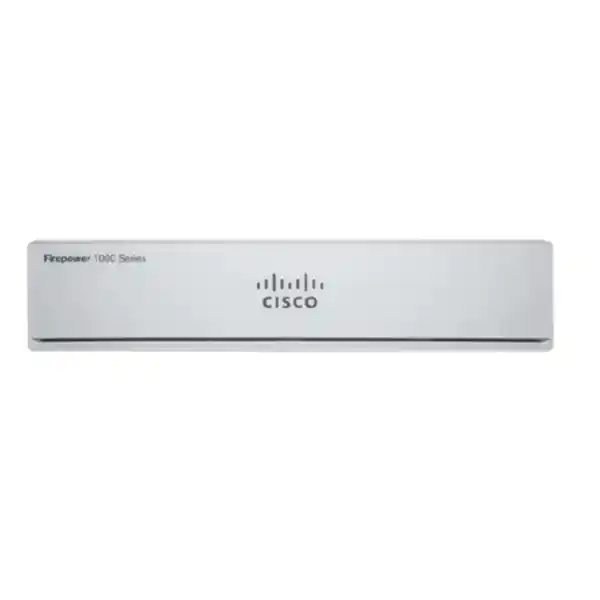
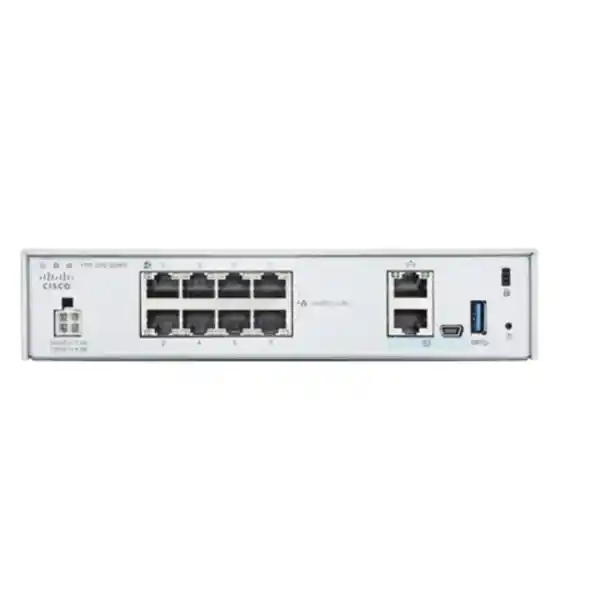
Cisco Firepower 1010E Firewall Dubai
A compact, fanless and non-PoE Cisco firewall platform for small offices, remote branches and carefully sized edge-security deployments. The 1010E combines eight 1GbE copper data ports with Cisco Secure Firewall software choices, threat-defense subscriptions, VPN capabilities and local or centralized management options.
Direct answer: what the Cisco Firepower 1010E is and who should consider it
What exactly is it?
The Cisco Firepower 1010E is the non-PoE member of the Firepower 1010 family. It is a compact security appliance with eight 1 Gigabit Ethernet RJ-45 data ports, a dedicated 1GbE management interface, serial console connectivity, USB support, 8 GB system memory and 200 GB internal storage. Cisco supports both Secure Firewall Threat Defense and Secure Firewall ASA software on this platform.
What is it mainly used for?
It is primarily suited to small business edges, branch offices, remote sites and other networks where firewalling, application control, intrusion prevention, VPN and centralized security management are required within a moderate traffic envelope. Its fanless desktop design also fits locations where acoustic noise, cabinet depth or space are practical considerations.
Who should consider it?
Organizations with internet circuits and inspection demands that fit the 1010/1010E performance profile should shortlist it, particularly when eight copper Gigabit interfaces are enough and PoE is not needed from the firewall itself. Buyers expecting faster WAN links, heavy encrypted inspection, large VPN populations or substantial growth should compare the 1120 or larger platforms before committing.
What matters most before ordering?
Do not size from the internet line rate alone. Confirm the software image, security features to be enabled, real traffic mix, encrypted traffic percentage, VPN load, concurrent sessions, management architecture, resilience target and expected growth. Advanced inspection changes the practical throughput envelope, so a configuration that looks adequate for basic firewalling can be undersized when TLS decryption and multiple security services are active.
What can FourTeck determine?
FourTeck can help map the requirement to the correct 1010E PID, software mode, license term, support requirement, management method, VPN need, accessories and installation scope. For replacement projects, the same discussion should include the current firewall model, interfaces, routing, NAT, VPNs, security rules, logging and downtime constraints.
Understanding the 1010E model identity
The letters and numbers around Cisco firewall products matter because visually similar appliances can be ordered with different software intentions and hardware capabilities. The Firepower 1010E is not simply another marketing label for the standard 1010. Cisco identifies it as a desktop, non-PoE appliance. The two commonly encountered hardware orderable identities are FPR1010E-NGFW-K9 for a Threat Defense-oriented order and FPR1010E-ASA-K9 for ASA software use. The hardware platform remains the 1010E, but the intended software and licensing path changes how the appliance is deployed and managed.
The most visible difference from the standard Firepower 1010 is PoE. The standard 1010 can provide PoE+ on two ports in supported configurations, whereas the 1010E is explicitly the non-PoE variant. That distinction is important in branch designs that expect the firewall to power an access point, IP phone, small camera or other powered endpoint. If the network already uses a PoE access switch, the absence of PoE on the 1010E may have no operational impact. If the firewall was expected to be the power source for edge devices, the design must change or the standard 1010 should be evaluated.
Current Cisco hardware guidance lists the 1010 and 1010E as compact fanless platforms with the same chassis dimensions, approximately 1.82 × 7.85 × 8.07 inches, and a chassis weight of about 3 lb / 1.36 kg. They are suitable for desktop or wall mounting, and Cisco provides rack-mount accessories for installations that need a structured rack placement. The compact format is useful in small communications rooms and branch cabinets, but it does not remove the need for ventilation. Cisco specifically warns that the internal temperature is significantly higher than the ambient operating temperature because the appliance has no fan.
The current 1010E power-supply guidance also deserves attention during procurement. Cisco changed the 1010E external power supply design to a 66 W unit, and current documentation identifies PWR-DT-66WAC and its spare equivalent for the 1010E. Earlier documentation may reference a 55 W maximum draw or older supply arrangement. For a new Dubai quotation, the practical rule is to quote the currently supported regional power configuration and correct power cord rather than copying an old bill of materials. This is one reason a current distributor or Cisco Commerce configuration is more reliable than an archived shopping list.
Verified performance profile and what the numbers mean in practice
Cisco publishes performance for the 1010 and 1010E together because they share the same security-performance class. Under Cisco test conditions with Secure Firewall Threat Defense, the platform is rated at up to 890 Mbps for firewall plus Application Visibility and Control, 880 Mbps for firewall plus AVC plus Intrusion Prevention System, 900 Mbps NGIPS throughput, 400 Mbps IPsec VPN throughput using Cisco’s stated test profile, and 195 Mbps TLS inspection throughput. Cisco also lists up to 100,000 concurrent sessions with AVC, 6,000 new connections per second with AVC and up to 75 VPN peers.
| Cisco published metric | 1010 / 1010E value | Buyer interpretation |
|---|---|---|
| FTD firewall + AVC | 890 Mbps | A useful baseline for application-aware firewalling, not a guarantee for every production traffic mix. |
| FTD firewall + AVC + IPS | 880 Mbps | Shows that IPS-enabled sizing remains close to the platform’s application-aware firewall figure under Cisco’s test conditions. |
| NGIPS | 900 Mbps | Relevant to intrusion-prevention workloads, but actual results depend on policy and traffic characteristics. |
| IPsec VPN | 400 Mbps | Important for branch tunnels and VPN-heavy designs; compare aggregate encrypted demand rather than one tunnel’s average. |
| TLS decryption | 195 Mbps | A critical constraint if deep inspection of encrypted web traffic is central to the security policy. |
| Concurrent sessions with AVC | 100,000 | Session count matters for user density, cloud-heavy applications, guest networks and busy branch environments. |
| New connections per second with AVC | 6,000 | Connection churn can be as important as bandwidth for web, SaaS, guest and highly distributed application usage. |
These numbers should be read as engineering reference points, not as a promise that every 800 or 900 Mbps internet circuit is automatically a good match. Cisco states that performance varies with the features activated, traffic protocols, packet sizes and software releases. A branch using normal firewalling and selective IPS may experience a very different load profile from a site decrypting a large share of outbound TLS traffic, running multiple VPNs, logging intensively and applying complex security rules. The buyer therefore needs a workload model rather than a simple comparison between ISP speed and one datasheet number.
Encrypted traffic is often the decisive sizing factor. Modern business applications are heavily HTTPS based, which means the firewall may need to decrypt, inspect and re-encrypt sessions before advanced controls can see the payload. The 195 Mbps published TLS figure is much lower than the 890 Mbps firewall-plus-AVC figure. If a business plans broad TLS inspection on a fast internet circuit, the 1010E can become the limiting component even though its basic firewall figure looks comfortable. Conversely, an organization that decrypts only selected categories or excludes trusted high-volume services may have a much lighter TLS workload.
ASA software presents a different performance profile because the feature set and test methodology differ. Cisco publishes up to 2 Gbps stateful inspection firewall throughput under ideal conditions, 1.4 Gbps multiprotocol stateful inspection, 100,000 concurrent connections, 25,000 new connections per second, 500 Mbps IPsec VPN throughput and a maximum of 75 VPN peers for the 1010/1010E class. These ASA figures should not be mixed with Threat Defense figures in a quotation without explaining the software image. A buyer moving from ASA to Threat Defense is changing both the security feature model and the relevant sizing method.
Hardware, interfaces and installation considerations
Eight copper Gigabit data ports
The 1010E provides eight 10/100/1000Base-T RJ-45 network ports. This suits branches that use copper handoffs from an ISP router, access switch, server segment or local distribution switch. It does not provide built-in SFP data ports, so fibre handoffs require an external media approach, a switch, or a different firewall model such as the 1120 family where Cisco provides SFP interfaces.
No PoE on the 1010E
The 1010E is specifically the non-PoE variant. This is a purchasing advantage when PoE is not required because there is no reason to pay for a capability the design will not use. It becomes a constraint when the branch expects the firewall to power an access point or phone directly. In that scenario, use a PoE switch, reconsider the standard 1010, or redesign the edge connection.
Dedicated management and console access
Cisco lists a dedicated 1000BASE-T management interface and serial console connectivity. The hardware guide also documents USB console and USB Type-A functionality. For deployment planning, reserve management addressing and decide whether the firewall will be reachable only from a local administration segment, through a central management architecture, or through a secured remote-management design.
Fanless operation
The platform is fanless and Cisco publishes 0 dBA acoustic noise. That makes it attractive for small offices where the firewall may sit in an open cabinet or near occupied work areas. Fanless does not mean ventilation is optional. Keep airflow paths clear, respect the 0–40°C published operating range and avoid enclosing the unit in a heat-trapping space without checking the real ambient conditions.
8 GB memory and 200 GB storage
Cisco documents 8 GB of system memory and 200 GB of storage for the 1010/1010E platform. These are appliance resources, not user-expandable capacity choices for a quotation. The practical procurement question is whether the platform class suits the workload; internal component failure generally leads to chassis RMA rather than field replacement of internal parts.
Desktop, wall or optional rack placement
The compact chassis supports desktop and wall deployment, while optional rack accessories are available for structured installations. Rack planning should account for the correct accessory version used with the current 66 W supply. For UAE projects, include rack position, power outlet type, cable routing, patching and ventilation in the installation scope instead of treating the firewall as an isolated box.
Threat Defense or ASA: choose the software path deliberately
One of the most consequential 1010E purchasing decisions is the software image. Cisco supports Secure Firewall Threat Defense as well as Secure Firewall ASA on the hardware. These are not merely two interface themes for the same operational model. Threat Defense is designed around Cisco’s modern next-generation firewall capabilities, including application visibility, intrusion prevention, malware-related services, URL filtering and centralized management options. ASA is the long-established Cisco firewall software platform with a different configuration and licensing model that remains relevant for particular migrations, operational standards and feature requirements.
A business that wants modern application-aware policy, IPS and subscription-driven security services will normally evaluate Threat Defense. A business replacing an existing ASA environment may consider whether staying with ASA reduces migration complexity, but that decision should be weighed against long-term security architecture, feature needs and Cisco roadmap considerations. The correct answer is not determined by which image is easier for an engineer on day one. It depends on the required controls, management platform, existing policy structure, VPN design, logging, automation and future operating model.
The ordering identity helps prevent ambiguity. FPR1010E-NGFW-K9 is the 1010E Threat Defense / NGFW appliance SKU in Cisco’s ordering material, while FPR1010E-ASA-K9 is the ASA-oriented appliance SKU. A quotation should state the intended software path instead of showing only “Cisco Firepower 1010E.” Otherwise the buyer can receive a price that appears comparable but carries a different license bundle, management expectation or implementation effort.
Migration projects deserve additional care. Converting an ASA policy to Threat Defense is not just a hardware swap. Existing access rules, NAT, object groups, site-to-site VPNs, remote-access VPN, routing, authentication, public services, logging and monitoring need to be inventoried and tested. Some configurations can be translated with migration tooling, but production validation remains essential. For a branch with a small and clean rule base, the cutover can be straightforward. For a long-lived perimeter with hundreds of objects and exceptions, the policy rationalization effort may be more important than the appliance installation itself.
Licensing and subscription planning
The appliance price is only one part of a Cisco Secure Firewall deployment. Threat Defense uses a required base entitlement plus optional security services. Current Cisco documentation identifies subscription capabilities such as Intrusion Prevention, Malware Defense, URL Filtering and Cisco Secure Client. The exact naming of the required base entitlement can vary across software releases and management workflows, so the safest procurement approach is to specify the desired security outcomes and let the current Cisco Commerce configuration determine the exact license SKUs and terms.
IPS licensing matters when the requirement includes signature-based and contextual intrusion prevention. Malware Defense is relevant when the policy needs file reputation, malware-focused inspection and related advanced threat workflows. URL Filtering adds category and reputation-driven web controls. Cisco Secure Client licensing is separate from the firewall appliance when remote-access users need client VPN connectivity. A quote that says only “1010E with license” is therefore incomplete; the buyer should know which services, how long they are licensed, and what happens at renewal.
Base entitlement
Confirm the base license required by the selected software release and management approach. Do not assume an older quote’s license name is still the current ordering language.
Security services
Specify whether IPS, Malware Defense and URL Filtering are required. Bundled term subscriptions are commonly used, but the exact commercial combination should be generated from the current Cisco ordering system.
Remote-access VPN
Cisco Secure Client entitlements must be sized for the required user population and feature level. The firewall’s 75-peer platform limit does not replace the need for client licensing.
Term and renewal
One-, three- and five-year terms are common in Cisco security subscriptions. Choose the term alongside the hardware lifecycle and budget plan rather than postponing renewal strategy until expiry.
Support coverage
Support should be quoted separately and aligned to the organization’s response expectations, replacement needs and internal support capability. License entitlement and hardware support are related commercial decisions but not interchangeable.
For ASA software, the licensing picture is different. Current Cisco guidance identifies the required ASA entitlement and an optional Security Plus capability for functions such as Active/Standby failover on the 1010 class, along with Cisco Secure Client licensing for remote access. This means two 1010E appliances do not automatically create a production-ready high-availability pair simply because the hardware count is two. The software image and the required HA entitlement must be part of the design and quote.
The cleanest commercial specification describes outcomes rather than abbreviations: for example, “1010E Threat Defense appliance, three-year IPS/Malware/URL security subscription, remote-access licensing for the named user count, centralized management integration and required support.” That language allows the reseller to map the requirement to current Cisco SKUs while giving the buyer a meaningful basis for comparing quotations.
Management choices: local administration, central control and cloud-delivered options
A firewall’s management architecture affects daily operations almost as much as its throughput. Threat Defense on the 1010E can be used with local device management for smaller deployments or integrated into Cisco centralized management approaches. Cisco’s current documentation references on-premises Firewall Management Center and cloud-delivered management options, while the broader platform has evolved through naming changes such as Defense Orchestrator and Cloud Control. For a buyer, the durable question is whether this firewall will be managed as a standalone branch device or as one node in a larger security estate.
Local management can be attractive for a single office because it reduces the immediate infrastructure required to get the device operational. The tradeoff appears when the organization adds more sites. Repeating policy changes manually, comparing logs across appliances and proving configuration consistency becomes harder as the estate grows. Central management can improve policy governance, logging, visibility and change control, but it introduces licensing, platform design, onboarding and administrator-role decisions that need to be made before deployment.
For companies with an existing Cisco Firewall Management Center, the 1010E should normally be evaluated as part of that management domain rather than independently. Confirm software compatibility between the manager and the appliance, planned software version, policy assignment, object reuse, event retention, network reachability and registration process. A branch cannot be considered “ready for central management” merely because the hardware supports it; the management traffic path and administrative workflow must exist.
Operations teams should also plan logging volume. Security inspection creates events, and event usefulness depends on where logs are retained, who reviews them and how alerts enter the broader incident-response process. A smaller firewall with a clean monitoring design is often more operationally valuable than a larger appliance whose events are ignored. During a FourTeck consultation, it is therefore useful to discuss SIEM integration, central syslog, cloud logging, retention requirements and the team that owns security alerts.
Six deployment patterns where the 1010E can make sense
Small office internet edge
A small office with one or two internet circuits, moderate user count and copper Gigabit handoffs can use the 1010E as its perimeter firewall. The design should still account for inspection services, guest traffic, SaaS usage, VPNs and future bandwidth increases. The compact chassis is useful where there is no full-depth network rack.
Remote branch connected to headquarters
A branch can terminate site-to-site IPsec connectivity to a larger head-office firewall while applying local internet security. The 400 Mbps published Threat Defense IPsec figure is an important ceiling for planning aggregate encrypted traffic. Routing, failover behavior and tunnel monitoring should be documented before cutover.
Retail or hospitality branch
Where payment, business, guest and operational networks must be segmented, the 1010E can enforce policy between zones and toward the internet. The firewall is not a replacement for a properly designed switching and wireless environment, so VLAN capacity, switch trunks, access-point traffic and upstream PoE requirements must be considered together.
Professional services office
Law firms, consultancies, accounting offices and similar businesses often depend heavily on encrypted cloud applications. In these environments, user count alone is a weak sizing method. Estimate SaaS traffic, remote access, large file transfers, video conferencing and whether TLS decryption is planned, because encrypted inspection can become the limiting workload.
Dedicated small-site security appliance
The 1010E can protect a focused site such as a small warehouse, satellite office, project location or operational subnet. Its fanless design is helpful where acoustic tolerance is low. Environmental temperature, dust, physical access and stable power still need to be addressed because a compact appliance is not an industrial hardened device.
ASA replacement with controlled scope
A branch currently using a smaller ASA can evaluate the 1010E as replacement hardware, either retaining ASA software where appropriate or moving to Threat Defense. The migration choice should be based on required features and lifecycle direction, not merely familiarity. Existing NAT, VPN and access policies should be cleaned before translation.
Sizing the 1010E correctly for a real business network
Correct firewall sizing starts by separating several workloads that are often collapsed into one number. The internet circuit may be 500 Mbps, but the firewall might also process east-west inter-VLAN traffic, site-to-site VPN, remote-access VPN, guest Wi-Fi, cloud backups and encrypted inspection. Some flows may traverse the firewall twice because of routing or service design. A robust sizing worksheet therefore lists traffic by purpose, security feature and peak period.
The first question is the current sustained and peak throughput, not just the subscribed ISP speed. A 1 Gbps circuit used at 150 Mbps most of the day has a different immediate requirement from a 500 Mbps circuit that regularly reaches 450 Mbps. However, sizing only to the current average creates another problem: internet usage tends to grow. Cloud migration, video meetings, software distribution, endpoint backup and richer web applications can increase traffic without increasing headcount. Capacity planning should include a realistic growth horizon.
The second question is which security services will inspect that traffic. Application visibility and IPS have published figures close to 900 Mbps on the 1010E, but TLS decryption is published at 195 Mbps. If the security policy requires broad decryption of web traffic, that lower figure becomes highly relevant. The planner should estimate the share of HTTPS traffic to be decrypted, exemptions for banking or privacy-sensitive categories, certificate deployment, applications that break under interception and the operational process for decryption exceptions.
The third question is session behavior. A small number of employees can create large numbers of concurrent connections because browsers, collaboration tools, cloud storage, mobile apps and operating systems all maintain background sessions. Guest Wi-Fi may create additional churn. The 100,000-session figure with AVC is generous for many small branches, but high connection rates can still matter in busy public-facing environments. For retail, hospitality and shared-office networks, device count is often a better starting variable than employee count.
The fourth question is VPN. Site-to-site traffic consumes encrypted throughput, while remote access adds user concurrency, authentication and client licensing considerations. A branch sending large backups to a data centre across IPsec can put more continuous VPN load on the firewall than fifty remote users who connect intermittently. Document tunnel count, peak encrypted bandwidth, routing method, failover behavior and whether internet breakout stays local or returns through headquarters.
Finally, consider resilience and growth. If the business expects a second ISP, more VLANs, heavier inspection, a new branch application or a move to a faster circuit within twelve to twenty-four months, the 1120 may be a better economic choice even when the 1010E meets today’s traffic. Replacing an undersized firewall early costs more than buying one larger model initially because the project cost includes licensing, engineering, downtime, change approvals and migration risk. The correct device is therefore the smallest platform that meets the required security profile with defensible headroom, not simply the least expensive model that passes a current-speed check.
VPN planning for site-to-site and remote users
Cisco publishes a maximum of 75 VPN peers for the 1010/1010E class. That figure is useful, but a VPN design also needs bandwidth and licensing context. With Threat Defense, Cisco’s published IPsec throughput figure is 400 Mbps under the stated test profile; ASA documentation publishes 500 Mbps under a different test methodology. These figures should not be treated as interchangeable, and neither should be interpreted as guaranteed user throughput after internet latency, encryption overhead and competing firewall workloads are considered.
For site-to-site VPN, list each peer, protected subnet, expected traffic and routing requirement. Decide whether the branch uses static routes, dynamic routing, policy-based behavior or another design supported by the selected software. Consider what should happen when a tunnel fails. If the branch has dual ISPs, failover logic must be tested because a tunnel that is technically established but advertising the wrong route can still produce a business outage.
For remote-access VPN, determine the number of named users and the maximum concurrent users. Cisco Secure Client licensing is a commercial requirement separate from the firewall’s hardware peer ceiling. Authentication is another design layer: local accounts may be acceptable for a temporary lab, but production environments commonly integrate corporate identity and multi-factor authentication. The project scope should therefore include the identity provider, certificates where used, DNS behavior, split-tunnel policy, posture requirements if any, client software deployment and support responsibilities.
VPN throughput should also be measured against security inspection. A firewall simultaneously handling internet browsing, IPS, encrypted site-to-site traffic and remote users has a mixed workload. A branch that expects 300–400 Mbps of sustained VPN alone is already close to the 1010E’s published Threat Defense IPsec reference point and should compare a larger model. Reserving capacity for burst traffic and other inspection functions is safer than designing at the laboratory maximum.
High availability, failure planning and operational resilience
Cisco lists Active/Standby high availability for the 1010/1010E class. High availability is valuable where one firewall failure cannot be allowed to disconnect a branch, but it should not be treated as a checkbox. A resilient design needs two appropriately licensed appliances, suitable switch connections, synchronized configuration, state/failover links as required, a compatible software setup and a tested method for upstream and downstream network failover.
With ASA software, current Cisco documentation identifies Security Plus as the optional license that enables failover on the Firepower 1010 class. Threat Defense licensing follows its own entitlement model. In either case, the quotation must show the HA requirement explicitly. Buying a second chassis later can create mismatched software, license terms or support dates, so organizations that know they need redundancy should plan the pair from the beginning.
High availability also does not protect against every outage. Both units can be affected by a shared ISP failure, switch failure, power problem, configuration error or environmental issue. For a critical Dubai site, consider dual power sources where practical, UPS runtime, redundant switching, dual internet connectivity and change-control practices. The firewall pair protects against specific device-level and maintenance scenarios; resilience is an end-to-end architecture.
A practical 1010E migration and deployment journey
Record WAN circuits, public IP addresses, LAN and VLAN structure, routing, NAT, access rules, VPNs, authentication, DHCP/DNS dependencies, logging destinations and management access. Capture peak traffic and current firewall utilization where possible. This baseline is the source of truth for sizing and migration.
Choose Threat Defense or ASA based on required capabilities and operating model. Decide whether management will be local, on-premises centralized or cloud delivered. Confirm compatibility with any existing management platform before the appliance is staged.
Map security requirements to subscriptions, remote-access requirements to Cisco Secure Client licensing, and HA requirements to the appropriate software entitlement. Align the subscription term with support and budget expectations.
Update to the approved software version, register licenses, establish management, configure interfaces and zones, import or recreate objects, build policy, configure routing and create VPNs. Staging should happen before the outage window so errors are found without affecting users.
Check rule order, NAT behavior, public services, DNS, internet browsing, SaaS applications, inter-VLAN access, site-to-site tunnels, remote-access VPN and logging. If TLS decryption is enabled, test business-critical applications and certificate trust.
Document cable movements, upstream ARP considerations, switch ports, ISP handoff, expected downtime, change approvals and rollback. Identify who can authorize rollback if testing fails. A precise cutover sheet reduces decision-making under pressure.
Move the circuits, verify link state, check routing and NAT, test representative user flows, confirm VPNs and inspect logs. Testing should include inbound services and inter-site applications, not only a successful browser session.
Review CPU, memory, connections, throughput, drops, threat events and VPN stability during the first busy periods. A firewall can appear healthy immediately after installation and still show capacity or policy issues under normal weekday load.
Network integration: switching, VLANs, routing and segmentation
The eight Gigabit Ethernet ports give the 1010E useful flexibility, but the best architecture usually treats the firewall as a security and routing platform rather than as a replacement for a complete access switch. A small office may connect WAN, LAN, guest, voice and server segments directly, yet larger branch designs should use managed switches and VLAN trunks so the firewall focuses on policy enforcement between meaningful security zones.
Cisco supports Layer 2 switch functionality on the 1010 family in supported software releases, which can simplify a very small installation. Even so, buyers should compare operational simplicity with future flexibility. Dedicated switching generally offers more ports, PoE choices, monitoring and expansion. Because the 1010E has no PoE, most environments with wireless access points or IP phones already need a PoE switch, which makes it natural to use that switch for access-layer connectivity.
Routing design should be agreed before configuration. Static routing is simple for a small branch, while more complex environments may require dynamic routing or multiple WAN paths. The firewall’s role in inter-VLAN routing also determines how much internal traffic contributes to appliance load. If large server-to-user transfers cross security zones, the firewall processes that traffic even though it never touches the ISP circuit. This is another reason internet speed alone can underestimate required capacity.
Segmentation should follow business risk rather than creating VLANs for their own sake. Common zones include corporate users, servers, guest Wi-Fi, voice, management, IoT and external services. Each zone should have a clear communication policy. For example, guest Wi-Fi generally needs internet access but no path to internal systems; management networks should be restricted to administrative sources; and IoT devices may need tightly scoped outbound services. The 1010E can enforce these decisions, but the switching and addressing design must carry the segmentation consistently.
Accessories and dependencies that can change the quotation
A useful firewall quotation covers the installation dependencies, not only the chassis. The 1010E’s current external power supply should match the regional power requirement, and the correct power cord matters. Rack deployments may require the 1010E-compatible rack-mount accessory. Wall installations may use the appropriate wall-mount kit. These parts are inexpensive relative to the firewall project, but missing one can delay a scheduled installation.
Network transceivers are not a 1010E data-port option because the appliance uses copper RJ-45 data interfaces. If the ISP presents fibre, decide where conversion occurs. The handoff may terminate on the provider’s ONT/router, a managed switch with SFP, or a media-conversion device selected for the circuit. If direct firewall SFP connectivity is a firm design requirement, compare the Firepower 1120 instead of adding unnecessary media components to force the 1010E into the design.
Cabling, patch leads, console access, rack power and UPS coverage are implementation items that are frequently omitted from hardware-only quotes. A branch refresh is also a good time to confirm whether the existing switch supports the required VLANs and whether the WAN handoff is electrically compatible. For dual-ISP designs, count physical ports after allocating LAN, HA and management connectivity so the final topology fits comfortably.
Software dependencies can be more significant than accessories. Central management may require an existing Cisco platform or a new management subscription. Remote-access VPN requires the appropriate Secure Client entitlement and identity integration. Advanced security services require term licenses. Support coverage should match the customer’s service expectation. These dependencies should be visible line items or clearly described inclusions rather than assumptions hidden inside a single price.
When the Cisco Firepower 1010E may be the wrong choice
A balanced product page should identify the conditions that push a buyer toward another model. The first is sustained advanced-security throughput above the 1010E’s comfortable envelope. If the organization expects near-gigabit inspected traffic with substantial TLS decryption, the published 195 Mbps TLS figure is a warning that a larger appliance should be considered. The second is VPN demand. A site expecting several hundred megabits of continuous encrypted traffic, especially alongside internet inspection, should evaluate more headroom.
The third is interface type. The 1010E has eight copper Gigabit data interfaces and no built-in SFP data ports. A design requiring direct fibre uplinks, multiple SFPs or 10 Gigabit connectivity belongs in a higher platform class. The fourth is PoE. If the firewall must directly power devices, the 1010E is unsuitable because it is explicitly non-PoE. Use external PoE switching or evaluate the standard 1010 where appropriate.
The fifth is scale and operational complexity. While 100,000 sessions and 75 VPN peers cover many branches, a dense shared environment, busy guest network or rapidly growing site may justify a larger model. The sixth is resilience architecture. The 1010E supports Active/Standby scenarios, but organizations needing higher-end clustering or different interface resilience should examine larger platforms and the exact feature support of the selected software version.
Finally, do not select the 1010E because it is the smallest device in the family or because a previous branch used one. Each site has a different mix of traffic, security policy and growth. The decision should emerge from a repeatable sizing method. If the 1010E meets the requirement with sensible headroom, it can be an efficient branch firewall. If the design is already close to a published limit before deployment, a larger model is usually the lower-risk purchase.
1010E versus nearby Cisco Firepower 1000 Series options
| Decision point | 1010E | 1010 | 1120 | 1140 |
|---|---|---|---|---|
| Typical position | Small office / branch, non-PoE | Small office / branch with PoE option | Higher-throughput small business / branch | Midsize branch / business edge |
| FTD FW + AVC | 890 Mbps | 890 Mbps | 2.3 Gbps | 3.3 Gbps |
| TLS decryption | 195 Mbps | 195 Mbps | 850 Mbps | 1.2 Gbps |
| Data interfaces | 8 × 1GbE RJ-45 | 8 × 1GbE RJ-45 | 8 × RJ-45 + 4 × SFP | 8 × RJ-45 + 4 × SFP |
| PoE | No | 2 ports PoE+ in supported configurations | No | No |
| Form factor | Compact desktop / wall | Compact desktop / wall | 1U rack | 1U rack |
The standard 1010 is the closest comparison because security performance is effectively the same; the major hardware distinction is PoE capability. The 1120 is the logical step up when the design needs substantially more inspected throughput, more VPN capacity, SFP interfaces or stronger TLS headroom. The 1140 goes further for midsize workloads. The best comparison is therefore not “which model is newer” but “which model leaves adequate capacity after all required services are enabled.”
Dubai and UAE procurement considerations
A Dubai firewall purchase should translate the technical design into an unambiguous commercial bill of materials. Start with the exact 1010E appliance PID and software intention, then add the current security subscription, support, remote-access licensing and accessories. Ask the supplier to identify the license term and regional power components clearly. This makes competing quotations easier to compare and reduces the risk of discovering after delivery that one quote excluded a required subscription or management component.
Lead time is another practical factor. Hardware availability can change, and Cisco ordering configurations may include country-specific options. If an installation has a fixed deadline, confirm availability before scheduling migration engineers or an outage window. Do not interpret “in stock” as confirmation that the exact software, subscription and support components are ready. For a complete project, the hardware and entitlements need to align.
Organizations with formal security or audit requirements should document the chosen software version, subscription level, administrative ownership and logging destination. If the firewall will protect regulated or sensitive environments, procurement may also need vendor onboarding, support escalation details and serial-number records. These are operational controls around the product rather than features of the 1010E itself, but they determine whether the deployed solution is supportable.
For local planning and broader infrastructure support, buyers can review FourTeck UAE for UAE technology solutions and FourTeck IT Services UAE when the firewall project also involves switching, server, endpoint, support or managed-service work. For organizations coordinating technology across multiple countries, FourTeck global provides an additional route for broader engagement.
A UAE quotation should also distinguish supply-only from implementation. Supply-only may suit customers with certified internal engineers and an established Cisco management platform. Installation services can include staging, software updates, license registration, policy creation, migration, VPN configuration, central management onboarding, cutover and post-change validation. The commercial scope should say which of those tasks are included so the lowest hardware price is not mistaken for the lowest project cost.
Security policy design: turning appliance capability into useful protection
Installing a next-generation firewall does not improve security by itself. The value comes from the policy. A clean 1010E deployment begins with clearly defined zones and allowed business flows. Instead of one broad “inside to outside permit” rule, organizations can classify traffic by user, application, destination and risk where appropriate. The exact level of granularity should remain manageable; a policy with hundreds of overlapping exceptions can be harder to secure than a smaller set of well-defined rules.
Application visibility adds context beyond port numbers because many modern applications use common web ports. This helps distinguish business services from unwanted or risky applications, but policy should reflect the organization’s real workflow. Blocking categories indiscriminately can break legitimate tools, while allowing everything except a short blacklist leaves little security value. A deployment project should include discovery or observation time when possible so application usage is understood before aggressive enforcement.
Intrusion prevention should be tuned to the environment. Enabling relevant protections provides important visibility and blocking, but false positives need an operational process. The team should know who reviews IPS events, how exceptions are approved, and how signatures are updated. Security subscriptions create capability; they do not replace event handling. This is particularly important in smaller companies where the same administrator may manage networking, endpoints and user support.
URL filtering can support acceptable-use and risk-reduction goals, while malware-focused services help evaluate suspicious files and known malicious activity. These controls work best when identity, endpoint security and DNS protections are also considered. The firewall is one layer in a broader security architecture. If users work remotely or applications are hosted in the cloud, not all traffic will traverse the branch perimeter. The security policy should acknowledge that reality rather than expecting one appliance to see every transaction.
Rule hygiene is a lifecycle task. After migration, review unused rules, temporary exceptions, shadowed entries and stale objects. A policy that accurately reflects current business need improves both security and troubleshooting. It can also reduce processing complexity. The 1010E is most effective when paired with disciplined change control, clear ownership and regular review rather than being treated as a one-time installation.
Frequently asked buyer questions about the Cisco Firepower 1010E
Is the Firepower 1010E an NGFW?
Yes, when ordered and deployed with Cisco Secure Firewall Threat Defense, the 1010E is used as a next-generation firewall platform with application-aware security and optional services such as IPS, Malware Defense and URL Filtering. Cisco also supports ASA software on the same hardware, so the exact software image must be stated.
What is the difference between 1010 and 1010E?
The 1010E is the non-PoE variant. The standard 1010 supports PoE+ on two ports in supported configurations, while the 1010E does not provide PoE. Their core Threat Defense performance class is shared. Current hardware documentation shows both as compact fanless platforms with eight copper Gigabit data ports.
Does the 1010E have SFP ports?
No data SFP interfaces are listed for the 1010E. It provides eight 1000BASE-T RJ-45 data ports. If the design requires direct fibre SFP connectivity, compare a higher model such as the Firepower 1120, which adds SFP interfaces.
Is the 1010E fanless?
Yes. Cisco documents fanless operation and 0 dBA acoustic noise for the 1010/1010E chassis. The absence of a fan makes ventilation discipline important because internal temperatures are higher than ambient. Keep the appliance within its operating environmental limits.
Can it handle a 1 Gbps internet circuit?
The answer depends on enabled services. Cisco publishes 890 Mbps for firewall plus AVC and 880 Mbps for firewall plus AVC plus IPS under its stated test conditions, but TLS decryption is published at 195 Mbps. A 1 Gbps circuit with broad encrypted inspection may justify a larger model. Size to the security workload, not only the circuit label.
How many VPN peers does it support?
Cisco publishes a maximum of 75 VPN peers for the 1010/1010E class. Remote-access users still require appropriate Cisco Secure Client licensing, and aggregate encrypted throughput must fit the platform’s VPN performance envelope.
Can the 1010E be managed locally?
Yes, Threat Defense supports local management options for smaller deployments, while Cisco also provides centralized and cloud-delivered management approaches. The best choice depends on the number of firewalls, policy-governance requirements, logging strategy and existing Cisco security infrastructure.
Is Firewall Management Center mandatory?
Not for every 1010E deployment. Local management can be used in suitable designs, while Firewall Management Center is valuable for centralized policy, monitoring and operations across multiple devices. Confirm the intended management method before licensing and staging.
Does the 1010E support high availability?
Cisco lists Active/Standby high availability for the 1010/1010E class. The required software licensing and deployment architecture must be included in the project. With ASA, Cisco identifies Security Plus as the optional license used for failover on the 1010 class.
What power supply does the current 1010E use?
Current Cisco hardware documentation identifies the 66 W external power supply for the 1010E. Older references may show an earlier power-supply arrangement, so a new quotation should use the currently supported regional configuration and correct power cord.
Can it be rack mounted?
Yes, with the appropriate optional rack-mount accessory. The appliance itself is a compact desktop/wall-mount chassis rather than a native 1U unit. Confirm the rack kit that corresponds to the current 1010E power-supply arrangement.
What should be included in a Dubai quote?
At minimum: exact 1010E PID, software image, base entitlement, security subscriptions and term, Secure Client licensing if required, support, power components, mounting accessories, management requirement and any installation or migration services. A complete quote should make exclusions visible.
Is the 1010E suitable for a new office?
It can be an excellent fit for a new small office when the expected inspected traffic, VPN demand and copper interface requirements match the platform. New offices should still plan growth, because internet usage often increases quickly as cloud services, video meetings and backup workloads are introduced.
Should I choose the 1120 instead?
Choose the 1120 when the requirement needs materially more inspected throughput, stronger TLS headroom, more VPN performance or SFP data interfaces. If the 1010E already sits close to its published limits in the design worksheet, the 1120 usually provides safer growth capacity.
Lifecycle, software updates and support planning
A firewall purchase begins a lifecycle rather than ending a procurement task. The 1010E should be deployed on a Cisco software release that is supported by the chosen management platform and acceptable to the organization’s change policy. New releases can add features, change behavior and address security vulnerabilities, but upgrading without preparation can create downtime. Establish an upgrade cadence, backup process and rollback method before the device becomes business-critical.
Support coverage determines how hardware and software issues are escalated. The required service level depends on site criticality. A small branch with redundant connectivity and spare equipment may tolerate a longer replacement path, while a revenue-generating site may need a more responsive contract and stronger local resilience. The support decision should therefore be tied to business impact, not chosen automatically from the cheapest available option.
Configuration backups are another lifecycle control. Keep a documented backup strategy for policies, objects, certificates, VPN configuration and management settings. Central management can simplify this process, but administrators still need to know how to recover after hardware replacement or a failed change. Certificate expiry dates, especially for VPN and TLS-related functions, should be monitored so they do not become unexpected outages.
Cisco product naming has evolved from Firepower to Secure Firewall across documentation, while the 1010E PID remains recognizable. During its service life, buyers may encounter both names in support documents and software interfaces. The practical approach is to track the exact hardware PID, serial number, software image and entitlement records. Those identifiers make support and renewal conversations more precise than relying on a generic description such as “Cisco firewall.”
What a complete FourTeck consultation can cover
A useful consultation begins with the business requirement and works backward to the appliance. For a 1010E project, that usually means confirming the number of users and devices, WAN circuit speeds, actual peak traffic, encrypted traffic, VPN requirements, number of security zones, interface types, management preference, software image, security subscriptions, support level and growth expectations. If the answers show that the 1010E is appropriately sized, the quotation can stay focused. If they show a risk of saturation or an interface mismatch, a higher Firepower 1000 Series model should be compared before purchase.
For migration work, FourTeck can scope the current configuration rather than assuming a blank deployment. Existing ASA, Fortinet, Sophos, SonicWall or other firewall environments may contain years of NAT, VPN and access policy. The migration plan should preserve required business flows while removing obsolete rules. This is where a pre-change discovery document becomes valuable: it gives the customer and engineer one agreed list of what must work after cutover.
The result should be a technically justified bill of materials and implementation scope, not just a hardware price. That distinction matters because two quotations for the same Cisco 1010E chassis can differ significantly in subscriptions, support, remote-access licensing, management and engineering. Comparing the complete outcome protects the buyer from apparent savings that later become change orders or missing capabilities.
Decision recap: is the Cisco Firepower 1010E a good fit?
Good fit when
The site is a small office or branch, eight copper Gigabit data ports are sufficient, PoE is not required from the firewall, advanced inspection fits within the platform’s performance profile, VPN demand is moderate and the organization wants Cisco Secure Firewall or ASA software on a compact fanless appliance.
Re-check the design when
The internet circuit approaches gigabit speeds with extensive TLS decryption, encrypted VPN demand is high, the site expects rapid growth, direct fibre interfaces are required, the firewall must power devices, or the current requirement already consumes most of the 1010E’s published capacity.
Confirm before ordering
Exact PID, Threat Defense or ASA, license term, IPS/Malware/URL needs, Secure Client user count, management method, support, HA requirement, current 66 W power arrangement, mounting accessory, interface handoffs and implementation scope.
What FourTeck needs from the buyer for an accurate quotation
Threat Defense or ASA, plus any existing Cisco management platform.
Circuit speed, real peak utilization and expected growth.
IPS, Malware Defense, URL Filtering and TLS decryption expectations.
Site-to-site peers, aggregate tunnel traffic and remote-access user count.
Copper or fibre handoffs, VLANs, WAN count and switch connections.
Single appliance or Active/Standby design, plus dual-ISP expectations.
Supply only, staging, migration, cutover, testing and documentation.
Subscription duration, support expectation and renewal alignment.
Plan the Cisco Firepower 1010E around your real traffic, not a generic bundle
Share the WAN speed, security services, VPN requirement, user/device count, software preference and installation scope. FourTeck can confirm whether the 1010E has appropriate headroom, identify the current Cisco ordering components and prepare a Dubai/UAE quotation that separates hardware, subscriptions, support and engineering clearly.

Reviews
There are no reviews yet.