
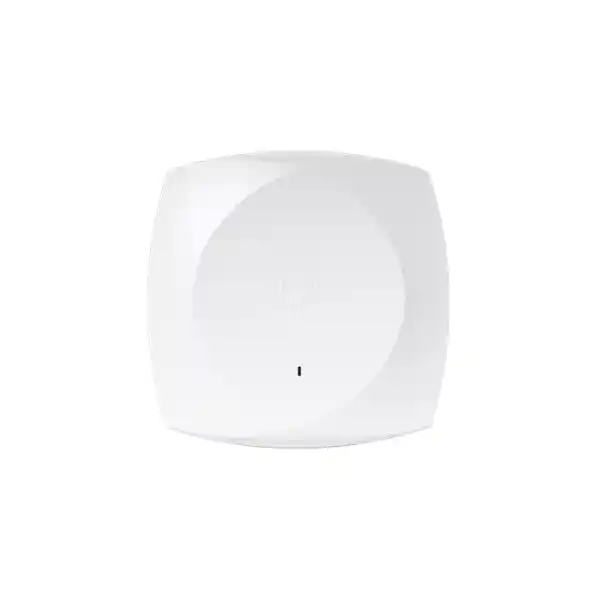
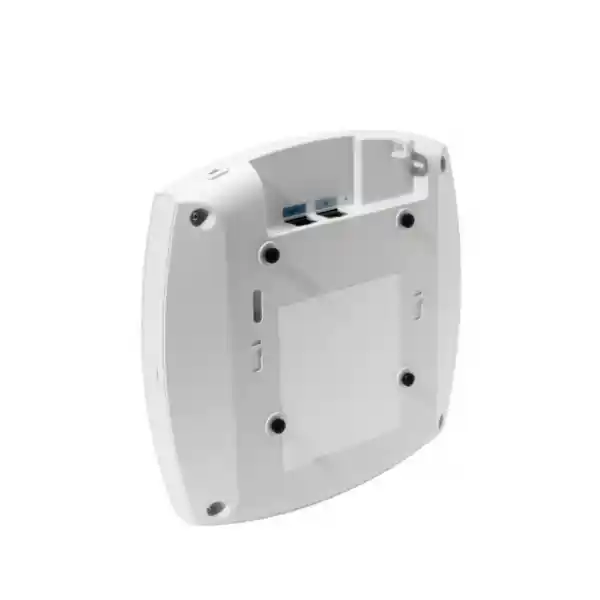
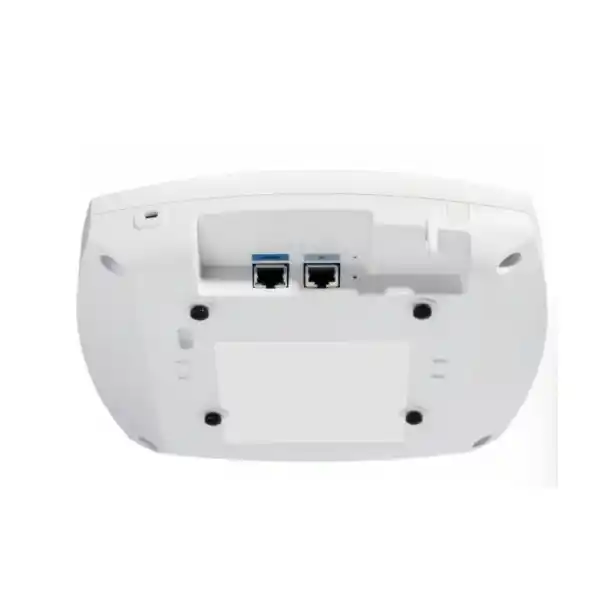
Cisco Wireless CW9176D1 Wi-Fi 7 Access Point
A directional enterprise Wi-Fi 7 access point for organizations that need focused high-capacity wireless coverage, 6 GHz readiness, multigigabit wired backhaul, modern security and the flexibility to operate within Cisco cloud-managed, on-premises or hybrid networking architectures.
Ideal for auditoriums, warehouse aisles, long corridors, high-ceiling areas and locations where a controlled antenna footprint is preferable to broad omnidirectional coverage.
Direct answer: what is the Cisco CW9176D1?
The Cisco Wireless CW9176D1 is an indoor Wi-Fi 7 access point with integrated directional antennas. Unlike a conventional ceiling-mounted omnidirectional access point that attempts to spread RF energy broadly around the device, the CW9176D1 shapes useful signal energy toward a defined coverage area. That makes it especially relevant when users, scanners, tablets, laptops, voice devices or IoT endpoints occupy a predictable zone in front of the access point. In practical UAE enterprise designs, this can include auditorium seating, warehouse aisles, distribution areas, exhibition spaces, long passageways, production floors and high-ceiling buildings where mounting geometry makes a directional antenna pattern advantageous.
The platform supports Wi-Fi 7, also known as IEEE 802.11be, with 4×4 uplink and downlink MU-MIMO and four spatial streams on its client-serving radios. It can operate with 2.4 GHz, 5 GHz and 6 GHz radios or, through flexible radio assignment, in a 5 GHz, 5 GHz and 6 GHz configuration where the design calls for additional 5 GHz capacity. Wi-Fi 7 capabilities include 4096-QAM, Multi-Link Operation, preamble puncturing, OFDMA, Target Wake Time, BSS coloring and channel widths extending to 320 MHz in 6 GHz. The wired interface is a single multigigabit RJ-45 port supporting 100 Mbps, 1 Gbps, 2.5 Gbps, 5 Gbps and 10 Gbps operation.
For a business evaluating the CW9176D1 in Dubai or elsewhere in the UAE, the access point should be considered as part of a complete RF, switching, power, controller, licensing and security design rather than as a stand-alone speed upgrade. FourTeck can coordinate the access point with multigigabit access switching, appropriate PoE budgets, CAT6/CAT6A structured cabling, wireless LAN controller choices, Cisco Networking Subscription licensing, VLAN and policy design, security integration and post-deployment validation. For broader enterprise networking requirements, customers can also review FourTeck UAE for infrastructure solutions and FourTeck IT Services UAE for implementation and support services.
CW9176D1 at a glance
802.11be radio platform
Built for the newest enterprise WLAN generation with advanced channel utilization, high-order modulation and multi-link capabilities designed to improve capacity, latency behavior and spectrum efficiency when supported by clients and infrastructure.
Four spatial streams per client radio
The client-serving radios support 4×4 uplink and downlink MU-MIMO with four spatial streams, giving the platform strong capability for modern high-density enterprise designs.
Wide 6 GHz channels
Support for 20, 40, 80, 160 and 320 MHz channels in 6 GHz lets designers choose between maximum peak throughput and more conservative channel reuse according to client density and regulatory availability.
Multigigabit wired uplink
A single RJ-45 interface scales from 100 Mbps through 1, 2.5 and 5 Gbps to 10 Gbps, reducing the likelihood that the wired edge becomes the limiting factor in a high-capacity deployment.
Maximum PoE budget
Cisco specifies 802.3bt Class 5 for the full 4×4 radio configuration, 10G link capability and USB availability, with maximum PoE consumption listed at 39 watts.
Integrated antenna array
Peak antenna gain is specified at 7 dBi for 2.4 GHz and 8 dBi for both 5 GHz and 6 GHz, with directional beam patterns intended to concentrate coverage into a defined target zone.
Why the directional D1 architecture matters
Wireless access point selection is not only about radio generation or aggregate PHY rate. Antenna geometry has a direct influence on how usable signal is placed into the environment. An omnidirectional indoor access point is often the right choice for offices with relatively even user distribution around a ceiling location. A directional access point solves a different RF problem. Its purpose is to place more of the available RF energy toward a known service area and reduce unnecessary energy behind or away from that area. This can improve signal quality and cell definition when the mounting location and user zone are predictable.
The CW9176D1 has an integrated directional array rather than external antenna connectors, which simplifies antenna compatibility and installation while preserving a controlled pattern. Cisco specifies an approximately 80 by 80 degree beamwidth for the 2.4 GHz antenna system and approximately 70 by 70 degrees for the 5 GHz and 6 GHz antenna systems. The useful interpretation is not that every client inside those angles will experience identical performance; walls, shelving, racks, machinery, people, reflective surfaces, ceiling height, device orientation and transmit power all alter the realized RF environment. The specification instead tells the WLAN designer that the AP is intended to illuminate a sector rather than a full room in every direction.
In a warehouse, for example, the access point can be positioned so the main lobe points along an aisle or toward a work zone. In an auditorium, the array can be aimed toward seating instead of wasting significant energy behind the mounting wall. In a long corridor, wall mounting can create a controlled longitudinal cell. In a building with exceptionally high ceilings, a directional antenna can be aimed downward to a defined floor area, although Cisco recommends validating connectivity when ceiling height exceeds conventional access point placement ranges. These are design advantages, not guarantees; a professional predictive model and on-site validation remain essential.
For UAE projects, directional design can also help in visually challenging venues where access points cannot always be installed directly above users. Hospitality ballrooms, exhibition facilities, education lecture halls, logistics centers, manufacturing spaces and transport-related facilities often impose architectural constraints that make standard ceiling placement difficult. The D1 form factor gives the designer another tool: RF energy can be directed from a wall, high mounting point or structural location toward the client population. The benefit is greatest when the antenna pattern is deliberately aligned to the required service area during commissioning rather than installed as if it were a general-purpose omnidirectional AP.
Wi-Fi 7 capability explained for enterprise buyers
Wi-Fi 7 introduces capabilities that are designed to make better use of spectrum and improve performance under demanding traffic conditions. The CW9176D1 supports 4096-QAM, allowing more data to be encoded per symbol when the client has sufficiently strong signal-to-noise ratio. This is important because the highest modulation rates are only achievable near ideal RF conditions. A product page can quote a modulation capability, but a network engineer must create cells with suitable signal strength, interference control and channel planning so compatible clients can actually use those rates. The directional antenna architecture can assist by concentrating useful energy into the target zone, but it does not remove the need for correct AP density and power settings.
Multi-Link Operation is another major Wi-Fi 7 capability. At a standards level, MLO enables capable devices to coordinate traffic across multiple links, with the goal of improving throughput, responsiveness or resilience depending on client and network implementation. In enterprise planning, the practical value will depend on the mix of Wi-Fi 7 client chipsets, operating systems, software versions, security configuration and network policy. A deployment designed in 2026 should therefore avoid assuming that every user device will immediately exploit every Wi-Fi 7 function. A CW9176D1 installation can serve older generations while building an infrastructure path for newer client capabilities.
Preamble puncturing is particularly useful in wide channels. Traditional wide-channel operation can be disrupted when part of the channel is affected by interference or unavailable spectrum. Wi-Fi 7 can use puncturing mechanisms to preserve usable portions of a wider channel instead of discarding the entire wide allocation. The resulting benefit is more efficient spectrum utilization in environments where a perfectly clean contiguous block is not always available. The effectiveness depends on regulatory rules, channel planning, controller software and client support, so it belongs inside an engineered WLAN policy rather than being treated as an automatic performance multiplier.
OFDMA divides channels into resource units so multiple users can be served efficiently, while MU-MIMO allows simultaneous spatial transmission opportunities. The CW9176D1 supports uplink and downlink OFDMA and 4×4 uplink/downlink MU-MIMO. These features become valuable in dense environments containing many active devices with diverse traffic patterns: handheld scanners sending small transactions, phones maintaining voice sessions, tablets receiving application updates, laptops using collaboration tools and cameras or IoT systems exchanging periodic data. Network performance is determined by airtime efficiency, contention, retry rates and RF quality as much as by the maximum data rate printed on a specification sheet.
Target Wake Time helps compatible clients coordinate wake schedules, potentially reducing unnecessary active radio time and improving efficiency for battery-powered devices. BSS coloring helps radios distinguish overlapping basic service sets, improving spatial reuse opportunities when neighboring cells share a channel. Maximal Ratio Combining can improve receive performance by combining signals across antenna paths. Packet aggregation mechanisms including A-MPDU and A-MSDU reduce overhead by carrying more useful data per transmission opportunity. Together, these features reflect the real purpose of a modern enterprise WLAN: not simply higher single-user speed, but more efficient handling of large and diverse device populations.
Cisco lists theoretical aggregate PHY data rates up to approximately 18 Gbps in a 2.4/5/6 GHz configuration and up to approximately 23 Gbps where the flexible radio design uses 5/5/6 GHz with wide channels. These figures should never be interpreted as application throughput to one device. Real throughput is lower because Wi-Fi is a shared, half-duplex medium with protocol overhead, contention, acknowledgements, channel conditions, client limitations and network services. The engineering objective is therefore to translate the radio capabilities into predictable service-level outcomes such as low retry rates, stable roaming, sufficient throughput per active client and acceptable latency for business applications.
Flexible radio assignment: 2.4/5/6 GHz or 5/5/6 GHz
One of the CW9176D1’s most useful enterprise characteristics is its flexible client-radio architecture. It can be configured in a conventional tri-band arrangement using 2.4 GHz, 5 GHz and 6 GHz, or the flexible radio can be repurposed so the access point operates with two 5 GHz radios plus 6 GHz. This matters because many organizations continue to carry a large installed base of 5 GHz clients while newer devices progressively adopt 6 GHz. A dual-5 GHz option can be attractive when 2.4 GHz demand is low and the design needs more 5 GHz capacity in a particular sector.
The correct mode depends on endpoint inventory. Warehouses may still use legacy handheld scanners or specialized devices that require 2.4 GHz. Education venues may contain a mixed population of older tablets and new laptops. Corporate offices often have a growing number of 6 GHz-capable premium clients but still rely heavily on 5 GHz for broad compatibility. A radio-mode decision should therefore follow a client capability assessment, not a preference for the newest band. FourTeck engineers can map the device estate by frequency support, Wi-Fi generation, channel width, authentication type and roaming behavior before finalizing the RF mode.
The 2.4 GHz band offers reach and broad legacy compatibility but has limited non-overlapping spectrum and is more exposed to interference from non-Wi-Fi sources. In high-density enterprise deployments, 2.4 GHz radios are often run at reduced power or selectively disabled to control cell size and reduce contention. The 5 GHz band remains the primary enterprise workhorse because of its broad client support and larger channel pool. The 6 GHz band adds substantially more spectrum in jurisdictions where permitted, but client support and regulatory policy must be confirmed. This is particularly important for UAE procurement: the hardware and software should be deployed in accordance with the country’s approved regulatory domain and the Cisco global-use onboarding process.
The practical design advantage is adaptability. Instead of treating every access point as an identical radio profile, the WLAN can be tuned according to the physical zone. A warehouse sector with 2.4 GHz scanner dependence can preserve that radio, while a conference or auditorium sector dominated by modern laptops may benefit from greater 5 GHz and 6 GHz capacity. Cisco’s radio resource management and policy tools can then operate within that architecture. The result is a WLAN designed around actual device behavior and spatial demand rather than a one-size-fits-all channel plan.
Directional antenna specifications and RF implications
| Radio / function | Published peak gain | Pattern / design note | Engineering implication |
|---|---|---|---|
| 2.4 GHz | 7 dBi | Directional, approximately 80 x 80 degrees | Useful for concentrating legacy-band coverage toward a defined zone. |
| 5 GHz | 8 dBi | Directional, approximately 70 x 70 degrees | Supports focused enterprise capacity with strong mainstream client compatibility. |
| 6 GHz | 8 dBi | Directional, approximately 70 x 70 degrees | Helps shape new-band coverage where compatible client adoption is expected. |
| IoT | 7 dBi | Integrated antenna system | Supports location and IoT-related services without a separate overlay radio appliance. |
| UWB | 10 dBi | Integrated Ultra-Wideband radio and antenna | Provides a hardware foundation for advanced location-oriented use cases. |
| GNSS | 2 dBi L1 / 5 dBi L5 | Integrated GNSS capability | Assists location and operational workflows supported by the Cisco platform. |
Antenna gain should be understood carefully. Higher gain does not mean that the access point creates additional transmit power; it means the antenna system redistributes energy more strongly in certain directions. A directional array can therefore increase effective signal in the intended sector while reducing signal in other directions. This is exactly why orientation matters. Installing a CW9176D1 flat on a ceiling without considering its directional pattern can produce an RF footprint different from the design intent. Cisco’s deployment guidance identifies wall mounting as a primary use pattern for the D1, while also noting high-ceiling scenarios where a downward-focused directional beam is useful.
RF engineers should model both downlink and uplink. A high-gain AP antenna can improve the AP’s receive sensitivity in the target direction, but the client still has its own transmit-power and antenna limitations. A smartphone, scanner or IoT device may transmit at lower power than the access point. This is why simply increasing AP transmit power is not a solution for coverage problems: the client must still be heard reliably at the AP. Directional antenna gain can improve the bidirectional link budget in the service sector, but cell edge targets should be established from the weakest critical client class.
For voice and real-time applications, the design should prioritize signal-to-noise ratio, low retries and clean roaming boundaries rather than absolute RSSI alone. For warehouse scanning, packet reliability and roam behavior may be more important than peak throughput. For auditorium client access, capacity planning must consider how many devices are concurrently active, the applications they run and the channel reuse strategy across multiple sectors. The CW9176D1 is valuable because the RF footprint can be made more deliberate, but that value is realized through correct site design.
10G multigigabit uplink: designing the wired edge correctly
The CW9176D1 provides one multigigabit Ethernet RJ-45 interface supporting 100 Mbps, 1 Gbps, 2.5 Gbps, 5 Gbps and 10 Gbps. This is a critical design feature because a high-capacity Wi-Fi 7 access point can generate enough aggregate traffic that a conventional 1 GbE access port becomes an avoidable bottleneck. The correct switch-port speed should be selected according to expected client load, radio mode, application mix, upstream architecture and PoE requirements. A 10G-capable AP does not mean every site must run the port at 10 Gbps, but the edge infrastructure should not be undersized without a deliberate capacity calculation.
Structured cabling quality becomes more important as Ethernet speed increases. Cisco recommends CAT6 or CAT6A cabling in its CW9176 deployment guidance for higher-speed operation, while older CAT5e runs may impose performance constraints depending on distance, quality and environment. In UAE brownfield buildings, the cabling plant should therefore be tested rather than assumed. Patch panels, keystone jacks, patch cords and intermediate connections all contribute to channel performance. A cable that successfully negotiated 1 Gbps for an older access point may not reliably support multigigabit or 10G operation after a Wi-Fi 7 refresh.
The access switch must satisfy both bandwidth and power requirements on the same port. This is where wireless refresh projects frequently expose hidden infrastructure limitations. A switch may support multigigabit Ethernet but only lower PoE classes on some ports, or it may provide adequate per-port power while lacking enough total PoE budget for a full floor of new access points. Engineers should calculate worst-case and typical consumption across all connected devices, include uplink modules and switch redundancy requirements, and preserve operational headroom rather than sizing the switch to the exact theoretical total.
FourTeck can align the wireless design with campus switching, VLAN architecture, redundancy, uplink oversubscription and structured cabling services. Where the WLAN participates in a broader secure-access architecture, customers can also use Firewall Dubai by FourTeck for perimeter and segmentation requirements. The goal is to treat the AP uplink as part of an end-to-end path from client device to application, not as an isolated cable run.
PoE requirements and feature impact
Power planning is one of the most important CW9176D1 deployment decisions. Cisco specifies 802.3bt Class 5, commonly associated with Cisco UPOE-capable infrastructure, for the access point to operate its three client-serving radios at 4×4, allow a 10G Ethernet link and make the USB interface available at up to 9 watts. Under this power condition, Cisco lists a maximum PoE consumption of 39 watts. The access point’s normal consumption may be lower, but switch and power-system design should accommodate the published maximum where full functionality is required.
The access point can also operate on 802.3at PoE+. Under Cisco’s published power table, the 2.4 GHz radio is reduced to 2×2 while the 5 GHz and 6 GHz radios remain 4×4, the wired link is limited to 2.5 Gbps and USB is unavailable. Maximum PoE consumption is listed at 25.5 watts. This can be useful in a staged migration where existing switching cannot yet provide Class 5 power, but it should be treated as a defined reduced-capability mode. The design team must decide whether that compromise is acceptable for the site’s capacity targets.
802.3af PoE is not an operational power mode for normal client service. Cisco identifies it for configuration staging with all radios off, using a 1G link and no USB, with maximum PoE consumption listed at 13.95 watts. This distinction matters during installation. A technician may be able to boot or stage an access point on a legacy PoE port and incorrectly conclude that the switch is sufficient. The final production switch must deliver the required power class and negotiate it correctly so the AP can enable the intended radio and interface capabilities.
Cisco recommends enabling LLDP and/or Cisco Discovery Protocol so the access point and switch can negotiate power properly. Enterprise deployments should verify the negotiated power state in both the wireless management platform and switch telemetry after installation. If an AP reports reduced radio chains, a lower Ethernet speed or unavailable USB, power negotiation and cabling should be among the first items investigated. The issue may not be a fault in the access point; it may simply be operating exactly as designed under the available PoE level.
UPS sizing must also account for the new power envelope. A floor with dozens of Wi-Fi 7 access points can materially increase the PoE load on access switches compared with an older wireless generation. For facilities with generator and UPS-backed network rooms, the wireless refresh can therefore affect battery runtime calculations and thermal planning. FourTeck can include PoE load, switch redundancy, UPS capacity and rack power in the bill of materials so the wireless upgrade does not create an unplanned dependency elsewhere in the infrastructure.
Security architecture: WPA3, 802.1X and trusted infrastructure
The CW9176D1 supports enterprise wireless security mechanisms including WPA2, WPA3, 802.1X authentication, Enhanced Open/OWE and modern AES-based cipher options. Cisco lists GCMP128, GCMP256 and CCMP256 among supported encryption capabilities, along with EAP methods including EAP-TLS, PEAP, EAP-FAST and other enterprise authentication choices. The access point can therefore participate in identity-based WLAN designs where users and devices authenticate against centralized policy systems rather than sharing a single pre-shared key.
For high-security UAE organizations, EAP-TLS is often attractive because it uses certificates rather than passwords for device or user authentication. A complete EAP-TLS deployment requires certificate lifecycle management, RADIUS policy, endpoint provisioning and recovery processes. Cisco Identity Services Engine can be integrated to provide policy and identity services, but the optimal architecture depends on existing identity systems, device ownership models and segmentation requirements. Guest access, contractor networks, corporate-managed devices, voice endpoints and IoT equipment may each require different onboarding and policy treatments.
The Cisco platform also uses Trust Anchor Technologies intended to strengthen hardware and software authenticity. Enterprise security planning should extend beyond Wi-Fi encryption to controller access, administrative roles, firmware governance, switch-port security, logging, DNS security, network segmentation and application policy. Wireless is an access layer, so a compromised identity or overly broad VLAN can create risk even when the over-the-air encryption itself is strong.
FourTeck can design the CW9176D1 as part of a layered architecture that separates employee, guest, operational technology, IoT and contractor traffic according to business risk. This may include dynamic VLANs, security group policy, firewall segmentation, identity-based authorization, NAC, logging to a SIEM and secure administrative access. The objective is to make the WLAN an enforcement point in the enterprise security model instead of treating it as a simple bridge between radio clients and the wired LAN.
Cloud-managed, on-premises or hybrid deployment flexibility
Cisco’s Wi-Fi 7 generation introduces a unified hardware and licensing approach that gives organizations more flexibility in how the wireless network is managed. The CW9176D1 can participate in Cisco on-premises architectures based on Catalyst 9800 family wireless LAN controllers and Cisco enterprise management systems, and the 9176 platform can also be used with Cisco Meraki cloud management. This matters for organizations that are modernizing gradually or have different operational models across sites.
An on-premises controller architecture can be attractive for enterprises with established Cisco campus networks, centralized change control, detailed RF policy requirements, local operational tooling or existing Catalyst 9800 investments. It can integrate with Cisco Catalyst Center for assurance, automation and broader campus workflows. A cloud-managed architecture is attractive when distributed branches, simplified operations, remote provisioning and web-based visibility are priorities. A hybrid organizational model may have a central campus managed on premises and smaller branches using cloud management while maintaining a common procurement and licensing framework.
The management decision should be made before implementation because it affects operational processes, telemetry, onboarding, integrations and staff workflows. Organizations should document who owns WLAN configuration, where logs are retained, how firmware is scheduled, how incidents are escalated and which team has administrative rights. Management mode is not just a technical feature; it determines how the network is operated every day.
For projects spanning UAE headquarters and international branches, a unified hardware strategy can simplify lifecycle management, but regional regulatory requirements still apply. Each access point must operate within the permitted country configuration. Organizations with multi-country procurement should therefore coordinate ordering, onboarding and regulatory assignment carefully. FourTeck’s UAE team can help define the local deployment and can coordinate broader sourcing requirements through FourTeck Global where appropriate.
Cisco Networking Subscription licensing
Cisco’s Wi-Fi 7 access points require a Cisco Networking Subscription for wireless. The two primary tiers are Cisco Wireless Essentials and Cisco Wireless Advantage. Essentials provides the core feature set needed to manage and operate the network, while Advantage adds advanced capabilities. Cisco’s current licensing model is designed to support management flexibility across cloud, on-premises and hybrid deployment models. New subscriptions generally have a standard minimum term, so licensing should be included in the initial commercial design rather than treated as an optional afterthought.
License tier selection should be based on required functions, not simply the lowest purchase price. A multi-site enterprise may value advanced assurance, automation, location or radio optimization features that justify the Advantage tier. A smaller, straightforward deployment may meet its operational requirements with Essentials. The correct quotation should therefore identify the number of access points, required license tier, subscription term, management mode and any controller or platform dependencies.
Lifecycle planning is equally important. When wireless licenses, switching support, controller software, security subscriptions and other infrastructure components renew at different times, operational overhead increases. Cisco’s subscription framework is intended to help align entitlements and renewal dates. FourTeck can prepare a license schedule that records start dates, quantities, term lengths and associated devices so the customer has a clear renewal baseline after project completion.
Licensing requirements evolve with Cisco software releases and commercial programs, so the quotation should always be validated against the current Cisco ordering guide at the time of purchase. Product content can describe the architecture, but the purchase order should reference the exact currently orderable license SKU and term appropriate to the customer’s deployment.
Integrated radios and location-ready services
Bluetooth Low Energy
Integrated BLE 5.3 provides a hardware foundation for location-oriented workflows such as asset visibility, wayfinding and proximity use cases. Cisco indicates a path to BLE 6 support through future software, subject to released software capability.
Ultra-Wideband
Integrated UWB hardware expands the platform beyond conventional Wi-Fi access and supports precise-location oriented architectures where compatible endpoints, applications and software services are deployed.
GNSS / GPS
GNSS capabilities support device-location and operational workflows within Cisco’s management ecosystem. This can assist large deployments where access point placement and location context are important to assurance and automation.
Dedicated scanning functions
The platform includes dedicated RF-monitoring capability that can be used by Cisco software for spectrum awareness, security monitoring and radio optimization without relying only on client-serving radios for visibility.
USB 2.0 interface
The USB 2.0 interface can deliver up to 9 watts when the AP has appropriate 802.3bt power, supporting application-hosting or approved peripheral scenarios. USB is disabled under lower PoE+ power mode.
Built-in accelerometer
An integrated accelerometer can help verify how the access point is physically installed, a useful operational aid for a directional model where orientation is directly related to RF coverage intent.
These integrated services matter because enterprise access points increasingly act as multi-radio edge platforms. A modern campus may need Wi-Fi access, RF monitoring, asset-location services, application hosting and telemetry from the same physical footprint. Consolidating those functions can reduce overlay hardware, but each service should still be justified by a business use case. A warehouse may care about asset location and scanner reliability; a corporate campus may emphasize wayfinding and occupancy analytics; a healthcare or logistics environment may value location-assisted workflows. FourTeck can scope the supporting software and integrations so customers do not pay for capabilities without a deployment plan.
Physical specifications and environmental considerations
The CW9176D1 is an indoor access point measuring approximately 9.5 by 9.5 by 2.0 inches, or roughly 24 by 25 by 5.1 centimeters, excluding the mounting bracket. Cisco lists the device weight at approximately 3.4 pounds, or 1.56 kilograms. The D1 uses the AIR-AP-BRACKET-2 as its default bracket, reflecting the model’s wall-oriented directional use case. The access point also includes a management console port and a status LED for boot, association and operating-state indications.
Cisco specifies an operating temperature range of 0 to 50 degrees Celsius and operating humidity of 10 to 90 percent noncondensing. Those limits are important in UAE facilities because indoor technical spaces can still become hot when HVAC fails or when access points are installed near roofs, industrial ceilings or poorly conditioned zones. A network design should evaluate the actual ambient temperature at the mounting position, not the thermostat reading at occupant level. High-bay warehouses can have significant temperature stratification between the floor and roof structure.
The access point is designed for indoor use. Projects requiring outdoor coverage, exposed loading docks or environmentally harsh installations should use a model specifically certified for those conditions. Installing an indoor AP inside an improvised box is not equivalent to deploying an outdoor-rated solution because enclosure thermal performance, condensation, UV exposure, ingress protection and antenna behavior all change the result. The product selection should follow the physical environment rather than attempting to adapt the wrong hardware to the location.
Mounting stability is especially important for a directional access point. If the bracket angle changes after commissioning, the coverage footprint changes. Installers should document orientation, height and azimuth for each D1 unit and include photographs in the as-built record. In large facilities, this makes future troubleshooting much easier because the engineer can compare the intended orientation with the actual installed position before making RF changes remotely.
Where the CW9176D1 fits best
Auditoriums and lecture halls
A sector-style footprint can be aimed toward seating areas, allowing multiple APs to divide a high-density venue into intentional coverage zones. Capacity planning should account for concurrent devices, collaboration traffic and event peaks.
Warehouses and logistics centers
Directional coverage can be aligned with aisles, picking zones or loading areas. Designs should prioritize scanner reliability, roaming, shelf attenuation, rack reflections and client transmit power rather than only speed.
Long corridors
Wall-mounted directional APs can project coverage along a hallway more deliberately than a broad ceiling cell. Channel reuse and cell overlap must still be engineered to support smooth roaming.
High-ceiling environments
A downward-focused antenna pattern can improve the link budget to a defined area when access points must be mounted high above users. Cisco recommends validation testing where mounting height is beyond common indoor ranges.
Exhibition and event spaces
Temporary high-density demand and changing floor layouts make controlled sector coverage useful. The RF plan should be revisited when partitions, stands or audience layouts materially change.
Industrial and production areas
Directional antennas can serve defined work cells while limiting unwanted overlap. Site surveys must account for moving machinery, metallic surfaces, process equipment and any non-Wi-Fi interference sources.
Warehouse WLAN engineering with CW9176D1
Warehouses are among the most demanding enterprise WLAN environments because RF behavior changes with inventory, racks, forklifts and client position. A predictive design based on an empty warehouse can be misleading after metal shelving is filled with products. Water-rich goods, paper, dense materials and metallic packaging each attenuate and reflect signals differently. The CW9176D1’s directional pattern is useful because it can be aimed along aisles or toward operational zones, but the design must be validated in conditions that resemble real production.
The critical client should determine the design target. A modern laptop with multiple antennas and higher transmit power may work well where an older handheld scanner struggles. If the business process depends on scanners, voice terminals or rugged tablets, those devices should be used during the active survey and roaming tests. Engineers should measure RSSI, SNR, retry percentage, data rates, latency and roam times while the client is used in realistic orientations. Handheld devices are often blocked by the operator’s body, and forklift-mounted terminals may sit close to metal structures that alter antenna behavior.
Channel width is another important decision. A warehouse does not automatically benefit from 160 or 320 MHz channels. Wider channels provide higher peak rates but consume more spectrum and can reduce channel reuse. Scanner traffic may require only modest throughput but demand highly predictable airtime and roaming. In such cases, narrower channels can create more independent cells and improve reuse. A high-capacity packing or video area may justify wider channels. The CW9176D1 gives the engineer the capability to support broad channel widths; the design should choose them based on application need.
Mounting height and aisle direction must be coordinated. An access point positioned at one end of an aisle can project signal down the aisle, but the far-end client uplink must still reach the AP. An AP mounted high and aimed downward may cover several adjacent work zones, but shelf shadowing can create unpredictable dead spots. Multiple lower-power cells often outperform one extremely strong cell because client devices can maintain more balanced uplink and downlink behavior. Cisco’s deployment guidance recommends keeping APs close to users where possible and validating installations that exceed common ceiling heights.
Operational resilience also matters. Warehouses may run around the clock, leaving limited maintenance windows. Controller redundancy, switch-stack resilience, UPS runtime, spare AP inventory and documented mounting positions should be included in the project plan. FourTeck can deliver an as-built package with AP names, MAC addresses, switch ports, cable IDs, mounting orientation, radio settings and survey evidence so the facility team has a reliable baseline for future changes.
Auditorium and high-density venue design
Auditoriums create a different problem: many users are concentrated in a relatively small area, and a large percentage of them may become active simultaneously at the start of a session, during breaks or when a presenter asks attendees to access the same application. The CW9176D1 can be used to divide seating into directional sectors, reducing the number of clients competing within one broad cell. A multi-sector design can also improve channel reuse when APs are carefully positioned and transmit power is controlled.
Capacity planning should begin with expected device count per seat rather than attendee count alone. A user may carry a laptop, phone and tablet, although not all devices will be active at the same time. The design should estimate concurrent association count, active client percentage, application throughput and latency sensitivity. Video conferencing, live streaming, cloud collaboration and web access produce different airtime profiles. Authentication infrastructure must also handle bursts when hundreds of clients reconnect after a break or event transition.
Directional antennas can reduce unwanted overlap, but side lobes and reflections still exist. Large screens, concrete walls, metal structures and human bodies affect propagation. The final RF validation should be performed with the venue populated where possible, or at minimum with a design margin that recognizes body loss. Channel width should be chosen to preserve enough independent channels for the number of sectors. The highest theoretical per-AP rate is irrelevant if adjacent sectors are forced into excessive co-channel contention.
For premium venues, a wired access layer capable of multigigabit speed and sufficient 802.3bt power allows the CW9176D1 to operate without artificial infrastructure constraints. The controller and WAN path should be sized for event peaks as well. A local wireless network can perform perfectly while users still perceive slowness because the internet circuit, firewall, DNS or authentication service is saturated. End-to-end testing is therefore part of a credible high-density wireless deployment.
Site survey and predictive design methodology
A CW9176D1 project should begin with requirements, not access point counts. The engineer needs floor plans, ceiling heights, wall materials, rack layouts, operational zones, user density, critical applications, client types and expected growth. For an existing facility, current WLAN performance and interference should be measured. For a new site, the predictive model should be based on realistic building materials and mounting constraints rather than generic defaults. Directional antenna orientation must be represented accurately in the model.
Coverage targets should be defined by application. General web access may tolerate lower signal quality than voice or real-time collaboration. Location services may impose different AP-density requirements from data connectivity. Warehouse scanners may have strict roaming requirements but low bandwidth needs. A single universal RSSI target can therefore oversimplify the design. FourTeck can establish separate design criteria for critical client classes and verify them during acceptance testing.
The predictive model should include 2.4, 5 and 6 GHz because propagation differs by frequency. 6 GHz generally experiences greater free-space and material loss than lower bands, so a 5 GHz design cannot simply be assumed to provide identical 6 GHz coverage. This does not mean every site needs more APs; directional gain, cell geometry and client density all influence the result. It means each band should be evaluated independently.
After installation, an active or passive validation survey should confirm coverage, SNR, channel overlap, noise, retry behavior and actual AP placement. Directional units should be checked for orientation. Wired link speed and PoE status should be recorded. Test clients should roam through representative paths and run the actual business applications where practical. Any discrepancy between predictive and measured behavior should be corrected through physical orientation, AP placement, channel planning or power adjustments before the site is accepted.
A survey deliverable is valuable long after installation because it creates a baseline. If users later report a coverage problem, the support team can compare current performance with the acceptance measurements. If the warehouse rack configuration changes or an auditorium is remodeled, the design can be updated from known conditions rather than starting over. This operational continuity is especially important for large multi-building UAE campuses.
Roaming, client behavior and real-world performance
Roaming is ultimately a client decision. The WLAN can advertise capabilities and create suitable cell boundaries, but the endpoint decides when to leave one access point and join another. Different scanner, phone and laptop chipsets behave differently. Some clients remain attached to a distant AP for too long, while others roam aggressively. A high-quality CW9176D1 design therefore shapes cells so clients receive clear conditions for movement and avoids oversized transmit power that encourages sticky behavior.
Directional antennas can be useful because the engineer can create more defined service zones. In a hallway, the cell can extend along the corridor rather than broadly through adjacent rooms. In an auditorium, sector boundaries can align with seating groups. In a warehouse, cells can correspond to aisle sections or process areas. The aim is not to eliminate overlap; clients need adequate overlap to roam. The aim is to create controlled overlap with enough signal quality for transition but not so much same-channel energy that neighboring cells constantly compete.
Voice, barcode scanning and real-time industrial applications should be tested with continuous traffic while roaming. A simple speed test performed while standing under an access point reveals very little about mobility quality. Engineers should review roam events, authentication delay, packet loss, latency spikes and retransmissions. Where 802.1X is used, the RADIUS and controller configuration can influence roam behavior. The network should also be tested during busy periods because high airtime utilization can magnify roaming delays.
Client driver currency is important during a Wi-Fi 7 migration. New standards place greater demands on endpoint software maturity, especially for 6 GHz and MLO features. Enterprise device-management teams should coordinate wireless driver and operating-system updates with network deployment. If a particular client behaves poorly, the root cause may reside in its driver rather than the access point. A controlled pilot with representative endpoint types reduces this risk before large-scale rollout.
6 GHz planning in the UAE
The 6 GHz band is one of the most important reasons enterprises are refreshing to Wi-Fi 7, but availability and operating rules are country-specific. Cisco’s global-use Wi-Fi 7 hardware is designed to simplify multi-country deployment by applying the appropriate regulatory settings during onboarding. For a UAE installation, the access point must be operated under the approved local regulatory configuration, and the project should confirm the channels, power levels and software support available for the country at the time of deployment.
From a network-design perspective, 6 GHz can provide cleaner spectrum and more opportunities for wide channels than congested legacy bands. It is particularly valuable for modern laptops and high-performance devices that support the band. However, 6 GHz propagation is not identical to 5 GHz, and older clients cannot use it. Enterprises should therefore avoid a design that assumes a complete client migration on day one. A tri-band strategy provides coexistence while the endpoint fleet transitions.
Security requirements are also stronger in 6 GHz ecosystems, and WPA3/Enhanced Open support becomes central to deployment. Organizations relying on old WPA2-only client configurations may need to update endpoint policy, certificate profiles and onboarding workflows. This migration should be planned with the security and desktop-management teams, not performed only by the network team.
Channel width should match capacity needs and reuse requirements. A 320 MHz channel can deliver impressive peak PHY rates to compatible clients, but it consumes a large block of spectrum. In dense enterprise environments, 80 or 160 MHz channels may provide better overall capacity because they allow more independent cells. The correct answer comes from modeling active clients and traffic across the full site.
Management and assurance for day-2 operations
A successful wireless deployment is not complete when the final AP is mounted. Day-2 operations determine whether the network continues to meet user expectations as devices, applications and RF conditions change. Cisco management platforms can provide client health, RF telemetry, event history, configuration workflows and assurance capabilities. The operational team should define dashboards and alerts around business symptoms such as association failures, authentication delay, high retries, uplink errors and radio-resource problems rather than watching only access point online/offline status.
Intelligent Capture capabilities can assist with deep troubleshooting by collecting packet-level and anomaly information when integrated with the relevant Cisco management architecture. This is valuable in intermittent problems where a field engineer cannot reproduce the issue on demand. The support process should still include structured evidence collection: affected user, client MAC, SSID, AP name, time, location, application and observed symptom. With that context, controller and assurance telemetry becomes much more actionable.
Configuration governance is equally important. Large wireless networks should use standardized RF profiles, site tags, policy tags, SSID templates and change-control processes. A directional AP may require a distinct RF design from omnidirectional units even if the SSID and security policy are the same. Naming conventions should identify building, floor, zone and access point number. Switch-port descriptions should mirror the AP identity. This documentation reduces troubleshooting time and makes audits more reliable.
Firmware upgrades should be tested against representative client types before enterprise-wide rollout, particularly during a Wi-Fi 7 transition when endpoint drivers are still evolving. Organizations should maintain a pilot location, review release notes, validate critical applications and schedule production updates in controlled waves. FourTeck can provide managed support for customers that want an external team to monitor software lifecycle, incidents and configuration changes.
Migration from Wi-Fi 5, Wi-Fi 6 or Wi-Fi 6E
A CW9176D1 refresh should not default to one-for-one replacement without validation. Older access points may have different antenna patterns, transmit power, radio chains and mounting orientations. If an existing omnidirectional AP is replaced by a directional D1 in the same physical position, the coverage shape changes even if the new radio generation is more capable. The migration plan should therefore identify which existing locations truly require directional coverage and which should use an omnidirectional model.
The wired infrastructure must be audited before the wireless cutover. Existing 1G switch ports, PoE+ budgets or old cabling may keep the new AP online but prevent it from using full capabilities. A proper migration inventory records switch model, port speed, PoE class, cable category, controller support, software version and subscription status for every area. This makes it possible to stage upgrades rather than discovering incompatibilities during installation.
Client capability analysis is also essential. If only a small percentage of endpoints support 6 GHz or Wi-Fi 7, the initial business case may focus on higher reliability, better RF design and infrastructure longevity rather than immediate peak throughput. If the organization is deploying new Wi-Fi 7 laptops, AR/VR devices or high-throughput mobile workstations, the value of 6 GHz and advanced features may appear sooner. The migration strategy should align WLAN investment with endpoint refresh cycles.
A phased cutover is often safest. Start with a representative area, confirm management onboarding, PoE state, uplink speed, SSIDs, security policy, client compatibility and roaming. Capture baseline performance. Then expand to additional zones using a repeatable installation standard. This approach reduces operational risk and gives the team evidence to adjust the RF design before the full estate is changed.
CW9176D1 versus CW9176I: choosing directional or omnidirectional
| Decision factor | CW9176D1 | CW9176I |
|---|---|---|
| Primary antenna behavior | Integrated directional | Integrated omnidirectional |
| Typical placement | Wall, sector, high-ceiling focused coverage | Conventional indoor ceiling coverage |
| Best physical layout | Users concentrated in a known direction | Users distributed around the AP |
| Wi-Fi platform | Wi-Fi 7, 4×4 client radios, multigigabit uplink | Wi-Fi 7, 4×4 client radios, multigigabit uplink |
| Selection principle | Choose for RF geometry, not because D1 is “faster” | Choose for broad-area ceiling coverage |
The CW9176D1 and CW9176I share the same overall 9176 platform, but their antenna systems target different spaces. The D1 should be selected when a directional footprint solves a specific design problem. The I model is often more appropriate in standard office layouts where users surround ceiling-mounted access points. Using a D1 everywhere simply because it has higher directional antenna gain can create coverage gaps or unnecessary complexity if the cells are not oriented correctly.
A mixed deployment is often the best answer. Offices can use omnidirectional APs, while warehouses, auditoriums, long corridors or atriums use D1 units. The controller can manage both under common SSIDs and policy. This lets each physical zone use the antenna type that matches its geometry without fragmenting the logical network.
Sizing methodology: how many CW9176D1 access points are required?
There is no credible fixed square-meter coverage number for an enterprise directional access point. Coverage depends on wall loss, mounting height, antenna orientation, transmit power, client capability, channel width, noise, interference and the performance threshold required by the application. Capacity adds another variable: a zone may have excellent RF coverage from one AP but still need several APs to handle the number of simultaneous users. A quotation that simply divides floor area by a generic coverage radius can therefore be technically misleading.
FourTeck sizes the WLAN from requirements. First, identify the critical application and minimum service level. Second, estimate the number of associated and concurrently active devices in each zone. Third, model RF coverage on every required band. Fourth, calculate airtime and capacity based on realistic client data rates rather than maximum PHY rates. Fifth, determine channel reuse and AP placement. Sixth, validate the design on site and adjust antenna orientation and power.
For auditoriums, seat count and active device ratio often drive capacity. For warehouses, aisle geometry and scanner roaming drive coverage. For offices, meeting rooms can be much denser than open work areas. For industrial spaces, interference and reflective materials may dominate. A single deployment can therefore contain several different sizing rules. Directional APs are especially useful because each unit can be assigned a specific service sector instead of being treated as a generic circle on a floor plan.
Customers requesting a budgetary quotation can provide floor plans and user counts for an initial estimate. For final AP quantities, FourTeck recommends a predictive RF design and, for critical facilities, an on-site survey. The final bill of materials can then include access points, brackets, licenses, controllers if needed, PoE switches, transceivers, patching, structured cabling, UPS upgrades, installation and post-deployment survey services.
Controller, switching and network architecture checklist
In an on-premises deployment, the CW9176D1 is supported with Cisco Catalyst 9800 Series Wireless Controllers, including physical and virtual options, and can participate in Cisco campus architectures. Controller selection should account for AP count, client count, throughput, high availability, interface capacity, geographic topology and software feature requirements. Existing controller hardware must also run a software release that supports the Wi-Fi 7 platform. Cisco lists IOS XE 17.15.2 or later as a baseline for the 9176 Series, while customers should follow the current recommended release guidance for production deployments.
The access layer should provide multigigabit ports and sufficient PoE. If a switch provides 10G copper but only a limited number of high-power PoE ports, AP placement must be mapped to those ports. Stack or chassis power allocation should be reviewed under failover conditions: if one power supply or stack member fails, the remaining infrastructure should still power the required APs. Uplink bandwidth from access to distribution should be sized for aggregate wireless traffic rather than assuming historical consumption from older APs will remain unchanged.
VLAN and routing design should avoid unnecessary Layer 2 extension. Modern campus architectures can centralize policy without extending every user VLAN across every floor. DHCP, DNS, AAA and certificate infrastructure must be resilient because wireless users depend on them during association and application access. Guest traffic may require dedicated internet breakout and firewall policy. IoT segments may need highly restricted east-west access. The WLAN design should document these dependencies so a wireless incident is not misdiagnosed when the actual failure occurs in an upstream service.
For complex campus projects, FourTeck can combine wireless, switching and security planning into one architecture. This reduces procurement mismatches such as buying access points without appropriate PoE or licensing. It also creates one implementation sequence covering rack preparation, switch configuration, controller readiness, AP staging, cabling certification, physical installation, RF tuning and acceptance testing.
UAE procurement and deployment considerations
Enterprise wireless procurement in the UAE should consider more than unit price. Product availability, Cisco licensing, warranty entitlement, regulatory onboarding, controller compatibility, switch power, cabling, installation access, site permits and after-sales support all influence the project schedule. A directional access point may also require more installation coordination because mounting height and orientation are part of the RF design. The quotation should therefore define what is included rather than presenting a bare hardware SKU with ambiguous services.
Organizations with Dubai, Abu Dhabi and Northern Emirates locations may need consistent architecture across offices, warehouses and remote branches. Standardizing SSIDs, security policy and management while allowing different antenna models by site creates a scalable operating model. The CW9176D1 can be used where directional coverage is required while other Cisco Wi-Fi 7 models serve conventional office spaces. A standard bill of materials can then define approved switch, AP, bracket and license combinations for each site type.
Lead times should be considered for large projects, particularly when access points, controller hardware and high-power multigigabit switches are ordered together. FourTeck can prepare phased procurement so network rooms and cabling are completed before access points arrive. Staging can include inventory recording, software validation, naming, license preparation and controller readiness. This reduces field installation time and makes the final cutover more predictable.
For customers comparing local and international infrastructure options, FourTeck can coordinate UAE delivery, implementation and support while maintaining a wider enterprise sourcing framework. The objective is a complete operational outcome: verified coverage, correct licensing, compliant configuration, documented asset ownership and a support path after handover.
Installation workflow for a production CW9176D1 rollout
1. Requirements capture: document user density, critical applications, client types, coverage zones, roaming paths, security policy, preferred management model and business availability requirements. Collect current floor plans, rack elevations and switch inventories.
2. RF design: model the D1 directional antenna pattern at the intended mounting height and orientation. Plan 2.4, 5 and 6 GHz coverage separately. Define channel widths, power targets and expected channel reuse. Identify where an omnidirectional model is more appropriate.
3. Wired readiness: certify cable runs, confirm multigigabit switch capability, reserve high-power PoE ports, verify LLDP/CDP operation and calculate switch and UPS power budgets. Check upstream uplinks and routing capacity.
4. Controller and licensing: validate supported software, management architecture and Cisco Networking Subscription quantities. Configure SSIDs, security policies, RF profiles, site assignments and monitoring. For cloud-managed deployments, prepare the organization, network and onboarding workflow.
5. Staging: record serial numbers and MAC addresses, update software if required, validate AP boot, confirm management discovery and label each unit according to the site naming standard. A staging port can be used for preparation, but production power must meet the intended operating requirement.
6. Physical installation: mount the AIR-AP-BRACKET-2 securely, position the AP according to the RF drawing, route cable without excessive bend or strain and record final height and orientation. Do not treat directional orientation as cosmetic.
7. Commissioning: confirm the access point joins the management platform, negotiates the expected Ethernet speed and power state, enables the required radios, advertises correct SSIDs and applies policy. Check for hardware or boot warnings.
8. Validation survey: measure coverage, SNR, noise, retries and channel overlap using representative clients. Test roaming along real user paths and confirm application performance. Adjust orientation or RF settings where required.
9. Handover: provide as-built floor plans, AP inventory, switch-port mappings, license records, controller configuration backup, survey results and support contacts. Train the operations team on health monitoring and escalation procedures.
Performance expectations: translating PHY rate into user experience
The CW9176D1 is capable of very high aggregate PHY rates, but application throughput is always lower than the advertised physical-layer number. Wi-Fi requires management frames, acknowledgements, contention intervals and retransmissions. A client usually supports fewer spatial streams than the access point, and its selected modulation depends on signal quality. Wired services, security inspection, WAN bandwidth and application server response can also limit the final user experience. A professional design therefore focuses on throughput per active client and airtime utilization rather than headline aggregate speed.
A 2×2 laptop connected on a clean 6 GHz channel will not use all four spatial streams of the AP. A phone at the edge of the cell may use a lower modulation rate. A warehouse scanner may use a narrow channel and modest rate by design. These are not failures. The purpose of the 4×4 infrastructure is to increase radio capability, diversity and multi-user efficiency across the total population. High performance means that the network remains predictable as many clients operate simultaneously.
Latency-sensitive workloads require special attention to contention and retries. A single slow client can consume disproportionate airtime if it repeatedly transmits at low data rates. Proper cell sizing and minimum-rate policy can reduce this effect, but those settings must be compatible with the weakest required device. Directional coverage can help keep the target client population within a better signal region, reducing the need for very low rates.
FourTeck acceptance testing can include controlled throughput tests, but speed testing is only one component. The team can also measure roam behavior, packet loss, RF utilization, authentication time and application responsiveness. This produces a more meaningful view of whether the wireless network supports the business process it was purchased to serve.
Troubleshooting framework for CW9176D1 deployments
When users report poor wireless performance, start with the symptom and location. Determine whether the problem affects one client, one AP, one SSID, one band or the entire site. Record time, device type, operating system, driver version and application. Check whether the client is associated to the expected directional AP or has attached to a distant neighboring cell. Directional deployments can expose orientation mistakes quickly because a physically nearby AP may not be pointing toward the user.
Next, verify the wired foundation. Confirm negotiated Ethernet speed, port errors, PoE state and switch logs. If the AP is running at 2.5G instead of 10G or has reduced radio capability, check whether the switch is supplying only PoE+. Inspect cable certification and patching. A high retransmission rate on the Ethernet side can create wireless symptoms even when RF conditions are healthy.
Then inspect RF metrics: RSSI, SNR, channel utilization, retries, noise and neighboring APs. A strong RSSI with poor SNR can indicate interference. High channel utilization can indicate contention. Excessive retries can result from interference, hidden nodes or marginal client uplink. If two directional APs are mounted very close together, verify channel separation and power; Cisco specifically cautions that closely colocated units should be tested under load for potential desense or interference effects.
Authentication problems should be separated from RF problems. If the client sees strong signal but cannot join, check RADIUS, certificates, user policy, DHCP and DNS. If association succeeds but applications fail, trace routing, firewall and upstream services. This layered approach prevents engineers from repeatedly changing RF settings when the actual fault lies elsewhere.
Finally, use management telemetry and packet capture strategically. Cisco assurance and capture tools can shorten root-cause analysis when they are combined with a precise incident record. After resolution, document the cause and corrective action so recurring patterns can be identified across the estate.
Technical specification summary
| Model | Cisco Wireless CW9176D1 |
| Product class | Indoor enterprise Wi-Fi 7 access point with integrated directional antennas |
| Client radio modes | 2.4 GHz + 5 GHz + 6 GHz, or 5 GHz + 5 GHz + 6 GHz through flexible radio assignment |
| MIMO | 4×4 uplink/downlink MU-MIMO, four spatial streams per client-serving radio |
| Wi-Fi 7 features | 4096-QAM, Multi-Link Operation, preamble puncturing, uplink/downlink OFDMA, TWT, BSS coloring, MRC, packet aggregation |
| Channel widths | 2.4 GHz: 20 MHz; 5 GHz: 20/40/80/160 MHz; 6 GHz: 20/40/80/160/320 MHz |
| Ethernet | 1 x RJ-45 100M/1G/2.5G/5G/10G multigigabit |
| USB | USB 2.0, up to 9W with appropriate power mode |
| Power | 802.3bt Class 5 for full capability; 802.3at PoE+ supported with reduced capability; 802.3af for staging with radios off |
| Maximum PoE draw | 39W under 802.3bt full-capability mode |
| 2.4 GHz antenna | 7 dBi peak gain, directional, approximately 80 x 80 degree beamwidth |
| 5 GHz antenna | 8 dBi peak gain, directional, approximately 70 x 70 degree beamwidth |
| 6 GHz antenna | 8 dBi peak gain, directional, approximately 70 x 70 degree beamwidth |
| Integrated services | BLE, UWB, GNSS/GPS, RF scanning capability, application hosting support and accelerometer |
| Security | WPA2/WPA3, 802.1X, Enhanced Open/OWE, AES GCMP/CCMP options and enterprise EAP methods |
| Dimensions | Approximately 9.5 x 9.5 x 2.0 in. / 24 x 25 x 5.1 cm without bracket |
| Weight | Approximately 3.4 lb / 1.56 kg |
| Operating environment | 0 to 50°C; 10% to 90% relative humidity, noncondensing |
| Licensing | Cisco Networking Subscription for wireless, Essentials or Advantage |
Frequently asked technical questions
Does the CW9176D1 require 10G switching?
No. The port supports multiple speeds down to 100 Mbps, but a high-capacity deployment should be sized deliberately. Under full 802.3bt power Cisco supports a 10G link; under PoE+ the published operating mode limits the link to 2.5G.
Can it run on PoE+?
Yes, with reduced capability. Cisco lists 2×2 on the 2.4 GHz radio, 4×4 on 5 and 6 GHz, a 2.5G Ethernet link and no USB under 802.3at PoE+. Full capability requires 802.3bt Class 5.
Is it suitable for normal office ceilings?
It can be installed in many indoor environments, but the directional pattern is optimized for focused coverage. Standard offices with users distributed around ceiling AP locations may be better served by an omnidirectional model such as the CW9176I.
Does every Wi-Fi 7 client get 320 MHz?
No. The client must support the band and channel width, the regulatory configuration must allow it and the RF plan must assign it. Dense deployments may deliberately use narrower channels for better reuse.
Can it be cloud managed?
Yes. The 9176 generation is part of Cisco’s unified Wi-Fi 7 approach supporting Meraki cloud management as well as Cisco on-premises wireless architectures, with the appropriate subscription and onboarding.
Is a license mandatory?
Yes. Cisco requires a Cisco Networking Subscription for Wi-Fi 7 access points, using Wireless Essentials or Wireless Advantage according to the required feature set.
What bracket is used?
Cisco identifies AIR-AP-BRACKET-2 as the default bracket for the CW9176D1, consistent with its directional wall-mount oriented deployment scenarios.
What cabling is recommended?
For high-speed operation Cisco recommends CAT6 or CAT6A. Existing cabling should be certified because older or marginal channels may prevent reliable multigigabit performance.
Why buy and deploy Cisco CW9176D1 through FourTeck UAE?
The value of an enterprise access point is determined by the architecture around it. FourTeck can supply the CW9176D1 as part of a complete UAE wireless solution covering discovery, RF design, site survey, licensing, wireless controller planning, multigigabit switching, PoE capacity, structured cabling, installation, configuration, security integration and post-deployment validation. This reduces the risk of hardware being purchased before infrastructure prerequisites are understood.
For customers with internal network teams, FourTeck can provide a design-and-supply engagement with detailed implementation guidance. For organizations requiring turnkey delivery, the project can include onsite installation, configuration, testing and documentation. For multi-site customers, standards can be created for naming, RF profiles, switch ports, licensing and acceptance criteria so future branches follow the same design method.
Commercial quotations can be structured around the complete lifecycle: access point hardware, required Cisco Networking Subscription, mounting components, controller or cloud-management requirements, PoE switching, optics, cabling, UPS impact and engineering services. This makes total project cost more visible and prevents common omissions such as insufficient PoE or missing licenses.
FourTeck’s broader infrastructure practice supports integrated network, security and IT service requirements, allowing wireless projects to be coordinated with switching, firewall, server and support workstreams rather than managed as an isolated technology refresh.
Pre-purchase engineering questions
Before selecting quantities, the customer should answer several practical questions. How many sites are included? Are floor plans available? What are the ceiling heights? Are access points expected to mount on walls, beams or ceilings? Which zones require directional coverage? How many users and devices occupy each zone at peak time? What percentage of endpoints support 6 GHz and Wi-Fi 7? Are there legacy 2.4 GHz-only devices? Which applications are most sensitive to latency or packet loss? What authentication model is used today?
The wired network should be reviewed in parallel. Which access switch models are installed? Do their ports support 2.5, 5 or 10G? Which PoE classes are available and what is the remaining switch power budget? What category of copper cabling is installed, and has it been certified? Are closets backed by UPS power? What are the distribution and core uplink capacities? Is a Catalyst 9800 controller already deployed, or is a cloud-managed design preferred?
Operational requirements are equally important. Who will manage the WLAN after handover? Is 24×7 support required? Are there formal change-control windows? Does the organization need guest portals, identity-based segmentation, location analytics or integration with Cisco Spaces? Are logs forwarded to a SIEM? What license term aligns with procurement policy? Are there multiple legal entities or cost centers that need separate subscriptions?
Answering these questions before ordering typically saves more time than resolving them during installation. FourTeck can turn the responses into a technical scope, RF design assumptions, bill of materials and implementation plan.
Decision recap: when the CW9176D1 is the right choice
Choose it for controlled coverage
Use the D1 where users occupy a defined sector and a directional antenna can place RF energy more efficiently than an omnidirectional ceiling pattern.
Choose it for Wi-Fi 7 capacity
4×4 radios, 6 GHz support, MLO, preamble puncturing and wide channels provide a strong platform for new enterprise client generations.
Prepare the wired edge
Full capability depends on 802.3bt Class 5 power and can use a 10G multigigabit uplink, so switching and cabling must be validated before rollout.
Design around the clients
The weakest critical endpoint, roaming behavior and real application requirements should set RF targets, not the access point’s maximum theoretical rate.
Quotation input checklist
For the fastest and most accurate Cisco CW9176D1 quotation in the UAE, prepare the following project information. Approximate data is acceptable for a budgetary estimate; final quantities should be based on RF design and site validation.
Emirate, building name, floor count, floor plans and ceiling heights.
Peak users, devices per user and high-density rooms or operational zones.
Wi-Fi generations, 2.4 GHz dependencies, 6 GHz capable devices and critical scanners.
Voice, video, scanners, ERP, collaboration, guest access, IoT and location services.
Switch models, available multigigabit ports, PoE class and remaining power budget.
Catalyst 9800 on-premises, Meraki cloud or architecture assessment required.
802.1X/RADIUS, guest access, segmentation, certificates and firewall integration.
Supply only, RF survey, installation, configuration, migration, validation or managed support.
Plan a Cisco CW9176D1 Wi-Fi 7 deployment with FourTeck UAE
A directional Wi-Fi 7 rollout delivers the best result when RF design, PoE, multigigabit switching, licensing, controller architecture and security are planned together. FourTeck can review floor plans, identify where the D1 antenna pattern is appropriate, size the required AP quantity, validate cabling and switch power, and produce a complete bill of materials for UAE deployment.
Engagements can range from product supply to full turnkey implementation with predictive design, on-site survey, installation, configuration, migration and acceptance testing. The final scope is built around measurable business requirements rather than generic coverage claims.
Share floor plans, user counts, current switch models and preferred management architecture for a technical quotation.

Reviews
There are no reviews yet.