
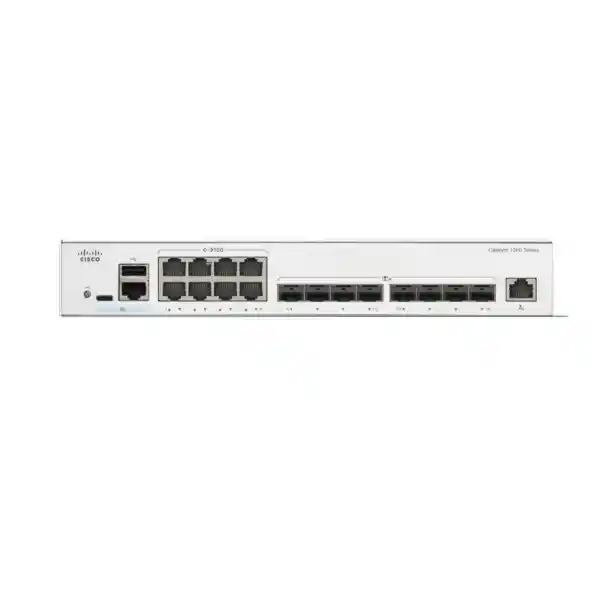
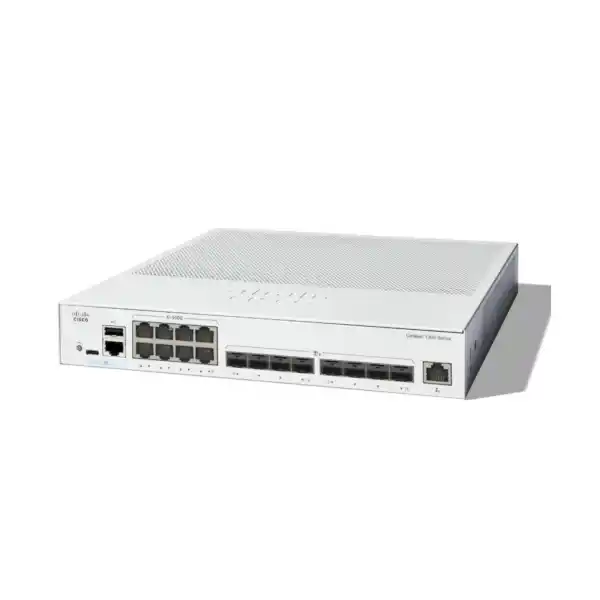
Eight 10 Gigabit Ethernet copper interfaces for high-bandwidth RJ-45 connected devices.
Eight SFP+ interfaces for fiber, supported transceivers, direct-attach links, uplinks, or stack connectivity.
Wire-speed, nonblocking switching capacity sized for full-duplex traffic across the sixteen 10GbE data interfaces.
High packet-processing capability measured with 64-byte packets for demanding mixed application traffic.
What the C1300-16XTS is designed to solve
A 10GbE switching project is rarely about headline port speed alone. The real design question is whether the switch can connect a mixed group of copper and fiber endpoints, forward traffic at line rate, maintain clean segmentation, preserve predictable application quality, and remain manageable when the network grows. The C1300-16XTS addresses this combination by providing equal counts of 10G copper and SFP+ interfaces in a compact platform. That interface balance is valuable when an organization has servers with 10GBASE-T network adapters in the same rack but also needs optical uplinks to other cabinets, buildings, firewalls, storage systems, or distribution switches. It prevents the design from being forced into an all-copper or all-fiber topology and allows the physical medium to be selected according to distance, pathway, electromagnetic environment, existing transceivers, and operational standards.
The switch is also useful when a business has outgrown a 1GbE aggregation layer. A group of modern servers, hypervisors, NAS systems, backup appliances, high-resolution media stations, or Wi-Fi access switch uplinks can saturate a Gigabit bottleneck quickly. Moving key trunks and server links to 10GbE creates more headroom, but only if the switch fabric and uplinks are designed correctly. Cisco rates the C1300-16XTS at 320 Gbps of switching capacity, matching the aggregate full-duplex bandwidth requirement of sixteen 10GbE data ports. For network architects, that specification is more meaningful than a simple port count because it indicates that the switching fabric is sized for wire-speed operation rather than assuming heavy oversubscription inside the device.
The platform is positioned for small and medium-sized business networks, but its feature set reaches well beyond basic Layer 2 access switching. It supports advanced VLAN designs, multiple spanning-tree modes, LACP link aggregation, multicast controls, static and dynamic IPv4 routing, IPv6 routing, policy-based routing, DHCP services, extensive traffic classification, security controls, and hardware stacking. This combination allows a UAE organization to use the C1300-16XTS as a high-speed access switch, a server aggregation switch, a compact distribution switch, or a specialized 10GbE interconnect layer. The correct role depends on route scale, redundancy objectives, cabling type, security architecture, endpoint count, and whether the deployment requires features reserved for other Cisco families, such as OSPF on the Catalyst 1300X models.
Verified hardware and platform specifications
Eight 10G copper ports: where twisted-pair 10 Gigabit Ethernet makes sense
The eight 10 Gigabit copper ports are a major reason to select the C1300-16XTS. Many SMB server environments in the UAE already use copper patching inside the cabinet because it is familiar, easy to terminate, straightforward to test, and compatible with a wide range of server network adapters and appliances. Where a device exposes a native 10GBASE-T interface, direct copper connectivity avoids the need to insert an optical transceiver at both ends. That can simplify short in-rack runs and reduce the number of optical components that must be tracked as spares. It also lets network teams retain the physical workflow they already know from conventional Ethernet while increasing the available bandwidth by an order of magnitude relative to a 1GbE link.
However, 10GBASE-T should be engineered rather than treated as a faster version of any old copper link. Cable category, permanent-link quality, patch-panel condition, connector termination, pathway length, bend radius, bundle density, electromagnetic environment, and thermal conditions all matter. A 10GbE project often exposes weaknesses that were invisible at 1GbE. For a new installation, FourTeck recommends validating the structured cabling specification and testing the complete channel before migration. In a server cabinet, short factory-made patch leads can be simple, but building-scale copper runs should be assessed carefully against the selected cabling standard and real route length. The goal is to ensure the switch is not blamed for a physical-layer problem caused by legacy cabling, poor patching, excessive length, or marginal terminations.
Copper also has operational implications. Ten-gigabit copper PHYs can draw more power and generate more heat than lower-speed interfaces, especially when several ports are active. The C1300-16XTS uses active cooling and Cisco lists one fan with 28.7 dBA acoustic noise at 25°C. In a closed communications room this is usually unremarkable, but it matters if the switch is installed near desks, meeting spaces, classrooms, studios, or hospitality areas. Rack airflow, ambient temperature, front-to-back clearance, cable management, and UPS sizing should be considered as part of the deployment instead of after commissioning.
For endpoint selection, the eight copper ports are best reserved for equipment that genuinely benefits from 10GbE. Examples include virtualization hosts, backup targets, NAS appliances, video editing stations, security appliances with high inspection throughput, large-file engineering workstations, or local servers carrying multiple virtual networks. Low-bandwidth printers, phones, standard office PCs, and other 1GbE endpoints normally belong on a separate access switch. Using the C1300-16XTS as a deliberate high-speed tier preserves its port density for workloads that can use the capacity and makes the network hierarchy easier to understand and troubleshoot.
Eight SFP+ ports: flexible fiber, DAC, uplink, and stack design
The eight 10 Gigabit SFP+ interfaces complement the copper side of the platform and are often the key to a clean distribution design. SFP+ allows the physical medium to be selected for the link rather than forcing every connection onto copper. Within the same rack or an adjacent cabinet, supported direct-attach copper assemblies can provide a compact low-latency connection when both endpoints accept the same interface type. Across rooms, floors, or buildings, optical transceivers and fiber cabling allow distance, pathway isolation, and electromagnetic immunity to be addressed more appropriately. For campus and industrial environments in the UAE, this flexibility can be important where electrical rooms, elevator equipment, power cabling, generators, or long risers make optical links preferable to copper.
The SFP+ interfaces can also be used strategically to divide traffic roles. A design might allocate two ports to a firewall cluster, two to a server virtualization pair, two to upstream distribution, and two to stacking or storage. Another design might use four ports for two redundant LACP bundles and retain the remaining four for future expansion. The hardware does not dictate the topology; the network architect should assign interfaces according to failure domains and traffic flows. When redundancy matters, do not place both members of every critical path through a single upstream device or a single physical route. Diverse uplinks, dual power protection upstream, and alternate fiber pathways are often more valuable than simply adding bandwidth to one link.
Optics must be selected carefully. The correct choice depends on wavelength, fiber type, connector type, link distance, attenuation budget, patch-panel count, and the compatibility support matrix for the switch firmware. Avoid selecting a transceiver solely because the connector physically fits. For procurement, document the exact optical requirement for each link: source cabinet, destination cabinet, fiber type, estimated path length, connector presentation, desired redundancy, and whether the link is expected to carry production forwarding, stacking, or management traffic. This information prevents a common installation delay in which the switch arrives correctly but the optics do not match the installed fiber plant.
For UAE projects that connect local servers and distant aggregation points from the same device, the mixed 8-copper/8-SFP+ port map is especially efficient. It permits a compact 10GbE layer without relying on media converters or separate copper and fiber aggregation switches. Fewer intermediary devices can mean fewer power supplies, fewer management IP addresses, fewer failure points, and simpler documentation. The design still needs disciplined labeling and interface naming so engineers can distinguish copper server links, optical trunks, storage connections, and stack members during troubleshooting.
320 Gbps switching and 238.1 mpps forwarding: interpreting performance correctly
Cisco specifies the C1300-16XTS as a wire-speed, nonblocking switch with 320 Gbps switching capacity and a forwarding rate of 238.1 million packets per second using 64-byte packets. These numbers are consistent with a sixteen-port 10GbE platform operating full duplex. A 10GbE interface can transmit and receive simultaneously; therefore, a capacity value that accounts for both directions across all sixteen data ports is essential when evaluating whether the internal fabric can sustain worst-case load. This does not mean every real network will run every interface at 100 percent continuously, but it means the switching architecture is not intentionally undersized relative to the physical port set.
The forwarding-rate figure matters because traffic is not composed only of large files. DNS, transactional applications, virtualization control traffic, storage metadata, voice signaling, monitoring, security telemetry, and east-west microservices can generate many small packets. A switch that looks strong in aggregate bandwidth but weak in packet processing can become constrained under small-packet workloads. The 238.1 mpps figure therefore gives architects a second dimension for sizing. In practical deployments, throughput will still depend on endpoint performance, protocol overhead, cabling, transceivers, server NIC drivers, storage latency, TCP windowing, application behavior, and traffic patterns. The switch should be one part of an end-to-end performance model, not the only component evaluated.
The C1300-16XTS also provides a 3 MB packet buffer. Buffering is important during microbursts, speed transitions, and moments when multiple ingress flows converge on a smaller number of egress ports. No finite buffer can compensate for sustained oversubscription, so network design should focus first on traffic engineering, appropriate uplink capacity, QoS, and avoiding chronic bottlenecks. The buffer is a safety mechanism for short-term contention, not a substitute for sufficient bandwidth. This distinction becomes important in virtualization and backup networks where several hosts may begin transferring at the same time.
Jumbo frames up to 9000 bytes are supported, while Cisco states a default MTU of 2000 bytes. Jumbo frames can reduce per-packet processing overhead in specific storage, backup, virtualization, or high-throughput workflows, but they must be configured end to end. A mismatched MTU between server NICs, hypervisors, switches, routed interfaces, security devices, and storage targets can create difficult-to-diagnose fragmentation or connectivity symptoms. Use jumbo frames only when the application design benefits from them and when the entire path is validated. Standard MTU remains the safer default for mixed general-purpose traffic unless a defined workload requires otherwise.
Layer 2 architecture: VLANs, spanning tree, LACP, and loop control
Layer 2 segmentation is central to the C1300-16XTS. Cisco specifies support for up to 4094 VLANs, noting that VLAN IDs 4078 through 4094 are reserved for internal use. The switch supports port-based and IEEE 802.1Q tag-based VLANs as well as MAC-based, protocol-based, and IP-subnet-based VLAN mechanisms. Management VLANs, private VLANs, Private VLAN Edge, guest VLANs, unauthenticated VLANs, dynamic VLAN assignment through RADIUS with 802.1X, voice VLANs, and other segmentation tools give administrators several ways to separate users, servers, storage, cameras, voice systems, contractors, and management traffic. The main design principle is to use only as much segmentation as the organization can document and operate consistently. Hundreds of unnecessary VLANs can make troubleshooting harder even when the switch technically supports them.
Spanning Tree Protocol protects Layer 2 topologies from loops that can otherwise create broadcast storms and network outages. The platform supports traditional 802.1D STP, Rapid Spanning Tree using 802.1w, Multiple Spanning Tree using 802.1s, and Cisco-oriented PVST+ and Rapid PVST+ modes. Cisco states support for 16 MST instances and 126 PVST+/RPVST+ instances. The correct mode should match the rest of the switching environment. In a simple network, RSTP can provide straightforward fast convergence. In a larger segmented network, MST can reduce control-plane overhead by mapping multiple VLANs to the same spanning-tree instance. If the C1300-16XTS connects into an existing Cisco topology using Rapid PVST+, consistency becomes especially important.
Link aggregation provides another layer of resilience and capacity. The C1300 series supports IEEE 802.3ad LACP with up to eight link aggregation groups and up to eight active ports per group, with additional candidate ports supported for dynamic aggregation. A properly designed LAG can combine links between the C1300-16XTS and a server, storage device, firewall, or upstream switch, subject to the capabilities and hashing behavior of both endpoints. Remember that LACP typically distributes flows rather than splitting every individual flow evenly across all member links. A single TCP session may still be limited to one member link even when aggregate bandwidth across many sessions is higher.
The switch also supports protections such as BPDU Guard, Root Guard, loopback guard, loopback detection, and Unidirectional Link Detection. These features are valuable because many real-world outages are caused not by hardware failure but by accidental patching, unmanaged switches, misconfigured trunks, one-way fiber faults, or a device unexpectedly attempting to influence spanning-tree root selection. A production build should define which ports are trunks, which are edge ports, where BPDUs are expected, and what happens when an anomaly is detected. Good Layer 2 security and loop protection reduce the blast radius of mistakes during moves, additions, and changes.
Layer 3 routing for compact distribution designs
The C1300-16XTS supports hardware-based Layer 3 functions that allow it to route traffic between VLANs rather than forwarding every internal subnet transition to an external router or firewall. Cisco specifies wire-speed IPv4 and IPv6 routing, Layer 3 interfaces on physical ports, link aggregation groups, VLAN interfaces, and loopback interfaces. For the Catalyst 1300 10 Gigabit Ethernet SKUs, Cisco lists support for up to 7168 dynamic plus static IPv4 routes and up to 256 IP interfaces. This scale is far beyond what many SMB deployments will need and gives the switch room to operate as a compact distribution layer for multiple server, user, voice, storage, camera, and management networks.
Routing Information Protocol version 2 is supported for dynamic IPv4 routing, and policy-based routing can direct IPv4 or IPv6 traffic to a selected next hop based on an access control list. Policy-based routing can be useful when different server VLANs must exit through different security appliances, when traffic must be steered toward a specialized inspection service, or when migration designs require temporary next-hop control. PBR should be documented carefully because it changes forwarding behavior from ordinary destination-based routing. Engineers troubleshooting the network months later need to know that a policy can override what the conventional route table would otherwise select.
An important product-family distinction is that Cisco lists OSPFv2 and OSPFv3 support for the Catalyst 1300X SKUs, not for the standard C1300 10GbE models such as the C1300-16XTS. If an organization requires OSPF as a mandatory routing protocol, that requirement should be identified before procurement and a different model or architecture should be selected. The C1300-16XTS remains capable of substantial inter-VLAN routing and RIP-based dynamic routing, but product selection must follow the required protocol set rather than assuming every Catalyst family implements the same routing stack.
The switch can also act as an IPv4 DHCP server for multiple pools and can relay DHCP across Layer 3 domains. UDP relay supports forwarding certain broadcast-based services between IP networks. In many enterprise designs, DHCP remains centralized on dedicated servers or security appliances, and the switch is configured only as a relay. In smaller branches, local DHCP service can reduce dependencies. Both approaches are valid when intentionally designed. The deciding factors include central policy, resilience, WAN availability, logging requirements, address-management processes, and the operational skills of the team responsible for the site.
Security controls for access, server, and aggregation layers
A 10GbE switch can carry a large portion of an organization’s east-west traffic, so management and access security must be designed as deliberately as throughput. The C1300 series supports SSH for encrypted command-line administration, HTTPS for the browser interface, RADIUS and TACACS+ for centralized administrator authentication, SNMPv3 for secure monitoring, multiple CLI privilege levels, configurable management access, and a dedicated out-of-band management port on the C1300-16XTS. A strong deployment normally places switch administration on a dedicated management network, restricts source addresses allowed to reach management services, disables unnecessary protocols, uses centralized authentication where practical, rotates credentials, synchronizes time, and forwards logs to a monitored syslog platform.
For endpoint admission, IEEE 802.1X enables RADIUS-based authentication and accounting, with capabilities such as guest VLANs, unauthenticated VLANs, multiple host or session modes, dynamic VLAN assignment, and MAC authentication. This allows a network to move beyond the assumption that physical connection automatically grants full access. In a server environment, 802.1X may not be enabled on every port, but it can be useful for high-speed engineering workstations, shared environments, or edge-facing interfaces. The design should reflect endpoint capability and operational requirements rather than enabling authentication indiscriminately.
The switch includes protections against common Layer 2 attacks and misconfigurations. DHCP snooping can distinguish trusted and untrusted DHCP paths and helps prevent rogue DHCP servers. IP Source Guard uses binding information to block source-address spoofing. Dynamic ARP Inspection validates ARP traffic against trusted IP-to-MAC information to reduce man-in-the-middle risk. IP/MAC/port binding combines these controls to reinforce identity at the access layer. Port security can limit learned MAC addresses and bind expected source addresses to interfaces. Private VLANs and protected ports can isolate hosts that share the same primary VLAN, useful for guest, hosting, surveillance, or multi-tenant designs where endpoints should reach an upstream service but not communicate laterally.
Access control lists provide granular enforcement. Cisco specifies up to 2048 ACL rules for Catalyst 1300 10GbE SKUs. Rules can match combinations of source and destination MAC addresses, VLAN identifiers, IPv4 and IPv6 addresses, protocols, TCP or UDP ports, DSCP markings, Ethernet type, ICMP, IGMP, TCP flags, and other traffic characteristics. ACLs can be applied on ingress and egress and can drop or rate-limit matching traffic. Time-based ACLs are also supported. This gives the switch enough policy depth for internal segmentation, management protection, service isolation, and traffic-control tasks, although a switch ACL is not a replacement for a stateful next-generation firewall when application-aware inspection, threat prevention, TLS inspection, or advanced security analytics are required.
For perimeter and internal firewall architecture, FourTeck can align the C1300-16XTS with security appliances and segmentation policies through the Firewall Dubai practice. The key design boundary is clear: use the switch for high-speed deterministic forwarding, VLANs, routing, QoS, and enforcement that belongs at the access/distribution layer, while sending traffic that requires advanced inspection through the appropriate security platform. This division preserves performance and keeps responsibilities understandable for operations teams.
QoS for voice, storage, business applications, and converged traffic
Ten-gigabit links provide substantial bandwidth, but congestion can still occur when many sources converge on a smaller number of destinations. Quality of Service gives the C1300-16XTS tools to classify, queue, remark, police, and shape traffic so critical applications behave predictably during contention. Cisco specifies eight hardware queues, strict-priority and Weighted Round-Robin scheduling, classification using port, 802.1p, IP precedence, Type of Service, DSCP, DiffServ, and ACL-based criteria, plus ingress policing and egress shaping. This is useful for environments that mix latency-sensitive voice and video with bursty backups, large file transfers, surveillance streams, software distribution, replication, and normal business traffic.
A practical QoS policy starts with identifying traffic classes and business outcomes rather than copying a long configuration from another site. Voice media may require low delay and jitter, signaling may need assured delivery but little bandwidth, interactive business applications may require consistent response time, and backups may be allowed to consume spare capacity without starving critical services. Marking should ideally occur close to the source, and trust boundaries should be explicit. If every device is allowed to mark itself as highest priority, QoS stops functioning as a policy and becomes a competition.
The platform also supports iSCSI traffic optimization, which can prioritize iSCSI over other traffic types. That feature can be valuable in smaller virtualization or storage environments where IP storage shares switching infrastructure with ordinary traffic. Even with prioritization, storage networks must be designed carefully. Calculate peak replication and backup windows, consider multipathing, isolate traffic with VLANs where appropriate, and confirm MTU policy across hosts and storage arrays. Do not rely on QoS to fix a topology that is permanently oversubscribed.
For voice and collaboration traffic, the switch supports voice VLAN functions and LLDP-MED, allowing compatible endpoints to discover network policy information. If the C1300-16XTS is used as an upstream aggregation layer rather than a phone access switch, these features can still matter on trunks carrying voice VLANs from downstream access switches. FourTeck’s broader IT Services UAE team can assist with end-to-end VLAN, QoS, monitoring, and migration planning where switching changes affect multiple application teams.
Hardware stacking and high availability
The C1300-16XTS supports hardware stacking as part of Cisco’s Catalyst 1300 Family 2 group. Cisco states that compatible C1300 and C1300X platforms can support up to eight switches in a stack, with up to 400 ports managed as one system and hardware failover. The key compatibility condition is that product IDs must belong to the same stacking family; cross-stacking between different families is not supported. For the C1300-16XTS, compatible family planning must therefore be verified before ordering additional stack members. This is particularly important when a customer assumes that any model carrying the Catalyst 1300 name can be stacked with any other model in the series.
A hardware stack reduces management complexity by presenting multiple physical switches as a single logical system. Cisco describes unified data, control, and management planes, allowing cross-stack features such as VLANs, QoS, link aggregation, and port mirroring. Operationally, this can reduce the number of independent configurations, simplify port expansion, and provide more resilient uplink designs. For example, a server can connect one NIC to the first stack member and another NIC to the second while participating in a cross-stack LAG, subject to the server’s bonding or teaming configuration. An upstream firewall or distribution device can use a similar approach to reduce the impact of a single member failure.
Stack design must include a failure model. Engineers should decide what happens if a stack cable fails, if the active control member reboots, if a switch loses power, if a fiber optic fails, or if a maintenance upgrade is required. Cisco supports active/standby control, fast stack failover, auto-numbering, hot swap of units, and ring or chain stacking options. A ring topology generally provides better resilience than a simple chain because an individual stack-link failure does not necessarily split the stack. Cable routing should protect the stack path from common physical damage, and each unit should be connected to the appropriate UPS-backed power source according to the business’s availability target.
The SFP+ interfaces are also used for high-speed stack interconnects. This makes port budgeting essential because ports assigned to stacking are not simultaneously available for ordinary data links. Before selecting the C1300-16XTS for a stack, calculate how many copper server connections, fiber uplinks, stack interfaces, firewall connections, and reserved growth ports are needed per member. The arithmetic should be done per physical switch, not only for the stack as a whole, because cable locations and failure domains matter. A stack with abundant total ports can still have a local port shortage on one member if devices cannot be cabled to another cabinet easily.
Stacking is not mandatory. Two independent switches connected through conventional LAGs or routed links can sometimes provide a simpler operational model, especially when the organization deliberately wants separate control planes. The decision should follow the required recovery behavior, management preference, uplink architecture, maintenance procedure, and team skill level. Hardware stacking is valuable when single-system operation and cross-stack features reduce complexity, but independent switches may be preferable when administrative isolation is a design objective.
Management, monitoring, and day-zero deployment
The C1300 platform supports several management methods, allowing a network team to choose between browser-based administration, command-line configuration, SNMP-based monitoring, and Cisco management tools. The built-in web interface supports HTTP and HTTPS access, simple and advanced modes, configuration wizards, a customizable dashboard, monitoring, maintenance functions, online help, and search. For organizations without a large network operations team, a structured web interface can make common tasks such as VLAN creation, port configuration, link aggregation, firmware management, and monitoring more approachable than a CLI-only platform.
Experienced engineers can use the scriptable CLI and secure SSH access. Cisco lists user privilege levels 1, 7, and 15, allowing administrative roles to be differentiated. The switch also supports SCP, TFTP upgrade workflows, traceroute, ping, syslog, SNTP, cable diagnostics, port mirroring, and other operational tools. SNMP versions 1, 2c, and 3 are supported, with SNMPv3 providing the preferred security model for new monitoring integrations. A production monitoring platform should collect interface utilization, errors, discards, CPU and memory indicators where available, environmental alarms, stack status, link changes, and configuration events. Thresholds should be tuned to the actual network rather than relying on generic defaults.
Cisco Business Dashboard integration and an embedded probe option can support centralized discovery and lifecycle visibility in compatible environments. The Cisco Business mobile application and Network Plug and Play capabilities can also assist with deployment. For multiple branch sites, standard templates reduce configuration drift. Define a baseline covering hostname, management IP, NTP, DNS, syslog, SNMPv3, administrator authentication, VLAN naming, trunk policy, spanning-tree mode, security settings, and firmware. Site-specific values can then be layered on top. This approach produces repeatable installations and makes later troubleshooting easier because engineers know what should be consistent everywhere.
The dedicated Gigabit Ethernet out-of-band management interface is particularly useful in server-room designs. Instead of exposing the management plane on the same 10GbE links that carry production traffic, the switch can connect to a separate management switch or isolated operations network. True out-of-band management can remain reachable during production VLAN changes, trunk failures, or routing problems. For higher-resilience sites, the management network should have its own power, addressing, access controls, and remote-access method so engineers can diagnose the data network without depending on the network they are trying to repair.
Multicast, surveillance, and media distribution
Many UAE businesses use multicast for video distribution, surveillance, service discovery, or specialized applications. The C1300 series supports IGMP snooping versions 1, 2, and 3, with Cisco specifying up to 4000 multicast groups on the 10GbE SKUs. IGMP snooping helps prevent multicast streams from flooding every port by forwarding traffic only toward receivers that have joined the relevant group. This can significantly reduce unnecessary bandwidth consumption when high-bitrate video or many camera streams share the same switching infrastructure.
IGMP querier and proxy functions are also supported. A querier can maintain group membership in a Layer 2 multicast domain where no multicast router is present, while proxy behavior can simplify certain forwarding scenarios. The switch also supports Multicast VLAN Registration for designs that distribute a common multicast service while keeping subscribers in separate VLANs. These features are powerful, but multicast configurations should be tested with the actual application. Some video systems, discovery protocols, or proprietary appliances behave differently under snooping, especially if membership reports are infrequent or application assumptions are undocumented.
For surveillance recording networks, the C1300-16XTS is often better placed at the recorder, core, or distribution side than directly powering cameras because it is not a PoE switch. Camera access switches can aggregate many PoE endpoints, then send 10GbE uplinks into the C1300-16XTS for transport toward recording servers, analytics platforms, or storage. This hierarchy separates PoE power delivery from high-speed aggregation and makes it easier to size each tier for its real function.
Server, virtualization, backup, and storage use cases
A common C1300-16XTS deployment is a compact server aggregation layer. Eight copper ports can attach directly to 10GBASE-T server NICs, while SFP+ links connect storage, upstream switching, firewalls, or additional cabinets. In a two-host virtualization cluster, each hypervisor might use multiple 10GbE interfaces for management, virtual machine networks, live migration, backup, and storage. The switch can carry those networks using VLAN trunks, but the design should avoid placing every critical service on one physical link. NIC teaming, multipathing, or LACP can provide resilience when supported by the server operating system and application architecture.
For backup workloads, 10GbE materially changes completion windows. A theoretical 10Gbps link is much faster than 1GbE, but actual backup throughput depends on storage media, deduplication, compression, encryption, CPU performance, protocol efficiency, and the read/write capabilities of both source and destination. The switch provides the network capacity, but it cannot make a slow disk array perform faster. During sizing, measure current backup throughput, determine the desired completion window, estimate daily change rates, and identify whether replication occurs simultaneously. If several backup sources converge on one target, the target’s NIC and storage subsystem may become the bottleneck before the switch does.
Storage traffic deserves special attention to loss, latency, MTU, and path redundancy. The switch supports iSCSI optimization and jumbo frames, but each storage vendor may specify its own validated configuration. Follow the server, hypervisor, and storage manufacturer’s network recommendations rather than applying a generic template. If iSCSI multipathing is used, preserve independent paths and avoid accidentally collapsing both paths onto the same physical failure domain. For NFS or SMB storage, LACP behavior and session distribution should be tested because one large session may not use the aggregate capacity of every link in a bundle.
FourTeck’s Server Dubai resources can complement a C1300-16XTS project where switching decisions are tied to server NIC selection, rack design, virtualization, storage, or backup architecture. Treat the server and network bills of materials as one design: port type, connector, transceiver, cable length, NIC capability, redundancy, and VLAN layout should match at both ends.
Firewall and security-appliance interconnection
Security appliances increasingly expose 10GbE interfaces because traffic inspection, VPN aggregation, east-west segmentation, and internet edge throughput can exceed 1Gbps. The C1300-16XTS can connect these platforms using SFP+ or 10G copper, depending on the firewall interface and physical layout. A simple design might place one redundant LACP bundle between the switch and each firewall. A more resilient design can distribute links across two stack members or independent switches so a switch failure does not remove every path to the security layer.
VLAN trunks toward firewalls should be limited to the networks the firewall actually needs. Avoid configuring every VLAN on every trunk by default. Explicit allowed-VLAN lists reduce accidental exposure and make packet captures easier to interpret. Native VLAN behavior should be standardized, and unused physical interfaces should be disabled or placed into a controlled parking VLAN. If the firewall provides inter-VLAN security between sensitive zones, do not also configure unrestricted switch SVIs that create a bypass around the firewall. Routing ownership must be unambiguous.
Where the switch performs local inter-VLAN routing for trusted networks and the firewall handles only north-south traffic, document the boundary carefully. The default route, return routes, ACLs, PBR, and firewall policies must agree. Asymmetric routing can break stateful inspection even when every component has a valid route. During deployment, validate traffic in both directions, including failover cases, not just basic ping tests. A good commissioning plan includes application transactions, large file transfers, DNS, DHCP, management access, log visibility, and redundant-path testing.
UAE power, thermal, rack, and environmental planning
Cisco specifies an internal universal 100–240V AC, 50–60 Hz power supply for the C1300-16XTS. At 220V, the listed worst-case system power consumption is 35.2 W and idle consumption is 18.3 W, with heat dissipation of 195.86 BTU per hour. These figures help when sizing UPS capacity and cabinet cooling. Although the switch itself is not a high-power device compared with PoE access switches or servers, the cumulative heat load of switches, firewalls, routers, storage, UPS systems, and servers can become significant inside a compact communications room.
Operating temperature is specified from -5°C to 50°C, with a 0°C minimum ambient temperature for cold start. Storage temperature is -25°C to 70°C, and operating/storage relative humidity is listed at 10% to 90% noncondensing. In the UAE, air conditioning and dust management are important. A network room that routinely reaches high ambient temperatures may still remain within an equipment rating but can reduce overall component reliability and leave little margin during AC faults. Keep the equipment space clean, conditioned, ventilated, and monitored. Avoid installing the switch where hot exhaust from servers or UPS equipment is recirculated directly into its intake path.
The chassis measures 268 mm wide, 300 mm deep, and 43.94 mm high, and weighs 2.68 kg. Cisco describes the model as rack-mountable, but the general package-content note states that only 24-port and 48-port models include 19-inch mounting brackets with the switch. For a C1300-16XTS order, rack-mounting accessories should therefore be confirmed explicitly before delivery. This is a small procurement detail that can prevent a disproportionately frustrating installation delay when a switch arrives at a site but cannot be mounted according to the cabinet plan.
Cisco lists one fan and 28.7 dBA acoustic noise at 25°C, with an MTBF figure of 1,201,527 hours at 25°C. MTBF is a statistical reliability metric rather than a promise that an individual unit will operate for that duration. Real availability depends on power quality, ambient temperature, maintenance, firmware management, cabling, upstream dependencies, configuration, and redundancy. If the business requires high availability, use architecture rather than a single hardware reliability number to achieve it: redundant links, redundant switches or stack members, UPS protection, monitored cooling, documented spare strategy, and tested recovery procedures all matter.
Energy efficiency without sacrificing forwarding performance
The Catalyst 1300 family includes energy-management features such as IEEE 802.3az Energy Efficient Ethernet on supported copper Gigabit interfaces, automatic reduction of power when a port link is down, and signal-strength adjustment based on cable length. The C1300-16XTS is a specialized 10GbE model with its own power profile, so power planning should use the exact model figures rather than extrapolating from lower-speed fanless variants. At 220V, Cisco lists 18.3 W idle and 35.2 W worst-case system power consumption, which is modest for a switch offering sixteen 10GbE data interfaces.
From an operational-cost perspective, the more important efficiency calculation is often architectural. Replacing several small intermediate devices with a properly sized mixed-media 10GbE switch can reduce the number of power supplies, patching points, and management interfaces. At the same time, overbuilding every link at 10GbE when the workload needs only 1GbE can waste ports and budget. The best design allocates high-speed capacity where it removes measurable bottlenecks and uses ordinary access switching for routine endpoints. This tiered approach balances performance, cost, and energy use.
Sizing the C1300-16XTS before you buy
Start with physical endpoints. Count every device that requires a 10GbE copper port and every device that requires SFP+. Then separate required day-one ports from optional future ports. If a server has two NICs for redundancy, count two interfaces. If a firewall pair uses two links per appliance, count four. If stacking consumes two SFP+ ports per member in a ring, subtract those from the ordinary data-port budget. If the design needs dedicated optical uplinks to two upstream switches, reserve those as well. The resulting port map should be written down before the purchase order is issued.
Next, model bandwidth. Record typical and peak traffic for virtualization hosts, storage, backup, internet edge, video, replication, and uplinks. A single 10GbE server does not automatically need a dedicated 10GbE uplink all the way through the network if its actual traffic is modest, but several servers can create significant aggregate demand. Look for convergence points. Eight 10GbE hosts feeding two 10GbE uplinks can create an oversubscription ratio that may be acceptable for general application traffic but unsuitable for synchronized backup or storage bursts. If traffic patterns are bursty, consider link aggregation, scheduling, QoS, or additional uplink capacity.
Then define routing scope. If the switch will perform only Layer 2 aggregation, the route table scale is irrelevant. If it will route between dozens of server VLANs, confirm the expected number of SVIs, static routes, dynamic routes, ACLs, DHCP relay entries, and policy routes. The C1300-16XTS has substantial capacity for SMB use, including up to 7168 IPv4 routes and 256 IP interfaces on Cisco’s 10GbE C1300 class, but protocol requirements still matter. If OSPF is mandatory, for example, move the requirement into product selection because Cisco associates OSPF with C1300X rather than this C1300 model.
Security sizing follows. Determine whether segmentation is enforced primarily by switch ACLs or an external firewall. Count expected ACL entries and decide where 802.1X, DHCP snooping, Dynamic ARP Inspection, IP Source Guard, private VLANs, or protected ports are required. Security features should have clear ownership. If a firewall is the enforcement point for a sensitive zone, the switch should not introduce a parallel unrestricted route. If the switch ACLs are the enforcement point, document them as production security policy and include them in change control and backups.
Finally, size operational dependencies: UPS runtime, rack space, mounting accessories, patch leads, optics, fiber jumpers, labels, out-of-band management, monitoring licenses or systems, spare transceivers, configuration backups, and support coverage. Many failed network procurements are not caused by choosing the wrong switch. They are caused by missing the surrounding components required to install and operate the switch successfully. A complete bill of materials should include every component between the switch interface and the far-end interface, plus the tools needed to manage the platform after deployment.
Deployment topology 1: high-speed server aggregation
In a compact server-room topology, the C1300-16XTS can sit between a group of physical servers and the security or core layer. Copper 10GbE ports connect servers that expose RJ-45 network interfaces. SFP+ ports connect the switch to storage, upstream aggregation, or a firewall pair. VLAN trunks carry separate networks for server production traffic, hypervisor management, backup, live migration, storage, and out-of-band systems. The dedicated management port connects to a separate administrative network. This design keeps high-volume east-west server traffic local to the 10GbE switch while selected north-south traffic follows routed or firewall-controlled paths.
The design should decide whether inter-VLAN routing occurs on the C1300-16XTS or on a firewall/core router. Routing on the switch provides wire-speed local forwarding and can reduce load on the firewall for trusted internal flows. Routing on the firewall provides stateful inspection between zones. A hybrid approach can route trusted infrastructure VLANs locally while sending sensitive server-to-user or partner traffic through the firewall. Whichever model is chosen, document the gateway address for every VLAN and ensure there is only one intended Layer 3 forwarding path.
Redundancy can be added by deploying two compatible stack members, connecting dual-NIC servers across members, and building cross-stack LAGs toward the upstream security/core layer. If stacking is not desired, use two independent switches with server multipathing or host teaming that understands independent switches. The best approach depends on the server OS, storage design, operational preference, and failure behavior required by the application.
Deployment topology 2: 10GbE building or floor distribution
The C1300-16XTS can aggregate downstream access switches that each serve ordinary users, phones, cameras, or wireless access points. SFP+ uplinks from the access layer terminate on the C1300-16XTS, while additional SFP+ ports connect toward a central core, firewall, or data-center switch. This creates a high-speed distribution layer with enough bandwidth for multiple access closets. The copper 10GbE ports remain available for local servers, security appliances, or short-distance uplinks where 10GBASE-T is already standardized.
At distribution, spanning-tree design becomes important. If Layer 2 VLANs extend across several access switches, define the root bridge intentionally and protect it with Root Guard or related controls. If the C1300-16XTS performs routing at the distribution layer, VLANs can terminate locally and routed links can be used upstream, reducing Layer 2 failure domains. The platform supports static routing, RIP v2, IPv6 routing, and PBR; the architecture should select the simplest mechanism that meets resilience and route-propagation requirements.
In multi-floor UAE offices, fiber is often preferred for vertical risers because it supports distance and avoids electrical potential differences between areas. Each optical path should be documented by fiber type, strand count, connector presentation, patch-panel position, and measured loss. Maintain spare strands and, where business continuity requires it, route redundant fibers through physically diverse pathways. Redundancy that shares the same riser or tray may protect against transceiver failure but not against construction damage to the shared cable route.
Deployment topology 3: virtualization and storage fabric for SMB environments
Virtualization clusters often concentrate significant east-west traffic in a small number of hosts. A C1300-16XTS can provide a compact switching fabric for two to several hypervisors, storage appliances, and backup systems. Multiple VLANs can separate management, virtual machine data, migration, storage, and backup traffic while still using the same physical 10GbE interfaces. This reduces the number of individual network adapters and cables compared with dedicating a physical NIC to every traffic type, but it increases the importance of VLAN and QoS configuration.
A single switch may be acceptable for a lab or noncritical workload, but production clusters normally need path redundancy. Two switches or two stack members can provide separate physical paths. Hypervisor NIC teaming, storage multipathing, or active/standby uplinks should be configured according to the virtualization and storage vendor’s support matrix. Avoid creating a design that appears redundant at Layer 2 but still depends on one power strip, one switch member, one fiber patch panel, or one upstream port.
Jumbo frames may be used for storage or migration traffic when the entire end-to-end path is configured consistently. Verify the MTU on server NICs, virtual switches, physical switches, storage interfaces, and routed gateways. Test with appropriate packet sizes and do not assume a successful standard ping proves jumbo-frame operation. A deliberate validation plan should include throughput tests, packet-loss monitoring, storage latency, failover tests, and sustained transfer behavior under simultaneous workloads.
Deployment topology 4: media, engineering, and high-bandwidth workgroups
Creative studios, architectural practices, engineering teams, and geospatial departments can generate large shared-file workloads that make 1GbE feel slow even when the internet connection is modest. The C1300-16XTS can connect high-performance workstations over 10GBASE-T while SFP+ links reach central storage or an upstream core. This is a strong use case for the mixed media design because desks and local workstation patching may favor copper while storage and backbone connections favor fiber.
Performance expectations should be set using end-to-end testing. A workstation with a 10GbE NIC does not guarantee a 10Gbps file transfer if the storage array can deliver only a few hundred megabytes per second, if the protocol is latency-sensitive, or if the client has slow local storage. Measure real read and write throughput, CPU utilization, storage latency, and network errors. If many editors access the same central storage simultaneously, size the storage uplinks as an aggregate workload rather than testing one user at a time.
QoS can protect interactive traffic from large background transfers, while VLANs can separate production storage, guest devices, voice, and management. For specialized multicast media workflows, IGMP snooping can keep streams from flooding uninterested ports. As always, verify application-specific network requirements before commissioning because some professional media systems have strict timing, multicast, PTP, or MTU expectations that may require features outside a general-purpose SMB switching platform.
Cabling and optics procurement checklist
For each 10G copper connection, record the endpoint NIC type, expected link speed, cable category, channel length, patch-panel path, and whether the installed cabling has been certified for the intended performance. Reuse of existing cabling can reduce project cost, but only if it is technically suitable. A network upgrade is a good opportunity to correct unlabelled patching, damaged jacks, poor cabinet dressing, and undocumented cross-connects. Reliable 10GbE depends on physical-layer discipline.
For each SFP+ connection, record the far-end device, transceiver type, supported wavelength, fiber mode, connector, required distance, and number of patch points. If a direct-attach cable is planned, confirm its length and support at both endpoints. Keep at least one appropriate spare optic or cable for critical link types. When a network uses several wavelengths or fiber types, label both the transceiver and the patch lead clearly to prevent accidental swaps during maintenance.
Do not treat optics as generic commodities. A transceiver may physically fit but still be unsupported, incorrectly coded, wrong for the fiber plant, or inappropriate for the distance. Use Cisco’s current supported-transceiver guidance and the endpoint vendor’s compatibility information when selecting optics. Firmware can affect support, so record the switch software version during commissioning and keep the compatibility decision with the project documentation.
VLAN design methodology for UAE business networks
A good VLAN plan starts with trust boundaries and operational ownership, not arbitrary numbering. Separate management from ordinary user traffic. Consider distinct networks for servers, voice, wireless corporate clients, wireless guests, cameras, building-management devices, printers, backup, storage, and partner or contractor systems where their security and performance requirements differ. Keep the number of VLANs understandable. Every VLAN should have a defined purpose, gateway location, DHCP source, DNS policy, routing policy, security policy, monitoring scope, and owner.
Trunk interfaces should allow only required VLANs. Access ports should have an explicit untagged VLAN and should not inherit permissive defaults simply because configuration is easier. Where endpoint identity is dynamic, 802.1X with RADIUS-based VLAN assignment can reduce manual port-by-port configuration. Private VLANs and protected ports can add Layer 2 isolation for shared environments. Voice VLAN functions can automate segmentation of compatible IP phones, and LLDP-MED can advertise network policy information.
Document VLAN names consistently across switches and sites. A VLAN called SERVER-PROD in Dubai should not mean something completely different in Abu Dhabi unless site scope is explicit. Consistent naming reduces operational risk during incidents. Where VLAN IDs must differ because of existing constraints, use diagrams and IP address management records to make the mapping obvious. The C1300-16XTS provides large VLAN scale, but good governance matters more than maximum capacity.
IPv6 readiness and dual-stack operation
The C1300 series supports IPv6 host mode, dual IPv4/IPv6 operation, IPv6 routing, neighbor discovery, stateless address autoconfiguration, path MTU discovery, duplicate address detection, DHCPv6 client functions, IPv6 ACLs, IPv6 QoS, and first-hop security capabilities such as Router Advertisement Guard, Neighbor Discovery inspection, and DHCPv6 Guard. These functions allow the switch to participate in modern dual-stack networks rather than treating IPv6 as an afterthought.
IPv6 security must be configured explicitly. An organization that says it does not use IPv6 may still have endpoints that enable it by default. Uncontrolled router advertisements or rogue DHCPv6 services can create unexpected paths. If IPv6 is part of the network strategy, define prefixes, gateways, DNS, ACLs, monitoring, and logging with the same discipline used for IPv4. If IPv6 is intentionally not used on a segment, disable or constrain it according to the endpoint and security policy rather than assuming that lack of formal deployment means no IPv6 traffic exists.
When dual stack is deployed, test both protocols during changes. A service that works over IPv4 may fail over IPv6 because of DNS records, ACL differences, routing gaps, or MTU behavior. Monitoring should also collect IPv6 neighbor, route, and interface information. The C1300-16XTS provides the switching and routing tools, but operational maturity determines whether dual-stack deployment remains predictable.
What this switch does not replace
The C1300-16XTS is not a PoE access switch. Its sixteen 10GbE data ports are intended for high-speed network connectivity, and Cisco does not list a PoE budget for this model. If the project needs to power access points, cameras, or phones directly from the switch, select a PoE-capable access model for those endpoints and use the C1300-16XTS upstream for 10GbE aggregation where appropriate.
It is also not a next-generation firewall. ACLs, DHCP snooping, Dynamic ARP Inspection, 802.1X, private VLANs, and other controls strengthen the switching layer, but they do not provide the full application inspection, intrusion prevention, malware filtering, web filtering, VPN termination, or threat intelligence expected from a dedicated security appliance. Use the switch and firewall together, each for the control plane it is designed to handle.
Finally, it is not a universal substitute for larger Cisco enterprise platforms. Organizations that require specific routing protocols such as OSPF on this role, very large routing tables, advanced data-center fabrics, 25/40/100GbE uplinks, EVPN/VXLAN, modular redundancy, or other enterprise features should evaluate a higher-tier Catalyst or Nexus platform. The C1300-16XTS is strongest when its compact 10GbE density and SMB-focused manageability align with the actual requirement.
Product selection should therefore begin with the feature matrix, not the brand label. A technically correct design may use C1300-16XTS switches at a branch or server-access layer while larger platforms handle campus core, data center, or advanced routing roles. Mixing tiers is often more cost-effective than forcing one switch family to perform every function.
Migration from 1GbE to 10GbE
A migration should begin with measurement. Collect interface utilization from existing switches, server NIC statistics, backup durations, storage throughput, and uplink congestion. Identify which applications are actually constrained by the network. This creates a baseline that can be compared after the upgrade. Without baseline data, a 10GbE project may be successful technically but still leave stakeholders unsure whether the investment produced the expected improvement.
Next, validate endpoint capability. Confirm that servers and workstations support the required 10GbE medium, that drivers and firmware are current, and that storage systems can sustain higher throughput. Check firewall interface types and licensed throughput where relevant. Verify that upstream switches have enough 10GbE ports. Review structured cabling and fiber paths. A bottleneck simply moves if one component remains at a slower speed.
Build the new switch configuration before the cutover. Create VLANs, trunks, routing interfaces, LAGs, management access, NTP, SNMP, syslog, ACLs, security controls, and stack settings. Back up the configuration. Then migrate in logical groups, beginning with low-risk links where possible. Validate speed, duplex, error counters, VLAN membership, routing, DNS, DHCP, application access, monitoring, and failover after each stage. Keep a rollback path for critical systems.
After migration, measure again. Compare throughput, latency, backup windows, application response, and error rates with the baseline. Ten-gigabit interfaces should not show significant physical errors. If they do, investigate cabling, optics, fiber cleanliness, patch leads, NIC drivers, or port configuration. The objective is not merely to see a 10G link indicator; it is to deliver stable application performance with enough capacity for growth.
Operational hardening checklist
Management plane
Use the dedicated management port or a protected management VLAN, prefer HTTPS and SSH, configure SNMPv3, centralize authentication where practical, restrict source networks, synchronize time, and export logs.
Access protection
Apply 802.1X, port security, DHCP snooping, IP Source Guard, Dynamic ARP Inspection, private VLANs, or protected-port features according to the endpoint and threat model.
Layer 2 resilience
Define spanning-tree root placement, use BPDU Guard on appropriate edge ports, protect root ports, configure LACP consistently, and monitor for loops or unidirectional fiber conditions.
Lifecycle discipline
Back up configuration, record firmware, review release notes, maintain a known-good image, document optics and cabling, keep spares for critical links, and test restore or replacement procedures.
Monitoring the switch after deployment
Visibility should be built into the deployment from day one. Monitor interface utilization in both directions, physical errors, discards, link changes, LAG member status, VLAN and trunk state, spanning-tree changes, CPU and memory utilization where exposed, temperature or system alarms, stack health, and management login events. A link running at 90 percent utilization for short bursts may be normal; a link pinned near capacity for hours may require additional bandwidth or traffic engineering. Error counters should generally remain very low, and any persistent increase on 10GbE links deserves investigation.
Syslog should be sent to a central collector with accurate timestamps. SNTP or another supported time source is therefore essential. Without synchronized time, correlating a switch event with firewall, server, and application logs becomes difficult. SNMPv3 is preferable to older community-string methods where the monitoring system supports it. Use descriptive interface labels so alerts identify the business connection, not just a port number. An alarm saying “SFP+7 down — uplink to DC firewall B” is far more actionable than “interface xe7 changed state.”
Create configuration backups after major changes and before firmware upgrades. Record the running firmware version, stack membership, serial numbers, optic inventory, cable endpoints, management address, and physical rack position. These details reduce time to recovery when an engineer who did not install the switch must troubleshoot it later. Good operations turn a capable switch into a dependable service.
Firmware and change-management practice
Switch firmware should be treated as controlled infrastructure software. Before an upgrade, read the Cisco release notes for the target version, verify supported upgrade paths, review known issues, confirm configuration backup, and schedule a maintenance window appropriate to the service impact. If the device is stacked, review the stack-specific upgrade procedure and verify member health before starting. Avoid changing firmware simply because a newer version exists unless the release addresses security, stability, compatibility, or required functionality relevant to the environment.
After an upgrade, validate management access, stack status, trunks, LAGs, routing, ACLs, spanning tree, VLANs, monitoring, and critical application paths. Check port error counters and system logs. A successful reboot is not sufficient evidence that the network service is healthy. For high-availability deployments, test failover explicitly according to the approved change plan.
Maintain a configuration standard and record deviations. If a one-off exception is required for a particular server or partner circuit, document why it exists and who approved it. Over time, undocumented exceptions create a fragile network where engineers are afraid to normalize configurations because they cannot predict the impact. The C1300-16XTS provides substantial flexibility; governance ensures that flexibility remains manageable.
Why the dedicated out-of-band management port matters
A dedicated 1GbE management interface is easy to overlook when comparing switch port counts, but it can materially improve troubleshooting. If switch administration occurs only through an in-band VLAN on the production interfaces, a trunk misconfiguration, routing change, spanning-tree event, or ACL mistake can remove the engineer’s management path at the same moment the network needs repair. Out-of-band management provides a separate interface that can connect to a physically or logically independent management network.
For branch sites, that management network might reach a secure remote-access appliance or a dedicated management switch. In a data room, it might connect switches, servers’ hardware management controllers, UPS network cards, PDUs, console servers, and firewalls into a restricted operations VLAN. Access can then be allowed only from administrator workstations or a bastion host. This design is particularly valuable when the site is remote and dispatching an engineer is expensive or slow.
Out-of-band management is not automatically secure simply because it uses a dedicated port. It still requires access control, strong credentials, secure protocols, logging, and patching. The advantage is independence: an engineer can preserve a path to the device while changing the production forwarding plane. For organizations with strict uptime objectives, this separation is a low-cost improvement to operational resilience.
Comparison logic: when C1300-16XTS is the right fit
Choose the C1300-16XTS when the requirement is specifically for a compact 10GbE managed switch with a balanced mix of copper and SFP+ ports. Eight of each is ideal when server-facing connections and fiber-facing uplinks are both important. The model is also a good fit where Layer 3 routing, advanced VLAN functions, ACLs, QoS, 802.1X, multicast management, browser administration, SNMP, and stacking are required without moving to a physically larger 24-port 10GbE platform.
Choose a different model when the environment needs more than eight copper 10GbE interfaces, more than eight SFP+ interfaces, PoE, 25GbE uplinks, a particular advanced routing protocol, or a substantially larger access-port count. The C1300 family includes several 10GbE variants with different copper/SFP+ mixes, and the C1300X family adds other capabilities. The correct SKU is determined by port map and feature requirements, not by choosing the highest model number available.
For a greenfield project, create a one-page requirements matrix before selecting the switch. Include data-port medium, port count, uplink speed, stacking, routing protocols, route scale, VLAN count, ACL scale, PoE, rack space, power, noise, management method, redundancy, and budget. The C1300-16XTS should win because it satisfies that matrix with appropriate headroom, not because it is simply a familiar Cisco product.
Procurement considerations for Dubai and the wider UAE
A complete procurement request should identify the exact product model, country of deployment, power-cord requirement, rack format, number and type of transceivers, patch leads, fiber jumpers, direct-attach cables, desired spares, support expectations, and installation scope. The C1300-16XTS model name alone is not enough to guarantee a complete deployable kit. Cisco’s package notes indicate that 19-inch mounting brackets are included only with 24-port and 48-port models, so confirm the correct mounting arrangement for this compact 16-port chassis before shipment to site.
For project planning, distinguish product warranty from an operational support contract. Cisco states a limited lifetime warranty with return-to-factory replacement and complimentary one-year access to the Small Business Support Center for the series, subject to Cisco terms. A business that requires defined response times, onsite replacement, managed monitoring, or configuration support may need additional services. Warranty protects against qualifying hardware failure; it does not replace configuration management, remote troubleshooting, change control, or on-site engineering.
Supply-chain documentation also matters. Record serial numbers, order references, optic part numbers, and rack location at handover. Keep electronic copies of configuration backups and diagrams. If equipment is deployed across several Emirates or African branch locations, use consistent naming and inventory standards so central support teams can identify the exact device remotely. FourTeck’s Africa network solutions resources can support organizations that need a repeatable switching architecture beyond the UAE.
For local network, infrastructure, and procurement coordination, the FourTeck UAE team can review the port map and bill of materials before ordering. That review is especially useful for mixed 10G copper and SFP+ deployments where a small mismatch in optic type, fiber connector, rack accessory, or far-end interface can delay commissioning even when the switch itself is correct.
Designing for growth instead of filling every port on day one
The C1300-16XTS has sixteen 10GbE data ports, but a good design does not always aim to use all sixteen immediately. Reserve capacity for failover links, additional servers, new storage nodes, future firewall interfaces, or a second uplink. Growth planning is particularly important on the SFP+ side because stack connections may consume ports that initially appeared available for ordinary data use. A switch that is 100 percent allocated at installation has no easy path for a new critical device six months later.
Consider the expected three-year topology. Will the virtualization cluster add hosts? Will the backup target move to a separate rack? Will internet bandwidth exceed 1Gbps? Will Wi-Fi access switches gain 10GbE uplinks? Will a second firewall be installed? Will the organization introduce surveillance analytics or a local AI workload? Not every possibility requires reserved hardware, but known projects should be represented in the port map before procurement.
If expected demand exceeds the comfortable port budget, a larger 10GbE model may be cheaper than adding a second switch later once optics, power, rack space, and management overhead are included. Conversely, if only a few 10GbE links are required and there is little growth expected, a smaller model may be sufficient. Sizing is about matching the architecture to the lifecycle, not maximizing unused capacity.
Commissioning tests for a production C1300-16XTS
Commissioning should confirm physical, Layer 2, Layer 3, security, management, and application behavior. Start with inventory: verify the exact model, serial number, power cord, rack mounting, transceivers, and cabling. Check firmware and load the approved baseline configuration. Confirm the management port is reachable only from intended sources. Synchronize time and verify syslog and monitoring. Label every cable at both ends.
At the physical layer, verify negotiated speed, link state, optic details, and error counters. Test fiber paths for loss where required. For copper, confirm cabling certification or perform suitable cable diagnostics. Move sustained traffic across high-speed links and watch for CRC errors, drops, or unexpected renegotiation. A 10GbE link that comes up is not automatically a healthy 10GbE link.
At Layer 2, verify every access VLAN, trunk allowed list, native VLAN policy, LACP member, spanning-tree root, and loop-protection setting. Test stack-member failure if stacked. At Layer 3, verify SVIs, gateways, static or dynamic routes, PBR, DHCP relay, and return routing. At the security layer, test ACL permits and denies, 802.1X behavior where used, DHCP snooping trust boundaries, DAI, and management restrictions. Confirm that blocked traffic is actually blocked and that logs show the event where appropriate.
Finally, test applications. Copy representative large files, run backup jobs, access storage, place voice or video calls if those VLANs traverse the switch, validate DNS and DHCP, test firewall paths, and confirm monitoring alerts. Perform failover while traffic is active so the team sees real recovery behavior. Capture results in the handover document. A structured test proves the design works and provides a baseline for future troubleshooting.
Common design mistakes to avoid
Treating all 10GbE ports as interchangeable. Copper and SFP+ solve different physical-layer problems. Design the medium first, then allocate ports. Do not assume a copper endpoint can connect directly to SFP+ without the correct supported interface solution.
Ignoring stack port consumption. Hardware stacking is valuable, but it uses high-speed interfaces. Reserve those ports before calculating available uplinks and server connections.
Routing around the firewall accidentally. If the firewall is meant to inspect traffic between security zones, do not create an unrestricted Layer 3 switch path that bypasses it. Define gateway ownership and route policy explicitly.
Using LACP as a guarantee that one flow gets 20Gbps or more. Aggregation increases total capacity and resilience, but hashing generally keeps an individual flow on one member link. Size according to actual traffic behavior.
Enabling jumbo frames partially. MTU must be consistent end to end. A partial configuration creates hard-to-diagnose connectivity problems and can be worse than leaving the network at standard MTU.
Ordering only the switch. Confirm rack accessories, power, optics, DACs, patch leads, fiber connectors, management cabling, UPS capacity, and spares. A complete bill of materials is part of the network design.
Support and warranty planning
Cisco states that Catalyst 1300/X Series Switches include a limited lifetime warranty with return-to-factory replacement and complimentary one-year access to the Small Business Support Center, subject to the manufacturer’s current terms. This provides an important baseline of product assurance, but support planning should match the business impact of downtime. A switch serving a small test environment can tolerate a different recovery process from a switch carrying production virtualization, storage, firewall uplinks, or building aggregation.
For critical sites, decide whether a spare unit should be kept locally, whether replacement can wait for RTF processing, or whether additional support coverage is required. Document the configuration backup and restoration procedure so a replacement switch can be brought online quickly. If optics are critical to service, keep spares for the link types that would otherwise stop operations. The fastest hardware replacement is still ineffective if the correct transceiver or configuration file cannot be found.
Operational support should include more than break/fix. Firmware review, configuration backup, capacity monitoring, log review, change management, security hardening, and periodic topology validation can prevent incidents. A well-operated switch is maintained as part of a service lifecycle rather than installed once and forgotten.
Decision recap: who should choose the Cisco Catalyst C1300-16XTS?
The C1300-16XTS is a strong fit for UAE organizations that need a compact managed 10GbE switch with a balanced physical interface mix. Eight 10G copper ports can connect servers, workstations, storage, or security appliances that use RJ-45, while eight SFP+ ports can connect fiber uplinks, DACs, storage, upstream switches, or compatible stack members. The switch’s 320 Gbps nonblocking capacity and 238.1 mpps forwarding rate are aligned with full use of the 10GbE port set rather than an intentionally oversubscribed internal fabric.
It is also appropriate where the network needs more than simple Layer 2 switching. The platform supports extensive VLAN segmentation, multiple spanning-tree modes, LACP, multicast controls, IPv4 and IPv6 routing, PBR, DHCP relay/server functions, ACLs, 802.1X, DHCP snooping, Dynamic ARP Inspection, IP Source Guard, private VLANs, QoS, secure management, SNMPv3, and hardware stacking. For many SMB server rooms and distribution layers, this combines enough performance and control to consolidate several network roles without moving to a large chassis.
It is less suitable if the deployment requires PoE on the same switch, more than eight copper or eight SFP+ 10GbE interfaces, 25GbE/40GbE/100GbE uplinks, or a routing protocol set that includes OSPF on this specific role. Those requirements should trigger comparison with other C1300, C1300X, Catalyst, or Nexus models. The correct product is the one that matches the full design matrix, not simply the one with the most familiar model name.
For a typical Dubai deployment with several 10GbE servers, two redundant firewall links, an optical uplink, and room for growth, the C1300-16XTS offers a compelling balance of port density, mixed media, manageable form factor, Layer 3 capability, and stacking. Its value is highest when the surrounding cabling, optics, security boundaries, rack accessories, management network, and redundancy plan are specified with the same care as the switch itself.
Quotation input checklist for FourTeck UAE
1. Switch quantity and site
Specify the number of C1300-16XTS units, the Emirate and site, whether devices are standalone or stacked, and any planned growth units.
2. Copper 10GbE endpoints
List servers, storage, workstations, firewalls, or other RJ-45 10GbE devices and the approximate cable length to each.
3. SFP+ links
Identify each far-end device, fiber type, connector, approximate distance, desired optic or DAC, and whether redundant paths are required.
4. Stack design
Confirm whether hardware stacking is required, how many members are planned, and how many SFP+ interfaces must be reserved for stack interconnects.
5. Routing and segmentation
Provide VLAN count, gateway location, static/dynamic routing needs, ACL requirements, DHCP relay, PBR, and firewall segmentation objectives.
6. Installation scope
State whether the quotation should include rack accessories, optics, patching, configuration, migration, testing, documentation, remote support, or on-site implementation.
Final consultation panel: validate the complete 10GbE design before ordering
A successful Cisco Catalyst C1300-16XTS deployment depends on more than the switch SKU. FourTeck UAE can review the physical port map, copper cabling, fiber plant, optics, stacking plan, VLAN architecture, routing ownership, firewall connectivity, ACL policy, management network, monitoring, UPS capacity, rack mounting, and migration sequence as one coordinated design. This is particularly useful when the project mixes existing 1GbE access switching with a new 10GbE server or distribution layer.
For the fastest technical review, provide a simple diagram showing current switches, servers, firewalls, storage, uplinks, and the desired 10GbE connections. Include existing cable types and approximate distances. If a diagram is not available, a port-by-port endpoint list is enough to begin. FourTeck can then identify likely optic requirements, copper/fiber split, stack-port consumption, required uplink capacity, rack considerations, and any feature gaps that should be resolved before purchase.
The aim is to produce a deployable bill of materials rather than a box-only quote. When the switch, optics, cables, rack accessories, configuration, and support plan are aligned in advance, installation becomes faster, troubleshooting is simpler, and the network has a clearer path for future growth.
Cisco Catalyst C1300-16XTS Dubai: technical summary
The Cisco Catalyst C1300-16XTS Network Switch delivers sixteen 10GbE data interfaces split evenly between eight copper and eight SFP+ ports, plus a dedicated Gigabit Ethernet management interface. Cisco specifies 320 Gbps switching capacity, 238.1 mpps forwarding performance, 3 MB packet buffering, up to 32,000 MAC entries for the 10GbE class, extensive Layer 2 controls, wire-speed IPv4/IPv6 routing, up to 7168 IPv4 routes, up to 256 IP interfaces, 2048 ACL rules, eight hardware QoS queues, and hardware stacking within the compatible C1300 Family 2 group. The chassis is compact at 268 × 300 × 43.94 mm and 2.68 kg, supports universal 100–240V AC input, and is designed for rack-mountable deployment.
For Dubai and UAE customers, the strongest applications include 10GbE server aggregation, virtualization, IP storage, backup, high-bandwidth engineering workgroups, firewall interconnection, high-speed access-switch aggregation, and compact distribution. Before ordering, verify the complete port budget, stack requirements, rack accessories, SFP+ optics or DACs, structured cabling, routing protocols, security boundaries, and management design. That process ensures the C1300-16XTS is selected for the role where its mixed-media 10GbE architecture provides the greatest technical and commercial value.

Reviews
There are no reviews yet.