
Enterprise Access Switching for UAE Networks
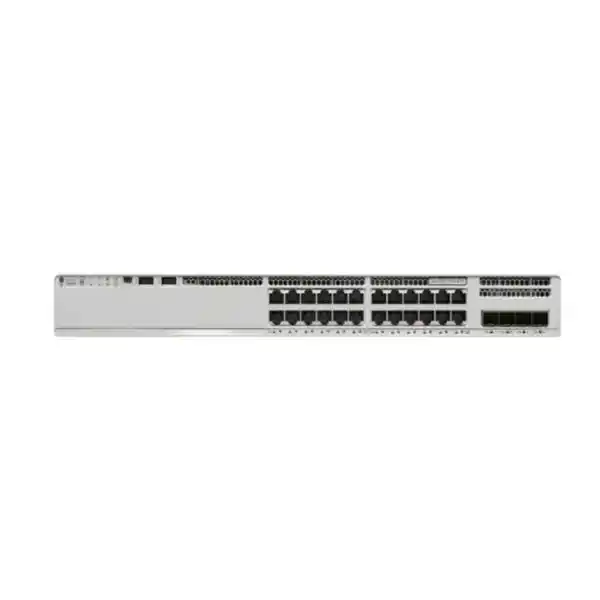
Cisco Catalyst C9200-24T Network Switch
The Cisco Catalyst C9200-24T is a 24-port Gigabit Ethernet data switch designed for secure branch, campus access, and enterprise edge deployments that need dependable Layer 2 and Layer 3 services, modular uplink choices, StackWise-based resiliency, operational consistency through Cisco IOS XE, and field-replaceable service components. For UAE organizations modernizing from older Catalyst access platforms, the C9200-24T offers a practical balance of predictable performance, hardware redundancy options, policy enforcement, telemetry, and centralized automation readiness without requiring a PoE access layer where endpoint power is not needed.
What is the Cisco Catalyst C9200-24T?
The C9200-24T is the 24-port, data-only member of Cisco’s modular-uplink Catalyst 9200 access switching family. Its front-panel access interfaces provide 24 copper Ethernet ports for computers, servers, printers, storage appliances, building systems, firewalls, routers, access points that are independently powered, and other devices that require network connectivity but do not need electrical power from the switch. This distinction matters during procurement because the C9200-24T is not a PoE model. Organizations requiring power delivery for IP phones, cameras, wireless access points, door controllers, or other powered devices should size a PoE-capable Catalyst 9200 variant instead of assuming that the C9200-24T can provide inline power.
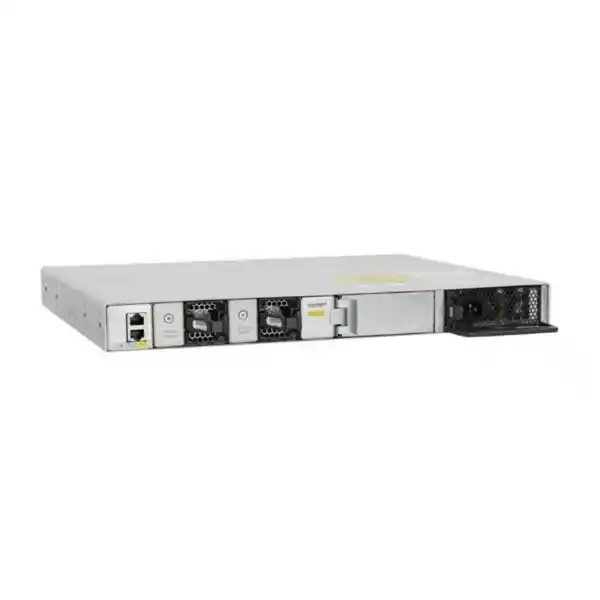
Cisco positions the modular C9200 models as resilient enterprise access switches. The C9200-24T combines modular uplinks, field-replaceable power supplies, field-replaceable redundant fans, and stack support with an enterprise software platform. Cisco documentation lists 128 Gbps of switching capacity and 95.23 million packets per second of forwarding performance for the standalone C9200-24T. When deployed with supported stacking hardware, multiple compatible C9200 units can be managed as a logical system, simplifying access-layer operations and creating design options for resilient uplinks, distributed access ports, and maintenance with fewer individual management points.
For Dubai and UAE customers, the model is especially relevant in branch offices, corporate floors, warehouses, hospitality back-office networks, government environments, financial-services branches, professional-services offices, education facilities, and industrial support networks where the access layer needs enterprise features but PoE is either unnecessary or deliberately separated. FourTeck can help determine whether C9200-24T, a PoE sibling model, or a higher-capacity Catalyst platform is the correct fit by mapping endpoint count, expected traffic, uplink oversubscription, redundancy goals, licensing level, optics, support requirements, and future growth before a bill of materials is finalized.
Core specifications at a glance
| Specification | Cisco Catalyst C9200-24T | Planning significance |
|---|---|---|
| Access ports | 24 × 10/100/1000 copper data ports | Best for wired endpoints that do not require PoE from the switch. |
| Uplinks | Modular uplink architecture | Uplink module and optics must be selected for the intended distribution/core design. |
| Switching capacity | 128 Gbps | Supports full access-layer traffic handling within the platform’s architectural limits. |
| Forwarding rate | 95.23 Mpps | Relevant when evaluating packet-processing capability for mixed enterprise traffic. |
| Stacking | Supported on modular C9200 models with compatible stack hardware | Enables multi-switch logical operation and resilient access-layer design. |
| Default power supply | 125W-class AC supply for this data-only model | Lower power requirement than PoE models; secondary PSU planning can improve resiliency. |
| Fans | Field-replaceable redundant fan design | Useful for maintainability in enterprise wiring closets and server rooms. |
| Weight | Approximately 5.0 kg | Include rails, cable management, optics, patching, and UPS capacity in rack planning. |
| Software choices | Network Essentials or Network Advantage orderable variants | License selection should follow routing, segmentation, policy, and lifecycle requirements. |
Specifications and supported feature combinations can vary by software release, license tier, network module, optics, and final orderable SKU. Confirm the complete bill of materials before purchase.
Branch access
Deploy C9200-24T at a branch edge where desktops, printers, small servers, security appliances, and building systems need stable Gigabit Ethernet. Modular uplinks allow the branch design to be adapted to copper-to-fiber transitions, aggregation speed, and distribution topology without changing the access switch chassis.
Campus floor
Use the switch in an office-floor access layer where 24 data ports provide a controlled port count and where a redundant stack can reduce operational complexity. This design is common when voice and wireless power requirements are handled by separate PoE switches.
Server-room edge
The platform can support management networks, low-to-medium bandwidth server access, out-of-band-adjacent segments, monitoring systems, and appliance connectivity where 1G copper is appropriate. Higher-speed server aggregation should be assessed separately rather than forced into an access-switch role.
Industrial support networks
In facilities where controllers, workstations, gateways, and OT-support appliances connect over standard Ethernet, the C9200-24T can serve as an enterprise-managed aggregation point, provided environmental, ruggedization, topology, and cyber-segmentation requirements match an enterprise access switch.
Hardware architecture and packet-forwarding behavior
The C9200-24T is built as an enterprise access switch rather than a simple unmanaged port expander. Cisco’s architecture for the 24-port C9200 models maps the 24 one-gigabit front-panel interfaces into the platform’s switching ASIC and connects uplink interfaces through the same switching architecture. This design gives network engineers deterministic access-layer behavior, hardware-assisted forwarding, policy enforcement, and operational consistency across standalone and stacked deployments. In practical terms, routine Layer 2 switching, routed access use cases supported by the selected software, access control, quality-of-service classification, and telemetry can be handled without turning the switch into a software-forwarding bottleneck.
The listed 128 Gbps standalone switching capacity and 95.23 Mpps forwarding rate help explain why this model comfortably serves ordinary 24-port Gigabit access workloads. Engineers should still design around real traffic patterns instead of treating aggregate chassis figures as a substitute for topology planning. A branch with heavy east-west backup traffic, storage replication, video distribution, or multiple high-throughput appliances may create uplink pressure long before it exhausts every access port. Conversely, a knowledge-worker office may run many active ports while using only a small fraction of the theoretical traffic capacity. Correct sizing therefore combines port count, endpoint speed, simultaneous utilization, traffic direction, application burst characteristics, and expected growth.
Buffering behavior, queueing, quality of service, and the relationship between access and uplink bandwidth also influence user experience. Voice, transactional applications, virtual desktop traffic, security inspection flows, cloud access, backups, and video conferencing have different latency and loss sensitivity. The C9200-24T can participate in a properly engineered QoS policy where classification, marking trust boundaries, queue treatment, and congestion management are coordinated across the campus or branch. That policy should be designed end to end; configuring an access switch in isolation cannot compensate for an oversubscribed WAN circuit, poorly sized firewall, congested wireless architecture, or insufficient distribution layer.
When evaluating the platform for a new UAE deployment, FourTeck recommends documenting the traffic matrix before selecting uplinks. Identify how many endpoints communicate primarily toward a local server, how many use internet and SaaS applications, whether traffic crosses an SD-WAN or firewall, whether local backup jobs run during business hours, and whether future Wi-Fi or surveillance systems will be attached to the same access layer. The switch itself is only one component of the forwarding path; a balanced architecture ensures the uplink, firewall, WAN, core, server interfaces, and switch configuration all support the intended service level.
24 Gigabit Ethernet data ports: where this model fits best
Each access port on the C9200-24T is designed for standard copper Ethernet connectivity up to 1 Gbps. That makes the platform a natural match for desktop PCs, printers, thin clients, branch servers with 1G interfaces, management controllers, building-management gateways, point-of-sale systems, non-PoE cameras with external power, small security appliances, industrial gateways used within supported environmental limits, and legacy equipment that still relies on 100 Mbps or 10 Mbps negotiation. Autonegotiation and established Ethernet behavior allow mixed-speed endpoint environments to be migrated without requiring all edge devices to be replaced at once.
The key procurement point is the word data. The C9200-24T does not provide PoE to connected endpoints. In UAE offices where phones, wireless access points, cameras, or door controllers depend on centralized power from the switch, a PoE-capable C9200 model will normally be a better choice for those ports. Some enterprises intentionally separate powered and non-powered devices onto different switch groups for capacity planning, fault isolation, or lifecycle management. In that design the C9200-24T can be highly appropriate for computers and appliances while PoE switches serve phones, access points, and physical-security devices.
Twenty-four ports also provide a useful planning unit. A rack serving a small office or specific department may not need 48 access ports, and installing a 24-port model can reduce unused capacity while preserving enterprise switching features. On the other hand, physical rack-unit savings alone should not drive the decision. If a site expects rapid headcount growth, many spare patch-panel positions, new IoT devices, extra printers, or a future expansion into surveillance or Wi-Fi, a 48-port or PoE model may reduce the number of chassis required. Port-count planning should therefore include an operational reserve rather than matching today’s live connections exactly.
A sensible design target is to classify every patch-panel outlet into active, planned, spare, and unknown categories. Map these to switch ports and reserve capacity for moves, adds, changes, troubleshooting, temporary devices, and growth. Then compare the total with the rack power budget, cooling, uplink count, cable management, and stacking plan. This approach avoids two common mistakes: buying too few ports and having to add a second switch unexpectedly, or buying high-density equipment that remains mostly unused while consuming capital and rack space.
Modular uplinks and aggregation design
A major difference between the C9200-24T and fixed-uplink access switches is its modular uplink architecture. Instead of permanently defining the uplink interfaces at chassis purchase, the modular design lets the bill of materials include a supported network module that matches the distribution or core topology. Depending on the supported module and software combination, organizations can choose uplink options suited to 1G or 10G aggregation and, across the broader current modular C9200 family, newer higher-speed options may be available for applicable models. The exact module compatibility must be checked against the specific C9200-24T hardware and intended release before ordering.
For many C9200-24T deployments, four 1G or four 10G class modular uplink options are common design references. The choice should be driven by oversubscription and redundancy. A small branch with light application traffic may operate efficiently with lower-speed aggregation, while a campus floor with 20 or more active Gigabit users, local servers, high-volume cloud access, or backup traffic can justify 10G uplinks. Two uplinks can be distributed across different upstream devices where the topology and protocols support it, or bundled through an EtherChannel design when both ends are engineered for the same logical relationship.
Optics and cabling are part of the uplink design, not accessories to be decided after the switch arrives. Fiber type, connector format, distance, transceiver wavelength, patch-panel standard, polarity, structured-cabling certification, and the upstream interface must all match. In a Dubai campus, a same-floor connection might use short fiber runs while a building-to-building or data-center interconnect could require different optics and pathway considerations. Copper direct-attach or optical transceiver options should be selected only after confirming supported combinations and physical distance.
FourTeck can align the switch, uplink module, optics, stack hardware, patching, and upstream interface as one design package. Customers can also coordinate switching with broader UAE infrastructure requirements through FourTeck UAE, ensuring that LAN changes are considered alongside routing, security, wireless, and data-center connectivity rather than treated as isolated purchases.
StackWise resiliency and multi-switch operations
The modular Catalyst 9200 platform supports StackWise technology so compatible switches can operate as a single logical stack. Cisco documentation for the established modular C9200 architecture lists StackWise-160 support for the traditional C9200 modular models, while current portfolio material may describe updated capabilities for newer hardware generations. For a C9200-24T procurement, the stack kit, cable lengths, member compatibility, license level, software release, and final hardware revision should be confirmed together. Mixing incompatible fixed-uplink C9200L and modular C9200 members is not a valid shortcut to expanding a stack.
Operationally, stacking is valuable because it reduces the number of independently managed devices while allowing ports to be distributed across multiple physical chassis. Engineers can design uplinks from different stack members to reduce dependence on a single physical switch, spread access connections across members, and perform some maintenance activities with better service continuity than a collection of unrelated standalone switches. A stack is not a substitute for architectural redundancy, however. Power feeds, upstream devices, cabling paths, rack location, software maintenance behavior, and failure domains still need to be evaluated.
Stack design begins with physical realities. Stack cable lengths must match rack placement. Power cords should be mapped to available PDUs or UPS outlets. If dual power supplies are fitted, the second supply adds resilience only when the power path itself is meaningfully diversified. Uplinks should be placed so a single member failure does not unnecessarily isolate the entire stack. Patch-panel numbering and port descriptions should make it obvious which switch member serves each outlet. Spare-stack-member strategy may also be relevant for large distributed estates where restoration time matters more than minimizing inventory.
From an operations perspective, stacking can simplify configuration, monitoring, and troubleshooting because administrators work with a logical system rather than many independent nodes. Yet this consolidation increases the importance of disciplined change management. Software upgrades, configuration templates, stack member priorities, version compatibility, and backup procedures should be documented before production rollout. FourTeck can help customers build a stack standard that covers member numbering, uplink placement, cable labeling, replacement procedure, software baseline, and rollback steps for consistent deployments across multiple UAE branches.
Power, cooling, field replacement, and rack planning
Because the C9200-24T is a data-only switch, its power profile is substantially different from a PoE access switch that must reserve hundreds of watts for powered endpoints. Cisco specifies a 125W-class AC supply as the default primary power supply for the C9200-24T. Actual measured platform consumption is lower than the nameplate power-supply rating under normal non-PoE conditions, but rack and UPS design should always use approved engineering values, expected utilization, redundant supply configuration, and environmental assumptions rather than a single laboratory number.
Field-replaceable power and fan components are useful in enterprise environments because a failed service component can often be replaced without discarding the entire switch chassis. Redundancy planning should distinguish component redundancy from service redundancy. A second power supply can protect against a PSU failure, but it does not protect against a failed upstream breaker if both power cords share one electrical source. Redundant fans improve cooling resilience, but a poorly ventilated rack, blocked front-to-back airflow, or overheated communications room can still create a thermal failure. The physical design must protect the whole path.
UAE deployments should pay particular attention to environmental control in branch communications rooms. High ambient temperatures outside the building make reliable HVAC, clean airflow, dust management, rack clearances, and monitored temperature more important. Switches should not be treated as tolerant of uncontrolled utility spaces simply because they are enterprise-grade. Keep air paths open, use proper blanking or cable management where appropriate, and avoid dense bundles that obstruct ventilation. UPS runtime calculations should account for the switch, uplink optics, router, firewall, wireless controllers where present, and any other device that must remain available during a power event.
The C9200-24T weighs approximately 5 kg before all installation accessories and cabling are considered. Rack loading is rarely a constraint for one switch, but large access closets may contain several switches, patch panels, UPS units, and cable managers. Planning the entire rack elevation in advance reduces airflow problems, tight bend radii, inaccessible service components, and confusing cable routes. FourTeck can incorporate rack, UPS, structured cabling, and deployment requirements into the switching bill of materials when a project needs more than hardware supply alone.
Cisco IOS XE: a consistent enterprise operating model
Cisco IOS XE is central to the operational value of the Catalyst 9200 family. Rather than functioning as a basic Layer 2 appliance, the switch participates in an ecosystem of enterprise configuration, monitoring, security, telemetry, routing, automation, and lifecycle workflows. For teams that already operate Catalyst infrastructure, this consistency can reduce retraining and make it easier to reuse validated templates, naming conventions, AAA policies, logging standards, SNMP or telemetry practices, access controls, and change-management procedures across branches.
A production switch configuration should start from an organizational baseline. That baseline typically defines management-plane addressing, DNS and NTP, authentication and authorization, role-based administrative access, SSH policy, syslog destinations, monitoring, configuration archive behavior, banner standards, interface naming, VLAN conventions, spanning-tree policy, storm control, port security or identity policy, DHCP snooping where applicable, device tracking, quality of service, and uplink behavior. The exact features depend on the chosen license level and software release, but the process is consistent: build a controlled baseline, test it, version it, and deploy it repeatably.
Software lifecycle is equally important. Access switches can remain in service for many years, which means the initial image is only the starting point. Enterprises should establish a release-selection policy based on Cisco guidance, feature requirements, known caveats, security advisories, interoperability with management platforms, and internal validation. A maintenance plan should define how images are staged, how configuration backups are verified, how stacks are upgraded, how long rollback is retained, and how post-change health is measured. Branch sites with limited technical staff may require a more conservative strategy than a centrally staffed campus.
For organizations that want implementation support beyond product supply, FourTeck IT Services UAE can be included in the rollout scope for configuration, migration, monitoring integration, documentation, and operational handover. The goal is not only to place the switch in a rack, but to make the new access layer fit the customer’s established security and support model.
Network Essentials or Network Advantage: choosing the correct software level
The base model name C9200-24T does not by itself identify the full orderable software bundle. Cisco offers C9200-24T variants aligned with Network Essentials and Network Advantage. In ordering references, the familiar -E and -A suffixes distinguish these software levels. The correct choice should be based on the actual feature set required across the planned lifecycle rather than on the assumption that all Catalyst 9200 switches are functionally identical. A switch purchased for simple access today may later be asked to support richer routing, segmentation, policy, or campus architecture functions.
Network Essentials is commonly selected for mainstream access-layer requirements where the routing and feature scope fits the Essentials entitlement. Network Advantage provides a broader capability set for organizations that need more advanced networking functions. The detailed entitlement matrix changes with software evolution, so procurement teams should validate the current Cisco feature and licensing documentation for the target IOS XE release. FourTeck can map required functions to the correct orderable SKU instead of choosing a license by price alone.
The requirement discovery conversation should include several questions. Will the switch only bridge user VLANs, or will it participate in routed access? Are dynamic routing protocols required? Is advanced segmentation planned? Will the organization integrate the access layer with Cisco’s campus automation or policy systems? Are there virtual-network requirements? What telemetry and assurance workflows are expected? Will licensing be standardized across a national or regional estate? Are there regulatory or internal controls around software subscription management? These questions reveal whether the initial license choice can support future operating models.
It is also important to distinguish perpetual network licensing concepts from subscription-based Cisco software packages that may accompany or enable specific management, assurance, and automation capabilities. Licensing names, term structures, and platform integration can evolve. Therefore, a quote should show the base switch SKU, license level, subscription term where required, service/support coverage, and all hardware accessories as separate line items. This makes the commercial scope auditable and prevents surprises when the device is commissioned.
For multi-site UAE projects, standardization usually provides more operational value than optimizing each switch independently. Selecting one approved software baseline for a class of branches can simplify templates, spares, upgrade testing, documentation, and troubleshooting. Exceptions can then be deliberate—for example, a headquarters floor may use a richer license because it participates in a more advanced architecture, while small branches follow a simpler standard. FourTeck can document these decisions so procurement and network teams work from the same model.
Layer 2 design: VLANs, trunks, spanning tree, and edge stability
Most C9200-24T deployments begin with Layer 2 access services. VLANs separate endpoint groups into logical broadcast domains, while trunks carry the required VLANs toward the distribution layer. A mature design avoids allowing every VLAN everywhere by default. Instead, the uplink trunk is limited to the VLANs genuinely required at that access location, reducing unnecessary broadcast propagation, configuration ambiguity, and the chance that a misplaced endpoint reaches an unintended segment.
Spanning Tree remains a critical protection mechanism in Ethernet access networks. The exact mode and root placement should match the organization’s architecture. Edge ports connected to ordinary endpoints can use edge/PortFast behavior when appropriate, but controls such as BPDU Guard should be considered so an accidental switch connection does not create a topology change or loop. Uplinks should be clearly identified and configured according to the intended redundancy model. A stack does not eliminate the need to understand Layer 2 convergence.
Operational controls can further improve stability. Storm-control policies can constrain abnormal broadcast, multicast, or unknown-unicast behavior. DHCP snooping can create a trust boundary between legitimate DHCP infrastructure and user-facing ports. Dynamic ARP Inspection and IP source-related controls may be used in designs that meet prerequisite requirements. Port-security or identity-based access can restrict unauthorized devices. These functions are most effective when applied as part of a tested policy and not simply enabled from a hardening checklist without understanding dependencies.
Interface descriptions are a simple but high-value practice. Each switchport can reference the patch-panel position, room, device type, or asset identifier. In a 24-port branch switch, this takes little effort and dramatically reduces troubleshooting time months later. Consistent naming also makes monitoring alerts more useful because operators can immediately see whether a failed interface serves a user, server, printer, uplink, or critical appliance. FourTeck deployment documentation can include port maps and labeling conventions so the physical and logical records remain aligned.
Layer 3 and routed-access considerations
The Catalyst 9200 family supports Layer 3 capabilities that can be used when the access design requires routing rather than pure Layer 2 extension. The exact routing scale and protocol availability depend on the hardware, selected license, and IOS XE release. This is one of the strongest reasons to decide the software level during architecture rather than after purchase. A branch may initially use a single upstream routed link and static routes, while a larger campus could require dynamic routing, routed access interfaces, or segmentation that makes a broader license appropriate.
Routed access can reduce the Layer 2 failure domain by moving the routing boundary closer to endpoints, but it changes how first-hop redundancy, policy, address allocation, multicast, and troubleshooting are handled. Traditional Layer 2 access remains perfectly valid for many sites, especially when distribution switches provide gateway services. The correct architecture depends on scale, team expertise, existing standards, failure-domain goals, and integration with security appliances or campus controllers.
Route-table scale should be evaluated against actual needs. Cisco publishes platform scalability figures for the C9200 family, including MAC and route resources, but raw maximums are not a planning target. Engineers should reserve capacity for operational variance and account for features that share hardware resources. Branch networks normally require far fewer routes than data-center or service-provider environments, which is why a purpose-built access switch can be a good fit when placed in the correct role.
For a UAE multi-branch deployment, the simplest successful design is usually preferred: enough routing intelligence to provide fast convergence and policy alignment without adding unnecessary protocol complexity at every site. FourTeck can review the WAN edge, firewall placement, DHCP gateway location, IP addressing, and routing protocol standard to determine whether the C9200-24T should remain Layer 2, host selected switched virtual interfaces, or participate directly in the routed topology.
Access-layer security and policy enforcement
The access switch is one of the first enforcement points encountered by wired endpoints, so security design should extend beyond simply placing users into VLANs. The C9200-24T can participate in an enterprise access-control architecture using authentication, authorization, device classification, access lists, segmentation, secure management protocols, and platform security capabilities supported by the chosen software. The strongest posture comes from combining switch controls with identity services, endpoint management, firewalls, monitoring, and incident-response procedures.
Management-plane security should be addressed first. Administrative access should use secure protocols, centralized AAA where practical, role separation, strong credential practices, and restricted management source networks. Telnet and other obsolete management methods should not be retained for convenience. NTP should be synchronized so logs and security events have reliable timestamps. Syslog and telemetry should be sent to monitored systems. Configuration backups should be protected because network-device configurations can contain sensitive addressing, credentials, shared secrets, and policy information.
At the edge, IEEE 802.1X can support identity-based network access where the organization’s authentication ecosystem is ready. Multi-auth or alternative methods may be needed for printers, building systems, or legacy devices that cannot act as 802.1X supplicants. The design should define failure behavior carefully: an authentication outage must not accidentally grant broad access, but an overly strict fail-closed design can also halt critical operational systems. Device categories, exception handling, guest access, and remediation workflows should be planned in advance.
Layer 2 protections can reduce common local attacks and configuration accidents. DHCP snooping helps distinguish trusted DHCP sources from untrusted access ports. Dynamic ARP Inspection can use trusted binding information to reduce certain spoofing risks. BPDU Guard can shut down edge ports that unexpectedly receive spanning-tree control frames. Storm control can reduce the impact of broadcast or multicast floods. Unused interfaces should be administratively disabled and placed in an appropriate unused-port policy. None of these settings should be applied blindly; each must be validated against legitimate devices and operational requirements.
Network segmentation remains essential even when access authentication is used. Finance users, guest devices, building systems, printers, management interfaces, servers, and security appliances should not automatically share the same trust zone. The switch can enforce local policy within its capabilities while a firewall provides deeper inspection between security zones. Customers building or refreshing firewall segmentation can review related UAE security solutions through FourTeck Server Dubai for infrastructure integration and coordinate network-to-server dependencies as part of the wider design.
Quality of service for voice, video, cloud, and critical applications
Quality of service on an access switch is most effective when it reflects a business policy rather than a collection of copied commands. The C9200-24T can classify and mark traffic, trust appropriate endpoint markings, police or remark untrusted flows, and place traffic into hardware queues according to the configured policy. This becomes important when multiple applications compete for an uplink or WAN path, particularly at branches where internet, SD-WAN, voice, conferencing, and cloud traffic share limited bandwidth.
The trust boundary should be explicit. A managed voice device or approved endpoint may be allowed to mark traffic, while an ordinary user-facing port should not automatically be trusted to assign itself high priority. Application classes should be limited to what the network can actually protect. Marking every application as critical simply moves congestion elsewhere. Real-time voice may need low latency, video can need bandwidth protection, transactional applications may need predictable loss behavior, and bulk backups can often tolerate lower priority during congestion.
QoS cannot create bandwidth. If 20 Gigabit-connected users all generate sustained traffic toward a single 1G uplink, the switch must queue and eventually drop some frames regardless of policy. The correct solution may be a higher-speed uplink, traffic scheduling, application tuning, WAN upgrades, or a revised topology. QoS then protects the most important traffic during brief contention rather than hiding a structurally undersized network.
For this reason, FourTeck treats QoS and uplink sizing as one design conversation. Traffic captures, interface utilization, application inventories, WAN circuit sizes, conferencing behavior, and backup windows can reveal whether a C9200-24T with selected uplinks will provide enough headroom. The result is a policy that is measurable and supportable rather than a generic template that no one can explain during an incident.
Monitoring, telemetry, and day-two operations
A switch becomes operationally valuable when administrators can understand its condition without logging in only after users complain. The Catalyst 9200 platform supports enterprise monitoring through familiar methods such as SNMP and syslog as well as modern telemetry and controller-integrated workflows, depending on the environment. The monitoring plan should capture interface state, error counters, utilization, CPU and memory, temperature, fan and power status, stack health, uplink status, spanning-tree changes, authentication events, and configuration changes.
Baseline data is essential. A port operating at 60 percent utilization may be normal for a backup server but abnormal for a printer. A single CRC error may be inconsequential, while a rapidly increasing error counter often indicates cabling, optics, duplex, or physical-layer trouble. Monitoring tools should therefore alert on rates, trends, and context rather than only absolute counters. Port descriptions and topology documentation make these alerts actionable because operators can immediately identify the affected service.
Configuration drift should also be monitored. If dozens of UAE branches follow the same standard, unauthorized local changes can create security holes or inconsistent troubleshooting behavior. Central backups, configuration comparison, and automated compliance checks reduce this risk. Where Cisco management platforms or automation tools are used, the C9200 can fit into a broader intent-based or template-driven operational model. Even without a controller, disciplined version control and change records provide significant value.
Software maintenance requires its own telemetry. Before an upgrade, capture stack state, interface errors, routing adjacencies, spanning-tree roles, power status, and utilization. After the upgrade, compare the same indicators and run service tests. This turns a maintenance window into a measurable change instead of relying on the observation that the switch came back online. For remote branches, preplanned out-of-band or recovery procedures are especially important because a failed upgrade can otherwise require an emergency site visit.
Operational documentation should live alongside monitoring. Record serial numbers, rack positions, stack member numbers, uplink destinations, IP addresses, license levels, support coverage, software releases, optics, and spare strategy. A well-documented C9200-24T is easier to support than a theoretically more powerful switch with unknown cabling and no baseline. FourTeck can include as-built records and handover documentation in deployment projects where this level of operational readiness is required.
Common deployment topology 1: resilient branch stack
A common branch design uses two compatible C9200 switches as one logical stack. Access devices are divided across the members, and uplinks are placed on different physical members to reduce dependence on a single chassis. The upstream connection may terminate on a redundant distribution pair, firewall pair, or branch router design depending on the architecture. This layout is well suited to a site that needs more than 24 ports or wants physical switch redundancy while keeping management straightforward.
The branch stack should not be treated as automatically redundant just because two switches are present. Critical endpoints with only one network interface still depend on the member to which they are connected. A printer or workstation normally accepts this risk, while a server or security appliance may use multiple interfaces connected to separate stack members if its own bonding or redundancy model supports that design. Power paths should also be diversified where available, and uplinks must be architected to survive a member or upstream failure.
The stack’s total access count should include growth reserve. If two 24-port switches are already planned to run at nearly all 48 ports on day one, it may be better to consider density, future stack membership, or a different chassis count before installation. Patch panels should be labeled by stack member and switchport. Spare stack cables and compatible optics can reduce restoration time, particularly at sites outside central Dubai where replacement logistics may take longer.
A resilient branch stack is a strong fit when the organization wants one management plane, consistent policy, and room for controlled expansion. It is less compelling when the site has only a handful of endpoints and no meaningful requirement for switch-level redundancy. FourTeck can compare standalone and stacked bill-of-material options so the customer sees both the capital difference and the operational trade-off.
Common deployment topology 2: campus floor access
On a corporate floor, the C9200-24T can serve users and non-PoE devices through structured cabling while uplinking to a building distribution layer. This topology often separates access switching from core routing and firewall enforcement. VLANs are extended only where required, while the distribution layer provides gateways or routed connectivity. The access switch enforces edge policy, authenticates endpoints where applicable, collects telemetry, and applies QoS before traffic reaches shared building infrastructure.
A floor design should start with the patch panel rather than the switch datasheet. Count active desks, meeting-room ports, printers, display systems, access-control gateways, building devices, local servers, and spare outlets. Determine which endpoints need PoE. If a large share requires power, a C9200-24T-only floor may create unnecessary external power adapters and should be reconsidered. A mixed design can be efficient when data-only ports and PoE ports are deliberately separated by purpose.
Uplink speed depends on user density and application profile. A 24-port office floor can often justify 10G aggregation when users access cloud services, centralized storage, video meetings, and virtualized applications concurrently. Redundant uplinks to a distribution pair can improve availability, but the exact EtherChannel, spanning-tree, or routed-uplink behavior must align with the upstream architecture. The best design minimizes convergence complexity while keeping failure domains predictable.
For buildings with several communications rooms, a standardized floor template reduces design drift. Each rack can use the same VLAN conventions, stack numbering, uplink pattern, monitoring configuration, and labeling. Exceptions are documented rather than improvised. This approach makes a multi-floor Dubai office easier to operate and enables spares to be shared across locations when the hardware standard is consistent.
Common deployment topology 3: management and infrastructure network
Data-only access switches are frequently useful in management and infrastructure networks where endpoints have their own power and traffic volumes are moderate. Examples include hypervisor management interfaces, server-management controllers, UPS management cards, environmental sensors with external power, KVM appliances, firewall management ports, storage management interfaces, monitoring appliances, and console-server adjacent Ethernet. The C9200-24T offers enterprise switching controls and centralized operations without paying for an unused PoE budget.
Management networks require strong segmentation because they provide privileged access to infrastructure. A dedicated VLAN alone may not be sufficient. Administrators should consider firewall separation, access lists, jump hosts, identity controls, restricted source networks, multifactor authentication at management systems, secure protocols, and detailed logging. The C9200-24T can provide the physical access layer while security policy is enforced across the full management path.
Availability expectations may be higher than ordinary user access. If the management network is needed to recover production systems, the switch should have resilient power, redundant uplinks, appropriate stack design, and documented recovery methods. Connecting every management interface to one physical switch can create a hidden single point of failure. Dual-homed devices or redundant management switches can be considered where supported and justified.
Capacity is usually not the primary concern in this topology; isolation and recoverability are. One-gigabit access is enough for most management interfaces, but backup appliances or image repositories may generate bursts. Keep heavy data-plane traffic off the management network unless there is a clear design reason. The result should be a small, secure, observable network that remains available precisely when production systems are under stress.
Sizing the C9200-24T correctly
Switch sizing is more than counting Ethernet sockets. A reliable design combines five dimensions: port density, port type, uplink demand, resilience, and software capability. Start with the endpoint inventory and identify which devices require only data, which require PoE, and which need more than 1G. Any endpoint needing multigigabit access or high-power PoE changes the hardware discussion immediately. Then add a reasonable number of spare ports for growth and operational flexibility.
Next, model traffic. Twenty-four 1G endpoints do not necessarily generate 24 Gbps of sustained traffic, but some environments are bursty. Design teams should look at current switch telemetry when replacing an existing platform. Record peak uplink utilization, 95th percentile utilization, packet drops, error counters, broadcast levels, and traffic patterns during backup windows. If no telemetry exists, application and user behavior can provide a useful estimate. A trading floor, video-production team, and ordinary administrative office may have the same port count but radically different bandwidth requirements.
Resilience adds hardware. A standalone C9200-24T may be sufficient for a small noncritical branch, while a larger office may use two or more compatible units in a stack. Decide whether dual power supplies are required and whether separate electrical feeds are available. Identify the upstream failure domain: one uplink to one core switch may remain a single point of failure even if the access stack is redundant. Conversely, adding every redundancy option to a low-impact site can create cost and operational complexity without proportionate value.
Software must be sized just like hardware. If the switch will use only straightforward Layer 2 access and limited routing, an Essentials-oriented variant may fit. If the architecture calls for advanced routing, richer segmentation, or expanded enterprise features, Advantage may be appropriate. The decision should be made against the current Cisco entitlement matrix for the target software release. Buying the wrong tier and trying to correct it during commissioning introduces avoidable licensing and project risk.
Finally, check lifecycle assumptions. Will the site grow from 20 users to 40? Will Wi-Fi access points move from separate injectors to switch power? Will a new camera project add PoE demand? Will a 1G WAN upgrade to 10G? Will centralized automation be introduced? If several of these changes are likely, the best switch today may not be the cheapest chassis that fits today’s patch panel. FourTeck can run this sizing exercise before quotation so the final bill of materials supports both current requirements and a realistic growth window.
Migration from legacy Cisco Catalyst switches
Many C9200-24T projects are refreshes of older Catalyst 2960, 3560, 3750, or comparable access-layer platforms. A successful migration should not simply copy the old configuration line for line. Legacy configurations often contain obsolete commands, historical VLANs, unused trunks, inconsistent spanning-tree settings, old management protocols, abandoned access lists, and interface descriptions that no longer match reality. The refresh is an opportunity to validate requirements and create a cleaner standard.
Begin by exporting the current configuration and operational state. Capture VLANs, trunks, spanning-tree topology, EtherChannels, interface status, MAC tables, routing, ACLs, DHCP-related functions, authentication policy, monitoring destinations, NTP, DNS, management addresses, and software versions. Map each old physical port to the new switchport and verify that patch-panel labels are accurate. If the migration moves from standalone switches to a stack, define member and port numbering before generating the new configuration.
Configuration syntax and feature behavior can change between platform generations and IOS releases. Each command should be validated rather than assumed to transfer directly. Security hardening should be updated to current organizational standards. Unsupported protocols or insecure management methods should be retired. If 802.1X or segmentation is being introduced during the refresh, consider a phased rollout so switching replacement and access-policy transformation are not both changed at full scale in one maintenance window.
A rollback plan is mandatory for important sites. Keep the old switch configuration, cable map, and physical device available until the new platform passes acceptance testing. Test management access, DHCP, DNS, internet reachability, internal applications, printing, authentication, voice paths where relevant, server access, monitoring, and redundancy. Verify that uplinks negotiate at the intended speed and that error counters remain clean. Only after service validation should the old switch be removed from the recovery plan.
For estates spanning the UAE and Africa, standardized migration templates can reduce risk. FourTeck’s regional delivery coordination can be aligned with broader infrastructure programs, and customers with cross-border requirements can explore FourTeck Africa for related regional coverage while keeping the technical switching standard consistent across locations.
UAE procurement planning: what should be in the bill of materials?
A complete C9200-24T quote should be treated as a system bill of materials, not a single switch line item. The base orderable SKU needs the correct Network Essentials or Network Advantage designation. The uplink network module must match the planned aggregation speed. Optics or cables must match both the module and upstream device. Stacking requires the correct stack kit and cable length. Power redundancy may require a second compatible power supply and a corresponding power cord suitable for the installation. Software subscription terms and support services must also be explicit.
Customers should provide enough technical context for accurate quotation. Important details include the number of switches, site locations, desired software level, access-port count, uplink speed, fiber type, uplink distance, stack size, power redundancy, rack type, support level, preferred warranty or service coverage, required delivery window, and whether installation or configuration is included. If the project replaces an existing switch, sharing the old model and current uplink configuration can accelerate compatibility planning.
Regional sourcing also requires attention to logistics and project sequence. A branch rollout may depend on rack preparation, cabling, ISP installation, firewall availability, and change windows. Delivering the switch before the fiber path or uplink optics are confirmed can leave hardware idle. Conversely, replacing a failed switch may prioritize rapid availability and compatibility over a broader redesign. FourTeck can structure supply around the project type, from a single urgent replacement to a multi-site standardized refresh.
Support planning is part of procurement. Cisco provides warranty and service options for Catalyst switching, and customers may choose additional support according to restoration requirements. A small office with local spare hardware can accept a different response model from a headquarters site where access-layer downtime affects hundreds of users. Define the business impact of failure first, then select the service level and spare strategy that meets it.
Commercial clarity reduces deployment delays. The final quotation should identify chassis SKU, license level, subscription term if applicable, network module, stack accessories, transceivers, spare power supply, rack or installation accessories, support, configuration services, and delivery assumptions. If a requested accessory is optional rather than mandatory, mark it as such. This makes approvals easier and ensures the technical team receives exactly what the design expects.
Physical deployment and installation checklist
Rack readiness
Confirm rack space, rail or mounting hardware, equipment depth, airflow, cable managers, patch-panel position, PDU outlets, UPS capacity, grounding requirements, and a serviceable route for power and data cables. Avoid placing the switch where bundles block ventilation or service components cannot be removed.
Cabling readiness
Certify copper runs where practical, label both ends, verify fiber type and connector format, clean optical connectors, check polarity, and confirm transceiver compatibility. A switch replacement often reveals old patch cords or undocumented cross-connects that should be corrected before production cutover.
Configuration readiness
Prepare management addressing, VLANs, trunks, routing, AAA, logging, NTP, monitoring, security baseline, interface descriptions, uplink channeling, QoS, and stack parameters before the change window. Validate the configuration against the target IOS XE release.
Acceptance testing
Test endpoint addressing, gateway reachability, DNS, application paths, internet access, monitoring, authentication, uplink redundancy, stack health, interface error counters, time synchronization, and configuration backup. Record results so handover is based on evidence rather than visual inspection.
Installation quality affects reliability for the entire service life. A correctly selected switch can still produce poor results if the rack overheats, uplink optics are mismatched, cables are poorly terminated, or configuration changes are undocumented. FourTeck can supply the hardware alone or integrate staging, configuration, installation, testing, and documentation according to project scope.
When the C9200-24T is the right choice—and when it is not
Choose the C9200-24T when you need 24 enterprise-managed 1G copper data ports, do not need PoE on those ports, want modular uplink flexibility, value stackable operation, require Cisco IOS XE operational consistency, and prefer serviceable hardware with field-replaceable power and fan components. It is particularly attractive for branches, user-access closets with separate PoE switching, management networks, appliance aggregation, and distributed enterprise sites that already standardize on Cisco Catalyst.
Consider a PoE Catalyst 9200 model instead when phones, cameras, access points, door controllers, or IoT devices depend on switch-provided power. External injectors can solve isolated cases but become difficult to manage at scale. A PoE model centralizes power monitoring and can simplify UPS-backed endpoint resilience, making it the better architectural choice when powered devices form a significant share of the port count.
Consider a higher-density or higher-performance platform when you need 48 ports per chassis, substantial multigigabit edge access, more demanding aggregation, data-center style server connectivity, advanced campus scale, or features outside the C9200 software and hardware envelope. The 9200 family is designed for enterprise access, not as a universal replacement for distribution, core, or data-center switches.
Consider a simpler platform when the site is very small, has no need for enterprise management, stacking, advanced policy, or long-term Cisco operational integration. The C9200-24T earns its value through manageability, resilience, security, and lifecycle consistency. If those capabilities will not be used, a less complex device may be commercially appropriate. FourTeck can compare options without forcing every site into the same hardware class.
Frequently asked technical questions
Does the C9200-24T provide PoE?
No. The C9200-24T is a 24-port data model. If endpoints require power from the switch, select a PoE-capable Catalyst 9200 model with an appropriate power budget.
Can the C9200-24T be stacked?
Yes, compatible modular C9200 models support StackWise-based stacking with the required stack hardware. Member compatibility, stack kit, cable lengths, license alignment, and software release should be verified before ordering.
What uplink speed should I choose?
Choose according to real traffic and redundancy requirements. Light branches may operate effectively with lower-speed uplinks, while busy user floors or sites with concentrated cloud, backup, or server traffic often benefit from 10G aggregation. Confirm the supported network module and optics for the specific hardware.
What is the difference between C9200-24T-E and C9200-24T-A?
The familiar -E and -A orderable variants correspond to Network Essentials and Network Advantage software levels. The broader Advantage tier supports additional capabilities. The exact current feature matrix should be checked for the intended IOS XE release and architecture.
Can it replace an older Catalyst 2960 or 3750?
Often yes for access-layer roles, but the migration should be designed rather than treated as a line-for-line hardware swap. Verify VLANs, trunks, stacking, routing, uplink optics, licensing, management protocols, security controls, rack requirements, and software compatibility.
Is the C9200-24T suitable for servers?
It can serve 1G server or appliance interfaces where enterprise access switching is appropriate, especially management and infrastructure networks. High-throughput production servers, storage, virtualization fabrics, or east-west intensive workloads may require a data-center or higher-performance switching platform.
Operational design for multi-site UAE networks
Organizations with many branches should avoid treating every switch deployment as a unique project. A standardized C9200-24T branch profile can define the approved hardware SKU, license tier, network module, optics, stack size, software release, management VLAN, AAA method, syslog destination, NTP source, interface template, monitoring thresholds, configuration backup, and spare policy. Local variables such as branch addressing and port descriptions can then be inserted into the standard rather than rebuilding the design each time.
Standardization lowers operational cost in several ways. Engineers troubleshoot a familiar platform. Spares can be shared across multiple locations. Upgrade testing is performed once against a representative template. Documentation stays consistent. Security audits can compare branch configurations against the same control set. Procurement teams can forecast recurring demand. Most importantly, the network becomes easier to understand during incidents because deviations are exceptions rather than the norm.
At the same time, branch classification should remain flexible. A small office with 12 users may need one standalone data switch. A medium office may use a two-member stack with redundant uplinks. A warehouse may require a mixture of data and PoE access. A headquarters floor may need a higher-density platform. A remote site with critical operations may justify local spare hardware even when its port count is low. Standardization works best when it defines a small catalog of validated patterns rather than forcing every site into one design.
Change management should also be standardized. Define who can approve switch configuration, how backups are taken, how software images are selected, how emergency changes are documented, and how rollback is executed. For remote sites, include console or recovery access where the business impact justifies it. A branch network is often invisible when healthy but immediately business-critical when it fails; operational discipline turns the access switch into a predictable service.
FourTeck can support this model by combining supply, standardized staging, configuration templates, labeling, logistics, installation, and handover for UAE locations. Customers can engage FourTeck UAE for the broader project context while retaining a single technical standard for Catalyst switching across the estate.
Design mistakes to avoid
Buying the data-only model for a PoE requirement: the C9200-24T does not power connected devices. Count powered endpoints before procurement so the correct PoE model and power budget are selected where necessary.
Leaving the uplink module until later: the modular uplink is a design advantage only when the correct network module, transceivers, fiber, and upstream interfaces are selected together. A chassis without the required connectivity can delay commissioning.
Assuming stacking makes everything redundant: stack operation reduces management complexity and can improve physical resiliency, but single power feeds, single upstream devices, single-homed critical endpoints, or shared cable routes remain failure points.
Ignoring software level: a Network Essentials orderable SKU may not satisfy a future requirement that depends on Advantage capabilities. Validate routing, segmentation, automation, and policy needs before purchase.
Copying a legacy configuration unchanged: old commands, insecure protocols, stale VLANs, and historical workarounds should be reviewed during migration. A hardware refresh is an opportunity to improve the network standard.
Under-sizing uplinks: 24 Gigabit access ports can concentrate significant traffic. Uplink speed and redundancy should reflect real application behavior and growth, not only the number of physical ports.
Skipping documentation: unlabeled stack members, unknown optics, missing interface descriptions, and undocumented patching increase recovery time. As-built records are part of the production system, not optional paperwork.
Decision recap for the Cisco Catalyst C9200-24T
The C9200-24T is best understood as an enterprise 24-port Gigabit data access switch with modular uplinks and stack-capable operations. It is not a PoE switch, not a data-center leaf switch, and not merely an unmanaged 24-port box. Its value comes from the combination of Cisco IOS XE operations, modular uplink planning, stack resiliency, security and policy features, serviceable hardware, and a licensing model that can be aligned with the intended network role.
Strong fit
24 or fewer data-only access ports, standardized Cisco operations, modular fiber aggregation, branch or campus edge, management networks, stackable growth, and long-term enterprise lifecycle control.
Review carefully
PoE demand, multigigabit endpoints, very high throughput, 48-port density, advanced routing or segmentation, unusual environmental conditions, and designs that depend on specific automation or controller features.
Order together
Correct -E or -A chassis, uplink module, optics or cables, stack kit and cables where needed, secondary power supply if required, software subscriptions, support, rack accessories, and implementation services.
Validate before cutover
Software release, licensing state, VLANs, trunks, routing, authentication, monitoring, uplink speed, stack health, cabling, redundancy, endpoint connectivity, application reachability, and configuration backup.
For most UAE buyers, the deciding question is not whether the C9200-24T is technically capable; it is whether its particular combination of 24 data-only ports, modular uplinks, stackability, software tier, and enterprise operations matches the actual branch or access-layer requirement. A short discovery review before quotation can prevent expensive mismatches between chassis, uplinks, optics, licenses, and powered endpoint needs.
Quotation input checklist
For a precise Cisco Catalyst C9200-24T quotation in Dubai or the wider UAE, provide the following project inputs. Complete information allows the switch, uplink module, stack hardware, optics, power, licensing, support, and services to be quoted as one compatible system instead of separate assumptions.
Number of switches, UAE location for each unit, rack or floor location, and whether deployment is standalone or multi-site.
Network Essentials or Network Advantage requirement, plus any required subscription term or management integration.
Required uplink speed, number of uplinks, upstream switch or router model, fiber type, connector format, and distance.
Number of members, rack placement, desired stack cable length, and whether existing compatible C9200 units will join the stack.
Single or dual power supplies, available PDU feeds, UPS design, and any requirement for spare power components.
Supply only, staging, configuration, migration, installation, testing, documentation, monitoring integration, or post-deployment support.
FourTeck consultation and deployment support
FourTeck can support the Cisco Catalyst C9200-24T as an individual hardware purchase or as part of a complete UAE network refresh. A technical consultation can cover access-port demand, PoE separation, uplink module selection, fiber and optics, stack architecture, Network Essentials versus Network Advantage, software baseline, VLAN and routing design, security hardening, monitoring integration, rack and power requirements, migration sequencing, acceptance tests, and as-built documentation.
For customers integrating the switch into a broader network and security project, requirements can be coordinated across campus switching, firewalls, servers, structured connectivity, and branch services. This helps avoid component-level decisions that conflict at deployment time. A switch quote can therefore be tied to the upstream interface, firewall path, WAN architecture, IP addressing, and operational ownership instead of being treated as an isolated SKU request.
Projects can range from one replacement switch in Dubai to standardized rollouts across multiple UAE sites. The key is to establish the technical standard once, confirm the bill of materials, stage and test repeatably, and document exceptions. When project teams need coordinated infrastructure services, they can also review FourTeck IT Services UAE as part of the overall implementation scope.
Provide your site count, required port quantity, uplink speed, fiber type, stack requirement, license preference, and deployment scope to receive a technically aligned quotation for the Cisco Catalyst C9200-24T Network Switch in the UAE.

Reviews
There are no reviews yet.