
Business DSL termination for Dubai and UAE networks
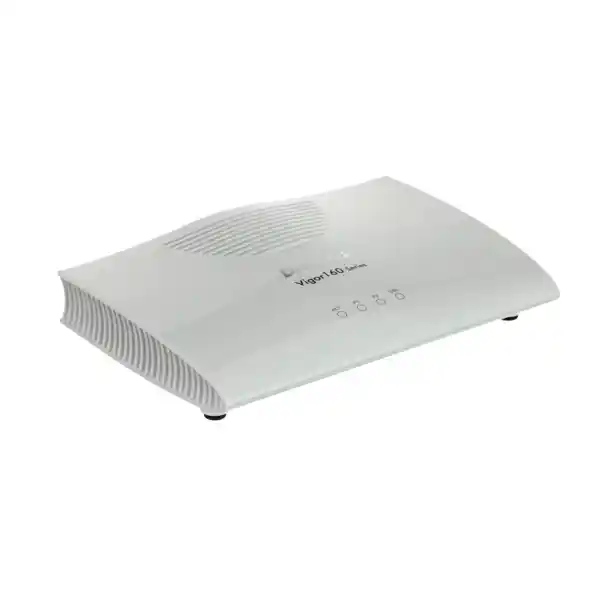
DrayTek Vigor167 VDSL2 35b Modem / Router
The DrayTek Vigor167 is a compact professional xDSL access device built to terminate VDSL2 35b or ADSL2+ services and present a clean Ethernet handoff to an existing firewall, router, SD-WAN edge or branch network. It is particularly useful when an organization wants the DSL modem function separated from the security and routing platform instead of relying on a consumer all-in-one gateway.
What the DrayTek Vigor167 is designed to do
The Vigor167 is best understood as a dedicated DSL edge device rather than a full enterprise security appliance. Its primary role is to synchronize with a compatible copper broadband circuit, convert that xDSL service to Ethernet, and then either bridge the service transparently to another router or perform basic routing and NAT itself. That separation is valuable in professional networks because the broadband access technology and the security policy engine can be treated as two distinct layers. The modem can handle the electrical and protocol requirements of VDSL2 or ADSL, while the downstream firewall can handle advanced security inspection, VPN, SD-WAN, content control, segmentation, high-availability policy and application governance.
For organizations purchasing connectivity equipment in Dubai, Abu Dhabi, Sharjah and other UAE locations, this architecture is frequently easier to support than replacing an entire security gateway whenever the DSL access requirement changes. A branch can retain its preferred firewall platform and use the Vigor167 as the copper termination device. FourTeck can also integrate the modem into a broader edge design that includes secure routing, structured switching and managed IT services. For projects that require a complete firewall architecture in addition to the DSL modem, visit FourTeck Firewall Dubai.
Core Vigor167 specifications at a glance
| Area | Specification | Deployment relevance |
|---|---|---|
| DSL interface | 1 × RJ-11 xDSL | Terminates supported VDSL2 and ADSL services directly. |
| VDSL2 | Profiles 8a, 8b, 8c, 8d, 12a, 12b, 17a, 30a and 35b | Broad profile coverage, including 35b supervectoring. |
| Maximum VDSL link rate | Up to 300 Mbps | Actual rate depends on service profile, copper quality, loop length and provider configuration. |
| ADSL fallback | ADSL, ADSL2 and ADSL2+; Annex A/B/J/M support | Useful where legacy DSL remains in service or where the line is not provisioned for VDSL2. |
| Ethernet | 2 × Gigabit Ethernet RJ-45 LAN | Provides flexible local management and downstream handoff options. |
| Operation modes | Modem/bridge mode and router mode | Allows transparent handoff to a firewall or standalone routing for simpler sites. |
| NAT sessions | 10,000 sessions | Relevant when the device is used in router mode rather than as a pure bridge. |
| Management | Web UI, HTTP/HTTPS, Telnet, SSH v2, TR-069, SNMP v2/v2c/v3 | Supports local administration, monitoring and centralized deployment workflows. |
| Power | 12 V DC, 0.4 A; maximum consumption around 4.4 W | Low-power access device suited to branch and cabinet deployment. |
| Dimensions | 181 × 125 × 40 mm | Compact footprint for desks, shelves and communications cabinets. |
Performance figures are maximum platform figures under suitable conditions. DSL synchronization speed and usable internet throughput are governed by line characteristics, ISP profile, protocol overhead and the downstream network design.
VDSL2 profile 35b and supervectoring explained
VDSL2 uses a much wider frequency range than legacy ADSL technologies, and profile 35b extends that concept further by making additional spectrum available on suitable loops. In practical terms, this gives service providers more room to deliver higher downstream rates over short, good-quality copper pairs. The Vigor167 supports VDSL2 profile 35b and DrayTek positions the platform for downstream link rates up to 300 Mbps. The exact synchronization rate is not created by the modem alone. It depends on the DSLAM or access-node profile, physical cable length, attenuation, noise, crosstalk, pair quality, binder conditions, vectoring environment and the provider’s configured service ceiling.
The modem also supports ITU-T G.993.5 vectoring. Vectoring is designed to reduce far-end crosstalk between VDSL2 lines within a cable bundle by coordinating signal processing at the access equipment. On a correctly provisioned network, it can materially improve stability and attainable bit rate compared with a non-vectored environment. The Vigor167 additionally supports retransmission mechanisms associated with ITU-T G.998.4, often discussed in DSL engineering as G.INP. Retransmission can make a line more resilient to short bursts of impulse noise without relying solely on heavy interleaving. That matters for interactive applications because excessive interleaving can add latency, while a well-tuned retransmission strategy can preserve both reliability and responsiveness.
A key purchasing point is that the Vigor167 is a VDSL2 35b device, not a G.fast modem. DrayTek’s model naming can lead to confusion because the Vigor166 is associated with G.fast capability, while the Vigor167 product specification is centered on VDSL2 35b and ADSL2+. If the service provider requires G.fast rather than VDSL2, the access technology must be confirmed before procurement. This distinction prevents a common field problem: buying a technically capable DSL unit that nevertheless does not support the exact line technology delivered by the carrier.
ADSL, ADSL2 and ADSL2+ fallback
The Vigor167 is backward compatible with older DSL access methods. It supports T1.413 Issue 2, ITU-T G.992.1 ADSL, G.992.3 ADSL2 and G.992.5 ADSL2+. DrayTek lists Annex A, B, J and M support along with band plans 998 and 997. This broad compatibility is useful for organizations that standardize on one modem platform across a mixed estate where one branch has VDSL2 35b, another has VDSL2 17a, and a smaller or older location still operates on ADSL2+.
DrayTek specifies ADSL link rates up to 20 Mbps for the platform. As with VDSL, that is a maximum capability rather than a guaranteed service rate. ADSL performance is especially sensitive to copper distance and noise. For deployment planning, the line should be treated as a provider service with measurable attenuation, SNR margin and attainable rate, not as an Ethernet link with a fixed guaranteed speed.
Two Gigabit Ethernet ports
The two Gigabit Ethernet RJ-45 ports provide more operational flexibility than a single-port bridge modem. A typical production design uses one Ethernet port for the upstream WAN interface of the firewall or router, while the second port may be used for local administration or service operations when the selected mode and addressing plan permit it. The dual-port design can simplify commissioning because an engineer may be able to access the modem interface without repeatedly disconnecting the production handoff.
The presence of Gigabit Ethernet does not mean a 1 Gbps DSL service is available. The Ethernet ports are simply the local handoff. The DSL side remains governed by the configured xDSL profile and physical line capability. In a profile 35b deployment, the Gigabit interfaces give ample headroom for the modem’s stated VDSL2 performance ceiling and avoid introducing a 100 Mbps Ethernet bottleneck.
Bridge mode: the preferred design for many firewall deployments
In modem or bridge mode, the Vigor167 focuses on the DSL access layer and passes traffic toward a downstream router or firewall. This is often the cleanest architecture for a business site because it avoids running two independent NAT and policy engines. The firewall can own the internet-facing logical configuration, public addressing, PPPoE session if required by the provider, security policy, VPN tunnels, route control, SD-WAN probes and logging. The Vigor167 remains responsible for the copper link and the DSL synchronization process.
Avoiding double NAT can be important for inbound services, IPsec VPNs, SIP deployments, remote-access gateways and troubleshooting. When two devices both perform NAT, engineers have to understand translation and state on two separate platforms. That is workable, but it creates more places where a port forward, ALG, timeout or asymmetric path can affect traffic. A bridge design removes that extra stateful boundary. It also allows the security team to retain one policy authority at the edge.
A common topology is therefore: provider copper pair to the Vigor167 DSL port, Vigor167 Ethernet to the WAN interface of the enterprise firewall, firewall LAN or trunk interfaces to the switching layer, and then access points, servers, IP phones and user endpoints behind the security gateway. FourTeck can design this handoff around existing security platforms or as part of a new branch deployment. Broader infrastructure design and managed support are available through FourTeck IT Services UAE.
Router mode: when the Vigor167 can operate as the local edge
The Vigor167 can also operate as a router. This mode is appropriate for smaller or specialized deployments where a separate security gateway is unnecessary, unavailable or intentionally avoided. DrayTek lists PPPoE, PPPoA, DHCP and static IP options for IPv4 WAN connectivity, along with IPv6 methods including PPP, DHCPv6, static IPv6, 6rd, 6in4 and static tunnel functions. The exact choices available in a production build depend on firmware and service design, but the platform clearly goes beyond a pure media converter.
In router mode, network administrators can use IPv4 and IPv6 DHCP services and relay functions, static routes, RIP v1/v2, NAT features and multicast controls. DrayTek specifies support for port redirection, open ports, DMZ host and UPnP, with ALGs for protocols such as SIP, RTSP, FTP and H.323. These functions make the Vigor167 capable of supporting a compact routed branch. Even so, organizations with formal cybersecurity requirements should distinguish basic routing and NAT capability from next-generation firewall functions such as IPS, advanced application inspection, malware analysis, web categorization, endpoint telemetry integration and enterprise VPN scale.
DrayTek states a 10,000 NAT-session capacity and recommends the platform for a network of around 10 hosts. This is a valuable sizing clue. It shows that router mode is aimed at modest endpoint counts rather than high-density enterprise edge consolidation. Session count matters because modern browsers, cloud applications, operating-system services, collaboration clients and mobile devices can open many concurrent connections. If the branch has dozens or hundreds of active users, the more scalable design is usually to place the Vigor167 in bridge mode and let a properly sized firewall or router carry the state table.
VLAN, PPPoE and service handoff planning
1. Confirm ISP encapsulation
Before installation, confirm whether the provider uses PPPoE, PPPoA, DHCP or static addressing, and whether credentials are required. The device can support multiple WAN methods, but the configuration must match the carrier handoff.
2. Confirm VLAN requirements
Some broadband operators require a specific customer VLAN ID on the DSL service. That value should be captured from the provider documentation before the cutover. A VLAN mismatch can leave the DSL layer synchronized while the IP session still fails.
3. Decide where PPP terminates
If the Vigor167 is bridged, it can be operationally cleaner for PPPoE to terminate on the downstream firewall. If router mode is used, the PPP session can terminate on the Vigor167. The decision affects addressing, NAT, monitoring and fault isolation.
4. Record MTU and MSS behavior
PPPoE introduces encapsulation overhead. Where applications are sensitive to path MTU, test the end-to-end packet size and ensure the downstream router handles MSS clamping or equivalent controls when necessary.
IPv6 capability for modern dual-stack networks
The Vigor167 includes IPv6 functions relevant to small routed deployments and transition environments. DrayTek identifies PPP, DHCPv6, static IPv6, TSPC, 6rd, 6in4 and static tunnel options, while LAN-side features include DHCPv6 and router advertisement capability. IPv6 static routing is also listed. These functions are useful when an ISP provides native IPv6 or when an organization is operating a dual-stack branch.
The architecture decision remains important. In a bridge deployment, the downstream firewall should generally own the IPv6 security policy and prefix handling because that keeps IPv4 and IPv6 governance in the same platform. In router mode, the Vigor167 can participate more directly in the IPv6 topology. Administrators should avoid assuming that IPv6 traffic is automatically protected just because IPv4 NAT exists. IPv6 typically uses globally routable addressing, so explicit firewall policy and device hardening remain essential at the security layer.
For organizations migrating gradually to IPv6, the modem can therefore support the access requirement without forcing an immediate change to the rest of the LAN. The downstream routing platform can determine whether prefixes are delegated to internal segments, whether only selected VLANs receive IPv6, and how DNS, monitoring and security policies are staged during adoption.
Management, monitoring and remote operations
Professional DSL deployments benefit from visibility. A line can be electrically synchronized but still experience poor SNR margin, intermittent errors, retransmissions or an attainable rate below the subscribed service. The Vigor167 exposes DSL status and tone information so an administrator can inspect the physical link rather than treating the modem as a black box. The user guide also provides monitoring areas for route tables, DHCP information, ARP entries, DNS cache, session tables and web syslog, giving engineers several ways to correlate access-layer behavior with routed traffic.
DrayTek lists HTTP, HTTPS, Telnet and SSH v2 management protocols, as well as SNMP v2, v2c and v3. In an enterprise deployment, secure protocols should be preferred and management access should be restricted to trusted source networks. Legacy clear-text management such as HTTP or Telnet may still exist for compatibility, but it should not be exposed to untrusted networks. SNMPv3 is generally the preferable monitoring option where supported by the operations platform because it can provide authentication and privacy controls unavailable in older community-string-only approaches.
TR-069 support is particularly relevant for centralized provisioning. The Vigor167 can be managed by VigorACS 3, allowing organizations or service providers to standardize deployment and remotely maintain compatible DrayTek devices. Central management becomes valuable when the modem is installed at multiple branches because engineers can reduce the need for site-by-site configuration and improve configuration consistency. It also creates a better operational model for tracking firmware, device status and service settings.
Remote management should be designed with the same care as firewall administration. Use unique administrator credentials, change defaults during commissioning, restrict source access, back up configuration before major changes, keep firmware within an approved maintenance baseline, and document how the modem can be reached when it is placed behind or in front of another routing device. FourTeck can align these steps with a broader UAE support framework through FourTeck UAE.
Recommended deployment topologies
Topology A: Vigor167 bridge + next-generation firewall
Use this design when security is the priority. The DSL pair connects to the Vigor167, and Ethernet connects to the firewall WAN interface. The firewall terminates PPPoE or receives the public address as required, then applies security policy, VPN, segmentation and SD-WAN logic. This minimizes double NAT and makes the firewall the single routed security boundary.
This is the preferred topology for branch offices, professional services firms, retail sites, warehouses and remote offices that already use a dedicated firewall platform.
Topology B: Vigor167 router + compact LAN
Use router mode when the site is small and advanced edge security functions are not required. The Vigor167 terminates the DSL and the IP service, performs NAT, and provides routing and DHCP functions. A downstream switch can connect a limited number of devices or a small wireless infrastructure.
This design is simple, but it should be selected with awareness of the stated 10,000-session capacity and DrayTek’s recommendation for around 10 hosts.
Topology C: DSL as secondary WAN
A VDSL2 or ADSL circuit can be used as a secondary connection behind a multi-WAN firewall. The Vigor167 bridges the copper service to one WAN interface while another circuit, such as fiber or Ethernet, serves as the primary path. The firewall then performs failover, health checks and route selection.
This topology can provide useful path diversity when the DSL circuit follows a different access route from the primary service, although true resilience depends on the carrier infrastructure and local cabling.
Topology D: Managed multi-site DSL estate
Organizations with multiple small branches can standardize on the Vigor167 for copper access and use centralized DrayTek management for provisioning and monitoring. The modem configuration can remain consistent while each branch firewall carries site-specific security, VPN and routing policy.
This separation is operationally attractive because access-layer replacement does not require rebuilding the complete branch security architecture.
How to size the Vigor167 correctly
Sizing a DSL modem is not just a matter of checking the advertised internet speed. Start with the access technology. Confirm that the carrier service is VDSL2 or ADSL and that its required profile is supported. For VDSL2, the Vigor167 covers profiles through 35b. If the circuit is G.fast, GPON, XGS-PON, DOCSIS, fixed wireless or Ethernet, a different access device is required. No amount of configuration can make a VDSL2 modem terminate an incompatible physical layer.
Next, determine whether the Vigor167 will be bridged or routed. If bridged, the local session scale of the modem is less relevant because the downstream firewall carries the user connection table. In that case, focus on DSL compatibility, stability, management and handoff. If routed, include endpoint count and session behavior in the design. DrayTek lists 10,000 sessions and around 10 recommended hosts, which is reasonable for a compact branch but not the profile of a large campus edge.
Then evaluate the line itself. Copper-loop conditions dominate DSL performance. Ask the provider for the contracted service profile, and during installation record actual synchronization speed, attainable rate if exposed, SNR margin, line attenuation, error counters and retransmission behavior. A modem that synchronizes at 110 Mbps on a long or noisy pair cannot deliver 300 Mbps simply because the hardware maximum is higher. Conversely, a short high-quality line with profile 35b and correct vectoring can benefit from the modem’s higher VDSL2 capability.
Finally, confirm operational requirements. If the modem must be monitored centrally, account for TR-069 or VigorACS integration. If the network team uses SNMP, confirm the monitoring policy. If the modem will live in a remote cabinet, ensure there is a controlled power source and a documented recovery procedure. Correct sizing therefore includes technology, throughput, sessions, management, resilience and support—not just a single speed number.
Installation workflow for a professional UAE deployment
- Validate the ordered circuit. Record the service provider, DSL technology, profile, PPP credentials if applicable, VLAN ID, public IP information, DNS expectations and support reference. This avoids commissioning delays caused by incomplete carrier information.
- Inspect the copper presentation. Confirm that the correct pair is presented at the site and that splitters, filters or building cabling do not introduce unnecessary loss. Poor extension wiring can affect DSL stability even when the carrier side is healthy.
- Connect the DSL port. Use the appropriate RJ-11 or provider-compatible cable supplied or approved for the site. Keep the DSL run away from obvious electrical noise sources where practical.
- Connect the Ethernet handoff. Link the chosen Gigabit Ethernet port to the downstream firewall or switch according to the design. Use known-good Cat5e or better structured cabling for a stable local handoff.
- Access the management interface. Use a controlled engineering workstation, change credentials and record the device configuration. Do not leave default administrative settings in production.
- Select modem or router mode. In a firewall-centric design, use bridge/modem operation so the downstream gateway owns the service session and security policy. For a small routed site, configure the Vigor167 WAN and LAN functions directly.
- Apply ISP parameters. Configure VDSL2 or ADSL mode, VLAN tagging and WAN encapsulation as required. If auto DSL mode is used, verify that the final negotiated technology matches the ordered service.
- Verify synchronization. Confirm DSL link status and record negotiated rates. If the line does not synchronize, troubleshoot the physical pair and provider profile before changing higher-layer routing settings.
- Verify IP connectivity. Confirm PPP session or DHCP/static addressing, default route, DNS resolution and internet reachability. Test from the downstream firewall as well as from an endpoint behind the LAN.
- Capture a baseline. Record SNR, attenuation and relevant error information when the line is healthy. A baseline makes later troubleshooting much faster because engineers can identify whether a future fault is a change in the DSL layer or elsewhere in the network.
- Harden management. Prefer HTTPS and SSH where practical, restrict management sources, disable unnecessary exposure, configure SNMP securely, and establish the intended TR-069 or VigorACS relationship.
- Document recovery. Save the approved configuration, note firmware version, label the cabling and define the escalation path to the carrier and FourTeck support team.
DSL troubleshooting: a layer-by-layer method
No DSL synchronization
Check the copper pair, wall outlet, splitter or filter, DSL cable, provider activation and selected DSL mode. A missing DSL carrier is a physical or access-layer problem; firewall rules and DNS settings cannot repair it.
DSL sync but no internet
Check VLAN ID, PPP username and password, PPPoE versus PPPoA, DHCP or static IP parameters, provider binding and whether PPP should terminate on the modem or downstream firewall.
Low negotiated rate
Inspect line attenuation, SNR margin, attainable rate, error counts and profile. Compare the actual line with provider expectations. Long loops and noisy pairs can reduce speed regardless of modem capability.
Frequent disconnects
Look for changing SNR, impulse noise, poor extension wiring, unstable power, damaged copper or aggressive provider profiles. Review retransmission and error behavior before assuming the Ethernet or firewall is responsible.
VPN or inbound-service problems
Check for double NAT, ALG behavior and port translation. Where possible, bridge the modem and make the firewall the single NAT boundary. Confirm MTU behavior on PPPoE links when tunnel traffic fragments or stalls.
Remote-management failure
Confirm the management interface address, access-control list, routing path, HTTPS or SSH service state, TR-069 parameters and any upstream firewall policy. Avoid exposing management directly to the public internet unless explicitly required and secured.
Important compatibility notes before ordering
VDSL2 35b is not G.fast. The Vigor167 is specified for VDSL2 35b and ADSL2+. If the carrier explicitly states that the local access circuit is G.fast, confirm a G.fast-capable model instead of assuming profile 35b is equivalent.
DSL performance is line-dependent. Up to 300 Mbps is a platform capability under suitable VDSL2 conditions, not a guaranteed speed on every copper circuit. Provider shaping, loop distance, crosstalk and line quality all affect the synchronized rate.
Bridge mode does not remove ISP requirements. The correct VLAN, PPP credentials or IP settings still have to be applied at the correct device in the path. Bridging only changes where higher-layer functions terminate.
The Vigor167 is not a next-generation firewall. Router mode offers useful NAT, routing and management features, but advanced threat prevention, application control, enterprise VPN scale and deep security services belong on a dedicated firewall when those functions are required.
Check regional power and cabling requirements. The hardware uses a 12 V DC supply. For UAE projects, confirm the supplied power adapter, outlet compatibility and installation environment as part of the final bill of materials.
Physical design, power and environmental planning
The Vigor167 measures approximately 181 × 125 × 40 mm, making it easy to place on a shelf, inside a communications room or near the carrier demarcation point. DrayTek’s current product specification lists a 12 V DC 0.4 A power input and maximum power consumption of approximately 4.4 W. Low power draw is useful in remote branches because the modem can be supported by a modest UPS without materially affecting runtime.
DrayTek lists an operating temperature range of 0 to 45°C and non-condensing humidity of 10 to 90 percent on the current product specification. UAE deployments require particular attention to cabinet temperature. A telecom room can exceed comfortable office temperature if ventilation fails or if equipment is installed in a sealed enclosure. The modem should not be exposed to direct sun, outdoor dust, condensation or unconditioned spaces unless the installation environment is engineered to stay within the product’s limits.
Place the modem close enough to the copper presentation to avoid unnecessary internal telephone wiring. Every additional connector, extension and poor-quality cable segment can contribute loss or noise. The Ethernet side is much more tolerant of distance within normal structured-cabling limits, so a common engineering choice is to keep the Vigor167 near the DSL demarcation point and extend Ethernet toward the firewall cabinet rather than extending fragile DSL cabling across the building.
Power resilience should also be considered. If the DSL service is intended as a backup WAN, it is counterproductive to leave the modem on an unprotected wall outlet while the firewall and switch are on UPS power. Place the Vigor167, downstream firewall and any required switch ports on the same resilience plan so the secondary circuit remains usable during short power disturbances.
Security design around the Vigor167
Management-plane security
Change default credentials, restrict management by source, prefer HTTPS and SSH, and use SNMPv3 when the monitoring platform supports it. Administration should normally be available only from a dedicated management segment or trusted engineering network.
Where TR-069 or VigorACS is used, treat the controller relationship as part of the security boundary. Record the server configuration, authentication method and lifecycle process so the device cannot be silently orphaned after a management-platform change.
Data-plane security
If the device is bridged, enforce internet security on the downstream firewall. If it is routed, review NAT, port forwarding, DMZ, UPnP and ALG settings carefully. Disable services that are not required and avoid opening inbound access merely for convenience.
For regulated or security-sensitive environments, a dedicated firewall is normally preferable because it centralizes threat inspection, VPN policy, logging, segmentation and access control in a platform designed specifically for those functions.
Multicast, voice and real-time application considerations
The Vigor167 specification includes IGMP v2/v3, IGMP proxy and IGMP snooping functions. These features matter where the DSL service carries multicast traffic, such as provider-managed video or specialized one-to-many applications. Correct multicast behavior depends on the entire path, including provider access equipment, modem mode, downstream switching and routing. If multicast is required, document whether the provider expects IGMP handling on the modem or the downstream router.
Voice traffic deserves similar care. In router mode, the Vigor167 includes a SIP ALG, but SIP ALGs can help or hinder depending on the voice architecture. Modern hosted PBX and SBC designs often work best when NAT behavior is predictable and unnecessary ALGs are disabled. If IP telephony experiences one-way audio, registration drops or failed inbound calls, check whether SIP translation is occurring at more than one device.
Latency on DSL is influenced by line conditions and error-protection settings as well as WAN congestion. G.INP-style retransmission support can improve resilience to impulse noise, but the end-to-end experience also depends on queueing and QoS in the downstream router. For voice, video meetings and remote desktop workloads, monitor both physical line health and WAN utilization. A line that is electrically stable can still feel slow when upstream traffic saturates the available bandwidth.
Using the Vigor167 as a secondary WAN for business continuity
A DSL line can be valuable even when it is not the fastest circuit at the site. As a secondary WAN, its role is to preserve essential connectivity when the primary fiber or Ethernet service fails. The Vigor167 can provide a simple copper handoff to a dual-WAN firewall, which then monitors both links and decides when to fail over. This is often more flexible than making the modem itself responsible for complex multi-WAN policy.
True resilience requires more than two logical connections. The primary and backup services should be assessed for shared ducts, building entrances, street cabinets and carrier aggregation points. If both circuits fail through the same trench or depend on the same upstream infrastructure, the second link may not provide the expected protection. DSL can still be useful because it may use a different last-mile system from a business fiber service, but that diversity should be confirmed rather than assumed.
The downstream firewall should define which traffic is permitted over the backup line. A 300 Mbps-capable VDSL2 circuit may still be much slower than the primary WAN, so failover policy can prioritize ERP, email, VPN, payment traffic and critical cloud services while restricting bulk backup jobs, software updates or guest Wi-Fi. This is an example of why separating the modem from the policy engine can produce a stronger business continuity design.
Centralized management with VigorACS
DrayTek identifies the Vigor167 as compatible with VigorACS 3 and TR-069. This makes the modem relevant not only to single-site deployments but also to managed estates where configuration consistency matters. Zero-touch workflows can reduce the amount of manual work needed at a remote branch. An installer can connect the device and allow the management platform to apply the intended configuration, provided the provisioning relationship has been prepared correctly.
The operational value grows with the number of sites. Without centralized management, every firmware upgrade, DSL parameter change or credential update can become a separate site task. With a controller, the network team can standardize profiles, observe device status and maintain a consistent baseline. This does not eliminate change control; instead, it gives the change process a scalable execution mechanism.
For managed-service providers, centralized visibility also improves first-line fault isolation. If a branch reports that internet access is unavailable, the operations team can determine whether the modem is reachable, whether the DSL link is synchronized, whether management telemetry is current and whether the device has recently restarted. That information can reduce unnecessary dispatches and helps the team decide whether to troubleshoot the customer LAN, the modem, the local copper pair or the carrier network.
FourTeck can integrate the Vigor167 into wider multi-vendor environments where the modem is only one component of the site edge. For broader regional and international project coordination, see FourTeck Global.
Use cases in Dubai and across the UAE
Branch office internet
Terminate a VDSL2 circuit and bridge it to a corporate firewall that extends site-to-site VPN, SD-WAN and centralized security policy back to headquarters or cloud hubs.
Retail and POS backup
Use DSL as a secondary path for payment terminals, inventory systems and managed applications when the primary circuit is interrupted.
Temporary office connectivity
Deploy on an available copper circuit while waiting for a longer-lead-time fiber service, then repurpose the DSL circuit as backup once the permanent link arrives.
Managed multi-site estates
Standardize on one modem model for many small branches and use TR-069 or VigorACS workflows for provisioning, monitoring and maintenance.
Firewall replacement projects
Keep the DSL access layer independent so the security gateway can be replaced or upgraded without changing the copper termination device, subject to handoff compatibility.
Small routed networks
Use router mode, NAT and DHCP for a limited user population where a dedicated enterprise firewall is not required and the risk profile permits a simpler edge.
Procurement considerations for UAE projects
Business hardware procurement should validate more than the model name. Confirm that the requested unit is the correct regional hardware and power-adapter bundle, that the service provider uses a supported DSL technology, and that required accessories are included. DrayTek lists Ethernet cabling, DSL cables for different annex environments, a power adapter and quick-start documentation among the package contents, but exact bundle contents can vary by region and distribution channel.
For rollout projects, record serial numbers, site assignment, firmware baseline and configuration ownership. This matters when the organization has many similar devices and needs to identify which modem belongs to which branch. Asset records should link the modem to the ISP circuit ID, firewall WAN port, support contract and local contact. A structured asset record shortens outage response because the support team does not have to reconstruct the physical and logical topology during an incident.
Spare strategy is also worth planning. A modem is a small and relatively inexpensive device compared with the business cost of a branch outage. Organizations with multiple DSL-dependent sites may keep one or more pre-approved spare units so a failed modem can be replaced quickly. If centralized provisioning is used, a replacement device can be brought into service with less manual configuration. The exact spare ratio should reflect site count, criticality and delivery lead time.
FourTeck can provide the Vigor167 as part of a wider UAE network bill of materials that includes firewalls, switching, Wi-Fi, servers and support services. The objective is not merely to supply a modem, but to ensure that the access device is technically aligned with the carrier circuit and downstream network.
Vigor167 versus an ISP-supplied all-in-one router
An ISP-supplied gateway is often convenient for residential or very small-office use because modem, router, Wi-Fi and basic firewall functions are combined in one unit. The disadvantage is architectural coupling. The organization may be forced to use the provider’s Wi-Fi, NAT behavior and management model even when a corporate firewall is already installed. Troubleshooting can also become difficult when the provider gateway performs hidden or poorly documented functions.
A dedicated Vigor167 separates the DSL layer from the rest of the edge. In bridge mode, it behaves much more like an access component: synchronize the line, present Ethernet, and allow the downstream firewall to own the IP and security design. This can make change management more predictable, especially when the organization uses a standardized firewall configuration across many sites.
The trade-off is that a dedicated modem requires deliberate configuration. ISP credentials, VLAN values and bridge behavior must be understood, and the organization owns more of the network design. For professional IT teams, that control is often desirable. For a tiny site with no IT support, an all-in-one provider gateway may be simpler. The right choice depends on operational maturity and security requirements rather than on hardware cost alone.
The Vigor167 is therefore strongest where the buyer wants a purpose-built DSL termination device with business management features, broad VDSL2/ADSL compatibility and the flexibility to hand service to another network platform.
Vigor167 port map and cabling logic
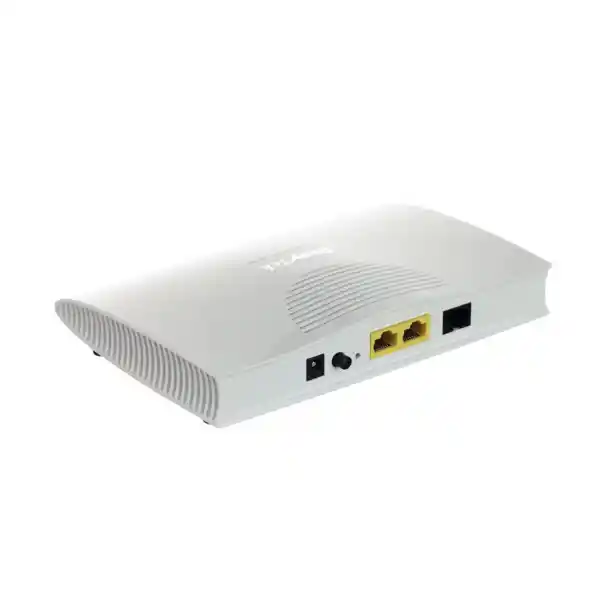
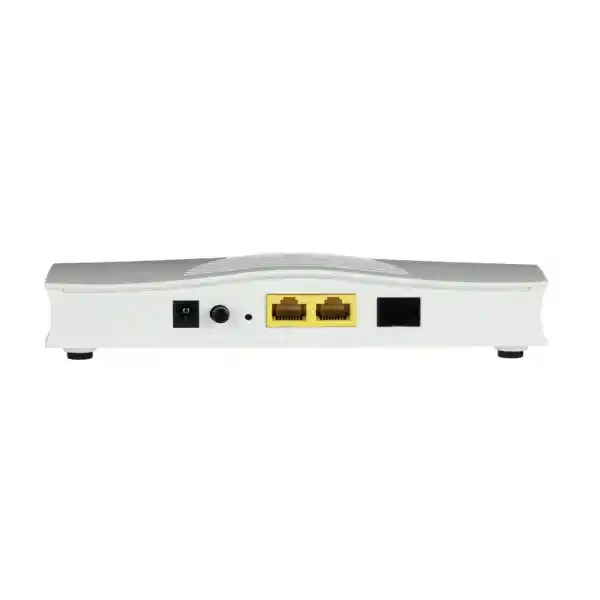
The rear-panel layout is intentionally simple. The unit provides a power input, power switch, reset control, two Gigabit Ethernet LAN ports and one RJ-11 DSL interface. In day-to-day support, that simplicity is an advantage. Engineers can quickly identify the carrier side and the LAN side without dealing with multiple optional WAN media types.
DSL RJ-11: connects to the telephone copper pair carrying VDSL2 or ADSL service. This is the access interface that must synchronize with the provider’s DSLAM or access node. It should not be connected to Ethernet equipment.
Gigabit LAN 1 and LAN 2: provide the Ethernet handoff for a firewall, router, switch or management workstation depending on the operating mode and design. Use standard Ethernet patch cabling and document which port carries production traffic.
Reset: should be used cautiously in production. A factory reset can remove service-specific settings and create a longer outage than the original problem. Before any reset, obtain a configuration backup where possible and record PPP, VLAN and management details.
Power: use the correct 12 V DC adapter for the supplied unit and place it on protected power where the circuit is business-critical. Avoid unapproved adapters because voltage or polarity mismatch can damage equipment.
Firmware and lifecycle management
Maintain an approved firmware baseline
DrayTek continues to publish firmware and support resources for the Vigor167. Network teams should define an approved version, review release notes, test changes when practical, and avoid leaving production equipment indefinitely on an old image.
Firmware changes can affect DSL interoperability, security and management behavior, so upgrades should be treated as controlled network changes rather than routine desktop updates.
Back up before change
The management system includes backup and restore functions. Save the known-good configuration before firmware work, service-profile changes or migration between modem and router modes.
A documented backup can reduce recovery time after a failed change and makes it easier to replace hardware with a spare while preserving ISP and management settings.
Designing the downstream firewall handoff
When the Vigor167 is used as a bridge, the downstream firewall becomes the key edge device. Its WAN configuration must match the service. For PPPoE, the firewall usually carries the username and password and may need a reduced WAN MTU compared with plain Ethernet. For provider DHCP, the firewall may need a specific client identifier or MAC registration. For a static-IP service, the provider may supply an address, mask or prefix, gateway and DNS values.
The firewall should also have a method for reaching the modem management interface when operational support requires it. Depending on the topology, this may use a secondary IP, dedicated management port, separate VLAN or temporary engineering connection. Plan that path during installation rather than discovering during an outage that the modem can only be reached by unplugging the production WAN cable.
If the branch uses SD-WAN, define performance thresholds appropriate to DSL. Latency, jitter and packet loss baselines may differ from fiber. The SD-WAN policy should not mark the DSL link failed merely because it has higher latency than the primary circuit. Instead, measure the healthy DSL baseline and set SLA thresholds around realistic service behavior.
For security, apply inbound-deny policy by default unless specific services must be published. If public services are required, terminate them on a hardened reverse proxy, VPN gateway or designated server segment rather than exposing internal endpoints directly. The Vigor167 provides the access path; the firewall should enforce the risk policy.
Why the Vigor167 fits professional network architecture
The strongest reason to select the Vigor167 is architectural clarity. It gives the network team a dedicated xDSL layer with enough management capability to be operated professionally, while still allowing the firewall, router or SD-WAN appliance to remain the authoritative policy platform. That is a cleaner separation of concerns than forcing an ISP gateway to perform routing, NAT and Wi-Fi functions the organization does not need.
The second reason is broad DSL compatibility. VDSL2 profiles from 8a through 35b, vectoring, retransmission support and ADSL2+ fallback make the model useful in mixed DSL estates. A branch upgrade from ADSL2+ to VDSL2 may therefore retain the same modem platform if the carrier service remains within the supported technologies.
The third reason is manageability. Secure web access, SSH, SNMP and TR-069 give operations teams several ways to integrate the device into established support practices. VigorACS adds centralized management for larger estates. These are not glamorous features, but they matter when a modem is installed in a remote office and needs to be monitored for years.
Finally, the two Gigabit Ethernet ports and compact low-power design make physical integration straightforward. The device can sit near the copper handoff, consume little rack or shelf space, and connect cleanly to the enterprise edge. For many business DSL deployments, that is exactly the right scope.
Frequently asked technical questions
Does the DrayTek Vigor167 support G.fast?
No. The Vigor167 is specified for VDSL2 profile 35b and ADSL2+. Buyers should not treat VDSL2 35b as the same technology as G.fast. If the provider requires G.fast, choose a model specifically supporting G.fast.
Can the Vigor167 be used only as a modem?
Yes. It supports modem or bridge operation so a downstream firewall or router can terminate the IP service and perform security, NAT, VPN and routing.
Can it also route internet traffic itself?
Yes. Router mode supports common WAN methods, NAT, DHCP, static routing and related functions. DrayTek lists a 10,000-session capacity and recommends approximately 10 hosts for this use case.
What is the maximum VDSL2 speed?
DrayTek specifies up to 300 Mbps VDSL2 link rate. Real synchronization speed varies with provider profile, copper length, line quality, crosstalk, vectoring and service configuration.
Does it support older ADSL services?
Yes. The platform supports ADSL, ADSL2 and ADSL2+ and is designed to fall back where VDSL2 is unavailable. DrayTek lists up to 20 Mbps ADSL link rate.
How many Ethernet ports are available?
There are two Gigabit Ethernet RJ-45 LAN ports. They provide the local handoff and management flexibility needed in modem or router deployments.
Can the modem be monitored remotely?
Yes. The specification includes HTTPS, SSH v2, SNMP and TR-069, and the device can be managed through VigorACS 3 in supported deployments.
Is it suitable for a large office as the main router?
As a routed edge, it is intended for a modest host count. Large offices should normally use it as a bridge to a firewall or router sized for the required users, sessions, VPNs and security services.
Can it be used for WAN failover?
Yes, when paired with a multi-WAN firewall or router. The Vigor167 supplies the DSL Ethernet handoff, while the downstream device performs health checks, failover and traffic policy.
Technical selection checklist
Decision recap: when the Vigor167 is the right choice
Choose the DrayTek Vigor167 when the site has a compatible VDSL2 or ADSL copper circuit and the network design benefits from a dedicated, manageable modem. It is particularly well suited to profile 35b VDSL2 deployments, firewall bridge mode, multi-WAN backup, compact branch routing and centrally managed multi-site estates.
Choose a different access device when the provider service is G.fast, GPON, XGS-PON, coaxial cable or another non-DSL medium. Also consider a more capable router or firewall when the Vigor167 would otherwise be expected to support a large user base, advanced cybersecurity inspection, high VPN scale or complex application policy directly.
VDSL2 35b termination, ADSL fallback, bridge-to-firewall architectures, small routed sites and managed branch estates.
Separates DSL access from security policy while still providing professional monitoring and remote-management options.
Confirm that the carrier circuit is VDSL2/ADSL and not G.fast or fiber before ordering.
Quotation input checklist for DrayTek Vigor167 projects
To quote and configure the correct solution, provide the technical details below. This allows FourTeck to determine whether the Vigor167 should be supplied as a standalone modem, preplanned bridge device or part of a complete firewall and WAN architecture.
Dubai, Abu Dhabi, Sharjah or other UAE location; number of branches; required delivery schedule.
Provider name, VDSL2/ADSL type, subscribed rate, profile if known, VLAN ID and PPP details.
Bridge to firewall, router mode, or secondary-WAN modem for an existing multi-WAN gateway.
Vendor/model, WAN interface type, PPPoE requirement, public-IP design and failover expectations.
Standalone local admin, SNMP monitoring, TR-069 provisioning or VigorACS-based centralized management.
Supply only, configuration assistance, remote commissioning, onsite installation or ongoing managed support.
FourTeck consultation for DrayTek Vigor167 in Dubai and UAE
FourTeck can supply the DrayTek Vigor167 as part of a complete business connectivity design. Our team can review the carrier access type, determine whether bridge or router mode is appropriate, align the modem with the downstream firewall, and plan management, monitoring and failover requirements. This is especially useful when the DSL line is being introduced as a backup WAN or when a branch is migrating from an ISP all-in-one gateway to a professional firewall architecture.
For wider network, security and infrastructure projects, FourTeck can coordinate the Vigor167 with switching, Wi-Fi, servers, structured cabling and managed support. The goal is a documented edge design in which every component has a clear role and the DSL access layer does not become an unmanaged point of failure.

Reviews
There are no reviews yet.