
DrayTek Vigor2866 in Dubai, UAE
A technically focused deployment guide for the DrayTek Vigor2866 G.fast/VDSL2 business router, covering WAN design, firewalling, VPN, VLANs, QoS, routing, management, sizing and practical procurement considerations for UAE organizations.
Dual-WAN architecture
5 × fixed Gigabit LAN
1 × switchable GbE WAN/LAN
60,000 NAT sessions
32 VPN tunnels
Hardware-accelerated routing
Direct answer: what is the DrayTek Vigor2866 and where does it fit?
The DrayTek Vigor2866 is a dual-WAN SMB firewall router with an integrated G.fast-capable DSL modem and a configurable Gigabit Ethernet WAN/LAN interface. Its DSL side is designed to accommodate modern copper access methods while retaining backward compatibility with widely deployed VDSL2 and ADSL2+ services. This makes it especially useful at sites where the access circuit arrives on copper, where an organization is migrating between access technologies, or where the IT team wants one device to terminate the line, apply routing policy, segment the LAN and create secure site-to-site or remote-access VPNs.
For a UAE business, the practical advantage is consolidation. Instead of treating the DSL modem, edge router, basic firewall, VPN concentrator, bandwidth controller and branch policy gateway as completely separate devices, the Vigor2866 combines those roles in one managed platform. That does not mean it replaces every next-generation security appliance in every environment. Rather, it is strongest where reliable edge routing, deterministic WAN control, segmentation, VPN and operational visibility are the dominant requirements. Small and midsize offices, retail outlets, clinics, professional firms, managed apartments, small hospitality sites, warehouses and distributed branch networks are common examples.
The platform is rated by DrayTek for up to 60,000 NAT sessions and a network scale around 50 hosts, with hardware acceleration available for high-throughput NAT and routing scenarios. DrayTek publishes up to 940 Mbps hardware-accelerated firewall performance on a single WAN and up to 1.8 Gbps combined performance across Ethernet and DSL WAN paths under test conditions. IPsec VPN throughput is specified up to 300 Mbps, and the device supports up to 32 VPN tunnels. These values should be treated as engineering maxima rather than guaranteed application throughput; encryption mix, packet size, policy depth, line quality, concurrent services and traffic direction all affect real-world results.
WAN architecture: integrated G.fast plus Ethernet flexibility
The defining characteristic of the Vigor2866 is its integrated DSL interface. The fixed WAN port is an RJ-11 interface supporting G.fast and VDSL2, including VDSL2 profile 35b, with backward support for ADSL2+. For organizations using copper access, this reduces the number of powered devices at the edge and gives the router direct visibility into the access link. Direct termination can simplify fault isolation because DSL state, WAN policy and router telemetry are available from the same management plane rather than being split between a provider modem and a separate firewall router.
G.fast is relevant where the local access network supports high-frequency copper service over comparatively short loop distances. DrayTek positions the Vigor2866 for G.fast download rates up to 1 Gbps, subject to provider service, loop conditions and deployment profile. The same physical DSL interface supports VDSL2 profiles 8a, 8b, 8c, 8d, 12a, 12b, 17a, 30a and 35b. That range matters when a branch estate contains different line generations or when a site is upgraded without replacing the edge router immediately.
The second WAN option is a Gigabit Ethernet interface that can be switched between WAN and LAN roles. This interface can connect to an ONT, carrier Ethernet handoff, external modem or other upstream access device. In a migration project, the DSL link can remain live while the Ethernet WAN is commissioned. During normal operation, the two WAN paths can be used for failover or traffic distribution. The correct design depends on whether the requirement is uptime, aggregate bandwidth, application steering or cost control. A finance or ERP service may be pinned to the more stable path, while general browsing can be distributed across both links.
For UAE deployments, this flexibility is often more valuable than simply chasing a headline throughput number. Offices frequently evolve from legacy access to fiber, relocate between buildings, add temporary backup circuits, or need to keep a copper service active while a primary circuit is being delivered. The Vigor2866 can sit at the center of that transition and maintain a consistent LAN policy while the upstream service changes.
Physical interfaces and port-map planning
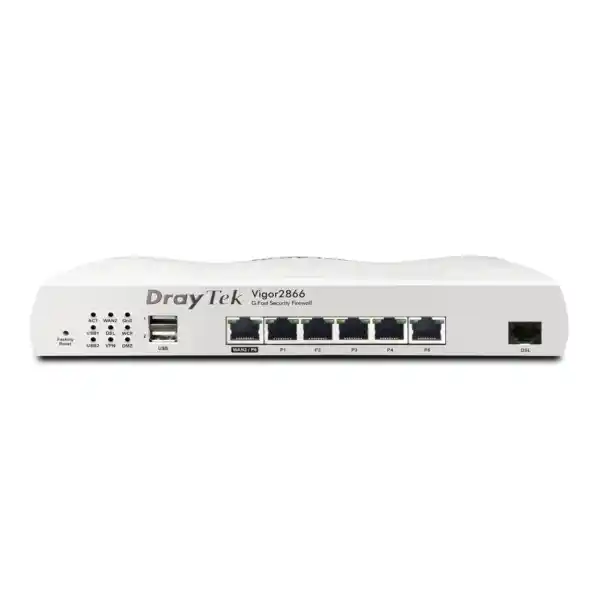
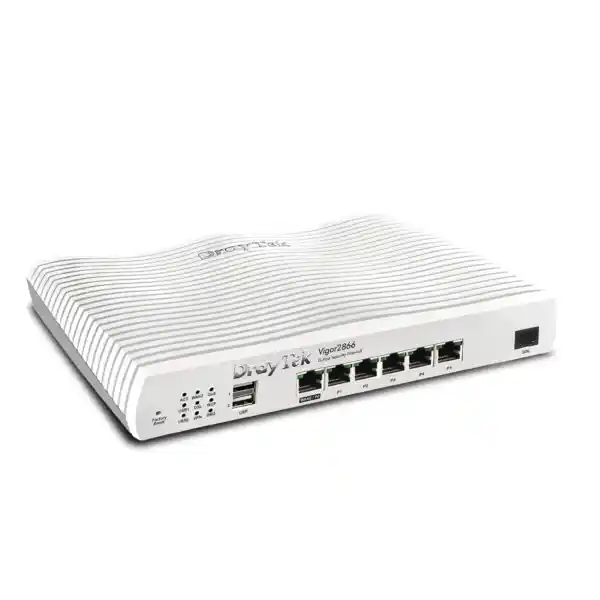
The base Vigor2866 provides five fixed Gigabit Ethernet LAN ports, one additional Gigabit Ethernet port that can operate as WAN or LAN, one fixed RJ-11 DSL WAN interface, and two USB 2.0 ports. This port arrangement is practical for a compact branch because it can connect a managed access switch, a local server or NAS segment, an IP phone or PBX network, an administrative workstation, and a dedicated management or isolated device without immediately requiring a large edge switch. In most structured deployments, however, the router should uplink to managed switching rather than serving as the entire access layer.
The switchable WAN/LAN port is a design resource that should be assigned deliberately. If the office needs dual fixed-line WAN connectivity, reserve it for the second uplink. If the DSL interface is the only WAN, the switchable port can become another LAN port. A procurement document should therefore state the intended WAN topology before installation so that cabling, VLAN assignments and patch-panel labeling reflect the final role of each interface.
The two USB 2.0 interfaces can be used for supported ancillary functions such as compatible USB cellular connectivity or storage-related services, depending on firmware and deployment requirements. In production networks, USB-based functions should be treated as controlled extensions rather than assumed substitutes for dedicated infrastructure. If LTE continuity is a hard business requirement, validate modem compatibility, radio placement, operator service and failover behavior during the design stage.
The chassis measures approximately 241 × 166 × 46 mm. DrayTek specifies an operating temperature range of 0 to 45°C and non-condensing operating humidity of 10 to 90 percent. In Dubai and other UAE locations, those figures reinforce a basic installation rule: the router belongs in a ventilated indoor communications area, not in an unconditioned cabinet exposed to rooftop or outdoor ambient temperatures. Good thermal practice improves stability and reduces avoidable service issues.
Hardware acceleration, NAT and real throughput expectations
DrayTek equips the Vigor2866 with hardware acceleration for NAT and routing. The published figures are up to 940 Mbps on a single WAN and up to 1.8 Gbps combined across two WAN paths, with the accelerator supporting up to 8,000 NAT and routing connections. The broader platform session ceiling is specified at 60,000 NAT sessions. These numbers describe different aspects of capacity: the session table indicates how many simultaneous translated connections the router can track, while the hardware-accelerated connection count and throughput describe traffic that can be processed through the acceleration path.
A network engineer should not size the router by Internet circuit speed alone. Two sites with a 500 Mbps service can place very different loads on the edge. A 20-user office dominated by web browsing and SaaS may be straightforward, while a 50-user site running many short-lived HTTPS sessions, cloud backups, remote desktops, site-to-site encryption and guest traffic can generate more state, more policy lookups and more burstiness. Packet size also matters: small-packet workloads consume more packet-processing capacity per megabit than large sequential transfers.
Advanced traffic functions can further influence achievable throughput. QoS classification, content controls, detailed firewall policy, VPN encryption, logging and inspection features all impose processing work. DrayTek specifically notes that published performance values are measured under optimal internal test conditions. The practical engineering method is therefore to identify the actual feature set, then retain operating headroom for traffic growth and burst events rather than buying to a laboratory maximum.
For many SMB branches, the Vigor2866 offers a balanced edge architecture because hardware acceleration allows high-speed routing without discarding business features such as QoS, bandwidth limits, traffic graphs, WAN budgets and data-flow monitoring. That balance is useful in environments where traffic governance matters as much as raw forwarding speed.
Session sizing
The 60,000-session ceiling gives the router substantial state capacity for an SMB environment, but design should consider how applications behave rather than counting users only. Modern browsers, collaboration suites, cloud storage agents, operating-system updates and mobile apps can create many parallel connections per endpoint.
Guest networks and unmanaged BYOD devices increase variability, so it is good practice to segregate them, apply session policies where appropriate, and monitor normal peak behavior before assuming the edge has unlimited reserve.
Bandwidth sizing
A circuit advertised at 1 Gbps does not imply every security or VPN workflow will run at 1 Gbps. For plain hardware-accelerated NAT, the router is positioned close to Gigabit speed on one WAN; encrypted and policy-heavy flows should be sized against their own published or measured performance.
Maintain margin for software updates, backups, unexpected conference traffic, and failover cases where two links collapse onto one path.
VLAN segmentation and LAN architecture
The Vigor2866 supports both IEEE 802.1Q tag-based VLANs and port-based VLAN segmentation. DrayTek specifies up to 16 VLANs and up to eight LAN subnets on this platform, with one DMZ port capability. These functions are important because a modern office should rarely operate as one flat broadcast and trust domain. Corporate endpoints, voice devices, CCTV, building systems, printers, servers, guest users and management interfaces have different risk profiles and should not automatically share unrestricted lateral connectivity.
A practical UAE office design might use separate logical networks for corporate workstations, IP phones, guest Wi-Fi, CCTV, infrastructure management, printers and servers. The router can route between those VLANs where policy permits and block or restrict flows where separation is required. For example, a guest VLAN should normally reach the Internet but not internal business systems. CCTV cameras may need access to a recorder and time or DNS services but should not initiate sessions toward user computers. Management VLAN access can be restricted to IT workstations or a secure jump host.
The router supports DHCP capabilities including multiple IP subnets, custom DHCP options and IP-to-MAC binding. Custom DHCP options are useful in environments with IP telephony, provisioning services or specialized endpoints. IP-to-MAC binding can improve administrative control for devices that require predictable addressing, though it is not a substitute for identity-based network access control.
Wired 802.1X authentication and port mirroring are also supported. 802.1X can form part of a broader access-control architecture when used with a suitable RADIUS design and compatible switches or endpoints. Port mirroring can help engineers troubleshoot traffic by copying packets to an analysis interface. The router also provides local DNS and conditional DNS forwarding functions, enabling internal namespace handling or forwarding selected domains toward specific resolvers.
When implementing VLANs, the access-switch design must match the router policy. Tagged trunk ports, untagged access ports, native VLAN behavior and management VLANs need a documented convention. A router cannot compensate for an access layer that is patched or tagged inconsistently. For implementation support across switching, structured network segmentation and onsite services, FourTeck’s IT Services UAE team can be referenced as part of the overall deployment scope.
Firewall policy, NAT and controlled Internet exposure
The Vigor2866 includes an IP-based firewall policy framework, NAT functions and application-layer gateways for common protocols. NAT capabilities include port redirection, open ports, port triggering, port knocking, DMZ host and UPnP controls. From a security perspective, these tools should be used with a least-exposure mindset. A port-forwarding feature is not inherently risky, but every inbound mapping creates an externally reachable service that must be justified, maintained and monitored.
For most business systems, direct inbound publishing should be avoided where a VPN, reverse proxy, managed cloud service or other controlled access method can meet the requirement. If an application must be exposed, restrict the destination, protocol and source range as narrowly as possible, document the rule owner, and define a review date. Disable unnecessary UPnP behavior on business networks unless a specific managed application depends on it.
The router supports application, URL-keyword and DNS-keyword filtering as well as web-feature controls and subscription-dependent web-category filtering. These mechanisms can provide useful policy enforcement for SMB environments, but they should not be confused with a full secure web gateway or modern endpoint detection platform. Their value is strongest when combined with endpoint protection, secure DNS, patch management, identity controls and user awareness.
Firewall rules should also be used internally between VLANs, not only at the Internet boundary. Segment-to-segment policy is where the router can materially reduce lateral movement. A CCTV network that can only talk to its recorder, or a guest network that can only reach public DNS and the Internet, creates a more controlled environment than a default allow-any model. The objective is predictable traffic paths and clear troubleshooting, not simply a larger number of rules.
VPN architecture: site-to-site, teleworker and mixed protocols
The Vigor2866 supports up to 32 VPN tunnels and a broad protocol set that includes IPsec, L2TP over IPsec, SSL VPN, GRE, IKEv2, IKEv2-EAP, OpenVPN and WireGuard, in addition to older protocol options. From an engineering perspective, the presence of a protocol does not mean every protocol should be selected for new deployments. New designs should prefer contemporary, organization-approved cryptography and authentication methods, while legacy support can be retained only where a documented interoperability requirement exists.
DrayTek specifies up to 300 Mbps single-directional IPsec throughput with AES-256 and up to 150 Mbps SSL VPN throughput under test conditions. These figures provide a starting point for sizing. A branch that copies large files continuously over IPsec, for example, should not be designed solely around the raw Internet rate if the encrypted throughput requirement exceeds the router’s practical VPN capacity. Conversely, offices using VPN mainly for business applications, RDP, ERP transactions and moderate file access can often operate comfortably within the platform’s envelope.
Site-to-site VPN design should include redundant addressing, route ownership, overlapping subnet checks, failover behavior and DNS dependencies. If the site uses dual WAN, the VPN topology should define whether tunnels follow one preferred circuit, establish on both paths, or use VPN trunk functions for redundancy. DrayTek supports VPN load balancing and failover functions, which can improve continuity when engineered with matching remote endpoints.
Remote-user VPNs require equal attention to identity. The platform supports local, RADIUS, LDAP, TACACS+ and mOTP-related authentication options, plus pre-shared key and X.509 methods for applicable VPN workflows. Organizations should prefer centralized identity where feasible so that joiner, mover and leaver processes are managed consistently. Certificate-based authentication can reduce reliance on shared secrets for device or site identity.
If the Vigor2866 is connecting a branch to a larger firewall estate, confirm phase-one and phase-two parameters, route selectors, NAT exemptions, MTU behavior and dead-peer detection on both sides. Interoperability is usually straightforward when parameters are explicit. Problems arise when each side assumes defaults. A deployment runbook should record every VPN setting necessary to rebuild the tunnel after a hardware replacement.
Branch VPN
Use IPsec/IKEv2 with explicit subnets, documented encryption settings, monitored tunnel status and defined WAN failover behavior. Verify application latency as well as throughput.
Remote access
Prefer organization-approved modern VPN modes, integrate authentication with directory or RADIUS where possible, and enforce user lifecycle controls rather than unmanaged shared credentials.
VPN resilience
When dual WAN is active, test primary-link loss, secondary-link recovery and tunnel re-establishment during a maintenance window. A configuration is only resilient after failover has been observed.
Capacity reserve
Budget throughput for encryption, application bursts and backup traffic. Do not assume NAT performance and VPN performance are interchangeable specifications.
QoS, bandwidth management and application experience
Quality of Service is one of the most operationally valuable functions in a business router because user experience depends on latency and packet loss as much as raw bandwidth. The Vigor2866 supports QoS classification using parameters such as ToS, DSCP, 802.1p, IP address, port and application. It also provides bandwidth and session control functions. These capabilities can prevent a backup job, software distribution task or guest download from overwhelming the upstream path and degrading calls or interactive business applications.
The correct QoS policy begins with measurement. Determine which applications are truly latency-sensitive, which consume sustained bandwidth, which are business-critical and which can tolerate delay. Voice and interactive meeting traffic may justify priority treatment. Cloud backup may require a capped rate during office hours and a wider window overnight. Guest access can be rate-limited so that visitor traffic does not consume the capacity reserved for business systems.
On asymmetric DSL services, the upstream can become the bottleneck long before downstream capacity is exhausted. This is a classic reason to apply traffic shaping or bandwidth limits. A workstation uploading a large cloud archive can fill the upstream queue, increasing latency for every user even if download bandwidth appears plentiful. The router’s QoS tools are therefore most useful when configured around the actual service profile rather than copied from a generic template.
For dual-WAN sites, policy routing and QoS should be designed together. Moving a voice service between WAN paths without considering source-IP changes, provider allow-lists or latency can create intermittent problems. Critical applications may be pinned to a specific WAN and given priority, while less sensitive traffic is load-balanced. The result is a policy that reflects business intent rather than simply maximizing aggregate utilization.
Policy routing and multi-WAN design
Policy-based routing allows traffic to be steered using characteristics such as protocol, IP address, port, domain or country-related rules where supported. This is valuable when different applications have different WAN requirements. A cloud PBX may need a predictable public address, while ordinary web traffic can use whichever path has capacity. A bank portal may be more stable through a fixed preferred circuit. A bulk backup may be intentionally sent over a secondary service.
Failover detection should be more robust than simply checking whether an Ethernet cable is physically up. The Vigor2866 supports link-failure and traffic-threshold logic plus connection detection mechanisms including ARP, strict ARP and ping options. The monitoring target must be chosen carefully. If a router pings only the ISP next hop, it may consider the WAN healthy even when upstream Internet reachability has failed. If it depends on one remote host, a remote outage can produce a false failover.
A disciplined deployment defines health-check targets, failure thresholds, recovery timers and preferred routes, then tests each failure mode. Pulling the WAN cable is only one test. Engineers should also simulate upstream reachability loss, DNS failure, modem resynchronization and VPN endpoint loss where relevant. This converts theoretical resilience into verified business continuity.
Routing, IPv6 and branch integration
Beyond default Internet routing, the Vigor2866 supports IPv4 and IPv6 static routing, policy routing, inter-VLAN routing, RIP v1/v2 and BGP. In a simple office, static and policy routes will cover most needs. In a more advanced branch network, dynamic routing can help integrate the site with upstream routers, provider services or a broader enterprise WAN design. The decision to use BGP should be driven by a real routing requirement and an operational ability to manage it, not by the fact that the feature exists.
IPv6 support includes common WAN-side mechanisms and address assignment functions depending on the provider environment. A dual-stack deployment should be treated as two active network planes. Firewall rules, DNS, monitoring and remote access must account for IPv6 traffic rather than securing IPv4 while leaving IPv6 behavior implicit. If IPv6 is not in use, define the policy explicitly. If it is in use, document prefixes, router advertisements, DHCPv6 behavior and security controls.
Inter-VLAN routing on the edge can be convenient for smaller sites because firewall policy and routing are centralized. At larger sites with substantial east-west traffic, it may be preferable to route selected VLANs on a Layer-3 switch while keeping security boundaries on the firewall. The right architecture depends on traffic patterns. A server-to-backup transfer that never needs Internet policy should not necessarily traverse a small edge router simply because all VLAN gateways were placed there by default.
When integrating the Vigor2866 into a server environment, document which services depend on local DNS, DHCP reservations, port forwards, VPN routes or static next hops. For businesses building or refreshing local compute alongside the router, Server Dubai can serve as a related infrastructure reference while the router remains the WAN and segmentation layer.
High availability and business continuity
DrayTek lists High Availability support on the Vigor2866. High availability should be considered at two separate layers: router availability and WAN availability. Dual WAN protects against an upstream circuit failure, but it does not protect against a failed router, power supply, configuration error or local switching issue. Router HA can reduce the appliance single point of failure, while redundant circuits address carrier diversity. These mechanisms complement each other.
A continuity plan should also include configuration backup, spare-hardware strategy and documented recovery steps. The Vigor2866 supports configuration backup and restore, firmware upgrade through web UI and other management methods, and compatibility paths with certain earlier Vigor configuration families. Even when compatibility exists, a migration should be reviewed rather than assumed to be perfect because interface assignments and feature behavior can change between models or firmware versions.
Power design is often neglected. A dual-WAN router with perfect policy is still offline during a local power interruption if the router, ONT, DSL termination and core switch are not on UPS power. For a branch continuity design, calculate runtime for every dependency in the network path. Keep the router, access handoff, PoE switch for phones or APs, and any required authentication or DNS services on protected power.
Finally, continuity must be rehearsed. Record baseline failover time, check whether active sessions recover or must reconnect, verify public IP changes, confirm DNS behavior and test critical SaaS applications. A successful resilience test produces evidence that the business can continue operating, not merely a green status icon in the router interface.
Central AP, switch and VigorACS management
The Vigor2866 can act as a central management point for DrayTek infrastructure. DrayTek specifies management capacity for up to 20 Vigor access points and up to 10 Vigor switches on the platform, with VigorACS support from firmware generation 4.3.2 onward. This can reduce the administrative burden in a small site because VLAN profiles, device visibility and selected operational tasks can be coordinated from the router rather than treating every network device as an isolated island.
Central management is most useful when configuration standards are defined first. Create consistent naming for sites, switches, APs, VLANs, SSIDs and uplinks. Record management IP ranges and admin-role assignments. A controller can make configuration faster, but it can also spread a mistake faster if templates are poorly designed. Pilot changes on a controlled device before broad rollout where the environment is business-critical.
The base Vigor2866 itself does not provide built-in Wi-Fi. Wireless variants in the broader 2866 family add radio capabilities, but the non-wireless model is often preferable when the office already uses dedicated ceiling-mounted access points. Separating routing from Wi-Fi allows AP placement to be based on radio coverage rather than the location of the carrier handoff. It also makes wireless capacity easier to expand without replacing the edge router.
For managed service scenarios, VigorACS can provide centralized visibility across distributed DrayTek devices. Before enabling cloud or remote management, define administrator identities, secure access methods, logging, update ownership and offboarding processes. Management convenience should not weaken administrative security.
Monitoring, logs and troubleshooting workflow
A stable branch router should provide enough telemetry to answer three questions quickly: is the access circuit healthy, is the router under resource pressure, and which traffic or policy is associated with the symptom? The Vigor2866 supports SNMP v1, v2c and v3, syslog and traffic-monitoring functions. In a managed environment, SNMPv3 is preferable to older community-string approaches because it supports stronger security controls.
Send syslog to a central collector if logs are operationally important. Local logs are useful for immediate troubleshooting but may be lost during reboot or hardware failure. Central logging also makes it easier to correlate WAN changes, VPN events and firewall behavior with user-reported incidents. Establish time synchronization consistently across routers, switches, servers and security platforms so timestamps are comparable.
For DSL troubleshooting, record line synchronization characteristics before and after changes. A low-quality copper pair can create intermittent faults that look like routing or application issues. A useful runbook distinguishes physical-layer resynchronization from WAN authentication failure, DNS failure, route failure and packet loss beyond the local circuit. The integrated modem helps because the same appliance can expose line and routing status.
When a site reports slowness, inspect interface utilization, session count, top talkers, latency, packet loss, QoS queues and VPN load before rebooting equipment. Reboots can temporarily mask a congestion or line-quality problem without solving it. A repeatable evidence-based workflow reduces downtime and avoids unnecessary hardware replacement.
Security operations and firmware lifecycle
Business routers are security infrastructure and should be operated accordingly. The Vigor2866 supports administrative access through multiple services, configuration backup, access lists and brute-force protection. Production policy should expose only the management services required by the organization. Internet-facing administration should generally be avoided or tightly constrained, with VPN-based administration preferred where practical.
Firmware management needs a defined owner. Before upgrades, back up the configuration, read the release notes, confirm whether modem code or feature behavior changes, and schedule maintenance for sites where a reboot will interrupt traffic. After the upgrade, validate WAN synchronization, public addressing, DNS, VPNs, VLAN routing, DHCP and remote management. A successful firmware installation is not the same as a successful service restoration.
Administrative credentials should be unique and protected. If multiple technicians manage the environment, use the strongest role separation the platform and operating model support, and maintain an external record of who is authorized to make changes. Store configuration backups in a controlled repository. A backup containing passwords, VPN secrets or network addressing is sensitive operational data.
For organizations using the Vigor2866 as part of a broader firewall strategy, the Firewall Dubai resource can be used to review related security options and deployment services. The router’s own firewall features are valuable, but security architecture should always be matched to regulatory requirements, threat exposure and business criticality.
Content filtering, guest access and acceptable-use controls
The Vigor2866 provides several policy mechanisms that can support acceptable-use and guest-network control. URL-keyword, DNS-keyword, application and web-feature filtering can be combined with firewall rules and bandwidth policies. Subscription-based web-category filtering may also be available depending on service status. These tools are most effective when the organization first defines what it is trying to achieve: reduce malware exposure, enforce workplace policy, protect a guest service, limit non-business traffic, or satisfy a specific compliance requirement.
The hotspot web portal supports multiple authentication styles, including click-through, social login, SMS PIN, voucher PIN, RADIUS and external portal server options depending on configuration. Hospitality, clinics, waiting areas and customer-facing offices can use the portal to create a clearer separation between public access and internal networks. Guest users should be placed on a dedicated VLAN with client isolation where appropriate and no route to corporate subnets.
Captive portals should not be mistaken for confidentiality controls. Modern applications already use encrypted sessions, and a portal mainly governs access to the network. Sensitive internal systems still require segmentation, endpoint security, identity controls and application-layer protection. Guest traffic should also be rate-limited so it cannot starve business traffic during busy periods.
If the organization needs detailed browsing analytics, advanced malware inspection, data-loss prevention or identity-aware web policy at larger scale, it may need complementary security services beyond the Vigor2866. The correct question is not whether one router includes every possible security function; it is whether its functions are aligned with the risk model and whether additional controls are deliberately layered where necessary.
Deployment topology 1: single-site office using DSL as the primary WAN
In the simplest topology, the Vigor2866 terminates the DSL circuit directly and acts as the default gateway for the office. The five fixed Gigabit LAN ports and switchable Ethernet port provide local connectivity, although a managed switch is recommended for structured VLAN deployment. The router handles DHCP, inter-VLAN policy, NAT, firewalling and Internet access. If a corporate VPN exists, the router establishes a site-to-site tunnel to headquarters or a data-center firewall.
A strong design separates at least corporate, guest and infrastructure traffic. Corporate clients receive normal Internet and approved internal access. Guests receive Internet-only access. Infrastructure devices such as switches and APs use a management subnet reachable only by authorized administrators. If CCTV or IoT devices are present, they receive their own restricted network. This creates clear trust boundaries even in a small office.
QoS is configured around the actual DSL upstream rate. Voice and interactive traffic receive priority, while backups are capped during office hours. DNS uses approved resolvers and the router forwards internal zones appropriately if a local server exists. Syslog is sent to a collector or managed monitoring platform. A configuration backup is taken after acceptance testing and stored securely.
This topology is cost-effective because the router replaces a separate DSL modem and business router. Its limitation is that the DSL access remains a single carrier dependency unless a second WAN is added. For businesses where Internet loss stops billing, communications or cloud access, the next topology is usually more appropriate.
Deployment topology 2: DSL plus Ethernet WAN for resilient connectivity
A more resilient branch uses the integrated DSL interface as one WAN and the Gigabit Ethernet WAN as a second service. The Ethernet handoff may come from a fiber ONT, carrier router or external modem. The two circuits should ideally have independent failure domains. If both services depend on the same building riser, same carrier core or same power source, apparent redundancy may not provide the expected business continuity.
The router can distribute traffic or keep one link primarily for failover. Active/active operation can improve aggregate utilization, but it introduces source-IP changes and session behavior that must be tested with banking sites, cloud security allow-lists, SIP services and VPN peers. Active/standby operation is simpler and often more predictable, but backup capacity must be large enough to carry essential services when the primary fails.
A mature policy defines classes of traffic. Critical business applications may be permitted on both links. Large backups may be suppressed during failover. Guest Wi-Fi may be disabled or severely rate-limited when only the backup WAN is available. Voice traffic may receive highest priority. Monitoring should generate an alert when failover occurs so the backup path does not silently carry production for days.
During commissioning, test physical disconnection, upstream Internet loss, DNS behavior and return-to-primary recovery. Verify that the router does not oscillate between unstable circuits. Document health-check targets and timers. The goal is not merely to demonstrate that the second link can pass traffic, but to prove that business applications behave acceptably throughout the transition.
Deployment topology 3: distributed branch estate with centralized standards
Organizations with multiple small branches can standardize on the Vigor2866 where DSL or mixed WAN access remains relevant. Standardization simplifies spares, documentation and engineer familiarity. Each site can use the same VLAN numbering convention, DHCP structure, management subnet pattern, VPN templates and logging configuration while still allowing local differences in carrier settings.
The central design should define a repeatable site code, device hostname, interface description and addressing plan. VPN routes should avoid overlapping subnets so that branches can communicate with central services predictably. If branches need local Internet breakout, firewall and DNS policies should remain consistent. If traffic is backhauled through headquarters, the WAN and VPN capacity must account for that extra load.
Management through VigorACS or another approved system can provide fleet visibility, but templates should be version controlled and tested. A firmware campaign should start with a pilot site rather than every branch simultaneously. Configuration backups should be linked to device serial numbers or site records. Asset registers should include install date, support status, power adapter details and spare availability.
For procurement, centralized standards also help avoid accidental model substitution. The base Vigor2866 has no integrated Wi-Fi, while other Vigor2866 family variants add wireless or voice functions. A purchase order should use the exact model required at each site so that engineers do not discover during installation that an expected radio, FXS port or other variant-specific feature is absent.
UAE installation considerations: heat, power, cabling and telecom handoff
The UAE operating environment makes installation discipline important. The Vigor2866 is designed for indoor operating temperatures up to 45°C, so it should be installed in a cooled communications space with airflow around the chassis. Small wall cabinets located near windows, rooftops or plant rooms can experience temperatures well above normal office conditions. Avoid stacking power supplies or placing the router directly on heat-producing equipment.
Power protection is equally important. Use a quality UPS sized for the router, ONT or DSL termination, switches and any voice infrastructure that must remain online. If a backup WAN uses an external modem, include that device in the UPS load. Label the router power adapter and avoid generic adapter substitution; correct voltage and current ratings matter for stability and warranty.
Copper DSL performance depends on line conditions, so building cabling should be inspected when synchronization is unstable. Poor extensions, damaged joints, parallel analog devices or unsuitable internal wiring can reduce attainable rates. Where possible, terminate the provider line cleanly and avoid unnecessary internal copper length. Keep DSL cabling away from strong electrical interference sources.
For Ethernet WAN services, confirm whether the provider handoff is tagged, untagged, PPPoE, DHCP or static IP, and whether MAC registration or VLAN IDs are required. Record public addressing, gateway, DNS, MTU and authentication data before the cutover. A change window should include rollback instructions so the previous service can be restored if the new handoff does not behave as expected.
FourTeck UAE can be referenced through the FourTeck UAE site for broader networking, infrastructure and deployment requirements beyond the router itself.
Model selection: Vigor2866 versus wireless and voice variants
The name Vigor2866 identifies a family as well as the non-wireless base model. Procurement teams should distinguish the exact variant because radio and voice features differ. The base Vigor2866 has no built-in WLAN and no FXS voice ports. Wireless variants such as Vigor2866ac and Vigor2866ax add integrated Wi-Fi capabilities, while voice-oriented variants in the family can add FXS interfaces. LTE is handled by a separate Vigor2866 LTE series with embedded cellular capability on applicable models.
For a professionally cabled office, the base non-wireless Vigor2866 can be the cleanest choice. Dedicated access points can be ceiling-mounted where radio propagation is best, while the router remains in the communications rack near the carrier handoff. This avoids tying Wi-Fi coverage to the router location and allows wireless capacity to scale independently.
An integrated wireless model can make sense for small premises where the router is centrally located and one radio footprint is sufficient. The Vigor2866ax family variant supports Wi-Fi 6 with published aggregate link-rate positioning around AX3000, while the ac variant uses 802.11ac Wave 2. These wireless specifications do not apply to the base Vigor2866 and should not be advertised as if every unit contains Wi-Fi.
The purchasing specification should therefore state the exact model string, WAN requirements, wireless requirement, voice-port requirement and cellular requirement. This prevents the common error of ordering a family member whose external appearance is similar but whose interfaces do not match the deployment plan.
Licensing and subscription considerations
One reason SMBs consider DrayTek is that core routing, VPN, VLAN, QoS and management capabilities are built into the appliance rather than requiring a complex feature-license stack for basic operation. However, some value-added services, including certain web-category filtering capabilities, may depend on subscription services. Procurement should distinguish between permanent device features and subscription-backed services so recurring costs are visible.
The same principle applies to management. If VigorACS or another managed platform is part of the solution, confirm its licensing and hosting model separately from the router hardware. A branch-router purchase price is only one component of lifecycle cost; managed monitoring, support, installation, spare coverage and scheduled maintenance should also be included in the operating model.
Before purchase, define which functions are mandatory on day one. If the requirement is simply dual-WAN routing, VPN, VLANs, QoS and central device management, the bill of materials can remain straightforward. If the requirement includes category-based web control, extensive remote management or third-party authentication services, identify every dependency and recurring service explicitly.
This avoids two common procurement problems: buying subscriptions that are never operationalized, and assuming a subscription feature is included indefinitely when it is not. A clean quotation should separate hardware, optional services, implementation and ongoing support so the customer can compare lifecycle cost rather than only the initial unit price.
Sizing methodology for an SMB or branch site
A good router sizing exercise begins with workload inventory. Count users, but also count managed devices, guest devices, cameras, phones, printers, servers and cloud-connected systems. Record the peak Internet rate, normal peak utilization, number of concurrent VPN users, branch tunnel count, expected encrypted throughput, number of VLANs and whether advanced filtering will be enabled. Add growth for at least the expected lifecycle of the appliance.
The Vigor2866 is positioned by DrayTek for networks around 50 hosts and up to 60,000 NAT sessions. That guidance is useful, but host count is not a hard universal limit. A 50-device office using light SaaS traffic may be easier to serve than a 25-device creative studio performing continuous cloud synchronization. Session count, packet rate and encrypted traffic are often more predictive than headcount.
VPN sizing should use the 300 Mbps IPsec and 150 Mbps SSL VPN published figures as upper reference points, then apply design margin. If a branch needs sustained encrypted transfer near those values, consider whether a higher-performance platform would provide better reserve. Likewise, if the business expects a multi-gigabit fiber upgrade, the Vigor2866’s Gigabit Ethernet interfaces may become the architectural constraint even if its dual-WAN aggregate figure appears high.
VLAN count should be mapped to the platform’s 16-VLAN support and eight LAN-subnet capacity. Most small offices need far fewer, but a building-management or multi-tenant project can consume logical segments quickly. Reserve room for management, guest, voice, CCTV, servers, corporate clients and future services.
Finally, account for failure mode. During a primary-WAN outage, the backup circuit may have lower bandwidth. The router should be sized and configured so critical applications still function under degraded conditions. Failover capacity planning is part of normal sizing, not an afterthought.
Migration from an older DSL router
Replacing an older DSL router with the Vigor2866 should begin with a configuration audit rather than a direct one-to-one copy. Capture the current WAN authentication, VLANs, DHCP scopes, reservations, DNS forwarding, NAT rules, VPN definitions, static routes, firewall policy, QoS behavior and management settings. Identify obsolete rules and undocumented exceptions before transferring them.
DrayTek lists configuration compatibility with several earlier Vigor families, which can help migration, but engineers should still review the imported result. Port numbering, firmware behavior and feature defaults may differ. A clean rebuild can sometimes be safer than carrying years of unused rules into a new appliance, especially where the old configuration has been modified by multiple administrators.
Schedule a cutover that preserves rollback. Keep the previous router and its configuration available until acceptance testing is complete. Test Internet access from each VLAN, DNS resolution, business applications, inbound services, VPNs, printing, voice calls, guest access and remote management. Verify that monitoring systems see the new device and that alerting is functional.
After a stable period, document the final configuration and remove temporary migration rules. Update diagrams, asset registers and support contacts. Decommission the old router securely by backing up anything required, removing credentials, factory-resetting the appliance and following the organization’s disposal or spare-hardware policy.
Technical specification summary
| Product | DrayTek Vigor2866 business dual-WAN firewall router |
| DSL WAN | 1 × RJ-11 supporting G.fast, VDSL2 including profile 35b, and ADSL2+ |
| Ethernet WAN/LAN | 1 × switchable Gigabit Ethernet RJ-45 |
| Fixed LAN | 5 × Gigabit Ethernet RJ-45 |
| USB | 2 × USB 2.0 |
| NAT sessions | Up to 60,000 |
| Hardware-accelerated single-WAN performance | Up to 940 Mbps under DrayTek test conditions |
| Hardware-accelerated dual-WAN combined performance | Up to 1.8 Gbps under DrayTek test conditions |
| VPN tunnels | Up to 32 |
| IPsec throughput | Up to 300 Mbps, AES-256 single-directional published figure |
| SSL VPN throughput | Up to 150 Mbps published figure |
| LAN subnets / VLANs | Up to 8 LAN subnets and 16 VLANs; 802.1Q tag-based and port-based VLAN support |
| Management scale | Up to 20 VigorAPs and 10 VigorSwitches managed from the router |
| Dimensions | Approximately 241 × 166 × 46 mm |
| Operating environment | 0 to 45°C; 10 to 90% non-condensing humidity |
Published throughput values are laboratory maxima under vendor test conditions. Actual performance varies with firmware, packet size, line quality, encryption, traffic mix, enabled features and network topology.
Who should choose the DrayTek Vigor2866?
The Vigor2866 is a strong fit for an SMB or branch that still needs direct DSL termination but wants modern business routing features around that access circuit. It is particularly relevant where G.fast or VDSL2 service is available, where a secondary Ethernet WAN is needed, or where the business expects to transition from copper to Ethernet-based access while retaining the same router for a period.
It is also suitable for organizations that value local network control. The combination of multiple VLANs, inter-VLAN policy, QoS, site-to-site VPN, remote-access VPN, central AP and switch management, DHCP controls, local DNS functions and detailed WAN policy provides a broad operational toolkit without requiring a large enterprise chassis.
The base model is especially appropriate when Wi-Fi is handled by dedicated APs. Offices with ceiling-mounted APs, managed switches and structured cabling can keep the router focused on edge functions. This is often a cleaner architecture than relying on a router’s integrated radio from a communications cupboard where coverage is poor.
The platform is less suitable when the branch requires sustained multi-gigabit Ethernet, very high encrypted throughput, large-scale application inspection, hundreds of users, advanced threat prevention or extensive enterprise identity integration beyond the product’s intended SMB scope. In those cases, the correct decision is to move up to a larger security platform rather than stretching the Vigor2866 beyond its design envelope.
What to verify before ordering in Dubai or anywhere in the UAE
First, confirm the access technology. If the WAN circuit is G.fast, VDSL2 or ADSL2+, collect the provider’s authentication and line details. If the primary or secondary service is Ethernet, confirm whether the handoff uses PPPoE, DHCP, static addressing or VLAN tagging. If the service is delivered over an ONT, the Vigor2866 will connect through its Ethernet WAN rather than using the DSL port.
Second, confirm the exact model. The base Vigor2866 is the non-wireless unit. Do not assume Wi-Fi or FXS voice interfaces are included. If integrated Wi-Fi is required, specify the relevant wireless family variant; if cellular backup is required, decide whether a supported USB modem is acceptable or whether an LTE-series model is preferable.
Third, quantify VPN and user load. Record the number of site-to-site tunnels, remote users and expected encrypted traffic. If the branch continuously transfers large files across VPN, compare the throughput requirement against the published IPsec or SSL VPN figures with headroom. If VPN is mainly transactional, the capacity requirement may be substantially lower.
Fourth, define VLANs and switching. If the router will support corporate, voice, guest, CCTV, server and management networks, ensure the managed switch supports the required 802.1Q trunking and that APs can map SSIDs to VLANs. Decide where inter-VLAN routing will occur and which flows must be blocked.
Finally, define support expectations. Identify who will own firmware updates, configuration backups, ISP escalation, monitoring and emergency replacement. Hardware selection is only one part of reliable network service. For product sourcing and infrastructure assistance, use FourTeck’s UAE channels rather than treating the router as an isolated box purchase.
Implementation blueprint for a clean production rollout
A production rollout should start with an approved low-level design. Record the WAN handoff, internal addressing, VLAN IDs, DHCP scopes, DNS servers, firewall zones, inter-VLAN policy, VPN peers, QoS classes, management IPs, logging destinations and admin access method. Convert that design into a staged configuration before the site cutover wherever possible.
At installation, label WAN and LAN cables at both ends. If the switchable Ethernet interface is used as WAN, mark it clearly to avoid accidental patching into the LAN. Place the router and associated carrier devices on UPS power. Confirm that the cabinet temperature remains within supported operating conditions after doors are closed and all equipment is running.
Commission WAN connectivity first, then LAN segmentation, then firewall policy, then VPN and finally QoS and monitoring. This sequence makes troubleshooting easier because each layer can be tested before the next is introduced. After the base Internet service works, validate every VLAN independently. Confirm DHCP options, DNS, gateway reachability and policy restrictions. Then add VPN routes and test application access end-to-end.
The acceptance test should include normal traffic, high utilization, failover, reboot recovery and remote administration. Save a final configuration backup only after the accepted state is confirmed. Store both the backup and the configuration record with the site documentation. Where ongoing managed support is required, add the router to monitoring and ticketing workflows immediately rather than waiting for the first incident.
This process turns a capable router into a supportable network service. The difference between a stable branch and a recurring support problem is often not the hardware model but the discipline of design, documentation, testing and lifecycle ownership.
Frequently asked technical questions
Does the Vigor2866 include Wi-Fi?
The base Vigor2866 does not include wireless LAN. Wi-Fi is available on specific Vigor2866 family variants such as ac and ax models. Dedicated APs can also be managed from the router.
Can it use fiber Internet?
Yes, when the fiber service is presented through an ONT or other Ethernet handoff. Connect that service to the switchable Gigabit Ethernet WAN/LAN port configured as WAN.
Can DSL and Ethernet run together?
Yes. The router is designed for dual-WAN operation using its DSL WAN and configurable Ethernet WAN, supporting failover and traffic distribution policies.
How many VPN tunnels are supported?
DrayTek specifies up to 32 VPN tunnels, with published IPsec throughput up to 300 Mbps under vendor test conditions.
How many VLANs can be configured?
The platform supports up to 16 VLANs and eight LAN subnets, with both 802.1Q tag-based and port-based VLAN options.
Is it appropriate for around 50 devices?
DrayTek positions the platform around a 50-host network, but actual suitability depends on traffic volume, sessions, VPN load, enabled features and growth expectations.
Procurement and support approach for FourTeck customers
A useful quotation for the DrayTek Vigor2866 should go beyond the product code. It should identify the exact hardware variant, UAE delivery location, WAN technology, whether configuration is required, whether onsite installation is required, and which network services must be integrated. This avoids ambiguity between a simple hardware sale and a turnkey branch deployment.
For hardware-only supply, the customer should still provide the intended access technology so compatibility can be checked. For configured supply, include WAN credentials, public addressing, LAN subnets, VLAN IDs and VPN parameters through a secure handover method. For onsite implementation, add rack or cabinet details, patching information, switch models and carrier handoff location.
Support requirements should specify response expectations and remote-access method. If the router is business-critical, maintain current configuration backups and consider spare-hardware availability. For distributed branches, standardize configurations enough that a replacement can be staged rapidly without reconstructing the site from memory.
FourTeck can support the router as one component of a larger UAE network stack, including structured LAN, switching, wireless, security and server infrastructure. The most reliable projects treat WAN, LAN and security as one system with documented dependencies rather than purchasing each component in isolation.
Decision recap: when the Vigor2866 is the right architectural choice
Choose it for mixed WAN flexibility
You need an integrated G.fast/VDSL2/ADSL2+ modem plus a Gigabit Ethernet WAN option for migration, backup or dual-carrier operation.
Choose it for branch control
You need VLANs, policy routing, QoS, firewall rules, DHCP controls, VPN and central management in one SMB-focused edge platform.
Choose it for dedicated AP designs
You prefer the non-wireless base router in the rack while ceiling access points provide scalable Wi-Fi coverage elsewhere in the office.
Move up when the workload demands it
Use a higher-class platform if sustained multi-gigabit, heavy next-generation inspection, very high VPN throughput or substantially larger user scale is required.
Quotation input checklist
For an accurate DrayTek Vigor2866 quotation and implementation scope, prepare the following information before procurement:
Final consultation panel
For UAE organizations, the DrayTek Vigor2866 offers a practical route from legacy DSL toward resilient dual-WAN branch networking without abandoning business controls such as VPN, VLANs, QoS and centralized DrayTek management. The key is to match the router to the actual access circuit, encrypted workload, user count and growth plan.
Before ordering, validate the exact hardware variant and confirm whether the site needs integrated Wi-Fi, cellular connectivity or voice ports, because those functions are variant-specific. For the base Vigor2866, plan dedicated wireless access points where Wi-Fi is required and reserve the switchable Gigabit port according to the intended second-WAN or LAN design.
FourTeck can help align product supply with the wider network design, including switching, wireless, firewall policy, server connectivity and implementation services. A correctly scoped quotation should make every dependency visible before installation, reducing onsite changes and creating a branch network that can be supported consistently after handover.

Reviews
There are no reviews yet.