
Business Edge Routing for Dubai & UAE
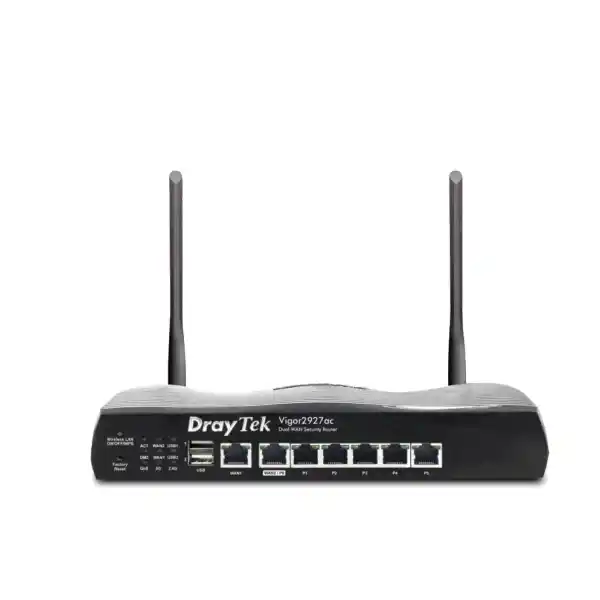
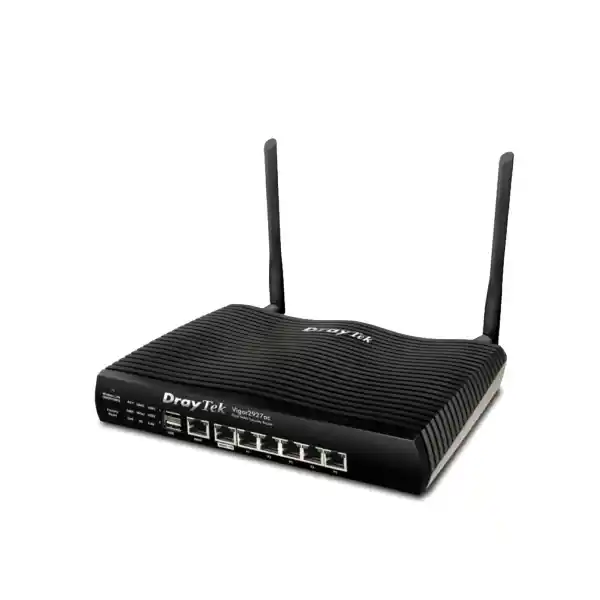
DrayTek Vigor2927ac Dual-WAN AC1300 VPN Router
The DrayTek Vigor2927ac is designed for organizations that need more than basic broadband sharing. It combines two Gigabit Ethernet WAN paths, load balancing, automatic failover, a stateful firewall, business VPN services, policy routing, VLAN-aware LAN design, application-aware Quality of Service and dual-band 802.11ac Wave 2 wireless in one compact edge appliance. For a UAE office, branch, clinic, retail location, warehouse, training center or professional services environment, that combination can reduce the number of separate devices needed at the Internet edge while still giving administrators granular control over how users, servers, guests and cloud applications reach the network.
Direct answer
Choose the Vigor2927ac when the requirement is resilient dual-WAN routing, business firewalling, site-to-site or remote-access VPN, segmented wired and wireless networks, and Wi-Fi 5 in a single SMB-class platform. It is especially relevant where Internet continuity and traffic policy matter more than consumer-router simplicity.
What the DrayTek Vigor2927ac is built to do
At its core, the Vigor2927ac is a dual-Ethernet-WAN business router with an integrated security and services stack. One Gigabit Ethernet interface is dedicated to WAN, while a second Gigabit Ethernet port can operate as a WAN or LAN interface. That flexible layout means an installation can use two fixed broadband services for failover or load sharing, or use a single Ethernet WAN and keep the switchable port available to the LAN. Five additional fixed Gigabit LAN ports provide local wired connectivity, and two USB 2.0 interfaces can support compatible peripheral or WAN use cases depending on firmware, region and supported-device lists.
DrayTek positions the Vigor2927 family for approximately fifty-host SMB networks and publishes a 60,000-session NAT capacity for the platform. Manufacturer performance figures indicate up to roughly Gigabit-class throughput on a single accelerated WAN and up to 1.8 Gbps aggregate throughput across dual WAN under test conditions. These numbers are useful for sizing, but production throughput always depends on packet size, traffic direction, enabled security features, VPN encryption, QoS rules, logging load, firmware, client behavior and the ISP handoff. A sound UAE deployment therefore treats headline throughput as a ceiling measured under controlled conditions, not as a guaranteed application-speed figure.
The “ac” model adds dual-band Wi-Fi 5. DrayTek describes the radio platform as AC1300 class, with 802.11n operation on 2.4 GHz and 802.11ac Wave 2 on 5 GHz, plus 2×2 MIMO/MU-MIMO capabilities. The integrated wireless function is useful for smaller offices or as the root of a managed wireless design, but a professional site survey remains important when walls, shelving, glass partitions, concrete, neighboring WLANs or a high client density are involved. For larger facilities, the router should be treated as the control and edge device while dedicated access points provide coverage where users actually work.
Technical snapshot
WAN & continuity
1 fixed Gigabit Ethernet WAN plus 1 Gigabit WAN/LAN switchable port. Supports failover, load balancing, policy-based routing, connection detection, dynamic DNS and multiple WAN strategies. Compatible USB WAN options depend on the supported modem list and firmware.
LAN & segmentation
5 fixed Gigabit LAN ports, with the switchable WAN/LAN port available as an additional LAN interface in single-Ethernet-WAN designs. Supports multiple LAN subnets, port-based VLANs, 802.1Q tagging, DHCP controls and inter-VLAN routing.
VPN
Up to 50 concurrent VPN tunnels, with support across common business protocols including IPsec, IKEv2, SSL VPN, L2TP, OpenVPN and WireGuard according to current platform firmware capabilities. Published IPsec performance can reach 800 Mbps with hardware acceleration in supported configurations.
Wireless
Dual-band Wi-Fi 5 with 802.11ac Wave 2 on 5 GHz and 802.11n on 2.4 GHz, two external antennas, multiple SSID capabilities, wireless isolation controls, WMM, band steering and mesh-related functions supported by the product family.
Dual-WAN architecture: where the Vigor2927ac earns its place
A small office can often survive with one ISP connection until the first time that circuit fails during a customer call, payment transaction, remote support session, cloud migration or video meeting. The Vigor2927ac addresses that operational risk by allowing two Ethernet Internet connections to participate in the routing policy. The administrator can define one service as primary and another as standby, distribute sessions across both links, or create policy rules so particular traffic follows a preferred WAN. This is materially different from simply connecting two Internet lines to two unrelated routers, because a coordinated dual-WAN platform can make forwarding decisions from one policy framework.
Failover is most useful when the router can determine whether the upstream path is actually usable, rather than only checking whether the Ethernet cable is physically connected. DrayTek exposes connection-detection options so the platform can test reachability and respond to failure conditions. In practical UAE deployments, the monitoring target should be selected carefully. A test that only reaches an ISP gateway might remain successful even when wider Internet routing is impaired, while an overly strict target can trigger unnecessary failovers. The correct design usually uses stable endpoints and a clear understanding of what constitutes a service-impacting failure for the business.
Load balancing is equally important. It does not magically bond every single TCP flow into the sum of two circuits; instead, it distributes traffic according to session, source, destination, protocol or other policy logic. A single download may therefore remain limited by the path used for that session, while many concurrent users can benefit from the aggregate capacity of both links. That distinction matters when setting expectations for an office with two Internet connections. The business benefit is often improved concurrency, resilience and traffic steering rather than a single-user speed test that always shows the arithmetic total of both subscriptions.
Policy routing lets administrators reserve a higher-quality or lower-latency service for traffic that is sensitive to delay, route bulk backup traffic over another link, or keep selected devices on a specific public-IP path. When paired with VPN, policy routing also helps define which tunnel or Internet route should carry traffic for remote sites, cloud workloads or managed services. For UAE organizations that rely on hosted ERP, Microsoft 365, Google Workspace, SIP platforms, remote desktop, CCTV viewing or branch-to-HQ applications, this ability to steer traffic can be more valuable than raw broadband speed because it turns multiple circuits into an intentional network design.
Performance, NAT sessions and realistic sizing
The Vigor2927 platform is specified for 60,000 NAT sessions. Session capacity matters because modern endpoints create many simultaneous connections: browsers open parallel sessions to content-delivery networks, phones maintain push and sync channels, collaboration tools establish media flows, endpoint-security agents contact cloud services, and operating systems perform background updates. A router can have enough headline bandwidth yet still become constrained by session state, CPU demand or feature processing if the deployment is much larger or more complex than its intended class.
For that reason, the most reliable way to size the Vigor2927ac is to assess four things together: total WAN bandwidth, simultaneous user count, peak session behavior and the security/VPN features that will be enabled. A fifty-person office doing email, SaaS, conferencing and ordinary web access is very different from fifty users transferring large design files over encrypted tunnels while cameras stream to a remote recorder and guests use a captive portal. Both have the same user count, but their packet-processing profile is not the same.
DrayTek publishes hardware-accelerated figures of approximately 940 to 950 Mbps for a single WAN and up to 1.8 Gbps combined dual-WAN throughput under its test conditions. The global specification also lists a lower non-accelerated NAT figure, which highlights why administrators should not assume every feature path receives identical acceleration. Hardware acceleration is designed to increase forwarding performance for eligible traffic, but advanced processing, particular VPN modes, logging, content controls or policy combinations can change real throughput. A professional bill of materials therefore starts with the actual traffic profile and adds margin rather than selecting a router only because a speed number exceeds the ISP package.
It is also good practice to separate Internet edge capacity from wireless capacity. Wi-Fi link rates are signaling rates, not guaranteed application throughput. RF contention, channel width, client antenna design, distance, interference and half-duplex airtime all affect usable data rates. If the requirement is consistent high-speed access for many users, the Vigor2927ac can remain the router while the LAN uses managed switches and multiple dedicated access points. FourTeck can integrate that broader design through its UAE network and infrastructure portfolio, ensuring that the router is sized as part of an end-to-end topology rather than as an isolated box.
AC1300 Wi-Fi 5: integrated wireless with business controls
The “ac” designation identifies the Vigor2927ac as the 802.11ac wireless model in the family. DrayTek describes it as AC1300 class, combining 2.4 GHz 802.11n and 5 GHz 802.11ac Wave 2 operation. The 5 GHz radio supports an 867 Mbps maximum link-rate class, while the manufacturer’s model matrix describes the 2.4 GHz side as up to 400 Mbps in the Vigor2927ac family configuration. Those are physical-layer link rates; real user throughput is lower and depends strongly on RF conditions and client capabilities.
For office design, the more important capability is segmentation. Multiple SSIDs can be mapped to separate LAN or VLAN contexts, allowing an administrator to distinguish corporate devices from guests, contractors, BYOD endpoints or operational equipment. Client isolation, hidden SSIDs, wireless scheduling, access lists and authentication controls can then be applied according to policy. This makes the integrated radio useful not only as a convenience feature but also as an extension of the router’s segmentation model.
The Vigor2927ac also supports wireless features such as band steering, WMM and airtime-related management options. Band steering can encourage dual-band clients toward 5 GHz where appropriate, helping preserve 2.4 GHz for legacy or range-sensitive devices. WMM assists with traffic prioritization over the WLAN. MU-MIMO in the 802.11ac Wave 2 implementation can improve efficiency with compatible clients by allowing the access point to serve multiple devices more effectively than older single-user scheduling techniques. These technologies help, but none eliminates the need for channel planning and coverage validation.
A Dubai office inside a reinforced concrete building, a villa, a retail unit in a mall and a warehouse with metal racks will each behave differently at radio frequency. Heat is not the only environmental factor; building materials, neighboring wireless networks, reflective surfaces, channel reuse and the number of active stations can have a larger effect on experience. For sites where wireless is business-critical, FourTeck can pair the router with structured Wi-Fi planning and broader UAE IT services so coverage, VLAN mapping and access-point placement are designed together.
The result is a flexible deployment path. A very small branch may rely on the integrated WLAN. A growing office can keep the Vigor2927ac as the Internet edge while adding managed access points. A multi-floor environment can use separate access-point coverage entirely and disable the router radio if that produces cleaner RF operation. Because routing, DHCP, VLANs, firewall policy and WAN failover remain centralized, the wireless architecture can evolve without immediately replacing the edge device.
LAN design, VLANs and subnet separation
Physical LAN foundation
The chassis provides five fixed Gigabit LAN ports. When the switchable WAN/LAN interface is not required as the second Ethernet WAN, it can expand the LAN-side connectivity. This is useful in compact deployments where the router directly connects a small number of endpoints, but most business installations should still use a managed Ethernet switch when several desks, phones, access points, cameras or servers are involved.
A managed switch gives the network more ports, PoE where needed, better cable organization and—most importantly—clean VLAN distribution. The Vigor2927ac can then act as the Layer-3 policy boundary while the switching infrastructure carries tagged VLANs to access ports and wireless APs.
Logical segmentation
DrayTek specifies support for multiple LAN subnets and up to 16 VLAN definitions, with as many as eight LAN subnets represented in common Vigor2927 documentation. 802.1Q tagging allows logical networks to cross one physical uplink while remaining separated by VLAN ID. Port-based VLANs are also available for simpler segmentation.
That structure can separate staff, voice, guest, management, IoT, CCTV and server zones. The exact number and naming of segments should follow business risk and operational needs rather than creating VLANs simply because the router supports them.
Segmentation is only useful when the firewall policy between segments is deliberate. A guest VLAN should normally have Internet access without reachability to office devices. A management network may need access to switches and access points while being blocked from guest clients. A VoIP network may require DNS, NTP, SIP or provider-specific media flows without broad access to user data. A CCTV network may need restricted access to a recorder and selected remote-management destinations. The Vigor2927ac supports inter-VLAN routing, but administrators can combine that routing with firewall policy so only justified traffic is permitted.
DHCP controls are another important part of the LAN design. Multiple subnets can each receive appropriate address pools, gateways and DNS settings, while IP-to-MAC binding can help create more predictable assignments for devices that need stable addresses. Static reservations are generally easier to manage than manually configuring addresses on every endpoint because the DHCP server remains the central record of what should receive which IP. For printers, access points, switches, PBX systems, controllers and appliances, this can reduce configuration drift and make troubleshooting faster.
Firewalling, NAT and controlled Internet exposure
The Vigor2927ac is a firewall router, not merely an Ethernet gateway. Its stateful inspection engine tracks connection state and applies policy to traffic moving between WAN, LAN and defined subnets. Administrators can build IP-based firewall policies, apply source and destination controls, use service definitions, and combine routing decisions with security rules. This provides the foundation for a least-privilege edge design in which only required traffic is allowed and administrative services are not indiscriminately exposed to the public Internet.
NAT features include familiar business functions such as port redirection, open ports, DMZ host options, port triggering and application-layer gateway support for selected protocols. These tools are powerful, but they should be used carefully. Publishing an internal server with a simple inbound port-forward creates an Internet-facing service, which means the security responsibility extends beyond the router to the operating system, application, authentication method, patch status and logging of the published host. Where possible, remote administrators should prefer a properly configured VPN rather than exposing management interfaces directly.
The router also offers denial-of-service and spoofing-related defenses in its security feature set. Such controls are useful at the edge, but they do not turn an SMB router into a cloud-scale DDoS scrubbing platform. If an attack saturates the ISP circuit itself, an on-premises router cannot restore bandwidth that never reaches the premises. The correct expectation is that local firewall controls reduce unwanted traffic and enforce policy, while large volumetric attacks require cooperation from the provider or a suitable upstream mitigation service.
Content filtering can apply URL, keyword, DNS keyword and application-related policies, while category-based web filtering may depend on the applicable subscription or service. Organizations should decide whether content filtering is being used for security, productivity, regulatory policy or a combination of those objectives. Each purpose has different exception and reporting requirements. Overly broad blocking can interfere with SaaS applications, software updates and authentication flows, so a staged implementation with logging and business-owner feedback is preferable to a large untested deny list.
For UAE customers building a broader security architecture, FourTeck’s dedicated Firewall Dubai solutions can help compare the Vigor2927ac’s integrated edge functions with next-generation firewall options where deeper inspection, larger-scale threat prevention, advanced reporting or higher performance tiers are required. The key is to match controls to risk rather than assuming every office needs the same security stack.
VPN for branches, teleworkers and protected site connectivity
VPN is one of the major reasons organizations select the Vigor2927ac over a consumer router. DrayTek specifies up to 50 concurrent VPN tunnels and up to 25 SSL VPN/OpenVPN-class tunnels, depending on protocol mix and firmware. The platform supports a broad set of business VPN methods, including IPsec with IKE variants, L2TP over IPsec, SSL VPN, OpenVPN and WireGuard in current family specifications. That breadth makes it possible to connect branch routers, individual teleworkers and third-party equipment without being locked into only one tunnel type.
For site-to-site deployments, IPsec is usually the first protocol considered because it is widely supported and can protect traffic between fixed networks. A Dubai head office can create an encrypted tunnel to a branch in another emirate or another country, allowing selected subnets to communicate as though they were part of a private routed environment. Correct routing and subnet planning are essential: overlapping address ranges between sites are a common cause of VPN complexity. Before deployment, each site should therefore have an IP plan that keeps corporate, guest, voice and infrastructure networks unique where they must participate in inter-site routing.
DrayTek publishes substantial IPsec performance for the Vigor2927 platform, including hardware-accelerated figures up to 800 Mbps in supported configurations. Standard non-accelerated figures and results in other regional documentation can be lower, so actual performance should be validated against firmware, encryption settings and enabled features. Encryption strength, packet size, tunnel count and bidirectional traffic all influence the result. A 1 Gbps ISP service does not automatically mean a 1 Gbps encrypted tunnel under all conditions.
For remote users, the router can provide secure access without exposing file shares, RDP, device web interfaces or internal applications directly to the Internet. User authentication can integrate with local or directory-backed methods supported by the platform, and multi-factor techniques such as mOTP may be available for selected remote-access scenarios. The security objective should be to verify the user, encrypt the session and restrict what that user can reach after connecting. A contractor who needs one management subnet should not automatically gain reachability to every internal network.
VPN resilience can also be coordinated with dual WAN. If the primary Internet circuit fails, the design can use secondary paths to restore site connectivity, subject to public IP, dynamic DNS, peer configuration and tunnel policy. This should be tested before an outage occurs. A failover design that works for ordinary web browsing may still require special handling for VPN peers because the remote side sees a different source address when the active WAN changes. Proper documentation and pre-production testing turn dual-WAN VPN from a marketing feature into dependable business continuity.
Quality of Service, bandwidth limits and application experience
Many network complaints are not caused by insufficient total bandwidth. They occur because one traffic class consumes enough upstream or downstream capacity to increase latency for everything else. Large cloud backups, software downloads, camera replication or file synchronization can compete with voice calls and interactive business sessions. The Vigor2927ac provides bandwidth management and QoS tools so administrators can decide which applications should retain responsiveness during periods of contention.
The platform supports IP-based bandwidth limits and session limits, along with Quality of Service classification using mechanisms such as DSCP, 802.1p, IP addresses, ports and application categories. DrayTek documentation describes four priority queues and automatic or application-oriented prioritization features, including VoIP prioritization. In practice, QoS should be designed around the bottleneck. If a branch has a 200 Mbps uplink and a 1 Gbps downlink, the upstream may be where packet scheduling is most important because video, cloud sync and outbound backups can easily fill it.
A common mistake is to mark too much traffic as high priority. If every application is classified as critical, QoS has no meaningful hierarchy. A better policy identifies a small set of genuinely latency-sensitive services—such as voice signaling and media or interactive business traffic—then assigns normal priority to ordinary browsing and SaaS, and lower priority to bulk transfer classes where appropriate. The policy should also reflect actual business dependence. A design studio may consider cloud file sync essential, while a call center may prioritize voice above almost everything else.
Session limits can help prevent a single endpoint from consuming excessive state-table resources, while per-IP bandwidth controls can keep guest or non-critical devices from monopolizing the WAN. These are useful tools for shared offices, training facilities, waiting areas and retail environments. They should be set from measured behavior, not arbitrary small numbers, because modern browsers and collaboration clients legitimately open many connections. Monitoring first and tuning second usually produces a better user experience than restrictive defaults.
Hotspot and guest access
The Vigor2927ac includes hotspot web portal capabilities that can be used to create a controlled guest Internet experience. The platform supports multiple portal profiles and authentication approaches such as click-through access, voucher PIN, RADIUS and external portal integration, with specific options varying by firmware and service configuration. This can be useful in reception areas, training rooms, clinics, customer lounges, retail premises and shared facilities where visitors need Internet connectivity without joining the corporate LAN.
Guest Wi-Fi should be designed as a separate trust zone. The SSID can map to a dedicated VLAN and subnet, the firewall can block access to internal networks, bandwidth policies can prevent abuse, and DNS/content rules can be applied independently of employee traffic. A captive portal then controls the user-facing access workflow without weakening the underlying network separation. The most important security property is the isolation itself; the portal is an access experience layered on top of that segmentation.
For businesses that collect identity information or display marketing content through a guest portal, privacy and legal requirements should be considered during configuration. The network appliance provides technical controls, but the business remains responsible for deciding what information to request, how long to retain it and what notice to provide. A minimal portal that asks only for what the business actually needs can be easier to operate and less intrusive than a heavily customized registration flow.
Where guest access is mission-critical or spans a large property, dedicated access points and centralized WLAN management are preferable to relying on one router radio. The Vigor2927ac can still define the Internet policy, VLAN gateway, DHCP scope and bandwidth controls while multiple access points deliver the RF coverage. This layered design scales more cleanly because routing and policy remain centralized while the wireless distribution system expands according to floor plan and user density.
Routing depth beyond simple default gateways
The Vigor2927ac supports IPv4 and IPv6 routing functions, static routes, inter-VLAN routing, policy routes and dynamic routing features represented in DrayTek’s platform specification, including RIP and BGP capabilities. Not every SMB deployment needs dynamic routing, but having those functions available can matter when the router must integrate with multiple internal networks, upstream peers, managed WANs or advanced branch topologies.
Static routing is appropriate when the topology is small and predictable. For example, if a core switch owns several internal networks, the Vigor2927ac can hold a route pointing to that core, while the core uses the DrayTek as its default Internet gateway. This avoids forcing the router to terminate every VLAN directly. Conversely, in a smaller office the Vigor2927ac can itself act as the gateway for multiple VLANs, simplifying the topology by keeping inter-network policy at the edge.
Policy routing is more selective because it can choose a path based on source, destination, protocol, port, domain or other supported criteria. This is useful when a business has two WANs with different public addresses or service characteristics. Corporate traffic can prefer the premium circuit, guest browsing can use a secondary service, cloud backup can be pushed away from the voice path, and selected servers can use a WAN whose public IP is allow-listed by a third party.
Routing policy should always be documented alongside firewall and NAT behavior. A packet may be allowed by firewall policy but still take the wrong WAN because of route preference. Similarly, a policy route may send traffic over a secondary ISP but the receiving application may only trust the primary public IP. A professional configuration worksheet records the source network, destination, required service, preferred WAN, failover behavior and NAT expectation for each exceptional flow. That documentation becomes invaluable months later when someone asks why one application behaves differently from the rest of the network.
Centralized management, monitoring and operational control
A business router is only as useful as the administrator’s ability to operate it safely after installation. The Vigor2927ac supports local management through web-based interfaces and other administrative protocols, firmware updates, configuration export/import, logging, SNMP and alerting functions. DrayTek also supports centralized management through VigorACS, allowing organizations or service providers to monitor and manage multiple compatible devices from a common system.
Central management is especially valuable for companies with branches because configuration consistency becomes a real operational problem once routers are distributed across different locations. A template-driven or centrally supervised approach can standardize firmware levels, VPN profiles, WAN monitoring, VLAN naming and administrative access. It also reduces the need to send an engineer to every site for routine configuration changes. That does not eliminate the need for site-specific documentation; rather, it creates a common baseline from which documented exceptions can be managed.
The Vigor2927 family can also participate in DrayTek’s broader management ecosystem for compatible access points and switches. Product documentation lists support for management of multiple VigorAP and VigorSwitch devices, with exact limits varying by function and firmware. For a small organization standardized on DrayTek infrastructure, this can reduce the number of management interfaces required for routine tasks such as access-point status, switch visibility and network provisioning.
Operational security should include management-plane restrictions. Administrative services should be limited to trusted subnets, strong credentials should be used, firmware should be maintained at an approved release, unused remote-management methods should be disabled, configuration backups should be protected, and alerts should be configured so failures are noticed before users report them. SNMP should use the strongest suitable version and community or credential settings should not remain at defaults.
For environments that include on-premises servers, NAS systems or virtualization hosts behind the router, network management should also align with server-side monitoring and backup strategy. FourTeck’s Server Dubai infrastructure practice can support projects where the edge router, switching, server platform and backup architecture need to be engineered as one service rather than as separate procurement items.
Deployment patterns in the UAE
Professional office
Use dual WAN for primary/backup Internet, a staff VLAN for managed endpoints, a guest VLAN for visitors, a voice VLAN if IP telephony is present and a management VLAN for network devices. Apply QoS to interactive traffic, restrict inter-VLAN access, and use remote-access VPN for approved staff.
Retail branch
Separate POS, corporate, guest and CCTV devices. Prefer a stable WAN for transaction or business traffic, retain failover to a secondary circuit, and apply bandwidth limits to guest access. Site-to-site VPN can connect business systems back to headquarters without directly publishing them to the Internet.
Clinic or service center
Segment administrative systems from guest Wi-Fi and building devices. Use VPN for authorized remote support, limit management access to trusted addresses, and keep sensitive application traffic on the preferred WAN. Logging and configuration backup should be part of normal operations.
Warehouse or workshop
Place operational terminals, handhelds, cameras and office systems into appropriate subnets. The router can remain in a secure communications room while distributed APs provide RF coverage across storage areas. WAN policy can keep business traffic prioritized during large surveillance or backup transfers.
Small multi-site business
Deploy a Vigor router per branch, standardize addressing so VPN subnets never overlap, use site-to-site tunnels for internal applications and centralize configuration oversight. Dual-WAN failover at each site can reduce dependence on a single local access circuit.
Training or customer venue
Use portal-controlled guest access on an isolated VLAN, rate-limit non-critical traffic, protect administrative systems with separate credentials and networks, and use dedicated APs if the client count exceeds what one integrated radio should carry comfortably.
A practical sizing method before purchase
The easiest way to make a poor router choice is to size only by the ISP speed printed on a quotation. A more defensible method starts with the network itself. Count active users, but also count non-user devices such as phones, access points, cameras, printers, controllers, displays, IoT devices and servers. Estimate the busy-hour behavior rather than the quiet-hour average. Identify which flows are encrypted, which are latency-sensitive, which need inbound access, which rely on a fixed public IP and which must survive a WAN failure.
Next, map the logical networks. A typical SMB may require staff, guest, voice, CCTV, server and management segments. Not every environment needs six VLANs, but the exercise reveals whether the router must perform substantial inter-VLAN routing and firewall inspection. If a Layer-3 core switch will route internally, the Vigor2927ac may see mostly north-south Internet traffic. If the router is the gateway for every VLAN, it will also handle east-west policy between segments. That difference changes the processing profile.
Then evaluate VPN. Count permanent site-to-site tunnels separately from remote-user tunnels. Note the encryption method and expected sustained throughput, not just the number of tunnel definitions. A single high-volume backup tunnel can consume more resources than many idle management tunnels. If the business expects hundreds of megabits of encrypted traffic continuously, validate the selected firmware path and consider whether a higher-performance platform is appropriate.
Wireless should be sized independently. The Vigor2927ac’s built-in AC-class WLAN is convenient, but one access point cannot overcome a large floor plan or severe RF attenuation. Count concurrent wireless clients, determine where they sit, and estimate airtime demand. If the environment needs multiple APs, design them from the beginning and treat the router’s radio as one cell—or disable it if that produces better channel reuse.
Finally, build growth margin. If the router would be operating at the edge of its practical capabilities on day one, it offers little room for a second branch, more VPN traffic, upgraded broadband or new security features. The Vigor2927ac is a strong SMB platform when matched to the right workload, but a larger organization should not force an edge device into an enterprise role merely because the port count fits. The objective is predictable operations, not minimum purchase price.
FourTeck can use this sizing process to prepare a model recommendation, switching plan, wireless bill of materials and implementation scope. The quotation should state assumptions—WAN bandwidth, user count, VPN demand, VLAN count, wireless coverage and support expectations—so the chosen platform can be evaluated against measurable requirements.
Migration from an ISP router or older SMB gateway
Replacing an existing router should be treated as a change project, even in a small office. The first task is to capture the current WAN information: connection method, static IP details, PPP credentials if applicable, VLAN tagging requirements from the ISP, DNS settings, public IP addresses and any modem or ONT operating mode. If the existing provider device must remain for voice or another service, determine whether it can operate in bridge, passthrough or upstream-router mode without creating unwanted double NAT.
The second task is to inventory the LAN. Record the existing gateway address, DHCP range, static devices, port forwards, VPN peers, printer addresses, camera recorders, PBX systems, access points and any application that restricts access by public IP. This inventory prevents surprises after cutover. A server that appears unrelated to the router may depend on a NAT rule, DNS override or static route that was configured years earlier and forgotten.
Where possible, build the Vigor2927ac offline. Configure LAN addressing, administrator access, firmware, VLANs, DHCP, DNS, WAN profiles, firewall policy and VPN definitions before the maintenance window. Test the configuration with a temporary workstation. If the old network uses a flat subnet, the initial cutover can preserve that addressing and introduce segmentation later, avoiding two large changes at once. Security improvements are valuable, but change sequencing matters.
During cutover, verify basic Internet access first, then DNS, then line-of-business applications, then inbound services, VPN and failover behavior. Test both WAN paths by deliberately disconnecting one service. Confirm that important applications reconnect, that the public IP change is acceptable, and that tunnel peers recover. A failover feature that has never been tested should not be assumed to work exactly as intended during a real outage.
After migration, retain a secure copy of the final configuration, the network diagram, administrator credentials in an approved password system, ISP support references and a rollback record. Label WAN cables and switch uplinks physically. Small operational details like these reduce recovery time when someone other than the original installer must troubleshoot the site.
Security configuration baseline
A secure Vigor2927ac deployment begins with firmware. Install an approved current release for the exact regional hardware and confirm release notes before production. Firmware can add capabilities, change VPN behavior and address vulnerabilities, so the running version should be part of the asset record. Configuration backups should be taken before and after upgrades, and upgrades should be scheduled with a rollback plan when the router serves a critical site.
Administrative access should be restricted. Use strong unique credentials, disable unneeded management services, prefer encrypted administration, and permit remote administration only from trusted sources or through a VPN where practical. If SNMP is required, use an appropriate secure version and avoid default strings. If an external monitoring platform needs access, create a narrowly scoped rule rather than leaving broad management exposure open.
Firewall policy should follow explicit trust boundaries. Guest devices do not need access to staff systems. IoT endpoints rarely need unrestricted east-west connectivity. Management interfaces should not be reachable from ordinary user VLANs unless there is a justified support requirement. Servers published through NAT should have only required ports exposed, and remote desktop or device web management should generally be reached through VPN instead of direct Internet forwarding.
DNS and content policies should support the organization’s operating model. If category filtering is used, document who approves exceptions and how false positives are handled. Logging should be enabled at a level that provides useful incident information without overwhelming storage or hiding important events in noise. Time synchronization is important so logs from routers, switches, servers and security products can be correlated accurately.
Finally, security is not static. Review administrator accounts, VPN users, firewall exceptions and obsolete port forwards periodically. Remove access when employees, vendors or applications no longer require it. A router that was securely installed three years ago can become insecure through accumulated exceptions and neglected firmware. Operational discipline is what preserves the value of the original design.
UAE procurement and deployment considerations
When sourcing a DrayTek Vigor2927ac for Dubai or elsewhere in the UAE, the exact regional unit matters. Power supply, wireless regulatory domain, firmware availability, warranty handling and bundled accessories can vary by market. Procurement should therefore verify that the supplied router is intended for the target region rather than assuming every Vigor2927ac sold globally is identical in packaging and support terms. Wireless channels and transmit behavior must comply with the regulatory domain programmed for the unit.
Internet handoff should also be confirmed before installation. Many UAE business connections present Ethernet from an ONT or provider CPE, but authentication, VLAN tagging, static addressing and provider-managed router requirements vary by service. If a customer wants to replace or bypass the ISP router, the implementation team should confirm what the carrier allows and whether any voice, television or managed service depends on the original device. Where the provider router must remain, the network should be designed to avoid unnecessary layers of NAT or ambiguous routing.
Power and environment are straightforward but important. Manufacturer specifications place the operating-temperature range at up to 45°C, with the appliance designed for indoor use. In the UAE, network equipment should therefore be installed in a conditioned indoor area with adequate airflow, not in a rooftop enclosure, unventilated ceiling void or sun-exposed cabinet. The site should provide clean power and preferably UPS protection if Internet continuity is operationally important. Dual WAN without backup power still fails when the router and ONT lose electricity.
Support scope should be agreed during procurement. A hardware-only sale is different from a configured solution with VLANs, VPN, QoS, failover testing and documentation. Businesses that rely on the router for critical operations should define who owns firmware updates, configuration backup, ISP escalation and incident response after installation. This is especially important in branch deployments where on-site technical staff may not be available.
FourTeck can supply the Vigor2927ac as part of a UAE network project that includes design, staging, configuration and deployment. For organizations planning a wider office refresh, the router can be integrated with managed switching, Wi-Fi, structured cabling, servers, IP telephony and security controls so the final network is engineered around workflow rather than individual boxes purchased separately.
When the Vigor2927ac is a strong fit—and when to move higher
The Vigor2927ac is a strong fit for small and mid-sized environments that need dual-WAN resilience, segmented networks, business VPN, traffic shaping and Wi-Fi 5 without moving immediately to a much larger security appliance. It is particularly attractive when the organization values integrated routing features such as policy routes, multiple subnets, hotspot controls and DrayTek management. A branch with a few dozen users, multiple VLANs and one or two broadband circuits is squarely within the kind of scenario the platform was built to address.
The model is also useful when the business has outgrown a consumer router but does not need full next-generation firewall inspection. Many offices primarily need reliable routing, VPN, VLANs, QoS and controlled guest access. In that case, paying for a large threat-prevention platform may not be necessary if endpoint security and other controls already cover the organization’s risk model. The Vigor2927ac provides a substantial networking feature set without forcing every deployment into the same security architecture.
A higher-tier platform should be considered when requirements include multi-gigabit WAN interfaces, very high sustained encrypted throughput, hundreds of users, advanced intrusion prevention, deep SSL inspection, extensive security analytics, very large routing tables, high-density SD-WAN, or formal HA designs beyond the operational scale of an SMB router. Similarly, if Wi-Fi 6/6E/7 is a primary requirement, the Vigor2927ac’s Wi-Fi 5 radio may not align with the intended lifecycle even if its routing functions are adequate.
The right decision therefore depends on workload, not brand or age alone. FourTeck can compare the Vigor2927ac against newer DrayTek models or firewall platforms after the bandwidth, user, VPN and security requirements are known. That protects the customer from both undersizing and unnecessary overspending.
Frequently asked technical questions
Does the Vigor2927ac support two Internet connections?
Yes. It has one fixed Gigabit Ethernet WAN port and one Gigabit WAN/LAN switchable port. In dual-WAN mode the two Ethernet services can be used for failover and load balancing, with policy routing available to steer selected traffic.
Can it handle a Gigabit Internet circuit?
DrayTek publishes hardware-accelerated single-WAN NAT throughput around the Gigabit class and up to 1.8 Gbps combined across dual WAN in controlled tests. Actual production throughput depends on configuration, traffic mix, enabled features and firmware, so requirements should be validated rather than relying only on the headline figure.
How many VPN tunnels are supported?
The platform is specified for up to 50 concurrent VPN tunnels. DrayTek also lists up to 25 concurrent SSL VPN/OpenVPN-class tunnels. The practical mix depends on protocol, encryption and traffic volume.
Does it have Wi-Fi 6?
No. The Vigor2927ac is the Wi-Fi 5 / 802.11ac Wave 2 model. The Vigor2927 family also includes an “ax” variant for Wi-Fi 6. If wireless lifecycle is a major buying factor, compare the ac and ax variants before purchase.
Can it create separate guest and staff networks?
Yes. The router supports multiple LAN subnets, 802.1Q VLAN tagging and multiple wireless SSID mappings. Firewall policy can then restrict communication between guest and corporate networks while allowing both to reach the Internet according to separate rules.
Can it be used with managed switches and access points?
Yes. 802.1Q VLANs allow tagged networks to extend over managed switching, while the router can provide gateways, DHCP, policy and Internet access. DrayTek also provides central management features for compatible VigorSwitch and VigorAP products.
Does dual WAN mean one download uses both links at once?
Not necessarily. Load balancing generally distributes sessions or flows across available WANs according to policy. A single session is commonly carried by one path, while many simultaneous users can benefit from aggregate capacity across the two circuits.
Is a second ISP enough for business continuity?
It is one layer. Real continuity also requires diverse last-mile paths where possible, tested failover policy, suitable public-IP handling, working backup DNS/VPN behavior and power protection for the router, ONTs and switches. Two lines that share the same physical upstream fault can still fail together.
Decision recap
Choose it for
Dual-WAN resilience, branch connectivity, up to 50 VPN tunnels, VLAN-separated staff and guest networks, business QoS, AC1300 Wi-Fi 5 and DrayTek-centric management.
Validate first
Actual WAN throughput with all required features, VPN traffic volume, number of active clients, RF coverage needs, ISP handoff method, regional hardware availability and support lifecycle.
Move higher if
You need multi-gigabit interfaces, advanced NGFW inspection, very high user density, heavier encrypted traffic, Wi-Fi 6/6E/7 as a built-in requirement or a larger enterprise routing scale.
For many Dubai and UAE SMB installations, the Vigor2927ac is best viewed as a highly configurable business edge rather than as a simple wireless router. Its value comes from combining WAN policy, firewalling, VPN, VLANs, QoS, hotspot functions and wireless services under one administration model. That combination can simplify a branch design while retaining enough control to build a properly segmented network.
Quotation input checklist
To produce an accurate UAE quotation and configuration scope for the DrayTek Vigor2927ac, provide the operational details below. The more complete this information is, the easier it is to determine whether the Vigor2927ac is the correct model or whether another DrayTek/router/firewall platform should be proposed.
Consult FourTeck for Vigor2927ac supply, configuration and rollout
FourTeck can support the DrayTek Vigor2927ac as a standalone router purchase or as part of a complete UAE branch/network project. A technical engagement can include WAN design, VLAN and IP planning, VPN configuration, firewall policy, QoS, guest Wi-Fi, managed switching, access-point integration, migration from an existing gateway and post-installation documentation.
For business environments where uptime matters, the deployment can also include secondary-WAN testing, UPS planning, configuration backup and an operational handover so the network is supportable after installation. The goal is not simply to power on the router; it is to produce a design in which each WAN, subnet, tunnel and security rule has a clear purpose and a documented owner.
Best next step
Send the two ISP speeds, user count, VPN requirement and number of VLANs. FourTeck can then validate whether the Vigor2927ac is correctly sized and prepare the appropriate UAE bill of materials.

Reviews
There are no reviews yet.