
DrayTek Smart Lite Switching • Dubai & UAE
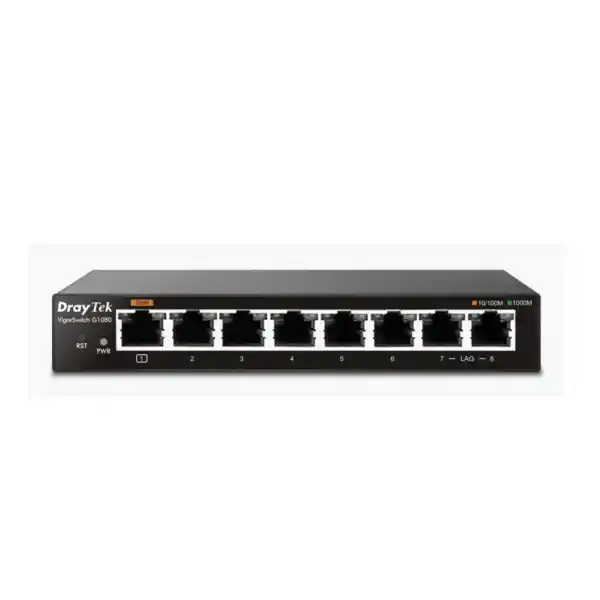
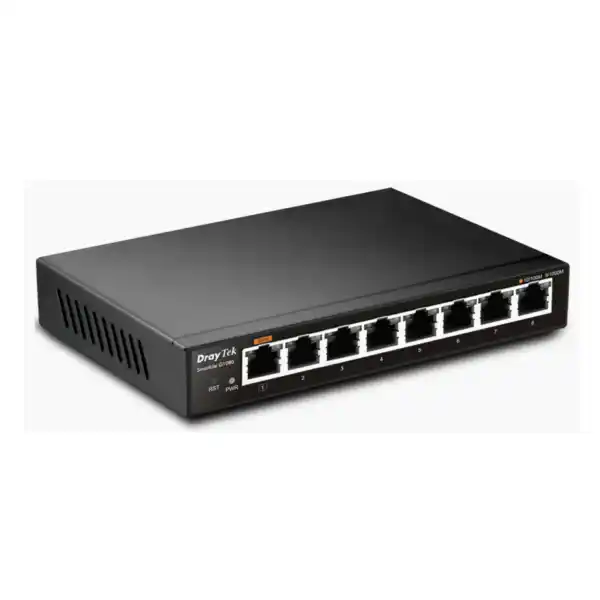
DrayTek VigorSwitch G1080 – 8-Port Gigabit Smart Lite Switch for Dubai Networks
The DrayTek VigorSwitch G1080 is designed for network builders who need more control than an unmanaged desktop switch but do not require the feature density, fan noise, rack format, or administrative overhead of a larger Layer-2+ platform. Its eight 10/100/1000Base-T interfaces, 16 Gbps switching fabric, 11.9 Mpps forwarding performance, VLAN segmentation, QoS, multicast control, loop protection, storm control, rate limiting, and optional centralized monitoring through the DrayTek ecosystem make it a focused fit for compact business networks in Dubai and across the UAE.
For small offices, clinics, professional suites, retail counters, meeting rooms, home offices, training spaces, temporary project networks, branch edge deployments, and lab environments, the G1080 gives administrators a meaningful step up from plug-and-play switching. It remains intentionally simple: there is no PoE budget, no fiber SFP interface, no Layer-3 routing table, and no spanning-tree implementation. That clarity matters during procurement because it lets the model be positioned around what it does well—compact Gigabit access switching with essential Layer-2 controls—rather than being oversold for roles that require a larger managed platform.
Direct answer: who should deploy the VigorSwitch G1080?
Choose the DrayTek VigorSwitch G1080 when the requirement is eight copper Gigabit Ethernet ports in a compact, low-power form factor and the network needs basic but useful management features such as 802.1Q VLANs, traffic prioritization, link aggregation, IGMP snooping, storm control, rate limiting, configuration backup, and loop protection. It is especially suitable when the router or firewall already performs DHCP, inter-VLAN routing, security inspection, VPN, and policy enforcement, leaving the access switch to concentrate on local Ethernet connectivity and traffic separation.
Do not select the G1080 when powered endpoints must receive electricity from the switch. The model has no PoE or PoE+ capability, so wireless access points, IP phones, cameras, door controllers, and other powered devices will need their own injectors or adapters, or the project should move to an appropriate PoE-capable switch. Likewise, projects requiring SFP fiber uplinks, 2.5GbE access, 10GbE aggregation, static Layer-3 routing on the switch, 802.1X access authentication, DHCP snooping, Dynamic ARP Inspection, advanced ACLs, SNMP-centric monitoring, or resilient spanning-tree topologies should be designed around a higher-tier managed switch.
This direct fit assessment is important in UAE projects because small networks often contain a mix of ISP equipment, security gateways, NAS devices, PCs, printers, point-of-sale systems, media endpoints, Wi-Fi infrastructure, and CCTV components. An inexpensive switch can become an operational bottleneck if its capabilities are not mapped to the topology before installation. The G1080 works best as a compact access-layer switch where eight Gigabit copper interfaces are sufficient and where an upstream router, UTM appliance, or firewall carries the heavier control-plane responsibilities.
Core hardware architecture and forwarding performance
At the physical edge, the VigorSwitch G1080 provides eight RJ-45 ports supporting 10Base-T, 100Base-TX, and 1000Base-T operation with auto-negotiation. For a typical modern installation, the practical value is straightforward: desktops, routers, NAS units, printers, NVRs, small servers, conferencing appliances, smart controllers, and other wired endpoints can connect at Gigabit Ethernet speed without consuming space for a rackmount chassis. The all-copper port layout makes the product easy to deploy in rooms where structured Cat5e or Cat6 cabling is already present and where fiber uplinks are not required.
The specified switching capacity is 16 Gbps. That figure aligns with eight full-duplex Gigabit ports because each port can theoretically handle 1 Gbps in each direction at the same time, giving an aggregate bidirectional fabric requirement of 16 Gbps. In practical terms, this means the switching backplane is sized so that all eight ports can participate in Gigabit forwarding without the fabric itself being the obvious oversubscription point. Real application throughput will still depend on frame size, endpoint performance, cabling quality, protocol overhead, congestion patterns, and the behavior of connected devices, but the raw architecture is appropriate for its eight-port access role.
DrayTek specifies a forwarding rate of 11.9 million packets per second for 64-byte frames. Packet-per-second capability matters because a network can be demanding even when its bandwidth usage appears modest. Small-packet workloads create more forwarding decisions per second than large sequential transfers. Voice traffic, control traffic, transaction systems, DNS, acknowledgment-heavy applications, and many security or IoT workflows can therefore stress packet processing differently from a single large file copy. The G1080’s published forwarding figure is consistent with wire-speed class switching for eight Gigabit ports under its intended operating profile.
The switch includes a 2 Mbit packet buffer and supports jumbo frames up to 9 KB. The packet buffer provides temporary holding capacity when traffic arrives faster on an ingress port than it can be transmitted through the selected egress path. No small desktop switch should be treated as a deep-buffer data-center platform, but buffering still helps absorb short bursts and scheduling differences. Jumbo frame support can reduce per-packet processing overhead in controlled environments such as storage transfers or lab networks, provided every device across the path is configured compatibly. Mixed MTU environments should be planned carefully because inconsistent jumbo-frame settings can produce hard-to-diagnose connectivity issues.
IEEE 802.3x flow control is supported as part of the Ethernet standards set. Flow control can help in certain congestion conditions by allowing a receiving station to request a temporary pause from its peer. Network designers should still avoid treating flow control as a substitute for capacity planning, QoS, or sensible traffic engineering. In latency-sensitive environments, indiscriminate pause behavior can move congestion rather than solve it. For a small office or edge switch, however, standards-based flow control contributes to interoperability with common Ethernet devices.
The platform also supports IEEE 802.3az Energy Efficient Ethernet. EEE allows compatible Ethernet links to reduce energy use during low traffic periods, matching the product’s broader low-power design. DrayTek specifies maximum power consumption at 3.3 W, which is useful for deployments where the switch may remain powered continuously. In a branch, cabinet, reception desk, home office, retail counter, or training room, low electrical consumption reduces operating overhead and heat output. It does not remove the need for reasonable ventilation, but the thermal load is modest compared with PoE switches that may deliver tens or hundreds of watts to endpoints.
Technical specification summary
802.1Q VLAN segmentation for compact business networks
VLAN capability is one of the main reasons to choose the G1080 over an unmanaged eight-port switch. The model supports IEEE 802.1Q tag-based VLAN operation with up to eight VLANs. VLANs allow one physical switch to carry multiple logical Layer-2 broadcast domains, helping separate device groups that should not share the same local segment. A small company can, for example, distinguish staff devices, guest connectivity, voice endpoints, cameras, payment systems, test equipment, and management interfaces without installing a separate physical switch for every category.
The value of VLANs is not that they magically create security on their own. The switch performs Layer-2 segmentation, but inter-VLAN routing and policy decisions must be handled by an upstream router or firewall. In a well-designed UAE office network, the G1080 can tag traffic toward a firewall trunk, while the firewall assigns IP subnets, DHCP scopes, internet access rules, inter-zone restrictions, logging, and threat inspection. This division of responsibility creates a simple architecture: the switch places traffic into the correct VLAN and the security gateway decides what those VLANs are permitted to reach.
For a small deployment, eight VLANs can be more than sufficient if the segmentation model is kept deliberate. One VLAN might serve corporate workstations, another guest devices, another printers and office peripherals, another voice equipment, another CCTV or IoT gear, and another switch and network-management interfaces. Remaining VLAN capacity can be reserved for future expansion or project-specific isolation. The correct design should follow business roles and trust boundaries rather than creating a separate VLAN simply because spare VLAN IDs are available.
Tagged and untagged port behavior should be documented before installation. Endpoint ports usually present an untagged access network to devices that do not understand VLAN tagging, while an uplink to a router, firewall, or VLAN-aware server may carry multiple tagged networks. Misconfigured VLAN membership is one of the most common reasons a small managed-switch installation appears to have intermittent or partial connectivity. A deployment checklist should therefore record each port’s intended device, VLAN membership, tagging state, uplink role, and expected IP subnet.
The G1080 does not provide Layer-3 static routing or VLAN routing. This is a key architectural boundary, not a defect. A Smart Lite switch is expected to forward Ethernet frames, not replace the routing and security functions of a business gateway. When several VLANs need to communicate, use a router-on-a-stick topology or connect the switch to a firewall or router with VLAN interfaces. The upstream device should enforce least-privilege rules between user, guest, IoT, surveillance, and management networks.
For network refresh projects, FourTeck can align the switch with routing and security infrastructure supplied through Firewall Dubai. This is particularly relevant when the G1080 is used as a compact access switch beneath a firewall that must terminate VLANs, provide DHCP services, inspect traffic, enforce internet policy, and connect the branch to VPN or SD-WAN services. The switch and firewall should be sized as one system rather than purchased independently.
Link aggregation: where LACP helps and where it does not
The G1080 supports one IEEE 802.3ad LACP aggregation group with up to two member ports, with DrayTek’s product guidance specifically referencing ports 7 and 8. Link aggregation allows two physical Gigabit links to operate as one logical connection when the device at the other end also supports a compatible LACP configuration. In a small network, that can be useful for attaching a NAS, server, compatible router, or another managed switch where multiple simultaneous traffic flows could benefit from a larger aggregate path.
A two-port LACP group should not be interpreted as a single 2 Gbps flow. Ethernet link aggregation usually distributes separate flows across member links using a hashing method based on frame or packet attributes. One file transfer or one TCP session will commonly remain on one physical member, while multiple independent sessions may be distributed across both links. The aggregate can therefore increase total throughput between groups of users and a multi-homed device, but it does not automatically double the speed of every individual transfer.
LACP can also improve link resilience because a surviving member may continue carrying traffic if one physical link fails, depending on the connected device and configuration. However, the G1080’s link aggregation capability is not a substitute for spanning-tree-based topology protection. DrayTek’s current specification indicates that STP, RSTP, and MSTP are not supported on this model. Designers should therefore avoid creating physical Layer-2 loops and should understand that redundant multi-switch ring or mesh designs require equipment with more advanced loop-avoidance and resiliency functions.
When using LACP, keep member links identical where possible: use the same cable category, similar cable length, matching speed and duplex negotiation, and consistent VLAN configuration. The peer device should be configured for LACP rather than an incompatible static trunk mode. If the aggregated link carries multiple VLANs, the tagged VLAN list must be consistent across the logical bundle. Inconsistent VLAN or LACP settings can create asymmetrical connectivity or unexpectedly strand traffic on one interface.
For very small environments, it can be sensible to preserve ports 7 and 8 for the aggregation group while using ports 1 through 6 for endpoints. In other installations, all eight ports may be needed individually and aggregation may remain unused. Capacity planning should start with the expected endpoint count, uplink demand, and growth requirement because consuming two ports for a bundle leaves six ports for other direct connections. If the network already requires more than eight access ports, stacking several G1080 units is generally less elegant than selecting a larger managed switch with the appropriate port count and uplink architecture.
QoS, rate limiting, and traffic prioritization
The VigorSwitch G1080 provides four QoS queues with scheduling support that includes weighted fair queuing and weighted round robin behavior. It also supports class-of-service handling and rate limiting. These controls are useful when some traffic deserves preferential treatment during contention. Examples include interactive voice, video collaboration, transaction systems, remote desktop sessions, or management traffic that should remain responsive while users copy large files or synchronize cloud data.
QoS should be designed as an end-to-end policy rather than a switch-only feature. Prioritization on one access switch cannot guarantee quality after traffic leaves that device. If voice or video traffic traverses a firewall, router, WAN service, ISP connection, or VPN tunnel, those devices and services must also classify and schedule traffic appropriately. The G1080 can preserve or act on Ethernet and IP priority markings within its supported feature set, but the overall user experience depends on the slowest and most congested segment along the path.
Rate limiting offers a different form of control. Instead of prioritizing one class over another, a rate limit can cap how much bandwidth selected traffic or a port is allowed to consume. In a guest, lab, kiosk, or temporary-device scenario, limiting throughput can prevent one endpoint from overwhelming a constrained uplink. It can also help enforce predictable behavior in a shared environment. Limits should be high enough to support the application while still protecting shared resources; overly aggressive limits can create poor performance that looks like a network fault.
For an eight-port edge switch, the best QoS configuration is often the simplest one that meets the requirement. Avoid complex marking schemes that no one will maintain. Identify one or two truly latency-sensitive traffic classes, verify that the upstream router or firewall treats them consistently, and test the policy under load. A network that performs well during quiet periods may behave very differently when a backup, software update, cloud sync, or large media transfer fills the uplink.
In customer-facing environments such as clinics, retail branches, showrooms, serviced offices, and professional practices, small improvements in traffic discipline can have an outsized operational impact because the same internet link often carries voice, SaaS, payment processing, messaging, remote support, and general browsing. The G1080’s QoS and rate-control tools provide enough functionality to organize these small-network priorities when the rest of the infrastructure follows the same traffic policy.
IGMP snooping and multicast behavior
The G1080 supports IGMP snooping version 2 and up to 128 multicast groups. Multicast is used when one source sends traffic intended for multiple receivers, and it can appear in IPTV, digital signage, media distribution, discovery protocols, monitoring applications, or specialized industrial and collaboration systems. Without multicast-aware switching, multicast frames may be flooded to ports that do not need them, consuming bandwidth and causing unnecessary processing on connected devices.
IGMP snooping allows the switch to observe IGMP membership messages and learn which ports actually contain receivers interested in a multicast stream. The switch can then constrain forwarding instead of treating multicast like broad unknown traffic. This is especially helpful in small networks where a high-bitrate media stream could otherwise reach every connected endpoint. The feature improves traffic efficiency without turning the G1080 into a multicast router.
The distinction between snooping and querying matters. DrayTek’s published feature matrix indicates IGMP snooping support but not an integrated IGMP querier on this model. A multicast environment may therefore depend on an upstream router or another device acting as the IGMP querier to maintain membership state. If multicast is business-critical, validate the entire topology rather than assuming the switch alone supplies every control-plane function.
The model also does not provide advanced multicast routing, MVR, or Layer-3 routing functions. It is best viewed as a Layer-2 participant that can intelligently constrain IPv4 multicast delivery within its supported scope. For standard office networks with little or no multicast traffic, the feature may simply remain available in reserve. For IPTV or specialized streaming deployments, perform a lab validation with the actual source, receivers, router, and application before production rollout.
This measured approach avoids a common procurement mistake: buying a switch because a single multicast acronym appears on the feature list without checking the full protocol dependency. The G1080 is capable of useful multicast containment, but network designers should still confirm querier placement, VLAN boundaries, stream bitrates, receiver count, and whether version-specific behavior aligns with the deployed endpoints.
Storm control, loop protection, and Layer-2 hygiene
Small networks are not immune to Layer-2 faults. A misplaced patch cable, a consumer device bridging two ports, an incorrectly connected mini-switch, or a malfunctioning endpoint can create broadcast storms or loops that consume switching capacity and disrupt every user on the segment. The G1080 includes storm-control functionality and loop protection to reduce the operational risk associated with these events. These controls are particularly valuable in offices where cabling changes may be performed outside a formal change-management process.
Storm control is intended to limit excessive broadcast or related traffic conditions so that one abnormal source does not monopolize the network. The appropriate threshold depends on the environment. Set it too low and legitimate bursts may be constrained; set it too high and protection becomes less useful. A sensible baseline should be established through normal traffic observation and then validated during controlled testing. Even a small eight-port switch benefits from measured thresholds because broadcast behavior can affect every connected device simultaneously.
Loop protection should not be confused with full spanning tree. DrayTek’s current specification marks STP, RSTP, and MSTP as unsupported for the G1080. That means the model should not be used as the building block for intentional redundant Layer-2 topologies that rely on spanning-tree convergence to block and unblock paths. Loop protection is useful for accidental-loop mitigation, but production designs needing redundant uplinks, switch rings, or multiple active paths should use a more advanced managed switch family.
Good Layer-2 hygiene also includes labeling ports, documenting uplinks, disabling unused wall outlets when practical, maintaining consistent VLAN assignments, and keeping patching easy to trace. The smaller the installation, the easier it is to believe documentation is unnecessary; yet small sites are often serviced by multiple technicians over several years. A simple port map showing what is connected, which VLAN is assigned, and where the uplink leads can save significant troubleshooting time.
For branch rollouts across multiple UAE sites, standardized templates are especially useful. Configure the same management method, VLAN numbering, port naming convention, QoS policy, and backup procedure at each location where the network design is equivalent. Consistency reduces errors and makes remote support faster. Where sites differ materially, document those exceptions rather than forcing a template that does not fit.
Management model: local HTTP, backup, VigorRouter SWM, and VigorConnect
The G1080 is positioned as Smart Lite rather than a fully managed enterprise switch, but it still provides useful administration capabilities. DrayTek lists HTTP for local management and supports configuration backup and restore. Local web management gives installers a practical way to define VLANs, QoS behavior, aggregation, rate controls, and other supported features without a dedicated console port. Before deployment, the management IP addressing plan should be documented and restricted to trusted administrative networks where the surrounding infrastructure allows.
Configuration backup is a simple but important operational control. Once a switch is commissioned and tested, export a backup and store it with the site’s network documentation. If the device must be replaced or reset, a known-good configuration can shorten recovery time. Maintain basic version information alongside the backup so technicians know what firmware and design assumptions were used when the file was created.
DrayTek also lists VigorRouter Switch Management support and VigorConnect compatibility beginning with G1080 firmware version 1.05.0. VigorConnect can provide centralized discovery, provisioning, monitoring, hierarchy views, alarms, maintenance functions, and scheduled operations for supported DrayTek devices. In a network that already uses compatible DrayTek routers, access points, or switches, this can reduce the need to log into each device individually for routine visibility and maintenance.
Centralized management should still be planned against the exact firmware running on each unit. Feature compatibility can change across releases, and a management platform may require a minimum switch firmware level. Before a multi-site rollout, standardize the approved firmware version, test the configuration, and document the upgrade path. Avoid performing mass upgrades during business hours without a rollback plan because even a small access switch can disconnect critical endpoints while it reboots.
The G1080 is not a replacement for an enterprise telemetry stack. The published specification does not position it as an SNMP-rich, sFlow-enabled, RMON-focused monitoring switch, and it lacks several advanced management and security functions found on larger managed platforms. This is consistent with the Smart Lite market position. Buyers should decide whether browser administration and DrayTek ecosystem management are enough for the site’s operational model before standardizing on the device.
Organizations seeking implementation help can use FourTeck IT Services UAE for broader network deployment planning, structured change work, endpoint connectivity, and support coordination. The aim should be to integrate the switch into a documented network service rather than treat it as an isolated box.
Physical design, power, environment, and installation considerations
The VigorSwitch G1080 measures approximately 154 × 85 × 26 mm and weighs about 320 g according to DrayTek’s current detailed specification table. Its compact footprint is valuable where a rackmount switch would be unnecessary or physically awkward. It can fit into a small communications shelf, desk-side installation, wall cabinet with suitable support, point-of-sale area, reception desk, lab bench, home office, or compact branch equipment zone. The unit should be placed so that patch leads do not put mechanical strain on the ports and so that the power cable cannot be easily dislodged.
Power input is specified as DC 5 V at 1 A, with maximum switch consumption listed at 3.3 W. The low draw is useful for always-on networks, but the supplied power adapter should still be connected through an appropriate surge-protected source or UPS where continuity matters. A UPS does more than keep a small switch powered during an outage; it can also reduce disruption from short power dips and allow the switching layer to remain available while upstream routers, firewalls, and internet equipment ride through brief electrical events.
The operating-temperature range is 0 to 45°C, with non-condensing operating humidity from 10 to 90 percent. Dubai installations require particular attention to room temperature and enclosure ventilation because ambient heat can rise significantly in poorly ventilated cabinets, ceiling voids, storage spaces, or sun-exposed locations. The switch’s low power consumption helps minimize its own heat contribution, but it does not protect the unit from an enclosure that exceeds the specified environmental range.
Storage conditions are specified more broadly, with a temperature range from -20 to 70°C and non-condensing humidity from 5 to 90 percent. Storage ratings should not be mistaken for operating ratings. Equipment held in a hot vehicle or warehouse should be allowed to return to suitable operating conditions before being powered, especially when there is a possibility of condensation after moving between very different temperature zones.
Because the G1080 is not a rackmount aggregation switch, cable discipline becomes part of the installation quality. Use correctly terminated Cat5e or Cat6 patch leads for Gigabit Ethernet, avoid sharp bends and crushed cable, separate data cabling from high-interference electrical routes where practical, and label both ends. If a port negotiates at 100 Mbps instead of 1 Gbps, investigate cabling first; Gigabit Ethernet depends on all four twisted pairs, while some faults can still allow a lower-speed link to come up.
A clean physical installation improves reliability more than adding unnecessary complexity. Keep the power adapter secure, provide air space around the unit, document the management address, label uplinks, and avoid leaving loose cables that can be accidentally moved. For a branch or customer-facing environment, these basic measures often reduce service incidents more effectively than adding advanced features that the site does not need.
No PoE: how to plan phones, access points, and cameras correctly
The G1080 has no Power over Ethernet capability. This must be considered early in the bill of materials because many modern network endpoints expect power from the switch. IP phones, Wi-Fi access points, surveillance cameras, door controllers, intercoms, and IoT gateways may support IEEE 802.3af, 802.3at, or higher PoE standards, but the G1080 will provide data only. Each powered endpoint must therefore use its own approved power adapter, a suitable PoE injector, or a separate PoE switch.
Using external injectors can be perfectly acceptable for one or two devices, especially in a small office with an existing power outlet near each endpoint. As the powered-device count grows, however, injectors increase cable clutter, consume sockets, complicate UPS coverage, and create more components to troubleshoot. At that point, a PoE switch usually produces a cleaner and more supportable design. Procurement should compare the complete installed solution rather than only the switch purchase price.
For IP telephony, many phones provide a pass-through PC port, meaning one switch port can serve both the phone and a connected workstation while the phone handles VLAN tagging. That can conserve switch ports, but it does not solve the power requirement. The phone still needs local power or a PoE source. If voice deployments are central to the project, review the full topology, VLAN plan, QoS behavior, and power architecture before selecting the access switch.
For wireless access points, local adapters can work where a mains outlet is present, but ceiling-mounted APs are usually better served by PoE because a single Ethernet run can provide both data and power. Likewise, surveillance cameras are often installed where AC outlets are intentionally absent. A non-PoE switch can still participate in the network, but it may be best used for PCs, printers, servers, NAS devices, or uplinks while a dedicated PoE switch serves cameras and access points.
FourTeck’s wider UAE networking portfolio at FourTeck UAE can support mixed designs where one compact non-PoE switch is appropriate for data endpoints and another platform provides powered access. The important decision is not whether PoE is universally better, but whether the specific site needs centralized endpoint power and how many powered devices are expected during the life of the installation.
Security boundaries: what the G1080 contributes and what stays upstream
A network switch is part of the security architecture, but the G1080 should not be mistaken for a security appliance. Its VLAN segmentation, storm control, rate limiting, and loop protection can improve separation and operational stability at Layer 2. Those capabilities help reduce accidental broadcast exposure and keep different endpoint groups logically divided. However, the model does not provide the deep identity, inspection, policy, and threat-prevention functions associated with a firewall, NAC platform, or higher-tier enterprise access switch.
DrayTek’s current published matrix indicates that features such as 802.1X/MAC authentication, IP Source Guard, DHCP snooping, Dynamic ARP Inspection, and Layer-3 routing are not part of the G1080 feature set. This matters in environments with compliance requirements or hostile endpoint assumptions. If the access layer must authenticate users and devices before granting network access, validate a more advanced switch platform that supports the required identity and policy mechanisms.
For many small offices, a defensible architecture can still be built with the G1080 by placing security responsibilities in the correct upstream systems. Use VLANs to separate trust zones, terminate those VLANs on a capable firewall, apply inter-VLAN access control there, provide DHCP from controlled infrastructure, keep network management on a dedicated or restricted segment, and maintain endpoint security on connected devices. The switch then performs a narrow and predictable Layer-2 role.
Administrative access deserves specific attention because the local management service is HTTP-based according to the product specification. Management interfaces should not be exposed directly to the public internet. Place the switch behind a firewall, limit management reachability to trusted internal systems, and use secure remote-access methods such as a business VPN to reach the management network from outside the site. Where the local security policy requires encrypted HTTPS administration on every infrastructure device, confirm the exact supported firmware capabilities or select a platform that meets that requirement explicitly.
Physical security also matters. A small switch deployed under a desk or in a publicly accessible room can be disconnected or repatched without credentials. When the network carries sensitive systems, mount networking equipment in a controlled cabinet or office area, secure patching, and label connections in a way that helps authorized technicians without revealing unnecessary detail to casual users.
The security model should therefore be layered: endpoint hardening, switch segmentation, firewall enforcement, secure remote access, logging, backups, and physical controls each address different risks. The G1080 can be a useful component inside that model when its Layer-2 scope is understood accurately.
Eight practical deployment patterns
1. Small professional office
Connect a firewall/router, two or three workstations, a printer, a NAS, and a meeting-room device. Use VLANs to keep guest or IoT traffic separate from corporate endpoints.
2. Retail back-office network
Separate point-of-sale or transaction systems from general office devices. Keep the switch behind a firewall that controls internet access and inter-VLAN communication.
3. Home office or smart-home core
Use eight Gigabit ports for a router, desktop systems, storage, media appliances, and smart controllers while segmenting trusted and IoT devices through VLANs.
4. Lab or test bench
Create several small VLANs to isolate test appliances, routers, and client devices. Configuration backup allows repeatable restoration after experiments.
5. NAS access switch
Use LACP on two ports with a compatible NAS to improve aggregate throughput across multiple client flows, while remembering that one session normally remains limited by a single Gigabit member.
6. Training room
Connect instructor and student endpoints, isolate them from office systems through VLANs, and apply rate controls where a shared uplink needs protection from large downloads.
7. Temporary project network
Create a compact wired network for commissioning teams, event operations, migration work, or short-term technical projects where essential management is useful without a rack switch.
8. Branch edge expansion
Add a small group of wired devices downstream of an existing firewall when the site has no need for PoE, fiber uplinks, or complex resilient Layer-2 topology.
Sizing the G1080 for a real project
Switch sizing should begin with a port inventory, not the headline port count. List every wired device that will connect on day one, including the router or firewall uplink. Then add the devices expected over the next two to three years. If link aggregation will be used, reserve two ports for the bundle. If seven or eight ports are already occupied at commissioning, the site has little expansion capacity, and a larger switch may be more economical than adding another small unit later.
Next, identify power requirements. Mark each endpoint as data-only, locally powered, or PoE-dependent. If several critical devices require PoE, the G1080 may not be the right access-layer switch even if its port count is sufficient. An architecture that combines the G1080 with a separate PoE switch can work, but only if the additional device and cabling complexity are justified by the site layout.
Third, map VLAN needs. The G1080 supports up to eight tag-based VLANs. Count the trust zones the site genuinely requires and leave some room for future change. If the project needs dozens or hundreds of VLANs, advanced voice VLAN automation, surveillance VLAN automation, private VLANs, QinQ, dynamic VLAN assignment, or sophisticated access control, use a more capable managed switch rather than forcing an entry-level model into an enterprise access role.
Fourth, examine uplink demand. One Gigabit uplink is enough for many small sites because the internet circuit may be substantially slower than 1 Gbps and because not all local endpoints transmit at full speed simultaneously. A two-port LACP bundle can raise aggregate path capacity for suitable local resources, but if the environment regularly moves several gigabits per second between switches, servers, and storage, consider platforms with 2.5GbE, 10GbE, or SFP+ uplinks.
Fifth, assess resilience. If the site can tolerate a single access switch and single uplink, the G1080’s simplicity may be appropriate. If the switch is a single point of failure for revenue-critical systems, consider spare-unit strategy, UPS coverage, dual-homed endpoints where supported, or a more resilient topology. Because the G1080 does not implement STP/RSTP/MSTP, do not design redundant Layer-2 loops that depend on spanning-tree failover.
Finally, consider support operations. Determine who will administer the switch, how configuration backups will be stored, whether VigorConnect or VigorRouter-based management will be used, how remote technicians will securely reach the management interface, and what documentation will be maintained. A device that technically fits the port count can still be the wrong operational choice if it does not match the organization’s monitoring and change-management model.
Cabling, negotiation, and troubleshooting methodology
Gigabit Ethernet over copper depends on cable quality and correct termination. Cat5e is generally sufficient for 1000Base-T within standard structured-cabling distance limits, while Cat6 may provide additional margin and is common in newer commercial installations. A switch cannot compensate for split pairs, damaged connectors, crushed cable, poor patch panels, or excessive electromagnetic interference. When a device unexpectedly negotiates at 100 Mbps, test the cable path before assuming a switch defect.
Use a systematic troubleshooting process. First confirm physical link state and negotiated speed. Next verify the endpoint IP address, gateway, and subnet. Then confirm the switch port’s VLAN membership and tagging mode. If the endpoint can communicate within its VLAN but not outside it, inspect the upstream router or firewall rather than changing the switch at random. For multicast issues, verify IGMP membership and the presence of an appropriate querier. For LACP issues, check both ends of the bundle for matching configuration.
Configuration changes should be controlled even on a small switch. Export a known-good backup before major changes, document the reason for each modification, and keep a simple rollback plan. If remote maintenance is involved, avoid changing the VLAN or management path that carries the current administrative session unless someone is available onsite to recover the device if connectivity is lost.
Performance troubleshooting should distinguish between throughput, latency, packet loss, and application response. A file copy may be limited by disk speed; a cloud application may be limited by internet latency; a VPN may be constrained by firewall encryption performance; and a wireless device may be affected by RF conditions even if the wired switch is operating normally. Collect evidence before replacing equipment. The G1080’s 16 Gbps switching fabric is unlikely to be the first bottleneck in a modest eight-device office when the real constraint is a slower WAN connection or endpoint.
When support spans several countries or distributed branches, FourTeck’s broader resources at FourTeck Global can be used for multi-market technology planning and procurement coordination. Standardized troubleshooting and documentation practices become increasingly important as the number of sites grows.
UAE procurement and deployment considerations
A switch purchase in Dubai should be based on the complete site requirement rather than the unit price alone. Confirm the number of wired endpoints, VLANs, powered devices, uplink type, internet speed, local-server traffic, environmental conditions, and support expectations. A low-cost eight-port switch can be the right engineering choice when those needs are modest, while the same model can become expensive indirectly if it forces additional PoE injectors, unmanaged daisy chains, or early replacement because the network grows beyond eight ports.
For new offices and refurbishments, coordinate switching with structured cabling. The physical switch location should have reliable power, suitable ventilation, and cable routes back to desks, rooms, cameras, access points, or other devices. If the cabling contractor installs more outlets than the switch can support, decide which outlets will be active and document patching. Leaving the switch with no spare ports at handover removes flexibility for troubleshooting or expansion.
For leased offices and retail spaces, consider whether equipment can be placed in a secure communications cabinet and whether the landlord or facilities team imposes restrictions on power, drilling, or cable pathways. A compact desktop switch is convenient, but it should not become an excuse to leave network infrastructure unprotected in a public area. Physical placement should support both cooling and access control.
For sites with generators or UPS systems, make sure all components in the connectivity chain receive protected power: not only the switch, but also the ONT or modem, firewall/router, wireless controller where applicable, and critical endpoints. Keeping the G1080 alive during an outage has limited value if the firewall or ISP termination loses power. Power continuity should be designed end-to-end.
Warranty and firmware support should be handled through legitimate distribution channels. Record device serial information, installation date, firmware version, configuration backup location, and supplier details. This operational record becomes valuable when the unit is moved between sites, serviced by a new technician, or replaced under support.
Finally, avoid purchasing based on model-name similarity alone. DrayTek offers several switch families with different port counts, PoE budgets, uplink types, and management levels. The G1080 is intentionally compact and light on advanced enterprise features. Where the project needs more, that should be identified before ordering rather than discovered during installation.
Feature boundaries you should confirm before ordering
The DrayTek VigorSwitch G1080 is a Smart Lite switch. Its strongest fit is a straightforward eight-port copper Gigabit access network that needs some segmentation and traffic-management tools. The following boundaries are not footnotes; they are selection criteria. The switch has no PoE output, no 2.5GbE interfaces, no 10GbE interfaces, no SFP or SFP+ slots, and no console port. It is not a rack-focused aggregation switch and does not provide a redundant power input.
The switch does not provide Layer-3 static routing, VLAN routing, or an integrated DHCP server. Those services must come from a router, firewall, server, or other infrastructure device. It supports 802.1Q VLAN segmentation, but advanced VLAN mechanisms such as QinQ and dynamic GVRP-style registration are not part of its published capability. Projects needing service-provider VLAN stacking or complex dynamic VLAN control should use a different platform.
The current published feature matrix also lists STP, RSTP, and MSTP as unsupported. The G1080 should therefore not be chosen for topologies that intentionally create redundant Layer-2 paths and rely on spanning tree to maintain a loop-free active topology. Its loop-protection capability is useful for accidental-loop control but is not equivalent to enterprise spanning-tree design.
Advanced access-security controls such as 802.1X/MAC authentication, DHCP snooping, Dynamic ARP Inspection, and IP Source Guard are likewise outside this model’s published feature set. If the deployment must enforce authenticated wired access or protect against rogue DHCP and ARP behaviors at the switch edge, select a managed access platform that supports those controls explicitly.
These limitations are precisely why the G1080 can be appealing for the right environment: it avoids feature bloat and remains compact and energy efficient. The procurement decision should therefore be based on fit, not on whether a larger feature list always looks better. A correctly specified simple switch is preferable to a sophisticated switch that is never configured properly.
Commissioning workflow for installers and network teams
Start by recording the site name, cabinet or room location, switch serial number, firmware version, management address, default gateway if applicable, and the connected upstream device. Photograph the final patching only if organizational policy permits and store the image with the network record. This creates a baseline for remote support and reduces ambiguity when another engineer services the location later.
Next, configure management addressing and verify that administrators can reach the interface from the intended trusted network. Do not expose management directly to public networks. If the switch will be administered through a DrayTek management platform, confirm compatibility and registration before configuring user traffic. Upgrade firmware only according to an approved process and retain a copy of the prior configuration.
Define VLANs based on the approved network design. Configure endpoint ports with the correct untagged network and uplinks with the required tagged VLANs. Test each VLAN using a representative endpoint. Confirm DHCP assignment, gateway reachability, DNS operation, internet access where allowed, and expected restrictions between segments. Do not assume that because one VLAN works the trunk is configured correctly for every VLAN.
Configure QoS and rate limits only after baseline connectivity is stable. Test latency-sensitive applications while creating controlled background load. Confirm that traffic markings are preserved or reclassified consistently by the firewall and WAN devices. For LACP, establish the bundle on both ends, confirm both links are active members, and test traffic distribution with multiple simultaneous sessions rather than expecting one flow to exceed 1 Gbps.
Enable or validate IGMP snooping where multicast applications require it, and confirm that an appropriate querier exists in the network if membership maintenance depends on one. For loop protection and storm control, use conservative settings, document them, and test under controlled conditions where possible. Avoid threshold changes based on guesswork after a single unexplained incident.
After testing, export a configuration backup and store it in the site’s documentation repository. Label patch leads, note which ports are intentionally unused, and record the upstream firewall or router interface. If the branch has remote support, verify that technicians can reach the network through the approved VPN method before closing the onsite work.
A disciplined commissioning process turns a small switch into a maintainable infrastructure component. The product itself may be simple, but documentation, change control, and testing determine whether future incidents are resolved in minutes or hours.
Migration from an unmanaged switch
Replacing an unmanaged switch with the G1080 can provide immediate visibility and segmentation benefits, but migration should be planned rather than performed by simply moving every cable. Before unplugging the old switch, create a port inventory showing each connected device, its IP network, whether it requires a static address, and any business dependency. This is particularly important when the unmanaged switch has been in service for years and undocumented devices may be hidden behind wall outlets or downstream mini-switches.
If the existing network uses one flat subnet, the safest first step may be to reproduce that behavior on the G1080, verify stability, and then introduce VLAN segmentation as a separate change. Combining hardware replacement, IP renumbering, firewall policy changes, and new VLANs in one maintenance window increases troubleshooting complexity. Phased changes make it easier to identify the source of any problem.
When creating VLANs, move one device class at a time. For example, migrate guest Wi-Fi first, then printers, then IoT devices, validating firewall policies and services after each change. Ensure shared resources such as printers, DNS servers, or NAS units remain reachable only from the networks that need them. Segmentation is valuable because it reduces unnecessary trust, but poorly planned segmentation can interrupt legitimate workflows.
If the unmanaged switch was feeding PoE injectors, document which injector belongs to which endpoint. The G1080 does not eliminate those injectors. If the old switch was connected to multiple downstream switches, check carefully for loops before reconnecting them because the G1080 does not run spanning tree. A topology diagram is especially useful in inherited networks where daisy chains have grown organically.
After migration, keep the old switch only if it remains operational and organizational policy permits it as an emergency spare. Label it clearly as unmanaged and do not reintroduce it casually into a segmented production network, because an unmanaged device can bypass intended VLAN separation depending on how it is connected. The goal of migration should be a simpler, better-documented network, not merely a newer switch.
Performance expectations in common workloads
For ordinary office traffic, an eight-port Gigabit switch provides far more local bandwidth than many endpoints use continuously. Email, web applications, SaaS platforms, printing, voice, and routine file access rarely drive every port at line rate simultaneously. The 16 Gbps switching capacity therefore provides a comfortable architecture for the model’s intended scale. Performance concerns are more likely to appear at shared bottlenecks such as the internet circuit, firewall, NAS disks, server NICs, or a single uplink carrying traffic for many endpoints.
A local backup from several workstations to a NAS is a good example. Each workstation may have a 1 Gbps link, while a NAS with one Gigabit interface can receive roughly one Gigabit of aggregate traffic before protocol and storage overhead. If the NAS supports two Gigabit interfaces and compatible LACP, a two-port aggregation group can provide additional aggregate capacity for multiple backup streams. Individual backup sessions may still remain limited by one member link, but concurrency can improve.
Cloud traffic behaves differently because the WAN often dominates. If the branch has a 300 Mbps internet connection, eight Gigabit switch ports will not make cloud downloads exceed that WAN rate. QoS may still help protect voice or interactive traffic from a large download that saturates the internet path, but the firewall and router must participate in the policy. The access switch cannot create bandwidth beyond the upstream service.
IPTV or multicast traffic can benefit from IGMP snooping because the switch can avoid sending a stream to ports that have not joined the multicast group. This reduces unnecessary load on endpoints and links. For unicast video conferencing, multicast features are usually irrelevant; QoS and WAN capacity become more important. Understanding the application traffic model prevents misconfiguration based on feature names alone.
Jumbo frames can improve efficiency in storage or specialized local transfers, but they should only be enabled when the entire path supports a consistent MTU. A single mismatched device can create fragmentation or connectivity issues depending on protocol behavior. Standard 1500-byte Ethernet frames remain the safest default for mixed office environments unless there is a documented reason to change them.
The key performance principle is to locate the real bottleneck. The G1080’s published switch fabric and forwarding rate are appropriate for its eight-port Gigabit design, but end-to-end throughput is always shaped by endpoints, cabling, protocol overhead, upstream links, and application characteristics. Measure before upgrading.
Why low power matters in always-on edge networks
A maximum consumption figure of 3.3 W is modest for an always-on network device. Energy cost savings from one small switch may not transform an IT budget, but power efficiency still matters because branch networks often run continuously and may include many similar devices. Lower electrical draw also means less heat is generated inside small cabinets and work areas, which can improve overall environmental headroom.
The absence of PoE is a major reason the switch’s power requirement is low. A PoE model must not only power its switching electronics but may also deliver tens or hundreds of watts to connected endpoints. Comparing only the switch’s own consumption can therefore be misleading when evaluating different architectures. If the project already has locally powered endpoints, the non-PoE G1080 can be very efficient. If the project requires many powered devices, a centralized PoE switch may still be more practical overall even though its rated consumption is higher.
Energy Efficient Ethernet further supports a low-power operating profile by allowing compatible links to enter lower-power states during idle periods. The actual savings depend on traffic patterns and endpoint support. In a lightly used branch overnight, links may spend significant time idle; in a storage or media network, links may remain active more continuously.
Low consumption also makes UPS sizing easier. A small UPS can support the switch for a comparatively long time, but runtime should be calculated for the whole communications stack, not this switch alone. Add the firewall, ONT, modem, Wi-Fi infrastructure, and any essential locally powered endpoint loads. UPS battery condition, inverter efficiency, and environmental temperature also affect real runtime.
For sustainability-focused organizations, procurement should balance equipment longevity, right-sizing, power efficiency, and avoidance of unnecessary hardware. Selecting a compact switch that meets the actual requirement can be more responsible than deploying a large PoE or multi-gigabit chassis where those capabilities will never be used.
Frequently asked technical questions
Is the G1080 a managed switch?
It is positioned as a Smart Lite switch. It offers local HTTP management and features such as VLANs, QoS, LACP, IGMP snooping, storm control, loop protection, rate limiting, and configuration backup, but it does not provide the complete feature set of a higher-tier Layer-2+ enterprise switch.
Does it provide PoE?
No. All eight ports are data-only Gigabit Ethernet ports. PoE devices require injectors, local power adapters, or a separate PoE-capable switch.
Can it route between VLANs?
No. VLAN routing and static Layer-3 routing are not part of the model’s published capabilities. Use an upstream router or firewall for inter-VLAN routing and policy enforcement.
How many VLANs are supported?
The current specification lists support for up to eight IEEE 802.1Q tag-based VLANs.
Can two ports be aggregated?
Yes. The switch supports one LACP group with up to two member ports, commonly described for ports 7 and 8. The peer device must also support compatible LACP.
Does LACP create one 2 Gbps session?
Normally no. LACP raises aggregate capacity across multiple flows. A single flow generally remains tied to one physical member, depending on the hashing behavior of the connected devices.
Does it support jumbo frames?
Yes, up to 9 KB according to the current specification. Enable jumbo frames only when the complete path supports a consistent MTU.
Does it support multicast snooping?
Yes. IGMP snooping version 2 is listed, with support for up to 128 multicast groups. An external querier may still be required depending on the topology.
Does it support spanning tree?
No. STP, RSTP, and MSTP are not listed as supported. Do not build redundant Layer-2 looped topologies around this model.
Can it be centrally monitored?
DrayTek lists VigorRouter switch-management support and VigorConnect compatibility from firmware 1.05.0. Validate the exact firmware and management-platform version before rollout.
Decision recap: when the G1080 is the right fit
Strong fit
Eight or fewer copper Gigabit connections; low-power desktop deployment; basic VLAN segmentation; simple QoS and rate control; one two-port LACP bundle; IGMP snooping; no PoE requirement; router or firewall already handles Layer-3 functions; no need for resilient spanning-tree topology.
Choose a higher-tier switch instead
You need PoE, SFP/SFP+, 2.5GbE or 10GbE, more than eight access ports, Layer-3 routing, spanning tree, 802.1X, DHCP snooping, DAI, richer enterprise telemetry, redundant power, or large-scale campus-style policy control.
The G1080 should be viewed as a precision tool for compact networks rather than a universal switch. Its strongest advantage is the combination of eight Gigabit ports, basic management, small dimensions, low power draw, and enough Layer-2 intelligence to segment and prioritize traffic without turning a simple branch into an over-engineered deployment. When those boundaries match the requirement, it is a practical solution. When they do not, selecting the correct larger platform at the start will usually cost less than redesigning later.
Quotation input checklist for Dubai and UAE projects
For an accurate quotation and a technically correct switch recommendation, prepare the following project information. These inputs help determine whether the G1080 is sufficient or whether a PoE, larger-port-count, multi-gigabit, fiber-uplink, or Layer-2+ model would fit better.
Final consultation panel: specify the switch as part of the network, not in isolation
The DrayTek VigorSwitch G1080 is best purchased after the switch port count, VLAN architecture, firewall capabilities, endpoint power needs, and growth plan have been checked together. FourTeck can help validate whether the compact G1080 fits the project or whether a different managed or PoE switch will avoid future redesign. The objective is to match the device to the topology rather than simply match a model number to a budget.
For Dubai deployments, provide the site type, number of users, wired-device count, Wi-Fi design, CCTV or IP-phone requirements, internet bandwidth, firewall model, local-server or NAS traffic, and whether there is an existing rack or communications cabinet. For replacement projects, also provide the current switch model and a simple port map. These details make it possible to compare capacity, management requirements, PoE needs, and uplink options before equipment is ordered.
A compact switch is often an excellent choice for a branch, but good engineering leaves enough spare ports, preserves a clean VLAN design, protects management access, and anticipates how the site may change. If the G1080’s eight Gigabit copper ports and Smart Lite functions cover the full lifecycle requirement, its small footprint and low power draw are compelling. If the project needs more, the correct answer is to move up to the appropriate platform rather than add workarounds.
FourTeck can coordinate the switching layer with firewalling, network services, structured deployment, and broader infrastructure requirements so the final installation is supportable from day one. This product page focuses on the G1080’s verified capabilities and practical design boundaries so procurement teams, installers, and IT managers can make a technically grounded choice.

Reviews
There are no reviews yet.