
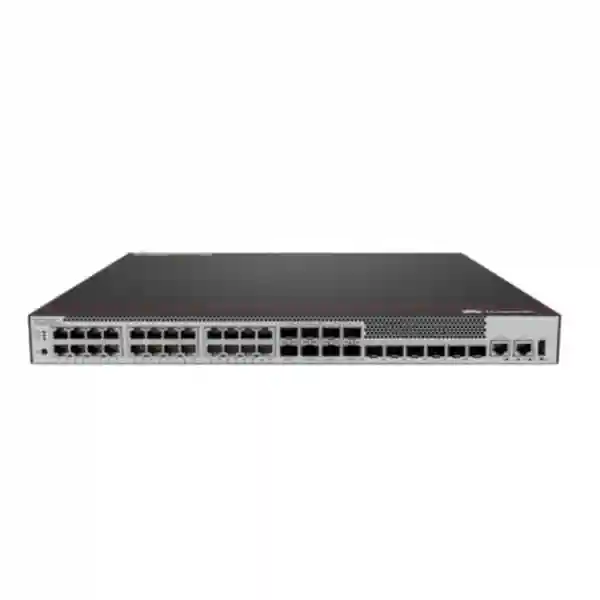
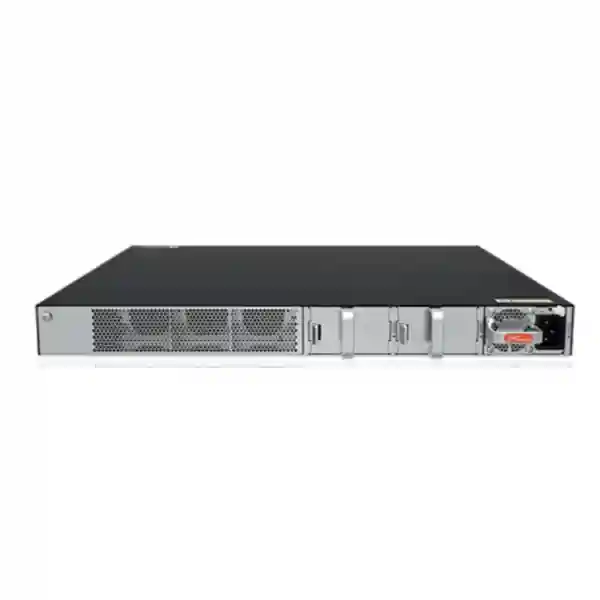
Huawei CloudEngine S5735-S24T4XEZ-V2
The Huawei CloudEngine S5735-S24T4XEZ-V2 is a fixed-access, non-PoE Gigabit Ethernet switch built for enterprise campus networks that need reliable edge connectivity, 10 Gigabit uplinks, dedicated stacking and an expansion path in a compact platform. For UAE organizations planning office, branch, education, hospitality, healthcare, government or commercial network upgrades, it offers a practical balance between access density, resilient power design, advanced Layer 3 functions and operational visibility.
Packet-forwarding capability published for this exact model.
Device switching capacity; Huawei also states a 520 Gbps system switching figure.
Designed to support redundant pluggable power modules for higher availability.
Select the PoE sibling model when endpoints need power from access ports.
What the S5735-S24T4XEZ-V2 is designed to do
The S5735-S24T4XEZ-V2 sits in Huawei’s CloudEngine S5735-S-V2 family and is aimed at standard enterprise Gigabit Ethernet switching rather than high-power endpoint access. Its front-facing 24-port copper block makes it straightforward to connect workstations, printers, desktop phones with separate power, security appliances, servers with 1 GbE interfaces, building-management controllers, storage management interfaces and other wired endpoints. Four 10GE SFP+ ports provide significantly more bandwidth for upstream links, server connections, firewall handoffs or inter-switch trunks than a platform limited to 1 GbE uplinks. Two dedicated 12GE stack ports are separate from ordinary service uplinks, helping preserve the 10GE ports for production traffic when a stacked design is required.
The suffix matters. The “T” identifies a copper-access variant, the “4X” portion aligns with the four 10GE uplink interfaces, and the “Z” variant includes an expansion slot that distinguishes it from the otherwise similar S5735-S24T4XE-V2. In practical design work, that expansion capability gives architects another hardware consideration when standard fixed connectivity is not the only requirement. Exact compatible cards, software dependencies and ordering codes should always be validated against the Huawei configuration documentation that applies to the software train and commercial bundle being quoted.
For UAE buyers, this model is particularly relevant where network teams need a professional managed switch with routing and resiliency capabilities but do not want to pay for PoE capacity that will remain unused. It can serve as an office-floor access switch, a branch-distribution switch, an aggregation point for smaller cabinets, a security-zone switch behind a firewall, or a compact Layer 3 node connecting multiple VLANs and routed links. Its value comes from combining familiar 1 GbE edge density with 10 GbE uplinks and enterprise software features rather than from providing endpoint power.
Exact physical port architecture
24 × 10/100/1000Base-T
These RJ45 copper interfaces are the primary access ports. They negotiate standard Ethernet rates up to 1 Gbit/s and are appropriate for structured copper cabling in normal enterprise LAN deployments. Because this specific T4XEZ model does not provide PoE, attached wireless access points, IP phones, cameras or IoT devices must use their own power source, an external injector or another PoE-capable switch. That distinction should be checked early in a bill of materials because it directly affects endpoint power design.
4 × 10GE SFP+
The four SFP+ interfaces are intended for high-speed uplinks and can support designs using suitable optical transceivers or direct-attach connectivity where supported. Four independent 10GE ports give more flexibility than a two-uplink access platform: they can be allocated to redundant core links, a server pair, firewall connectivity or link aggregation. Transceiver reach, fiber type and compatibility must be matched to the selected optic and installed cabling plant.
2 × dedicated 12GE stack ports
Dedicated stack connectivity enables multiple supported switches to operate in a coordinated topology without consuming all production 10GE uplinks for stacking. This is useful where cabinet resiliency, simplified logical management or cross-device link aggregation is part of the design. Stack-member limits, cable types, supported topology and software-version rules should be verified during implementation rather than assumed from physical port count alone.
One expansion slot
The expansion slot is one of the defining hardware differences of the S5735-S24T4XEZ-V2. In project planning, treat it as a controlled expansion path rather than as a generic open slot. The exact supported interface card, feature card or accessory depends on Huawei’s model-specific hardware documentation, software support matrix and regional ordering availability. FourTeck can help align the required expansion function with the appropriate part number before procurement so the delivered switch and accessory combination is supportable.
Management interfaces
Huawei’s published series specifications list an RJ45 console interface and USB 2.0 support on this hardware family, enabling local administration and operational workflows in addition to network-based management. For production deployment, out-of-band procedures, administrator authentication, configuration backups, software-image governance and console access controls should all be part of the implementation standard. The console port should be treated as privileged infrastructure access, not as a general user interface.
Important: this model does not provide PoE
The Huawei CloudEngine S5735-S24T4XEZ-V2 is the non-PoE model. This is a positive design choice when connected devices are independently powered because it avoids sizing a PoE budget that the project does not need. It is not, however, the correct switch when the LAN must deliver power directly to phones, access points, surveillance cameras, door controllers or other powered devices over Ethernet. A PoE requirement discovered after purchase can force additional injectors, external power adaptors, rack devices or a switch replacement, so endpoint power must be part of the initial port schedule.
For mixed environments, a common approach is to use non-PoE access switches such as this model for desks, servers, appliances and infrastructure interfaces, while reserving PoE-capable switches for wireless, voice and physical-security endpoints. That separation can simplify power-budget calculations and make UPS sizing more predictable. If the cabinet is expected to evolve toward a high density of PoE endpoints, a PoE sibling from the S5735-S-V2 family may be a better lifecycle fit even when the immediate requirement is modest.
Switching performance and why the figures matter
Huawei specifies 132 Mpps forwarding performance for the S5735-S24T4XEZ-V2. Packet-per-second performance is relevant because a switch must process large numbers of frames at wire speed, not merely advertise an aggregate bandwidth value. Networks carrying voice signalling, transactional traffic, east-west application flows, many small TCP sessions or broadcast and multicast control traffic can stress packet handling even when measured throughput is well below the nominal line rate. A 132 Mpps forwarding rating positions the platform for full enterprise access switching rather than unmanaged or lightly featured desktop use.
Huawei publishes switching capacity as 176 Gbps / 520 Gbps for this model. In its public product documentation, the figure before the slash refers to the device switching capability and the value after the slash refers to system switching capability. When comparing products, use like-for-like vendor definitions instead of mixing “backplane,” “fabric,” “system,” “full duplex,” and “device” figures from different datasheets. For a project bill of materials, the practical questions are whether the access ports can operate at their intended speeds, whether uplinks have enough headroom for aggregated edge traffic, and whether the architecture remains non-blocking or appropriately oversubscribed for the actual application mix.
A simple sizing example illustrates the role of uplinks. Twenty-four 1 GbE ports represent 24 Gbit/s of theoretical ingress capacity if every access port is simultaneously saturated in one direction. Four 10GE uplinks provide up to 40 Gbit/s of nominal physical uplink bandwidth before protocol overheads and design reservations. Real user networks rarely drive all access interfaces at line rate together, but 10GE uplinks provide a healthy margin for burst aggregation, backup windows, software distribution, virtualization traffic and high-speed internet or data-center paths. Where resilience matters, engineers normally reserve bandwidth across separate uplinks or link-aggregation groups rather than treating all four ports as one undifferentiated pool.
Layer 2 architecture for segmented campus networks
The S5735-S-V2 platform supports enterprise Layer 2 capabilities needed to build structured access networks. Huawei lists support for up to 4094 VLANs, voice VLAN functions, MUX VLAN and VLAN assignment based on MAC address, protocol, IP subnet, policy and physical port. The practical benefit is not the VLAN number by itself; it is the ability to separate users, servers, printers, building systems, guest devices, security infrastructure, management traffic and service networks into controlled broadcast domains that align with security policy and operational ownership.
Port-based VLAN assignment remains the simplest method for fixed enterprise access. A port serving a finance workstation can be assigned to a finance user VLAN, while an appliance uplink can be presented as a tagged trunk carrying several logical networks. MAC- or policy-driven approaches can support more dynamic access models where device identity or network policy needs to influence segmentation. Voice VLAN functionality can help separate IP telephony traffic where voice endpoints are present, though this particular switch will not power those phones. That means phone power and data segmentation should be engineered as separate requirements.
Huawei also publishes MAC address auto-learning and aging, static, dynamic and blackhole MAC entries, source-MAC filtering and interface-based MAC learning limits. These controls are useful for stable forwarding and for reducing risk from uncontrolled address learning on edge interfaces. In a hardened configuration, switch ports should not simply be enabled with default settings. Network teams can define expected port role, VLAN behaviour, storm controls, address-learning limits, authentication policy and administrative shutdown status for unused ports. Doing this consistently across floor switches materially improves troubleshooting and reduces accidental lateral connectivity.
Loop prevention remains essential in any switched campus. The exact spanning-tree design should follow the organization’s topology and interoperability requirements. Huawei lists VBST interoperability with PVST/PVST+/RPVST environments, which can matter during phased migrations from networks built around other vendors. Rather than treating interoperability as a checkbox, projects should validate the selected spanning-tree mode, root placement, path cost strategy, edge-port protection and failure convergence in a lab or controlled maintenance window when mixed-vendor switching is involved.
Layer 3 routing capabilities
Static and dynamic routing
Huawei publishes support for static routes, RIPv1/v2, RIPng, OSPF, OSPFv3, IS-IS, IS-ISv6, BGP and BGP4+. This enables the switch to participate in routed access or distribution designs rather than acting only as a Layer 2 bridge. The appropriate protocol depends on topology, operational skills, scale, convergence targets and interaction with the upstream core, firewall and WAN.
ECMP
Equal-cost multipath support allows traffic to use multiple equal routing paths in designs where the routing protocol and topology permit it. This can improve link utilization and resilience, but engineers should understand hashing behaviour, application flow characteristics and upstream symmetry requirements. ECMP is most effective when both the physical topology and routing policy have been designed for parallel paths.
VRRP and VRRP6
Huawei lists VRRP and VRRP6 for gateway redundancy. In a distribution-layer design, VRRP can provide a resilient virtual default gateway across supported Layer 3 nodes. The real design value comes from coordinating first-hop redundancy with link redundancy, spanning tree or routed access, tracking, failure domains and maintenance procedures so a device or path failure does not create a hidden single point of service interruption.
IPv6-ready enterprise networking
Mature IPv6 capability is increasingly important in enterprise network refreshes, even when the current production environment remains mostly IPv4. Huawei positions the S5735-S-V2 family with IPv6 features and lists routing support that includes RIPng, OSPFv3, IS-ISv6, BGP4+ and VRRP6. For organizations building dual-stack networks, this means the access or distribution layer can participate in modern routed designs rather than becoming the limiting component that must be replaced when IPv6 adoption expands.
A successful IPv6 rollout is more than enabling an address family. Network teams should define addressing plans, gateway placement, router-advertisement behaviour, DHCPv6 strategy where applicable, security controls, monitoring, DNS dependencies and dual-stack troubleshooting procedures. Existing firewall policies, NAC systems, endpoint management, SIEM tooling and application allowlists must also understand IPv6. A switch that supports IPv6 routing functions creates the platform capability, while implementation governance determines whether the transition is secure and operationally manageable.
For UAE organizations with long refresh cycles, buying switching infrastructure that can operate in both current IPv4 networks and future dual-stack designs can reduce forced replacement later. That consideration is especially relevant for government, education, healthcare, hospitality and large commercial environments where cabling and network hardware may remain in service for many years. The S5735-S24T4XEZ-V2 provides a practical bridge between conventional Gigabit access and modern routed campus architecture.
Dedicated stacking for resiliency and simpler operations
Two dedicated 12GE stack ports are a notable characteristic of this model. Stacking can allow multiple physical switches to be managed and operated as a coordinated system, depending on the supported stack architecture and software version. In access closets, the operational benefits can include simplified configuration, reduced management touchpoints and the ability to build cross-member link aggregation so an upstream connection is not dependent on one physical switch chassis.
A stack does not remove the need for sound failure-domain design. Engineers should plan stack topology, cable routing, member numbering, software consistency, power redundancy and upgrade procedures. Two stack ports also make topology planning more flexible than a single-stack-link design because supported systems can provide redundant stack paths. The physical stack should be cabled so that a single cable or member failure does not unnecessarily split the logical system. Exact supported member counts, cable options and topology rules should be taken from the software release and hardware documentation used for the deployment.
For sites that prefer independent switches rather than a logical stack, the dedicated stack interfaces do not force a stacking architecture. The four 10GE SFP+ ports can still be used for conventional redundant uplinks to a pair of aggregation switches. The decision between stacking and independent routed or Layer 2 access should be based on operational preference, change-control practice, blast-radius tolerance and the upstream core design. FourTeck can map those choices into a cabinet-level topology before hardware quantities are finalized.
Power-supply redundancy and availability planning
Huawei specifies 1+1 power-supply backup for the S5735-S24T4XEZ-V2 and lists support in the family for pluggable power-module options. In practical terms, a redundant PSU design allows the switch to continue operating if one installed power module fails, provided the remaining module and upstream electrical feed are healthy and correctly sized. The strongest design uses two power modules connected to independent protected power sources where the facility supports that arrangement, rather than plugging both modules into the same unprotected strip.
For UAE installations, cabinet power planning should account for UPS capacity, expected runtime, ambient temperature, power distribution units, plug format, circuit diversity and facility generator strategy. The switch is only one component in the rack. Firewalls, routers, optical termination, servers, storage, wireless controllers and auxiliary devices can materially change the load. A redundant switch PSU is valuable, but end-to-end availability depends on redundant upstream circuits and sensible maintenance procedures as well.
Power-module selection should be part of the commercial quote rather than assumed from the chassis name. Exact module type, quantity, connector and regional bundle can vary, and the desired 1+1 operating state requires the appropriate modules to be ordered. FourTeck can align the chassis, redundant power modules and compatible accessories into one bill of materials so the delivered configuration matches the intended availability objective.
Intelligent operations and telemetry
Huawei promotes intelligent network operations on the S5735-S-V2 family through telemetry and integration with iMaster NCE-CampusInsight. Telemetry is useful because it can provide higher-frequency operational data than traditional polling alone, supporting visibility into device state and network behaviour. In larger campus environments, centralized analytics can help operators identify faults, performance anomalies and user-experience issues without logging into each switch individually for every investigation.
Operational value depends on integration quality. Before deploying telemetry at scale, teams should determine which counters and events are collected, where data is stored, how long it is retained, how access is controlled and what alerts actually require action. Excessive telemetry without an incident process can create noise. A better approach is to establish baselines for interface errors, utilization, link flaps, stack events, routing adjacency state and device health, then build alerts around meaningful deviation and service impact.
Traditional management methods remain important as well. Secure management should use controlled administration networks, centralized authentication where appropriate, role separation, configuration backups, time synchronization, logging and restricted management-plane access. SNMP, syslog, command-line administration and orchestration methods should be configured according to the organization’s security standard. USB and console interfaces should be governed as privileged local access paths. Default accounts, unused services and legacy management protocols should be reviewed before the device enters production.
For managed-service or multi-site operations, standardized templates are especially valuable. A template can define naming, VLANs, trunks, gateway interfaces, routing, NTP, logging, authentication, access controls, interface descriptions and shutdown policy. Repeatable configuration reduces drift and makes troubleshooting easier across branches. FourTeck’s broader UAE networking and IT services practice can support organizations that want the hardware supplied together with deployment, migration or operational assistance.
Six practical deployment patterns
1. Office-floor wired access
Use the 24 GE copper ports for desktop users, printers and locally powered endpoints. Aggregate traffic through redundant 10GE fiber uplinks to a core or distribution pair. This topology is appropriate when endpoint power is not required from the switch and the floor needs more uplink headroom than older 1GE aggregation designs.
2. Branch distribution
In a larger branch, the switch can aggregate smaller access switches, servers or appliances and provide Layer 3 connectivity toward a firewall or WAN edge. Dynamic routing or static routes can be selected based on complexity. The 10GE uplinks allow the LAN side to avoid becoming a bottleneck as WAN bandwidth grows.
3. Security-zone switching
Deploy behind a next-generation firewall to aggregate DMZ servers, appliances, management interfaces or segmented service networks. VLAN separation and 10GE uplinks make the switch useful when multiple security zones need structured local connectivity before traffic reaches the firewall enforcement point.
4. Server and infrastructure access
Use 1GE access ports for management interfaces, infrastructure appliances and servers whose traffic profile does not require multi-gigabit access. Reserve the SFP+ ports for high-throughput server, storage-adjacent or upstream connectivity. For data-heavy compute networks, confirm whether 10/25/40/100GE server switching is more appropriate.
5. Small campus aggregation
The Layer 3 feature set allows the switch to aggregate routed or switched access in smaller sites. OSPF, VRRP and ECMP can support resilient designs where the topology warrants them. Port density remains modest, so aggregation sizing should consider the number of downstream links and future expansion.
6. Stacked wiring-closet pair
Use dedicated 12GE stack links to form a supported stack and distribute access connections across members. Cross-member upstream aggregation can improve resilience and simplify the logical topology. Ensure stack cables, software alignment and power diversity are included in the deployment plan.
Uplink design: fiber, DAC and redundancy choices
The four 10GE SFP+ ports give network designers several ways to connect the switch upstream. In same-rack or short-range environments, supported direct-attach copper assemblies may simplify cabling and reduce optical components. For building or campus links, optical transceivers and fiber are usually preferred because they can cover longer distances and provide electrical isolation between locations. The right optic depends on fiber type, link length, connectorization, patch-panel design and Huawei compatibility.
Do not select a transceiver based only on speed. Multimode and single-mode optics have different fiber requirements and reach. Existing plant may be OM3, OM4, OS2 or another standard, and the installed connector path, loss budget and patching condition can affect reliability. For brownfield sites, validate the actual fiber before ordering optics in quantity. A successful link budget also needs to consider patch panels, splices, dirty connectors and future moves, not just the straight-line building distance.
Redundant uplinks can be implemented in different ways. A pair of links may be bundled in an aggregation group, split toward separate upstream devices in a supported multi-device topology, or operated as independent routed links. Layer 2 designs need careful spanning-tree and link-aggregation coordination. Routed designs may use OSPF, ECMP or other protocols to remove spanning-tree dependence from the uplink. The preferred model should match the upstream core capabilities and the team’s operational expertise.
Four 10GE ports also create room for mixed roles. For example, two may be dedicated to a redundant core uplink while the remaining two connect a firewall pair, virtualization host or local high-speed service. This flexibility is useful in compact branch racks. However, engineers should document the role and failure implication of each interface so later changes do not accidentally consume a port reserved for resilience.
VLAN and segmentation design methodology
A well-designed switch deployment starts with logical segmentation before individual ports are configured. Create a VLAN and IP plan tied to business functions rather than arbitrary port ranges. Typical enterprise categories include corporate users, guest access, voice, printers, CCTV, building management, server management, network management, security appliances and application services. Each segment should have a clear gateway location, address range, security policy and ownership model.
The presence of 4094 VLAN capability does not mean thousands of VLANs should be created. Excessive segmentation can increase operational complexity, spanning-tree instances, gateway configuration and troubleshooting burden. The goal is to separate traffic where security, scale or fault containment requires it. On the S5735-S24T4XEZ-V2, port-based, MAC-based, protocol-based, subnet-based and policy-based VLAN capabilities provide flexibility, but the simplest method that meets the requirement is usually the easiest to support.
Trunk interfaces should have an explicit allowed-VLAN list instead of carrying every VLAN by default unless there is a documented reason. Native or untagged VLAN behaviour should be consistent across the environment. Unused ports should be administratively disabled or placed in a non-routed parking VLAN. Interface descriptions should identify the connected room, rack, endpoint, upstream device or circuit. These basic controls have a large effect on incident response because engineers can understand the intended topology without tracing every cable under pressure.
If the switch provides default gateways for user VLANs, routing and firewall policy must be considered together. Inter-VLAN routing on a switch can move traffic at high speed but may bypass a firewall if the security architecture assumes all segment-to-segment traffic is inspected. Some organizations therefore keep sensitive gateway interfaces on firewalls, while others route locally and enforce segmentation with distributed policy. The S5735-S24T4XEZ-V2 can support routed designs, but the policy location should be chosen deliberately.
Routing design for branches and campuses
Static routing is appropriate for simple topologies with a small number of predictable paths. It is easy to understand, but it does not automatically adapt to every failure unless multiple routes and tracking mechanisms are designed. OSPF is a common enterprise choice for dynamic routing because it can advertise internal networks and reconverge when links change. IS-IS is often used in larger service-provider or sophisticated enterprise designs. BGP may be useful at policy boundaries or in larger architectures where path control matters. The presence of all these protocols on the platform allows the same hardware to fit different network roles.
Protocol support should not encourage unnecessary complexity. A 24-port access switch does not need BGP simply because it is available. The routing protocol should solve a defined problem. In a routed-access campus, OSPF may eliminate Layer 2 failure domains between access and distribution. In a branch, a default route toward the firewall may be entirely sufficient. In a multi-homed service environment, BGP may become appropriate. Operational consistency across sites is usually more valuable than using every available feature.
VRRP can provide redundant first-hop gateways where two Layer 3 switches share VLAN gateway responsibility. To gain the full benefit, downstream Layer 2 paths, upstream routes, state tracking and device maintenance procedures must align with the gateway design. A virtual IP that survives device failure is only useful if traffic still has a working path beyond the gateway. Tests should include link failure, power-supply failure, stack-member failure where relevant, upstream device loss and controlled reboot.
ECMP can distribute flows across equal-cost routed paths, improving use of parallel uplinks. Because most implementations hash traffic by flow fields, one large flow may remain on a single physical link while many independent flows distribute more evenly. Applications sensitive to asymmetric routing, stateful firewall paths or ordered delivery should be considered in the overall topology. The design team should validate forwarding behaviour rather than assuming that two links automatically double performance for every application.
Security hardening considerations
Management plane
Place management interfaces in dedicated administrative networks, restrict source addresses, use strong authentication and disable services that are not required. Central logging, NTP, configuration backups and named administrator accounts improve accountability. Console access should be physically controlled and documented.
Access ports
Apply expected VLANs, MAC-learning limits, storm controls, authentication policy and shutdown status. Avoid leaving active ports in an unrestricted production VLAN. Use descriptions and inventory mapping so every live port has an operational purpose and owner.
Uplinks and trunks
Allow only required VLANs, protect topology-control protocols, monitor link changes and document aggregation membership. On routed uplinks, use appropriate routing authentication and prefix controls where the chosen protocol and software release support them.
Switching security is part of a layered architecture. A campus switch controls local connectivity, while a next-generation firewall provides inspection and policy enforcement at security boundaries. FourTeck can integrate the switch with firewall platforms and segmentation designs through its Firewall Dubai practice, allowing the LAN topology and security policy to be engineered together rather than as independent purchases.
Quality of Service and application traffic planning
Enterprise access networks carry very different traffic types at the same time: interactive voice, video meetings, web applications, backups, software distribution, print jobs, management telemetry and bulk data. Quality of Service is most useful when it protects latency-sensitive applications during congestion rather than attempting to make every application “high priority.” The switching platform’s feature set should be combined with a clear marking, trust and queueing strategy that is consistent from endpoints through access, distribution, WAN and security devices.
At the access edge, decide whether endpoint markings are trusted or rewritten. User-controlled devices should not automatically be able to claim the highest priority. Voice systems, managed video endpoints and infrastructure devices may have controlled policies. Uplink capacity should still be sized to minimize sustained congestion; QoS is not a substitute for adequate bandwidth. The four 10GE uplinks on this model give substantial headroom for a 24-port Gigabit edge, especially when links are aggregated or assigned by traffic role.
When the switch is used as a branch distribution device, WAN bandwidth may be much lower than LAN bandwidth. In that case the congestion point often sits on the router, SD-WAN appliance or firewall rather than on the access switch. End-to-end policy should therefore preserve markings across the LAN and apply shaping or queueing at the constrained egress. During acceptance testing, verify application performance under realistic load instead of relying only on interface speed tests.
Interoperability in mixed-vendor networks
Many UAE enterprises operate mixed-vendor networks because switches, wireless systems, firewalls and data-center platforms are refreshed on different cycles. Huawei publishes VBST interoperability with PVST, PVST+ and RPVST environments and describes LNP as providing functionality similar to DTP. This can assist migration and coexistence, but interoperability should still be treated as an engineering exercise rather than an assumption based on feature names.
For a staged migration, document the existing spanning-tree root, VLAN-to-instance mapping, trunk tagging, native VLAN behaviour, link-aggregation mode, MTU, routing timers and gateway placement. Then compare those elements with the target Huawei configuration. Small differences can cause loops, blocked paths, inconsistent VLAN transport or one-way connectivity. A maintenance-window test should include link failure and restoration, not just successful ping tests while everything is healthy.
Optics also require compatibility planning. SFP+ is a form factor and electrical interface, not a guarantee that every third-party transceiver is accepted or supported. For production environments, use Huawei-supported optics or specifically validated alternatives where support policy permits them. Record part numbers and wavelengths so field engineers can replace failed optics with matching components without trial and error.
Capacity planning for 24 access ports
A 24-port switch is often selected because the cabinet has fewer than 24 immediate connections, but port count alone is not a complete sizing method. Reserve capacity for patching changes, new desks, temporary project devices, redundant appliance links and future systems. If a rack already needs 21 or 22 permanent ports, the real choice may be between two 24-port switches or a 48-port model rather than consuming nearly every interface on day one. Spare ports reduce the operational friction of adds and changes.
Traffic profile matters as well. Twenty-four office endpoints usually do not sustain 1 Gb/s simultaneously, so a pair of 10GE uplinks can provide ample capacity. A group of backup servers, CCTV recorders, storage gateways or virtualization hosts can behave differently. Measure current interface utilization and peak bursts before migration. If individual endpoints need more than 1 GbE, the S5735-S24T4XEZ-V2’s copper access ports may be the limiting factor even though the uplinks are 10GE.
Consider failure-state capacity. A design with two 10GE uplinks may normally use both, but if one link or upstream device fails, the surviving path must handle critical traffic. Network sizing should therefore look at N-1 conditions rather than only normal operation. The same principle applies to stacked switches and redundant power. Availability features are most valuable when the remaining components have enough capacity to carry the required service after a failure.
Finally, account for management scale. Each switch adds configuration, software lifecycle, monitoring, inventory and support work. Stacking can reduce some operational overhead, but it can also increase the size of a common failure or upgrade domain. A good design balances physical resiliency with operational simplicity rather than maximizing device count or stack size without a clear reason.
When to select this model — and when to select something else
Choose the S5735-S24T4XEZ-V2 when you need twenty-four 1GbE copper access ports, high-speed 10GbE uplinks, dedicated stacking, redundant power capability and enterprise Layer 3 features in a non-PoE platform. It is a strong fit for independently powered desktops, servers, appliances and infrastructure devices. It also makes sense where existing cabinets use fiber uplinks and the organization wants a consistent Huawei campus-switching platform with telemetry and mature IPv6 capability.
Choose a PoE model when the switch must power wireless access points, IP phones, cameras or other powered devices. Choose a 48-port model when access density is high enough that two 24-port switches would add unnecessary cost or management. Choose a multi-gigabit access switch when Wi-Fi access points, workstations or servers need 2.5GbE or faster copper connectivity. Choose a higher-end aggregation or data-center platform when the design requires larger routing tables, substantially more 10/25/40/100GE interfaces, deeper buffers or data-center-specific features.
The right switch is therefore determined by endpoint speed, endpoint power, uplink bandwidth, redundancy, software features and lifecycle growth together. FourTeck can compare the S5735-S24T4XEZ-V2 with adjacent Huawei models as part of a project quote, preventing a small naming difference from becoming a major deployment mismatch.
Model-positioning comparison
| Decision point | S5735-S24T4XEZ-V2 | Alternative direction |
|---|---|---|
| Access ports | 24 × 1GE copper | Use a 48-port model for greater density. |
| PoE | No | Use a P-series model when endpoints need PoE+. |
| Uplinks | 4 × 10GE SFP+ | Use higher-speed aggregation platforms for 25/40/100GE requirements. |
| Stacking | 2 × dedicated 12GE stack ports | Independent routed access may be preferred where stack failure domains are undesirable. |
| Expansion | One expansion slot | The non-Z T4XE variant lacks this slot. |
| Power | 1+1 backup capability | Confirm module quantity and electrical-feed design in the BOM. |
UAE procurement and deployment considerations
Enterprise switching projects in the UAE often span more than the switch chassis. A complete quote may require power modules, stack cables, SFP+ optics, fiber patch leads, rack accessories, console access, labeling, patch panels, UPS capacity and professional configuration. When any of these are omitted, installation teams can arrive on site with the core hardware but without the components needed to put it into service. FourTeck’s UAE technology portfolio can help consolidate the switching requirement with the surrounding infrastructure.
Lead time and exact regional part number should be confirmed at quotation stage. Enterprise vendors may offer different power cords, power supplies, license bundles or support options by region. The commercial description “S5735-S24T4XEZ-V2” identifies the switch model, but a procurement-ready BOM should capture every required accessory and service entitlement. This is especially important when the project has a fixed maintenance window or a multi-site rollout schedule.
For new server rooms or cabinet refreshes, switch selection should also be coordinated with servers, racks and UPS design. FourTeck’s Server Dubai infrastructure team can align switching with compute and rack requirements so uplink media, port quantities and power assumptions are consistent across the solution. That coordination is useful when a branch or office build includes switching, firewalls, servers and structured cabling in one project.
Support planning matters after installation. Record chassis serial numbers, PSU details, optic part numbers, software version, rack position, management address, uplink destinations and configuration backup location. A standardized handover pack turns the hardware purchase into an operable network asset. For distributed UAE sites, consistent documentation is particularly important because support engineers may troubleshoot locations they did not originally install.
Installation planning: rack, cabling and environment
Before installation, confirm rack space, airflow, power availability and cable routing. Enterprise switches should not be installed in overcrowded cabinets with blocked ventilation or unmanaged cable bundles. Maintain the airflow clearances required by the hardware documentation and keep fiber bend radius within specification. Patch cords should be labeled at both ends. If a stack is planned, stack cables should be routed so they are protected from accidental removal during routine patching.
Copper cabling should be tested and certified to the category required for Gigabit Ethernet over the installed distance. Old or poorly terminated horizontal cabling can create intermittent errors that appear to be switch faults. During commissioning, review interface error counters, negotiation state and duplex rather than assuming that a link LED proves cabling quality. For fiber links, clean connectors before insertion and verify optical levels where tools and optic support allow it.
Power should be treated with the same discipline. If redundant PSUs are installed, label each feed and document its PDU or UPS source. Ideally the feeds should not share a single upstream breaker or unprotected strip when the facility supports true power diversity. Confirm UPS runtime under the full rack load rather than calculating only from the switch’s nominal consumption. Where generator-backed power is available, validate transfer behaviour and maintenance bypass arrangements.
Environmental conditions can affect reliability. UAE equipment rooms require dependable cooling, especially in sites where external temperatures are high and HVAC interruptions can quickly raise cabinet temperature. Monitoring should include room or rack temperature where possible. Dust control and regular inspection are equally important. A premium enterprise switch cannot compensate for blocked vents, overheated closets or unstable mains power.
Commissioning workflow
Verify model, serial number, power modules, optics, expansion accessory if any, stack cables and ordered support. Match the delivered items to the approved BOM before rack installation.
Confirm the intended VRP software version, compatibility requirements and approved upgrade path. Standardize versions before forming a stack or introducing the switch into a managed fleet.
Configure management addressing, secure administration, time synchronization, logging, authentication and access restrictions before connecting user-facing ports.
Build VLANs, trunks, access profiles, loop-protection settings, interface descriptions and unused-port policy. Validate tagging and native VLAN behaviour end to end.
Configure gateway interfaces and routing only where the design requires them. Verify adjacency, route preference, redundancy and return paths through firewalls or WAN devices.
Test endpoint access, VLAN isolation, DNS and application reachability, uplink failover, PSU redundancy, stack resilience where used, monitoring and configuration backup.
Migration from an existing access switch
A successful migration begins with the old switch configuration and patch schedule, not with the new hardware. Export the existing VLAN table, trunk list, access-port assignments, gateway addresses, routing configuration, spanning-tree role, link aggregation, ACLs, QoS policy, management services and monitoring settings. Compare that information with the physical patch panel so stale configuration is not blindly copied to the new platform.
Build the new configuration from an approved template and map every old port to a new port. Where interface numbering differs, use a migration worksheet rather than improvising during the outage. Pre-stage the switch, verify software and test the management plane before the maintenance window. If optics are being changed, validate fiber type and transceiver compatibility in advance. If stacking is introduced, form and test the stack before moving production cables.
During cutover, migrate uplinks and critical infrastructure in a controlled order. Confirm spanning-tree or routing state before connecting large numbers of access ports. Test a representative endpoint from each VLAN and verify upstream security policy. Watch logs and interface counters for loops, errors, unexpected negotiation or flapping. Do not remove the legacy switch until acceptance tests pass and rollback is no longer required.
After migration, update network diagrams, asset registers, monitoring targets and configuration backups. Remove obsolete MAC reservations or static routes discovered during the project. A switch replacement is an opportunity to improve documentation and standardization rather than carrying old inconsistencies forward indefinitely.
Operational monitoring after go-live
The first week after deployment should establish a baseline. Track uplink utilization, interface errors, packet drops, CPU and memory trends, temperature, power-module status, stack state, routing neighbours and log events. Baseline data helps distinguish normal behaviour from future incidents. A 60 percent peak on an uplink may be entirely healthy if stable, while repeated link flaps at low utilization can indicate a physical fault that deserves immediate attention.
Set alerts with actionable thresholds. Not every counter change requires a ticket. Interface-down alerts should differentiate user access ports from critical uplinks. Power-supply loss should alert immediately in a redundant chassis because the switch is now operating without redundancy even though traffic may still be flowing. Stack topology changes and routing-neighbour loss should also receive elevated attention. Monitoring should identify degraded resilience, not only complete outages.
Configuration change control is equally important. Save a known-good baseline and automate regular backups where the management platform allows it. Record approved changes, especially uplink modifications, VLAN additions, routing changes and software upgrades. When an incident occurs, comparing the current configuration against the previous known-good version can be faster than troubleshooting solely from symptoms.
Lifecycle reviews should include software maintenance, vulnerability advisories, support status and capacity. A switch that was correctly sized at installation can become constrained after office expansion or application changes. Periodically review port occupancy and 10GE uplink utilization so growth is planned rather than discovered during an outage or large project deployment.
Designing with firewalls, servers and services
The switch usually sits inside a broader architecture. A next-generation firewall may enforce internet, inter-zone and remote-access policy. Servers provide applications and identity services. Wireless systems extend the LAN beyond the copper edge. Monitoring platforms collect health data. Treating these components as one design reduces mismatches such as a firewall with 10GE interfaces connected through a switch uplink that has been consumed by another service, or a server cluster that requires port speeds beyond the selected access switch.
FourTeck can combine the S5735-S24T4XEZ-V2 with the wider enterprise portfolio available through FourTeck Global. For UAE projects, the design process can include switching, firewall placement, server connectivity, rack planning and implementation scope. This is useful when the switch is part of a new office, branch rollout, data-room refresh or security segmentation project rather than a one-for-one hardware replacement.
A coordinated design also improves troubleshooting ownership. When VLAN, routing and firewall policy are documented together, network teams can determine whether a connectivity problem originates at the access port, the switch gateway, an uplink, the firewall or the server. That clarity reduces time spent transferring incidents between teams and makes maintenance changes safer.
Frequently asked technical questions
Does S5735-S24T4XEZ-V2 support PoE?
No. This exact T4XEZ model is a non-PoE switch. If access points, phones or cameras must receive power through Ethernet, select a PoE-capable sibling or provide separate power by design.
How many 10GE ports are available?
There are four 10GE SFP+ ports. They can be used for uplinks, aggregation, high-speed devices or other supported 10GE connections depending on the topology and transceivers.
Are stack ports shared with the uplinks?
Huawei specifies two dedicated 12GE stack ports in addition to the four 10GE SFP+ interfaces, so the fixed hardware provides separate physical connectivity for stacking and service uplinks.
Can it route between VLANs?
Yes. The platform supports Layer 3 functions including static routing and multiple dynamic protocols. Gateway placement should still follow the security and resilience architecture of the overall network.
What is the forwarding performance?
Huawei publishes 132 Mpps forwarding performance for the S5735-S24T4XEZ-V2, with a device switching capacity of 176 Gbps and a stated system switching figure of 520 Gbps.
Does the switch have redundant power capability?
Yes. Huawei lists 1+1 power-supply backup for this model. The project BOM must include the appropriate pluggable power modules required to achieve the intended redundancy.
What does the Z variant add?
The S5735-S24T4XEZ-V2 includes one expansion slot. Exact compatible expansion hardware should be checked against the applicable Huawei hardware and software support documentation before ordering.
Is it suitable for a data center?
It can serve infrastructure or 1GE access roles, but dense server fabrics often need higher port speeds, deeper buffers and data-center-specific features. Match the platform to server NIC speed and east-west traffic requirements.
Detailed project-sizing methodology
Start with a port schedule. List every endpoint expected in the cabinet for day one and for the next expansion phase. Identify the endpoint type, copper or fiber media, speed, VLAN, PoE requirement, redundancy requirement and expected traffic. Mark devices with dual network interfaces because they consume more than one switch port. Add a sensible spare-port allowance. This quickly reveals whether a 24-port model is sufficient or whether a 48-port platform is more economical.
Next build the uplink model. Determine whether the switch connects to one core, two cores, a firewall pair, a WAN edge or another access layer. Define the required number of 10GE ports in normal operation and under failure conditions. If two 10GE ports are used in a link aggregation group to the core and two are reserved for another service, there is no remaining high-speed spare. That may be acceptable, but it should be intentional rather than discovered during future expansion.
Then assess logical scale. Count VLANs, routed interfaces, routing peers and redundancy relationships. Decide whether the switch remains Layer 2 with gateways upstream or becomes a Layer 3 gateway. Map this decision to firewall policy because local inter-VLAN routing may change the traffic path. For dynamic routing, define protocol area or domain structure, summarization and failure behaviour. For static routing, document primary and backup next hops.
Finally size the physical environment. Confirm rack units, cable-management space, PSU quantity, PDU sockets, UPS load and fiber patching. Select optics based on actual reach and fiber type. Add stack cables if the switches will stack. Include spares where outage cost justifies them. A complete sizing exercise turns a model selection into a deployable system rather than a chassis-only purchase.
This methodology is particularly valuable for multi-site rollouts because it creates a repeatable site template. Small branches can use a reduced version while larger offices add members or higher-density switches. Standardizing the design makes support, spares and configuration management easier across the UAE.
Why 10GE uplinks remain important on a 1GE access switch
Gigabit access is still sufficient for many desktop and infrastructure workloads, but uplink requirements have increased. Cloud synchronization, software distribution, centralized backup, video collaboration and high-speed internet services concentrate traffic from many 1GE users onto a small number of upstream links. A legacy access switch with 1GE uplinks can become congested long before individual user ports are busy. Four 10GE SFP+ ports let the S5735-S24T4XEZ-V2 aggregate edge traffic without imposing that older bottleneck.
The benefit is also operational. With four uplinks, two can be assigned to resilient upstream connectivity while preserving additional 10GE ports for local services. In a branch with a 10GE firewall interface and local virtualization host, that flexibility can prevent the switch from forcing everything through 1GE. It can also support a phased architecture where the core is upgraded first and access endpoints remain on familiar 1GE copper until there is a business case for faster edge speeds.
The limitation should be equally clear: 10GE uplinks do not make the 1GE access ports multi-gigabit. A workstation or access point connected to a copper edge port remains limited by that interface. Organizations deploying Wi-Fi systems that require 2.5GbE or faster wired backhaul should evaluate multi-gigabit access switches rather than assuming that a fast uplink solves the edge-port requirement.
Procurement mistakes to avoid
Check every camera, phone and access point. If it expects power from the switch, this model alone will not provide it.
SFP+ ports require suitable transceivers or supported DAC assemblies. Specify media, reach and quantity in the BOM.
The chassis supports 1+1 backup, but the required power modules must actually be included and connected to suitable feeds.
Dedicated stack ports need the correct cabling and supported topology. Include those items if stacking is part of the solution.
Do not assume any similarly shaped card will work. Validate the exact supported expansion option and software release.
A redundant topology should still meet critical traffic needs after one uplink, PSU or upstream device is unavailable.
Lifecycle and support planning
Enterprise switches typically remain in service for years, so lifecycle planning should begin at purchase. Record the vendor support entitlement, software train and planned maintenance responsibility. Define who receives security and software advisories, who approves upgrades and who owns after-hours maintenance. A switch with a rich feature set still needs governance to remain secure and supportable throughout its service life.
Software upgrades should be tested against the features actually in use. A site using stacking, OSPF, VRRP, telemetry and third-party optics has a different validation requirement from a simple Layer 2 access switch. Read release notes, check known issues and verify upgrade sequencing. For stacks, member compatibility and reboot behaviour require particular attention. Maintain a rollback path and a current configuration backup before every change.
Spare strategy depends on business impact. A site that can tolerate a day of degraded access may rely on vendor replacement, while a hospital, hotel, factory or critical branch may keep a compatible spare switch, PSU or optics locally. Standardizing on a limited number of switch models across sites can reduce the quantity of spares needed while still improving recovery time.
When the environment eventually outgrows 1GE access or 10GE uplinks, the documentation created for this deployment will simplify migration. Port schedules, VLAN plans, routing maps and optic inventories are reusable assets. Good network engineering therefore extends beyond the current chassis and makes the next refresh easier.
Technical specification summary
Specifications should be validated against the Huawei documentation and commercial configuration applicable to the software release and region at the time of order.
Decision recap for UAE network teams
Strong fit when
You need 24 Gigabit copper access ports, four 10GE SFP+ uplinks, dedicated stacking, Layer 3 routing, IPv6 capability, an expansion slot and redundant power support, while endpoint power is not required from the switch.
Recheck the model when
Your endpoints need PoE, more than 24 copper ports, multi-gigabit copper access, large quantities of high-speed server ports or data-center-focused switching features. Those needs may point to another S5735 variant or a different Huawei family.
Validate before ordering
Confirm PSU quantity, optics, stack cables, expansion hardware, software release, support entitlement, rack power, fiber type and implementation scope. These items turn the correct switch model into a complete deployable solution.
Quotation input checklist
UAE location, rack size, free rack space, PDU type, UPS availability, cooling condition and maintenance-window constraints.
Current port count, 12–36 month growth, endpoint types, dual-homed devices, spare-port target and any ports reserved for infrastructure.
Confirm that edge PoE is not required, then specify one or two switch power modules and the required electrical-feed redundancy.
Number of 10GE links, upstream device models, fiber or DAC preference, optical distance and whether link aggregation or routed uplinks are planned.
Number of stack members, cabinet arrangement, stack-cable length and desired failure topology. Confirm software compatibility before deployment.
Supply only, staging, configuration, migration, on-site installation, testing, documentation, managed monitoring or support-handover scope.
Plan the S5735-S24T4XEZ-V2 as a complete network solution
For a reliable quotation, share the required switch quantity, site location, port schedule, uplink distances, fiber type, stacking requirement, PSU redundancy target and whether implementation services are needed. FourTeck can then align the S5735-S24T4XEZ-V2 chassis with the correct supporting components and deployment scope for the UAE environment.
This approach reduces the chance of missing optics, power modules, stack accessories or installation tasks and gives the project team a clearer acceptance baseline. It also allows adjacent firewall, server and IT-service requirements to be coordinated through one technical design where appropriate.
• Model and BOM validation
• Optics and fiber matching
• Stack and uplink topology
• VLAN and routing planning
• Deployment and migration services

Reviews
There are no reviews yet.