
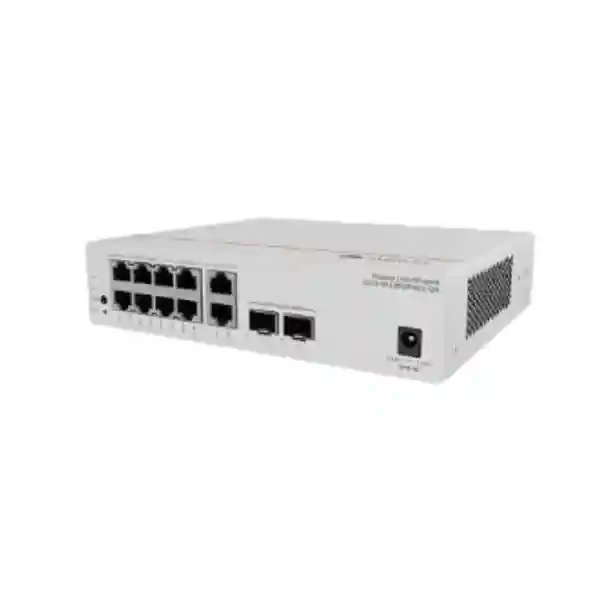
Huawei CloudEngine S5751-L8T2HX-RUA
A compact 10GE-capable remote unit for simplified Huawei campus networks, combining eight Gigabit Ethernet copper access ports, two hybrid optical-electrical SFP+ uplinks, fanless operation, MACsec-capable Ethernet protection, flexible local or remote powering, and centralized architecture for distributed UAE access locations.
Choose the S5751-L8T2HX-RUA when the design requires a small, silent, non-PoE copper access remote unit with up to 10GE hybrid uplinks and the operational benefits of Huawei’s simplified campus architecture. It is especially useful where rack space, acoustic comfort, distributed access, and centralized control matter more than local PoE output.
10/100/1000BASE-T downlink ports for user and endpoint connectivity.
100M/1GE/2.5GE/10GE SFP+ interfaces with hybrid optical-electrical capability.
Designed for line-rate campus access traffic within the remote-unit architecture.
Internal switching capacity aligned to compact distributed campus access.
What the S5751-L8T2HX-RUA is designed to do
The Huawei CloudEngine S5751-L8T2HX-RUA is not positioned like a conventional stand-alone branch switch that is planned, configured, and managed as an isolated device. It belongs to Huawei’s CloudEngine S5751-L remote unit family, which is built around a simplified campus concept. In that architecture, a compatible central switch provides the primary control and management role, while remote units expand access ports closer to users, rooms, work areas, cabinets, ceilings, or distributed service zones. This changes the practical design question from “where do I install another independently managed switch?” to “where do I need access ports, and how can I extend those ports with less local complexity?”
For UAE organizations with distributed office floors, hospitality rooms, education blocks, healthcare departments, retail zones, meeting spaces, security posts, or commercial units, this approach can reduce the amount of configuration that must be maintained at each edge location. The S5751-L8T2HX-RUA contributes eight standard Gigabit Ethernet copper interfaces for local endpoints and two high-speed hybrid SFP+ interfaces for uplink connectivity. Because the unit is fanless and physically compact, it can fit deployment locations that would be awkward for a traditional rack-oriented access switch. The model itself does not provide PoE output on its eight copper access ports; this distinction is important when selecting between the T and P variants in the family.
Verified technical specification overview
| Model | Huawei CloudEngine S5751-L8T2HX-RUA |
| Downlink ports | 8 × 10/100/1000BASE-T Ethernet ports |
| Uplink ports | 2 × 100M/1GE/2.5GE/10GE SFP+ hybrid optical-electrical ports |
| Forwarding performance | 42 Mpps |
| Switching capacity | 98 Gbps |
| Dimensions | 43.6 × 195 × 160 mm, without packaging |
| Weight | Approximately 1.2 kg, without packaging |
| Installation | Desktop or wall mounting |
| Powering approach | Compatible power adapter or PoE_IN through supported hybrid optical-electrical infrastructure |
| Maximum device power | 10.00 W device via power adapter; 11.87 W device plus adapter. Hybrid-cable figure listed as 17.57 W. |
| Typical / static consumption | Typical: 11.14 W via adapter or 13.14 W via hybrid cable. Static: 5.35 W via adapter or 7.15 W via hybrid cable. |
| Cooling | Fanless natural heat dissipation |
| Operating environment | -5°C to +45°C; 5% to 95% RH non-condensing |
| Storage temperature | -40°C to +70°C |
Specifications should be confirmed against the exact Huawei ordering code, software release, approved optics, compatible central-switch platform, and project bill of materials before procurement.
Eight Gigabit access ports
The eight 10/100/1000BASE-T interfaces are intended for ordinary Ethernet endpoints that do not need the switch itself to deliver power. Typical examples include desktop PCs, printers, non-PoE appliances, local controllers, workstations, building-system interfaces, media devices, thin clients, or other Ethernet-connected systems. Auto-negotiation allows the access port to establish an appropriate supported rate with the connected device.
Because the S5751-L8T2HX-RUA is a T model rather than a P model, designers should not assume PoE output on these copper ports. Any powered device such as an IP phone, wireless access point, or camera that requires IEEE PoE power needs an external injector, local power source, or a different S5751-L PoE-capable variant selected during BOM design.
Two multi-rate hybrid uplinks
The two SFP+ uplink positions support 100M, 1GE, 2.5GE, and 10GE rates according to Huawei’s product documentation. The hybrid optical-electrical design is central to the model’s deployment flexibility: supported infrastructure can carry optical data while also delivering power to the remote unit. This can reduce dependency on an electrical outlet immediately beside the access device.
In a conventional fiber design, the same unit can be locally powered through a compatible adapter. This dual approach gives architects more freedom to choose between remote powering and local powering based on building design, cable routes, distance, resilience requirements, and project economics.
How Huawei simplified campus architecture changes edge deployment
Traditional campus networks commonly follow a multi-tier operational model: the core handles high-level routing and services, aggregation switches collect access-layer traffic, and many individual access switches are configured and managed throughout buildings. That model remains valid in many environments, but it creates a predictable operational burden. Every access switch may require addressing, configuration, software management, troubleshooting procedures, credentials or AAA integration, monitoring, lifecycle planning, and replacement processes. As the number of closets and distributed access points grows, operational complexity grows with it.
Huawei’s remote-unit architecture is intended to reduce part of that burden. The remote unit works with a supported central switch and behaves as an extension of the centralized access system rather than as an independent island. Huawei describes the design as simplifying the traditional three-layer access, aggregation, and core model into a two-layer approach in suitable deployments. The remote unit can act as a port expansion element of the central switch, and Huawei’s documentation emphasizes planning-free, configuration-light, and plug-and-play behavior for the RU in the intended architecture.
For a UAE enterprise this can be particularly useful in multi-floor offices, hotels, universities, schools, hospitals, warehouses, large villas converted to commercial use, distributed retail, and mixed-use properties. Instead of reserving a full equipment cabinet for every small cluster of eight endpoints, the network team can design central switching capacity and place compact remote units where the ports are actually needed. Fiber or hybrid cabling then becomes the long-distance transport medium between central and remote locations. This can reduce copper horizontal distance pressure and allow centralization of active infrastructure.
The architectural benefit should still be validated against the exact topology. Remote units depend on compatible Huawei central-switch platforms and software. Huawei indicates that supported CloudEngine S16700, S12700E, S8700, S6700, and S5700 family platforms can participate in remote-module networking when running an appropriate supported release; project teams should confirm the precise central model, license, software version, optic, hybrid cable, and feature matrix for the intended deployment instead of treating series-level compatibility as a blanket guarantee.
Hybrid optical-electrical powering: where it helps
Fewer local power dependencies
Where supported hybrid optical-electrical infrastructure is used, the RU can receive power over the hybrid connection. That can be attractive in ceilings, corridors, room service zones, reception areas, small telecom points, or other locations where adding an electrical socket and UPS-backed local circuit would otherwise complicate the project. Remote power can also make centralized electrical resilience strategies easier to design because the power source can remain at a controlled central location.
Longer reach architecture
Optical transport avoids the familiar 100-metre limitation associated with standard copper Ethernet horizontal cabling. Huawei positions the optical-electrical hybrid concept for remote-unit access beyond conventional copper distances and describes scenarios exceeding 1000 metres when designed with the relevant central system and hybrid solution. Actual supported reach depends on the approved cable, power design, optics, central platform, and installation conditions and should be engineered from Huawei’s compatibility data.
Local adapter remains an option
Hybrid power is not mandatory for every installation. If the site already has a reliable power outlet near the intended remote-unit position, the S5751-L8T2HX-RUA can be designed around a compatible power adapter. This lets a project use ordinary optical uplink design where appropriate while retaining the same compact access footprint. The best choice depends on construction cost, UPS coverage, cable route, physical access, expected maintenance model, and power availability.
Important PoE distinction for this exact model
The model name S5751-L8T2HX-RUA must not be confused with S5751-L8P2HX-RUA. The “T” version described on this page provides eight standard Gigabit Ethernet copper downlinks without PoE output. The hybrid uplinks can participate in the power-input architecture that supplies the remote unit itself, but this does not turn the eight copper ports into PoE source ports.
If the project needs the switch to power IP phones, access points, surveillance cameras, sensors, door controllers, or other powered devices directly from the copper downlinks, the BOM should be reviewed for a PoE-capable CloudEngine S5751-L variant. This is one of the most important selection checks because a network can have adequate bandwidth and port count yet still fail operationally if the power-delivery requirement is not captured during design.
Performance engineering: interpreting 42 Mpps and 98 Gbps
Switch specifications can be easy to misread when the numbers are considered without context. The published 42 Mpps forwarding performance describes packet-processing capacity, while the 98 Gbps switching capacity describes the internal switching capability of the platform. For this compact remote unit, those figures are consistent with its role as an eight-port Gigabit access device with two uplink interfaces that can operate up to 10GE. They are not an instruction that every deployment should run two uplinks at maximum line rate all the time; rather, they indicate that the hardware is designed for high-speed edge forwarding within its intended topology.
When sizing the unit, engineers should first estimate the realistic traffic generated by the eight attached devices. A typical business desktop rarely sustains 1 Gbps continuously. Even so, short bursts, backup activity, file copies, virtual desktop traffic, local media workflows, software distribution, and cloud synchronization can create transient peaks. A 10GE-capable uplink provides substantial headroom compared with a 1GE uplink and can prevent the remote-unit uplink from becoming the first bottleneck as endpoint demand increases.
Two uplink ports also create topology options such as supported link aggregation or resilient connectivity designs, subject to the central-switch and feature implementation. Huawei lists uplink link aggregation among the interface functions of the S5751-L family. The exact method used in a project should follow Huawei’s supported RU architecture rather than assumptions copied from conventional independently managed access switches.
For bandwidth planning, calculate the aggregate expected endpoint throughput, oversubscription policy, application mix, and failure state. If a normal design uses one 10GE path and a redundant design must survive the loss of that path, confirm how traffic is carried during failure. If link aggregation is used, understand how flows are distributed because a single flow does not generally gain the sum of multiple member links. This engineering discipline is more useful than choosing a switch solely because its headline switching number is large.
VLAN and Ethernet segmentation
Huawei documents support for up to 128 VLANs on the S5751-L remote-unit family, together with VLAN management and port-based VLAN assignment. In practical campus design, segmentation lets the network separate user groups, shared services, building systems, guest devices, or specialized operational endpoints into defined Layer 2 domains. The central architecture determines how these segments are carried onward to routing, security, and policy enforcement points.
The relevant question is not only how many VLANs the RU can recognize, but how many segments the site genuinely requires. A clean segmentation plan with documented naming, subnet ownership, security policy, and gateway location is easier to support than a design that creates a separate VLAN for every small endpoint category without operational purpose.
Automatic MAC learning and aging
The platform supports automatic MAC address learning and aging, fundamental behaviors for Ethernet switching. The remote unit learns which MAC addresses are reachable through its access interfaces and forwards frames accordingly. Aging removes stale entries after the relevant conditions are met, allowing the forwarding database to adapt when devices move, disconnect, or are replaced.
From an operations perspective, MAC visibility is valuable when tracing an endpoint from an IP address or security alert to a physical access port. In a centralized campus architecture, the management workflow should be designed so support teams can quickly correlate user identity, MAC address, VLAN, physical RU, and upstream policy location.
MACsec and access-layer security
Huawei lists MACsec support across the S5751-L remote-unit family and describes it as providing identity authentication, data encryption, integrity checking, and replay protection for Ethernet frames. MACsec operates at Layer 2 and is designed to protect Ethernet traffic on supported links from interception or manipulation. In a security-sensitive campus, this can be useful when the physical cabling route traverses spaces where stronger link protection is desired.
MACsec should not be mistaken for a complete security architecture. It protects eligible Ethernet links, while endpoint authentication, network access control, firewalling, malware defense, identity policy, segmentation, logging, vulnerability management, and application security remain separate responsibilities. A secure campus design combines these layers rather than expecting any one control to replace the others.
Huawei also lists port isolation for the remote-unit family. Port isolation can be useful where directly attached endpoints should not communicate with each other at Layer 2 even though they share a broader access context. Examples can include guest-room devices, kiosk endpoints, specific IoT systems, or other environments where lateral Layer 2 connectivity is undesirable. Whether isolation is appropriate should be decided from application requirements because some services depend on local peer discovery or direct communication.
For UAE deployments subject to internal security frameworks or sector-specific controls, network teams should document which controls are enforced on the RU, which are enforced on the central switch, and which are enforced by the firewall or NAC platform. This control mapping avoids a common operational gap in which a feature is assumed to exist “somewhere in the network” but no team owns its configuration, monitoring, or incident response process.
Fanless design and acoustic advantages
The S5751-L8T2HX-RUA uses natural heat dissipation with no fans. Huawei lists acoustic power below 30 dB(A) and acoustic pressure below 20 dB(A) at normal temperature for the relevant fanless models. This makes the unit suitable for locations where fan noise would be noticeable or undesirable, such as meeting rooms, reception areas, classrooms, hotel service spaces, private offices, patient-adjacent areas, control desks, or small wall-mounted enclosures close to occupied rooms.
Fanless hardware also removes a mechanical component that can accumulate dust or eventually fail. That does not mean the device can be installed without thermal planning. Natural-convection equipment needs clear airflow around the chassis and should not be trapped inside a tightly sealed box exposed to high ambient temperature. Huawei specifies an operating range up to +45°C for this model, and UAE projects should account for the temperature inside the actual enclosure rather than using the building’s room thermostat as a proxy.
Sites with outdoor-adjacent cabinets, ceiling voids, riser spaces, or poorly ventilated telecom boxes can exceed comfortable indoor conditions, particularly if other heat-producing equipment shares the enclosure. During design, estimate heat load, confirm ventilation, avoid direct solar heating, keep the unit within specified environmental limits, and leave adequate clearance for convection. These steps preserve the benefit of silent operation without compromising reliability.
Physical form factor and placement strategy
At approximately 43.6 × 195 × 160 mm and about 1.2 kg without packaging, the S5751-L8T2HX-RUA is far smaller than a conventional 19-inch 24- or 48-port access switch. Huawei supports desktop or wall installation for the model. This creates useful placement options where only a small number of access ports are required.
A compact device should still be installed professionally. Wall placement must use suitable mounting hardware and a surface that can support the equipment and attached cabling. Cable bend radius should be respected, particularly for optical or hybrid cables. Copper patch leads should have strain relief, and the device should remain accessible for inspection and replacement. If the installation is above a ceiling, local fire and building requirements, cable containment rules, and service-access expectations should be incorporated into the design.
The two uplinks should be routed so that accidental handling of endpoint copper cabling does not disturb the higher-value backbone path. Labels should identify the RU name, central-switch association, uplink pair, room or zone, VLAN service purpose, and power source. If the device is remotely powered, documentation should clearly identify the central powering point so technicians do not waste time looking for a local adapter during troubleshooting.
FourTeck can assist with broader UAE network planning through the FourTeck UAE infrastructure team, including switch placement, fiber pathways, structured cabling coordination, and integration planning around existing security and network services.
UAE deployment scenarios
Corporate offices
Use remote units for small endpoint clusters in meeting suites, executive zones, reception areas, satellite workspaces, or floor sections where a full-size access switch is excessive. 10GE-capable uplinks provide headroom back to the central layer while the silent form factor supports occupied areas.
Hotels and hospitality
Remote units can distribute wired access to service areas, back-office zones, digital-signage clusters, administration spaces, or non-PoE room systems while keeping active switching compact. PoE endpoints require a PoE-capable variant or external powering strategy.
Education campuses
Schools, colleges, and universities can extend access toward classrooms, laboratories, offices, libraries, and distributed buildings. Fiber-oriented transport is valuable when copper distance limits make centralized access impractical.
Healthcare environments
Fanless operation and compact mounting can suit administrative, support, consultation, or technical areas where quiet infrastructure is desirable. Healthcare network segmentation and security requirements should be mapped carefully through the central system and firewall controls.
Commercial buildings
Remote-unit architecture can support distributed tenant or common-area connectivity where fiber reaches are available and the project benefits from centralizing active equipment. Building management endpoints should be isolated according to the site’s operational technology policy.
Branches and service sites
Small branch zones that are part of a larger campus or property can use an RU to add eight local Ethernet ports without creating another conventional management island, provided a supported Huawei central architecture is available.
Design pattern 1: compact office-floor access zone
Consider an office floor with a small executive meeting cluster located far from the main telecommunications room. The zone contains six wired devices: a room controller with local power, two desktop systems, a collaboration appliance, a printer, and a facilities interface. None needs PoE from the switch. A conventional solution could require a full 24-port switch and a local rack or cabinet even though most ports would remain unused. The S5751-L8T2HX-RUA can instead place eight copper interfaces close to the endpoint cluster and connect back to a compatible central switch over a high-speed optical path.
The design team can reserve the two spare copper ports for future expansion and choose an uplink rate based on traffic engineering. If the meeting room handles high-resolution media transfer or local content synchronization, 10GE uplink capability leaves comfortable headroom. If normal traffic is modest, the architecture still retains the option to run supported lower uplink rates where that fits the central design.
The device can be wall mounted in a secured technical cupboard or service space. Because it is fanless, acoustic output is minimal. If a local UPS-backed outlet is already present, adapter power may be simplest. If the project is designed around Huawei hybrid optical-electrical infrastructure, remote powering can eliminate the need for a local outlet. The final choice should be made with facilities teams so electrical resilience, maintenance access, and cable containment are consistent across the floor.
VLAN mapping can separate corporate endpoints from facilities systems. Port isolation can be considered where endpoint-to-endpoint communication is unnecessary. MACsec can be evaluated for protected Ethernet transport where supported and required. The central network then forwards traffic toward routing, security, and application services according to the campus architecture.
Design pattern 2: long-distance building wing or annex
A second common scenario is an annex, warehouse corner, external office wing, or service area beyond the practical reach of standard copper Ethernet from the nearest main switch room. Pulling copper through intermediate closets can increase cost, introduce more powered equipment, and create additional management points. Fiber is naturally suited to longer distances, and Huawei’s RU concept is intended to exploit that advantage by moving a compact access element close to the endpoint area.
The network designer first confirms the route length, cable environment, pathway availability, fire-stopping requirements, and whether standard fiber or supported hybrid optical-electrical cable is preferred. The central switch and RU compatibility are then checked against Huawei documentation. Optic selection must match the chosen link rate and fiber type. If hybrid remote power is planned, cable and central power calculations must confirm supported distance and power budget.
At the remote end, the RU provides eight copper drops for locally powered equipment. It can be mounted on a wall or suitable surface, avoiding a bulky rack where one is not otherwise needed. Because the device has no fans, it does not introduce fan noise and does not depend on active cooling inside the chassis. The enclosure still needs adequate natural airflow and must remain within the documented temperature and humidity range.
This pattern is attractive when the project objective is architectural simplification rather than merely buying a smaller switch. The real value comes from combining fiber reach, centralized control, compact access, and a deployment model that avoids treating every remote point as a fully independent managed switch.
Cabling and optic planning checklist
The presence of an SFP+ cage does not mean every optical module or cable is interchangeable. Huawei switch projects should use modules and cabling validated for the exact platform and software release. The uplink path must be engineered as a system: central-switch interface, transceiver, fiber type, connector type, distance, patch-panel loss, splice loss, and RU interface all affect the final link.
For multimode fiber, confirm the cable grade and maximum supported distance for the intended optic and speed. For single-mode fiber, confirm wavelength, optic pair, connector cleanliness, and optical power budget. If bidirectional optics are considered, make sure transmit and receive wavelengths are paired correctly. If the project uses hybrid optical-electrical cabling, the power conductors, optical component, connectors, and central powering hardware must all belong to a supported design.
Fiber cleanliness is an operational issue, not just an installation detail. Contaminated connectors are a common cause of intermittent optical problems. Every new or moved fiber should follow inspect-clean-inspect practice using appropriate tools. Patch leads should have documented labels at both ends, and spare fibers should be recorded rather than left unidentified in trays.
For implementation support that includes structured cabling coordination, network integration, and on-site infrastructure services, organizations can also review FourTeck IT Services UAE as part of the wider deployment scope.
Central-switch compatibility and software planning
A remote unit should never be specified in isolation. Its value depends on the compatible Huawei central platform that controls and aggregates it. Huawei’s S5751-L brochure states that CloudEngine S16700, S12700E, S8700, S6700, and S5700 series switches can participate in remote-module networking when upgraded to a suitable R24C00 or later version. Series-level statements provide architectural direction, but procurement still requires a model-level compatibility check.
Before ordering, record the exact central-switch model, installed software train, planned target release, available uplink ports, interface type, required transceivers, license status, and power architecture. Then verify that the S5751-L8T2HX-RUA is supported with that combination. If the network already uses an older software release, include the upgrade impact in the project plan rather than discovering compatibility requirements during installation.
Software planning should consider more than minimum support. Review change-control policy, maintenance windows, rollback procedure, configuration backup, feature behavior, known caveats, interoperability with authentication systems, monitoring integration, and existing automation. A remote-unit deployment may simplify edge management, but the central switch becomes more important because it aggregates operational responsibility for many remote access points.
For high-availability environments, consider how central-switch maintenance affects RUs, how redundant central architecture is implemented, what happens to endpoint connectivity during an uplink or controller failure, and how replacement RUs are adopted. These questions should be answered in the design document before hardware arrives on site.
Power engineering in UAE facilities
The S5751-L8T2HX-RUA offers two broad powering approaches: a compatible local power adapter or PoE_IN through supported hybrid optical-electrical infrastructure. Huawei publishes a maximum device consumption of 10 W when powered through the adapter, with 11.87 W listed for the device plus adapter. For hybrid-cable operation, Huawei lists 17.57 W in the maximum-power table. Typical consumption is shown as 11.14 W via adapter and 13.14 W via hybrid cable, with static values of 5.35 W and 7.15 W respectively.
These modest power figures make the unit easy to accommodate from a heat-load perspective compared with higher-port PoE access switches, but resilience still requires planning. If a local adapter is used, determine whether the electrical outlet is backed by a UPS, generator, or other protected source. A remote unit connected to a highly available core can still become unavailable if its local outlet loses power.
Hybrid remote power can centralize this dependency. If the central powering system is protected, the RU can benefit from that resilience without requiring a UPS at every remote location. However, remote-power design has its own limits and compatibility requirements. Cable length, conductor characteristics, central power budget, and supported Huawei components must be validated.
UAE electrical installations should also be reviewed for grounding, surge environment, and building standards. Huawei lists ±4 kV differential-mode and ±4 kV common-mode surge protection for the relevant model’s power port in its brochure. Surge specifications are not a substitute for site-level protective design; external surge protection, grounding, and bonding should be engineered according to the facility and local electrical practice.
Environmental limits and UAE temperature realities
Huawei specifies -5°C to +45°C operating temperature, -40°C to +70°C storage temperature, and 5% to 95% relative humidity non-condensing for the S5751-L8T2HX-RUA. In an air-conditioned office this operating range is comfortable. The challenge comes when the device is mounted in an enclosure, ceiling, riser, warehouse corner, guard room, rooftop-adjacent space, or utility zone where actual internal temperatures can be significantly higher than the occupied-room temperature.
Because the switch relies on natural convection, enclosure design matters. Leave sufficient space around ventilation surfaces. Avoid stacking other heat-generating equipment directly against the chassis. Keep the unit away from direct sun and sources of radiant heat. If installed in a cabinet, measure or model cabinet temperature under the worst expected load, not just at commissioning during mild conditions.
Humidity is equally important. The published range is non-condensing. Condensation can occur when equipment moves between very different temperatures or when humid air reaches a cold surface. Equipment brought from a cool warehouse or vehicle into a hot humid environment should be allowed to acclimatize before powering where condensation risk exists.
Dust and airborne contaminants can also affect connectors and heat transfer. A fanless unit avoids drawing large volumes of air through the chassis, but exposed ports, optical connectors, and surfaces still require sensible environmental protection. Unused optical ports should retain dust caps, and inspection should be part of preventative maintenance.
Operational visibility and troubleshooting model
Centralized architecture changes the support workflow. Instead of logging into an independent access switch at every remote location, operations teams should build their troubleshooting process around the central system’s visibility of the remote unit and its ports. The support runbook should explain how to locate the RU, identify its uplink, see port state, map VLANs, inspect learned MAC addresses, verify negotiated speed, check link aggregation, review alarms, and determine whether a fault is local to the endpoint, copper patching, RU, optical path, central port, or upstream service.
Huawei documents port up/down detection, auto-negotiation, port rate setting, VLAN management, uplink aggregation, automatic MAC learning and aging, and factory reset support for the family. These capabilities give technicians useful signals during incident response. A disciplined naming convention makes that information much easier to use. For example, an RU identifier can include building, floor, zone, and sequence number, while each access port description records the endpoint owner or service.
Monitoring should distinguish between RU-level loss, individual copper-port faults, uplink degradation, central-switch issues, and higher-level service outages. If hybrid power is used, power-source alarms should be included in the troubleshooting workflow. If redundant uplinks are deployed, monitoring should alert when redundancy is lost even if users remain online, because that is the ideal moment to repair the fault before a second failure creates an outage.
Factory-reset capability can simplify replacement, but asset control remains important. Record serial numbers, installation locations, central associations, cable identifiers, purchase date, warranty data, and spare inventory. Centralized networking does not eliminate physical asset management; it makes accurate records even more valuable because a single management domain can contain many similar remote devices.
Sizing methodology: when eight ports are the right number
Selecting an eight-port RU should start with endpoint count, but the current count alone is not enough. Identify every wired endpoint expected at commissioning, then add known near-term additions, service ports, and a reasonable growth allowance. If a zone starts with seven endpoints and is likely to add two more within a year, an eight-port switch creates an avoidable expansion problem. If a zone has four to six stable endpoints, eight ports may provide a good balance between size and headroom.
Next classify power requirements. If even one future endpoint is likely to require switch-delivered PoE and the project wants to avoid injectors, the T model may not be the best choice. This is particularly important in modern offices where wireless access points, cameras, occupancy sensors, door controllers, and collaboration devices increasingly use PoE. A non-PoE switch can still connect such devices when they have separate power, but the power architecture must be explicit.
Then evaluate bandwidth. Eight users performing standard office work rarely challenge a 10GE uplink, but specialized media, engineering, backup, imaging, or storage workflows can generate larger bursts. The two multi-rate uplink ports provide flexibility, but the central infrastructure must have matching capacity. Oversubscription should be intentional and documented.
Finally, check physical placement. The advantage of the RU is strongest when its compact format and centralized architecture solve a real deployment constraint: distance, cabinet space, acoustic requirements, management simplicity, or distributed access. If the site already has a full rack with power and many endpoints in one location, a conventional higher-density access switch may be more appropriate.
When not to choose the S5751-L8T2HX-RUA
This model is not the right answer for every access requirement. Avoid selecting it when the design needs PoE output from the eight copper ports, more than eight local copper endpoints with limited growth tolerance, conventional stand-alone switch management independent of a compatible Huawei central architecture, environmental ratings beyond the published operating range, or a rack-density requirement better served by 24- or 48-port access hardware.
It may also be inappropriate where the organization cannot support the software and architecture required for Huawei remote units. If an existing campus uses another vendor’s central switching, inserting an RU simply because its port count looks attractive would miss the purpose of the product. The S5751-L8T2HX-RUA should be evaluated as part of a Huawei campus system, not as a generic unmanaged mini-switch.
Correct selection comes from matching architecture, port density, power, bandwidth, optics, environmental conditions, lifecycle, and operational model. FourTeck can review these factors alongside firewall and segmentation design; for related perimeter and network-security infrastructure, see Firewall Dubai solutions.
Migration from conventional edge switches
Organizations moving from conventional independently managed access switches to a remote-unit model should treat the change as an architectural migration. Start by inventorying the existing edge: switch models, uplinks, VLANs, authentication methods, PoE loads, connected devices, spanning-tree role, monitoring, access policies, optics, cable routes, and power sources. This inventory reveals which locations are good RU candidates and which require a different access design.
Next, map each current function to the target architecture. Determine where Layer 3 gateways will live, how VLANs are extended, how user authentication is enforced, how MACsec is used if required, how traffic reaches the firewall, and how management responsibility shifts to the central switch. If current edge switches perform local routing or advanced services, those functions cannot simply be assumed to exist on the RU.
Cabling migration may be the largest physical task. Copper uplinks can be replaced by fiber or hybrid optical-electrical paths where the new design calls for them. Patch panels, fiber trays, splice points, and rack termination must be planned. If remote power is adopted, coordinate with the electrical and facilities teams because the power source is moving into the network infrastructure.
Pilot one representative zone before wide deployment. Validate endpoint connectivity, VLAN assignment, throughput, failover, monitoring, replacement workflow, power behavior, and troubleshooting procedures. Use the pilot results to refine templates and documentation. Once the architecture is proven, rollout can proceed in controlled batches with pre-defined acceptance tests.
The migration should end with updated diagrams and operations documentation. A simplified physical edge only delivers operational savings if the support team understands the new centralized model and can identify faults quickly.
Resilience and redundancy considerations
The S5751-L8T2HX-RUA provides two uplink interfaces, which can support designs that need more than a single physical path. Huawei lists uplink link aggregation as a family feature. The exact redundancy method, supported topology, and behavior under failure must be designed according to the central-switch architecture and software release. Do not assume that every generic dual-homing pattern used on ordinary access switches applies identically to a remote unit.
Resilience analysis should consider at least four failure domains: the RU itself, the uplink cable or optic, the central switch or central port, and the power source. A second uplink improves cable-path resilience only if it is physically diverse and connected to an architecture that can use it. Two fibers in the same conduit remain vulnerable to one physical cut. Similarly, dual data paths do not help if the RU depends on a single unprotected local power adapter.
If the site uses hybrid remote power, central power resilience becomes important. UPS and generator design at the central room can potentially keep many remote units operating during local-area electrical interruptions, but the exact topology must be confirmed. If local adapters are used, consider whether each adapter is supplied by protected circuits.
Document the expected result of every single failure. For example: loss of one uplink should generate an alert but preserve service; loss of the central switch may affect a defined group of RUs; loss of hybrid power may take down a specific remote zone. This failure matrix helps management decide whether the architecture meets business availability requirements.
Security architecture around the remote unit
A remote unit is one component in a layered campus security system. At the physical edge, the organization controls which wall outlets and patch leads are accessible. At Layer 2, VLAN assignment, MACsec, and port isolation can help structure access and protect selected links. At the identity layer, NAC or authentication systems can determine who or what is allowed onto the network. At Layer 3 and above, firewalls, segmentation gateways, application controls, endpoint security, DNS security, and monitoring enforce broader policy.
The S5751-L family supports MACsec, which is valuable when link confidentiality and integrity are required. However, MACsec does not inspect application traffic or replace a firewall. Sensitive zones should still route through appropriate security controls. The architecture should define where east-west traffic is allowed, where inspection occurs, and whether different endpoint categories can communicate.
Port isolation can reduce direct Layer 2 reachability among endpoints. This is useful for some shared-access designs, but it should be tested with applications that depend on local discovery, casting, clustering, or peer communication. Security controls are effective when aligned to application behavior rather than applied blindly.
For organizations combining Huawei campus access with perimeter controls from other vendors, ensure operational teams can correlate events across platforms. A firewall alert that identifies a source IP should be traceable to a VLAN, MAC address, RU, port, physical location, and user or device identity. This correlation is central to fast incident response.
Procurement and bill-of-materials planning
A correct order should include more than the RU model. Start with the exact S5751-L8T2HX-RUA part description and then build the surrounding BOM. Depending on the selected power method, the project may require a compatible power adapter, hybrid cable components, or other Huawei power accessories. Uplink design requires approved SFP/SFP+ modules or supported hybrid interfaces. Fiber patch leads, couplers, panels, cable management, and labels must match the physical installation.
The central side of the BOM is equally important. Confirm the central-switch model, interface availability, software release, compatible optics, licenses if applicable, rack space, power budget, and redundancy design. If many RUs are being deployed, aggregate uplink capacity and port count at the central layer can become the primary sizing constraint.
Include spares based on business criticality. A spare RU is useful, but only if a replacement can be adopted quickly and the correct optic, adapter, cable, and mounting hardware are also available. For large sites, holding a small standardized spare kit can reduce recovery time dramatically.
For UAE procurement, confirm warranty status, lead time, serial-number traceability, region-appropriate supply, and documentation. Avoid treating a model name alone as proof that all accessories are included. Ask for a line-by-line quotation showing the switch, optics, power component, cable component, support, and installation scope separately.
FourTeck can also coordinate broader multi-vendor infrastructure requirements through its global technology portfolio when a UAE deployment includes servers, security platforms, telephony, or other network components alongside Huawei campus switching.
Acceptance testing after installation
A remote unit should not be considered complete merely because link LEDs are green. The acceptance test should validate architecture, performance, security, and documentation. Begin with physical inspection: verify model number, mounting, power source, cable labels, fiber cleanliness, bend radius, connector seating, grounding practices where applicable, and environmental clearance.
Then verify the central system recognizes the RU correctly. Confirm expected software compatibility, device status, uplink speed, port state, and alarms. If two uplinks are used, test the intended aggregation or redundancy behavior. Disconnect one path in a controlled manner and confirm service continues as designed, monitoring generates the expected alert, and recovery occurs cleanly when the path is restored.
For each copper access port, test negotiated speed, VLAN assignment, endpoint reachability, and intended isolation. Check that MAC addresses are learned in the expected location. Where MACsec is enabled, validate that the protected link establishes successfully and that operational monitoring can detect failures or mismatches.
Measure application performance or use an approved throughput method appropriate to the network. The goal is not to force every endpoint to generate 1 Gbps; it is to demonstrate that the deployed path supports the agreed service without unexpected bottlenecks, duplex problems, packet loss, or unstable optics.
Finally, verify documentation. The as-built diagram should show the RU name, physical location, central switch and port, fiber or hybrid path, power method, assigned VLANs, endpoint descriptions, and support owner. Good documentation converts a successful installation into a supportable production system.
Lifecycle and maintenance guidance
Fanless edge devices require less mechanical maintenance than switches with cooling fans, but they are not maintenance-free. Periodically inspect the installation for dust accumulation, blocked ventilation, loose mounting, damaged patch leads, stressed fiber, missing dust caps, unauthorized cabling, and environmental changes. A cabinet that was cool at handover can become overloaded later when additional equipment is added.
Software lifecycle is primarily managed through the compatible central architecture. Maintain a tested release strategy and keep records of Huawei support advisories relevant to the central and RU environment. Before upgrades, review feature compatibility, backup configuration, confirm rollback procedures, and schedule maintenance according to business impact.
Keep an accurate spare strategy. Because the RU is compact, holding replacement inventory is relatively easy. The spare should be stored with protective caps and in appropriate environmental conditions. Confirm that technicians know the replacement procedure and that the central system can adopt the new unit according to the intended plug-and-play workflow.
Asset records should be reconciled periodically. Remote units are easy to overlook because they may be mounted outside traditional switch rooms. A site survey or asset-management process should track their serial numbers and exact locations so security audits and refresh projects have reliable data.
Frequently asked technical questions
Does the S5751-L8T2HX-RUA provide PoE to phones or access points?
No. This exact T model has eight non-PoE 10/100/1000BASE-T downlinks. Choose a PoE-capable P variant or use a separate power method when endpoints require PoE.
Can the unit itself receive power remotely?
Yes, the hybrid optical-electrical design supports PoE_IN in the intended Huawei architecture. It can also be powered locally with a compatible adapter.
What is the fastest uplink speed?
Each of the two hybrid SFP+ uplinks supports rates up to 10GE, with 100M, 1GE, 2.5GE, and 10GE listed by Huawei for the model.
Is the switch fanless?
Yes. Huawei specifies natural heat dissipation without fans, supporting quiet placement in occupied or acoustically sensitive areas.
Can it be wall mounted?
Yes. Huawei lists desktop and wall mounting. The installation should preserve ventilation, cable bend radius, and service access.
Does it support VLANs?
Yes. Huawei lists up to 128 VLANs, VLAN management, and port-based VLAN assignment for the S5751-L remote-unit family.
Does it support MACsec?
Huawei documents MACsec support on all ports for the S5751-L RU family, subject to the supported architecture and software implementation.
Can it work as a generic independent mini-switch?
Its intended value is as a Huawei remote unit working with a compatible central switch. Procurement should be based on that architecture rather than treating it as an unrelated stand-alone edge switch.
Decision recap for UAE network teams
The Huawei CloudEngine S5751-L8T2HX-RUA is a strong architectural fit when a project needs exactly the combination of compact distributed access, eight non-PoE Gigabit copper ports, high-speed hybrid uplinks, quiet fanless operation, and integration into a Huawei simplified campus design. Its 42 Mpps forwarding performance and 98 Gbps switching capacity support its intended edge role, while two multi-rate SFP+ uplinks provide bandwidth and design flexibility.
The unit is particularly compelling where access ports must be placed away from traditional switch rooms. Fiber or supported hybrid cabling can carry the network over longer distances than copper horizontal cabling, and hybrid remote power can reduce the need for local electrical infrastructure in suitable designs. The device’s small chassis and wall-mount capability also reduce the need for full-size access cabinets in low-port-count zones.
The main selection caution is PoE. This exact T model does not provide PoE output on the eight copper downlinks. If powered endpoints are part of the requirement, compare the appropriate S5751-L P model before finalizing the order. The second caution is architectural compatibility: confirm the central switch, software release, optics, hybrid components, and feature support as one system.
For UAE enterprises, the best outcome comes from designing the RU around actual building pathways, endpoint count, power strategy, security segmentation, resilience, and operational workflows. That is more important than choosing a product by headline throughput alone.
Quotation input checklist
1. Central platform
Provide the exact Huawei central-switch model, current software version, available uplink ports, and whether the design is new or an expansion of an existing simplified campus network.
2. Remote-unit quantity
State how many S5751-L8T2HX-RUA units are required and whether spare units should be included for on-site resilience.
3. Endpoint count
List the number and type of wired endpoints at each location, including any projected growth and any devices that require PoE.
4. Uplink distance
Provide estimated cable distance from the central switch to every RU and identify existing fiber type where already installed.
5. Power method
Specify whether local adapter power is available and UPS-backed, or whether supported hybrid optical-electrical remote power is preferred.
6. Redundancy
State whether single or dual uplinks are required, whether physically diverse paths exist, and what service continuity is expected during failures.
7. Security policy
Identify VLAN count, segmentation goals, port-isolation requirements, MACsec requirements, NAC integration, and the firewall path for inter-segment traffic.
8. Installation environment
Describe wall, cabinet, ceiling, desk, riser, or technical-room placement and provide expected temperature, ventilation, dust, and access conditions.
Structured consultation for Huawei CloudEngine S5751-L8T2HX-RUA UAE projects
A complete quotation should validate the RU, central switch compatibility, software release, optics, fiber or hybrid cable, remote-power design, mounting method, VLAN architecture, redundancy, and installation scope. FourTeck can build the BOM around the actual site rather than quoting the remote unit in isolation.
For larger infrastructure projects that combine campus switching with firewalls, servers, structured cabling, wireless, or collaboration systems, share the network diagram and endpoint schedule so interface count, uplink bandwidth, and security boundaries can be checked before procurement.
Send the central-switch model, number of remote locations, endpoints per location, longest uplink distance, PoE requirements, and preferred power method. These six inputs are enough to begin a practical compatibility and BOM review.

Reviews
There are no reviews yet.