
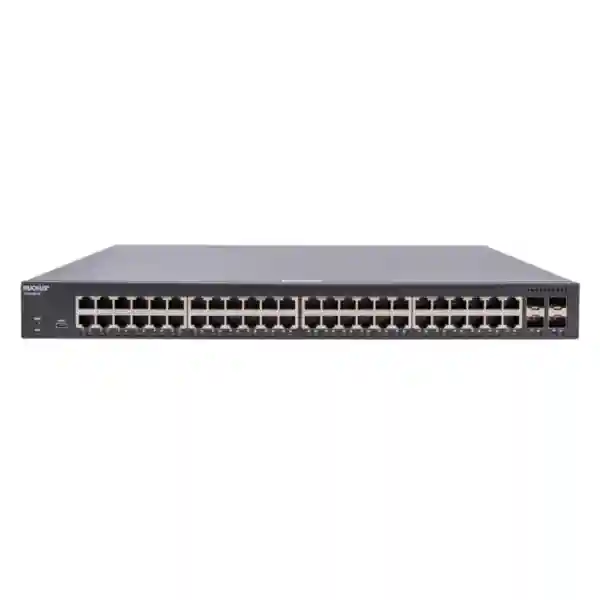
RUCKUS ICX 8100-48 Network Switch
The RUCKUS ICX 8100-48 is a non-PoE managed Ethernet switch aimed at access-layer deployments that need dense Gigabit copper connectivity without paying for unused powered ports. RUCKUS currently identifies the model as an Ethernet switch with up to 48 1GbE RJ45 interfaces, four 1GbE SFP interfaces, sFlow visibility and Energy Efficient Ethernet. The manufacturer also lists a maximum switching-capacity figure of 180 Gb/s on the current model page. Because RUCKUS offers several closely named ICX 8100 variants, including PoE and “-X” versions, buyers should confirm the exact suffix, uplink speed, optics and software requirements in the quotation rather than assuming that specifications from another ICX 8100 model apply to ICX 8100-48.
FourTeck helps organizations evaluate the switch as part of the complete access network: endpoint count, VLAN design, uplink media, firewall connection, wireless architecture, rack space, patching, monitoring and growth. This page is written for buyers searching for RUCKUS ICX 8100-48 Dubai, RUCKUS ICX 8100-48 UAE, regional supplier guidance, quotation information and practical deployment considerations.
Model: RUCKUS ICX 8100-48
Access ports: Up to 48 × 1GbE RJ45
Uplinks: Four SFP-family uplink positions; confirm speed and optic support for the quoted SKU
PoE: No on ICX 8100-48; select a PoE model if powered endpoints are required
Before ordering: Validate software, transceivers, power cord, mounting accessories and management requirements.
Port-density value
Forty-eight copper access ports make the model relevant where desktops, printers, servers, controllers or other wired endpoints need consolidated Gigabit connectivity in one rack unit.
Non-PoE design
The standard ICX 8100-48 does not provide PoE/PoE+. That can suit data-only access layers, while phones, cameras and access points may require another powered switch or injector strategy.
Operational visibility
sFlow support can contribute traffic visibility where the monitoring platform and configuration are designed to collect and interpret flow data.
Energy awareness
Energy Efficient Ethernet is listed by RUCKUS. Actual consumption still depends on traffic, cabling, firmware and operating conditions, so facility planning should use current manufacturer documentation.
What the RUCKUS ICX 8100-48 is — and what it is not
The ICX 8100 family contains models that look similar in search results but are not interchangeable. The exact ICX 8100-48 is the standard 48-port non-PoE model. It is appropriate to compare it with requirements for user access, device connectivity, VLAN separation and uplink design; it should not be purchased on the assumption that it powers access points, IP phones or cameras. If those endpoints need switch-supplied power, the project should compare the appropriate ICX 8100 PoE variant and its power budget.
The current RUCKUS model page identifies the product as an Ethernet switch and lists 48 maximum 1GbE RJ45 ports, four maximum 1GbE SFP ports, a maximum switching capacity of 180 Gb/s, sFlow and Energy Efficient Ethernet. RUCKUS documentation also distinguishes standard ICX 8100 models from “-X” versions. For procurement, that means the requested line item should contain the full exact model designation. Uplink transceiver type, supported speed, firmware release, power cord, mounting kit and any management entitlement should be confirmed explicitly before the purchase order is released.
A 48-port switch decision is rarely only about port count. A sound design also checks the upstream capacity, traffic concentration, failure impact, rack ventilation, patch-panel arrangement, copper cable quality, VLAN count, monitoring, administrator access and whether the network requires redundancy or stacking features not listed for the standard model. FourTeck can help translate those requirements into a quotation checklist instead of treating the switch as an isolated box.
RUCKUS ICX 8100-48 technical planning snapshot
| Planning item | Current verified direction | Buyer action |
|---|---|---|
| Model role | Managed Ethernet access switch | Confirm that the required role is access switching, not a feature set expected from a higher-layer platform. |
| Copper access | Up to 48 × 1GbE RJ45 | Count active endpoints, spare ports and patch-panel capacity. |
| Uplink connectivity | Four SFP-family uplink positions are listed across current manufacturer material | Confirm supported speed and transceiver part numbers for the exact ordered SKU. |
| PoE | No on ICX 8100-48 | Use a PoE-capable variant or separate power method for powered edge devices. |
| Monitoring | sFlow listed | Confirm collector compatibility, sampling policy and retention. |
| Stacking | Not listed for the standard model | Do not design a stack unless the exact model and software explicitly support the planned method. |
Where this switch can fit
The RUCKUS ICX 8100-48 can be considered for office floors, branch racks, training environments, hospitality back-office networks, retail administration, warehouses, education facilities and similar locations where a large number of wired Gigabit endpoints terminate in one access cabinet. It can also fit mixed infrastructures where wireless access points or cameras are powered by a different PoE switch while ordinary workstations and fixed data devices use the non-PoE ports on the ICX 8100-48.
For a new network, first divide endpoints into data-only and powered categories. Then calculate the number of access ports per cabinet, expected simultaneous traffic, the bandwidth of uplinks to aggregation or firewall layers, and the number of spare ports needed for growth. If the business already uses RUCKUS wireless or RUCKUS management tooling, confirm the current management compatibility and firmware baseline for this specific model before standardizing the deployment.
For broader infrastructure planning in the UAE, buyers can also review FourTeck networking and infrastructure services and FourTeck UAE IT and network solutions. These resources are useful when the switch purchase is part of a larger project involving cabling, firewalls, Wi-Fi, servers or operational support.
RUCKUS ICX 8100-48 Network Switch Dubai
Organizations searching for RUCKUS ICX 8100-48 Dubai are usually trying to solve one of three practical needs: add a dense block of wired Gigabit access ports, replace an aging access switch, or standardize a new office or branch rack around a managed switching platform. In Dubai, the purchasing conversation should start with the exact rack and endpoint requirement rather than the model name alone. A 48-port non-PoE switch can be a strong fit for desktop-heavy offices, data-only device networks, server-room patching and mixed environments where powered endpoints are handled by dedicated PoE switches. It is a weaker fit when most ports will connect directly to access points, phones, cameras or door controllers that expect power from the switch.
Before requesting a Dubai quotation, document how many active copper ports are required on day one, how many ports should remain available for growth, and how the switch will connect upstream. Identify whether the uplink terminates on a firewall, router, aggregation switch or another access layer. Confirm whether the upstream connection uses copper or fiber and, for fiber, specify connector type, optic standard and link distance. This is especially important in Dubai offices where network rooms can be distributed across multiple floors or buildings and the uplink medium may be defined by structured cabling already in place.
Thermal and rack planning also deserves attention. Even when a switch is straightforward to install, the complete cabinet can contain UPS systems, firewalls, patch panels, NVRs, servers and other heat-producing equipment. Buyers should confirm rack-unit space, airflow, power outlet type, cable organization and access for maintenance. The quote should state the exact ICX 8100-48 model, power accessories, mounting items, optics if required and any support or software components that are part of the proposed solution. Availability and delivery timing should be confirmed at quotation stage rather than assumed from an online listing.
For projects where the switch connects directly to an internet-security layer, FourTeck’s Dubai firewall deployment guidance explains how switches, VLANs, ISP handoffs and gateways should be reviewed together. Buyers can use the FourTeck Dubai contact page to share port counts, rack details, uplink media and project scope for a commercial discussion.
RUCKUS ICX 8100-48 Network Switch UAE
A UAE-wide RUCKUS ICX 8100-48 requirement may cover headquarters, branches, warehouses, clinics, schools, hospitality sites or distributed offices in different emirates. The procurement challenge is therefore not only selecting the hardware but keeping configuration, cabling and operational standards consistent across locations. The standard ICX 8100-48 provides dense non-PoE Gigabit access, making it relevant to sites with many fixed data endpoints. When wireless access points, IP telephones or security cameras dominate the port count, the project should separate those powered endpoints and compare a suitable PoE switch rather than forcing the non-PoE model into the wrong role.
For multi-site UAE projects, create a repeatable switch schedule. Record the switch name, cabinet location, VLANs, uplink destination, optic or cable type, management address, firmware target, backup procedure and monitoring method. Standardization reduces troubleshooting time because support teams can understand what is expected at each branch. It also helps purchasing teams distinguish the exact RUCKUS ICX 8100-48 from the ICX 8100-48P, ICX 8100-48PF and “-X” variants that may appear beside it in distributor catalogs.
UAE buyers should also ask how the access switch interacts with the firewall and wireless environment. A VLAN created on the switch may need a corresponding gateway, DHCP scope, firewall policy and wireless SSID mapping. A fiber uplink may require approved optics at both ends. A branch design may need redundancy that a single access switch cannot provide on its own. These dependencies should be captured before the equipment list is finalized so the quotation includes the right supporting components and services.
For general UAE infrastructure planning, review FourTeck UAE technology solutions. For network-edge context, the perimeter firewall planning resource is useful when switch VLANs and security zones must be designed together. The purchasing objective should be a documented access-network design, not simply a box with 48 ports.
RUCKUS ICX 8100-48 Network Switch Uganda
For customers researching RUCKUS ICX 8100-48 Uganda, the most useful first step is to separate core procurement questions from deployment conditions. The ICX 8100-48 is a high-density, non-PoE Gigabit access switch. That profile can suit offices, education facilities, service businesses and operations where many wired data endpoints terminate at a central rack. If the network includes access points, IP phones or cameras that must receive power over Ethernet, those devices need a separate power plan or a PoE-capable switch model. Avoid assuming that all 48-port ICX 8100 models provide the same power features.
Uganda deployments can involve a mixture of urban offices and sites where replacement logistics or specialist support may take additional planning. That makes documentation and spares strategy valuable. Buyers should list the exact model, uplink media, transceiver requirements, power cord, rack accessories and firmware baseline on the bill of materials. For sites that depend heavily on the switch, consider how service will continue if the device is unavailable: spare ports on a neighboring switch, a standby device, documented replacement configuration or another practical continuity method may be justified depending on the business impact.
WAN and internet performance should not be confused with LAN switching capacity. The ICX 8100-48 can provide many local Gigabit access ports, but user experience also depends on uplink sizing, firewall capacity, ISP performance, wireless design and server or cloud application behavior. A well-designed deployment maps each dependency so that a bottleneck elsewhere is not incorrectly blamed on the access switch. Where branches connect back to Kampala or another central location, VLAN and routing plans should be documented consistently.
Customers can review FourTeck Uganda IT and networking support for regional context. When requesting a quote, include the number of switches, installation city, endpoint count, uplink type, rack status and whether configuration or deployment assistance is required. That information produces a more useful proposal than asking only for a RUCKUS ICX 8100-48 price.
RUCKUS ICX 8100-48 Network Switch Kampala
Kampala buyers often need access switching for offices, multi-floor business premises, training centers, hospitality operations, clinics and growing organizations that are consolidating network equipment into structured racks. The RUCKUS ICX 8100-48 can serve data-heavy access layers where 48 Gigabit copper ports are useful and PoE is not required on those specific connections. A good Kampala design begins with the patch panel: count the live outlets, identify which endpoints require power, reserve reasonable growth capacity and map each outlet to the correct VLAN or network role.
In buildings with more than one wiring closet, uplink planning is a major decision. Copper may be sufficient for short same-room connections, while fiber can be preferred across floors, longer distances or electrically challenging paths. The exact optic and supported uplink speed must match both the ICX 8100-48 SKU and the device at the far end. Do not purchase generic transceivers solely by connector appearance; compatibility, wavelength, distance and fiber type should be verified in the final bill of materials.
Kampala organizations replacing an existing switch should capture the old configuration before cutover. Record VLAN assignments, tagged and untagged ports, uplinks, management addressing, link aggregation, access controls and any monitoring settings. The migration plan should identify which connections are business-critical and how each one will be tested after the new switch is installed. Even a simple access-layer replacement can interrupt internet access, IP addressing or server connectivity when VLAN assumptions are not documented.
Regional purchasing information is available through FourTeck Uganda. For a Kampala quotation, buyers should provide the exact ICX 8100-48 requirement, quantity, rack location, fiber or copper uplink details, expected installation scope and any requirement for switch configuration, labeling or testing. These details help align the supply request with the real network rather than treating every 48-port managed switch as equivalent.
RUCKUS ICX 8100-48 Network Switch Arua
For an Arua deployment, procurement should account for the operational importance of the site and the practicalities of replacement, installation and remote support. The RUCKUS ICX 8100-48 is a non-PoE 48-port managed access switch, which can fit branch offices, institutions, commercial sites and service facilities with a significant number of wired data endpoints. It is particularly important to classify endpoints before purchase because a switch that is ideal for computers, printers and data devices will not directly power access points, phones or cameras.
Arua sites that depend on remote IT administration should have a clear management and recovery plan. Record the management IP address, administrator access method, configuration backup location, firmware baseline and uplink information. If the organization has a central IT team elsewhere in Uganda, agree on a naming convention and VLAN standard that makes the Arua switch understandable without requiring local staff to reconstruct the network from scratch. Remote support becomes much easier when port descriptions identify the connected department or device.
Power quality and rack conditions should also be included in the project checklist. The switch should be installed with suitable power protection and ventilation according to current manufacturer requirements and local site conditions. Cables should be labeled, bend radius respected for fiber, and patch leads kept organized so troubleshooting does not become risky. Where replacement lead time would be disruptive, the buyer can consider whether a compatible spare, alternative port capacity or documented contingency is justified by the site’s business role.
When requesting RUCKUS ICX 8100-48 Arua pricing, include more than the product name. State the desired quantity, delivery location, planned uplink medium, rack status, required optics, configuration support and whether the site connects to other Uganda branches. FourTeck Uganda can be used as the regional reference point for discussing the wider network requirement and procurement scope.
RUCKUS ICX 8100-48 Network Switch Mbarara
Mbarara businesses and institutions may use a 48-port access switch when one communications room serves a large number of wired users, administrative systems or operational devices. The RUCKUS ICX 8100-48 is most relevant where those connections are data-only and Gigabit Ethernet is appropriate. If the same cabinet serves many wireless access points, IP telephones or CCTV cameras, the procurement team should calculate PoE demand separately and either add a dedicated powered switch or select the appropriate PoE-capable model.
For a Mbarara campus, warehouse or multi-building site, document uplink topology before ordering optics. The path may include single-mode or multimode fiber, different connector types, patch panels and intermediate cabinets. Every element must match. The switch model alone does not determine the complete uplink solution. Ask for an itemized quotation that distinguishes the switch, transceivers, patch cords, rack hardware, power accessories and professional services. This makes commercial comparison easier and reduces the risk of receiving hardware that cannot be commissioned immediately.
Network segmentation is another reason to choose a managed switch rather than an unmanaged alternative. Departments, guest devices, servers, building systems or other device groups can be separated through a planned VLAN architecture, subject to the capabilities of the complete network. The upstream router or firewall must understand how those VLANs are routed and secured. Switch configuration should therefore be coordinated with gateway rules, DHCP services and wireless settings rather than completed independently.
A useful RUCKUS ICX 8100-48 Mbarara quote request lists endpoint types, port count, VLANs, uplink distance, cabinet details and the expected installation or support scope. For Uganda-wide coordination, FourTeck Uganda provides a regional channel for networking and IT inquiries. Buyers should confirm current availability and any delivery arrangement as part of the formal quotation.
RUCKUS ICX 8100-48 Network Switch Gulu
For Gulu, the RUCKUS ICX 8100-48 can be evaluated as an access-layer switch for organizations that need many managed Gigabit data ports in a single rack. Typical requirements can include offices, education, hospitality, healthcare administration, project sites and branch facilities. The most important model-selection point is that ICX 8100-48 is the standard non-PoE version. If the Gulu site expects the switch to power cameras, access points or IP phones, that requirement must be addressed with a PoE-capable design rather than assumed to be included.
Where a Gulu branch is managed from Kampala or another central office, consistent configuration becomes a business advantage. Use standard port descriptions, VLAN identifiers, management addressing and backup procedures. Record the exact switch software version and approved upgrade process. If remote troubleshooting is required, monitoring should be designed so the central team can distinguish a local port problem, an uplink issue, a WAN fault and a firewall or ISP problem. sFlow support can be part of that visibility strategy when the organization already has a compatible collector and appropriate operating processes.
The physical layer should receive equal attention. Verify patch-panel labeling, cable category, fiber route, rack depth, power protection and ventilation. A 48-port switch can create a dense cable environment, so clean patching and documentation are not cosmetic details; they reduce errors during maintenance and expansion. For remote or operationally important sites, decide in advance what happens if the switch fails and how configuration will be restored on replacement hardware.
To request RUCKUS ICX 8100-48 Gulu pricing, buyers should send the quantity, site location, required uplink type, network role, endpoint mix and service scope. FourTeck Uganda can be referenced for regional networking discussions. A clear bill of materials should identify every accessory and service rather than leaving optics, mounting or configuration assumptions unresolved.
RUCKUS ICX 8100-48 Network Switch Kenya
Kenya buyers evaluating the RUCKUS ICX 8100-48 are often comparing managed 48-port access switches for offices, branches, campuses, hospitality, retail back offices, warehouses and institutional networks. The model’s main procurement value is dense Gigabit copper connectivity without PoE on the standard version. That makes endpoint classification essential. Workstations, printers and many fixed network devices may use ordinary Ethernet, while access points, cameras and phones may need a different switch model with a defined PoE budget.
In a Kenya multi-site deployment, standardize the bill of materials so procurement does not mix the ICX 8100-48 with similarly named PoE or “-X” variants. Each site schedule should show switch quantity, rack location, uplink media, optics, power accessories, firmware target and management approach. If a branch requires fiber to an aggregation layer, confirm the optical standard and distance. If the switch is expected to participate in a redundant architecture, validate that design against the exact model’s supported features rather than assuming capabilities from a different ICX family.
Network growth should also be considered. A switch with 48 ports may appear to leave ample room, but spare capacity can disappear quickly when printers, access control, building systems and new departments are added. Reserve ports deliberately and document which device categories belong on this non-PoE switch. When the access layer connects to a firewall, coordinate VLAN trunks, gateway interfaces and policy rules so segmentation works consistently across the network.
For RUCKUS ICX 8100-48 Kenya inquiries, FourTeck Kenya is a relevant regional resource. A quote request should include installation city, quantity, endpoint types, existing network brands, uplink distance and whether configuration, testing or project support is required. Current stock, delivery and commercial terms should be confirmed in the quotation rather than inferred from third-party online listings.
RUCKUS ICX 8100-48 Network Switch Kuwait
A RUCKUS ICX 8100-48 Kuwait requirement can arise in corporate offices, retail groups, hospitality, education, professional services or branch networks that need high-density wired access. The non-PoE design can be attractive where most endpoints already have local power and the organization wants to avoid buying unused PoE capacity. Conversely, a cabinet serving many wireless access points, cameras or IP phones should be reviewed for a powered switching requirement before the hardware is selected.
Environmental planning is important in Kuwait because network equipment may be installed in heavily cooled indoor spaces while cable paths or remote cabinets experience different conditions. The switch itself should be installed within current manufacturer environmental limits, with adequate airflow and a stable power source. Avoid placing network hardware in an unsuitable enclosure solely because the location is convenient. Verify rack depth, front and rear cable clearance, UPS capacity and the maintenance path for replacing a power cable or uplink optic.
For enterprise procurement, include the full exact model designation on the purchase request. RUCKUS ICX 8100-48, ICX 8100-48P and ICX 8100-48PF are different products, and “-X” variants can differ in uplink capability. The proposal should identify optics, support, management components and installation services separately. If centralized monitoring or cloud management is required, confirm current compatibility and entitlement with the quoted hardware and software release.
Customers can review FourTeck Kuwait for regional IT and network solution context. When asking for RUCKUS ICX 8100-48 Kuwait pricing, share the quantity, rack environment, uplink media, endpoint mix and project timeline. That lets the quotation address the complete requirement instead of presenting an isolated hardware price that may omit necessary accessories or services.
RUCKUS ICX 8100-48 Network Switch Ghana
Organizations searching for RUCKUS ICX 8100-48 Ghana may be planning office expansion, switch replacement, structured cabling upgrades or a standardized branch network. The ICX 8100-48 should be evaluated as a non-PoE managed Gigabit access switch with high copper-port density. That profile can work well for conventional data endpoints while a separate powered switching plan supports wireless, voice and surveillance equipment when needed.
For Ghana deployments, the purchasing team should ask how the switch connects into the wider topology. Is the uplink copper or fiber? What is the distance? Which device provides the VLAN gateways? Is the access layer monitored centrally? Are there branch links or VPN paths that depend on the switch? These questions matter because a locally healthy switch can still appear slow when an uplink, firewall, ISP connection or server is the true bottleneck. Clear topology documentation allows support teams to isolate faults more efficiently.
The bill of materials should identify the exact model, required optics, patch leads, rack hardware, power arrangement and any service scope. If the network is replacing older equipment, export and document the existing configuration before changes begin. Plan a test list covering DHCP, internet access, internal applications, inter-VLAN communication, printers, servers and any special devices. A controlled cutover is safer than moving all patch cords without a map and troubleshooting afterward.
For local context, buyers can use FourTeck Ghana IT product and infrastructure resources. A useful RUCKUS ICX 8100-48 Ghana quote request includes the deployment city, switch quantity, endpoint count, rack readiness, uplink specification and expected support. Stock and delivery should be confirmed at the time of quotation because availability can change by supplier and project quantity.
RUCKUS ICX 8100-48 Network Switch Nigeria
Nigeria projects can range from single offices to distributed enterprise networks, making it important to define the access-layer role before selecting the RUCKUS ICX 8100-48. The model is relevant where 48 managed Gigabit copper ports are useful and PoE is not needed on those connections. Large office environments often contain a mixture of powered and non-powered devices, so the access design may use the ICX 8100-48 alongside separate PoE switching for wireless, voice, CCTV or access-control equipment.
For multi-branch Nigerian organizations, configuration standardization can reduce operational risk. Define common VLAN IDs where practical, consistent port-description conventions, management addressing, firmware policy, administrator access and configuration backup. A standard template should still allow site-specific exceptions, but those exceptions should be documented. If a switch is replaced, the support team should be able to restore service from known information rather than reconstructing every port manually.
Power resilience should be planned according to the business impact of an outage. A UPS can help protect the switch from short power interruptions, but the entire network path matters: firewall, router, ISP equipment, wireless controllers and servers may also need protected power. Similarly, redundant internet links do not create resilience if all internal access depends on one undocumented cabinet. The network design should identify single points of failure and decide which ones are acceptable for the site.
For procurement and regional IT discussions, visit FourTeck Nigeria. A RUCKUS ICX 8100-48 Nigeria request should state the city, quantity, existing switch environment, uplink media, expected VLANs and implementation scope. Ask for an itemized quotation that distinguishes hardware, optics, accessories and professional services. This makes it easier to compare proposals on the same technical basis.
RUCKUS ICX 8100-48 Network Switch Seychelles
Seychelles buyers considering the RUCKUS ICX 8100-48 may be supporting hospitality, offices, education, retail, service operations or infrastructure where dependable wired access is important. Because island logistics can increase the consequence of an omitted accessory or incorrect model, the bill of materials should be unusually explicit. Confirm the exact ICX 8100-48 non-PoE model, quantity, power accessories, rack hardware, uplink optics, patch cords and any management or support requirements before shipment is arranged.
The switch can provide dense Gigabit copper access for data devices, but it should not be selected if the primary requirement is to power endpoints. In a hotel or resort, for example, wireless access points, cameras and phones may need PoE, while administration PCs, servers, controllers or back-office devices can use non-PoE switching. Separating those categories creates a clearer power budget and can make future troubleshooting easier. It also prevents procurement from assuming that all 48-port switches are functionally identical.
For sites spread across separate buildings, fiber uplinks may be part of the architecture. Confirm distance, fiber type, connector and optic compatibility at both ends of every link. If the switch is part of a business-critical network, consider the replacement plan in advance: configuration backups, labeled patching, spare optics and a documented recovery procedure can materially reduce downtime when local specialist access or replacement logistics are constrained.
For Seychelles inquiries, regional coordination can begin through FourTeck Africa or the main FourTeck infrastructure portal. Share the island or site location, switch quantity, endpoint mix, fiber requirement, rack details and support expectations. Current availability, freight arrangements and commercial terms should be confirmed in the quotation rather than assumed.
Compatibility and deployment questions to resolve before purchase
A switch quotation is complete only when the surrounding design is understood. The following items should be reviewed with the network administrator or project team so that the exact hardware and services match the environment.
Endpoint and PoE map
Count workstations, printers, servers, access points, cameras, phones and IoT devices separately. The standard ICX 8100-48 does not provide PoE, so powered endpoints need a different power strategy.
Uplink and optics
Confirm the exact uplink speed supported by the ordered SKU, fiber type, wavelength, distance, connector, optic compatibility and the far-end interface.
VLAN and gateway design
Define which networks are tagged or untagged on each link, where the default gateways live, how DHCP is supplied and which firewall rules govern traffic between segments.
Management and monitoring
Confirm local, centralized or cloud management requirements, administrator access, configuration backup, logging, sFlow collection and the approved firmware lifecycle.
Related FourTeck resources for a complete network project
A switch sits between endpoint cabling and the routed or secured network edge. The following verified FourTeck pages can help buyers consider the adjacent parts of that design instead of purchasing access switching in isolation.
Firewall Dubai home
Use the Firewall Dubai solution portal when the access switch will connect to a business firewall and security policies need to be coordinated with VLANs.
About FourTeck Firewall Solutions
Review FourTeck’s Dubai network-security approach for context on how switching, VLANs, Wi-Fi and firewalls interact during project planning.
Firewall deployment planning
The firewall deployment guide covers network review, switch layout, VLANs, ISP handoffs and other dependencies that should be mapped before implementation.
Perimeter firewall design
Read the perimeter firewall resource when access-switch segments will be protected by policy zones, guest controls or server security boundaries.
Palo Alto PA-Series design reference
The Palo Alto PA-Series planning page includes useful guidance on interface planning, optics and bill-of-material discipline for networks that pair access switches with a security gateway.
PA-410 branch edge reference
See the PA-410 branch firewall page for an example of planning a compact security edge with separate switching, VLAN and fiber considerations.
PA-415 edge connectivity reference
The PA-415 page discusses when a dedicated switching layer remains useful even where the firewall itself provides a limited number of local interfaces.
Frequently asked questions
Does the RUCKUS ICX 8100-48 provide PoE?
No. The current RUCKUS product page lists PoE/PoE+ as “No” for ICX 8100-48. Buyers who need to power wireless access points, IP phones, cameras or other PoE devices should select an appropriate PoE-capable switch or provide a separate power method.
How many access ports are available?
RUCKUS lists up to 48 1GbE RJ45 ports on the ICX 8100-48. The final network plan should reserve some capacity for growth and distinguish active user ports from uplinks, management and special-purpose connections.
What should I confirm about the uplinks?
Confirm the exact ordered model and suffix, supported uplink speed, optic part number, fiber type, connector, distance and compatibility with the device at the other end. Do not assume that an “-X” specification applies to the standard ICX 8100-48.
Can the switch be used with a firewall from another vendor?
Ethernet switching and VLAN interoperability can work across vendors when standards, tagging, link settings and routing are configured correctly. The specific firewall interface, VLAN gateway, transceiver and link design should still be validated before deployment.
Is the ICX 8100-48 stackable?
The current RUCKUS model page lists stacking as “No” for the standard ICX 8100-48. If stacking is a project requirement, use the exact current RUCKUS documentation to identify a model and software combination designed for that need.
What information should I send for a quote?
Send the exact model, quantity, deployment country and city, endpoint count, PoE requirement, uplink media and distance, existing switch or firewall environment, rack status, optic requirements and whether configuration, installation, testing or ongoing support is required.
Decision recap
Choose the RUCKUS ICX 8100-48 when the design calls for a managed 48-port Gigabit access switch and the connected endpoints do not require PoE from this device. Confirm the exact uplink capability, optics, software, rack accessories and management requirement for the quoted SKU. If the network depends on stacking, PoE, redundant power or other advanced features not listed for the standard model, revisit the switch selection before ordering.
You need dense managed Gigabit copper access, have a separate plan for powered endpoints and can design the uplink around the exact supported interfaces.
The project expects PoE, stacking, redundant power, higher-speed access interfaces or other features that belong to a different model or product tier.
List the exact model, quantity, optics, accessories, support and service scope so proposals can be compared on identical requirements.
Quotation checklist
1. Exact model: RUCKUS ICX 8100-48, including any suffix shown on the manufacturer or distributor line item.
2. Quantity and site: Number of switches and deployment city/country.
3. Endpoint plan: Number of data-only and PoE-powered endpoints.
4. Uplink details: Speed, media, distance, fiber type and far-end device.
5. Accessories: Optics, patch cords, rack hardware and power accessories.
6. Services: Staging, configuration, installation, testing, documentation and support.
Talk to FourTeck about the complete access-network requirement
Share the number of users and devices, current switch environment, VLAN plan, uplink media, firewall model, wireless requirements, rack details and deployment location. FourTeck can use that information to clarify whether the RUCKUS ICX 8100-48 fits the design and what optics, accessories or adjacent network components should be included in the quotation. The objective is to reduce ordering mistakes and produce a bill of materials that can be deployed with fewer surprises.
For regional projects, FourTeck resources are available through Kenya, Uganda, Kuwait, Ghana and Nigeria, with broader infrastructure information at FourTeck.

Reviews
There are no reviews yet.