

Ubiquiti Flex Mini 2.5G USW-Flex-2.5G-5 in Dubai, UAE
A five-port 2.5 GbE desktop switch for buyers who need a small, manageable step beyond standard Gigabit Ethernet without adding a full-size access switch.
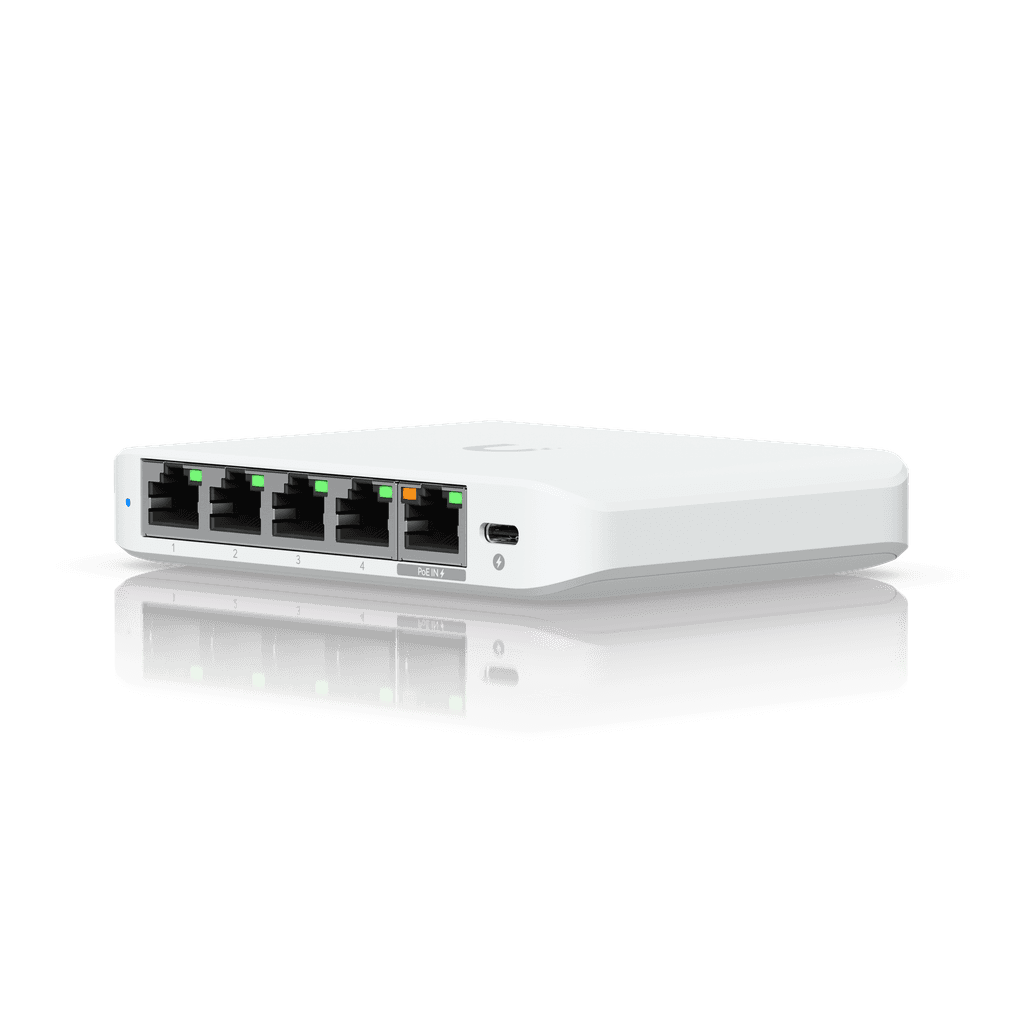
Form factor: compact desktop
Management: UniFi Network
Direct answer for buyers
The Ubiquiti Flex Mini 2.5G is a compact Layer 2 switch with five multigigabit RJ45 ports. It is mainly used to add 2.5 GbE connectivity at the edge of a small UniFi network, such as beside a workstation group, meeting-room system, network storage device or high-speed wireless access point. It is best considered by buyers who need a small port count, central UniFi management and more bandwidth than ordinary Gigabit Ethernet. Before proceeding, confirm the required number of ports, the speed of the uplink, cabling quality, the chosen power method, UniFi Network application version and whether any connected device requires PoE output, because this model accepts PoE power but does not supply PoE to endpoints.
What it does
This switch creates a small wired network segment with five 2.5 GbE ports. It can connect several local devices while providing a single path back to another switch, gateway or network core. Because every port supports 2.5G, 1G, 100M and 10M operation, the Flex Mini 2.5G can accommodate a mixed set of modern and legacy Ethernet devices. The negotiated speed depends on the endpoint, cable and upstream equipment.
Its role is straightforward: provide managed multigigabit access in a small footprint. It is not intended to replace a larger access switch when many endpoints, PoE output, SFP uplinks, redundant power or advanced Layer 3 routing functions are required.
Who it suits
The model can suit small offices, design studios, media desks, retail counters, classrooms, technical labs, executive work areas and branch locations where only a few wired connections are needed. It is also relevant for buyers adding one or two 2.5 GbE-capable endpoints to an existing UniFi environment without installing a large switch.
It is most appropriate when simple placement, silent desktop use and central management matter more than expansion. Organisations expecting additional users, multiple access points, IP phones, surveillance cameras or power-hungry edge devices should assess a larger UniFi switch with sufficient PoE budget and uplink capacity.
Business challenges this model can address
Gigabit bottlenecks at the desk
A workstation, NAS or Wi-Fi 6E/7 access point may support more than 1 GbE. A 2.5 GbE edge switch can remove the one-gigabit limit, provided the uplink and destination path are also fast enough.
Limited space
Its compact enclosure is easier to place on a desk, shelf or equipment surface than a rack-width switch. Buyers should still allow ventilation and protect the unit from unsuitable environmental conditions.
Fragmented management
Within a UniFi deployment, the switch can be adopted and managed through the UniFi Network application, giving administrators a consistent view alongside compatible gateways, access points and other switches.
Power outlet constraints
The unit may be powered from PoE input or a compatible 5V USB-C source. The best option depends on the network layout, available injector or upstream PoE port, and local power design.
Core capabilities at a glance
Product-fit decision matrix
| Requirement | Suitable when | Confirm before ordering |
|---|---|---|
| Small 2.5G edge segment | Up to five local Ethernet connections are enough. | Reserve one port for uplink if required, leaving four for endpoints. |
| PoE-powered switch placement | A compatible upstream PoE source is available. | Voltage, injector or switch compatibility, cable length and cable condition. |
| USB-C-powered installation | A suitable 5V DC USB-C source can be provided. | Included accessories and regional power-adapter arrangement. |
| UniFi-managed network | The organisation already operates or plans to operate UniFi Network. | Controller hosting and minimum application version 8.6.9. |
| Powered edge devices | Endpoints have their own power or separate injectors. | This model has no PoE output budget for attached devices. |
Verified technical information
| Brand | Ubiquiti |
|---|---|
| Product name | UniFi Flex Mini 2.5G |
| Model | USW-Flex-2.5G-5 |
| Product type | Compact managed Layer 2 desktop switch |
| Network ports | 5 × 2.5 GbE RJ45, supporting 2.5G/1G/100M/10M |
| Switching capacity | 25 Gbps |
| Total non-blocking throughput | 12.5 Gbps |
| Forwarding rate | 19 Mpps |
| Supported VLANs | 256 |
| MAC address table | 4,000 entries |
| Layer 2 features | STP/RSTP, egress rate limiting, flow control, storm control, multicast and broadcast rate limiting, port isolation, port mirroring, jumbo frames and loop protection |
| Power methods | 1 × USB Type-C, 5V DC, 1A; or 1 × PoE input |
| Supported voltage | 4.8–5.2V DC/USB or 44–57V PoE |
| Maximum power consumption | 5W with AC/DC input; 6.4W with PoE input |
| Dimensions | 117.1 × 90 × 21.2 mm |
| Weight | 206 g |
| Enclosure | Polycarbonate |
| Operating temperature | -20 to 45°C |
| Operating humidity | 10 to 90% non-condensing |
| Management application | UniFi Network 8.6.9 or later |
| Availability | Contact FourTeck for current UAE options, quantity and lead time |
Compatibility and dependency notice
Performance depends on the complete network path. A 2.5 GbE endpoint connected to this switch will not automatically achieve 2.5 GbE end-to-end if the uplink, gateway, server, cable or destination device is limited to 1 GbE. For practical planning, verify every critical link from source to destination.
The Flex Mini 2.5G is managed through UniFi Network and the official requirement is version 8.6.9 or later. Buyers should confirm where the UniFi Network application will run, who will administer it, how adoption will be performed and whether existing site standards permit the selected firmware and application version.
PoE on this product is a power input method, not an output service. It cannot directly power cameras, access points or phones. If attached devices require PoE, select a suitable PoE switch or separate injector arrangement after checking power standards and budgets.
A practical purchase and deployment journey
Map the links
List the endpoints, uplink device and actual negotiated speeds. Decide which connections genuinely need more than 1 GbE.
Confirm port count
Account for one uplink where needed. A five-port switch commonly provides four endpoint connections plus one upstream connection.
Choose power
Decide whether the switch will use PoE input or USB-C power, then confirm the upstream source and regional adapter arrangements.
Plan UniFi adoption
Confirm controller hosting, administrator access, network profiles, VLAN requirements and the approved maintenance window.
Test the path
After installation, verify link speed, VLAN assignment, reachability, throughput expectations and monitoring visibility.
2.5 GbE where it delivers practical value
The main reason to consider this switch is not simply that 2.5 is a larger number than 1. The business case is strongest where endpoints can transfer sustained traffic above the effective limits of Gigabit Ethernet. Examples include large design files moving between a workstation and network storage, frequent backup traffic, local media workflows, virtual-machine images, software repositories, high-resolution content and wireless access points whose aggregate client traffic can exceed a single gigabit.
A buyer should avoid treating every endpoint as a 2.5G requirement. Office printers, many phones, basic terminals and light-use devices may gain little from a multigigabit link. The more useful approach is to identify bandwidth-sensitive systems, place them on appropriate ports and confirm that the uplink is not slower than the traffic demand. Because the Flex Mini 2.5G provides five equal-speed ports, it offers flexibility in assigning uplink and endpoint roles, but it does not create extra bandwidth outside the switch itself.
Cabling also matters. Existing structured cabling may support 2.5 GbE, but actual results depend on category, length, termination quality, patch leads, electromagnetic conditions and installation history. Before replacing a switch to solve a performance complaint, test the cabling and inspect negotiated speeds on both ends. FourTeck can help businesses frame the right checks so that the purchase addresses the true bottleneck rather than only one visible component.
Central management without a large switch footprint
The Flex Mini 2.5G is designed for use with UniFi Network. In an established UniFi environment, this allows the switch to appear in the same operational interface used for compatible gateways, access points and other switches. Administrators can review device status, port activity and relevant network configuration without relying on a separate management utility for this small edge location.
Central management is valuable when several compact switches are distributed around a site. A meeting room, reception desk and creative workspace can each require a few ports, yet the IT team still needs consistent naming, VLAN assignment and troubleshooting. UniFi adoption can support that consistency, provided the organisation has a suitable UniFi Network host, administrative ownership and documented configuration standards.
The device supports useful Layer 2 controls including STP and RSTP for loop prevention, port isolation, port mirroring, storm control, rate limiting, jumbo frames and loop protection. These are practical operational tools, but they need deliberate configuration. Port mirroring, for example, is useful for diagnostics but should be enabled only when required. Port isolation can restrict device-to-device communication, but the intended communication pattern must be understood first.
This is not a substitute for full network design. VLANs, gateway rules, wireless policies and security controls need to be planned across the entire environment. FourTeck can assist with a requirement review and configuration scope so that the compact switch is placed within a coherent architecture rather than installed as an isolated device.
Flexible powering for constrained locations
The ability to power the switch through either PoE input or a 5V USB-C source gives designers two practical installation choices. PoE input may reduce the need for a local electrical outlet when a suitable upstream PoE switch or injector is available. This can be useful on a shelf, behind a display, near a meeting-room system or in a small enclosure where a separate mains adapter would be inconvenient.
USB-C power may be simpler where local power is already available and the upstream network device does not provide PoE. The official specification lists 5V DC at 1A and a supported USB voltage range of 4.8 to 5.2V. Buyers should confirm the actual power supply included with the regional package or specify a compatible source in the bill of materials. A connector that physically fits is not enough; voltage and current requirements still matter.
The PoE input option must not be confused with PoE output. The switch consumes power from PoE but does not distribute PoE to its connected endpoints. This distinction is essential when the intended devices include wireless access points, IP cameras, phones or access-control components. Those devices need their own power, dedicated injectors or a switch designed with a sufficient PoE output budget.
For business deployments, the power decision should be documented alongside cabling, mounting location and maintenance access. A switch placed where it cannot be reached easily may save space initially but complicate future troubleshooting. FourTeck can include power-source review and installation planning in the quotation discussion when the project needs more than product supply.
Ideal environments and use cases
Creative workstation pod
Connect several design or media workstations to a nearby NAS or faster upstream switch. Confirm storage performance and uplink speed before expecting sustained multigigabit transfer rates.
Small meeting room
Provide managed wired ports for a conferencing unit, room PC, display controller and local connection. Device power must be handled separately where PoE is required.
Wi-Fi access point uplink
Use 2.5 GbE for an access point that can exceed a 1 GbE wired link, while supplying the access point through another suitable PoE source because this switch has no PoE output.
Compact branch edge
Add a few centrally managed wired connections in a branch or temporary workspace. Check remote-administration procedures and whether five ports leave enough room for growth.
Lab or test bench
Create a small multigigabit segment for testing appliances, development systems or data transfers. Port mirroring can assist diagnostics when configured appropriately.
Home office or studio
Connect a workstation, NAS, desktop and uplink in a compact environment, provided UniFi management is desired and expansion expectations remain modest.
Integration and operational considerations
The switch should be considered as one component of a wider network. The upstream switch or gateway must provide the required speed and VLAN handling. A 2.5 GbE uplink to a 1 GbE core can still be useful for local traffic between devices on the Flex Mini 2.5G, but traffic leaving that local segment will encounter the slower upstream limit.
Network loops are another practical consideration. Small switches are often placed in user areas where patching changes occur without formal change control. STP, RSTP and loop-protection features can reduce risk, but physical labelling and clear patching guidance remain important. Avoid connecting two ports back to the same network unless the design intentionally supports that topology and has been reviewed.
Where VLAN separation is required, confirm that the upstream network, gateway and UniFi configuration use consistent VLAN IDs and tagging behaviour. A port profile suitable for a workstation may differ from one used for an access point, phone or trunk. Documenting these roles before installation makes commissioning faster and future troubleshooting more predictable.
Environmental placement should also be checked. The official operating range is -20 to 45°C with 10 to 90 percent non-condensing humidity, but practical installations should still avoid direct heat, moisture, dust accumulation and enclosed spaces without airflow. The polycarbonate desktop enclosure is compact; it should not be treated as a rugged outdoor housing.
Buyer questions to resolve before ordering
Count endpoints and the uplink. Five physical ports may mean only four device ports in a typical topology.
Identify devices, storage and uplinks that support multigigabit Ethernet and justify the upgrade.
Plan separate power or select another switch, because the USW-Flex-2.5G-5 provides no PoE output.
Choose PoE input or USB-C and confirm the exact source, cable and regional accessory requirement.
Confirm a compatible Cloud Gateway, console or hosted application and assign administrative responsibility.
A larger model may be more economical if port demand, PoE needs or high-speed uplinks will expand soon.
Procurement checklist
☐ Exact model USW-Flex-2.5G-5
☐ Required quantity and site allocation
☐ Endpoint count plus uplink allowance
☐ Required negotiated speed per device
☐ Existing cable category and test status
☐ PoE input or USB-C power selection
☐ Confirmation that no PoE output is needed
☐ UniFi Network host and version
☐ VLAN and port-profile requirements
☐ Installation location and ventilation
☐ Configuration and testing scope
☐ UAE delivery destination and timeline
☐ Warranty terms confirmed in quotation
FourTeck consultation and quotation support
FourTeck can help translate a short product request into a more accurate bill of materials. For this switch, that means confirming the model, quantity, intended endpoints, uplink design, power method, controller environment and any configuration services. This step is especially useful when a buyer is choosing between the Flex Mini 2.5G and a larger UniFi switch that offers more ports, PoE output or a faster dedicated uplink.
The consultation can also cover cabling assumptions, VLAN requirements, adoption planning, naming conventions and commissioning checks. Product supply, installation, configuration and support should be stated clearly in the quotation so that each party understands what is included. For wider infrastructure planning, explore FourTeck’s business technology product range and network and security services.
To begin, share the exact site requirement through the FourTeck contact team. Include the location, quantity, target devices, expected link speeds and whether deployment assistance is needed. This enables a quotation that reflects the real installation rather than only the unit model.
UAE availability and support guidance
Contact FourTeck to confirm current UAE availability for the Ubiquiti Flex Mini 2.5G USW-Flex-2.5G-5. Availability can change according to quantity, regional supply, vendor lead time and the exact package required. A quoted unit price should be checked together with VAT treatment, delivery destination, included accessories, warranty terms and any installation or configuration service.
For projects in Dubai, Abu Dhabi, Sharjah and Ajman, FourTeck can coordinate requirement review, quotation and delivery planning after the site details are confirmed. Where configuration is required, provide the UniFi Network environment, VLAN plan, administrator availability and preferred maintenance window. Installation and configuration scope should be included explicitly in the quotation rather than assumed to be part of product supply.
Businesses planning a broader refresh can also review FourTeck’s UAE technology solutions and discuss adjacent switching, wireless, firewall and support requirements in one coordinated request.
GCC Availability
FourTeck can assist organisations across the GCC with requirement review, model confirmation, quotation coordination and deployment planning for the Ubiquiti Flex Mini 2.5G. Buyers in the United Arab Emirates, Saudi Arabia, Kuwait, Qatar, Bahrain and Oman should provide the destination country, quantity, intended use, power preference and required timeline so that the request can be assessed accurately. Product availability, regional packaging, warranty handling, delivery schedules and service scope may vary by country and vendor lead time. Where the switch will be integrated into an existing UniFi network, it is also helpful to share the controller version, uplink design and VLAN requirements. FourTeck can then advise whether this five-port model fits the project or whether another option should be evaluated. For Kuwait-related coordination, the FourTeck Kuwait resource may also support regional discussions. No local stock, customs outcome or fixed delivery date should be assumed until the formal quotation and destination details are confirmed.
Africa Availability
For Africa-based requirements, FourTeck can help businesses evaluate the exact switch model, quantities, power arrangement, cabling, controller environment and any configuration support needed before procurement. Fulfilment may depend on the destination, vendor lead time, shipping route, regional power requirements, warranty process and local project conditions. Buyers should share the destination country, deployment city, expected schedule and whether the switch is part of a larger UniFi rollout. This is particularly important when several sites need consistent configuration or when related gateways, wireless access points and PoE switches are also required. FourTeck supports regional planning through resources including FourTeck Africa, FourTeck Kenya and FourTeck Uganda. Availability, shipment, installation coverage and support arrangements should be confirmed for the exact country and scope; immediate inventory or guaranteed delivery should not be assumed.
Related products and services to consider
Larger UniFi 2.5G switch
Consider a higher-port-count model when five ports are insufficient or when a dedicated faster uplink is needed. Exact specifications must be checked by model.
UniFi PoE switch
A PoE-output model may be more suitable for powering access points, cameras or phones. Calculate the required per-port standard and total power budget.
UniFi Cloud Gateway or console
A compatible management host may be required where the organisation does not already operate UniFi Network.
Structured cabling assessment
Cable testing can identify whether existing links will negotiate reliably at 2.5 GbE and whether patching changes are needed.
UniFi configuration support
Adoption, VLAN profiles, port naming, firmware review and commissioning tests can be included as a defined service scope.
Why businesses contact FourTeck
Buyers often know the model they want but still need to confirm whether it fits the site. FourTeck can review the port count, uplink requirement, endpoint speeds, power method and UniFi management environment before the order is finalised. This helps distinguish a straightforward five-port edge requirement from a wider switching project that needs more ports, PoE output, rack mounting or a different uplink design.
FourTeck can also coordinate quotation details, related accessories, cabling checks, configuration scope and regional delivery planning. The purpose is not to add unnecessary complexity; it is to make sure that the quoted item, services and responsibilities match the intended deployment. Learn more about the company through the FourTeck business profile or submit the exact requirement through the contact page.
Frequently asked questions
Is the USW-Flex-2.5G-5 a managed switch?
Yes. It is managed through the UniFi Network application over Ethernet. Ubiquiti lists UniFi Network version 8.6.9 or later as the application requirement.
Do all five ports support 2.5 GbE?
Yes. The official specification lists five RJ45 ports supporting 2.5G, 1G, 100M and 10M. Actual negotiated speed depends on the connected device and cable.
Can it power a UniFi access point?
No. The switch can receive power through PoE, but it does not provide PoE output. An access point that requires PoE needs a separate injector or a PoE-output switch.
Can the switch be powered through USB-C?
Yes. The official specification lists a 5V DC, 1A USB Type-C power method. Confirm the included regional power accessory and compatibility before ordering.
How many user devices can be connected?
There are five physical ports. In a common layout, one port is used as the uplink, leaving four ports for endpoints. A different topology may use the ports differently.
Does it support VLANs?
Yes. Ubiquiti lists support for up to 256 VLANs. The complete VLAN design must also be supported by the upstream network and gateway.
Is it suitable for outdoor installation?
It is specified as a compact desktop switch with a polycarbonate enclosure. Do not treat it as an outdoor-rated device unless a suitable protected installation has been designed and verified.
Will it make every network transfer 2.5 times faster?
No. End-to-end performance depends on the source, destination, storage, uplink, gateway, cable and application. The switch removes one possible Gigabit bottleneck but cannot overcome slower components elsewhere.
What information is needed for a quotation?
Provide the exact model, quantity, UAE or regional destination, endpoint count, preferred power method, controller environment, required delivery timing and any configuration or installation scope.
How can I confirm Dubai availability?
Contact FourTeck with the quantity and destination. Current availability, price, lead time, warranty terms and service scope should be confirmed in the formal quotation.
Confirm the model, quantity and deployment plan
Share your endpoint count, uplink speed, preferred power method and UniFi management environment. FourTeck can prepare a focused quotation and clarify current UAE availability.

Reviews
There are no reviews yet.