
Juniper Mist wireless for room-level deployments
Juniper AP12 Access Point Dubai
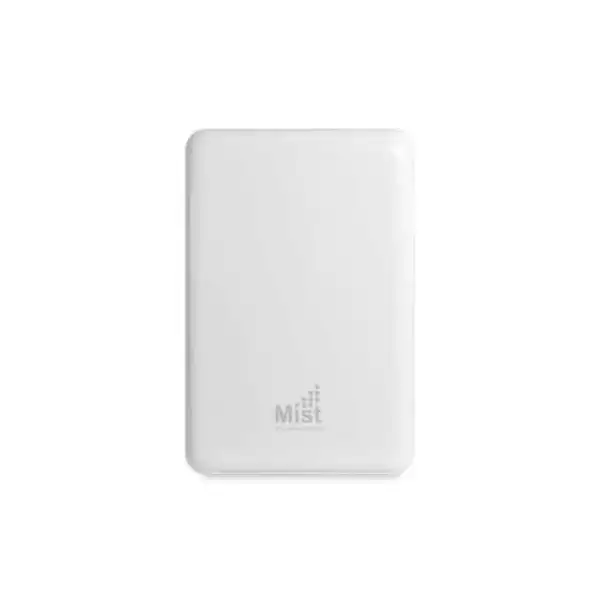
The Juniper AP12 is a compact indoor wall-plate Wi-Fi 6 access point designed for environments where a single room, office, accommodation unit or small branch area needs reliable dual-band wireless service together with several local wired connections. It combines 2×2:2 802.11ax radios, a dedicated scanning radio, Bluetooth 5.0, Gigabit Ethernet connectivity and Juniper Mist cloud operations in a form factor that can be mounted on a wall plate or placed on a desk with the appropriate accessory.
Direct answer: what is the Juniper AP12 and who should consider it?
The Juniper AP12 is an indoor wall-plate access point in the Juniper Mist portfolio. It uses Wi-Fi 6 on the 2.4 GHz and 5 GHz bands, supports two spatial streams per client radio, and includes a dedicated third radio used for monitoring, wireless security, spectrum analysis, synthetic testing and location-related functions. Its unusual strength is the combination of wireless access with room-side wired connectivity, which makes it particularly relevant to hospitality rooms, dormitories, compact branch offices, teleworker environments and similar spaces where one AP can serve both Wi-Fi users and nearby Ethernet devices.
Organizations should consider the AP12 when the wall-plate or desk-mount form factor fits the physical design and when Wi-Fi 6 dual-band service is sufficient. It should not be selected merely because its published aggregate radio rate is 1.8 Gbps. Real application throughput depends on client capabilities, channel width, interference, airtime contention, wired uplink design, RF planning and the service delivered upstream. The most important factors to confirm before ordering are the correct regional hardware SKU, the required Juniper Mist Wi-Fi Assurance subscription, the intended PoE source, the mounting accessory, and whether the project needs the AP12’s 2×2:2 dual-band design or a higher-capacity or 6 GHz model instead.
FourTeck can help map room count, wired device needs, expected client density, switch PoE capacity, subscription term and installation method to an accurate Dubai/UAE quotation. That planning matters because the AP hardware is only one part of a working Mist WLAN deployment.
Why the AP12 is different from a conventional ceiling access point
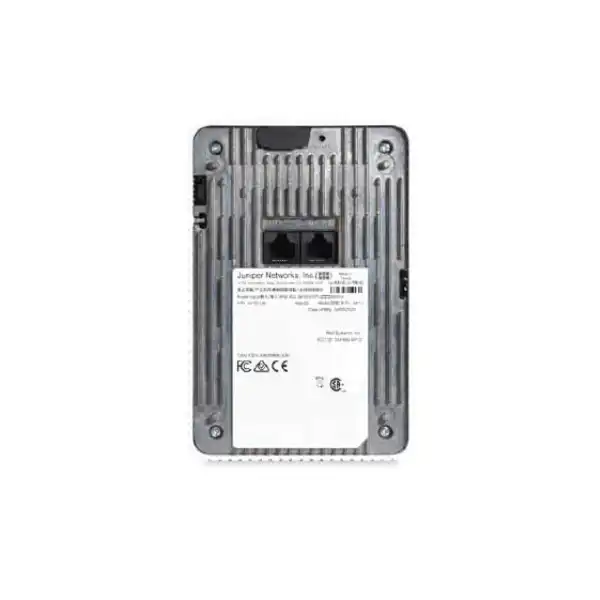
Many enterprise access points are designed primarily to create a wireless cell from a ceiling or high wall. The AP12 is aimed at a different deployment problem. Its wall-plate orientation lets a network team bring Wi-Fi and wired access close to the user in a room or compact working area. This can be useful when the building already has one Ethernet run to each room and the design needs to extend that single run into several local connections without adding a separate small switch at every location. Juniper’s product information describes five Ethernet ports on the AP12. The detailed interface table identifies Eth0 as a 10/100/1000Base-T RJ45 PoE-powered-device input, Eth1 as a 10/100/1000Base-T RJ45 interface that can provide Class 2 PoE output when the AP receives 802.3at power, Eth2 and Eth3 as additional 10/100/1000Base-T RJ45 interfaces, plus a passthrough connection.
That topology can simplify a hotel-room or residence design. A room can receive Wi-Fi from the AP while a television, desk phone, workstation, printer or other Ethernet endpoint uses one of the local ports. The exact endpoint mix still needs design review because the AP is not a substitute for an access switch with a large PoE budget, VLAN scale or extensive switch features. The PoE-output capability is also conditional: the datasheet states that Eth1 PoE output requires 802.3at power to the AP. If the AP is fed only by an 802.3af source, the project should not assume the downstream PoE function will be available.
The AP12 also differs from a simple room access point because its third radio is dedicated to operational intelligence rather than client traffic. Juniper lists dual-band WIDS/WIPS scanning, spectrum analysis, synthetic client operation and location analytics among the functions of this radio. This means the AP can collect RF and user-experience data without continuously sacrificing one of the two client-serving radios for background scanning. That architecture is particularly relevant when a business intends to use Juniper Mist for automated RF management, service-level monitoring and troubleshooting rather than treating the AP as a stand-alone Wi-Fi box.
The design trade-off is equally important. The AP12 is a 2×2:2 dual-band Wi-Fi 6 product rather than a 4×4 model or a Wi-Fi 6E product with 6 GHz support. For a room-centric deployment this may be exactly the right balance of size, cost and capability. For a high-density hall, large open office, auditorium or newer 6 GHz client strategy, the product family should be compared before committing to AP12 throughout the site.
Core Juniper AP12 specifications
| Specification | AP12 detail and buyer relevance |
|---|---|
| Deployment | Indoor wall-plate or desk-mount deployment with the appropriate bracket or stand. This makes placement and room cabling part of the selection decision. |
| Wi-Fi standard | IEEE 802.11ax (Wi-Fi 6), with OFDMA, 1024-QAM, MU-MIMO, Target Wake Time and BSS Coloring; backward compatible with 802.11a/b/g/n/ac clients. |
| 2.4 GHz radio | 2×2:2; up to 575 Mbps with 802.11ax and up to 400 Mbps with 802.11b/g/n according to Juniper’s published specification. |
| 5 GHz radio | 2×2:2 802.11ax with a maximum supported data rate of 1,200 Mbps. |
| Combined highest supported data rate | 1.8 Gbps across the 2.4 GHz and 5 GHz client radios. This is an aggregate PHY-rate figure, not a promise of 1.8 Gbps application throughput to one client. |
| Third radio | Dedicated 2.4/5 GHz scanning radio for WIDS/WIPS, spectrum analysis, synthetic client functions and location analytics. |
| Internal Wi-Fi antennas | Omnidirectional; published peak gain is 3 dBi at 2.4 GHz and 6 dBi at 5 GHz for the internal-antenna model. |
| Bluetooth | Bluetooth 5.0 with an omnidirectional antenna; Juniper lists superbeacon mode with iBeacon and Eddystone support. |
| Ethernet and PoE | Eth0 Gigabit Ethernet PoE input; Eth1 Gigabit Ethernet with Class 2 PoE output when the AP is powered by 802.3at; Eth2 and Eth3 Gigabit Ethernet; plus passthrough. |
| Power options | 802.3af/at PoE. The switch or injector choice should reflect whether downstream PoE output is required. |
| Dimensions | 150 × 100 × 40 mm. |
| Weight | 0.6 kg excluding mount and accessories. |
| Operating environment | 0°C to 40°C for the internal-antenna model, 10% to 90% relative humidity noncondensing, and operating altitude up to 3,048 m. |
| Security hardware | Trusted Platform Module (TPM) included for infrastructure security. |
Specifications above reflect Juniper’s published AP12 documentation. Regulatory domain, subscription entitlements, feature availability and support terms should be reconfirmed for the exact Dubai/UAE order at quotation time.
Understanding the 1.8 Gbps figure before sizing a network
The AP12 is often summarized by its combined highest supported data rate of 1.8 Gbps, but that number needs context. Juniper publishes up to 575 Mbps for the 2.4 GHz 802.11ax radio and up to 1,200 Mbps for the 5 GHz radio. Adding those radio maxima produces the marketed combined figure. It does not mean a single laptop can download at 1.8 Gbps, and it does not mean every AP12 installation will deliver the same throughput. Wi-Fi is a shared, half-duplex radio medium. The actual user experience depends on the modulation rate a client can negotiate, the number of spatial streams supported by that client, distance and attenuation, the selected channel width, interference, retransmissions, protocol overhead, airtime sharing, traffic direction and upstream network capacity.
For a business buyer, the useful question is therefore not “Is 1.8 Gbps fast enough?” but “How many devices will be active in this room or cell, what applications will they run, and what service level is required at the busy hour?” A hotel room with several guest devices, a smart television and a wired phone presents a very different load from a classroom, meeting room or open office. The AP12’s 2×2:2 design is well aligned with many phones, tablets and laptops that themselves use two spatial streams, but a higher-density environment may benefit more from an AP with additional spatial streams, different antenna characteristics or a broader spectrum strategy.
The wired side also matters. Each active Ethernet port is Gigabit Ethernet. The AP’s client radios and wired endpoints ultimately share the available upstream path through the deployment design. If several local Ethernet devices and many wireless clients simultaneously exchange heavy traffic, the access switch, VLAN architecture, WAN link and application servers can become limiting factors before the nominal wireless PHY rates do. This is why an AP quote should be connected to a simple capacity model rather than based only on the headline Wi-Fi specification.
For Dubai projects, FourTeck can use the expected number of rooms or work areas, approximate client count per AP, application mix, wired endpoint requirements and upstream switch design to determine whether the AP12 is appropriately sized or whether a different Juniper access point should be evaluated.
Wi-Fi 6 capabilities and what they mean in practice
OFDMA
Orthogonal Frequency Division Multiple Access allows a Wi-Fi 6 access point to divide a channel into smaller resource units so multiple clients can be served more efficiently. This can improve efficiency when many devices exchange smaller packets, which is common with mobile and IoT traffic. The benefit is not a fixed speed multiplier; it depends on compatible clients, traffic patterns and RF conditions.
MU-MIMO
The AP12 supports two-spatial-stream MU-MIMO. Juniper states that the device can deliver up to 1,200 Mbps of wireless data rate to as many as four MU-MIMO-capable client devices simultaneously under supported conditions. Client capability and scheduling determine whether this technique is used in a given moment.
BSS Coloring
BSS Coloring helps Wi-Fi 6 networks distinguish overlapping basic service sets and can improve spatial reuse where multiple cells share spectrum. It is useful in multi-room and multi-AP environments, but good RF design remains necessary; BSS Coloring does not remove the need to control channel reuse, transmit power and physical placement.
Target Wake Time
Target Wake Time lets compatible clients coordinate wake and sleep schedules, potentially improving battery efficiency for suitable IoT and mobile devices. Juniper pairs this Wi-Fi 6 capability with Bluetooth 5.0 in the AP12 to support modern device environments. The endpoint must support the relevant behavior for the benefit to apply.
The AP12 also supports 1024-QAM and transmit beamforming. These technologies can raise efficiency or data rate under favorable signal conditions, but they depend on client support and RF quality. A buyer should view Wi-Fi 6 as a toolbox for capacity and efficiency rather than as a guarantee that every device will operate at the highest advertised rate. Older 802.11a/b/g/n/ac clients remain supported, which helps mixed-generation environments migrate gradually, but legacy devices can still consume airtime inefficiently and influence the overall cell experience.
The dedicated third radio: operational value beyond client connectivity
A core AP12 design characteristic is its third dual-band radio, which Juniper dedicates to monitoring and operational functions rather than normal client service. In the published datasheet, this radio is associated with WIDS/WIPS, spectrum analysis, synthetic client behavior and location analytics. That architecture allows the access point to observe the surrounding 2.4 GHz and 5 GHz environment while the two client-serving radios continue carrying user traffic. For a cloud-managed WLAN, this separation is valuable because RF intelligence and security monitoring are ongoing tasks, not one-time setup activities.
Juniper Mist Radio Resource Management uses environmental information to automate channel and power decisions. The datasheet describes a learning process that monitors service-level coverage and capacity metrics and uses a 24-hour window with hysteresis for site-wide rebalancing. In practical terms, the network can respond to changes in interference and client conditions more systematically than a static channel plan. This does not eliminate the need for initial RF planning. APs still need sensible placement, sufficient overlap for roaming where required, and channel resources appropriate to local regulations. Automated RRM works best when the physical design is sound.
The synthetic client function is another useful distinction. The dedicated radio can act as a test client to help detect network anomalies proactively. Combined with Mist service-level data, this can shorten troubleshooting because the network has telemetry about the user path before an engineer arrives with a laptop and packet-capture tool. Juniper also describes dynamic packet capture that streams relevant captures to the cloud when significant issues are detected. These capabilities are part of the broader Mist service experience and should be evaluated together with the required subscription rather than assumed to be stand-alone AP features independent of cloud licensing.
For buyers with many small branches, rooms or distributed sites, this operational model can be as important as raw radio speed. A modestly sized AP that provides consistent telemetry and centralized management may lower support effort more effectively than a higher-specification AP managed without appropriate visibility. The decision therefore involves both radio capacity and the network operations model.
Juniper Mist cloud management and subscription planning
The AP12 is designed to operate as part of the Juniper Mist cloud architecture. Current Juniper documentation states that Juniper Mist is a subscription-based service and that Wi-Fi Assurance is a mandatory subscription when using Juniper access points. That point belongs in the hardware quotation conversation from the beginning. Buying the AP without planning its subscription term can create an incomplete procurement package, especially when a project is replacing another vendor whose controller or license model works differently.
Wi-Fi Assurance provides the day-to-day cloud functions that make the Mist operating model useful, including WLAN configuration, radio resource management, service-level expectations, dynamic packet capture and guest Wi-Fi capabilities. Juniper publishes one-, three- and five-year Wireless Assurance terms under the SUB-MAN family. Exact subscription SKUs and commercial packaging can change, so the final quote should use the current Juniper ordering structure rather than relying on an old bill of materials copied from another deployment.
Additional cloud services are optional depending on the use case. Juniper Mist Asset Visibility can support asset-location workflows; Premium Analytics extends reporting and data analysis beyond the standard analytics experience; User Engagement supports location-aware engagement scenarios; and Marvis Virtual Network Assistant provides AI-driven conversational troubleshooting and network insight. These services are not interchangeable. A hospitality buyer interested primarily in reliable guest Wi-Fi may need a different combination from a healthcare, logistics or enterprise-office buyer focused on asset visibility and operational analytics.
Juniper’s current analytics documentation distinguishes standard analytics included with Wireless Assurance from Premium Analytics. Standard analytics provides a shorter historical view, while Premium Analytics adds longer retention, richer reporting and third-party data capabilities under a separate subscription. Because cloud features evolve more frequently than access-point hardware, the safest procurement approach is to define the required operational outcomes first and map those outcomes to the current subscription SKUs at the time of purchase.
For renewal planning, subscription quantity and duration should be aligned with the expected number of APs and lifecycle of the site. A three-year branch rollout should not accidentally receive mixed one-year licenses unless that is intentional. Likewise, organizations consolidating many sites into one Mist organization should review how subscriptions are assigned at organization or site scope so expansion and renewals remain manageable.
Ethernet ports, PoE input and downstream PoE: a critical AP12 design check
The AP12’s wired interfaces are a major reason to select it, but they also create one of the most important design dependencies. Eth0 is the Gigabit Ethernet uplink and PoE-powered-device interface. The AP accepts 802.3af or 802.3at PoE. Eth1 is another Gigabit Ethernet port and can provide Class 2 PoE output when the AP receives 802.3at power. Eth2 and Eth3 provide additional Gigabit Ethernet connections, and the unit includes a passthrough connection. This arrangement can reduce the need for a separate edge switch in a room, but only when the power and VLAN requirements are understood.
Suppose a hotel room needs an IP phone powered from the AP12. The upstream switch port must be able to provide the 802.3at input condition required for the AP’s PoE-output feature. It is not enough for the switch to support PoE in general; its available per-port budget and total chassis budget must remain sufficient when all rooms are active. A large deployment can have dozens or hundreds of APs, so power planning should be performed across the switch stack, not one AP at a time. If an 802.3af injector is used instead, the downstream PoE behavior should not be assumed to match an 802.3at-fed deployment.
VLAN design also deserves attention. The local wired ports may serve devices with different security or traffic requirements from the wireless SSIDs. A television, VoIP phone, workstation and guest Wi-Fi client should not automatically share the same policy simply because they terminate on the same AP. The Mist configuration, access-switch design, upstream firewall and authentication model should work together to segment traffic appropriately. Where 802.1X, MAC-based access, private pre-shared keys or cloud NAC are part of the architecture, the relevant Juniper Mist service and upstream network compatibility should be confirmed during design.
The practical advantage is significant when the design is correct: one structured-cabling drop can support the AP and several room devices, simplifying room aesthetics and reducing the number of standalone powered devices. The limitation is that the AP12 should not be treated as a general-purpose switch. It remains primarily an access point with useful local Ethernet extension, and projects with larger wired-port counts, high downstream PoE demand or advanced edge-switch requirements should retain dedicated switching where appropriate.
Mounting choices and physical installation
The AP12 is designed for wall-plate use, but Juniper also lists a desktop stand option. The published mounting accessories include the APBR-WP1 wall-plate bracket, the APBR-DS1 desktop stand for the small-form-factor access point, and an APWP-KIT combining the desktop stand with a wall-pluggable 802.3af PoE injector. These accessory choices affect the installation plan, cable path, appearance and power behavior. The exact accessory should therefore appear explicitly on the bill of materials instead of being left to the installer to improvise.
For wall-plate installation, the existing wall box, cable termination and physical orientation need to be checked. A design that assumes the AP will simply replace every existing data faceplate can fail if mounting dimensions, back-box depth or cable bend radius are unsuitable. The AP itself measures 150 × 100 × 40 mm and weighs 0.6 kg excluding mount and accessories. A site survey should verify that the intended position is unobstructed, serviceable and not hidden behind furniture, metal fixtures or other material that can alter the RF pattern.
Desk mounting may be useful for remote-worker spaces, temporary offices, small branches or rooms where wall modification is undesirable. It is also helpful during pilot testing because the AP can be positioned without permanent mounting. However, desktop placement changes antenna height and the surrounding obstruction environment, so RF performance should not be assumed to match a wall-plate design. Power-cable and Ethernet-cable visibility may also matter in customer-facing spaces.
In Dubai, the AP12’s published 0°C to 40°C operating range for the internal-antenna model is especially relevant to installation quality. The product is intended for indoor use. It should not be placed in unconditioned outdoor enclosures, hot ceiling voids or locations where ambient temperature can exceed the rated range. Humidity must remain within the specified 10% to 90% noncondensing range. A comfortable air-conditioned room normally presents a different thermal environment from a service cupboard or façade-adjacent enclosure, so the physical location should be evaluated rather than inferred from the building address.
The best installation is one that combines mechanical fit, RF fit, cable access, power availability and future serviceability. Treating mounting as an accessory afterthought can undermine an otherwise correct AP selection.
RF planning for hotels, residences, branches and room-based environments
The wall-plate form factor naturally encourages a one-AP-per-room mindset, but that is not automatically the right answer for every building. RF design should still account for wall construction, room dimensions, corridor layout, neighboring APs, client density and expected application load. In some properties, heavy concrete or insulated walls can make room-level AP placement attractive because signals do not travel efficiently between rooms. In others, lighter partitions may allow more overlap, which makes channel reuse and transmit-power control especially important.
The AP12 uses omnidirectional internal antennas with published peak gains of 3 dBi at 2.4 GHz and 6 dBi at 5 GHz. An omnidirectional pattern does not mean perfectly equal coverage in every direction, and antenna plots vary with frequency and orientation. The practical takeaway is that access-point placement should be tested in the intended mounting orientation. A signal that appears strong in a corridor may behave differently through a bathroom wall, wardrobe, metallic door or equipment cabinet. Predictive design is useful, but validation measurements in representative rooms reduce risk.
Channel planning must also consider the difference between 2.4 GHz and 5 GHz. The 2.4 GHz band has fewer non-overlapping channel resources and generally travels farther, so excessive transmit power can cause too much co-channel contention across rooms. The 5 GHz band offers more channel choices in many regulatory domains and usually supports higher capacity, but available channels and power levels depend on local regulation. The AP12’s RRM can automate channel and power assignment, yet it can only work within the regulatory domain and physical conditions presented by the deployment.
A proper room-based plan also considers roaming. If users move from rooms into corridors, lounges or common areas, those spaces may need their own access points. AP12 should not be forced into every location simply because it is selected for rooms. Ceiling-mounted or higher-capacity Juniper models may be better for lobbies, conference halls, open-plan offices or high-density public areas. A mixed-AP design can be more effective than a uniform design when the building contains several distinct RF environments.
For a branch office, the same principle applies at smaller scale. An AP12 can be a good fit where the AP location also needs wired ports, but a central ceiling AP may be more efficient when the floor plan is open and wired edge devices are already served by nearby switches. Product fit follows the physical problem, not the model name.
Regional ordering for Dubai and the importance of the correct AP12 SKU
Juniper’s AP12 ordering information distinguishes US and worldwide models. The published datasheet lists AP12-US for the United States internal-antenna model and AP12-WW for the internal-antenna model outside the United States; external-antenna variants are identified separately as AP12E-US and AP12E-WW. For a Dubai/UAE deployment, the internal-antenna AP12-WW is the relevant worldwide ordering family in Juniper’s documentation, but the exact authorized regional SKU and regulatory domain still need to be confirmed at the time of quotation.
That verification is not administrative trivia. Juniper explicitly notes that products are manufactured in accordance with electrical and environmental regulations for specific regions and that regional or country-specific SKUs should be used only in authorized areas. Wi-Fi channel availability, transmit-power limits and regulatory behavior vary by jurisdiction. Using the wrong domain can create compliance issues and may affect warranty or support. A professional quotation should therefore identify the intended country of deployment rather than importing a model code based only on apparent stock availability.
The model distinction also matters because the user’s request is for AP12, which normally refers to the internal-antenna wall-plate unit. The AP12E is a different variant with external antennas. An external-antenna model may be appropriate in a specialized design, but it should not be silently substituted for AP12. Mounting, antenna selection and regulatory planning change when external antennas are involved.
For FourTeck’s Dubai quotation workflow, the safest order input is the exact product family, internal versus external antenna requirement, installation country, quantity, subscription term and mounting accessory. That allows the commercial line items to be aligned with the technical design before approval.
Security, wireless monitoring and segmentation considerations
The AP12 includes a Trusted Platform Module for infrastructure security and a dedicated radio used for wireless intrusion detection and prevention scanning. These features support a stronger operational foundation, but enterprise wireless security still depends on configuration and the surrounding network. An AP cannot compensate for weak authentication policy, flat VLAN design, outdated client settings or insufficient firewall segmentation.
In a hotel or residence, guest devices should normally be isolated from operational systems such as property-management terminals, building systems, staff devices and voice infrastructure. The local wired ports add another dimension because room devices can have very different trust levels. The design should define which VLAN or policy each Ethernet port uses, whether a device is authenticated, and whether east-west communication between guest endpoints is permitted. The upstream switch and firewall must enforce the intended policy consistently with the WLAN configuration.
For enterprise branches, identity-aware access can be more important than static VLAN assignment. Juniper Mist offers cloud-based access-control services separately from the base Wi-Fi Assurance subscription. Whether those services are required depends on the organization’s authentication model, existing RADIUS infrastructure, endpoint types and security policy. A buyer migrating from another WLAN should not assume that every existing controller-based role, ACL or captive-portal behavior maps one-to-one into Mist. Migration design should identify the current SSIDs, authentication methods, certificates, VLANs, access rules, guest workflows and device onboarding process before cutover.
The dedicated scanning radio also contributes to RF security visibility because it can monitor 2.4 GHz and 5 GHz while client radios remain active. That can help detect unauthorized or anomalous wireless activity depending on the configured Mist features and subscription. However, WIDS/WIPS should be treated as one security layer, not a replacement for endpoint security, NAC, switch controls or firewall policy.
For procurement, the useful security question is not simply whether the AP12 is “secure.” It is whether the selected hardware, Mist subscriptions, authentication architecture and network segmentation together satisfy the organization’s security requirements. That is a design outcome, not a single product checkbox.
Bluetooth 5.0 and asset-related use cases
The AP12 includes Bluetooth 5.0 with an omnidirectional Bluetooth antenna and support for superbeacon mode with iBeacon and Eddystone. This capability can participate in location and asset workflows within the Juniper Mist ecosystem. The value depends on the exact service subscription and the tags or mobile applications used, so Bluetooth should be considered a platform capability rather than an automatic asset-tracking solution delivered by the AP alone.
Juniper Mist Asset Visibility is designed to identify assets and provide location-oriented information for compatible third-party tags. In a hotel, this might be relevant to mobile equipment, maintenance assets or operational items. In an office, education or healthcare setting, the use case may involve locating tagged equipment and reviewing historical movement or telemetry. The AP12’s physical BLE radio can contribute to these scenarios, while the cloud service provides the application layer for visibility and analytics.
An important product-family nuance is that Juniper’s comparison table does not list “Virtual BLE” as a supported AP12 feature, even though the AP12 has Bluetooth 5.0 and superbeacon capability. Buyers should therefore avoid treating all Juniper AP BLE capabilities as identical. If a design specifically depends on virtual beacon behavior, advanced indoor location or a particular sensor function, the exact AP model and service documentation should be checked before purchase. The AP12 family comparison also does not list onboard IoT environmental sensors such as temperature or accelerometer for this model.
This distinction is useful during selection. If the primary business requirement is room Wi-Fi plus wired ports, AP12’s BLE capability can be a valuable addition. If location services are the primary project driver, a broader Juniper access-point comparison and a proof of concept may be more appropriate so the radio and cloud features are matched precisely to the accuracy and workflow required.
Where the AP12 fits in the Juniper access-point family
Juniper’s own family comparison positions the AP12 as an indoor wall-plate/desk-mount Wi-Fi 6 access point with 2×2:2 radios and a dedicated third scanning radio. That combination is its reason to exist: it is not simply a smaller version of a ceiling AP, and it is not intended to cover every enterprise WLAN scenario. Comparing adjacent models helps prevent over- or under-specification.
Choose AP12 when
The project needs an indoor room-level AP, a wall-plate or desk form factor, Wi-Fi 6 on 2.4/5 GHz, 2×2:2 capacity and several nearby wired connections. The Ethernet/PoE arrangement is a genuine requirement rather than an unused feature.
Compare AP33 or AP43 when
The deployment is a more conventional indoor Wi-Fi 6 design and higher spatial-stream capability is required. Juniper’s family table lists AP33 with 4×4:4 at 5 GHz and 2×2:2 at 2.4 GHz, and AP43 as 4×4:4 Wi-Fi 6. Form factor and interfaces differ, so this is a design comparison rather than a drop-in replacement.
Compare AP24, AP34 or AP45 when
The WLAN strategy specifically requires Wi-Fi 6E and access to the 6 GHz band. Juniper’s family comparison identifies these models as Wi-Fi 6E options. Client support, local 6 GHz regulation, channel design and mounting requirements should be evaluated before changing product family.
Compare outdoor models when
The access point must operate outdoors or in harsh environmental conditions. AP12 is an indoor product with a published internal-antenna operating range of 0°C to 40°C. Outdoor Juniper models are designed for a different environmental class.
Use a mixed model design when
Rooms, corridors, lobbies and high-density public areas have different RF and interface requirements. AP12 can serve room-level spaces while other Juniper APs serve open areas, all under the same Mist cloud operations model where supported.
The most cost-effective architecture is often the one that uses each AP where its form factor and radio design match the environment. Standardizing on one model purely for purchasing simplicity can increase the AP count, create unnecessary overlap or leave capacity gaps in specialized areas.
Deployment workflow for a new AP12 project
1. Define the space
Count rooms, offices and common areas; identify wall construction; note existing data outlets and areas with unusual attenuation. Separate room-level AP needs from lobby, corridor and meeting-space requirements.
2. Model clients and traffic
Estimate concurrent wireless devices, application types and wired endpoints per AP. Include peak occupancy rather than average occupancy so the design reflects busy periods.
3. Verify switching and PoE
Confirm Gigabit access ports, available 802.3af/at power, total switch PoE budget and whether any AP12 Eth1 port must power a downstream device. Review VLAN and trunk requirements.
4. Select regional SKU and accessories
Confirm the authorized Dubai/UAE hardware code, internal versus external antenna requirement, wall bracket or desk stand and any injector requirement.
5. Select Mist subscriptions
Include mandatory Wi-Fi Assurance for the intended term and add only the optional services needed for Marvis, asset visibility, premium analytics or other workflows.
6. Pilot and validate
Test representative rooms or branches, validate RF behavior, Ethernet devices, PoE output, SSID policy and Mist visibility before a large-scale rollout. Use the pilot to refine power and channel assumptions.
A rollout can then proceed in controlled batches. Cloud onboarding is designed to be straightforward: the AP connects to Juniper Mist, retrieves its configuration and joins the assigned network. Even with automated onboarding, inventory discipline remains important. Record serial numbers, physical room or office location, switch port, AP name and site assignment so the cloud view corresponds to the real building. That information becomes valuable during troubleshooting and later renovations.
Migration from an existing WLAN or room-network design
Replacing existing access points with AP12 is not always a one-for-one hardware swap. The strongest migration plans start by documenting the current network behavior: SSIDs, VLANs, authentication methods, guest portals, bandwidth policies, RF channels, transmit-power levels, wired room devices, PoE requirements, switch models, DHCP scopes, DNS dependencies and firewall rules. That baseline reveals which functions belong to the old controller, which belong to the switch or firewall, and which must be recreated in Mist.
Physical cabling deserves special attention in hospitality and residence projects. A legacy wall plate may carry Ethernet, telephone or passthrough services in a layout that does not map directly to AP12. The AP12’s passthrough connection can help preserve a non-switched cable path in some designs, but the exact use should be validated. An installer should trace representative rooms before a mass cutover rather than assume every outlet is terminated consistently.
The power model may also change. Older access points may have used lower PoE classes or local adapters. AP12 accepts 802.3af/at, but projects intending to use Eth1 downstream Class 2 PoE need 802.3at input. If the existing access switches are near their power budget, a large AP replacement can require switch upgrades even when every physical port is Gigabit-capable. A PoE audit should calculate both per-port and aggregate demand.
For cloud migration, subscription activation and organization/site structure should be prepared before installation day. Define naming conventions, sites, WLAN templates and role assignments so new APs appear in the correct place when claimed. Pilot a small subset, verify client onboarding and application access, then move larger groups. This staged approach reduces the chance that an authentication or VLAN mismatch affects an entire building at once.
Finally, migration should include an exit condition for the old platform. Determine how long legacy controllers or licenses must remain active, how configurations will be archived, and when monitoring responsibility moves to Mist. A technically successful AP installation can still create operational confusion if both management systems remain partially authoritative for too long.
Practical use cases for the Juniper AP12 in Dubai
Hotel guestrooms
The AP12 can place Wi-Fi close to guests while providing wired ports for room devices. The design should confirm per-room client density, television/phone requirements, PoE output, guest isolation and whether common areas need a different AP model.
Student or staff accommodation
A wall-plate AP can combine personal Wi-Fi coverage with desk-side Ethernet. High room counts make centralized Mist visibility useful, but privacy, client isolation, switch PoE capacity and consistent room cabling must be planned carefully.
Compact branch offices
AP12 can work well when the branch needs Wi-Fi plus several local Ethernet endpoints and has a suitable wall or desk location. A larger open office may be better served by a ceiling AP selected around RF coverage instead of local port convenience.
Remote-worker or executive office
The desktop option can support a managed corporate Wi-Fi presence with wired devices in a small remote space. WAN quality, secure access architecture and centralized support processes remain just as important as the AP hardware.
Room-based service environments
Clinics, consultation rooms, training rooms or small tenant spaces may benefit from nearby Wi-Fi and Ethernet. Suitability depends on security policy, device density, wall construction, interference and whether the AP’s indoor environmental limits are appropriate.
These examples illustrate deployment patterns rather than universal recommendations. A site survey and requirements review are needed because room count alone does not determine access-point count. RF propagation, client behavior and wired-device requirements can make adjacent spaces behave very differently.
When the AP12 may not be the best choice
The AP12 is a strong fit for a specific problem, and recognizing its limits helps avoid poor standardization decisions. First, it is a dual-band Wi-Fi 6 product and does not provide 6 GHz service. Organizations with a deliberate Wi-Fi 6E strategy, a large population of 6 GHz-capable clients or a spectrum plan that depends on 6 GHz should compare AP24, AP34, AP45 or other current Juniper options rather than selecting AP12 simply because it is compact.
Second, AP12 is 2×2:2. This is appropriate for many individual rooms and small offices, but a high-density conference hall, open-plan office or public venue may benefit from a higher-spatial-stream model and a ceiling-oriented RF design. The number of clients an AP can technically associate is not the same as the number it can serve well under a specific application load. Capacity planning should focus on concurrent active devices and airtime demand.
Third, the AP12 is rated for indoor use and an operating range of 0°C to 40°C for the internal-antenna model. It is not an outdoor AP. Dubai projects involving terraces, parking areas, loading zones, unconditioned warehouses or exposed service spaces should use appropriately rated outdoor or industrial equipment rather than placing an indoor AP inside an improvised box.
Fourth, the local Ethernet ports do not turn AP12 into a full access switch. If a room needs many PoE devices, multigigabit uplinks, complex edge switching, redundant uplinks or a larger power budget, a dedicated switch architecture may be more suitable. Likewise, if a location has no need for local wired ports, a conventional ceiling AP may offer a cleaner RF placement and better value.
Finally, AP12 depends on the Juniper Mist cloud service model and mandatory Wi-Fi Assurance subscription. Organizations unwilling or unable to adopt that subscription-based management approach should resolve that architectural issue before choosing the hardware. Product suitability includes operational model, not only radio specifications.
Troubleshooting and lifecycle considerations
One of the reasons businesses adopt Mist-managed access points is to improve visibility into user experience. Juniper’s AP12 documentation describes service-level metrics, proactive analytics, dynamic packet capture, synthetic testing and cloud-driven troubleshooting. These functions can reduce the time an engineer spends reproducing an intermittent wireless problem, particularly across distributed rooms or branches. The value is greatest when IT teams define a consistent operating process around the data rather than merely installing the AP and ignoring the cloud telemetry.
Firmware management is part of that lifecycle. The AP12 connects to Juniper Mist, retrieves configuration and receives firmware updates through the cloud workflow. Organizations should still manage change windows, release policies and testing according to their internal procedures. A hospitality property, for example, may avoid broad updates during peak occupancy, while a distributed branch estate may use staged upgrades to detect issues early. Cloud automation makes deployment easier, but governance remains a business responsibility.
Hardware support should also be viewed through the current Juniper warranty and service terms. The AP12 family comparison lists a limited lifetime warranty for the indoor model, but formal Juniper warranty statements and the active support/subscription arrangement take precedence. Procurement should therefore record serial numbers, purchase records, subscription dates and support entitlement details in a centralized asset system.
Lifecycle planning becomes especially important when many AP12 units are installed behind room furniture or wall plates. Access for replacement should be considered during installation. If an AP can only be reached by moving fixed cabinetry or disrupting a guest room for an extended period, a simple hardware failure becomes an operational problem. Labeling the upstream switch port and preserving a room-to-AP inventory map shortens replacement time.
As the WLAN evolves, review whether AP12 remains the right model for expansion. New client generations, higher bandwidth applications, 6 GHz adoption and building renovations can change the optimal design. Existing AP12 units can continue serving appropriate spaces while newer Juniper models are introduced elsewhere under the same broader management architecture, subject to current compatibility and licensing.
Buyer questions to answer before requesting a quotation
How many AP12 units are required?
Quantity should follow room count and RF design, not square footage alone. Provide floor plans, room types, expected occupancy and common-area requirements so the design can separate room APs from other AP models where needed.
Is Wi-Fi 6 enough, or is 6 GHz required?
AP12 supports 2.4 GHz and 5 GHz Wi-Fi 6, not Wi-Fi 6E. If 6 GHz is a project requirement, compare a Juniper Wi-Fi 6E model before finalizing the bill of materials.
Will Eth1 power a downstream device?
If yes, plan 802.3at input to the AP and check the upstream switch’s power budget. Do not assume the PoE-output function is available under every powering method.
Wall plate or desk stand?
The mounting choice affects accessories, cable presentation, antenna placement and installation labor. Specify the intended method by room type rather than ordering the AP alone.
Which Mist subscription term is required?
Wi-Fi Assurance is mandatory for Juniper APs. Align one-, three- or five-year terms with the project lifecycle and add optional services only where their capabilities are needed.
What wired devices connect locally?
List phones, televisions, PCs, printers, gateways or other endpoints, including VLAN and power requirements. That determines whether AP12’s local interfaces genuinely simplify the room architecture.
Frequently asked questions about the Juniper AP12
Is the Juniper AP12 Wi-Fi 6 or Wi-Fi 6E?
It is Wi-Fi 6, based on 802.11ax, and operates on 2.4 GHz and 5 GHz. It does not provide 6 GHz Wi-Fi 6E service. Buyers needing 6 GHz should compare Juniper’s Wi-Fi 6E models.
What is the maximum data rate?
Juniper publishes up to 1,200 Mbps on 5 GHz and up to 575 Mbps on 2.4 GHz for 802.11ax, with a combined highest supported data rate of 1.8 Gbps. These are PHY-rate figures; real user throughput is lower and varies with client capability and RF conditions.
Does AP12 need a Juniper Mist subscription?
Yes. Current Juniper documentation states that Wi-Fi Assurance is a mandatory subscription when using Juniper access points. Subscription term should be included in the quotation alongside the hardware.
Can the AP12 power another device?
Eth1 can provide Class 2 PoE output when the AP itself is powered using 802.3at. If downstream PoE is required, confirm both the upstream PoE source and total switch power budget.
How many Ethernet connections does it provide?
Juniper markets the AP12 with five Ethernet ports. Its interface table lists Eth0, Eth1, Eth2, Eth3 and a passthrough connection. Eth0 through Eth3 are Gigabit Ethernet interfaces with different power roles.
Can it be mounted on a desk?
Yes, with the appropriate Juniper desktop stand accessory. Juniper also lists a desk-stand kit with an 802.3af injector. The mounting and power combination should be selected according to the intended room design.
Is AP12 suitable outdoors in Dubai?
No. AP12 is an indoor access point. The published operating temperature for the internal-antenna model is 0°C to 40°C. Outdoor or unconditioned locations should use equipment rated for those environments.
Does it support older Wi-Fi clients?
Yes. Juniper specifies backward compatibility with 802.11a/b/g/n/ac in addition to 802.11ax. Legacy-client performance and airtime use should still be considered in capacity planning.
What is the dedicated third radio used for?
Juniper lists dual-band WIDS/WIPS scanning, spectrum analysis, synthetic client functions and location analytics. It supports monitoring and operational intelligence without using the two primary client radios for all background scanning duties.
Which AP12 regional model is relevant outside the United States?
Juniper’s datasheet identifies AP12-WW as the internal-antenna worldwide model outside the United States. The exact authorized UAE regulatory SKU should still be confirmed at order time.
Decision recap for a Juniper AP12 Dubai deployment
What FourTeck needs for an accurate AP12 quotation
A precise quote is faster when the commercial request includes the design inputs that affect hardware, subscriptions and accessories. The most useful information is:
Number of AP12 units, rooms, branches or deployment phases.
Wall-plate bracket, desk stand or mixed installation by room type.
Existing switch model, 802.3af/at capability and whether Eth1 must power a device.
Expected concurrent clients, application types and any 6 GHz requirement.
Phones, televisions, PCs, printers or other devices that will use AP12 ports.
One-, three- or five-year Wi-Fi Assurance planning and any optional Mist services.
Existing WLAN vendor, SSIDs, VLANs, authentication and guest-network behavior.
Supply only, configuration assistance, site survey, staging or full installation requirement.
Plan the AP12 as a complete room-network solution, not a single hardware line
For the right indoor environment, the Juniper AP12 can combine Wi-Fi 6, Mist-driven operations and convenient local Ethernet in a compact wall-plate design. The best result comes from confirming the regional model, RF capacity, switch PoE budget, mounting accessory and Wi-Fi Assurance term before purchase. FourTeck can prepare a Dubai/UAE quotation around the actual room count and network architecture, and can also help identify when another Juniper AP model is a better fit for common areas, 6 GHz requirements or higher-density spaces.


Reviews
There are no reviews yet.