
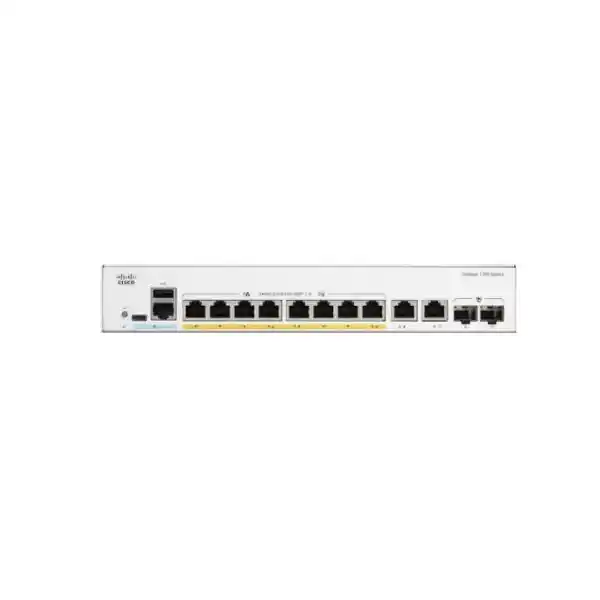
Cisco Catalyst C1200-8P-E-2G Network Switch Dubai
The Cisco Catalyst C1200-8P-E-2G is an eight-port Gigabit PoE+ managed switch with a 67W PoE budget and two Gigabit copper/SFP combo uplinks. It is built for business access-layer networks that need dependable wired connectivity, VLAN segmentation, voice and video traffic control, network security features, and compact fanless operation without moving into a larger 24-port switching platform.
67W total PoE budget
2 × 1GbE copper/SFP combo uplinks
20Gbps switching capacity
Fanless
Direct answer: what should a buyer know first?
The Cisco Catalyst C1200-8P-E-2G is a managed access switch in the Cisco Catalyst 1200 family. Its exact port profile is eight 10/100/1000 Ethernet ports that can provide PoE/PoE+ power, backed by a 67W switch-wide PoE budget, plus two Gigabit combo uplinks. Each combo uplink offers a copper RJ-45 interface and an SFP slot, but the copper and SFP sides of a given combo port are alternatives rather than two simultaneously usable ports.
It is mainly used to connect a small group of powered and non-powered business endpoints such as IP phones, Wi-Fi access points, surveillance cameras, printers, workstations, door controllers or other Ethernet devices while keeping traffic segmented and manageable. Organisations that need approximately eight powered edge ports, Gigabit uplinks, quiet fanless operation and managed LAN features should consider it. The most important purchasing check is not simply the port count: it is whether the 67W total PoE budget is sufficient for the actual powered devices and whether Gigabit uplinks provide enough headroom for the intended traffic.
FourTeck can help determine whether this exact model is appropriately sized, whether the higher-power C1200-8FP-2G should be evaluated, which copper or fibre uplink media are needed, how VLANs and QoS should be organised, and how the switch should connect to the existing router or firewall.
Exact model position and why it exists
The C1200-8P-E-2G fills a very specific place in the Catalyst 1200 line. It is not an unmanaged eight-port desktop switch and it is not a large enterprise campus chassis. It is a compact, rack-mountable managed switch intended for smaller business access networks where eight PoE-capable copper ports are enough but operational controls such as VLANs, spanning tree, access control lists, QoS, link aggregation, monitoring and static routing are still important. That combination makes the model relevant to branch offices, retail units, reception areas, clinics, classrooms, small server rooms, IP telephony zones and surveillance clusters where the network needs more control than a consumer switch can provide.
The model name itself is useful when comparing nearby options. The “8P” identifies the eight-port PoE-oriented access profile, while “2G” identifies the pair of Gigabit uplink interfaces. In this specific model, those uplinks are copper/SFP combo ports. This matters in procurement because a buyer may see “10 system ports” and assume ten independent copper ports plus two fibre slots. The correct interpretation is eight dedicated 1GbE PoE+ access ports plus two combo positions. At each combo position, the RJ-45 copper socket and SFP slot represent two media choices for one logical uplink port. If the SFP side is active, the paired copper side is not an additional simultaneous link.
That architecture is useful when a site may use copper uplinks today but needs the option to use fibre later, or when one uplink goes to a nearby firewall while another traverses fibre to a main distribution point. It is less suitable when the site needs multiple independent fibre uplinks in addition to ten simultaneous copper links, because the combo design does not create extra interfaces beyond the two logical uplink ports. The distinction should be captured in the bill of materials before installation rather than discovered while patching the cabinet.
Cisco positions the Catalyst 1200 family for small and medium-sized business networking with managed switching, security and Layer 3 static-routing features. For a Dubai buyer, the practical value is the ability to deploy a compact access switch with a recognisable Cisco management model while keeping enough control for business segmentation, voice and video traffic, and basic internal routing. The suitability still depends on workload, PoE consumption, port growth and uplink requirements rather than the Cisco brand name alone.
Access ports
Eight 10/100/1000 RJ-45 ports support IEEE 802.3af PoE and 802.3at PoE+. They can carry data and provide endpoint power over the same structured cabling run.
PoE budget
The model provides 67W total for powered devices. A port can deliver up to 30W where required, but all powered loads must fit within the shared switch budget.
Uplink flexibility
Two Gigabit combo ports allow copper or supported SFP media per uplink, which is useful for short copper links, fibre building runs or mixed-media branch designs.
Quiet deployment
The C1200-8P-E-2G is fanless, an advantage in reception areas, small offices and occupied rooms where switch acoustics should not become a distraction.
Managed LAN controls
VLAN, STP, LACP, ACL, QoS, 802.1X, monitoring and static-routing functions support a structured business LAN rather than a flat plug-and-play network.
Cisco C1200-8P-E-2G specifications that affect the buying decision
The most useful specification table is the one that connects the data sheet to real deployment choices. The figures below identify the exact C1200-8P-E-2G rather than presenting generic Catalyst 1200 family capabilities as though every model had the same hardware.
| Specification | C1200-8P-E-2G value | Buyer relevance |
|---|---|---|
| Access interfaces | 8 × 10/100/1000 RJ-45 PoE+ ports | Suitable for up to eight directly attached edge devices before considering downstream switching. |
| Uplinks | 2 × 1GbE copper/SFP combo ports | Each combo position is one logical port with copper or fibre media selection, not two simultaneous links. |
| PoE budget | 67W total, up to 30W on a PoE+ port within the budget | Endpoint wattage must be summed; eight PoE ports do not mean eight ports can all draw 30W. |
| Switching capacity | 20Gbps | Matches the aggregate full-duplex capacity of ten Gigabit logical interfaces for nonblocking switching. |
| Forwarding rate | 14.88 mpps at 64-byte packets | Useful when comparing packet-processing capacity with another managed access switch. |
| MAC address table | 8,000 addresses | More than the directly connected port count; still relevant when the switch participates in larger bridged segments. |
| Packet buffer | 1.5MB, dynamically shared | Traffic bursts and oversubscription still require good QoS and uplink design rather than relying on buffer size alone. |
| Jumbo frames | Up to 9000 bytes; default MTU 2000 bytes | End-to-end MTU consistency must be planned if jumbo frames are intentionally used. |
| Memory / CPU | 1GB DDR4 DRAM, 512MB flash, dual-core ARM 1.4GHz | Hardware platform information helps confirm the exact generation and management capability. |
| Dimensions | 268 × 185 × 44 mm | Confirm cabinet shelf or rack arrangement, cable bend radius and external power-adapter placement. |
| Weight | 1.53 kg | Compact enough for smaller communications spaces while remaining rack-mountable. |
| Cooling | Fanless | Supports quiet deployment, but passive cooling still requires reasonable airflow around the installed unit. |
| Power input | External universal 100–240V AC, 50–60Hz | The external adapter and local cord/plug arrangement should be confirmed for UAE delivery. |
| Operating temperature | -5°C to 50°C | The communications room still needs proper environmental control, particularly in hot UAE conditions. |
| Warranty | Cisco limited lifetime warranty | Commercial support requirements should be evaluated separately from the base hardware warranty. |
PoE planning: the 67W figure is the key sizing constraint
Power over Ethernet is usually the reason a buyer chooses the C1200-8P-E-2G rather than the non-PoE C1200-8T-E-2G. The switch supports IEEE 802.3af and IEEE 802.3at on its eight Gigabit RJ-45 access ports, with up to 30W available to an individual port until the overall switch power budget is reached. The important number is therefore not “eight PoE+ ports” in isolation; it is the 67W aggregate power available to all powered devices at the same time.
A practical deployment should be sized from the endpoint power requirements, not from the marketing class of the endpoint. For example, an IP phone may consume only a modest amount of power, while a Wi-Fi access point, pan-tilt-zoom camera or video endpoint may require considerably more. The design should use the actual or maximum expected draw of each model, consider any USB accessories attached to phones or access points, and leave sensible operating headroom. A switch that powers eight endpoints at 7W each is dealing with a very different load from a switch expected to power four 20W devices plus several smaller endpoints.
The 67W budget can be a good match for eight low-to-moderate-power devices, mixed voice and camera installations, or a small Wi-Fi and telephony cluster. It is not the correct choice simply because the physical number of PoE ports matches the number of devices. If the total maximum demand approaches or exceeds 67W, the higher-power C1200-8FP-2G deserves comparison because Cisco specifies a 120W PoE budget for that nearby eight-port model. Choosing the higher-budget model can provide more margin without increasing the number of access ports.
PoE headroom also affects change management. A branch might start with four IP phones and two access points, then later add cameras or higher-power wireless hardware. If the original switch was sized with no margin, adding one device can force an unplanned switch replacement. For that reason, FourTeck normally needs the exact powered-device list or, at minimum, device categories and quantities before confirming that this model is the best commercial fit.
A useful PoE calculation
Add the maximum planned power of every powered endpoint, then compare the result with the 67W switch budget. Avoid assuming that all eight ports can each provide the full 30W simultaneously: eight times 30W would be 240W, far above this model’s shared budget. Also account for future additions and confirm whether any endpoint negotiates a higher PoE class than expected.
The switch also supports time-based PoE scheduling, which can turn PoE on or off according to a configured schedule. In suitable environments that can reduce unnecessary after-hours power use for devices that do not need to remain active continuously. Cisco also documents perpetual PoE functionality, which is designed to maintain power to connected powered devices while the switch itself reboots. That can matter for devices such as phones, cameras or access points where avoiding a power interruption during certain switch maintenance operations is operationally useful.
PoE planning should be connected to UPS sizing as well. If the network switch and its powered endpoints must remain operational during a mains interruption, the UPS supports not only the switch electronics but also the aggregate endpoint load passing through PoE. An eight-port PoE switch can therefore have a much larger protected-power requirement than a data-only switch. Battery runtime calculations should use realistic PoE load plus the firewall, router, ISP equipment and any other critical communications devices sharing the UPS.
Uplink design: understand the two copper/SFP combo ports
The two Gigabit combo uplinks are one of the strongest reasons to choose this specific eight-port model over a basic desktop switch, but they are also a common source of misunderstanding. A combo port combines an RJ-45 copper interface and an SFP cage into one logical interface. The buyer can choose copper or supported fibre media for that uplink position. The two physical media connectors in the pair are not intended to operate as two independent ports at the same time.
For a small office installed close to the firewall or upstream switch, copper uplinks may be completely adequate. Category 5e or better cabling supports Gigabit Ethernet over normal office distances, and copper avoids the need to purchase transceivers. For a switch mounted in another room, another floor or a location affected by electrical isolation requirements, fibre may be the better path. In that case, the transceiver type, fibre mode, connector style, fibre count and remote-end compatibility must be part of the quotation.
Cisco lists multiple Gigabit SFP options for the Catalyst 1200 family, including multimode, single-mode and copper transceiver choices. That does not mean every fibre module should be chosen interchangeably. A multimode optic must match the installed multimode fibre and distance requirement; a single-mode optic must match the single-mode path and optical budget; and the remote device needs a compatible interface. If the uplink is being connected to a firewall, core switch or media patch panel supplied by another vendor, the full link should be checked from both ends rather than selecting an SFP from only one side.
Gigabit uplink capacity also determines whether the model is correctly sized for traffic concentration. Eight access ports can theoretically generate more than 1Gbps of aggregate traffic toward servers, internet services or another network segment. In many SMB deployments, actual simultaneous traffic is far below that level, so Gigabit uplinks are reasonable. In a high-throughput camera archive, large file-transfer environment, dense wireless deployment or branch with multi-gigabit WAN service, however, one or two Gigabit uplinks can become the design constraint. The C1200 family includes larger models with different uplink profiles, including selected models with 10 Gigabit Ethernet uplinks; those should be evaluated if sustained uplink demand is expected to exceed the practical headroom of this switch.
Link Aggregation Control Protocol is available on the platform, with Cisco documenting up to four aggregation groups and up to eight ports per group subject to candidate-port limits. Whether link aggregation is appropriate depends on the peer device, topology and traffic pattern. Two aggregated Gigabit links can add capacity and redundancy for multiple flows when both ends are configured correctly, but LAG is not a substitute for a single faster interface in every application because an individual flow is typically mapped to one member according to the hashing method.
Layer 2 switching, VLANs and loop control
A managed access switch earns its place in the network by controlling how devices communicate rather than simply repeating Ethernet connectivity. The Catalyst 1200 platform supports port-based and 802.1Q tagged VLANs with up to 255 active VLANs simultaneously. That gives the C1200-8P-E-2G the tools to separate voice, corporate data, surveillance, guest, building-control or management traffic even though the hardware has only eight access ports.
VLAN design should reflect security zones and operational ownership. An IP camera does not normally need the same access privileges as an employee laptop. Guest Wi-Fi clients should not generally share unrestricted Layer 2 access with internal systems. IP phones may use a dedicated voice VLAN while a connected workstation uses a data VLAN on the same physical switch port, depending on endpoint and network configuration. The switch supports Voice VLAN functionality and LLDP-MED, which is designed to help voice endpoints discover relevant network information.
The platform supports common spanning-tree mechanisms including standard STP, Rapid STP and Multiple STP, as well as Cisco-oriented PVST+ and Rapid PVST+ functionality. These features are important if there is more than one possible Layer 2 path. A redundant cable can increase availability when the topology and spanning-tree design are deliberate; the same cable can create a damaging forwarding loop when installed without control. The switch also provides loopback detection as another mechanism that can help protect against accidental loops.
Link aggregation can be used where the upstream peer supports matching LACP configuration. This is particularly relevant if the site wants two physical uplinks to act as one logical bundle. The design should decide whether the priority is additional aggregate throughput, resilience against a single link failure, or both. Cabling paths matter as much as configuration: two links routed through the same vulnerable cable tray do not provide the same physical resilience as diverse paths.
The switch supports IGMP snooping versions 1, 2 and 3 and an IGMP querier function. Cisco documents support for up to 255 multicast groups. These features can reduce unnecessary multicast flooding by forwarding multicast streams to interested receivers rather than every port. That can be valuable in video, IPTV or certain discovery-heavy environments, although multicast design should be validated with the application vendor if the network depends on specialised multicast behavior.
For a small Dubai branch, a sensible configuration might include a management VLAN, a corporate data VLAN, a voice VLAN, a camera VLAN and possibly a guest or IoT VLAN. The firewall or Layer 3 gateway can then enforce policy between security zones, while the switch keeps local Layer 2 domains organised. There is no benefit in creating dozens of VLANs merely because the switch supports them; segmentation should correspond to a real security, performance or administrative requirement.
Layer 3 static routing: useful, but not a firewall replacement
Cisco includes Layer 3 static-routing capabilities in the Catalyst 1200 platform. The data sheet specifies wire-speed IPv4 routing with up to 32 static routes and up to 16 IP interfaces, together with IPv6 routing, CIDR and Layer 3 interfaces that can be configured on physical ports, LAGs, VLAN interfaces or loopback interfaces. This can allow the switch to route between selected internal VLANs instead of sending every inter-VLAN packet to an external router.
That feature is useful when the objective is straightforward internal routing. For example, a local server VLAN and office-user VLAN may exchange high-volume traffic under controlled policy without forcing every packet through an edge router. It can also help distribute routing responsibilities in a small network. The architectural choice should nevertheless be intentional: if the firewall is expected to inspect, log or enforce policy on every flow between security zones, moving that routing onto the switch could bypass those controls unless the design uses ACLs and other measures appropriately.
Static routing is not equivalent to a next-generation firewall. The switch provides routing and network-access controls, but it is not the place to expect full application inspection, malware prevention, SSL inspection, VPN termination, web filtering or the broad threat-prevention functions found in a security gateway. In a typical branch design, the C1200-8P-E-2G acts as an access switch while a dedicated firewall remains the internet edge and security-policy enforcement point.
This is why switch and firewall procurement should be considered together. The switch determines local port, PoE, VLAN and uplink architecture, while the firewall determines WAN connectivity and security controls. Buyers planning a new office can review network-security options through Firewall Dubai by FourTeck, particularly when the switching project is part of a wider branch or office network refresh.
Security controls at the access layer
Access switching is part of the security boundary because every wired endpoint enters the network through a switch port. The Catalyst 1200 platform provides IEEE 802.1X authenticator functionality with RADIUS support, guest VLAN options and multiple host or session modes. In an environment with a RADIUS service, 802.1X can help make network access dependent on identity or device authentication rather than the physical presence of an Ethernet socket.
Port security provides another control by allowing source MAC addresses to be restricted on a port and the number of learned addresses to be limited. This can be useful for fixed devices or locations where the expected endpoint count is known. MAC-based restrictions should not be treated as strong identity authentication by themselves, but they can still contribute to layered control when combined with VLAN policy, 802.1X, firewall enforcement and physical security.
Cisco documents Access Control List support for up to 512 rules on the platform. ACL matching can consider items such as source and destination MAC addresses, VLAN IDs, IPv4 or IPv6 addresses, protocols, TCP or UDP ports, DSCP values and other packet properties. ACLs can be applied to ingress and egress traffic, and time-based ACLs are supported. These controls can limit unwanted traffic between local segments, though the policy should be kept understandable enough to troubleshoot safely.
Additional platform security functions include DoS-prevention mechanisms, storm control for broadcast, multicast and unknown-unicast traffic, secure HTTPS management, SSH, privilege levels, Secure Sensitive Data handling, and boot-integrity or trustworthy-system functions. These controls help reduce management and forwarding risks but do not eliminate the need to harden configuration. Default credentials must be replaced, management access should be restricted to authorised networks, unused ports should be disabled or placed in an appropriate parking VLAN, and firmware should be maintained according to Cisco guidance.
Logging is equally important. Syslog, SNMP and RMON capabilities can contribute to operational visibility when they are actually integrated into monitoring processes. A switch that supports monitoring but is never connected to a monitoring or log platform still leaves the operations team reactive. The correct deployment therefore includes both configuration and an ownership model: who receives alerts, who reviews port and PoE status, how configuration changes are recorded, and how firmware updates are scheduled.
QoS for IP phones, video and business applications
The C1200-8P-E-2G is often deployed with IP phones, access points or cameras, and those endpoints do not all respond to congestion in the same way. Voice conversations are sensitive to delay, jitter and packet loss, while file transfers can generally tolerate some variation. The Catalyst 1200 platform provides eight hardware queues, strict-priority and weighted round-robin scheduling options, and classification methods based on port, 802.1p, IP precedence, DSCP and other traffic attributes.
Voice VLAN support can simplify the separation of telephone traffic, while LLDP-MED helps supported endpoints learn network information. QoS should still be designed end to end. Marking a packet as voice on the access switch does not guarantee treatment across the firewall, WAN, ISP or cloud voice path. Every relevant device should either preserve trusted markings or reclassify traffic according to a defined policy.
Rate limiting and egress shaping can also help control traffic from devices or VLANs that should not consume disproportionate bandwidth. This is useful in a small switch because a single backup job, camera stream or misconfigured endpoint can otherwise compete with latency-sensitive sessions. QoS is not a way to create bandwidth that does not exist; it is a way to decide which traffic receives preferred treatment when the available capacity becomes contested.
For IP telephony, FourTeck would normally confirm the number and make of phones, whether handsets include PC pass-through ports, the expected PoE class, the call-control platform, voice VLAN requirements, DHCP options and uplink path. If the switch is being ordered as part of a telephony project, those details matter more than simply confirming that “PoE is supported.”
Management in 2026: Cisco Business Dashboard and local administration
The Catalyst 1200 family supports multiple management approaches. Cisco documents a browser-based interface, a text-oriented command-line interface, SNMP, syslog, RMON, port mirroring, cable diagnostics, DHCP client functions, SNTP and other operational tools. The switch also supports Cisco Business Dashboard and can function as an embedded probe for that management environment, reducing the need for a separate onsite probe in suitable designs.
A significant 2026 licensing change is relevant to new buyers. Cisco states that beginning with Cisco Business Dashboard version 2.11.1, paid device-management licences are no longer required, including for deployments above the previous 25-device threshold. That reduces one management-software procurement dependency for supported devices. Organisations running earlier CBD releases should not assume the same terms apply; the software version and deployment model should be checked during migration or renewal planning.
The management decision is broader than licensing. A single small branch might be administered locally through the switch interface, while a multi-site company can benefit from central visibility, device discovery, configuration consistency and lifecycle monitoring. The chosen model should fit the organisation’s support process. If no one is responsible for configuration backups, firmware review or alert handling, central management technology alone will not solve the operational gap.
Firmware management should be treated as a controlled change. Cisco documents dual images for resilient firmware upgrades as well as browser, TFTP and SCP-based upgrade methods. A good procedure records the current configuration and software version, reviews release notes, confirms the approved target version, backs up configuration, schedules an appropriate maintenance window and validates VLAN, uplink, PoE and management behavior after the change.
For managed-service environments, the switch should be incorporated into standard monitoring and incident processes. Port link state, PoE allocation, uplink errors, spanning-tree changes, authentication failures and environmental or system events can all offer useful troubleshooting context. The value comes from integrating those signals into support operations rather than treating the switch as a device that is configured once and then ignored.
Organisations that need broader infrastructure assistance can review FourTeck IT Services UAE for planning, deployment and ongoing IT support around switching, connectivity and related business infrastructure.
Physical deployment and UAE environmental considerations
The C1200-8P-E-2G measures approximately 268 × 185 × 44 mm and weighs about 1.53 kg. Cisco identifies it as rack-mountable, and the package information for the Catalyst 1200 family includes a mounting kit. Its compact footprint is valuable in smaller cabinets, but cabinet design should still account for patch leads, power-adapter placement, fibre bend radius where SFP uplinks are used, UPS connections and service access to the front panel.
The model is fanless. That reduces acoustic noise and removes a fan as a moving component, making it attractive for open office areas, reception spaces, classrooms or smaller wall cabinets close to occupied rooms. Fanless does not mean ventilation is irrelevant. Passive cooling depends on airflow around the chassis, and dense cabinets full of PoE equipment, firewall appliances and UPS systems can accumulate substantial heat even when each individual device is within its rated range.
Cisco specifies an operating temperature range of -5°C to 50°C for this model family position and 10% to 90% relative humidity, noncondensing. In Dubai and other UAE locations, external ambient temperature can be far higher than suitable communications-room conditions. Equipment should therefore be placed in an air-conditioned or properly ventilated indoor environment rather than a hot service void, roof space or poorly cooled enclosure. The rated maximum is not a recommended design target for continuous operation.
Power is supplied through an external universal 100–240V, 50–60Hz source for this model. The regional mains cord or adapter arrangement should be confirmed in the quotation, especially where project specifications require a specific plug style, rack PDU connection or UPS outlet. If the switch powers critical endpoints, the external adapter should be secured so it cannot be accidentally unplugged during cabinet work.
Structured cabling should be Category 5e or better for 1000BASE-T, with testing appropriate to the installation standard. PoE links are particularly sensitive to poor termination, excessive resistance or damaged cabling because the cable carries both data and power. A successful bench test with a short patch lead does not prove a permanent 90-metre horizontal cable run is healthy. New office deployments benefit from certified cabling results and clear outlet-to-switch port documentation.
Six practical use cases for the C1200-8P-E-2G
1. Small office voice and data
The switch can power a group of IP phones while connecting workstations, printers or access points. Voice VLAN and QoS functions help separate and prioritise telephony, provided the 67W PoE budget fits the phone and wireless load. The two uplinks can connect to a firewall and another distribution point, or provide a redundant design where the peer configuration supports it.
2. Retail branch network
A retail location may connect POS terminals, phones, wireless access points, cameras or local controllers. VLANs can separate payment or corporate devices from guest and surveillance segments, while the compact fanless chassis suits smaller back-office spaces. The design should leave enough uplink and PoE margin for future camera or Wi-Fi expansion.
3. Small surveillance cluster
Eight PoE ports can make the model attractive for a small IP-camera group, but camera wattage and video traffic must be calculated. High-power PTZ cameras may exhaust the 67W budget faster than fixed cameras, and multiple high-bitrate streams can consume significant uplink bandwidth toward an NVR or server.
4. Wi-Fi edge switch
The switch can power and connect several 1GbE wireless access points in a small venue. It is most appropriate when the APs use Gigabit Ethernet and their combined PoE load stays within budget. If newer APs require multi-gigabit Ethernet or high PoE power, another switch class should be considered rather than forcing the requirement onto a 1GbE platform.
5. Classroom or training room
Fanless operation is useful where people work close to the switch. Ports can serve a local access point, instructor station, video endpoint, IP phone or other classroom technology. VLANs and port controls can keep training devices logically separate from the organisation’s administrative network.
6. Remote cabinet with fibre backhaul
The combo uplinks allow the switch to use supported Gigabit SFP optics for a fibre run back to the main network while delivering copper PoE at the remote location. Fibre type, transceiver compatibility, pathway distance and the remote-side interface must all be confirmed before ordering.
When this exact model may be too small
The C1200-8P-E-2G is not automatically the best choice just because a requirement lists eight endpoints. The first reason to move to another model is PoE capacity. If the planned load is close to 67W or likely to grow, the C1200-8FP-2G with a 120W PoE budget is a direct comparison. It preserves an eight-port access profile while providing significantly more power headroom.
The second reason is port growth. An eight-port switch can become operationally awkward if all access ports are occupied on day one. Spare ports simplify additions, temporary testing and endpoint changes. If the site already expects more than eight edge devices, a 16-port or 24-port Catalyst 1200 model may be cleaner than deploying another small switch later, assuming rack space, PoE budget and uplink design are compatible.
The third reason is uplink performance. This model’s uplinks are Gigabit. A small office with normal internet, voice and cloud-application traffic may never approach that ceiling, but storage-heavy workflows, dense wireless traffic, multiple high-bitrate cameras or a multi-gigabit WAN can justify a model with faster uplinks. Selected larger Catalyst 1200 models provide 10GbE uplink options. The correct threshold depends on measured or forecast traffic rather than a generic rule.
The fourth reason is architecture. Larger campus environments may require different resiliency, telemetry, automation, stacking or dynamic-routing capabilities than the Catalyst 1200 series is designed to provide. The C1200-8P-E-2G is a managed SMB access switch with useful Layer 3 static routing, not a replacement for every enterprise switching tier. If the network standard calls for a more advanced Cisco Catalyst platform, consistency and operational requirements may outweigh the compact model’s cost advantage.
The fifth reason is access speed. Every dedicated access port on this model is Gigabit Ethernet. Devices that specifically require 2.5GbE, 5GbE or 10GbE access should be matched to a platform designed for those interface speeds. Buying a Gigabit switch and assuming future software changes can create faster physical interfaces is not a viable upgrade path.
Installation and migration journey
Inventory the existing network
Record each connected device, port, VLAN, PoE requirement, uplink, static route, LAG, spanning-tree role and management dependency. If replacing an older switch, capture the active configuration and confirm which entries are still needed rather than cloning historical settings blindly.
Validate capacity
Confirm eight access ports are enough, sum PoE demand against the 67W budget, and check whether 1GbE access and uplinks match the intended traffic. This stage is where the higher-power or larger-port-count alternative should be selected if needed.
Prepare physical connectivity
Confirm rack or shelf space, UPS output, adapter placement, patching, copper certification and any SFP or fibre components. Label both ends of cabling and verify fibre polarity and remote-side transceiver compatibility before the cutover window.
Build the logical configuration
Create management access, VLANs, trunks, voice settings, QoS, ACLs, spanning tree and monitoring in a documented order. Avoid enabling complex features simply because they exist; every rule should have a clear purpose and owner.
Cut over in controlled stages
Move uplinks and endpoints in a sequence that preserves troubleshooting visibility. Check link speed, VLAN membership, DHCP, gateway reachability, authentication, PoE allocation, voice registration, camera streams and internet access as relevant to each device class.
Document and monitor
Save the final configuration, port map, software version, administrator access process and support contacts. Add the switch to the chosen monitoring platform, then define how alerts and configuration changes will be reviewed over the device lifecycle.
Procurement details that should be on the quotation
An accurate quotation for the Cisco Catalyst C1200-8P-E-2G should identify the exact model code rather than a generic description such as “Cisco 8-port PoE switch.” Closely related models can have different power budgets, uplink arrangements or form factors, so the part number is the most reliable procurement anchor. The required quantity, delivery location and intended deployment role should also be stated.
If fibre uplinks are required, transceivers should appear as separate line items unless explicitly included. The bill of materials should identify the optic or copper SFP type, quantity, fibre mode, expected distance and peer interface. Patch cords, fibre adapters, rack accessories, UPS requirements and structured cabling work should be separated clearly so the buyer can see what is part of the switch purchase and what is part of the surrounding installation.
The regional power arrangement should be checked. Cisco specifies universal 100–240V input for the external power source, but the project still needs the correct UAE connection and a suitable UPS or PDU outlet. If the switch is going into a secure cabinet, confirm the external adapter can be mounted or positioned without strain and without blocking adjacent equipment.
Support should be discussed separately from the hardware warranty. Cisco specifies a limited lifetime warranty for the Catalyst 1200 series and complimentary one-year access to the Small Business Support Center. A business that requires guaranteed response times, onsite replacement strategy, managed monitoring or after-hours support should define those service expectations explicitly rather than assuming they are identical to warranty coverage.
For UAE projects, FourTeck can also align the switch requirement with wider regional infrastructure procurement when the Dubai installation is part of a multi-site network or broader technology refresh.
Buyer questions and detailed answers
Does the C1200-8P-E-2G have ten usable Ethernet ports?
It has ten logical Gigabit Ethernet system ports: eight dedicated RJ-45 access ports and two combo uplink ports. Each combo uplink provides an RJ-45 copper connector and an SFP slot as alternative media for the same logical port. The copper and SFP sides of one combo pair are not two simultaneous independent links. This distinction matters when calculating the exact number of physical connections available in a cabinet.
Can all eight PoE ports deliver 30W at once?
No. Cisco specifies a 67W total PoE budget for the C1200-8P-E-2G. An individual supported port can provide up to 30W under PoE+, but the total consumption of all powered devices must remain within 67W. If the endpoint list requires more, compare the C1200-8FP-2G with a 120W budget or another model with the appropriate power capacity.
Is this switch suitable for IP phones?
Yes, provided the phone count, per-phone power and overall PoE budget fit the design. The platform supports PoE/PoE+, Voice VLAN, LLDP-MED and QoS features that are useful in IP telephony. The complete voice design should also confirm DHCP, call-control reachability, VLAN tagging, endpoint compatibility and prioritisation across the rest of the network.
Is it suitable for Wi-Fi access points?
It can power and connect access points that use Gigabit Ethernet and fall within the PoE budget. It should not be selected for an AP requirement that depends on multi-gigabit wired access or a PoE level beyond what this switch can provide. Checking the exact AP data sheet is therefore essential, especially for newer high-performance wireless hardware.
Does it support fibre?
Yes, through the SFP side of each of the two Gigabit combo uplink ports. A compatible SFP transceiver and the correct fibre path are required. The optic should be matched to fibre type, distance and the interface at the remote device. Because the port is a combo design, using the SFP side means the paired copper side is not an additional active port.
Can the switch route between VLANs?
The Catalyst 1200 platform supports Layer 3 static routing, including IPv4 and IPv6 routing. Cisco specifies up to 32 IPv4 static routes and up to 16 IP interfaces. Whether inter-VLAN routing should occur on the switch or on a firewall depends on security policy, logging requirements and network architecture.
Does the switch replace a firewall?
No. The switch has useful security and access-control functions such as 802.1X, ACLs, port security, storm control and DoS-prevention features, but it is not a next-generation security gateway. Internet edge security, VPN services, application control and threat prevention normally remain functions of a dedicated firewall or security platform.
Is Cisco Business Dashboard licensed?
For current deployments using Cisco Business Dashboard version 2.11.1 or later, Cisco states that paid licences are no longer required for device management, including networks larger than the previous 25-device threshold. Older Dashboard versions had different licensing rules, so an existing deployment should confirm its actual software version before making assumptions.
Is the C1200-8P-E-2G fanless?
Yes. Cisco lists the model as fanless. That helps in quiet spaces and removes fan noise, but the installed environment still needs adequate ventilation and acceptable temperature. Passive cooling should not be treated as permission to place the switch in a sealed, hot enclosure.
What should be compared before buying?
Compare at least five things: total PoE demand against 67W, required access-port count against eight, required uplink speed against 1GbE, copper versus fibre uplink media, and growth expectations. If PoE power is the only shortfall, the 120W C1200-8FP-2G is a close alternative. If ports or uplink speed are short, a larger Catalyst 1200 model may be a better fit.
Operational practices after installation
A successful switching project continues after the ports come online. The final switch configuration should be exported and stored in a controlled location with the date, software version and change reference. Port descriptions should identify connected devices or outlets, and unused interfaces should be administratively disabled or configured according to the organisation’s security standard. A documented port map reduces troubleshooting time during future moves and changes.
PoE utilisation should be monitored, particularly when new phones, access points or cameras are added. A branch can operate comfortably for months and then experience power-allocation problems after one high-draw endpoint is installed. Maintaining a simple PoE inventory of device model, port and expected wattage gives the support team a clear reference when capacity changes.
Uplink errors and utilisation deserve similar attention. Fibre links should be monitored for errors and checked against expected optical behavior if supported by the transceiver and platform. Copper uplinks should be investigated when negotiation drops below 1Gbps or when error counters increase. Replacing a switch should not be the first troubleshooting response if the actual problem is a damaged patch lead, failing SFP, contaminated fibre connector or poor permanent cabling.
Spanning-tree and LAG events should be understood before making topology changes. An apparently unused uplink may be intentionally blocked by spanning tree as part of a redundant design. Removing it because “no traffic is passing” could silently remove failover capacity. Conversely, connecting a second path without configuring the intended loop-control method can create instability. Change procedures should therefore reflect the logical topology, not only the physical cable view.
Firmware review should be periodic, but upgrades should be controlled rather than automatic in production. Read release notes, confirm the exact supported image for the switch, save configuration, choose a maintenance window and validate services afterward. If the site uses Cisco Business Dashboard, lifecycle visibility can support this process, but a responsible administrator still needs to make and record the change decision.
For multi-site networks, consistent naming, VLAN numbering, management addresses and configuration standards simplify support. The C1200-8P-E-2G may be a small device, but treating it as part of a repeatable branch architecture produces far better operational results than configuring every site differently.
Compatibility and dependency checklist
The switch can be technically suitable and still fail a project if the surrounding dependencies are missed. The following checks are particularly important for this model.
Powered endpoints
Confirm IEEE 802.3af/at compatibility, maximum draw and combined PoE requirement. Proprietary or unusually high-power endpoints may require different switching hardware or external power.
SFP and fibre path
Match transceiver type, wavelength, fibre mode, distance and remote-side optics. A supported SFP in the switch cannot correct a mismatch elsewhere in the optical path.
Upstream switch or firewall
Confirm VLAN tagging, LAG method, spanning-tree expectations, interface speed and management policy on both ends. The two devices must agree on the connection design.
Cabling system
Use tested Category 5e or better cabling for 1000BASE-T and verify patching quality. For PoE, cable condition affects both data reliability and delivered power.
Management environment
Confirm IP addressing, management VLAN, administrator authentication, monitoring, syslog/SNMP expectations and Cisco Business Dashboard version if central management is planned.
Power and UPS
Size protected power for the switch plus its PoE endpoint load. Confirm the external adapter, UAE plug/PDU arrangement and desired runtime during a utility interruption.
Decision recap for the Cisco Catalyst C1200-8P-E-2G
Model fit
Best matched to small managed access networks needing eight 1GbE PoE+ ports and two flexible Gigabit uplinks.
Power fit
The aggregate 67W PoE budget must be validated against all powered devices and planned growth.
Uplink fit
Two 1GbE combo ports support copper or SFP media. They are logical combo interfaces, not four independent uplink ports.
Management fit
VLANs, ACLs, 802.1X, QoS, monitoring and static routing provide stronger business controls than unmanaged switching.
Growth fit
Evaluate a higher-PoE, higher-port-count or faster-uplink model when expansion is already foreseeable.
What FourTeck needs for an accurate quotation
Providing the following inputs allows the quotation to address the complete network requirement rather than only the switch chassis:
Number of switches and Dubai/UAE delivery or installation site.
Phones, APs, cameras and other devices with estimated PoE draw.
Copper or fibre, distance, peer device and any redundancy or LAG requirement.
VLANs, voice, surveillance, guest, management and inter-VLAN routing expectations.
Supply only, rack installation, configuration, migration, testing or managed support.
Existing UPS/PDU details and expected backup runtime for switch plus PoE endpoints.
Confirm the right Cisco 8-port PoE switch before ordering
The C1200-8P-E-2G is a strong fit when eight Gigabit PoE+ ports, a 67W budget and two Gigabit combo uplinks align with the branch requirement. The final decision should confirm powered-device wattage, spare-port needs, uplink media and traffic, VLAN/security design, rack conditions and support scope. If any of those factors exceed the model’s practical envelope, it is better to select the right higher-capacity switch at procurement time than redesign the access layer after deployment.
Product availability, exact regional accessories, support entitlement and delivery schedule should be confirmed at quotation. Technical specifications may be revised by the manufacturer over the product lifecycle.

Reviews
There are no reviews yet.