
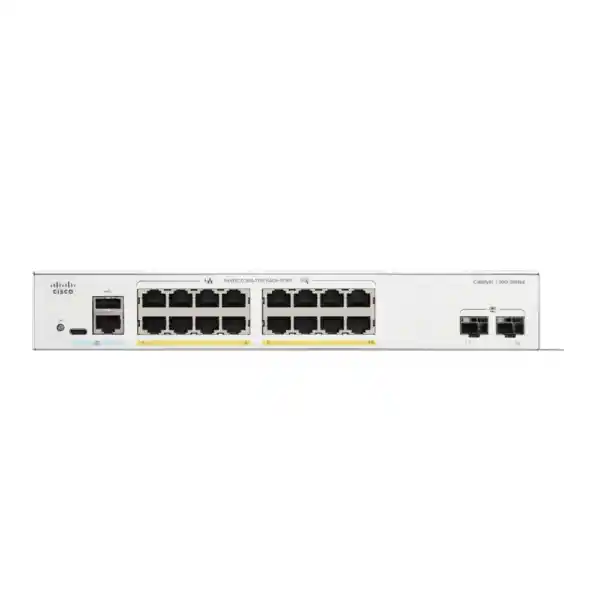
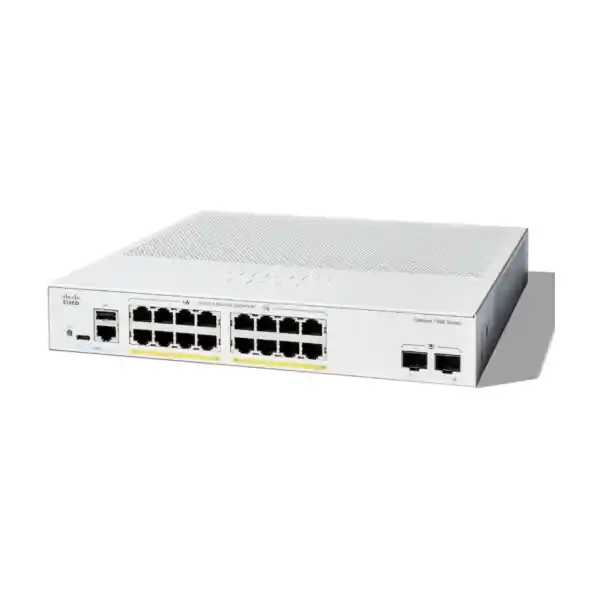
Cisco Catalyst C1300-16T-2G Network Switch
A compact 18-port Gigabit platform with 16 copper access ports, two dedicated 1G SFP uplinks, wire-speed Layer 2/Layer 3 forwarding, enterprise-oriented segmentation and security, silent fanless operation, and practical management for UAE branch and SMB networks.
Direct answer: who should buy the C1300-16T-2G?
Choose the Cisco Catalyst C1300-16T-2G when a site needs roughly sixteen wired Gigabit access connections, clean separation between users and services, two fiber-capable uplinks, and Layer 3 functions without the cost, acoustic profile, power budget, or physical size of a larger campus access switch. It is especially well matched to offices where endpoints already have local power, to server or appliance connectivity where Power over Ethernet is unnecessary, and to branches where a firewall handles Internet security while the access switch handles local VLANs, traffic policy, and controlled inter-VLAN forwarding.
The model is not a PoE switch. That distinction matters in quotation design. IP phones, Wi-Fi access points, CCTV cameras, door controllers, and other powered endpoints will need injectors or independent power unless another PoE switch is used. Buyers who need switch-delivered power should compare the PoE variants in the Catalyst 1300 family rather than treating C1300-16T-2G as a substitute. Likewise, this particular 2G model is not among Cisco’s front-panel hardware-stacking SKUs. It is a strong standalone managed switch, but architects requiring unified physical stacking should select one of the supported 4X/10G-oriented models.
For procurement teams in Dubai, Abu Dhabi, Sharjah, Ajman, Ras Al Khaimah, Fujairah, Umm Al Quwain, and distributed UAE branches, the practical value is balance: sufficient Layer 3 intelligence for a business edge, mature Layer 2 controls, broad security features, and two SFP uplinks in a quiet compact chassis. FourTeck can supply the switch as part of a larger networking, firewall, server, wireless, or managed IT project through FourTeck UAE.
10/100/1000BASE-T RJ-45 for desktops, printers, appliances, servers, phones with local power, and other copper Ethernet devices.
Dedicated Gigabit SFP slots for fiber or supported copper transceiver uplinks, useful for risers, cabinets, remote rooms, or firewall/core handoff.
Wire-speed, nonblocking switching capacity aligned with full-duplex traffic across the switch’s eighteen Gigabit system ports.
Published forwarding rate at 64-byte packets, a useful reference for evaluating small-packet performance in business workloads.
No internal fan, helping reduce audible noise and removing a common mechanical component from quiet-office deployments.
Wire-speed routing, VLAN interfaces, static and dynamic capabilities, policy-based routing, and dual-stack operational support.
Core technical specifications
| Product ID | C1300-16T-2G |
| Total system ports | 18 × Gigabit Ethernet |
| Copper access | 16 × 10/100/1000BASE-T RJ-45 |
| Fiber uplinks | 2 × Gigabit SFP |
| Switching capacity | 36 Gbps, wire speed and nonblocking |
| Forwarding rate | 26.78 Mpps at 64-byte packets |
| CPU / memory | Dual-core ARM at 1.5 GHz / 1 GB DDR4 |
| Flash | 1 GB SLC |
| Packet buffer | 1.5 MB aggregate, dynamically shared across ports |
| MAC table | 16,000 addresses for Catalyst 1300 1 Gigabit Ethernet SKUs |
| Jumbo frame support | Up to 9000 bytes; published default MTU 2000 bytes |
| Power input | Internal universal 100-240V, 50-60 Hz |
| System power, worst case | 10.9W at 110V / 11.2W at 220V |
| Idle power | 4.6W at 110V / 4.9W at 220V |
| Dimensions | 268 × 272 × 43.94 mm (W × D × H) |
| Weight | 2.18 kg |
| Cooling | Fanless |
| Operating temperature | -5°C to 50°C; minimum cold-start ambient 0°C |
| Operating humidity | 10% to 90% relative, noncondensing |
| Published MTBF at 25°C | 912,776 hours |
Performance architecture: what 36 Gbps and 26.78 Mpps mean in practice
Switch buyers often compare only port count, but port count by itself says little about whether a platform can forward traffic cleanly when many interfaces are busy at the same time. The C1300-16T-2G is specified for 36 Gbps of switching capacity. That figure is consistent with eighteen Gigabit system ports operating full duplex: each Gigabit port can simultaneously receive and transmit, so eighteen ports represent up to 36 Gbps of aggregate bidirectional switching demand. Cisco therefore positions the device as wire-speed and nonblocking. In a correctly designed topology, the switching fabric is not intentionally oversubscribed internally merely because several access ports transmit at once.
The second important number is 26.78 million packets per second using 64-byte packets. Small-packet forwarding is a demanding case because forwarding decisions occur at a much higher packet rate than with large frames. For offices carrying ordinary application sessions, voice signalling, DNS, business SaaS, SMB file access, print traffic, and routine server transactions, the published rate gives confidence that the forwarding path is designed for line-rate Gigabit switching rather than for a low-end software bridge. It is still important to distinguish theoretical forwarding capacity from application experience: endpoint TCP stacks, WAN bandwidth, firewall inspection, server storage, Wi-Fi airtime, transceiver quality, and cabling can become bottlenecks before the switch fabric does.
Cisco publishes a dual-core 1.5 GHz ARM processor, 1 GB of DDR4 memory, and 1 GB of SLC flash for the C1300 platform. Those management-plane resources support control functions, the operating system, management interfaces, protocol processes, logging, configuration, and monitoring. They should not be interpreted as if every Ethernet frame were forwarded by the ARM CPU. The platform is specified for hardware-oriented switching and routing behavior, including hardware queues and hardware handling of functions such as IPv6 QoS and ACL processing. Cisco’s public product data does not identify a merchant-silicon ASIC part number for this model, so responsible architecture discussions should focus on published forwarding capacity, buffers, tables, queues, and supported hardware features rather than inventing an unverified chipset identity.
The 1.5 MB packet buffer is dynamically shared across all ports. Shared buffering can help absorb short bursts where one or more ingress ports momentarily deliver traffic faster than the destination egress port can transmit it. However, no compact access switch should be treated as an infinite burst absorber. When many 1G endpoints converge onto one 1G uplink, sustained demand above the uplink’s line rate will create congestion regardless of switching fabric capacity. For that reason, uplink sizing is as important as the switch’s local forwarding specification. The C1300-16T-2G is best when expected uplink demand is compatible with one or two 1G paths, or when traffic is intentionally divided across different upstream destinations.
Port map and uplink design
The sixteen front-panel RJ-45 ports support 10/100/1000 Ethernet, allowing mixed endpoint speeds while preserving Gigabit capability where devices and cabling support it. For new installations, Category 5e is the minimum practical baseline for 1000BASE-T, while Category 6 is commonly chosen in UAE structured-cabling projects to improve installation margin and provide a more forward-looking copper plant. Auto-negotiation simplifies everyday deployment, but production acceptance testing should still confirm negotiated speed and duplex on every critical server, firewall, workstation, printer, and appliance link.
The two dedicated Gigabit SFP slots are strategically useful because they avoid consuming access ports when fiber connectivity is required. Common patterns include one SFP uplink to a main distribution switch and one to a redundant path, one uplink to a firewall or aggregation layer with the second reserved for expansion, separate fiber paths to different zones, or dual members of an LACP port channel when the upstream design supports it. Link aggregation can improve aggregate bandwidth across multiple flows and provide link redundancy, but a single session normally follows one member link according to the hashing policy; two 1G members do not turn one flow into a 2 Gbps transfer.
Optics selection should be based on fiber type, distance, connector standard, optical budget, upstream interface capability, and supported transceiver matrix. For short building links over multimode fiber, a suitable 1G multimode SFP is typical. For longer campus or inter-building runs, single-mode optics may be appropriate. Procurement should never choose an SFP solely because the physical module fits the slot. Correct wavelength, fiber type, transmit/receive power, connector, link partner, and Cisco platform support all matter. FourTeck can include optics and patching in the bill of materials so the switch does not arrive without the components required for the intended fiber path.
Where copper uplink is required, confirm the exact supported transceiver option and distance rather than assuming every generic 1G copper SFP will behave identically. If the topology is entirely copper and all sixteen access ports are needed, preserving the dedicated SFPs for uplinks protects port availability. If the site needs uplinks above 1 Gbps, the correct answer is usually a different Catalyst 1300 family member with 10G-capable uplinks rather than trying to force a 2G-SFP model into a bandwidth profile it was not designed to serve.
Layer 2 segmentation for users, servers, voice, guest, IoT, and operations
The C1300 platform supports a broad VLAN feature set, including port-based and IEEE 802.1Q tagged VLANs, MAC-based VLANs, protocol-based VLANs, IP subnet-based VLANs, management VLANs, private VLAN constructs, guest VLAN behavior, unauthenticated VLAN handling, dynamic VLAN assignment through RADIUS with 802.1X, voice VLAN functions, and multicast-oriented VLAN mechanisms. The headline platform scale supports up to 4094 VLAN IDs, with part of the high range reserved for internal use. In practice, most SMB and branch sites should use far fewer VLANs and focus on clear purpose, documentation, and firewall policy alignment.
A typical professional office might separate corporate users, servers, voice, printers, guest devices, building-management devices, CCTV management, switch management, and perhaps a quarantine network. Segmentation should be driven by trust boundaries rather than by arbitrary department labels. For example, printers often have weak embedded software and broad network visibility, so placing them in a dedicated VLAN with restricted access can be more defensible than leaving them in the same broadcast domain as finance workstations. The same reasoning applies to IoT devices, meeting-room controllers, digital signage, and contractor equipment.
Private VLAN and protected-port capabilities can help isolate devices that share a subnet but should not communicate laterally. This is useful for guest or lodging scenarios where clients may need upstream Internet access while remaining isolated from one another. Voice VLAN functions simplify endpoint classification and can work with discovery protocols so IP phones receive appropriate VLAN and QoS treatment. When a phone has a connected PC behind its internal switch, design must account for tagged voice and untagged data behavior, authentication mode, and the security implications of allowing multiple endpoint types on the same physical access port.
Spanning Tree support includes classic STP, Rapid STP, Multiple STP, and Cisco-oriented per-VLAN spanning-tree options. RSTP is valuable in many branch environments because it improves convergence compared with legacy STP. MST can reduce control-plane complexity when many VLANs share the same physical topology. Root Guard, BPDU Guard, and loop-protection controls should be deliberately applied at edge and infrastructure ports. A managed switch does not automatically make loops safe; the correct topology, spanning-tree root placement, guard configuration, and change control are what convert protocol capability into resilient operation.
Inter-VLAN routing
The Catalyst 1300 can route IPv4 and IPv6 traffic at wire speed and can create Layer 3 interfaces on physical ports, link-aggregation groups, VLAN interfaces, and loopback interfaces. This allows local east-west traffic to be routed on the switch when policy permits, reducing unnecessary trips to an upstream router.
Routing scale
Cisco specifies up to 990 combined dynamic and static IPv4 routes and up to 128 IP interfaces for the standard C1300 platform. That is far beyond the needs of many small offices but useful for branches with several internal segments, lab networks, routed handoffs, or multiple local subnets.
RIP and policy routing
RIP v2 is available for dynamic IPv4 routing, and Policy-Based Routing can direct IPv4 or IPv6 traffic toward a selected next hop based on ACL matches. OSPF is a Catalyst 1300X feature, not a capability to assume on this C1300-16T-2G.
DHCP services
The platform can function as an IPv4 DHCP server and supports Layer 2/Layer 3 DHCP relay functions. In larger environments, centralized DHCP is often preferable, but local scope capability can be useful in independent branches, temporary networks, or resilient designs.
Layer 3 design: when to route on the switch and when to route on the firewall
One of the most important architectural decisions is where inter-VLAN routing should occur. Routing on the C1300-16T-2G can keep trusted internal traffic local and reduce load on an upstream firewall. For example, a business may allow a workstation VLAN to access a local application server VLAN through carefully defined switch ACLs while reserving Internet-bound traffic for the perimeter firewall. This can be efficient when the security policy is simple and when inspection between those internal segments is not required.
Routing on the firewall, by contrast, centralizes security policy and can provide deep inspection, application control, threat prevention, URL filtering, identity-based rules, logging, and other functions not provided by an access switch. Sensitive environments may intentionally send traffic between user, server, guest, CCTV, and IoT networks through a firewall even if the switch is technically capable of routing locally. The tradeoff is firewall throughput consumption and possible hairpin traffic. The right choice depends on segmentation goals, compliance needs, traffic volume, and the capabilities of the security gateway.
A hybrid design is often strongest. The switch can route between low-risk operational networks or handle dedicated routed links, while the firewall terminates higher-risk VLANs and controls trust transitions. Default routes should be explicit, return paths must be validated, and asymmetric routing should be avoided unless the inspection architecture supports it. Where Policy-Based Routing is used, document each match condition and next hop because PBR can override normal routing logic and become difficult to troubleshoot when the original design intent is forgotten.
For UAE branches connected through site-to-site VPN, SD-WAN, MPLS, or managed WAN services, the branch routing boundary should be planned with the upstream security device and service-provider handoff. The C1300 can participate in local Layer 3 forwarding, but it should not be presented as a replacement for a stateful firewall. FourTeck’s Firewall Dubai practice can align VLAN gateways, trusted routes, WAN handoffs, and security policy so the switch and firewall have clearly separated responsibilities.
Access-layer security controls
The C1300-16T-2G offers substantially more access-layer protection than an unmanaged switch. IEEE 802.1X can authenticate endpoints using a RADIUS infrastructure, support guest or unauthenticated VLAN behavior, and apply dynamic VLAN assignment. MAC authentication can supplement environments where devices cannot run an 802.1X supplicant. The switch can also operate as an 802.1X supplicant in specific extended-access designs. These features allow wired access to become identity-aware rather than relying only on physical connection to an Ethernet jack.
DHCP snooping is a foundational control for defending access networks against rogue DHCP servers. By marking expected DHCP-server paths as trusted and treating ordinary user-facing ports as untrusted, the switch can reject DHCP behavior that should not originate from clients. The binding information learned through DHCP snooping can then support IP Source Guard, which filters source addresses that do not match expected bindings, and Dynamic ARP Inspection, which validates ARP behavior against trusted bindings. Together these features can reduce opportunities for address spoofing and certain man-in-the-middle techniques on local networks.
Port security can limit learned source MAC addresses and bind expected devices to access ports. Storm control can constrain excessive broadcast, multicast, or unknown-unicast traffic. BPDU Guard can shut an edge port if spanning-tree BPDUs unexpectedly arrive, helping protect the topology from accidental or unauthorized switch connections. Root Guard prevents a downstream device from attempting to become the spanning-tree root. These features are most effective when port roles are known and documented; indiscriminate activation without understanding endpoint behavior can create avoidable outages.
Management security includes HTTPS for the browser interface, SSH for command-line access, SNMPv3 for secure monitoring, and RADIUS/TACACS+ client support for centralized administrator authentication. Production hardening should disable unused management services, restrict management access to a dedicated VLAN or approved source subnets, prefer SSH and HTTPS over clear-text protocols, use unique administrator credentials, integrate centralized AAA where operationally justified, synchronize time, send logs to a protected syslog target, and keep software updated through a controlled change process.
IPv6 should receive the same security attention as IPv4. The platform supports IPv6 ACL treatment and first-hop security features including Router Advertisement Guard, Neighbor Discovery inspection, DHCPv6 Guard, neighbor-binding tables, and binding-integrity checks. A site that says it “does not use IPv6” may still have endpoints generating IPv6 traffic by default. Explicitly deciding how IPv6 is handled is safer than ignoring the protocol and leaving an unmonitored path through the access layer.
Quality of Service for voice, collaboration, video, and business applications
The Catalyst 1300 platform provides eight hardware queues with strict-priority and Weighted Round-Robin scheduling options. Classification can use port settings, IEEE 802.1p class of service, IPv4/IPv6 precedence and DSCP values, DiffServ logic, and ACL-based classification or remarking. Rate limiting, ingress policing, egress shaping, and flow-based controls provide tools for enforcing traffic policy at the access layer. For a sixteen-port branch switch, these capabilities are useful because congestion frequently appears not inside the switching fabric but at uplinks, WAN edges, Internet circuits, or shared service interfaces.
Voice QoS should begin with a trust model. If an IP phone marks voice correctly and is under administrative control, the switch can trust or classify that traffic and place it in a low-latency queue. If arbitrary user devices are allowed to mark packets with high-priority DSCP values, simply trusting all markings can let ordinary applications claim priority. A better design identifies trusted phone ports or trusted upstream devices, remarks other traffic according to policy, and verifies queuing on every congested hop. QoS cannot create bandwidth; it determines how constrained bandwidth is allocated when contention occurs.
Video collaboration and cloud calling also require attention to uplink utilization. A branch with sixteen users can easily generate several concurrent video calls plus cloud file sync, backups, software updates, and Internet browsing. The local switch may forward all of that traffic easily, but a 100 Mbps or 300 Mbps WAN circuit can still congest. In such cases, access-layer marking should align with the firewall or router’s WAN queuing policy. Mismatched classification between the switch and the edge gateway defeats the purpose of QoS.
The platform also includes iSCSI traffic optimization capabilities. That does not automatically make a 1G access switch the correct choice for every storage design. Storage networks should be sized using IOPS, throughput, latency, multipathing, redundancy, frame size, server NIC capability, and backup-window requirements. Small branch appliances or light iSCSI workloads may fit comfortably; high-performance virtualization clusters may justify 10G, 25G, or faster switching instead.
Multicast, surveillance, IPTV, and discovery traffic
Multicast handling becomes important when a network carries IPTV, video distribution, imaging systems, discovery-heavy applications, or other one-to-many traffic. The C1300 1G family supports IGMP snooping so multicast frames can be forwarded only toward interested receivers instead of being flooded like broadcast traffic. Cisco specifies support for up to 2000 multicast groups on Catalyst 1300 1 Gigabit Ethernet SKUs. IGMP querier capability can maintain membership behavior in a Layer 2 domain that does not have a multicast router, while IGMP proxy can provide simpler multicast forwarding behavior in suitable designs.
Multicast VLAN Registration can be useful when a shared multicast source needs to serve subscribers that remain separated into different VLANs. This can apply to hospitality or managed-building scenarios. However, multicast design should be treated as an engineering task rather than a checkbox. Query intervals, querier placement, source behavior, receiver joins, VLAN boundaries, and upstream routing all affect whether streams arrive reliably. Uncontrolled multicast can consume significant bandwidth and create performance symptoms that resemble ordinary switching problems.
For CCTV deployments, note again that C1300-16T-2G does not provide PoE. It can switch camera traffic if cameras are independently powered or connected through PoE injectors, but most modern surveillance installations are operationally simpler with a PoE access switch. If a non-PoE design is intentional, calculate aggregate camera bitrate, recording-server throughput, retention requirements, uplink utilization, and failover behavior. Sixteen 4K cameras can produce very different traffic profiles depending on codec, frame rate, scene complexity, VBR configuration, and analytics.
IPv6 multicast is supported through MLD snooping and proxy functions. Discovery protocols such as LLDP, LLDP-MED, Cisco Discovery Protocol, and Bonjour can assist device identification and service discovery. In secure networks, discovery protocols should still be scoped appropriately; operational convenience does not remove the need to control which information is exposed on untrusted access ports.
Management, monitoring, and lifecycle operations
Administrators can manage the switch through a built-in browser interface over HTTP/HTTPS, a full command-line interface, SNMP, Cisco Business Dashboard, Cisco Business mobile tooling, and Cisco Network Plug and Play workflows. The web interface supports simple and advanced modes, setup wizards, customizable dashboards, monitoring, maintenance, online help, and search. This gives smaller IT teams an approachable path while preserving CLI access for engineers who prefer repeatable text-based configuration and detailed troubleshooting.
Cisco Business Dashboard can use an embedded probe running on supported switches, reducing the need for a separate on-site probe appliance or virtual machine in some topologies. As of Cisco’s 2026 licensing update, Business Dashboard version 2.11.1 and later no longer requires paid device-management licenses, including for networks above the prior paid-license threshold. Licensing policies can change over a product lifecycle, so buyers should confirm current Cisco terms at the time of deployment, but the present model materially simplifies management cost planning for supported devices.
SNMPv3 is recommended when a monitoring platform polls operational statistics because it supports authenticated and encrypted management rather than relying on clear-text community strings. RMON groups provide local history, statistics, alarms, and events that can assist performance investigation. Syslog should be directed to a central log platform when possible, especially when the switch supports a critical branch. Time synchronization is equally important; without consistent timestamps, correlating switch events with firewall logs, authentication events, server alerts, and user reports becomes unnecessarily difficult.
Firmware management supports browser-based upgrade methods as well as file-transfer mechanisms such as TFTP and SCP, and Cisco specifies dual images for resilient firmware upgrades. A sensible maintenance process includes saving the current configuration, verifying the target release and release notes, confirming a rollback path, scheduling an approved window, checking power stability, and validating critical VLANs, uplinks, routing, authentication, and monitoring after restart. The existence of dual images reduces risk but does not replace change control.
For businesses that want ongoing operational support rather than only hardware delivery, FourTeck IT Services UAE can be aligned with switch monitoring, configuration backup, network documentation, incident response, migration work, and broader branch support.
IPv6 readiness without abandoning IPv4
The C1300-16T-2G supports dual IPv4/IPv6 operation, allowing businesses to introduce IPv6 gradually rather than redesigning the LAN in a single disruptive project. The platform supports IPv6 host operation, neighbor and router discovery, stateless address autoconfiguration, path MTU discovery, Duplicate Address Detection, ICMPv6, DHCPv6 client functions, and IPv6-capable management applications. IPv6 routing can coexist with IPv4 routing so selected services can migrate while older systems remain reachable.
From a security perspective, IPv6 cannot be treated as “future traffic” if endpoint operating systems already enable it. Router Advertisement Guard can help prevent unauthorized devices from advertising themselves as IPv6 routers. Neighbor Discovery inspection and DHCPv6 Guard can reduce first-hop abuse. IPv6 ACLs can drop or rate-limit unwanted traffic in hardware, while IPv6 QoS support allows the same application-priority principles used for IPv4 to be extended into a dual-stack environment.
A staged UAE branch migration might first activate IPv6 on the management network, then on a user test VLAN, followed by selected server services, all while monitoring DNS behavior, firewall rules, ISP capability, VPN compatibility, logging, endpoint policy, and application dependencies. The switch supplies the access and routing tools, but a successful IPv6 project also requires upstream firewall, WAN, DNS, DHCP/IPAM, identity, endpoint, and monitoring readiness.
Power efficiency, fanless acoustics, and UAE environmental planning
The C1300-16T-2G is one of the fanless models in the Catalyst 1300 family. That makes it attractive for executive offices, reception areas, clinics, meeting suites, training rooms, retail back offices, and other locations where switch noise would be undesirable. Fanless operation also removes a mechanical cooling component that can wear over time. It does not mean the switch can be placed in a sealed box or in direct sun. Passive cooling still depends on adequate airflow around the chassis and operation within the rated ambient range.
Cisco specifies an operating range of -5°C to 50°C, with a 0°C minimum ambient for cold start, and 10% to 90% noncondensing operating humidity. In the UAE, room temperature is often controlled well below the maximum, but network planners should consider what happens during air-conditioning faults, overnight shutdown policies, poorly ventilated cabinets, warehouse heat, ceiling voids, or small outdoor-adjacent enclosures. Heat inside a cabinet can be materially higher than room temperature. UPS units, routers, firewalls, servers, NVRs, and power supplies also add thermal load.
The switch uses an internal universal 100-240V, 50-60 Hz power supply. Published system power consumption is approximately 10.9W at 110V and 11.2W at 220V in the stated worst-case system condition, with idle power around 4.6W and 4.9W respectively. Those figures are low compared with PoE models because the switch is not powering endpoints. For UPS sizing, however, do not use only the switch’s nominal consumption. Add the firewall, ISP equipment, wireless controller if any, servers or NAS devices, NVR, access points powered elsewhere, and desired runtime, then include conversion losses and battery aging margin.
Cisco publishes an MTBF figure of 912,776 hours at 25°C for this model. MTBF is a statistical reliability measure, not a promise that an individual unit will operate for that number of hours. Operational availability depends on power quality, temperature, firmware stability, cabling, upstream devices, optics, change management, and replacement logistics. A small site with only one switch should therefore have a spare strategy or defined replacement path if downtime has material business impact.
Physical installation and cabinet planning
The C1300-16T-2G chassis measures approximately 268 mm wide, 272 mm deep, and 43.94 mm high, with a unit weight of about 2.18 kg. Its compact width is useful where a full-width 19-inch chassis would consume unnecessary space, but the mounting approach should be checked before procurement. Cisco’s package-information notes that only 24- and 48-port models include 19-inch mounting brackets with the switch, so a 16-port installation may require different mounting accessories or shelf planning depending on the intended cabinet.
Good cabinet design provides strain relief for copper and fiber, clear separation between power and data where appropriate, unobstructed ventilation, readable labels, service loops that do not become tangled coils, and enough front clearance for patch leads and SFP handling. Fiber jumpers should maintain proper bend radius and be protected from sharp edges. The two SFP uplinks should be labeled at both ends with source, destination, fiber pair, and service role. If redundant uplinks are used, patching should avoid a single physical pathway failure where practical.
The front panel includes a Cisco-standard RJ-45 console interface and USB Type-C capability for console/file/image management. Console access is important for recovery when IP management is unavailable, so the site documentation should record how an engineer can reach the switch physically and which approved console cable or adapter is kept in the support kit. The reset button should not be casually accessible to untrained staff because restoring or interrupting configuration can create a major outage.
For branch deployments, the cabinet should be connected to a properly sized UPS and a stable earthing environment consistent with local installation standards and equipment requirements. Patch panels, horizontal cable managers, labeling, and power distribution are part of network reliability; a premium managed switch cannot compensate for damaged copper runs, dirty fiber connectors, loose power cables, or undocumented patching.
Six practical deployment patterns
1. Professional office access
Use the sixteen copper ports for desktops, printers, a local server, and meeting-room devices, while the SFP uplinks connect to the firewall or building distribution layer. Separate staff, printers, guest access infrastructure, and management with VLANs. This pattern works well when endpoint power is local and PoE is not required.
2. Branch office with local routing
Create VLAN interfaces on the switch for low-risk internal segments, use a default route toward the branch firewall, and apply ACLs between local networks. This can keep east-west traffic efficient while the firewall concentrates on Internet, VPN, and sensitive trust boundaries.
3. Retail or clinic back office
Fanless operation suits quiet back-office locations. POS terminals or clinical workstations can be isolated from guest, printer, IoT, and administrative networks. DHCP snooping and port security help reduce accidental or unauthorized device behavior at the access edge.
4. Small server-room aggregation
Connect low-to-moderate bandwidth servers, backup appliances, management interfaces, and infrastructure devices at 1G. Use one or two SFP uplinks toward the core. For virtualization, high-volume storage, or heavy east-west server traffic, validate whether 1G uplinks are sufficient before choosing this model.
5. Training room or classroom
Sixteen wired endpoints can be segmented from instructor systems and management traffic. Fanless cooling reduces acoustic distraction. Port schedules and administrative shutdown can disable unused interfaces outside operating hours, supporting simple energy and security policies.
6. Non-PoE surveillance aggregation
Where cameras receive power independently, the switch can carry video streams and management traffic with IGMP/QoS controls as needed. The design must calculate camera bitrate and uplink demand. For ordinary powered-camera projects, a PoE model is usually the cleaner operational choice.
Sizing methodology before requesting a quote
A correct switch quotation begins with port consumption, not with the model name. Count every endpoint expected on day one, then add realistic growth. Include workstations, printers, phones, wireless access points, CCTV devices, servers, NAS appliances, hypervisor management ports, firewalls, routers, door controllers, biometric terminals, AV systems, meeting-room panels, building-management devices, and uplink/transit connections. Because the C1300-16T-2G provides sixteen copper access ports and separate SFP uplinks, fiber uplinks do not consume those copper ports, which can make the model more usable than an 18-port count initially suggests.
Next classify each endpoint by power requirement. Any device that expects 802.3af, 802.3at, or higher PoE from the switch is a warning that the 16T model may be wrong unless a deliberate injector design exists. PoE injectors can solve individual exceptions but become difficult to operate at scale because they add power supplies, cables, failure points, and cabinet clutter. When several endpoints need PoE, compare the C1300-16P-2G or C1300-16FP-2G rather than pricing injectors one by one.
Then estimate traffic. User access is rarely all line-rate simultaneously, but special workloads can drive sustained throughput. Backup jobs, NAS synchronization, NVR recording, large engineering files, media editing, image repositories, VDI, replication, and software deployment can saturate 1G links. Calculate expected aggregate traffic toward each uplink. If several high-volume ports converge onto one 1G SFP, the uplink becomes the bottleneck even though the switch has a 36 Gbps internal fabric. Two SFPs can provide redundancy or aggregated capacity across multiple flows, but they remain 1G interfaces.
Finally consider topology growth. A sixteen-port switch can be perfect for a stable branch with ten to twelve endpoints, leaving comfortable expansion capacity. It can be poor value for a branch already at fifteen ports and expected to grow. Buying a 24-port model initially may reduce the cost and disruption of adding a second switch later. Conversely, a 48-port switch may be unnecessary in a small office where a compact, fanless device is operationally preferable. FourTeck can size the switch alongside servers and network services; customers planning on-premises compute can also coordinate requirements through Server Dubai.
The most useful quotation request therefore includes device count, PoE requirements, fiber distances, current and future uplink speed, VLAN count, routing requirement, firewall model, rack or wall-mount constraints, UPS requirements, and whether configuration or migration services are needed. This converts a hardware request into an implementable solution rather than a box-only order.
C1300-16T-2G versus nearby Catalyst 1300 choices
| Model | Access | Uplinks | PoE | Best-fit reason |
|---|---|---|---|---|
| C1300-16T-2G | 16 × 1G RJ-45 | 2 × 1G SFP | No | Compact fanless access where devices have local power. |
| C1300-16P-2G | 16 × 1G RJ-45 | 2 × 1G SFP | PoE+ | Same basic port count with 120W PoE budget for powered endpoints. |
| C1300-16FP-2G | 16 × 1G RJ-45 | 2 × 1G SFP | PoE+ | Higher 240W PoE budget for denser phone/AP/camera deployments. |
| C1300-24T-4G | 24 × 1G RJ-45 | 4 × 1G SFP | No | More copper growth room and four Gigabit uplinks in a larger chassis. |
The first comparison is power. If phones, access points, or cameras need power from the switch, choosing the T model solely because its purchase price is lower can move cost into injectors and support complexity. The second comparison is uplink bandwidth and count. Sites that will grow into multiple switch-to-switch links, high-volume server traffic, or 10G aggregation should evaluate Catalyst 1300 models with 10G uplinks rather than assuming 1G SFPs will remain sufficient.
The third comparison is stacking. Cisco supports front-panel hardware stacking on specified Catalyst 1300 4X and higher-bandwidth families, but C1300-16T-2G is not listed as a hardware-stacking model. If the design requirement is a multi-switch logical system with unified data/control planes and stack failover, select a supported stacking SKU at the design stage. If the site needs one compact managed switch, or multiple independently managed switches connected through standard Ethernet uplinks, C1300-16T-2G remains a practical choice.
Migration from an unmanaged or aging access switch
Migrating from an unmanaged switch should not mean copying the old flat network into new hardware and stopping there. First inventory every connected device, record MAC addresses where helpful, identify DHCP versus static addressing, document gateway settings, and determine which traffic relationships are actually required. This creates the opportunity to introduce VLANs, a dedicated management network, guest isolation, and more deliberate firewall policy without guessing about production dependencies.
For a migration from another managed switch, export or document VLAN IDs, trunk tagging, access-port assignments, LACP groups, spanning-tree priorities, edge-port settings, voice VLANs, ACLs, static routes, DHCP relay addresses, multicast controls, SNMP, NTP, syslog, administrator authentication, and management IP information. Vendor syntax may differ even when the underlying standards are the same. A configuration should be translated conceptually, not pasted blindly from another platform.
Pre-stage the new switch before the change window. Load the approved firmware if necessary, define management access, create VLANs, configure uplinks, set access-port roles, apply security, and save a validated configuration. Label new patch positions. During cutover, move uplinks first or according to the planned dependency sequence, then migrate endpoint ports in controlled groups. Check link negotiation, VLAN membership, DHCP, DNS, gateway reachability, authentication, voice registration, printer access, server connectivity, and Internet paths before declaring success.
Keep the previous switch available until validation is complete when business continuity allows. If the old device is retired permanently, sanitize its configuration according to organizational policy. Update network diagrams, rack elevations, IP addressing records, switchport descriptions, support contacts, and asset registers immediately after migration. Documentation created during the change is often more valuable during the next outage than the switch’s original packaging.
Day 0, Day 1, and Day 2 operational model
Day 0 design defines the intended network before configuration begins. This includes port count, VLAN numbering, IPv4/IPv6 addressing, gateway placement, routing, firewall boundaries, uplink type, optic choice, LACP, spanning-tree root strategy, authentication, DHCP design, management subnet, DNS/NTP/syslog/SNMP targets, administrator roles, backup approach, and acceptance criteria. A clear Day 0 design prevents engineers from making live production policy decisions one port at a time.
Day 1 deployment turns that design into a working switch. Tasks include firmware validation, secure management enablement, password/AAA configuration, VLAN creation, trunk and access settings, Layer 3 interfaces where required, default/static routes, ACL application, 802.1X or port security, DHCP snooping trust boundaries, Dynamic ARP Inspection, QoS, multicast settings, logging, monitoring, configuration backup, and physical labeling. Each function should be tested from an endpoint perspective rather than only by viewing configuration.
Day 2 operations keeps the environment healthy. Monitor uplink utilization, errors, discards, port flaps, STP changes, authentication failures, CPU/memory trends, temperature information where available, MAC-table anomalies, and unusual broadcast behavior. Review inactive ports and disable those that are not required. Audit administrator accounts and access methods. Test configuration restoration procedures before an emergency. Schedule firmware reviews and compare releases against known defects, security fixes, and feature requirements.
For small organizations, the operational process can remain lightweight, but it should still exist. A one-page port map, an exported configuration, a current network diagram, and a written recovery procedure can dramatically reduce incident duration. The value of a managed switch is not only the number of features it has; it is the visibility and control those features give the support team when something changes or fails.
Security hardening checklist for production deployment
Management plane
Place management on a dedicated VLAN or routed management network. Restrict source addresses with ACLs. Use HTTPS and SSH. Prefer SNMPv3. Disable unused services. Use unique credentials or centralized RADIUS/TACACS+ authentication. Configure time synchronization and remote syslog.
Edge-port behavior
Set user-facing ports as edge ports where appropriate, apply BPDU Guard, disable unused interfaces, assign unused ports to a nonproduction VLAN, limit MAC learning where suitable, and avoid leaving default access behavior on ports with no defined purpose.
Address integrity
Enable DHCP snooping with carefully defined trusted ports. Use IP Source Guard and Dynamic ARP Inspection where compatible with endpoint addressing. Document static-IP devices so security controls do not block legitimate infrastructure.
Identity and guest access
Use 802.1X and dynamic VLAN assignment where the organization has RADIUS and endpoint identity infrastructure. Define guest and unauthenticated behavior deliberately rather than allowing failed authentication to create uncontrolled connectivity.
IPv6 controls
Apply an explicit IPv6 policy. Use RA Guard, DHCPv6 Guard, Neighbor Discovery inspection, IPv6 ACLs, and monitored dual-stack behavior where IPv6 is active. If IPv6 is intentionally disabled, enforce that decision consistently across endpoints and infrastructure.
Recovery and evidence
Back up configuration after every approved change, preserve current and previous known-good copies, record firmware versions, maintain an asset serial record, test console access, and ensure logs are retained where incident-response or compliance requirements apply.
Troubleshooting framework for common switch complaints
“The network is slow.” Start by separating local-switch performance from WAN or server limitations. Check negotiated interface speed and duplex, CRC or physical errors, discards, uplink utilization, broadcast/multicast rates, endpoint NIC statistics, and whether traffic is crossing a firewall. A 1G access link can still feel slow if the Internet circuit is congested or a file server’s storage cannot keep up. Do not assume the switch fabric is the bottleneck merely because users connect through it.
“One VLAN cannot reach another.” Confirm the source port’s access VLAN, trunk allowed VLANs, SVI or routed-interface status, IP addressing, subnet mask, default gateway, route table, ACL matches, and return path. If the firewall is the default gateway, check firewall interfaces and policies rather than adding routes to the switch blindly. If the switch performs inter-VLAN routing, verify that both VLAN interfaces are up and that policy permits the desired traffic.
“Clients are not receiving DHCP.” Check whether the client port is in the expected VLAN, whether the DHCP server resides locally or requires relay, whether the relay target is correct, and whether DHCP snooping trust is configured properly on the server-facing path. A misconfigured snooping trust boundary can look exactly like a server outage. Static-addressed test devices can help distinguish Layer 2/VLAN problems from DHCP-specific issues.
“An uplink is flapping.” Review physical errors, fiber cleanliness, optic compatibility, light levels where diagnostic monitoring is available, patch cords, connector type, remote-interface logs, spanning-tree changes, and power events. Replace one variable at a time. Swapping both optics and fiber simultaneously may restore service but makes the root cause impossible to identify for future prevention.
“Voice quality is poor.” Confirm phone VLAN membership, DSCP classification, trust policy, queue assignment, uplink congestion, WAN QoS, firewall shaping, packet loss, latency, jitter, and ISP performance. Access-switch QoS is only one hop in the path. A correct switch configuration cannot compensate for an oversubscribed Internet link or an upstream router that ignores or rewrites priority markings incorrectly.
Warranty, support, and procurement considerations
Cisco lists a limited lifetime warranty with return-to-factory replacement for the Catalyst 1300/X family, together with one-year access to the Small Business Support Center in the product information. Warranty terms, regional eligibility, support entitlements, replacement timelines, and service options should be checked against the exact SKU, sales channel, and order at purchase. In a business-critical branch, warranty alone may not satisfy the required restoration time because return-to-factory replacement is different from having an on-site spare or a contracted rapid-response service.
UAE procurement should identify whether the order is hardware-only or a deployable network package. A complete package can include the switch, correct UAE power lead if applicable, SFP optics, fiber patch cords, copper patch leads, rack shelf or mounting accessories where required, labels, console cable/adapter, UPS capacity, firewall interfaces, installation, configuration, testing, documentation, and post-deployment support. Omitting inexpensive accessories can delay a site more than the core hardware lead time.
Serial-number records should be captured at receipt and mapped to branch location and asset owner. Inspect packaging for transit damage, verify model and quantity, and keep procurement documentation associated with the asset. If switches are staged centrally before being sent to branches, use standardized templates and per-site variables for hostname, management IP, VLANs, and uplinks. This reduces configuration drift across distributed locations.
For organizations with multiple UAE offices, standardizing on a small set of access-switch models can simplify spares, training, templates, monitoring, and troubleshooting. Standardization should still allow exceptions when a branch needs PoE, 10G uplinks, more ports, or hardware stacking. The goal is controlled variety, not forcing one SKU into every site regardless of technical fit.
What the C1300-16T-2G does not replace
It does not replace a next-generation firewall. The switch can enforce ACLs, segmentation, authentication, source-integrity controls, and routing policy, but it is not intended to provide the same threat inspection, web filtering, application visibility, malware prevention, VPN security stack, or Internet-edge policy functions as a dedicated security appliance. Use the switch to create a controlled access layer and the firewall to enforce appropriate security boundaries.
It does not replace a PoE switch. There is no PoE budget on the T model. A network filled with phones, wireless APs, and cameras should normally use the P or FP variants, or another model suited to the required PoE class and total wattage. Power design should account for peak device draw, not only average consumption, and should leave operating margin for future endpoint changes.
It does not replace a high-bandwidth aggregation switch. Two 1G SFP uplinks are excellent for many branch workloads, but server farms, virtualization clusters, high-resolution media workflows, large backup repositories, and high-density Wi-Fi environments can demand 10G or faster uplinks. If an architect already expects to aggregate multiple Gigabits of sustained traffic, select the uplink tier accordingly.
It also does not provide hardware front-panel stacking on this model. Multiple C1300-16T-2G units can participate in standard switched topologies and can be managed through centralized tools, but they should not be represented as one supported hardware stack. Where true stacking, cross-stack link aggregation, and stack failover are requirements, choose a Cisco-listed stackable Catalyst 1300 SKU.
UAE deployment engineering: site realities that affect switch performance
A network design that is technically correct on a diagram can still fail if site conditions are ignored. In UAE offices, server rooms and communication cabinets may share space with building services, fit-out contractors, or facilities equipment. Verify power socket type, UPS feed, cabinet depth, ventilation, access permissions, labeling standards, cable routes, and fiber termination before dispatching hardware. Where a switch is placed in a retail or open-office location, fanless operation is beneficial, but physical security and accidental disconnection become more important.
Structured cabling should be certified, especially when existing copper was installed years earlier or has passed through multiple fit-outs. Intermittent cable faults can produce CRC errors, renegotiation, or unstable links that are often misdiagnosed as switch problems. Patch cords should be part of quality control, not an afterthought. For fiber, inspect and clean connectors before use, verify polarity, confirm the correct optic pair, and record the path. A good fiber link should not depend on bending or reseating a patch cord until it happens to work.
Internet and WAN handoffs also differ by site. Some providers deliver Ethernet directly, others provide managed routers or optical network terminals, and some corporate networks use SD-WAN appliances. Decide whether the C1300 uplink is a Layer 2 trunk, an access connection, or a routed link. Document native VLAN assumptions and tagged VLAN lists. Misaligned tagging between the switch and firewall is one of the most common causes of branch cutover problems.
When the branch supports regulated, financial, healthcare, or other sensitive operations, network segmentation and logging should be mapped to the organization’s actual governance requirements. The switch provides useful technical controls, but compliance is achieved through policy, implementation, monitoring, evidence, and operational discipline rather than by the presence of a particular feature on a datasheet.
Bill-of-material planning around the switch
A robust bill of materials should state the switch quantity and model, then list every dependency needed to make the intended topology real. For copper endpoints, include the required patch leads and patch-panel capacity. For fiber uplinks, identify SFP type, wavelength, multimode or single-mode fiber, connector format, distance, patch-cord length, fiber panel ports, and any splice or cross-connect requirements. If LACP or redundant paths are planned, include both optical paths rather than quoting one and assuming the second can be added later without impact.
Power items include the correct cord, UPS outlets, power distribution, and runtime objective. Installation items can include shelf or mounting accessories, cable managers, labels, Velcro, cage nuts where relevant, and console access. Service items can include pre-configuration, on-site rack installation, cable migration, firewall policy changes, acceptance testing, documentation, remote support, and post-cutover monitoring. These line items make the quote more transparent and prevent a low hardware price from hiding missing implementation work.
For multi-site rollouts, add staging standards. A repeatable template should define hostname convention, management VLAN, IP addressing, NTP, DNS, syslog, SNMPv3, AAA, VLAN IDs, standard port descriptions, uplink configuration, spanning-tree priority, edge guards, DHCP snooping, ACL templates, configuration backup, and firmware baseline. Per-site variables can then be applied without rebuilding the design for every branch.
The same planning approach is available through FourTeck UAE for broader infrastructure projects, while specialized operational assistance can be coordinated through the linked FourTeck IT and security practices already referenced on this page.
Frequently asked technical questions
Is this a Layer 3 switch?
Yes. The Catalyst 1300 family provides wire-speed IPv4/IPv6 routing, Layer 3 interfaces, static routing, RIP v2, policy-based routing, DHCP server/relay functions, and related capabilities. OSPF is specified for C1300X, not this C1300-16T-2G.
Does it provide PoE?
No. The C1300-16T-2G is a non-PoE model. If powered phones, APs, cameras, or controllers are required, choose an appropriate PoE variant or design external power deliberately.
Are the uplinks 10 Gigabit?
No. This model has two Gigabit SFP uplinks. Sites requiring 10G uplinks should select another Catalyst 1300 family model designed for 10G connectivity.
Can the switch be stacked?
Not as a supported front-panel hardware stack on this specific SKU. Cisco’s stackable C1300 list covers designated 4X and higher-bandwidth models. Use standard Ethernet topology or choose a stackable SKU if hardware stacking is required.
Can it isolate guest devices?
Yes. VLANs, private VLAN concepts, protected ports, ACLs, 802.1X, guest VLAN functions, and upstream firewall policy can be combined to create controlled guest access.
Is it suitable for a silent office?
The switch is fanless, which makes it suitable for quiet locations when the site still provides adequate passive airflow and remains within the rated environmental limits.
Decision recap: a strong fit when these conditions are true
Choose it when
You need up to sixteen powered-elsewhere copper endpoints, two Gigabit SFP uplinks, VLAN and Layer 3 control, advanced access security, silent operation, compact dimensions, and a manageable price/performance profile for an SMB or branch.
Choose another model when
You require PoE, 10G uplinks, hardware stacking, substantially more than sixteen access ports, multigigabit access, or sustained aggregate traffic that makes 1G uplinks an obvious bottleneck.
Validate before ordering
Confirm port growth, optic type, fiber distance, rack/shelf requirement, firewall topology, VLAN and routing design, endpoint power needs, UPS runtime, software baseline, management method, and required support response.
Plan for operations
Create configuration backups, central logging, time synchronization, monitored uplinks, port descriptions, an IP/VLAN register, secure administrator access, firmware review procedure, and a replacement or spare strategy.
For the right site, C1300-16T-2G is not “just a 16-port switch.” Its value comes from combining wire-speed Gigabit forwarding with Layer 3 routing, enterprise-oriented VLAN control, endpoint admission options, first-hop security, IPv6 readiness, QoS, multicast management, and multiple management methods in a low-power fanless platform. The purchasing decision should still be based on topology and lifecycle requirements rather than feature count alone.
Quotation input checklist
Providing the following information allows FourTeck to quote the switch with the correct optics, accessories, configuration, and implementation scope instead of returning a hardware-only price that leaves deployment questions unresolved.
Emirate, site address or area, number of switches, single-site or multi-site rollout, required delivery date, and whether staging is centralized.
Current copper endpoints, twelve-to-thirty-six-month growth estimate, device types, local-power status, and any endpoint requiring PoE.
Multimode or single-mode, approximate distance, connector type, existing optic details, number of uplinks, redundancy, and upstream switch/firewall model.
VLAN list, IP subnets, gateway location, static/dynamic routing requirement, DHCP design, guest isolation, voice VLAN, multicast, and IPv6 policy.
802.1X/RADIUS/TACACS+, SNMPv3, syslog, NTP, monitoring platform, management VLAN, administrator access sources, and configuration-backup requirements.
Rack or shelf installation, UPS, patching, labeling, after-hours cutover, migration from existing switch, testing, documentation, and support requirement.
Final consultation panel: turn the model into a deployable network
FourTeck can scope the Cisco Catalyst C1300-16T-2G as a standalone UAE switch supply, a preconfigured branch access device, or one component in a wider firewall, server, wireless, voice, or managed-services deployment. The most useful engagement starts with topology and business requirements rather than a generic price request. Share your endpoint count, PoE needs, fiber distances, upstream device, VLAN plan, WAN speed, and rack constraints, and the solution can be validated before hardware reaches site.
A technically complete proposal can address switch selection, compatible optics, patching, VLAN segmentation, inter-VLAN routing, firewall integration, secure management, remote monitoring, configuration backup, software baseline, acceptance testing, migration sequencing, and documentation. This reduces the risk of discovering after delivery that the site needed PoE, 10G uplinks, a different mounting approach, additional transceivers, or a more scalable switch model.
For UAE networking enquiries, use the consultation path below. FourTeck can also coordinate related infrastructure through its approved networking, security, server, and IT-services practices so the access switch is designed as part of the whole environment rather than in isolation.
• Endpoint and PoE count
• Fiber type and distance
• Firewall/core model
• VLAN and routing requirements
• Rack/UPS requirements
• Installation and migration scope

Reviews
There are no reviews yet.