
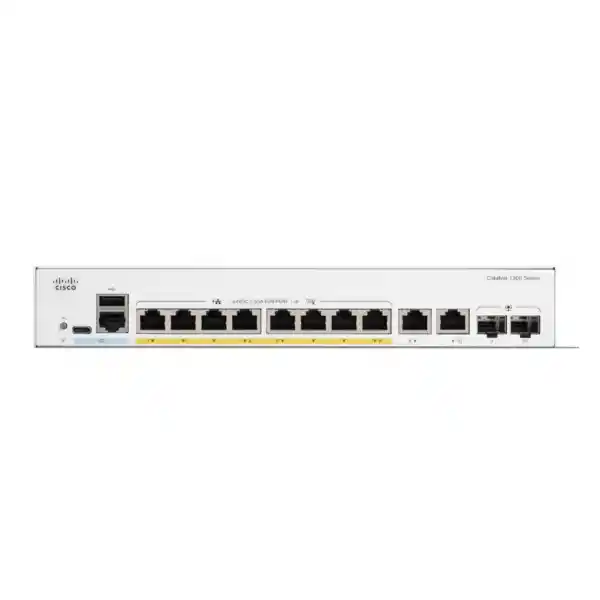
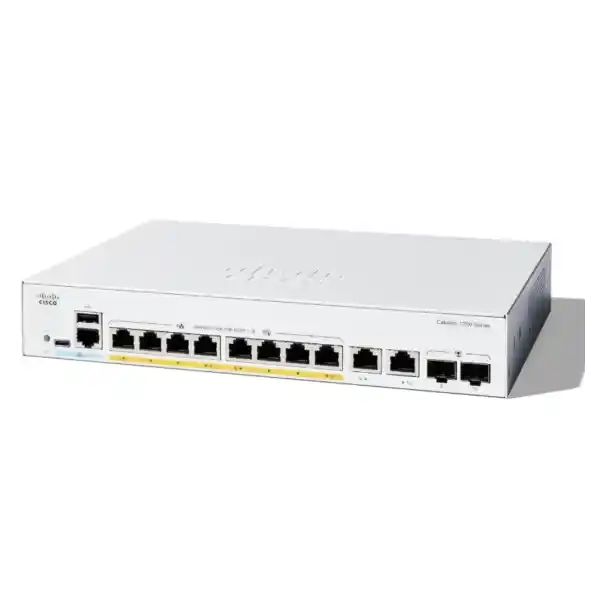
Cisco Catalyst C1300-8T-E-2G Network Switch in Dubai, UAE
A compact Cisco Catalyst 1300 managed Layer 3 switch with eight Gigabit Ethernet access ports and two Gigabit copper/SFP combo uplinks for branch, office, retail and edge networks that need business-class segmentation, routing and management without Power over Ethernet.
Direct answer: what is the C1300-8T-E-2G and who is it for?
The Cisco Catalyst C1300-8T-E-2G is a fixed, managed Layer 3 Gigabit Ethernet switch in Cisco’s Catalyst 1300 family. It is mainly used to connect a modest number of wired business devices while providing managed features such as VLAN segmentation, access control, quality of service, IPv4 and IPv6 routing, monitoring and centralized administration. Its physical port layout is unusually useful for a small edge switch because the eight copper access ports are supplemented by two Gigabit combo uplinks that let the network designer choose copper or compatible SFP fiber for each uplink according to the building and distance requirement.
The model should be considered by small offices, branch sites, retail units, clinics, schools, meeting facilities, laboratories, low-density equipment rooms and enterprise edge locations that need more control than an unmanaged switch provides but do not need PoE on the access ports. It is especially sensible where desktop computers, printers, servers, firewalls, appliances or other endpoints already have independent power. The most important factor to confirm before ordering is whether eight non-PoE access ports and Gigabit-only uplinks are enough for the expected device count, endpoint power strategy and future traffic. Buyers should also confirm whether copper uplinks are sufficient or whether SFP transceivers and fiber patching are required.
FourTeck can help determine the correct Catalyst 1300 model, uplink media, SFP type, quantity, cable requirements, VLAN and routing design, installation scope and whether a PoE or higher-capacity alternative is more appropriate. That selection step matters because the C1300-8T-E-2G is intentionally compact: it is not the right answer for every network simply because the current port count fits.
Why this exact Cisco model deserves a separate buying decision
Small managed switches can look interchangeable on a quotation, but the C1300-8T-E-2G has a specific combination of characteristics that changes how it should be deployed. The switch offers eight dedicated copper Gigabit access interfaces and two Gigabit combo interfaces, giving a total system-port figure of ten Gigabit Ethernet ports. The word “combo” is important: the paired copper and SFP presentation gives a media choice for the uplink rather than turning each combo position into two separately usable logical ports. A buyer planning two fiber uplinks, two copper uplinks or one of each can therefore design around the available media options, while a buyer expecting four independent uplink connections from the two combo pairs would be sizing the model incorrectly.
This model is also explicitly non-PoE. That is not a weakness when the connected equipment has its own electrical supply; it can be a cost and power-efficiency advantage in a data-only environment. However, it becomes a hard design limitation when the switch is expected to power IP phones, wireless access points, cameras, door controllers or other powered devices through Ethernet. In those cases the nearby C1300-8P-E-2G or C1300-8FP-2G variants deserve evaluation because they add PoE capability and different power budgets. Selecting the non-PoE model and then compensating with multiple external injectors can make a small installation more complex than selecting the correct PoE switch from the start.
The C1300-8T-E-2G also sits in the 1 Gigabit portion of the Catalyst 1300 range. Its 20 Gbps switching capacity and 14.88 Mpps forwarding figure are appropriate for wire-speed operation across its Gigabit interfaces, but they do not turn the unit into a 10 Gigabit aggregation platform. If a server cluster, high-throughput storage system, Wi-Fi 6/6E/7 aggregation layer or traffic-heavy distribution link is likely to need multi-gigabit or 10 Gigabit uplinks, it is better to evaluate a higher-specification Catalyst 1300 or Catalyst 1300X model before locking the bill of materials.
Verified technical profile
| Specification | Cisco Catalyst C1300-8T-E-2G |
|---|---|
| Product class | Fixed managed enterprise-class Layer 3 switch for SMB and branch deployments. |
| Access ports | 8 × 10/100/1000BASE-T Gigabit Ethernet RJ-45. |
| Uplink / combo interfaces | 2 × Gigabit Ethernet copper/SFP combo ports. |
| Total system ports | 10 × Gigabit Ethernet. |
| PoE | Not provided on this model. |
| Switching capacity | 20 Gbps. |
| Forwarding rate | 14.88 Mpps for 64-byte packets. |
| Packet buffer | 1.5 MB aggregate, dynamically shared across ports. |
| MAC address table | 16,000 addresses for Catalyst 1300 1 Gigabit Ethernet SKUs. |
| Memory | 1 GB DDR4 DRAM and 1 GB SLC flash for the C1300 platform. |
| CPU | ARM dual-core at 1.5 GHz. |
| Dimensions | 268 × 185 × 43.94 mm (W × D × H). |
| Weight | 1.39 kg. |
| Cooling | Fanless according to Cisco’s current Catalyst 1300/1300X data sheet. |
| Power input | 100–240V, 50–60 Hz through an external power supply for this 8-port SKU. |
| Worst-case system power | Approximately 10.63W at 110V and 10.65W at 220V in Cisco’s current data sheet. |
| Operating temperature | -5°C to 50°C; Cisco notes a 0°C minimum ambient temperature for cold start. |
| Warranty | Cisco limited lifetime warranty with return-to-factory replacement, subject to Cisco terms and regional conditions. |
Specifications should still be matched to the exact regional order, firmware level, accessories and installation environment. In particular, transceivers, fiber type, patch leads, rack accessories and local power-cord requirements should be confirmed on the quotation rather than assumed from the switch model alone.
Port design: why the two combo uplinks matter
For many small-site deployments, uplink flexibility matters more than adding another pair of ordinary desktop ports. A branch switch may sit next to a firewall and use copper today, then later be moved into a cabinet where the upstream distribution switch is reached by fiber. The C1300-8T-E-2G’s two Gigabit combo uplinks provide that media choice without forcing the buyer to select a fiber-only or copper-only version. When SFP is required, the transceiver must match the fiber type, wavelength, connector arrangement, distance and upstream optic. When copper is used, Category 5e or better cabling is appropriate for 1000BASE-T according to Cisco’s platform specifications.
That flexibility should not be confused with bandwidth beyond 1 Gbps per uplink. A fiber SFP does not automatically mean 10 Gigabit Ethernet. This switch is a Gigabit Ethernet model and its combo interfaces are Gigabit. If the network design expects a 10G backbone, a high-volume virtualization host, a very busy NAS or many access points concentrated behind the switch, the uplink can become the practical bottleneck long before the eight access ports are physically full. In such cases a model with 10G-capable SFP+ or higher-speed interfaces should be compared.
Two uplinks can also support more resilient topologies or link aggregation where the surrounding network design supports it. However, resilience should be designed end to end rather than inferred from the presence of two ports. The upstream switches, VLAN design, spanning-tree configuration, link aggregation method, gateway architecture and failure domains all influence whether a second physical link increases availability or merely creates a loop. An accurate quotation therefore needs both the desired cable type and a simple diagram or explanation of what the switch will connect to upstream.
For buyers migrating from a flat unmanaged network, a good starting design is often to reserve the eight access ports for local equipment and treat the combo ports as dedicated uplinks. That preserves a clean cabling plan and makes later troubleshooting easier. Other designs are possible, but the value of the combo interfaces is strongest when they are intentionally allocated rather than consumed casually as ordinary edge ports.
Layer 3 capability without turning the switch into your internet firewall
Cisco describes the Catalyst 1300 family as managed Layer 3 switching. For this product class that matters because a small office can separate departments or device groups into VLANs and route internal traffic between selected networks at the switch rather than forcing every east-west packet through an external router. Cisco documents IPv4 and IPv6 wire-speed routing, Layer 3 interfaces on physical ports, LAGs, VLAN interfaces and loopbacks, support for Routing Information Protocol version 2, policy-based routing, DHCP server functions and DHCP relay. Those capabilities give a network administrator considerably more design freedom than a Layer 2-only smart switch.
The distinction between internal routing and perimeter security remains important. A managed Layer 3 switch can enforce useful access policies and move traffic efficiently, but it is not a substitute for a correctly sized next-generation firewall at the internet edge. Stateful inspection, application control, threat prevention, VPN termination, web filtering and other security services belong on the firewall or security platform designed to provide them. A common small-office architecture is therefore to use the C1300-8T-E-2G for local switching and selected inter-VLAN routing while a firewall handles internet access, site-to-site VPN, remote access and policy enforcement between trusted and untrusted zones.
Another buying detail is OSPF. Cisco’s current specification distinguishes the Catalyst 1300X family by adding OSPF support there; buyers should not purchase this C1300-8T-E-2G assuming it provides the same OSPF capability as C1300X. If the network architecture specifically requires OSPFv2 or OSPFv3, that routing requirement should be stated at quotation stage so a suitable model can be selected. For simple branches that need static-style segmentation, RIP-based dynamic routing or direct inter-VLAN routing rather than a larger routed topology, the C1300 feature set may be entirely adequate.
This is a good example of why model selection should start with required protocols, not only port count. Two switches can both have eight or ten physical interfaces yet fit very different architectures because of their routing, stacking, uplink and security behavior.
VLAN segmentation for real business environments
Staff and corporate devices
Business laptops, desktops and approved wired devices can be placed in a controlled corporate VLAN with access to the resources they actually require. That makes policy easier to understand than one flat broadcast domain where every endpoint is adjacent to every other device.
Voice and collaboration
Cisco supports voice VLAN behavior and QoS mechanisms across the Catalyst 1300 family. On this non-PoE model, IP phones would still need an independent power method, so the logical voice design and the physical power design must be considered separately.
Guest or untrusted access
Guest traffic can be separated from business resources rather than sharing the same Layer 2 environment. The final policy still depends on the gateway and firewall design, but segmentation at the access layer provides a clean foundation.
Printers and office equipment
Printers, scanners and appliances often have a different security profile from user computers. Keeping them in a dedicated VLAN can reduce unnecessary adjacency and make firewall or access-control rules easier to document.
Management interfaces
A separate management VLAN can restrict administrative access to approved systems. This is more defensible than allowing the switch web interface or SSH service to be reachable from every user segment.
Special-purpose devices
Building systems, lab instruments, digital signage and embedded devices can be isolated according to business need. The C1300 platform supports extensive VLAN functions, but an eight-port switch still requires disciplined port planning to avoid running out of physical capacity.
Cisco documents support for up to 4094 VLAN identifiers across the platform, with some reserved for internal use, as well as port-based and 802.1Q tag-based VLANs, private VLAN capabilities, guest VLAN behavior, dynamic VLAN assignment through RADIUS with 802.1X, voice VLAN and other advanced segmentation features. In practice, an eight-access-port branch rarely needs thousands of VLANs; the buyer value is that the software does not force a simplistic flat network merely because the physical switch is small. The sensible design is to create only the VLANs that have clear security, operational or traffic-management purposes and to document where each one is routed, filtered and monitored.
Critical limitation: this model does not provide PoE
The “T” model should be selected deliberately for data-only or independently powered endpoints. A small branch often connects devices that already have power adapters: desktop PCs, printers, firewalls, WAN routers, network appliances, compact servers, storage devices, industrial controllers or test equipment. In those cases paying for a PoE power supply and budget may offer no practical return. The C1300-8T-E-2G keeps the footprint and power demand modest while still providing the managed features expected from the Catalyst 1300 family.
The same model becomes a poor fit when the access switch is expected to power modern network endpoints. IP phones, ceiling-mounted wireless access points, many surveillance cameras, access-control readers and some IoT gateways commonly rely on Power over Ethernet. External injectors can work for one or two devices, but they add adapters, electrical sockets, cabling clutter and extra failure points. If several powered endpoints are part of the plan, the better procurement decision is usually to evaluate a PoE variant before purchase.
Cisco positions the C1300-8P-E-2G with eight PoE+ ports and a 67W power budget, while the C1300-8FP-2G increases the PoE budget substantially. The exact alternative should be chosen from the endpoint power calculation, not from port count alone. Each powered device has a maximum requirement, and wireless access points in particular may require more power as features and radios become more capable. A quotation should therefore list the endpoint model numbers and quantities whenever PoE is relevant.
If the requirement is uncertain, treating power as a separate design line item prevents an expensive mistake. The C1300-8T-E-2G can be excellent in the right non-PoE role, but there is no software setting that adds PoE after installation.
Security controls at the access layer
The value of a managed switch is not only that an administrator can create VLANs. It also provides tools for controlling who connects, how management sessions are protected and how common Layer 2 mistakes are contained. Cisco documents SSH, encrypted HTTPS management, IEEE 802.1X authentication, RADIUS integration, MAC authentication, guest and unauthenticated VLAN options, BPDU Guard, Root Guard and other protections across the Catalyst 1300 family. These mechanisms support a more disciplined access network than leaving every physical port permanently trusted.
802.1X is particularly useful where businesses want identity-aware wired access. A switch port can require credentials or machine authentication through a RADIUS service before placing the endpoint into an authorized network. Dynamic VLAN assignment can then make the physical desk port less important because policy follows the authenticated user or device. This capability still depends on properly configured authentication infrastructure, supplicant behavior and fallback rules; buying the switch does not automatically create a complete network access control program.
Spanning-tree protection is another practical feature in small sites. An accidental patch cable between two wall outlets or an unmanaged downstream switch can create loops that disrupt the entire local network. BPDU Guard, Root Guard, loop detection and appropriate spanning-tree configuration can reduce that risk. The switch should still be installed with labeled cabling and documented port roles because software protection is strongest when the physical network is understandable.
Management security deserves equal attention. Browser access should use HTTPS, command-line administration should prefer SSH, unnecessary services should be disabled, administrator credentials should be unique, configuration backups should be protected and management should ideally be limited to dedicated subnets. SNMPv3 is preferable where monitoring systems support it because it provides stronger security than older community-string approaches.
These controls make the C1300-8T-E-2G suitable for business use, but the actual security outcome depends on configuration. A switch delivered with default-style settings and no segmentation can provide less protection than the same hardware deployed with a clear access policy, monitoring plan and secure administration path.
Management and operational visibility
Cisco supports several management approaches for the Catalyst 1300 family. The switch provides a browser-based configuration utility with simple and advanced modes, wizards, monitoring and maintenance functions. Cisco Business Dashboard can manage Catalyst 1200 and 1300/X switches alongside supported routers and wireless products, and the platform supports an embedded probe so a separate probe appliance or virtual machine is not always necessary at the site. Cisco Network Plug and Play can also simplify provisioning of new devices in standardized rollouts.
For a single small office, the web interface may be sufficient. For an organization with many branches, repeatable configuration and centralized monitoring become more important because the operational cost of logging into each switch individually grows quickly. The choice of management method should therefore be decided alongside the hardware. A branch template might define VLAN IDs, uplink settings, management addresses, SNMP parameters, NTP servers, syslog destinations, AAA settings and port-security policy so every site starts from a consistent baseline.
The platform also supports SNMP versions 1, 2c and 3, syslog and common network management functions. These tools let a monitoring system track interface status, errors, link utilization, environmental or system alerts and other operational conditions. The value is not merely a dashboard; alerts need owners and escalation rules. A link that has been flapping for several days is useful information only if somebody is expected to investigate it.
Configuration backup is another procurement and support consideration. Network teams should define how often configurations are exported, where they are stored, who can retrieve them and how a replacement device would be restored. The switch’s compact size makes it easy to deploy at remote edges, but remote sites benefit most from strong operational discipline because an engineer may not be physically nearby when a fault occurs.
Performance: what the 20 Gbps and 14.88 Mpps figures actually tell you
Cisco rates the C1300-8T-E-2G at 20 Gbps switching capacity and 14.88 million packets per second using 64-byte packets, describing the family as wire-speed and nonblocking. Those numbers align with the model’s ten Gigabit Ethernet system ports and show that the switching fabric is designed to handle full-duplex Gigabit traffic across the interfaces without an artificially undersized backplane. That is important because inexpensive switches can otherwise advertise many ports while providing less aggregate internal bandwidth.
The published figures do not mean every business application will see 20 Gbps of usable throughput. Endpoint speeds, protocol overhead, uplink concentration, server performance, storage latency, WAN bandwidth, firewall inspection and traffic patterns determine what users experience. Eight clients simultaneously sending large flows toward a single 1G uplink can obviously create contention even though the switch fabric itself is capable. Network performance should therefore be examined along the complete path rather than judged from one chassis number.
The 1.5 MB packet buffer is dynamically shared across ports. Buffers help absorb short bursts, but they are not a substitute for correct capacity planning. Sustained oversubscription toward a single uplink eventually creates queueing and dropped traffic. Quality of service can prioritize important classes such as voice or critical applications, yet QoS redistributes contention; it does not create bandwidth that does not exist.
For ordinary office access—document workflows, web applications, ERP terminals, printing, voice signaling, local services and moderate file transfer—the Gigabit interface model is often appropriate. For high-volume media production, virtualization traffic, large backup windows, storage networks, dense high-speed wireless aggregation or workloads that regularly exceed 1 Gbps per uplink, the buyer should evaluate faster ports and uplinks before choosing the smallest physical switch.
A useful sizing question is therefore not “Does the switch have enough ports?” but “What traffic converges on each uplink during the busiest business period?” That one question often exposes whether the C1300-8T-E-2G is correctly sized or merely physically convenient.
IPv6 readiness and dual-stack planning
Cisco includes extensive IPv6 support in the Catalyst 1300 family, including IPv6 host functionality, dual IPv4/IPv6 operation, neighbor discovery, stateless address autoconfiguration, path MTU discovery, DHCPv6 client functions, IPv6 quality of service, IPv6 access control lists, first-hop security mechanisms, multicast listener discovery snooping and IPv6 routing. That breadth matters even for organizations that are primarily IPv4 today because managed infrastructure often remains installed for years.
An IPv6-capable switch does not force an immediate migration. It gives the network team the option to introduce dual stack gradually, test security policy and ensure management systems can observe both protocols. The risk in ignoring IPv6 is that endpoints may still generate IPv6 traffic even when the organization has not intentionally designed for it. First-hop security features such as router advertisement guard and DHCPv6 guard can be relevant when controlling which devices are allowed to influence IPv6 addressing on an access segment.
If IPv6 is part of the roadmap, the buyer should confirm how addressing, DNS, firewall policy, logging, monitoring, VPN access and application support will work across both protocol families. A switch can forward and route IPv6 correctly while an old monitoring tool or security rule set remains IPv4-only. Migration therefore belongs in a broader operational plan rather than being treated as a checkbox in the switch data sheet.
For a small branch, this future readiness is useful because the same compact switch can support current IPv4 operations while participating in a later dual-stack design. It reduces the chance that the access layer becomes the first component that must be replaced solely because the organization begins adopting IPv6 more seriously.
Quiet operation, external power and physical deployment
Cisco’s current Catalyst 1300/1300X data sheet lists the C1300-8T-E-2G as fanless. That makes it attractive for deskside equipment areas, meeting rooms, classrooms, reception spaces and small cabinets where audible fan noise would be undesirable. Fanless operation also removes a moving part from the cooling system, although the switch still requires adequate ventilation and should not be installed where heat can accumulate around the chassis or external power supply.
The unit measures approximately 268 mm wide, 185 mm deep and 43.94 mm high and weighs about 1.39 kg. Its compact width is smaller than a full 19-inch rack device, so the mounting approach should be checked against the actual cabinet or shelf. Cisco’s package information notes that 19-inch mounting brackets are included only with 24- and 48-port models, which means buyers should not assume the compact 8-port unit arrives with the same rack hardware as larger models. If it must be installed in a standard rack, the required shelf, tray or compatible mounting arrangement should be defined in the bill of materials.
This model uses an external universal 100–240V, 50–60 Hz power arrangement. That is practical for UAE mains environments, but the exact regional power cord and adapter packaging should still be confirmed at quotation stage. Remote branches also benefit from labeling the adapter because external power supplies can be accidentally disconnected or confused with other equipment during maintenance.
Cisco lists an operating range of -5°C to 50°C, with 0°C as the minimum ambient temperature for a cold start. Dubai installations more often face the upper end of the environmental concern: small communications cabinets can become much hotter than the surrounding office when ventilation fails or equipment is placed near glazing, ceilings or utility areas. The published switch limit should not be treated as a target operating temperature. Good cabinet airflow, clean power and sensible spacing improve long-term reliability.
For sites without a dedicated comms room, the combination of compact dimensions, low system power and fanless operation is a genuine deployment advantage. The physical environment still needs the same discipline as a larger network: stable placement, cable strain relief, power protection, ventilation and accessible labeling.
When hardware stacking is a requirement, confirm another model
Cisco documents front-panel hardware stacking for selected Catalyst 1300 and Catalyst 1300X models, with up to eight switches in supported stacks. However, the published list of stack-supported Catalyst 1300 families does not include the C1300-8T-E-2G. That distinction is important because a buyer may read the family-level stacking description and assume every model participates in a hardware stack. For this exact compact 8-port SKU, stacking should not be specified as a design requirement.
A small standalone branch may have no need for hardware stacking. One switch with two uplink options can be simpler, cheaper and easier to support. But a site that expects multiple access switches, a single logical control plane, cross-stack link aggregation or fast stack failover should move that requirement to the top of the selection process. A stack-capable C1300 model with higher-speed interfaces may then be a better architectural fit.
This also affects growth planning. If the current deployment needs seven ports and the site is likely to add another dozen endpoints within a year, buying the smallest switch today and another independent compact switch later may create more configuration and uplink complexity than purchasing a 16- or 24-port model from the outset. Conversely, if the location is a kiosk, small branch or equipment pod with a stable device count, a larger chassis can be unnecessary.
The right decision depends on whether growth happens inside one room, across separate physical areas or across multiple sites. Port-count headroom, physical layout and operational management should be considered together. The absence of hardware stacking on this exact model is not a defect; it simply defines the role for which the switch is best suited.
Typical deployment scenarios in the UAE
Small branch office
Connect staff PCs, a printer, a local appliance and a firewall while separating corporate, management and guest-related traffic. The combo uplinks provide flexibility if the branch backbone changes from copper to fiber.
Retail or reception area
Use the compact fanless switch where noise and physical space matter, provided connected terminals, printers and appliances have their own power and the site does not require PoE cameras or access points from this switch.
Meeting or training room
Provide managed wired connectivity for conferencing equipment, presentation devices and guest ports while keeping management and corporate networks logically separated from temporary users.
Lab or test bench
Create repeatable VLANs for equipment under test, management interfaces and engineering systems. The non-PoE design suits many appliances and servers that are already powered independently.
Firewall-side aggregation
Connect several local networks or appliances near a firewall where Gigabit speeds are adequate. VLAN and Layer 3 capabilities can help organize traffic, while perimeter security remains on the firewall.
Low-density equipment cabinet
Serve building systems or network appliances in a secondary cabinet where only a handful of Gigabit links are needed. Fiber can be used on the combo uplink where copper distance is unsuitable.
These examples are intentionally different because the correct design is driven by endpoint type and traffic path. A switch that is perfect for a small data-only cabinet can be wrong for an office ceiling zone where every endpoint needs PoE, and a switch that is ideal for eight local devices can be undersized if all traffic must cross a single high-volume uplink. UAE buyers should provide the actual endpoint list and upstream connection requirement rather than relying on a generic “8-port switch” description.
SFP selection: what must be confirmed
The presence of SFP-capable combo ports creates useful fiber options, but the switch itself is only one part of a fiber link. The selected transceiver must be compatible with the Cisco switch and match the optic at the far end. Buyers should identify whether the fiber is single-mode or multimode, its connector type, the approximate link distance, the required wavelength and whether the existing patch panels and fiber jumpers are already installed. A transceiver chosen only because it physically fits the SFP cage can still be electrically or optically unsuitable for the link.
For short building links, multimode fiber may already be available. For longer inter-building or campus runs, single-mode is common. The actual design should follow the existing cabling infrastructure and supported optic combinations. If the far-end device is another vendor’s switch, compatibility should be checked on both sides rather than assuming every 1G SFP interoperates automatically. Fiber polarity and connector cleanliness also affect commissioning even when the transceivers are correct.
Copper can be preferable where both devices are close and Category 5e or better cabling is already present. It avoids purchasing optics and fiber patch cords. Fiber becomes valuable when distance, electrical isolation, pathway constraints or existing backbone architecture favor optical media. The combo design lets one SKU accommodate either approach, which can simplify standardization across branches with different cabling conditions.
A complete quotation for an optical uplink should therefore name the switch, SFP quantity and type, fiber patch cords, connector format and any installation or testing work. Leaving the optics as “to be confirmed later” can delay deployment because the switch may arrive before the physical link is actually buildable.
Migration from Cisco Business 350 or an unmanaged switch
Cisco’s current end-of-sale guidance for selected Cisco Business 350 models identifies the C1300-8T-E-2G as the migration product for the CBS350-8T-E-2G variants. That makes the Catalyst 1300 model particularly relevant for organizations standardizing away from the older CBS350 compact managed-switch generation. A hardware replacement should still be treated as a migration project rather than an assumption that every configuration element can be copied one for one without review.
Before replacing an existing managed switch, export the current configuration and document VLANs, tagged and untagged port membership, native VLAN behavior, link aggregation, spanning tree, access-control lists, management addresses, SNMP settings, NTP, syslog, RADIUS or TACACS+ integration, DHCP relay, routing and any unusual port features. This is also the right time to remove stale rules and abandoned VLANs rather than carrying years of configuration debt onto new hardware.
A migration from an unmanaged switch is simpler physically but usually introduces more design questions because the old network may have no explicit segmentation. Decide which devices should be grouped together, what the default gateway will be for each VLAN, which networks may communicate, how administrators will reach the switch and what monitoring should be enabled. Label cables before moving them; with only eight access ports, a clean port map takes little effort and pays back during troubleshooting.
For branches that cannot tolerate extended downtime, build and test as much of the configuration as possible before the cutover. Confirm the uplink first, then move endpoints in a planned sequence while verifying DHCP, DNS, routing and application access. A rollback plan can be as simple as keeping the previous switch configuration and cable map available until the new device has passed acceptance testing.
Migration is therefore an opportunity to improve the network, not merely exchange one box for another. The compact Catalyst model can preserve the small physical footprint while moving the site onto the current Cisco access-switch family and a more deliberate operating model.
Installation and commissioning journey
A compact switch can be installed quickly, but good commissioning is about reducing future ambiguity. The person supporting the site six months later should be able to identify what each port does, how the switch is reached, where logs are sent and which configuration backup is current. That documentation is especially important in distributed UAE operations where a site may be supported remotely by a central IT team.
How to decide whether eight access ports are enough
Port count should include both today’s devices and realistic near-term growth. Begin with permanently connected endpoints rather than the number of employees. A five-person office can consume more than eight ports if it has several printers, a firewall handoff, meeting-room equipment, a NAS and building systems. Conversely, a larger team using mostly Wi-Fi may need very few wired access ports but could still require PoE for access points, which would make this non-PoE model unsuitable for a different reason.
Reserve ports for known projects. If a branch is likely to add a second printer, biometric device, local server or specialist appliance, include it in the count now. Avoid designing a new installation where every access port is occupied on day one unless there is a deliberate reason. Spare ports reduce the temptation to add unmanaged desktop switches later, which can create loops, undocumented devices and security blind spots.
The two combo uplinks should also be treated according to their intended role. A design that consumes them as ordinary local access ports may technically work but leaves less flexibility for resilient or fiber uplinks. If the switch needs eight local devices plus two independent upstream paths, the port plan is already full. If it needs nine or ten local devices as well, a 16-port model is likely cleaner.
Physical growth and bandwidth growth are separate. A site may stay at six devices while traffic increases because a new server or cloud gateway handles much larger files. In that case the next switch might need faster uplinks rather than more copper access ports. Procurement teams should therefore ask both “How many links?” and “How fast must the busiest links be?”
A simple worksheet listing endpoint, interface speed, PoE requirement, VLAN, expected traffic and physical location is enough to make this decision objectively. FourTeck can use that information to compare the C1300-8T-E-2G with nearby Cisco alternatives rather than recommending a larger model without a reason.
When to choose another Catalyst 1300 model
Choose a PoE-capable model when phones, access points, cameras or other powered endpoints should receive electricity through Ethernet. The C1300-8P-E-2G and C1300-8FP-2G keep a similar compact access-port count while adding PoE capability with different power budgets. The correct PoE alternative depends on the number of powered devices and the maximum draw expected from each one.
Choose a higher-port-count model when the eight access ports leave little or no expansion room. The 16-port and 24-port C1300 variants can reduce the need to cascade multiple small switches and may provide a cleaner wiring-cabinet design. Larger models also have different uplink arrangements, so the selection should consider both access density and backbone connectivity.
Choose a 10G- or multi-gigabit-capable model when uplink speed is the limiting factor. A modern wireless deployment can place several high-throughput access points behind one access switch, and storage or media workflows can exceed what a 1G uplink comfortably supports. C1300 and C1300X models with faster interfaces are better candidates for those environments.
Choose a stack-capable model when the design specifically requires front-panel hardware stacking, a unified stack control plane or cross-stack features. Cisco’s stack-supported model list does not include the C1300-8T-E-2G, so stacking should be treated as a model-selection requirement rather than an afterthought.
The supplied model remains a strong choice when the requirement is genuinely small, Gigabit, non-PoE and independently managed. Balanced procurement means preserving that fit rather than automatically upselling. A larger switch can cost more, consume more space and add unused features; a smaller one can create early replacement costs. The best model is the smallest one that meets the defined technical and growth requirements with sensible headroom.
Quality of service, multicast and application behavior
Business networks increasingly carry different traffic classes over the same access layer. Interactive voice, video meetings, transaction systems, backups, software updates and guest browsing do not have the same sensitivity to delay and packet loss. The Catalyst 1300 family provides quality-of-service mechanisms that let administrators classify and prioritize traffic so latency-sensitive flows can receive preferential treatment during congestion. QoS is most effective when markings and policies are designed consistently across switches, routers and firewalls rather than configured on one device in isolation.
Multicast can also matter in specialized branches, digital signage, surveillance or media-distribution environments. Cisco documents IGMP snooping for the C1300 platform, allowing multicast traffic to be forwarded to interested receivers rather than flooded unnecessarily throughout the Layer 2 domain. An IGMP querier and related multicast functions are also available. The need for these features should be validated against the application because poorly understood multicast can be difficult to troubleshoot.
Voice VLAN functionality can simplify classification of IP telephony endpoints, but remember that this exact switch does not supply PoE. A phone can still connect if it uses an external adapter or another power method, yet a deployment with many phones is normally cleaner on a PoE model. The logical feature set and the physical power requirement should be evaluated together.
Jumbo-frame support up to 9000 bytes is documented across the platform, with Cisco noting a lower default MTU. Jumbo frames can be useful in some storage or specialized data environments, but they should only be enabled when the entire path and application benefit from them. A mismatched MTU can produce difficult connectivity problems.
These application-oriented functions reinforce the product’s role as a managed business switch rather than a basic port multiplier. They are valuable when configured for a documented need and largely irrelevant when enabled without understanding the traffic they are intended to improve.
Power, UPS and branch resilience
The C1300-8T-E-2G’s modest power demand makes it easy to include in a small UPS design, but the network only remains useful if the devices around it are protected too. A branch may have the switch on backup power while the firewall, ISP modem or fiber termination device loses electricity, leaving users disconnected. UPS sizing should therefore account for the complete critical network chain and the required runtime rather than the switch alone.
Cisco publishes worst-case system power of roughly 10.6W for this model and much lower idle figures, excluding PoE because the switch has none. That low consumption is attractive for always-on branch infrastructure. When calculating UPS load, use the actual power supplies for the switch, firewall, WAN equipment and any local server devices, then include headroom and battery aging. The desired runtime may differ between offices that only need graceful shutdown and sites that need to remain online through short utility outages.
External power adapters should be secured and labeled. In small cabinets, adapters are often the least organized part of the installation, and accidental disconnection during unrelated maintenance is a common preventable event. Surge protection and clean power are also relevant in locations where electrical quality is inconsistent.
Resilience is therefore broader than redundant Ethernet links. Power continuity, internet diversity, gateway redundancy, switch architecture, documented recovery procedures and spare hardware all contribute to availability. The compact C1300 model can be part of a resilient small-site design, but the required service level should determine whether a single standalone switch is sufficient.
Procurement details that improve quotation accuracy
A useful network-switch quotation is more than a line showing one Cisco part number. The exact C1300-8T-E-2G should be identified, together with quantity, destination, required delivery expectations and any services. If fiber uplinks are planned, the SFP models and patch leads should be quoted explicitly. If rack installation is required, the mounting method should be stated because compact 8-port packaging differs from larger 24- and 48-port models that include standard 19-inch mounting brackets.
Power should also be confirmed for the destination. The switch uses an external universal power supply, but the cable and plug arrangement should match the local deployment. For a Dubai or wider UAE installation, the bill of materials should avoid ambiguity about local power accessories, especially when equipment is sourced through international channels or consolidated shipments.
Support expectations belong on the same quotation. Cisco states a limited lifetime return-to-factory warranty for the family and one year of access to the Small Business Support Center in its current data sheet, but businesses may require different response times, advance replacement arrangements, onsite support or managed-service coverage. Warranty and operational support are not identical. A return-to-factory process can be perfectly acceptable for a low-criticality branch while a revenue-critical site may need a faster replacement plan or spare unit.
Installation scope should specify whether the work includes configuration, VLAN design, migration from the old switch, rack or shelf installation, fiber termination, cable testing, firewall changes, monitoring integration and documentation. Splitting those items into clear deliverables avoids a common problem where “installation” means physical mounting to one party and full commissioning to another.
For multi-site rollouts, standardization adds further value. A repeatable branch configuration, naming convention and port map can reduce installation time and support complexity across dozens of locations. The hardware purchase then becomes part of a controlled operating model rather than a series of isolated switch orders.
Support, lifecycle and firmware considerations
Cisco currently lists the Catalyst 1300 Series as available to order and provides current data sheets, administration guides, release notes and software information for the platform. That active status is relevant for organizations moving away from older Cisco Business 350 hardware. Procurement should still record the exact model, serial numbers and purchase documentation because entitlement and support processes depend on being able to identify the installed unit accurately.
Firmware management should be deliberate. Before deployment, review the recommended or current release appropriate to the environment and read release notes for known issues and feature changes. In production, avoid upgrading simply because a newer version exists; schedule changes with a rollback plan and test important functions such as VLANs, routing, authentication, monitoring and management access. Small switches can be business-critical even if their configuration is simple.
Configuration backups should be taken after commissioning and after meaningful changes. Store them in a location accessible to the support team but protected from unauthorized modification. A backup is most valuable when accompanied by the firmware version, network diagram and list of required credentials or AAA dependencies. This allows a replacement switch to be restored quickly instead of reconstructed from memory.
Lifecycle planning should also look at the network role. A compact Gigabit switch may remain perfectly suitable for years if the branch has stable traffic, while a growing site may outgrow 1G uplinks or eight access ports long before the hardware reaches end of support. Keeping a simple capacity record—port utilization, uplink utilization and planned endpoints—helps distinguish business growth from hardware failure and makes replacement timing more predictable.
The most economical lifecycle is not necessarily the longest possible hardware life. It is the period in which the switch continues to meet performance, support and security requirements without creating avoidable operational risk.
Frequently asked buyer questions
Is the C1300-8T-E-2G a managed switch?
Yes. Cisco positions the Catalyst 1300 family as managed enterprise-class Layer 3 switching for SMB and branch networks. It supports browser management, Cisco Business Dashboard, SNMP, VLANs, routing, security and other managed features.
Does this model provide PoE?
No. The C1300-8T-E-2G is the non-PoE variant. If phones, access points, cameras or other powered devices need electricity through Ethernet, compare the C1300-8P-E-2G or C1300-8FP-2G and calculate the required PoE budget.
Are the two uplinks 10 Gigabit?
No. They are Gigabit Ethernet copper/SFP combo interfaces. Fiber support does not imply 10G. If the design requires 10G uplinks, select a Catalyst model with the appropriate SFP+ or faster interfaces.
Can I use copper instead of fiber on the combo ports?
Yes. The combo design gives a choice between the paired copper and SFP media for each combo interface. The design should reserve those interfaces according to the intended uplink topology and not count a paired copper and SFP presentation as two independent ports.
Is the switch fanless?
Cisco’s current Catalyst 1300/1300X data sheet lists the C1300-8T-E-2G as fanless. This makes it useful in noise-sensitive spaces, though adequate ventilation and a suitable ambient temperature are still required.
Does it support hardware stacking?
The exact C1300-8T-E-2G is not included in Cisco’s published list of stack-supported C1300 models. If hardware stacking is a requirement, choose from the models Cisco explicitly identifies for front-panel stacking.
Can the switch route between VLANs?
Yes. Catalyst 1300 provides Layer 3 interfaces and IPv4/IPv6 routing features. The routing design should still identify which networks the switch routes locally and which security boundaries are enforced by the firewall.
Does this model support OSPF?
Cisco’s current data sheet identifies OSPF v2 and v3 support with the C1300X SKUs. Buyers who require OSPF should specify that protocol requirement and select a suitable model rather than assuming feature parity across the full C1300 family.
What SFP should I order?
The correct SFP depends on fiber type, wavelength, connector, distance and the far-end interface. Provide those details with the quotation request so the transceiver and patching can be selected as a complete link rather than guessed.
Is it suitable for a firewall deployment?
It can be a useful managed access or aggregation switch beside a firewall when Gigabit speeds and eight access ports are sufficient. It does not replace the firewall’s stateful inspection, VPN and threat-protection roles.
UAE buying and deployment guidance
For Dubai and UAE buyers, availability should be confirmed against the exact Cisco product ID C1300-8T-E-2G rather than a shortened “Catalyst 1300 8-port” description. The family contains PoE and non-PoE models with similar names, and the wrong suffix changes power capability and sometimes physical or uplink characteristics. A purchase order should therefore carry the complete product ID.
Local deployment planning should include the destination site, quantity, required delivery window, power arrangement, cabinet type and whether the installation is a new build or replacement. Fiber uplinks require additional details such as existing backbone fiber type and distance. Multi-site customers can also state whether all branches should use the same standardized configuration so staging and documentation can be repeated consistently.
FourTeck supports business infrastructure requirements across the UAE. Buyers can review the broader company capabilities through FourTeck UAE, explore network and security-focused services through Firewall Dubai by FourTeck, and consider implementation or managed support through FourTeck IT Services UAE. International or multi-country organizations can also use FourTeck as a broader reference point.
The most useful inquiry includes the exact model, quantity, endpoint list, uplink media, whether SFPs are required, whether installation and configuration are needed and any preferred support arrangement. With those inputs, the quotation can distinguish the switch itself from transceivers, cabling, mounting, UPS, configuration and ongoing support instead of hiding important dependencies in assumptions.
Decision recap: is the C1300-8T-E-2G the right fit?
Strong fit when
You need eight managed 1G copper access ports, one or two 1G copper/fiber uplinks, no PoE, compact dimensions, fanless operation, VLANs, routing and business-grade management for a small site.
Reconsider when
You need to power endpoints, require more than eight local copper ports, expect sustained traffic beyond Gigabit uplinks, need OSPF specifically or require hardware stacking on the selected switch.
Confirm before ordering
Exact quantity, port headroom, copper versus fiber uplink, SFP compatibility, cabinet mounting, regional power accessories, VLAN/routing scope, monitoring, installation and support expectations.
The model’s strength is clarity of purpose. It is a small, capable managed switch rather than an attempt to cover every access-layer requirement. That makes it efficient where the environment is predominantly wired, independently powered and Gigabit. The same clarity makes the limitations easy to identify: no PoE, no 10G uplink on this SKU and no published hardware-stacking support for the exact model. A buyer who validates those three points is unlikely to be surprised after deployment.
What FourTeck needs for an accurate quotation
Confirm C1300-8T-E-2G and the number of units required per site.
List wired devices now and expected additions so port headroom can be checked.
State whether any phones, APs, cameras or other endpoints need Ethernet power.
Specify copper or fiber, distance, fiber type and far-end device if SFP is required.
Include VLANs, routing, authentication, monitoring, migration and documentation needs.
Provide UAE delivery location, cabinet details, installation need and desired support response.
These inputs prevent the switch from being quoted in isolation when the real deployment also needs optics, patching, power protection, migration work or a different model. They also make it possible to identify when the C1300-8T-E-2G is already the correct economical choice and no larger chassis is necessary.
Plan the Cisco C1300-8T-E-2G around your actual branch network
If your requirement is eight non-PoE Gigabit access ports with flexible 1G copper or SFP uplinks, the C1300-8T-E-2G is a focused, capable Catalyst 1300 option. If the project needs PoE, more ports, 10G uplinks, OSPF or hardware stacking, it is better to change the model before purchase than redesign the site after installation. Share the endpoint list, uplink type, quantity and configuration scope for a UAE quotation built around the real network.


Reviews
There are no reviews yet.