
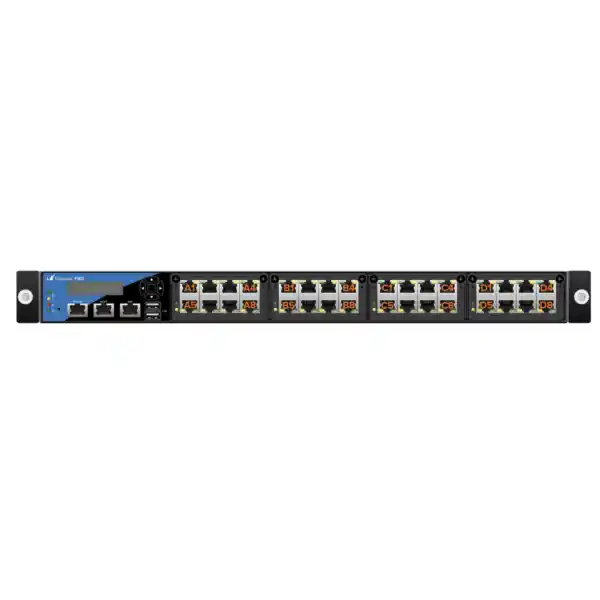
Barracuda CloudGen Firewall F900 Revision C
The Barracuda CloudGen Firewall F900 Revision C is built for organizations that need high-throughput perimeter security, secure SD-WAN, large session capacity, modular interface choices, centralized control, and resilient data-center operation in a compact 1U platform. For Dubai headquarters, UAE data centers, large campuses, regional hubs, service-provider edge locations, and multi-site enterprise networks, the F900C provides a practical combination of processing headroom and physical network flexibility.
Barracuda publishes the F900C family at up to 53.2 Gbps firewall throughput, 15.0 Gbps SD-WAN throughput, 16.9 Gbps IPS throughput, 13.0 Gbps NGFW throughput, and 12.2 Gbps threat-protection throughput under its stated test conditions. The platform supports four million concurrent sessions and 250,000 new sessions per second, making it suitable for large user populations, busy internet edges, application-heavy campuses, and concentrated branch VPN aggregation.
Direct answer: what is the Barracuda F900 Revision C?
The F900 Revision C, often written F900C, is a current high-end hardware member of the Barracuda CloudGen Firewall F-Series. It is a 1U rack-mount security appliance with a 32-core Intel Xeon processor, 64 GB of RAM, SSD storage of 430 GB or higher, dual internal hot-swap power supplies, dedicated management and IPMI connectivity, and several front-end interface configurations. Barracuda offers the hardware in CCC, CCE, CFE, and CFEQ submodels so an enterprise can choose between dense 1 GbE copper, 10 GbE fiber, mixed 1 GbE copper and fiber, or a design that also includes 40 GbE QSFP+ connectivity.
The platform is not only a packet-forwarding firewall. CloudGen Firewall integrates stateful firewalling, application control, intrusion prevention, URL filtering, TLS inspection, VPN, dynamic routing, network segmentation, SD-WAN, traffic shaping, and centralized lifecycle management. Optional subscriptions can extend the platform with malware protection, advanced threat protection, advanced remote access, and Firewall Insights. This combination is important when the same UAE edge device must secure internet access, terminate site-to-site tunnels, control SaaS traffic, steer traffic across multiple carriers, enforce segmentation policy, and deliver consistent configurations to branch or regional networks.
For many Dubai enterprises, the central purchasing question is not simply whether 53.2 Gbps is enough. The more useful question is whether the F900C has enough inspected throughput, session capacity, interface density, redundancy, and growth margin for the real production mix. FourTeck approaches F900C sizing around actual traffic profiles, security services, encrypted traffic, uplink design, high-availability requirements, and operational model rather than selecting a firewall from raw headline throughput alone.
Performance envelope at a glance
Published maximum using large UDP packets, bidirectional traffic, and the highest available port density under optimized test conditions.
A useful reference point for large multi-uplink WAN hubs, although tunnel count, encryption, path quality, and policy complexity must be considered.
Published intrusion-prevention result. Production sizing should retain margin for signature inspection, application mix, packet sizes, and concurrent services.
Measured with IPS, application control, Advanced Threat Protection, and web filtering enabled using Barracuda’s enterprise traffic methodology.
Published value with a broader security stack including IPS, application control, ATP, web filtering, antivirus, and TLS inspection.
Large connection-state capacity for busy enterprise edges, internet gateways, data-center application access, and aggregated remote locations.
Compute architecture and why it matters
The F900 Revision C is built around an Intel Xeon platform with 32 CPU cores and 64 GB of system memory. That is materially different from firewall designs that rely almost entirely on a narrow-purpose forwarding ASIC. Barracuda’s approach gives the CloudGen software stack substantial general-purpose compute resources for security inspection, VPN, routing, logging, control-plane activity, policy processing, and services that need flexible software execution. Buyers should therefore evaluate the appliance as an integrated software-and-hardware system instead of trying to map its architecture directly to a competitor’s ASIC terminology.
For production engineering, the practical advantage of a multi-core x86 security platform is flexibility. Different flows can require different processing stages: a trusted internal route may need little inspection, a SaaS flow may require application identification and policy, an inbound web connection may traverse IPS and TLS inspection, and a site-to-site tunnel may add encryption plus QoS. A large core count provides scheduling headroom for these mixed workloads. The 64 GB memory allocation supports large state tables and service processes while the published four-million-session capability provides a concrete sizing boundary for environments where thousands of users open many parallel web, cloud, API, collaboration, and mobile connections.
The internal SSD, specified by Barracuda at 430 GB or higher, supports the system software and local operational data. It should not be treated as a substitute for enterprise log retention architecture. Organizations with formal retention, SOC, SIEM, or audit requirements should design centralized logging and monitoring independently, then use the firewall’s native export and management capabilities to feed those systems. FourTeck can align the F900C deployment with broader UAE infrastructure, server, backup, monitoring, and IT operations through FourTeck IT Services UAE.
F900 Revision C hardware specifications
| Category | Published F900 Revision C specification | Deployment relevance |
|---|---|---|
| Processor | Intel Xeon, 32 cores | High-end compute platform for mixed inspection, routing, VPN, and security workloads. |
| Memory | 64 GB RAM | Supports large session tables and multi-service operation. |
| Storage | SSD, 430 GB or higher | Fast local system storage; enterprise logs should still be centrally retained where required. |
| Form factor | 1U rack mount | Efficient for data-center and communications-room deployment. |
| Appliance dimensions | 440 × 550 × 44 mm | Check rack depth, cable bend radius, and front/rear service clearance before installation. |
| Appliance weight | 10.9 kg | Suitable for standard rack installation with normal equipment-handling practices. |
| Power | Dual hot-swap internal AC; 100–240 V, 50–60 Hz | Supports redundant A/B power distribution designs when connected to independent protected feeds. |
| Max power / estimated use | 550 W maximum rating; 322 W estimated consumption | Useful for UPS runtime and rack power budgeting. |
| Operating temperature | 0 °C to 40 °C | Requires conditioned IT space; especially important for UAE summer conditions and edge rooms. |
| Operating humidity | 10% to 85%, non-condensing | Plan environmental monitoring and avoid condensation during maintenance or transport. |
| Management | Dedicated MGMT 1 GbE RJ45, IPMI 1 GbE RJ45, serial console, LCD | Allows separation of production data paths, out-of-band management, and local recovery workflows. |
| Reliability | Published system MTBF greater than 7 years | Use alongside HA, spares, support coverage, and lifecycle planning rather than as a standalone availability guarantee. |
Four F900C interface personalities: CCC, CCE, CFE, and CFEQ
One of the most important F900 Revision C design decisions is the submodel. The security performance class is shared across the F900C family, but the physical network presentation is different. That means the correct choice depends on the switching architecture, carrier handoff, aggregation layer, fiber plant, transceiver policy, and whether the firewall is acting as an internet edge, data-center gateway, SD-WAN hub, or segmentation boundary.
F900.CCC
Provides 32 × 1 GbE RJ45 Ethernet ports. This is the densest copper-oriented option and can suit environments with numerous direct copper handoffs, dedicated zones, legacy switching, service-provider CPE connections, management networks, or multiple physical security segments. It is attractive when 10 GbE fiber is not needed on the base interface set, although optional modules can still extend capabilities where supported.
F900.CCE
Provides 16 × 1 GbE RJ45 plus 8 × 10 GbE SFP+. This is often a strong enterprise-edge profile because it combines plentiful copper ports for carriers, auxiliary zones, management-adjacent connections, or legacy links with eight high-speed 10 GbE fiber interfaces for core switches, data-center fabrics, distribution layers, and resilient inside/outside designs.
F900.CFE
Provides 8 × 1 GbE RJ45, 8 × 1 GbE SFP, and 8 × 10 GbE SFP+. This mixed-media configuration works well where a UAE enterprise has 1 GbE optical carrier circuits or campus fiber alongside 10 GbE core connectivity and a smaller number of copper interfaces. It reduces the need for media converters and can simplify physically diverse handoffs.
F900.CFEQ
Provides 8 × 1 GbE RJ45, 8 × 1 GbE SFP, 4 × 10 GbE SFP+, and 2 × 40 GbE QSFP+. It is the broadest speed mix in the F900C line and is useful when the design requires high-speed 40 GbE attachment to aggregation or data-center switching while retaining 10 GbE and 1 GbE fiber and copper connectivity for WAN and segmented networks.
The submodel should be selected before optics and patching are ordered. A clean bill of materials maps each physical firewall port to its connected switch, carrier NID, cross-connect, HA peer function, or out-of-band management path. This prevents common commissioning delays such as receiving an all-copper chassis for a fiber-only core, ordering an SFP+ optic for a QSFP+ handoff, or exhausting high-speed ports after HA and redundant switching are included.
Optional network modules: expand the physical design without changing security class
Barracuda lists four field-replaceable network module families for the F900 Revision C: ET074, ET075, ET076, and ET085. The ET074 adds eight 1 GbE fiber SFP ports using an Intel I350-AM4 controller. The ET075 adds eight 1 GbE copper RJ45 ports using the same controller family. The ET076 adds four 10 GbE SFP+ ports using an Intel X710 controller. The ET085 adds two 40 GbE QSFP+ ports using an Intel XL710-BM2 controller. Only supported module combinations should be deployed, and the final module plan should be validated against the specific F900C submodel and current Barracuda compatibility guidance before procurement.
This modularity is valuable in enterprise projects because firewall refresh cycles and switch refresh cycles rarely align perfectly. A company may deploy the F900C with 10 GbE today, then add a 40 GbE data-center handoff later; another may need additional copper ports temporarily during migration from an older segmented design. Optional modules can reduce the need to replace the entire appliance solely because the physical interface plan evolves. They also allow architects to reserve base ports for production while dedicating module ports to migration, testing, external partner networks, or future connectivity.
Optics must be treated as part of the solution, not as an afterthought. SFP, SFP+, and QSFP+ links depend on fiber type, wavelength, distance, connector standard, transceiver coding, and peer compatibility. Barracuda publishes tested and known-compatible transceivers for its supported controller families, and its documentation notes that not every available market transceiver can be tested. For a Dubai data-center deployment, FourTeck recommends documenting every optical run by speed, SR/LR type, multimode or single-mode fiber, patch-panel path, expected distance, peer device, and required redundancy before placing the transceiver order.
Understanding the published throughput figures correctly
Firewall vendors publish several throughput values because different security functions create different processing workloads. The F900C’s 53.2 Gbps firewall figure is a useful ceiling for basic stateful forwarding under Barracuda’s optimized benchmark methodology, but it is not the number that should be copied directly into a production capacity plan. Barracuda states that its firewall throughput test uses large UDP packets with MTU 1500, bidirectional traffic across multiple ports, and the highest available port density. Small packets, asymmetric traffic, many short sessions, complex NAT, logging, and mixed services can produce a different result.
The 16.9 Gbps IPS number is more relevant where intrusion prevention is broadly enabled. The 13.0 Gbps NGFW result adds application control, Advanced Threat Protection, and web filtering to IPS under Barracuda’s enterprise traffic mix. The 12.2 Gbps threat-protection figure goes further by including antivirus and TLS inspection as well. For a security-first enterprise design, threat-protection throughput is often the safer starting point because it more closely reflects a heavily inspected policy. Even then, the production target should leave headroom for peak traffic, firmware processes, management activity, growth, failover, bursts, and future security policy expansion.
SD-WAN throughput, published at 15.0 Gbps, should be interpreted separately from raw firewall forwarding. SD-WAN designs can add VPN encryption, path monitoring, dynamic routing, traffic shaping, forward error correction, and multi-uplink balancing. A hub that aggregates tens or hundreds of branches may therefore be limited by encrypted or inspected WAN workload long before it reaches raw stateful firewall capacity. Tunnel topology also matters: a full-mesh design creates a different control and traffic pattern from a hub-and-spoke topology.
FourTeck sizes the F900C by constructing a service matrix. Each major traffic class is mapped to expected peak bandwidth, packet profile, encryption, inspection stack, source and destination zones, and failover path. That matrix is then applied to steady-state and degraded-state scenarios. A firewall pair that appears comfortable in normal operation may become undersized if one device must carry all traffic during maintenance while a backup WAN circuit simultaneously runs at a different speed or MTU. Designing for those conditions is more dependable than using an optimistic aggregate bandwidth total.
Security stack: one policy point for users, applications, content, and threats
CloudGen Firewall provides stateful packet inspection and forwarding as the foundation of its policy engine. Above that base, administrators can apply user-aware policy, application control, IDS/IPS, web filtering, TLS inspection, NAT and PAT, anti-spoofing, denial-of-service protections, dynamic rules, timer triggers, and object-oriented rules across routed, bridged, and routed-bridging scenarios. For enterprises consolidating multiple older security appliances, this integrated approach can simplify the packet path because routing, security classification, and application policy can be coordinated on the same platform.
Application control is particularly relevant for cloud-heavy UAE networks. Traditional port-based policy cannot reliably distinguish modern SaaS applications that share TCP 443. Application-aware controls allow security teams to define policy around the detected application rather than only the destination port. Combined with user identity, segmentation, and web filtering, this supports more precise decisions such as allowing a collaboration platform while restricting an unapproved file-sharing service or steering business-critical SaaS traffic to a preferred WAN provider.
Intrusion prevention adds signature and anomaly inspection intended to identify exploit techniques, malicious patterns, fragmentation attacks, and evasion behavior. Barracuda provides automatic signature updates when the required subscriptions are active. The operational quality of IPS is not only determined by whether it is enabled; policy tuning matters. Security teams should determine which rules apply to internet inbound, internet outbound, partner networks, data-center server zones, user segments, OT or IoT segments, and VPN traffic. Overly broad exclusions reduce protection, while indiscriminately strict policy without change control can create avoidable business impact.
For a UAE deployment, FourTeck recommends documenting every security service in a policy baseline before cutover. That baseline should identify which zones require IPS, web filtering, application control, TLS inspection, antivirus, Advanced Threat Protection, and remote-access controls, plus the logging level and exception process. This gives operations teams a measurable security architecture rather than a collection of default checkboxes.
TLS inspection and threat protection capacity planning
Encrypted traffic now represents a large portion of normal enterprise communications, so a next-generation firewall must often inspect traffic that would otherwise hide applications or threats inside TLS. The F900C supports TLS interception as part of the CloudGen feature set, and Barracuda’s published threat-protection benchmark includes TLS inspection together with IPS, application control, ATP, web filtering, and antivirus. That makes the 12.2 Gbps threat-protection figure a useful reference for security-intensive planning, but the actual result depends on cipher suites, certificate handling, object sizes, connection rates, bypass policy, and the ratio of inspected to non-inspected traffic.
TLS inspection also has organizational considerations. Some business services, privacy-sensitive destinations, certificate-pinned applications, financial applications, healthcare services, or regulated systems may need explicit exclusions based on company policy and legal guidance. The firewall design should therefore include an inspection policy hierarchy and a certificate lifecycle process. Managed endpoints need the inspection CA distributed through an appropriate enterprise mechanism; unmanaged devices and guest networks require a different strategy.
When sizing the F900C for TLS-heavy networks, count connection establishment as well as megabits per second. A busy API environment or modern web application can open many parallel connections even when total bandwidth is moderate. The F900C’s published 250,000 new sessions per second and four-million concurrent-session capacity provide substantial headroom, but they should still be compared with real flow telemetry from the existing edge. If telemetry is unavailable, FourTeck can use firewall logs, NetFlow or IPFIX sources, ISP graphs, proxy statistics, and application inventories to build a conservative estimate before migration.
Secure SD-WAN for multi-carrier UAE connectivity
CloudGen Firewall integrates SD-WAN capabilities directly with the security platform. Barracuda documents optimized direct-internet uplink selection, performance-based transport selection, application-aware routing, adaptive session balancing, traffic shaping, QoS, dynamic bandwidth detection, simultaneous use of multiple uplinks, and forward error correction. This is relevant to organizations that want to combine leased lines, business internet, MPLS, broadband, or other carrier services while applying application policy to path selection.
In a Dubai hub design, the F900C can sit between redundant core switches and multiple WAN or internet providers. Business-critical traffic can prefer the path with the best measured quality, while less critical traffic can use lower-cost capacity. If a provider degrades, policy can move selected applications rather than waiting for a complete link failure. For cloud-first workloads, local breakout can reduce unnecessary backhaul through a central data center, but direct internet access should be coupled with consistent security policy so every exit point enforces the intended controls.
The F900C is particularly attractive as a regional SD-WAN headend because its session scale and interface options can accommodate multiple high-speed uplinks and branch tunnels. However, the headend should not be sized from the number of branches alone. Each branch may have two or more providers, and traffic may be duplicated or protected with error-correction techniques depending on policy. Encryption, inspection, and failover simultaneously consume resources. Growth in branch bandwidth can compound quickly when dozens of sites upgrade from 100 Mbps to 500 Mbps or 1 Gbps services.
Organizations planning a multi-emirate or broader Middle East rollout can use the F900C as part of a standardized architecture, with smaller CloudGen models at remote branches and centralized policy through Control Center. FourTeck’s Firewall Dubai practice can assist with WAN discovery, carrier handoff mapping, security-zone design, HA, cutover planning, and operational documentation.
Routing, VLANs, and segmentation
A high-end firewall is often inserted into an existing routed network rather than deployed as a simple two-interface internet gateway. CloudGen Firewall supports IPv4 and IPv6, 802.1Q VLANs, and dynamic routing protocols including BGP, OSPF, and RIP. That allows the F900C to participate in enterprise route exchange with core switches, data-center routers, carrier networks, and WAN infrastructures. Multicast support is also part of the platform feature set, which can matter for specialized enterprise applications.
BGP is especially useful for dual-provider internet or WAN architectures where the enterprise needs policy control over multiple external routes. OSPF can integrate well with internal campus or data-center routing. Static routing remains appropriate for simpler zones and point-to-point handoffs. The right choice should minimize unnecessary complexity: a firewall should not become the accidental convergence point for every route in the organization without a clear architecture, route filtering, prefix limits, and change-control process.
Segmentation is another major use case. The F900C’s port density and VLAN support allow the firewall to separate user networks, servers, DMZs, management zones, guest networks, OT or IoT segments, development environments, partner connections, and dedicated cloud or WAN handoffs. Physical interfaces can be used where strong operational separation or legacy constraints justify them, while VLAN subinterfaces allow many logical zones over a smaller number of high-speed trunks.
The best design normally uses a combination. High-bandwidth data-center zones can ride redundant 10 GbE or 40 GbE trunks, while carrier handoffs and isolated third-party services may receive dedicated ports. FourTeck documents zone-to-zone flows before implementation so firewall policy, routing, NAT, IPS, logging, and failover behavior are defined together. That avoids creating a fast firewall with an unclear trust model.
VPN, remote access, and regional connectivity
Barracuda CloudGen Firewall includes client-to-site and site-to-site VPN capabilities in the base feature set, including IPsec and Barracuda’s own VPN technologies. This makes the F900C suitable for corporate VPN concentration where many branches, partner networks, administrators, and mobile workers need encrypted access through a central gateway. The design should separate remote-access traffic from site-to-site traffic because the authentication, address assignment, logging, segmentation, and support requirements are different.
Site-to-site VPN design should identify encryption domains, route ownership, NAT exemptions, overlapping address spaces, failure behavior, and whether tunnels are static or built dynamically by SD-WAN policy. If the F900C is replacing an existing VPN concentrator, the migration plan should inventory every remote peer, crypto proposal, pre-shared key or certificate, tunnel health check, routing dependency, and business owner. This reduces the risk of discovering an undocumented third-party tunnel during the final cutover window.
Advanced Remote Access is offered as an optional subscription. Barracuda documents browser-based remote access, network access control functions, and support for multi-factor authentication methods in applicable remote-access workflows. Licensing and authentication integration should be agreed before rollout, especially when the organization uses external identity stores, MFA services, or role-based access models. Remote administrative access to the firewall itself should remain separate from end-user remote access and should use dedicated management policy.
For cross-border connectivity between the UAE and offices elsewhere in the Middle East or Africa, the F900C can serve as a regional aggregation point, but application latency and underlay quality still matter. Security cannot compensate for a poorly performing circuit. FourTeck can help organizations coordinate the firewall design with broader regional requirements through the FourTeck Africa network when a deployment extends beyond the UAE.
Central management with Barracuda Firewall Control Center
The Barracuda Firewall Control Center is designed to centrally manage multiple CloudGen Firewalls. It provides template-driven configuration, reusable global objects, hierarchical configuration structures, role-based administrative models, revision control, status monitoring, central statistics, and distribution of configuration, updates, and licenses to managed firewalls. For an organization with many branches, this is more scalable than administering each appliance as a separate island.
Templates are valuable when the enterprise wants every site to share a common baseline. Core policies, objects, security settings, VPN parameters, and operational standards can be managed centrally while still allowing local values such as WAN IP addresses, VLAN identifiers, or branch-specific services. Revision control helps administrators understand what changed and provides a structured rollback reference. Multi-administrator support and role profiles allow duties to be separated between security, network, operations, and service-provider teams.
Centralization also improves lifecycle management. A single F900C at the headquarters may be manageable manually, but if it anchors dozens of branch firewalls, the control model becomes part of the architecture. Engineers need to decide where the Control Center runs, how its management tunnel is protected, how configuration versions are staged, how firmware is tested, how alerts are monitored, and how backup files are retained. An enterprise should also establish a break-glass process for local firewall access if the central management path is unavailable.
FourTeck can supply the F900C as part of a centrally managed architecture rather than as an isolated appliance. Our UAE team can align physical installation, CloudGen configuration, Control Center hierarchy, branch templates, administrative roles, change-control workflow, and handover documentation. For wider infrastructure sourcing and UAE technical support, visit FourTeck UAE.
Zero Touch Deployment for large rollouts
Barracuda supports Zero Touch Deployment for F-Series hardware. In the managed workflow, the Control Center is prepared to communicate with the Zero Touch service, the appliance is associated with the appropriate account or claimed using the approved process, and the firewall receives a basic configuration before establishing its management relationship and downloading the complete configuration. For the F900, Barracuda identifies port A4 as the DHCP client interface used during Zero Touch Deployment.
ZTD can substantially reduce on-site engineering time when a standardized firewall must be deployed to many locations. The local task can be reduced to rack installation, correct cabling, power, DHCP reachability, and internet access, while the central team controls the production configuration. It is not a replacement for project planning: every site still needs a validated port map, carrier handoff, addressing plan, switch configuration, power plan, change window, and rollback procedure.
The network prerequisites must also be considered. Barracuda documents DNS and correct time as requirements and identifies HTTPS and the remote management tunnel connectivity needed by the ZTD workflow. Security teams should permit only the required destinations and services according to the current vendor documentation and internal policy. The configuration version and firewall firmware must be compatible with the management hierarchy.
For a Dubai headquarters F900C, ZTD is most valuable when the appliance is part of a larger managed estate. FourTeck can stage the central configuration, label interfaces, prepare rack and patching documentation, coordinate the on-site activity, and validate that the unit has reached the intended Control Center state before production traffic is moved.
High availability: design the pair, not just the appliance
Barracuda CloudGen Firewall supports active-passive high availability. In an HA design, services remain available when the active unit is unavailable because the passive partner can take over the shared network identity and services. Barracuda’s HA architecture uses virtual MAC and shared IP handling so clients can continue communicating through the newly active firewall. The firewall pair is only one part of the availability chain, however. Surrounding switches, routers, carrier circuits, power feeds, optics, and cabling must also be redundant.
A common enterprise design uses two F900C appliances connected to two independent core or aggregation switches. Each firewall receives separate power from different protected power distribution units, and WAN connectivity is arranged so both devices can reach the required provider handoffs. HA synchronization and management paths are documented separately from production forwarding. The switch design avoids a single VLAN, port-channel, or spanning-tree condition that could isolate both firewalls at once.
Capacity planning must assume a single appliance can carry the production load during failover. If the normal design deliberately spreads unrelated traffic across two standalone firewalls, that is not the same as active-passive HA and requires a different recovery model. With an HA pair, each F900C should individually satisfy the required inspected throughput, session capacity, and interface needs during the worst expected traffic period. Maintenance windows, firmware updates, or a failed PSU should not force the organization into an emergency bandwidth reduction.
FourTeck validates HA with controlled failover tests before acceptance. The checklist typically includes internet sessions, site-to-site tunnels, remote access, dynamic routing, NAT, VLAN gateways, critical server flows, management access, monitoring, logging, and restoration to the preferred active node. The goal is to prove the surrounding network converges correctly, not merely to confirm that the secondary firewall powers on.
Six practical F900C deployment topologies
1. Dubai enterprise internet edge
A pair of F900C appliances protects a high-bandwidth corporate internet perimeter. Redundant ISP circuits connect outside, redundant core switches connect inside, and public DMZs use dedicated VLANs or interfaces. Application control, IPS, web filtering, TLS inspection, NAT, remote access, and BGP can be consolidated in one security tier.
2. Regional SD-WAN hub
The F900C aggregates encrypted branch connectivity and selects among multiple WAN providers. Control Center distributes standardized branch policy, while the headend applies routing, security inspection, QoS, and application-aware path decisions. This suits groups with UAE branches plus regional offices.
3. Data-center north-south gateway
High-speed SFP+ or QSFP+ links connect the firewall to the data-center fabric. The platform separates public services, application tiers, partner networks, cloud interconnects, and internet-facing workloads while maintaining dynamic routes and inspected connectivity.
4. Campus segmentation core
The firewall is placed between major trust zones such as users, servers, guests, IoT, laboratories, production systems, and administration networks. VLAN trunks carry multiple segments while high-value or unusual zones receive dedicated physical interfaces where operational separation is useful.
5. Migration gateway
During a phased firewall replacement, the F900C temporarily connects both the legacy network and the new core. Its interface density helps preserve existing handoffs while zones are moved in controlled groups. Temporary routes and policies are removed after migration to avoid long-term complexity.
6. Multi-tenant or shared services edge
A large organization or service provider can use segmentation, administrative roles, templates, and routing policy to separate multiple internal business units or managed environments. The design must include clear ownership, logging boundaries, object naming, and capacity reservations for each tenant or service group.
A rigorous F900C sizing methodology
Sizing starts with observed traffic, not the service-provider contract rate. A company may have two 10 Gbps internet circuits but use only 4 Gbps at the 95th percentile today; another may have a 5 Gbps circuit that regularly bursts to line rate during backups or software distribution. Collect at least several weeks of interface statistics when possible and capture peak periods such as month-end processing, large cloud backups, video events, operating-system patching, or e-commerce campaigns.
Next, classify the inspection stack. Identify which traffic is stateful firewall only, which receives IPS, which requires application control and web filtering, which undergoes TLS inspection, and which uses antivirus or ATP. The percentage of encrypted traffic matters, as does the ratio of north-south to site-to-site or internal segmented traffic. Use the lowest relevant published performance class as the starting envelope, then apply engineering headroom rather than assuming benchmark maximums are sustainable business targets.
Session behavior must be measured separately from bandwidth. Guest Wi-Fi, large web proxies, VDI, microservices, API gateways, mobile applications, and busy SaaS environments can create many concurrent connections. The F900C’s four-million-session capacity and 250,000-new-sessions-per-second rating are substantial, but large campuses should still compare them to existing telemetry. Abnormally short-lived connections can create load even when aggregate throughput is modest.
The third dimension is physical I/O. Count every WAN circuit, core switch uplink, DMZ trunk, management port, HA path, partner link, migration interface, and future reserved connection. For each, record speed and medium. A CCE may be ideal if the core is 10 GbE and the carriers are copper; a CFEQ may be better when a 40 GbE data-center fabric is involved. Optional ET074, ET075, ET076, and ET085 modules can extend the interface plan, but module slots and supported combinations must be validated.
Then model failure conditions. What happens if one F900C in the HA pair is down? What if the preferred ISP fails and all cloud traffic moves to another circuit? What if a switch maintenance event forces traffic through a single trunk? What if TLS inspection coverage is expanded after deployment? Capacity should still be acceptable in the degraded state. This is where designs that appear comfortable on a normal-day spreadsheet often reveal a hidden constraint.
Finally, include lifecycle growth. Firewalls commonly remain in production through several bandwidth upgrades, SaaS migrations, office expansions, acquisitions, and new security requirements. A 25 to 40 percent design margin is often a useful internal planning range, but the exact margin should reflect the organization’s growth forecast and risk tolerance rather than a fixed universal rule. The F900C is best selected when its inspected throughput and I/O leave practical room for those changes.
UAE data-center and facilities considerations
The F900C is specified for operation from 0 °C to 40 °C and 10% to 85% non-condensing humidity. In Dubai and other UAE locations, that makes environmental control a basic design requirement rather than a convenience. A properly conditioned data center normally stays comfortably within range, but edge rooms, retail back rooms, temporary sites, or poorly ventilated communications cabinets can exceed safe temperatures during HVAC failure. Temperature monitoring and alerting should therefore be included wherever the appliance is installed outside a managed data hall.
Power design should use both hot-swap power supplies. Ideally each PSU connects to an independent rack PDU backed by separate UPS paths or an A/B power architecture. Connecting both supplies to the same extension strip provides less resilience than the hardware can deliver. Barracuda lists a 550 W maximum rating and approximately 322 W estimated consumption, so the rack power budget and UPS runtime calculation should account for both the firewall pair and the surrounding switches, optics, carrier devices, and management equipment.
Rack depth and cable management also matter. The appliance is approximately 550 mm deep, so the rack must provide adequate usable depth plus room for power cables and airflow. Fiber connections need proper bend radius and labeling. Copper patch leads should be arranged so a replacement PSU or appliance can be serviced without disturbing unrelated links. In an HA pair, port numbering should be mirrored wherever possible so the primary and secondary cabling diagrams remain easy to understand during a maintenance event.
For colocation deployments, cross-connect lead times can be longer than firewall installation. Confirm the carrier demarcation, connector type, optic ownership, and handoff speed before the appliance arrives. A 10 GbE service delivered as LR single-mode fiber requires a different optic and fiber path from a short-range multimode connection. FourTeck can coordinate the firewall bill of materials with rack, patching, switching, and optics to reduce last-minute commissioning changes.
Licensing and subscription planning
CloudGen Firewall licensing should be defined at quotation stage because security functionality and update services depend on the selected subscriptions. Barracuda documents a base license for hardware appliances and states that Energize Updates is mandatory for the first year of hardware purchase. The base license includes core CloudGen capabilities such as SD-WAN, application-control reporting, SSL inspection on supported models, and an unlimited number of VPN clients for supported client-to-site and site-to-site technologies. After the first year, the customer can decide whether to renew Energize Updates, but operating without current subscriptions results in reduced update-driven functionality.
Energize Updates covers important maintenance and security content such as firmware updates, IPS signatures, application-control definitions, and web-filter updates. For a production perimeter firewall, FourTeck recommends budgeting ongoing subscriptions as part of the security service rather than treating them as an optional afterthought. An enterprise that deliberately stops security intelligence updates should understand the operational and security consequences before making that decision.
Malware Protection, Advanced Threat Protection, Advanced Remote Access, and Firewall Insights are additional subscriptions available for relevant CloudGen deployments. Barracuda documents that antivirus and ATP workflows have specific subscription dependencies; for example, ATP requires the corresponding ATP subscription and Energize Updates. The correct bundle therefore depends on which security services the policy design will enable, not just which hardware model is being purchased.
| License / subscription | Planning purpose |
|---|---|
| CloudGen Firewall Base | Core hardware firewall entitlement and foundational CloudGen functions. |
| Energize Updates | Firmware and dynamic security/application/web intelligence updates; mandatory for the first hardware year according to Barracuda licensing documentation. |
| Malware Protection | Gateway antivirus functionality where required by policy. |
| Advanced Threat Protection | Advanced malware and sandboxing workflows for suspicious content. |
| Advanced Remote Access | Expanded browser-based remote access and NAC-related capabilities where required. |
| Firewall Insights | Centralized visibility and reporting across larger firewall estates. |
Firmware baseline and revision awareness
Hardware revision matters. Barracuda publishes F900 Revision C as a distinct platform from F900 Revision B, and the product documentation identifies Revision C as requiring CloudGen Firewall firmware 9.0.4 or later. Current migration documentation also lists F900 Revision C among supported hardware for newer CloudGen releases. Procurement teams should therefore record the exact hardware revision, not simply “F900,” in the purchase order, asset database, support contract, HA pairing plan, and migration documentation.
A new firewall should be deployed on a vendor-supported firmware train appropriate for the organization’s operational policy. The safest workflow is to review the current release notes, verify the required upgrade path, validate free disk and migration requirements where relevant, back up configurations, and test the release in a controlled environment before changing a critical pair. In an HA cluster, version compatibility and upgrade sequencing are essential to maintain a predictable failover state.
Barracuda’s F900 Revision C hardware page also records known issues tied to older 9.0.3-era behavior, including system recovery limitations. Because the revision itself requires 9.0.4 or later in the current hardware matrix, a UAE production deployment should not be designed around 9.0.3. The exact target release should be selected from current Barracuda support guidance at implementation time, especially because firmware support status changes throughout the product lifecycle.
For replacement hardware, keep current configuration backups and record the running firmware version. Barracuda documents restoring configuration to the same model or a newer revision when the replacement system is prepared at the appropriate firmware level. A tested backup is therefore part of the hardware resilience strategy, not merely an administrative convenience.
Migration from an existing enterprise firewall
A successful migration begins with discovery. Export or document the existing interface map, VLANs, IP addresses, static routes, dynamic routing neighbors, NAT rules, security rules, address objects, service objects, VPN tunnels, remote-access users, certificates, authentication integrations, logging destinations, monitoring systems, DNS and DHCP services, and any special proxies. Rules that have not matched traffic for months should be reviewed rather than copied automatically, but removal decisions should be approved by the application owner.
The next step is policy translation. Different vendors express objects, application controls, zones, NAT, and VPNs differently, so a migration should preserve the business intent rather than simply recreate rule numbers. Each production rule should answer four questions: who or what is the source, what destination is needed, which service or application is authorized, and what inspection and logging apply? That model produces a cleaner Barracuda configuration and exposes rules that were previously too broad.
The physical migration is then staged. The F900C can be racked, powered, upgraded, licensed, centrally managed, and configured without carrying production traffic. Core and WAN links can be pre-cabled to shutdown or isolated switch ports. Routing adjacencies can be prepared with administrative controls. VPN peers can be configured but not activated. Test networks can validate DNS, logging, management, NTP, authentication, and selected policy before the formal cutover window.
During cutover, move the smallest possible number of dependencies at once. If the design allows it, migrate internet edge, remote access, site-to-site VPN, or internal segmentation in planned phases rather than turning every security function over simultaneously. Establish measurable success checks such as internet access, critical SaaS, inbound published services, ERP, voice, branch tunnels, monitoring, and remote administration. Keep a clearly timed rollback trigger so the team can return to the prior firewall before the change window expires.
After migration, remove temporary routes and interfaces, confirm HA behavior, tune IPS and application policy, review denied traffic, validate backups, and update network diagrams. FourTeck can provide migration planning, staging, cutover assistance, and handover as part of the UAE deployment engagement.
Operational monitoring and day-two administration
Firewall projects should budget for operations from day one. The F900C can export or expose operational information for central management and monitoring, while CloudGen supports technologies such as SNMP, IPFIX, and centralized statistics through Control Center. A production monitoring baseline should include interface state, throughput, packet errors, CPU and memory health, session utilization, VPN status, routing neighbors, HA state, PSU condition, temperature alerts where available, subscription status, firmware version, and security-event volume.
Logging policy should match the organization’s incident response model. Excessive logging can create noise and storage cost; insufficient logging makes troubleshooting and forensics difficult. Critical denies, administrative changes, authentication events, VPN events, IPS detections, malware detections, high-severity application policy events, and HA changes normally deserve reliable centralized retention. Lower-value permitted traffic may be sampled or logged selectively depending on policy, analytics needs, and storage capacity.
Configuration backup is equally important. Before major changes, retain a known-good backup and record the running firmware. Keep change tickets linked to the corresponding configuration revision. When Control Center is used, take advantage of its revision-control capabilities, but also maintain the broader disaster-recovery plan for the management platform itself. An enterprise should be able to explain how it would recover after accidental policy deletion, a failed upgrade, loss of the primary appliance, or loss of central management.
Routine maintenance should include subscription renewal, firmware review, obsolete rule cleanup, unused object cleanup, certificate expiry checks, VPN crypto review, administrative account review, transceiver health, and periodic HA failover testing. This operational discipline is what turns a capable firewall into a dependable security control over its full lifecycle.
IPMI, console, and out-of-band management
The F900 Revision C includes dedicated MGMT and IPMI RJ45 ports, both operating at 10/100/1000 Mbps, plus an RJ45 serial console. These interfaces should be placed on a protected management network that is separate from normal user and internet traffic. The management design becomes especially valuable during routing failure, policy mistakes, or maintenance because administrators can reach the appliance without relying on the same production path they are trying to repair.
IPMI provides hardware-level remote management capability. Because out-of-band management interfaces are powerful, they should never be exposed directly to the public internet. Restrict access through a dedicated management VLAN, jump host, VPN, or secure operations network, use strong administrative controls, and monitor access attempts. If the organization has a separate data-center OOB switching fabric, connect both firewalls’ management interfaces to redundant paths where practical.
The serial console remains important even in modern environments. Barracuda documents 19200 baud, 8 data bits, one stop bit, no parity, and no handshake for the F900 Revision C console workflow. Keep the required console cable or terminal server access available and label it clearly. A console that cannot be located during a failed boot is effectively not part of the recovery plan.
The front LCD provides local status and access to selected appliance information such as IP addressing, time, uptime, serial number, and reboot or shutdown functions. In a secure data center, physical access should already be controlled, but the LCD can accelerate on-site troubleshooting when the network team needs to identify the unit without attaching a laptop.
Common design mistakes to avoid
Sizing on 53.2 Gbps alone
Use the inspected throughput class that matches enabled security services, then preserve headroom for peaks, failure conditions, and growth.
Ignoring interface medium
A 10 GbE SFP+ requirement cannot be solved by simply having enough total ports. Match speed, medium, optics, peer device, and distance.
Connecting both PSUs to one source
Dual hot-swap supplies only improve resilience when the upstream power architecture avoids the same single point of failure.
Treating HA as a firewall-only feature
Switches, routes, provider handoffs, VLANs, optics, and monitoring must all behave correctly when the passive firewall becomes active.
Migrating every legacy rule
Translate business intent and retire verified obsolete policy rather than reproducing years of accumulated technical debt.
Forgetting subscriptions
Define Energize Updates and required security subscriptions with the hardware quote so production security services are licensed on day one.
How to choose between F900C submodels in a real UAE bill of materials
Start by drawing the logical architecture without choosing the firewall port type. List outside carriers, inside core connections, DMZ trunks, partner links, cloud interconnects, HA requirements, migration links, management, and any dedicated service networks. Then assign bandwidth and physical medium to every connection. If most high-speed links terminate on 10 GbE SFP+ and there are still many 1 GbE copper handoffs, the CCE is a natural candidate. If the design includes numerous 1 GbE optical services alongside 10 GbE core links, the CFE can reduce external conversion hardware.
The CFEQ becomes compelling when the switching layer presents 40 GbE QSFP+ uplinks or when an aggregation design benefits from higher-speed trunks while still requiring several 10 GbE and 1 GbE interfaces. The CCC is useful in copper-dense environments, especially during migrations from traditional rack architectures where many individual zones still terminate on RJ45. Optional network modules can shift these boundaries, but relying on a module should be explicit in the SKU and rack design rather than assumed late in the project.
For HA, duplicate the physical requirements. If each firewall needs two 10 GbE links to separate core switches, two WAN fiber circuits, and a dedicated sync or management path, count those per appliance. If a provider offers only one physical handoff, the HA design may need an intermediate switch pair or carrier-supported redundant handoff arrangement. The firewall cannot manufacture upstream redundancy that does not exist.
Once the physical architecture is stable, confirm transceiver models and patch media. Keep spare optics for critical links, especially if the design uses less-common QSFP+ modules. FourTeck can provide a quotation that includes the selected F900C submodel, compatible network modules where required, optics, support subscriptions, implementation, and HA services so the purchase reflects the full production architecture.
Procurement guidance for Dubai and the UAE
Enterprise firewall procurement should preserve traceability. The quotation and purchase order should state Barracuda CloudGen Firewall F900 Revision C, the exact submodel, required network modules, power accessories, optics, license term, support level, quantity, HA pairing, and implementation services. Recording only “F900” creates room for revision or interface ambiguity. The SKU in FourTeck’s catalog is therefore structured as BARRACUDA-F900C-UAE while the final vendor line items should retain Barracuda’s own part-number detail.
Lead time should be checked for the full bill of materials, not only the appliance. A firewall may be available while a specific 40 GbE optic, module, or support entitlement has a different fulfillment timeline. Data-center cross-connects, public IP allocations, carrier routing changes, and change approvals can also become the critical path. Building a procurement schedule around these dependencies helps avoid equipment sitting unused or an installation team arriving before the network is ready.
For UAE organizations with internal vendor onboarding requirements, include commercial documents, warranty terms, serial-number capture, and support registration in the acceptance checklist. Asset management should record the model, revision, serial number, rack location, management IP, firmware baseline, support expiry, license expiry, and HA partner. Those records become valuable during RMA, renewal, security audit, and lifecycle refresh.
FourTeck can support product sourcing and technical scoping for customers in Dubai, Abu Dhabi, Sharjah, and other UAE locations. The broader FourTeck global site provides additional corporate context for organizations coordinating multi-country infrastructure purchases.
Implementation phases for a production F900C rollout
Discovery and traffic baseline
Collect current topology, traffic peaks, security services, sessions, VLANs, routing, VPNs, NAT, carrier details, application dependencies, logging, identity integrations, and maintenance constraints.
Architecture and bill of materials
Select CCC, CCE, CFE, or CFEQ; determine modules and optics; define HA, power, switching, routing, WAN, management, subscriptions, and the migration strategy.
Staging and configuration
Rack or bench-stage the hardware, apply supported firmware, activate licensing, configure management, build objects and policy, prepare Control Center, and validate backups.
Pre-cutover validation
Test routes, VLAN tagging, optics, logging, NTP, DNS, authentication, test VPNs, HA communications, management access, monitoring, and recovery paths before production traffic moves.
Controlled migration
Move traffic according to the approved sequence, execute application tests, monitor denies and performance, validate tunnels and routing, and keep the rollback path available until acceptance.
Handover and optimization
Complete HA failover tests, remove temporary migration policy, tune inspection, capture backups, update diagrams, document subscriptions, train operators, and agree the maintenance cadence.
Why the F900C fits high-demand enterprise edges
The F900 Revision C occupies a useful position for organizations that need more than a branch firewall but do not want a large multi-rack security platform. Its 1U chassis can present up to 40 GbE interfaces, yet it still provides dense 1 GbE options for practical enterprise handoffs. Its dual hot-swap power supplies suit redundant data-center power designs. The 32-core Xeon platform and 64 GB memory provide the resources required for a broad CloudGen software stack, while the four-million-session rating is appropriate for environments with many users and application flows.
Security and WAN functions are integrated. That means an enterprise can combine IPS, application control, web policy, TLS inspection, VPN, dynamic routing, SD-WAN, traffic shaping, and centralized management instead of creating independent policy silos. Integration is not automatically simpler; it must be designed. But when responsibilities and logging are well organized, one platform can give network and security teams a common view of application path, protection policy, and WAN behavior.
The F900C is also adaptable. CCC, CCE, CFE, and CFEQ cover several copper and fiber profiles, and the supported ET074, ET075, ET076, and ET085 modules extend the port strategy. This allows the same security model to fit a copper-heavy migration, a 10 GbE enterprise core, a mixed 1/10 GbE data center, or a 40 GbE aggregation environment without forcing every customer into the same physical architecture.
Frequently asked technical questions
Is the F900 Revision C a 1U appliance?
Yes. Barracuda specifies the F900 Revision C as a 1U rack-mount appliance measuring approximately 440 × 550 × 44 mm and weighing about 10.9 kg. Confirm rack depth and cable clearance during site survey.
What is the published firewall throughput?
Barracuda publishes up to 53.2 Gbps firewall throughput for the F900C family under its documented optimized benchmark conditions. For production security sizing, also review the lower IPS, NGFW, threat-protection, and SD-WAN values.
How many concurrent sessions can it support?
The current Barracuda hardware datasheet lists four million concurrent sessions and 250,000 new sessions per second for the F900C. Actual operational headroom depends on configuration and workload.
Which F900C model provides 40 GbE?
The F900.CFEQ includes two 40 GbE QSFP+ ports in its base interface set, together with four 10 GbE SFP+, eight 1 GbE SFP, and eight 1 GbE RJ45 ports. The ET085 optional module can also add two 40 GbE QSFP+ interfaces where supported.
Does it have redundant power?
Yes. Barracuda specifies dual internal hot-swap AC power supplies. For meaningful resilience, connect them to separate protected power sources rather than the same single PDU or UPS output.
Can the F900C be deployed as an HA pair?
Yes. CloudGen Firewall supports active-passive high availability. The surrounding switch, routing, WAN, and power architecture must be designed so the passive partner can assume production traffic without encountering another single point of failure.
Does the F900C support Zero Touch Deployment?
Yes. Barracuda supports ZTD for F-Series hardware and identifies the F900’s A4 interface as the DHCP-client port used during the zero-touch workflow. Central configuration is delivered through the Zero Touch service and Control Center when prerequisites are met.
What firmware does Revision C require?
Barracuda’s current hardware matrix lists F900 Revision C as requiring version 9.0.4 or higher. The production release should still be selected from the vendor’s currently supported versions and migration notes at implementation time.
Can it run 1 GbE copper, 1 GbE fiber, 10 GbE, and 40 GbE?
Across the F900C submodels and supported network modules, yes. The exact combination depends on the chosen chassis profile and supported module configuration, so the required media mix must be finalized before ordering.
Is the F900C appropriate for a large Dubai office?
It can be, particularly when the office is also a regional hub, data-center edge, internet gateway, or VPN concentrator. For a smaller office with limited inspected traffic, it may be oversized. The decision should come from traffic, services, sessions, interfaces, HA, and growth requirements.
Decision recap: when to shortlist the Barracuda F900 Revision C
Shortlist the F900C when the design requires a high-end 1U CloudGen Firewall with substantial inspected throughput, four-million-session scale, large new-session capacity, redundant hot-swap power, central management, SD-WAN, advanced security services, and the ability to choose among dense copper, 10 GbE fiber, mixed 1/10 GbE, or 40 GbE-capable interface profiles. It is especially relevant for enterprise internet edges, large campus gateways, data-center north-south security, regional SD-WAN hubs, and high-density segmentation projects.
Strong fit
Peak inspected traffic approaches multi-gigabit levels; multiple 10 GbE or 40 GbE links are required; four-million-session capacity provides useful scale; HA is mandatory; the firewall acts as an SD-WAN or VPN hub; or centralized management is part of a larger Barracuda estate.
Review carefully
The site has modest bandwidth, few users, no high-speed fiber, no need for HA, and limited security services. A smaller CloudGen model may provide a better cost-to-capacity balance while preserving the same architectural approach.
Quotation input checklist for an accurate F900C UAE proposal
A technically accurate quotation can be produced faster when the following information is available. Exact answers are useful, but estimates are acceptable during early design; FourTeck can help refine the unknown items during discovery.
Build the F900C around your network, not the other way around
For a dependable Barracuda CloudGen Firewall F900 Revision C deployment, the hardware choice, interface layout, subscription bundle, routing design, security policy, HA topology, optics, and migration plan should be engineered together. FourTeck can review your current firewall, ISP links, switch uplinks, VPN estate, user population, traffic graphs, and security requirements, then recommend the most appropriate F900C submodel and bill of materials for the UAE environment.
A complete engagement can include product supply, network modules, optics, licensing, rack and cabling guidance, staging, firmware preparation, policy migration, SD-WAN design, Control Center integration, high-availability configuration, cutover support, testing, documentation, and operational handover. This keeps commercial and technical decisions aligned from quotation through go-live.
Existing firewall model, internet/WAN speeds, required 1/10/40GbE ports, single or HA deployment, desired security subscriptions, branch/VPN count, and target Dubai/UAE installation date.


Reviews
There are no reviews yet.