
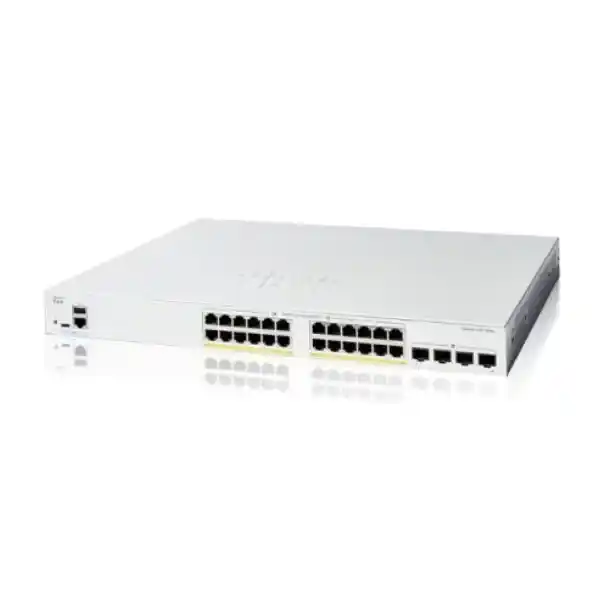
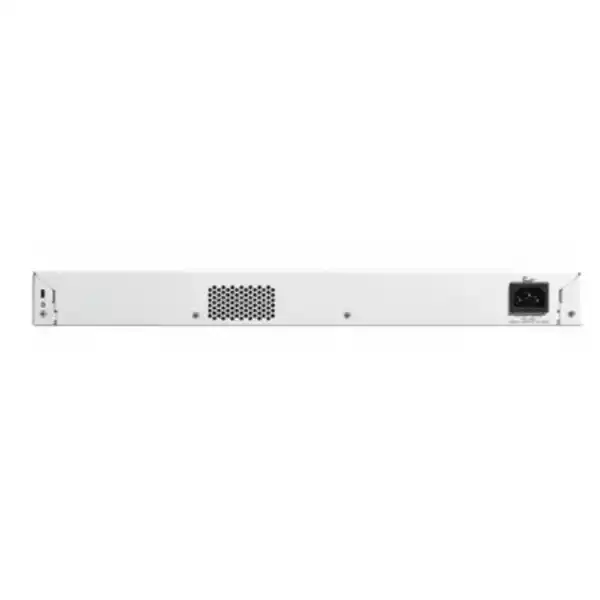
Cisco Catalyst C1200-24P-4X Network Switch Dubai
A 24-port managed PoE+ access switch with four 10 Gigabit SFP+ uplinks for businesses that need dependable wired access, voice, wireless or surveillance connectivity without moving to a larger enterprise switching platform. The key buying decision is not simply the port count: it is whether the 195W PoE budget, 1G edge-port speed, uplink optics and management model match the real deployment.
Direct answer for buyers
What exactly is it?
The Cisco Catalyst C1200-24P-4X is a managed 24-port Gigabit Ethernet switch in Cisco’s Catalyst 1200 family. All 24 copper access ports support PoE/PoE+, while four dedicated SFP+ uplinks provide up to 10 Gigabit Ethernet per uplink.
What is it mainly used for?
It is mainly used as an access-layer switch for desktops, IP phones, wireless access points, cameras, printers and other Ethernet endpoints where organisations want VLANs, QoS, access control, monitoring and faster 10G uplinks to servers, distribution switches or network cores.
Who should consider it?
Small and medium businesses, branch offices, schools, clinics, retailers, hospitality sites and professional offices should consider it when 24 one-gigabit edge ports are sufficient and a moderate shared PoE budget is appropriate.
What must be confirmed first?
Confirm the total PoE wattage required by every powered endpoint and the uplink media plan. A 195W budget can be ample for a mixed office, but it can be restrictive when many high-draw wireless access points, PTZ cameras or other PoE+ devices operate together.
What can FourTeck determine?
FourTeck can help turn device counts, PoE loads, rack location, fibre distances, transceiver requirements, VLAN design and installation scope into an accurate Dubai or UAE quotation and a practical deployment shortlist.
Where the C1200-24P-4X fits in a business network
The C1200-24P-4X occupies a useful middle ground between an unmanaged desktop switch and a more complex enterprise campus switching platform. It gives a small or medium business the controls normally needed for a properly segmented office network—VLANs, spanning tree, link aggregation, multicast controls, access lists, 802.1X, Quality of Service, secure management and static routing—while retaining a management approach aimed at organisations that may not have a large in-house network engineering team.
The model designation is important. The 24P identifies a 24-port PoE-capable access model, while 4X identifies four 10G SFP+ uplinks. That combination is materially different from the C1200-24P-4G, whose uplinks are Gigabit SFP rather than 10 Gigabit SFP+. It is also different from the C1200-24FP-4X, which keeps the same 24 access ports and four 10G uplinks but raises the published PoE budget from 195W to 375W. For many buyers, choosing among those nearby variants is more consequential than comparing superficial feature lists.
The strongest fit is an environment with ordinary one-gigabit edge devices but greater bandwidth demand upstream. A floor or department may have 20 to 24 endpoints that rarely need more than 1 Gbps individually, yet multiple users, access points, phones and cameras can generate enough aggregate traffic that a 1G uplink becomes a constraint. Four 10G SFP+ interfaces give the designer substantially more headroom for fibre uplinks, server links or aggregated connections. They do not automatically make every deployment 40 Gbps; real usable throughput depends on the topology, optics, cabling, remote device capabilities and any link aggregation design. Their value is flexibility.
The switch should not be selected purely because it has PoE. The 195W pool is the defining sizing constraint. Cisco specifies support for IEEE 802.3af and IEEE 802.3at, with up to 30W available to an individual Gigabit Ethernet port until the switch’s total PoE budget is reached. Twenty-four low-power phones may be easy to support, while a mix of high-performance access points and PTZ cameras can consume the pool much faster. The right pre-sales exercise is therefore to list each powered device, its maximum expected draw, the number of units, and a sensible margin for growth.
For Dubai buyers, this model can be especially attractive where a compact rack needs to feed voice, wireless and wired users from one access switch, and where 10G fibre already exists or is planned between floors or to a central communications room. It remains a fixed-configuration access switch rather than a chassis platform, so buyers with requirements for higher port density, more advanced routing, redundant field-replaceable power architectures or broader campus automation should evaluate a larger Cisco family rather than forcing this model into a role it was not designed to fill.
Cisco C1200-24P-4X verified specification summary
The following values are based on Cisco’s published Catalyst 1200 Series documentation for the exact C1200-24P-4X model. They are useful for initial design and quotation, but an order should still confirm the region-specific commercial SKU, power cord, optics and any support requirement.
| Specification | C1200-24P-4X value |
|---|---|
| Access ports | 24 × 10/100/1000 Mbps RJ-45 PoE+ ports |
| Uplink ports | 4 × 10 Gigabit Ethernet SFP+ |
| PoE standards | IEEE 802.3af and 802.3at PoE+, with up to 30W on an individual port subject to total budget |
| PoE power budget | 195W shared across PoE-capable ports |
| Switching capacity | 128 Gbps |
| Forwarding rate | 95.23 million packets per second for 64-byte packets |
| Packet buffer | 1.5 MB aggregate, dynamically shared |
| MAC address table | 8,000 addresses |
| Active VLANs | Up to 255 simultaneously |
| Static IPv4 routes | Up to 32 static routes and up to 16 IP interfaces |
| Jumbo frames | Up to 9000 bytes; published default MTU is 2000 bytes |
| Processor and memory | Dual-core ARM at 1.4 GHz, 1 GB DDR4 DRAM, 512 MB flash |
| Dimensions | 445 × 299 × 44 mm |
| Weight | 3.68 kg |
| Cooling | Fanless for this model |
| Power input | Internal universal 100–240V AC, 50–60 Hz |
| Operating temperature | -5°C to 50°C under Cisco’s published conditions for this model family |
| Warranty | Cisco limited lifetime warranty, subject to Cisco terms and regional conditions |
PoE planning: why the 195W budget matters more than the phrase “24 PoE+ ports”
A common purchasing mistake is to read “24 PoE+ ports” as though the switch can supply the maximum PoE+ power level to all 24 ports at the same time. It cannot. Cisco publishes a 195W total PoE budget for the C1200-24P-4X. The standards support lets an individual copper port provide power to compatible endpoints, but the switch distributes power from one finite pool. At the theoretical 30W maximum for IEEE 802.3at, six ports drawing 30W each would already consume 180W. Real devices often draw less than their maximum, yet procurement should be based on credible worst-case or engineered power requirements rather than an optimistic average.
For an office voice deployment, the calculation may be comfortable. Many IP phones draw relatively modest power, especially models without large colour displays, expansion modules or downstream devices. A network with 18 phones, two standard access points and a few non-PoE workstations can be a natural fit. In a surveillance design, however, camera loads vary significantly. Fixed cameras may be modest, while heaters, infrared illumination, PTZ motors or extra radios can raise demand. Wireless access points also differ widely; newer multi-radio units can require more power than older entry-level models. The switch does not know the business intention behind a device, only the negotiated electrical requirement.
A useful pre-sales PoE worksheet should include the endpoint model, quantity, supported PoE standard, expected operating draw, manufacturer maximum draw and whether the device has any peak-load behaviour. Multiply the maximum or engineered planning figure by the quantity, then reserve margin for moves, adds and changes. If the result approaches 195W closely, the better commercial decision may be the C1200-24FP-4X with its higher published 375W PoE budget rather than relying on perfect load assumptions. This is one of the clearest examples of why the “P” and “FP” versions should be compared deliberately.
Time-based PoE can be useful where policy allows endpoints to be powered off on a schedule, but it should not be treated as a substitute for correct budget sizing. Cisco also documents perpetual PoE behaviour for the series, allowing connected powered devices to continue receiving power while the switch itself reboots. That can reduce service interruption for devices such as phones or cameras during certain maintenance operations, although the end-to-end application may still be affected while data forwarding is unavailable.
Power planning also affects the UPS. A buyer who places the switch on an uninterruptible power supply must size the UPS for both the switch electronics and the PoE load it is expected to deliver. Cisco publishes system and PoE-inclusive power consumption figures, but UPS selection should account for runtime objectives, load growth, efficiency, power factor and the other equipment sharing the same UPS. A communications rack containing the switch, firewall, router, ISP equipment and NVR can have a materially different runtime requirement from a switch alone.
The practical buying rule is simple: count ports for connectivity, but count watts for powered connectivity. If the intended design is close to the 195W ceiling on day one, use a higher-budget model or distribute the powered load across additional switches. Leaving reasonable power headroom usually produces a more resilient and maintainable network than building a deployment that works only while every endpoint remains below an assumed average.
Four 10G SFP+ uplinks: design choices before you order optics
The four SFP+ uplinks are the main performance differentiator between this switch and the 4G variant. They are valuable when the access layer needs to aggregate many one-gigabit endpoints into faster links toward a server, storage host, firewall, distribution switch or network core. They also make the model attractive for multi-floor or multi-rack designs where fibre is preferred for distance, electrical isolation or structured cabling reasons.
SFP+ is a slot format, not a complete cable specification. The correct module depends on the media and distance. Cisco’s current documentation lists supported 10G short-range and long-range optical modules as well as short direct-attach copper options for the series. A short rack-to-rack connection may use a compatible DAC where both ends support it. Multimode fibre inside a building may use a short-range optic matched to the fibre grade and link distance. Longer single-mode runs may require a long-range optic. The switch’s presence alone does not decide which transceiver is correct.
The remote side is equally important. An uplink can operate only when the far-end switch, server adapter or firewall supports the chosen speed and optical standard. Buyers replacing an older 1G SFP switch should not assume that existing optics can simply be moved into an SFP+ design and provide 10G service. Some SFP+ cages support lower-speed modules in specific circumstances, but compatibility must be confirmed against the exact hardware and supported transceiver list. The safest quotation identifies both ends of every intended uplink.
Link aggregation can combine multiple physical links into a logical group when both ends are configured compatibly. Cisco documents IEEE 802.3ad LACP support and up to four link-aggregation groups for the series, with up to eight ports per group. Aggregation can add capacity and resilience, but it does not make a single flow exceed the speed of one member link. Traffic distribution depends on hashing and flow characteristics. For an office access switch, a single 10G uplink may already provide substantial headroom; additional uplinks can then be reserved for redundancy, another distribution device, a server or future growth.
Fibre planning in Dubai should also consider the building. Existing fibre may be multimode or single-mode, connector types may differ, patch panels may introduce additional loss, and labelled strands may not correspond to current documentation. A site survey can prevent the common situation in which the correct switch is delivered but commissioning stops because the optics, patch cords or fibre route do not match. Where copper direct-attach links are planned, cable length and equipment location must be known before purchase.
Do not treat all four 10G slots as mandatory to populate. The C1200-24P-4X is valuable because it gives options. A deployment may start with one or two uplinks and leave the remaining interfaces for resilience or expansion. That is usually better than buying unnecessary optics without a topology plan. The quotation should state the number, type and distance of each required uplink so modules and patch leads can be selected deliberately.
Layer 2 switching, VLANs and loop protection
The switch supports the core Layer 2 controls needed to build a structured business LAN rather than one flat broadcast domain. Cisco documents up to 255 active VLANs, including port-based and IEEE 802.1Q tag-based operation. VLANs are useful for separating staff workstations, phones, wireless networks, CCTV, guest access, building systems and management traffic. Segmentation does not automatically create security by itself; inter-VLAN communication still needs appropriate routing and policy. The value is that the network can be divided into logical trust or service zones instead of placing every endpoint in the same Layer 2 segment.
Voice VLAN capabilities can simplify IP telephony deployment when compatible endpoints and discovery mechanisms are used. QoS can then prioritize delay-sensitive voice traffic over less time-critical traffic. This matters in a converged network where a backup transfer, software update or large file copy might otherwise compete with calls. The switch offers eight hardware queues, strict-priority and weighted round-robin scheduling options, classification based on 802.1p, DSCP and other criteria, plus ingress and egress traffic controls. Correct QoS still depends on consistent markings and policy across the rest of the path.
Spanning Tree support is another practical business feature. Cisco documents traditional STP, Rapid STP, Multiple STP, PVST+ and Rapid PVST+ capabilities for the series. These protocols help prevent forwarding loops when redundant Layer 2 links exist. A loop can cause severe broadcast storms and network instability, so simply plugging redundant links between switches without a design is unsafe. The appropriate spanning-tree mode should match the existing topology and neighbouring switches.
The C1200 platform also supports LACP link aggregation, loopback detection and storm control. Those features are useful for building more resilient uplinks and limiting the damage from certain misconfigurations or abnormal traffic. They are not substitutes for good documentation. A maintainable installation should record which switch ports are access ports, trunks, uplinks, phone ports, camera ports or management interfaces, along with VLAN membership and PoE expectations. This reduces future troubleshooting time when devices are moved.
Multicast control is available through IGMP snooping for versions 1, 2 and 3, with support for multicast groups documented by Cisco. This can matter for video distribution or other multicast applications because it limits multicast forwarding to ports that have requested the traffic rather than flooding it everywhere. Whether that feature is relevant depends on the actual application. A conventional office with mostly unicast cloud traffic may never need to tune it, whereas surveillance or media environments can benefit from deliberate multicast design.
The main buyer outcome is operational control. An unmanaged 24-port PoE switch may provide basic connectivity, but it offers little ability to separate traffic, observe problems or enforce policy. The C1200-24P-4X is justified when those management and segmentation functions are part of the requirement, not merely because the Cisco name appears on the front panel.
Static Layer 3 routing: useful, but understand the boundary
Cisco positions the Catalyst 1200 family beyond a simple Layer 2 smart switch by including static Layer 3 routing. The published specification states wire-speed IPv4 routing with up to 32 static routes and up to 16 IP interfaces, along with IPv6 routing support and Layer 3 interfaces on physical ports, LAGs, VLAN interfaces or loopbacks. This can be enough for a small network to route between a limited number of internal VLANs without sending every internal packet to an external router.
A common design might place staff, voice, guest, CCTV and management networks in separate VLANs, with selected inter-VLAN routes handled by the switch and the default route pointing toward a firewall. This can reduce unnecessary traffic through the firewall when the security policy permits local routing. However, it changes the enforcement point. If a business needs inspection, logging or policy control between internal zones, routing those VLANs directly on the switch may bypass firewall rules. The topology should therefore be driven by the security requirement, not by the availability of a routing feature.
Static routing also means routes are configured deliberately rather than learned through a broad dynamic routing architecture. For a small branch with a few stable networks, that can be simple and predictable. For a larger campus, frequent topology changes or multi-path routed designs, static routes can become cumbersome and error-prone. Buyers should not interpret “Layer 3” as equivalent to the feature depth of Cisco’s higher enterprise switching families. The C1200-24P-4X is best evaluated as an access switch with useful static routing capability, not as a replacement for every distribution or core platform.
DHCP relay and UDP relay functions can help when clients and service servers reside in different IP subnets. Instead of placing a DHCP server in every VLAN, the switch can relay requests to a central service, provided the network and server are configured correctly. This is useful in a segmented office but should be documented carefully because DHCP scope configuration, gateway addresses, DNS settings and relay targets must all agree.
During procurement, state whether the switch is expected to remain purely Layer 2 or perform internal routing. That one decision affects configuration scope, firewall policy, gateway design, troubleshooting ownership and migration planning. If the organisation requires advanced dynamic routing, policy-based routing, extensive route scale or campus-grade redundancy, a higher switching platform should be compared before purchase.
Security controls at the access layer
Access switches sit where users and devices join the network, so basic security controls matter. The C1200 series supports IEEE 802.1X in the authenticator role with RADIUS, allowing organisations to control port access through identity-based authentication rather than assuming that any device plugged into an Ethernet socket is trusted. The usefulness of 802.1X depends on a complete authentication design including RADIUS infrastructure, endpoint supplicants, certificates or credentials, guest or remediation policy and an operational fallback strategy.
Port security offers another layer of control by limiting learned source MAC addresses or binding access expectations to ports. This can reduce casual misuse, but MAC addresses alone are not strong identity. In a serious zero-trust or regulated environment, port security should complement stronger authentication and network access control rather than replace it. The right feature choice depends on the risk model and the organisation’s ability to operate the controls consistently.
Cisco documents access control lists with up to 512 rules for the platform, supporting conditions based on MAC addresses, VLAN IDs, IPv4 or IPv6 addresses, protocols, TCP or UDP ports, DSCP values and other fields. ACLs can be applied to ingress and egress traffic and can help reduce unwanted communication at the switch. They should be designed conservatively: an overly broad permit rule can undermine segmentation, while an overly restrictive rule can interrupt legitimate services such as DHCP, DNS, voice signalling or management.
Management security includes HTTPS, SSH, SCP and SNMPv3 support, alongside role or privilege controls. A sensible deployment disables or avoids insecure legacy access where it is not needed, uses unique administrative credentials, limits management interfaces to an authorised management VLAN or source network, configures secure monitoring, and keeps firmware maintained. The switch can also generate syslog messages and SNMP traps so operational events can feed a central monitoring platform.
Storm control and denial-of-service prevention features help protect switch availability from certain abnormal traffic conditions. Spanning-tree guards and loop detection reduce the risk of Layer 2 problems becoming full-site outages. These protections are valuable, but they do not turn the switch into a firewall. Internet threat inspection, malware control, application policy, VPN termination and other security-gateway functions remain the job of a firewall or dedicated security platform.
For projects that combine switching with perimeter security, buyers can use Firewall Dubai by FourTeck as a specialist resource for coordinating firewall and LAN design. The important architectural question is where each policy is enforced: access port, switch ACL, routed interface or firewall zone. Clear ownership makes the network easier to audit and troubleshoot.
Management, monitoring and day-two operations
The value of a managed switch becomes clearer after installation. Cisco provides a built-in browser interface, CLI access, SNMP, Cisco Business Dashboard integration and mobile-app support for the 1200 Series. That gives smaller IT teams several ways to configure and observe the network. The correct management method should be chosen based on scale and operational discipline rather than convenience alone.
For a single switch or small site, the browser interface can simplify tasks such as VLAN creation, port configuration, firmware maintenance and status checking. In environments with several switches, central visibility becomes more important. Cisco Business Dashboard can provide discovery and management functions, and Cisco documents an embedded probe capability that can reduce the need for a separate onsite probe appliance or virtual machine. The exact management architecture should be confirmed against the current software version and the organisation’s support model.
CLI access remains valuable because configuration can be more consistent, scriptable and auditable than repeated manual clicking. Cisco also supports text-editable configuration files, SCP transfer and deployment-related automation features. Even in a small environment, keeping a known-good configuration backup is an important operational habit. A switch failure should not require an administrator to reconstruct VLANs, trunks, PoE schedules, ACLs and management settings from memory.
SNMP and syslog provide a path into existing monitoring systems. Useful items include interface status, errors, utilization, PoE state, temperature or system alarms and authentication events. Monitoring should focus on actionable signals. Collecting thousands of counters without thresholds or ownership creates noise, while a small number of well-defined alerts can identify failing links, saturated uplinks, power issues or unauthorised changes early.
Cisco documents dual firmware images, which can improve resilience during software maintenance by maintaining separate images. Firmware still needs change control. Before an upgrade, review release notes, back up the configuration, confirm the maintenance window and establish a rollback plan. In networks supporting phones, cameras or wireless, maintenance should consider the business services dependent on the switch rather than treating it as an isolated appliance.
Cable diagnostics, port mirroring, ping, traceroute, LLDP and Cisco Discovery Protocol can help troubleshooting. LLDP-MED is particularly relevant to IP phones because it can exchange endpoint information used in voice deployments. Port mirroring can feed packet captures when a protocol problem is difficult to diagnose. Those tools do not eliminate the need for good labelling, but they make a managed switch far more serviceable than an unmanaged equivalent.
Organisations that want installation, recurring infrastructure support or broader LAN maintenance can also review FourTeck IT Services UAE. The switch purchase is only the beginning; documentation, backups, monitoring and controlled changes determine how reliable the network remains over its operating life.
Six practical deployment patterns
1. Office access switch
A floor with user PCs, IP phones, printers and a few wireless access points is a natural role. VLANs can separate voice, corporate data, guest access and management, while the 10G uplink carries combined traffic back to the core. The design should reserve ports for growth and confirm that the cumulative phone and AP power draw stays well below 195W.
2. IP telephony access layer
PoE+, voice VLAN and QoS make the model suitable for many phone deployments. The engineering work is to confirm handset wattage, any expansion modules, PC pass-through requirements and call-control network design. If phones share links with desktop traffic, VLAN and QoS settings should be consistent with the voice platform rather than applied as generic defaults.
3. Wireless access-point aggregation
The switch can power and connect multiple access points where one-gigabit wired interfaces are sufficient. The critical caveat is that newer APs may have higher PoE requirements or multi-gigabit Ethernet interfaces. If the wireless design requires 2.5G or 5G access links, a switch with multi-gigabit copper ports should be evaluated instead of assuming a 1G edge port is adequate.
4. CCTV and security cameras
Twenty-four PoE-capable ports can make the model attractive for IP cameras, while VLANs and ACLs help keep surveillance traffic separated from ordinary user networks. Camera power draw, bitrate, NVR location and uplink capacity should all be calculated. High-power PTZ units or dense camera loads may point toward the higher-PoE FP model or multiple access switches.
5. Branch-office convergence
A branch can combine wired users, phones, APs, cameras and local devices on one managed access switch, then use a 10G or lower-speed supported uplink toward a firewall or distribution device. The design remains simple when the site has stable VLANs and limited routing complexity. Larger branches with more redundancy or route scale may need a stronger platform.
6. Education, retail or clinic edge
Schools, retail sites and clinics often have a mixed population of staff systems, payment or application devices, phones, Wi-Fi and cameras. Segmentation and access control are more valuable than raw port count alone. The fanless design can also be useful where acoustic noise is undesirable, provided the installation still follows environmental and ventilation requirements.
When the C1200-24P-4X may not be the right model
A balanced product page should make the limitations as clear as the strengths. The first limitation is PoE headroom. If the deployment needs close to or more than 195W, the C1200-24FP-4X is the more obvious model to compare because Cisco publishes a 375W PoE budget for that 24-port 10G-uplink variant. Paying for more PoE capacity can be cheaper than redesigning the network later when additional access points or cameras are added.
The second limitation is edge-port speed. The 24 RJ-45 ports are Gigabit Ethernet, not 2.5G, 5G or 10G multi-gigabit copper. That is appropriate for many desktops, phones, printers and cameras. It may be unsuitable for newer high-throughput wireless access points, workstations or servers that are designed to exceed 1 Gbps over copper. The presence of 10G uplinks does not change the speed of the 24 access ports.
The third limitation is port density. If a site already needs more than 24 copper connections, buying a 24-port switch with no spare capacity can lead to immediate expansion pressure. Cisco offers 48-port models in the family. Whether one 48-port switch or two 24-port switches is better depends on rack space, resilience, PoE distribution, uplinks, failure domains and growth. Two switches can provide operational separation, while one larger switch can simplify management and cabling.
The fourth boundary is routing and enterprise feature depth. The C1200 family provides useful static Layer 3 functionality, but buyers needing advanced dynamic routing, extensive policy scale, stacking architectures, campus automation or redundant enterprise power designs should compare higher Cisco Catalyst platforms. A lower purchase price is not a saving if the switch lacks a function that becomes mandatory during implementation.
The fifth consideration is hardware lifecycle alignment. Even though Cisco lists a limited lifetime warranty, warranty and support are not the same thing. A project should consider firmware maintenance, technical assistance requirements, spares strategy and the expected operational lifetime of the whole network. Organisations with strict response-time targets may want a formal support arrangement rather than relying only on standard warranty provisions.
Finally, buyers should avoid choosing a switch before they know the endpoint estate. A port-count-first purchase can miss PoE, speed, optic and segmentation requirements. A requirement-first shortlist makes it easier to decide whether the C1200-24P-4X is the correct fit, a higher-PoE variant is warranted, or a different switching family should be considered.
Migration from an older SMB or unmanaged switch
Replacing an unmanaged switch looks simple until the old device is carrying phones, cameras, access points, uplinks and undocumented dependencies. A controlled migration starts with discovery. Record every connected port, endpoint, MAC address where useful, PoE device, VLAN expectation, uplink, fibre type and physical cable label. If the old switch is managed, export its configuration and note any trunks, spanning-tree settings, voice VLANs, QoS rules, ACLs, link aggregation or port-security controls.
The next step is to build the target configuration before moving users. Define the management IP, management VLAN, administrator access, time source, logging destination and monitoring settings. Then create VLANs and trunks, followed by access-port profiles. Port descriptions should name the connected area or service. If 802.1X or RADIUS is being introduced at the same time, consider a staged rollout because changing hardware and authentication policy simultaneously can make troubleshooting harder.
PoE migration needs its own check. A device that received power from the old switch may not negotiate identically under every configuration, and total power budgets can differ. Confirm the old and new switch budgets and the actual endpoint mix. If phones use a PC pass-through port, test voice and data VLAN behaviour together. If cameras connect to an NVR across a routed or firewalled boundary, validate addressing, multicast or unicast behaviour and recording continuity.
Uplink migration is often the most sensitive point because it can disconnect the whole site. If moving from 1G SFP to 10G SFP+, confirm the far-end interface and optic. Do not assume fibre patch cords can remain unchanged just because connectors physically fit. Multimode fibre grade, optical wavelength, link length and transceiver compatibility all matter. Where LACP is used, build matching channel settings on both sides and plan the change sequence to avoid loops or black holes.
A migration window should include acceptance tests. Verify management reachability, DNS and DHCP for client VLANs, internet access, inter-VLAN policy, voice registration and calls, Wi-Fi uplinks, camera feeds, printing and any business-critical local applications. Review switch logs and interface error counters after traffic has stabilised. A configuration that merely shows “link up” is not necessarily a successful migration.
Once the new switch is stable, save and export the configuration, update rack diagrams and port schedules, label optics and fibre paths, and record the software version. This documentation turns a one-time installation into a maintainable system. If a replacement switch is needed later, the organisation can restore service from known information rather than rediscovering the network under outage pressure.
FourTeck’s broader FourTeck global site provides another route for organisations coordinating requirements across more than one location. Multi-site buyers should standardise configuration templates where possible while still accounting for local ISP, rack, fibre and power differences.
Dubai and UAE deployment considerations
A network switch is specified by its electronics, but site conditions determine whether those electronics operate reliably. Cisco publishes an operating temperature range for this family, yet the temperature inside a communications cabinet can be materially higher than the air-conditioned office outside it. Even though the C1200-24P-4X is fanless, it still needs appropriate ventilation and should not be installed in a sealed, heat-soaked enclosure with blocked airflow around other power-dense equipment.
Rack depth and cable management should be checked before delivery. The chassis is approximately 445 mm wide, 299 mm deep and 44 mm high. One rack unit of height is straightforward, but practical depth must also include power-cable bend radius, front copper patch cords, fibre management and clearance from neighbouring equipment. A shallow wall cabinet may technically accept a 1U device but still be awkward once patch panels, firewall appliances and UPS units are present.
Power in a UAE installation should be approached as a complete rack requirement. The switch uses an internal universal 100–240V AC supply, but the delivered cord and plug format should be confirmed in the commercial order. If the rack depends on a UPS, its load should include the switch’s own consumption plus powered endpoints supplied through PoE. A 195W PoE budget does not mean the switch always draws 195W; it means the design must allow for the planned endpoint load and desired runtime.
Fibre routes between rooms or floors should be surveyed when 10G uplinks are part of the project. Confirm whether installed cabling is multimode or single-mode, the approximate distance, connector presentation and availability of spare strands. For new builds, structured cabling plans should reserve fibre capacity for future links rather than treating the first switch connection as the final requirement. Proper labelling at both ends reduces commissioning mistakes.
Where the switch will power cameras or access points outside conditioned office areas, endpoint environmental ratings are a separate concern. The switch may remain inside a rack while powered devices face heat, humidity or dust exposure elsewhere. Outdoor or semi-outdoor deployments may need suitably rated endpoints, enclosures, surge protection, grounding and cabling practices. Those requirements are not solved by selecting a PoE switch alone.
Procurement should also identify who is responsible for configuration. Supply-only orders and installed projects are different scopes. A supply-only quotation may include the switch and selected optics. An implementation quotation may include rack mounting, patching, firmware updates, VLAN configuration, PoE validation, uplink commissioning, firewall coordination, documentation and handover. Stating that scope early makes quotations more comparable.
For UAE product sourcing and infrastructure coordination, FourTeck UAE can be used as the primary regional reference. Availability, lead time and final commercial terms should be confirmed at quotation because inventory and distribution conditions can change.
Buyer questions that affect the quotation
How many copper ports are needed on day one and after growth?
Count every PC, phone, AP, camera, printer, server management port, access-control device and spare patch-panel position likely to be activated. If the requirement already reaches 22 to 24 ports, consider whether a 48-port model or second switch gives a more practical growth path.
What is the true PoE total?
List powered-device models and their maximum or engineering design draw. A mixed fleet with many low-draw phones may fit comfortably, while several high-power access points and PTZ cameras can push the 195W pool near its limit.
What connects to the SFP+ uplinks?
Specify the far-end device, interface speed, fibre type, connector path and distance. This determines whether the project needs short-range optics, long-range optics, direct-attach copper or another approved media option.
Will the switch route between VLANs?
If yes, identify which VLANs, where default gateways will reside and which traffic must still pass through the firewall for policy or inspection. This affects both configuration scope and security design.
Is central monitoring required?
State whether the switch will be monitored through SNMP, syslog, Cisco Business Dashboard or another operations platform. Monitoring requirements influence management VLANs, credentials, access rules and handover documentation.
Licensing, software and support considerations
The published Catalyst 1200 data sheet describes the switching, routing, security and management features as platform capabilities and does not present a mandatory recurring feature subscription as a prerequisite for the base functions discussed on this page. That should not be confused with support. A buyer may still choose or require Cisco support services, and any optional service entitlement should be priced and described separately from the hardware.
Cisco states a limited lifetime warranty for the series and complimentary one-year access to the Small Business Support Center in its current documentation. Warranty terms, replacement processes and regional service conditions can change or contain eligibility requirements, so an enterprise purchase should confirm the support path needed by the business. A branch that can tolerate next-business-day replacement has a different risk profile from a clinic or revenue-generating site that requires tightly defined response times.
Firmware is another lifecycle consideration. Network switches should not be treated as install-once appliances. Security fixes, stability improvements and feature changes may be delivered through software updates. The organisation should define who reviews releases, who authorises upgrades, how configurations are backed up and how the maintenance window is communicated. Dual-image support can help with upgrade resilience, but operational process is still required.
If Cisco Business Dashboard is used, confirm the current deployment and support model at implementation time. Management platforms evolve, and features may depend on software versions. The switch also provides standard mechanisms such as HTTPS, CLI and SNMP that can fit environments with existing network-management processes. The design should avoid locking administrators out through poorly planned management VLAN or ACL changes.
For quotation purposes, ask for hardware, optics, accessories, support and implementation to be itemised. That prevents a low hardware price from appearing equivalent to a complete deployed solution. It also makes future renewal or support decisions easier because each commercial component is visible.
Frequently asked questions about the Cisco C1200-24P-4X
Does every port support PoE+?
All 24 RJ-45 access ports are PoE-capable and Cisco documents IEEE 802.3af and 802.3at support. The key limitation is the 195W total power budget. An individual port can provide up to the supported PoE+ level, but all active powered devices share the same overall budget.
Are the four uplinks really 10 Gigabit?
Yes. The C1200-24P-4X is the four-SFP+ version, and Cisco publishes four 10 Gigabit Ethernet SFP+ uplinks. Actual link speed and reach depend on compatible modules or cables and the interface at the far end.
Can it route between VLANs?
Yes, the series supports static Layer 3 routing. Cisco publishes up to 32 IPv4 static routes and up to 16 IP interfaces. Whether inter-VLAN routing should occur on the switch or a firewall depends on the required security policy and inspection path.
Is the C1200-24P-4X fanless?
Cisco’s current specification identifies this exact model as fanless. That can reduce acoustic noise and remove a moving cooling component, but the switch still requires appropriate ventilation and must remain within published environmental limits.
Can it power 24 wireless access points?
Possibly, but the device count alone is not enough to answer. Add the power requirement of all 24 APs and compare it with the 195W budget. Many current AP designs can consume enough power that a higher-budget switch or multiple switches would be a safer choice.
What is the difference between 24P-4X and 24FP-4X?
Both have 24 Gigabit PoE+ access ports and four 10G SFP+ uplinks. The major published difference for power planning is the PoE budget: 195W on the C1200-24P-4X versus 375W on the C1200-24FP-4X.
What is the difference between 24P-4X and 24P-4G?
Both provide 24 PoE+ Gigabit access ports and a 195W PoE budget. The key distinction is uplink speed: the 4X model provides four 10G SFP+ uplinks, while the 4G model provides four 1G SFP uplinks.
Does it support VLANs and voice networks?
Yes. Cisco documents up to 255 active VLANs and dedicated voice VLAN functionality, alongside QoS features. Proper IP telephony design should still align VLAN IDs, DHCP options, LLDP-MED or discovery behaviour and QoS markings with the phone system.
Does it have secure management?
The platform supports HTTPS, SSH, SCP, SNMPv3, RADIUS and privilege controls. A secure installation should also restrict management access to authorised networks, use strong credentials, maintain firmware and send logs to a monitored system where appropriate.
Can existing SFP modules be reused?
Do not assume so. Existing optics must be checked for speed, wavelength, fibre type and Cisco compatibility. A module used in a 1G SFP environment does not automatically become a 10G optic simply because it can physically fit a similar cage.
Is the switch suitable for a server connection?
It can connect ordinary one-gigabit servers through RJ-45 ports or compatible 10G interfaces through SFP+ where the server has the correct adapter and media. A data-centre workload with extensive 10G/25G server density may call for a different switch class.
Does it need a recurring license for basic switching?
Cisco’s published platform description presents the core switching, routing, security and management capabilities as features of the Catalyst 1200 Series rather than as functions that require a mandatory recurring feature subscription. Support services or other optional commercial services should still be quoted separately where required.
A practical pre-installation checklist
Good switch deployments are decided before the mounting screws are tightened. The following sequence keeps physical, logical and commercial decisions connected.
Procurement guidance for an accurate FourTeck quotation
The fastest way to obtain a useful quotation is to provide requirements that distinguish the switch hardware from the complete installation. Start with the exact model, C1200-24P-4X, required quantity and delivery location. Then state whether the order is supply only, supply plus configuration, or a full installation that includes rack work, patching, fibre, testing, documentation and handover.
For optics, list each intended SFP+ link separately. “Four uplinks” is not enough information because one may connect a core switch over multimode fibre, another may use single-mode fibre to another building and a third may be a short DAC to a server. The correct transceiver depends on media, distance and the far-end interface. If existing optics will be reused, provide their exact part numbers for compatibility review.
For PoE, provide the model and quantity of phones, cameras, access points or other powered endpoints. If exact device models are not known, at least state the device type and expected quantity so a conservative allowance can be discussed. A quotation that omits this step may deliver enough ports but insufficient power headroom.
For configuration, state the number of VLANs, IP subnets, uplinks and trunks, whether the switch will perform static inter-VLAN routing, and whether 802.1X, RADIUS, ACLs, SNMP, syslog or central dashboard integration is required. These are not just technical details; they determine implementation effort and acceptance testing.
For installation, provide the site address, rack location, rack type, availability of patch panels and fibre termination, maintenance-window restrictions and whether existing network services must remain live during migration. A simple greenfield installation and a live replacement of a production access switch require very different planning.
FourTeck can then separate hardware, optics, accessories, support and professional services so the buyer can understand exactly what is included. That transparency is more useful than a single lump-sum line because it reveals which parts of the project can be adjusted if the scope changes.
Decision recap
Model fit
Choose this model when 24 one-gigabit edge ports are enough and the network benefits from four 10G SFP+ uplinks.
PoE capacity
Treat 195W as a shared engineering limit. Compare the FP model if powered-device demand is high or future growth is uncertain.
Compatibility
Confirm optics, fibre type, far-end interfaces, VLAN architecture and endpoint PoE requirements before ordering accessories.
Operations
Plan management access, monitoring, configuration backups, firmware maintenance and support ownership as part of deployment.
What FourTeck needs from the buyer
Number of C1200-24P-4X units required and any spare-unit policy.
PCs, phones, APs, cameras, printers and other network devices.
Device models and planned wattage so the 195W budget can be validated.
Far-end device, speed, fibre type, distance and optic requirements.
VLANs, trunks, routing, ACLs, authentication, monitoring and logging needs.
Supply only, configuration, migration, rack installation, fibre work, testing or support.
Confirm the right Cisco access-switch design for your Dubai network
The Cisco Catalyst C1200-24P-4X is a strong candidate when you need 24 managed Gigabit PoE+ ports, a moderate 195W shared PoE budget and four fast SFP+ uplinks. The right quotation should also settle the optics, fibre path, endpoint power, rack conditions, VLAN plan and installation scope. Provide those inputs and FourTeck can help determine whether this exact model, the higher-PoE FP variant or another switch is the better operational fit.

Reviews
There are no reviews yet.