
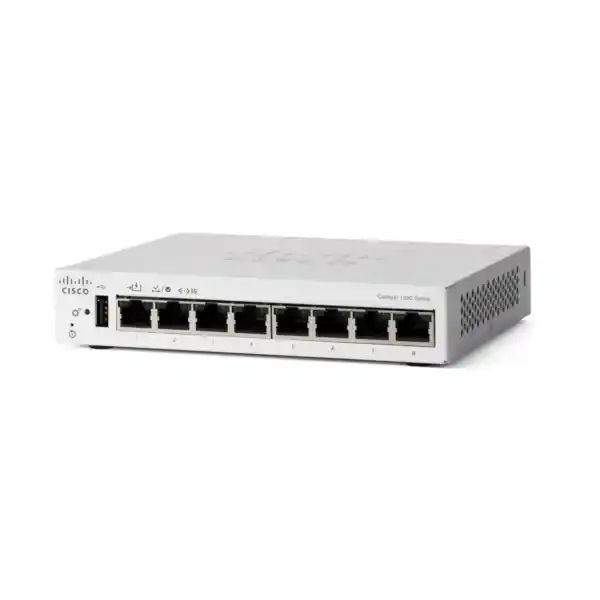
Cisco Catalyst C1200-8T-D Network Switch Dubai
A compact eight-port managed Gigabit switch for business edge connectivity where dependable copper Ethernet, segmentation, security controls and simple management matter more than high port density, fibre uplinks or PoE output.
Direct answer for buyers
The Cisco Catalyst C1200-8T-D is an eight-port managed Gigabit Ethernet desktop switch in the Catalyst 1200 Series. It offers a substantially richer feature set than an unmanaged switch while remaining compact and fanless.
It is mainly used to connect business endpoints such as PCs, printers, servers, firewalls, access points with separate power, phones with their own power arrangements, cameras with separate power, and other Ethernet devices while adding VLAN, QoS, access control, monitoring and basic Layer 3 routing.
Small offices, retail outlets, clinics, classrooms, meeting rooms, branch locations and distributed business sites that need up to eight copper Gigabit ports and managed features without needing dedicated fibre uplinks or PoE output are strong candidates.
Confirm that eight copper ports are sufficient after reserving the port used for the upstream connection, and confirm that the deployment does not require the switch to power phones, cameras or access points. The C1200-8T-D accepts PoE input on port 1 but does not provide PoE output.
FourTeck can help determine port count, VLAN design, uplink requirements, firewall integration, power method, growth allowance, installation scope and whether a nearby Catalyst 1200 model with PoE or dedicated SFP uplinks is a more appropriate choice.
What makes the C1200-8T-D a distinct model
The C1200-8T-D is not simply a smaller version of a rack switch. Its design choices make it particularly relevant when a buyer needs managed switching in a location where a full wiring cabinet is unnecessary or inconvenient. Cisco specifies eight 10/100/1000BASE-T ports, desktop form factor, fanless operation and a chassis measuring 160 x 128 x 30 mm. At 0.54 kg, it can be placed in compact technology spaces where a deeper rack-mountable platform would be excessive. Its low physical profile also makes it practical for branch counters, reception areas, compact network enclosures and remote equipment positions, provided the location is properly ventilated and protected.
The most unusual feature in this exact model is the ability to receive 802.3af PoE input on port 1. That capability can simplify a remote deployment because the switch may be powered by a compatible upstream PoE source instead of relying only on its external AC power adapter. Cisco notes that when functional AC power is connected, AC is preferred; PoE can act as the sole supply or as a backup source. This is useful for edge locations, but the distinction must be understood correctly: the switch is a PoE powered device in that scenario. It does not become a PoE power sourcing switch for endpoints.
The model also has an important architectural limitation: there are no dedicated SFP or SFP+ uplink ports. All eight physical network ports are copper Gigabit Ethernet. In a normal small-office design, one of those ports will commonly be used as the uplink toward a router, firewall or parent switch, leaving seven for local endpoints. A buyer who needs eight local endpoint ports plus a separate uplink may therefore be better served by the C1200-8T-E-2G or a larger model. Similarly, a site requiring fibre between floors, buildings or long-distance network segments should not assume that an SFP can be inserted into this model.
These details make product identity especially important during procurement. C1200-8T-D, C1200-8T-E-2G, C1200-8P-E-2G and C1200-8FP-2G are all eight-port class products, but their uplink and power characteristics are different. The suffix is therefore not a minor ordering detail. It directly affects connectivity, physical deployment, power architecture and the number of usable endpoint ports in the final design.
Verified hardware and performance specifications
| Specification | Cisco Catalyst C1200-8T-D | Buyer relevance |
|---|---|---|
| Copper network ports | 8 x 10/100/1000 RJ-45 | Suitable for compact Gigabit access requirements; allow one port for the upstream path if there is no alternate topology. |
| Dedicated uplink ports | None | There is no SFP or SFP+ slot, so fibre or a dedicated uplink requires another model. |
| Switching capacity | 16 Gbps | Matches line-rate operation across eight Gigabit ports for the intended access role. |
| Forwarding rate | 11.90 Mpps for 64-byte packets | Useful when checking packet-processing performance for busy access environments. |
| Packet buffer | 1.5 MB aggregate | Traffic bursts still require sensible QoS and network design; a buffer is not a substitute for sufficient uplink capacity. |
| MAC address table | 8,000 addresses | More than adequate for the normal scale implied by an eight-port SMB access switch. |
| Jumbo frame support | Up to 9,000 bytes; default MTU 2,000 bytes | Any non-default MTU should be planned consistently across endpoints and the path rather than enabled in isolation. |
| Memory | 512 MB flash, 1 GB DDR4 DRAM | Supports the operating platform and management feature set for the switch family. |
| CPU | Dual-core ARM at 1.4 GHz | Appropriate to the management and control functions of this SMB platform. |
| Power | External 100-240 V, 50-60 Hz supply; 802.3af PoE input on port 1 | Two possible supply methods can help remote-site designs, but upstream PoE capability must be checked. |
| Dimensions and weight | 160 x 128 x 30 mm; 0.54 kg | Well suited to compact placements where a 19-inch rack switch would be unnecessarily large. |
| Cooling | Fanless | Useful for noise-sensitive work areas, while ambient temperature and airflow still require attention. |
| Operating range | 0°C to 50°C; 10% to 90% relative humidity, noncondensing | Placement in UAE sites should avoid unconditioned hot enclosures that can exceed the specified range. |
| Warranty | Limited lifetime | Procurement teams should still confirm local channel terms, support entitlement and replacement process in the quotation. |
Cisco publishes worst-case system consumption for the C1200-8T-D at approximately 7.03 W on 110 V and 7.09 W on 220 V, with idle figures around 4.14 W and 4.26 W respectively. These values reinforce its suitability for small always-on locations, although total site energy planning should include the upstream switch, firewall, access points, endpoints and any UPS equipment.
How to size eight ports correctly
An eight-port switch sounds straightforward, but the useful endpoint count depends on the topology. In the most common design, one port connects upstream to the internet router, firewall or aggregation switch. That leaves seven ports for local devices. If the branch has a firewall with a dedicated LAN port, four desktop PCs, one printer, one access point and one network-attached storage device, all eight switch ports can be consumed immediately. There is then no spare capacity for a second access point, temporary laptop, IP phone, camera, backup appliance or future workstation.
For that reason, port count should be calculated from the actual connection schedule rather than the current device count alone. Include every wired endpoint, every infrastructure uplink and every device that may be added during the expected service period. A practical small-business design often reserves one or two spare ports so that ordinary changes do not require replacing the switch. If the requirement already reaches seven local endpoints plus an uplink, the C1200-16T-2G may offer a cleaner growth path because it provides 16 copper access ports and separate SFP uplinks. The larger chassis costs and occupies more space, but it avoids immediate capacity pressure.
The C1200-8T-D makes the strongest sense when the network is deliberately compact: a meeting room cluster, a small branch desk area, a retail counter, a laboratory station, a reception point, a security console or an extension switch serving a clearly bounded set of non-PoE devices. It can also be attractive as a managed edge switch behind a larger core because VLANs, access controls and monitoring can be applied close to the devices rather than leaving that segment unmanaged.
Do not size solely from Ethernet port count if the site has fibre requirements. Because this model lacks an SFP slot, a fibre handoff from an ISP, building backbone or remote floor cannot connect directly without an external media converter or another switch. In many business designs, selecting a Catalyst 1200 model with integrated SFP uplinks is simpler and easier to support than adding conversion hardware solely to preserve the smaller switch.
Layer 2 segmentation for a small business network
The value of the C1200-8T-D is not just that it moves Ethernet frames between eight ports. Cisco supports up to 255 active VLANs simultaneously on the Catalyst 1200 Series, including port-based and 802.1Q tag-based VLANs. That allows a small site to separate traffic even when everything terminates on the same physical switch. For example, a branch can keep employee computers on one VLAN, guest wireless traffic on another, voice devices on a voice VLAN and operational equipment on a further segment. Segmentation can reduce broadcast scope and, when combined with firewall or routing policy, helps control which device groups may communicate.
A compact switch should not encourage an overly complex VLAN design. The fact that 255 VLANs are supported does not mean a small eight-port site benefits from dozens of segments. Each VLAN adds addressing, routing, DHCP, security-rule and troubleshooting implications. The appropriate design is the minimum segmentation that meets security, application and operational requirements. In many small branches, two to five well-defined VLANs are more manageable than a large number of narrowly separated networks.
The switch supports Spanning Tree Protocol functions including traditional STP, Rapid Spanning Tree and Multiple Spanning Tree, along with Cisco-oriented per-VLAN variants. These features become relevant when the switch is connected through redundant or potentially looping Layer 2 paths. A simple one-uplink branch may not need advanced spanning-tree design, but managed loop protection is still an advantage over an unmanaged desktop switch. Cisco also lists independent loopback detection, which can help protect against accidental loops where the configured conditions support it.
Link aggregation with LACP is supported at the family level, with Cisco documenting up to four groups and up to eight ports per group. On an eight-port model, however, consuming several ports for an aggregate can quickly reduce endpoint capacity. Link aggregation should therefore be used only when the connected devices and upstream design genuinely benefit from it. For many C1200-8T-D deployments, a single Gigabit uplink is the more practical use of the limited port count.
Static routing: useful, but not a firewall replacement
Cisco positions the Catalyst 1200 Series above a basic Layer 2 smart switch by including Layer 3 static routing. The platform supports wire-speed IPv4 routing with up to 32 static routes and up to 16 IP interfaces, along with IPv6 routing and Layer 3 interfaces on physical ports, link aggregations, VLAN interfaces or loopbacks. This can be useful when a small business wants the switch to route locally between selected VLANs instead of sending all internal traffic through an external router.
The benefit depends on the security design. Routing between VLANs on the switch can reduce unnecessary traffic through the firewall and can improve local efficiency, but it may also bypass firewall inspection if inter-VLAN security policy was supposed to be enforced centrally. Before enabling local Layer 3 routing, decide which traffic should be routed on the switch and which traffic must traverse a security gateway. A finance VLAN, guest network or sensitive server segment may require stronger inspection and logging than basic switch routing provides.
Static routing also means the forwarding path is manually defined. This is appropriate for stable, small topologies but is not equivalent to the dynamic routing capabilities expected in more advanced campus or data-centre switching platforms. If the network needs complex route exchange, advanced high availability, sophisticated policy routing or large route tables, the buyer should evaluate a more capable switching family. The C1200-8T-D is best understood as a small-business managed access switch with useful Layer 3 features, not as a compact replacement for an enterprise core.
DHCP relay and UDP relay capabilities can help in segmented networks where clients and supporting services are in different IP domains. Again, the practical deployment should remain proportionate to the size of the site. For a very small branch, central DHCP services, a few VLANs and simple static routes may be sufficient. Complex designs should be documented so that future support teams understand where routing, addressing, DHCP and security decisions are implemented.
Security controls at the access edge
A managed switch cannot secure a business network by itself, but it can reduce avoidable exposure at the access layer. Cisco includes IEEE 802.1X authentication, port security, RADIUS client support, access control lists, storm control and denial-of-service prevention features in the Catalyst 1200 platform. These functions are especially valuable when a small branch would otherwise use an unmanaged switch where every connected device is effectively trusted by default and network visibility is limited.
IEEE 802.1X can be used to control access before a device or user is admitted to the network, provided the surrounding authentication infrastructure is available and correctly configured. RADIUS integration is therefore a design dependency, not something the switch creates on its own. For a small business without an existing authentication service, port-based controls and VLAN segmentation may be more realistic initial measures. Where 802.1X is required, confirm supplicant compatibility, certificate or credential strategy, guest or fallback behaviour and what happens to infrastructure devices that cannot authenticate in the same way as user workstations.
Cisco documents up to 512 ACL rules, with matching criteria that can include MAC addresses, VLAN identifiers, IPv4 or IPv6 addresses, protocols, TCP or UDP ports, DSCP values and other traffic attributes. ACLs can be applied on ingress and egress, and time-based controls are supported. These capabilities can be powerful on a small switch, but rules should be kept understandable. A compact branch with a difficult-to-audit ACL set can be harder to support than a simpler design enforced at the firewall.
Port security can restrict learned source MAC addresses on a port, while storm control can limit disruptive broadcast, multicast or unknown-unicast conditions. These controls are useful for reducing accidental network problems as well as certain malicious behaviours. STP loopback guard and loop detection add protection against Layer 2 forwarding loops, which remain a common cause of small-site outages when cables are moved without documentation.
Secure management matters as much as data-plane controls. The platform supports HTTPS, SSH and SNMPv3 alongside older protocols. In a new deployment, management should use secure protocols, strong credentials, restricted management VLAN access, current firmware and central logging where possible. Legacy or insecure management methods should be disabled unless there is a documented operational reason to retain them. The switch is one component in a broader security architecture that should also include a correctly sized firewall, endpoint security, secure wireless design and disciplined identity management.
QoS for voice, video and business applications
The Catalyst 1200 Series provides eight hardware queues and supports strict-priority and weighted round-robin scheduling. Classification can use port, 802.1p, IPv4 or IPv6 precedence and DSCP information, with rate limiting and shaping functions available. This feature set is useful in a branch where voice, interactive applications, backups and ordinary web traffic share the same Gigabit links. The objective is not to make insufficient bandwidth disappear; QoS decides which traffic receives preferable treatment when contention exists.
For IP telephony, the platform supports voice VLAN functions and LLDP-MED. However, the exact C1200-8T-D does not provide PoE output. A desk phone therefore needs its own power supply, a separate PoE injector or power from another PoE-capable switch. This is an important procurement detail because voice VLAN support can create the impression that the switch is intended to power phones. It can classify and manage voice traffic, but electrical power to those endpoints is a separate issue on this model.
QoS policy should align with the whole network path. Marking traffic on the access switch has limited value if the upstream firewall, WAN router, ISP service or cloud connection ignores or rewrites those markings. In branch deployments, the most meaningful congestion may occur on the internet or WAN link rather than inside the local Gigabit switch. Voice quality therefore depends on end-to-end bandwidth, latency, jitter, packet loss and policy, not solely on the presence of multiple hardware queues.
Rate limiting can be valuable for guest access, backup devices or other traffic that should not consume all available bandwidth. Even so, overly aggressive policing can create application problems that are difficult to diagnose. Start with clear business priorities and measured traffic behaviour. A simple QoS policy that protects voice and critical interactive services is usually easier to operate than a large number of finely tuned classes on a small eight-port branch switch.
Management options and operational visibility
Cisco provides several ways to manage the Catalyst 1200 Series. The built-in web interface is useful for administrators who prefer browser-based configuration and monitoring. A scriptable command-line interface is also available, with documented privilege levels for different administrative roles. SNMP versions 1, 2c and 3 are supported, and the platform can send traps to monitoring systems. For new deployments, SNMPv3 is preferable where the monitoring platform supports it because it provides stronger security than community-string-based older versions.
Cisco Business Dashboard support can be valuable when an organisation has multiple compatible Cisco small-business devices. Cisco documents an embedded probe capability that can remove the need for a separate local probe appliance or virtual machine. The platform also supports Cisco Network Plug and Play for simplified provisioning. These tools may reduce the operational burden across distributed sites, but they should be evaluated against the buyer’s existing management stack. An organisation already standardised on another network-monitoring platform may prefer SNMP, syslog and configuration processes that fit its established operations model.
The switch supports firmware upgrades through browser-based methods, TFTP and SCP, with dual images available for more resilient upgrade handling. This is important because a managed switch should not be treated as a static appliance that is installed once and ignored. Firmware maintenance, configuration backups and change records are part of normal lifecycle management. Remote sites should have a documented recovery process in case a configuration error interrupts connectivity.
Other useful operations features include port mirroring, syslog, ping, traceroute, cable diagnostics, SNTP, discovery protocols and text-editable configuration files. Port mirroring can assist troubleshooting or packet capture; cable diagnostics can help identify certain cabling problems; syslog can centralise event records; and time synchronisation improves the usefulness of those logs. These features are particularly valuable when the switch is in a remote branch and support engineers need evidence before dispatching someone onsite.
The C1200-8T-D does have a management exception compared with many larger models in the series: Cisco’s current datasheet notes that the standard RJ-45 console and USB Type-C console arrangement is not available on this exact model. That makes correct IP management access and configuration recovery planning more important. Procurement and implementation teams should not assume that every Catalyst 1200 model has identical physical management interfaces.
PoE input: where it helps and where it does not
Port 1 on the C1200-8T-D can accept IEEE 802.3af PoE input. This allows the switch itself to receive power from a compatible upstream PoE switch. In a distributed deployment, that can remove the need for a local power socket beside the switch. It can also make central UPS protection easier: if the upstream PoE switch is connected to a UPS, the edge switch can remain powered through the Ethernet cable during a local mains interruption, subject to the upstream switch’s power budget and UPS runtime.
Cisco specifies that AC power is preferred when a working AC source is connected. PoE can function as backup or sole power. This makes the model attractive for a remote desk, small network cabinet or device cluster where local power reliability is less convenient than centralised PoE. The design still requires attention to cable quality, maximum Ethernet distance, upstream PoE budget and the power behaviour of the parent switch during reboots or failures.
The feature must not be confused with PoE output. C1200-8T-D is not listed among the Catalyst 1200 models that supply 802.3af or 802.3at power to endpoints. If a deployment includes Wi-Fi access points, IP cameras, door controllers, phones or other powered devices, calculate their PoE requirements separately. A C1200-8P-E-2G or C1200-8FP-2G may be more suitable because those models add PoE+ output and dedicated combo uplinks. Their PoE budgets are different, so endpoint wattage still needs to be totalled rather than inferred from the number of ports.
For buyers choosing C1200-8T-D specifically to take power from an upstream switch, the quotation should identify the existing upstream switch model and available PoE capacity. That avoids a situation where the compact switch is ordered for PoE-powered operation but the source device cannot provide the required standard or budget. Where no compatible upstream PoE exists, the external AC adapter remains the normal power method.
Installation planning for Dubai and UAE sites
The switch’s compact form factor gives installers considerable flexibility, but the location should still be treated as business infrastructure rather than consumer electronics. Cisco specifies an operating range of 0°C to 50°C and 10% to 90% relative humidity, noncondensing. In Dubai and across the UAE, this makes indoor conditioned spaces the normal choice. A fanless design eliminates fan noise and a mechanical failure point, but it also means the chassis relies on passive heat dissipation. Do not place it in a sealed enclosure exposed to direct sun or in an unconditioned outdoor cabinet where internal temperatures can exceed specification.
Cabling should use Category 5e or better for 1000BASE-T according to Cisco’s minimum guidance. New installations often choose Cat6 or better for broader structured-cabling reasons, but the switch itself does not turn a poor cabling system into a reliable Gigabit link. Termination quality, patch-panel condition, cable length, electromagnetic environment and physical routing all influence link stability. Cable diagnostics can assist troubleshooting, but certification testing is the better approach when a structured cabling installation is being commissioned.
Because there are no dedicated uplinks, label the port used for the network upstream connection clearly. In small sites, unlabeled desktop switches are often moved or recabled during office changes, creating avoidable outages or loops. The configuration should document port purpose, VLAN membership, access-control settings and any trunking. Where the switch is powered through port 1, that fact should be visible in the site record so a technician does not accidentally disconnect the power path while assuming another power source is active.
Power resilience should be decided according to business impact. A small retail point-of-sale environment may need the switch, firewall and access point to remain operational during short utility interruptions. A meeting-room switch may not justify the same UPS requirement. If the switch is powered by its AC adapter, include that adapter in the UPS load calculation. If powered by upstream PoE, include the upstream switch and its PoE consumption instead.
FourTeck’s IT Services UAE team can be relevant when a purchase also requires onsite assessment, structured network changes, configuration, migration or ongoing support. The hardware decision and the installation plan should be treated together where downtime, security segmentation or branch standardisation matters.
Business use cases where the C1200-8T-D fits well
Small branch office
A branch with a firewall, several PCs, a printer and one independently powered access point can benefit from managed VLANs, secure administration and visibility without installing a larger rack switch. The key check is whether seven local endpoint ports after the uplink are sufficient for expected growth.
Retail or point-of-sale area
A managed switch can separate point-of-sale devices from general office equipment and guest services. Compact size and silent operation suit customer-facing spaces. Buyers should confirm that payment terminals, cameras or wireless devices do not depend on PoE output from this switch.
Meeting-room technology
Video systems, presentation devices, control processors and room PCs can be connected through a managed edge switch, with VLAN and QoS policy aligned to the building network. The switch’s fanless design avoids introducing audible fan noise into the room.
Classroom, lab or training area
Eight managed ports can serve a clearly defined device cluster where administrators need segmentation, access controls and troubleshooting visibility. If the environment frequently changes equipment, reserve spare ports and maintain clear port profiles rather than consuming all capacity on day one.
Remote edge powered from a central switch
PoE input on port 1 can simplify a remote managed edge where a local AC socket is undesirable. The upstream PoE source and cable path become part of the power design. This is particularly useful when central UPS-backed PoE can keep the remote switch online during a local power interruption.
When this model may be the wrong choice
A good product page should identify misfit conditions as clearly as fit. The first reason to choose another switch is endpoint PoE. If the network must directly power Wi-Fi access points, IP cameras, desk phones or other powered devices, C1200-8T-D does not provide that function. Adding several external injectors may work technically but can create unnecessary adapters, cabling clutter and support complexity. A PoE-capable Catalyst 1200 model is usually a cleaner solution when multiple powered endpoints are involved.
The second reason is uplink architecture. This model has no SFP or SFP+ ports. If the switch must connect to a fibre backbone, a different Catalyst 1200 model with SFP capability is preferable in most professional deployments. Fibre is often selected for long distance, building-to-building links, electrical isolation or backbone design. An external media converter can bridge fibre to copper, but it adds another powered device and another failure point.
The third reason is port growth. A site that needs eight endpoint connections now is already beyond the comfortable capacity of this model once an uplink is counted. Similarly, a site with six or seven local devices and likely expansion may justify a 16-port model. Buying more ports than are currently occupied can reduce future replacement work, although excessively oversized hardware is not always necessary for a tiny fixed-purpose location.
The fourth reason is network-role complexity. C1200-8T-D supports static routing and a strong SMB management feature set, but it is not intended to act as a high-capacity distribution or core switch for a large campus. Organisations needing dynamic routing at scale, stacking, advanced redundancy, high-speed 10G or faster uplinks, large PoE budgets or enterprise campus automation should evaluate another Cisco family.
Finally, physical placement can make another model more appropriate. The C1200-8T-D is a desktop-oriented compact unit. Buyers building a standardised 19-inch rack may prefer a rack-mountable model even if eight ports would technically be enough, because rack integration, cable management, consistent spares and operations discipline may outweigh the smaller footprint.
Comparing nearby Catalyst 1200 options
| Model | Access ports | Uplinks | PoE role | Best-fit decision |
|---|---|---|---|---|
| C1200-8T-D | 8 x 1G copper | No dedicated uplinks | 802.3af input on port 1; no endpoint PoE output | Choose for the smallest managed desktop footprint when copper-only connectivity and non-PoE endpoints are acceptable. |
| C1200-8T-E-2G | 8 x 1G copper | 2 x 1G RJ-45/SFP combo | Data only | Evaluate when eight access ports are needed without sacrificing one for the uplink, or when fibre flexibility matters. |
| C1200-8P-E-2G | 8 x 1G PoE+ copper | 2 x 1G RJ-45/SFP combo | 67 W PoE budget | Better for a small number of phones, cameras or access points when the total power requirement fits the budget. |
| C1200-8FP-2G | 8 x 1G PoE+ copper | 2 x 1G RJ-45/SFP combo | 120 W PoE budget | Useful when the same eight-port scale requires more PoE headroom for endpoints. |
| C1200-16T-2G | 16 x 1G copper | 2 x 1G SFP | Data only | A stronger growth choice when a branch is close to the eight-port ceiling or needs separate fibre uplinks. |
The comparison should be based on the complete topology, not a price difference viewed in isolation. Extra uplinks can preserve all access ports for endpoints. PoE capability can eliminate injectors and local adapters. A 16-port chassis can reduce future replacement work. Conversely, the smallest C1200-8T-D may remain the better choice for a tightly defined edge location where its compact size, fanless design and PoE-input capability are more valuable than additional capacity.
Migration from an unmanaged switch
Replacing an unmanaged eight-port switch with the C1200-8T-D can improve visibility and control, but the migration should not begin by copying cables blindly. First record every existing connection and identify which device provides DHCP, routing and internet access. Check whether any endpoint is currently receiving PoE from the old switch; if it is, C1200-8T-D cannot directly replace that power function. Also identify any fibre handoff or dedicated uplink that an unmanaged device may currently provide through another form factor.
The next step is to design VLANs and management addressing before cutover. A switch management IP should fit the site’s addressing plan and be reachable only from intended administrative networks. If ports will be assigned to different VLANs, document which endpoint belongs to each segment and where those VLANs are routed. Trunk configuration toward the firewall or upstream switch must match the peer device. A mismatch in native VLAN, allowed VLANs or tagging behaviour can interrupt connectivity even when every physical link is up.
Security features should be introduced deliberately. Turning on port security, 802.1X or strict ACLs during the same short maintenance window can make troubleshooting harder if the existing device inventory is incomplete. For a branch migration, it is often safer to establish known-good connectivity, confirm monitoring and logging, then add stronger enforcement according to a documented change plan. Critical sites may justify preconfiguration and bench testing before installation.
QoS and voice VLAN settings also require coordination with endpoint behaviour. IP phones may advertise or learn network parameters through discovery protocols, but their power arrangement remains external to this switch. Wireless access points may carry multiple VLANs over a trunk even when the switch does not power them. The access-point configuration, switch trunk and firewall interfaces all need consistent VLAN definitions.
After cutover, verify endpoint reachability, DHCP leases, DNS access, internet connectivity, inter-VLAN policy, voice or video quality, management access, logging and failover expectations. Save a backup of the working switch configuration and record the firmware version. A managed-switch migration has the greatest value when the new control capabilities are documented and maintained, not merely when a more capable box replaces an unmanaged one.
Integrating the switch with a business firewall
In a typical small Dubai office, the C1200-8T-D will sit on the LAN side of a firewall or router. The firewall provides internet security, NAT, VPN and often DHCP, while the switch provides local Ethernet connectivity and segmentation. If multiple VLANs are carried toward the firewall, the uplink port can be configured as an 802.1Q trunk and the firewall can terminate those VLANs. This design centralises inter-VLAN security policy on the firewall and is easy to understand in small environments.
Alternatively, some local VLANs may be routed on the switch using static Layer 3 interfaces. That can keep local traffic off the firewall, but security policy must be reviewed carefully. A switch ACL can enforce basic restrictions, yet a next-generation firewall may provide deeper application inspection, user identity controls, threat prevention and richer logging. The right architecture depends on which traffic flows require security inspection and how the organisation operates the network.
The single physical Gigabit uplink can also become the aggregate path for all local devices. Even though the switch fabric is 16 Gbps, simultaneous traffic destined for resources beyond the switch must share the uplink bandwidth. In a small office with ordinary internet usage this may be entirely adequate. A branch handling large local backups to a remote data centre, heavy cloud synchronisation or multiple high-bandwidth applications should assess uplink utilisation, not just access-port speed.
For network-security projects, Firewall Dubai by FourTeck is a relevant resource for firewall selection, integration and support. The switch quotation can be aligned with the firewall design so that VLANs, port roles, management access and growth requirements are considered as one network rather than separate products.
Where a firewall replacement and switch replacement happen at the same time, pre-stage both configurations. Confirm addressing, VLAN tags, DHCP scopes, VPN dependencies and any static routes that currently reference the old network. This reduces the risk of treating a post-change connectivity problem as a hardware fault when the underlying issue is a routing or policy mismatch.
Procurement details that improve quotation accuracy
The exact product identifier should be written as C1200-8T-D. This matters because nearby Catalyst 1200 models differ in uplinks, PoE and form factor. Procurement documents should avoid descriptions such as “Cisco 8-port Catalyst switch” without the full model code. A generic description can result in a technically different unit being quoted even when the port count appears similar.
Quantity is the next obvious input, but site distribution is equally important. Ten switches for one building may be supported differently from ten switches spread across ten branches. Distributed sites can require preconfiguration, labels, shipping coordination, standard templates, remote management, serial-number records and spare-unit planning. If the switches will be centrally monitored, provide the intended management platform and network reachability requirements.
State the actual port schedule and whether the switch must power endpoints. If the buyer needs four computers, two access points and a phone, the C1200-8T-D may appear to have enough ports but cannot directly power the wireless and voice devices. If the requirement includes fibre, dedicated uplinks or eight endpoint ports plus an uplink, another model may be more appropriate. These are design inputs rather than accessories that can always be added later without consequence.
Specify whether installation is required and what that means. Installation can range from physically placing the switch and patching cables to complete VLAN design, firewall changes, IP addressing, firmware standardisation, configuration backup, monitoring integration, testing and documentation. A quotation is more useful when the intended scope is explicit. The same applies to after-sales support: hardware supply, implementation support, managed services and on-call troubleshooting are different service levels.
Cisco states that Catalyst 1200 products are purchased through distributors and partners rather than ordered directly from Cisco. UAE buyers should therefore confirm current local availability, lead time, warranty handling and support terms through the supplying partner. FourTeck can align those channel details with the network design rather than treating availability as the only purchasing criterion.
Support, firmware and lifecycle considerations
Cisco currently lists the Catalyst 1200 Series as available to order and provides a limited lifetime warranty. The series also includes complimentary one-year access to Cisco’s Small Business Support Center according to the current datasheet. These points are useful, but a business buyer should still confirm the exact support arrangement supplied in the UAE because channel services, replacement handling and implementation support can differ from manufacturer warranty terms.
Firmware lifecycle should be part of operations from the beginning. Managed switches can receive security corrections, feature improvements and bug fixes. Record the installed firmware version, review Cisco release information during maintenance planning and maintain configuration backups before changes. A remote branch switch may seem low-risk because it is small, but a failed upgrade or configuration error can disconnect an entire location if that switch is the only LAN aggregation point.
Configuration standardisation becomes valuable when the same model is deployed repeatedly. Naming conventions, management VLANs, SNMP settings, syslog servers, NTP or SNTP configuration, administrative access controls and baseline port security can be templated. Site-specific items such as IP addresses, VLAN IDs and port descriptions should still be documented individually. Consistency reduces troubleshooting time because support engineers know what normal configuration should look like.
Spares strategy depends on business criticality and the number of installed units. A single meeting-room switch may not justify a dedicated spare. Dozens of branch switches may justify keeping one or more preconfigured units available for rapid replacement. The compact model’s low power draw and small physical size can make spare storage practical, but inventory should be tracked so replacement hardware does not sit for years with outdated firmware and unknown configuration.
For broader purchasing or technology projects, buyers can also review FourTeck for group capabilities and regional technology coverage. Product supply is most effective when it is connected to a clear support model, especially for organisations standardising many small sites.
Practical network design examples
Example 1: small professional office
Assume a seven-person office uses three wired desktop PCs, one shared printer, one NAS, one conference-room appliance and one independently powered wireless access point. The firewall connects to the switch as the upstream device. That produces eight total connections: seven local devices and one firewall uplink. The C1200-8T-D can physically accommodate the design, but there is no spare port. If the office expects to add another desk, second access point or local server, a 16-port model is more sensible. If the access point requires PoE and has no separate adapter, a PoE-capable switch is necessary instead.
Example 2: retail branch with segmentation
A retail branch might connect two POS terminals, one back-office PC, one receipt or label printer, one controller and one access point. The firewall uplink uses another port, leaving one spare. POS traffic can be placed in a dedicated VLAN, general office traffic in another, and guest wireless traffic carried on a separate VLAN to the access point if the AP supports tagged networks. The firewall can terminate those VLANs and enforce policy. This is a strong managed-switch use case because segmentation improves control without requiring a large chassis.
Example 3: remotely powered edge
A building has a central PoE switch in a UPS-backed cabinet and a remote cluster of four non-PoE Ethernet devices in a room without a convenient power socket. A cable from the central PoE switch can provide network connectivity and 802.3af power to port 1 of the C1200-8T-D. The local switch then serves the four devices. This arrangement can be elegant, but the upstream PoE port must support the required standard and budget. The total cable run must remain within Ethernet limits, and the remote endpoints themselves still need their own power sources.
Example 4: unsuitable camera deployment
A surveillance project needs six IP cameras powered over Ethernet and one uplink to a recording network. C1200-8T-D has enough copper ports numerically, but it cannot supply power to the cameras. Six separate injectors would add unnecessary complexity. A PoE-capable Catalyst 1200 switch with sufficient total wattage is a better design. This example illustrates why endpoint count alone should never determine the model.
Frequently asked buyer questions
Does the Cisco C1200-8T-D provide PoE to phones or cameras?
No. The model can receive 802.3af PoE input on port 1 to power the switch itself, but it is not a PoE power sourcing model for connected endpoints. Phones, cameras and access points need their own power arrangement, an injector, or a different Catalyst 1200 model that provides PoE output.
Does it have SFP ports?
No. Cisco lists eight Gigabit Ethernet RJ-45 ports and no dedicated uplink or combo ports for C1200-8T-D. If fibre connectivity, dedicated uplinks or all eight access ports plus a separate uplink are required, compare a model such as C1200-8T-E-2G or a larger Catalyst 1200 switch.
Can it create VLANs?
Yes. The Catalyst 1200 platform supports port-based and 802.1Q tagged VLANs, with up to 255 active VLANs. The practical number for an eight-port branch should be driven by security and operational needs, not by the platform maximum. A simple, documented VLAN plan is easier to support.
Can the switch route between VLANs?
Yes. Cisco documents Layer 3 static routing, including up to 32 IPv4 static routes and up to 16 IP interfaces. Whether routing should happen on the switch or on the firewall is a design decision. Sensitive inter-VLAN traffic may need firewall inspection rather than direct switch routing.
Is the C1200-8T-D fanless?
Yes. Cisco lists the C1200-8T-D as fanless. That makes it suitable for noise-sensitive locations such as meeting rooms and offices. Fanless does not mean ventilation is unnecessary; the switch should remain within its 0°C to 50°C operating specification and should not be placed in a sealed overheated enclosure.
How many endpoint devices can I really connect?
There are eight copper ports, but one is commonly used as the uplink to a firewall or parent switch. In that topology, seven remain for local devices. If you need eight local endpoints plus an uplink, choose a model with dedicated uplink ports or a higher port count rather than planning around a fully occupied switch.
Can it be managed remotely?
Yes, subject to the network design. The series supports web management, CLI, SNMP, syslog and Cisco Business Dashboard functions. Remote administration should use secure protocols and restricted management access. Avoid exposing the switch management interface directly to the public internet.
Does it have a console port?
Cisco’s current Catalyst 1200 datasheet notes that the standard RJ-45 and USB Type-C console arrangement is not available on C1200-8T-D. Plan normal IP-based management carefully and keep configuration backups. Do not assume console connectivity simply because other models in the family provide it.
Is the switch suitable for UAE operating conditions?
For normal indoor conditioned environments, yes. Cisco specifies operation from 0°C to 50°C and 10% to 90% noncondensing relative humidity. UAE deployments should avoid unconditioned outdoor or sealed spaces where heat can exceed the supported range, particularly because the unit relies on passive cooling.
What should be confirmed before placing an order?
Confirm the exact model code, quantity, required endpoint count, upstream connection, fibre requirement, PoE requirement, power method, VLAN and routing design, installation location, management platform, support expectations and growth allowance. Those inputs determine whether C1200-8T-D is the correct exact variant rather than merely a switch with the right current port count.
UAE availability and buying guidance
Cisco states that Catalyst 1200 products are ordered through distributors and partners rather than directly from Cisco. For Dubai and UAE buyers, that makes local channel availability, lead time and supplied support terms important parts of the purchase. Availability can change, so a quotation should confirm the exact C1200-8T-D identifier rather than relying on a broad series description.
FourTeck can quote the switch as part of a standalone hardware requirement or a wider branch-network project. For UAE product sourcing and infrastructure enquiries, FourTeck UAE provides a regional route for consultation. Organisations with requirements spanning multiple technologies or countries can also use FourTeck. Where the project includes security gateways, network segmentation or firewall replacement, Firewall Dubai by FourTeck is directly relevant. Where onsite configuration, migration or ongoing network support is needed, FourTeck IT Services UAE can be considered alongside the hardware purchase.
The best quotation is not simply the lowest-cost eight-port switch. It should reflect the exact connectivity requirement, confirm that no PoE output is expected, account for the missing dedicated uplink ports, and include the required implementation or support scope. If those conditions fit, C1200-8T-D is a compact and feature-rich managed edge option. If they do not, a nearby Catalyst 1200 model can avoid unnecessary adapters or an early replacement.
Decision recap
What FourTeck needs for an accurate quotation
Confirm C1200-8T-D and the number of units required, including whether a spare is needed.
List every wired device and identify the upstream firewall, router or parent switch connection.
State whether any endpoint needs power from the switch and whether the C1200-8T-D itself will use PoE input.
Confirm media type, distance and available upstream interface so the lack of SFP ports does not become a surprise.
Provide required segments, firewall integration, IP addressing and whether routing should occur on the switch or security gateway.
Identify the deployment location, configuration requirements, migration window, documentation needs and desired support level.
Confirm the right Cisco Catalyst 1200 model before ordering
The C1200-8T-D is a strong fit when a compact, silent, eight-port managed copper switch meets the real topology and no PoE output or dedicated fibre uplink is required. Share the endpoint count, uplink type, VLAN plan, power method and installation scope so the quotation can confirm this exact model or identify a better nearby Catalyst 1200 option before deployment.

Reviews
There are no reviews yet.