
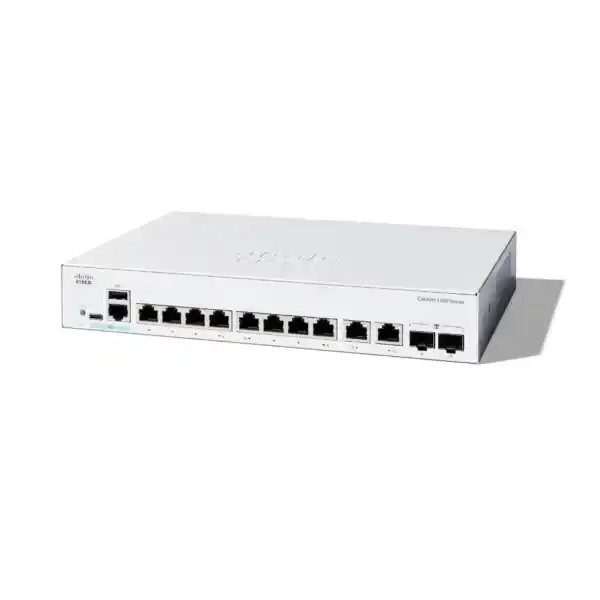
Cisco Catalyst C1200-8T-E-2G Network Switch in Dubai, UAE
The Cisco Catalyst C1200-8T-E-2G is an eight-port data switch with two additional Gigabit copper/SFP combo interfaces, a fanless rack-mountable chassis and the managed Layer 2, security, quality-of-service and static-routing capabilities required for a professionally segmented small-business LAN. It is particularly relevant when the requirement is reliable wired access and flexible copper or fibre uplinks without paying for PoE circuitry that will not be used.
Direct answer: what is the C1200-8T-E-2G and who should consider it?
What exactly is it?
It is a managed Cisco Catalyst 1200 Series Gigabit Ethernet switch identified by product ID C1200-8T-E-2G. The model provides eight 10/100/1000 Mbps RJ-45 data ports and two Gigabit combo interfaces. Each combo interface gives a choice between a copper RJ-45 connection and an SFP slot, but the copper and SFP sides of the same combo interface are alternatives rather than two simultaneously usable ports. Cisco describes the switch as rack-mountable, and the current product datasheet lists it as fanless.
What is it mainly used for?
Its main role is managed wired access in a compact business network. Typical tasks include connecting PCs, printers, non-PoE servers or appliances, firewall LAN interfaces, PBX equipment, storage or building systems while separating traffic with VLANs and carrying one or two uplinks toward another switch, router, firewall or fibre distribution point. It adds network controls that an unmanaged switch cannot provide, including spanning-tree functions, link aggregation, access controls, QoS, monitoring and static routing.
Who should consider it?
Small offices, branches, retail locations, clinics, hospitality back offices, professional-services firms, training rooms and other sites with a modest wired-device count can consider this model when eight local access ports are sufficient. It is also useful as a compact managed edge switch in a larger topology where local traffic needs VLAN separation and a Gigabit copper or fibre path to upstream infrastructure.
What is the most important factor to confirm?
Confirm whether any connected endpoint requires Power over Ethernet and whether the intended uplink needs more than 1 Gbps. The C1200-8T-E-2G is data-only, so it does not power IP phones, wireless access points, cameras or other PoE devices. Its combo uplinks are Gigabit, not 10 Gigabit. Those two facts determine whether this exact SKU is a good fit or whether a PoE or SFP+ model should be shortlisted instead.
What can FourTeck help determine?
FourTeck can map the device count, VLAN plan, rack or wall location, uplink medium, SFP type, fibre distance, management requirements and expected growth to the correct Catalyst 1200 model. That is especially useful when a quotation must include optics, patching, installation, configuration, migration from an unmanaged switch, coordination with an existing firewall, or validation that a larger port count is justified.
Where this exact Cisco Catalyst 1200 model fits
The C1200-8T-E-2G sits in the compact part of the Catalyst 1200 family. Its eight access ports make it suitable for a small local device population, while the two combo interfaces give more deployment flexibility than a basic eight-port desktop switch. For a buyer, that combination matters because an access switch often needs a dedicated upstream connection and sometimes a second link for another network segment, a local server, a redundant physical path or a separate fibre run. The combo design lets the project choose copper or fibre without replacing the switch simply because the physical medium changes.
The model should not be mistaken for a PoE switch. The “T” data-port model is aimed at endpoints that already have their own power source. In an office where most connected devices are desktops, printers, small servers, security appliances or other self-powered equipment, that can be an efficient choice. In a voice, wireless or CCTV-heavy deployment, however, a data-only switch can create an unnecessary collection of power injectors and adapters. In those cases, a Catalyst 1200 PoE model often produces a cleaner physical design and a simpler power-management plan.
The second boundary is uplink speed. The two uplink choices on this SKU are 1 Gigabit Ethernet combo ports. For a small branch with ordinary office traffic, internet access and modest local server use, that may be entirely adequate. For a high-density access layer, a storage-heavy environment, a large Wi-Fi aggregation point or an uplink expected to carry several gigabits of sustained traffic, a 10G SFP+ Catalyst 1200 model deserves comparison. The correct decision therefore depends less on the switch label and more on device count, power requirements, traffic concentration and upstream architecture.
Verified hardware and performance specifications
Cisco’s current Catalyst 1200 Series datasheet identifies the C1200-8T-E-2G as a ten-interface Gigabit system when the eight access interfaces and two combo interfaces are counted at the system level. The combo design must be interpreted correctly: each of the two combo positions can use either its RJ-45 side or its SFP side at a time.
| Specification | C1200-8T-E-2G detail | Buyer relevance |
|---|---|---|
| Access ports | 8 × 10/100/1000 RJ-45 data ports | Suitable for up to eight directly attached copper endpoints before using other ports or adding another switch. |
| Combo interfaces | 2 × Gigabit RJ-45/SFP combo | Allows a copper or fibre connection on each combo position; only one medium on a combo position is active at a time. |
| Switching capacity | 20 Gbps | Designed for wire-speed, nonblocking operation across the Gigabit interfaces within the platform specification. |
| Forwarding rate | 14.88 mpps for 64-byte packets | Provides a useful indicator of small-packet forwarding capability when assessing branch or access-layer workloads. |
| Packet buffer | 1.5 MB aggregate, dynamically shared | Important when traffic arrives in bursts or when faster senders feed temporarily congested egress ports. |
| System memory | 1 GB DDR4 DRAM; 512 MB flash | Supports the embedded operating environment, configuration storage, firmware and management functions. |
| CPU | Dual-core ARM at 1.4 GHz | Drives the control plane and management functions; switching remains handled by the switching architecture. |
| Cooling | Fanless | Useful for quiet offices, reception areas and small communications spaces, while still requiring sensible ventilation. |
| Dimensions | 268 × 185 × 44 mm | Compact 1U-height form factor; rack planning should still confirm mounting space, cable bend radius and power-adapter placement. |
| Published unit weight | 1.39 kg in the current Catalyst 1200 datasheet | Relevant for shelf, bracket and shipment planning; always check the supplied revision and mounting kit during installation. |
| Power | External 100–240V, 50–60 Hz adapter; worst-case system consumption around 10.65W at 220V | Low switch power draw, but the external adapter and outlet arrangement should be included in cabinet planning. |
| PoE output | None | A decisive limitation for IP phones, access points, cameras and other powered devices. |
| Warranty | Cisco limited lifetime warranty | Warranty terms and regional service processes should be confirmed against the exact sales channel and current Cisco policy at order time. |
Understanding the eight access ports and two combo uplinks
A common purchasing mistake is to read “8T-E-2G” and assume the switch simply has ten ordinary copper ports. The physical design is more useful than that, but it also needs correct interpretation. The eight primary ports are standard Gigabit Ethernet RJ-45 data interfaces. The two additional Gigabit positions are combo interfaces that expose both copper and SFP connectivity. On an individual combo position, the RJ-45 connector and the SFP slot represent the same logical port resources; they are not two independent interfaces that can both forward at the same time. This arrangement is valuable when a project may use copper today and fibre later, or when two sites use the same switch SKU but different uplink media.
For copper, Category 5e or better cabling is the normal baseline for 1000BASE-T. In a short office run, copper may be the simplest choice because no optical module is required. Fibre becomes more attractive when the uplink must cross electrically noisy areas, connect to another floor or building, exceed normal copper-channel distance, or integrate with an existing fibre distribution system. The switch therefore supports a practical transition between copper and fibre at the edge without forcing the buyer to maintain separate switch models for each media case.
Optics must still be engineered rather than guessed. Cisco’s data sheet lists supported Gigabit SFP modules that include multimode, single-mode and copper choices. The correct module depends on the fibre type, connector presentation, wavelength, link distance and the transceiver on the device at the far end. A multimode optic is not interchangeable with a single-mode optic simply because both operate at 1 Gbps. Likewise, bidirectional optics require the correct complementary pair. For a UAE project, the quotation should identify the exact SFP part numbers, fibre patch cords and connector types instead of using the vague line item “fibre module.”
The two combo ports can also influence logical design. One may connect to the site firewall or core switch while the other serves a second distribution point, local server network or another switch. Link aggregation is supported in the Catalyst 1200 feature set, but an implementation must respect the actual physical interfaces, upstream capabilities and failure domain. Two links do not automatically provide redundancy or double throughput unless both ends are configured for the same aggregation or spanning-tree design. The uplink plan should therefore be documented before patching begins.
Switching performance: what 20 Gbps and 14.88 mpps mean in practice
Nonblocking switching capacity
Cisco publishes a 20 Gbps switching capacity for the C1200-8T-E-2G. For a ten-interface Gigabit system, this corresponds to full-duplex bandwidth accounting across the available Gigabit interfaces. It signals that the switching fabric is designed to operate at wire speed rather than forcing ordinary port traffic through a lower-capacity shared bottleneck. For an access switch, that is the right architectural baseline because local file transfers, backups and east-west traffic should not be constrained by an artificially undersized fabric.
Forwarding rate
The published 14.88 million packets per second figure is based on 64-byte packets. Packet-rate performance matters because networks carrying many small transactions can place different demands on a switch than a workload dominated by large frames. Buyers do not normally need to calculate packet rates for a small office, but the figure helps confirm that the hardware is designed as a proper managed access switch rather than a low-end forwarding device with an obvious packet-processing constraint.
Where the real bottleneck may move
Even when the internal fabric is nonblocking, a network can still experience congestion at a 1G uplink, a firewall interface, an internet circuit, a server NIC or an oversubscribed downstream link. The switch specification does not remove those dependencies. If several access devices can generate sustained traffic at the same time, the project should estimate aggregate demand toward the uplink. A 1G uplink is usually adequate for ordinary office access, but it is not the same as having 10G aggregation capacity.
The 1.5 MB dynamically shared packet buffer provides temporary absorption of traffic bursts, but a buffer is not a substitute for capacity planning. Continuous oversubscription still causes queues to build and packets to be dropped according to the configured policies. This is why QoS, uplink sizing and application behavior matter together. A small office with cloud applications and ordinary file traffic may run comfortably on the platform, whereas a video-production team copying large datasets to central storage can justify a switch with faster uplinks even if the device count is identical.
VLANs, spanning tree and resilient Layer 2 design
The business value of a managed switch begins with control over the Layer 2 network. The Catalyst 1200 feature set supports port-based and IEEE 802.1Q tagged VLANs, with Cisco documenting support for up to 255 active VLANs simultaneously across the series. A small site may use only a handful: a corporate user VLAN, a guest or contractor VLAN, a voice VLAN, a management VLAN and perhaps a dedicated segment for building systems, cameras or lab equipment. The benefit is not the number itself; it is the ability to create clear trust boundaries and carry those segments over tagged uplinks toward a router or firewall.
VLAN design should start with business and security requirements rather than port numbering. For example, putting accounting PCs, guest devices and network-management interfaces into one flat subnet may work physically, but it weakens policy control and makes troubleshooting less predictable. On the C1200-8T-E-2G, the limited access-port count means segmentation can still be meaningful even in a small environment. A single switch can attach several device classes and send tagged traffic over one uplink to a firewall that enforces inter-VLAN policy.
Spanning-tree capabilities protect against accidental Layer 2 loops, which can be disproportionately damaging in a small network. Cisco lists traditional STP, Rapid Spanning Tree, Multiple Spanning Tree and PVST-related functions in the Catalyst 1200 feature set. The right mode depends on the rest of the network. In a simple single-switch site, spanning tree may appear unimportant until a user connects two wall outlets with a patch lead or a second switch introduces a redundant path. In a multi-switch design, consistent root-bridge planning and edge-port configuration become essential.
Link aggregation using LACP is also supported. Aggregation can combine multiple physical links into a logical bundle when both devices support compatible configuration. On a compact switch, this can be useful when attaching to an upstream switch and when the available port budget justifies consuming two interfaces. However, aggregation should not be described as free capacity. A single traffic flow is normally hashed to one member link, and the benefit appears across multiple flows. The design also needs to decide whether using two Gigabit uplinks for a LAG is more valuable than retaining one interface for a different connection.
Multicast features such as IGMP snooping and an IGMP querier can reduce unnecessary flooding of multicast traffic. That matters in environments using IPTV, video distribution, discovery-heavy applications or other multicast services. An unmanaged switch may flood such traffic across many ports, while a managed switch can constrain forwarding to interested receivers when the network is designed correctly. The result is a more deliberate Layer 2 domain rather than simply a collection of connected Ethernet cables.
Static Layer 3 routing: useful capability with a clear boundary
Cisco positions the Catalyst 1200 Series above unmanaged switching by including Layer 3 static routing. The current datasheet lists wire-speed IPv4 routing, up to 32 static routes and up to 16 IP interfaces, together with IPv6 routing and support for Layer 3 interfaces on physical ports, link-aggregation groups, VLAN interfaces or loopback interfaces. For a small business, this can move straightforward internal routing tasks onto the switch instead of forcing every local subnet transition through an external router.
A practical example is a branch with separate user, server and management VLANs. The switch can provide VLAN interfaces and static paths for predictable internal destinations, while a firewall remains responsible for internet access, security inspection, VPN termination and policy enforcement where appropriate. Whether routing should be performed on the switch or the firewall is an architectural decision, not a feature checklist. If security policy requires every inter-VLAN session to pass through a next-generation firewall, enabling switch-based routing merely because it is available could bypass the desired inspection point.
Good use of static routing
Predictable, modestly sized networks where routes change infrequently and the switch can perform local forwarding without undermining the security design. It can also simplify reachability to infrastructure or management networks when the topology is stable.
When to use a router or larger platform
Networks that require extensive dynamic routing, advanced routing policy, high-scale segmentation or security inspection between many internal zones may be better served by a router, firewall or more advanced campus switching platform. Static routing is a useful tool, but it does not turn an access switch into a full enterprise routing core.
DHCP relay and UDP relay functions can also support segmented networks by forwarding selected broadcast-dependent services across IP domains. These features reduce the need to run a DHCP server in every VLAN, but the relay destination, gateway addressing and firewall policy must agree. A deployment checklist should therefore capture IP addressing, VLAN IDs, gateway ownership, DHCP scope locations and default-route behavior before the switch configuration is built.
Security controls for a business access layer
An access switch is part of the security boundary because every wired endpoint reaches the network through a physical port. The Catalyst 1200 feature set includes secure web management over HTTPS, SSH for command-line access, IEEE 802.1X authentication, access-control lists and protections intended to keep management and control traffic available under stress. These functions are valuable only when they are included in the operational design; leaving every port in the same VLAN with default access settings wastes much of the benefit of buying a managed switch.
IEEE 802.1X can authenticate endpoints through a RADIUS infrastructure before granting normal network access. This is useful where a business wants identity-aware wired access, guest handling or controlled onboarding. Deployment maturity matters. If the organization does not have a working RADIUS service, endpoint supplicant policy or exception process for printers and other non-user devices, enabling 802.1X without preparation can create outages. A staged rollout normally begins with an inventory of endpoint types and a clear fallback method for devices that cannot perform the preferred authentication method.
Access-control lists provide another layer of policy. Cisco lists support for rules that can match information such as MAC addresses, VLAN IDs, IPv4 or IPv6 addresses, protocol values, TCP or UDP ports, DSCP markings and other fields. The Catalyst 1200 datasheet specifies support for up to 512 ACL rules across the platform feature set. This can help restrict management access, limit unwanted east-west communication or enforce simple traffic boundaries close to the endpoint. ACL policy should still be documented and reviewed, because a compact switch with many ad hoc rules can become harder to troubleshoot than a clean design with policy centralized on a firewall.
Management security is equally important. Administrative interfaces should normally live in a dedicated management VLAN or otherwise be restricted to trusted source addresses. HTTPS and SSH should be used instead of insecure management methods, strong credentials should be applied, configuration backups should be maintained and firmware should be kept under lifecycle control. If SNMP is required for monitoring, SNMPv3 is preferable where the monitoring platform supports it because it adds authentication and privacy capabilities beyond older community-string models.
The switch should not be presented as a replacement for a firewall. It can enforce useful Layer 2 and Layer 3 access controls, but perimeter protection, threat inspection, VPN services, advanced application policy and internet security remain separate functions. In a well-designed branch, the switch and firewall complement each other: the switch controls attachment, segmentation and local forwarding, while the firewall enforces the broader security boundary and inspected traffic paths.
QoS, voice VLAN and traffic prioritization
The C1200-8T-E-2G is data-only from a power perspective, but it still includes the Catalyst 1200 family’s traffic-management capabilities. Cisco documents eight hardware queues, strict-priority and weighted round-robin scheduling, classification based on 802.1p values, IP precedence and DSCP, plus ingress policing and egress shaping functions. These controls can be useful when a small branch mixes interactive voice, business applications, backups and internet traffic on shared links.
A voice VLAN can separate IP-telephony traffic from user data and apply appropriate quality-of-service treatment. That does not mean this particular switch will power the phones. An IP phone connected to the C1200-8T-E-2G needs its own local power adapter or a separate power injector unless another architecture supplies power. If the office expects several PoE phones, selecting the PoE-capable C1200-8P-E-2G or another suitably sized PoE model is often more practical than adding individual injectors.
QoS also has limits that buyers should understand. Prioritization manages contention; it does not create bandwidth. If a 1G uplink is continuously saturated, QoS can protect important classes from less important traffic, but the underlying capacity shortfall remains. The best design combines reasonable uplink sizing, correct marking, trust-boundary decisions and simple class definitions that operators can understand later. Complex policy added without a measurable requirement tends to increase troubleshooting cost rather than network quality.
Management options: local control and Cisco Business Dashboard
Cisco designed the Catalyst 1200 Series for organizations that need real management capabilities without the operating overhead associated with a large campus platform. The switches support an on-box graphical interface and command-line management. Cisco’s administration and CLI documentation also covers SNMP, making the platform suitable for integration with monitoring systems that need interface statistics, state changes and device health information.
For centralized operations, Cisco Business Dashboard is purpose-built for Catalyst 1200 and 1300 Series switches and related Cisco small-business infrastructure. Cisco describes capabilities such as device discovery, topology and inventory views, centralized configuration, monitoring, firmware-related lifecycle functions and management across multiple sites. Cisco’s 2026 Business Dashboard material also states that the current Dashboard and Dashboard Lite licensing models do not require a license, though deployment platform and feature differences still need to be checked against the current software version used by the customer.
Central management becomes more valuable as the number of sites grows. A single switch can be maintained locally without much difficulty, but ten or twenty branches create a different problem: inventory consistency, firmware visibility, configuration drift and troubleshooting access. A dashboard can reduce those operational gaps by presenting devices in one system. Managed-service providers can also benefit from centralized visibility when they support multiple customer environments, provided access controls and tenant separation are implemented correctly.
The switch includes console access, and Cisco’s current hardware table lists an RJ-45 console and a USB Type-C port on the C1200-8T-E-2G. The USB Type-C interface can support console and file or image management functions. Console access is valuable when management addressing has been misconfigured, credentials need recovery according to approved procedures, or the device is being staged before it joins the production network. A project that depends only on in-band web access can be harder to recover when the management VLAN itself is the source of the problem.
Operational planning should specify who owns the configuration, how backups are stored, which firmware train is approved, what monitoring platform receives alerts and how changes are documented. A managed switch is not automatically a managed network. The management process is what turns the available features into predictable service. For customers wanting installation plus ongoing infrastructure assistance, FourTeck IT Services UAE can be included in the discussion around staging, configuration, monitoring and support scope.
Fibre uplink planning for the two SFP combo interfaces
A fibre-capable switch purchase is incomplete until the optical path is defined. The C1200-8T-E-2G supports Gigabit SFP connectivity through its two combo interfaces, but the transceiver is a separate design decision. Cisco’s compatibility table for the family includes examples such as 1000BASE-SX multimode optics, 1000BASE-LX/LH single-mode optics, bidirectional single-mode options and copper SFP transceivers. Maximum distance depends on the selected optic and media rather than on the switch alone.
Multimode fibre
Often used for shorter in-building links. The design must match the optic to the installed fibre grade, connector presentation and expected distance. Existing fibre should be inspected rather than assumed to be suitable based only on its colour or age.
Single-mode fibre
Appropriate for longer distances and common in building backbones or inter-building links. Optical budget, wavelength, patching and the transceiver at both ends must match. “Single-mode” alone is not a complete part specification.
Copper SFP
Can provide a copper presentation from an SFP slot where supported, but on this switch a native combo RJ-45 path may already meet the requirement. Using the native copper side can simplify the bill of materials when fibre is not needed.
The far-end device matters just as much as the local switch. An SFP link succeeds only when both ends support compatible speed, media and optical characteristics. If the remote switch uses a fixed 1G SFP slot, the match is straightforward once optics are selected. If it uses an SFP+ slot, the project must confirm that the port supports 1G operation with the intended transceiver. Autonegotiation expectations should also be checked for copper modules and unusual handoffs.
A good quotation therefore identifies switch quantity, exact Cisco-compatible SFP part number, patch-cord type, connector type, fibre distance and whether installation includes testing. This prevents a common procurement failure in which the switch arrives on time but cannot be connected because the optical modules or patch leads were not included. For a new fibre run, the project should also specify testing and labeling so the physical path can be supported later.
Power, heat, acoustics and placement
The C1200-8T-E-2G is fanless, which is valuable in small branches where the network equipment may be located close to staff. A fanless design removes continuous fan noise and one moving component, but it does not eliminate thermal requirements. The switch still dissipates heat and should be installed with clear ventilation rather than stacked under papers, placed inside an unventilated cabinet or exposed to direct heat sources.
Cisco lists an operating range of -5°C to 50°C for the Catalyst 1200 models other than the C1200-8T-D, along with noncondensing operating humidity from 10% to 90%. In the UAE, the practical implication is that indoor equipment should be installed in a conditioned environment with reasonable airflow. A switch that is rated for elevated temperature is not a substitute for proper cabinet cooling, especially when neighboring devices such as firewalls, NVRs, servers or UPS units add heat.
The current datasheet lists approximately 10.65W worst-case system consumption at 220V and about 4.72W idle at 220V for this model, with an external universal power source. That is modest compared with PoE switches because the chassis is not delivering endpoint power. The power adapter nevertheless needs a reliable socket and should be routed so it cannot be easily disconnected. For critical branches, the switch and its upstream firewall should normally be connected to a suitably sized UPS rather than only one of the devices.
Physical dimensions of 268 × 185 × 44 mm make the unit compact, and Cisco lists it as rack-mountable. Rack planning should still confirm the supplied mounting kit, available rack width and depth, power-adapter position, patch-panel layout and cable service loops. In a shallow wall cabinet, connectors and cable bend radius can consume more usable depth than the metal chassis itself. Measuring the cabinet before ordering avoids a preventable installation delay.
Practical use cases in Dubai and UAE business networks
Small professional office
A legal, consulting, accounting or design office may need managed connectivity for workstations, printers, a small NAS, a firewall and perhaps a local application appliance. When endpoints use their own power and eight copper access ports are sufficient, this model can provide VLAN separation, controlled uplinks and monitoring without the expense or heat of unused PoE capacity. A second combo port can remain available for fibre expansion or another local network connection.
Retail or branch back office
A small retail site may have point-of-sale terminals, management PCs, back-office printers and a firewall connection that benefit from VLAN separation and centralized monitoring. If cameras and wireless access points are powered by a different PoE switch, the C1200-8T-E-2G can serve the non-PoE data side. Where the same switch is expected to power cameras or APs, a PoE variant should be preferred.
Compact server or appliance segment
The switch can connect a small group of self-powered servers, security appliances, backup devices or lab systems where 1GbE is sufficient. VLANs and ACLs can isolate management or service traffic. Buyers with storage-heavy east-west traffic should review whether the 1G access and uplink architecture will meet throughput expectations before choosing this platform.
Fibre-fed remote room
A remote office room, classroom cluster or small floor zone may receive a 1G fibre uplink from the building core and need a handful of local copper ports. The SFP combo interface allows the switch to terminate that fibre directly, subject to correct optics, while the fanless compact chassis suits spaces where acoustic noise is undesirable.
Managed edge beside a firewall
The switch can present multiple VLANs to a firewall over an 802.1Q trunk, letting the firewall enforce policy between business zones while the switch handles local access. This is common when a site needs more than a flat LAN but does not need a large access chassis. The VLAN, trunk and gateway plan should be agreed across both devices before cutover.
Deployment design: decisions to make before the switch is installed
The most reliable installations begin with a small network design rather than with factory-default patching. First, list every endpoint that will connect to the switch and identify whether it is data-only or PoE-dependent. This simple inventory often determines whether the C1200-8T-E-2G is appropriate. If six workstations and two printers are the entire requirement, the eight access ports may be enough. If the same room also contains three IP phones and two access points, the port count and power design immediately change.
Second, reserve uplink capacity. It is poor planning to consume every available interface with local devices and only then decide how the switch will connect upstream. One or both combo ports should be assigned deliberately according to topology. If fibre is required, identify the exact SFP module and patching before installation day. If copper is used, confirm cable category, path length and upstream port configuration. Where a link aggregation group is planned, reserve both member ports and document the LACP settings on both ends.
Third, define VLANs and gateway ownership. Each access port should have a purpose: user access, printer, server, management device or trunk. Native or untagged VLAN behavior must match the attached device. Trunk ports should carry only the VLANs required by the design instead of every possible VLAN by default. If the firewall provides the VLAN gateways, the switch should not accidentally provide competing addresses on the same segments. If the switch performs selected static routing, the firewall and other routers need corresponding return routes.
Fourth, define management. Choose the switch management VLAN and IP address, DNS and NTP behavior where used, administrator authentication, secure web or SSH access, SNMP monitoring method and configuration-backup process. Management access should be tested from the actual administrative network, not only from a laptop connected directly during staging. If Cisco Business Dashboard will be used, decide where the Dashboard or Lite instance will run and how remote sites will be discovered and managed.
Finally, document the cutover sequence. Label cables, export the old switch configuration if the previous device is managed, record port assignments and define an outage window when business systems are sensitive to brief link interruption. A compact switch may take only minutes to rack, but application restoration can take longer if VLANs, DHCP relay, authentication or trunk settings are wrong. Treating the switch as part of the network architecture rather than as a commodity box reduces that risk.
Migration from an unmanaged or older switch
Replacing an unmanaged switch with the C1200-8T-E-2G creates new capability, but the safest first objective is service continuity. Before disconnecting the old device, record which cable serves which endpoint, identify the uplink and check for any hidden daisy-chained switches. An unmanaged network can conceal topology problems because every port behaves similarly. A managed replacement exposes those assumptions when VLANs, spanning tree and security settings are introduced.
A sensible migration can be staged in two phases. In the first phase, configure secure management, basic VLAN membership and the upstream connection, then move endpoints while keeping policy intentionally simple. Confirm DHCP, DNS, printing, internet access and access to local applications. In the second phase, add 802.1X, ACLs, more granular QoS or other controls after baseline connectivity is proven. This separation makes troubleshooting much easier because only a limited set of variables changes at each stage.
When replacing an older managed switch, export or document its VLANs, trunks, access-port assignments, LAGs, spanning-tree role, management addressing, SNMP settings and any ACLs. Do not assume configuration syntax or default behavior will copy directly between product families. Recreate the intent using supported Catalyst 1200 functions, then validate the forwarding result. A migration is a good opportunity to remove unused VLANs, obsolete trunks and undocumented workarounds rather than reproducing years of accumulated configuration.
For a branch connected to a firewall, coordinate the switch cutover with the firewall configuration. Trunk VLAN IDs, native VLAN behavior and gateway addressing must match. When the switch takes on static routing, return-path routing on the firewall becomes especially important. A one-sided route can create intermittent or one-way connectivity that looks like a switching fault even though the real issue is Layer 3 path symmetry.
When the C1200-8T-E-2G may be the wrong choice
A balanced product page should identify disqualifiers as clearly as strengths. The first is PoE. If the deployment must power multiple IP phones, cameras, access points, door controllers or other IEEE 802.3af/at devices, this switch does not provide that power. External injectors can solve isolated cases, but using many injectors adds cabling, outlets and failure points. A PoE Catalyst 1200 model is usually cleaner when endpoint power is a normal part of the requirement.
The second is port scale. Eight data access ports can be ideal today but restrictive if the office is expected to grow to twelve or sixteen devices quickly. Adding a second switch is not always wrong, yet a larger 16-port or 24-port model can produce simpler management, fewer inter-switch links and more spare capacity. When choosing between “just enough” and “room to grow,” include printers, temporary devices, local servers, management appliances and planned staff additions rather than counting only current PCs.
The third is uplink bandwidth. This SKU has Gigabit combo uplinks. If a site has a multi-gigabit internet connection, high-throughput local storage, a dense group of users transferring large datasets or an upstream core designed around 10G, a Catalyst 1200 model with SFP+ uplinks should be evaluated. Buying an access switch with 1G uplinks for a workload that clearly demands more can create a predictable bottleneck.
The fourth is routing and enterprise feature depth. Static routing, VLANs, ACLs, 802.1X and standard switching protocols cover many small and medium business needs. Organizations requiring large route tables, sophisticated dynamic routing, stacking or advanced campus architectures may need a different Cisco family. Procurement should match the operational architecture rather than treating all “managed Cisco switches” as interchangeable.
Finally, consider resilience requirements. A small fanless switch with an external power adapter is appropriate for many branch deployments, but a site that requires redundant power supplies, chassis-level resiliency or hitless high-availability mechanisms needs a different class of equipment. The business impact of switch failure should be part of the selection discussion, especially for clinics, warehouses, call centres or revenue-generating sites where a single access switch can become a local point of failure.
Compare nearby Catalyst 1200 options before ordering
| Model | Access ports | Uplinks | PoE | Why compare it? |
|---|---|---|---|---|
| C1200-8T-E-2G | 8 × 1G RJ-45 data | 2 × 1G RJ-45/SFP combo | No | Best reference point for a compact data-only network that values flexible 1G copper/fibre uplinks. |
| C1200-8P-E-2G | 8 × 1G RJ-45 PoE+ | 2 × 1G RJ-45/SFP combo | 67W budget | Compare when a modest number of phones, APs or cameras need switch-supplied power. |
| C1200-8FP-2G | 8 × 1G RJ-45 PoE+ | 2 × 1G RJ-45/SFP combo | 120W budget | Compare when the same eight-port footprint must support a higher aggregate PoE load. |
| C1200-16T-2G | 16 × 1G RJ-45 data | 2 × 1G SFP | No | Compare when eight access ports leave too little expansion room and copper/SFP combo uplinks are not essential. |
| C1200-24T-4X | 24 × 1G RJ-45 data | 4 × 10G SFP+ | No | Compare when access density and multi-gigabit aggregation are more important than compact size. |
The most useful comparison is not always the nearest model number. A buyer should compare the feature that constrains the design: PoE budget, port count, uplink speed, rack footprint or future growth. If eight access ports are enough and no endpoint needs power, the C1200-8T-E-2G avoids paying for unused PoE. If only two more endpoints are expected next year, however, jumping to a 16-port model may be cheaper operationally than installing and managing a second switch later.
Procurement guidance for Dubai and UAE buyers
Cisco states that Catalyst 1200 Series products are supplied through distributors and partners rather than ordered directly from Cisco by end users. For a UAE buyer, the commercial process should therefore verify the exact product ID, distribution source, included accessories and applicable regional warranty route. The model string C1200-8T-E-2G should appear clearly on the quotation so it is not confused with the compact C1200-8T-D or the PoE-capable eight-port variants.
A complete bill of materials may need more than the switch. If fibre is planned, include SFP transceivers and patch leads. If the switch is being installed in an existing rack, confirm the mounting kit and cabinet compatibility. If uptime matters, include an appropriate UPS outlet and consider spare hardware or support coverage based on the site’s business criticality. If configuration is part of the purchase, specify the VLAN plan, management IP addressing, uplink method, ACL or QoS requirements and whether the supplier is responsible for after-hours cutover.
Availability and lead time can vary by distribution channel, shipment cycle and quantity. A product page should therefore avoid claiming permanent stock without a live inventory confirmation. For projects with fixed deployment dates, request a quotation that states current availability, expected lead time and the exact scope included. This is especially important when the order also depends on optics or accessories that may have a different lead time from the switch itself.
Buyers can use FourTeck for broader technology sourcing context and Firewall Dubai by FourTeck when the switching requirement is part of a firewall, VLAN or secure branch-network project. Where the same network also includes IP phones, the FourTeck IP Phones specialist resource can help frame endpoint and power requirements before a switch model is finalized.
For quotation accuracy, describe what the switch must connect rather than sending only a model number when the architecture is not yet fixed. Device count, PoE needs, uplink media, fibre distance, VLAN count, firewall model, cabinet location and installation scope are more useful than a generic request for “an eight-port Cisco switch.” Those details allow the model choice to be validated before purchase and reduce the chance of discovering a missing PoE budget or incompatible optic during deployment.
Installation and commissioning journey
Confirm C1200-8T-E-2G, required quantity, data-only power model, port count and 1G uplink requirements. If PoE or 10G uplinks are necessary, change the model before ordering rather than designing workarounds after delivery.
Apply the approved firmware level, set secure administrator access, management IP addressing, time settings and backup procedures. Confirm whether the switch will be monitored locally or through Cisco Business Dashboard or another supported NMS.
Configure access VLANs, trunks, permitted VLAN lists, spanning-tree roles and any link aggregation. Install the correct copper or SFP uplink and confirm the far-end interface operates at the intended speed and tagging mode.
Configure static routes, DHCP relay, ACLs, 802.1X and QoS according to the approved design. Avoid adding features merely because they are available; every rule should have an operational reason and a documented owner.
Verify DHCP, DNS, internet access, printers, servers, voice where externally powered, monitoring and reachability across permitted network segments. Test both normal operation and relevant failover or loop-prevention behavior before declaring the cutover complete.
Operational considerations after deployment
Once the switch is in production, configuration consistency matters more than frequent change. Maintain a current backup after approved modifications and store it somewhere other than on the switch itself. Record the management address, device name, physical location, uplink ports, VLAN assignments and support details in the network inventory. This information is inexpensive to maintain and significantly shortens troubleshooting when a site has an outage months later.
Firmware should be reviewed as part of a regular maintenance process rather than upgraded randomly. Read release notes, confirm whether a release addresses a security or stability issue relevant to the deployment, and schedule the change according to the business impact of a reboot. Centralized tools can improve visibility across many devices, but they do not remove the need for change control and rollback planning.
Monitoring should focus on symptoms that correspond to user impact: uplink utilization, errors, discards, port flaps, unexpected topology changes, CPU or memory anomalies and device availability. Interface counters are particularly useful for separating cabling faults from congestion. A port with increasing CRC or physical errors suggests a media problem, while a clean port with persistent queue drops points toward capacity or policy. Good monitoring turns those distinctions into evidence instead of guesswork.
Periodic reviews should also confirm that the switch is still the correct size. Growth can change a good eight-port design into an overextended one. If unmanaged mini-switches start appearing under desks because ports are exhausted, or if the Gigabit uplink regularly approaches saturation, the network has moved beyond the original design. Upgrading intentionally is better than allowing ad hoc expansion to undermine segmentation and supportability.
Important limitations and dependencies to include in the quotation
- No PoE output: every attached powered endpoint must have another power method. If several PoE endpoints are expected, compare a PoE-capable Catalyst 1200 model.
- Gigabit uplinks: the two combo interfaces are 1G. They do not provide 10G SFP+ aggregation.
- Combo behavior: the RJ-45 and SFP sides of a combo position are alternative media for the same interface. They are not two concurrent ports.
- SFPs are selection items: choose modules according to supported compatibility, fibre type, distance and the far-end device. Do not order optics by connector appearance alone.
- Static routing is not a substitute for an enterprise routing core: use it for suitable small-network routing tasks while preserving the intended firewall and security inspection paths.
- External power adapter: cabinet power and adapter placement need to be planned, particularly in compact wall racks.
- Fanless does not mean ventilation-free: maintain airflow and indoor environmental conditions within the published operating range.
- Feature availability depends on software: configuration menus and management behavior can change across firmware revisions, so deployment procedures should reference the approved current Cisco documentation.
Buyer questions about the Cisco Catalyst C1200-8T-E-2G
Is the C1200-8T-E-2G a managed switch?
Yes. It belongs to Cisco’s Catalyst 1200 Series and provides managed switching functions rather than unmanaged plug-and-play behavior. The family supports a web interface, CLI, secure management, VLANs, spanning tree, link aggregation, QoS, ACLs, 802.1X, monitoring and static Layer 3 routing features. This makes it suitable when a business needs control over segmentation, access and network operations.
Does it have PoE?
No. The eight access ports are data-only. This is one of the most important distinctions between this model and the C1200-8P-E-2G or C1200-8FP-2G. If the connected equipment includes IP phones, wireless access points, cameras or other PoE devices, either provide separate power or choose a PoE model with a budget sized for those endpoints.
How many usable network interfaces does it provide?
It provides eight regular Gigabit Ethernet RJ-45 access interfaces plus two Gigabit combo interfaces. A combo interface can use either its RJ-45 connector or its SFP slot at a time. Therefore, do not count each copper and SFP presentation as a separate simultaneously usable port.
Can the two combo ports be used for fibre?
Yes, with supported Gigabit SFP transceivers. The transceiver must match the fibre type, link distance and far-end optics. Multimode, single-mode, bidirectional and copper SFP choices exist within Cisco’s published compatibility list for the family. Exact part numbers should be selected as part of the bill of materials.
Are the uplinks 10 Gigabit?
No. The combo uplinks on this exact SKU operate at Gigabit Ethernet speed. Buyers needing 10G aggregation should compare Catalyst 1200 variants with SFP+ uplinks, such as appropriate 24-port or 48-port “4X” models, rather than assuming an SFP slot automatically means 10G.
Can it route between VLANs?
The Catalyst 1200 family supports static Layer 3 routing, including IPv4 and IPv6 routing capabilities. Cisco lists up to 32 static IPv4 routes and up to 16 IP interfaces. Whether the switch should perform inter-VLAN routing depends on the security architecture. Some networks intentionally send inter-VLAN traffic to a firewall for inspection rather than routing locally on the switch.
Is the switch quiet enough for an office?
Cisco lists the C1200-8T-E-2G as fanless, so it has no fan noise. That makes it suitable for office-adjacent environments where acoustics matter. Placement must still allow ventilation and protect the unit from high ambient temperatures, blocked airflow, dust accumulation and accidental disconnection of its external power adapter.
Can it be rack mounted?
Yes. Cisco’s ordering information lists the C1200-8T-E-2G as rack-mountable and the package contents include a mounting kit for the series. Because the chassis is compact and uses an external power source, the installer should also plan adapter placement, cable routing and rack depth instead of considering only the switch’s metal dimensions.
Does it support link aggregation?
Yes, the Catalyst 1200 switching feature set includes IEEE 802.3ad LACP. Cisco documents support for multiple LAG groups. The practical design must confirm available ports and matching configuration on the far-end device. A LAG can provide aggregate capacity across multiple flows and link resilience, but it does not make a single flow exceed the speed of one member link.
Does it support secure endpoint authentication?
The Catalyst 1200 family supports IEEE 802.1X in the authenticator role with RADIUS-based authentication options. That capability is useful for controlled wired access, but successful deployment requires a RADIUS service, endpoint policy and a plan for devices that cannot use 802.1X. It should be tested in stages rather than enabled across all business ports without preparation.
Can Cisco Business Dashboard manage it?
Yes. Cisco describes Business Dashboard and Business Dashboard Lite as management tools purpose-built for Catalyst 1200 and 1300 Series switches. They can help with network discovery, topology and inventory visibility, configuration, monitoring and lifecycle operations. The software deployment method and current feature set should be checked against the version planned for the customer environment.
Is Cisco Business Dashboard licensed separately?
Cisco’s 2026 Business Dashboard feature-comparison material states that Business Dashboard Lite requires no license and that Business Dashboard requires no license from version 2.11.1. Software packaging and support details can change, so a project should validate the current Cisco software documentation if centralized management is a contractual requirement.
What cable is required for the copper ports?
Cisco specifies Category 5e or better UTP for 1000BASE-T operation. Real installations also depend on termination quality, patch-panel condition, channel distance and interference. Where an existing cable run shows errors or cannot negotiate Gigabit speed reliably, test the physical channel before treating the switch as the cause.
Is 1G enough for the uplink?
For many small offices and branches, yes. The answer depends on aggregate traffic rather than user count alone. Cloud office applications and internet access may fit comfortably, while centralized storage, video production, backup windows or a multi-gigabit WAN can justify faster aggregation. Reviewing switch-port utilization and expected application traffic gives a better answer than relying on a generic rule.
What should be included when requesting a Dubai quotation?
Provide the exact C1200-8T-E-2G model, quantity, required delivery location, number and type of attached devices, whether any device needs PoE, uplink medium, fibre distance if applicable, SFP requirements, rack or cabinet details and whether configuration, installation, migration or support is required. Those inputs allow the quotation to cover the complete deployment rather than only the switch chassis.
Decision recap for business buyers
What FourTeck needs for an accurate C1200-8T-E-2G quotation
A model-only request is enough when the exact architecture is already approved. When the network is still being designed, the following inputs help confirm whether this SKU is correct and prevent missing accessories or installation work.
Confirm the right Cisco Catalyst 1200 switch before you order
The Cisco Catalyst C1200-8T-E-2G is a strong compact option when the requirement is eight self-powered Gigabit endpoints, flexible 1G copper or fibre uplinks, managed segmentation and quiet fanless operation. The decision changes when PoE, more access ports, 10G aggregation or higher-resilience architecture becomes necessary. Share the device count, uplink media, VLAN plan and installation scope so the quotation can reflect the network you actually need rather than only the model name.


Reviews
There are no reviews yet.