
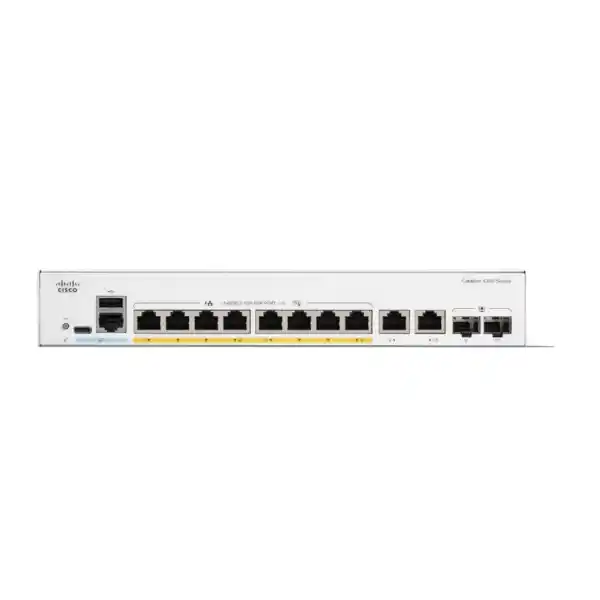
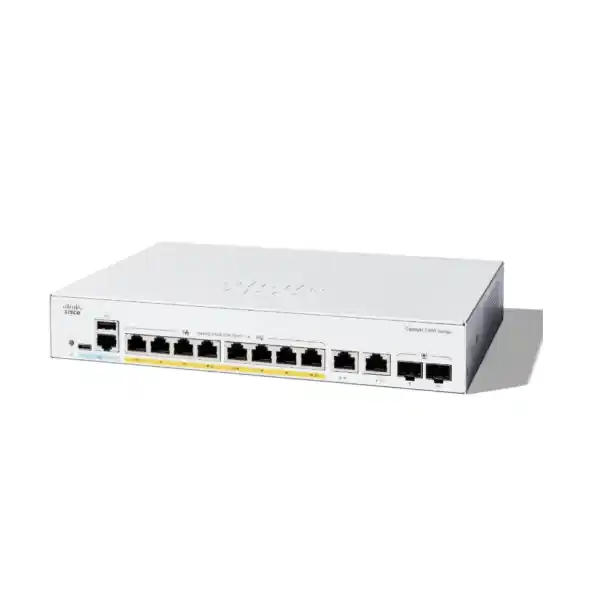
Cisco Catalyst C1300-8FP-2G Network Switch
The Cisco Catalyst C1300-8FP-2G is an eight-port Gigabit PoE+ managed switch aimed at branch offices and small-to-medium business networks that need more than basic Layer 2 connectivity. It combines eight 10/100/1000 Mbps PoE+ access ports, a 120W shared PoE budget, two Gigabit copper/SFP combo uplinks, wire-speed nonblocking forwarding, advanced VLAN and security controls, and Layer 3 routing functions in a compact fanless chassis. For UAE buyers, its strongest fit is a controlled-access edge where phones, cameras, wireless access points and business endpoints must be powered and segmented without deploying a larger 24- or 48-port switch.
FourTeck positions this model for offices, clinics, retail branches, hospitality zones, training rooms, reception networks, small warehouses and distributed sites where quiet operation, manageable PoE, secure endpoint admission and flexible copper-or-fiber uplinks matter more than extreme density. It is not simply an unmanaged PoE injector with switching added; it is a policy-capable access switch with routing, ACL, QoS, authentication and monitoring functions intended to support a professionally designed business LAN.
Direct answer: what the C1300-8FP-2G is designed to do
The most practical way to understand the Cisco Catalyst C1300-8FP-2G is as a compact managed access switch for a site with up to eight powered edge devices and a requirement for one or two Gigabit uplink paths using either copper or SFP fiber media. Every one of the eight access ports supports 10/100/1000 Mbps Ethernet and IEEE 802.3at PoE+ at up to 30W per port, but the total available PoE budget across those ports is 120W. This distinction is central to correct sizing: the switch can deliver 30W on an individual port, yet it cannot deliver 30W simultaneously to all eight ports because eight fully loaded 30W ports would require 240W. A realistic design therefore begins with the actual maximum power draw of every powered device rather than only counting ports.
The two uplink interfaces are Gigabit copper/SFP combo ports. A combo interface gives a media choice: the network designer can use copper RJ-45 or an appropriate SFP transceiver for fiber on that logical interface. It should not be treated as two independent simultaneous interfaces per combo position. This makes the model useful when a UAE branch may initially connect to a nearby firewall or router with copper and later move the uplink onto fiber for a longer building run, an electrically isolated path, or a connection to a distribution cabinet.
Cisco specifies the C1300-8FP-2G at 20 Gbps switching capacity and 14.88 million packets per second at 64-byte packet size, with wire-speed nonblocking operation. Those figures align with ten Gigabit Ethernet system interfaces operating at full duplex. The practical implication is that the switching fabric is not intentionally oversubscribed inside this model under its published port configuration. Buyers should still distinguish fabric capacity from application throughput: end-to-end performance also depends on endpoint NICs, cabling, uplink design, storage systems, WAN bandwidth, firewall inspection, traffic mix and whether multiple access devices converge onto a single 1Gbps uplink.
Core hardware specification and engineering meaning
| Specification | C1300-8FP-2G detail and design implication |
|---|---|
| Access interfaces | 8 × 10/100/1000 Mbps RJ-45 PoE+ ports. Suitable for powered IP endpoints and normal Ethernet clients. |
| Uplink interfaces | 2 × Gigabit Ethernet combo interfaces offering RJ-45 or SFP media choice per combo port. |
| PoE capability | IEEE 802.3af PoE and 802.3at PoE+; up to 30W per capable port, with 120W total switch PoE budget. |
| Switch fabric | 20 Gbps switching capacity, wire-speed and nonblocking for the published interface set. |
| Forwarding rate | 14.88 mpps for 64-byte packets, providing a useful reference for worst-case packet-rate behavior. |
| Packet buffer | 1.5 MB aggregate, dynamically shared across ports. |
| MAC table | 16,000 MAC addresses for Catalyst 1300 1 Gigabit Ethernet SKUs, ample for the normal scale of an eight-port access edge. |
| Jumbo frames | Frame sizes up to 9000 bytes; useful where end-to-end jumbo-frame design is validated across every path component. |
| Dimensions | 268 × 297 × 43.94 mm, approximately 10.55 × 11.71 × 1.73 inches. |
| Weight | Approximately 3.05 kg. |
| Cooling | Fanless design for this model, reducing acoustic impact and removing a mechanical fan as a maintenance item. |
| Power input | Internal universal 100–240V AC, 50–60 Hz power supply. |
| Operating temperature | -5°C to 50°C during operation; minimum ambient temperature for cold start is 0°C. |
For a procurement team, the table above is more useful when read as a set of design boundaries rather than a feature checklist. The eight access interfaces define endpoint density. The 120W power ceiling defines how many of those endpoints can be powered at their expected worst-case draw. The two combo uplinks define media flexibility but remain Gigabit links, so high-throughput aggregation requirements must be considered carefully. The compact fanless enclosure suits offices and customer-facing spaces, but fanless does not mean ventilation can be ignored. The switch still dissipates heat, especially when delivering substantial PoE power, and it needs the clearances and ambient conditions expected for network equipment.
PoE+ engineering: how to size the 120W budget correctly
PoE sizing is the point at which otherwise sound small-switch deployments most often fail. The C1300-8FP-2G provides eight PoE-capable ports, and each port can support up to 30W under IEEE 802.3at PoE+, but the switch has 120W total dedicated PoE capacity. The correct calculation is therefore the sum of the maximum or engineering-design draw assigned to all powered devices, plus a sensible reserve. Do not simply assume that eight PoE+ ports means eight devices at 30W simultaneously. The available budget would support four devices at a full 30W each, or eight devices averaging 15W each, or any other combination that remains within the total budget and respects per-port limits.
Example A: voice-heavy office
Six IP phones budgeted at 7W each consume 42W. Two modest wireless access points budgeted at 15W each add 30W. Total planned PoE is 72W, leaving 48W of headroom. That is a comfortable design if the endpoint specifications confirm those figures and no powered expansion is expected beyond the eight physical ports.
Example B: surveillance edge
Eight cameras budgeted at 12W each consume 96W, leaving 24W. This may be acceptable for fixed cameras without heaters, high-power illuminators or motorized PTZ functions, but the procurement check must use each camera’s worst-case PoE requirement rather than its typical daytime draw.
Example C: high-power mismatch
Eight endpoints each genuinely requiring 25W would total 200W. The switch has enough physical ports but not enough total PoE budget. In that situation the right answer is a higher-budget switch or a deliberately split power design, not an assumption that the endpoints will always remain below their rated requirement.
Example D: phased expansion
If today’s deployment uses four cameras and two phones, the spare two ports do not automatically represent safe future capacity. Reserve both switch-port count and PoE watts. A site planning to add two new access points should include their power class in the original design rather than discovering a budget shortfall after installation.
The switch also supports useful power-management capabilities such as time-based PoE scheduling and persistent PoE behavior. Time-based PoE can help turn power on or off according to a defined schedule, which may be useful for selected noncritical endpoints outside business hours. Persistent PoE is valuable because powered endpoints can continue receiving power while the switch itself is rebooting, reducing avoidable resets of phones, cameras or access points during certain maintenance events. These controls should be applied intentionally: a security camera, door controller or emergency communications endpoint should not be placed on an energy-saving schedule merely because the feature exists.
For UAE projects, PoE budgeting should be documented alongside UPS sizing. The switch’s worst-case system power figures are materially higher when it is delivering PoE than when operating only its own electronics. Cisco publishes worst-case consumption around 145.44W at 110V and 141.80W at 220V for this model with PoE, versus system-only consumption around 14W and idle figures below 10W. A UPS design should account for the switch, powered endpoint load, firewall, router, optical equipment and any local server or NVR equipment that must remain online during an outage. Runtime calculations based only on the switch’s idle consumption will substantially overstate real resilience when PoE loads are active.
Copper/SFP combo uplinks: flexibility without confusing port count
The two Gigabit combo uplinks are one of the most useful characteristics of the C1300-8FP-2G for compact branch designs. Each combo interface provides a choice between copper RJ-45 and an SFP slot. That allows the same switch platform to support short copper handoffs inside a cabinet or fiber paths between rooms, floors or buildings when the appropriate optics and fiber infrastructure are selected. A combo port is not a pair of independent forwarding interfaces; using the copper side and SFP side of the same combo interface does not create two separate Gigabit links. For port-count planning, think of the switch as having eight PoE access ports plus two logical Gigabit uplink interfaces.
In a small Dubai office, one combo uplink can connect to the firewall or upstream distribution switch and the second can be reserved for a secondary path, another switch, or a server/NVR segment depending on topology. In a villa, retail branch or clinic where the main network rack is elsewhere in the building, an SFP fiber uplink can reduce distance limitations and electrical concerns associated with long copper runs. Fiber is also valuable where electromagnetic interference, lightning exposure between structures, or separate earthing domains make copper undesirable. The actual optic type, connector, fiber grade and distance must be selected as an engineered combination rather than assuming all SFPs are interchangeable.
Both uplink interfaces are Gigabit Ethernet. This matters when multiple access devices can generate sustained traffic simultaneously. Eight 1Gbps endpoints can theoretically offer far more aggregate traffic than a single 1Gbps uplink can carry. That does not mean the switch is unsuitable; most office traffic is bursty and often constrained by WAN services, servers or application behavior. It means the uplink must be sized against actual concurrency. A surveillance design with eight high-bitrate cameras writing continuously to an NVR is different from an office with six IP phones and two lightly used printers. Likewise, two wireless access points serving high-density users may justify a model with multigigabit access and 10Gbps uplinks instead of this 1Gbps-focused platform.
Where dual uplinks are used for resiliency or aggregated bandwidth, the design should use supported spanning-tree and link-aggregation mechanisms rather than ad-hoc parallel cabling. The Catalyst 1300 family supports features such as Link Aggregation Control Protocol, STP, Rapid STP and Multiple STP. The objective is deterministic loop prevention and predictable failover. A second cable that is connected without a correct topology can create a Layer 2 loop, causing broadcast storms and an outage faster than a single failed uplink would have done.
Switching architecture, packet handling and what Cisco actually publishes
Cisco publishes the performance envelope of the C1300-8FP-2G but does not identify a specific merchant-silicon or proprietary switching ASIC part number in the public product data used for buyer sizing. For a production procurement page, inventing a chipset name would be technically irresponsible. The useful published values are the 20 Gbps nonblocking switching capacity, 14.88 mpps forwarding rate for 64-byte frames, 1.5 MB aggregate dynamically shared packet buffer, 16,000-entry MAC table for 1 Gigabit Catalyst 1300 SKUs, support for jumbo frames up to 9000 bytes, and hardware-supported QoS and IPv6 handling features. These measurable characteristics are what should drive an access-edge decision.
The 20 Gbps fabric figure corresponds to the bidirectional capacity required for ten 1Gbps system interfaces operating full duplex. It indicates that internal switching capacity is designed for line-rate operation across the published ports rather than a deliberately oversubscribed backplane. The 14.88 mpps rate is especially relevant because small packets stress packet-processing capacity more than large frames. A switch that can meet line rate at minimum-size frames is better positioned for workloads containing voice, control traffic, ACK-heavy flows, transaction systems and mixed enterprise applications, although the true end-to-end result remains dependent on the whole network path.
The 1.5 MB packet buffer is dynamically shared across ports. Buffering helps absorb short bursts when traffic enters faster than a destination link can transmit, but no finite buffer can compensate for sustained oversubscription. If several Gigabit access ports continuously send toward one 1Gbps uplink, queues will eventually fill and congestion management will take effect. That is why QoS classification, shaping and appropriate topology matter. For real-time applications, the goal is not to build enormous queues; it is to avoid unnecessary contention, prioritize important traffic correctly and maintain a capacity margin.
Jumbo-frame support can be valuable for storage or specialized workloads, but it should be enabled only as part of an end-to-end MTU design. A 9000-byte-capable switch does not guarantee that a firewall, server NIC, hypervisor, storage target, VPN path or WAN service will pass the same frame size. Inconsistent MTUs can produce fragmentation, drops or difficult-to-diagnose application symptoms. For normal branch access networks, the default Ethernet MTU remains the safer baseline unless a validated use case requires larger frames.
Layer 2 segmentation for phones, cameras, users and guests
Business VLAN design
The Catalyst 1300 feature set includes port-based and 802.1Q tag-based VLANs, management VLANs, MAC-based VLANs, protocol-based and IP-subnet-based VLAN options. In a practical branch, that enables user devices, voice, surveillance, guest access, infrastructure management and building systems to be separated logically even though they share the same physical switch.
Voice VLAN
Voice VLAN functions help place voice endpoints into an appropriate VLAN and apply suitable QoS treatment. LLDP-MED and Cisco Discovery Protocol capabilities can assist endpoint discovery. This is useful when IP phones and connected PCs share physical access while retaining separate logical policies.
Private and protected access
Private VLAN and protected-port capabilities can restrict Layer 2 communication between endpoints that should reach an upstream service but should not directly talk to one another. That can be useful in guest, hospitality, residential-service or shared-workspace environments where lateral isolation matters.
Multicast control
IGMP snooping, querier and proxy capabilities can help constrain multicast delivery to interested receivers. This is important for multicast-heavy video, IPTV or discovery environments because unmanaged flooding wastes bandwidth and can burden endpoint interfaces unnecessarily.
A common mistake in eight-port deployments is to assume segmentation is unnecessary because the site is small. Security boundaries are determined by trust and function, not by the number of switch ports. A five-person branch can still contain corporate laptops, guest Wi-Fi, CCTV cameras, a printer, an IP phone and a building controller. Putting all of those devices into one flat VLAN makes broadcast domains larger than necessary and expands lateral movement opportunities if one endpoint is compromised. Even when a site uses only a handful of ports, a structured VLAN plan can improve security, troubleshooting and policy enforcement.
For a typical UAE SMB design, FourTeck may separate corporate users, voice, cameras, guest wireless and switch management, then trunk those VLANs to a firewall or route selected VLANs locally according to the network architecture. The correct placement of routing and security controls depends on where stateful inspection, internet policy and inter-VLAN restrictions are required. A managed switch can route, but it does not replace a next-generation firewall. Use the switch for efficient internal forwarding and segmentation functions, while retaining the firewall where application control, threat prevention, VPN, web filtering and internet-edge security are required. For broader network and infrastructure planning, buyers can review FourTeck UAE and coordinate switching with the rest of the site architecture rather than sourcing the access layer in isolation.
Layer 3 routing: capable, but choose the right boundary
The Catalyst 1300 family is positioned as a managed Layer 3 switching platform rather than a Layer 2-only SMB switch. For the 1 Gigabit C1300 class, Cisco specifies wire-speed IPv4 and IPv6 routing, up to 990 combined dynamic and static IPv4 routes, and up to 128 IP interfaces. Layer 3 interfaces can be configured on physical ports, link aggregation groups, VLAN interfaces or loopback interfaces. CIDR is supported, and RIP v2 is available for dynamic routing. Policy-Based Routing can direct packets to different next hops using criteria based on IPv4 or IPv6 ACLs. The switch can also provide IPv4 DHCP server functions, DHCP relay and UDP relay capabilities.
An important model-family distinction is OSPF. Cisco’s current 1300/1300X documentation assigns OSPF v2 and v3 support to Catalyst 1300X SKUs, not the standard C1300 1 Gigabit model represented by the C1300-8FP-2G. Buyers should therefore not purchase this switch assuming it offers the same routing protocol depth as the newer 1300X family. If an RFP requires OSPF adjacency at the access layer, that requirement should trigger a different model assessment rather than a post-purchase workaround.
For many small branches, static routing is sufficient. A common pattern is to create VLAN interfaces for internal segments, perform selected inter-VLAN routing on the switch, and use a default route toward the firewall. That can reduce unnecessary load on the firewall for trusted east-west traffic. However, this design also changes the security boundary. If two VLANs are routed locally on the switch, traffic between them may not traverse the firewall, so any policy that depended on firewall inspection must be recreated using switch ACLs or the topology must be changed. Routing performance is only one part of the decision; security policy ownership is equally important.
In branch networks where every inter-VLAN flow should be inspected, it may be preferable to keep the switch primarily at Layer 2 and trunk VLANs to the firewall. In a site with high local east-west traffic between trusted systems, selective Layer 3 switching can be more efficient. The choice should be documented during design. FourTeck’s Firewall Dubai resources can help place the switch correctly relative to the security gateway, especially when VLANs, site-to-site VPNs, internet breakout and security inspection must work as one architecture.
The switch also supports IPv6 capabilities including dual-stack operation, neighbor discovery, stateless address autoconfiguration, DHCPv6 client and relay functions, IPv6 ACL processing, IPv6 QoS and first-hop security mechanisms. Even organisations that do not currently route IPv6 should avoid ignoring it. Modern endpoints may enable IPv6 automatically, and unmanaged IPv6 behavior can create blind spots if administrators only secure IPv4. A clean deployment either designs IPv6 intentionally or explicitly controls it according to policy.
Access-layer security: controlling who connects and what they can reach
A business access switch is one of the first enforcement points an endpoint encounters. The C1300 feature set includes IEEE 802.1X authentication, port security, web-based authentication options, RADIUS and TACACS+ client functions, ACLs, DHCP snooping, Dynamic ARP Inspection, IP Source Guard, storm control and denial-of-service prevention mechanisms. IPv6 First Hop Security extends controls with functions such as Router Advertisement guard, Neighbor Discovery inspection, DHCPv6 guard and neighbor binding integrity checks. These capabilities are significant because small branches often have limited physical security and may expose wall jacks, meeting rooms or public-facing spaces where unauthorized attachment is plausible.
802.1X can authenticate users or devices before granting normal network access, usually with a RADIUS server providing centralized policy. Port security can limit learned source MAC addresses and lock expected devices to ports. DHCP snooping can build trusted bindings and help block rogue DHCP responses. Dynamic ARP Inspection uses trusted information to reduce ARP spoofing attacks, while IP Source Guard can restrict traffic with invalid source bindings. These mechanisms work best as a coordinated design. Enabling one feature without configuring trust boundaries, uplink behavior and exception handling correctly can cause outages or provide less protection than expected.
The switch supports up to 1024 ACL rules in the Catalyst 1300 1 Gigabit class. ACL matching can consider source and destination MAC addresses, VLAN IDs, IPv4 or IPv6 addresses, protocol fields, DSCP/IP precedence, TCP or UDP ports, 802.1p priority, Ethernet type and other criteria. Rules can be applied on ingress and egress, and time-based ACL behavior is supported. This gives the switch meaningful segmentation enforcement ability, but it should still be treated differently from a stateful next-generation firewall. ACLs are excellent for deterministic allow/deny policy inside a LAN; they do not provide the full application-layer inspection, threat intelligence and session awareness expected from a security gateway.
Management-plane protection matters as well. Secure Shell, HTTPS-based management, authentication services, privilege levels, SNMP options and logging should be configured according to an operational standard. Default credentials must be changed, unused services disabled, the management interface placed on a restricted VLAN, and administrative access limited to trusted source networks. Configuration backups and firmware lifecycle procedures should be established before the switch is considered production-ready. A managed switch with excellent security features can still be exposed by weak administrative practice.
For UAE organisations with outsourced IT, the security design should specify responsibility boundaries: who owns switch firmware, who receives alerts, who manages RADIUS or TACACS+, who approves VLAN changes, and who retains configuration backups. FourTeck’s IT Services UAE can be used as a reference point for integrating switching operations with broader managed infrastructure processes rather than treating the switch as a one-time hardware purchase.
QoS for voice, video and business applications
The C1300 family provides eight hardware queues and supports strict-priority and Weighted Round-Robin scheduling. Classification can use port settings, 802.1p priority, IPv4 or IPv6 precedence, ToS/DSCP and DiffServ mechanisms, with classification and remarking through ACL-based logic. Ingress policing and egress shaping or rate control can be applied per VLAN, per port or according to flows. These tools allow the network to protect latency-sensitive traffic when congestion occurs, but QoS does not create bandwidth. It determines which packets receive preferred treatment when resources are contested.
Voice is the clearest example. IP telephony uses relatively little bandwidth per call, yet delay, jitter and packet loss directly affect call quality. A voice VLAN combined with LLDP-MED discovery and correct QoS marking can keep phone traffic logically separate and place it into an appropriate priority queue. The configuration must remain consistent across the whole path. Prioritizing packets on the access switch accomplishes little if an upstream firewall, WAN router or service provider re-marks or ignores the same traffic class.
Video traffic has different characteristics. Interactive conferencing needs low delay and predictable delivery, while CCTV streams may be continuous and bandwidth-heavy but less delay-sensitive. A surveillance VLAN carrying eight cameras to an NVR can consume a sustained share of an uplink. QoS may protect management or voice traffic from that load, but if the camera aggregate approaches the uplink’s physical capacity, a faster uplink or different topology is the proper engineering answer. Queue configuration should never be used to disguise a persistent capacity deficit.
When deploying phones, the switch can be coordinated with voice infrastructure and handset requirements. Buyers evaluating the complete telephony stack can use FourTeck’s IP Phone Site to align phone power requirements, VLAN behavior and endpoint scale with the switch’s 120W PoE budget and eight-port physical limit.
Management options and lifecycle operations
The Catalyst 1300 platform can be managed through an embedded web interface, command-line workflows, SNMP and Cisco Business Dashboard. Cisco also supports the Cisco Business mobile application for Catalyst 1200 and 1300/X environments and provides Network Plug and Play functions for simplified provisioning. The administration interface offers basic and advanced display modes, which can help smaller IT teams start with common settings while allowing engineers to access the full configuration set when required.
Cisco Business Dashboard is particularly relevant to multi-site SMB environments because the switch supports an embedded probe, reducing the requirement for a separate probe appliance or virtual machine at every location. As of Cisco Business Dashboard version 2.11.1 and later, Cisco states that paid device-management licenses are no longer required, including for networks larger than 25 supported devices. Cisco also states that Catalyst 1200 and 1300/X switches themselves have no software license to purchase and receive software updates without an additional license charge. Procurement teams should still separate software licensing from support entitlements, replacement service level and any organisation-specific support contract.
Operationally, the strongest value of a managed switch comes from standardization. Build a repeatable configuration template covering hostname, management IP, NTP, DNS, VLANs, trunks, native VLAN rules, PoE policy, spanning-tree priorities, port descriptions, LLDP/CDP, authentication, logging, SNMP, administrative source restrictions and backup procedure. Document which ports are expected to host which device types. An eight-port switch is small enough that clear documentation can be extremely precise, and that precision pays off when a branch calls after someone has moved cables.
Firmware management should be deliberate rather than reactive. Track the deployed software version, review Cisco release notes, test significant upgrades when possible and maintain a rollback plan. The platform supports dual images, which helps reduce risk during software maintenance. Configuration backups should be taken before upgrades and after approved changes. If the switch is deployed at a remote branch, confirm that the maintenance method will not accidentally remove the only management path back to the device.
Monitoring should include interface errors, discards, link flaps, PoE allocation, port utilization, temperature/environmental status, authentication failures and topology changes. SNMP and syslog can feed centralized tools. These metrics help distinguish endpoint problems from cabling faults, bandwidth saturation, duplex/negotiation issues, bad optics or policy misconfiguration. Buying a managed switch without using its visibility features leaves much of its operational value unrealized.
Physical design, fanless operation and UAE installation conditions
Compact rack-mountable chassis
At approximately 268 mm wide, 297 mm deep and 43.94 mm high, the unit occupies roughly 1U in height and is compact compared with full-width access switches. Rack-mountability allows professional cabinet installation even when the site only needs eight access ports.
Fanless acoustics
Cisco lists this model as fanless. That makes it attractive for quiet offices, reception areas, training rooms and retail environments. It also removes a mechanical fan as a common wear component, although electronic and power-supply thermal limits still apply.
Universal AC input
The internal power supply supports 100–240V AC at 50–60 Hz, making the platform electrically suitable for standard UAE mains environments when used with correct local power connections, grounding and protected distribution.
Temperature envelope
The published operating range reaches 50°C, but that is not permission to place the switch in an unventilated sealed cabinet in direct heat. Long-term reliability benefits from controlled ambient temperature, airflow around the chassis and clean installation conditions.
In the UAE, indoor network equipment frequently sits in compact wall cabinets, back offices, retail stock areas or service cupboards where air-conditioning effectiveness changes during closed hours. PoE switches generate more heat when powering endpoints, so cabinet thermal behavior should be assessed under realistic load. A fanless switch does not force air through its chassis; it depends heavily on passive heat dissipation and surrounding airflow. Avoid stacking equipment directly against ventilation surfaces, and do not fill a small sealed enclosure with a firewall, PoE switch, UPS and NVR without considering their combined thermal output.
Power quality is another installation concern. Use a properly rated UPS or protected power source where business continuity matters, especially when the switch powers phones, cameras or wireless access points. If the switch loses power, every PoE endpoint powered from it loses power at the same time. Redundancy planning therefore includes electrical supply, not only network links. For a critical reception phone, access-control endpoint or camera cluster, UPS runtime should be based on measured or worst-case combined load, not marketing runtime measured at a light load.
Where this switch fits well in UAE deployments
The C1300-8FP-2G is strongest when the design needs enterprise-style controls at a physically small edge. It is not trying to compete with a 48-port campus access stack. It is a compact device for places where the endpoint count is genuinely low, PoE demand stays within 120W, and Gigabit uplinks are adequate. In those conditions, buying a much larger switch can increase cost, cabinet size, power draw and unused capacity without improving the application.
Small office or branch
A branch with a firewall, four to six users, IP phones and one or two access points can use the switch as a compact managed access layer. VLANs separate corporate, voice and guest traffic, while PoE removes local power adapters for supported endpoints.
Retail and hospitality zone
POS terminals, phones, cameras, a wireless AP and back-office devices can share the physical switch while being segmented by VLAN and policy. Fanless operation is useful where the cabinet sits near staff or customers.
CCTV aggregation point
Up to eight powered cameras can be connected when their combined worst-case draw remains within 120W. Fiber uplink capability is valuable for remote camera zones linked back to a central NVR or core switch over longer distances.
Clinic, classroom or training room
A small controlled zone can power phones and wireless APs while providing wired access for workstations, printers or AV equipment. Quiet fanless operation and compact rack depth can simplify installation in space-constrained rooms.
Remote IDF or floor edge
An SFP uplink can connect a small remote cabinet to a central distribution area while the local switch powers nearby endpoints. This avoids extending many long copper horizontal runs back to a distant rack.
Executive or meeting suite
Phones, conferencing endpoints, access points and presentation devices can be placed on separate policies without installing a high-port-count switch. QoS helps protect interactive communications when the uplink is busy.
The same compactness that makes the switch attractive also creates its primary design constraint: there is little spare port capacity if the site grows. An eight-port access switch can fill quickly when phones, cameras, APs, printers and desktops are counted individually. Where a site already needs seven or eight ports on day one and has a credible expansion plan, a 16-port model can be more economical than installing a second small switch later. Growth planning should include at least the next 24 to 36 months of expected endpoints, not only the installation-day count.
Sizing methodology: ports, watts, uplinks and policy scale
A disciplined sizing process prevents the common mistake of selecting a switch from a single headline specification. Four independent questions should be answered: how many Ethernet endpoints must connect, how many of them need PoE and at what worst-case wattage, how much aggregate traffic can converge on the uplink, and which network/security functions must be enforced locally. The C1300-8FP-2G is a strong fit only when all four answers fall within its design envelope.
1. Build the physical port map
List every endpoint rather than estimating. Include IP phones, desktop passthrough requirements, wireless access points, cameras, printers, access-control panels, time-attendance units, NVRs, local servers, building controllers and spare service ports. Decide which devices connect to the eight access ports and which functions use the two combo uplinks. If seven or eight access ports are required immediately, document whether expansion will force replacement or an additional switch.
2. Calculate the PoE load
For each powered endpoint, obtain its negotiated PoE class or published maximum input requirement. Use the expected worst-case value, not only nominal consumption. Sum the devices and add engineering headroom. A switch that operates at 119W on paper has no comfortable allowance for device variation, future firmware behavior, cable losses or replacement hardware with a higher draw. If a site has a mix of 5W phones and 20W access points, calculate them individually rather than applying one average to all devices.
3. Estimate traffic concurrency
Identify continuous flows and bursty flows. Cameras sending video to an NVR create sustained load. Users browsing cloud applications create variable bursts. Backups can create large scheduled transfers. Wireless AP traffic aggregates many clients onto a single switch port. If multiple heavy sources converge on one Gigabit uplink, calculate the expected aggregate and determine whether the second uplink can be used effectively or whether a model with 10Gbps uplinks is more appropriate.
4. Validate feature requirements
Confirm VLAN count and design, routing protocol requirements, 802.1X policy, RADIUS/TACACS+ integration, ACL complexity, multicast behavior, SNMP monitoring, QoS, IPv6 policy, redundancy and management method. Do not assume a capability from another Catalyst family is present here. For example, the standard C1300 1GbE family supports RIP v2, while OSPF is identified for C1300X SKUs. Likewise, hardware stacking is only supported on specified C1300 models; the C1300-8FP-2G is not listed among the supported front-panel stacking models.
5. Plan power and environmental resilience
Calculate UPS VA/W capacity and runtime using the switch plus its powered endpoints under realistic load. Review cabinet ventilation and ambient temperature. Confirm grounding and protected mains supply. Where fiber uplinks are used, specify optic type and spare optics. Where copper uplinks are used, validate cabling category, run length and patching. The network is only as reliable as the weakest physical dependency.
6. Decide how much growth to pre-buy
If growth is unlikely and the site is intentionally small, the eight-port form factor avoids unnecessary hardware. If the branch is expected to double headcount or add Wi-Fi, CCTV and access control, choose the next size up before the cabinet becomes a patchwork of small switches and injectors. The lowest purchase price is not always the lowest lifecycle cost. FourTeck can also align local network capacity with server and compute requirements through Server Dubai when east-west traffic to local workloads is part of the branch design.
Important limitations and when to choose another model
A technically accurate product page should make clear where the C1300-8FP-2G should not be used. First, the 120W PoE budget is moderate, not unlimited. It is ideal for typical phones, cameras and standard-power access points, but it may be insufficient for a dense mix of devices that each approach the 30W PoE+ ceiling. It also does not provide 802.3bt PoE++ for 60W-class powered devices. If the project includes high-power Wi-Fi 7 access points, advanced PTZ cameras, displays or other devices requiring more than 30W, a different PoE++ model is required.
Second, the access interfaces and uplinks are Gigabit. That is appropriate for ordinary business endpoints, many phones and cameras, and conventional Wi-Fi designs, but it is not a multigigabit access switch. An AP with a 2.5GbE or 5GbE interface will negotiate only according to mutually supported speeds, potentially limiting its aggregate client throughput. Likewise, a busy storage, virtualization or surveillance environment may need 10Gbps uplinks to avoid aggregation bottlenecks.
Third, the C1300-8FP-2G should not be purchased for front-panel stacking. Although Cisco markets stacking capabilities within parts of the Catalyst 1300 family, the published stacking list identifies other C1300 models and does not include C1300-8FP-2G. If a requirement calls for multiple switches to operate as a single hardware stack with unified control and cross-stack functions, choose a specifically supported stacking SKU.
Fourth, do not assume OSPF capability from the Catalyst name alone. The current Cisco documentation assigns OSPF v2/v3 to C1300X SKUs. The C1300 family supports routing and RIP v2, but an architecture requiring OSPF should be evaluated against the appropriate C1300X or enterprise switching platform. Routing protocol compatibility is an RFP requirement, not a feature to discover after equipment delivery.
Finally, a managed Layer 3 switch is not a substitute for a security gateway. The switch can implement ACLs, authentication, source validation, VLANs and first-hop protections, but internet-edge security normally requires stateful inspection, NAT, VPN, application control and threat prevention functions provided by a firewall. Treat the C1300-8FP-2G as a secure access and routing component inside a layered architecture.
UAE procurement, support and deployment planning
For a UAE purchase, the hardware model number should be confirmed exactly as C1300-8FP-2G and matched to the required regional power accessories, warranty path and source. Cisco’s current positioning for Catalyst 1200 and 1300/X emphasizes software updates without a separate switch software license and a limited lifetime warranty framework, with specific replacement terms depending on product and entitlement. Buyers should still request written confirmation of the supplied unit’s warranty coverage, support option, lead time and replacement process because those commercial details can vary by sourcing channel and service agreement.
The quotation should identify whether SFP optics are included. The switch has SFP-capable combo uplinks, but an SFP slot is not itself an optical transceiver. If fiber connectivity is required, specify the correct Cisco-compatible optic, wavelength, fiber type, connector and distance for both ends of the link. Include fiber patch leads, patch-panel interfaces and spare optics if the branch is operationally important. If copper is used instead, include Cat6 or better patching where appropriate and maintain standards-compliant channel lengths.
Likewise, rack-mountable does not mean every deployment automatically includes a complete rack solution. The buyer should confirm rack hardware, cabinet depth, PDU availability, UPS capacity, grounding, patch panels, cable managers and environmental conditions. Small branches often spend more troubleshooting time on power and cabling than on switching software. A professionally labeled patch field and documented port map can reduce support time dramatically.
Configuration scope should be quoted separately from hardware where appropriate. A production-ready deployment may require VLAN design, IP addressing, trunks, QoS, PoE policy, spanning tree, management-plane security, AAA integration, SNMP/syslog, firmware updates, configuration backup and testing with the firewall, phones, APs and cameras. The switch is capable of advanced features, but those features have value only when they are designed and configured correctly.
For multi-branch organisations, standardization should extend beyond the device. Use consistent VLAN IDs where practical, common naming conventions, identical management controls, a documented firmware baseline and reusable configuration templates. This improves troubleshooting, inventory management and staff handover. The goal is to make every C1300-8FP-2G deployment predictable enough that a support engineer can understand a remote branch before logging into it.
Design examples with realistic engineering trade-offs
Branch office with phones and Wi-Fi
Consider a six-person branch with four desk phones, two workstations connected through phone pass-through ports, one Wi-Fi access point, one printer and a firewall. The physical switch ports might be allocated to four phones, one AP, one printer and one additional direct data endpoint, leaving one spare. If the phones draw 7W each and the AP is budgeted at 18W, PoE demand is about 46W, well inside the 120W budget. A voice VLAN, user VLAN, guest wireless VLAN and management VLAN can traverse one combo uplink as an 802.1Q trunk toward the firewall. The second combo uplink can remain spare or connect to another network device according to policy. This is an efficient use of the model because port count, PoE and uplink bandwidth all remain comfortable.
Eight-camera surveillance cabinet
Now consider eight 4K cameras. If every camera is budgeted at 12W, the total is 96W and the switch remains within its PoE limit. An SFP uplink can carry the camera VLAN back to an NVR or distribution switch. However, bitrate matters. Eight cameras recording at 15 Mbps each produce about 120 Mbps before overhead, which is comfortable on a Gigabit uplink. If the cameras use much higher bitrates, additional streams, analytics or bursty uploads, reassess. If the cameras are PTZ models requiring 25W each, the total would be 200W and this switch would be unsuitable despite having exactly eight physical PoE ports.
Retail branch with POS and guest wireless
A retail site might connect two POS terminals, two cameras, one phone, one AP, one back-office PC and one printer. Cameras, phone and AP consume PoE while POS and office devices use data only. Segmentation can place POS in a restricted transaction VLAN, cameras in a surveillance VLAN, staff devices in a business VLAN and guest Wi-Fi in an isolated VLAN. Switch ACLs can limit obvious lateral paths, while the firewall handles internet security and inter-zone inspection. This architecture demonstrates why a managed eight-port switch can be more valuable than a cheap unmanaged PoE device in a small site.
Meeting and collaboration room
A meeting suite may include an IP phone, video endpoint, room controller, wireless AP, display adapter and several spare presentation ports. QoS is important because interactive voice and video are sensitive to jitter. The fanless chassis is an advantage near occupied spaces. If the room’s AP supports multigigabit Ethernet and serves heavy local traffic, however, the 1Gbps access port becomes the limiting factor. In that case a multigigabit switch should be considered even if all other requirements appear modest.
Remote floor cabinet over fiber
A small floor may only need five cameras, one phone and one AP, but the main network room is too distant for copper. The C1300-8FP-2G can sit in a local IDF and use an SFP combo uplink over fiber. The second combo interface may provide an alternate path or local copper connection depending on the topology. This is a good use of the compact chassis, but the IDF still needs protected power, appropriate cooling, physical security and labeled fiber termination. The fiber solution should be specified as a complete optical path, not merely “SFP required.”
Why managed switching matters even at eight ports
Small port count does not imply small security or operational consequences. An eight-port switch can sit at the center of every technology in a branch: the staff PCs that access cloud systems, the phones used for customer calls, cameras that protect the site, wireless APs serving staff and guests, printers containing sensitive documents and building systems that may receive little maintenance. A failure or loop at that point can disconnect the entire location. A flat unmanaged network also gives an attacker or faulty endpoint more opportunity to affect unrelated systems.
Managed VLANs reduce fault domains and create policy boundaries. Spanning tree provides controlled loop prevention. Link aggregation supports planned multi-link designs. Port security and 802.1X help control attachment. DHCP snooping and ARP inspection address common local spoofing attacks. QoS protects interactive applications under contention. SNMP and syslog provide remote visibility. PoE scheduling and monitoring make powered endpoints easier to operate. Layer 3 routing can keep appropriate traffic local. None of these features are guaranteed to be needed at every branch, but having them available allows a network to mature without replacing a basic switch at the first policy requirement.
There is also a supportability benefit. When a user reports “the internet is slow,” a managed switch can show link speed, errors, utilization, queue behavior and port status. When a camera goes offline, an administrator can inspect PoE state remotely. When a rogue DHCP server appears, snooping controls and logs can help identify the port. When a cable is moved, LLDP/CDP information and port descriptions can speed diagnosis. These capabilities reduce dependence on physical site visits.
For an organisation building a consistent network standard across the Emirates, a small managed Catalyst can therefore serve as a repeatable branch building block. Standardization is more important than any one feature. If Dubai, Abu Dhabi, Sharjah and other sites use the same configuration patterns, monitoring and support workflow, operational complexity decreases even when the individual branches remain physically small.
Licensing and support considerations in 2026
For buyers comparing recurring costs, Cisco’s current guidance is favorable: Catalyst 1200 and 1300/X switches are marketed without a switch software license purchase requirement, and software updates are available without an additional license charge. Cisco Business Dashboard licensing also changed in 2026. Beginning with version 2.11.1, Cisco removed the paid device-management license requirement, including for supported deployments above the previous 25-device threshold. That can simplify management budgeting for organisations operating many small branches.
However, “no software license required” should not be confused with “all support is free forever.” Warranty, replacement service level, technical support and optional service contracts remain commercial considerations. Cisco describes a limited lifetime warranty framework and complimentary one-year access to the Small Business Support Center for the Catalyst 1300/X family, but the exact replacement mechanism and entitlement should be confirmed for the sourced SKU and procurement channel. Businesses with strict SLA requirements may still choose enhanced support coverage.
This distinction should appear on the bill of materials. Hardware, optics, rack accessories, UPS, installation, configuration and support are separate line items even when the core switch does not require a software subscription. A transparent quotation helps the buyer understand total lifecycle cost and avoids later assumptions about services that were never included.
In regulated or audit-sensitive environments, record serial numbers, software versions, warranty status, configuration baselines and change history. The switch can provide good technical controls, but governance depends on process. Asset records should connect the physical device to its site, rack position, management IP, support owner and approved configuration backup.
Decision recap: is the C1300-8FP-2G the right switch?
Choose the Cisco Catalyst C1300-8FP-2G when the site genuinely needs no more than eight access interfaces, when powered devices fit comfortably inside a 120W shared PoE budget, when 1Gbps access and 1Gbps uplinks are appropriate, and when managed Layer 2/Layer 3 functions provide meaningful value. It is particularly compelling for compact branch, retail, clinic, hospitality, surveillance and remote-IDF deployments that benefit from fanless operation, rack mounting and the option to use copper or SFP fiber uplinks.
Strong fit
Up to eight endpoints; moderate PoE demand; phones, cameras and standard-power APs; VLAN/security requirements; quiet installation; copper or fiber Gigabit uplink; branch routing with static/RIP-compatible design.
Reassess the model
More than eight access endpoints; more than 120W total PoE; PoE++ devices; 2.5/5GbE access; 10GbE uplink requirement; hardware stacking requirement; OSPF requirement; very high east-west throughput.
The key is to size from workload rather than brand familiarity. A compact Catalyst is an excellent engineering choice when its limits align with the application. It becomes a poor choice only when port, power, uplink or protocol requirements are stretched beyond the published envelope.
Quotation input checklist for a correct UAE bill of materials
To receive a technically useful quotation, provide more than the model name. The following inputs allow FourTeck to validate whether the C1300-8FP-2G is properly sized and to identify accessories or services that would otherwise be missed.
Structured consultation panel: what FourTeck can validate before purchase
A short pre-sales design review can prevent the most expensive small-network mistakes: insufficient PoE, no spare ports, wrong optics, unsupported routing assumptions, under-sized UPS capacity, or a flat VLAN design that later needs to be rebuilt. FourTeck can use your endpoint schedule and site topology to validate whether the C1300-8FP-2G is the correct access switch or whether another Catalyst model will produce a cleaner lifecycle result.
Network fit review
Port map, VLAN architecture, uplink topology, fiber/copper choice, routing boundary, spanning tree, QoS and expected traffic flows.
Power fit review
Per-device PoE maximums, total 120W budget validation, UPS sizing, runtime targets and cabinet thermal considerations.
Security fit review
802.1X, AAA, ACLs, DHCP snooping, ARP inspection, IPv6 first-hop security, management-plane restrictions and firewall integration.
Procurement fit review
Exact SKU, optics, patching, rack hardware, warranty/support path, firmware baseline, installation scope and documentation handover.
For most buyers, the fastest path to a reliable decision is to send the endpoint list, PoE wattages, expected VLANs and uplink distance. That information is enough to identify whether this compact model has appropriate headroom. If it does, the C1300-8FP-2G provides a strong combination of manageable PoE, secure switching, Layer 3 capability, quiet operation and flexible Gigabit uplinks for a small professional network. If it does not, the same sizing exercise points clearly to the required next step rather than forcing compromises after installation.

Reviews
There are no reviews yet.