
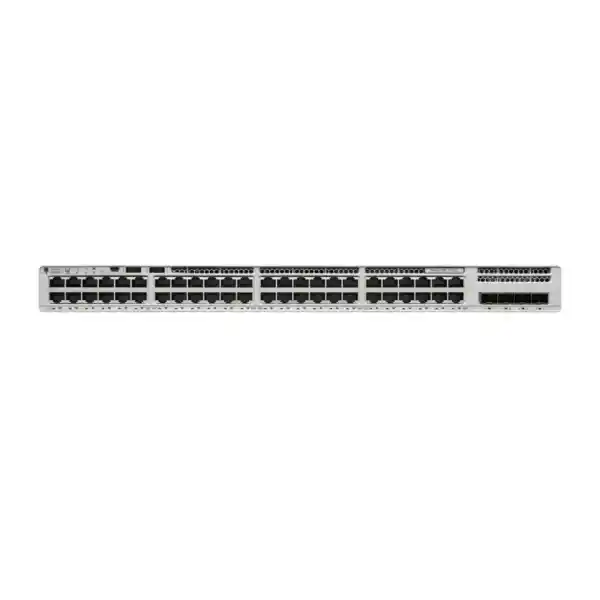
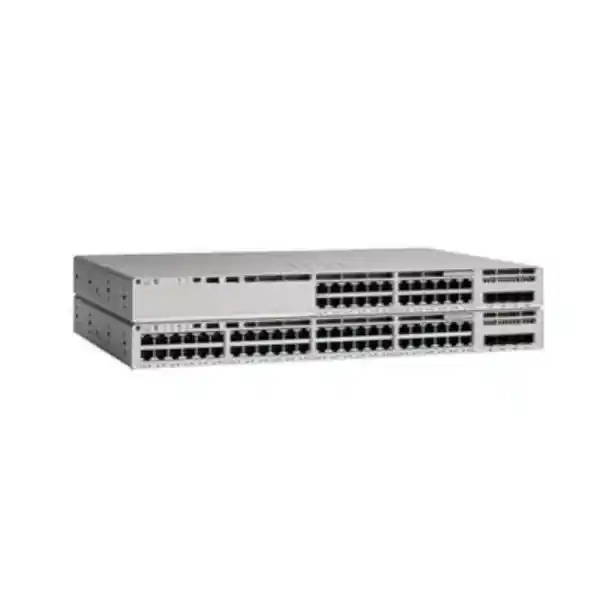
Cisco Catalyst C9200-48T Network Switch
The Cisco Catalyst C9200-48T is a 48-port, data-only Gigabit Ethernet access switch built for organizations that want enterprise-grade campus and branch switching without paying for unused PoE capacity. It combines forty-eight 10/100/1000 copper access interfaces, modular uplink choices, Cisco StackWise-160 stacking, redundant field-replaceable power and cooling design, Cisco IOS XE, programmable management, telemetry, security controls and a scalable forwarding architecture suitable for offices, branches, education networks, hospitality administration, healthcare facilities, warehouses, government environments and multi-site enterprises across the UAE.
176 Gbps switching capacity
130.95 Mpps forwarding rate
160 Gbps StackWise bandwidth
Up to 8 members per stack
Modular 1G/10G/25G/40G uplink options
High-density 1GbE connectivity for desktops, printers, servers, appliances, cameras with external power, industrial controllers and other non-PoE endpoints.
Build a single logical access stack with centralized management and a high-speed stack fabric designed for resilient branch and campus access architectures.
Cisco UADP architecture provides hardware-based forwarding, scalable tables, QoS, security policy enforcement and programmable capabilities for modern enterprise access.
A common enterprise network operating system with CLI, APIs, model-driven telemetry, automation and lifecycle features suited to standardized operations.
What the Cisco Catalyst C9200-48T is designed to do
The C9200-48T is best understood as a secure, stackable enterprise access-layer switch for organizations that need many wired Ethernet ports but do not require the switch itself to supply endpoint power. The “48T” designation is important: this is a data-port model with forty-eight copper Gigabit Ethernet interfaces. That makes it especially useful where desktop computers, fixed workstations, printers, thin clients, access-control controllers, storage appliances, building-management gateways, hypervisor hosts with 1GbE interfaces, out-of-band management ports and other powered devices are already supplied from their own power sources. Buyers who need Power over Ethernet for phones, wireless access points or cameras should evaluate the PoE members of the Catalyst 9200 family instead of assuming the C9200-48T can energize those endpoints.
Its role is typically the edge of a hierarchical enterprise network. User and device traffic enters through the 48 downlink ports; policy, segmentation, quality of service and access security are enforced at the switch; traffic then leaves through a selected modular uplink toward a distribution layer, collapsed core, firewall or data-center aggregation point. In smaller branch environments, a C9200-48T or stack can also perform limited routed-access duties depending on the chosen license and design. In larger campuses, it commonly operates as a disciplined Layer 2 or Layer 3 access switch under centrally defined standards.
For UAE organizations, this design has a practical procurement advantage. You can standardize one enterprise switching platform across Dubai, Abu Dhabi, Sharjah and remote branches while adjusting uplink speeds and licensing according to each site. A small office may only need 1G uplinks and Network Essentials, while a higher-density branch may benefit from 10G or faster optics and Network Advantage. The chassis remains consistent, simplifying sparing, configuration templates, operations training and maintenance procedures.
Core hardware specifications
| Specification | Cisco Catalyst C9200-48T |
|---|---|
| Access ports | 48 × 10/100/1000 Mbps RJ-45 data ports |
| PoE capability | Data-only model; no PoE power budget on the 48T access ports |
| Uplinks | Modular network-module architecture; available C9200 modules include 4 × 1G SFP, 4 × 10G SFP+, 2 × 25G SFP28 and 2 × 40G QSFP+ options, subject to software and optics compatibility |
| Switching capacity | 176 Gbps standalone |
| Forwarding performance | 130.95 Mpps standalone |
| Stacking | Cisco StackWise-160, up to 160 Gbps stack bandwidth, up to eight compatible C9200 members with appropriate stack hardware and aligned licensing |
| MAC address scale | Up to 32,000 MAC addresses for C9200 SKUs |
| IPv4 route scale | Up to 14,000 total IPv4 routes in documented platform scale, including direct and indirect routes, subject to software template and feature use |
| Default primary PSU | 125W AC power-supply class for the data-only C9200-48T; two power-supply slots support resilient design options |
| Cooling | Dual field-replaceable fan architecture on modular C9200 models |
| Form factor | 1RU class; chassis approximately 1.73 × 17.5 × 13.8 inches before rear components |
| Operating system | Cisco IOS XE |
Specification planning should always account for the exact orderable SKU suffix, selected network license, software release, uplink module, transceiver choice and support entitlement. Feature availability and scale can vary by software version and license tier.
48-port access architecture: where the C9200-48T fits
Forty-eight access ports are often the most efficient density for a standard 1RU access switch because a single unit can serve a full office zone, floor communications room or concentrated equipment area without consuming two rack units. In a structured cabling design, the switch commonly terminates Cat5e, Cat6 or Cat6A horizontal cabling from patch panels. The exact cable category depends on installed infrastructure and application requirements, but 1GbE over copper is a mature, predictable medium that remains appropriate for a large percentage of enterprise endpoints.
Each access interface can be assigned according to enterprise policy rather than treated as an unmanaged Ethernet socket. Typical configuration elements include access VLAN assignment, 802.1X authentication, MAC Authentication Bypass where appropriate, spanning-tree edge settings, storm control, DHCP snooping, IP Source Guard, Dynamic ARP Inspection, quality-of-service classification and port security policy. The value of a Catalyst access platform is not merely port count; it is the ability to make the access layer an enforceable policy boundary with consistent automation and visibility.
For desktop-heavy environments, 48T is often a better commercial match than a PoE model. A finance office with 35 workstations, several printers, badge-controller interfaces and a few local server-management ports may have no requirement to send power over Ethernet. Selecting a PoE switch would still work for data, but the organization could be paying for larger power supplies and PoE circuitry it does not intend to use. Conversely, an office standard that includes many IP phones or ceiling access points may be better served by a C9200-48P, C9200-48PL or another PoE-capable platform. The correct decision should follow an endpoint inventory rather than a generic preference.
FourTeck can help map those endpoint categories before quotation. For wider UAE infrastructure planning, organizations can also review enterprise networking and systems services through FourTeck UAE and implementation capabilities through FourTeck IT Services UAE. This is useful when switching is being purchased as part of a broader office migration, firewall refresh, server-room build or multi-site rollout rather than as a standalone box.
UADP forwarding architecture and hardware-based packet processing
The C9200-48T is built around Cisco’s Unified Access Data Plane architecture. In this model, a dedicated programmable switching ASIC handles the traffic-forwarding work that would be inefficient or unpredictable if performed by a general-purpose CPU. The C9200-48T uses a UADP 2.0 mini-class architecture for its access switching functions. All forty-eight 1GbE copper ports are mapped into the switch’s hardware forwarding pipeline, allowing the platform to apply forwarding decisions, Layer 2 policy, Layer 3 lookups, security classifications and quality-of-service behavior at line-rate-oriented hardware speed within the supported platform scale.
For a network architect, the practical advantage is determinism. When hundreds or thousands of flows cross an access stack, the switch does not need to hand ordinary forwarding decisions to the control-plane CPU. The ASIC uses hardware tables populated by Cisco IOS XE protocols and policy. MAC addresses, routes, adjacency information, ACL entries, QoS classification and other forwarding objects are programmed into dedicated resources. That separation between control plane and data plane is central to enterprise switching design because it preserves packet-forwarding performance while the operating system simultaneously runs routing processes, authentication sessions, telemetry, management and automation tasks.
The platform’s documented scale of up to 32,000 MAC addresses gives the modular C9200 family substantially more Layer 2 headroom than a small-office switch. This matters in stacked access deployments, shared campus segments and environments with virtualization or dense endpoint populations. The route scale similarly supports routed-access designs beyond simple default-route use, although architects should size route requirements against the selected license, feature set and software release rather than treating headline table values as universally available for every simultaneous feature.
Programmability also protects operational investment. Cisco can expose new capabilities through software while relying on a programmable ASIC pipeline rather than requiring a completely different fixed-function forwarding chip for every enhancement. That does not mean every future feature will be available on every platform; it means the architecture was designed to support a modern software lifecycle and policy evolution more effectively than legacy fixed-function access switches.
Modular uplinks: match the access layer to the core
One of the strongest reasons to select the modular C9200-48T instead of a fixed-uplink access switch is uplink flexibility. The switch is designed to accept a C9200 network module so the organization can choose the aggregation interface appropriate to the site. Current Catalyst 9200 module families include four-port 1GbE SFP, four-port 10GbE SFP+, two-port 25GbE SFP28 and two-port 40GbE QSFP+ options, subject to the exact switch software release, transceiver compatibility and deployment design. This lets a branch standardize the same access chassis while using different uplink speeds in different locations.
A basic office with a modest user count may only require dual 1GbE fiber uplinks. A busier floor with many active desktop sessions, local file transfers, voice traffic elsewhere in the stack, cloud application usage and east-west access to local servers may justify dual 10GbE. A high-density stack carrying traffic from several switches toward a central distribution layer may benefit from 25GbE or 40GbE depending on the exact topology and module support. The design goal is not to purchase the highest speed automatically; it is to avoid an uplink bottleneck after accounting for realistic concurrency, oversubscription, failure conditions and future growth.
Optics selection deserves equal attention. SFP, SFP+, SFP28 and QSFP+ are physical module form factors, but the correct transceiver still depends on fiber type, wavelength, distance, connector presentation, existing patching standards and the peer device. Short-range multimode optics may be ideal within a campus building, while single-mode optics may be required between buildings or across a metro link. Direct-attach copper and active optical cable options may suit short rack-to-rack connections where supported. Mixing unsupported optics or assuming that every physical connector accepts every speed is a common cause of commissioning delays.
A FourTeck quotation can therefore include the switch, the selected C9200 uplink module, matching transceivers, fiber patch cords, stacking hardware, secondary power supply where required and implementation services as a single deployment bill of materials rather than leaving critical accessories unresolved until installation day.
How to size uplink bandwidth correctly
Access-switch uplink sizing should start with traffic behavior, not just the mathematical sum of forty-eight 1GbE port speeds. In most enterprise offices, all users do not transmit at one gigabit per second at the same moment. Internet browsing, SaaS applications, email, printing and ordinary office collaboration are bursty, so a 10GbE uplink can comfortably aggregate many 1GbE access ports in a typical user environment. However, workloads such as large CAD files, media production, backup jobs, local virtual desktop infrastructure, high-rate imaging, surveillance recording, scientific datasets or east-west server traffic can change the ratio dramatically.
A useful method is to classify endpoints into traffic groups and estimate busy-hour throughput. Suppose a switch serves 30 office users, six engineering workstations, four network printers, four management interfaces and four specialized appliances. The office group may have modest average utilization but occasional bursts. Engineering devices may generate sustained multi-hundred-megabit transfers. Appliances may push telemetry or database traffic continuously. Instead of multiplying 48 by 1Gbps, the architect estimates realistic simultaneous demand, adds headroom and then tests the design under a failed-uplink condition.
Redundancy changes the answer. Two 10GbE links can provide twenty gigabits of aggregate logical capacity when used in an EtherChannel design, but the surviving single link after a failure provides only ten. If the business requires acceptable performance during maintenance or optic failure, the design should be sized for the reduced state. The hashing behavior of link aggregation also means an individual flow usually follows one physical member rather than being striped arbitrarily across all links, so aggregate throughput and single-flow throughput should be considered separately.
Stacking introduces another dimension. A stack of four C9200-48T switches can expose up to 192 access ports, but not every member has to connect to the distribution layer in the same way. Architects can use cross-stack EtherChannel so uplink members terminate on different physical stack members, reducing exposure to one switch failure. The StackWise fabric carries traffic between members, and the uplink plan should consider where traffic enters the stack, where it exits, and the effect of a member or cable failure. This disciplined approach produces a more resilient network than simply adding a fast optic without understanding traffic paths.
StackWise-160: scale multiple switches as one logical access system
Cisco StackWise-160 is a major architectural distinction between modular C9200 switches and simpler standalone access devices. With the correct stacking kit and compatible members, multiple physical switches can operate as one logical switching system with a shared management and control context. Cisco documents support for up to eight modular C9200 members in a stack, producing as many as 384 access ports when eight 48-port members are used. The stack bandwidth is up to 160 Gbps, providing a dedicated inter-switch fabric rather than consuming ordinary front-panel uplinks for basic stack connectivity.
Operationally, stacking reduces the number of independently managed devices. Instead of logging into four separate 48-port switches to maintain four configurations, administrators can manage a four-member stack as one logical unit. VLAN definitions, routing, access policies and many operational tasks can be applied centrally. Interface names still identify member and port position, preserving physical visibility while reducing control-plane fragmentation. This can simplify standards in branch offices where local IT staff are limited and centralized teams need predictable remote management.
Resiliency improves when the stack and uplinks are designed correctly. A stack ring provides alternate paths through the stack fabric, and uplink links can be distributed across different members. If one member fails, endpoints physically connected to that member lose access, but devices on other members can continue operating if the stack and upstream paths remain healthy. This is different from chassis switching, where line cards share a central chassis and supervisory architecture, but it offers a practical balance of cost, serviceability and availability for entry enterprise deployments.
Stack design still requires discipline. Compatible C9200 models should use an aligned software release and appropriate license level. Stack cables must be correctly sized and routed. Power should be distributed across suitable PDUs or UPS feeds where resilience is required. Member numbering and priority should follow a documented standard. Replacement procedures should be rehearsed so a failed unit can be introduced without configuration confusion. A stack is not automatically resilient simply because cables are connected; resilience results from correct physical, logical and operational design.
For multi-floor UAE offices, one common pattern is to use a two- or three-member stack per telecommunications room, dual uplinks toward redundant distribution or core switches, and standardized configuration templates. This gives local port density without forcing every access switch to be managed as an isolated device.
Cisco IOS XE: operations, automation and lifecycle consistency
Cisco IOS XE provides the software foundation for the Catalyst 9200 platform. For organizations already operating Cisco enterprise routing and switching, this creates valuable consistency in command structure, configuration patterns, monitoring, software lifecycle procedures and automation interfaces. Traditional CLI management remains available, but modern operations can also use model-driven APIs and telemetry rather than relying entirely on screen scraping and manual configuration.
NETCONF, RESTCONF and YANG-based models allow an automation system to configure or query device state through structured interfaces. That matters when an enterprise manages dozens or hundreds of branch switches. A human operator can configure a VLAN and access policy on one switch quickly, but manual repetition across a large estate increases the chance of drift. Structured automation enables a source-of-truth model in which desired state is generated, validated and deployed programmatically. Even organizations that do not implement full intent-based networking can benefit from basic configuration templating and API-driven auditing.
Model-driven telemetry extends the same philosophy to monitoring. Instead of repeatedly polling every counter with traditional protocols, telemetry subscriptions can stream selected operational data at defined intervals. The resulting information can feed observability platforms for trend analysis, capacity planning and faster fault isolation. SPAN and RSPAN remain useful for packet-level troubleshooting, while sampled flow visibility can help identify traffic patterns depending on the chosen software and license capabilities.
Software maintenance is another design consideration. Catalyst 9200 supports Cisco IOS XE release trains with security fixes, maintenance releases and feature evolution. Enterprises should select a supported release according to Cisco guidance, validate it against required features, optics, network modules and management systems, then maintain a controlled upgrade process. Cold patching support can help deliver fixes between full maintenance releases, although such patching still requires an appropriate reboot process on the platform. A change-management window, configuration backup, rollback plan and post-upgrade validation checklist remain essential.
A production switch should therefore be treated as part of a lifecycle, not a one-time hardware purchase. Software support, Smart Licensing, vulnerability response, configuration backup, monitoring integration and planned replacement all affect the actual operating cost over several years.
Network Essentials vs Network Advantage
Catalyst 9200 purchasing is not complete until the software tier is selected. Cisco positions Network Essentials as the foundational perpetual network feature set and Network Advantage as the higher tier for advanced capabilities. New ordering can also involve term-based Cisco Catalyst software subscriptions aligned to Essentials or Advantage. Organizations should confirm the exact orderable bundle and term requirements at quotation time because Cisco licensing policy evolves independently of the physical chassis.
Network Essentials
Appropriate for many access-layer designs that need core Layer 2 functions, static routing, limited routed-access capabilities, QoS, first-hop security, 802.1X, MACsec-128, automation interfaces, model-driven telemetry, sampled flow visibility and common operational tools. It is often sufficient for straightforward branch access where advanced segmentation and routing protocols are not required.
Network Advantage
Adds advanced routing, segmentation and scale capabilities such as broader dynamic-routing functions and technologies including VRF, VXLAN, LISP and Security Group Tag capabilities in the documented Catalyst feature set. It is more suitable when the access layer participates in sophisticated segmentation, resilient routing or software-defined campus architectures.
The best way to choose is to start from required features rather than the label. If a branch simply needs VLANs, 802.1X, QoS, static routes and a basic OSPF design within Essentials limits, buying Advantage solely because it sounds more enterprise may add unnecessary cost. If the project requires advanced VRFs, broader routing scale, advanced multicast or SD-Access segmentation, attempting to save money with Essentials can create an architectural blocker later. Licensing should be a line item in the design workshop, not an administrative afterthought.
It is also important to distinguish perpetual network licensing from term subscriptions and management platforms. Cisco’s current switching offers can include Catalyst software subscriptions with management options such as Catalyst Center or Meraki Dashboard cloud monitoring. The switch can still be operated through its native CLI and web-based tools according to the licensed stack, but organizations should confirm how their selected subscription, support entitlement and management strategy fit together before purchase.
Security at the wired edge
An enterprise access switch is often the first managed infrastructure device that encounters an endpoint. That makes the access layer a strategic security enforcement point. The C9200-48T supports a portfolio of controls intended to reduce unauthorized access, limit Layer 2 attacks, enforce identity-based policy and protect traffic on appropriate links. The exact feature set depends on license and software release, but the platform is far more capable than an unmanaged or lightly managed switch.
IEEE 802.1X can be used to authenticate users or devices before granting normal network access. In a mature deployment, the switch works with a RADIUS policy platform such as Cisco Identity Services Engine to determine whether an endpoint belongs to an employee, contractor, printer, specialized device or another policy group. MAC Authentication Bypass can accommodate devices that cannot run an 802.1X supplicant, although it should be used with appropriate controls because a MAC address by itself is not a strong identity credential.
Layer 2 first-hop security features help defend the local segment. DHCP snooping can build a trusted binding database and reject unauthorized server responses. Dynamic ARP Inspection can use those bindings to reduce ARP spoofing. IP Source Guard can restrict traffic that does not match expected endpoint bindings. Port-security controls can limit or learn MAC addresses on access interfaces. Storm control can prevent broadcast, multicast or unknown-unicast floods from overwhelming a segment when misconfiguration or a faulty device creates abnormal traffic.
MACsec-128 capability can protect Ethernet links against unauthorized inspection or modification when supported on the relevant interfaces and configured as part of a compatible design. Cisco TrustSec and Security Group Tag features, particularly in advanced licensing scenarios, can shift policy away from purely topology-based VLAN rules toward identity and role-based segmentation. This can reduce dependence on large ACL sets when an organization is adopting a policy-centric campus architecture.
Security still depends on configuration quality. Default passwords, unused active ports, broad management access, outdated software and undocumented VLAN trunks can undermine strong hardware. A secure C9200 deployment should disable or quarantine unused ports, restrict management-plane access, use AAA, protect SNMP credentials, synchronize time, log security events, maintain supported IOS XE releases, back up configurations and validate port roles regularly.
Layer 2 design: VLANs, spanning tree and loop prevention
Most C9200-48T deployments begin with a Layer 2 access design. User, voice, printer, management, guest, building-control and server networks are separated into VLANs according to security and operational policy. Access ports normally carry one principal data VLAN, while trunks carry multiple tagged VLANs between switches, firewalls, wireless controllers, virtualization hosts or upstream distribution devices. The design should limit VLAN propagation to where it is needed rather than extending every VLAN everywhere by default.
Spanning Tree Protocol remains important even in carefully designed networks because accidental or intentional Layer 2 loops can create broadcast storms and MAC-table instability. Edge access interfaces should be configured with appropriate edge/PortFast behavior so endpoints do not wait unnecessarily for spanning-tree convergence. Protection features such as BPDU Guard can disable an edge port that unexpectedly receives spanning-tree control traffic, reducing the chance that an unauthorized switch creates a loop or influences root election.
Root-bridge placement should be explicit. In a traditional campus hierarchy, the distribution layer is normally a deliberate spanning-tree root, while access switches are assigned lower preference for root election. This keeps blocked links and forwarding paths predictable. If the design uses routed access or software-defined fabrics, the role of spanning tree may be reduced, but local Layer 2 protections are still relevant for endpoint-facing interfaces.
EtherChannel can combine multiple physical uplinks into one logical port channel. LACP is commonly preferred because it negotiates bundle membership and can detect certain mismatches. A cross-stack EtherChannel can terminate member links on different switches in a C9200 stack, improving physical diversity. However, VLAN lists, native VLAN behavior, speed, duplex and channel parameters must be consistent. A partially mismatched trunk can produce subtle outages in which some VLANs work and others fail.
A deployment handover should therefore include a VLAN matrix, trunk map, spanning-tree root plan, port-channel design and reserved VLAN policy. These artifacts are more valuable than screenshots because they let future administrators understand the intended topology and quickly identify drift.
Layer 3 routed access and branch routing considerations
Although the C9200-48T is primarily an access switch, it can participate in Layer 3 designs. Static routing is available in the foundational feature set, and Cisco documents routed-access capabilities including protocols and route-scale limits that vary by tier. This creates several architecture options. A branch can use the switch strictly as Layer 2 access with all default gateways on a firewall or distribution switch; it can terminate selected VLAN interfaces locally and route between them; or it can participate in dynamic routing toward an upstream layer.
Placing inter-VLAN routing on the access switch can reduce unnecessary traffic hairpinning and improve convergence, but it also changes the security boundary. If security policy requires all traffic between departments to pass through a next-generation firewall, local routing between those VLANs may be inappropriate unless VRFs, ACLs or other segmentation controls enforce the intended policy. Architecture should therefore be driven by trust boundaries and traffic flows, not just by the ability to enable an SVI.
For branch deployments, the upstream firewall often remains the natural default gateway for internet-bound and sensitive inter-zone traffic. The C9200 stack can carry VLAN trunks to the firewall, or use routed point-to-point links depending on design. Where dynamic routing is used, route summarization, passive-interface policy, authentication where applicable and clear redistribution rules should be documented. A small branch should not become a complex routing domain without operational justification.
Network Advantage becomes relevant when a project needs broader advanced routing and segmentation. VRFs can isolate routing tables for separate tenants, departments or operational zones. In larger Cisco campus frameworks, LISP, VXLAN and Security Group Tag functions can participate in software-defined segmentation. These technologies are powerful, but they should be selected as part of an end-to-end architecture that includes policy, control systems and operational skills; enabling isolated features on a single access switch does not by itself create an SD-Access fabric.
FourTeck can align the access switch with upstream firewall design as part of a broader security project. Organizations planning integrated switching and perimeter upgrades can review Firewall Dubai for the security side of the architecture while keeping switching, segmentation and routing decisions coordinated.
Quality of Service for predictable application performance
Quality of Service is sometimes misunderstood as a way to create bandwidth. It cannot increase the capacity of a congested uplink, but it can determine which traffic receives preferential treatment when contention exists. At the access layer, QoS begins by identifying trusted traffic sources, classifying packets, marking them appropriately and placing them into hardware queues according to policy. Cisco Catalyst platforms support granular QoS functions designed for enterprise voice, video and critical application traffic.
Even though the C9200-48T does not provide PoE, it can still carry IP voice and video traffic if phones or endpoints are powered by another method. A desk phone with an external adapter, a conferencing system with separate power, or an AV endpoint can use the switch like any other Ethernet device. QoS policy can recognize DSCP markings from trusted devices, remark untrusted traffic, prioritize delay-sensitive traffic and prevent a bulk data transfer from consuming every queue during a congestion event.
The most effective QoS design is end to end. Marking a packet as high priority at the access switch has little value if the firewall, WAN router, MPLS service, SD-WAN edge or upstream switch ignores the marking. Organizations should define a limited number of traffic classes with clear business meaning, map applications into those classes, and maintain consistent DSCP treatment across the path. Over-classifying too many applications as critical undermines the purpose of prioritization.
Capacity planning remains the first defense. If a 10GbE uplink runs close to saturation for long periods, QoS may protect voice but data users will still experience congestion. Telemetry and interface counters should identify sustained utilization, drops and queue behavior so the network team can distinguish genuine capacity constraints from endpoint or application issues.
Resilient power and cooling design
The C9200-48T is a data-only model, so its power requirement is much lower than a 48-port PoE switch that must also supply hundreds of watts to endpoints. Cisco specifies a 125W-class default primary power supply for the modular data model. The chassis provides two power-supply slots, allowing organizations to configure redundant power where service requirements justify it. The modular C9200 platform also uses field-replaceable redundant fan components rather than the fixed fan implementation found on some C9200L models.
Redundant power is valuable only when the upstream electrical design is also resilient. Two switch power supplies connected to the same power strip and the same single UPS do not protect against a failure of that PDU or UPS. A stronger design connects each PSU to a separate protected feed where building and rack infrastructure permit. In smaller branches with only one UPS, a secondary PSU still protects against individual PSU failure and can simplify replacement, but the shared electrical dependency should be acknowledged.
Thermal planning matters in UAE environments because network closets can experience high ambient conditions if cooling is poorly designed or lost during building maintenance. The switch must be installed within Cisco’s specified environmental limits with unobstructed airflow. Rack blanking, cable management and equipment placement should avoid blocking fan exhaust. Network rooms should have monitored temperature, especially in warehouses, remote branches and older buildings where telecom rooms may not receive the same cooling attention as server rooms.
Power-consumption planning should use measured platform data rather than the PSU wattage as a direct estimate of continuous electrical draw. A 125W-rated power supply does not mean the switch constantly consumes 125W. Cisco’s published test data for the C9200-48T shows materially lower platform consumption under representative traffic conditions, with results varying by uplink module, voltage and load. For UPS sizing, however, designers should include switch load, optical modules, redundancy margin, other rack devices, battery aging and required runtime rather than optimizing to a single laboratory average.
A procurement checklist should confirm PSU quantity, AC cord type appropriate for the UAE installation, UPS/PDU interface, airflow clearance, spare fan policy and whether local maintenance staff are permitted to replace field-replaceable units.
Physical deployment, rack layout and cabling
The C9200-48T occupies a standard 1RU-class rack footprint with a chassis approximately 17.5 inches wide and 1.73 inches high. Depth is compact for an enterprise switch, but real rack planning must include rear power supplies, fans, power cords, stack cables and cable-bend radius. A shallow wall cabinet that appears large enough for the bare chassis may become unsuitable once rear components and structured cabling are installed. Before ordering, measure usable front-to-rear rail depth and the space behind the rails, not only the cabinet’s external dimensions.
Port density makes patching strategy important. Forty-eight copper ports can create a dense cable bundle, especially when two 24-port patch panels sit above or below the switch. Short, correctly sized patch cords reduce congestion and improve serviceability. Horizontal cable managers may be appropriate where rack space allows. Labels should identify both switch-port and patch-panel references so technicians can trace a connection without disconnecting live links unnecessarily.
Stack cables and uplink fibers require their own routing discipline. Stack cables are relatively thick and should not be sharply bent or stretched. If multiple switches are stacked vertically, select cable lengths that allow a complete ring without excess loops that block airflow. Uplink fiber should be routed through appropriate managers with bend-radius protection and clear labeling for core/distribution destination, optic type and link number. Where redundant uplinks terminate on physically diverse upstream switches, route them separately where practical so one accidental cable event cannot take down both paths.
Out-of-band management requirements should also be decided in advance. Some organizations use the switch’s dedicated management interface connected to a separate management network, while others manage through an in-band SVI. Out-of-band access is valuable when production VLANs or routing fail, but it requires its own management switch, console server or secure remote-access design. Branches with no local IT staff benefit disproportionately from reliable remote recovery paths.
Finally, rack documentation should show unit position, serial number, switch member number, PSU feed, stack-cable path, uplink optic and upstream port. This small amount of discipline shortens incident response and makes later expansion much easier.
Typical UAE deployment scenarios
Corporate office floor
A 48T can terminate desktop PCs, printers, access-control interfaces and management ports in a floor cabinet. Dual 10GbE uplinks connect to redundant distribution switches. Identity policy and VLAN segmentation separate employees, finance systems, printers and facilities devices. PoE access points and phones can be placed on separate PoE switches if required.
Data-only branch
A branch where endpoints use local power may deploy one or two C9200-48T units behind a firewall. Static or dynamic routing connects the access layer to the edge. Centralized templates and telemetry let a Dubai operations team manage remote UAE branches without a resident network engineer.
Server management network
The switch can provide dense 1GbE connectivity for iDRAC, iLO, hypervisor management, storage management, KVM appliances and other out-of-band interfaces. A dedicated management VLAN or VRF can keep these interfaces away from user traffic while redundant uplinks provide controlled access to administration systems.
Warehouse and industrial office
Fixed workstations, label printers, PLC gateways, scanners with independent power, BMS controllers and administrative devices can use the 48 copper ports. Ruggedization requirements should still be evaluated because the C9200 is an enterprise access switch, not a hardened industrial Ethernet switch for uncontrolled environments.
Education administration
Administrative offices, labs with powered PCs, printers and local servers can use the data switch while separate PoE switching supports APs, cameras and phones. Network Access Control can distinguish managed institutional devices from guest or lab equipment.
Multi-site standardization
Enterprises with many UAE locations can standardize configurations, spare units, uplink modules, software trains and monitoring practices. Larger sites use stacks and faster uplinks; smaller sites use single switches. A common Catalyst platform reduces operational variance across the estate.
C9200-48T versus PoE Catalyst 9200 alternatives
The most common specification mistake is choosing the C9200-48T when the endpoint plan actually requires Power over Ethernet, or buying a higher-cost PoE model when nearly every endpoint is independently powered. A model comparison should start with the endpoint schedule. Count wireless access points, IP phones, cameras, access readers, intercoms, IoT gateways and other devices that may require Ethernet power. Then calculate both port count and wattage, because having enough PoE-capable ports is not the same as having enough aggregate PoE budget.
| Model type | Best fit | Power to endpoints | Procurement logic |
|---|---|---|---|
| C9200-48T | 48 powered-by-themselves Ethernet devices | No PoE | Choose when 1GbE data density, modular uplinks and stacking are required without PoE hardware overhead. |
| C9200-48P | High PoE endpoint density | Full PoE+ class model | Use when phones, APs, cameras or similar devices need switch-delivered power across many ports. |
| C9200-48PL | Mixed data and moderate PoE demand | Partial PoE+ class model | Useful when only a portion of the 48 endpoints need power and the full PoE budget is unnecessary. |
| C9200-48PXG | Higher-speed multigigabit access | PoE+ class with mGig interfaces | Consider when Wi-Fi or high-performance endpoints require multigigabit copper speeds beyond standard 1GbE. |
The 48T also differs from C9200L fixed-uplink models. C9200 provides modular uplink flexibility and field-replaceable fan design, while C9200L models generally target lower-cost fixed-uplink deployments. If an organization knows it will always use a fixed uplink configuration and does not need the same modular serviceability, a C9200L could be economically attractive. If future uplink flexibility, modularity and StackWise-160 architecture are priorities, the full C9200 line is often the stronger fit.
Model selection should therefore compare the total architecture, not just the front-panel port count. Uplink speed, stacking bandwidth, fan serviceability, power design, PoE requirement, software tier and long-term standardization all affect value.
Telemetry, monitoring and troubleshooting workflow
A production switch should be observable from day one. The C9200-48T exposes traditional operational counters along with modern telemetry capabilities. Interface statistics reveal errors, discards, speed and utilization. Environmental sensors expose fan, power and temperature state. Logging records link transitions, security events and protocol changes. SNMP remains widely used, but modern Cisco IOS XE deployments can add model-driven telemetry for structured streaming of selected operational data.
Monitoring should be designed around actionable thresholds. A dashboard showing every port in green is less useful than one that highlights rising CRC errors, excessive interface flaps, stack-member instability, uplink utilization, spanning-tree changes, authentication failures or power-supply alarms. Historical baselines allow the team to distinguish a new problem from normal behavior. For example, a 10GbE uplink peaking at 4Gbps during nightly backup may be normal, while the same utilization at 10:00 AM after a new application launch may indicate an emerging capacity issue.
Troubleshooting also benefits from SPAN and RSPAN. A local SPAN session can mirror traffic from a suspect access port or VLAN to a packet-analysis port. RSPAN extends capture across a Layer 2 domain in supported designs. Flow telemetry can reveal top talkers and traffic patterns without capturing complete packet payloads. These capabilities help determine whether a complaint originates from physical cabling, duplex negotiation, congestion, packet loss, application behavior, routing or security policy.
Good operations teams maintain standard checks. For a “slow network” ticket, they examine interface errors, negotiated speed, VLAN assignment, authentication state, MAC-table learning, uplink utilization, queue drops and reachability before replacing hardware. For intermittent outages, they correlate timestamps across switch logs, firewall logs, authentication systems and WAN monitoring. Time synchronization through NTP is therefore not cosmetic; consistent timestamps are fundamental to multi-system fault analysis.
If the switch is integrated with Cisco Catalyst Center or other centralized tooling, automation can add inventory, topology, configuration assurance and health views. Whether management is centralized or CLI-driven, the operational goal remains the same: detect degradation before users report it and preserve enough historical evidence to explain what happened.
Automation and configuration standardization
Large switching estates fail operationally when every device becomes a handcrafted exception. The C9200-48T supports the modern programmability interfaces required to move toward repeatable configuration. Even a modest organization can benefit from defining standard switch roles: access stack, small branch standalone, server-management access and lab access. Each role can have a baseline configuration for AAA, NTP, DNS, syslog, SNMP or telemetry, management ACLs, spanning tree, DHCP snooping, VLANs and interface templates.
NETCONF and RESTCONF allow external systems to retrieve or change structured configuration state. YANG data models describe the structure of that information, making it possible to validate data types and automate changes more safely than parsing free-form CLI output. Cisco Plug and Play workflows can help with initial provisioning in managed environments. These tools are especially valuable for remote UAE branches where shipping a switch is easy but dispatching an engineer for every configuration task is expensive.
Automation should still include guardrails. A script that can configure one hundred switches can also misconfigure one hundred switches quickly. Enterprises should use version-controlled templates, peer review, pre-change validation, staged rollout and post-change checks. Idempotent automation—where the same intended configuration can be applied repeatedly without producing unwanted duplication—reduces drift. Configuration backups should be independent of the device so replacement hardware can be rebuilt quickly after failure.
Inventory data should also be normalized. Track hostname, serial number, management IP, site, rack, stack member, license tier, IOS XE release, uplink module, optic types, support entitlement and end-of-support milestones. A network team cannot manage lifecycle risk if it does not know which software and hardware combinations are deployed. Automated inventory collection reduces dependence on spreadsheets that become outdated after every move or replacement.
The platform therefore supports both traditional and modern workflows. Teams can start with familiar CLI operations while progressively adding API-driven audit, telemetry streaming and deployment automation as skills mature, without replacing the switching hardware simply to gain programmability.
Migration from older Cisco access switches
Many organizations evaluating the C9200-48T are refreshing legacy Catalyst access switches that have delivered years of stable service. The migration should not be treated as a line-for-line copy of an old configuration. Older switches may contain obsolete commands, unused VLANs, weak security settings, legacy SNMP communities, nonstandard spanning-tree parameters and years of undocumented exceptions. A refresh is an opportunity to simplify and standardize.
Begin with discovery. Capture port status, descriptions, VLAN assignments, trunk lists, EtherChannels, MAC-address tables, routing, ACLs, authentication policy, QoS, spanning-tree state, monitoring settings and software dependencies from the existing switch. Compare the physical endpoint list with observed active ports. This identifies unused cabling and old services that do not need to move. Validate whether every endpoint is truly data-only; an old non-PoE switch may have downstream injectors or local adapters that the new design should rationalize.
Next, translate rather than blindly copy. Cisco IOS XE syntax may differ from older platforms, and some features have updated best practices. Build a clean target template, then map required legacy functionality into that template. Confirm transceiver compatibility because optics supported on an older Catalyst model are not automatically supported on a new C9200. Review stack cabling and power cords rather than assuming they can be reused.
Plan the cutover in port groups. Label every patch cord before disconnecting the old switch. Pre-stage the C9200 with management access, software version, licensing, VLANs, routing and security settings. Test uplinks first, then migrate a small set of noncritical endpoints and verify authentication, DHCP, DNS, gateway reachability and application access. Continue in batches, monitoring for errors. Keep the legacy switch available during the maintenance window if rollback is required.
After migration, remove temporary exceptions, archive the old configuration, update diagrams and record the new serial numbers and support data. A successful refresh is not just one where packets pass; it is one that leaves the environment simpler, documented and easier to operate than before.
High availability beyond stacking
Stacking is only one layer of availability. A complete access design considers endpoint link, switch member, stack fabric, uplink, distribution switch, firewall, WAN, power and cooling failure domains. The C9200-48T provides building blocks for resilience, but the network architecture determines how those blocks behave under failure.
At the switch level, a secondary PSU can protect against an individual power-supply failure. Field-replaceable fans reduce the need to replace an entire switch because of a fan fault. StackWise connectivity can keep surviving members operating when one member is lost. Cross-stack EtherChannel can distribute uplink members across separate switches. Upstream, dual distribution switches or a resilient collapsed-core pair can remove a single aggregation-device dependency.
Endpoint redundancy is workload-specific. An ordinary desktop with one NIC will lose connectivity if the exact access switch or port fails; duplicating access infrastructure for every desk is rarely cost effective. A critical server or appliance may have dual NICs connected to different stack members, with teaming or bonding configured according to application support. Management interfaces can be connected to a separate access system to preserve troubleshooting access even if the production path is impaired.
Software failure domains also matter. A stack uses a common control system, so a defective software image or bad global configuration can affect multiple physical members simultaneously. High availability is therefore not a substitute for disciplined change management. Stage upgrades, maintain backups and avoid changing every site at once. Multi-site enterprises often use phased release rings so one branch validates a new IOS XE release before broader deployment.
Business requirements should define the investment. A small office that can tolerate one hour of downtime may not need dual PSUs, dual cores and redundant WAN links. A trading floor, healthcare operation or 24-hour logistics facility may justify much deeper redundancy. FourTeck can translate recovery objectives into a proportionate switching and infrastructure design instead of applying the same expensive topology everywhere.
Procurement details that should be confirmed before ordering
The product name “C9200-48T” identifies the hardware family and port profile, but a production purchase needs more precision. Cisco orderable SKUs commonly include a license suffix such as Essentials or Advantage. The switch may require a selected term subscription under current ordering policy. Uplink modules, optics, stack kits, secondary power supplies and support are separate decisions. A price comparison that omits these items may look attractive but can produce an incomplete system.
Confirm Network Essentials or Network Advantage against required routing, segmentation, automation and security features.
Confirm the current Cisco Catalyst or Cisco DNA subscription requirement, tier alignment and duration for a new order.
Choose 1G, 10G, 25G or 40G architecture based on supported module, peer device and bandwidth design.
Identify fiber type, wavelength, distance, connector and supported transceiver on both ends of every uplink.
Include StackWise kits and correct cable lengths when two or more compatible C9200 units will form one stack.
Decide whether a second PSU is required and verify rack PDU, UPS and UAE power-cord compatibility.
Support coverage should be defined as part of the same purchase. Consider required replacement response, software support, technical-assistance access and the organization’s tolerance for spare-stock versus vendor replacement. A central UAE headquarters might hold a local cold spare, while small branches rely on support logistics. The right model depends on downtime cost and geographic distribution.
For organizations sourcing multiple technology categories internationally or across regional operations, FourTeck Global can provide broader context alongside the UAE operation. The quotation should still identify the precise local delivery destination, tax requirements, installation scope and support expectations.
UAE deployment and environmental planning
Enterprise switches are frequently installed in small telecommunications rooms rather than fully engineered data centers. In the UAE, ambient heat makes this distinction important. The C9200-48T should operate in a controlled environment within Cisco’s published temperature, humidity and altitude specifications. A communications cabinet placed near an exterior wall, warehouse ceiling or unconditioned utility zone can experience temperatures much higher than occupied office space, particularly if HVAC is shut down outside business hours.
Before installation, verify cooling continuity, rack ventilation and dust control. Dust accumulation can reduce thermal efficiency and increase fan demand. Construction projects are especially risky because gypsum and concrete dust can enter network rooms while fit-out work is still underway. Sensitive electronics should be installed after major dusty works or protected according to site procedures. Filters and room cleaning should not restrict the switch’s required airflow path.
Power quality is equally important. Use an appropriate UPS where continuity is required and verify that rack PDUs, plugs and cords match the installation. In a redundant-PSU design, separate feeds improve failure isolation. Earthing and bonding should follow local electrical and structured-cabling standards, especially in racks with copper cabling entering from multiple building zones. Surge exposure should be considered for links that leave the protected building environment; fiber is often preferred for inter-building connectivity because it avoids conductive paths between electrical grounds.
Site logistics can affect rollout sequencing. Large UAE projects may have multiple fit-out contractors, access-control rules, permits, after-hours maintenance windows and building management approvals. Pre-staging switches in a controlled workshop reduces time spent in communications rooms. Devices can be inventoried, upgraded, licensed, labeled and given baseline configurations before they reach site. On-site work then focuses on rack installation, uplink validation, patching and service testing.
A rollout schedule should also account for spare optics, patch cords and console access. Small components cause disproportionate delays when teams discover at midnight that the supplied optic type does not match the installed fiber. A complete bill of materials and pre-installation survey prevents many of these avoidable incidents.
Design example: 192-port office access stack
Consider a Dubai office floor that requires 160 active data connections today with capacity for future growth. The endpoints are mostly desktop PCs, printers and powered appliances, while wireless access points and IP phones are served by a separate PoE access block. Four C9200-48T switches provide 192 copper access ports, leaving 32 ports of physical growth capacity. The four switches are connected in a StackWise-160 topology and managed as one logical stack.
The distribution layer consists of two upstream switches. One 10GbE fiber uplink from stack member 1 connects to distribution switch A, and another 10GbE uplink from stack member 4 connects to distribution switch B. The two links form a logical port channel where the upstream architecture supports that design. Physical placement at opposite ends of the stack reduces the chance that one member failure removes all uplink capacity. Traffic from access ports on members 2 and 3 crosses the stack fabric toward the active uplink path as needed.
VLANs separate standard users, finance users, printers, facilities devices and network management. Employee access ports use 802.1X with fallback policy for approved non-supplicant devices. DHCP snooping and Dynamic ARP Inspection protect user VLANs. BPDU Guard is enabled on edge interfaces. Unused ports remain administratively shut down in a quarantine VLAN. Management access is permitted only from designated administration subnets using AAA and encrypted protocols.
Monitoring collects stack health, interface errors, authentication status, uplink utilization, temperature and power state. Configuration backups run after approved changes. The stack has two power supplies per member only if the organization’s availability requirement justifies that cost; otherwise, critical spare PSUs may be held locally. UPS design is sized for the four switches plus adjacent infrastructure with the required runtime.
This example shows why the C9200-48T should be selected as part of a system. The switch count, uplink speed, security policy, power design and management model are all derived from business needs. Simply ordering four switches and connecting them together would not produce the same operational result.
Design example: server and infrastructure management network
The C9200-48T is also a strong candidate for a dedicated infrastructure-management network because many server and appliance management interfaces are 1GbE and independently powered. A rack row may contain server BMC ports, hypervisor management NICs, storage controllers, firewall management interfaces, UPS network cards, PDUs, console servers and KVM appliances. These ports rarely need PoE but require stable connectivity, strong access control and high availability.
In this role, the switch should be treated as security-sensitive infrastructure. Management endpoints can be placed in dedicated VLANs or VRFs according to function. Access from user networks should be blocked by default, with administration allowed only from hardened jump hosts, privileged-access systems or management VPNs. The switch’s own management plane belongs in a protected network and should not be reachable broadly from production user VLANs.
Dual C9200-48T switches or a stack can provide port density, but the architecture must avoid circular dependency. If the only path to manage the firewall passes through the same firewall, an outage can prevent administrators from reaching the device they need to repair. A true out-of-band design may use separate WAN or cellular console access. If budget does not support full out-of-band infrastructure, at minimum document the dependencies and provide local console procedures.
Server management networks can be quiet most of the time, so uplink capacity may be modest, but backup, firmware update or imaging workflows can generate bursts. Redundancy and security may be more important than raw throughput. Two 10GbE uplinks can provide generous headroom and resilient paths while maintaining a consistent optic standard with the rest of the data center.
This scenario demonstrates the benefit of a data-only switch: the organization pays for enterprise switching, stacking, modular uplinks and software features without allocating large PoE budgets that management interfaces will never use.
Implementation methodology for a production rollout
A reliable C9200-48T rollout follows a repeatable sequence from design through handover. First, capture requirements: endpoint count, PoE needs, VLANs, routing, uplink bandwidth, fiber distance, authentication, availability, management tooling, rack space, power and support expectations. These inputs determine whether the 48T is actually the correct model and what accessories belong in the bill of materials.
Second, complete low-level design. Define hostnames, management addresses, VLAN IDs, Layer 3 interfaces, routing adjacencies, stack numbering, uplink ports, LACP configuration, spanning-tree role, AAA servers, NTP, DNS, syslog, telemetry destinations, SNMP policy, DHCP-snooping trust boundaries and edge-port templates. Identify exactly which interfaces connect to patch panels, firewalls, servers and distribution switches. This design becomes the configuration source of truth.
Third, pre-stage hardware. Inspect serial numbers, install the intended IOS XE release, apply licensing, form the stack where practical, label members, test power supplies and fans, load baseline configuration and verify management access. Insert the correct network module and optics. Where two-ended fiber links already exist, test light levels and link establishment before the cutover window if site access allows.
Fourth, perform controlled cutover. Mount the switch, connect stacking and power, validate stack status, then establish upstream connectivity. Migrate endpoint ports in small groups. For each group, test link state, VLAN assignment, DHCP or static addressing, gateway reachability, DNS, authentication and representative applications. Watch logs for spanning-tree, DHCP-snooping or 802.1X events that may reveal policy mismatches.
Fifth, execute acceptance tests. Confirm all stack members, uplinks, port channels, routes, VLANs, power supplies, fans, monitoring, logging and security services. Where redundancy is in scope, physically test an uplink failure, stack-path failure or PSU loss rather than assuming configuration equals functionality. Capture baseline command outputs after successful testing.
Finally, hand over documentation: as-built diagram, port schedule, IP plan, VLAN matrix, configuration backup, software version, license details, optic inventory, support reference and recovery procedure. A network is supportable only when the operations team can understand what was built and why.
Frequently asked technical questions
Does the C9200-48T provide PoE?
No. The C9200-48T is a data-only 48-port model. If phones, wireless access points, cameras or other endpoints need power over Ethernet, select a PoE-capable Catalyst 9200 model or provide a separate supported power method.
Can the C9200-48T be stacked?
Yes. Modular C9200 models support StackWise-160 with appropriate stack hardware. Cisco documents up to eight compatible members and up to 160 Gbps stacking bandwidth. Stack compatibility, software release and license alignment should be validated before deployment.
What uplink speed should I choose?
The answer depends on endpoint traffic, number of stacked members, upstream capability and resilience targets. Typical offices often use 10GbE uplinks, while lower-demand branches may use 1GbE and higher-density designs may justify 25GbE or 40GbE where the selected module and peer support it.
What is the switching capacity?
Cisco lists 176 Gbps standalone switching capacity and 130.95 Mpps forwarding performance for the C9200-48T. With stacking, Cisco documents higher aggregate switch capacity and forwarding figures for the platform.
Do I need Network Advantage?
Not necessarily. Network Essentials covers many common enterprise access requirements. Network Advantage is appropriate when advanced routing, segmentation, multicast or higher-level policy capabilities are required. The feature list should be checked against the intended IOS XE release and architecture.
Can it be managed without Cisco Catalyst Center?
Yes. The platform supports native CLI and web-based management functions according to the software stack. Catalyst Center or cloud monitoring may add centralized automation and assurance, but they are not prerequisites for basic switch operation.
Is the C9200-48T suitable for a data center?
It can serve management, utility or lower-speed access roles, but it is fundamentally an enterprise access switch. High-performance server leaf/spine fabrics normally require platforms designed for much higher port speeds, buffering profiles and data-center-specific architectures.
Can FourTeck provide configuration and installation?
FourTeck can scope supply, pre-staging, uplink and optic selection, stack design, migration, implementation and broader UAE IT infrastructure services according to project requirements.
Operational best practices after go-live
After installation, the switch should enter a defined operational lifecycle. Create regular configuration backups and verify that backups can actually be restored. Track IOS XE software recommendations and security advisories, but do not upgrade simply because a newer release exists; choose a supported release appropriate to your feature set, test it, then roll it out under change control. Keep a current record of license and support entitlements so critical incidents do not begin with uncertainty about coverage.
Monitor physical health and trends. Fan or PSU alarms, increasing temperature, CRC errors and link flaps often provide early warning before a full outage. Review interfaces that consistently negotiate at 100Mbps when 1GbE is expected, because damaged pairs or old cabling can force reduced speed. Track dormant ports and disable unused interfaces according to security policy. Periodically compare actual port configuration with the intended template to catch drift.
Validate access security as the endpoint estate changes. New printers, laboratory devices and building systems frequently enter networks without being included in the original NAC policy. Rather than creating broad bypasses, define specific profiles and ownership. Remove exceptions when devices are decommissioned. Review privileged network-administration accounts and AAA policies regularly. Management traffic should use encrypted protocols and restricted source networks.
Capacity reviews should look beyond average utilization. Monitor busy-hour peaks, packet drops, queue behavior and growth rate. A link that averages 15 percent may still saturate for short periods during backups or file synchronization. If the stack grows from two to six members, revisit uplink capacity even if individual user behavior has not changed. Changes in cloud adoption, video collaboration or local storage can alter traffic patterns dramatically over the service life of a switch.
Finally, practice failure procedures. Know how to identify a failed stack member, replace a PSU, capture diagnostics, move a critical port, access the console and restore configuration. Incidents are resolved faster when the first response is a known process rather than improvisation.
Why buy the Cisco Catalyst C9200-48T through FourTeck UAE
Enterprise network switching is most effective when procurement and architecture are connected. FourTeck can help verify that the 48T data model is the correct choice, identify the required software tier, select uplink modules and transceivers, size a stack, align the switch with firewall and server infrastructure, and plan deployment. That reduces the risk of receiving a chassis without the components needed to commission it.
For a single replacement switch, the requirement may be straightforward: match the existing access role, confirm the license, supply the correct uplink module and optics, and provide replacement support. For a new building or multi-branch project, the same hardware decision becomes part of a wider design involving rack elevations, structured cabling, UPS capacity, firewall zones, WAN connectivity, network authentication, monitoring and documentation. FourTeck can scope the switching component within that wider context.
UAE projects also benefit from clear logistics. Delivery location, site access, working hours, pre-staging, engineer access approvals and maintenance windows can be planned before hardware arrives. Large deployments can be staged by site or floor so every switch is labeled, licensed and configured before installation. This approach reduces onsite troubleshooting and makes cutovers more predictable.
The goal is not simply to sell a 48-port switch. It is to make sure the installed C9200-48T has the correct uplinks, software, power resilience, management policy and integration to deliver useful service over its lifecycle.
Decision recap: when the C9200-48T is the right choice
Choose the Cisco Catalyst C9200-48T when your requirement is centered on high-density 1GbE data access, enterprise security and management, modular uplinks, stacking and serviceable hardware rather than PoE delivery. It is especially compelling when you want a common Cisco IOS XE access standard that can be deployed as a standalone branch switch today and expanded into a multi-member stack later.
Forty to forty-eight data-only endpoints, enterprise VLAN and security policy, need for modular fiber uplinks, stack growth, redundant hardware options and centralized Cisco operations.
Large numbers of PoE phones, access points or cameras; requirement for multigigabit copper access; industrial temperature/ruggedization needs; or very high-speed data-center server switching.
License tier, subscription term, uplink module, optic type, stack kit, PSU count, rack depth, power cords, support level and required IOS XE compatibility.
Configuration backup, telemetry, vulnerability response, software upgrades, spare strategy, documentation and expansion capacity should be included from the beginning.
Quotation input checklist
For the fastest and most accurate quotation, provide as much of the following information as possible. FourTeck can still help when some details are unknown, but these inputs reduce assumptions and prevent accessory gaps.
Plan your C9200-48T deployment with FourTeck
Share your port count, site location, uplink design, existing core or firewall model, stacking requirement and preferred support scope. FourTeck can build a deployment-ready bill of materials covering the Cisco Catalyst C9200-48T, license tier, network module, optics, stacking accessories, redundant power options and implementation services.
BoM validation
Pre-staging
Migration planning
Onsite implementation
Post-cutover support


Reviews
There are no reviews yet.