
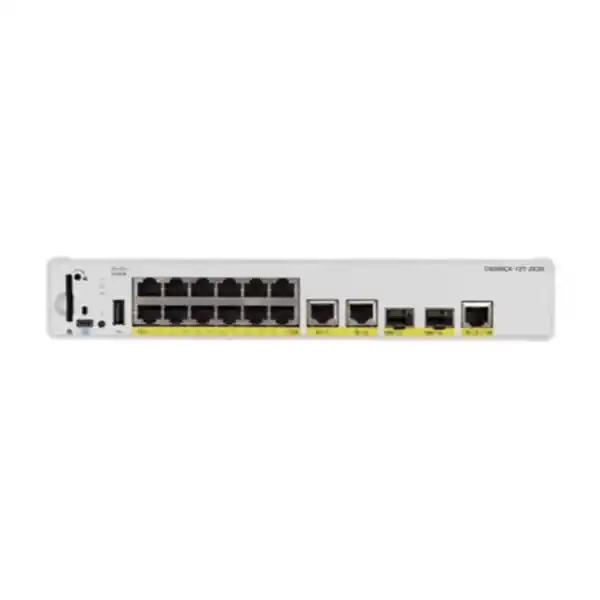
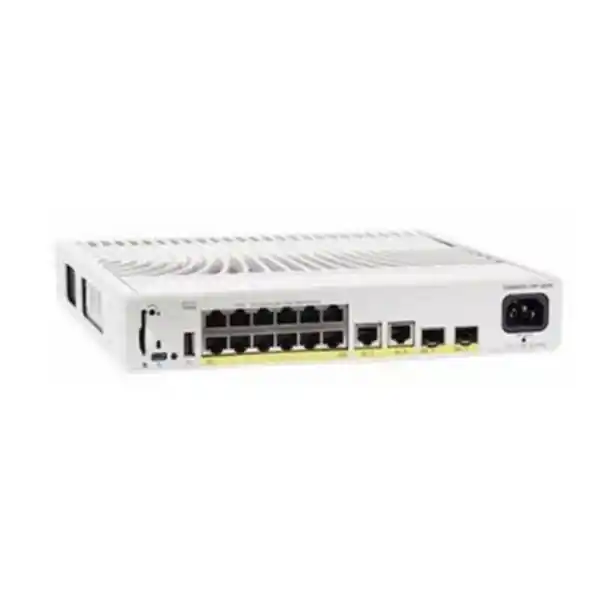
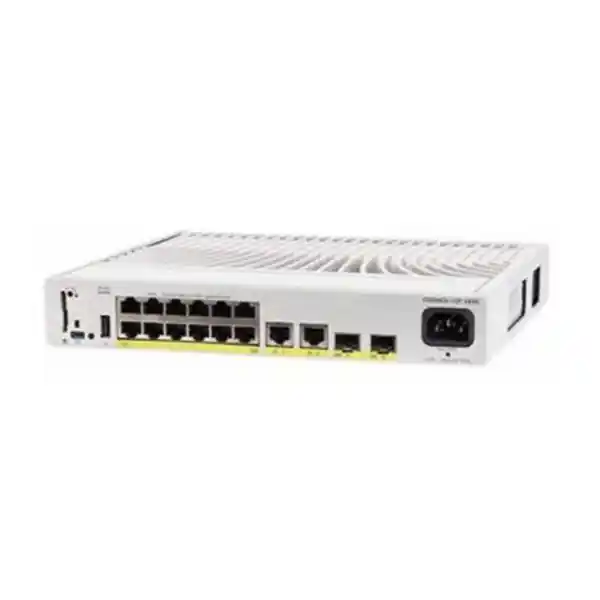
Cisco Catalyst C9200CX-12P-2XGH Network Switch
A fanless, fixed-configuration Catalyst 9200CX access switch with twelve 1 Gigabit PoE+ downlink ports, two fixed 10 Gigabit SFP+ uplinks, two fixed 1 Gigabit copper uplinks, a 240W PoE budget and a 315W HVDC/AC internal power supply. It is designed for enterprise edge locations where operational noise, physical footprint, PoE delivery, secure segmentation and high-speed upstream connectivity all matter.
Choose the C9200CX-12P-2XGH when you need a quiet 12-port PoE+ enterprise access switch, 10G optical uplinks and an HVDC/AC power architecture. If your site expects conventional 115/230V AC input, compare the C9200CX-12P-2X2G AC variant before finalizing the bill of materials.
What the Cisco C9200CX-12P-2XGH is designed to solve
The Cisco Catalyst C9200CX-12P-2XGH addresses a common enterprise design gap: many distributed locations need more capability than an unmanaged or small-business switch can provide, but they do not need a full-depth, high-port-count wiring-closet platform. A compact branch can still require authenticated access, VLAN segmentation, Layer 2 protections, routed interfaces, QoS, telemetry, automated configuration and centralized operational consistency. At the same time, the device may need to sit in a reception cabinet, wall enclosure, hospitality back office, clinic room, retail counter area, meeting-room credenza or space-constrained communications zone where acoustic noise and chassis depth are important.
This model brings the Catalyst 9200 family’s enterprise access approach into that compact environment. Twelve 1G PoE+ ports are enough for a carefully sized mix of endpoints such as IP phones, cameras, compact wireless access points, badge readers and workstations. Two 10G SFP+ fixed uplinks provide significantly more upstream headroom than a design limited to 1G uplinks, while two additional 1G copper uplinks can be used for local infrastructure attachment, transitional handoffs or alternate connectivity patterns. Because the platform is fanless, the thermal design relies on passive heat transfer rather than forced airflow, which reduces noise and removes a mechanical fan from the chassis but makes correct mounting and ambient-temperature planning more important.
For UAE buyers, the XGH suffix deserves particular attention. This is the 315W HVDC/AC internal-power variant. Cisco publishes the model around 277VAC and 380VDC operating input contexts, so it should not be treated as interchangeable with a standard AC variant without an electrical design check. If a site is a conventional office using typical 230V AC branch circuits, the C9200CX-12P-2X2G may be the more natural power choice, subject to the final approved design. The XGH model becomes especially relevant where building, telecom, industrial or data-center electrical architecture provides the required high-voltage AC or DC feed. FourTeck can align the switch, power input, optics, licensing and endpoint PoE demand in one quotation rather than treating the chassis as an isolated part number.
Verified platform specification overview
| Category | C9200CX-12P-2XGH specification | Design implication |
|---|---|---|
| Downlinks | 12 × 10/100/1000 PoE+ copper | Supports a compact set of powered and non-powered edge devices. |
| Uplinks | 2 × 10G SFP+ plus 2 × 1G copper | Allows high-speed optical aggregation plus local copper connectivity. |
| PoE budget | 240W | Average budget equals 20W per port if all twelve ports draw simultaneously; real designs should use per-device maximums and reserve margin. |
| Internal power | 315W HVDC/AC fixed internal PSU | Confirm the electrical feed before purchase; the XGH power variant is a deliberate selection. |
| Cooling | Fanless | Suitable for quiet spaces; requires unobstructed passive heat dissipation. |
| Switching capacity | 68Gbps | Matches the compact access role with dual 10G uplink capability. |
| Forwarding rate | 50.59Mpps | Provides hardware-forwarding performance for enterprise campus edge traffic patterns. |
| Architecture | Cisco UADP 2.0 mini; Cisco IOS XE Lite | Delivers programmable forwarding and enterprise software operations in the compact CX platform. |
| Memory | 4GB DRAM, 8GB flash | Platform resources support IOS XE Lite operations, configuration state and software lifecycle requirements. |
| Packet buffer | 6MB | QoS and burst planning should still be engineered rather than relying on buffer size alone. |
| MAC scale | Up to 32,000 MAC addresses | Substantial endpoint learning capacity for the physical port density. |
| VLAN / SVI scale | 4094 VLAN IDs; up to 512 SVIs | Supports sophisticated segmentation while practical deployment scale should match operational needs. |
| Jumbo frames | Up to 9198 bytes | Useful where the full path is designed consistently for larger frames. |
| Dimensions | 1.73 × 10.6 × 9.6 in; 4.4 × 26.9 × 24.4 cm | Compact footprint suitable for distributed spaces with correct mounting clearance. |
| Weight | Approximately 6.6 lb / 2.99 kg | Important for wall, shelf or enclosure mounting design. |
Technical values should be validated against the Cisco release, license and ordering documentation used for the final purchase. Feature availability can depend on software release and Network Essentials or Network Advantage entitlement.
UADP 2.0 mini architecture and IOS XE Lite
At the hardware level, the Catalyst 9200CX family is based on Cisco’s Unified Access Data Plane 2.0 mini architecture. The value of this design is not simply the headline throughput figure. An enterprise access switch must make forwarding decisions consistently while applying VLAN membership, access policies, ACL processing, QoS classification, policing, marking and other services. A programmable enterprise ASIC allows these functions to be implemented in the forwarding pipeline rather than forcing ordinary traffic through a general-purpose CPU. The practical outcome is predictable edge behavior when the switch is configured correctly for the intended role.
The C9200CX platform runs Cisco IOS XE Lite. For network teams already operating Catalyst switching, this matters because the operational model is aligned with enterprise Cisco practices rather than a separate small-office interface. Engineers can standardize configuration templates, authentication policies, VLAN conventions, interface descriptions, logging, telemetry and upgrade procedures. Model-driven programmability can also reduce manual configuration drift across branch or distributed deployments. Rather than treating every compact site as a one-off appliance, the switch can participate in a broader lifecycle covering staging, deployment, monitoring, change control, backup and replacement.
The architecture should nevertheless be matched to the product’s position. C9200CX is not a substitute for a modular campus core, a high-density aggregation switch or a platform that requires physical stacking bandwidth. Cisco lists stacking bandwidth as not applicable for the CX family. That means resiliency should be designed through topology, redundant uplinks where appropriate, upstream architecture, first-hop design and replacement strategy rather than by assuming StackWise chassis behavior. This distinction is particularly important in small branches where the temptation is to infer capabilities from larger Catalyst 9200 models that are not present on the compact CX hardware.
For UAE rollouts with multiple locations, FourTeck can help translate these platform characteristics into repeatable site standards. A standardized branch profile might define a management VLAN, user VLAN, voice VLAN, surveillance VLAN, access-point VLAN, uplink port-channel design, SNMP or telemetry settings, AAA policy, DHCP snooping, spanning-tree protections and a documented PoE reserve. The goal is to use the enterprise control model of the switch without creating unnecessary configuration complexity at each small site. For broader solution integration, see FourTeck UAE for enterprise networking and infrastructure planning.
Port map engineering: using the 12 access ports and four uplinks intelligently
The physical port mix is one of the strongest reasons to select the C9200CX-12P-2XGH. Twelve Gigabit PoE+ access interfaces offer enough density for a small but meaningful edge zone, while the uplink block provides two 10G SFP+ interfaces and two 1G copper interfaces. A good design begins by assigning roles before cabling. For example, access ports 1 through 4 may be reserved for wireless access points and collaboration endpoints, ports 5 through 8 for IP phones or desks, and ports 9 through 12 for cameras, building systems or local devices. This is not a technical requirement, but deliberate port grouping makes troubleshooting, power budgeting and visual inspections easier.
The 10G SFP+ interfaces are normally the preferred path toward an aggregation or distribution layer when traffic demand, resilience objectives or future growth justify 10 Gigabit bandwidth. Depending on supported optics and the fiber plant, an organization can select short-reach multimode or longer-reach single-mode connectivity, or use a supported direct-attach option in a short equipment-room link. The two optical uplinks can be designed as separate paths, an EtherChannel where the upstream design supports it, or primary and alternate links subject to spanning-tree and routing policy. The exact topology should be determined by failure-domain requirements rather than simply plugging both ports into the same upstream device and assuming redundancy has been achieved.
The two 1G copper uplinks provide useful flexibility. One may serve a local firewall handoff in a compact branch; another may connect to a carrier CPE, nearby infrastructure appliance, management segment or legacy switch during migration. In some environments, engineers reserve copper uplinks for out-of-band or transition use and keep both SFP+ ports dedicated to upstream production traffic. In others, one copper port can provide a low-cost connection when 10G is unnecessary. The important point is that uplink media and speed should be selected from the actual traffic model and physical topology, not from port availability alone.
Oversubscription is usually acceptable at an access layer because edge devices rarely transmit at line rate simultaneously, but it still needs analysis. Twelve 1G endpoints create a theoretical 12Gbps of one-direction access demand, while a single 10G uplink is already substantial for many branch workloads. Dual 10G uplinks offer additional capacity and topology options. The 68Gbps switching-capacity figure indicates the hardware can service the configured port mix within its platform design, while the 50.59Mpps forwarding rate describes packet-processing capability at minimum-sized frames. Neither number eliminates the need to profile actual traffic such as video surveillance, backup flows, wireless aggregation, voice, cloud access and east-west traffic.
PoE+ engineering: why the 240W budget must be calculated, not guessed
Power over Ethernet is often the limiting resource in a compact switch, so port count alone is not a sufficient sizing metric. The C9200CX-12P-2XGH provides twelve PoE+ access ports and a maximum PoE budget of 240W. Dividing 240W by twelve gives 20W per port as a simple average if all ports are drawing power simultaneously. That does not mean every connected device is limited to exactly 20W; PoE allocation is managed per endpoint and according to power-class behavior, switch configuration and negotiated demand. The average is simply a useful first test for whether an intended endpoint mix is realistic.
A conservative quotation starts with each powered device’s maximum required draw rather than its typical idle consumption. Suppose a site includes four access points specified at 25W maximum each, four IP phones at 8W each and four cameras at 15W each. The theoretical endpoint total is 192W. That fits below the 240W switch budget and leaves 48W of headroom. If the same site later replaces the access points with 30W devices and cameras with 20W models, the requirement rises to 232W, leaving very little engineering reserve. In that situation, a design may still operate but could be poor lifecycle planning because endpoint revisions, USB accessories on phones, cold-start behavior or future additions may consume the remaining margin.
PoE policy should also consider operational priority. Voice phones, security cameras, door controllers and wireless access points may have different business criticality. Cisco switching allows administrators to control PoE behavior and interface states as part of the network configuration. A well-documented branch standard identifies which devices must remain powered, which ports can be disabled during maintenance, and what happens if the available budget is challenged. For sites backed by UPS or generator infrastructure, remember that the switch’s own input power, connected powered-device load and upstream equipment all contribute to runtime calculations. A 240W PoE budget is not equivalent to a 240W total facility draw.
Cable quality matters to PoE delivery. Certified copper runs, correct termination, acceptable channel length and suitable cable category reduce voltage drop and link problems. In hot UAE ceiling spaces or dense bundles, temperature and bundling should be considered because conductor heating can become relevant under PoE loads. The switch may be compact and fanless, but the cabling ecosystem still needs enterprise discipline. Patch-panel labeling, endpoint identity, cable certification records and port descriptions greatly improve supportability.
For mixed network and security projects, the switch can be planned alongside next-generation firewall placement, segmentation and protected WAN connectivity. FourTeck’s Firewall Dubai practice can help align the access layer with firewall zones, secure branch topology and edge policy rather than treating switching and perimeter controls as separate systems.
Important UAE power-input note for the XGH model
The C9200CX-12P-2XGH should be ordered only after the site power feed has been confirmed. Cisco identifies this model with a fixed 315W HVDC/AC internal supply and publishes power data for the XGH variant around 277VAC and 380VDC. That is materially different from assuming the unit is the ordinary low-voltage AC version for a typical office wall outlet. The closely related C9200CX-12P-2X2G uses a fixed 315W AC internal supply and is commonly the model to compare when the project requires a conventional AC feed.
This distinction is especially important in UAE procurement because a product title can look almost identical while the final suffix changes the power architecture. A reseller quote should therefore include the complete SKU, license suffix and site power requirement. Electrical compatibility should be confirmed by the customer’s facilities or engineering team where necessary. A high-voltage DC deployment in a telecom or infrastructure environment may specifically call for the XGH unit; a normal branch office may not. The network engineer should not solve an electrical-design question by substituting a power cord.
The practical purchasing question is simple: do you intentionally need the C9200CX-12P-2XGH HVDC/AC model? If yes, confirm the available feed and connector requirements as part of the bill of materials. If no or if the site power is ordinary AC, compare the C9200CX-12P-2X2G and verify that the chosen license tier and physical uplinks still match the network design. This check prevents receiving a technically capable switch that cannot be commissioned at the target location without electrical changes.
Performance, memory and scale in a compact access role
Cisco specifies 68Gbps of switching capacity and 50.59Mpps of forwarding performance for the C9200CX-12P-2XGH. These figures are appropriate to a compact fixed switch with twelve Gigabit access ports and a combination of 10G and 1G uplinks. The switching-capacity number represents the data-plane bandwidth available to move traffic through the switch, while packet-per-second performance is useful when considering workloads with smaller frames. Enterprise networks experience both large throughput-oriented flows and high packet-rate transactional traffic, so capacity should not be reduced to one benchmark.
The CX family platform scale includes 32,000 MAC addresses, 14,000 IPv4 routes when direct and indirect route resources are considered, 4,000 IPv4 routing entries, 2,000 IPv6 routing entries, 1,000 multicast routing scale entries, 1,000 QoS scale entries and 1,600 ACL scale entries according to Cisco’s platform tables. Those values are far beyond what many twelve-port branch sites will consume, but they illustrate that the switch is not engineered as a minimal unmanaged edge appliance. It is designed to participate in enterprise policy and forwarding architectures. The right question is therefore not whether a twelve-port switch can learn twelve devices; it is whether the platform can carry the segmentation, policy, routed adjacency and operational constructs required by the wider network.
Memory resources include 4GB of DRAM, 8GB of flash and a 6MB packet buffer for the C9200CX class. Flash capacity supports the operating-system image and software lifecycle needs; DRAM supports control-plane processes and runtime state; packet buffering helps absorb short bursts but should not be used as a substitute for traffic engineering. In a video-surveillance deployment, for example, persistent oversubscription will not be solved by buffers. In a voice and collaboration deployment, low-latency QoS classification and upstream congestion management matter more than simply having a large packet queue.
The platform supports 4094 VLAN IDs, up to 512 switched virtual interfaces and jumbo frames up to 9198 bytes according to Cisco’s scale tables. An architect should distinguish supported scale from recommended configuration complexity. A branch with twelve access ports rarely benefits from hundreds of SVIs. Operational simplicity is usually better: create only the segments required by security, broadcast containment, service separation or routing policy. A concise branch template with six well-defined VLANs is easier to audit and recover than an unnecessarily large design that merely demonstrates theoretical capability.
Flexible NetFlow scale for C9200CX is listed at up to 16,000 flows. Flow visibility can help teams understand application behavior, identify unusual traffic patterns and troubleshoot uplink usage when deployed with the appropriate collector and configuration. Telemetry should be planned together with logging, time synchronization, SNMP or model-driven monitoring, authentication and configuration backup. Observability works best as an operations system rather than a collection of isolated switch features.
Layer 2 segmentation and access-edge controls
VLAN design
Use separate VLANs for users, voice, cameras, wireless infrastructure, building systems, guests or management where policy requires separation. VLANs should map to firewall and routing policy, not merely departmental labels. Avoid carrying unused VLANs across uplinks and trunks.
Spanning-tree protection
Define root placement upstream and use edge protections such as PortFast with BPDU Guard where appropriate. Loop-prevention behavior must be intentional, especially in retail and branch environments where users may connect unmanaged switches or patch cables incorrectly.
Link aggregation
Where the upstream platform and topology support it, EtherChannel can combine physical links and simplify spanning-tree treatment. The design must account for failure domains: two links to the same upstream chassis improve link resilience but not upstream-device resilience.
Edge hardening
Features such as DHCP snooping, IP source protections, port security, storm control and 802.1X can reduce common access-layer risks when deployed with correct policy and supporting infrastructure. Controls should be staged carefully to avoid blocking legitimate devices.
Layer 2 design is often where small sites accumulate risk. A compact switch may be installed in a lightly supervised room where ad-hoc patching occurs over many years. That makes predictable edge-port behavior especially valuable. Every user-facing interface should have an explicit role, voice VLAN if required, access VLAN, authentication policy, PoE state and description. Unused interfaces can be administratively disabled and placed in a parking VLAN according to organizational practice. Trunk ports should use an explicit allowed-VLAN list rather than carrying every VLAN by default.
Spanning tree deserves the same discipline. The C9200CX should normally be an access-layer participant rather than the accidental root for a larger campus. Root guard, BPDU guard, loop guard or other protections may be appropriate depending on topology. Do not copy a template blindly: an uplink-facing trunk and an end-user access port should not receive identical edge settings. The objective is controlled convergence under fault conditions without turning a configuration safeguard into an outage trigger.
Layer 3 functions and branch segmentation strategy
A Catalyst access switch can do more than bridge Ethernet frames, but the routing role should match the network architecture and selected license. Cisco lists routing resources for C9200CX, including IPv4 and IPv6 entries, but feature availability differs between Network Essentials and Network Advantage and can also depend on the software release. Before quoting, identify whether the switch will be purely Layer 2 with default-gateway routing performed upstream, or whether it must host SVIs, static routes, first-hop redundancy features or dynamic routing functions that require a particular entitlement.
For many small branches, centralizing inter-VLAN enforcement on a firewall is attractive because security policy remains in one place. In that topology, the C9200CX carries VLAN trunks to the firewall or upstream distribution system, and the security appliance routes between segments. This is easy to reason about when user, guest, camera and IoT networks require explicit inspection. The trade-off is that east-west inter-VLAN traffic may traverse the firewall, so firewall interface speed and policy capacity need to match demand.
In a larger campus edge design, the switch may participate in routed access or host SVIs while policy is enforced through enterprise network controls. This can reduce hairpinning and provide efficient local routing. However, it shifts responsibility for gateway resilience, route propagation, ACL design and troubleshooting toward the switching layer. The C9200CX’s compact form does not simplify those design responsibilities. A twelve-port site can still be part of a sophisticated routing domain, and small physical size should not be confused with small operational impact.
IPv6 readiness is also relevant. Even when an organization primarily uses IPv4, modern operating systems and applications may use IPv6 link-local behavior or dual-stack services. A security design should decide whether IPv6 is intentionally supported, filtered or disabled at specific boundaries rather than ignoring it. Layer 2 protections, router advertisements, DHCPv6 behavior and ACL policy should be incorporated into the branch standard where applicable.
When the C9200CX is connected behind a firewall, route summarization, management reachability and failure behavior should be documented. The operations team should know how to reach the switch if the WAN is down, what default route or management route is expected, and which interface serves as the management source for TACACS+, RADIUS, syslog, NTP and telemetry. These design details often determine whether an incident can be resolved remotely or requires a site visit.
Security architecture at the access layer
The access switch is where users and devices first enter the wired enterprise network, making it a critical enforcement and visibility point. A strong C9200CX deployment starts with authenticated administration: centralized AAA where available, encrypted management protocols, role separation, protected management VLANs, secure logging and time synchronization. Default or shared administrative practices should be replaced by auditable accounts and controlled privilege. Configuration backups should be automated so the device can be rebuilt without relying on an outdated engineer laptop.
Endpoint access can be strengthened with IEEE 802.1X, MAC Authentication Bypass for devices that cannot perform 802.1X, downloadable or local authorization policy and segmentation appropriate to the organization’s identity architecture. Deployment should be phased. Start by profiling devices and validating RADIUS behavior, then move from monitor modes toward enforcement. Printers, cameras, access-control panels and embedded systems frequently behave differently from managed laptops, so a successful authentication design includes exception handling and lifecycle ownership rather than simply enabling dot1x globally.
Layer 2 attacks also deserve attention. DHCP snooping can establish trusted DHCP paths and provide a binding database used by additional protections. Dynamic ARP inspection and IP source guard may help protect against address spoofing where the topology and software support the chosen design. Port security can limit learned MAC behavior on selected interfaces. Storm control can reduce the impact of excessive broadcast, multicast or unknown-unicast traffic. Each control should be configured with thresholds and trust boundaries appropriate to the site.
Segmentation is most effective when the switching and firewall policies agree. A camera VLAN should not be considered secure simply because it has a different VLAN number; routing policy must define where those cameras can communicate, and management services must be protected. Guest networks should have a clear path to the internet without unintended internal reachability. Voice VLANs need access to call-control services and supporting DNS, DHCP and time services. The access switch provides the local attachment and classification point, while the wider security architecture determines end-to-end trust.
QoS for IP voice, collaboration, wireless and video workloads
Quality of Service is not about making a slow link faster; it is about deciding which traffic receives priority when contention occurs. The C9200CX platform provides enterprise QoS resources, and the design can classify, mark, police and queue traffic according to policy. The most reliable deployments establish a trust boundary. A managed IP phone may be trusted to mark voice correctly, while an ordinary user port should not necessarily be allowed to claim high-priority markings from any application. Wireless traffic often requires coordination between access-point policy, WLAN configuration and wired switch queues.
Voice traffic is sensitive to delay, jitter and loss. In a branch with a 10G LAN uplink but a much slower WAN circuit, congestion is more likely to occur at the router or firewall WAN egress than on the switch uplink. End-to-end QoS therefore needs consistent DSCP treatment and queue strategy across the path. Configuring the access switch alone will not protect a call if markings are discarded later or if the WAN edge has no priority queue. The switch should be one component of an end-to-end service policy.
Video creates a different profile. Collaboration video can be bursty and interactive, while surveillance cameras generate predictable continuous streams. Twelve cameras at several megabits per second each can consume meaningful bandwidth but are still far below a 10G uplink in many designs. The larger concern may be the destination recorder, firewall path, WAN transport or storage system. The switch’s role is to deliver stable PoE, correct VLAN assignment, predictable forwarding and adequate uplink capacity. Traffic classification helps protect voice and management sessions when large file transfers or backup traffic compete for resources.
A practical QoS design documents the application classes, expected markings, trust boundaries, uplink policy and verification commands. It also monitors queue drops rather than assuming policy is working because the configuration was accepted. For organizations outsourcing monitoring or support, FourTeck IT Services UAE can integrate switching operations with broader infrastructure support and lifecycle management.
Automation, telemetry and operational consistency
The value of IOS XE Lite becomes especially visible when an organization operates many small sites. Manual CLI configuration can work for a single branch, but it becomes a source of inconsistency when tens or hundreds of switches are deployed. Small differences in VLAN allowed lists, spanning-tree protection, AAA settings, NTP servers, syslog destinations or SNMP communities can create long-term security and troubleshooting problems. A templated configuration process reduces those differences and gives the operations team a predictable baseline.
Model-driven programmability can be used with automation systems to push intended configuration and retrieve structured state. The specific APIs, tooling and supported models should be validated against the IOS XE Lite release in the proposed software train. Teams do not need to automate everything on day one. High-value starting points include standardized device naming, management addresses, VLAN definitions, interface descriptions, NTP, DNS, AAA, logging, monitoring destinations and software versions. Once those foundations are repeatable, more advanced policy can be introduced safely.
Telemetry and Flexible NetFlow can improve visibility into what the compact site is actually doing. A branch that experiences periodic WAN saturation may benefit from flow records that identify which endpoints and applications create demand. Interface counters can reveal physical errors, duplex issues, link flaps or output drops. PoE telemetry can show endpoint draw and allocation. Environmental and system state can provide early warning of conditions that warrant inspection. None of these data sources are useful if they are not collected, normalized and reviewed, so monitoring architecture should be included in deployment scope.
Configuration archival is another basic but important control. Every approved change should result in a known-good configuration copy stored centrally. Device inventory should capture serial number, location, rack or room, software version, license level, installed optics, uplink destination and support coverage. When a switch fails, this information shortens replacement time dramatically. The C9200CX’s high published MTBF does not remove the need for recovery planning; resilient operations assume that any hardware can eventually fail or be damaged by site conditions.
Software lifecycle planning should include image selection, vulnerability review, maintenance-window requirements, upgrade testing and rollback strategy. Branch switches are often ignored until an incident forces attention. A healthier model treats them as managed infrastructure with the same change governance as firewalls, servers and wireless controllers, adjusted to the risk and scale of the site.
Deployment patterns for the C9200CX-12P-2XGH
Branch office
Connect phones, desks, access points and local appliances while using 10G or 1G uplinks toward a firewall, router or distribution switch. Centralized templates make branch builds repeatable.
Retail outlet
Segment POS, staff devices, cameras, wireless and building systems. Fanless operation helps in compact back-office or counter-adjacent spaces where noise matters.
Hospitality zone
Use PoE+ for APs, IP phones and selected IoT systems while maintaining separate guest, operations, voice and management segments.
Meeting-suite edge
Support collaboration endpoints, room devices, phones and local APs without introducing fan noise into acoustically sensitive office environments.
Security / CCTV edge
Power a limited group of cameras and security endpoints while using high-speed uplinks toward recording, analytics or secured aggregation infrastructure.
HVDC-enabled facility
Use the XGH power variant where the facility intentionally provides a compatible high-voltage AC or DC feed and compact PoE switching is required.
In a branch-office design, the switch often sits between local endpoints and a security appliance. A typical logical topology separates corporate users, phones, wireless access points, guest services and cameras. Depending on policy, the switch can either route selected VLANs or extend those VLANs to the firewall. The 10G uplink provides room for aggregated traffic, while a 1G copper link may be sufficient for a lower-speed firewall appliance or carrier handoff. The correct choice depends on the fastest bottleneck in the path.
Retail deployments have a different risk profile. Point-of-sale terminals, staff devices, CCTV, digital signage and guest Wi-Fi should not share one flat network. The C9200CX can provide the physical access and VLAN separation needed to keep these systems distinct. PoE simplifies camera and access-point cabling, but the 240W budget must be calculated against the installed endpoints. Because retail equipment is frequently installed in nontraditional communications spaces, environmental and mounting requirements should be reviewed during the site survey.
Hospitality and meeting environments benefit from fanless acoustics. A switch installed near occupied spaces should not add audible fan cycles, but silence does not eliminate thermal design. Passive cooling needs room for heat to escape. The chassis should not be buried beneath documents, enclosed in a sealed decorative cabinet or stacked tightly with other heat-generating electronics. Facility teams should understand that a quiet switch still produces heat proportional to its electrical load.
For CCTV-focused edge zones, count both bandwidth and watts. A dozen cameras might fit physically, but their combined maximum PoE draw could exceed or approach 240W depending on model, heater, illuminator or PTZ features. Likewise, camera bitrates accumulate toward the recorder uplink. The dual 10G SFP+ interfaces provide ample local headroom for many surveillance designs, but end-to-end capacity includes the recorder, storage, firewall and WAN path if video leaves the site.
Sizing methodology before requesting a quotation
A reliable switch quotation starts with five numbers: required access-port count, number of powered devices, maximum PoE wattage, uplink bandwidth and expected growth. The C9200CX-12P-2XGH supplies twelve access ports. If the site currently needs eleven, the spare-port ratio is only about eight percent. That may be acceptable for a fixed appliance enclosure but poor for an office expected to add desks, cameras or access points. A switch should not be chosen solely because today’s cable count fits exactly.
Next, calculate PoE device by device. List every endpoint, its standard, its maximum power request and whether it is operationally critical. Add the maximum figures and compare the result with 240W. Then reserve practical headroom for hardware refresh or endpoint expansion. If the initial design already uses more than roughly eighty to ninety percent of the available budget, consider whether a larger switch, different endpoint split or separate PoE source is more appropriate. The right margin depends on change expectations and risk tolerance; there is no universal percentage.
Uplink sizing should use measured or estimated traffic. An office with cloud applications and a 500Mbps internet circuit may not need 10G upstream for WAN traffic, but local backups, wireless aggregation, video surveillance or access to on-premises servers could justify it. A 10G SFP+ uplink can also reduce future recabling by providing headroom from the beginning. Conversely, buying 10G optics without a 10G-capable peer achieves nothing. Confirm the upstream switch port, transceiver type, fiber type, connector, reach and speed on both ends.
Resilience requirements must be stated explicitly. Is one uplink enough? Are two links required? Do they terminate on one upstream switch or two? Does the branch need to survive an upstream-device failure, only a cable failure, or no local failure at all because the business can tolerate an outage? The C9200CX family does not provide physical stacking bandwidth, so redundancy is a topology decision rather than a StackWise assumption. In some small branches, keeping a preconfigured spare switch on site is more cost-effective than engineering dual-device local redundancy.
Finally, confirm power. For this XGH model, the available electrical feed is not a minor accessory question. Provide facility input type and voltage with the quote request. If the environment is ordinary AC, ask FourTeck to compare the 2X2G variant rather than forcing the XGH SKU into the design. A correct bill of materials should include the exact license suffix, supported optics, patch leads or fiber jumpers where required, mounting approach and support entitlement.
Optics, fiber and copper cabling considerations
The two SFP+ uplinks provide flexibility, but transceiver selection must be treated as part of the network design. “10G SFP+” describes the interface form factor and speed capability; it does not identify the correct optic. A short multimode fiber run inside a building may use a different transceiver than a longer single-mode campus connection. Existing fiber should be identified by type, connector, loss budget and patch-panel path. Reusing unknown fiber because it is already installed can turn a straightforward commissioning job into intermittent link problems.
Both ends of an optical link must be compatible. Verify the upstream switch’s supported transceiver, wavelength, fiber mode and link distance. For new multimode builds, fiber grade and distance should be matched to the desired Ethernet standard. For single-mode, confirm optical budget and avoid unnecessary high-power optics over very short links without checking vendor guidance. Cleanliness is also critical: contaminated fiber connectors are a common source of optical loss. Inspection and cleaning should be part of installation practice, not a troubleshooting afterthought.
Copper access cabling should be certified to the required category and installed with PoE in mind. The C9200CX access ports operate at up to 1 Gigabit, so ordinary enterprise Category 5e or better cabling can support 1000BASE-T within standard channel rules, but many organizations standardize on Category 6 or 6A for new builds. The correct choice depends on building standards, future multigigabit plans, bundling, pathway capacity and endpoint requirements. This particular model’s twelve PoE+ access ports are 1G, not multigigabit; choosing Cat6A does not turn the port into 2.5G or 5G, although it may prepare the cabling plant for future switches.
Patch cords are part of the channel. Low-quality or damaged patch leads can introduce errors even when the permanent link tests correctly. Label both ends, document panel positions and use consistent color conventions where organizational standards allow. Avoid excessive coil lengths and sharp bends. For PoE loads, reliable terminations are especially important because the same pairs carry both data and power.
If the switch is part of a server-room or edge-compute build, upstream storage and server connectivity should be designed separately from access-port assumptions. FourTeck’s Server Dubai resources can help coordinate switching requirements with server, rack and infrastructure planning for UAE deployments.
Fanless thermal design, mounting and environmental planning
Fanless operation is a major deployment benefit, but it changes the way installers should think about heat. Cisco’s architecture documentation describes the 9200CX chassis as dissipating heat through the top into the built-in heat-sink design. That means the enclosure, mounting orientation and clearance around the switch must allow passive heat transfer. A fanless switch installed correctly can operate quietly and reliably; the same switch placed in a sealed, sun-exposed or poorly ventilated cabinet can experience higher temperatures that reduce thermal margin.
Cisco lists normal operating ranges for the C9200CX family that extend to 45°C under stated altitude conditions, with storage from -40°C to 70°C and noncondensing relative humidity from 5% to 90%. These are equipment limits, not a recommendation to run every site continuously at the top boundary. UAE indoor technical spaces should be designed with adequate air conditioning or ventilation so normal operating temperature remains well within the supported envelope. Enclosures in warehouses, service corridors or outdoor-adjacent areas deserve special attention because ambient temperature can rise above the office set point.
Physical dimensions are approximately 4.4cm high, 26.9cm wide and 24.4cm deep, with weight around 2.99kg. The compact size creates several mounting possibilities, but any mounting accessory and orientation should follow Cisco’s installation guidance. Do not assume that because the unit is small it can be suspended from network cables or placed loosely on top of other hot equipment. The chassis should be secured, power input protected from accidental disconnection and cable strain controlled.
Dust is another practical concern in regional deployments. Fanless equipment does not pull air through fans in the same manner as traditional switches, but dust can still accumulate on surfaces and within open areas, reducing effective heat dissipation or contaminating connectors. Technical spaces should be kept clean, and optical ports not in use should retain dust protection. Copper patch areas should be organized so routine cleaning does not disturb active links.
Because the switch can power up to 240W of downstream devices, thermal planning should consider the whole cabinet. A firewall, router, NVR, power supplies and PoE switch may collectively produce far more heat than the switch alone. UPS losses add additional heat. A site survey should therefore assess enclosure volume, airflow, room temperature and expected equipment load together.
High availability without physical stacking
Cisco lists stacking bandwidth as not applicable for C9200CX, so designers should not assume the compact model behaves like stack-capable Catalyst 9200 configurations. This does not prevent resilient network designs, but the resilience mechanisms are different. Redundant uplinks, link aggregation, upstream switch redundancy, routed paths and rapid spanning-tree convergence can all contribute to availability. The exact design must account for what failure the business wants to survive.
A single C9200CX with two uplinks to one upstream switch can survive one cable or optic failure if the links and protocols are configured appropriately, but it cannot survive failure of the local C9200CX itself or the single upstream chassis. Connecting to two independent upstream switches can improve the upstream-device failure domain, but only when those upstream devices support the required multi-chassis or routing design and it is configured correctly. Simply connecting two uplinks to separate devices can create spanning-tree, VLAN or forwarding behavior that must be engineered.
For small branches, the business case for a second local access switch depends on outage cost. A clinic, payment environment or security facility may justify two switches and dual-homed critical systems where endpoint capabilities permit. A small office may instead choose a single switch plus next-business-day or onsite spare strategy. In that case, standardized configuration backups and pre-documented port maps are essential so a replacement can be installed rapidly.
Power resilience should also be separated from network-path resilience. The XGH model’s power input may connect to a facility DC or high-voltage AC system that already offers resilience, but that must be confirmed. If the electrical source is single and fails, redundant uplinks cannot help. Similarly, PoE endpoints will lose power if the switch loses its input even when their network path could otherwise reroute. UPS or facility backup requirements should be calculated from the whole powered stack.
Operations teams should document failure tests. Disconnect one uplink and confirm convergence. Reboot an upstream device in a maintenance window. Verify that phones re-register, access points recover and management monitoring reports the expected alarms. Resilience exists only when the actual system has been tested, not when the diagram looks redundant.
Network Essentials versus Network Advantage ordering
The base platform name C9200CX-12P-2XGH identifies the hardware family and port/power design, but Cisco ordering distinguishes license variants. C9200CX-12P-2XGH-E is the Network Essentials version, while C9200CX-12P-2XGH-A is the Network Advantage version. The correct suffix should be selected according to the feature set required by the network design, not by choosing the lower-cost option automatically.
Network Essentials is generally positioned for common enterprise access functions, while Network Advantage extends capabilities for more advanced routing, segmentation or policy scenarios. Exact feature matrices evolve by IOS XE release and licensing program, so the final bill of materials should be checked against Cisco’s current feature navigator, ordering guide and subscription requirements. If a design document calls for a specific dynamic routing protocol, advanced segmentation feature, automation integration or security capability, the quotation should map every requirement to the appropriate entitlement before purchase.
Licensing also affects lifecycle planning. Organizations often standardize one license tier across branches to simplify templates even when some sites do not immediately use every feature. Others optimize cost by using Essentials at simple Layer 2 locations and Advantage where routing or advanced policy is required. Both approaches can be valid. The deciding factor is whether the operational team can manage the resulting variation without configuration drift or unexpected feature limitations.
When requesting a FourTeck quote, provide the exact intended SKU if known. If not, state the required features and topology so the licensing choice can be validated. Do not omit the suffix from a purchase order and assume it will be inferred. The hardware may look the same, but entitlement affects what the deployed switch is authorized to provide.
C9200CX-12P-2XGH versus nearby 9200CX models
The most important comparison is with the C9200CX-12P-2X2G. Both provide twelve 1G PoE+ access ports, two 1G copper uplinks, two 10G SFP+ uplinks, a 240W PoE budget and fanless operation. The key distinction is power: the 2X2G model uses a 315W AC internal power supply, while the 2XGH version uses a 315W HVDC/AC internal supply. For many standard offices, that power difference is more decisive than any networking feature because the port map is otherwise very similar.
The C9200CX-8P-2XGH reduces access-port count to eight while retaining the two 1G copper and two 10G SFP+ uplinks, fanless design and XGH power architecture. It also has a 240W PoE budget according to Cisco. With fewer PoE ports sharing the same budget, it can be attractive when the site has a smaller endpoint count but relatively high per-device PoE demand. However, fewer ports reduce expansion capacity, so compare future endpoint growth before selecting the eight-port model merely to save space or cost.
The C9200CX-8UXG-2XH is intended for sites that need multigigabit access and UPOE. It offers a mix including four multigigabit ports up to 10G and four 1G ports, with two 10G SFP+ uplinks. That makes it more appropriate for high-performance wireless access points or other endpoints that can exceed 1G over copper. If the project is deploying newer Wi-Fi access points whose wired interface is 2.5G, 5G or 10G, the 12P-2XGH’s 1G access ports may become a bottleneck even though its uplinks are 10G.
The C9200CX-12T-2X2G is a data-only model rather than a twelve-port PoE+ model. It can be appropriate where endpoints have local power and PoE is unnecessary. Choosing a data-only switch can reduce unnecessary PoE hardware, but it removes the convenience and centralized power control used by phones, APs and cameras. A site survey should therefore distinguish “currently not using PoE” from “will never need PoE during the service life.”
The correct model is determined by four questions: how many copper access ports are required, which of them need PoE and at what wattage, whether multigigabit access is necessary, and what electrical feed is available. Uplink requirements and licensing then refine the final SKU. This structured comparison is much safer than choosing models based on similar product names.
Migration from legacy access switches
Replacing an older access switch is an opportunity to correct accumulated configuration debt. Before removing the existing device, capture its running configuration, interface status, MAC table, VLAN database, spanning-tree state, PoE usage, LLDP/CDP neighbors, trunk allowed lists, link aggregation, routing state and management dependencies. Photograph patch-panel connections and label cables if port descriptions are unreliable. A migration should be based on observed network state, not only the old configuration file, because disconnected and undocumented lines can remain in configuration for years.
Create a port-mapping worksheet from old interface to new interface. Record endpoint identity, VLAN, voice VLAN, PoE requirement, authentication policy and special settings such as speed, duplex or storm control. This prevents the common mistake of moving cables one by one and discovering later that a phone, camera or controller had a unique configuration. Where possible, normalize the new configuration to current standards instead of copying obsolete commands blindly.
Validate uplink compatibility before the maintenance window. Confirm that the upstream port can negotiate or be configured for the chosen 1G or 10G media, that optics are supported, that trunk VLANs match and that spanning-tree expectations are correct. If moving from a 1G uplink to 10G, ensure both ends and the fiber plant support the new speed. A transceiver mismatch discovered after users are disconnected can turn a routine switch migration into an extended outage.
PoE migration requires special care because endpoint power is interrupted when cables move. Access points may take several minutes to boot and join their controller; cameras may take time to reinitialize; phones may need DHCP, call-control registration and configuration download. Sequence critical devices intentionally and verify service, not just Ethernet link state. If a phone powers up but cannot reach the call manager, the migration is not complete.
After cutover, validate the network from both device and application perspectives. Check error counters, PoE state, spanning-tree topology, MAC learning, DHCP, DNS, authentication, routing, firewall reachability and monitoring. Save the final configuration and update inventory. If the old switch remains onsite as an emergency spare, label it clearly with its support status and configuration limitations so it is not accidentally returned to production months later as an undocumented device.
For multi-site refresh projects, a pilot location should be used to refine the template, timing and rollback procedure before broad rollout. The smaller the switch, the easier it can be to underestimate migration complexity; disciplined process is what turns repeatable hardware into a repeatable deployment.
UAE procurement, project documentation and lifecycle considerations
Enterprise switch procurement should include more than a chassis line item. The final UAE bill of materials may need the exact -E or -A license SKU, compatible SFP/SFP+ transceivers, fiber or copper patching, mounting accessories, power components, support entitlement and spare strategy. If the switch is entering an existing Cisco estate, software-release compatibility with management and automation platforms should be reviewed before shipment. If the customer uses a standard golden image, verify that the C9200CX hardware supports the selected train.
Lead time and supply availability can influence project sequencing, but substitute models should not be accepted purely because the port count looks similar. A substitution may change power input, PoE budget, access speed, uplink media, license entitlement or physical dimensions. Every alternate should be reviewed against the original requirements. For the C9200CX-12P-2XGH specifically, changing to or from the 2X2G version alters the power architecture and must be intentional.
Project documentation should identify the destination site and room, rack or enclosure, management IP, hostname, uplink destination, VLANs, endpoint port map and support ownership. For regulated or security-sensitive environments, capture approval records for segmentation and management access. For distributed retail or hospitality sites, consistent labels and remote-monitoring details are especially important because onsite technical staff may be limited.
Environmental planning in the UAE should account for heat, dust and power quality. Indoor enterprise equipment should be installed in conditioned, protected spaces appropriate to its rating. A switch in a warehouse mezzanine or external service cabinet may experience much higher ambient temperature than the main office. The fact that Cisco specifies an operating range does not make the product an outdoor or industrial-hardened switch. Use the correct enclosure and environmental platform for the actual location.
Lifecycle planning includes warranty and support, software maintenance, backup, monitoring and eventual refresh. Serial numbers should be recorded at installation. Support access should be known before an outage occurs. The network team should also maintain a secure repository of standard configuration, port maps and software images or references. Compact access switches often remain in service for years; documentation created during commissioning becomes extremely valuable when the original project team is no longer available.
FourTeck can coordinate Cisco switching with wider UAE infrastructure procurement through FourTeck UAE, while specialist security integration can be aligned through Firewall Dubai and managed infrastructure requirements through IT Services UAE. Server-side dependencies can be coordinated with Server Dubai. These four approved FourTeck properties are included to keep switching, security, services and compute planning connected.
Technical deployment examples
Example A: twelve-device professional branch
Consider a professional office with four IP phones, four user workstations connected through phone pass-through ports, two wireless access points, one security camera and one access-control controller. The physical port count uses eight switch ports if four workstations are daisy-chained behind phones, leaving four physical ports available for infrastructure and growth. PoE demand might include four phones at 8W maximum, two APs at 25W maximum, one camera at 15W and one controller at 12W, totaling 109W. That leaves substantial headroom under the 240W budget. A 10G uplink to the building distribution switch can carry all VLANs, while the second 10G port can be reserved for redundancy or future use.
The switch configuration could include a data VLAN, voice VLAN, corporate wireless VLAN, guest wireless VLAN, camera VLAN, building-control VLAN and management VLAN. Access ports serving phones may use a voice VLAN and authenticated data access. The AP ports may be trunks depending on wireless design. Camera and controller ports can be restricted to their specific segments. DHCP snooping trust would normally be limited to the uplink direction. Spanning-tree edge protections would apply to endpoint-facing ports. The management interface would use centralized AAA, NTP, syslog and monitoring.
Example B: compact surveillance aggregation
A small facility may use ten fixed cameras at 12W maximum each and two higher-feature cameras at 20W each. The total maximum PoE demand is 160W, leaving 80W of budget. If every camera streams an average of 8Mbps, aggregate traffic is roughly 96Mbps before overhead, well below a 1G uplink. However, the design may still select 10G SFP+ because the upstream network is standardized on fiber, because traffic could increase with higher resolutions, or because the same switch also carries management and other data. The recorder path should be tested end to end.
Security policy should prevent cameras from initiating unnecessary connections to user networks. Camera VLAN routing can be enforced at a firewall or upstream gateway. NTP and DNS access should be limited to required services. The switch management plane should be separate from the camera segment. PoE monitoring should be included in operations so a failed camera can be distinguished from a switch port power issue. If cameras include heaters or infrared illuminators that raise peak draw at night, use their maximum specification rather than daytime measured consumption for the power budget.
Example C: meeting and collaboration suite
A boardroom zone may need video endpoints, touch controllers, IP phones, room-booking panels, access points and a few local data connections. Fanless operation is valuable because the switch can be placed closer to occupied spaces without fan noise. QoS becomes more important than raw bandwidth: collaboration media should retain correct markings and the uplink path should preserve the intended service classes. If a room system draws close to the PoE+ limit, verify its exact standard and power requirement; some high-end collaboration endpoints may require more than PoE+ and therefore need local power or a different switch model.
The compact chassis can simplify local cabling by keeping room devices close to the access switch, but that only works when the mounting area has adequate thermal clearance and service access. Concealing the switch in a sealed audiovisual cabinet can undermine the advantage of a fanless design. Cable management should allow technicians to identify each room device without disrupting neighboring links.
Example D: HVDC-enabled infrastructure location
The XGH variant is particularly relevant when an infrastructure room intentionally provides compatible high-voltage AC or DC power. In such a project, the electrical engineer and network engineer should agree on input feed, connector, protection and grounding before hardware arrives. The network design can then take advantage of the same 12-port PoE+ and dual-10G uplink capabilities without introducing a separate conversion stage. This is a stronger use case for the XGH model than an ordinary office where the required high-voltage feed is absent.
Commissioning checklist for network engineers
Before power-on
Verify exact model and license suffix, approved power feed, mounting, grounding, cable labels, optics, fiber type, upstream port capability, console access, management addressing and rollback equipment.
Base configuration
Set hostname, management connectivity, DNS, NTP, secure administrative access, AAA, logging, monitoring, banner, software baseline, encrypted credentials and configuration archive target.
Access policy
Configure VLANs, voice settings, 802.1X or MAB policy, DHCP snooping, port security where appropriate, PoE behavior, descriptions, spanning-tree edge settings and disabled unused ports.
Uplink validation
Confirm transceiver state, negotiated speed, trunk VLANs, port-channel membership, spanning-tree role, routing adjacency if used, MTU consistency, error counters and failover behavior.
PoE validation
Check per-port powered-device class, measured draw, total allocation, endpoint boot sequence and remaining budget. Test critical phones, cameras and APs from the application side.
Handover
Save final configuration, record serial number and software version, update network diagrams and port maps, attach test results, register support details and confirm monitoring alarms.
Commissioning should include negative testing, not only successful pings. Connect an unauthorized endpoint to a protected port and confirm the expected authentication behavior. Disconnect an uplink and observe reconvergence. Restart a PoE endpoint and confirm power recovery. Generate traffic between segmented VLANs and verify that firewall or ACL policy blocks what should be blocked. Confirm that the switch cannot be managed from untrusted user or guest networks unless that access is explicitly intended.
Record the final baseline after testing. Operational documentation should match reality at handover, including any ports that changed function during commissioning. A technically correct switch configuration loses value quickly if diagrams and inventory remain outdated. Good handover turns the C9200CX from installed hardware into a maintainable enterprise asset.
Common design mistakes to avoid
Treating the XGH suffix as cosmetic: it identifies the HVDC/AC power variant. Confirm site power before order placement.
Sizing only by port count: twelve ports can still be the wrong fit if PoE draw exceeds 240W, if multigigabit access is needed or if near-term growth will consume every port.
Assuming 10G uplinks guarantee 10G end-to-end: the peer port, optic, fiber and upstream path must all support the selected speed and media.
Ignoring license requirements: feature availability differs between Network Essentials and Network Advantage. Translate every design requirement into the proper entitlement before purchase.
Building a flat VLAN: compact locations still need segmentation for users, guests, cameras, IoT, voice and management where risk requires it.
Overlooking fanless thermal needs: no fan does not mean no heat. Passive cooling needs clearance and a suitable ambient environment.
Confusing model family capabilities: larger C9200 switches can support stacking designs that do not apply to C9200CX. Engineer resilience using the capabilities of the exact model.
Buying optics after the switch arrives: optical media should be designed with the fiber plant and upstream port as one link budget.
Using typical PoE wattage instead of maximum: endpoint power can rise under load, during boot or when accessories activate. Budget from supported maximum requirements.
Skipping operational handover: without saved configuration, diagrams, serial inventory and monitoring, even a well-built branch becomes difficult to support after personnel changes.
Frequently asked technical questions
Is the C9200CX-12P-2XGH fanless?
Yes. Cisco identifies this model as fanless. That makes it suitable for quiet environments, but adequate passive cooling and mounting clearance remain necessary.
How many PoE ports does it provide?
It provides twelve 10/100/1000 PoE+ access ports with a shared maximum PoE budget of 240W. The endpoint mix should be calculated using device maximum power requirements.
Does it have 10 Gigabit uplinks?
Yes. Two fixed SFP+ uplink ports support 10 Gigabit connectivity. It also includes two fixed 1 Gigabit copper uplink interfaces.
What is the switch capacity?
Cisco publishes 68Gbps switching capacity and 50.59Mpps forwarding performance for C9200CX-12P-2XGH.
Can it be stacked?
Cisco lists stacking bandwidth as not applicable for C9200CX. Do not design it as a StackWise member. Use redundant links, upstream architecture and replacement strategy appropriate to the site.
Is the XGH model the right choice for a normal 230V UAE office outlet?
Do not assume so. The XGH unit is the HVDC/AC variant and Cisco publishes operating data around 277VAC and 380VDC. For conventional office AC, compare the C9200CX-12P-2X2G and confirm power compatibility with the site and final Cisco documentation.
Which license should I order?
C9200CX-12P-2XGH-E corresponds to Network Essentials and C9200CX-12P-2XGH-A to Network Advantage. Select according to required features, software release and licensing policy rather than price alone.
Can all twelve ports run at full PoE+ simultaneously?
The shared PoE budget is 240W, so twelve devices each drawing the full theoretical PoE+ maximum would exceed the total budget. Size the exact powered-device mix and preserve appropriate reserve.
Does the model provide multigigabit access?
No. The twelve PoE+ access ports are 1G. If endpoints such as high-performance access points require 2.5G, 5G or 10G copper access, compare the C9200CX-8UXG family.
What information should I send for a quote?
Provide site location, power feed, license requirement, endpoint list, PoE wattage, uplink speed and media, fiber type and distance, support term, mounting requirements and desired quantity.
Decision recap: when this exact model is the right fit
The Cisco Catalyst C9200CX-12P-2XGH is a strong fit when all of the following are true: the edge zone needs up to twelve 1G copper access ports; connected endpoints require PoE+ within a 240W aggregate budget; the network benefits from two fixed 10G SFP+ uplinks plus two 1G copper uplinks; a compact and fanless platform is preferable; Cisco IOS XE Lite operational consistency is required; and the site intentionally supports the model’s HVDC/AC power design. It is particularly suitable for carefully sized enterprise branches, distributed offices, quiet collaboration areas, retail or hospitality zones, surveillance edges and compatible infrastructure facilities.
It is not the best choice when you need more than twelve access ports, when multiple endpoints require multigigabit copper, when PoE demand exceeds 240W, when physical stacking is a requirement, or when the site only has conventional AC power that does not match the XGH design. In those cases, another Catalyst 9200CX or Catalyst access model may provide a cleaner fit. A correct procurement decision should optimize the entire system: endpoint speeds, PoE, uplinks, resilience, licensing, power, environmental conditions and lifecycle support.
Quotation input checklist
Send the following information with your UAE inquiry so the quotation can be built around the exact deployment rather than only the chassis name.
Validate the exact Cisco C9200CX-12P-2XGH bill of materials before purchase
FourTeck can review the access-port requirement, PoE budget, XGH power compatibility, Network Essentials or Network Advantage licensing, 10G optics, fiber path, VLAN and security design, mounting constraints and rollout services. This is especially valuable when the switch is part of a wider branch firewall, wireless, CCTV, server or multi-site refresh project.

Reviews
There are no reviews yet.