
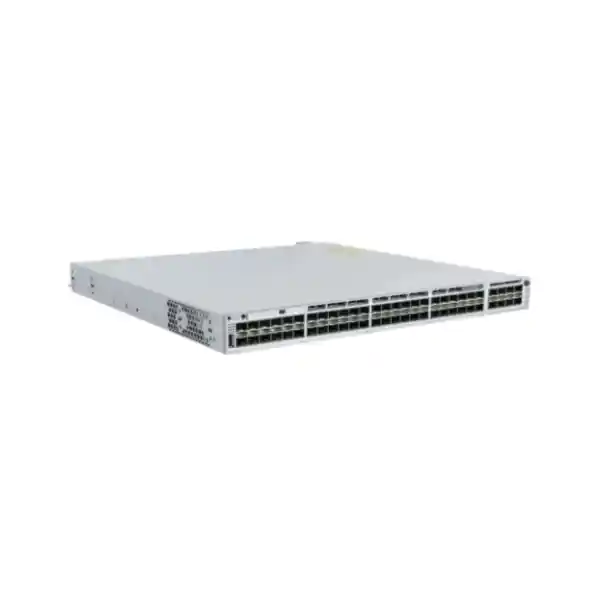
Cisco Catalyst C9300-48S Network Switch
A 48-port 1G SFP stackable Catalyst 9300 platform for organizations that need dense fiber access, deterministic campus switching, modular uplinks, high availability, policy-driven segmentation, and a long-lived Cisco IOS XE operating model.
The C9300-48S is best suited when most edge or aggregation connections are optical rather than copper. It provides 48 native 1G SFP downlink ports, a field-selectable uplink network module, StackWise-480 data stacking, StackPower support, two power-supply bays, three field-replaceable fans, and enterprise Layer 2/Layer 3 services.
For quotation accuracy, specify license level, uplink module, optics, stack cables, secondary power supply, support term, and required software subscription or management entitlement.
Cisco C9300-48S at a glance
Why organizations choose the C9300-48S for fiber-heavy networks
Many enterprise access switches are designed primarily around copper Ethernet, with fiber reserved for uplinks. The Cisco Catalyst C9300-48S reverses that assumption. Its forty-eight front-panel data ports are 1 Gigabit SFP interfaces, making the switch particularly relevant when the network edge itself is optical. This is useful in campuses where building distances exceed copper limits, in industrial environments where electromagnetic interference is a concern, in security networks where camera clusters connect through fiber media converters or optical access nodes, in government facilities that use fiber-to-the-desk, and in multi-building commercial properties where each tenant or floor is handed off over a dedicated strand.
The platform is not merely a large SFP tray. It is part of the Catalyst 9300 enterprise switching family and therefore combines dense optical access with the Cisco Unified Access Data Plane architecture, Cisco IOS XE, hardware-assisted forwarding, policy and security controls, rich telemetry, resilient stacking, modular uplinks, and programmable operations. This matters because the operational value of an enterprise switch is defined not only by the number of physical ports, but by what happens during a link failure, software upgrade, topology change, authentication event, route convergence, congestion event, or security incident.
For UAE deployments, the C9300-48S is often evaluated for headquarters campuses in Dubai and Abu Dhabi, education estates, logistics facilities, utility environments, hotels, healthcare campuses, financial offices, public-sector sites, managed service networks, and large CCTV or building-management backbones. FourTeck can align the base switch with the correct optical modules, uplink choice, support level, licensing, stack accessories, and integration services through its UAE enterprise technology portfolio.
Verified hardware and scale profile
| Parameter | C9300-48S profile | Design relevance |
|---|---|---|
| Downlink interfaces | 48 x 1G SFP | Dense optical access, building aggregation, fiber distribution |
| Uplink architecture | Modular | Choose uplink speed and port count independently from downlink density |
| Switching capacity | 256 Gbps standalone; 736 Gbps with stacking | Supports nonblocking enterprise forwarding within stated platform design |
| Forwarding rate | 190.47 Mpps standalone; 547.62 Mpps with stacking | Useful for packet-rate sizing and dense small-packet environments |
| MAC addresses | 32,000 | Supports large access domains and aggregation use cases |
| IPv4 route scale | 32,000 total platform scale for standard C9300 modular models | Enables routed access and campus distribution designs |
| IPv6 route entries | 16,000 | Supports dual-stack and IPv6 transition strategies |
| Packet buffer | 16 MB for 48-port Gigabit models | Shared ASIC buffering for burst absorption and QoS |
| Flexible NetFlow scale | Up to 64,000 flows on standard 24/48-port Gigabit models | Visibility, analytics, security, and traffic engineering |
| VLAN IDs | 4094 | Enterprise segmentation at Layer 2 |
| SVIs | Up to 1000 | Scalable inter-VLAN routing and routed campus design |
| Jumbo frames | Up to 9198 bytes | Useful for storage, overlays, and selected high-efficiency workloads |
Scale values are platform maximums and can be affected by software release, SDM template, enabled features, license level, topology, and configuration. Final design should be validated against the exact IOS XE release and feature combination planned for deployment.
UADP 2.0 architecture: why the forwarding silicon matters
The standard Catalyst 9300 family is built around Cisco Unified Access Data Plane 2.0 silicon. In the C9300-48S class, the switching ASIC is responsible for line-rate forwarding, Layer 2 lookups, Layer 3 lookups, access-control processing, quality-of-service actions, NetFlow accounting, packet rewrite, tunneling functions, and many policy operations that would be inefficient if handled only by the general-purpose CPU. Keeping those tasks in hardware is central to predictable performance under normal enterprise loads.
A network architect should distinguish between control-plane scale and data-plane capability. The x86 control plane runs IOS XE processes, routing protocols, management services, telemetry, automation agents, and system functions. The UADP data plane handles packet forwarding at high speed. This separation allows the switch to maintain forwarding while control-plane tasks, management queries, or software functions occur, subject to the usual design and software requirements. It also allows Cisco to expose hardware tables through configurable SDM templates so an administrator can bias resources toward access, routing, or other use cases where supported.
For the C9300-48S, the 16 MB shared packet buffer is especially relevant when many 1G ingress links feed fewer high-speed uplinks. Oversubscription is normal in access networks, but the uplink design must account for traffic burstiness, not just average utilization. A 40G uplink may appear vastly larger than a typical 1G access requirement, yet synchronized backup jobs, video traffic, storage transfers, or multicast bursts can create short congestion windows. QoS classification, queueing, policing, shaping at adjacent devices, and appropriate uplink capacity help keep business-critical traffic stable.
The C9300-48S is therefore best evaluated as a complete forwarding system: ASIC resources, port density, uplink bandwidth, stack topology, route scale, security features, software release, and operational tooling all interact. A procurement decision based only on the forty-eight SFP ports misses much of the platform’s enterprise value.
48 x 1G SFP ports: designing the optical access layer correctly
Each of the forty-eight front-panel data ports is intended for 1 Gigabit Ethernet SFP connectivity. That creates a flexible optical termination point because the physical medium is determined by the transceiver rather than being permanently fixed in the chassis. Depending on the supported optic and cabling plant, the network can use multimode fiber for shorter in-building runs, single-mode fiber for longer campus or metro distances, or selected copper SFPs where a limited number of twisted-pair handoffs are unavoidable. The exact transceiver support matrix should be checked against the target IOS XE release and Cisco optics compatibility guidance before ordering.
Optical design should begin with distance, fiber type, connector type, wavelength, patching topology, loss budget, and redundancy—not with the switch port count. A 1000BASE-SX design typically uses multimode fiber for shorter distances; 1000BASE-LX/LH families address longer single-mode or suitable multimode scenarios; extended-reach optics may support longer spans where permitted by the transceiver specification and optical budget. Mixing OM generations, unknown patch panels, dirty connectors, excessive splice loss, and unsupported third-party optics can turn an otherwise straightforward switch deployment into a reliability problem.
For large UAE sites, fiber documentation is particularly valuable. Each C9300-48S port should map to an originating rack, destination rack or device, fiber pair, patch-panel position, optic model, wavelength if relevant, and service role. The result is faster fault isolation and easier moves, additions, and changes. Where dual-homed endpoints or redundant distribution are used, path diversity should be physical as well as logical. Running both redundant fibers through the same tray, riser, or duct protects against an optic failure but not against a cable cut.
Because this model does not provide PoE on the 1G SFP ports, endpoints requiring electrical power need a separate power source, media device, or downstream PoE switch. That distinction matters for CCTV, access-control, wireless, and IoT designs. The C9300-48S is strongest as an optical concentration and enterprise switching platform, not as a direct PoE source.
Modular uplinks: match the uplink to the traffic model
A major advantage of the C9300-48S over fixed-uplink platforms is that the uplink block is modular. The access port investment can remain constant while the uplink personality is selected for the building, distribution, or core design. Cisco offers C9300 network modules that include four 1G SFP interfaces, eight 10G SFP+ interfaces, two 40G QSFP+ interfaces, two 25G SFP28 interfaces, and a four-port multigigabit module for supported use cases. The correct module is not simply the fastest option; it is the one that aligns with upstream port availability, optics, redundancy requirements, oversubscription targets, and future growth.
Four 1G SFP uplinks. Appropriate when the upstream architecture is strictly Gigabit Ethernet and aggregate bandwidth is modest.
Eight 10G SFP+ slots, with ports supporting 1G or 10G connectivity. Strong fit for redundant 10G EtherChannels and multi-uplink campus designs.
Two 40G QSFP+ uplink slots. Useful where a compact high-bandwidth connection to distribution or core is required.
Two 25G SFP28 slots, providing a practical intermediate step between 10G and 40G designs where supported optics and upstream interfaces are available.
For most new high-density C9300-48S deployments, 10G, 25G, or 40G uplinks deserve evaluation. Forty-eight 1G access ports can theoretically source 48 Gbps in one direction before considering uplinks and stack traffic. Real access networks rarely drive every port at line rate simultaneously, so a 2 x 10G redundant design may be entirely adequate for many offices, while video, storage, research, or aggregation environments may justify 25G or 40G. The design decision should be based on measured or modeled concurrency rather than port-speed arithmetic alone.
StackWise-480: scale and resiliency without managing eight separate switches
Cisco StackWise-480 allows compatible Catalyst 9300 modular-uplink switches to operate as a single logical switching system. Up to eight members can be combined, subject to the supported model and license-level rules. The stack uses dedicated rear stacking interfaces and StackWise cables, creating a high-speed ring. From an operations perspective, a well-designed stack reduces the number of independent management planes, simplifies VLAN and port-channel configuration, supports cross-stack EtherChannel, and allows access capacity to grow in switch-sized increments.
For the C9300-48S specifically, stacking can create very dense fiber termination. Two units provide ninety-six 1G SFP ports; four units provide 192; eight units provide 384 native 1G SFP ports. Cisco’s broader platform design can support up to 448 access ports in a standard C9300 stack when compatible models are mixed, but actual port totals depend on the selected members. In fiber-centric designs, stacking can be especially useful because a single logical system can present distributed optical ports across a rack while upstream links are spread across multiple physical members.
Redundancy planning should avoid concentrating all uplinks on one stack member. A resilient design typically distributes physical uplinks across different members and uses a port channel where the upstream topology supports it. This protects against a single line-card-equivalent member failure and simplifies maintenance. Stack cables should also form a complete ring, not a chain, so that one stack-link failure does not partition the system.
Stacking is powerful, but it is not a substitute for every form of fault-domain separation. Some environments deliberately use two independent stacks or two separate distribution systems to reduce the blast radius of software defects or administrative errors. The appropriate choice depends on business continuity targets, change-management maturity, physical topology, and the cost of duplicated infrastructure.
Cisco supplies stack cable options in 0.5 m, 1 m, and 3 m lengths for the C9300/C9300X modular family. Cable length should be selected around rack layout and service loops. Avoid unnecessary long loops that complicate rear-rack airflow and maintenance.
Power, fans, StackPower, and rack engineering
The C9300-48S uses a 715W AC power supply by default and provides two power-supply slots. Because the switch itself is not a PoE access switch, the 715W rating should not be interpreted as a PoE budget. The second bay enables power redundancy when populated with a compatible supply. In business-critical deployments, redundant PSUs should normally feed separate PDUs or electrical circuits where the facility design supports it. Two power supplies connected to the same failed PDU do not provide meaningful source redundancy.
Cisco StackPower can pool power resources across supported Catalyst 9300 members. In stacks that include different models or future PoE members, power-stack design becomes an additional availability and capacity consideration. Even in a non-PoE C9300-48S deployment, understanding the physical power topology is valuable because stacked systems can accumulate significant rack load and thermal output.
Cooling is handled by three field-replaceable fan modules with N+1 fan redundancy support in the Catalyst 9300 platform. Airflow is designed from the port and side intake toward the rear exhaust. Rack placement should preserve unobstructed intake and exhaust paths. Dense optical patching must not block front ventilation, and rear cable management should not press against fan or power modules. In UAE equipment rooms, cooling resilience is particularly important because ambient conditions outside controlled spaces can be severe. The switch should be installed in a properly conditioned environment consistent with Cisco’s environmental specifications, not in an unconditioned ceiling void or outdoor enclosure unless the enclosure itself maintains the required operating conditions.
The C9300-48S chassis is approximately 4.3 cm high and 44.4 cm wide. Cisco lists different depth values depending on the installed power supply, with the base chassis depth around 44.9 cm and longer depth requirements with some supply options. The listed weight for the C9300-48S is about 7.86 kg before accounting for every possible accessory, optic, cable, and second power supply. Rack planners should allow additional depth for power cords, stack cables, fiber bend radius, and rear service access.
For projects combining switching with server-room upgrades, racks, UPS systems, or compute infrastructure, FourTeck’s server and data-center solutions in Dubai can be coordinated with the switching bill of materials so that power, cooling, cabling, and rack-space assumptions are validated together.
Layer 2 switching for enterprise campus design
At Layer 2, the C9300-48S supports the building blocks expected in enterprise campus networks: VLAN segmentation, 802.1Q trunking, Spanning Tree variants, EtherChannel, link aggregation, storm control, port security functions, multicast controls, and quality-of-service policy. The platform supports up to 4094 VLAN IDs, 300 PVST instances, and large spanning-tree virtual-port scale, though an efficient campus design normally uses far fewer active VLANs and avoids stretching unnecessary Layer 2 domains across buildings.
A useful design principle is to keep failure domains intentional. Fiber makes it easy to extend a VLAN over long distances, but physical reach does not mean the VLAN should span every location. Routed access, distribution boundaries, or policy fabrics can contain broadcasts and topology changes. Where Layer 2 extension is required for a specific application, redundancy and loop prevention should be documented, and the behavior during link restoration should be tested rather than assumed.
EtherChannel is central to uplink resiliency. Multiple physical links can operate as one logical bundle, increasing aggregate capacity and protecting against individual member failures. When used across different physical switches in a StackWise system, cross-stack EtherChannel can protect against an entire stack member outage. Link Aggregation Control Protocol is generally preferred for standards-based negotiation and visibility, though final policy depends on the connected platform and operational standards.
Multicast-heavy environments such as IPTV, digital signage, market data, video distribution, and certain industrial systems need more than basic VLAN connectivity. IGMP snooping, querier placement, multicast routing at the appropriate layer, and explicit receiver/source mapping prevent multicast streams from being flooded unnecessarily. The standard C9300 platform provides multicast routing scale up to 8,000 entries, but real designs should account for software features, table profiles, and the number of active groups and sources.
Quality of service should likewise reflect application behavior. Voice and interactive traffic may require low latency; control protocols should be protected; video may need assured bandwidth but not necessarily strict priority; bulk backup traffic can be deprioritized. Fiber bandwidth reduces but does not eliminate congestion. QoS is most effective when classification and trust boundaries are consistent from access to WAN or data center.
Layer 3 routing and routed-access use cases
The C9300-48S can operate as more than a Layer 2 fiber concentrator. With the appropriate license and software configuration, Catalyst 9300 supports enterprise Layer 3 capabilities suitable for routed access, branch aggregation, campus distribution, and resilient building interconnects. Standard C9300 modular models provide a total IPv4 route scale of up to 32,000 entries, including direct and learned-route allocations, plus up to 16,000 IPv6 routing entries and as many as 1,000 switched virtual interfaces. These values make the platform appropriate for substantial enterprise routing tables without positioning it as an Internet-scale edge router.
Static routes, first-hop redundancy, OSPF, and other dynamic routing functions are commonly part of Catalyst enterprise deployments, while more advanced routing features depend on the selected Network Essentials or Network Advantage tier and the target software release. The procurement team should not assume that two physically identical C9300-48S units provide identical routing entitlements. The -E and -A ordering variants correspond to different network license levels.
Routed access can reduce spanning-tree dependency by making the uplink from an access block a Layer 3 boundary. Each closet or building can advertise summarized prefixes toward the distribution layer, and equal-cost routing can use multiple paths where the architecture allows it. The result can be faster convergence and smaller Layer 2 failure domains. However, routed access changes gateway placement and may affect services that expect Layer 2 adjacency, so it should be validated against wireless, voice, security, application, and operational requirements.
IPv6 should be designed from the beginning even if a project is currently IPv4-dominant. The C9300 platform forwards IPv6 in hardware and supports dual-stack operations. Address planning, RA guard, DHCPv6 controls, routing policy, multicast behavior, and security monitoring should be included in the deployment standard rather than added reactively later.
Security architecture: enforce policy at the switching edge
Modern campus security is not achieved by placing a firewall at the Internet edge and treating the internal LAN as trusted. The Catalyst 9300 family is designed to participate in identity, segmentation, telemetry, and policy enforcement close to users and devices. The C9300-48S can apply access control, VLAN segmentation, authentication-driven policy, control-plane protection, DHCP-related safeguards, source validation, and traffic visibility at a point where many optical endpoints enter the network.
IEEE 802.1X, MAB-based workflows, RADIUS integration, downloadable or centrally assigned policy concepts, and Cisco Identity Services Engine integrations can be used to differentiate users and devices. This is particularly useful in fiber-to-the-desk or building-aggregation environments where the downstream device may be a workstation media endpoint, industrial controller, camera aggregation unit, another switch, or third-party appliance. Identity and role should determine access rather than physical port location alone.
The Catalyst 9300 family also supports hardware-rooted trust concepts such as Secure Boot and Secure Unique Device Identification, helping establish that approved software is running on genuine hardware. MACsec support on the family can protect Ethernet links against interception or tampering where the selected optic, interface, software, license, and peer support the required mode. Link-level encryption can be valuable across shared pathways, between buildings, or in high-security facilities, but it should be engineered together with key management, monitoring, and throughput considerations.
Encrypted Traffic Analytics and advanced threat-oriented telemetry may be available in supported Catalyst architectures and subscription combinations. These functions should be treated as part of an integrated security program rather than as a replacement for dedicated firewalls, endpoint protection, SIEM, or network detection. FourTeck can coordinate the switching layer with firewall and network-security solutions in Dubai so segmentation, routing, inspection, and logging are aligned.
Operational security is equally important. Disable unused services, use SSH rather than legacy clear-text management, apply AAA, separate management traffic, restrict SNMP access, prefer SNMPv3 where appropriate, centralize logs, protect NTP sources, maintain approved IOS XE versions, back up configuration, and review privilege assignments. A sophisticated switch configured with weak management controls is still a weak point.
Cisco IOS XE, programmability, and operations
Cisco IOS XE is a modular operating system rather than a monolithic switch image in the traditional sense. It supports model-driven programmability, structured APIs, automation, telemetry, and container or application capabilities supported by the platform. For enterprise teams, this creates several operational paths: traditional CLI for direct administration, NETCONF/RESTCONF and YANG-based models for automation, streaming telemetry for monitoring, Python or controller-driven workflows, and centralized Cisco management platforms where licensed.
The value of programmability becomes clear at scale. Manually configuring one switch may be faster than writing automation, but manually configuring fifty switches invites drift. A standardized data model can define VLANs, trunks, routing, SNMP, AAA, logging, QoS, and interface profiles; automation can then validate desired state before and after changes. Configuration compliance becomes measurable instead of relying on memory or screenshots.
Streaming telemetry provides richer time-series visibility than periodic polling alone. Interface counters, environmental data, system health, and selected operational states can be collected at useful intervals and correlated with application or security events. Flexible NetFlow adds conversation-level visibility and can scale to tens of thousands of flows on the platform. Together, telemetry and flow data can answer questions such as which devices are consuming an uplink, whether a traffic shift began before or after a change, and whether a suspected incident corresponds with unusual communication patterns.
For customers who prefer an implementation partner, FourTeck’s UAE IT services team can support design validation, staging, configuration, migration, documentation, and integration with monitoring and security platforms.
Network Essentials vs Network Advantage: order the entitlement deliberately
The C9300-48S is available in Network Essentials and Network Advantage variants, commonly identified by -E and -A suffixes in the Cisco ordering SKU. Both are built on the same C9300-48S hardware profile, but the feature entitlement differs. This is a procurement-critical distinction because a switch selected for advanced routing, policy, segmentation, or specific enterprise features may require the higher network tier even though the physical port requirement is identical.
Cisco licensing has evolved across Catalyst software generations and ordering programs, and subscription or management entitlements may be packaged differently depending on the purchase date, software release, controller choice, and commercial offer. For that reason, the cleanest quotation process starts with the required features rather than with a guessed license SKU. State whether the network needs basic access switching, advanced Layer 3 routing, SD-Access, automation, assurance, cloud management, advanced telemetry, security integrations, or specific Cisco controller capabilities. The reseller can then map those requirements to the current valid ordering combination.
Do not treat a subscription term as the same thing as hardware support. Hardware service, software entitlement, cloud or controller subscription, and feature license are related but different commercial components. A project may also require Smart Net Total Care or another Cisco support offer, depending on organizational policy and the current Cisco service catalog. The quotation should identify each component separately so renewal dates and operational dependencies are visible.
For existing Cisco customers, include the current Smart Account or licensing organization details during planning. This reduces activation delays and helps maintain clean entitlement ownership when equipment is deployed across multiple UAE entities, sites, or business units.
Deployment scenario 1: campus fiber aggregation
In a multi-building campus, the C9300-48S can act as a building aggregation or distribution platform for many 1G optical links. Individual access closets, security cabinets, or remote network nodes connect back over single-mode or multimode fiber. The C9300-48S terminates those links centrally and forwards traffic toward a campus core through 10G, 25G, or 40G uplinks selected according to the aggregate demand.
The design should separate physical and logical redundancy. For example, two C9300-48S switches can form a stack, with access links distributed between members and two uplinks placed on different members. If remote access switches support dual uplinks, each remote node can connect through physically diverse fiber paths. Routing or EtherChannel design then determines convergence. A single fiber path to every building may be acceptable for noncritical services, but business-continuity requirements often justify dual paths for core facilities.
Campus aggregation is where documentation and optic standardization deliver large operational savings. Using a defined set of approved 1G optic types, consistent patch-panel labeling, and a small number of uplink standards simplifies sparing and troubleshooting. A mixed collection of wavelengths and third-party transceivers can work technically but becomes harder to operate over the life of the network.
Deployment scenario 2: fiber-to-the-desk and secure office access
Some organizations deploy fiber directly to office zones, trading copper horizontal cabling for optical runs and compact endpoint media devices. The C9300-48S is a natural central switch for this model because each user or zone can have a dedicated 1G optical link. Fiber provides electrical isolation and long-distance capability, and it is less susceptible to electromagnetic interference than copper.
However, fiber-to-the-desk changes the power model. A copper PoE switch can power an IP phone, access point, or camera directly; an SFP fiber port cannot. Endpoint media converters, optical network devices, or downstream access equipment need local power. UPS coverage must therefore be considered at the remote end, not only in the central rack. If voice services rely on a locally powered media device, loss of building power can interrupt communications even while the central C9300 stack remains online.
Security policy should identify the endpoint behind each optical handoff. 802.1X or other authentication workflows, port-security controls, DHCP protections where applicable, and network-access policy remain important. Fiber changes the physical medium, not the need for identity and segmentation.
Deployment scenario 3: CCTV and physical-security fiber concentration
Large CCTV environments frequently use fiber to connect distant camera cabinets, parking areas, perimeter zones, warehouses, or remote PoE access switches. A C9300-48S can aggregate those 1G fiber circuits before forwarding video toward recording servers, a security operations center, or a firewall boundary. The density is attractive when dozens of field cabinets converge on a central room.
Video traffic is sustained rather than burst-only, so uplink sizing should use codec bitrate, resolution, frame rate, number of streams per camera, analytics traffic, replay patterns, and retention architecture. A camera with a nominal 4 Mbps stream does not simply equate to 4 Mbps of uplink forever; multiple streams, bursts, metadata, firmware updates, management traffic, and live viewing all contribute. A conservative design uses measured or vendor-specified worst-case bitrates and preserves headroom.
Multicast may appear in live distribution systems, while most recording architectures use unicast. QoS can protect control traffic, but insufficient uplink capacity cannot be solved by QoS alone. If forty field switches can each generate several hundred megabits of video, aggregate bandwidth can become substantial. In such cases, 40G uplinks or distributed aggregation may be more appropriate than a pair of 10G links.
Physical-security networks should be segmented from general corporate access while still allowing controlled communication with recording, management, identity, time, and monitoring systems. The C9300-48S can participate in that segmentation, but the overall policy should also define firewall inspection points, remote-access controls, and logging.
Deployment scenario 4: industrial, logistics, and utility environments
Warehouses, plants, ports, and logistics campuses often contain long cable runs and electrically noisy environments. Fiber is attractive because it is immune to electromagnetic interference and provides galvanic isolation. A centrally located C9300-48S can aggregate hardened remote switches, PLC zones, security cabinets, building systems, and wireless distribution points over optical links while keeping enterprise routing, segmentation, and telemetry at the aggregation layer.
The C9300-48S itself is an enterprise switch intended for controlled installation environments, not a substitute for an industrially hardened switch in harsh field locations. Remote devices exposed to vibration, dust, heat, or wide temperature ranges may require industrial Ethernet hardware. The C9300-48S belongs in an appropriate rack or communications room where power, cooling, humidity, and access can be controlled.
Operational technology networks also require strict change governance. A minor VLAN or routing modification can affect production systems with very different availability expectations from office IT. Use dedicated management, documented maintenance windows, configuration backups, tested failover, and clear responsibility boundaries between IT, OT, security, and facilities teams.
Sizing methodology: choose the switch count from requirements, not habit
Start with the number of active 1G optical circuits expected on day one, then add realistic growth. A 48-port switch should not be planned at forty-eight ports of immediate occupancy unless the organization is comfortable adding another unit at the first expansion. Many projects reserve 15 to 25 percent port headroom, but the correct value depends on site growth, rack space, budget, and whether additional switches can be installed without disruption.
Next classify ports by traffic type. A 1G link to a lightly used branch closet and a 1G link to a surveillance aggregator consume the same physical port but may have completely different bandwidth behavior. Group ports into office access, camera/video, servers, wireless aggregation, building systems, storage, inter-switch links, and miscellaneous services. Estimate busy-hour traffic and worst-case concurrency for each group.
Then determine uplink bandwidth. An oversubscription ratio can be useful, but a fixed ratio such as 4:1 or 10:1 should not be applied without context. Forty-eight office links might run comfortably behind two 10G uplinks, while forty-eight high-utilization appliance or video links may need much more. Include redundancy: if two uplinks normally load-share, determine whether one surviving uplink can carry the required traffic after failure. Designing only for normal state can create an outage precisely when redundancy is needed.
Evaluate stack size and failure domain. A large eight-member stack simplifies management but concentrates many ports under one logical control system. Smaller stacks may improve maintenance flexibility. Where the business requires very high availability, two independent stacks or chassis-level distribution may be preferable. Use recovery-time objectives and change-risk tolerance to decide.
Finally, validate route, MAC, VLAN, ACL, QoS, multicast, and flow-export scale. Most enterprise access networks stay comfortably below the published maxima, but highly segmented campuses or dense security policies can consume tables faster than expected. The configuration template and software release must be checked as part of detailed design.
Optics and fiber bill of materials
A complete C9300-48S quotation is rarely just the switch chassis. Every active fiber port needs a compatible optic at each end of the link unless the remote device already includes the required transceiver. Multiply optics by link count, not switch count. A switch with twenty-four active fiber links can require twenty-four local SFPs plus twenty-four matching remote optics. Spare optics should also be considered because transceiver failures are easier to restore when a known-good replacement is immediately available.
Record fiber type for every run. OM3, OM4, and OS2 are not interchangeable design labels; they indicate different fiber characteristics and distance capabilities. Connector format is equally important. LC duplex is common for SFP optics, but patch panels may use different connectors, requiring appropriate patch cords. The optical loss budget must include fiber attenuation, connectors, splices, splitters if any, and engineering margin.
For single-mode links between buildings, verify whether the site owns the fiber path or uses a telecom provider. Provider-delivered dark fiber may have documented loss values, while older campus fiber may need testing. An OTDR and power-meter test can identify breaks, reflections, splice issues, and unexpected attenuation before cutover. Cleaning and inspecting connectors is basic but critical; contamination is a common cause of optical errors.
Uplink optics require the same discipline at higher speed. 10G SFP+, 25G SFP28, and 40G QSFP+ options vary by reach and fiber type. Confirm that both the C9300 network module and upstream switch support the selected transceiver, speed, and breakout mode if applicable. Never assume that a connector physically fitting a port guarantees operational compatibility.
Migration from legacy Catalyst or third-party fiber switches
A migration should begin with discovery. Export the running configuration, interface status, VLAN database, spanning-tree state, MAC tables, route tables, port channels, authentication policy, ACLs, QoS, multicast settings, SNMP configuration, logging destinations, NTP, AAA, and software versions from the existing switch. Collect interface traffic for several business cycles so uplink sizing reflects actual peaks rather than a single snapshot.
Map every old physical port to the new C9300-48S port before installation. Fiber patching is easy to misidentify because many LC pairs look identical in a dense panel. Label patch cords at both ends and build a cutover worksheet containing old interface, new interface, VLAN or routed function, optic type, remote device, expected speed, and validation test. For critical services, identify rollback actions before the maintenance window starts.
Configuration should be translated, not blindly copied. Cisco IOS syntax and feature behavior may differ between older Catalyst generations or third-party switches. Some legacy commands are deprecated; some defaults have changed; some features require new licenses or templates. Build the C9300 configuration from a validated standard and migrate the intent of the old configuration rather than every historical line.
During cutover, validate physical link state, optical receive levels where available, VLAN membership, trunk allowed lists, EtherChannel state, spanning-tree root placement, gateway reachability, routing adjacencies, DHCP, DNS, authentication, monitoring, and application connectivity. Watch counters for CRC errors, discards, drops, and interface flaps. A successful ping does not prove that a production path is healthy under load.
After migration, retain pre-change and post-change documentation, exported configurations, and port maps. Remove unused legacy VLANs and ACL entries only after confirming that they are no longer needed. Clean documentation turns the migration into an operational improvement rather than just a hardware replacement.
High-availability design checklist
Use a complete StackWise ring with compatible members, supported cables, and appropriate software/feature alignment.
Distribute redundant uplinks across separate stack members and physical fiber paths where possible.
Populate the second PSU for critical sites and feed supplies from independent PDUs/circuits when facility design supports it.
Maintain front/side intake and rear exhaust clearance; keep spare fan strategy aligned with business criticality.
Verify stack active/standby behavior, software compatibility, and change procedures before production deployment.
Back up configuration, maintain tested software images, document console access, and retain rollback procedures.
Monitoring and troubleshooting strategy
Baseline the switch immediately after deployment. Record normal CPU, memory, temperature, fan state, power state, interface utilization, packet drops, optical error counters, stack health, route counts, MAC counts, and NetFlow behavior. Baselines turn future alerts into meaningful deviations rather than isolated numbers.
Interface errors should be interpreted by type. CRC errors can point toward physical-layer issues, defective optics, contamination, or cabling problems. Output drops often indicate congestion and should trigger queue and traffic analysis. Link flaps can indicate unstable optics, remote-device resets, or fiber disturbances. High utilization alone is not necessarily a fault, but sustained utilization near line rate with drops and latency is a capacity signal.
For optical links, diagnostic monitoring can be extremely useful when supported by the transceiver. Transmit power, receive power, temperature, voltage, and bias current can reveal degrading optics or excessive attenuation before a complete failure. Thresholds should be interpreted against the optic specification rather than generic values.
Central logging, SNMPv3, streaming telemetry, and flow export should feed a monitoring platform with appropriate retention. Alerts need clear severity. A single fan alert on an N+1 system is important but different from loss of both uplinks; a growing CRC count may deserve investigation before users report impact. Mature operations distinguish informational changes, warning trends, and service-affecting faults.
When troubleshooting a stack, confirm stack-member status, stack-ring health, software consistency, role, and power state before focusing only on front-panel ports. A problem that appears to be an individual interface issue can originate from a stack link, member reboot, control-plane event, or upstream topology change.
UAE procurement considerations
Enterprise switch procurement in the UAE should account for more than unit price. Confirm the exact Cisco SKU suffix, licensing tier, current lead time, country of supply, warranty or service coverage, optics, uplink module, stack accessories, second power supply, power-cord type, rack accessories, software entitlement, and installation scope. Two quotes that both say “C9300-48S” can differ substantially in what is actually included.
For projects spanning Dubai, Abu Dhabi, Sharjah, or other Emirates, logistics and staging can be centralized before site delivery. Pre-staging allows asset tagging, serial capture, software normalization, license registration preparation, configuration loading, optics verification, and stack assembly before the equipment reaches the production site. This reduces work during the maintenance window and makes DOA issues easier to resolve.
Support should match the operational model. A 24×7 environment with no spare switch has different risk from a branch with a local cold spare and a four-hour maintenance tolerance. Define response expectations, escalation paths, and whether onsite engineering is required. If the site uses third-party optics, understand how that affects support workflows and troubleshooting responsibilities.
Finally, include lifecycle planning in the purchase. Keep a standardized software train, track Cisco security advisories, review support milestones, maintain configuration and license records, and budget for future uplift. A Catalyst 9300 is a multi-year operational asset; disciplined ownership is more valuable than a one-time installation.
What should be included in a production-ready C9300-48S solution?
Base hardware
C9300-48S chassis in the required Network Essentials or Network Advantage ordering variant, with the default power supply and rack hardware specified in the Cisco bundle.
Uplink module
Select 1G, 10G, 25G, 40G, or supported multigigabit module according to the final topology and upstream hardware.
Optics
Local and remote SFP/SFP+/SFP28/QSFP+ transceivers, matched to fiber type, reach, connector, speed, and Cisco compatibility.
Stack accessories
StackWise cables in appropriate lengths; StackPower cables if the power-stack design requires them.
Power resilience
Optional second compatible power supply, separate PDU feeds where practical, UPS capacity, and rack power budget.
Software and support
Required network license, subscription or management entitlement, Smart Account preparation, and Cisco support coverage appropriate to the SLA.
Frequently asked technical questions
Does the C9300-48S have 48 copper RJ45 ports?
No. The forty-eight data interfaces are 1G SFP slots. If the project needs forty-eight native copper access ports, a C9300 copper model is more appropriate.
Does it provide PoE?
No PoE is delivered by the C9300-48S fiber data ports. PoE endpoints require local power or a downstream PoE switch/device.
Can it stack?
Yes. Standard C9300 modular-uplink models support StackWise-480 and can form supported stacks of up to eight compatible members.
What is the default power supply?
The C9300-48S is documented with a 715W AC power supply installed by default and two power-supply slots.
What uplink speeds are possible?
Supported C9300 network modules provide choices including 4 x 1G, 8 x 10G, 2 x 25G, and 2 x 40G, plus a multigigabit module. Compatibility should be checked for the target release.
Is Network Advantage mandatory?
Not for every deployment. Network Essentials may meet many access requirements; advanced routing and other capabilities can require Network Advantage. Quote from required features, not assumptions.
Implementation sequence for a controlled rollout
- Discovery: inventory existing links, optics, VLANs, routing, policies, support dependencies, and application traffic.
- Low-level design: define stack members, uplink module, fiber paths, IP plan, VLANs, routing, redundancy, QoS, authentication, management, logging, and monitoring.
- Bill of materials: confirm exact C9300-48S license variant, uplink module, optics, stack cables, second PSUs, support, subscriptions, and rack accessories.
- Staging: inspect hardware, capture serials, normalize IOS XE, assemble the stack, apply baseline configuration, and test management access.
- Pre-cutover validation: verify fiber continuity, optical budgets, upstream port availability, power feeds, rack space, configuration backups, and rollback plan.
- Migration: move links in a documented sequence, validating each service group before progressing.
- Resiliency test: test uplink failure, stack-member failure where operationally safe, routing convergence, and power redundancy.
- Operational handover: deliver final diagrams, port maps, credentials process, software baseline, support details, monitoring alerts, and configuration backups.
- Post-change review: compare utilization and errors against the baseline, resolve anomalies, and update capacity assumptions for future growth.
Decision recap: when the C9300-48S is the right choice
Choose it when
You need many 1G optical access links, modular high-speed uplinks, enterprise IOS XE features, StackWise-480 resiliency, hardware-based forwarding, rich telemetry, and a standardized Cisco campus operating model.
Reconsider when
Most endpoints are copper or PoE, the project needs native multi-gigabit downlinks, Internet-scale routing, 100G-class C9300X uplinks, industrial environmental hardening, or a lower-cost unmanaged fiber aggregation device.
For a fiber-dense enterprise campus, the C9300-48S occupies a useful position between simple Layer 2 optical switches and larger modular chassis systems. It brings access-layer economics together with sophisticated routing, security, automation, and high-availability functions. The strongest deployments are those where switch hardware, optics, fiber plant, uplink bandwidth, licensing, and operations are designed as one system.
Quotation input checklist for UAE projects
Provide the following information to receive an accurate Cisco Catalyst C9300-48S bill of materials rather than a chassis-only estimate:
Consultation panel
FourTeck can help translate port counts into a complete production design covering C9300-48S hardware, uplink modules, optics, StackWise topology, redundant power, licensing, IOS XE planning, security segmentation, routing, monitoring, and migration.
For best results, send the current network diagram or port list together with expected growth, fiber distances, and business-continuity requirements. This allows the quotation to address the whole switching path rather than only the chassis.
Validated BOM • Optics matrix • Uplink recommendation • Stack design • Power checklist • License alignment • Migration scope • Support options • Implementation assumptions


Reviews
There are no reviews yet.