
Business Cellular WAN • Wi-Fi 6 • VPN • Security
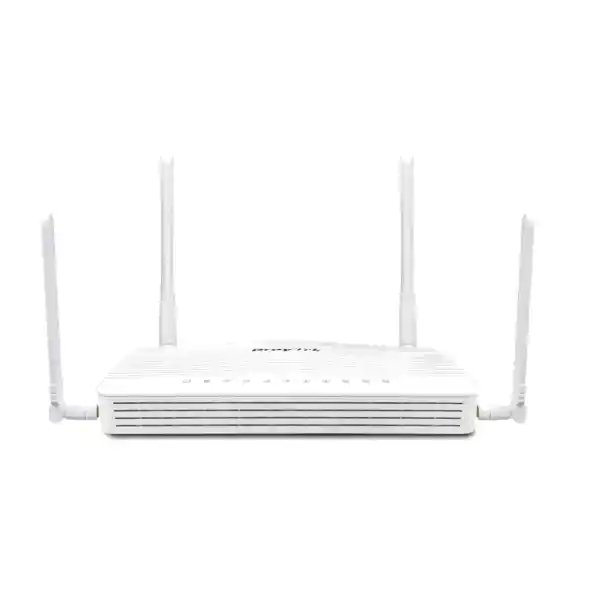
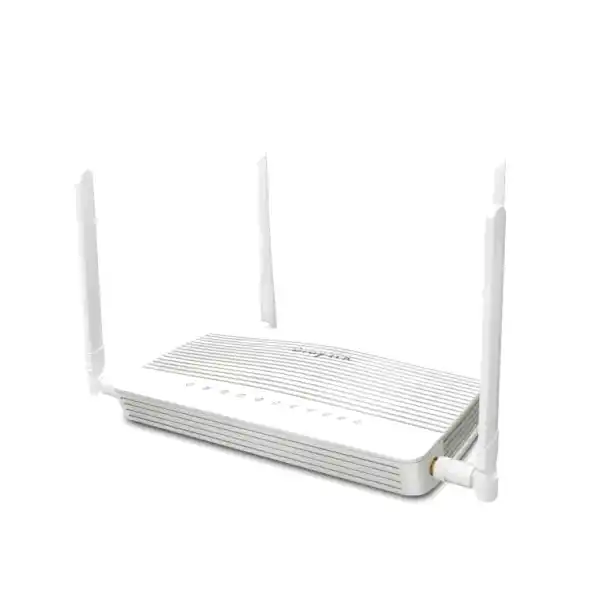
DrayTek Vigor C410ax UAE – AX3000 Wi-Fi 6 4G LTE Security Router
The DrayTek Vigor C410ax is a compact cellular WAN security router built for organisations that need dependable Internet access, practical multi-WAN resilience, secure remote connectivity and modern wireless performance without deploying a large branch firewall appliance. It brings together embedded 4G LTE Category 6 connectivity, dual nano-SIM slots, Gigabit Ethernet routing, Wi-Fi 6, policy control, VLAN segmentation, content filtering and business VPN capabilities in one platform suited to branch offices, retail counters, warehouses, clinics, temporary project sites and remote UAE facilities.
For UAE deployments, the value of the platform is not simply that it accepts a SIM card. It is the combination of cellular-first routing, Ethernet and wireless backup options, segmented LAN design, VPN termination and centralised management features that allows an integrator to build a branch edge with fewer boxes, fewer power adapters and fewer failure points. The router is especially relevant where leased-line installation may be delayed, where fixed connectivity is operationally critical but requires an independent backup path, or where a site must become productive quickly before permanent infrastructure is ready.
KEY VERIFIED CAPABILITIES
Routing: up to 940 Mbps NAT
Sessions: up to 50,000
VPN: 16 tunnels; IPsec up to 370 Mbps
Cellular: LTE Cat 6, up to 300 Mbps down / 50 Mbps up
Wireless: Wi-Fi 6, 574 Mbps + 2402 Mbps link rates
Cellular-First WAN
Embedded LTE Cat 6 provides a direct mobile broadband path with dual nano-SIM slots for carrier resilience. One SIM is active at a time, so the second slot supports an alternate mobile service rather than simultaneous cellular aggregation.
AX3000-Class Wi-Fi 6
The 2.4 GHz radio supports up to 574 Mbps and the 5 GHz radio up to 2402 Mbps theoretical link rate, with OFDMA and other Wi-Fi 6 mechanisms intended to improve efficiency in busy client environments.
Business VPN Edge
Support for up to 16 VPN tunnels and multiple VPN technologies enables site-to-site, remote-user and branch connectivity patterns. DrayTek rates IPsec throughput up to 370 Mbps under its test conditions.
Segmented LAN Security
Four fixed Gigabit LAN ports plus one switchable LAN/WAN Gigabit port provide practical wired connectivity, while 802.1Q VLAN, multiple LAN subnets and policy controls separate business, guest, IoT and management traffic.
What the DrayTek Vigor C410ax Is Designed to Do
The Vigor C410ax sits in a useful category between a basic mobile broadband router and a larger security appliance. A consumer 4G router may provide acceptable Internet access but often lacks the segmentation, route policy, VPN, identity, logging and management controls required by an organisation. At the other end of the scale, a high-end next-generation firewall can be unnecessarily large, costly or complex for a thirty-user branch, a temporary project office, a shop, a small warehouse or an unmanned remote cabinet. The C410ax targets that middle ground by concentrating the functions most often required at a small business edge.
DrayTek positions the platform for a network of around 30 hosts and quotes a maximum of 50,000 NAT sessions. Those figures should be treated as sizing indicators rather than guarantees. Real deployments vary significantly according to the number of concurrent clients, session-heavy applications, VPN encryption, filtering, logging, wireless airtime utilisation and the characteristics of the upstream service. A branch with twenty light office users can behave very differently from a retail site with twenty staff devices, twenty guest phones, multiple CCTV recorders, cloud-managed terminals and always-on SaaS sessions. The correct design therefore starts with the actual application profile and not only with the headcount.
The most distinctive element is the embedded LTE capability. The router can operate with cellular service as the principal WAN connection, which is valuable at locations that do not have immediate fixed-line availability. It can also be incorporated into a resilience plan in which Ethernet is used as a fixed-line path and another interface is used as failover. Wireless WAN can be used as a backup option on the supported bands. This gives integrators several ways to separate the primary and secondary failure domains rather than depending on two services that share the same physical last-mile infrastructure.
FourTeck can integrate this type of platform into broader UAE networking and security projects through FourTeck UAE, including structured LAN design, switch and access-point planning, cabling coordination and branch rollout. For customers specifically building secure Internet edges and resilient connectivity, the Firewall Dubai practice can align the Vigor C410ax with VPN, segmentation and operational security requirements.
Hardware Interface and Physical Design
Ethernet and SIM Connectivity
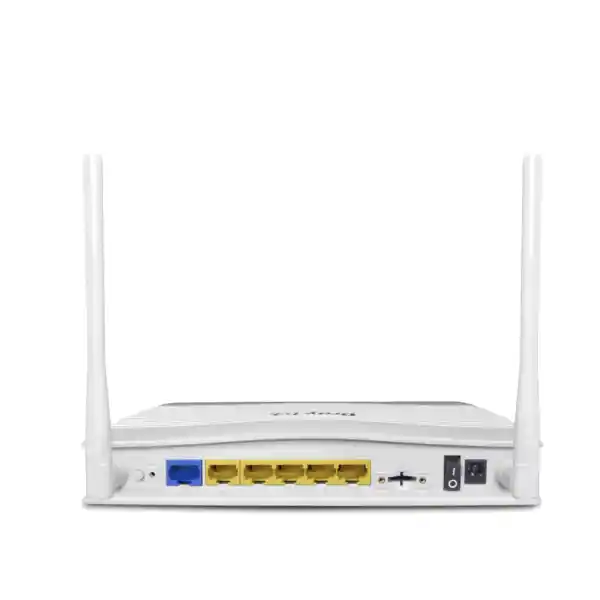
The C410ax provides one fixed Gigabit Ethernet WAN port, one Gigabit Ethernet port that can be assigned as LAN or WAN, and four fixed Gigabit Ethernet LAN ports. This layout is useful for compact branch designs because it supports direct attachment of several local endpoints while still allowing the switchable port to be repurposed as part of a dual-WAN strategy. The port plan should nevertheless be designed around the intended topology. Where a site needs many wired endpoints, PoE phones, surveillance devices or multiple wireless access points, the router should feed a managed access switch rather than being treated as the site’s only switching layer.
Two nano-SIM slots are integrated for cellular service. The platform uses one SIM at a time, allowing the second SIM to serve as an alternate operator profile or contingency path. This distinction matters in technical proposals: dual-SIM does not mean two simultaneous LTE modems and it should not be represented as cellular link aggregation. Instead, it provides a practical way to prepare for differences in carrier coverage, account availability or mobile-service incidents.
External cellular antennas are supplied, and the ax model also uses external Wi-Fi antennas. Antenna positioning has a significant influence on performance in real buildings. Metal cabinets, low-level placement, reinforced concrete and equipment rooms located deep inside a facility can reduce signal strength and radio quality. For cellular-first deployments, an installation survey should therefore consider router placement, antenna orientation, mobile signal measurements and the possibility that a different equipment location may materially improve WAN stability.
Power, Dimensions and Environment
The published chassis dimensions are approximately 207 × 131 × 42 mm. DrayTek specifies a 12 V DC, 1.4 A power input for the C410ax and a maximum power consumption of 16.2 W. Its compact footprint makes the router suitable for desktops, counters, communications shelves and small wall cabinets where rack space is limited, but the power and mounting method should still be treated as part of the resilience design. A small UPS can keep the router and upstream access equipment alive during brief utility interruptions, which is particularly useful if cellular connectivity is intended to maintain service during local last-mile or premises incidents.
The published operating temperature range is 0 to 45°C with 10 to 90 percent non-condensing operating humidity. The storage range is lower and higher than the operating range, but the router should not be assumed to be an industrial outdoor device. In UAE projects, cabinet temperature is important because a small enclosed enclosure, especially one installed in an unconditioned room, can exceed indoor ambient temperature quickly. The design should allow airflow and avoid placing the unit directly beside heat-producing power supplies or other equipment.
The box contents listed by DrayTek include two cellular antennas, two Wi-Fi antennas for the ax model, an Ethernet cable, power adapter and quick-start guide. Final supplied accessories can depend on regional packaging, so procurement documentation should verify the exact local part number, power adapter type, warranty channel and any required mounting accessories before order placement.
4G LTE Architecture for UAE Branch Connectivity
The embedded cellular modem is based on LTE Category 6 capability, with DrayTek quoting maximum receive and transmit link rates of up to 300 Mbps and 50 Mbps respectively. These are radio-link maxima, not guaranteed Internet speeds. Actual throughput depends on the mobile operator, spectrum availability, cell loading, signal quality, antenna placement, backhaul capacity, network policy and the service plan associated with the SIM. A procurement document should therefore describe the router’s cellular capability separately from any promised carrier bandwidth.
The supported LTE bands published for the model include FDD bands 1, 3, 7, 8, 20 and 28 together with TDD bands 38 and 40. Before deployment, the exact regional hardware variant and supported bands should be matched to the intended UAE operator and deployment location. Network operators can use several spectrum layers across different areas, so the strongest band at one site may not be the strongest at another. A survey at the target location remains more valuable than assuming that a model tested successfully in one branch will produce identical radio conditions at every branch.
A cellular-first design is particularly useful for temporary construction offices, pop-up retail, logistics yards, portable service desks, new branches waiting for fibre activation and sites where installing a fixed circuit is disproportionate to the expected operating period. The router can be installed once power and adequate cellular coverage are available. LAN, Wi-Fi, VLAN and VPN services can then be configured before the permanent fixed service exists. When the fixed circuit later becomes available, the Ethernet WAN can be incorporated into the final policy without replacing the whole edge device.
For continuity-focused offices, cellular is often more valuable as a failure-domain-diverse backup. Two fixed circuits entering the same riser, building telecom room or carrier aggregation point may share physical dependencies even when they have different account numbers. LTE uses a radio last mile and therefore introduces a different physical path. It is not immune to outages, congestion or power loss at cellular infrastructure, but it can protect against many cable cuts, ONT failures, local fibre issues and building-side service interruptions that affect a wired connection.
SIM strategy should be designed explicitly. With two nano-SIM slots and one active SIM at a time, an organisation can stage profiles from different mobile operators or maintain a secondary SIM for contingency. If the requirement is automatic operator failover, the implementation should be validated against the intended firmware behaviour and SIM policies during commissioning. The technical team should also document PIN requirements, APN parameters, account ownership, data allowances and responsibility for monitoring data consumption. A backup link that has an expired plan or exhausted data allowance is not an effective backup.
For externally hosted services, inbound connectivity over mobile broadband requires additional care because many carrier plans use private addressing or carrier-grade NAT. Traditional inbound NAT, port forwarding or direct public-IP assumptions may not work on a standard mobile plan. Site-to-site VPN initiated outbound from the branch is usually easier to design because the branch establishes the tunnel toward a reachable concentrator. Where inbound management or hosted services are required, ask the mobile provider whether a public, static or enterprise APN service is available and design the security model accordingly.
Data budgeting is another operational consideration. DrayTek includes WAN data-budget controls on the platform, which can help a branch avoid unexpected consumption when failover causes all business traffic, cloud backups, operating-system updates and streaming sessions to move to LTE. A well-designed policy can prioritise transactional systems, VPN and communications traffic during cellular operation while restricting or scheduling high-volume nonessential transfers. That approach turns cellular from a best-effort emergency connection into a controlled business continuity service.
Wi-Fi 6: AX3000-Class Wireless for Modern Client Density
The C410ax adds dual-band 802.11ax wireless connectivity to the C410 platform. DrayTek states a theoretical maximum link rate of 574 Mbps on 2.4 GHz and 2402 Mbps on 5 GHz, for an aggregate AX3000-class designation. These figures describe physical-layer link rates across the radios and should not be interpreted as a promise that a single wireless client will obtain 3 Gbps of application throughput. Actual wireless speed is influenced by the client radio, channel width, modulation rate, interference, distance, building material, contention and upstream WAN capacity.
On 2.4 GHz, the radio is described as 802.11ax 2×2 MIMO. On 5 GHz, DrayTek lists 802.11ax 3×3 MU-MIMO capability. The specification includes support for 160 MHz channel bandwidth and 1024-QAM, which help create high theoretical link rates when both the radio environment and client support allow them. In a business deployment, however, the widest channel is not always the best operational choice. Dense offices or multi-tenant buildings may benefit from narrower channels that permit cleaner frequency reuse and reduce overlapping contention. Wireless design is therefore a balance between headline speed and predictable airtime availability.
OFDMA is one of the important Wi-Fi 6 features supported by the platform. Instead of treating a channel only as a single block assigned to one client at a time, OFDMA can divide transmission resources so that multiple devices are scheduled more efficiently. This is particularly relevant where many clients transmit relatively small amounts of data, such as business messaging, cloud application signalling, scanners, handheld terminals and ordinary office devices. The benefit depends on compatible clients and real airtime conditions, but the design goal is more efficient use of the available channel under load.
The wireless security modes published for the C410ax include WPA3 and transitional WPA3/WPA2 options alongside older compatibility modes. A new deployment should favour the strongest security mode compatible with the client estate and avoid legacy protocols unless an explicit device requirement makes them unavoidable. Guest and IoT wireless networks should be placed in separate VLANs with restricted routing policies. Client isolation can be useful for guest networks where devices should reach the Internet but should not communicate directly with one another.
Band steering, airtime fairness, WMM, access control, hidden SSID options, scheduling and assisted roaming features provide additional tools for tuning wireless behaviour. Their presence does not eliminate the need for proper RF planning. A single C410ax can be effective in a small branch, but a larger office, long corridor, multi-floor premises, warehouse or building with dense concrete walls may require separate access points. In that case, the router should be treated as the secure edge and one wireless cell, not as a substitute for an engineered multi-AP WLAN.
The model can also use Wi-Fi as a WAN backup option. This is useful in circumstances where a nearby authorised wireless Internet service can act as an alternate uplink. The architecture should still preserve security boundaries: a wireless WAN should be treated as an untrusted external network, while the router’s firewall and NAT functions protect internal segments. When using this mode, validate channel coexistence and capacity because the same general radio environment may be serving both WAN access and local clients.
For installations where wireless performance is business-critical, combine the router configuration with a site survey, channel plan and post-installation verification. FourTeck’s IT Services UAE team can incorporate endpoint counts, floor plans, cabling availability and application requirements into a broader LAN and WLAN deployment rather than relying only on default radio settings.
WAN Failover, Policy Routing and Application Continuity
A business edge router becomes more valuable when it can make deliberate decisions about which path should carry which traffic. The Vigor C410ax provides several WAN choices, including embedded cellular, fixed Ethernet WAN, the switchable LAN/WAN Ethernet interface and supported wireless WAN backup. That flexibility allows the network designer to create policies around availability, cost and application importance instead of treating every uplink as interchangeable.
Connection detection is fundamental to failover. A physical Ethernet link can remain electrically up even when the upstream Internet service is unreachable, so a design should use an appropriate reachability test rather than relying only on port state. DrayTek lists connection detection options such as ARP and Ping. The target, interval and recovery behaviour should be selected carefully. If a test target is unstable, the router may switch WAN paths unnecessarily. If the test is too narrow, it may fail to identify a partial outage that affects critical destinations.
Route policy can then steer traffic according to parameters such as protocol, IP address or port. This is useful for keeping a corporate VPN on a preferred service while allowing generic web browsing to use another path, or for ensuring that cloud voice and collaboration traffic use the WAN with the most predictable latency. Application-aware policy should be tested against the actual application architecture, especially when cloud services use distributed addresses, encrypted sessions or frequently changing endpoints.
Failover behaviour must also account for stateful sessions. When the public source address changes because a flow moves from Ethernet to LTE, existing sessions may need to re-establish. Some applications recover transparently; others require a reconnect or reauthentication. Voice calls, live transactions, remote desktop sessions and VPN tunnels should therefore be tested during an intentional WAN switchover. The objective is to understand the actual recovery sequence, not simply to confirm that the router can reach the Internet after a failure.
The platform supports IPv4 and IPv6 functions, including static IPv6 options and several transition or tunnel methods. Whether IPv6 should be enabled at a branch depends on the upstream services, enterprise addressing plan, firewall policy and management readiness. A dual-stack network effectively has two protocol surfaces to secure, so IPv6 should not be enabled casually without equivalent filtering, logging and monitoring controls.
For dynamic routing, DrayTek’s published feature set includes RIP, BGP and OSPF version 2/version 3 together with static and policy routing. Small branches may never need a dynamic protocol, but support can be valuable when the C410ax is integrated into a larger routed environment, connected to an MPLS replacement design, or used to exchange routes with an upstream firewall or internal Layer 3 core. Dynamic routing should only be enabled when the operational team understands route preference, failover and advertisement behaviour; otherwise static routes and clear policy may be safer and easier to troubleshoot.
The central design principle is to decide which failures the architecture is intended to survive. Power loss, ISP loss, fibre cut, SIM problem, router failure and cloud application outage are different events. The C410ax can address several WAN-side failure scenarios when configured correctly, but no single router can remove every single point of failure. Critical sites may still require redundant power, secondary switching, separate cellular providers, monitored UPS capacity and documented replacement procedures.
LAN Segmentation, VLANs and Addressing
A small branch does not have to be a flat network. The C410ax supports 802.1Q tag-based VLANs and DrayTek lists support for up to eight VLANs together with multiple LAN subnets. This is sufficient for many compact environments to separate corporate users, guest devices, IP phones, printers, payment terminals, CCTV equipment, building-management controllers and network administration. The security gain comes not from creating VLAN IDs alone, but from defining which segments may communicate and which services are explicitly permitted between them.
A typical UAE retail branch might place staff laptops and business terminals in a corporate VLAN, guest Wi-Fi in an Internet-only VLAN, CCTV cameras in a surveillance VLAN, and management interfaces in an administrator-only VLAN. Inter-VLAN routing can then be controlled so that guest devices cannot reach private systems, cameras can reach the recorder or cloud platform but not staff endpoints, and only authorised administrators can open management sessions to the router or switching infrastructure. This reduces lateral movement opportunities if an untrusted or poorly maintained device is compromised.
DHCP functions include multiple IP-subnet options, custom DHCP options and bind-IP-to-MAC capability. These tools help create predictable addressing for appliances that benefit from stable identities without manually assigning static addresses on every endpoint. DNS forwarding and local DNS options can simplify local name resolution, while conditional forwarding can direct selected domains toward specific resolvers when required by corporate resources or VPN-connected sites.
Port mirroring is another useful operational capability. When troubleshooting intermittent application behaviour, packet loss or unexpected device communication, a mirrored interface can feed a packet analyser without inserting another device inline. This feature should be used carefully because capture data can contain sensitive information. Access to mirrored traffic, stored traces and diagnostic workstations should be restricted according to the organisation’s security procedures.
For multicast applications, the feature set includes IGMP version 2/version 3, IGMP Proxy, IGMP Snooping and fast-leave functions. These can matter for IPTV-style services, certain surveillance or media systems and other multicast-dependent applications. Multicast should not be enabled broadly without a requirement because uncontrolled flooding can consume bandwidth and complicate troubleshooting. When it is required, the switch and router configuration should be planned together so membership information is handled consistently.
The wired port count should be regarded as edge connectivity, not as a replacement for a managed access switch when the branch is expected to grow. A switch provides scalable port density, PoE for phones and access points, and more flexible physical topology. The router then concentrates on security, routing, WAN resilience and VPN. Separating these roles usually creates a cleaner operational design and avoids running out of ports as new endpoints are introduced.
Firewall, Web Controls and Identity-Aware Access
The Vigor C410ax includes a stateful business firewall and content-control functions intended for branch security. DrayTek lists IP, content and traffic filtering, along with mechanisms addressing ARP spoofing and IP spoofing. The device can also filter web access by URL keywords or web categories and supports URL/IP reputation functions. These features can help reduce exposure to known undesirable destinations and enforce acceptable-use policy, but they should be configured as part of a layered security model rather than treated as a complete substitute for endpoint protection, patch management, email security and application-specific controls.
Firewall policy should follow an explicit allow-and-deny model. Start by defining trusted internal segments, untrusted guest or IoT segments, site-to-site VPN zones and external WAN interfaces. Then document the flows required by business applications. For example, payment terminals may need outbound access to a payment processor while having no reason to initiate sessions toward office workstations. Cameras may need DNS, NTP and connections to a recorder or cloud service while being blocked from guest clients. A management VLAN may require HTTPS or SSH access to infrastructure while ordinary users do not.
Content filtering can be used to support acceptable-use policy and reduce risky browsing. Category-based controls are most useful when organisational policy defines the intended result, such as blocking known malicious destinations, adult content or categories unrelated to a controlled terminal. Overly broad filters can disrupt legitimate services because modern applications frequently rely on content-distribution networks and third-party APIs. Changes should therefore be logged and tested, and exception processes should be documented so business users can request review when a site is misclassified.
DrayTek also includes a port-knocking capability intended to reduce the visibility of selected services until an authorised sequence is received. Port knocking can add obscurity around administrative exposure, but it does not replace strong authentication, restricted management source addresses, current firmware and encrypted management protocols. Direct management from the public Internet should be minimised. Where possible, administrators should connect through a VPN or a protected management path rather than exposing the management interface broadly.
User authentication options in the platform include local credentials, RADIUS, TACACS+, mobile one-time password and time-based one-time password capabilities in relevant workflows. Central identity integration can improve accountability by avoiding shared administrator credentials and allowing access to be revoked centrally. The correct choice depends on the customer’s identity stack and management model. A ten-user branch with no directory may use a simpler design, whereas a multisite enterprise is more likely to prefer central authentication and standard administrator roles.
The hotspot web portal features can support click-through, social login, SMS PIN, RADIUS and external portal server methods. This makes the C410ax useful in hospitality, reception, retail or visitor environments where guest Wi-Fi must be separated from internal resources and may require an acceptance or authentication step. Guest networks should be bandwidth-controlled so they cannot consume the capacity needed by business applications, particularly when the active WAN is cellular.
Security settings are not one-time configuration items. They need review as applications change, staff roles evolve and new device categories are introduced. An effective branch standard defines a baseline configuration, names the owner of firewall changes, establishes a configuration-backup process and includes periodic checks of remote administration, inactive accounts, VPN profiles, web-filter exceptions and exposed services.
VPN Design: Site-to-Site, Remote Access and Secure Branch Overlay
VPN is one of the strongest reasons to choose a business router instead of a basic LTE gateway. The C410ax supports up to 16 VPN tunnels, and the published feature set includes IPsec, L2TP over IPsec, IKEv1/IKEv2, IKEv2-EAP, IPsec-XAuth, OpenVPN and WireGuard. This provides enough protocol flexibility to connect the branch to head office, cloud gateways, other DrayTek sites or remote users, subject to interoperability, firmware capability and the security policy of the organisation.
DrayTek quotes up to 370 Mbps for IPsec VPN throughput using AES-256 in its stated test context and up to 50 Mbps for WireGuard in the published specification data. These values are laboratory maximums, not application guarantees. Real encrypted throughput can change with packet size, traffic direction, concurrent tunnels, selected cryptographic parameters, latency and other router services. A branch that expects sustained encrypted transfers should be sized using expected simultaneous workloads rather than only the maximum headline result.
For a site-to-site design, the usual objective is to make selected branch networks reachable from headquarters or a data centre while keeping guest and other untrusted segments local to the Internet. The route and firewall policy should identify which VLANs are included in the tunnel. Sending every branch subnet through VPN by default can unintentionally expose guest or IoT devices to corporate networks. Conversely, forgetting a required subnet may break printers, voice services or application access. The encryption domain should therefore be documented alongside the VLAN plan.
IKEv2 and modern encryption parameters are generally preferable where interoperable with the remote peer. Pre-shared keys are simple but require secure distribution and rotation. X.509 certificate authentication can improve scalability for multisite environments when the organisation has an appropriate certificate lifecycle. Older algorithms may remain listed for compatibility, but new deployments should avoid weak or legacy options when both peers support stronger cryptography. The exact standard should follow the customer’s security policy and interoperability requirements.
NAT traversal support is important when the branch itself is behind carrier-grade NAT or another upstream router. Mobile broadband frequently presents this condition. A tunnel initiated by the C410ax toward a public VPN endpoint can often traverse NAT more reliably than expecting unsolicited inbound sessions to reach the branch. This architecture also reduces the need to obtain a public mobile address merely for management or site-to-site connectivity.
Remote-access VPN should be designed around identity and device trust, not only password possession. If the deployment uses one-time password methods or an external authentication service, enrollment and recovery procedures should be documented before rollout. Administrators need a process for a lost phone, expired credential or departing employee. A secure VPN implementation includes account lifecycle, logging, least privilege and periodic review of inactive profiles.
When the router has multiple WAN paths, VPN recovery should be tested across failover. Some peers bind security associations to source IP addresses, so moving from fixed Ethernet to LTE may require the tunnel to renegotiate. DNS-based peer names or central concentrator settings can help in some designs, but the correct solution depends on both ends. A commissioning test should deliberately remove the primary circuit and record how long the tunnel takes to restore access over the backup path.
VPN also affects addressing design. Overlapping private subnets between branches create routing ambiguity and are a common source of deployment delay. Organisations planning multiple sites should use a structured subnet allocation scheme before equipment is installed. A consistent pattern can reserve address ranges per site, VLAN role or region and reduce the need for awkward translation later. The C410ax supports multiple subnets and policy routing, but good addressing remains simpler than compensating for duplicate networks.
For international or multisite projects extending beyond UAE, FourTeck’s global network and infrastructure practice can coordinate common branch standards, configuration templates and secure connectivity requirements so individual locations do not evolve into incompatible one-off designs.
QoS, Traffic Control and User Experience
A branch does not need extremely high bandwidth to benefit from traffic management. In fact, QoS becomes most valuable when a constrained service is shared by interactive and bulk applications. The C410ax includes QoS and application-aware policy functions that can help prioritise time-sensitive traffic while preventing background downloads, cloud synchronisation or guest usage from dominating the uplink. This matters particularly on LTE because uplink capacity is typically much lower than downlink capacity and can vary with radio conditions.
The first step is measuring the real service, not configuring policy from the theoretical radio maximum. If an LTE connection consistently provides 80 Mbps down and 18 Mbps up at a particular branch, shaping values based on 300/50 could fail to control congestion because the bottleneck exists before the policy becomes effective. Conservative bandwidth definitions based on observed performance can allow the router to become the controlled queueing point rather than leaving unpredictable queuing to the carrier network.
Voice, video meetings, remote desktop and transaction systems are typical candidates for priority. Backups, software updates, large file synchronisation and guest downloads can often accept lower priority or scheduled windows. The business owner should define the operational hierarchy. IT can then map that hierarchy into classes and rules. Prioritising everything defeats the purpose of QoS, so classification should remain limited to traffic with a genuine latency or continuity requirement.
During WAN failover, QoS policy may need to change because the backup service could have much less capacity than the primary service. A 500 Mbps fixed circuit failing to a 40 Mbps cellular path creates a different operating environment. The branch continuity plan should identify which applications remain essential under degraded conditions and which can be reduced or paused. This makes backup connectivity more predictable and protects the workflows that justified the resilience investment in the first place.
Monitoring, Remote Administration and VigorACS 3
Operational visibility is essential when a router is deployed outside the main office. The C410ax exposes monitoring information for clients, WAN status, ARP and route tables, DHCP state, IPv6 neighbours, LLDP neighbours, DNS cache, cellular WAN status, session state and running services. These views help engineers distinguish a local client problem from a routing issue, a mobile-service problem or a DNS failure without immediately travelling to the site.
Management protocols listed for the platform include HTTPS, SSH, HTTP, Telnet, FTP and TR-069 in various roles. Secure deployments should prefer encrypted management methods and disable unnecessary legacy exposure. Remote access should be restricted by source where practical and ideally reached through VPN. Administrative credentials should be unique, strong and tied to named users when central authentication is available. A management interface reachable from every LAN and every WAN is convenient during installation but creates unnecessary risk in production.
VigorACS 3 provides a central-management path for larger estates. DrayTek highlights zero-touch deployment and provisioning, Auto VPN, interface quality and SLA functions, application visibility, application-based SD-WAN policy, hotspot customisation and other management capabilities. A multisite operator can use central management to standardise configurations, push changes and monitor branch health instead of treating each router as an isolated device. Licensing, hosting and support arrangements for VigorACS should be confirmed as part of the solution because platform features and entitlement models can evolve.
Configuration backup and restore should be integrated into change management. Before a significant firewall, VPN or routing update, save a known-good configuration with a clear date and site identifier. Do not store unprotected backups in a shared location if they contain sensitive settings. After an approved change, update the documentation and backup again. This simple discipline can reduce recovery time after an accidental misconfiguration or hardware replacement.
Firmware lifecycle management is equally important. DrayTek continues to publish firmware for the C410ax, but the appropriate release can differ by region and support channel. Production routers should not be upgraded merely because a version number is newer. Review release notes, security fixes, resolved defects and known issues, confirm the correct hardware region, back up configuration and schedule a maintenance window. For high-availability branches, test the target release on a representative device before broad rollout where possible.
Logging should answer operational questions: which WAN failed, when did it recover, which VPN went down, which administrator changed configuration, and whether repeated authentication or filtering events indicate a problem. The router’s own log view is useful, but organisations with a central syslog or monitoring platform should forward relevant events so evidence remains available even if the branch device is rebooted or replaced.
Sizing the Vigor C410ax Correctly
DrayTek recommends the platform for a network of around 30 hosts and lists up to 50,000 NAT sessions. Those figures provide a useful starting point but should be interpreted alongside traffic behaviour. Host count is not the same as device count and device count is not the same as session demand. A user may have a laptop, phone and tablet. Cloud applications can maintain many concurrent encrypted sessions. Cameras can create continuous upstream traffic, while guest devices create bursts of unpredictable consumption. A technical sizing exercise should therefore inventory people, endpoints, traffic direction, applications and expected growth.
The maximum NAT figure of up to 940 Mbps indicates that the platform is appropriate for Gigabit-class Internet access in favourable conditions. Throughput can reduce when multiple services are applied. VPN encryption, filtering, extensive logging, QoS, wireless traffic and concurrent flows consume processing resources. The vendor itself states that published throughput results are maximums obtained under its test conditions and that actual performance varies with network conditions and enabled applications. Procurement specifications should repeat this principle instead of promising laboratory numbers as guaranteed production throughput.
For VPN-heavy branches, start with the encrypted workload. A site that has a 700 Mbps Internet service but only needs 50 Mbps of corporate VPN and uses the remaining bandwidth for local cloud access may fit differently from a site that expects nearly all traffic to traverse an IPsec tunnel. DrayTek’s IPsec figure of up to 370 Mbps gives a ceiling for planning, but design headroom is still required. Sustained production use should not be planned at the absolute maximum figure.
Wireless sizing requires a separate view. The router’s AX3000-class radios can provide high link rates, but a single radio cell serves a shared medium. Thirty low-duty office clients may be straightforward; thirty devices all transferring large files are different. Walls, distance, neighbouring WLANs and client capabilities also influence performance. If coverage is the dominant requirement, multiple access points connected by Ethernet may provide a better user experience than attempting to reach every corner from one high-power location.
Cellular sizing should distinguish nominal plan speed from observed site performance. Measure signal quality and throughput during representative busy periods. Mobile networks can be excellent at one time and more constrained during peak demand. If LTE is the only WAN for a business-critical site, consider whether the application can tolerate that variability. If not, a fixed circuit or secondary carrier may still be required even though the router technically supports cellular-first operation.
Feature fit is as important as performance. The C410ax is a strong choice when the requirements include embedded 4G, Wi-Fi 6, modest branch user count, VLANs, business VPN and flexible WAN backup. It may be less suitable if the organisation requires multi-gigabit WAN interfaces, very high encrypted throughput, hundreds of users, extensive next-generation threat inspection, dual simultaneous cellular modems or large-scale rack-mounted redundancy. Identifying those boundaries early prevents buying a compact router for a workload that belongs on a larger security platform.
A useful sizing margin is to plan for the next stage of the branch, not only the first month. If the site is expected to grow from fifteen to thirty users, add cameras, deploy cloud telephony and move from a 100 Mbps line to Gigabit service, size the router and switching design against the later-state traffic. The C410ax can accommodate many such branches, but documenting the growth assumption makes the decision measurable and easier to revisit.
UAE Deployment Scenarios
New Branch Waiting for Fibre
A company can configure LAN, Wi-Fi, VPN and security policy before the fixed circuit is delivered, use LTE as the initial WAN, and later add the Ethernet service without replacing the edge. This accelerates opening schedules and keeps the branch architecture consistent from day one.
Retail or POS Continuity
A fixed circuit can carry normal operations while cellular provides a physically diverse backup for payment systems, inventory applications, cloud POS and staff connectivity. QoS and data-budget controls can restrict nonessential traffic while the site operates on LTE.
Temporary Project Office
Construction and event sites often need connectivity before permanent telecom infrastructure exists. The C410ax can provide rapid wireless and wired access, establish a VPN to headquarters and later be redeployed when the temporary office closes.
Remote Warehouse or Yard
Where fixed-line installation is difficult, LTE can connect scanners, supervisors, selected cameras and operational systems. The network should use VLANs and traffic policies to ensure continuous surveillance or large uploads do not overwhelm transaction traffic.
SME Office Security Edge
A small office can consolidate routing, guest Wi-Fi, staff Wi-Fi, multiple LAN segments, filtering and remote-access VPN. Central authentication and logging can be added as the organisation matures without immediately moving to a larger branch appliance.
Managed Multisite Rollout
Organisations with repeated branch patterns can standardise VLAN IDs, subnets, WAN checks, VPN profiles and security rules, then use central management to reduce configuration drift and simplify support across multiple sites.
Each scenario benefits from an installation worksheet. Record the carrier, APN, SIM ownership, WAN priority, VLAN plan, DHCP ranges, wireless SSIDs, VPN peers, administrative access methods and escalation contacts. This information turns a working router into a supportable service. Without documentation, a simple SIM replacement or ISP change can become a prolonged outage because nobody knows which assumptions were built into the original configuration.
Recommended Installation and Commissioning Method
A professional deployment starts before the router is powered on. Confirm the exact hardware variant, approved power adapter, intended mobile operator, SIM form factor, service activation and building location. If LTE is primary or backup, test coverage at the proposed installation point and record signal quality. Place the device where the antennas are not shielded by metal or dense building materials and where the operating temperature remains within specification.
Next, define the logical network. Allocate LAN subnets and VLAN IDs, decide which physical ports carry access or tagged traffic, create DHCP scopes and identify any fixed addressing requirements. Separate corporate, guest, IoT and management networks when the business case requires it. Build firewall policy from these defined zones. Avoid creating a flat network first and promising to segment it later, because devices and applications quickly become dependent on unrestricted reachability.
Configure the primary WAN and backup WAN independently before enabling automated failover. Confirm DNS, default route, MTU-sensitive applications and access to required cloud services on each path. For mobile WAN, verify APN settings, data plan and expected addressing behaviour. If the branch requires inbound services, confirm whether the mobile carrier provides suitable public addressing; do not assume inbound NAT will operate through carrier-grade NAT.
Configure VPN only after base Internet connectivity is stable. Use defined cryptographic standards and unique credentials or certificates. Test every required branch subnet through the tunnel, then test excluded networks such as guest Wi-Fi to confirm they do not gain unintended corporate access. Validate DNS across the VPN if internal names are required. Finally, force WAN failover and observe whether tunnels, applications and remote management recover as expected.
For Wi-Fi, select security modes compatible with the client estate, prefer WPA3-capable configurations where practical and isolate guest traffic. Measure coverage rather than relying on signal bars at the router. Walk the actual user areas with representative devices and test roaming, latency and throughput. If coverage gaps remain, add properly positioned access points rather than attempting to solve a building-layout problem only by changing router transmit settings.
Apply management hardening before handover. Change default credentials, create named administrator accounts where supported, disable unused remote services, restrict management sources, enable secure protocols, back up configuration and record the firmware release. If central monitoring or VigorACS is part of the solution, enrol the router and confirm that alerts, inventory and remote actions are working.
Commissioning should finish with evidence. Record WAN speeds on each path, VPN reachability, failover recovery, wireless coverage checks, VLAN isolation and management access. Provide the customer with a concise network diagram, IP plan, support contact and backup procedure. A branch that passes these tests is easier to operate and much easier to troubleshoot than one that is simply declared online after a successful speed test.
Procurement, Licensing and Support Considerations
When buying a Vigor C410ax for UAE use, procurement should confirm more than model name and price. Request the exact regional part number, warranty terms, included power adapter, LTE band support, antenna package and current local support path. DrayTek has regional firmware and support resources, so firmware obtained from another geography should not automatically be assumed to be the correct production image for a UAE-supplied device. The supplier should be able to confirm the applicable release channel and escalation route.
The base router includes a broad feature set, but some cloud management or content services may have separate subscriptions, service terms or lifecycle conditions. A quotation should identify what is included with the hardware and what, if anything, requires an additional licence. This is especially important for central management platforms, reputation services, advanced content categorisation or third-party authentication integrations. Procurement should compare total operating cost over the expected service period rather than only the appliance cost.
SIM service is a separate commercial component. Confirm whether the branch will use consumer, business or enterprise mobile plans, and whether the operator supports the required APN, public addressing, roaming or static addressing features. Data allowances should reflect backup behaviour: a branch that normally uses a fixed WAN may consume very little LTE data until the primary circuit fails, at which point usage can increase rapidly. Alerts or capped policies help prevent unexpected billing.
Spares strategy depends on the importance and number of sites. A single small office may accept next-business-day replacement. A retail chain with many branches may justify holding a preconfigured spare or maintaining a rapid replacement process. Because the router is compact, standardising on one branch model can simplify spare logistics. Configuration backups and central management improve the ability to replace hardware quickly, but the team should test that restoration process before it is needed during an outage.
Professional services can include requirements validation, configuration, staging, installation, SIM/APN setup, VPN integration, VLAN creation, Wi-Fi tuning, failover testing, documentation and handover. Customers should define which tasks are included in the purchase so there is no ambiguity between hardware supply and a commissioned network solution. FourTeck can scope supply-only and integration-led engagements depending on whether the customer has an internal network team.
Finally, establish lifecycle ownership. Someone must review firmware advisories, renew any applicable subscriptions, update administrative credentials, maintain the branch diagram and verify that the backup SIM is still active. Resilience depends on these operational details. A perfectly configured router can still fail to provide continuity if the backup data plan expired months earlier or the site moved without anyone retesting cellular coverage.
Detailed Technical Reference
| Area | DrayTek Vigor C410ax Capability | Design Interpretation |
|---|---|---|
| NAT | Up to 940 Mbps; up to 50,000 sessions | Suitable for many Gigabit-class small-branch environments, subject to enabled services and traffic profile. |
| Cellular | LTE Cat 6, up to 300 Mbps receive and 50 Mbps transmit; dual nano-SIM, one active | Use as primary WAN or diversified backup. Real performance depends on operator and RF conditions. |
| Ethernet | 1 × fixed GbE WAN, 1 × GbE LAN/WAN switchable, 4 × fixed GbE LAN | Enough for compact sites; connect a managed switch for larger endpoint counts or PoE requirements. |
| Wi-Fi | 802.11ax; 2.4 GHz up to 574 Mbps; 5 GHz up to 2402 Mbps; OFDMA | High-efficiency branch WLAN; theoretical link rates differ from user application throughput. |
| VPN | Up to 16 tunnels; IPsec up to 370 Mbps; WireGuard up to 50 Mbps in published data | Size against actual encrypted workload and concurrent features, not only raw WAN bandwidth. |
| Segmentation | 802.1Q VLAN, up to 8 VLANs, multiple LAN subnets | Supports practical separation of users, guests, IoT, surveillance and management networks. |
| Routing | Static, policy route, inter-VLAN route, RIP, BGP, OSPF v2/v3 | Can integrate with simple or more structured routed branch designs. |
| Security | Firewall, content filtering, URL/IP reputation, anti-spoofing controls, port knocking | Useful branch controls; deploy within a layered security model. |
| Dimensions | 207 × 131 × 42 mm | Compact form factor for shelves, counters and small communications spaces. |
| Power / Environment | 12 V DC 1.4 A; max 16.2 W; operating temperature 0–45°C | Allow ventilation and consider a UPS where WAN continuity is important. |
Published performance values are maximum figures from vendor test conditions. Actual results depend on firmware, active services, traffic mix, radio environment, carrier service, client capability and configuration.
When the C410ax Is a Strong Fit — and When to Size Up
The Vigor C410ax is a strong fit when a branch needs embedded LTE, a small number of wired ports, modern Wi-Fi, segmented LANs, secure site-to-site connectivity and flexible WAN backup in one device. It is particularly attractive when fast deployment matters or when a site needs a cellular path that is independent of the local fixed circuit. Its published host guidance, session scale and VPN figures align naturally with small offices and branch workloads rather than campus or data-centre roles.
Size up when requirements move beyond that profile. Examples include multi-gigabit Internet services, very large numbers of users, sustained high-throughput encryption, advanced intrusion prevention across large traffic volumes, many high-density wireless cells, redundant active/standby firewall appliances, dual simultaneous cellular modems or large numbers of site-to-site tunnels. A larger platform may also be justified when the organisation already standardises on a central security ecosystem that provides common policy, threat intelligence and analytics across hundreds of sites.
The key is not to compare products only by throughput. Branch architecture includes operational simplicity, number of supportable failure paths, client density, application mix, remote-management capability, identity integration, physical footprint and lifecycle support. A compact router that precisely matches a branch can be more supportable than a larger appliance with features that are never used, while undersizing creates recurring performance and reliability issues.
FourTeck can review the proposed user count, WAN circuits, mobile operator, floor plan, VPN topology and segmentation requirements before quotation. That helps determine whether the Vigor C410ax should operate as a complete small-branch edge, as a cellular backup gateway alongside another firewall, or whether a different model is more appropriate.
Frequently Asked Technical Questions
Can the Vigor C410ax use 4G as its main Internet connection?
Yes. The product is designed to support embedded cellular WAN and can operate with LTE as the primary path. Actual Internet speed depends on operator coverage, signal quality, cell loading and the subscribed service plan.
Do both SIM slots operate at the same time?
No. The platform provides two nano-SIM slots but uses one active SIM at a time. The second slot is useful for operator or account redundancy rather than simultaneous LTE bonding.
Is AX3000 equal to 3 Gbps Internet speed?
No. AX3000 is an aggregate wireless link-rate class based on the 2.4 GHz and 5 GHz theoretical radio rates. Real client throughput is lower and is also limited by the WAN service and RF conditions.
How many VPN tunnels are supported?
DrayTek lists support for up to 16 VPN tunnels. The router supports several protocols including IPsec, OpenVPN and WireGuard, with performance depending on the selected protocol and configuration.
Can it separate guest Wi-Fi from the office network?
Yes. VLANs, multiple LAN subnets, firewall rules, client isolation and hotspot features can be combined to keep guest traffic separate from corporate devices and internal services.
Is it suitable for a large enterprise headquarters?
Its natural role is a small branch or compact site. Large headquarters with high user density, multi-gigabit services or extensive security inspection generally require a higher-capacity platform and dedicated wireless infrastructure.
Decision Recap for IT Managers and Procurement Teams
Choose the DrayTek Vigor C410ax when the requirement is for a compact security router that can bring a branch online over 4G, provide modern Wi-Fi 6, terminate business VPNs, separate local networks and preserve connectivity through alternate WAN paths. Its core strengths are integration and deployment flexibility. The platform can reduce the number of separate devices required at a small site and gives the network team more control than a basic cellular router.
The technical boundaries should be respected. Dual SIM means one active cellular connection at a time. AX3000 is a wireless class rather than a single-client speed guarantee. Published NAT, VPN and LTE values are maximums under specific conditions. The router is recommended by DrayTek for roughly thirty hosts, but application behaviour and endpoint count can change the practical load substantially. These points should be written into the solution design so stakeholders understand what the platform is expected to deliver.
For the strongest deployment outcome, pair the hardware with a clear WAN strategy, a VLAN plan, a tested VPN design, secure management, documented failover tests and a support process. That transforms the C410ax from a feature-rich box into a maintainable branch connectivity service.
Quotation Input Checklist
To prepare an accurate UAE quotation and implementation scope, provide the information below. These inputs allow the engineering team to determine whether the C410ax can be supplied as a standalone router or should be paired with managed switching, additional access points, UPS protection, structured cabling or another security platform.
Site and Users
City and site type, expected staff count, total wired and wireless devices, guest-user requirement, working hours and expected growth during the next 12–24 months.
WAN Services
Primary ISP speed, Ethernet handoff type, preferred mobile operator, SIM plan, APN requirements, whether LTE is primary or backup, and any public/static IP requirement.
VPN and Applications
Number of site-to-site tunnels, remote-access users, head-office firewall or VPN peer, required encrypted throughput, cloud applications, voice platforms and latency-sensitive systems.
LAN and Wi-Fi
Number of VLANs, IP subnets, existing switches, PoE devices, access points, guest SSID, floor size, construction materials and any areas with known wireless coverage difficulty.
Security and Management
Content-filter policy, authentication source, central logging, VigorACS requirement, administrator access method, configuration backup policy and maintenance-window expectations.
Commercial Scope
Hardware-only supply or full installation, number of sites, staging requirement, onsite commissioning, documentation, staff handover, warranty preference and target deployment date.
FourTeck UAE Consultation
Plan the Vigor C410ax Around Your Real WAN, VPN and Wi-Fi Requirements
A reliable branch design depends on more than ordering the router. Share your site count, mobile operator, fixed-line service, user profile, VPN peer and coverage requirements so the proposed configuration can be sized around actual operating conditions.
FourTeck can provide hardware supply, staging, configuration, VLAN and VPN design, cellular failover testing, Wi-Fi verification, central management setup, documentation and UAE onsite deployment according to the agreed project scope.
Before requesting a quote, have these four answers ready:
1. Is 4G primary or backup?
2. How many users and devices?
3. What VPN peer and throughput are required?
4. Is one Wi-Fi cell enough for the site?

Reviews
There are no reviews yet.