
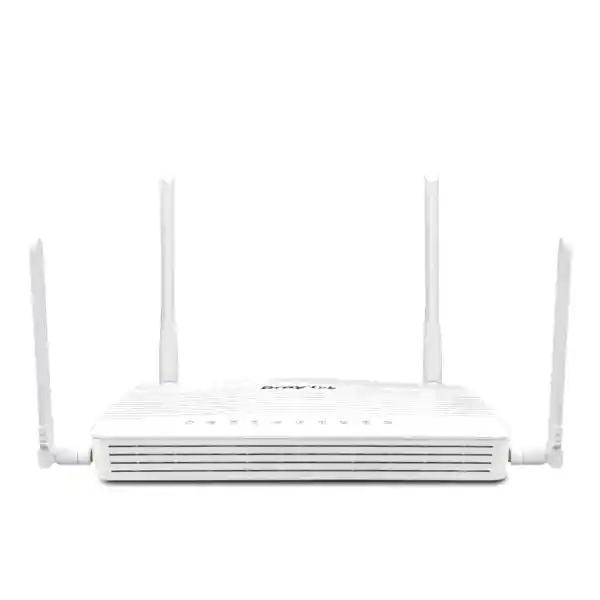
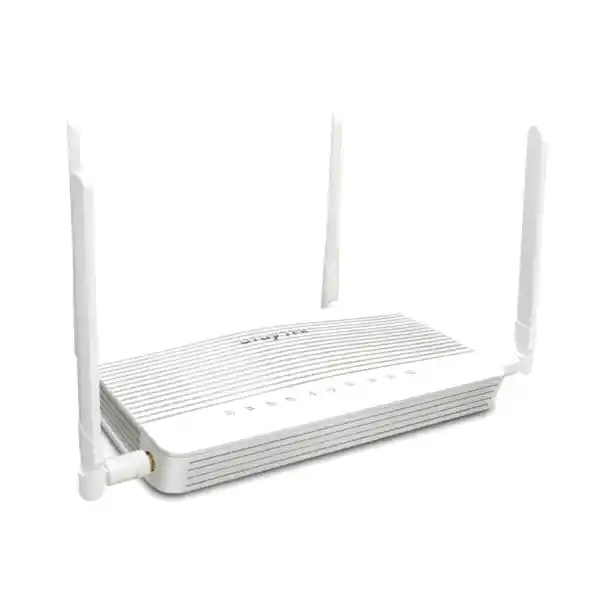
DrayTek Vigor C510ax UAE – 5G Wi‑Fi 6 Security Router for Resilient Business Connectivity
The DrayTek Vigor C510ax is built for organizations that need dependable Internet access even when a fixed circuit is unavailable, delayed, congested or temporarily out of service. It combines embedded 5G cellular WAN, dual nano-SIM slots, Wi‑Fi 6, business routing, policy control, VPN, firewalling, segmentation and centralized management in a compact platform suitable for branch offices, retail outlets, warehouses, project sites and mobile or temporary operations across the United Arab Emirates.
For UAE buyers, the practical value of the C510ax is not simply that it contains a 5G modem. Its value is that cellular connectivity is integrated into a router platform designed for controlled failover, secure remote access, site-to-site VPN, traffic policy, VLAN segmentation, content controls and operational monitoring. This makes it relevant both as a primary WAN appliance and as a continuity device behind an existing fibre or Ethernet service.
Verified platform highlights
What the Vigor C510ax is designed to solve
Modern branch connectivity is rarely a simple question of choosing the fastest Internet circuit. A useful branch edge must keep users connected, enforce policy, isolate business systems, provide secure access to remote resources and give administrators a practical way to diagnose failures. The Vigor C510ax addresses these requirements by integrating an embedded cellular modem with a mature routing platform. DrayTek positions the C510 series as a cellular WAN security router with 5G support and an always-on cellular mode, while the ax model adds Wi‑Fi 6 and Wi‑Fi WAN backup capability.
In the UAE, this architecture is particularly relevant where a site has to become operational before fibre delivery, where a retailer cannot tolerate a payment-network outage, where a construction or event location moves regularly, or where a conventional leased line remains the primary service but a second access path is needed for continuity. A 5G router can also reduce deployment friction at small remote offices because Internet access, local wireless access and security policy can be delivered from one compact device rather than assembled from multiple consumer products.
The C510ax should therefore be evaluated as an edge appliance, not as a simple 5G hotspot. It supports business functions such as policy routing, inter-VLAN routing, IPv4 and IPv6 static routing, dynamic routing options, QoS, web content controls, identity functions, hotspot services, VPN technologies and centralized management. The design objective is controlled connectivity: administrators can determine which traffic uses which WAN path, how users are separated, how services are exposed, how remote offices connect and what happens when one transport path degrades.
Hardware and interface architecture
Embedded 5G modem
The integrated cellular modem supports 5G Standalone and Non-Standalone operation, enabling the router to work with modern 5G deployments while retaining LTE compatibility. Because the modem is internal, administrators avoid the mechanical and operational weaknesses of attaching an external USB modem. Antenna placement, SIM management, status monitoring and failover logic remain part of the router platform.
Dual nano-SIM slots
Two nano-SIM slots allow two operator subscriptions to be installed, with one SIM active at a time. This is useful for carrier redundancy, field deployments and locations where signal quality or service consistency differs between providers. Dual SIM does not mean two simultaneously aggregated cellular connections; it provides operational flexibility and a way to switch between provisioned SIM profiles.
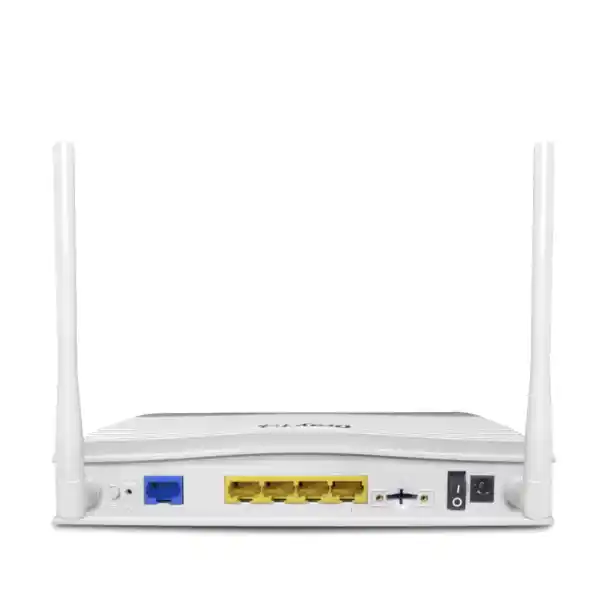
Five Gigabit RJ‑45 ports
The physical Ethernet layout includes one fixed Gigabit Ethernet WAN port, one Gigabit port that can operate as LAN or WAN, and three fixed Gigabit LAN ports. This arrangement gives small sites enough copper connectivity for a switch, local server, IP-PBX, payment gateway, access-control appliance or workstation while preserving the option to add an Ethernet-based WAN path.
External antennas
The C510ax uses external cellular and Wi‑Fi antennas. Correct antenna orientation and router placement matter because RF conditions can have a larger impact on real 5G performance than nominal modem capability. In UAE offices with coated glass, reinforced concrete, metal partitions or equipment rooms, a pre-installation signal assessment can prevent disappointing throughput after deployment.
5G and LTE connectivity for UAE deployments
The C510ax supports 5G NR bands including n1, n3, n7, n8, n20, n28, n38, n40, n77 and n78 according to DrayTek’s published model specification. It also supports LTE operation across a defined set of FDD and TDD bands. For UAE projects, n78 support is notable because mid-band 5G is widely used for high-capacity deployments; however, network compatibility should always be confirmed against the exact operator, subscription type, local coverage and device certification applicable at the installation address. Cellular networking is a shared radio service, so real throughput depends on spectrum, signal quality, congestion, carrier policy and the radio conditions at the site.
A technically sound installation therefore begins with measurement rather than assumption. Engineers should inspect signal indicators, test multiple physical positions and consider how the device will be mounted relative to windows, concrete cores, metallic racks and sources of RF noise. The best position for Ethernet cabling is not always the best position for 5G reception. Where a router is placed inside a dense communications cabinet, the cabinet itself can attenuate radio energy. Where operationally possible, the C510ax should be positioned to obtain stable cellular metrics while remaining secure and serviceable.
The dual-SIM arrangement can also form part of a continuity strategy. A customer may install primary and secondary SIM subscriptions from different operators, then define an operational procedure for switching when one network has a local outage or persistent degradation. This design is useful in remote or temporary sites because it avoids waiting for a replacement SIM to arrive. Nevertheless, organizations should check whether automatic SIM switching behavior, APN requirements and operator restrictions match their continuity objectives before final commissioning.
For sites using 5G as the primary WAN, data-plan design is as important as router selection. Video conferencing, cloud backups, operating-system updates, CCTV uploads and guest Wi‑Fi can consume large volumes of data. QoS, traffic policy and segmentation can keep essential business services usable during busy periods, but they do not eliminate the need for an appropriately sized carrier plan. FourTeck can help map expected traffic classes to a practical WAN design rather than selecting a cellular package solely from its advertised maximum speed.
Wi‑Fi 6: local access and backup-WAN flexibility
The Vigor C510ax adds 802.11ax Wi‑Fi 6 to the C510 platform. DrayTek specifies a theoretical aggregate link rate of up to approximately 3 Gbps, composed of up to 574 Mbps on 2.4 GHz and up to 2402 Mbps on 5 GHz. These are wireless PHY or link-rate figures, not promises of application throughput. Real client performance will be lower and varies with channel width, modulation, client radio capability, RF interference, distance, wall loss, airtime contention and the performance of the WAN itself.
Support for 160 MHz channel width and 1024-QAM can improve peak link speed for compatible clients in clean RF conditions. In many business environments, however, wider channels are not automatically better. A 160 MHz channel occupies substantial spectrum and may increase overlap or reduce channel planning flexibility. For a small office with a clean 5 GHz environment it can be useful; for a denser multi-AP deployment, narrower channels may deliver more stable capacity and better reuse. The correct configuration depends on the number of neighboring networks, client density and the intended coverage area.
OFDMA, a core Wi‑Fi 6 mechanism, allows an access point to schedule portions of a channel among multiple compatible clients. This can improve efficiency where many devices exchange smaller bursts of traffic. WPA3 options, client isolation, SSID hiding, access lists and WLAN scheduling further support controlled business wireless design. The C510ax can serve as a convenient integrated access point for a small location, while larger premises may use dedicated managed access points connected behind the router.
The ax model can also use Wi‑Fi as a backup WAN source. This can be valuable at events, hospitality sites or temporary offices where an approved upstream wireless network is available. A backup Wi‑Fi WAN should be treated as another untrusted transport and should be protected by the same routing, firewall and VPN principles applied to Ethernet or cellular Internet. It is best viewed as an additional resiliency path rather than as a substitute for proper site wireless design.
Routing, multi-WAN policy and branch traffic engineering
Policy-based WAN selection
A business router becomes useful when it can make deterministic forwarding decisions. The C510ax supports policy routing and multiple WAN methods, allowing traffic to be directed according to business requirements rather than sending every session through whichever path happens to be active. A branch can, for example, reserve a preferred Ethernet circuit for high-volume cloud synchronization while keeping 5G ready for failover, or use 5G as primary connectivity with Ethernet or Wi‑Fi WAN available as alternatives.
Policy design should prioritize operational outcomes. Payment terminals, ERP traffic, DNS, authentication, voice and management traffic may deserve different treatment from guest browsing, streaming media or software downloads. Even when a single WAN is active, identifying these classes makes later failover behavior easier to control.
Static and dynamic routing
The platform supports IPv4 and IPv6 static routing, inter-VLAN routing and dynamic routing features including RIP, OSPF and BGP as listed in DrayTek’s specification. These options extend the appliance beyond basic NAT. A branch joining a routed enterprise WAN can advertise or learn networks, while segmented local subnets can remain reachable according to central design standards.
Dynamic routing should be enabled only when there is a clear topology requirement and a documented filter policy. Small standalone branches often need only static routes, whereas multi-site or service-provider-connected deployments may benefit from OSPF or BGP. FourTeck can align the routing configuration with upstream firewalls, SD-WAN devices, cloud VPN gateways or MPLS handoffs so that failover does not create asymmetric or black-holed traffic.
Firewall, filtering and edge-security controls
The Vigor C510ax includes a stateful firewall and policy controls intended to separate trusted and untrusted traffic. Firewall policy should start from a clear zone model: Internet-facing interfaces are untrusted, management networks are tightly restricted, user networks receive only required access, guest networks are isolated, and any exposed services are specifically defined. The router supports IP-based and service-based rules, address and object concepts, anti-spoofing controls and access restrictions that can be combined into a practical branch security baseline.
DrayTek also provides content-filtering capabilities. URL keywords and web categories can be used to limit access to unwanted or risky destinations. The operational value of content filtering depends on policy governance: categories should be documented, exceptions should have owners, and administrators should understand how encrypted web traffic, modern applications and content-delivery networks affect classification. Content filtering is a useful layer but should not be confused with endpoint detection, email security or a full secure web gateway service.
Port knocking is another security-oriented function highlighted by DrayTek. In a port-knocking design, an externally accessible management service can remain hidden until a valid sequence or trigger is received. This can reduce the attack surface visible to broad Internet scanning. It does not replace secure credentials, MFA where available, IP allow-listing, timely firmware maintenance or VPN-based administration. The strongest design keeps direct Internet management disabled unless there is a documented operational requirement.
For UAE business deployments, FourTeck recommends treating router security as a lifecycle rather than a one-time installation. Change default administrative credentials, restrict management protocols, prefer encrypted administration, define a firmware-update process, back up the configuration after approved changes, document SIM and WAN details, and monitor logs or alerts. A correctly configured mid-range router can provide strong branch protection, but no edge device compensates for unmanaged endpoints, weak identity practices or unrestricted lateral movement inside the LAN.
VPN capabilities for remote offices and teleworkers
DrayTek specifies support for up to 16 VPN tunnels on the C510 series and published IPsec throughput of up to 370 Mbps under its internal test conditions. Actual encrypted throughput can vary substantially with packet size, encryption choices, concurrent services, cellular conditions, remote-peer behavior and enabled security functions. The specification is nevertheless useful for sizing a small branch or temporary site where secure connectivity to a head office, cloud environment or partner network is required.
Supported VPN technologies listed by DrayTek include IPsec, L2TP over IPsec, IKEv1 and IKEv2 methods, OpenVPN and WireGuard. This mix provides flexibility when connecting to other DrayTek routers, third-party security gateways or remote users. In new deployments, protocol selection should be based on security policy, peer compatibility, supportability and performance. Legacy cryptographic options may remain present for compatibility, but modern configurations should favor current algorithms and avoid weak suites whenever both peers support stronger choices.
A useful branch VPN design separates the tunnel from the application requirements carried over it. A site may need access to Active Directory, file services, an ERP application, a voice platform, CCTV recording, private cloud workloads or management tools. Each dependency affects routing, DNS, MTU, QoS and firewall requirements. Cellular paths also introduce variable latency and may sit behind carrier NAT. Site-to-site VPN should therefore be tested under the actual SIM and carrier conditions, not only on a bench connection.
For remote administration, certificate-based authentication or tightly managed pre-shared keys should be combined with role separation and logging. The platform also lists local RADIUS, TACACS+ and one-time-password mechanisms among its identity features. Where a wider enterprise identity architecture already exists, FourTeck can integrate the router into that model instead of maintaining unmanaged local accounts across multiple branches.
VLAN segmentation and IP addressing strategy
Corporate users
Place managed laptops and desktops in a dedicated business VLAN with access to only the internal and cloud services they require. Apply DNS, web and QoS policies consistently. Avoid mixing guest or IoT devices with corporate endpoints because a flat subnet makes incident containment and access control much harder.
Voice and collaboration
IP phones and voice gateways benefit from a dedicated VLAN because addressing, QoS and troubleshooting become predictable. When cellular WAN is used for voice, administrators should test jitter and latency across realistic busy-hour conditions. Bandwidth alone does not guarantee acceptable call quality.
Guest Wi‑Fi
Guest users should normally receive Internet-only access with client isolation and no route to internal business networks. Captive-portal and hotspot options can support controlled access where required. Guest usage can also be rate-limited or deprioritized so that business-critical traffic remains responsive during congestion.
IoT and operational devices
CCTV cameras, access-control panels, signage players, printers, sensors and building systems should be isolated where practical. Permit only known management servers or cloud destinations. Segmentation reduces lateral movement and makes it easier to identify abnormal traffic from embedded devices that receive infrequent updates.
The C510ax supports 802.1Q VLAN functions and multiple IP-subnet options, allowing a small branch to implement a structured addressing plan without installing a separate Layer 3 core. The router can also bind IP addresses to MAC addresses where deterministic addressing is useful. In larger sites, VLAN routing may be performed by a core switch or firewall instead; the C510ax can still serve as the WAN edge. The correct boundary depends on throughput, redundancy and operational ownership.
Performance sizing: what the published numbers mean
DrayTek lists approximately 50,000 NAT sessions for the C510 series and recommends the platform for a network of around 30 hosts. These figures provide a useful orientation, but host count should not be interpreted as a hard licensing limit. Thirty lightly used office devices behave very differently from thirty endpoints running cloud backup, video meetings, multiple browser sessions, CCTV uploads and large software updates. Session count, packet rate, inspection features, VPN traffic and wireless airtime all influence user experience.
Published NAT performance reaches the Gigabit class under DrayTek test conditions, while IPsec throughput is specified up to 370 Mbps. Hardware acceleration is used where available in the vendor’s performance measurements. DrayTek does not publish a proprietary security-ASIC architecture for this model comparable to the dedicated acceleration chips marketed by some enterprise firewall vendors, so it would be misleading to invent an ASIC description. The practical fact is that the platform can use acceleration for forwarding under supported conditions, and feature combinations may alter throughput.
Sizing should therefore begin with the WAN service and workload. If the branch expects a 5G service that commonly delivers several hundred megabits per second, the C510ax is well aligned with that access method. If the requirement is multi-gigabit fixed broadband, very high encrypted throughput, hundreds of users or full next-generation firewall inspection at line rate, a larger security appliance may be more appropriate. The C510ax is strongest as a compact branch, mobile-site or resilient cellular edge rather than as a data-centre firewall.
FourTeck can size the router from concurrent users, traffic mix, VPN requirements, number of VLANs, wireless-client density, carrier conditions and expected growth. This avoids two common mistakes: oversizing based only on a headline bandwidth number, or undersizing because the current site happens to be quiet during installation.
QoS and application-aware traffic control
Cellular WAN links are variable by nature. A branch may see excellent 5G throughput during one period and lower capacity during local congestion, maintenance or RF changes. QoS is therefore especially valuable on a 5G-connected site because it determines which applications remain usable when available bandwidth contracts. The objective is not to create bandwidth but to allocate contention deliberately.
A typical policy may prioritize interactive voice, business VPN, DNS and authentication; provide a normal class for web and SaaS applications; and place bulk transfer, guest traffic, media streaming or software distribution in a lower class. Administrators should avoid creating too many classes because complex QoS becomes difficult to validate. A small set of meaningful service classes is usually easier to operate and troubleshoot.
Traffic policy can also work with routing. For example, a business may choose the fixed WAN for large backups while preferring 5G for low-latency transactional traffic, or preserve cellular data by allowing only essential services to use 5G during wired-WAN failure. This type of design is more efficient than simply failing all traffic to the backup path without restriction.
Voice deployments deserve special care. The router supports SIP-related application handling, but voice quality still depends on end-to-end path characteristics. Measure latency, jitter and packet loss to the actual SIP or UC platform, then test during realistic uplink load. If the site uses cloud telephony, QoS on the local router protects the local bottleneck; it cannot control congestion elsewhere on the public Internet or mobile carrier network.
Centralized management with VigorACS and DrayTek tools
Multi-site organizations quickly discover that configuration consistency matters more than the convenience of any individual router interface. DrayTek lists VigorACS 3 support for the C510 series, providing functions such as zero-touch deployment and provisioning, Auto VPN, interface-quality monitoring, application visibility, SD-WAN policy features and centralized operational management. These capabilities can simplify rollouts where many small branches follow a common template.
A sensible managed deployment uses a golden configuration that defines WAN behavior, VLANs, DHCP scopes, DNS, firewall rules, VPN parameters, administrative access, alerting and wireless policy. Site-specific values such as SIM APN, LAN subnet, branch identifier and VPN peer can then be applied as controlled variables. This reduces configuration drift and makes fault isolation easier because engineers know what a healthy site should look like.
The platform also includes remote management methods such as HTTPS, SSH, SNMP and TR-069-related functions according to the published specification. Each protocol should be enabled only where operationally necessary. SNMPv3 is preferable where supported by the monitoring system because it provides stronger security than older community-string models. Internet-facing administration should be restricted by source address or carried through a secure management VPN whenever possible.
For organizations that do not operate their own monitoring stack, FourTeck can provide design and implementation support through the FourTeck IT Services UAE practice. This can include deployment standards, configuration backup, upgrade planning, branch documentation and escalation processes so that the router remains maintainable after the initial installation.
Primary 5G WAN deployment topology
In a primary-5G design, the C510ax provides the Internet edge from day one. This is effective for temporary offices, pop-up retail, exhibitions, project cabins, mobile clinics, warehouses awaiting fibre activation and branch locations where cellular service is commercially preferable to fixed access. The router terminates the SIM-based WAN, provides NAT or routed connectivity, applies firewall policy and can serve local Wi‑Fi clients directly.
The first design decision is whether the built-in Wi‑Fi should serve all clients or only administrative and low-density devices. A small office may use the integrated radio as the primary access point. A larger floor, warehouse or high-density retail environment should normally connect dedicated managed access points through a switch. The router then acts as the gateway while the wireless system handles coverage, roaming and client capacity.
The second decision is resilience. Even when 5G is the primary service, the fixed Gigabit WAN or switchable LAN/WAN port can connect a secondary Ethernet service. The Wi‑Fi WAN capability can provide another backup option where appropriate. Administrators should decide which path is preferred, what constitutes failure and which applications are allowed on a backup transport. A link that remains electrically up but loses Internet reachability should not be considered healthy simply because the Ethernet carrier is present.
The third decision is addressing. Many mobile operators use carrier-grade NAT, which can restrict unsolicited inbound connections. Site-to-site VPN initiated from the branch can avoid many inbound reachability problems, but public addressing requirements should be checked with the chosen carrier. If an application depends on inbound NAT, public IPv4, static IP or specific APN services, confirm those commercial options before deployment.
5G backup for fibre, leased line or business broadband
The C510ax can also be deployed primarily as a continuity appliance. The fixed Ethernet WAN receives the normal business circuit, while the embedded cellular interface remains available for failover. This pattern is attractive to retail, hospitality, professional services and distributed offices where the cost of an Internet outage exceeds the cost of maintaining a secondary SIM service.
Backup design should be application-aware. During a fixed-WAN outage, it may be sensible to permit payment systems, ERP, email, DNS, authentication, voice and remote support while restricting high-volume guest traffic or nonessential cloud synchronization. A cellular backup path has finite radio capacity and may carry a metered plan. Treating it as an unlimited copy of the primary circuit can create avoidable congestion or unexpected data consumption.
Monitoring should distinguish WAN failure from application failure. A good health check probes a reliable external destination or service rather than only the next-hop gateway. Failover timers should avoid rapid oscillation when signal conditions vary. Restoration policy should also be considered: some organizations prefer immediate return to the primary circuit when it recovers, while others use a hold-down interval to confirm stability.
For critical locations, the router itself should be protected by a UPS. Cellular failover is ineffective if the branch loses power to the router, switch or essential endpoint devices. A complete availability design therefore includes power, WAN diversity, configuration backup, spare hardware strategy and a documented support path—not just a second SIM.
Retail, POS and hospitality use cases
Retail branch continuity
Point-of-sale terminals, inventory applications, cloud ERP, digital signage and staff devices can be separated into dedicated VLANs. During a primary-WAN outage, policy can preserve payment and transaction traffic while limiting guest traffic. Dual-SIM capability provides an additional operational option where two carrier subscriptions are maintained.
Hotel and serviced-office backup
Front-desk systems, booking platforms and administrative networks may need connectivity even when the main guest broadband path fails. The C510ax can protect critical back-office traffic while a larger Wi‑Fi infrastructure remains connected behind switching. Guest access can be restricted during failover to preserve cellular capacity.
Pop-up stores and exhibitions
Temporary locations often cannot wait for fixed Internet provisioning. An embedded 5G router can bring up secure access quickly and maintain a repeatable firewall/VPN template. When the event ends, the same device can be redeployed to another location with minimal physical infrastructure.
Kiosks and remote service points
Small unmanned or lightly staffed sites benefit from centralized management, scheduled wireless settings, VPN connectivity and remote diagnostics. The router can sit behind an enclosure with only essential local devices attached, while centralized monitoring helps identify WAN, SIM or routing issues before dispatching an engineer.
Construction, logistics and temporary-site networking
Construction and logistics environments create a different set of networking challenges. Sites open quickly, move frequently and may require connectivity long before fixed telecom services are commissioned. Project-management platforms, cloud drawings, time-attendance systems, CCTV, access control, VoIP and contractor Wi‑Fi can all depend on Internet access. The C510ax provides a compact platform that can be preconfigured centrally and installed with minimal on-site networking work.
The key technical issue is RF placement. Portacabins, steel structures, warehouses and equipment rooms can attenuate cellular and Wi‑Fi signals. The router should be placed where cellular reception is stable, and structured cabling should extend LAN connectivity from that position if necessary. For large compounds, use the C510ax as the WAN gateway and distribute connectivity through managed switches and dedicated outdoor or indoor access points rather than expecting one built-in radio to cover the entire site.
Temporary sites also benefit from configuration portability. A standard template can define VLANs for administration, CCTV, contractors and guest users. When a project closes, the router can be factory reset under a controlled process or re-provisioned for the next site. SIM inventory, device serial number, firmware version and configuration backup should be tracked so that redeployment does not introduce undocumented settings.
Where CCTV traffic is present, uplink capacity deserves particular attention. Multiple cameras sending continuous high-bitrate streams or cloud recordings can consume the upstream side of a 5G service. Local recording with event-driven remote access may be more efficient than sending every stream continuously. QoS and policy routing can also protect interactive business applications from camera upload bursts.
Remote-office VPN and SD-WAN-style policy
A distributed company can use the C510ax as a branch gateway that establishes secure tunnels back to a main office or cloud security hub. With up to 16 VPN tunnels, the platform can support several site-to-site and remote-access relationships at a small location. Policy routing and interface-quality measurements can then determine how traffic uses available WAN paths.
This creates an SD-WAN-style operational model even when the branch is not using a large enterprise SD-WAN appliance. The value comes from application-aware path selection, measurable WAN quality and centralized configuration. For example, Microsoft 365 or public SaaS traffic may break out locally while private ERP traffic traverses an IPsec tunnel. If the Ethernet WAN fails, essential private traffic can move to 5G while guest Internet is constrained.
Care is needed with overlapping private address ranges. Branch subnets should be unique across the organization so that VPN routing remains deterministic. DNS should be designed for split or centralized resolution as required, and firewall policy should explicitly define which branch VLANs can reach which central resources. Avoid placing every VLAN inside every tunnel by default; least-privilege routing makes both security and troubleshooting easier.
FourTeck can integrate the Vigor C510ax with an existing central firewall or VPN concentrator, including mixed-vendor environments. The design process should confirm encryption compatibility, phase-1 and phase-2 parameters, route exchange, NAT exemptions, keepalive behavior, DPD settings and failover testing. A VPN is only useful when it recovers predictably after WAN changes, so restoration behavior should be part of acceptance testing.
Security hardening checklist for production deployment
Replace default credentials, use unique strong secrets, limit administrative roles and integrate centralized authentication where operationally suitable. Remove stale accounts promptly.
Restrict HTTPS and SSH administration to trusted networks or VPN. Avoid exposing management interfaces broadly to the public Internet. Disable protocols that are not required.
Record the deployed firmware version, subscribe to vendor advisories, test updates where necessary and maintain a controlled upgrade schedule with rollback and configuration backups.
Segment corporate, voice, guest and IoT networks. Permit only required east-west access. Document exceptions so that future changes do not gradually recreate a flat network.
Prefer current algorithms and IKE methods supported by both peers. Retain older options only for documented compatibility needs. Protect keys and certificates through an ownership process.
Enable useful system, VPN and WAN alerts. Export logs or SNMP data to a monitoring platform where required. Alert fatigue should be managed by focusing on actionable events.
Record carrier, APN, subscription owner and data plan. Protect SIM PIN information where used and maintain a process for cancellation or replacement when equipment is decommissioned.
Test WAN failure, SIM switching, VPN recovery, DNS resolution and restoration to the preferred path. A failover plan that has never been tested is only an assumption.
Dimensions, power and environmental planning
DrayTek specifies dimensions of approximately 207 × 131 × 42 mm for the Vigor C510ax, with a 12 V DC input rated at 1.4 A and maximum power consumption around 16 watts. The operating temperature range is listed as 0 to 45°C, storage temperature as -25 to 70°C, and non-condensing operating humidity as 10 to 90 percent. These figures are important in UAE installations because communications cabinets, guard rooms, kiosks and temporary site offices can become significantly hotter than normal air-conditioned office spaces.
Do not interpret the upper operating-temperature rating as permission to install the router in direct sun, a sealed outdoor enclosure or an unventilated cabinet that routinely approaches the limit. Electronics generally operate more reliably when there is thermal margin. Place the device where airflow is available, keep it away from heat-producing power supplies where possible, and use an enclosure rated for the actual environment when the site is dusty or exposed.
Power continuity is equally important. A compact UPS can keep the router and essential switch online through short power interruptions. If the branch uses IP phones, access control or a local firewall behind the C510ax, the UPS design should include those dependencies as well. Protecting only the router may preserve the WAN while leaving users unable to access it.
The package contents listed by DrayTek include the cellular antennas, two Wi‑Fi antennas for the ax model, Ethernet cable, power adapter and quick-start guide. Regional package contents and power-plug format can vary by supply channel, so procurement should confirm the exact UAE shipment configuration.
How to choose between C510ax and larger firewall platforms
The C510ax is a strong fit when integrated 5G is a central requirement and the site is small enough that Gigabit Ethernet, approximately 30-host guidance, 16 VPN tunnels and the available security features match the workload. Its compact design can reduce device count because cellular WAN, routing, firewalling and Wi‑Fi are combined. This is particularly attractive for branches where simplicity, portability and rapid deployment matter.
A larger firewall or SD-WAN platform may be more suitable when the organization needs multi-gigabit interfaces, large user populations, deep application inspection, sandboxing, high-throughput SSL inspection, large numbers of site-to-site tunnels, redundant appliances, advanced threat-prevention subscriptions or extensive centralized security analytics. In those environments, the C510ax can still act as an external cellular gateway feeding a larger firewall, depending on the desired architecture.
The key is to avoid buying based on product category names alone. “Security router,” “firewall” and “SD-WAN” overlap, but products are optimized for different scales and control models. Start with user count, WAN speed, VPN throughput, security inspection requirements, interface needs, HA expectations, logging requirements and operational ownership. Then map the platform to those constraints.
FourTeck supplies a broad range of business security and networking platforms through the Firewall Dubai portfolio. This makes it possible to compare the C510ax against alternatives when the project requires more throughput, different security subscriptions or a different branch architecture rather than forcing one model into an unsuitable role.
UAE procurement and deployment considerations
Business networking purchases in the UAE should be planned around more than hardware availability. The buyer should confirm the exact model suffix, supported cellular bands, power adapter, warranty route, firmware train and whether the intended mobile operator accepts the device and subscription type. A router may technically support the required 5G band while still being affected by APN policy, SIM restrictions, private-addressing behavior or enterprise-service requirements.
If the project uses a public static IP, private APN, M2M/IoT SIM, fixed-wireless business plan or inbound services, obtain those details from the operator before final configuration. The difference between consumer and business mobile subscriptions can be operationally significant. Carrier NAT, traffic shaping and service restrictions can affect VPN, remote access and hosted applications even when RF signal quality is excellent.
Procurement should also specify what “configured” means. A basic supply-only purchase is different from a production deployment that includes SIM/APN setup, WAN failover, VLANs, firewall policy, VPN, Wi‑Fi security, QoS, monitoring, documentation and acceptance testing. FourTeck can support both supply and integration. Customers can review broader UAE networking capabilities at FourTeck UAE or coordinate multi-region requirements through FourTeck Global.
For projects with deadlines, provide the target site location, required go-live date, estimated users, preferred UAE carrier, expected traffic, VPN peer details and any public-IP requirement at the quotation stage. This allows engineering questions to be resolved before hardware reaches site and reduces the risk of a deployment being delayed by missing SIM or network information.
Installation methodology for a predictable rollout
Pre-stage the router before site delivery. Update to the approved firmware, configure administrative access, set the time zone and NTP, create VLANs, define DHCP scopes, load firewall rules, configure the SIM APN and establish the VPN. A staged device should have a documented baseline so the engineer can distinguish configuration issues from site-specific RF or carrier issues.
Validate cellular service independently. Confirm that the SIM is activated, has the correct data plan and can register on the expected network. Record signal metrics and test more than one physical placement. Where two SIMs are used, test both profiles. A secondary SIM that was never activated cannot provide real redundancy.
Test the LAN design. Verify DHCP, DNS, inter-VLAN restrictions, guest isolation, printer or server reachability, IP phone registration and any local application dependencies. Test wired and wireless users separately. If dedicated access points are used, confirm trunk and access VLANs on the switch path.
Exercise failure scenarios. Disconnect the preferred WAN, simulate loss of Internet reachability, observe routing changes and verify that critical applications continue over 5G. Confirm that VPN tunnels rebuild and that DNS resolution works after the path transition. Then restore the primary path and confirm that the chosen recovery policy operates as intended.
Document the accepted state. Save the final configuration, network diagram, VLAN table, SIM details, carrier support information, firmware version, administrator ownership and escalation contact. Documentation turns a one-off installation into an operational service that another engineer can support later.
Troubleshooting cellular and Wi‑Fi performance
When a 5G router performs below expectations, the troubleshooting sequence should begin with radio conditions, not with a speed-test website. Check whether the modem is connected to 5G SA, 5G NSA or LTE, inspect signal indicators, confirm the active SIM and APN, and compare results from different physical locations. Throughput can change when the router moves only a few metres because building materials, antenna orientation and cell geometry alter RF quality.
Next, separate WAN performance from Wi‑Fi performance. Run a wired Ethernet test directly from a controlled client where possible. If wired throughput is good but Wi‑Fi is poor, investigate channel use, interference, client capability, distance and channel width. If both wired and wireless results are low, focus on cellular registration, carrier congestion, QoS, VPN overhead or the data plan.
For VPN problems, verify basic Internet reachability first, then check peer addresses, IKE negotiation, encryption parameters, local and remote subnets, NAT exemptions and routing. Cellular services may use carrier NAT, but outbound-initiated VPN can still work normally. If the remote peer expects an inbound connection to a public address, confirm the carrier’s addressing service.
For intermittent business applications, review session logs and WAN-quality trends. A service that fails only during failover may have IP-whitelisting or session-persistence assumptions at the cloud side. A voice application may be sensitive to jitter even when speed tests look good. Effective troubleshooting follows the path of the affected application rather than treating all Internet problems as generic bandwidth issues.
Technical specification summary
Performance figures are vendor maximums measured under defined test conditions and may vary with network conditions, enabled services, packet characteristics, firmware and client behavior. Final project sizing should use the expected real workload.
Why buy the DrayTek Vigor C510ax from FourTeck UAE
FourTeck approaches cellular-router projects as network integrations rather than box sales. The same hardware can produce very different results depending on RF placement, SIM service, VLAN design, WAN policy, VPN configuration and monitoring. For business customers, the engineering work around the device is often what determines whether failover is genuinely usable.
A FourTeck engagement can include model confirmation, UAE supply, firmware preparation, SIM/APN configuration, WAN failover, secure Wi‑Fi, VLAN segmentation, DHCP and DNS settings, site-to-site VPN, QoS, remote administration restrictions, monitoring integration and commissioning tests. For multi-site projects, we can define a repeatable branch template and a site-data sheet so that every location follows the same baseline.
The objective is operational clarity. Customers should know which WAN is primary, what happens during failure, which VLANs can communicate, how the VPN recovers, how the router is monitored and who owns the configuration backup. These details are more important than a long feature list because they determine how the network behaves when a real incident occurs.
For UAE projects that combine firewalls, switching, Wi‑Fi, servers, IP telephony or managed services, FourTeck can coordinate the edge router with the wider infrastructure instead of configuring each component independently. This reduces duplicated NAT, conflicting DHCP services, overlapping VLANs and inconsistent security rules.
Decision recap: is the Vigor C510ax a good fit for your site?
Strong fit
Choose the C510ax when integrated 5G, Wi‑Fi 6, compact deployment, business routing, around 30-host guidance, multi-WAN resilience and up to 16 VPN tunnels match the branch requirement. It is especially suitable for temporary sites, retail branches, SMEs and locations awaiting fixed connectivity.
Evaluate carefully
Review alternatives if you need multi-gigabit wired interfaces, very high encrypted throughput, hundreds of users, advanced threat inspection, appliance high availability or a large number of concurrent VPN peers. In those cases the C510ax may still serve as a 5G gateway behind a larger firewall.
Validate before purchase
Confirm the UAE carrier, SIM type, APN, 5G coverage, public-IP needs, site RF conditions, expected traffic, required VLANs and VPN peer. These inputs determine whether the final deployment will meet business expectations.
Quotation input checklist
Providing the following information allows FourTeck to quote the correct hardware, configuration scope and services without unnecessary assumptions:
For a simple supply-only quote, product quantity and delivery location may be sufficient. For a configured deployment, the checklist above enables a more accurate statement of work and reduces commissioning delays.
Plan your DrayTek Vigor C510ax deployment with FourTeck
A successful 5G branch rollout depends on the combination of carrier service, RF conditions, router policy and application requirements. FourTeck can help you determine whether the C510ax should be used as the primary router, a resilient backup edge, a temporary-site gateway or a cellular access device in front of a larger firewall.
Share your site count, user estimate, preferred carrier, VPN requirement and go-live date. We can then align the hardware, configuration and support scope with the real operational objective instead of relying on headline throughput alone.

Reviews
There are no reviews yet.