
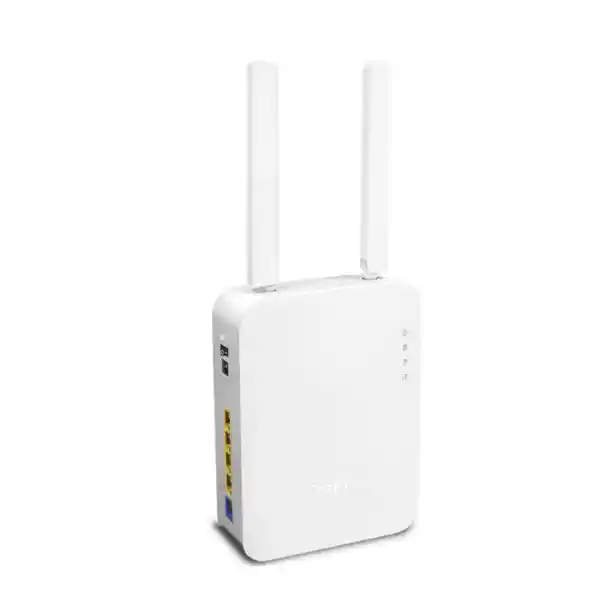
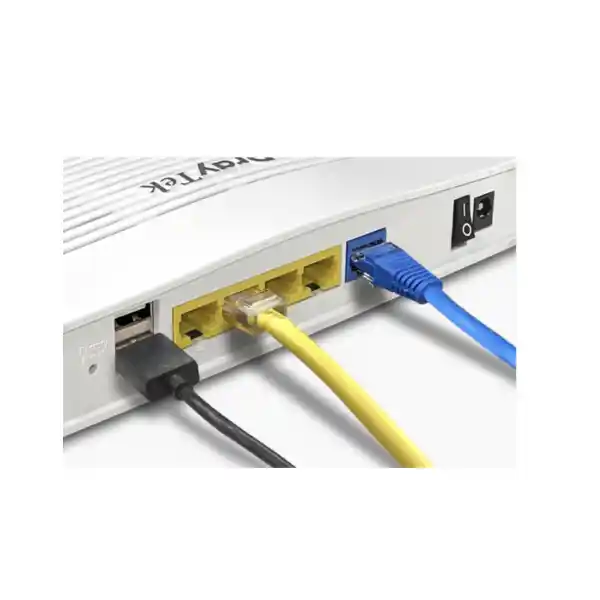
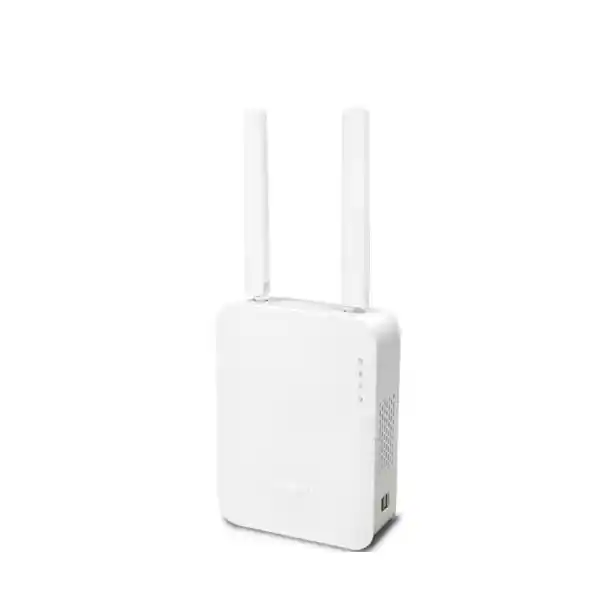
DrayTek Vigor2135ax in Dubai, UAE
The DrayTek Vigor2135ax is built for users who have outgrown consumer routers but do not need the rack footprint, licensing overhead or complexity of a large next-generation firewall. It combines near-Gigabit wired routing, AX3000-class dual-band WiFi 6, business VPN, VLAN segmentation, policy routing, application-aware quality of service and central management compatibility in one compact platform. For Dubai and UAE sites, it is especially practical where a single high-speed Ethernet ISP circuit, secure remote access, separate business and guest networks, predictable real-time application performance and controlled wireless coverage are required from one device.
Direct answer: who should choose the Vigor2135ax?
Choose the Vigor2135ax when the site has one primary Ethernet broadband connection up to roughly Gigabit class, needs substantially more control than a normal home router, and can work within the platform’s small-office VPN and user scale. DrayTek positions the Vigor2135 family for professional smart homes and SOHO networks, with a headline recommendation around 30 hosts and support for 50,000 NAT sessions. That makes it well suited to an executive home office, consultancy, boutique retail unit, clinic reception and administration area, design studio, small warehouse office, café back office, serviced office suite, showroom, training room or compact branch where the network still benefits from genuine segmentation and policy control.
It is not intended to replace a high-availability enterprise firewall cluster, a multi-gigabit security gateway, or a large-campus wireless controller. Its strongest role is as a disciplined edge router for a modest user count: fast Internet access, several isolated LANs, controlled guest access, two VPN tunnels, per-application traffic policy and integrated WiFi 6. FourTeck can position it as a standalone edge device or as part of a wider UAE network that includes managed switches, access points, IP phones, servers and cloud services. For broader UAE infrastructure integration, customers can also review FourTeck UAE for complementary networking and IT solutions.
Verified hardware and performance specification
Performance values are manufacturer laboratory maxima under stated test conditions. Real throughput depends on firmware, packet size, active firewall services, VPN encryption, traffic mix, wireless client capability, RF conditions, ISP design and the number of simultaneous sessions.
What the hardware accelerator changes in practical networks
The most important wired performance feature in the Vigor2135ax is not a marketing label around processor clock speed; it is the presence of a hardware-accelerated forwarding path. DrayTek states up to 940 Mbps NAT throughput with hardware acceleration, which is close to the practical ceiling of a 1 Gigabit Ethernet interface once protocol overhead is considered. The architectural value is that eligible flows can be forwarded through an optimized fast path instead of forcing every packet through the full software processing stack. This helps the router sustain high broadband throughput while retaining useful controls such as bandwidth management in supported acceleration scenarios.
That distinction matters in Dubai, where small offices and premium residential Internet services can easily reach several hundred megabits per second. A router that has rich policy features but cannot forward traffic efficiently can become the bottleneck even when the ISP circuit is healthy. With the Vigor2135ax, a correctly configured deployment can make much better use of a near-Gigabit access service for ordinary NAT traffic. However, hardware acceleration does not make every workload run at 940 Mbps. Encrypted VPN, deep filtering, unusual packet handling, diagnostic functions, certain QoS operations or features that require software inspection can move traffic away from the accelerated path. Capacity planning should therefore separate plain Internet forwarding from security-service and VPN expectations instead of assuming one headline number applies to every use case.
FourTeck sizing practice is to begin with the applications and concurrency rather than the speed printed on the ISP contract. A ten-user design studio moving large cloud files may stress throughput but create relatively few policy complications. A thirty-user office with video calls, cloud ERP, CCTV viewing, guest WiFi and remote VPN may use less raw bandwidth yet generate many more sessions and more variable latency. The Vigor2135ax gives an administrator the routing controls to shape those workloads, but the design still needs to respect the device’s intended SOHO scale.
WAN edge
One Gigabit Ethernet WAN is ideal for a primary fiber ONT, Ethernet handoff or upstream modem operating in bridge or routed mode. PPPoE, DHCP and static addressing options support common ISP delivery models.
LAN core
Four Gigabit LAN ports support direct endpoints or an uplink to a managed switch. VLANs and multiple IP subnets allow the router to remain the Layer 3 policy boundary for a compact office.
Wireless edge
Integrated dual-band WiFi 6 serves laptops, phones, tablets, printers and IoT endpoints without an immediate requirement for a separate access point in small coverage areas.
Secure remote access
Two concurrent VPN tunnels support a small site-to-site connection or a limited remote-access requirement where the design does not demand a large tunnel count or high encrypted throughput.
AX3000 WiFi 6: what the numbers mean
The Vigor2135ax combines a 2.4 GHz 802.11ax 2×2 radio rated up to 574 Mbps with a 5 GHz 802.11ax 2×2 MU-MIMO radio rated up to 2402 Mbps. Adding those theoretical link rates produces the familiar AX3000 class. This is not a promise that a single client will download at 3 Gbps, and it cannot override the Gigabit WAN port. Wireless link rate is the negotiated physical-layer signaling speed between the client and access point; real TCP or application throughput is lower because airtime is shared and WiFi carries management, retransmission and protocol overhead.
The strongest WiFi 6 benefit for the intended environment is efficiency. OFDMA allows the access point to divide channel resources more effectively among compatible clients, while MU-MIMO helps serve multiple capable devices more efficiently. A 160 MHz-capable 5 GHz client can negotiate a very high link rate under clean RF conditions, giving local wireless transfers and Internet access headroom that older 802.11ac or 802.11n designs may not provide. In a small meeting space or office where many devices are active at once, improved scheduling can make responsiveness more consistent even when a speed test is not dramatically higher.
The 2.4 GHz band remains valuable for reach and compatibility, especially for IoT devices, printers and older endpoints. The 5 GHz band is normally preferred for performance-sensitive laptops and phones because it offers more usable spectrum and less legacy congestion. The Vigor2135ax includes band steering to encourage capable devices toward 5 GHz, Airtime Fairness to reduce the impact of slower clients, WMM for wireless traffic prioritization and WLAN scheduling for operational control. These are business-oriented tools that help an administrator treat WiFi as managed infrastructure rather than a single password broadcast.
160 MHz channels: powerful, but deploy them deliberately
The 5 GHz radio can use channel widths up to 160 MHz. A wide channel gives a compatible client more spectrum and can produce the headline 2402 Mbps link rate, but that does not mean 160 MHz should be enabled everywhere. Wide channels consume a larger portion of the 5 GHz band, which can increase co-channel or adjacent-channel planning challenges when neighboring offices, apartments, shops or access points are nearby. In dense Dubai commercial towers and residential developments, a narrower 80 MHz or even 40 MHz plan can sometimes deliver more predictable service because more non-overlapping channel choices remain available.
FourTeck therefore treats channel width as a design variable, not a fixed performance switch. A small villa office with limited neighboring WiFi may benefit from 160 MHz. A multi-tenant office floor may achieve better aggregate performance from conservative widths and additional wired access points. The correct setting depends on a spectrum scan, client capabilities, DFS behavior, walls, neighboring SSIDs and the application mix. High negotiated link rate is useful only when packet loss, retries and airtime contention remain under control.
WPA3, OWE and enterprise authentication choices
Wireless security on the Vigor2135ax supports modern WPA3 modes as well as WPA2 and compatibility options for older clients. For a new business SSID, WPA3 should be considered where the endpoint estate supports it. WPA2 remains widely interoperable and may still be required for legacy printers, scanners, embedded systems or specialized devices. Mixed security can simplify migration, but administrators should avoid retaining weak legacy choices merely because they are available. The goal is to select the strongest common method that all required production clients can use reliably.
The router also supports 802.1X authentication, allowing wireless access to be tied to individual credentials or a RADIUS-backed identity service rather than a single shared password. That is valuable where staff turnover, contractor access or auditability makes one pre-shared key undesirable. Open Wireless Encryption, or OWE, can provide encryption on an otherwise open-style network for compatible clients, while a conventional guest SSID can use client isolation and captive-portal functions where the use case calls for a browser-based onboarding flow.
A practical small-office design might allocate one WPA2/WPA3 corporate SSID to trusted devices, a separate isolated guest SSID for visitors, and another restricted SSID for IoT equipment. The SSIDs can map to different VLANs and IP subnets so that changing wireless credentials does not become the only security boundary. That combination of radio security and Layer 3 segmentation is much stronger than placing every device on one flat network.
VLAN design for a professional small network
The Vigor2135ax supports 802.1Q tag-based VLANs, port-based VLANs and multiple IP subnets. DrayTek lists up to eight LAN subnets for this model. This gives a small site enough logical separation to create meaningful trust zones without deploying a separate Layer 3 switch or firewall for every function. A common UAE branch design could use VLAN 10 for staff computers, VLAN 20 for voice, VLAN 30 for CCTV, VLAN 40 for guest WiFi, VLAN 50 for printers and building devices, and VLAN 60 for management. Not every site needs that many segments, but the platform provides room for an organized addressing plan.
Segmentation is useful only when the policy between segments is defined. The router can route between VLANs, so administrators should decide which flows are truly required. Staff may need access to a printer VLAN, while guest users should normally have Internet access only. CCTV cameras may need to reach an NVR but not corporate laptops. Management interfaces should be reachable only from an administrator subnet. This approach reduces lateral movement opportunities and makes troubleshooting easier because each device class has an expected network location.
If additional switch ports are required, connect a managed switch to a LAN interface configured as an 802.1Q trunk and carry the required tagged VLANs downstream. The switch then assigns access VLANs to edge ports for PCs, phones, cameras or access points. This topology lets the Vigor2135ax remain the gateway and policy point while a larger switch handles physical fan-out. For customers building a more complete managed environment, FourTeck’s UAE IT services team can support structured deployment, migration and ongoing network administration.
Example VLAN 10 — Corporate
Trusted laptops, desktops and approved phones. Permit required DNS, DHCP, cloud services, printers and business applications. Restrict access to network-management interfaces unless the device is an administrator workstation.
Example VLAN 20 — Voice
IP phones or voice gateways receive a dedicated subnet and QoS treatment. Permit signaling and media paths required by the PBX or service provider while reducing unrelated lateral access.
Example VLAN 30 — CCTV / IoT
Cameras, controllers and building devices are isolated from ordinary user endpoints. Allow only required NVR, DNS, NTP or vendor cloud destinations instead of unrestricted access to the office LAN.
Example VLAN 40 — Guest
Visitor devices are kept separate from corporate systems. Apply client isolation, controlled bandwidth and content policy, while allowing straightforward Internet access and an optional captive portal.
Firewall behavior, NAT and service publishing
At the Internet edge, the Vigor2135ax performs stateful routing and NAT for internal clients. For ordinary outbound traffic, private LAN addresses are translated to the public or provider-facing address, while unsolicited inbound sessions are not accepted unless a deliberate rule or translation is created. The platform supports common service-publishing functions such as port redirection, open ports, port triggering and a DMZ host option. These features are useful, but they should be applied with restraint because every exposed service increases the reachable attack surface.
For a business server, the preferred pattern is to expose only the exact protocol required, restrict source addresses where practical, keep the service patched, and use VPN rather than direct publication when remote users do not need public access. UPnP can simplify consumer applications but is often disabled in business deployments so that endpoints cannot automatically create inbound mappings. Similarly, application-layer gateways for protocols such as SIP, FTP or H.323 should be enabled only when they improve compatibility; many modern services work better with explicit NAT behavior and no unnecessary protocol manipulation.
The router’s firewall rules can also support policy between internal subnets. This is where VLAN segmentation becomes operationally useful. Instead of thinking only about “Internet blocked or allowed,” administrators can implement a matrix of trust: guest-to-corporate denied, CCTV-to-corporate denied, corporate-to-printer allowed, management-to-network-devices allowed, and so on. A documented policy matrix makes later troubleshooting and security review far easier than a collection of ad hoc exceptions.
VPN capability and realistic sizing
DrayTek lists two concurrent VPN tunnels for the Vigor2135ax and IPsec throughput up to 150 Mbps. The firmware supports a broad protocol set that includes IPsec, IKEv2, L2TP over IPsec, SSL VPN, OpenVPN and WireGuard alongside older compatibility methods. That makes the router flexible for a small branch-to-head-office tunnel, a connection to another Vigor router, or limited remote user access. The important sizing point is the tunnel count: this is a small-office router, not a VPN concentrator for dozens or hundreds of simultaneous remote users.
A sensible deployment might dedicate one tunnel to a site-to-site IPsec connection and leave another available for a secondary site or remote-access use case. If an organization needs many home users connected simultaneously, multiple branches terminating on one hub, or encrypted throughput far beyond the stated 150 Mbps IPsec figure, a larger firewall platform is more appropriate. Encryption performance also depends on cipher choice, packet size, encapsulation, WAN latency and the processing required by other active services.
For UAE businesses linking a Dubai office to an overseas headquarters, IPsec with IKEv2 is a common starting point because it is standardized and widely interoperable. WireGuard or OpenVPN can be attractive when client simplicity or cross-platform support drives the design. The final protocol should be chosen based on both ends of the tunnel, security policy and supportability. Whatever method is used, define clear local and remote subnets, avoid overlapping RFC1918 ranges, use strong credentials or certificates, and monitor tunnel health rather than treating a connected status indicator as the only measure of quality.
Quality of Service for voice, meetings and cloud applications
Internet bandwidth is not the same as application quality. A 500 Mbps or 1 Gbps circuit can still produce poor calls if a large upload fills the upstream queue and introduces latency. The Vigor2135ax includes QoS classification using parameters such as IP address, port, DSCP, 802.1p and application, together with application-aware QoS and VoIP prioritization capabilities. These controls let an administrator identify traffic that should receive preference and prevent bulk workloads from dominating the available line rate.
For Microsoft Teams, Zoom, SIP voice and interactive remote desktop, the design objective is usually stable latency and low jitter rather than maximum throughput. A practical policy reserves or prioritizes enough bandwidth for real-time traffic, gives normal business applications a fair share, and places large backups, operating-system downloads or guest usage in lower-priority classes. If the ISP provides an asymmetric service, upstream shaping deserves particular attention because the smaller upload path reaches saturation first.
QoS should be verified with real traffic. Over-classification can be as harmful as no classification if too many applications are marked “high priority.” DSCP values also may not be honored end to end across the public Internet, but they remain useful inside the LAN and at the WAN queue managed by the router. The Vigor2135ax gives small businesses a practical way to control the bottleneck they actually own: the edge of their own network.
Route Policy: steering traffic with intent
DrayTek’s Route Policy framework adds another layer of control beyond the ordinary routing table. Policies can match characteristics such as protocol, IP address, port, domain or country and direct traffic according to administrator-defined logic. On platforms with multiple logical WAN paths, VPNs or failover interfaces, this can be used to steer selected applications toward a preferred path. Even on a compact deployment, policy routing is useful when some destinations should traverse a VPN while ordinary Internet traffic exits locally.
Consider a Dubai office connected by IPsec to a head office. Finance traffic destined for internal ERP addresses can be routed through the tunnel, while Microsoft 365, public web traffic and local SaaS services can break out directly to the UAE Internet circuit. This avoids hairpinning unnecessary traffic through the head office and can reduce latency. A different policy can force a diagnostic host through a specific gateway or define failover behavior for traffic whose preferred route becomes unavailable.
Policy routing is powerful because it changes the path packets take, so documentation is essential. Each rule should have a clear business reason, explicit source and destination scope, and an understood interaction with NAT, DNS and VPN configuration. Otherwise, later troubleshooting can become confusing when a packet follows a policy that is not obvious from the basic route table.
USB mobile broadband as a resilience option
The Vigor2135 platform supports cellular WAN through a compatible USB modem. For a small office, this can provide a useful contingency path when the primary Ethernet broadband circuit is unavailable. The design is especially relevant for retail, appointment-based businesses or executive users who need basic cloud access during an ISP outage. Because USB modem compatibility, carrier support and firmware behavior vary, the exact modem should be validated before procurement rather than assumed to work from connector type alone.
A mobile backup path should also have a deliberate traffic policy. When failover occurs, it may be inappropriate to send cloud backups, operating-system updates, guest streaming and CCTV uploads across a metered or lower-capacity cellular service. Administrators can use routing and QoS controls to preserve essential applications first. Test the entire failover process during commissioning: primary link failure, detection time, alternate path activation, DNS behavior, VPN re-establishment, application recovery and return to the primary circuit.
Web content control and application governance
The Vigor2135ax includes multiple layers of content-policy functionality, including URL, keyword, DNS keyword and web-feature controls. Category-based web filtering is also available with a subscription where supported. These capabilities can help a small organization implement acceptable-use policy, reduce obvious distraction or risk categories, and create different browsing rules for staff and guests. The controls are best viewed as policy enforcement at the gateway rather than a substitute for endpoint security, DNS security, identity controls or a full secure web gateway.
Policies should be designed around user groups and network segments. Guest WiFi may need broad Internet access but no internal destinations. A student or public-access area may need category restrictions. Business workstations may require access to cloud storage that would be blocked on an IoT network. Administrators should also understand how HTTPS encryption and modern applications affect URL-based inspection; not every page-level action can be classified from an edge router without deeper proxying or endpoint integration.
For stronger security posture, combine router policy with patched endpoints, reputable endpoint protection, multifactor authentication, DNS filtering where appropriate, restricted administrator access and current backups. The Vigor2135ax provides an effective network control plane for its class, but layered security remains the correct model.
IPv6 readiness without abandoning IPv4 control
The router supports IPv6 connectivity methods including DHCPv6, static IPv6 and common tunnel mechanisms, while continuing to provide the familiar IPv4 NAT and routing environment used by most small networks. This dual-stack capability is important because UAE service providers and global cloud platforms continue to expand IPv6 availability even though many business applications still rely heavily on IPv4.
IPv6 should not be treated as an automatic extension of the IPv4 security policy. Because endpoints can receive globally routable addresses, administrators need to understand firewall behavior, router advertisements, DHCPv6, DNS and prefix delegation. If a site is not ready to manage IPv6 properly, it may be preferable to disable unused paths rather than allow unmanaged addressing. Where IPv6 is deployed, include it in monitoring, access-control rules and troubleshooting procedures from the beginning.
A controlled dual-stack rollout can be valuable for testing modern services and preparing the organization for wider IPv6 adoption. The Vigor2135ax provides the necessary routing foundation, but operational discipline determines whether the transition is simple or confusing.
SNMP
SNMP v1, v2c and v3 support allows compatible monitoring platforms to poll interface and device statistics. Prefer SNMPv3 where operationally practical because it supports stronger authentication and privacy controls.
Syslog
Send events to a centralized log collector so firewall, VPN, WAN and administration activity remains available beyond the router’s local storage and can be correlated with other systems.
NetFlow / IPFIX
Flow-export support for NetFlow v5, v9 and IPFIX helps administrators understand which hosts, destinations and protocols are consuming bandwidth without relying only on aggregate port counters.
VigorACS
Compatibility with DrayTek VigorACS enables centralized configuration, monitoring and lifecycle workflows for organizations or service providers managing multiple supported DrayTek devices.
Central management and operational visibility
A network edge device should be measurable as well as configurable. The Vigor2135ax supports SNMP, Syslog, NetFlow and IPFIX, plus DrayTek’s VigorACS ecosystem. This combination gives administrators multiple ways to observe health, traffic and events. In a single small office, the built-in web interface may be enough for routine management. Across several branches or managed customer sites, central telemetry becomes much more valuable because it reduces the need to log into each router separately.
Flow data is useful for questions such as “Which host generated the upload spike?” or “Which external service accounts for most WAN consumption?” Syslog can reveal authentication attempts, WAN transitions and firewall events. SNMP allows a monitoring platform to trend interface utilization and availability. Central configuration tools can standardize settings and reduce drift. Together, these features support a more mature operating model than consumer routers that provide only basic local statistics.
Operational security still matters. Disable management protocols that are not required, restrict administration to trusted subnets, prefer HTTPS and SSH over clear-text alternatives, use strong unique administrator credentials, and send logs to a protected collector. If remote administration is required, a VPN path is generally preferable to exposing the management interface directly to the public Internet.
Firmware lifecycle and configuration discipline
At the time this content was prepared, DrayTek’s resource center listed Vigor2135 Series firmware version 4.5.3.1 dated 8 July 2026. Firmware availability changes over time, so every deployment should verify the latest stable release for the exact regional hardware before installation. Updates can deliver security fixes, interoperability improvements and feature changes, but business networks should still follow a controlled upgrade process rather than installing new firmware blindly during production hours.
Before an upgrade, back up the running configuration, record the current firmware version, confirm power stability and review release notes for behavior that affects WAN, VPN or wireless operation. After the upgrade, test Internet access, DNS, VLAN routing, WiFi association, VPN tunnels, port-forwarding rules and any critical QoS or policy-routing behavior. Retain a known-good configuration and an agreed rollback procedure.
The Vigor2135ax supports configuration backup and restore and firmware management through the web interface, TFTP and TR-069 mechanisms. Configuration compatibility is listed with earlier Vigor2132 and Vigor2133 series profiles, but migrations should still be validated setting by setting because new firmware branches and different hardware capabilities can change defaults. A clean documented build is usually safer than assuming every historical option should be carried forward.
Dubai deployment guidance: heat, placement and RF conditions
The Vigor2135ax is specified for operation from 0 to 45°C with non-condensing humidity from 10% to 90%. In UAE buildings, the router should remain indoors in a conditioned environment with free airflow. Do not place it above heat-producing equipment, inside an unventilated cabinet, on a window ledge exposed to solar gain, or in a ceiling void that can exceed the environmental rating. Heat-related instability is often misdiagnosed as an ISP or WiFi problem.
Wireless placement is equally important. A compact router positioned at one corner of an office may provide excellent service nearby but poor 5 GHz coverage through reinforced walls, glass films, concrete cores or metal shelving. The external antennas should be firmly attached and oriented to support the coverage area. Keep the router away from large metal objects, microwave ovens and other strong RF interference sources. If the site requires coverage across multiple rooms or floors, use wired access points instead of trying to overcome physics with maximum transmit power.
Dense Dubai apartment buildings and office towers can have a large number of neighboring access points. Perform a channel survey during installation and revisit it if the RF environment changes. Band steering and Airtime Fairness can improve client distribution, but they cannot create clean spectrum where none exists. A deliberate channel plan, appropriate channel width and sensible AP placement remain the foundation of reliable WiFi.
Mesh root capability and when to add dedicated access points
The Vigor2135ax can participate as a 5 GHz mesh root in compatible DrayTek wireless designs, and the specification includes AP management capabilities. Mesh can be useful where pulling Ethernet is difficult, but a wireless backhaul consumes airtime and can reduce available capacity compared with a wired uplink. For a performance-focused business environment, Ethernet-connected access points remain the preferred design whenever cabling is practical.
A simple single-router deployment works best when the coverage area is compact and centrally served. Add access points when users move beyond the reliable 5 GHz cell, when walls significantly attenuate signal, when client density grows, or when separate radio cells are needed for meeting rooms and work areas. Do not wait until users complain about “slow Internet” when the actual issue is a weak wireless link. Measure RSSI, retries, channel utilization and roaming behavior.
For customers expanding from one integrated router to multiple managed access points, the Vigor2135ax can remain the wired gateway and policy device while additional APs take over radio coverage. This protects the original investment and lets the network scale in layers rather than forcing an immediate replacement of the edge router.
Captive portal and guest network design
Guest wireless service in a reception area, salon, café, clinic or small showroom should be isolated from business systems and easy to operate. The Vigor2135ax supports guest onboarding mechanisms such as click-through access, social login, SMS PIN, RADIUS and external portal server integration depending on the selected workflow. A captive portal can present terms, collect a simple login, or hand authentication to another service before Internet access is granted.
The portal is only one layer. Place the guest SSID on its own VLAN and subnet, enable client isolation where appropriate, limit bandwidth so visitors cannot starve business applications, and block access to private corporate ranges. If the site uses printers, POS devices or smart TVs that need guest interaction, create explicit exceptions rather than collapsing the guest and corporate networks into one segment.
Privacy and regulatory obligations vary by organization and jurisdiction. Decide what logs are genuinely required, how long they are retained and who can access them. Network policy should support the business objective without collecting unnecessary personal data. FourTeck can help translate the operational requirement into a controlled VLAN, portal and bandwidth design for UAE sites.
Three deployment blueprints
Executive home office
One fiber ONT connects to the Gigabit WAN. A work SSID and home/IoT SSID use separate subnets. Corporate VPN access is limited to required business resources, while local entertainment traffic exits directly.
QoS prioritizes meetings and voice over cloud backup. A USB mobile modem can provide basic resilience where compatible.
Small professional office
The router uplinks to a managed switch carrying staff, voice, printer and guest VLANs. The integrated WiFi serves the immediate office while one wired AP extends coverage to a meeting room.
Policy rules allow staff-to-printer access, deny guest-to-LAN traffic and prioritize SIP or collaboration traffic.
Compact retail branch
POS terminals, CCTV, back-office PCs and guest WiFi sit on separate VLANs. The branch maintains one site-to-site VPN to headquarters for business systems and uses local Internet breakout for ordinary SaaS traffic.
Traffic rules prevent cameras and guest clients from reaching POS devices, while monitoring exports logs and flow data centrally.
ISP handoff planning in the UAE
Before installation, confirm exactly how the ISP delivers the circuit. The Vigor2135ax supports common Ethernet WAN methods such as PPPoE, DHCP and static IPv4. Some provider gateways can be placed in bridge mode so that the DrayTek terminates the public session directly. Others must remain routed, which can introduce double NAT unless the provider device offers a DMZ or passthrough arrangement. The correct topology depends on the service type and the provider’s equipment.
PPPoE users should have the correct username, password and any required VLAN tag before the change window begins. Static-IP customers should record the assigned address, mask or prefix, gateway and DNS information. If inbound VPN or port forwarding is required, verify that the service has a usable public address and is not behind carrier-grade NAT. A router cannot publish a service directly to the Internet if the provider does not route inbound traffic to the customer address.
During commissioning, measure wired performance from a known-capable computer, verify duplex and link speed, confirm DNS resolution and observe latency under load. This establishes whether any later performance complaint is related to the WAN, the LAN, WiFi or the endpoint. For Dubai customers evaluating broader edge-security options, the Firewall Dubai portfolio provides additional firewall and security gateway choices when requirements exceed the Vigor2135ax class.
DNS, DHCP and IP address management
The Vigor2135ax can provide DHCP services for multiple LAN subnets and supports custom DHCP options plus IP-to-MAC binding. In a small network, centralizing default gateway, DNS and lease distribution on the router keeps the design understandable. Use separate DHCP scopes for each VLAN, reserve infrastructure addresses outside the general client pool, and document static assignments for switches, access points, printers, servers and controllers.
IP-to-MAC binding can help maintain predictable addresses for known devices, but it is not a complete access-control mechanism because MAC addresses can be changed or spoofed. Treat it as an address-management convenience and a modest policy aid, not strong identity. Where stronger admission control is needed, use 802.1X, certificates, endpoint management or NAC tools appropriate to the environment.
DNS policy deserves equal attention. Decide whether clients use the router as a forwarding resolver, internal DNS servers, or approved secure external resolvers. If content filtering depends on DNS visibility, prevent clients from bypassing the intended resolver where technically and operationally appropriate. Keep the design simple enough that support staff can trace a client from IP address to VLAN, DHCP lease, DNS path and firewall policy without guesswork.
Sizing by users, sessions and application behavior
DrayTek’s recommendation of approximately 30 hosts for this product class is a useful boundary, but user count alone does not define load. One person can open hundreds of browser connections, synchronize multiple cloud accounts and run video meetings at the same time. IoT devices may generate little bandwidth but stay continuously connected. CCTV systems can consume consistent upstream capacity. The 50,000-session capability offers healthy room for a small network, yet an unmanaged device or compromised endpoint can still create abnormal session growth.
A sound sizing exercise records the number of active users, wired and wireless endpoints, expected guest count, Internet circuit rate, VPN traffic, real-time applications, large upload workloads, required VLANs and future growth. If the site is already close to the recommended host count and expects rapid expansion, choosing a larger router now may be more economical than redesigning the edge soon after deployment. Similarly, if the customer requires many VPN tunnels, dual active WANs, multi-gigabit interfaces or deeper threat-inspection features, another platform is the correct fit even if today’s user count is small.
The Vigor2135ax is strongest when it is used within its design envelope: a compact site where near-Gigabit NAT, strong routing policy, capable WiFi 6 and a small VPN requirement matter more than large-scale concurrency or multi-gigabit expansion.
When the Vigor2135ax is not the right router
A good product page should make the limits clear. Do not choose the Vigor2135ax if the site requires Internet routing above 1 Gbps, because the WAN and LAN interfaces are Gigabit Ethernet rather than 2.5G or 10G. Do not choose it as the central concentrator for a large remote workforce because it supports only two concurrent VPN tunnels. Do not use the integrated WiFi as the sole wireless solution for a large multi-floor office, warehouse or high-density venue where multiple professionally placed access points are required.
It is also not a substitute for an advanced next-generation firewall when the security policy demands high-throughput TLS inspection, sandboxing, comprehensive intrusion-prevention signatures, large-scale identity integration or enterprise HA pairs. DrayTek provides useful firewall and content-control capabilities for the target market, but product categories are not interchangeable.
The right decision is based on risk, scale and operational requirements. FourTeck can compare the Vigor2135ax with larger DrayTek models or dedicated firewall appliances and can source broader infrastructure through FourTeck Global when a multi-country or higher-capacity design is required.
Security hardening checklist for commissioning
Troubleshooting methodology for support teams
When users report “the Internet is slow,” split the problem into layers. First check physical link state and interface negotiation. Second measure the WAN from a wired client to separate ISP capacity from WiFi conditions. Third compare latency when idle and under upload or download load; a large latency increase points toward queue congestion and may justify QoS tuning. Fourth inspect session counts, bandwidth by host and flow data to identify unexpected consumers. Fifth test DNS response and application-specific paths. This sequence avoids random configuration changes.
For WiFi complaints, verify whether the client is on 2.4 or 5 GHz, inspect signal strength, channel utilization and retry behavior, and test near the router. A client connected at a very low PHY rate can consume excessive airtime. Band steering can encourage 5 GHz use, while Airtime Fairness can reduce the impact of slow stations, but physical placement remains decisive. If coverage is weak, add an access point rather than repeatedly increasing transmit power.
For VPN problems, confirm that both peers have reachable public paths, matching phase parameters, non-overlapping subnets and correct firewall rules. Separate tunnel establishment from routed application access: a tunnel can show as “up” while a missing route or policy still blocks traffic. Capture logs during negotiation and test with simple ICMP or TCP probes before blaming the application.
A consistent troubleshooting process reduces downtime and preserves the integrity of the configuration. Every change should have a hypothesis, an expected result and a rollback path.
Power protection and physical installation
The Vigor2135ax uses a 12 V DC, 2 A power input and is rated for maximum consumption up to 23.6 W. Although power draw is modest, the router is a critical dependency because Internet, VPN, wireless and inter-VLAN routing can all pass through it. Connect the router, ISP termination device and essential switch to an appropriately sized UPS where continuity matters. A UPS can bridge short interruptions and reduce abrupt shutdowns during unstable power events.
Mount or place the router so that ventilation openings remain clear, cables are strain-free and the antennas have space. Label WAN and LAN connections, especially if a managed switch carries multiple VLANs on one trunk. Keep a diagram showing which physical port connects to the ISP, switch, NVR or other fixed infrastructure. This simple documentation can save significant time when an engineer is troubleshooting remotely with non-technical staff on site.
If the router is installed inside a cabinet for physical security, verify temperature and RF impact. Metal cabinets can severely attenuate wireless signals, so a cabled external access point may be necessary. The router can remain protected in the cabinet as the gateway while wireless coverage is provided from a better radio location.
Procurement considerations for Dubai and UAE projects
Network procurement should include more than the router itself. Confirm the exact Vigor2135ax model, regional power adapter, warranty terms, current firmware support and any required subscription for web-category filtering. If the design uses USB mobile failover, validate the modem and carrier combination before the installation date. If VLANs extend to a switch, ensure the selected switch supports 802.1Q tagging and has enough PoE capacity for access points, phones or cameras where required.
For office moves and new branches, collect ISP information early because circuit delivery often drives the project timeline. Confirm whether the customer receives a public IP, static block or CGNAT service, whether PPPoE credentials are required, and whether any provider-supplied router must remain in the topology. Document the cutover plan and schedule a test window that includes VPN and business applications, not just a browser speed test.
FourTeck can supply the DrayTek Vigor2135ax as part of a wider UAE network build, including switching, WiFi, firewalling, IP telephony and server connectivity. That end-to-end view is useful because edge routing decisions affect addressing, VLANs, QoS, voice, cameras, wireless roaming and remote access simultaneously.
Frequently asked technical questions
Is the Vigor2135ax a 2.5 Gigabit router?
No. The Vigor2135ax uses a Gigabit Ethernet WAN and four Gigabit Ethernet LAN ports. Its 5 GHz WiFi can negotiate a radio link above 1 Gbps with compatible clients, but Internet traffic is still constrained by the Gigabit wired edge and protocol overhead.
Can it handle a 1 Gbps Internet plan?
DrayTek states up to 940 Mbps hardware-accelerated NAT under optimal conditions, which is appropriate for near-Gigabit service. Actual results vary with packet size, ISP protocol, active features, endpoint performance and test methodology.
How many VPN tunnels does it support?
The specification lists two concurrent VPN tunnels. This is suitable for a very small branch or remote-access requirement, not a large VPN hub.
Does it support WireGuard?
Yes, WireGuard appears in the supported VPN protocol set for the Vigor2135ax series, alongside IPsec, IKEv2, OpenVPN and other methods. Verify the installed firmware and deployment requirements before configuration.
Does it support WPA3?
Yes. The wireless security options include WPA3 as well as WPA2 and compatibility modes. Client support should be checked before enforcing WPA3-only operation.
Can I create separate staff and guest networks?
Yes. Multiple SSIDs, VLANs, multiple IP subnets, client isolation and firewall policy can be combined to keep staff, guest and IoT traffic separate.
Can it manage additional access points?
The model includes DrayTek AP-management capabilities and can operate as a mesh root in compatible deployments. For larger sites, use wired access points where possible for predictable capacity.
Does it require a license for basic routing and VPN?
Core routing, firewall, VLAN, WiFi and VPN functions are built into the platform. Certain category-based web-filtering services can require a subscription. Confirm current service entitlement and regional availability at quotation stage.
Comparison framework: Vigor2135ax versus a consumer WiFi router
A modern consumer router may offer fast WiFi, but business deployments usually need more than raw radio speed. The Vigor2135ax adds policy routing, multiple subnets, 802.1Q VLANs, business VPN protocols, application-aware QoS, flow export, SNMP, centralized management options and more explicit firewall controls. Those functions make it possible to create a network architecture rather than simply share an Internet connection.
The tradeoff is that business features require deliberate configuration. A consumer mesh system may be faster to set up for basic browsing, while the Vigor2135ax rewards an administrator who understands subnets, VLANs, DHCP, routing and security policy. For organizations that need auditability and predictable behavior, that extra control is an advantage. For a household that only wants simple whole-home WiFi, a consumer system may be easier.
The purchasing decision should therefore be driven by operational requirements. If you need guest isolation, VPN to another site, traffic prioritization, monitoring and managed policy, the Vigor2135ax offers a professional foundation. If you only need the highest possible wireless benchmark with minimal administration, its business capabilities may be unnecessary.
Comparison framework: Vigor2135ax versus a larger security firewall
Compared with a dedicated next-generation firewall, the Vigor2135ax emphasizes integrated routing, WiFi and small-site manageability. It does not attempt to provide the same scale of intrusion prevention, threat-intelligence inspection, TLS decryption, sandboxing, multi-gigabit interfaces or high tunnel counts found on larger security appliances. The advantage is lower complexity and a compact all-in-one footprint for networks whose risk profile and policy needs fit the platform.
A larger firewall becomes preferable when security inspection is the dominant requirement, when multiple WAN links must be active simultaneously at high speed, when dozens of VPNs terminate at the site, or when the business needs high availability. The Vigor2135ax remains attractive when the edge is simple but still needs professional controls, particularly in a small branch where separate wireless infrastructure would otherwise increase cost and cabling.
FourTeck can help identify the crossover point. The objective is not to select the biggest device; it is to choose a platform with enough performance, security depth, interface capacity and lifecycle headroom for the actual site.
Decision recap: where the Vigor2135ax fits best
Strong fit
Single Gigabit-class WAN, up to about 30 active hosts, compact wired and wireless footprint, several VLANs, guest WiFi, small site-to-site VPN requirement, cloud applications and a need for real QoS and routing policy.
Check carefully
Dense RF environments, heavy encrypted VPN use, rapidly growing endpoint counts, many cameras or IoT sessions, complex captive portal workflows, and sites where WiFi must cover several separated rooms or floors.
Choose a larger platform
Multi-gigabit WAN, many concurrent VPN tunnels, enterprise high availability, large campuses, advanced threat inspection at high throughput, or hundreds of users and endpoints.
Quotation input checklist
To quote and size the DrayTek Vigor2135ax correctly for a Dubai or UAE site, provide the following details. A complete input list helps avoid missing accessories, incompatible ISP assumptions or an undersized design.
FourTeck consultation for DrayTek Vigor2135ax Dubai deployments
FourTeck can supply and integrate the DrayTek Vigor2135ax for UAE customers that need a professional WiFi 6 edge router with strong control over routing, segmentation, VPN and application performance. A typical engagement starts by confirming the ISP handoff, number of users, security zones, wireless coverage, VPN topology and critical applications. From there, the router can be configured with an addressing plan, VLAN structure, DHCP scopes, WAN settings, QoS policy, firewall rules, wireless security and monitoring aligned to the site.
For customers with an existing network, migration planning is just as important as the new configuration. FourTeck can map current subnets, identify dependencies such as printers and cameras, preserve required port forwards, move VPN peers in a controlled window and validate application access after cutover. If the requirements exceed the Vigor2135ax—whether because of multi-gigabit service, larger VPN scale, enterprise security inspection or high-density WiFi—the design can be adjusted before procurement instead of forcing the wrong platform into service.
The result should be a network that is understandable, supportable and appropriately sized, not merely a router that passes a speed test. Use the quotation checklist above to start a technical discussion and FourTeck can match the Vigor2135ax with the correct switching, WiFi and support components for the site.


Reviews
There are no reviews yet.