
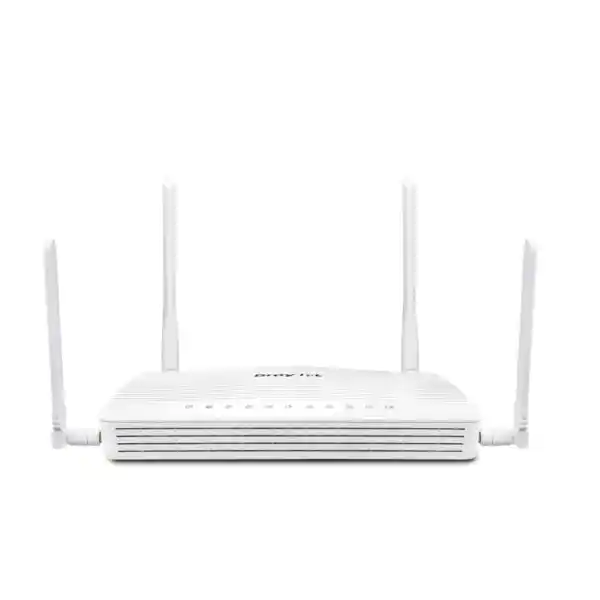
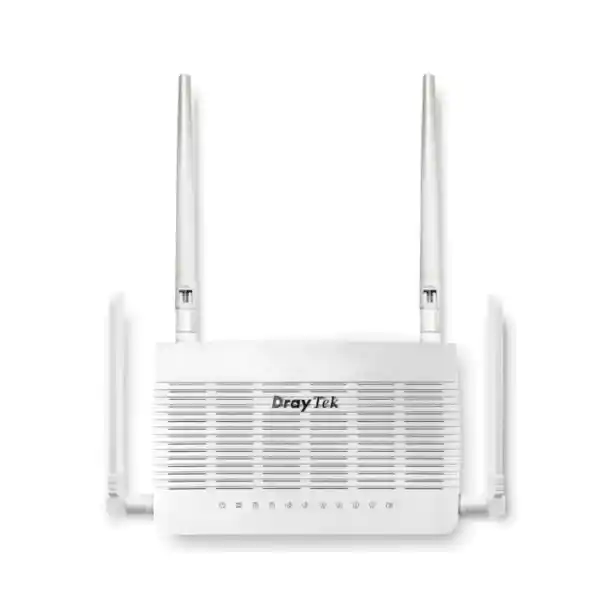
DrayTek Vigor2136ax in Dubai, UAE
A compact multi-gigabit business router for fibre internet, branch connectivity, professional smart homes and small offices that need fast wired routing, Wi‑Fi 6, policy control, VLAN segmentation, resilient WAN design and secure remote access without moving to an oversized enterprise chassis.
A fixed 2.5 Gigabit Ethernet WAN interface is designed for modern fibre internet services that can exceed conventional 1GbE routing limits.
A switchable 2.5GbE LAN/WAN interface can be assigned to high-speed LAN duties or used in a dual-WAN strategy.
AX3000-class dual-band wireless uses 160MHz channel support and modern Wi‑Fi 6 efficiency features for dense client environments.
VLANs, route policy, bandwidth management, firewall rules, application-aware QoS and VPN tools turn raw bandwidth into a manageable service.
Direct answer: what is the DrayTek Vigor2136ax and who is it for?
The DrayTek Vigor2136ax is a business-oriented broadband VPN router with integrated dual-band Wi‑Fi 6. Its design sits between basic consumer wireless routers and larger enterprise security appliances. The platform is particularly relevant when an organisation has fast fibre internet, wants deterministic control over users and applications, needs several logical networks, or requires secure site-to-site and remote-access VPN without deploying several separate boxes. DrayTek rates the Vigor2136 series for up to 2.3Gbps NAT performance under its stated test conditions, with a 50,000-session class and a recommended network size of around 30 hosts. These figures make the product a strong fit for small offices, professional home offices, clinics, retail branches, small hospitality sites, studios, workshops, project offices and executive residences where the network must be more controlled than a consumer router but still simple enough to operate from a single management plane.
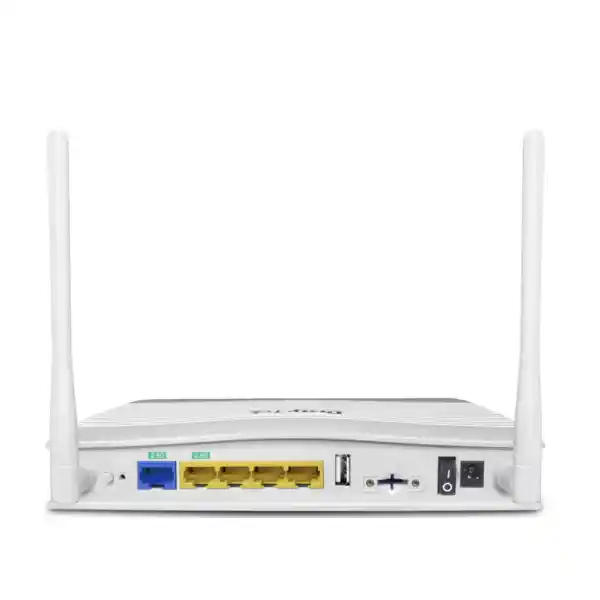
The “ax” suffix is important because it identifies the model with built-in 802.11ax Wi‑Fi 6. The radio system is AX3000 class, with a theoretical link-rate combination of up to 574Mbps on 2.4GHz and up to 2402Mbps on 5GHz under suitable client, channel and RF conditions. That wireless capability is paired with a fixed 2.5GbE WAN port, a second 2.5GbE port that can operate as LAN or WAN, three fixed Gigabit Ethernet LAN ports and USB connectivity. This architecture gives an installer several choices: use the second 2.5GbE port for a fast local workstation, switch, NAS or access point; turn it into another WAN interface for resilience; or place the router at the centre of a segmented small-site design where wireless and wired clients share common routing, policy and VPN services.
In Dubai and the wider UAE, the Vigor2136ax is most compelling where the internet circuit is faster than 1Gbps, where fibre upgrades are likely during the router’s service life, or where a customer wants disciplined traffic control rather than simply headline Wi‑Fi speed. FourTeck can position the router as part of a wider network deployment that may include switching, access points, structured LAN, server connectivity, endpoint services and firewall policy work. For broader UAE infrastructure requirements, visit FourTeck UAE; for a security-led engagement, the Firewall Dubai portfolio provides the surrounding design context.
Hardware architecture and interface map
The strongest architectural advantage of the Vigor2136ax is that its physical interfaces match the way many small-business networks are evolving. Internet access is moving beyond 1Gbps, Wi‑Fi 6 clients can aggregate substantial traffic, cloud backup can run continuously, and local services such as NAS, video, file collaboration and workstation imaging can create short bursts well above traditional office traffic. A router with only Gigabit Ethernet on every interface may become the first bottleneck even when its CPU can process more traffic. DrayTek addresses that issue by providing two 2.5GbE RJ‑45 ports: one is a fixed WAN interface and the other is switchable between LAN and WAN operation.
| Interface | Role | Deployment value |
|---|---|---|
| 1 × 2.5GbE RJ‑45 | Fixed WAN | Connects to high-speed fibre ONT, ISP CPE or an upstream handoff without forcing the primary internet link through a 1GbE interface. |
| 1 × 2.5GbE RJ‑45 | Switchable LAN/WAN | Can serve a high-bandwidth local device or provide a second wired WAN for failover, load-sharing policy or service-provider diversity. |
| 3 × 1GbE RJ‑45 | Fixed LAN | Suitable for switches, PCs, printers, controllers, NVRs or lower-bandwidth infrastructure that does not need 2.5GbE. |
| 2 × USB 2.0 | Peripheral / service expansion | Supports compatible functions such as USB WAN and selected utility roles, subject to firmware and peripheral compatibility. |
| Dual-band Wi‑Fi 6 | Integrated WLAN | Provides local wireless access without requiring a separate AP in compact environments, while still allowing expansion with managed APs when coverage grows. |
The practical significance of the switchable 2.5GbE port depends on the topology. In a simple office, it can be a 2.5G LAN uplink to a multi-gigabit switch, allowing the router to pass traffic to a faster wired core. In a branch with two providers, the same port can become WAN2 while the fixed 2.5G WAN remains the primary circuit. In a professional home, the port can connect to a high-speed NAS or workstation while the three Gigabit ports serve TVs, automation gateways and other devices. Because it is switchable, the installer is not forced to buy a particular port layout before the final internet design is confirmed.
DrayTek specifies dimensions of approximately 207 × 131 × 42 mm for the Vigor2136ax and a 0–45°C operating temperature range. That compact form factor suits a shelf, cabinet or communications enclosure, but good deployment practice still requires ventilation, accessible cabling and protection from heat accumulation. UAE installations deserve particular attention to cabinet temperature. A communications cupboard in an air-conditioned office may be comfortable during business hours but become much warmer after HVAC schedules change. The router should therefore be placed where airflow remains adequate and where the power adapter, WAN cables and antennas are not compressed against metalwork.
Power and physical placement should be designed as deliberately as logical configuration. A small UPS can keep the router, ONT and core switch online through short interruptions, while surge protection can reduce risk to edge equipment. If a site depends on VPN access to cloud applications or remote offices, keeping the WAN handoff and router on the same protected power path is generally more useful than protecting the router alone. The result is a compact edge platform with interfaces that can be adapted to both present bandwidth and realistic upgrade paths.
AX3000 Wi‑Fi 6: capacity, efficiency and realistic expectations
The Vigor2136ax integrates dual-band Wi‑Fi 6 and is marketed in the AX3000 performance class. DrayTek lists theoretical wireless link rates of up to 574Mbps on the 2.4GHz band and up to 2402Mbps on the 5GHz band. Those are PHY link rates rather than guaranteed application throughput. Real user speed is always lower because Wi‑Fi has protocol overhead, shared airtime, environmental interference, client limitations, channel conditions and retransmissions. The value of Wi‑Fi 6 is therefore not only a larger headline number; it is the combination of higher modulation efficiency, 160MHz channel capability where spectrum conditions permit, OFDMA-based scheduling and improved handling of multiple active devices.
For a Dubai office, the 5GHz band should usually carry performance-sensitive clients such as laptops, workstations and modern phones, while 2.4GHz remains useful for legacy endpoints, IoT devices and clients that need better wall penetration at modest data rates. A clean 160MHz channel can provide high link capacity to compatible 5GHz clients, but it is not always the best choice in every building. Dense apartments, multi-tenant offices and busy commercial towers may have competing networks nearby. In those environments, narrower channels can sometimes deliver more consistent real-world service because they consume less spectrum and are easier to place without overlap. A professional Wi‑Fi design evaluates the RF environment instead of treating maximum channel width as a universal setting.
Wi‑Fi 6 OFDMA is particularly relevant when many clients exchange small packets rather than one client performing a large download. Collaboration applications, messaging, cloud management agents, smartphones, smart devices and web applications can create many short transmissions. OFDMA allows the access point to schedule portions of the channel more efficiently, helping reduce contention in suitable client mixes. MU‑MIMO and modern scheduling similarly aim to improve simultaneous service to multiple clients. These mechanisms do not remove the shared-medium nature of Wi‑Fi, but they make the available airtime more productive.
Wireless security is equally important. The Vigor2136ax supports modern WPA3 options as well as compatibility modes required for mixed estates. In a new deployment, the goal should be to move capable devices toward stronger authentication while isolating legacy endpoints that cannot support modern security. Corporate wireless, guest wireless, building systems and personal devices should not automatically share the same trust zone. The router’s VLAN and policy features are useful precisely because wireless convenience should not collapse the security boundaries that a wired design would otherwise enforce.
DrayTek also positions the platform for managed wireless expansion. The Vigor2136 family can operate as the root of a self-healing mesh with supported nodes, and the vendor’s virtual controller concept provides centralised AP control. For larger WLAN estates, the router can act in AP management mode with support for a broader number of compatible access points. This means a customer can start with the integrated wireless service and later add APs as the office expands, as rooms become harder to cover, or as client density grows. That transition path is useful for villas, warehouses with attached offices, clinics with several rooms and businesses that open adjacent units.
A critical design principle is to separate capacity problems from coverage problems. If a user has weak signal because the router is behind concrete walls, adding internet bandwidth will not solve the issue. If a user has excellent signal but many active devices compete for airtime, moving the router may not solve congestion. If a client is limited to an older Wi‑Fi standard, changing the router alone does not upgrade the client radio. A FourTeck deployment should therefore consider the router position, construction materials, number of clients, 2.4GHz and 5GHz channel plan, expected roaming pattern and availability of wired backhaul before deciding whether the integrated radio is sufficient.
For sites where Wi‑Fi is business-critical, the Vigor2136ax is best viewed as the routing and policy anchor rather than as a promise that one access point can cover every floor. In a small open-plan office, the integrated radio may be enough. In a larger property, multiple access points with wired uplinks will normally deliver better capacity and roaming. FourTeck’s IT Services UAE team can align router configuration with switching, wireless placement and endpoint requirements so the design is driven by service quality rather than one specification number.
WAN design: 2.5Gbps fibre, dual-WAN policy and resilience
The fixed 2.5GbE WAN interface is the headline feature for broadband connectivity. Many small-business routers are still physically limited to 1GbE even when their software feature set is advanced. If the provider service is 1.5Gbps, 2Gbps or similar, a Gigabit WAN port creates an immediate ceiling. The Vigor2136ax avoids that physical limitation at the edge and pairs it with a manufacturer-stated maximum NAT performance of up to 2.3Gbps. As with every routing platform, actual results depend on packet size, enabled security functions, QoS, VPN encryption, WAN protocol, client behaviour and firmware, so the rated figure should be used as a sizing reference rather than a contractual speed guarantee.
The second 2.5GbE port gives the network architect a choice between LAN performance and WAN redundancy. When configured for WAN service, the router can participate in a dual-WAN design where two internet paths serve different resilience or policy objectives. A typical UAE branch might use the main fibre line on the fixed WAN interface and a secondary Ethernet handoff from another provider, managed service or media converter on the switchable port. Policy can then determine whether the second path is standby-only or carries selected traffic during normal operation.
Failover design is more nuanced than simply adding another cable. The router needs a reliable method to determine whether a path is actually useful. A WAN interface may remain electrically up while upstream internet connectivity has failed. DrayTek supports connection detection methods that can check beyond basic link state, allowing failover logic to respond to a real path problem rather than only a disconnected Ethernet cable. The best probe targets and intervals depend on the provider and business requirement; overly aggressive detection can cause unnecessary path switching, while overly slow detection leaves users waiting during a genuine outage.
Load balancing can also be useful, but it should not be confused with bonding. Two independent internet connections do not automatically combine into one larger single-flow connection. Most dual-WAN routing distributes sessions or classes of traffic across available paths. A large single download may still use one WAN, while dozens of users collectively consume capacity on both. Policy routing becomes valuable when particular applications should prefer one provider, when VoIP requires the most stable path, when a cloud backup job should avoid the premium circuit, or when a partner service permits access only from a specific public IP address.
The Vigor2136ax supports IPv4 and IPv6 WAN operation and can be used with common broadband addressing models such as DHCP, static addressing and PPPoE, subject to ISP requirements. UAE fibre services can differ in how the provider ONT or gateway is presented, whether VLAN tagging is needed, and whether a customer receives public addressing. The exact WAN configuration should therefore be based on the ISP handoff rather than copied from another site. For business VPN or inbound services, public IP addressing and carrier NAT must be considered early because they affect reachability and failover design.
Wireless WAN can provide another resilience option in supported scenarios. The Vigor2136ax includes Wi‑Fi WAN functionality, which can be useful for temporary connectivity through an upstream wireless service. For serious business continuity, however, engineers should evaluate the dependency chain: if the Wi‑Fi WAN ultimately relies on the same building internet infrastructure as the primary fibre, it is not true carrier diversity. Better resilience comes from diverse last-mile paths, diverse provider infrastructure where possible, independent power where practical and a documented failover policy.
A properly designed dual-WAN deployment should answer several questions before configuration: Which applications must survive a primary outage? How much backup bandwidth is required? Which sessions can tolerate source IP changes? Does any SaaS or banking service whitelist the primary public IP? Should guest traffic use the backup circuit during an outage, or should business applications receive all available backup bandwidth? The Vigor2136ax provides the routing controls, but availability depends on matching those controls to business priorities.
Firewall, content control and attack-surface reduction
Business routing is not only about forwarding packets quickly. The edge device must decide which traffic is allowed, which networks may communicate, which services can be published, how suspicious access is handled and how administrative interfaces are protected. The Vigor2136ax includes a stateful firewall and a broad set of policy controls intended for small-business security. These capabilities are useful for reducing unnecessary exposure, but they work best when implemented as part of a clear security model rather than enabled as unrelated checkboxes.
A sensible baseline starts with least privilege. Inbound access from the internet should be denied unless a service has an explicit business purpose. Remote administration should be restricted to trusted sources or performed through VPN rather than exposed broadly. Inter-VLAN traffic should be limited according to role: for example, guest Wi‑Fi may reach the internet but not corporate PCs, while IoT devices may reach required cloud services but not accounting systems. Printer and scanner access can be allowed from selected user networks without granting those devices unrestricted lateral reach.
DrayTek provides IP and content filtering functions, including URL and reputation-oriented controls depending on configured services and feature availability. These tools can complement endpoint security by blocking categories, known undesirable destinations or policy-violating sites at the gateway. They should not be treated as a replacement for endpoint protection, DNS security, patching or user awareness. Encrypted web traffic and rapidly changing cloud services mean that network-layer controls are one component in a layered defence model.
The platform also supports protection mechanisms such as spoofing defences, access controls and management-service restrictions. One interesting feature in the Vigor2136 family is port knocking, which can keep selected services closed until an authorised sequence is received. The purpose is to reduce passive exposure by making a service less visible to unsolicited probes. Port knocking can be valuable in specific operational models, but it does not replace strong authentication, modern cryptography or a VPN. Any externally reachable service should still be hardened and monitored.
Management-plane security deserves special attention. Router administration should use HTTPS or SSH where appropriate, strong unique credentials and restricted source networks. SNMP should be configured with care, preferring secure versions when available, and management access from guest or untrusted segments should be blocked. Configuration backups should be protected because they can contain sensitive topology and credential information. Administrator roles and change procedures matter even in a 20-person company: accidental misconfiguration can create as much downtime as a technical fault.
Firmware maintenance is another central control. DrayTek continues to publish firmware and resource updates for supported products. Before production deployment, the selected firmware should be checked for model compatibility and release notes, then upgrades should be scheduled with backup and rollback planning. A small router is often the only gateway between the internal network and the internet, so an upgrade should not be treated like updating a non-critical desktop application. Export the configuration, confirm power stability, verify the upgrade path and test key services after reboot.
Security logging is most useful when someone reviews it. The Vigor2136ax exposes operational and security information that can support troubleshooting and monitoring, but a business should decide where alerts go and who owns response. Repeated login failures, unexpected VPN attempts, WAN instability, address conflicts and abnormal session growth can all be early indicators of a problem. Even without a full SIEM platform, defined alert recipients and periodic reviews improve operational awareness.
For customers comparing router-class security with dedicated next-generation firewall platforms, the correct choice depends on risk, compliance, user count, application inspection requirements and incident-response needs. The Vigor2136ax is a capable business router with strong policy and VPN functions, but organisations requiring advanced threat prevention, sandboxing, deep application inspection, enterprise identity integration or regulated security controls may need a dedicated firewall architecture. FourTeck can assess the requirement across both categories rather than forcing every site into the same platform size.
VPN capability: branch connectivity, remote users and secure administration
DrayTek lists support for up to 16 VPN tunnels on the Vigor2136ax and an IPsec throughput figure of up to approximately 390Mbps under vendor test conditions. That capacity aligns well with the target market: small offices and branch locations that need several encrypted site-to-site connections, remote staff access or secure administrative paths but do not require hundreds of concurrent tunnels. Supported VPN families include IPsec and common remote-access technologies such as L2TP over IPsec, OpenVPN and WireGuard, with protocol availability and behaviour dependent on the installed firmware.
Site-to-site VPN is useful when two offices need private IP reachability over ordinary internet circuits. A Dubai head office can connect to a warehouse, a retail outlet or a regional branch so that selected subnets communicate through encrypted tunnels. The design should still preserve segmentation: a VPN should not automatically bridge every local network to every remote network. Routes and firewall rules should permit only the systems that need to talk. For example, branch point-of-sale terminals may require access to a central application subnet but not to staff laptops, while CCTV management traffic may be limited to an operations subnet.
Remote-access VPN is relevant for administrators, hybrid staff and contractors who need controlled access to internal services. Strong authentication should be used wherever supported, and user access should be tied to role. A contractor maintaining one server should not receive the same network reachability as an internal network engineer. Split tunnelling, full tunnelling, DNS behaviour and route advertisement should be selected deliberately because they affect both security and user experience.
VPN performance should be sized separately from ordinary NAT performance. Encryption is computationally heavier than basic forwarding, and the vendor’s IPsec throughput figure is lower than the raw NAT figure. A site with a 2Gbps internet connection can therefore route general internet traffic at much higher rates than it can necessarily encrypt into VPN. This is normal for compact appliances. If the business expects hundreds of megabits of sustained encrypted backup, replication or inter-office file transfer, that workload should be included in sizing rather than assuming the WAN port speed equals VPN speed.
Latency also matters. A VPN tunnel between Dubai and a remote region cannot eliminate propagation delay. Application design, server location and ISP routing may have more impact on user experience than the encryption engine. Chatty applications that require many sequential request-response exchanges can feel slow over long-distance links even when bandwidth is abundant. A deployment review should therefore distinguish throughput requirements from latency sensitivity.
Public IP addressing is another design factor. Traditional inbound VPN models work most predictably when at least one endpoint has a reachable public address. Carrier-grade NAT, dynamic addresses and upstream provider gateways can complicate tunnel establishment. DrayDDNS can help with changing public addresses in compatible scenarios, but it cannot turn a non-routable carrier-NAT connection into a publicly reachable endpoint. Where WAN addressing is constrained, outbound-initiated VPN methods or alternate architectures may be more appropriate.
For multi-site customers, configuration consistency is as important as tunnel count. Standard naming, subnet plans, encryption settings, peer identifiers, failover behaviour and documentation reduce troubleshooting time. If different branches use overlapping private IP ranges, routing can become unnecessarily complex. FourTeck can standardise the addressing and VPN approach during rollout so that the Vigor2136ax functions as part of an intentional WAN design rather than as a collection of independent tunnels.
VLAN segmentation and network zoning
One of the largest improvements a small organisation can make is to stop treating every connected device as equally trusted. Modern offices contain employee laptops, personal phones, printers, IP cameras, smart TVs, door controllers, payment terminals, voice systems, visitor devices and building automation. Placing all of them in one flat subnet makes lateral movement easier and turns a minor device compromise into a broader security concern. The Vigor2136ax supports 802.1Q VLAN-based segmentation and multiple logical LANs, allowing one router to enforce boundaries between different classes of device.
A common design might create a corporate VLAN for managed PCs, a voice VLAN for IP phones, a guest VLAN for visitors, an IoT VLAN for building systems and a management VLAN for switches and access points. Each zone can receive its own DHCP scope, addressing plan, DNS settings and firewall policy. Guest users may be given internet-only access. IoT devices may be limited to required cloud destinations and a local controller. Management interfaces can be reachable only from administrator devices. Corporate endpoints can access approved servers while being blocked from unnecessary device networks.
VLANs become especially useful when combined with managed switches and access points. A tagged trunk can carry several logical networks over one physical uplink, and wireless SSIDs can map to different VLANs. This lets a user join “Company” Wi‑Fi and enter the corporate network while a visitor joins “Guest” Wi‑Fi and is automatically placed into an isolated internet-only segment, even though both SSIDs are broadcast by the same access point. The router then becomes the policy enforcement point between those networks.
Segmentation should reflect business processes rather than create unnecessary complexity. Every VLAN adds routing, DHCP, DNS and troubleshooting considerations. A five-person office may not need ten zones. The goal is to separate meaningful trust levels. Start with the highest-risk boundaries: guests versus staff, unmanaged IoT versus business systems, and infrastructure management versus ordinary users. Additional segmentation can then be added for compliance or operational needs.
Inter-VLAN routing rules must be explicit. Simply creating VLANs without firewall restrictions can result in several separate broadcast domains that still communicate freely at Layer 3. The security benefit comes from controlling that routing. Rules should document source, destination, service and business justification. Broad “any to any” rules should be avoided unless there is a clear reason. Where a printer must serve multiple departments, permit the necessary printing protocols to the printer rather than opening unrestricted access to the entire printer VLAN.
For UAE customers integrating servers, NAS appliances, virtualization hosts or surveillance storage, high-speed local traffic may also influence where routing happens. The Vigor2136ax provides strong edge routing for its class, but east-west traffic between high-speed server VLANs can exceed the needs of an internet gateway. In larger designs, Layer 3 switching or a higher-capacity firewall may be appropriate for internal routing while the Vigor2136ax handles internet edge functions. For server-side infrastructure options, FourTeck’s global FourTeck technology portfolio can be referenced alongside the UAE network design.
Application-aware QoS and bandwidth management
A fast internet service can still feel slow if a small number of users or applications consume disproportionate bandwidth. Cloud backup, operating-system updates, large file synchronisation, video uploads and speed tests can temporarily fill the WAN queue. When that happens, interactive traffic such as voice, remote desktop, meetings and transaction systems can experience latency or packet loss. The Vigor2136ax includes bandwidth management and application-aware quality-of-service functions intended to keep shared links usable under load.
QoS should be designed around business priority rather than around individual users’ preferences. Voice packets typically need low delay and consistent delivery but consume relatively little bandwidth. A video conference needs more bandwidth and is sensitive to jitter. Web browsing is interactive but bursty. Backup is usually throughput-oriented and can tolerate delay. Software distribution may be large but non-urgent. By classifying these flows and setting sensible priorities, the router can protect time-sensitive traffic while still allowing lower-priority applications to use spare capacity.
Bandwidth limits are useful when a class of traffic should never dominate the connection. Guest Wi‑Fi is a common example: visitors can receive enough speed for normal browsing and messaging without being able to consume the majority of the corporate WAN. Session limits can also reduce the impact of devices or applications that open excessive numbers of concurrent connections. These controls are particularly relevant to the router’s 50K-session capacity because session management is about fairness and stability, not merely the theoretical maximum table size.
Correct QoS configuration depends on realistic WAN rates. If the router believes the line is faster than the actual service, queues may form upstream at the ISP where the router cannot control them. If configured far below the actual line rate, the router unnecessarily reduces available throughput. Engineers should therefore measure or confirm the usable upload and download capacity, then shape close enough to the real service that the router remains the point where congestion is managed.
Upload deserves special attention. Many business internet services have lower upstream capacity than downstream capacity, yet modern workflows constantly upload to cloud storage, video meetings and SaaS platforms. A 1Gbps download figure can distract from a much smaller upload path. If several users send large files while others join meetings, upstream congestion may become the real performance limit. QoS policy should consider both directions.
Application-based control can simplify policy because administrators think in terms of services rather than only ports and IP addresses. Nevertheless, encrypted applications can change behaviour, and classification is not infallible. Rules should be tested under real load, and critical business services should have fallback policies based on known destinations, subnets or devices when possible. The aim is stable performance during congestion, not an overly complex QoS configuration that nobody understands after deployment.
Routing, policy routing and advanced network control
The Vigor2136ax offers routing functions beyond the needs of a basic home router. Static routing and policy routing allow administrators to determine where traffic should go based on network design or business intent. DrayTek also lists support for dynamic routing families including RIP and OSPF, with BGP capability shown in the manufacturer’s feature matrix for the platform. These features can be useful in advanced branch environments, though smaller deployments will usually rely on static routes and policy rules.
Policy routing is valuable when the default route is not enough. Suppose a company has two WAN links: ordinary browsing can use either, VoIP should prefer the lower-latency circuit, cloud backup should prefer the secondary service, and a partner portal requires traffic to originate from the public IP of WAN1. A set of policy routes can express those requirements. Policies can also steer specific internal networks differently; guest traffic might use one WAN while corporate users prefer another.
Routes must be designed together with firewall rules. Routing decides the next hop, while policy decides whether the traffic is allowed. A static route to a remote subnet does not automatically mean every local user should access that subnet. Similarly, a VPN route may exist while only selected VLANs are permitted through the tunnel. Keeping routing and access control conceptually separate makes troubleshooting more predictable.
Dynamic routing becomes relevant when the network has several routers or when route changes need to propagate automatically. OSPF, for example, can distribute internal reachability across multiple routed segments without manually configuring every path on every device. BGP is normally associated with larger networks and provider connections, but support on compact routers can be useful in specialised environments. Whether these protocols should actually be deployed depends on the topology and the expertise available to maintain them. A dynamic protocol adds flexibility but also requires disciplined filtering, authentication where applicable and monitoring.
IPv6 planning should not be ignored. Many networks operate dual stack, where clients receive both IPv4 and IPv6. Security policy must cover both protocols; blocking unwanted IPv4 traffic while leaving permissive IPv6 paths can undermine segmentation. DNS, DHCPv6 or router advertisements, prefix delegation and upstream provider behaviour all influence the implementation. If the organisation does not intend to use IPv6 yet, it should make an explicit decision rather than allowing unmanaged behaviour by default.
For expert deployments, the Vigor2136ax can therefore serve as more than an internet NAT gateway. It can participate in a routed site architecture, enforce path selection and support multi-network designs. The key is proportionality: use the advanced features that solve a real operational problem, document them clearly and avoid needless protocol complexity in a small site that can be served by a few explicit routes.
Central management, monitoring and lifecycle operations
A network device delivers business value only when it can be operated consistently after installation. DrayTek provides a web-based interface for local management and supports remote management options and monitoring protocols. The vendor also positions VigorACS as a central management platform for fleets of compatible DrayTek equipment. This is relevant for organisations with several branches because repetitive configuration, firmware management and fault investigation become costly when each site is treated as a standalone appliance.
Central management can support provisioning, monitoring, configuration backup, VPN deployment and visibility across multiple devices, depending on platform compatibility and licensing or service design. The operational benefit is standardisation. If ten stores use the same VLAN numbering, SSID names, VPN template and monitoring policy, an engineer can troubleshoot them faster and roll out controlled changes with less risk. Site-specific values such as WAN addressing still vary, but the configuration structure remains familiar.
Monitoring should focus on indicators that help answer operational questions. WAN uptime, latency, packet loss, session utilisation, VPN status, wireless client health, DHCP allocation and interface errors are more actionable than collecting every possible metric. Alert thresholds should avoid noise. If an alert triggers constantly under normal conditions, operators eventually ignore it. A smaller set of reliable alerts linked to clear response procedures is usually more valuable.
Configuration backup is essential. Before changing WAN settings, VLAN policy, VPN parameters or firmware, export a known-good configuration. Backups should be named with site, device and date information and stored securely. A restore file can greatly shorten recovery after a failed change, but only if staff can find the correct version and know which firmware it belongs to. Periodic documentation of admin access, serial information, WAN details and physical port mapping further reduces recovery time.
Operational access should also be separated from user access. Management interfaces should not be reachable from guest Wi‑Fi, and administrators should avoid managing the router from unmanaged public devices. Where practical, a dedicated management VLAN or trusted admin subnet reduces the attack surface. Remote support can be performed through a secure VPN, and emergency remote access should be time-bounded and logged.
For businesses without an internal network team, managed support may be as important as the hardware purchase. FourTeck can combine supply, initial configuration, remote support and wider IT services so that the router is maintained as part of the customer’s environment. This is particularly useful when the same deployment includes access points, switches, servers, cameras or IP telephony and the root cause of a problem may cross several systems.
Dubai and UAE deployment scenarios
Small office with high-speed fibre
A 10–30 person office may have a 1Gbps or faster fibre circuit, cloud productivity tools, IP phones, Wi‑Fi users, printers and a small local server or NAS. The Vigor2136ax can terminate the internet connection, provide Wi‑Fi 6, separate staff and guest networks, prioritise voice and meetings, and offer VPN access for remote users. The 2.5GbE WAN avoids an immediate Gigabit interface ceiling, while the switchable 2.5GbE port can uplink to a multi-gigabit switch if local traffic justifies it.
Retail branch or showroom
Retail networks often mix payment systems, staff devices, customer Wi‑Fi, digital signage, CCTV and cloud applications. Segmentation is more important than raw client count. The router can isolate guest access, keep payment or business systems on controlled VLANs, establish VPN connectivity to head office and use a second WAN for resilience. QoS can protect transaction and voice traffic if guest usage increases during busy periods.
Professional villa or executive residence
Large residences can have dozens of smart devices, cameras, streaming endpoints, home offices and guest devices. The Vigor2136ax provides business-style controls that are often absent from consumer mesh products: VLANs, policy routing, VPN, detailed firewalling and bandwidth policy. The integrated Wi‑Fi may cover a compact area, while additional managed APs can extend service across floors using wired backhaul for better performance.
Clinic or professional practice
Clinics and professional offices need stable access to cloud systems while keeping guest devices separate from business endpoints. A segmented design can place staff PCs, printers, guest Wi‑Fi and specialist equipment into different policy zones. VPN may provide controlled access for IT support or secure connectivity to another site. Because availability matters, a dual-WAN plan and UPS protection should be considered from the start.
Project office or temporary site
Construction, fit-out and project teams often need a rapidly deployed network that later moves or changes. The Vigor2136ax can provide routing, local Wi‑Fi, VPN to corporate resources and policy control in one device. If the primary service changes from temporary wireless access to fixed fibre, the WAN configuration can evolve without replacing the entire local network design.
Regional branch with headquarters VPN
A branch may require secure access to ERP, file services, directory resources or management systems at headquarters. The Vigor2136ax can maintain site-to-site VPN while preserving local internet breakout for SaaS traffic. Policy routing can keep specific applications on a preferred WAN, and local VLANs can mirror the company’s standard branch architecture for easier support.
The common theme is that the router is most valuable where the network must express policy. If the only requirement is to provide basic internet to a handful of unmanaged devices, many simpler routers can do that. The Vigor2136ax earns its place when bandwidth, segmentation, VPN, failover and operational visibility matter together.
Sizing the Vigor2136ax correctly
Router sizing should consider several independent dimensions: internet throughput, encrypted VPN throughput, concurrent sessions, user count, wireless density, number of VLANs, feature load and expected growth. A device can be sufficient in one dimension and insufficient in another. The Vigor2136ax is vendor-rated for up to 2.3Gbps NAT, approximately 390Mbps IPsec throughput, 50,000 sessions and a recommended environment of around 30 hosts. Those figures are a useful starting point, not a substitute for workload analysis.
Start with the WAN service. If the site has a 500Mbps or 1Gbps circuit, the router has comfortable physical headroom. If the service is around 2Gbps, the 2.5GbE interface and 2.3Gbps NAT class are directly relevant, but enabling additional features can reduce peak throughput. If the provider offers a service materially above 2.5Gbps, a different platform with faster interfaces may be a better long-term choice. Always size for the speed the business expects during the router’s useful life, not only the contract speed on installation day.
Next consider VPN. A company may have a 2Gbps internet line but only require 50Mbps of VPN for remote administration, in which case the platform has ample headroom. Another company may replicate large datasets to a remote site and expect 600Mbps of sustained encrypted throughput. That workload points toward a higher-tier VPN appliance even if the ordinary internet browsing requirement is modest. VPN throughput should therefore be specified separately on the quotation.
Session count is not the same as user count. A single modern browser can create many concurrent connections, and cloud applications, messaging tools, software agents and mobile devices all add sessions. The manufacturer’s 50K session class provides substantial room for the intended small-site audience, but unusual workloads such as peer-to-peer software, large guest networks or high-volume development environments can increase session consumption. Session limits and policies may be used to prevent one device from destabilising the gateway.
Wireless sizing requires a separate lens. Thirty low-activity clients in an open office are different from thirty laptops simultaneously joining HD video meetings. The integrated AX3000 radio has strong capability for a compact site, but one AP still shares airtime among nearby clients and must overcome the physical building environment. If user density, floor area or wall construction is challenging, add access points rather than assuming a more powerful router will solve RF constraints.
Growth should be quantified. Ask whether the site will add staff, cameras, access-control systems, VoIP phones, guest devices or cloud applications over the next two to three years. Ask whether the ISP is likely to upgrade the fibre speed. Ask whether a second branch is planned, because that may introduce another VPN tunnel and new routing requirements. An appliance that is comfortably sized today but already close to one limit may not be the most economical choice if replacement is likely soon.
Finally, consider security requirements. The Vigor2136ax is a sophisticated router, but some organisations need next-generation threat inspection, advanced malware analysis, user identity integration, large-scale logging or formal compliance features. In such cases, the correct comparison is not simply router versus router; it is architecture versus requirement. FourTeck can help identify whether the Vigor2136ax is the right edge device or whether the site should move to a dedicated security appliance with separate wireless infrastructure.
Recommended deployment topology
A clean small-business deployment can be built around the Vigor2136ax as the internet edge and policy gateway. The primary ISP handoff connects to the fixed 2.5GbE WAN. If required, a second service connects to the switchable 2.5GbE port configured as WAN2. One Gigabit LAN port or the 2.5GbE port, when retained as LAN, uplinks to a managed switch. From that switch, tagged VLANs distribute corporate, voice, guest, IoT and management networks to access points and wired devices. The router terminates the VLAN interfaces, provides DHCP where appropriate and enforces inter-zone firewall rules.
If the site is small enough to use only the built-in LAN ports, the design can remain simpler. A workstation, printer and small switch can connect directly, while wireless users join the integrated SSIDs. Even then, logical separation is still possible, and the configuration should avoid putting every device into one unrestricted network. The point of the platform is to use policy where it adds value without over-engineering the topology.
For a larger office, the router should not be expected to provide all switching and wireless coverage itself. A managed PoE switch can power multiple access points and phones, while the Vigor2136ax remains focused on routing, WAN policy, firewalling and VPN. This division of roles is easier to scale and troubleshoot. It also lets access points be placed where users are located instead of where the internet cable happens to enter the building.
Guest wireless should map to a dedicated VLAN with internet access and no reachability to trusted networks. Corporate Wi‑Fi can map to a protected VLAN, while IoT or facilities devices use another. A management VLAN can carry access to switch, AP and router interfaces. If the site has an on-premises server or NAS, it can reside in a server VLAN with access granted only from relevant user networks. This approach limits lateral movement and makes firewall rules easier to reason about.
For dual WAN, define the normal and failure states. During normal operation, one path may carry all business traffic while the second remains standby, or traffic may be distributed by policy. During failure, decide whether every VLAN can use the backup or only priority users. If the backup service is metered or lower speed, guest Wi‑Fi and cloud backup may need to be suspended automatically through policy to preserve capacity for transactions and communications.
Remote branches can connect through site-to-site VPN, and administrators can use remote-access VPN for support. Monitoring should alert on tunnel failure, WAN path changes and device health. This topology turns the Vigor2136ax into the control point of a layered small-site network rather than simply a wireless box at the edge.
Installation and commissioning methodology
A professional installation begins before the router is powered on. Record the ISP circuit details, WAN protocol, addressing, VLAN requirements and any provider equipment that will remain in path. Confirm whether the customer needs a public IP, PPPoE credentials or static routes. Inventory the existing LAN subnets and identify any address conflicts. If replacing another router, document port forwards, VPN peers, DNS settings, DHCP reservations and special policies so that required behaviour is not lost during migration.
The router should then be updated to a suitable supported firmware after reviewing the release information and compatibility requirements. Administrator credentials should be changed immediately, remote management restricted, time settings verified and configuration backup established. WAN service can be commissioned first, followed by LAN addressing and DHCP. This order makes it easier to isolate faults: confirm basic internet routing before adding VLANs, VPN or complex policy.
Segmentation should be introduced in controlled steps. Create the required VLANs and test local addressing. Configure switch trunks and access ports, then map wireless SSIDs. Validate that clients receive the correct DHCP scope and default gateway. Only after basic reachability is confirmed should inter-VLAN firewall rules be tightened. Test both permitted and denied paths; a security rule is not proven merely because the intended application works.
QoS and bandwidth policy should be tested under load. A speed test when the office is empty verifies only basic capacity. A better test generates realistic upload and download load while checking voice, conferencing and business applications. If latency rises sharply, adjust shaping or class priorities. Wireless should be validated from representative user locations rather than only standing beside the router.
VPN commissioning should include tunnel establishment, route verification, DNS resolution and application testing. If failover is required, disconnect or disable the primary path and confirm that essential services move to the backup as designed. Then restore the primary and verify recovery behaviour. Planned testing is much better than discovering failover problems during the first real outage.
At handover, document the physical port map, WAN details, VLAN IDs, subnets, SSID purpose, VPN peers, administrator access process, firmware version and support contacts. Provide the customer with a change record and secure backup. Good documentation converts an installation into an operational service that can be maintained by another engineer months later.
UAE procurement and project-planning considerations
When procuring a DrayTek Vigor2136ax for Dubai or elsewhere in the UAE, confirm the exact model variant rather than relying only on the family name. The Vigor2136 range includes different wireless and cellular combinations, and a customer requesting Vigor2136ax should receive the Wi‑Fi 6 model described here, not a non-wireless or 4G-integrated variant unless that change is intentional. Model labels, power accessories, firmware region and warranty channel should be verified at quotation and delivery.
The bill of materials should include more than the router if the project depends on resilient operation. Consider a UPS, appropriate Ethernet patch leads, a managed switch for VLAN expansion, PoE capacity for external access points, rack or shelf placement and any required fibre or ISP handoff equipment. A router can only deliver a dual-WAN design if the second internet circuit and physical handoff exist, and it can only deliver multi-AP wireless if the cabling and switching infrastructure support those APs.
Support expectations should be agreed before deployment. Some customers want supply-only pricing, while others need configuration, migration, VPN setup, after-hours cutover and ongoing monitoring. These are different scopes. A clear quotation should state whether the project includes WAN commissioning, VLAN creation, wireless tuning, content policy, branch VPN, user VPN, documentation and remote support. This prevents a hardware purchase from being mistaken for a complete network transformation.
For organisations with multiple countries or future regional expansion, configuration standards can be created at the UAE site and reused elsewhere. Address plans, VLAN numbering, VPN naming, logging policy and administrative controls can follow a common template while provider-specific WAN details vary by country. This reduces support complexity and makes later central management more valuable.
FourTeck can support customers that need a coordinated technology stack rather than an isolated router. Network edge, Wi‑Fi, switching, server connectivity, IP telephony and managed services often overlap at branch level. A structured scope ensures that the Vigor2136ax is selected because it fits the system design, not simply because one specification looks attractive.
Technical specification summary
| Product | DrayTek Vigor2136ax |
| Router class | Dual-WAN broadband VPN router with integrated Wi‑Fi 6 |
| Fixed WAN | 1 × 2.5GbE RJ‑45 |
| Switchable interface | 1 × 2.5GbE RJ‑45 configurable as LAN or WAN |
| Fixed LAN | 3 × Gigabit Ethernet RJ‑45 |
| USB | 2 × USB 2.0 |
| Wireless | Dual-band 802.11ax Wi‑Fi 6, AX3000 class |
| Theoretical wireless rates | Up to 574Mbps on 2.4GHz and up to 2402Mbps on 5GHz under suitable conditions |
| Maximum NAT rating | Up to 2.3Gbps according to DrayTek test conditions |
| VPN tunnels | Up to 16 |
| IPsec throughput class | Up to approximately 390Mbps under vendor test conditions |
| Session capacity class | 50,000 sessions |
| Suggested network scale | Approximately 30 hosts as a manufacturer recommendation, subject to workload |
| VPN families | IPsec, L2TP over IPsec, OpenVPN, WireGuard and related supported modes depending on firmware |
| Segmentation | 802.1Q VLAN, multiple LAN/subnet functions and inter-VLAN routing controls |
| Routing | Static and policy routing plus supported dynamic routing capabilities |
| Management | Web management, monitoring services and compatibility with DrayTek central-management workflows such as VigorACS |
| Dimensions | Approximately 207 × 131 × 42 mm |
| Operating temperature | 0–45°C |
Performance figures are vendor maximums derived under stated test conditions. Real throughput varies with configuration, enabled services, packet characteristics, wireless environment, client capability, WAN protocol and firmware.
Decision recap: when the Vigor2136ax is the right fit
Choose it for multi-gigabit edge routing
The 2.5GbE primary WAN and up-to-2.3Gbps NAT class make sense when the internet service can exceed 1Gbps or when the business wants room for a near-term fibre upgrade.
Choose it for controlled small-business networks
VLANs, firewall policy, QoS, route policy and multiple LAN functions support offices that need separation and predictable application behaviour rather than a flat consumer network.
Choose it for VPN and branch use
Up to 16 VPN tunnels and several modern VPN options suit branch links, controlled remote access and secure administration when the encrypted bandwidth requirement fits the platform.
Choose it for integrated Wi‑Fi 6 convenience
AX3000 wireless can cover compact offices and professional residences, with the option to expand into additional access points when coverage or density requires a multi-AP design.
The Vigor2136ax is less suitable when the project requires internet interfaces materially above 2.5GbE, very high encrypted VPN throughput, large campus-scale user populations, high-density wireless across many rooms without additional APs, or advanced next-generation firewall inspection. In those cases, moving up to a larger router or dedicated security platform is usually better than forcing the Vigor2136ax beyond its intended scale.
For its target class, however, the balance is strong: modern WAN speed, a flexible second 2.5G interface, capable Wi‑Fi 6, business routing, firewall policy, VPN, segmentation and central-management options in a compact appliance. The right buying question is not simply “How fast is the Wi‑Fi?” but “Does this platform match our WAN speed, security zones, VPN demand, support model and growth plan?”
Quotation input checklist for FourTeck UAE
To receive an accurate solution rather than a generic hardware quote, provide the following project details. This information helps determine whether the Vigor2136ax can be supplied as a standalone router or should be paired with managed switching, additional access points, UPS protection, installation and support services.
Current and planned download/upload speed, ISP, handoff type, PPPoE or static IP requirement, and whether the provider router will remain in front of the DrayTek.
Staff count, estimated total wired and wireless clients, guest usage, IoT, CCTV, phones, printers, servers and any high-session applications.
Floor area, number of rooms or floors, wall construction, critical coverage zones and whether network cabling is available for additional access points.
Required separation for staff, guest, voice, CCTV, IoT, management, servers or payment systems, plus any compliance or policy constraints.
Number of branches, expected encrypted throughput, remote-user count, peer firewall brands, public IP availability and applications accessed through the tunnels.
Need for dual WAN, backup provider bandwidth, UPS, monitoring, after-hours cutover, managed support, configuration backup and response expectations.
Plan a DrayTek Vigor2136ax deployment with FourTeck
FourTeck can supply the DrayTek Vigor2136ax in Dubai and the UAE as part of a complete network scope covering WAN configuration, VLAN design, QoS, VPN, managed switching, Wi‑Fi expansion, branch connectivity and ongoing support. The objective is to match the router to the real traffic profile and security requirement so that the installed system performs predictably after handover.
For a fast quotation, share the ISP speed, user count, approximate wireless area, number of branches and whether a second WAN is required. If replacing an existing router, include the current model and any VPN, public-IP or port-forwarding dependencies. This allows the migration plan to preserve essential services while improving capacity and segmentation.
Where the project extends beyond the router, FourTeck can coordinate the surrounding LAN and IT stack so responsibility does not end at the WAN port. That approach is especially useful for new offices, network refreshes and multi-site rollouts where routing, wireless and switching must be validated together.
Send the site requirements and expected internet speed so FourTeck can confirm router fit, accessories and implementation scope.

Reviews
There are no reviews yet.