
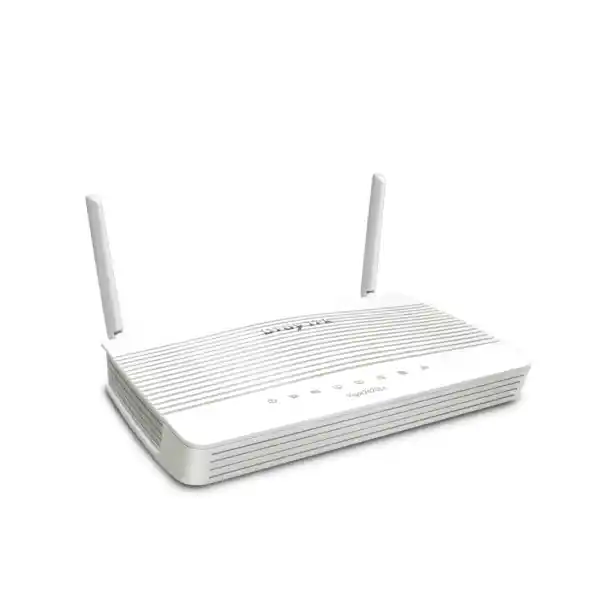
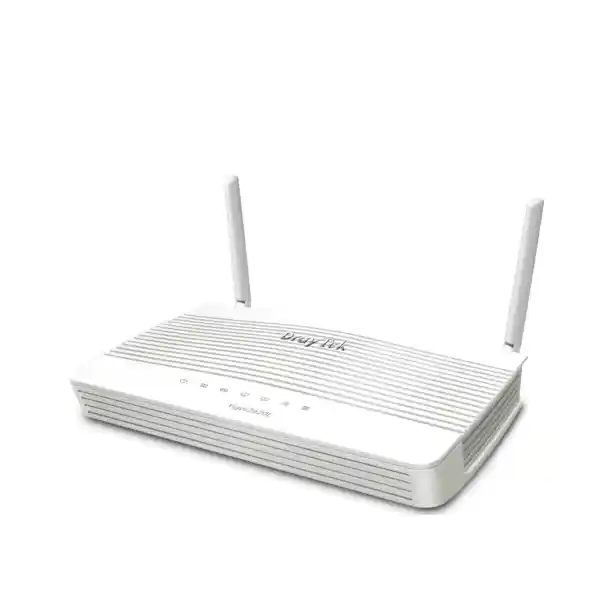
UAE Multi-WAN Branch Router
DrayTek Vigor2620Ln Dual-SIM LTE, VDSL2 and Gigabit WAN Router
The DrayTek Vigor2620Ln is designed for sites where Internet continuity matters more than raw port count. It combines an integrated dual-SIM 4G LTE Category 4 modem, VDSL2/ADSL2+ connectivity and a configurable Gigabit Ethernet WAN path in one compact branch platform. That makes it especially useful for UAE retail locations, service counters, project offices, warehouses, small clinics, remote technical rooms, temporary facilities and distributed business sites that need secure primary connectivity, practical failover or both.
Direct answer: what is the Vigor2620Ln best used for?
Use the Vigor2620Ln when a small site needs several independent Internet access methods in a single appliance. A DSL circuit can operate as the fixed-line service, the switchable Ethernet port can connect to an ONT, upstream router or another handoff, and the built-in LTE modem can provide mobile broadband with two SIM slots for carrier diversity. It is not a high-density access switch, not a modern Wi-Fi 6 platform and not an enterprise data-centre firewall. Its strength is resilient edge routing for modest branch traffic, combined with business controls such as VLANs, stateful firewalling, VPN, bandwidth management, SMS monitoring and central management integration.
Integrated DSL, built-in cellular and switchable Gigabit Ethernet give the router three different access methods for resilient branch designs.
Two SIM slots support carrier contingency on the integrated LTE modem, with one SIM active at a time and the alternate available for failover.
Suitable for a small branch-to-head-office tunnel plus remote-access use, subject to protocol choice, traffic profile and performance requirements.
Compact wired access for endpoint or downstream-switch connection; one physical Gigabit port can be reassigned for Ethernet WAN operation.
Why connection diversity matters in UAE branch networks
A branch router should be selected around failure modes, not around a single headline speed. A small UAE office may have a stable fibre or Ethernet service most days, but an upstream access fault, building cabling issue, provider maintenance window, CPE problem or local power event can still isolate the site. A project office may face a different challenge: fixed broadband may not be available on the first day that staff, payment systems or monitoring equipment need connectivity. A retail counter may need a backup channel for cloud POS access. A warehouse may need continuous connectivity for inventory applications even when the preferred circuit is unavailable. The Vigor2620Ln addresses these scenarios by putting DSL, Ethernet and LTE options in one device.
The design value is not that all links become one super-fast connection. Instead, the router can be configured so that an appropriate access method is primary and another becomes the failover route when health checks detect a problem. That approach lets network designers match cost, availability and business impact. A low-cost fixed line can remain active for routine usage while an LTE SIM is reserved for outages. In another site, LTE can be the main connection while a wired circuit becomes the fallback. The right policy depends on data allowance, carrier coverage, latency, public-IP needs, VPN requirements and how the applications behave when the public address changes during failover.
For organisations that already standardise firewalling and support processes in Dubai or across the Emirates, FourTeck can combine the router with broader perimeter planning through Firewall Dubai. The important point is to treat the Vigor2620Ln as part of an end-to-end branch design: WAN handoffs, SIM services, LAN segmentation, authentication, DNS, VPN, monitoring and support procedures all influence the real availability of the site.
Hardware and interface map
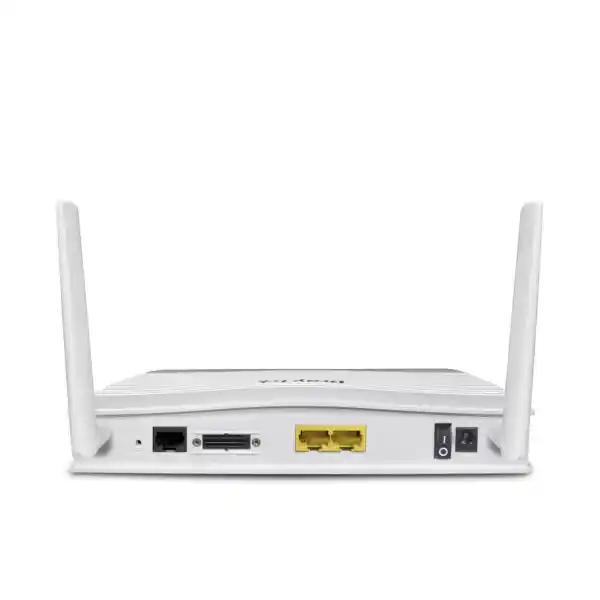
| Interface | Role | Deployment note |
|---|---|---|
| DSL WAN | VDSL2 / ADSL2+ | Useful for compatible copper-based broadband services; supports VDSL2 vectoring and multiple VDSL profiles. |
| P2 Gigabit Ethernet | LAN or WAN2 | Can be switched to operate as an Ethernet WAN, allowing connection to an ONT, modem, managed CPE or other Ethernet handoff. |
| P1 Gigabit Ethernet | LAN | Connect directly to a local device or, more typically in a business site, to a managed access switch. |
| Dual SIM slots | LTE primary / backup SIM | One SIM is online at a time. Use separate carriers where practical if carrier-level redundancy is a requirement. |
| 2 external LTE antennas | Cellular RF | Removable antennas allow orientation and placement planning; the router location still strongly affects LTE signal quality. |
| 2.4 GHz WLAN | 802.11n wireless | Up to 300 Mbps PHY rate under supported conditions. Best treated as convenience or small-site coverage rather than a modern high-density WLAN. |
Integrated LTE Category 4
The Vigor2620Ln integrates a 4G LTE Category 4 modem rated for up to 150 Mbps downstream and 50 Mbps upstream at the radio-link level under ideal network conditions. Real throughput depends on cellular signal quality, carrier congestion, channel allocation, RF conditions, antenna placement, backhaul capacity, plan restrictions and traffic processing on the router. LTE performance should therefore be validated on-site rather than assumed from the category maximum.
Dual SIM slots are particularly useful for resilience. The second slot is not a bonding mechanism and does not combine two operators into one connection. Instead, the router can use one SIM at a time and move to the other according to the configured policy. For a critical branch, using two independent mobile operators can reduce the chance that a single carrier outage disables the cellular backup strategy. The actual UAE operator, APN and addressing model should be confirmed before rollout.
Regional LTE band caution
Vigor2620Ln hardware has been sold in different regional variants, and published band lists differ between country editions. That means procurement should not rely on a band table copied from a UK, European or Australian page without checking the exact hardware SKU. FourTeck recommends confirming the unit’s supported LTE bands against the chosen UAE carrier before purchase, especially when the router will be deployed at scale or in a location where only one band provides strong indoor coverage.
This verification is more important than the theoretical Cat 4 rate. A router with a compatible band set and strong signal can provide stable failover; a router installed in a poor RF location can perform unpredictably even when the carrier advertises excellent outdoor coverage. Signal testing at the intended mounting point is therefore part of professional deployment.
DSL capability: VDSL2 and ADSL2+ in one WAN interface
The integrated DSL interface lets the Vigor2620Ln connect directly to compatible VDSL2 or ADSL-family services without requiring a separate DSL modem. Published specifications include VDSL2 support with profiles such as 8a, 8b, 8c, 8d, 12a, 12b, 17a and 30a, together with vectoring-related capabilities and legacy ADSL standards including ADSL, ADSL2 and ADSL2+. The practical advantage is reduced equipment count: where a supported copper broadband service is available, the router can terminate the line and apply routing, firewall, VPN and failover policy in the same platform.
DSL compatibility always depends on the service provider’s line technology, framing, VLAN parameters, authentication method and local network requirements. A specification saying that a router supports VDSL2 does not guarantee that every provider profile will work without configuration. Before migration, document the incumbent device settings, including PPPoE credentials where applicable, service VLAN values, MTU expectations and any IPTV or management virtual circuits. The Vigor2620Ln supports common WAN protocols such as DHCP client, static addressing and PPPoE, while its DSL stack also includes mechanisms used by ADSL services such as PPPoA and bridging.
For UAE projects, DSL is often one of several possible underlay technologies rather than the only design choice. The Vigor2620Ln remains useful even when the site later moves to an Ethernet-delivered service because the P2 interface can be repurposed as WAN2. This protects some of the investment when a site transitions from copper access to a fibre or managed Ethernet handoff.
Gigabit Ethernet WAN and LAN design
The router includes two Gigabit Ethernet ports, with the second port switchable to Ethernet WAN use. This compact layout is adequate for a small edge design but it must be planned carefully. If P2 becomes WAN2, only the remaining fixed LAN port is available for local wired connectivity. In most business deployments that port should uplink to a managed switch, which then fans out to PCs, POS terminals, printers, access points, CCTV equipment, IP phones or other endpoints. The router can carry VLAN-tagged traffic to a capable downstream switch so that the limited physical port count does not prevent basic segmentation.
Do not confuse Gigabit port speed with routed security throughput. The physical Ethernet interfaces can negotiate at 1 Gbps, while published firewall performance for the Vigor2620Ln is up to about 300 Mbps under the vendor’s test conditions. Security processing, VPN encryption, QoS, content controls, concurrent sessions and bidirectional application flows all influence the usable rate. If the site has a 500 Mbps or 1 Gbps Internet service and expects to sustain most of that bandwidth through the router, this model is likely undersized even though the WAN Ethernet port is Gigabit capable.
Sizing should therefore start with the required processed throughput rather than the connector label. Measure typical and peak business traffic, identify encryption requirements, count concurrent users and sessions, then include growth margin. For a low-to-moderate traffic branch where availability and WAN diversity are priorities, the Vigor2620Ln can be a strong fit. For higher-speed sites, FourTeck can help identify a larger firewall or SD-WAN platform through its broader UAE networking portfolio.
Wireless LAN: useful, but not the reason to buy this router
The Vigor2620Ln includes 2.4 GHz 802.11n wireless with a maximum PHY rate of up to 300 Mbps using two spatial streams under suitable channel conditions. That can be enough for a small office, commissioning laptop, temporary site or low-density branch where only basic wireless access is needed. It also supports wireless integration with VLAN-based network separation, which makes it possible to distinguish internal and guest access when the rest of the design supports the same segmentation.
However, 2.4 GHz 802.11n is an older wireless platform. The band is commonly crowded, and the router does not provide the capacity, efficiency or radio design expected from current Wi-Fi 6 or Wi-Fi 6E deployments. In a warehouse, open office, clinic, hospitality site or any location with many wireless clients, separate business access points are normally the better design. The router can centrally manage up to two compatible DrayTek VigorAP units, which is useful for a small distributed WLAN, but larger environments should use a dedicated wireless architecture with proper survey, channel planning and controller strategy.
A useful way to think about the built-in radio is as a convenience feature, not as an excuse to skip WLAN design. If staff depend on real-time cloud applications or voice over Wi-Fi, place access points according to coverage and capacity requirements rather than simply installing the router wherever the ISP cable enters the room.
Firewall and access control
The Vigor2620Ln provides stateful packet inspection and object-based filtering for IPv4 and IPv6. Administrators can build rules around addresses, services and groups rather than relying only on flat port-forward entries. The platform also includes controls used in small-business perimeter designs such as NAT, port redirection, DMZ host configuration, MAC-related policies, DoS protection, IP-to-MAC binding and scheduled access rules.
These functions are valuable only when policy is deliberate. A secure deployment should begin with deny-by-default thinking for unsolicited inbound traffic, minimal remote-management exposure, strong administrator authentication and a documented reason for every published service. If an application can be accessed through VPN rather than open Internet port forwarding, the VPN path is normally preferable.
Content filtering and licensing
The router supports application, URL and keyword-style policy functions, while category-based web reputation or content services can depend on an active subscription or service entitlement. This distinction matters during quotation: the hardware purchase should not be assumed to include every cloud-fed filtering feature for the life of the unit.
If category filtering, reporting or managed security controls are mandatory, specify them in the bill of materials and confirm the required term. Organisations with broader managed-network needs can align router deployment with monitoring, patching and support processes through FourTeck IT Services UAE.
VPN capability and realistic performance planning
The Vigor2620Ln supports two VPN tunnels and is positioned for small-site secure connectivity rather than large VPN concentration. Published feature sets include IPsec with IKEv1 and IKEv2, L2TP with IPsec and DrayTek SSL VPN options. Vendor figures list IPsec performance up to about 50 Mbps with AES-256 and SSL VPN performance up to about 25 Mbps under test conditions. These numbers are useful for sizing, but they should be treated as ceilings rather than guaranteed production rates.
VPN throughput depends on packet size, cipher suite, traffic direction, CPU load, firewall rules, concurrent sessions and what else the router is doing. A branch that only needs a lightweight ERP tunnel, remote desktop access or management traffic may be comfortable within this envelope. A site continuously backing up hundreds of gigabytes through an encrypted tunnel, carrying heavy video traffic or servicing many remote users should use a higher-performance security gateway.
For site-to-site deployment, define the protected subnets on both ends, make sure addressing does not overlap, select modern cryptographic proposals supported by the peer, configure dead-peer detection or equivalent liveness checks, and document routing behavior during WAN failover. If LTE becomes active, the public addressing model can change. Some mobile services place the SIM behind carrier-grade NAT, which may affect inbound initiation or specific IPsec designs. The correct approach is to verify the mobile APN and tunnel initiation direction before installation.
The two-tunnel limit is also a topology constraint. A single small branch connecting to one data centre plus one secondary endpoint may fit. A hub-and-spoke environment with many peers, dynamic meshes, multiple cloud VPN gateways or extensive remote-access concurrency needs a larger platform. The Vigor2620Ln should be selected because its capacity matches the branch, not because it happens to support the protocol name.
VLANs and two-LAN segmentation
The router supports two LAN subnets and 802.1Q VLAN tagging. For a compact branch, that is enough to implement a meaningful trust boundary, such as a corporate network and a guest or untrusted network. A typical design might place staff endpoints and business systems in LAN 1 while placing visitor Wi-Fi or a limited-purpose device group in LAN 2. Firewall rules then control whether traffic can cross between segments, reach only the Internet, or access a specific internal service.
Because only two logical LANs are available, the segmentation model is intentionally simple. If a site needs independent zones for users, voice, CCTV, access control, IoT, servers, building systems, guest Wi-Fi and management, the router becomes the limiting point. It may still serve as a WAN edge upstream of a more capable firewall, but in that case the architecture should be reconsidered to avoid unnecessary double NAT or policy duplication.
When VLANs are extended to a managed switch, document the tagged and untagged behavior of each port. Many avoidable outages happen because the router VLAN ID, switch trunk configuration and access-port PVID do not match. A clean branch deployment includes a small port map showing which VLAN is native, which VLANs are tagged, which DHCP scope belongs to each network and what inter-VLAN rules are permitted.
Quality of Service for voice and business-critical traffic
The Vigor2620Ln includes bandwidth management and Quality of Service controls with support for common marking mechanisms such as DSCP and 802.1p. QoS is valuable when the WAN becomes congested, particularly on LTE or lower-speed DSL circuits where upload bandwidth can be the bottleneck. Voice packets, interactive business applications and management traffic can be prioritised above bulk downloads or software updates so that a busy user does not make every call or cloud session unusable.
QoS cannot create bandwidth that the carrier does not provide. It works by deciding which packets should move first when there is contention. To configure it properly, measure the realistic WAN rate and shape below that rate so the router, rather than the upstream provider, becomes the queueing point. If the actual LTE uplink varies significantly, conservative shaping may provide more predictable application behavior than configuring the theoretical 50 Mbps Cat 4 maximum.
VoIP deployments should also account for NAT timers, SIP topology, DNS, jitter and failover behavior. A WAN transition can change the public IP and interrupt active calls even when the router restores Internet access quickly. Business continuity planning should therefore distinguish between connection recovery and session preservation; they are not the same thing.
WAN failover design: health checks are the heart of resilience
A backup link is useful only if the router can identify when the preferred path is no longer healthy. An Ethernet interface may remain electrically up even when the upstream ISP has lost Internet reachability. A DSL line can remain synchronised while DNS or upstream routing is impaired. Good failover configuration therefore uses meaningful detection targets and thresholds instead of relying solely on physical link state.
Choose probe destinations that reflect real Internet reachability, avoid depending on a single external host, and use sensible retry timers so a brief packet loss event does not cause unnecessary WAN flapping. At the same time, thresholds should not be so relaxed that the branch remains stuck on a broken primary path for several minutes. The correct balance depends on the application. A payment terminal or remote support link may require faster recovery than a low-priority monitoring sensor.
When failover activates LTE, also consider data budget. Operating-system updates, cloud backups or CCTV uploads can consume mobile data rapidly. The Vigor platform includes WAN budget and monitoring functions that can help limit surprises, but application policy still matters. During an outage, nonessential traffic may need to be restricted so the backup service remains available for the workflows that justify it.
Failback deserves the same attention. If the primary path returns only briefly and fails again, immediate failback can create instability. Use recovery timers and test the behavior with real applications. A good acceptance test includes physical disconnects, upstream reachability failures, DNS impairment, SIM switching and restoration of the preferred path.
Topology A: fixed broadband with LTE backup
This is the most common resilience pattern. Use DSL or Ethernet WAN as the preferred Internet path. Install a tested UAE SIM in the LTE modem and configure it as failover. Keep critical SaaS, VPN, POS and management traffic permitted on the mobile path while restricting optional high-volume traffic. If carrier diversity is important, place a second operator SIM in the alternate slot. This topology balances normal fixed-line economics with mobile recovery.
Topology B: LTE-first temporary or remote site
Use LTE as the primary service when a project office, kiosk, construction facility or remote location needs connectivity before a fixed circuit is available. The second SIM can provide carrier failover, while DSL or Ethernet can be enabled later without replacing the router. This is particularly practical during site commissioning, but the data plan, indoor RF conditions and public-IP requirements must be checked before the design is approved.
Topology C: LTE bridge to another firewall
The Vigor2620 LTE family can be used so the cellular connection feeds a separate broadband router or firewall. This can be useful when the organisation wants to keep its existing security gateway but needs an integrated dual-SIM LTE modem placed where signal is strongest. In this architecture, routing responsibility, public addressing and NAT placement must be planned carefully so the LTE device does not create unintended double-NAT behavior.
Topology D: small dual-network branch
Use the two available LAN subnets to separate trusted business endpoints from guest or limited-purpose devices. Extend both networks to a managed switch or compatible access point using 802.1Q tagging. Apply firewall rules that prevent the untrusted segment from reaching internal resources while allowing only required Internet access. This keeps the design simple enough for the platform while still improving security over a single flat LAN.
Management: web interface, CLI, SNMP, TR-069 and VigorACS
The Vigor2620Ln can be administered through its web interface and provides command-line access options including web console, Telnet and SSH depending on configuration. It also supports logging through Syslog, SNMP management and TR-069-class remote provisioning functions. In production, prefer encrypted management methods, limit access to trusted networks and disable services that are not required. Telnet should not be exposed across untrusted networks because it does not provide the protections of SSH.
VigorACS support is valuable when multiple DrayTek sites need central visibility and configuration. Central management can reduce the operational cost of repetitive tasks such as monitoring, backup, alerting, bulk firmware operations and remote diagnostics. However, the existence of ACS compatibility does not eliminate the need for a deployment standard. Define a baseline template covering administrator access, NTP, DNS, syslog, SNMP, backup, WAN monitoring, firewall policy and firmware maintenance before onboarding dozens of devices.
Management platforms and subscriptions can have separate licensing, hosting or support terms. Include those requirements explicitly in the commercial scope instead of assuming all central-management capabilities are permanently included with the router hardware.
Firmware and security lifecycle
Router security is a lifecycle process. The Vigor2620Ln is an established model, and DrayTek continues to publish firmware resources for the Vigor2620 LTE series. The vendor’s resource centre currently lists 3.9.9.6 modem-code variants for the series, and a November 2025 DrayTek security advisory identified 3.9.9.6 as the fixed version for a set of WLAN driver vulnerabilities affecting the Vigor2620Ln. Any new deployment should therefore begin by checking the exact regional hardware, modem-code requirement and latest supported firmware before the router is placed into production.
Firmware should not be upgraded casually in a critical branch. Export the configuration first, read the release notes, confirm the correct hardware model and modem code, schedule a maintenance window, and make sure someone has a recovery path if the unit does not return as expected. For DSL deployments, modem-code variants can affect line behavior, so the newest filename is not always the only consideration. The goal is to run a supported secure release that is appropriate for the line and region.
Administrative hardening should include unique credentials, HTTPS-only management where practical, restricted management source networks, secure remote access through VPN, disabled unused services, regular configuration backups and log forwarding. Avoid exposing the router’s management portal directly to the public Internet. Where remote administration is unavoidable, use strict source restrictions and multi-layer controls rather than relying on obscurity.
Security operations should also document who owns firmware review. A device that is secure on installation day can become exposed if no one is responsible for advisories and updates. For distributed branch estates, central management and a repeatable patch process are more important than one-time configuration quality.
Performance envelope and sizing methodology
| Metric | Published figure | How to use it |
|---|---|---|
| Firewall throughput | Up to 300 Mbps | Treat as an upper lab reference. Apply margin for rules, sessions and mixed traffic. |
| NAT sessions | 30,000 | Relevant for concurrent web, cloud and device connections; user count alone does not predict sessions. |
| IPsec VPN | Up to 50 Mbps with AES-256 | Suitable for modest branch encrypted traffic, not heavy backup or large-site aggregation. |
| SSL VPN | Up to 25 Mbps | Plan for remote administration and light user access rather than large concurrent populations. |
| LTE Cat 4 radio | Up to 150/50 Mbps down/up | Carrier and RF conditions usually determine practical performance before the category maximum is reached. |
| 802.11n WLAN | Up to 300 Mbps PHY | Do not equate PHY rate with application throughput; use dedicated APs for modern high-density Wi-Fi. |
A sound sizing process starts with five questions. First, what is the contracted WAN rate and what percentage of it must pass through the router at peak? Second, how much of that traffic is encrypted through IPsec or SSL VPN? Third, how many endpoints and concurrent sessions exist during busy periods? Fourth, which security and QoS functions will be enabled simultaneously? Fifth, what growth is expected over the next three years?
If the answer is a 100 Mbps branch circuit, modest VPN traffic, tens of endpoints and a need for LTE resilience, the Vigor2620Ln can be well aligned. If the site expects sustained multi-hundred-megabit traffic with full security processing, multiple VLANs, many VPN peers and modern Wi-Fi, the design should move to a larger platform. Buying headroom is usually cheaper than replacing an undersized router after users begin reporting latency.
A note on chipset and acceleration claims
Public Vigor2620Ln documentation focuses on functional throughput and interface capability rather than naming a specific forwarding ASIC or detailed chipset pipeline. FourTeck therefore does not invent silicon-level architecture claims for this model. What matters to deployment is the measured performance envelope published by DrayTek and the workload the router must process. The device clearly performs routing, firewalling, NAT, QoS and VPN functions in an embedded platform, but the exact internal hardware path is not a reason to make unsupported marketing claims.
This is important because terms such as hardware acceleration can be misleading when copied between unrelated models. A newer DrayTek platform may publish different acceleration figures or processors. The Vigor2620Ln should be judged on its own documented firewall, VPN, session and interface specifications. Where an application needs guaranteed performance beyond those figures, use a higher-tier platform and validate it with realistic traffic.
Physical specifications and installation planning
The router is small enough for a shelf, compact wall cabinet or branch communications area, but UAE ambient conditions still matter. Do not install it in an unventilated enclosure exposed to direct sun, roof-space heat or dust beyond the device’s environmental rating. A router with a 45 °C operating ceiling should be placed in conditioned indoor space when possible. Good airflow and a clean power source improve reliability more than squeezing the appliance into the nearest available electrical cupboard.
Cellular placement can conflict with network-cabinet placement. The strongest LTE signal may be near a window, while the Ethernet distribution point may be in an internal rack. Because the LTE antennas are removable, there is some flexibility, but long RF extension cables add loss. In difficult sites, test multiple locations before final mounting or use the device as a cellular bridge near the best RF position with Ethernet back to the main firewall.
Power resilience should match the business requirement. If the branch needs Internet during brief mains disturbances, connect the router, upstream ONT or modem and required network switch to a properly sized UPS. Backing up only the router does not help if the fibre ONT or access switch loses power at the same moment.
SMS monitoring and remote control
Because the LTE modem can send and receive SMS messages, administrators can use the router for certain monitoring and control workflows even when ordinary IP connectivity is impaired. DrayTek documents status reporting and remote reboot commands through SMS. This can be useful for an unattended site where the management tunnel is down but the modem remains registered to the mobile network.
SMS control should be treated as an administrative feature with security implications. Restrict authorised numbers where the firmware supports it, avoid publishing operational phone numbers broadly and document who is allowed to issue commands. A remote reboot is useful when troubleshooting, but it can also interrupt service if performed without change control. The feature belongs inside the same operational policy as web, SSH and central management access.
For monitoring, do not rely on SMS alone. Combine router logs, SNMP or VigorACS alarms with external monitoring that checks branch reachability from outside the site. The most reliable operations model confirms both sides: what the router thinks about its WAN state and whether users can actually reach the services they need.
UAE procurement factors
For UAE buyers, model name alone is not enough. Confirm the exact Vigor2620Ln hardware region, power supply, LTE band support, included antennas, warranty route and firmware branch before the purchase order is issued. A grey-market unit intended for another country can create avoidable radio, support or power-adapter complications. The bill of materials should identify the correct regional SKU rather than simply saying “Vigor2620Ln”.
For cellular service, define whether the SIM will use a private APN, public dynamic IP, static public IP or carrier-grade NAT. Those choices affect inbound VPN initiation, remote management and integration with cloud services. If the branch requires site-to-site VPN through LTE, validate the carrier plan during a pilot instead of discovering addressing restrictions after dozens of units are installed.
For fixed-line service, record whether the handoff is DSL, Ethernet from an ONT, or Ethernet from provider-managed CPE. If an existing ISP router is being replaced, collect authentication credentials and VLAN parameters before the maintenance window. If the provider requires its own CPE to remain, decide whether the Vigor2620Ln will receive a routed public address, sit behind NAT or use bridge/passthrough functionality upstream.
Commercially, include accessories and services that make the installation complete: managed switch capacity, UPS, patch leads, rack or wall mounting, structured cabling, LTE signal validation, configuration, VPN integration, documentation and support. FourTeck’s broader global networking practice can support standardisation where a UAE branch is part of a larger multi-country rollout.
Recommended pre-deployment configuration sequence
Migration from an existing branch router
A router replacement is safest when the old configuration is translated into a clean new design rather than copied blindly. Start by documenting the current WAN addressing, DHCP scope, reservations, static routes, port forwards, VPN peers, DNS settings, VLANs and any hard-coded device gateways. Identify configuration that exists only because of the previous router and remove it from the target design when it is no longer needed.
Build and test the Vigor2620Ln offline wherever possible. Preconfigure its LAN addresses without connecting it to the live network, prepare WAN credentials, import VPN parameters manually and confirm administrator access. During the cutover, disconnect the old router, connect the new device, validate local DHCP and routing, then confirm Internet access before testing inbound services and VPNs. This sequence reduces troubleshooting variables.
If the branch uses fixed IP addresses, verify the new router uses the same gateway address or update endpoints as planned. Devices such as printers, CCTV recorders, access controllers and PBX systems are frequently missed because they do not use DHCP. A migration checklist should include each of these infrastructure endpoints.
After the site is stable on the primary WAN, simulate failure and confirm LTE takes over. A router that works normally but has never had failover tested is not yet a resilient deployment. Complete the change only after primary restoration and failback are also proven.
Troubleshooting LTE performance
When cellular throughput is poor, begin with radio conditions before changing firewall settings. Check the modem’s reported signal metrics, network registration, operator and active band. Move the router or reorient the external antennas, then repeat the test. Indoor reinforced concrete, metal racks, equipment rooms, low floors and tinted façades can significantly reduce cellular performance. A small physical relocation may improve stability more than any software tuning.
Next, verify the SIM plan and APN. Some plans are traffic-shaped, prioritised differently or restricted behind carrier NAT. Test the same SIM in a known-good device at the same location when diagnosing whether the issue is carrier-side or router-side. Use several test times because mobile capacity varies with cell congestion.
Finally, test the router without competing LAN traffic. A cloud backup or OS update can make LTE appear slow even though the link itself is healthy. Review data-flow monitoring and QoS configuration, then compare single-client and multi-client results. In a failover design, the objective is usually stable business connectivity rather than achieving a speed-test record.
If packet loss or latency remains high despite good signal, test another carrier if available. Dual-SIM capability is useful not only for outages but also for operational troubleshooting: it can quickly demonstrate whether the problem follows the mobile network or remains with the site.
Troubleshooting DSL and Ethernet WAN
For DSL, separate physical synchronisation problems from authentication or routing problems. If the DSL interface does not train, check the cable, splitter or filter where applicable, line type, annex, profile compatibility and provider status. If it synchronises but cannot reach the Internet, verify PPP credentials, service VLAN parameters, encapsulation and assigned addressing. Keep a copy of the ISP’s known-good settings from the previous router.
For Ethernet WAN, verify link speed and duplex, upstream gateway reachability, VLAN tagging and DHCP or static settings. A physical link light only confirms Layer 1 connectivity; it does not prove Internet service. If the provider hands off a public IP only to a registered MAC address, a service reset or MAC-related procedure may be required when replacing the router.
When a connection works intermittently, collect timestamps and logs rather than rebooting immediately. Reboots erase useful state and can hide patterns. Correlate router events with ISP tickets, DSL retrains, DHCP lease changes, LTE registration and VPN outages. Accurate evidence makes support escalation faster and prevents repeated guesswork.
Best-fit UAE use cases
When the Vigor2620Ln is not the right choice
Choose a larger platform when the site must route and inspect substantially more than the Vigor2620Ln’s published performance envelope, when many simultaneous VPN tunnels are required, or when the firewall must support a richer set of modern security services. The two-VPN-tunnel scale is intentionally small. Likewise, a branch with a 1 Gbps Internet circuit should not expect this router to provide 1 Gbps of full firewall performance simply because it has Gigabit Ethernet ports.
Choose a modern wireless solution when Wi-Fi is a primary access method for dozens of users, voice clients or high-throughput devices. The integrated 2.4 GHz 802.11n radio is adequate for limited use but is not equivalent to a current multi-radio Wi-Fi 6 access point. A proper WLAN design should use dedicated APs and a capacity plan.
Choose a platform with more LAN segmentation when the security policy calls for many trust zones. Two LAN subnets can support a simple corporate-versus-guest design, but they are not enough for complex OT, IoT, voice, CCTV, server, guest and management separation. For those sites, start with the segmentation requirement and select the firewall accordingly.
Finally, choose a current-generation cellular platform when 5G throughput, advanced carrier aggregation or long-term radio roadmap is a primary requirement. The Vigor2620Ln is a Cat 4 LTE product. It remains useful for resilient modest-bandwidth branches, but it should not be purchased as if it were a 5G edge router.
Specification summary
| Product | DrayTek Vigor2620Ln |
| Cellular | Integrated 4G LTE Category 4 with 3G fallback; up to 150 Mbps down / 50 Mbps up theoretical radio rate; regional band variants apply. |
| SIM | Two standard-size SIM slots; one SIM active at a time. |
| DSL WAN | VDSL2 / ADSL2+ family support, including VDSL vectoring capabilities. |
| Ethernet | 2 × Gigabit Ethernet ports; P2 can be switched to Ethernet WAN2. |
| Wireless | 2.4 GHz 802.11n, up to 300 Mbps PHY rate with two spatial streams. |
| LAN segmentation | 2 LAN subnets with 802.1Q VLAN support. |
| Firewall performance | Up to 300 Mbps published maximum under vendor test conditions. |
| NAT sessions | Up to 30,000 sessions. |
| VPN | 2 tunnels; IPsec and SSL VPN support; published IPsec up to 50 Mbps AES-256 and SSL VPN up to 25 Mbps. |
| Management | Web UI, CLI options, Syslog, SNMP, TR-069 and VigorACS integration. |
| AP management | Central management for up to 2 compatible DrayTek VigorAP access points. |
| Dimensions | Approximately 207 × 131 × 39 mm. |
| Weight | Approximately 440 g without antennas. |
| Power | 12 V DC, 1 A external PSU; published maximum consumption about 12 W. |
| Operating environment | 0 °C to 45 °C; 10% to 90% non-condensing humidity. |
Deployment engineering notes for network teams
Treat the router as the policy boundary for a small site. Draw the traffic flows before configuration: which users need the Internet, which devices need headquarters access, which services are inbound, which segment contains untrusted clients and which WAN should carry each class during normal operation. Translating those flows into firewall, NAT, routing and QoS policy is easier than starting from the GUI and enabling features one by one.
Keep naming consistent. Use WAN labels that describe the carrier or circuit, LAN labels that describe the security zone, and VPN profile names that identify both endpoints. This matters when a support engineer sees an alarm at 2 a.m. A profile named “VPN1” is far less useful than “DXB-BR01-to-HQ”. The same discipline should be applied to DHCP reservations, address objects and Syslog messages.
Document failover intent in plain language alongside the configuration. For example: “Ethernet WAN is primary; after three failed probes, move default traffic to LTE SIM1; keep bulk backup blocked; if SIM1 registration fails, use SIM2; fail back to Ethernet only after five minutes of stable probes.” This turns a collection of settings into an operational design that another engineer can audit.
Finally, test from the user’s perspective. Successful ping tests do not prove the branch application works. Open the SaaS platform, initiate the VPN, make a voice call if relevant, test DNS, confirm NTP and verify remote monitoring. Repeat those checks while each WAN path is active. The acceptance criteria should describe business outcomes rather than only interface status.
Decision recap: who should buy the DrayTek Vigor2620Ln?
Choose the Vigor2620Ln when the branch is small, WAN resilience is important and the required security throughput is comfortably below the platform’s published ceiling. It is especially attractive when one appliance must support a combination of DSL, Ethernet WAN and built-in dual-SIM LTE without adding a separate USB modem or cellular gateway.
The model fits best where the network can live within two LAN subnets and two VPN tunnels, and where 2.4 GHz 802.11n is either sufficient or supplemented by dedicated access points. It is less appropriate for gigabit firewalling, extensive segmentation, large VPN meshes or high-density modern Wi-Fi. That distinction should be made before purchase because the cost of choosing an undersized platform is usually higher than the saving on the original hardware.
For many UAE branch scenarios, the strongest reason to deploy this router is not a single speed figure. It is the ability to survive more than one type of access failure using independent WAN technologies, while keeping the firewall, VPN, VLAN and monitoring configuration in a single manageable platform.
Quotation input checklist
For an accurate UAE quotation and deployment recommendation, provide the following information. These details determine whether the Vigor2620Ln is correctly sized and which accessories or services should be included.
FourTeck consultation for DrayTek Vigor2620Ln UAE deployments
FourTeck can help determine whether the Vigor2620Ln is the right edge device for your branch, temporary site or LTE backup requirement. The consultation can cover ISP handoff, SIM diversity, LTE signal considerations, VLAN design, firewall policy, VPN interoperability, QoS, VigorACS onboarding, firmware baseline and installation documentation.
For a single site, the goal is a clean configuration that fails over predictably and can be supported without guesswork. For a multi-site rollout, the goal expands to repeatability: standard addressing, naming, templates, monitoring, firmware policy and a documented exception process. The router is only one part of that operating model.
Share the branch location, current WAN service, target Internet speed, expected user count and VPN requirement. FourTeck can then recommend the router configuration, identify any switch or access-point dependencies and confirm whether a larger platform would provide better performance headroom.


Reviews
There are no reviews yet.