
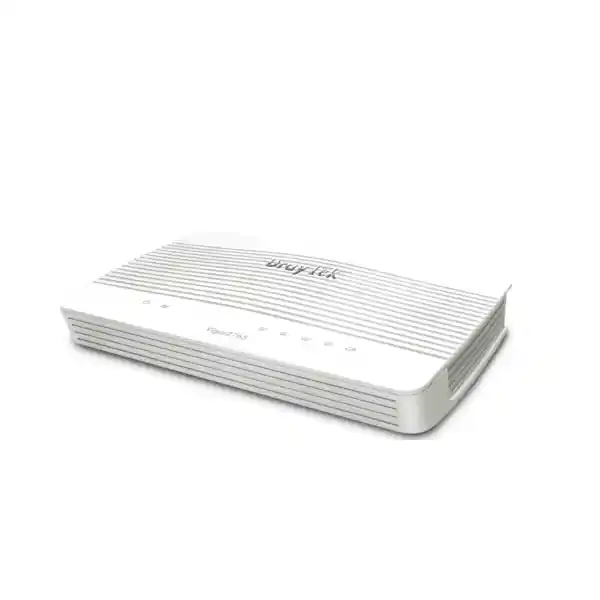
Business VDSL2 35b • WiFi 5 • VPN • Firewall
DrayTek Vigor2765ac in UAE
The DrayTek Vigor2765ac is a professional VDSL2 35b Supervectoring modem router designed for organisations that want direct DSL termination, controlled Gigabit Ethernet switching, dual-band 802.11ac Wave 2 wireless, secure VPN connectivity and detailed policy enforcement in one compact platform. It is especially relevant to UAE branches, professional offices, retail points, remote sites and technical home-office environments where the access circuit, firewall, user segmentation and wireless policy need to be managed as an integrated system rather than as unrelated consumer devices.
ENGINEERING POSITION
Integrated DSL edge for controlled small-site networking
Best considered when the site still depends on VDSL2 or ADSL service and requires stronger routing, segmentation, VPN and traffic-management capability than a basic ISP gateway provides.
Direct answer: what is the DrayTek Vigor2765ac?
The Vigor2765ac is a combined VDSL2/ADSL modem, IPv4/IPv6 router, stateful firewall, VPN gateway, VLAN-capable LAN router and dual-band wireless access device. Its defining WAN feature is an integrated DSL interface that supports VDSL2 profiles through 35b Supervectoring as well as legacy ADSL standards. On suitable VDSL2 35b lines, DrayTek specifies a maximum DSL link rate up to 300 Mbps. The device also includes four Gigabit Ethernet RJ-45 ports, with one LAN port able to operate as an Ethernet WAN interface for deployments that migrate away from DSL or need an alternate uplink design.
For routed Internet traffic, DrayTek publishes NAT throughput of 600 Mbps and up to 940 Mbps with hardware acceleration under its stated test conditions. The platform is rated for up to 50,000 NAT sessions, which is useful in busy small offices where browsers, cloud applications, mobile devices, collaboration tools, cameras and background software can create many simultaneous connections even when headline bandwidth is moderate. VPN capability includes site-to-site and teleworker use cases, with published IPsec performance up to 150 Mbps using AES-256 and SSL VPN performance up to 100 Mbps. The platform supports a maximum of two concurrent VPN tunnels, so it should be sized as a capable small-site gateway rather than treated as a high-density enterprise VPN concentrator.
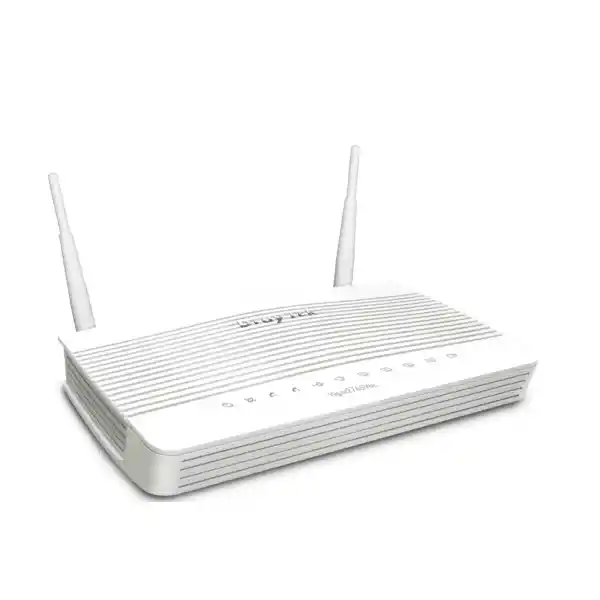
Wireless on the Vigor2765ac is WiFi 5 generation rather than WiFi 6. The 5 GHz radio uses 802.11ac Wave 2 2×2 MU-MIMO with a link rate up to 867 Mbps, while the 2.4 GHz radio uses 802.11n 2×2 MIMO. Two external dual-band antennas provide the radio interface, and business-oriented controls include band steering, airtime fairness, WMM, access lists, client isolation, hidden SSIDs and WLAN scheduling. The model therefore fits environments where stable policy control and integrated DSL routing matter more than the newest wireless generation.
DSL WAN
VDSL2 Profile 35b
Integrated VDSL2 Supervectoring and ADSL2+ modem for sites that need the router to terminate the access line directly.
ROUTING PERFORMANCE
Up to 940 Mbps
Manufacturer-rated accelerated NAT ceiling under optimal test conditions; practical performance varies with services and traffic.
SECURE TUNNELS
150 Mbps IPsec
Suitable for branch and teleworker designs with two maximum concurrent VPN tunnels and up to 100 Mbps SSL VPN.
WIRELESS
802.11ac Wave 2
Dual-band 2×2 wireless with up to 867 Mbps link rate on 5 GHz and business access controls for smaller coverage zones.
Technical profile and hardware interface map
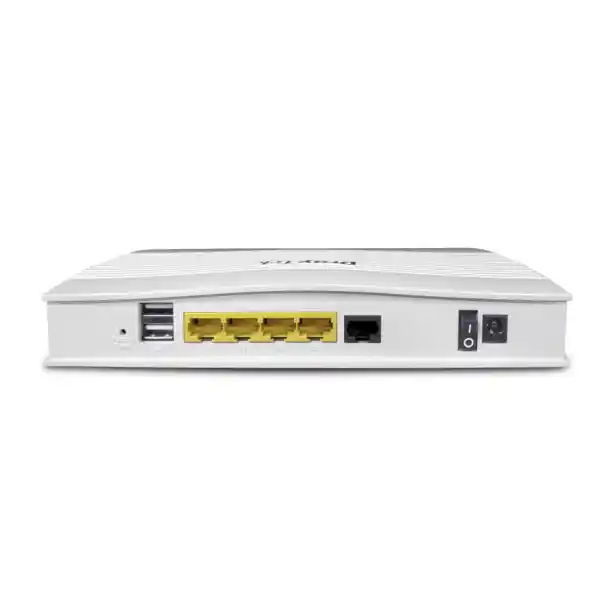
A useful way to understand the Vigor2765ac is to treat it as an access-edge appliance with three primary data paths: the integrated xDSL modem path, the Ethernet WAN/LAN path and the local wireless path. The DSL port terminates supported VDSL2 or ADSL services. The Ethernet side provides three fixed Gigabit LAN ports plus a fourth Gigabit port that can be switched between LAN duty and Ethernet WAN duty. The wireless subsystem extends those routed and segmented networks over 2.4 GHz and 5 GHz. Two USB 2.0 ports add optional functions such as supported cellular modem connectivity or storage-oriented services, depending on firmware and deployment requirements.
| Area | Vigor2765ac capability | Engineering implication |
|---|---|---|
| DSL interface | 1 × RJ-11, VDSL2 through Profile 35b plus ADSL/ADSL2/ADSL2+ | Can replace a basic carrier modem where line standards and provider requirements are compatible. |
| Ethernet | 4 × Gigabit RJ-45, including one switchable LAN/WAN port | Supports direct LAN attachment and an Ethernet-uplink migration path without replacing the router immediately. |
| USB | 2 × USB 2.0 | Useful for supported cellular, storage or service functions where required; USB is not a substitute for dedicated high-speed storage infrastructure. |
| Wireless | 2.4 GHz 802.11n 2×2; 5 GHz 802.11ac Wave 2 2×2 MU-MIMO | Appropriate for controlled office coverage; higher-density or large-floor deployments should use separately planned access points. |
| Power and enclosure | 12 V DC input; approximately 207 × 131 × 42 mm; published maximum consumption 19.2 W | Compact for desk, shelf or communications cabinet placement with appropriate ventilation and protected power. |
The important design point is that the Ethernet WAN capability is not an additional fifth Ethernet port. One of the four Gigabit ports is reassigned when Ethernet WAN mode is used. That distinction matters when counting physical connections for switches, VoIP phones, local servers, printers or management devices. A site requiring more copper ports should normally attach a managed access switch rather than choose a router based on direct-port count alone. This also keeps VLAN distribution and endpoint expansion cleaner as the network grows.
VDSL2 35b and ADSL: where this modem architecture fits
The integrated modem is the most specialised part of the Vigor2765ac. VDSL2 Profile 35b, often described as Supervectoring, extends the usable frequency spectrum beyond older VDSL2 profiles to enable higher line rates on suitable copper loops and compatible access equipment. DrayTek specifies a maximum VDSL link rate up to 300 Mbps for this series. That figure is a physical-layer ceiling in suitable conditions, not a guaranteed service speed. Actual synchronisation depends on the telecom provider, DSLAM profile, copper-loop length, noise, crosstalk, internal wiring, line quality and the commercial service profile purchased by the customer.
The router supports VDSL2 profiles including 8a, 8b, 8c, 8d, 12a, 12b, 17a and 35b, alongside vectoring and retransmission-related standards. It also maintains backward compatibility with common ADSL generations, including G.dmt, ADSL2 and ADSL2+. That backward compatibility is valuable during staged migrations because a customer can standardise on one management platform even when individual branches have different DSL access types. It also helps replacement projects where the exact circuit profile is not obvious until the existing modem configuration and line status are inspected.
The Vigor2765ac should not be sold as a G.fast router. Its xDSL value is VDSL2 35b and ADSL compatibility. This distinction is commercially important because G.fast uses different profiles and deployment assumptions. If a provider handoff is Ethernet from an ONT, fibre CPE or carrier-managed modem, the Vigor2765ac can still be considered by using its switchable Gigabit Ethernet WAN port, but in that design the integrated DSL modem is no longer the primary reason to select the model.
For UAE customers, compatibility review should therefore begin with the actual service handoff rather than the marketing name of the broadband package. Engineering should identify whether the carrier presents an RJ-11 DSL pair, an Ethernet handoff, a fibre ONT or another managed CPE, then confirm encapsulation, VLAN requirements, addressing method and authentication. The Vigor platform supports common WAN methods such as PPPoE, PPPoA, DHCP and static IP on applicable interfaces, but the service must still be matched to the provider configuration. FourTeck can help organisations document the existing circuit and map it to a target router configuration before a migration window.
Line statistics also matter after installation. A technically sound commissioning process records sync rate, attainable rate where available, signal-to-noise margin, line attenuation, retransmission/vectoring status, error counts and stability over time. A router cannot compensate for damaged copper, poor building wiring or a marginal carrier loop. When a DSL circuit is unstable, troubleshooting should separate physical line problems from routing, firewall or WiFi symptoms. This prevents wasted effort adjusting LAN policy when the access line itself is retraining or accumulating errors.
Gigabit Ethernet routing, NAT and session capacity
Routing performance is often misunderstood when evaluating an all-in-one broadband router. The Vigor2765ac has Gigabit Ethernet interfaces, but a Gigabit port does not automatically guarantee Gigabit routed throughput with every security and traffic-control feature enabled. DrayTek publishes standard NAT throughput around 600 Mbps and an accelerated maximum up to 940 Mbps under test conditions where the platform can use hardware acceleration. The manufacturer explicitly notes that real performance changes according to network conditions and active applications. A correct design therefore looks at the intended security policy, QoS rules, VPN usage and traffic mix rather than quoting the physical port speed as the firewall throughput.
The 50,000-session rating is equally important. Session count represents the number of simultaneous tracked network conversations the NAT/firewall engine can maintain. A user opening modern cloud applications can create many connections to authentication services, APIs, content-delivery networks, telemetry systems and web resources. IP phones maintain signalling and media relationships. Security cameras and NVRs can generate persistent streams. Operating systems and endpoint agents create background traffic. In a 20- to 30-user office, these flows can easily number in the thousands even when WAN bandwidth is not saturated. A 50,000-session ceiling gives a meaningful operational buffer for the small-site class, provided the network is sensibly controlled.
Hardware acceleration should be treated as a performance optimisation, not as a substitute for policy design. Certain functions may require traffic to be handled differently from a simple fast-path flow. Complex QoS classification, VPN encryption, detailed filtering or other services can reduce the amount of traffic that follows the fastest forwarding path. For this reason, a branch expecting sustained high hundreds of megabits while simultaneously applying many services should be validated in a representative configuration. Capacity planning based only on a single best-case throughput figure is risky.
The switchable LAN/WAN port gives the platform useful lifecycle flexibility. A site may start on VDSL2, then later receive fibre from a carrier that presents Ethernet. Instead of replacing the router solely because the access medium changes, administrators can move the WAN function to Ethernet and preserve the existing VLAN, firewall, VPN, DHCP and management configuration after an appropriate migration. This can reduce operational change, although the WAN speed and security workload should still be checked against the router’s performance envelope.
For larger LANs, the router should sit upstream of a managed switch. That design allows the Vigor2765ac to focus on routing, security, VPN and WAN policy while the access switch handles port density, Power over Ethernet where required, endpoint VLAN assignment and local switching. FourTeck’s UAE technology portfolio can be used to plan the surrounding switching, wireless and infrastructure components so the router is not expected to perform roles better assigned to dedicated access-layer equipment.
Dual-band 802.11ac Wave 2 wireless engineering
The Vigor2765ac integrates two-band WiFi intended for practical office and professional use rather than extreme client density. On 5 GHz, it uses 802.11ac Wave 2 with 2×2 MU-MIMO and a published maximum link rate of 867 Mbps. On 2.4 GHz, it uses 802.11n 2×2 MIMO. DrayTek documentation for the model lists two external dual-band dipole antennas, with published gains of 4 dBi on 5 GHz and 2 dBi on 2.4 GHz. These specifications describe radio capability and negotiated link rates; they should not be confused with guaranteed application throughput.
WiFi design is dominated by RF conditions. The final user experience depends on client radio capability, distance, obstacles, wall materials, interference, channel width, channel selection, neighbouring networks and the number of active devices. In Dubai and other dense UAE commercial environments, neighbouring access points can be numerous, particularly in shared office buildings, retail complexes and apartment towers. A router placed inside a metal cabinet or equipment room may deliver excellent wired routing but poor wireless coverage. If the Vigor2765ac’s WiFi is expected to serve staff directly, physical placement should be considered during network design rather than after cabling is complete.
The 5 GHz band normally provides more capacity and more non-overlapping channel opportunities than 2.4 GHz, but it also has different propagation characteristics. Band steering can encourage capable clients toward 5 GHz, helping reserve 2.4 GHz for older or longer-range devices. Airtime fairness attempts to prevent slower clients from consuming a disproportionate share of radio time. WMM supports WiFi multimedia traffic prioritisation mechanisms. These functions are useful, but they work best when channel planning, signal quality and client capability are already reasonable.
Multiple SSIDs can support role separation. A business might broadcast a corporate SSID mapped to an internal VLAN and a separate guest SSID mapped to an Internet-only VLAN. Client isolation can reduce direct peer-to-peer visibility among guest devices. Access lists and WLAN schedules can enforce additional operational policy. Security modes include modern options such as WPA2 and WPA3 support in current firmware families, along with 802.1X authentication capability. Legacy modes may also be exposed for compatibility; they should not be enabled simply because the router offers them. Security configuration should reflect the strongest mode supported by the actual client estate.
A common sizing mistake is to expect the integrated radio to replace a designed multi-access-point WLAN across a large villa, warehouse, clinic or multi-room office. The Vigor2765ac can be an effective local access point, but RF coverage does not scale with router CPU or WAN speed. Concrete walls, lift cores, glass partitions, shelving and office geometry create attenuation and multipath effects. Where reliable roaming and uniform coverage are required, dedicated managed access points should be placed according to a survey or at least a structured predictive plan, while the Vigor2765ac remains the routing and security edge.
Because this is an 802.11ac model, organisations standardising on WiFi 6 or newer client features should assess whether integrated wireless is still strategically appropriate. The router can remain useful as an edge platform while dedicated newer access points deliver the WLAN. That separation can extend the value of the routing investment and allows wireless technology to evolve independently from the DSL and firewall functions.
Firewall controls, NAT services and content filtering
The Vigor2765ac is designed to provide substantially more policy control than a minimal broadband gateway. Its firewall capabilities include IP-based policy, DoS attack defence, spoofing defence, NAT services and content-control features. Administrators can define rules around source and destination networks, protocols and ports, then combine those rules with VLAN and routing design. The objective is not simply to block unsolicited Internet traffic; a well-configured branch firewall also limits unnecessary movement between local trust zones and exposes only the services that the business intentionally publishes.
NAT functions include port redirection, open ports, port triggering, DMZ host options and UPnP capability. In a business environment, these features should be controlled carefully. Port forwarding should be documented with a business owner, destination system, protocol, external requirement and review date. A broad DMZ host mapping can expose far more services than intended. UPnP may simplify consumer device behaviour but can conflict with strict security governance because internal applications can request mappings automatically. The existence of a feature does not mean it should be enabled by default.
Application Layer Gateway support can help protocols such as SIP, RTSP, FTP or H.323 traverse NAT in some environments, but ALGs can also create troubleshooting complexity when modern endpoints already handle NAT traversal themselves. For example, hosted VoIP platforms may provide specific guidance on whether SIP ALG should be enabled or disabled. That setting should be aligned with the voice provider and tested rather than chosen generically. Customers integrating IP telephony can also review FourTeck’s IP phone and business voice resources when planning handset, switching and QoS requirements around the router.
Content filtering can act on application, URL keyword, DNS keyword, web features and web-category policy, with some web-category capability requiring a subscription. This distinction matters for procurement. Core routing and firewall features are part of the platform, but a customer wanting maintained category databases should confirm the relevant subscription entitlement, term and renewal process before purchase. The goal is to avoid deploying a policy that silently loses expected categorisation coverage because the licensing assumption was not documented.
DNS security features, including DNSSEC support, can strengthen name-resolution validation where the surrounding DNS architecture is compatible. Administrators should still decide whether clients query the router, an internal DNS server or a managed cloud resolver. DNS policy becomes more important as organisations use web filtering, SaaS controls and security services that depend on consistent resolver behaviour. Split DNS for VPN users and internal domains should also be planned so that remote workers can resolve private resources without unnecessarily redirecting all public DNS traffic.
For organisations with formal security requirements, the Vigor2765ac should be assessed against the required control set, logging retention, central monitoring and incident-response process. It provides strong small-site routing and firewall functions, but it should not be represented as a next-generation firewall with every enterprise inspection engine. If the requirement includes advanced intrusion prevention, sandboxing, enterprise endpoint integration or high-volume TLS inspection, a different security platform may be more appropriate. Correct product selection is preferable to forcing an access router into a role beyond its design class.
VPN design: site-to-site, teleworker and protocol choices
Secure connectivity is one of the strongest reasons to choose the Vigor2765ac over a basic ISP modem. The platform supports a broad set of VPN technologies, including IPsec, IKEv2, L2TP over IPsec, SSL VPN, OpenVPN and WireGuard in supported firmware. DrayTek also lists PPTP and plain L2TP for compatibility, but modern deployments should favour contemporary cryptographic methods appropriate to the client platform and security policy. The router supports both LAN-to-LAN and teleworker-to-LAN use cases.
DrayTek specifies up to 150 Mbps IPsec throughput with AES-256 and up to 100 Mbps SSL VPN throughput. Those numbers are single-directional manufacturer test figures and should be treated as maximum reference values rather than commitments for every packet size or policy. Real VPN performance depends on encryption, packet characteristics, WAN quality, concurrent services and whether traffic is also subject to detailed firewall or QoS processing. Latency between sites affects user experience independently from router encryption speed.
The most important sizing constraint is the maximum of two concurrent VPN tunnels. This can be entirely adequate for a branch that needs one permanent headquarters tunnel plus one contingency or administrator connection. It can also suit a small office with limited remote-access requirements. It is not a good fit for dozens of simultaneous teleworkers or a hub site that terminates many branch tunnels. In those scenarios, the network should use a platform designed for a higher tunnel count even if the aggregate bandwidth appears modest.
For a site-to-site VPN, engineers should define the local and remote subnets, interesting traffic selectors, routing, NAT exemption, encryption proposal, authentication method, dead-peer behaviour, DNS requirements and failover process. Overlapping private address ranges are a common obstacle when connecting independently built offices. If both sides use the same RFC1918 subnet, routing becomes ambiguous and may require readdressing or translation. Detecting that conflict before installation avoids emergency changes during the cutover.
For teleworker access, user identity and endpoint governance matter as much as the tunnel protocol. The Vigor2765ac supports local and RADIUS-related authentication options and mOTP mechanisms, depending on the chosen VPN feature. A secure remote-access design should address password policy, MFA expectations, client configuration, split tunnelling, DNS handling, permitted destination networks and offboarding. It should also define whether the remote device is company managed. A VPN that strongly encrypts traffic from an unmanaged and compromised endpoint does not by itself make the internal network safe.
NAT Traversal support is useful when a remote peer sits behind another gateway. DrayTek’s VPN Matcher feature can assist specific NAT-constrained site-to-site scenarios by helping compatible routers locate each other. Even with these aids, upstream carrier NAT can affect inbound reachability and certain VPN architectures. UAE customers using fixed broadband or mobile backup should confirm whether the service provides public addressing, dynamic public addressing or carrier-grade NAT. This becomes particularly important for inbound site-to-site initiation, hosted services and remote management.
FourTeck’s UAE IT services team can support VPN planning around routing tables, firewall rules, user access, migration sequencing and validation. The best VPN deployment is not the one with the longest protocol list; it is the one whose cryptography, identity model, addressing and operational ownership are clearly documented.
Quality of Service, bandwidth limits and session governance
Small offices often experience performance problems not because the circuit is too slow overall, but because bursts from backups, software updates, cloud synchronisation or large downloads compete with latency-sensitive traffic. The Vigor2765ac provides QoS classification using mechanisms such as ToS, DSCP, 802.1p, IP address, port and application criteria. It also supports application-oriented QoS and VoIP prioritisation features. These tools allow the administrator to express which traffic should receive preference when the WAN becomes congested.
QoS is most effective at a controlled bottleneck. If the router knows the actual available upstream and downstream rates, it can schedule traffic before queues build unpredictably in the provider network. On DSL, upstream bandwidth is often materially lower than downstream bandwidth, so voice and video can be affected by a large upload even when download speed looks healthy. The engineering process should measure or conservatively set the WAN rate, then prioritise interactive applications without allocating so much reserved capacity that other services become unusable.
Per-IP bandwidth and session limits can stop individual devices from consuming excessive resources. Session limits are particularly useful for guest networks, poorly behaved endpoints or applications that create large numbers of simultaneous flows. Bandwidth limits can enforce fair use across departments or guest users. These controls are not a replacement for endpoint remediation; if a device suddenly creates abnormal connection volumes because of malware or a software defect, the underlying problem should still be investigated.
Application QoS should be tested after implementation. Classification engines can change with application behaviour, encryption and firmware evolution. For critical traffic, deterministic identifiers such as known voice subnets, DSCP markings or explicit ports may be preferable where feasible. A structured validation test should include a deliberately congested WAN, an active voice or video session and representative background transfers. This demonstrates whether the policy improves user experience under the conditions it is designed to control.
VLAN segmentation and multi-subnet branch design
A professionally configured Vigor2765ac should usually separate unlike device classes rather than place every endpoint in one flat subnet. The platform supports 802.1Q tag-based VLANs, port-based VLAN concepts, multiple IP subnets, inter-VLAN routing and DHCP controls. This allows the router to become a policy boundary between corporate users, voice devices, guest WiFi, cameras, building systems or management equipment.
Consider a small professional office with four logical zones. VLAN 10 could carry employee computers and managed mobile devices. VLAN 20 could carry IP phones. VLAN 30 could provide guest Internet access. VLAN 40 could contain cameras and an NVR. The router would host or route the gateway interfaces, while a managed switch and wireless access points extend the VLAN tags to the correct ports and SSIDs. Firewall rules could allow employees to reach selected internal servers, permit phones to reach the PBX or hosted voice service, block guests from private networks, and restrict cameras to the NVR and required update or time services.
The security benefit comes from explicit trust boundaries. If a guest device is compromised, it should not be able to scan the corporate subnet merely because both devices connect to the same physical router. If an IoT device needs only cloud access, it does not need unrestricted reachability to employee workstations. Segmentation also improves troubleshooting because addressing, DHCP leases and firewall logs reveal which functional zone generated traffic.
VLAN design must be coordinated across the router, switch and access points. A tagged trunk configured on the router is useful only if the downstream switch port accepts the same VLAN IDs and the access points map SSIDs correctly. Native or untagged VLAN assumptions must match at both ends. Misconfiguration can produce symptoms that look like DHCP failure, Internet loss or intermittent wireless access. A deployment document should therefore list every VLAN ID, subnet, gateway, DHCP scope, tagged link and access port role.
DHCP options can be used for specialised services where required, and bind-IP-to-MAC functions can provide predictable addressing for selected endpoints. Static addressing may still be appropriate for infrastructure devices, but centrally controlled reservations are often easier to audit. Whatever approach is chosen, the address plan should reserve space for growth and avoid common overlapping ranges if future VPN interconnection is expected.
Inter-VLAN routing should default to the minimum required communication. It is easier to add a documented exception than to discover later that every subnet can reach every other subnet. Logging should be enabled for significant deny or allow rules where it provides operational value without overwhelming storage. For more complex organisations, central log collection or monitoring may be needed because the router’s local interface is not a complete long-term security analytics platform.
USB connectivity, backup concepts and service continuity
Two USB 2.0 ports extend the Vigor2765ac beyond its fixed interfaces. DrayTek supports selected USB functions such as cellular modem connectivity and external storage-related services. In a business continuity design, a compatible 3G/4G/LTE USB modem may provide an alternate WAN path if the primary DSL circuit fails. The usefulness of this approach depends on modem compatibility, carrier coverage, data plan, NAT behaviour and actual mobile throughput at the installation site.
A backup link should be tested under failure conditions. It is not enough to see that the modem is detected. Engineers should disconnect or logically fail the primary WAN, verify that routing changes as expected, confirm DNS operation, test business-critical applications and measure whether VPN sessions recover. Some inbound services may not work over mobile networks because the carrier uses CGNAT. Cloud applications may continue normally while site-to-site VPN or externally initiated access behaves differently. Those distinctions should be understood before the backup circuit is treated as a resilience solution.
Bandwidth policy on backup links is also important. A mobile failover service might have lower throughput, higher latency or usage limits. QoS and route policy can protect essential applications by restricting large updates, guest traffic or nonessential transfers during failover. If service continuity has high business value, automated monitoring should be paired with a notification process so administrators know that the site is running on backup and can investigate the primary service.
USB storage functions can be practical for lightweight file sharing or operational tasks, but they should not be equated with a resilient NAS or business server. Performance, redundancy, backup, access control and lifecycle expectations are different. For business data, the appropriate storage architecture should be chosen independently of the fact that the router has a USB port.
IPv6, routing policy and multicast support
The Vigor2765ac supports both IPv4 and IPv6 features, including static routes and multiple IPv6 connection or transition methods depending on firmware and service. This matters for organisations that want to avoid treating IPv6 as an afterthought. A network can be secure in IPv4 while unintentionally leaving IPv6 paths less controlled if policies are not mirrored. When an ISP delegates IPv6 prefixes, administrators should review firewall behaviour, client addressing, DNS, VPN expectations and monitoring across both protocol families.
Policy-based routing allows traffic decisions to consider criteria beyond the ordinary destination routing table. Protocol, IP address, port, domain or country-oriented conditions may be available for certain routing policies. This can support designs where selected applications use a particular WAN or where traffic classes follow different paths. Policy rules should be kept readable and documented because overlapping rules can become difficult to troubleshoot, especially when combined with NAT and VPN routes.
Multicast functions such as IGMP proxy, IGMP snooping and fast-leave support can matter for IPTV or specific media distribution environments. They help avoid treating multicast as ordinary broadcast traffic across every LAN port. Whether these features are needed depends on the service provider and local application design. Enabling multicast functions without a requirement can add unnecessary complexity, while failing to enable them for a provider-delivered IPTV service can prevent the service from operating correctly.
The broader lesson is that the Vigor2765ac exposes many routing functions in a compact appliance. A stable deployment uses only the functions required by the documented topology. Complexity should serve a business requirement. Unused tunnels, redundant NAT rules, conflicting routes and stale VLANs increase operational risk even when the router is technically capable of supporting them.
Management, monitoring, logging and configuration control
Day-two operations determine whether a business router remains reliable after installation. The Vigor2765ac offers local management services including web administration and supported remote-management protocols, configuration backup and restore, firmware upgrade functions, SNMP, Syslog and traffic-export capabilities such as NetFlow/IPFIX families in supported firmware. These features allow the router to participate in a broader monitoring environment rather than being managed only when users report a problem.
Administrative exposure should be minimised. Management from the public Internet should be avoided unless there is a defined secure reason and the access is restricted appropriately. VPN-based administration or trusted management networks are preferable. Strong administrator passwords, restricted source addresses, HTTPS/SSH rather than insecure protocols, and brute-force protection all reduce unnecessary attack surface. Legacy services such as Telnet or FTP may be available for compatibility, but availability is not an argument for routine use.
Configuration backup should be part of every change process. Before a firmware upgrade or major policy modification, export the current configuration and record the running firmware version. Maintain a short change note describing what changed, why, who approved it and how to roll back. Small networks frequently lack this discipline, which makes outages longer because engineers must reconstruct previous settings from memory.
Syslog and SNMP can improve visibility into interface state, authentication events and system health. NetFlow-style exports can help identify which endpoints or applications consume bandwidth. The monitoring platform should be chosen according to the organisation’s operational maturity; there is little value in exporting logs to a system no one reviews. Even a simple alert for WAN failure, repeated authentication errors or abnormal traffic can shorten response time.
Firmware maintenance is a security and stability function. Before upgrading, administrators should review release notes, confirm configuration compatibility, schedule an appropriate change window and preserve a backup. After upgrading, validate WAN synchronisation, Internet access, DHCP, VLAN routing, wireless SSIDs, VPNs, NAT rules and critical applications. A router that reboots successfully has not necessarily passed the complete service validation.
Organisations managing several DrayTek sites should consider central-management options supported by the product family and current firmware. Centralised visibility can standardise configuration and simplify inventory, but it does not remove the need for site-specific documentation. Circuit IDs, physical handoff details, VLAN plans and local contacts remain essential during incident response.
UAE deployment scenarios
Professional office on VDSL2
A legal, consultancy, accounting or design office with a compatible VDSL2 circuit can use the Vigor2765ac as the direct modem and security gateway. Corporate users can occupy a protected VLAN, visitors can use a separated guest SSID, and a small IP telephony deployment can receive QoS priority. A permanent VPN to a head office or cloud-connected security zone can consume one of the two available tunnel slots. This scenario plays directly to the model’s strengths because it uses the DSL modem, policy routing, WiFi and VPN in one appliance.
Retail or branch location
A retail branch can separate POS terminals, staff devices, guest WiFi and CCTV. The router can enforce outbound policy, maintain a site-to-site IPsec tunnel and restrict lateral movement between network segments. Where a USB cellular modem is supported, the branch may use mobile connectivity as a contingency path for selected cloud services. The limited VPN tunnel count remains suitable if the branch connects mainly to one headquarters endpoint.
Executive home office
A technically demanding home office can benefit from business routing controls unavailable on many residential gateways. Work devices can be separated from household or smart-home devices, business traffic can receive QoS priority and secure access to an office can be established through VPN. This use case is especially relevant when the user needs stable wired Ethernet and policy control rather than only high headline WiFi speed.
DSL today, Ethernet tomorrow
A site may initially use the integrated VDSL2 modem and later migrate to a fibre or carrier service with Ethernet handoff. The switchable Gigabit port can then operate as WAN, allowing much of the logical configuration to remain in place. This does not guarantee that the router is the right long-term platform for every future service speed, but it can reduce immediate replacement pressure during access-medium transitions.
For procurement and deployment support in the UAE, customers can also consult FourTeck’s specialist Firewall Dubai resources for security-edge planning and product positioning. The correct architecture depends on circuit type, expected user count, VPN requirement, segmentation scope, wireless coverage and support model rather than on the router name alone.
Sizing methodology: when the Vigor2765ac is the right class of router
A sound sizing process starts with five independent dimensions: WAN throughput, session count, VPN density, security-service load and wireless coverage. The Vigor2765ac may be excellent in four of these dimensions and still fail the design because the fifth exceeds its class. For example, a 100 Mbps VDSL branch with 20 staff, 8,000 active sessions, one IPsec tunnel and moderate WiFi coverage is a very different workload from a 900 Mbps Ethernet site with 80 users, dozens of remote VPNs and high-density wireless expectations.
WAN throughput: compare the actual service speed with the router’s routing performance while considering enabled services. A 100 or 200 Mbps DSL circuit leaves substantial routing headroom. A near-Gigabit Ethernet service sits much closer to the accelerated best-case ceiling, so the policy set becomes more important. If sustained near-line-rate security processing is mandatory, validate the exact configuration or move to a larger platform.
Session count: the published 50,000 NAT-session capacity is generous for many small offices, but endpoint count alone does not determine sessions. A software-development office, busy guest network or environment with many cloud-connected devices can produce more sessions per user than a simple back-office site. Monitoring an existing gateway during busy periods provides better evidence than multiplying staff count by an arbitrary number.
VPN density: the two-tunnel maximum is a clear hard constraint. If the design needs more than two simultaneous tunnels, choose another platform. Do not assume that low bandwidth makes a higher tunnel count acceptable. Tunnel count is a resource and software-design limit independent of aggregate Mbps.
VPN throughput: compare expected encrypted traffic with the 150 Mbps IPsec and 100 Mbps SSL VPN reference figures. A branch with a 50 Mbps Internet line will not be bottlenecked by a 150 Mbps IPsec ceiling, but a 250 Mbps symmetric service carrying most traffic through the tunnel could be. Application latency, packet size and encryption settings should also be considered.
Security workload: decide whether the requirement is stateful firewalling, NAT, URL/application controls and DoS defence, or whether it requires advanced NGFW inspection, large-scale threat intelligence, sandboxing or deep TLS inspection. The Vigor2765ac is strong as a feature-rich branch router, but product class should match security expectations.
Wireless scope: integrated WiFi is convenient for a modest floor area and manageable client density. If the site spans multiple floors, thick walls or many rooms, use dedicated access points. Client demand is also changing: a modern fleet may expect WiFi 6 or later even though the Vigor2765ac’s WiFi 5 radio remains serviceable. Separating routing from WLAN can be the best upgrade path.
A final sizing decision should leave operational margin. Networks grow, SaaS applications become more connection-intensive and new security policies add processing. Selecting a router that operates near its ceiling on installation day leaves little room for change. FourTeck can use the existing WAN speed, user count, traffic measurements and topology to decide whether the Vigor2765ac fits comfortably or whether a higher-capacity DrayTek or firewall platform is more appropriate.
Security hardening checklist for production deployment
A new router should not move directly from factory defaults to production without a hardening review. The following controls provide a practical baseline, although every organisation should adapt them to its own requirements.
Administration
Set strong unique administrator credentials, restrict management source networks, prefer HTTPS and SSH, disable unnecessary legacy management services, document recovery procedures and keep configuration backups protected.
WAN exposure
Review every inbound NAT rule, avoid broad DMZ mappings unless explicitly justified, disable unnecessary UPnP in managed business environments and confirm that remote administration is not exposed unintentionally.
LAN segmentation
Separate guest, corporate, IoT, voice and camera traffic where practical. Build inter-VLAN policy from least privilege and validate both allowed and denied paths during commissioning.
Wireless policy
Use modern encryption, retire legacy compatibility modes where clients permit, place guest SSIDs in isolated networks, use strong passphrases or enterprise authentication and review WLAN schedules.
VPN
Prefer modern protocols, use strong cryptographic proposals, enforce appropriate authentication, restrict remote users to required networks and remove obsolete tunnel definitions after migrations.
Maintenance
Track firmware, review release notes, schedule updates, export configuration before changes, monitor logs and keep a current network diagram with circuit and support details.
Migration from an ISP router or older firewall
Replacing an existing gateway is primarily an information-capture exercise. Before touching cabling, record the current WAN mode, PPP credentials where applicable, VLAN tags, public IP settings, DNS servers, DHCP scope, static leases, WiFi SSIDs, NAT rules, VPNs and any unusual routes. Export screenshots or configuration backups from the old device when possible. This inventory becomes the migration checklist and prevents hidden dependencies from being discovered after the cutover.
If the Vigor2765ac will terminate DSL directly, confirm the provider’s required xDSL and authentication parameters. If an existing carrier modem remains in place, determine whether it operates in bridge mode, router mode or presents a public IP over Ethernet. Double NAT may be acceptable for some simple outbound use but can complicate inbound services, VPNs and troubleshooting. Bridge or passthrough designs are often cleaner when the DrayTek is intended to be the policy gateway, provided the carrier equipment and service support that mode.
LAN migration should avoid accidental subnet changes unless readdressing is part of the project. If the old router used 192.168.1.0/24 and dozens of printers or controllers have static addresses, changing the subnet during a router replacement can create unnecessary work. Conversely, a planned migration is a good opportunity to move away from overlapping or poorly designed address ranges if future VPN connectivity requires it. The decision should be explicit.
WiFi cutover can preserve SSID names and passwords to reduce client reconfiguration, but that convenience must be balanced against security. If the old network used a weak pre-shared key or obsolete encryption, migration is the right time to correct it. Businesses can stage the change by creating a new SSID, moving managed devices first and retiring the old SSID after validation.
VPN migration requires coordination with the remote peer. A site-to-site tunnel usually depends on matching proposals, peer addresses, shared secrets or certificates and routing definitions at both ends. Schedule the remote administrator during the change window. If the public WAN address will change, update peer definitions or DNS-based identifiers before testing. Validate bidirectional application traffic, not merely the tunnel-up indicator.
After cutover, keep the old gateway available but disconnected until the new router has passed acceptance testing. This creates a practical rollback path. Once the new deployment is stable and documented, securely erase or decommission the old device according to the organisation’s asset policy.
Performance expectations and common misconceptions
“It has Gigabit ports, so every security function must run at 1 Gbps.” Physical port speed and routed security throughput are different measurements. The Vigor2765ac’s accelerated NAT figure reaches up to 940 Mbps in manufacturer testing, while standard NAT and encrypted VPN figures are lower. Build expectations around the specific workload.
“The 867 Mbps WiFi number means an 867 Mbps Internet speed.” The 867 Mbps figure is a maximum negotiated link rate for the 5 GHz 802.11ac radio under suitable conditions. WiFi protocol overhead, client capability, signal quality and contention reduce application throughput, and the WAN service may be slower than the radio link.
“VDSL2 35b is the same as G.fast.” It is not. VDSL2 Profile 35b is the modem technology targeted by the Vigor2765ac. G.fast is a different DSL technology and should not be assumed compatible merely because both can deliver higher rates than older ADSL services.
“50,000 sessions means 50,000 users.” Session count measures simultaneous network connections, not people. One active user can consume many sessions. For this model, DrayTek positions the session scale for a small professional network, not a 50,000-user environment.
“Two VPN tunnels means two users only.” A site-to-site tunnel can carry traffic for many users behind a branch, while a remote-access tunnel may represent one individual client. The important limit is two concurrently established tunnels, regardless of how many internal users share a site-to-site path.
“Integrated WiFi means separate access points are unnecessary.” Integrated wireless can be entirely sufficient for a compact office. It does not change RF physics. Large, dense or partitioned sites should use a coverage plan and additional access points when needed.
Procurement considerations for UAE customers
A product quotation should specify more than the router model. Customers should confirm the exact Vigor2765ac variant, included power adapter, antenna set, warranty route, firmware support expectations and whether any optional subscription-based filtering services are required. DSL cabling standards and connector arrangements may differ by deployment, so the installation plan should identify the handoff and any existing patching.
Stock status and lifecycle should also be considered. The Vigor2765ac is an established WiFi 5 generation product. That can be an advantage when a customer needs a known VDSL2 35b feature set or wants consistency with an installed DrayTek estate. For greenfield sites with no DSL dependency, buyers should compare it against newer routing and wireless alternatives. The right choice is the model that fits the circuit and operational requirement, not automatically the newest or oldest product.
Power protection is often overlooked. A compact router consumes modest power, but even a short interruption can drop WAN synchronisation and active VPN sessions. A small UPS sized for the router, ONT or modem, switch and essential wireless devices can preserve connectivity through brief disturbances. In branch environments, the UPS should also expose health status or at least have a documented battery replacement process.
Support ownership should be clear. Determine who holds the ISP credentials, who can authorise firewall changes, who manages remote VPN users, where configuration backups are stored and how incidents are escalated. This is especially important in multi-tenant offices or outsourced IT arrangements. A technically capable router still becomes difficult to support if no one owns its credentials or documentation.
FourTeck can supply product guidance together with implementation support. Customers who need broader infrastructure planning can use the FourTeck global technology site to review additional network and IT solution areas alongside the UAE-focused services referenced on this page.
Detailed deployment workflow
1. Discover
Record WAN handoff, service speed, ISP authentication, public addressing, existing NAT rules, VPN peers, user count, critical applications, WiFi coverage area, VLAN requirements and the current router’s peak session or bandwidth behaviour.
2. Design
Choose DSL or Ethernet WAN mode, create the IP plan, define VLANs, decide DHCP ownership, map firewall rules, select VPN protocols, establish QoS classes and decide whether integrated WiFi will be primary or supplementary.
3. Stage
Upgrade to the approved firmware, set administrator security, configure WAN parameters, create VLANs and SSIDs, build firewall rules, configure VPNs and save a clean staged backup before the router enters production.
4. Cut over
Move the access circuit during the agreed window, confirm DSL synchronisation or Ethernet link, verify public addressing, test DNS and Internet access, then validate internal routing and endpoint DHCP behaviour.
5. Validate
Test every production VLAN, guest isolation, published service, VPN tunnel, WiFi SSID, voice call, critical SaaS application, printer or controller path. Perform a bandwidth and latency check without assuming a successful ping proves full service.
6. Document
Capture firmware version, management IP, WAN identifiers, VLAN table, DHCP ranges, VPN peers, backup location, support contacts and final test results. Store credentials through the organisation’s approved password-management process.
This structured workflow reduces downtime because every configuration item is tied to a known requirement and a test. It also creates a baseline for future troubleshooting. Six months later, an engineer can distinguish a carrier change, an endpoint issue and a deliberate firewall rule from an undocumented accident.
Technical specification summary
| Product | DrayTek Vigor2765ac |
| Primary WAN | Integrated VDSL2/ADSL modem, RJ-11 |
| VDSL2 profiles | 8a, 8b, 8c, 8d, 12a, 12b, 17a, 30a and 35b in DrayTek global specification listings; regional DSL compatibility should be confirmed with the service provider |
| Maximum VDSL link reference | Up to 300 Mbps under compatible line conditions |
| Ethernet interfaces | 4 × Gigabit RJ-45; one port switchable to Ethernet WAN |
| USB | 2 × USB 2.0 |
| NAT throughput | 600 Mbps published standard value; up to 940 Mbps with hardware acceleration under manufacturer test conditions |
| NAT sessions | Up to 50,000 |
| VPN tunnels | Up to 2 concurrent tunnels |
| IPsec throughput | Up to 150 Mbps, AES-256, manufacturer single-direction test reference |
| SSL VPN throughput | Up to 100 Mbps, manufacturer single-direction test reference |
| 2.4 GHz WLAN | 802.11n 2×2 MIMO |
| 5 GHz WLAN | 802.11ac Wave 2 2×2 MU-MIMO, up to 867 Mbps link rate |
| Antennas | 2 × external dual-band dipole |
| Routing | IPv4/IPv6 static routing, inter-VLAN routing, RIP and policy routing capabilities |
| Security | Stateful firewall policies, NAT controls, DoS defence, spoofing defence and content-filtering functions |
| QoS | ToS, DSCP, 802.1p, IP, port and application-aware classification options |
| Dimensions | Approximately 207 × 131 × 42 mm |
| Operating temperature | 0 to 45°C published range |
| Power | 12 V DC, published maximum consumption 19.2 W |
Performance values are manufacturer maximums derived from controlled testing. Real throughput varies with firmware, enabled services, WAN conditions, packet size, radio conditions and endpoint capability.
Who should choose the Vigor2765ac?
Choose the Vigor2765ac when a site needs a business-oriented VDSL2 35b or ADSL modem router, requires more routing and security control than a consumer gateway, benefits from integrated dual-band WiFi, and needs only a small number of VPN tunnels. It is particularly compelling when one appliance can replace an ISP modem, basic router and standalone wireless unit without sacrificing VLANs, QoS or firewall policy.
It is also a sensible choice for an existing DrayTek environment where operational familiarity, configuration consistency and central support matter. Standardising branch routers reduces troubleshooting variation, especially when staff already understand Vigor firewall rules, VPN configuration and monitoring.
Consider a different model when the site needs more than two simultaneous VPN tunnels, sustained advanced security processing near Gigabit rates, built-in WiFi 6/6E/7 as a mandatory requirement, multi-gigabit Ethernet, a native G.fast modem, or enterprise-grade threat inspection beyond the scope of a professional branch router. A product can be technically capable and still be the wrong size for a specific requirement.
The best purchasing decision therefore comes from mapping requirements to measurable limits. The Vigor2765ac has a clear profile: strong DSL integration, compact Gigabit routing, business WLAN controls, 50,000-session capacity, detailed segmentation, practical QoS and limited but capable VPN functionality. When those characteristics match the site, it can provide a clean and manageable network edge.
Decision recap for UAE buyers
Strong fit
VDSL2/ADSL branch, up to roughly 30-host professional environment, one or two VPN requirements, moderate integrated WiFi coverage, VLAN segmentation and controlled application traffic.
Validate carefully
Near-Gigabit Ethernet WAN, heavy QoS/filtering, large numbers of simultaneous cloud connections, demanding wireless density, critical cellular failover or complex inbound publishing.
Choose another class
More than two concurrent VPN tunnels, mandatory WiFi 6+, multi-gigabit LAN/WAN, G.fast access or full next-generation firewall inspection at high sustained throughput.
Deployment priority
Confirm provider handoff and line compatibility first, then size routing, VPN and wireless requirements. The access technology should drive the product decision, not the model label alone.
Quotation input checklist
For an accurate DrayTek Vigor2765ac quotation and deployment scope, provide the information below. These inputs allow the hardware, optional services and engineering effort to be matched to the real site rather than estimated from the product name alone.
Plan the Vigor2765ac around your actual UAE circuit and network
FourTeck can help verify whether the DrayTek Vigor2765ac matches your DSL or Ethernet handoff, expected throughput, VPN topology, VLAN requirements and wireless coverage. The consultation can also identify whether the integrated WiFi is sufficient or whether a separate managed WLAN and access switch would produce a cleaner design.
Prepare your ISP handoff details, user count, existing router configuration and VPN requirements before requesting the quotation. That information allows compatibility and sizing questions to be resolved before installation, reducing downtime and avoiding product mismatch.
FOURTECK UAE
Supply • Configuration • Migration • Support
Business-focused assistance for secure branch routing, DSL migration and VPN deployment.


Reviews
There are no reviews yet.