
Professional DSL, Wi-Fi 6 and secure routing for UAE networks
DrayTek Vigor2765ax in UAE – AX3000 Wi-Fi 6 VDSL2 35b Router for Controlled Business Connectivity
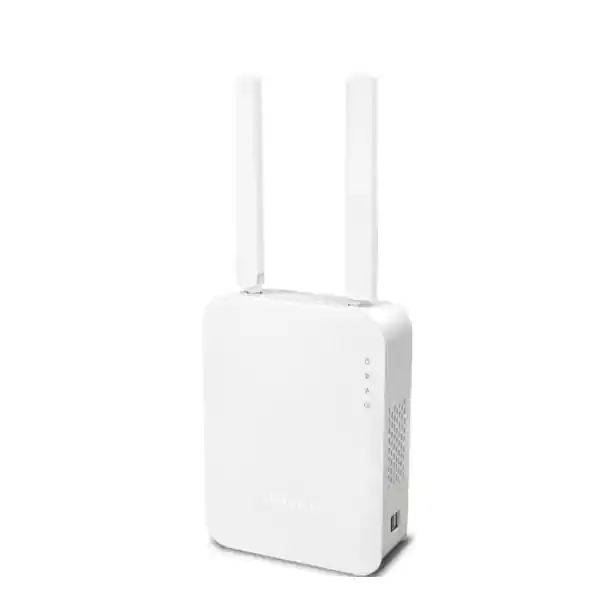
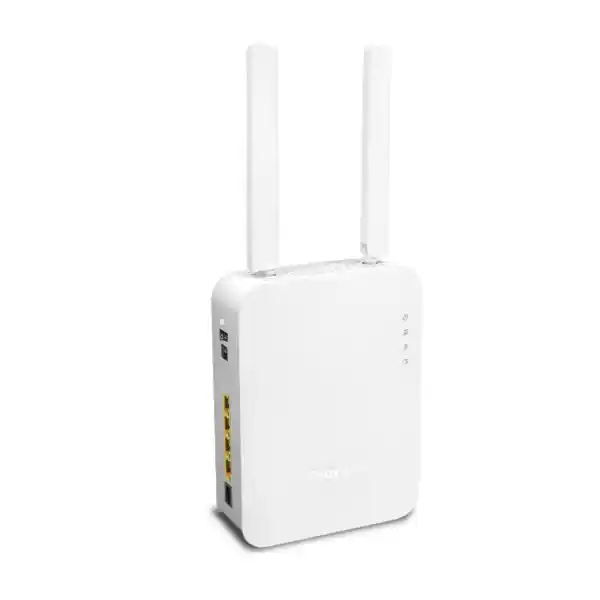
The DrayTek Vigor2765ax is built for organisations that need a capable xDSL edge router without giving up modern Wi-Fi, segmented LAN design, policy control, VPN access, resilient WAN options and professional monitoring. It combines an integrated VDSL2 modem supporting profile 35b with Gigabit Ethernet switching, AX3000-class dual-band 802.11ax wireless, firewall functions, multiple VLANs, traffic management and remote administration. In UAE deployments it can serve as the primary router for a DSL-based branch, a managed Wi-Fi and security gateway behind an Ethernet handoff, or a compact edge appliance where IT teams require visibility and configuration depth beyond consumer broadband equipment.
Integrated xDSL modem with VDSL2 vectoring and supervectoring support, plus backward compatibility with common ADSL generations.
2×2 Wi-Fi 6 on 2.4 GHz and 5 GHz, with up to 574 Mbps and 2402 Mbps negotiated link rates respectively.
A session capacity suited to professional networks with multiple users, cloud applications, voice traffic and connected devices.
Supports common remote-access and site-to-site VPN methods, with IPsec throughput rated up to 150 Mbps under vendor test conditions.
What the DrayTek Vigor2765ax is designed to solve
Small and mid-sized sites often face an awkward connectivity gap. An ISP-provided router may establish internet access, but it can become restrictive as soon as the network requires multiple VLANs, guest Wi-Fi, application-aware quality of service, route policy, VPN connectivity, local DNS control, central monitoring or a clean failover design. At the other extreme, a large next-generation firewall may be unnecessary for a modest branch using VDSL or a sub-gigabit Ethernet service. The Vigor2765ax occupies the practical middle ground: it is a professional routing platform with an integrated DSL modem and Wi-Fi 6 radio set, giving network administrators more control without forcing a multi-appliance architecture at every location.
For UAE businesses, this makes the model relevant to satellite offices, retail outlets, service counters, temporary project offices, small clinics, workshops, professional practices, warehouses and remote sites where DSL is still used or retained as a backup circuit. The switchable Ethernet WAN option also means the hardware does not become useless if the access circuit later changes. One Gigabit Ethernet port can be assigned to WAN duties, enabling the router to operate with an upstream ONT, metro-Ethernet handoff or another access device while keeping the internal firewall, VLAN and Wi-Fi policy intact.
FourTeck positions the Vigor2765ax as a controlled edge platform rather than merely a wireless router. Buyers comparing it with consumer-class equipment should focus on the operational features that matter after installation: segmented network design, traffic prioritisation, policy-based controls, access restrictions, VPN interoperability, visibility through logs and SNMP, configuration backup, remote management and the ability to retain a consistent local network design when the WAN medium changes.
Hardware architecture and physical interfaces
The Vigor2765ax integrates the main components needed at a professional broadband edge. Its xDSL interface supports VDSL2, including profile 35b for supervectoring, and also maintains compatibility with ADSL, ADSL2 and ADSL2+ line types where the service provider and local copper plant use those standards. This matters in mixed infrastructure environments because an organisation can standardise on one edge configuration while accommodating different DSL generations across locations. DrayTek rates the VDSL2 link capability up to 300 Mbps under suitable line conditions. Actual synchronisation depends heavily on distance to the cabinet or DSLAM, copper quality, crosstalk, line profile and provider provisioning, so the headline rate should be treated as a physical-layer maximum rather than a guaranteed internet speed.
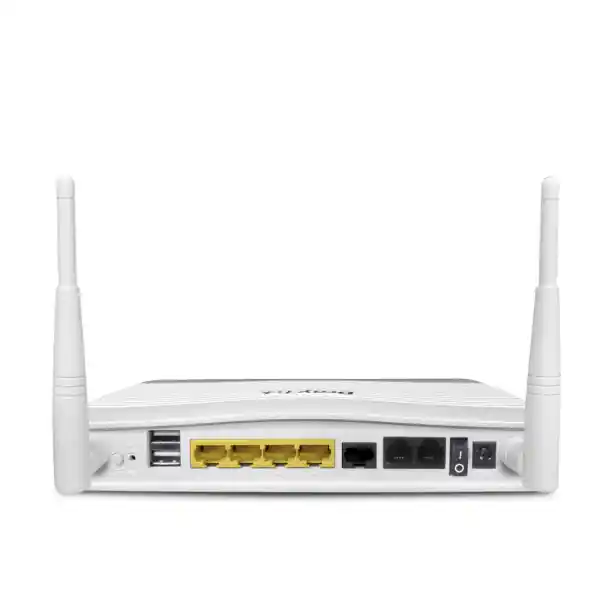
On the LAN side, the router provides four Gigabit Ethernet RJ-45 ports. Three are fixed LAN interfaces, while one is switchable and can be used as an additional LAN port or reassigned as a Gigabit Ethernet WAN. That flexibility is important in migration projects. A site can start with the integrated DSL modem, later move to an Ethernet-based ISP circuit, and preserve much of the internal network design. It also enables administrators to build failover or multi-WAN scenarios where the topology and firmware feature set permit it. When planning port usage, remember that a switchable port used for WAN is no longer available for a directly attached LAN endpoint, so managed access switching may be appropriate for offices that need more physical ports or multiple tagged VLANs at the desktop layer.
Two USB 2.0 ports extend connectivity for supported peripherals and cellular modems. In resilience designs, a compatible USB mobile broadband modem can provide an alternate path when the fixed line fails, subject to modem compatibility, carrier conditions and configured policy. USB should be treated as a practical backup mechanism rather than assumed to deliver the same performance or latency profile as a dedicated wired WAN. The physical design also includes external dual-band antennas for the wireless model, allowing the 2×2 radio system to serve office clients directly or participate in supported DrayTek wireless topologies.
The unit is powered by 12 V DC at 2 A and is intended for normal indoor networking environments. DrayTek lists operating temperature from 0 to 45 degrees Celsius and non-condensing humidity from 10 to 90 percent. In UAE installations, those ratings reinforce an important deployment rule: the router should be installed in an air-conditioned or environmentally controlled indoor space, away from direct sunlight, enclosed rooftop cabinets, ceiling voids with trapped heat, dusty plant rooms and other locations where ambient temperature can rise well beyond normal office conditions. Correct placement improves reliability and also benefits Wi-Fi coverage by avoiding metal enclosures and radio-obstructive positioning.
VDSL2 35b, vectoring and broadband migration
VDSL2 profile 35b extends the frequency range used by compatible VDSL systems and can provide significantly higher downstream rates than older 17a deployments when line length and infrastructure permit. The Vigor2765ax supports the key VDSL2 profiles listed by DrayTek, including 8a, 8b, 8c, 8d, 12a, 12b, 17a, 30a and 35b, as well as vectoring technologies intended to mitigate crosstalk between copper pairs. The practical benefit is adaptability: a customer does not need to buy a router tied to a single narrow DSL profile when the provider upgrades a line or when equipment is redeployed to another branch.
For network design, the integrated modem reduces the number of active devices between the service line and the local security policy. Fewer devices can simplify fault isolation because DSL statistics, line state, routing, firewall rules and WAN monitoring can be viewed from one administration plane. It can also remove ambiguity created by double NAT when an ISP modem-router is placed in front of a separate firewall. Where provider requirements force the use of an upstream device, the Ethernet WAN option still allows the Vigor2765ax to operate as the routing and policy layer while the upstream equipment handles only physical access or ONT functions.
DSL performance planning should always be conservative. The modem may support a 300 Mbps VDSL2 link, yet a specific UAE circuit can synchronise at a lower rate because copper distance, pair quality and provider profile determine the attainable speed. Organisations should measure actual sync rate, signal-to-noise margin, attenuation and error counters before sizing cloud backup windows, voice capacity or large file-transfer expectations. A router cannot recover bandwidth that the access line does not physically deliver. It can, however, manage the available bandwidth intelligently through QoS, bandwidth limits and traffic policies so business-critical services remain usable during congestion.
When the site later migrates from copper broadband to fibre or a managed Ethernet service, the switchable Gigabit Ethernet WAN port becomes strategically useful. Instead of redesigning VLANs, SSIDs, DHCP scopes, firewall rules and VPN identities at the same time as the carrier migration, administrators can preserve the LAN architecture and change the external handoff. This lowers migration risk and makes the Vigor2765ax more than a short-lived DSL-only purchase.
AX3000 Wi-Fi 6: what the radio specifications mean in practice
The Vigor2765ax uses 802.11ax Wi-Fi 6 radios in a 2×2 configuration. On 2.4 GHz, DrayTek specifies a maximum link rate of 574 Mbps, while the 5 GHz radio can negotiate up to 2402 Mbps with compatible clients under ideal channel-width and modulation conditions. Together these rates are marketed as AX3000 class. Those figures are PHY link rates, not application throughput. Actual user data rates are lower because wireless framing, retransmissions, contention, client capability, signal level, channel width and interference all consume airtime. For professional planning, the AX3000 label should therefore be read as an indicator of radio generation and theoretical capacity, not as a promise that every user will download at 3 Gbps.
Wi-Fi 6 is valuable in business environments because it improves efficiency when many modern clients share the same access point. The standard introduces mechanisms designed to schedule spectrum more effectively and reduce contention compared with earlier generations. In a small office this can improve responsiveness when laptops, phones, tablets, printers, scanners and IoT endpoints are active simultaneously. The benefit is most visible when the client devices also support 802.11ax. Older 802.11n or 802.11ac clients can still connect, but they cannot use every efficiency improvement offered by the newer standard.
The 5 GHz radio supports bandwidth up to 160 MHz. That can enable high negotiated rates with compatible clients, but using the widest channel is not always the best choice in a dense commercial building. Wide channels consume more spectrum and can increase overlap with neighbouring networks. A disciplined deployment may choose 80 MHz or even narrower channels where spectrum reuse and predictable performance matter more than peak single-client speed. Channel planning should be based on a site survey, especially in Dubai offices where multiple tenants, hospitality networks and residential towers can produce intense radio competition.
Security options include contemporary WPA3 support alongside compatibility modes for older clients. A business rollout should prefer WPA2 or WPA3 according to client compatibility, use unique and sufficiently strong credentials, disable obsolete security modes where possible, and place guest or unmanaged devices on separate VLANs. Wireless security is strongest when SSID policy, VLAN assignment, firewall rules and client isolation are designed together. Simply setting a complex passphrase does not create segmentation between trusted workstations and visitor devices if both ultimately enter the same unrestricted subnet.
For larger premises, the built-in radio should not be assumed to replace a multi-access-point design. Wall materials, floor layout, shelving, lift cores, glass treatments and office density affect RF propagation. DrayTek indicates management capability for additional access points and supported mesh devices, allowing the Vigor2765ax to act as part of a broader wireless architecture. Where coverage is critical, FourTeck recommends designing access point quantity and placement from measured requirements rather than relying on the router’s position near the ISP termination point.
Firewall, NAT capacity and security policy
The router is designed to enforce stateful network policy at the internet edge. DrayTek lists up to 50,000 NAT sessions, a figure that is meaningful because modern endpoints open many simultaneous connections to web services, collaboration platforms, software update networks, cloud storage, analytics services and content-delivery infrastructure. A 20-person office does not generate only 20 sessions; each device can create dozens or hundreds of flows. Session capacity therefore gives a better picture of routing headroom than user count alone. DrayTek positions the platform for approximately 30 hosts, which is a sensible reference point for typical professional usage rather than an absolute connection limit.
Hardware-accelerated NAT throughput is rated up to 940 Mbps under optimal vendor test conditions. That makes the router suitable for many sub-gigabit broadband services when the configuration can use acceleration. Administrators should still understand that enabling features can alter performance. VPN encryption, filtering, traffic classification, logging, wireless processing and complex policy can introduce CPU work that differs from a simple NAT benchmark. Capacity planning should therefore be based on the intended feature set and expected traffic profile, not on a single laboratory number.
Firewall controls can be organised around IP addresses, protocols, ports and other policy criteria, while content-control functions can restrict application, URL, keyword or DNS-related access according to the supported firmware capabilities. Web-category filtering may depend on a subscription service, so procurement teams should distinguish features included in the platform from services that may require an ongoing licence. This is especially important when comparing prices between suppliers: two quotes for the same hardware can represent different operational capabilities if one includes required subscriptions, support or deployment services and the other lists only the appliance.
Port redirection, open-port policies, port triggering and DMZ host functions are available for publishing internal services, but internet exposure should be minimised. Modern UAE businesses should prefer outbound-initiated cloud services or VPN-protected administration wherever possible. If a server must be reachable from the public internet, use the narrowest required port set, restrict source addresses when practical, keep the service patched, and monitor logs. Universal Plug and Play should be treated cautiously in managed business networks because automatic port mapping can bypass deliberate change control.
The router also supports management access controls and brute-force protection capabilities. These controls should be combined with administrative hygiene: change default credentials, use HTTPS or SSH where appropriate, limit management to trusted subnets or approved remote sources, keep firmware current, back up the configuration after controlled changes and document who holds administrative access. A professional firewall is most effective when its configuration process is as disciplined as its feature set.
VPN for branches, administrators and hybrid work
The Vigor2765ax supports two concurrent VPN tunnels and a broad set of protocols including IPsec, IKEv2, SSL VPN, L2TP over IPsec, OpenVPN and WireGuard, in addition to legacy methods available for interoperability. This protocol range gives administrators flexibility when connecting a small branch to a head office, providing secure remote administration or supporting users who need access to internal resources. DrayTek rates IPsec performance up to 150 Mbps and SSL VPN up to 100 Mbps under its test methodology. These values are useful sizing indicators but should not be treated as guaranteed throughput for every cipher set, packet size, internet path or feature combination.
For a site-to-site deployment, the most important design questions are not simply whether the router supports IPsec. The two sites need compatible proposal parameters, clear local and remote network definitions, stable addressing or dynamic DNS, route planning that avoids overlapping subnets, and firewall policy that permits only the traffic required between locations. In a UAE branch connected to a regional headquarters, for example, the branch VLAN for point-of-sale devices may need access to only a specific application server, while guest Wi-Fi should never traverse the corporate tunnel. Network segmentation and VPN policy should therefore be designed together.
WireGuard and OpenVPN provide additional choices for modern interoperability, while IKEv2 is useful for robust IPsec client or gateway scenarios. Organisations with a standard VPN platform should confirm exact compatibility, authentication method and firmware support before deployment. Certificate-based authentication can be preferable to shared secrets for managed environments, but it adds certificate lifecycle tasks. Pre-shared keys are simpler yet must be long, unique and stored securely. The router supports local authentication options and can integrate with supported RADIUS methods for centralised user control.
The two-tunnel ceiling is an important sizing factor. It is suitable for a small site that needs a branch tunnel plus perhaps one additional secure connection, but it is not intended to terminate dozens of simultaneous remote users. If the business expects substantial remote-access growth, numerous branch peers, high VPN throughput or advanced threat inspection on encrypted traffic, a higher-tier security gateway may be more appropriate. FourTeck can help compare this router against larger firewall platforms available through the FourTeck Firewall Dubai portfolio so the edge device matches the actual security and scale requirement.
For small deployments, the Vigor2765ax remains attractive because VPN is integrated with the same routing, VLAN and WAN policy used for internet access. There is no requirement to introduce a second appliance solely to create a basic encrypted branch link. That reduces equipment count and can simplify support, provided the two-tunnel limit and performance profile are appropriate for the site.
VLAN segmentation and multi-subnet design
A key advantage over basic home routers is the ability to create multiple logical networks. DrayTek specifies support for 802.1Q tag-based VLANs and port-based VLANs, with up to eight VLANs and several LAN subnets. This allows a compact office to separate staff computers, guest devices, voice equipment, cameras, building-control endpoints and administration systems even when they share the same switching and wireless infrastructure. Segmentation reduces the number of devices that automatically trust one another and makes firewall policy easier to express around business roles.
A practical design might dedicate one VLAN to corporate users, another to VoIP phones, another to visitors and a fourth to IoT or surveillance endpoints. The router can provide DHCP services to each logical network and enforce inter-VLAN policy. Corporate users may be permitted to reach selected printers and servers, while guest clients are restricted to internet access only. CCTV devices may reach an NVR but be denied outbound access except for approved update or cloud services. This structure creates useful security boundaries without requiring physically separate cabling for every device category.
When VLANs extend beyond the router to a managed switch or access point, tagging must be planned carefully. The uplink port usually carries multiple tagged networks, while end-device ports are configured untagged in the correct VLAN. Native or management VLAN choices should be documented consistently. Many apparent firewall problems are actually mismatched switch tags or PVID settings. During commissioning, test DHCP, DNS, default gateway and inter-VLAN reachability from a device connected to each segment before declaring the policy complete.
Wireless SSIDs can be aligned with VLANs so that a user’s network identity begins at association. A staff SSID can enter the corporate VLAN, a guest SSID the internet-only VLAN, and a dedicated SSID can support devices that cannot use wired connections. Client isolation is valuable on guest wireless because it reduces direct communication among visitor devices. Hiding an SSID is not a meaningful security measure by itself; strong authentication and correctly enforced VLAN policy matter more.
For organisations that need structured switching, larger wireless coverage or broader infrastructure integration, FourTeck can combine the router with professional LAN design and support through FourTeck IT Services UAE. This is useful when the requirement extends beyond the router itself to managed switching, Wi-Fi optimisation, server access, endpoint policy or branch standardisation.
Quality of Service, bandwidth control and application experience
Bandwidth is only useful when important applications can use it at the right time. The Vigor2765ax provides QoS and bandwidth-management features that help administrators prevent a few high-volume transfers from degrading voice calls, interactive cloud sessions or line-of-business applications. Classification can use traffic attributes such as IP address, port, DSCP, 802.1p markings and supported application categories. Bandwidth limits can also keep guest or non-essential traffic within a defined share of the WAN capacity.
QoS is particularly valuable on asymmetric broadband circuits. A VDSL service may have a respectable downstream rate but a much smaller upstream rate. Cloud backup, video upload or large file synchronisation can saturate that upstream path and increase latency for every user. By defining priority for voice, business VPN or interactive services and limiting bulk transfers, the router can keep the link responsive even when utilisation is high. This does not create extra bandwidth; it determines which traffic is served first when demand exceeds the available capacity.
Accurate configuration begins with the real WAN rate. If the QoS engine is told the circuit can transmit more than the line actually supports, queues may form upstream at the DSL equipment where the router has less control. For best results, configure traffic management based on measured sustainable throughput and leave a small margin below the physical maximum. Re-check the values if the provider changes the line profile or if the site migrates from DSL to Ethernet WAN.
Voice deployments benefit from end-to-end consistency. Marking packets on the LAN is helpful only if switches preserve those markings and the router maps them to an appropriate WAN class. The public internet does not guarantee DSCP treatment, but prioritising traffic before it leaves the local bottleneck still prevents internal bulk transfers from overwhelming the uplink. Similar logic applies to video meetings, remote desktop sessions and cloud ERP access.
Administrators should avoid overcomplicated rule sets. Begin with a small number of clear classes—realtime, business-critical, normal and bulk, for example—then monitor actual behaviour. Excessively granular policies are difficult to troubleshoot and can produce unexpected results when applications change ports or cloud endpoints. The objective is predictable user experience, not the maximum possible number of rules.
Dual-WAN thinking, failover and business continuity
Internet resilience matters because a router can be healthy while the access circuit fails. The Vigor2765ax supports WAN failover concepts using its integrated DSL interface, switchable Ethernet WAN and supported USB cellular connectivity. The exact topology should be chosen around the failure modes a business wants to survive. A DSL primary with mobile backup protects against many copper-line outages. An Ethernet primary with DSL backup can provide medium diversity when both services are independently delivered. A USB modem may be convenient for a small branch, but its signal quality and carrier coverage should be tested at the actual installation point.
Connection detection is as important as having a second link. If the primary interface remains electrically up but internet routing beyond the provider has failed, failover should be able to recognise loss of real connectivity rather than only link state. The router supports monitoring mechanisms that can be incorporated into WAN policy. Administrators should test failover deliberately: disconnect the primary service, observe detection time, verify that required VLANs can use the backup path, then restore the primary and confirm sessions return in a controlled manner.
Backup links usually have different capacity, latency and addressing. A mobile connection may use carrier-grade NAT, preventing inbound services that worked over a public IPv4 address. A lower-bandwidth backup may not support all guest traffic, cloud backups and video streaming at the same time. Policy should therefore become more restrictive during failover. Business-critical services can remain enabled while bandwidth-heavy nonessential traffic is limited. This is a stronger continuity strategy than simply sending every packet to the backup circuit and hoping capacity is sufficient.
VPN behaviour also requires attention. If a site-to-site tunnel is bound to a public IP on the primary WAN, moving to a backup link may require dynamic peer identification, dynamic DNS or a secondary tunnel configuration. The remote endpoint must know how to accept traffic from the alternate path. Continuity testing should therefore include VPN reconnection, not just web browsing.
For UAE companies standardising multiple branches, FourTeck can help define a repeatable template for primary and secondary WANs, DNS, DHCP, VLANs, management access and VPN policy. Standardisation makes replacement and troubleshooting faster because every branch follows the same design logic even when local access media differ.
Monitoring, logs and remote management
Professional networking depends on visibility. The Vigor2765ax supports Syslog, SNMP versions 1, 2c and 3, and flow-export capabilities including NetFlow v5, NetFlow v9 and IPFIX. These functions allow administrators to move beyond reactive troubleshooting. SNMP can report interface state, utilisation and device health to a monitoring platform. Syslog can centralise firewall and system events. Flow data can reveal which sources, destinations and protocols consume bandwidth, making it easier to explain congestion that would otherwise appear as a vague complaint that the internet is slow.
SNMPv3 is preferable where supported because it offers stronger authentication and privacy options than older community-string methods. Whatever version is selected, management polling should be restricted to trusted monitoring hosts and dedicated management networks. Exposing SNMP broadly across user VLANs or the public internet is unnecessary. The same principle applies to web administration, SSH, TR-069 and other management services: enable only what is required and constrain who can reach it.
Configuration backup should be part of the maintenance routine. Save a known-good configuration after commissioning and after significant approved changes. Document firmware version, WAN settings, VLAN IDs, DHCP scopes, VPN peers, wireless SSIDs and administrative contacts separately so recovery does not depend on a single binary backup. DrayTek provides firmware upgrade methods through its management interfaces, and update planning should include release-note review, configuration backup and a rollback strategy for important sites.
DrayTek also supports central-management ecosystems such as VigorACS for compatible firmware, which can be useful when many branches must be managed consistently. Central management does not remove the need for change control; it makes controlled change easier to apply at scale. A standard branch template can define naming conventions, VLAN numbers, SSID structure, logging targets and administrative restrictions so each site is predictable.
For organisations that want procurement, deployment and support from a single UAE technology partner, the broader FourTeck UAE team can assist with router integration, switching, wireless, cabling and network services rather than treating the Vigor2765ax as an isolated box.
Recommended deployment scenarios in the UAE
Small professional office
Use the integrated DSL modem as primary access, create separate staff and guest VLANs, apply QoS for Microsoft Teams or voice traffic, and use the built-in Wi-Fi 6 radio for a compact floor area. This design is appropriate when the office has a modest host count and does not need high-volume VPN termination.
Retail or service branch
Segment POS terminals from guest Wi-Fi and staff devices, use a site-to-site VPN for approved business traffic, export logs centrally and configure a USB or Ethernet backup WAN. Restrict inter-VLAN access so payment or operational endpoints do not share a trust zone with visitor devices.
Temporary project office
Deploy where quick connectivity is required but the network still needs central control. DSL can be used when available, mobile backup can improve continuity, and the router can later move to an Ethernet WAN service without replacing the LAN policy architecture.
Advanced home office or executive residence
Create dedicated networks for work systems, personal devices and smart-home equipment, use VPN for corporate access, and apply bandwidth policy so entertainment traffic does not interfere with business calls. Wi-Fi 6 supports modern laptops and mobile devices while VLANs create clearer trust boundaries.
The router is less suitable when the site needs hundreds of users, multi-gigabit WAN, a large number of simultaneous VPN tunnels, advanced sandboxing, SSL inspection at high throughput, redundant power supplies or enterprise high-availability clustering. In those cases, a higher-capacity firewall or branch platform should be selected. The correct product is the one that fits the workload and security requirement, not simply the device with the longest feature list.
Sizing the Vigor2765ax correctly
Sizing begins with the internet circuit. Record the current downstream and upstream rates, whether the line is DSL or Ethernet, and whether an upgrade is planned within the expected life of the router. A device capable of hardware-accelerated NAT near Gigabit Ethernet line rate has ample headroom for many sub-gigabit services, but VPN and filtering throughput should be evaluated separately. If the business expects a full gigabit service with complex security inspection, it may be more appropriate to move to a platform designed for that sustained workload.
Next, count active hosts rather than employees. Include laptops, phones, tablets, printers, CCTV cameras, NVRs, access-control panels, smart displays, IoT controllers, payment devices and guest clients. A 15-person office can easily exceed 30 networked endpoints. DrayTek’s recommended 30-host figure is a planning reference, not a hard interface limit, but it helps identify when a site is moving beyond the intended class of the appliance. The 50,000-session capacity provides useful connection headroom, yet CPU-intensive services and wireless airtime can become practical constraints before session state is exhausted.
Wireless sizing should consider floor area, wall construction and client density. The built-in 2×2 AX radio is convenient for a compact area, but an access point inside a router cannot overcome poor placement. If the DSL termination is in a communications cabinet at one edge of the office, installing separate ceiling-mounted access points may provide better coverage. The Vigor2765ax can still act as the router, DHCP server, VLAN gateway and policy point while dedicated APs handle radio coverage.
VPN requirements need an explicit count. If two concurrent tunnels are sufficient, the Vigor2765ax can be a strong fit. If each employee requires an independent remote-access tunnel, or if the branch must connect to many cloud and headquarters gateways simultaneously, the tunnel limit quickly becomes restrictive. VPN throughput should also be compared with the actual workload. A branch synchronising large datasets over encrypted links may need more performance than a branch that uses a tunnel only for ERP transactions and remote management.
Finally, identify security requirements that are mandatory rather than optional. If the organisation requires advanced threat-prevention engines, enterprise identity integration, extensive SSL inspection, high-volume logging, zero-trust enforcement or formal compliance controls, a dedicated next-generation firewall may be necessary. If the requirement is robust stateful routing, segmentation, VPN, bandwidth management and professional administration at a small site, the Vigor2765ax is much closer to its intended operating profile.
Secure configuration blueprint
A new router should not be placed into production with only internet access configured. Start by updating to an approved stable firmware release after backing up the factory or initial state. Set a strong administrator credential and restrict management interfaces to a dedicated management subnet or a small set of trusted IP addresses. Disable services that are not needed. If remote administration is required, prefer VPN-protected access instead of exposing the management interface publicly.
Build the LAN around explicit trust zones. Staff endpoints, guest devices, IP phones, surveillance equipment and infrastructure management should not automatically inhabit the same broadcast domain. Allocate a VLAN and IP subnet to each role that needs different policy. Provide DHCP scopes with clear address ranges, reserve infrastructure addresses where appropriate, and document gateways and DNS settings. Inter-VLAN traffic should be denied by default where practical, then opened only for required business flows.
Wireless configuration should use WPA2 or WPA3 according to the client fleet, with WPA3 preferred for compatible managed devices. Use separate SSIDs for materially different trust levels and map them to the correct VLANs. Avoid creating many unnecessary SSIDs because each one adds management traffic and operational complexity. Guest Wi-Fi should use client isolation and should not have routes into internal business networks.
WAN policy should include reliable DNS, connection detection and a documented failover method if a backup circuit exists. Test failover under controlled conditions instead of discovering its behaviour during an outage. If the site uses inbound services, document how public addressing, port forwarding and dynamic DNS behave on each WAN. For VPNs, record proposals, peer identifiers, subnets and authentication material securely so recovery does not rely on one administrator’s memory.
QoS should reflect actual application priorities. Give real-time voice and critical business applications preferential treatment, constrain uncontrolled guest or bulk traffic, and configure WAN bandwidth values slightly below measured sustainable rates so the router remains the point where queues form. Monitor utilisation before and after applying policy to ensure the rules improve user experience rather than simply adding complexity.
Logging and monitoring should be configured from day one. Send Syslog to a central collector if available, enable SNMPv3 for monitoring, and export flow records when traffic analysis is valuable. Establish a periodic review of firmware, administrator accounts, VPN users, firewall exceptions and failed authentication events. Security posture degrades when temporary rules and old accounts are left in place indefinitely.
Operational performance and realistic expectations
Vendor performance figures are measured under controlled conditions, and DrayTek explicitly notes that actual results vary with network conditions and enabled applications. For the Vigor2765ax, hardware-accelerated NAT is rated up to 940 Mbps. This is close to the practical payload ceiling of a Gigabit Ethernet interface in favourable conditions, but it does not mean every configuration will route at that rate. Stateful inspection, VPN encryption, traffic shaping and software-based features can reduce throughput because packets require additional processing.
The wireless PHY rates are even more sensitive to conditions. A client may display a 2.4 Gbps 5 GHz link when close to the router with compatible hardware and a 160 MHz channel, yet real application throughput will be lower. Move the client through walls, add interference, reduce channel width or connect multiple active users and the rate changes. For business planning, measure throughput at representative work locations and focus on minimum acceptable performance rather than the highest number observed beside the router.
DSL adds another variable because physical line quality directly affects sync rate. A VDSL2 35b-capable router cannot force an older DSLAM, long copper loop or noisy pair to deliver a 300 Mbps connection. The correct approach is to read line statistics after installation, compare them with the subscribed service and escalate material line issues to the carrier. Stable slightly lower sync may be preferable to an aggressive profile that creates frequent retrains or packet errors.
Latency-sensitive applications deserve separate testing. A branch may have ample download throughput but poor call quality because upload saturation adds hundreds of milliseconds of delay. QoS can address this by keeping the WAN queue controlled. Similarly, VPN throughput may be sufficient in megabits per second while the user experience remains poor due to high-latency internet paths. A complete acceptance test should therefore include latency, jitter, packet loss, DNS response, VPN access and application behaviour, not just a speed-test result.
This realistic approach prevents both underbuying and overbuying. The Vigor2765ax is a strong compact platform when its limits match the site. Understanding those limits produces a more reliable design than treating marketing maxima as guaranteed production performance.
UAE procurement, compatibility and deployment considerations
When procuring the DrayTek Vigor2765ax in the UAE, confirm the exact hardware variant, power supply, warranty path and DSL annex compatibility required for the service. DrayTek specifies Annex A, B, J and M support in the platform family, but provider provisioning and local line conditions remain important. A procurement decision should include the intended ISP connection type, handoff, authentication method and any VLAN tagging required on the WAN side. PPPoE, PPPoA, DHCP, static IP and other supported connection methods provide flexibility, but the configuration must match the carrier service.
Also confirm whether the buyer expects subscription-based web-category filtering or only the built-in routing and security functions. Licences, support plans and deployment services should be itemised so renewal obligations are clear. This prevents a common mismatch where a buyer assumes every feature shown in a datasheet is permanently included with the hardware price.
For business deployment, include the surrounding infrastructure in the quotation. The router may require a managed Gigabit switch for additional ports and VLAN distribution, ceiling or wall access points for larger coverage, a rack shelf or communications cabinet, UPS protection and structured cabling. A UPS is particularly useful because brief power interruptions can force DSL retraining and disrupt VPN sessions even when the provider circuit remains available.
Installation should include configuration backup and a handover record. Document WAN credentials, public IP details, VLAN IDs, SSIDs, DHCP scopes, VPN peers, management URLs, firmware version, serial number, warranty information and support contacts. Sensitive secrets should be stored securely rather than in an unprotected document. A labelled physical diagram showing WAN, LAN switch uplinks and backup connectivity can save significant troubleshooting time months later.
UAE organisations with multiple offices may benefit from standardising one branch template and changing only site-specific values such as WAN credentials, IP subnets and Wi-Fi names. Consistent configurations reduce support effort and make security reviews easier. Where requirements span countries or regional offices, FourTeck Global can provide broader technology context while the UAE team addresses local deployment and support requirements.
Before purchase, provide the expected user count, endpoint count, internet speed, VPN topology, wireless floor plan and required security controls. These details allow the supplier to confirm whether the Vigor2765ax is correctly sized or whether a different DrayTek model or dedicated firewall would deliver a better long-term fit.
Detailed specification interpretation
WAN and modem: One integrated xDSL interface supports VDSL2 with vectoring and profiles through 35b, plus backward-compatible ADSL modes. A Gigabit Ethernet port can be switched between LAN and WAN roles. This combination suits sites that want a migration path from copper to Ethernet-based access without rebuilding the internal network.
Ethernet LAN: Four Gigabit RJ-45 ports are present in total, with three fixed as LAN and one switchable to WAN. Where more physical ports are needed, use a managed switch rather than relying on unmanaged expansion if VLANs must pass through the access layer.
Wireless: Dual-band 802.11ax uses 2×2 MIMO, with up to 574 Mbps at 2.4 GHz and up to 2402 Mbps at 5 GHz. WPA3 is supported, and the 5 GHz radio can use channel widths up to 160 MHz. Actual throughput is lower than negotiated PHY rate and depends on environmental conditions.
Routing and sessions: The platform supports approximately 50,000 NAT sessions and hardware-accelerated NAT up to 940 Mbps in ideal vendor tests. This provides healthy headroom for a small professional site but should be balanced against the processing cost of VPN and policy features.
VPN: Two concurrent VPN tunnels are supported, with IPsec performance rated up to 150 Mbps and SSL VPN up to 100 Mbps. Supported technologies include IPsec, IKEv2, SSL VPN, L2TP over IPsec, OpenVPN and WireGuard, giving broad interoperability for modest tunnel requirements.
Segmentation: Up to eight VLANs can be used, together with multiple LAN subnets, DHCP functions, port-based segmentation and tagged 802.1Q networks. This is enough to implement meaningful separation between staff, guests, voice and IoT in a compact branch.
Management: SNMP, Syslog, NetFlow/IPFIX, HTTPS, SSH and other administrative methods provide monitoring and operational access. Centralised management capabilities can be integrated with compatible DrayTek systems. Use encrypted and restricted management methods wherever possible.
Environment: The router is intended for indoor operation, with a stated temperature range of 0 to 45 degrees Celsius and non-condensing humidity up to 90 percent. UAE deployments should avoid unconditioned enclosures where ambient temperature can exceed those limits.
Frequently asked technical questions
Can the Vigor2765ax be used without DSL?
Yes. The switchable Gigabit Ethernet port can be assigned as a WAN interface, allowing the router to work behind an Ethernet handoff or suitable upstream access device. This is useful when a site migrates from VDSL to fibre or Ethernet service.
Does AX3000 mean 3 Gbps internet speed?
No. AX3000 is the combined wireless class based on theoretical PHY link rates across the 2.4 GHz and 5 GHz radios. Internet speed remains limited by the WAN service, routing workload, radio conditions and client capability. A single client also does not combine both band maxima into one 3 Gbps connection.
Is the router suitable for a 1 Gbps internet circuit?
Its hardware-accelerated NAT figure approaches Gigabit Ethernet line rate, but real throughput depends on active services. If the requirement is sustained full-gigabit traffic with heavy VPN or advanced security processing, a higher-performance platform may be more appropriate. Sizing should be based on the enabled feature set, not only the port speed.
How many VPNs can it run?
DrayTek specifies two concurrent VPN tunnels. This is appropriate for a small branch with limited tunnel requirements but is not designed for a large remote-access population or many simultaneous site-to-site peers.
Can it separate guest Wi-Fi from business devices?
Yes. VLANs, multiple LAN subnets, SSID mapping and firewall rules can be combined so guest users receive internet access while remaining isolated from corporate systems. Client isolation adds another layer within the guest wireless network.
Can a USB modem be used for backup?
The platform supports cellular connectivity through compatible USB devices. Compatibility, carrier service and signal quality should be confirmed before depending on it for business continuity. Test the failover path and apply reduced-bandwidth policy if the backup service is slower than the primary link.
Is Wi-Fi 6 coverage enough for an entire office?
Coverage depends on building size, wall construction, router position and client density. The integrated radio can work well for compact spaces, but larger or partitioned offices often benefit from dedicated access points. Treat coverage as an RF-design question rather than a specification-sheet question.
Does the router include advanced web filtering?
It provides URL, keyword, DNS and related filtering functions, while category-based web filtering may require a subscription. Confirm licence requirements at quotation stage if categorised web-control capability is mandatory.
Why buy the DrayTek Vigor2765ax through FourTeck UAE
A router purchase should result in a stable network, not just a delivered carton. FourTeck can help validate whether the Vigor2765ax matches the planned circuit, user load, VPN requirement and wireless environment. That validation is useful when a specification appears sufficient on paper but the site has hidden constraints such as many connected IoT devices, dense neighbouring Wi-Fi, complicated VLANs, public services or an upcoming carrier migration.
Deployment support can include WAN configuration, VLAN design, DHCP scopes, Wi-Fi security, firewall policy, VPN setup, QoS, logging and failover testing. For customers replacing an ISP router, the migration plan should identify authentication credentials, public addressing, provider VLAN requirements and any services that depend on the previous router. For customers replacing an older DrayTek, configuration compatibility should still be reviewed rather than assuming every legacy setting should be carried forward unchanged.
FourTeck can also coordinate the surrounding network. If the site needs managed switches, access points, firewall upgrades, IP telephony, servers or support services, the Vigor2765ax can be integrated into a complete design rather than deployed as an isolated component. The goal is a topology where every device has a clear role and the security boundaries are intentional.
Support planning is especially important for branches without on-site IT staff. Remote monitoring, configuration backups and standardised cabling make first-line diagnosis far easier. A small investment in documentation at installation time can prevent a much larger outage later when nobody remembers which port carries the switch trunk or which WAN credential belongs to the circuit.
For broader infrastructure and procurement requirements, visit the FourTeck UAE technology portal, while security-focused requirements can be explored through the dedicated Firewall Dubai practice. The objective is to select the right platform class and then implement it with a configuration that reflects the real operational requirement.
Decision recap: when the Vigor2765ax is the right fit
Strong fit
Choose the Vigor2765ax when the site uses VDSL2 or needs an Ethernet migration path, has a modest number of users, benefits from Wi-Fi 6, needs VLAN segmentation, requires no more than two simultaneous VPN tunnels, and values DrayTek-style routing, QoS and monitoring controls.
Consider a higher tier
Move up when the site needs large-scale remote access, many branch VPNs, advanced threat prevention, sustained high-throughput encrypted traffic, multi-gigabit WAN, high availability, hundreds of users or extensive central security analytics.
The best purchasing decision comes from matching the device to the site rather than matching only the WAN speed. For a branch with 20 users, 35 endpoints, two SSIDs, four VLANs, one IPsec tunnel and a 200 Mbps VDSL line, the Vigor2765ax can be a very rational choice. For a 100-user office with a 1 Gbps fibre circuit, dozens of VPN users and deep inspection requirements, the same device would be operating outside the role it was built to fill. FourTeck uses this workload-based approach to avoid both undersizing and unnecessary overinvestment.
The Vigor2765ax stands out because it combines broadband modem, router, Wi-Fi 6 access, segmentation and VPN in one compact appliance while still offering professional controls. Its value is not one record-breaking metric; it is the integration of the functions a small branch genuinely uses every day.
Quotation input checklist for an accurate UAE proposal
To prepare the correct Vigor2765ax quotation and configuration scope, provide the following project information. These details allow the technical team to identify required accessories, switching, wireless coverage, licences and implementation effort before installation.
DSL type or Ethernet handoff, subscribed speed, static or dynamic public IP, PPPoE/PPPoA/DHCP requirements, and provider VLAN details.
Employees, laptops, phones, printers, cameras, POS devices, IoT equipment and typical guest-client volume.
Required VLANs, IP ranges, guest policy, voice network, surveillance network and inter-VLAN access requirements.
Number of concurrent tunnels, remote gateway brand, encryption expectations, user VPN needs and applications that cross the tunnel.
Floor size, partitions, expected client density, existing access points and any locations where reliable 5 GHz coverage is mandatory.
Need for Ethernet, DSL or mobile backup; acceptable downtime; critical applications; and services that must remain available during failover.
FourTeck UAE consultation
Plan the DrayTek Vigor2765ax around your actual circuit, users and security policy
Share your ISP handoff, expected endpoint count, VLAN plan, VPN needs and wireless floor coverage. FourTeck can confirm whether the Vigor2765ax is appropriately sized, identify any required switches or access points, and define a secure configuration scope before the equipment is deployed.
Send the WAN speed, branch size and VPN requirement with your enquiry so the technical team can respond with the most relevant configuration and quotation path.

Reviews
There are no reviews yet.