
DrayTek Vigor2766ax UAE – Professional DSL Security Router with AX3000 WiFi 6
The DrayTek Vigor2766ax is built for organizations that still depend on copper-based broadband access but want modern wireless performance, business-class routing controls, segmentation, policy enforcement and secure remote connectivity in one compact platform. It combines an integrated G.fast modem, backward compatibility with VDSL2 profile 35b and ADSL2+, one configurable Gigabit Ethernet WAN/LAN port, three fixed Gigabit LAN ports, two USB 2.0 interfaces and dual-band 802.11ax wireless networking with aggregate AX3000-class link rates.
Direct answer: who is it for?
Choose the Vigor2766ax when you need a single-router design for G.fast or VDSL service, WiFi 6 access, VLANs, firewall policy, QoS and up to two simultaneous VPN tunnels.
It is particularly suitable for small UAE offices, clinics, retail outlets, professional practices, distributed branch locations and advanced home-office networks where controlled segmentation matters more than very large VPN tunnel counts.
DrayTek Vigor2766ax at a glance
Why the Vigor2766ax remains relevant for UAE business connectivity
Modern offices often operate in a mixed-access environment. One site may receive broadband over fiber with an Ethernet handoff, while another may use VDSL or a copper last-mile service. Some locations move through temporary premises, leased offices or older buildings where structured cabling and carrier infrastructure do not match the design of a new headquarters. The DrayTek Vigor2766ax is useful in exactly this kind of transition because it does not force an organization into a single access method. Its integrated DSL interface can terminate compatible G.fast, VDSL2 and ADSL2+ services, while the switchable Gigabit Ethernet LAN/WAN port gives the same appliance a path to operate from an Ethernet broadband handoff if the access circuit changes.
That flexibility is valuable for UAE businesses that want to standardize branch networking without overbuying a large enterprise security appliance for every small location. A small office may need several capabilities at once: separate employee and guest networks, application prioritization for cloud voice or video meetings, secure remote access, local policy routing, content restrictions, a captive portal and centrally retrievable logs. Using a consumer broadband router for such a site often creates operational compromises. The Vigor2766ax approaches the branch-router problem from a business networking perspective, giving administrators explicit controls for address planning, VLAN separation, firewall rules, DHCP behavior, routing and wireless access rather than focusing only on basic internet sharing.
For organizations planning a wider rollout, FourTeck can align the router with structured network services available through FourTeck UAE, specialist perimeter and routing assistance through Firewall Dubai, and implementation support through IT Services UAE. Organizations coordinating networks across multiple countries can also reference FourTeck Global for broader infrastructure planning.
Hardware architecture and physical interface design
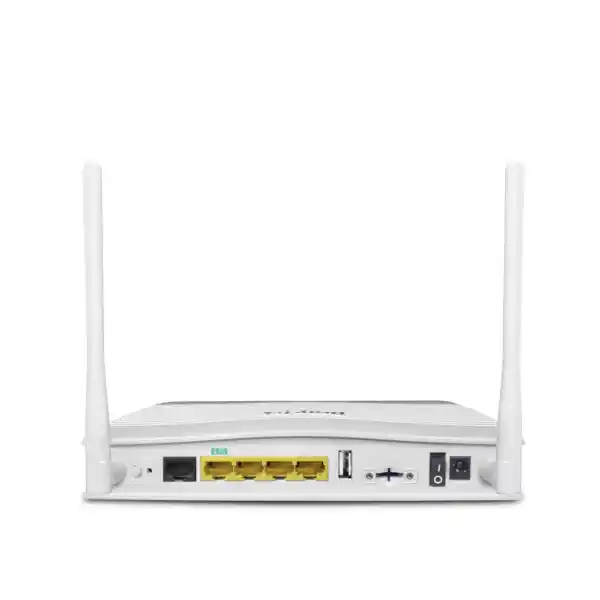
The physical design of the Vigor2766ax is intentionally compact, but the port layout supports several realistic business topologies. The xDSL RJ-11 interface is the primary access interface when the router is deployed directly on a compatible copper broadband circuit. Unlike a router that requires a separate DSL bridge or modem, the integrated modem lets the administrator view and manage the WAN connection from the same platform that applies routing, firewall, VPN and QoS policy. This reduces the number of boxes in the path and can simplify fault isolation because synchronization state, internet authentication and LAN routing are handled within one managed device.
On the Ethernet side, there are three fixed Gigabit LAN ports and one additional Gigabit Ethernet port that can be configured as LAN or WAN. In a DSL deployment, the switchable interface can remain part of the LAN switching environment. In an Ethernet broadband deployment, that same interface can become the WAN uplink. This is an important design detail for customers evaluating lifecycle value: a router purchased for a VDSL or G.fast site does not necessarily become unusable if the carrier later replaces the DSL circuit with a service delivered over Ethernet. It can be repurposed, subject to throughput and feature requirements, without changing the LAN addressing design.
Two USB 2.0 ports add further deployment flexibility. Depending on supported peripherals and firmware functions, USB can be used for selected cellular modem integration or storage-related functions. For resilience planning, a compatible USB mobile broadband modem can provide an alternate path when fixed broadband is interrupted. However, buyers should validate the exact modem model, carrier band compatibility, firmware support and desired failover behavior before treating USB cellular as a guaranteed business-continuity circuit. The interface exists, but a robust failover design still depends on carrier service quality, supported hardware and correct monitoring thresholds.
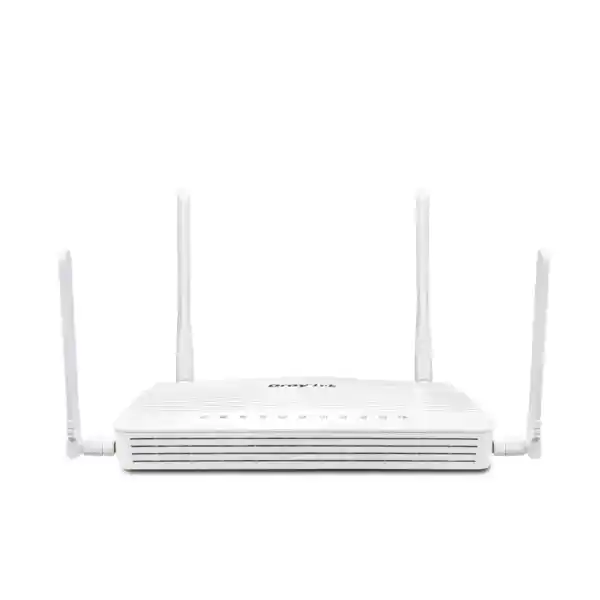
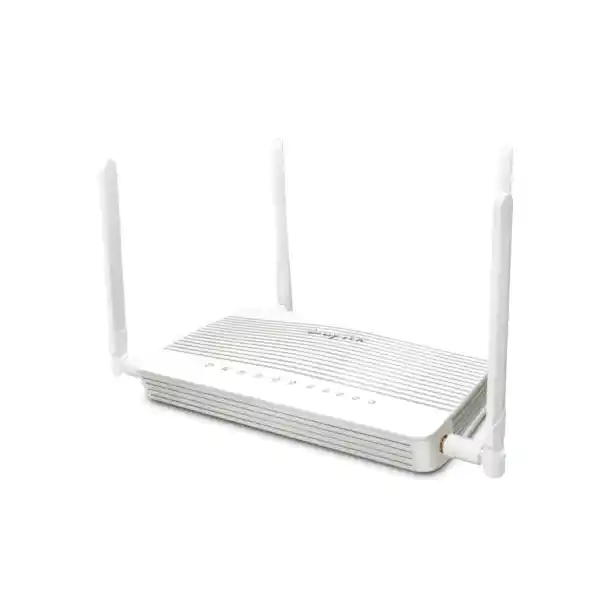
The Vigor2766ax uses two external dual-band antennas. The wireless platform is a 2×2 design, which is well matched to modern laptops, phones and many office clients that themselves use two spatial streams. The antenna system and radio design are appropriate for small-office coverage, but placement remains critical. Mounting the router inside a metal cabinet, behind dense walls or at floor level can significantly reduce wireless performance. For larger premises, multi-room villas, warehouses or offices with reinforced walls, use the built-in wireless radio as part of a designed coverage plan rather than assuming one router can replace a properly surveyed access-point deployment.
The published physical dimensions for the ax model are approximately 194 × 155 × 50 mm, with a 12 V DC power input and a published maximum power figure in the low-twenties of watts for this variant. The operating environment is specified for standard indoor use, with an operating temperature range of 0 to 45°C and non-condensing humidity requirements. In UAE deployments, this makes location selection particularly important. Do not install the router in an unconditioned rooftop enclosure, direct sunlight, a sealed ceiling void or a high-temperature cabinet that can exceed the specified environment. Stable air conditioning, clean power and sensible cable management contribute directly to long-term reliability.
DSL WAN: G.fast, VDSL2 profile 35b and ADSL2+ in one platform
The defining capability of the Vigor2766 family is the integrated G.fast modem. G.fast was developed to push substantially higher data rates over short copper loops than traditional VDSL, making it useful where fiber is brought close to a building or distribution point but the final run still uses copper. DrayTek specifies G.fast support with link rates up to 1 Gbps under appropriate conditions. That figure is a physical-link capability, not a promise that every line or service plan will deliver a gigabit of real application throughput. Copper quality, loop length, profile configuration, carrier equipment, noise, crosstalk and subscribed bandwidth all affect the actual result.
Backward compatibility with VDSL2 is equally important. The router supports VDSL2 profiles including 8a, 8b, 8c, 8d, 12a, 12b, 17a, 30a and 35b. Profile 35b, often associated with supervectoring deployments, extends the usable frequency range compared with profile 17a and can provide higher rates over suitable loops. Support for vectoring and retransmission-related standards helps the modem participate in networks designed to control crosstalk and improve line stability. Again, service-provider implementation determines which profile and features are actually available on a specific circuit.
ADSL2 and ADSL2+ compatibility makes the device practical in migration scenarios and for areas where older DSL access remains in service. From a procurement perspective, this reduces the risk of buying a router that only supports one generation of DSL. A company may have multiple small sites with different line technologies; a common Vigor2766ax platform can simplify support documentation, configuration practices and spare-unit planning, provided the required WAN protocols and carrier settings are supported at each location.
WAN protocol support includes common methods used in business broadband environments, such as PPPoE, PPPoA, DHCP and static IP configurations. The exact circuit design should be obtained from the ISP before installation. Ask whether the service uses PPP credentials, a VLAN tag, static public addressing, routed IP blocks or specific MTU settings. For business circuits, confirm whether the provider expects the router to terminate the session directly or whether a carrier-supplied device must remain in bridge, passthrough or routed mode.
A correct WAN design also needs realistic throughput planning. The Vigor2766ax is not a multi-gigabit edge router: its Ethernet interfaces are Gigabit class, and published NAT figures indicate around 600 Mbps in standard conditions with hardware-accelerated performance up to approximately 940 Mbps in optimal test conditions. Those numbers should be treated as laboratory maxima, not guaranteed application throughput. Activating traffic inspection, QoS, VPN encryption, logging and other services changes CPU workload. Size the router to the actual service, expected concurrent usage and enabled functions rather than matching a single headline rate.
AX3000 WiFi 6 performance explained
The Vigor2766ax integrates dual-band 802.11ax wireless networking. DrayTek rates the 2.4 GHz radio for a maximum link rate of 574 Mbps and the 5 GHz radio for up to 2402 Mbps, producing the familiar AX3000 marketing class when the two radio capabilities are added together. This aggregate figure is not the speed a single user receives. A client connects to one band at a time, negotiates a link rate based on its own radio capabilities and signal quality, and then experiences lower real application throughput after WiFi protocol overhead, interference, retransmissions and shared-airtime effects are considered.
The 5 GHz radio supports channel widths up to 160 MHz. Wide channels can increase peak link rate for compatible clients, but they also consume more spectrum and may be less practical in congested buildings. In a dense office tower, 80 MHz or even narrower channels may provide more predictable total network capacity because neighboring WLANs need room to coexist. Wireless design should therefore prioritize airtime efficiency and channel reuse rather than maximizing the link-rate number shown on a laptop.
WiFi 6 introduces technologies that improve efficiency in environments with many active devices. OFDMA allows the access point to divide a channel into smaller resource units so multiple clients can be served more efficiently. MU-MIMO can improve simultaneous transmission behavior when compatible clients and traffic patterns allow it. These mechanisms are most valuable when the network contains numerous contemporary devices; an office dominated by old 802.11n clients will not gain the full benefit of an 802.11ax infrastructure.
Security support includes modern WPA3 options as well as WPA2 and enterprise-style authentication mechanisms such as 802.1X where appropriate. Legacy methods may remain available for compatibility, but administrators should avoid weakening the WLAN merely to accommodate an obsolete device. A better design is to isolate legacy endpoints on a dedicated SSID and VLAN, apply restrictive firewall policy, then migrate or replace them. Client isolation, access controls, hidden SSID options and scheduling can complement segmentation, although hidden SSIDs should not be mistaken for meaningful security on their own.
The router can broadcast multiple SSIDs per band and associate different wireless networks with different LAN policies. A common office pattern is to create an employee SSID mapped to the trusted corporate VLAN and a guest SSID mapped to an internet-only network. If operational technology, printers, CCTV or IoT devices require wireless connectivity, a third segment can prevent those systems from sharing the same broadcast domain as employee devices. This improves fault containment and gives the firewall a clear point at which to restrict traffic between trust zones.
For larger premises, wireless capacity should be distributed across access points rather than extended solely by increasing transmit power. The Vigor2766ax can participate in supported DrayTek wireless management and mesh scenarios, including 5 GHz mesh functions within the platform’s published capabilities. Mesh can simplify coverage where Ethernet cabling is unavailable, but wired backhaul remains preferable for predictable business performance because a wireless backhaul consumes radio airtime. A site survey should evaluate wall materials, client density, interference, roaming expectations and application sensitivity before deciding whether the router’s integrated radio is sufficient.
LAN segmentation, VLANs and address architecture
A professional router should do more than connect devices to the internet. The Vigor2766ax supports multiple LAN subnets and VLAN-based segmentation, allowing one physical router to enforce logical separation between users, guests, servers, voice equipment and specialized devices. DrayTek specifies support for four LAN subnets and up to eight VLANs on this platform. The distinction matters: VLAN IDs can be used to tag and separate traffic at Layer 2, while routed IP subnets define Layer 3 boundaries and policy points. A sensible design maps business functions to both consistently.
For example, a small clinic could use one subnet for administrative PCs, one for clinical devices, one for guest WiFi and one for building or CCTV systems. Firewall rules would then explicitly control which networks can communicate. Guests may receive internet access only. CCTV cameras may be allowed to reach the recorder and time servers but not user laptops. Administrative workstations may access printers and approved internal services. This is far safer than putting every endpoint into a single flat network where compromise of one poorly maintained device exposes the entire broadcast domain.
The router supports 802.1Q tag-based VLANs and port-based VLAN functions. When used with a managed switch, an Ethernet trunk can carry multiple tagged VLANs between the router and switch, while switch access ports assign untagged devices to the correct network. Wireless SSIDs can then be mapped into the same VLAN architecture. This creates a coherent design in which the user’s connection method does not determine security policy; an employee receives the same logical trust level whether connected through an office switch or the corporate SSID.
DHCP capabilities support multiple IP subnets, custom options and bind-IP-to-MAC functions. Reservations are useful for printers, controllers and management devices that need predictable addressing without manually configuring every endpoint. Custom DHCP options can support specialized equipment that expects information about controllers, VoIP services or boot infrastructure. Administrators should document scopes carefully and avoid overlaps, especially when VPN networks or future branches may use similar private address ranges.
Inter-VLAN routing should be treated as a security decision. Creating VLANs but allowing unrestricted routing between them provides organizational convenience without meaningful isolation. Start with a deny-oriented policy between trust zones, then permit only required application flows. DNS, directory services, print protocols, management interfaces and backup systems can each have explicit rules. This approach not only reduces attack surface but also makes troubleshooting clearer because permitted communication paths are documented rather than accidental.
Firewall and content-control strategy
The Vigor2766ax includes a stateful firewall and multiple filtering mechanisms that can be combined into an enforceable internet-access policy. Core firewall rules can match traffic based on addresses, ports, protocols and direction. This lets administrators separate simple edge protection from internal segmentation. For example, inbound internet traffic can be blocked by default except for explicitly published services, while internal firewall rules restrict which VLANs are allowed to reach management interfaces, servers or other network zones.
URL keyword, DNS keyword, application and web feature controls can support basic acceptable-use policy. Web-category filtering may require an external subscription, so procurement teams should distinguish between functions included in the router and cloud classification services that may involve recurring licensing. This is important for lifecycle cost calculations. The router does not necessarily require a subscription merely to route traffic or operate its firewall, but optional classification databases or associated security services can have different commercial terms.
A small-office firewall policy should be written around business outcomes rather than long lists of arbitrary blocked ports. Protect the administrative interface first: limit router management to trusted subnets, use HTTPS or SSH rather than insecure protocols where possible, enforce strong unique credentials and avoid exposing management directly to the public internet unless there is a compelling, controlled requirement. Then define outbound and inter-VLAN permissions. Finally, publish only services that must be reachable externally, preferably through a VPN rather than direct port forwarding.
The platform supports common NAT features such as port redirection, open ports, DMZ host and port triggering. These are functional tools, not security recommendations. A DMZ-host setting that forwards broad inbound traffic to one device can create substantial risk if used casually. Where remote access is required, use a VPN whenever possible. If a public service must be exposed, restrict source addresses where feasible, patch the destination system, monitor logs and document the reason for each open port.
UPnP may be useful in some consumer-style environments, but business networks should consider disabling automatic port-opening behavior unless a defined application depends on it. Security improves when changes to the edge are intentional and logged. The same principle applies to legacy protocols and weak wireless modes: compatibility should be granted only where necessary, isolated appropriately and scheduled for removal as equipment is upgraded.
VPN architecture for remote users and small branches
The Vigor2766ax supports a broad mix of VPN technologies, including IPsec, IKEv2, L2TP over IPsec, SSL VPN, OpenVPN and related remote-access methods. The platform is specified for up to two concurrent VPN tunnels. That limit is one of the most important sizing considerations. The router can be a strong fit for a small branch that needs one site-to-site tunnel plus one occasional remote-user session, but it is not the right choice for an office that expects dozens of simultaneous remote workers or many site-to-site peers.
DrayTek publishes IPsec throughput for the Vigor2766 series at up to about 200 Mbps under test conditions. SSL VPN performance is lower, and real-world encrypted throughput depends on encryption method, packet size, feature load, WAN latency and client hardware. A site with a 500 Mbps internet service should therefore not assume a single encrypted tunnel will run at the full circuit rate. The correct design compares the expected application traffic inside the tunnel with the router’s tested VPN performance, leaving headroom for other routing and security tasks.
For site-to-site connectivity, IPsec is commonly selected to link a branch subnet with headquarters or a cloud gateway. Use modern encryption suites supported at both ends, define precise local and remote networks, and avoid overlapping private IP ranges. Overlap is especially common when branches were independently deployed using default addressing such as 192.168.1.0/24. A coordinated address plan makes VPN routing, troubleshooting and future expansion much easier.
For mobile users, IKEv2, SSL VPN or OpenVPN may be appropriate depending on endpoint platform, corporate policy and authentication requirements. DrayTek’s client tooling can simplify compatible remote-access use cases, but user accounts should still be managed carefully. Give every employee an individual identity where possible, remove access promptly when no longer required, and combine VPN access with application-level identity controls. A VPN extends network reachability; it should not be treated as a substitute for endpoint security, multi-factor authentication on business applications or proper authorization.
The router includes local authentication options such as local RADIUS and supports certificate-based mechanisms in relevant VPN scenarios. Certificates are generally preferable to shared secrets for scalable identity, but they introduce lifecycle responsibilities: issuance, secure storage, expiry tracking and revocation. Small organizations that cannot maintain a certificate process may choose a simpler design, yet should still use strong cryptographic settings and unique credentials rather than sharing one account among many users.
VPN planning should include failover behavior. If the office uses DSL as primary access and a cellular path as backup, confirm whether incoming VPN sessions are expected to survive a WAN change. Public IP addressing may change, carrier-grade NAT may block inbound access, and active tunnels normally need to renegotiate when the path changes. Dynamic DNS and VPN-matching services can help in selected cases, but continuity requirements should be tested in the exact production topology before the solution is considered complete.
QoS and bandwidth management for voice, video and cloud applications
Bandwidth is only one dimension of network quality. Interactive applications such as Microsoft Teams, Zoom, VoIP, remote desktops and cloud management sessions can perform poorly even when a speed test shows abundant bandwidth. The reason is often contention, latency or queueing. The Vigor2766ax includes QoS and bandwidth-management features that let the administrator decide which traffic should receive priority when the WAN becomes busy.
A useful QoS policy begins with accurate WAN rates. If the router believes the uplink is faster than the carrier actually delivers, queues may form upstream in equipment that the router cannot control. Configure realistic values based on stable measured performance, not the maximum line synchronization figure. Upload bandwidth deserves particular attention because consumer and small-business circuits are often asymmetric. A saturated upstream can harm voice calls, DNS responses and interactive sessions even while downstream capacity remains available.
Traffic can be classified by factors such as IP address, port, application type or DSCP markings. Business voice should typically receive predictable low-latency treatment, while bulk backups and large downloads can be allowed to use spare capacity without overwhelming interactive traffic. The goal is not to make every application high priority. If everything is prioritized, nothing is prioritized. Good policy reserves preferred treatment for workloads that are genuinely sensitive to delay or loss.
Per-user or per-service bandwidth limits can also protect shared connections. Guest WiFi is a common example. An unrestricted guest network may allow one large download or cloud backup to consume capacity needed for point-of-sale systems or staff communications. A reasonable cap maintains usable guest access without letting untrusted clients dominate the WAN. Similar limits can be applied to IoT networks, CCTV remote-viewing streams or other traffic classes whose maximum rate can be bounded safely.
QoS should be monitored after deployment. Policies designed around assumptions may not match actual traffic. Review utilization, identify top consumers, measure latency during busy periods and adjust classifications carefully. If the circuit is saturated for long periods despite prioritization, the correct solution may be a bandwidth upgrade or application architecture change rather than increasingly complicated queue rules.
Policy-based routing and WAN resilience
Policy-based routing allows traffic to be steered according to criteria beyond the normal destination-routing table. On DrayTek platforms, policies can match properties such as protocol, source, destination, port, domain or country-related criteria depending on the feature set and firmware. This is useful when multiple possible egress paths exist or when certain applications should follow a specific VPN or WAN interface.
Consider an office using the integrated DSL connection as the normal internet path while keeping a secondary Ethernet or supported cellular connection for resilience. General web traffic may use DSL, while a policy can send selected traffic through another path when required. More commonly, route policy is used to force traffic for a remote business network through a VPN rather than the public internet. When routes are documented clearly, the router becomes a predictable traffic-control point rather than a collection of ad hoc static entries.
Failover requires reliable path detection. A physical link can remain electrically up even when upstream internet service has failed. Resilience settings should therefore test reachability in a way that reflects actual service availability. Detection intervals should balance fast failover with stability; overly aggressive probes can cause unnecessary transitions during brief packet loss, while very slow detection increases application downtime.
Return behavior matters as much as failover. When the primary connection recovers, forcing all active sessions immediately back to it may interrupt calls, downloads or VPN traffic. In some designs, established sessions should remain on the backup path until they naturally close, while new sessions return to primary. In others, immediate failback is desired to reduce cellular usage or comply with routing policy. The correct choice depends on business priorities.
For mission-critical applications, a second WAN should not be considered sufficient by itself. True resilience examines carrier diversity, last-mile diversity, power, DNS, public addressing and upstream dependencies. Two services that share the same building entry cable or provider aggregation equipment may fail together. The Vigor2766ax can participate in a resilient edge design, but the physical and carrier architecture must support that goal.
Guest access and hotspot portal use cases
Hospitality, retail, waiting areas and shared offices often need internet access for visitors without granting access to internal systems. The Vigor2766ax includes hotspot web portal capabilities that can be used to present a landing page and control how guests authenticate. Supported approaches can include click-through access, social-login workflows, SMS PIN, RADIUS and external portal integration depending on configuration and external service availability.
A guest portal should sit on a dedicated VLAN and IP subnet. Firewall policy should block access from guests to all private corporate networks while permitting the internet services needed for normal browsing. Client isolation can reduce direct communication between guest devices. DNS configuration should also be considered; guests normally do not need access to internal DNS zones or administrative services.
Bandwidth limits are especially useful in public access environments. A cafe, showroom or reception area can offer useful internet access without allowing one guest to consume the entire circuit. Session timers and scheduled availability can further reduce abuse. Organizations should also review local legal, privacy and logging requirements before retaining user identity or portal analytics, particularly when social login or personally identifiable information is involved.
The portal function is a convenience and access-control layer, not a substitute for proper network isolation. Even authenticated guests should remain in an untrusted security zone. The corporate environment should assume that any guest endpoint may be compromised and enforce policy accordingly.
Management, monitoring and operational control
Business networking does not end at installation. The long-term value of a router depends on how easily administrators can back up configuration, apply firmware, monitor health and investigate incidents. The Vigor2766ax supports local web management, secure shell access, SNMP, Syslog, TR-069 and configuration backup and restore functions. VigorACS support provides a path toward centralized deployment and management for organizations operating multiple compatible DrayTek devices.
Configuration backups should be taken after commissioning and after every material change. Keep the backup in an access-controlled repository and document the router firmware version associated with it. When replacing hardware after a failure, a current configuration file can reduce recovery time dramatically. However, configuration compatibility between firmware revisions should be validated; do not assume every historic backup can be restored safely onto every future version.
Syslog is valuable because it moves event records away from the router. A local device may lose logs when rebooted or when storage limits are reached. Forwarding firewall, VPN, authentication and system events to a central log platform improves troubleshooting and provides a better timeline during incident review. SNMP can complement logs with performance and status metrics such as interface counters, uptime and other device health indicators.
Firmware management should be treated as planned maintenance. Review release notes, back up the configuration, schedule an outage window where appropriate, install supported firmware and test key functions afterward. A small branch router may be the only path to the internet, so an unsuccessful upgrade can disconnect the site. Having console-independent recovery instructions, a local contact and a spare configuration reduces operational risk.
Administrative access should be segmented. Ideally, router management is allowed only from a trusted IT subnet or secure VPN. Disable unnecessary management protocols, change default credentials, use strong unique passwords and restrict access lists. If remote management through a cloud or ACS platform is enabled, secure the management account with strong identity controls and audit who has access. Central management is powerful because it simplifies change at scale; the same power increases the impact of compromised administrative credentials.
For multi-site organizations, consistent templates are preferable to configuring every router independently. Standardize naming, VLAN numbers, address ranges, DNS settings, NTP sources, log targets, firewall baselines and SSID conventions. Site-specific settings such as WAN credentials or public IP addresses can then be applied as controlled variables. This reduces configuration drift and makes troubleshooting faster because support engineers know what a healthy site should look like.
Performance sizing: read the numbers correctly
Published networking specifications are useful only when interpreted in context. The Vigor2766ax is listed for up to 50,000 NAT sessions and is positioned for a network of roughly 30 hosts. Session capacity and host count are different metrics. A single modern laptop can create hundreds of short-lived connections through browsers, collaboration tools, cloud storage and security software. Conversely, 30 lightly used devices may create far fewer sessions than ten heavy users. The recommended host count is therefore a practical sizing guide rather than a hard technical limit.
NAT throughput is similarly workload dependent. DrayTek publishes a standard NAT figure around 600 Mbps and a hardware-accelerated maximum approaching 940 Mbps under optimal laboratory conditions. Real throughput changes when the router must perform encryption, content filtering, QoS classification, logging and other work. Small packets can also create more processing overhead than large packets at the same bit rate. If the business needs sustained near-gigabit routing while running multiple advanced services simultaneously, validate with a representative configuration or select a higher-performance platform with greater headroom.
VPN throughput deserves separate sizing because encryption is computationally expensive. An IPsec figure of up to approximately 200 Mbps does not imply that all supported VPN types achieve the same result. SSL-based tunnels may be slower. Latency across the internet also affects file transfers and application behavior, especially over high-delay international links. A branch connecting to resources in another region may need application-level optimization in addition to raw bandwidth.
Wireless figures are link rates, not application rates. An AX3000 designation describes aggregate radio capability. A two-stream 5 GHz WiFi 6 client connected at 2402 Mbps under excellent conditions will not transfer application data at 2402 Mbps through a router whose wired interfaces are Gigabit and whose internet circuit may be slower. The high wireless link rate still has value because it creates airtime efficiency and local headroom, but buyers should not equate it directly with WAN speed.
A good sizing exercise lists the internet service rate, number of users, peak session count, VPN requirements, enabled security functions, wireless client count and growth horizon. It then leaves operational margin. Running an edge router continuously at its maximum test specification is poor practice. Headroom improves stability during bursts, firmware changes and evolving workloads.
Recommended UAE deployment patterns
Small professional office
Use the xDSL port for the carrier circuit, create separate staff and guest VLANs, enable WPA3-capable employee WiFi, apply QoS for collaboration traffic, send logs to a monitoring host and maintain one site-to-site VPN to headquarters. This is a natural fit when user count and encrypted traffic remain modest.
Retail branch
Separate point-of-sale terminals, staff devices, CCTV or IoT systems and guest WiFi. Use restrictive inter-VLAN firewall rules, reserve bandwidth for payment or business applications and configure a resilient backup path if outages have direct revenue impact.
Advanced home office
Create distinct corporate, personal, guest and IoT networks. Use VPN for secure access to office resources, schedule guest WiFi, restrict smart-home devices and prioritize work conferencing during business hours. The integrated WiFi 6 radio can reduce the need for a separate access point in a compact property.
Temporary or migrating site
Deploy initially on VDSL or G.fast, then convert the switchable Ethernet port to WAN if the provider later installs an Ethernet handoff. Keeping the same router can preserve LAN, VLAN, DHCP and policy configuration during the access migration.
Example secure office topology
A practical design starts with the provider line connected to the Vigor2766ax DSL interface. The router terminates the WAN session and becomes the default gateway for all internal networks. One Gigabit LAN port connects to a managed switch using an 802.1Q trunk. The switch then provides access ports for staff workstations, phones, printers, CCTV equipment and other devices. The Vigor’s integrated wireless radios broadcast staff and guest SSIDs mapped to their corresponding VLANs.
VLAN 10 can be assigned to corporate users, VLAN 20 to guest WiFi, VLAN 30 to surveillance and IoT devices, and VLAN 40 to management. Corporate users are allowed to access approved internal services and the internet. Guests can reach only the internet. Cameras can send streams to a recorder but cannot initiate traffic toward employee workstations. The management VLAN can reach router, switch and access-point administration interfaces, while ordinary users cannot.
A site-to-site IPsec VPN connects the corporate subnet to headquarters. Only networks that genuinely require cross-site communication are included in the encryption domain. Guest and CCTV traffic stays local unless there is a specific central service requirement. DNS queries from corporate devices can be forwarded to company DNS infrastructure, while guest devices use public or filtered resolvers. This separation prevents accidental leakage of internal naming information.
QoS prioritizes business voice and conferencing. A lower-priority class handles operating-system updates, cloud backups and guest downloads. The router sends Syslog to a monitoring system and SNMP data to a network management platform. Configuration backups are retained after each approved change. If a supported USB cellular modem is used, failover policy activates it only after the primary WAN fails, helping control mobile data consumption.
This topology is intentionally straightforward. Complexity should be added only when a requirement justifies it. Small sites are easier to secure when trust zones, route paths and management ownership are obvious. The Vigor2766ax offers enough control to build a disciplined design without turning a 20-user office into an unnecessarily complicated enterprise architecture.
Compatibility and procurement checks before ordering
The first question is the WAN service type. Confirm that the site actually uses, or will use, a G.fast, VDSL2 or ADSL service compatible with the router, or that an Ethernet WAN handoff is available. Do not purchase a DSL router based only on the telephone-style connector at the wall. Obtain the service specification from the ISP and determine whether the circuit uses Annex A, Annex B or other provider-specific settings, whether VLAN tagging is required and whether the provider allows customer-owned termination equipment.
Second, check line-rate expectations. If the business is ordering a connection faster than Gigabit Ethernet or requires multi-gigabit LAN routing, the Vigor2766ax is not the appropriate platform because its copper Ethernet ports are Gigabit class. Similarly, if the site requires many concurrent VPN tunnels, select a higher-tier router. The Vigor2766ax is deliberately positioned for smaller deployments; buying it for a requirement far above its design envelope creates avoidable performance and support issues.
Third, validate WiFi coverage. Ask for floor area, wall construction, number of rooms, ceiling height, expected client count and whether voice roaming is needed. One integrated 2×2 access point can be excellent for a compact office, but it cannot defeat concrete walls or provide enterprise capacity across a large floor. Where coverage is uncertain, include compatible access points and managed switching in the quotation rather than assuming that additional mesh nodes can be added later without design consequences.
Fourth, document every service that depends on inbound reachability. Examples include site-to-site VPN, remote desktop gateways, CCTV viewing and hosted applications. Ask the ISP whether the site receives a public IPv4 address, uses carrier-grade NAT or can obtain static addressing. A router cannot make an inbound service reachable through provider NAT without an alternative mechanism. Dynamic DNS solves changing public addresses but does not eliminate CGNAT.
Fifth, check power and environmental conditions. Business routers should be connected through a suitable UPS where connectivity matters. In locations with unstable power, include surge protection and verify the UPS runtime required for the router, modem functions, switch, access points and any ONT or provider equipment. A five-minute router UPS is not useful if the upstream switch or carrier handoff loses power immediately.
Finally, request the exact regional hardware version and included accessories. Product bundles, power adapters, annex cables and firmware availability can vary by market. A professional quotation should identify the model, quantity, support scope, installation services and any optional subscriptions or accessories separately so the buyer understands both capital and recurring costs.
Installation and commissioning methodology
A reliable deployment starts before the router is powered on. Record the ISP settings, current IP addressing, connected switches, wireless SSIDs, VPN peers and any port-forwarding requirements from the existing environment. If replacing another router, export or document its configuration but do not blindly copy old policy. Migration is an opportunity to remove obsolete rules and correct insecure defaults.
Place the Vigor2766ax in a ventilated, secure indoor location with access to clean power and the incoming DSL or Ethernet handoff. If its integrated WiFi will provide primary coverage, position it away from metal cabinets and major sources of interference. Keep DSL cabling separated from noisy power equipment where practical, and avoid unnecessary extension wiring that can degrade copper line quality.
Update to an approved firmware version according to change-control policy before completing configuration. Then set the administrative password, management restrictions, NTP and logging. Configure WAN service, verify synchronization and public reachability, and record baseline performance. Only after the WAN is stable should you build LAN subnets, VLANs, DHCP scopes and firewall rules.
Create wireless networks using documented SSID names, secure authentication and appropriate VLAN assignments. Test a client on every SSID and verify not only internet access but also isolation. A guest device should fail to reach corporate addresses. An IoT device should be able to reach only the required services. A management workstation should reach infrastructure interfaces while an ordinary employee device cannot.
Configure QoS after measuring the stable WAN rate. Build VPN tunnels and test bidirectional communication, DNS resolution and application access. If failover is part of the design, disconnect the primary circuit physically and confirm that traffic moves to the backup. Then restore the primary and observe failback behavior. These tests should be performed during commissioning, not discovered for the first time during an outage.
Complete the handover with documentation: device model and serial number, firmware, management IP, VLAN table, DHCP ranges, WAN settings, VPN peer information, backup file location, support contacts and maintenance responsibilities. Store credentials securely outside the handover document. A technically good router deployment becomes operationally strong only when another qualified engineer can understand and support it later.
For organizations without internal networking staff, installation services can include configuration staging, site cutover, firewall policy, WiFi validation, VPN setup and post-change testing. This is often more cost-effective than using the router as a plug-and-play consumer device and then troubleshooting undocumented behavior after users are already dependent on it.
Technical specification summary
| Category | DrayTek Vigor2766ax |
|---|---|
| DSL WAN | 1 × RJ-11 xDSL interface supporting G.fast, VDSL2 including profile 35b, and ADSL2/ADSL2+ compatibility according to regional line standards. |
| Ethernet | 3 × fixed Gigabit Ethernet LAN plus 1 × Gigabit Ethernet LAN/WAN switchable port. |
| USB | 2 × USB 2.0 interfaces for supported peripherals and selected connectivity/storage functions. |
| Wireless | Dual-band 802.11ax 2×2 WiFi 6; up to 574 Mbps at 2.4 GHz and up to 2402 Mbps at 5 GHz; 160 MHz maximum channel width on 5 GHz. |
| Antennas | 2 × external dual-band antennas; published gain approximately 2.7 dBi at 2.4 GHz and 2.5 dBi at 5 GHz. |
| NAT sessions | Up to 50,000 sessions; vendor positioning approximately 30 hosts for this product class. |
| Routing performance | Published NAT performance around 600 Mbps, with hardware-accelerated maximum up to approximately 940 Mbps under optimal internal test conditions. |
| VPN | Up to 2 concurrent VPN tunnels; supports IPsec, IKEv2, SSL VPN, OpenVPN, L2TP and related methods. IPsec throughput published up to approximately 200 Mbps under test conditions. |
| LAN architecture | Up to 4 LAN subnets; 802.1Q tag-based and port-based VLAN; up to 8 VLANs; multiple DHCP subnets, custom DHCP options and IP/MAC binding. |
| Security | Stateful firewall, application/URL/DNS keyword controls, optional category filtering, access restrictions, NAT and common application-layer helpers. |
| Routing features | IPv4/IPv6 static routing, policy routing, inter-VLAN routing, RIP v1/v2 and selectable traffic steering features. |
| Wireless security | WPA3, WPA2, 802.1X options, access control, client isolation, SSID hiding and WLAN scheduling subject to firmware capabilities. |
| Management | Web UI, HTTPS, SSH, configuration backup/restore, SNMP v1/v2c/v3, Syslog, TR-069 and VigorACS compatibility. |
| Dimensions | Approximately 194 × 155 × 50 mm for the ax model. |
| Operating environment | 0 to 45°C operating temperature; 10 to 90% non-condensing humidity. Indoor installation within specified environmental limits is recommended. |
Performance figures are vendor laboratory maxima and can vary with firmware, traffic mix, WAN conditions, encryption, enabled security services, packet size and client capabilities.
How the Vigor2766ax compares conceptually with larger DrayTek routers
The Vigor2766ax is best understood as a compact professional DSL router, not as a replacement for DrayTek’s larger multi-WAN platforms. It provides strong functionality for a modest site but intentionally limits some scale dimensions. The two-tunnel VPN ceiling is the clearest example. Larger models in the Vigor2866, Vigor2927 and Vigor2962 families are built for heavier multi-WAN, VPN and session demands. Choosing between them should start with requirements, not simply the presence of WiFi 6 or a DSL port.
If a branch needs G.fast plus WiFi 6, a handful of VLANs, one headquarters VPN and perhaps one remote user, the Vigor2766ax can be efficient and cost-conscious. If the site needs thirty-two or more simultaneous VPN tunnels, multiple active WAN links with sophisticated load balancing, high encrypted throughput or substantially more clients, stepping up to a larger platform avoids future replacement. Likewise, an organization that already has enterprise wireless access points may choose a non-wireless router and keep WiFi as a separate managed layer.
The integrated wireless design reduces equipment count, but separation of functions can provide operational benefits at scale. Dedicated access points can be positioned based on RF needs, while the router stays in the communications room. Dedicated firewalls can offer deeper inspection and security subscriptions. The Vigor2766ax is attractive when convergence is an advantage; it should not be forced into deployments where separate specialist components are clearly required.
Procurement should therefore compare architecture rather than model numbers alone. Document WAN type, routed throughput, VPN count, wireless coverage, user count, security requirements and management model. The lowest-cost unit that satisfies every current requirement with sensible headroom is usually a better investment than either an undersized router or an unnecessarily complex appliance.
Security hardening checklist for production deployment
Identity and administration
Change default credentials, use unique administrator passwords, restrict management by source IP or VLAN, prefer HTTPS and SSH, and remove access for former staff or contractors promptly.
Network segmentation
Separate trusted users, guests, IoT, CCTV and management. Apply explicit firewall policy between zones instead of relying on VLAN separation alone.
Wireless security
Use WPA3 or WPA2 with strong authentication, avoid obsolete security modes where possible, isolate legacy devices and disable WPS if organizational security policy does not permit it.
External exposure
Prefer VPN access to direct port forwarding. Remove unnecessary UPnP or DMZ-host configurations and never expose the administrative interface broadly to the internet without a controlled reason.
Monitoring and logs
Forward relevant logs, synchronize time, monitor interface status and review repeated authentication failures or unexpected policy events.
Lifecycle maintenance
Track firmware advisories, keep configuration backups, test after upgrades and maintain an inventory of hardware, support ownership and replacement procedures.
Frequently asked technical questions
Does the DrayTek Vigor2766ax support fiber internet?
It does not contain an optical SFP or GPON/EPON interface. If the fiber provider delivers service through an ONT or media device with a Gigabit Ethernet handoff, the Vigor2766ax can use its switchable Gigabit Ethernet port as WAN, subject to the provider’s authentication and VLAN requirements.
Is AX3000 the internet speed?
No. AX3000 is a combined wireless link-rate class based on the two WiFi bands. Internet speed is limited by the WAN service, routing performance, Ethernet interfaces, wireless conditions and client capability.
Can it handle a 1 Gbps internet connection?
Hardware-accelerated NAT can approach Gigabit speeds in ideal vendor tests, but real throughput depends on enabled features and traffic conditions. For a sustained business requirement close to 1 Gbps while using multiple advanced services, obtain a configuration-specific sizing recommendation.
How many VPN tunnels does it support?
The Vigor2766 series is specified for up to two concurrent VPN tunnels. This makes it appropriate for light branch or remote-access use, not a high-density VPN concentrator.
Does it support VLANs?
Yes. It supports 802.1Q tag-based and port-based VLANs, multiple LAN subnets and up to eight VLANs according to DrayTek’s published specification table.
Can guest WiFi be isolated from office computers?
Yes. Map the guest SSID to a dedicated subnet or VLAN and use firewall policy to block private network access while allowing internet connectivity. Client isolation can add another layer within the guest WLAN.
Can I use a mobile broadband backup?
The platform supports USB connectivity for selected cellular modem use cases. Compatibility varies, so the exact modem, carrier and firmware combination should be checked before procurement.
Is the router suitable for 100 users?
That would generally exceed the vendor’s practical positioning for this model. DrayTek identifies the series around a 30-host use case. User count, session load, VPN demand and security features should be assessed; a larger platform is usually more appropriate for a 100-user office.
UAE procurement, warranty and project planning considerations
Business networking equipment should be purchased as part of an operational plan, not only as a hardware line item. Confirm regional stock, hardware revision, included power supply, cable type, warranty route and replacement procedure. If the router will support a revenue-generating branch, ask how quickly a failed unit can be replaced and whether a configured spare should be held locally.
For offices in Dubai, Abu Dhabi, Sharjah and other Emirates, installation conditions can vary substantially. A router in an air-conditioned office rack has a different reliability profile from one installed in a guardhouse, warehouse mezzanine or external communications cabinet. Because the Vigor2766ax is specified for indoor operating temperatures up to 45°C, any hotter location needs environmental mitigation or a different installation approach.
Internet service activation should be coordinated with router commissioning. Request ISP credentials and technical parameters before the engineer arrives. If a static IP block is ordered, obtain gateway information and confirm whether the carrier routes the subnet through a dynamic WAN address or assigns it directly. When replacing provider equipment, verify whether voice or IPTV services depend on the original device before removing it.
Wireless requirements also affect the quotation. A small router may provide excellent coverage in an open office but struggle in a villa or clinic with dense internal walls. If business-critical roaming is required, budget for access points, cabling and possibly PoE switching. RF performance is a property of the whole environment, not just the access point specification.
Finally, separate product cost from professional services. Staging, migration, VLAN design, VPN integration, after-hours cutover, documentation and remote support are engineering activities. Including them explicitly creates a more predictable project and avoids the assumption that an advanced router will automatically deliver secure behavior without configuration.
Decision recap: when the Vigor2766ax is the right choice
Choose it when
You have G.fast, VDSL2 35b or ADSL2+ access; want WiFi 6 built into the edge router; need up to four LAN subnets and eight VLANs; expect a small number of VPN tunnels; and value granular DrayTek routing, QoS and firewall controls in one device.
Consider a larger model when
You need multi-gigabit WAN/LAN, many concurrent VPN tunnels, several active WAN circuits, substantially more than roughly 30 hosts, advanced enterprise inspection services or sustained near-gigabit throughput with heavy security and encryption enabled.
The Vigor2766ax succeeds when its scope matches the site. It is a feature-rich small-business router with an unusually flexible DSL front end, strong wireless capability and a mature set of networking controls. Its limitations are equally clear: Gigabit-class Ethernet, two concurrent VPN tunnels and performance that should be sized with feature overhead in mind. Treating those limits as design inputs results in a dependable deployment rather than an overstretched one.
For a UAE branch, professional office or advanced home office that needs direct DSL termination and WiFi 6 without giving up VLANs, policy routing, firewall rules and VPN functions, the Vigor2766ax can consolidate several network roles into one manageable platform.
Quotation input checklist
For an accurate DrayTek Vigor2766ax quotation and configuration scope, provide the following information. This avoids proposing the correct router with the wrong accessories, WAN assumptions or services.
Plan the Vigor2766ax as a complete network, not just a router
FourTeck can scope the DrayTek Vigor2766ax around the actual UAE site requirements: WAN service, VLAN design, secure WiFi, guest access, VPN, managed switching, failover, logging and support. Providing the quotation inputs above enables a faster and more technically accurate recommendation.
If the Vigor2766ax is undersized for the expected user count, VPN scale or throughput, the project can be redirected to a larger platform before deployment. If it fits, configuration can be standardized and documented so the router becomes a maintainable part of the business network rather than a one-off appliance.

Reviews
There are no reviews yet.