
UAE Business Connectivity Platform
DrayTek Vigor2767ax-4G: VDSL2 35b, Wi-Fi 6 and Integrated 4G for Resilient UAE Networks
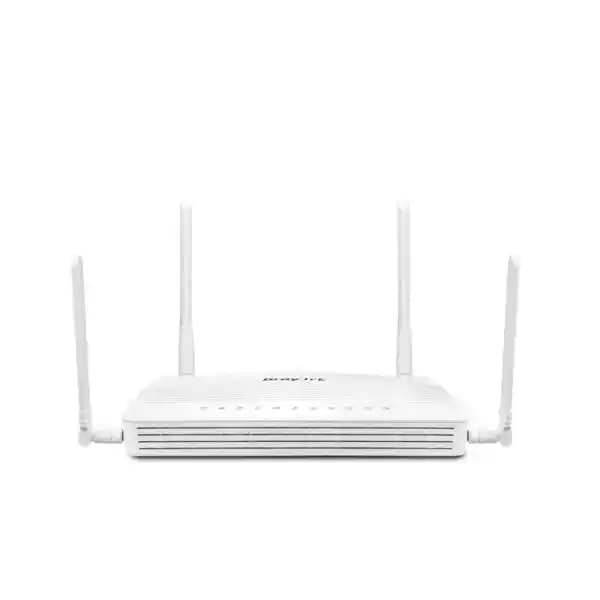
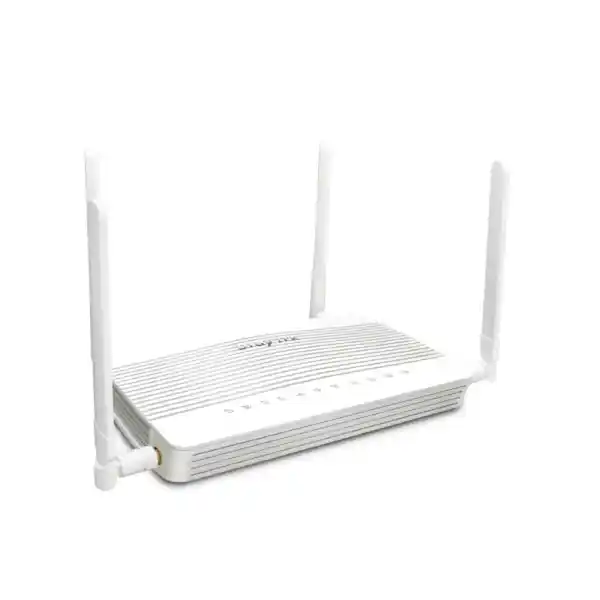
The DrayTek Vigor2767ax-4G is designed for organizations that cannot treat internet access as a single-link convenience. It brings a VDSL2/ADSL modem, 2.5GbE Ethernet WAN capability, dual-band Wi-Fi 6, integrated LTE Category 6, dual Nano-SIM slots and embedded eSIM support into a compact router that can serve as the connectivity hub for branch offices, retail counters, clinics, professional studios, temporary sites and high-specification homes across the UAE.
For buyers in Dubai, Abu Dhabi, Sharjah and the wider Emirates, its value is not simply the number of WAN technologies on the chassis. The real advantage is operational flexibility: a site can retain DSL where that remains practical, migrate to Ethernet broadband, use LTE for primary or standby connectivity, apply policy routing and QoS to business applications, extend wireless coverage through managed DrayTek access points, and maintain encrypted VPN connectivity to remote users or other offices.
Multiple WAN Paths
VDSL2/ADSL, switchable 2.5GbE Ethernet WAN, integrated 4G LTE and Wi-Fi WAN options let engineers build primary, backup or transitional internet designs without replacing the router every time the carrier changes.
Business Wi-Fi 6
Dual-band 802.11ax with up to 574 Mbps on 2.4 GHz and 2402 Mbps on 5 GHz gives the router an AX3000-class wireless foundation with OFDMA, MU-MIMO, WPA3 and 160 MHz channel capability.
Branch Security and Control
Policy routing, VLAN segmentation, bandwidth management, app-aware QoS, VPN, firewall rules, user controls, monitoring and optional reputation intelligence support a far more structured deployment than a consumer wireless gateway.
Why the Vigor2767ax-4G Fits UAE Connectivity Requirements
UAE branch networks often grow in stages. A new office may begin with mobile broadband before a fixed circuit is activated. A warehouse or showroom may have an existing copper service that remains operational but is not sufficient as the only business connection. A small professional office may migrate to a faster Ethernet handoff while still wanting LTE as an independent backup path. A temporary retail kiosk may have no fixed line at all. The Vigor2767ax-4G addresses these different situations with one routing platform rather than forcing the organization to deploy a DSL modem, a separate LTE gateway, a firewall/router and an independent Wi-Fi access point on day one.
The built-in VDSL2 modem supports profile 35b supervectoring as well as common VDSL2 profiles including 8a, 8b, 8c, 8d, 12a, 12b, 17a and 30a. It also maintains backward compatibility with ADSL, ADSL2 and ADSL2+ families, including Annex A/B/J/M support. This matters when a UAE customer is inheriting an older circuit, moving into an existing tenancy, or operating in a location where replacing the access method is not immediately possible. The router can function as the termination device while the network design remains consistent behind it.
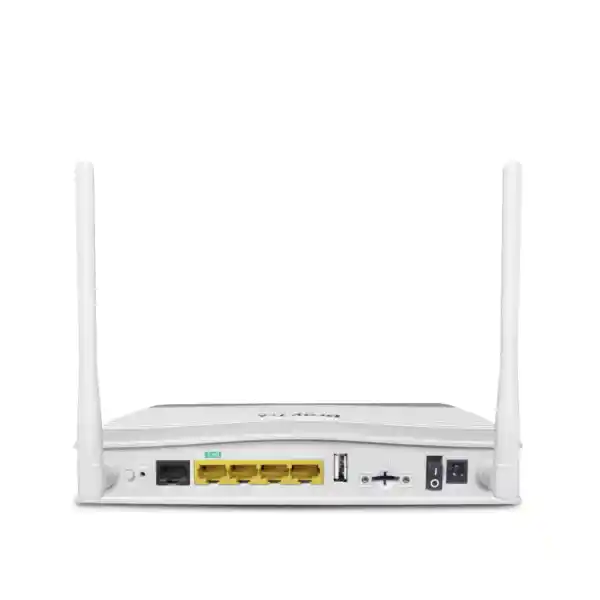
Where Ethernet broadband is available, the 2.5GbE RJ-45 port can be configured as LAN or WAN. That gives the hardware a practical migration path beyond legacy DSL. It also avoids restricting a faster handoff to a one-gigabit interface when the service, upstream gateway or local architecture can benefit from multi-gigabit Ethernet. The remaining three fixed Gigabit Ethernet LAN ports can serve local switches, servers, IP telephony systems, access points or other network segments depending on the design.
For organizations that need a local technology partner to combine routing, switching, wireless, firewall policy and structured cabling into one implementation, FourTeck UAE provides broader integration services through FourTeck UAE. The router is most effective when treated as part of an overall topology: WAN diversity, physical cable routes, VLAN design, address planning, Wi-Fi coverage, authentication, UPS protection and documented failover behavior all influence the final result.
WAN Architecture: DSL, 2.5GbE, LTE and Wireless Backup in One Chassis
The strongest reason to specify the DrayTek Vigor2767ax-4G is its ability to accommodate different last-mile technologies without changing the LAN-side design. The fixed RJ-11 port handles VDSL2 and ADSL families. The switchable 2.5GbE port can be used as an Ethernet WAN when the internet provider presents service over copper Ethernet, an ONT or another upstream handoff. The integrated 4G modem supplies cellular access without relying on an external USB dongle, and DrayTek also supports wireless WAN modes that can be used where an upstream Wi-Fi network is part of the contingency plan.
In a resilient branch architecture, engineers should not think only in terms of “main line plus backup line.” They should define which services are allowed to move during failover, how fast the router should declare a link unhealthy, whether public IP-dependent services can tolerate a changed source address, and how voice, payment, ERP, cloud applications and remote-access VPN will behave on a lower-bandwidth cellular path. The Vigor2767ax-4G provides the routing and policy mechanisms needed to build those decisions into the network rather than leaving them to users.
A practical example is a retail branch using Ethernet broadband as the normal WAN and 4G as standby. Point-of-sale traffic, cloud inventory, staff collaboration and guest Wi-Fi may all share the primary service. During an outage, the cellular circuit should prioritize payment, inventory and business communication while restricting guest traffic and large software downloads. Bandwidth limits, session controls, QoS and policy routing can be combined to keep the reduced-capacity path usable. This is more valuable than simply proving that the router can “fail over,” because continuity depends on application behavior after the failover has occurred.
Another common scenario is a professional office retaining VDSL2 while waiting for a faster fixed service. The same router can be installed early, establish Wi-Fi, VPN, VLANs and user policies, then transition to Ethernet WAN when the new service arrives. LTE can remain as a tertiary or independent backup option. This reduces migration effort because the LAN addressing, SSIDs, VPN profiles and security policies do not have to be rebuilt on a different edge device.
DrayTek specifies maximum NAT throughput up to 2300 Mbps under its internal test conditions. Real-world throughput depends on packet size, feature set, active inspection, routing policies, VPN use, wireless conditions and the characteristics of the internet circuit. For procurement, the correct approach is to size the router around the actual application mix and the heaviest expected WAN mode, not simply compare a laboratory maximum against an ISP headline rate.
Integrated 4G LTE: Dual Nano-SIM and eSIM for Carrier Flexibility
The cellular subsystem is an important differentiator of the Vigor2767ax-4G. It supports LTE Category 6 with theoretical receive rates up to 300 Mbps and transmit rates up to 50 Mbps, subject to operator network capability, signal quality, congestion, spectrum allocation and local radio conditions. The unit provides two Nano-SIM slots and embedded eSIM capability, giving organizations more flexibility than a single removable SIM design.
For UAE deployments, dual-SIM planning can reduce dependence on a single mobile operator. A branch can be engineered so that one SIM profile is preferred and another is retained for resilience, commercial flexibility or coverage differences. The embedded eSIM option adds another path for managing service profiles without relying exclusively on physical card handling. Actual eSIM provisioning depends on operator support and subscription arrangements, so that part of the project should be validated with the selected carrier before rollout.
The supported LTE band set includes FDD bands 1, 3, 7, 8, 20 and 28, along with TDD bands 38 and 40. The router uses two external cellular antennas. For sites with challenging RF conditions, physical placement can have a significant impact on performance. Keeping the router inside a metal communications cabinet, behind reinforced concrete, adjacent to high-noise electrical equipment or in an internal room can reduce available signal quality. A pre-installation survey should confirm the intended operator, measured radio conditions, antenna orientation and where the router will physically reside.
Cellular data budgeting is also an operational consideration. A backup link that activates during a fixed-line outage can consume significant data if cloud backup, operating-system updates, video meetings, guest Wi-Fi and streaming applications continue at normal levels. The Vigor platform includes WAN data budget functions and traffic management tools that help administrators control consumption. Effective policies should prioritize business-critical flows and apply restrictive limits to low-priority categories when the site is on cellular service.
For temporary offices, construction cabins, exhibitions or pop-up retail, the 4G function can also be used as the initial primary WAN before fixed connectivity is delivered. Once a permanent circuit arrives, the same device can be reconfigured so LTE becomes backup. This staged deployment model reduces the number of hardware changes during a site launch and can help IT teams standardize branch configurations across locations with different carrier readiness dates.
Wi-Fi 6 AX3000 for High-Density Small Networks
The Vigor2767ax-4G combines routing and wireless access with dual-band 802.11ax. DrayTek rates the platform at up to 574 Mbps on 2.4 GHz and 2402 Mbps on 5 GHz, creating an AX3000-class link-rate profile. These are PHY link rates rather than guaranteed internet throughput, but they indicate that the wireless subsystem is designed for modern clients and for efficient airtime use compared with older 802.11ac or 802.11n gateways.
Wi-Fi 6 introduces mechanisms such as OFDMA and MU-MIMO that improve how airtime is scheduled among multiple clients. In practical business environments, this matters because the wireless network rarely carries one large transfer from one device. It serves laptops, phones, barcode scanners, tablets, televisions, printers, IoT devices, cloud applications, voice traffic and background synchronization at the same time. Better scheduling can reduce contention and make the network feel more consistent when many devices are active.
The 5 GHz radio supports 160 MHz channel width, which can improve peak link rates for compatible clients in suitable RF conditions. However, 160 MHz should not be enabled automatically in every office. Wider channels consume more spectrum and may reduce the number of clean channel choices. In multi-AP environments, 80 MHz or narrower channels can sometimes provide better overall capacity because adjacent access points have more non-overlapping options. The correct channel plan depends on neighboring networks, building construction, client population and how many managed APs will be deployed.
Security options include WPA3 alongside earlier compatibility modes, and the platform supports 802.1X authentication for environments that use centralized identity services. Guest access can be separated from internal resources with SSID-to-VLAN mapping and firewall policy. A guest portal can be used where hospitality or visitor onboarding is required. Client isolation, access lists, hidden SSID controls and wireless scheduling provide additional administrative options, although strong authentication and segmentation should take priority over cosmetic measures such as hiding the network name.
The integrated radio is appropriate for many compact offices and homes, but a single router cannot overcome RF physics. Large villas, multi-floor offices, warehouses and partition-heavy commercial spaces may require additional access points. The Vigor2767ax-4G can act as the root of a DrayTek mesh with up to seven manageable mesh nodes, and for larger deployments its AP management capability can centrally control up to 20 APs. This allows the router to remain the edge policy device while wireless coverage is expanded using dedicated access points.
2.5GbE and LAN Design
The switchable 2.5GbE port can serve as a high-speed LAN interface or as Ethernet WAN. This is useful when an upstream ONT or service gateway offers multi-gigabit handoff, or when a local device such as a Wi-Fi 6 access point, workstation, NAS or switch benefits from more than one gigabit of link capacity.
Three additional fixed Gigabit Ethernet LAN ports provide direct connections for local devices. In business designs, those ports are typically uplinked to managed switches rather than consumed individually by end-user equipment. The switch can then extend VLANs, PoE services and additional access ports across the office while the Vigor router handles inter-VLAN policy and internet edge functions.
A common engineering mistake is to treat every LAN port as part of one flat network. The Vigor2767ax-4G supports multiple LAN subnets and 802.1Q VLANs, so the physical ports and wireless SSIDs can be mapped into separate trust zones. This allows corporate devices, voice endpoints, printers, cameras, building systems, guests and management interfaces to have different rules.
USB 2.0 and Auxiliary Functions
The router includes one USB 2.0 port. DrayTek lists applications such as storage-related file sharing, device status functions, printer support, temperature sensing and USB WAN functions, depending on supported peripherals and firmware. For enterprise projects, these should be treated as auxiliary capabilities rather than replacements for dedicated file servers, monitoring systems or managed print infrastructure.
The presence of USB can still be useful in edge deployments where a lightweight service is needed or where administrators require a supported peripheral for monitoring or backup connectivity. Any USB device added to the router should be assessed for power requirements, supportability and operational ownership.
For a clean branch design, keep critical services simple at the edge. Use the router for routing, security, WAN resilience, VPN and policy enforcement; use dedicated systems for storage, surveillance recording and line-of-business applications. This separation makes troubleshooting easier and reduces the effect of a peripheral fault on connectivity.
VLAN Segmentation for Business, Voice, Guest and IoT Traffic
A modern small office should rarely operate as one unrestricted broadcast domain. The Vigor2767ax-4G supports multiple IP subnets and 802.1Q VLAN tagging, allowing the router to separate traffic according to business function. This makes it possible to create a corporate user VLAN, a voice VLAN, a guest VLAN, an IoT or building-services VLAN, a camera VLAN and a management VLAN while applying different routing and firewall behavior between them.
Segmentation improves security because compromise of a low-trust device does not automatically provide direct access to every other endpoint. It can also improve troubleshooting. If IP phones, point-of-sale terminals and guest users have separate address ranges, the IT team can identify the source and purpose of traffic more quickly, apply QoS precisely and restrict lateral communication that is not required.
Inter-VLAN routing should be explicitly designed. A printer VLAN may need access from staff devices but should not initiate connections to accounting workstations. Cameras may need to reach an NVR and time service but should not have unrestricted access to the internet. Guest Wi-Fi should reach the internet without reaching internal RFC1918 networks. Management interfaces should be accessible only from authorized administrator subnets or VPN users. These policies can be expressed at the router rather than relying on end-device behavior.
The platform supports DHCP capabilities such as multiple subnets, custom DHCP options and bind-IP-to-MAC functions. In voice deployments, DHCP options can help endpoints discover call-control or provisioning services where applicable. Address reservations can keep infrastructure devices predictable. For larger sites, the router can also coexist with dedicated DHCP and DNS services if the network architecture requires centralized management.
When the branch uses a managed switch, trunk links can transport multiple tagged VLANs between the Vigor router and switching infrastructure. Access ports on the switch are then assigned to the correct VLAN according to endpoint type. Wireless SSIDs can be mapped to the same VLAN plan so wired and wireless users follow consistent security rules. This approach scales far more cleanly than creating separate physical routers for each user group.
QoS, Bandwidth Management and Application Prioritization
The Vigor2767ax-4G includes bandwidth management functions that can prevent one user or application from consuming disproportionate network resources. This becomes especially important when the active WAN changes from fixed broadband to LTE. A branch that normally has hundreds of megabits available may suddenly be operating on a smaller and more variable cellular budget. Without controls, one cloud sync job can degrade voice calls, remote desktops or payment traffic for everyone.
Bandwidth limits can cap individual clients or classes of traffic. Session limits can reduce excessive connection counts generated by problematic applications or devices. Quality of Service can prioritize latency-sensitive workloads, and app-based QoS provides more granular recognition where supported. The goal is not to maximize every speed test; it is to make the business applications that matter remain predictable under congestion.
A useful UAE branch policy might classify IP telephony and video meeting signaling as high priority, ERP and cloud productivity as business priority, general browsing as standard, and guest streaming or bulk updates as low priority. If the router shifts to 4G, the policy can be tightened further by reducing guest bandwidth and pausing nonessential backup operations. The IT team should test these rules during implementation rather than discovering their behavior during a real carrier outage.
QoS is most effective when the engineer knows the true bottleneck. Applying outbound shaping above the real upload rate provides little control because congestion may occur upstream at the carrier before the router can schedule packets. For DSL and LTE services, upload capacity may be substantially lower than download capacity, so uplink shaping deserves particular attention. VoIP quality problems often appear first on the upstream path when users send large files or synchronize cloud storage.
For organizations that need assistance integrating edge routing with IP telephony, switching, cabling or managed support, FourTeck IT Services UAE can be used as part of a wider deployment plan. The important objective is to translate business priorities into measurable network policy rather than leave every application competing equally for bandwidth.
VPN for Branch Connectivity, Teleworkers and Secure Administration
The router supports a broad selection of VPN technologies including IPsec, L2TP over IPsec, IKEv1/IKEv2, IKEv2-EAP, IPsec-XAuth, OpenVPN and WireGuard. DrayTek specifies support for up to 16 VPN tunnels, making the Vigor2767ax-4G suitable for smaller branch and remote-access environments where a handful of site-to-site links and teleworker sessions are required.
For site-to-site use, IPsec can connect a UAE branch to headquarters, a data center, a cloud security gateway or another Vigor-equipped location. The device supports pre-shared key and X.509-based IKE authentication options. NAT traversal helps when one side of a tunnel is behind carrier or upstream NAT, although certain mobile broadband scenarios can still create limitations for inbound connectivity depending on the operator’s addressing model.
DrayTek publishes a maximum single-directional IPsec throughput figure of 300 Mbps with AES-256 and a WireGuard figure of 50 Mbps for this model. These figures should be treated as lab maxima rather than guaranteed branch throughput. Real VPN performance depends on tunnel protocol, encryption, packet sizes, CPU load, concurrent services and the actual WAN path. If a site must carry sustained encrypted traffic near gigabit speeds, a higher-capacity security gateway may be more appropriate.
For teleworkers, the choice of protocol should account for client support, identity requirements and help-desk complexity. IKEv2 is widely supported on modern operating systems. OpenVPN and WireGuard can be useful where compatible clients are available and the organization has a defined configuration process. The EasyVPN feature can simplify supported DrayTek remote-access scenarios. Regardless of protocol, administrators should use strong credentials, keep firmware current, restrict management exposure and avoid publishing unnecessary services directly to the internet.
VPN design also interacts with failover. A site-to-site tunnel tied to a fixed public IP may need to re-establish over LTE using a different address. If the mobile operator uses CGNAT, inbound initiation may not be possible in the same way as on a fixed public IP. Dynamic DNS, outbound tunnel initiation and cloud-mediated access patterns can help, but the exact design must be validated against the chosen carrier before deployment.
Firewall Filtering
Stateful policy controls, protocol and address filters, port forwarding, DMZ functions and application-layer gateway support allow administrators to expose only required services and govern traffic between WAN, LAN and VLAN zones.
Threat-Oriented Controls
Features include port knocking, spoofing defenses, MAC filtering profiles, IPv6 address security and reputation-based options. These controls supplement, but do not replace, endpoint protection, patching and secure identity practices.
Identity and Access
User and group policies, conditional access functions, local RADIUS, TACACS+ and OTP-related authentication options help administrators tie network access to identity rather than depending only on source IP addresses.
Security Licensing: What Is Included and What Requires Attention
The Vigor2767ax-4G includes the routing, firewall, VPN, VLAN, QoS, wireless and management functions that define the platform. DrayTek also offers cloud-backed URL/IP Reputation as a threat-intelligence service. That reputation function should not be presented as a permanently subscription-free feature. DrayTek provides a trial workflow and then uses a license model for continued URL/IP Reputation service.
For procurement, the distinction matters because a buyer may see “URL/IP Reputation” in the feature list and assume that cloud classification will operate indefinitely without renewal. The project scope should separate base router capabilities from optional or renewable services and should document the expected license period, renewal ownership and MyVigor registration process where the reputation service will be used.
Security planning should also avoid relying on one control. Reputation feeds are useful for blocking known malicious destinations, but they are not substitutes for endpoint protection, multifactor authentication, strong patch management, DNS security strategy, secure backups and least-privilege access. A small branch router is one enforcement point in a layered security architecture.
Customers looking specifically for perimeter security guidance, firewall selection and UAE deployment services can also review Firewall Dubai by FourTeck. Where application inspection, advanced threat prevention, larger VPN scale or enterprise reporting requirements exceed the Vigor2767ax-4G’s intended scope, FourTeck can position it alongside or instead of a dedicated next-generation firewall according to the site’s risk profile.
Routing Features for More Than Basic Internet Sharing
The Vigor2767ax-4G is capable of more than default-route internet access. It supports static routing for IPv4 and IPv6, policy routing, inter-VLAN routing, RIP v1/v2, BGP and OSPF v2/v3. That feature set can be useful when the device is installed in a branch with multiple internal networks, upstream routers, private WAN services or dynamic routing requirements.
Policy-based routing is especially useful in multi-WAN scenarios. An administrator can direct specific users, services or destinations toward a preferred WAN rather than allowing every flow to follow the same default path. A finance VLAN might use the fixed connection whenever available, while a dedicated IoT service is sent over an alternate path. Management traffic to a cloud platform could be pinned to the most stable WAN, while guest traffic is assigned lower priority or prevented from using cellular backup.
Dynamic routing should be used deliberately. Small sites often do not need BGP or OSPF, but their presence can be valuable when the router is part of a more structured network. If OSPF is used inside a branch, route redistribution and failure domains should be carefully controlled. If BGP is introduced, the engineer must understand prefix filtering, neighbor security and the limits of the branch topology. These protocols are powerful, and configuration errors can create outages that are much harder to diagnose than a simple static route.
IPv6 support should also be part of the design rather than ignored. The router can handle IPv6 addressing and routing functions, and firewall policy must be applied to IPv6 with the same care as IPv4. Disabling or neglecting IPv6 on client devices while leaving partial connectivity can create inconsistent behavior. Where the ISP supplies IPv6, administrators should document address assignment, DNS behavior, permitted inbound traffic and how VPN services interact with dual-stack connectivity.
The value of this routing feature set is flexibility. A small organization can begin with simple NAT and DHCP, then introduce VLANs, policy routes, site-to-site VPN or dynamic routing as requirements evolve. The same platform can remain in service across several stages of network maturity, provided throughput and session scale remain appropriate for the site.
Wireless Management, Mesh and Expansion Beyond the Built-In Radio
A single integrated Wi-Fi router can be an excellent fit for a compact floor plan, but the Vigor2767ax-4G is also designed to manage additional DrayTek wireless infrastructure. The router can operate as a mesh root and manage up to seven mesh nodes. For larger Wi-Fi environments, its virtual controller can switch into AP management mode and centrally control up to 20 supported access points.
Centralization gives small IT teams one place to standardize SSIDs, security settings and radio-related policy rather than logging into each access point independently. Assisted roaming features can help compatible clients transition between APs, although roaming decisions ultimately depend in part on client behavior. Coverage design should therefore combine controller settings with a sensible RF plan and adequate signal overlap.
Mesh can be useful when Ethernet cabling is difficult or when a location requires rapid deployment. However, wired backhaul is generally preferable for business-critical APs because it provides predictable capacity and avoids consuming wireless airtime for inter-node transport. Mesh is best treated as a design option rather than a default replacement for structured cabling.
For a multi-floor villa, a typical deployment might place the Vigor2767ax-4G near the internet handoff and use dedicated APs on upper floors connected through wired Ethernet. SSIDs could be separated into family, guest, IoT and work networks. For a small office, APs may be placed according to meeting rooms, open workspace and reception coverage, with a separate guest SSID isolated by VLAN policy. In a warehouse, the design should account for racking, reflective surfaces, scanner behavior and roaming corridors.
This managed approach is one reason to choose a business router instead of a residential all-in-one gateway. The Wi-Fi system can grow without discarding the edge router, and the routing, DHCP, VLAN, QoS and security policies remain centralized as coverage expands.
Management, Monitoring and Operational Visibility
Day-two operations are often more important than the initial configuration. The Vigor2767ax-4G provides status and diagnostic views for clients, wireless information, WAN state, cellular WAN, DSL status, ARP, routes, DHCP, IPv6 neighbors, LLDP neighbors, DNS cache and sessions. These tools help administrators determine whether a problem is inside the LAN, at the WAN edge, on the cellular path or with a specific endpoint.
Remote management options include secure web administration, SSH v2, SNMP, syslog and TR-069 functions. The precise remote-access policy should be conservative. Management interfaces should not be exposed broadly to the internet when they can instead be reached through VPN, source restrictions or a dedicated management service. Default credentials should be changed, unused services disabled and administrative accounts separated from ordinary user access.
SNMP can feed interface and status data to a monitoring platform, while syslog can centralize event records for troubleshooting. Alerts through supported channels can notify administrators of events such as WAN changes. In a fleet of branches, central visibility becomes important because the help desk cannot depend on users to describe exactly what failed. A meaningful alert should indicate which WAN went down, whether failover succeeded and whether the site remained reachable.
Configuration backup is another operational requirement. Once the router is installed and validated, the organization should retain an encrypted or otherwise protected copy of the approved configuration along with documentation of firmware version, WAN credentials, SIM ownership, VPN keys or certificates, VLAN IDs, DHCP scopes and recovery steps. Backup files should be controlled because they can contain sensitive network information.
Firmware maintenance should be scheduled rather than reactive. Network edge devices are security-sensitive infrastructure, so administrators should track vendor releases, review change notes, test major updates where possible and maintain a rollback or recovery plan. A branch router that remains online for years without maintenance can become a risk even if it was securely configured on installation day.
Deployment Scenarios in Dubai and Across the UAE
Small Office or Professional Practice
Use Ethernet or VDSL as the primary circuit, 4G as backup, staff and guest VLANs, Wi-Fi 6 for laptops and phones, VPN for remote workers and QoS for conferencing. This is suitable where the office needs business controls without a large rack-mounted edge appliance.
Retail Branch or Point-of-Sale Site
Separate POS, corporate, IoT and guest traffic. Prioritize payment and inventory applications, maintain LTE backup for transaction continuity and apply stricter bandwidth policies when cellular becomes active.
Premium Home or Home Office
Combine strong Wi-Fi 6, VLAN separation for work and IoT devices, VPN access, parental or reputation controls where licensed, and LTE resilience for professionals who depend on cloud applications and video calls.
Temporary or Rapid-Deployment Site
Start service over LTE, then transition to DSL or Ethernet when the fixed circuit becomes available. Keep the same LAN, Wi-Fi, VPN and security policy during the migration so users experience minimal change.
For multi-country organizations that want consistent edge standards beyond the UAE, FourTeck also supports broader infrastructure sourcing through FourTeck Global. Standardizing a branch router can simplify templates, documentation and support, but each country still requires local validation of LTE bands, operator policies, power, ISP handoff and regulatory requirements.
Sizing the Vigor2767ax-4G Correctly
A router should be selected by workload, not by product label. The Vigor2767ax-4G is positioned for professional smart homes, SOHO environments and smaller branch networks. It offers strong flexibility, but that does not mean it is the correct edge platform for every site. The sizing process should begin with the number of users, internet speed, expected concurrent sessions, VPN load, Wi-Fi client count, VLAN complexity, application mix and required security services.
For WAN throughput, consider both today’s circuit and likely upgrades. A site with a 250 Mbps connection may later move to 1 Gbps or beyond. The 2.5GbE interface and vendor-rated NAT ceiling give the device headroom for many scenarios, but enabling VPN encryption, complex policies and traffic inspection changes the effective capacity. If the branch routinely transfers hundreds of megabits through IPsec, a platform with higher encrypted throughput should be evaluated.
For Wi-Fi, count active devices rather than employees. One person may carry a laptop, phone, tablet and wearable, while the office also has printers, meeting-room devices, TVs, cameras and IoT sensors. Wireless coverage is not determined by router power alone. Building materials, floor area, neighboring networks and device capabilities determine whether integrated Wi-Fi is enough or whether additional APs are required.
For LTE backup, calculate the business traffic that must survive an outage. If the site normally uses 500 Mbps but the cellular service provides a fraction of that in practice, the continuity plan must define what gets restricted. A successful failover is one where essential services continue, not one where every user keeps the same bandwidth profile.
For network security, decide whether the branch requires a router with business firewall controls or a full next-generation firewall stack with advanced malware analysis, SSL inspection, centralized SOC integration and large-scale logging. The Vigor2767ax-4G is a capable multi-service router, but high-risk or compliance-heavy environments may justify pairing it with or replacing it by a dedicated security appliance.
Implementation Methodology for a Reliable Installation
A disciplined deployment begins before the router is powered on. Record the ISP circuit type, VLAN or PPPoE requirements, public IP information, DSL credentials if applicable, LTE operator, SIM PIN status, expected eSIM profile, DNS requirements and whether the WAN uses a static or dynamic address. Confirm where the router will be mounted and whether the location is suitable for both Wi-Fi and LTE reception.
Next, design the LAN addressing plan. Define subnets and VLAN IDs for staff, guest, voice, IoT, cameras and management as required. Assign DHCP ranges and infrastructure reservations. Decide which networks can communicate and document the minimum necessary rules. If a managed switch will be connected, define whether the router-to-switch link is tagged, which VLANs traverse it and whether any native VLAN is required.
The WAN failover policy should then be tested. Disconnect the primary service and verify that critical applications move to LTE. Confirm DNS behavior, VPN recovery, cloud application access, voice quality and public-facing dependencies. Restore the primary WAN and observe failback. Repeat the test while generating realistic traffic so QoS and bandwidth controls are validated under load.
Wireless validation should include coverage measurements in the actual work areas, not only a speed test beside the router. Check signal quality, roaming between access points, guest isolation and performance at the edge of coverage. On 5 GHz, verify that the chosen channel width is appropriate for the local RF environment. On 2.4 GHz, avoid unnecessary channel overlap and use the band primarily for legacy or range-oriented clients where possible.
Finally, secure and document management. Change default credentials, restrict administration sources, enable HTTPS and SSH rather than insecure alternatives where possible, configure logging, save an approved backup, record serial and subscription information, and establish a firmware review process. Label WAN and LAN connections physically so onsite staff can follow recovery instructions without guessing which cable serves which function.
A router installation becomes a supportable business service only when the configuration, physical connections, credentials ownership, failover behavior and monitoring process are all documented. That operational discipline is especially important for branches without permanent IT staff onsite.
Comparison Logic: When to Choose This Model
Choose the Vigor2767ax-4G when the project benefits from a built-in DSL modem, integrated 4G, modern Wi-Fi 6 and business routing functions in one compact unit. It is particularly attractive when WAN technology may change over time, when cellular resilience is important, or when the organization wants to avoid stacking a separate modem and LTE gateway beside the primary router.
Choose a different class of router if the site needs substantially more VPN throughput, a large number of simultaneous tunnels, dual multi-gigabit wired WANs, rack-mount hardware, enterprise-scale SD-WAN policy or extensive security inspection. The Vigor2767ax-4G is optimized for versatility at the small-site edge, not for replacing a high-end datacenter firewall or a large campus core.
Compared with a consumer Wi-Fi router, the Vigor adds capabilities that matter operationally: multiple WAN methods, VLANs, policy routing, structured QoS, VPN options, centralized AP control, SNMP/syslog, dynamic routing and more deliberate security controls. These features make it easier to integrate the device into a managed network rather than treat it as an isolated appliance.
Compared with a dedicated firewall plus separate modem and access points, the Vigor can reduce equipment count and simplify small-site installation. The tradeoff is that integrated platforms have finite scale and feature depth. A good design decides whether consolidation is an advantage or whether separate specialized appliances are justified by performance, compliance or operational requirements.
For many UAE SMEs, professional homes and remote offices, the balance is compelling: a single device can terminate DSL, accept Ethernet WAN, use LTE, deliver Wi-Fi 6, segment users, establish VPNs and manage additional DrayTek APs while remaining compact enough for small communications spaces.
UAE Procurement and Regional Deployment Considerations
Network equipment procurement in the UAE should account for more than the model number. Confirm the hardware region, supported LTE bands, local power adapter, warranty path, firmware branch and any carrier-specific requirements. If LTE is critical, verify the intended operator’s coverage at the physical site and determine whether the subscription uses CGNAT, a public IP option or a private APN. Those choices can change how inbound VPN and remote management are designed.
For DSL deployments, confirm whether the service presentation and annex requirements match the router and whether the provider supplies authentication or VLAN tagging parameters. For Ethernet services delivered through an ONT, document whether the ONT is routed or bridged and whether the Vigor should receive the public address directly. Double NAT can be acceptable in some environments but may complicate VPN, port forwarding and troubleshooting.
Power quality also deserves attention. The router’s maximum listed consumption is 22.1 W and it uses a 12 V DC supply, so it is easy to protect with an appropriately sized UPS. A small branch should keep the router, ONT or modem, core switch and critical access point powered together. Backing up only the router is not useful if the upstream fiber ONT or switch loses power at the same time.
Temperature and installation environment matter in the UAE climate. The router’s listed operating range is 0 to 45°C and humidity is 10% to 90% non-condensing. Indoor communications spaces should be ventilated and protected from direct heat. Avoid placing the unit inside sealed boxes exposed to sunlight, on top of heat-producing equipment or in locations where dust and poor airflow can raise internal temperature.
For organizations purchasing multiple units, standardize naming, LAN addressing templates, administrator roles, firmware policy, backup procedure and monitoring. A repeatable deployment template reduces support time and makes it easier to compare branch performance. Serial numbers, SIM identifiers and WAN circuit references should be recorded in the asset register so telecom and network incidents can be escalated quickly.
Frequently Asked Technical Questions
Can 4G be used as the main internet connection?
Yes. The integrated LTE modem can provide primary connectivity where fixed service is unavailable or delayed. Many deployments later convert LTE to backup after DSL or Ethernet service is installed.
Does it support 5G?
No. This model is an integrated 4G LTE router. If the project specifically requires 5G cellular access, a different DrayTek model or external architecture should be selected.
Can the 2.5GbE port be WAN?
Yes. The 2.5GbE RJ-45 interface is switchable between LAN and WAN operation, allowing the router to connect to an Ethernet broadband handoff or provide a multi-gigabit local link.
How many VPN tunnels are supported?
DrayTek specifies up to 16 VPN tunnels. The practical mix depends on protocol, traffic level and the overall workload placed on the router.
Is the URL/IP Reputation service free forever?
No. DrayTek provides a trial mechanism and then licenses the cloud-backed URL/IP Reputation service. Buyers should include renewal requirements in the project scope if they intend to use it continuously.
Can it manage additional Wi-Fi access points?
Yes. It can function as a mesh root and can centrally manage supported DrayTek APs, with AP management mode supporting up to 20 access points.
Operational Best Practices After Installation
After commissioning, create a baseline. Record normal WAN latency, LTE signal conditions, typical bandwidth use, Wi-Fi client counts and VPN status. Baselines make it easier to distinguish a new fault from normal variation. A cellular link in particular can change performance by time of day, network congestion and radio conditions, so administrators should understand the site’s normal range before setting aggressive alert thresholds.
Review firewall policies periodically. Temporary port forwards and test rules tend to accumulate unless they have owners and expiry dates. Every inbound exception should have a business justification. Where possible, replace direct exposure of administration services with VPN access. Review inactive user accounts, old VPN profiles and stale address objects as part of routine maintenance.
Test failover on a schedule. A backup WAN that has not been tested for a year may contain an expired SIM, depleted data plan, changed APN, weak antenna connection or outdated policy. Controlled testing confirms that the service still works and gives the help desk familiarity with expected behavior. For critical branches, document the approximate recovery sequence and which applications may briefly reconnect.
Maintain configuration and firmware records. Before a major change, save a backup and note the reason for the change. Where multiple branches use the same platform, keep a standard template but document local exceptions. This reduces configuration drift and speeds replacement if hardware ever needs to be swapped.
Finally, align the router with wider IT operations. Network alerts should reach the same support process that handles server, application and telecom incidents. WAN circuit references, carrier contacts and device credentials should be available to authorized support staff. The best edge device is one that can be diagnosed quickly when something goes wrong.
Decision Recap: Is the DrayTek Vigor2767ax-4G the Right Fit?
The Vigor2767ax-4G is a strong choice when a UAE site needs several connectivity methods in one compact business router. Its combination of VDSL2 35b, Ethernet WAN, LTE Category 6, dual Nano-SIM plus eSIM support, AX3000 Wi-Fi 6, 2.5GbE, VLANs, VPN, QoS and wireless management provides a practical bridge between consumer all-in-one routers and larger enterprise security appliances.
Choose It When
You need resilient WAN options, an integrated 4G modem, business Wi-Fi 6, branch VPN, multiple VLANs, controlled guest access, centralized DrayTek AP management and a compact form factor suitable for a small office, shop, clinic or premium home network.
Consider a Larger Platform When
You require very high encrypted throughput, dozens or hundreds of VPNs, advanced next-generation firewall inspection, large-scale SD-WAN, enterprise HA pairs, 10GbE interfaces or a much larger number of users and access points.
If the site falls between these categories, the deciding factor should be measured workload and security requirements rather than brand preference. FourTeck can size the edge device against the planned ISP bandwidth, VPN traffic, number of VLANs, expected wireless density and required security services.
Quotation Input Checklist for UAE Projects
Providing the following information helps FourTeck prepare a more accurate quotation and avoids supplying a router without the accessories, switching or service scope needed for the final design.
VDSL/ADSL, Ethernet/fiber handoff, 4G-only or another upstream gateway; include ISP speed and authentication method if known.
Preferred UAE operator, number of SIMs, public IP or private APN requirement, expected data allowance and whether eSIM will be used.
Approximate employees, Wi-Fi clients, IP phones, printers, cameras, IoT devices, POS terminals and any high-bandwidth workstations.
Floor area, number of levels, construction type and whether additional managed APs or mesh nodes are expected.
Corporate, guest, voice, camera, IoT and management networks, plus any restrictions between them.
Number of branches, remote users, expected encrypted throughput, peer firewall type and whether certificates or MFA are required.
Supply only, pre-configuration, onsite installation, cabling, rack/UPS work, testing, documentation and post-deployment support.
Firewall policy, reputation-service licensing, logging, remote monitoring, content controls and any compliance or audit requirements.
FourTeck Consultation and Deployment Support
FourTeck can supply the DrayTek Vigor2767ax-4G as a standalone product or include it in a complete UAE network deployment covering WAN design, structured cabling, managed switching, wireless access points, VLAN segmentation, VPN configuration, failover testing, UPS protection and documentation. The recommended scope depends on whether the site is a new branch, an upgrade of an existing router, a temporary LTE-first deployment or a migration from DSL to Ethernet broadband.
Before ordering, share the intended WAN type, ISP speed, number of users, expected Wi-Fi coverage, VPN requirements and whether 4G is primary or backup. That information allows the design to be checked against the Vigor2767ax-4G’s capabilities and helps identify whether additional access points, switches, cellular data plans or a higher-capacity firewall are required.
The objective is not simply to deliver a router. A production-ready branch should have documented WAN failover, tested VPN recovery, secured administration, controlled guest access, suitable QoS and a configuration backup. These steps reduce downtime and make future support more predictable.
For organizations standardizing multiple locations, FourTeck can also help create a repeatable branch template with consistent VLAN IDs, naming, wireless policy, monitoring and failover rules. This improves deployment speed while allowing site-specific WAN details and cellular carrier choices to remain flexible.

Reviews
There are no reviews yet.