
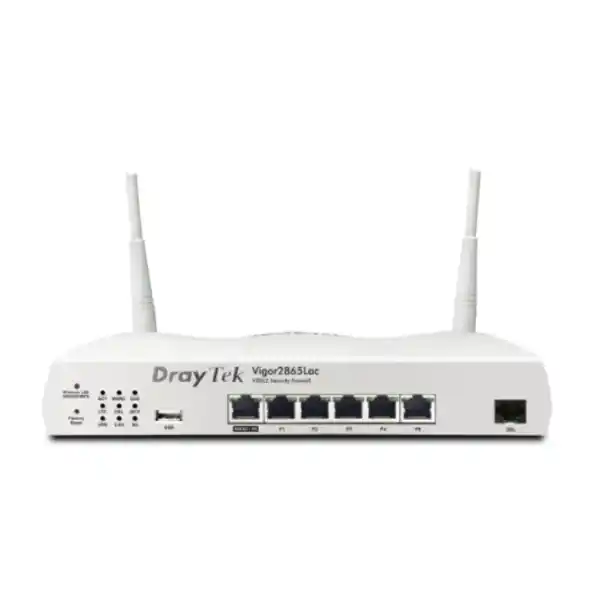
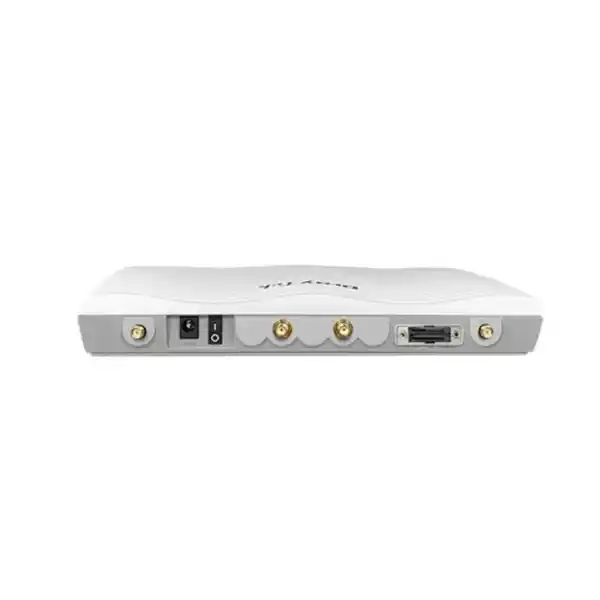
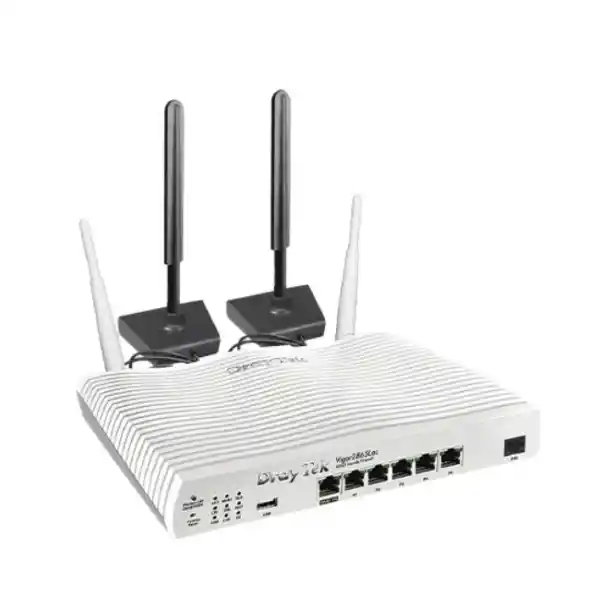
DrayTek Vigor2865Lac — VDSL2 35b, Cat 6 LTE, AC Wireless & Business VPN Router
The DrayTek Vigor2865Lac is designed for organisations that want one resilient edge platform to combine fixed broadband, mobile broadband, enterprise-style routing, VPN, segmentation, wireless access, policy control and centralized DrayTek ecosystem management. For UAE branch offices, retail sites, clinics, professional firms, warehouses, schools, hospitality locations and distributed business networks, it provides a practical way to keep Internet access available even when a primary circuit is impaired, while retaining the routing and security controls expected from a dedicated SMB gateway.
4G LTE Cat 6 dual SIM
802.11ac Wave 2 dual-band WLAN
Gigabit Ethernet WAN/LAN
32 VPN tunnels
Up to 60,000 NAT sessions
What the DrayTek Vigor2865Lac is built to solve
Business Internet design is no longer simply a matter of connecting a router to a single ISP circuit. Modern UAE offices depend on cloud applications, VoIP, video meetings, remote access, payment systems, SaaS platforms, surveillance, branch-to-head-office communications and always-on customer services. A circuit outage that once meant a temporary inconvenience can now interrupt sales, communications and operational access across an entire location. The Vigor2865Lac approaches this problem as a multi-access edge router: it combines integrated DSL, Gigabit Ethernet WAN capability, built-in Cat 6 LTE and wireless WAN possibilities in one appliance, enabling several connectivity paths to be evaluated for failover or load-sharing strategies.
This design is especially relevant where a branch may inherit different access technologies over its lifecycle. One site may initially receive VDSL, later migrate to an Ethernet handoff or fibre ONT, and still require LTE as an emergency path. Instead of redesigning the edge each time, the Vigor2865Lac allows the administrator to treat the WAN options as parts of a controlled routing policy. That means a Dubai office can use fixed broadband for normal traffic, keep cellular connectivity as a standby path, or distribute selected traffic across links when the application design allows it.
The router also addresses internal network complexity. It supports VLAN-based segmentation, multiple LAN subnets, policy routing, bandwidth control, firewalling and VPN services so guest wireless clients, office users, voice devices, cameras, management systems and servers do not need to share the same flat broadcast domain. For organisations that standardise on DrayTek access points and switches, the router can additionally operate as a local management point, helping reduce the number of separate interfaces required for day-to-day branch administration.
WAN architecture: xDSL, Ethernet and LTE in one edge platform
Integrated VDSL2 / ADSL2+
The dedicated RJ-11 WAN interface supports VDSL2 including profiles 8a, 8b, 8c, 8d, 12a, 12b, 17a, 30a and 35b, together with legacy ADSL standards. Profile 35b is significant because it allows higher DSL link rates on suitable copper access networks using supervectoring. The practical result depends on the service provider, line length, copper quality, cabinet technology and provisioned profile, so the router should be selected as part of the complete access design rather than on headline sync figures alone.
Gigabit Ethernet WAN / LAN flexibility
A Gigabit Ethernet port can be used as a WAN or switched to LAN operation, allowing the appliance to accept an Ethernet handoff from a fibre ONT, carrier CPE, microwave bridge or upstream modem. This makes the Vigor2865Lac usable beyond DSL-only deployments. It also enables staged migrations: the router can remain in service when the provider changes the last-mile technology, subject to throughput and feature requirements of the new circuit.
Built-in Cat 6 LTE with dual SIM
The integrated mobile modem supports LTE Category 6 with a stated maximum receive link rate of 300 Mbps and transmit link rate of 50 Mbps. Two standard-size SIM slots are provided, with one SIM active at a time. This allows an administrator to prepare alternate carrier options or operating policies without relying on an external USB modem for the main cellular path. LTE availability and real throughput depend on operator coverage, spectrum, signal quality, congestion, antenna placement and subscription plan.
USB cellular expansion and service resilience
The USB 2.0 interface can be used for supported cellular modem applications and other compatible functions, giving designers another way to add diversity. A resilient WAN plan should avoid treating all links as equally independent: two services delivered over the same duct, upstream provider or building riser can still fail together. The most robust branch designs combine technological and carrier diversity with power protection, monitoring and documented failover tests.
LTE bands, dual-SIM planning and UAE deployment considerations
The Vigor2865Lac specification lists LTE FDD bands 1, 3, 7, 8, 20 and 28, together with TDD bands 38 and 40. The router also provides external LTE antenna connections. From a network-design perspective, band support is only one part of cellular readiness. A successful deployment requires confirmation that the exact hardware region, firmware build and mobile operator service are appropriate for the intended UAE network. Cellular services are dynamic environments: coverage can vary between floors in the same building, tower loading changes by time of day, and low-emissivity glass, concrete cores, metal racks and equipment rooms can reduce radio performance.
For this reason, the LTE portion of the Vigor2865Lac should be commissioned with actual signal and throughput testing at the intended router location. If the router sits inside a server cabinet or communications room, the radio path may be worse than at a window-facing location. External antenna positioning can therefore matter as much as the theoretical modem category. The dual-SIM design is useful when a business wants a second mobile operator profile prepared for continuity, but the two SIMs should not be confused with two simultaneously active cellular modems. The product specification indicates one active SIM at a time, so switching strategy and operational procedures should be defined accordingly.
Data plan governance is equally important. LTE failover can preserve access during a fixed-line outage, but unrestricted backup usage may consume a large data allowance very quickly when cloud sync, software updates, video conferencing, surveillance uploads or guest traffic continue unchanged. The Vigor platform includes WAN data-budget functions, allowing the network team to treat mobile data as a managed resource. In a well-designed configuration, failover rules can prioritize business-critical services while reducing nonessential consumption until the primary circuit returns.
Wireless LAN: 802.11ac Wave 2 for integrated branch access
The “ac” designation in Vigor2865Lac identifies the integrated dual-band 802.11ac wireless variant. DrayTek specifies 2×2 MIMO wireless with 802.11b/g/n operation on 2.4 GHz and 802.11a/n/ac on 5 GHz. Maximum link rates are listed as 400 Mbps on 2.4 GHz and 867 Mbps on 5 GHz, with 80 MHz channel capability on the 5 GHz radio. These are radio link rates rather than guaranteed application throughput. Real performance is influenced by client capability, channel width, interference, distance, building materials, airtime contention, encryption, retransmissions and the simultaneous load on the router.
For a compact office, showroom, branch reception, clinic or small retail site, integrated Wi-Fi can eliminate the need for a separate access point where coverage and capacity requirements are modest. The advantage is operational simplicity: WAN, routing, security and WLAN configuration can sit on the same appliance. However, a router should not automatically be used as the sole access point simply because it includes wireless. The correct location for a WAN router is often a structured cabling cabinet, while the correct location for an access point is usually a central open area with predictable RF propagation. In larger Dubai offices, multi-floor premises or dense client environments, dedicated ceiling or wall-mounted access points are generally the more scalable architecture.
The Vigor2865Lac can manage other DrayTek VigorAP devices, giving a branch a migration path from integrated Wi-Fi to a centrally coordinated AP design. Manufacturer specifications list management for up to 20 access points and mesh support for up to 7 manageable APs on the wireless model. This does not mean every environment should be built to those numerical limits; AP count, radio density and controller load should be sized according to client numbers, authentication method, channel plan and business-critical application expectations.
Wireless security support includes contemporary options such as WPA2 and WPA3 in the manufacturer feature set, as well as 802.1X authentication capabilities. An enterprise deployment should favour strong encryption and central authentication where appropriate, separate corporate and guest SSIDs into dedicated VLANs, disable legacy security modes that are not required, and maintain a planned firmware lifecycle. The objective is to treat wireless access as part of the security architecture rather than as an isolated convenience feature.
LAN switching, VLANs and segmentation for business networks
The Vigor2865Lac provides five fixed Gigabit Ethernet LAN ports plus the additional Gigabit port that can operate in WAN or LAN mode. That physical port count is useful for compact deployments, but the more important design capability is logical segmentation. Manufacturer specifications list support for 802.1Q tag-based VLANs, port-based VLANs, up to 16 VLANs and multiple LAN subnets. These tools allow an administrator to divide endpoints according to trust level, business role or application rather than placing every device in the same layer-2 network.
A typical UAE branch design might dedicate one VLAN to corporate workstations, one to IP phones, one to managed printers, one to CCTV or IoT devices, one to guest Wi-Fi and another to network management. Inter-VLAN routing can then be controlled so that devices receive only the access required for their role. Guest clients, for example, may be allowed to reach the Internet but denied access to internal servers. Cameras may be allowed to reach a recorder or management platform but not user subnets. Network infrastructure can be placed on a management VLAN accessible only from administrator endpoints or through secure remote management.
Segmentation improves security and troubleshooting, but it needs to be planned with the connected switching infrastructure. Tagged VLANs have value only if upstream and downstream ports are configured consistently. If managed switches are used, trunk and access-port policies should be documented, native or untagged VLAN behaviour should be deliberate, and unused switch ports should be disabled or placed in a restricted VLAN according to the organisation’s standard. DHCP scope design, DNS reachability and access-control policies should align with the VLAN structure so the network remains understandable under fault conditions.
The router also supports features such as port mirroring, local DNS functions and Bind-IP-to-MAC options. These can assist diagnostics and endpoint administration, though they should be used with a clear operational model. A structured IP plan, meaningful VLAN naming convention, reserved infrastructure ranges and maintained network diagram often deliver more long-term value than complex rules added without documentation.
Firewall and policy control at the branch edge
The Vigor2865Lac is positioned as a security firewall router for SMB networks. Its policy controls can be used to restrict traffic by protocol, IP address, port, domain and other supported classifications. At the edge, these capabilities provide a practical enforcement point between trusted business segments, guest networks and Internet services. The router also supports common NAT functions such as port redirection, open ports, port triggering and DMZ host configuration. These features should be treated carefully because publishing internal services to the Internet changes the exposure of the network and may require additional controls such as application-layer authentication, IP allowlisting or a reverse proxy.
Content-filter functions can be applied using URL, keyword, DNS keyword and web-feature controls, with some category-based capabilities dependent on subscription services. This distinction matters during procurement: the appliance includes a broad baseline of routing and security functions, but any subscription-dependent feature should be confirmed against the desired policy and renewal model before it is included in a compliance or operational requirement. A network design should never assume that every listed feature is perpetual, globally identical or enabled without licensing.
The router’s 60,000-session scale helps it support busy small-business environments where browsers, mobile applications, collaboration suites, cloud storage and background services create many simultaneous connections. Session capacity is not the same as user count, and a single device can open many sessions. DrayTek describes the platform as suitable for around 50 hosts under its own reference assumptions. Actual sizing should consider application behaviour, VPN load, wireless usage, filtering features, number of VLANs, concurrent flows and expected growth.
For organisations with higher security requirements, the Vigor2865Lac can serve as a branch routing and VPN device while specialised security inspection is provided elsewhere in the architecture. Product selection should be based on the control set the organisation genuinely needs, not simply on whether the device is called a firewall. Deep malware inspection, sandboxing, full SSL decryption, advanced endpoint telemetry correlation and large-scale security analytics are different requirements from stateful routing, content controls and VPN termination.
VPN: secure site-to-site and remote-access connectivity
DrayTek specifies support for up to 32 VPN tunnels and IPsec throughput up to 300 Mbps under stated test conditions. The platform supports a broad selection of VPN technologies including IPsec, L2TP over IPsec, SSL VPN, GRE, OpenVPN and WireGuard, alongside authentication options such as pre-shared keys and X.509 certificates. This makes the Vigor2865Lac useful for organisations that need to connect a Dubai branch to a UAE head office, data centre, cloud gateway or other remote site without purchasing a separate VPN concentrator for every small location.
VPN throughput should always be interpreted in context. Encryption performance depends on protocol, cipher, packet size, direction, NAT acceleration state, software release and simultaneous router workload. The 300 Mbps IPsec figure is therefore a sizing reference rather than a guaranteed user speed. DrayTek’s current specification also lists different figures for SSL VPN and WireGuard performance, which highlights why the actual chosen protocol matters. A branch using a 1 Gbps Internet circuit can still become VPN-limited if most business traffic must be encrypted through a lower-throughput tunnel.
Site-to-site VPN design should include route planning, subnet uniqueness and failover behaviour. Two offices cannot communicate predictably if they use overlapping private address ranges without additional translation or redesign. When LTE serves as a backup WAN, the VPN configuration should be tested to confirm that tunnels recover correctly after the public IP address or underlying path changes. Where the mobile operator uses carrier-grade NAT, inbound initiation may be restricted, so tunnel initiation direction and keepalive behaviour should be considered.
For remote users, VPN authentication deserves the same attention as bandwidth. The router supports integration options including local RADIUS, LDAP and TACACS+ in its feature set, depending on the chosen function. Organisations should apply strong credentials, certificate-based methods where practical, least-privilege network access and multi-factor authentication through an appropriate architecture when policy requires it. VPN access should be logged and reviewed, and former users should be removed promptly rather than leaving dormant accounts enabled.
Routing, WAN failover and load balancing strategy
The Vigor2865Lac supports policy-based routing, static routing and dynamic-routing capabilities listed by DrayTek, together with WAN failover and load-balancing functions. These features allow traffic to be steered according to business intent instead of forcing every application to follow the same default path. For example, a branch can send general Internet browsing through the primary fixed circuit, reserve LTE for failover, and define selected business traffic to prefer a particular WAN. Another design could distribute sessions across two fixed links where both circuits are intended for active use.
Load balancing should be distinguished from link bonding. A dual-WAN router can distribute different sessions across available links, but a single ordinary TCP session does not automatically become the sum of both circuit speeds. Some cloud applications and download managers use many parallel sessions and can therefore benefit indirectly, while a single flow remains bound to one path unless a separate bonding technology is used. This distinction is important when users expect a 200 Mbps circuit plus a 100 Mbps circuit to produce a 300 Mbps single-session result.
Failover detection is another critical element. A physical Ethernet link can remain electrically up even when the upstream provider has lost Internet reachability. The router therefore supports connection-detection methods such as ARP and ping-based checks. The monitoring targets and thresholds should be chosen carefully: checking only the gateway may miss an upstream routing failure, while checking a single remote host can trigger a false alarm if that host is unavailable. Good practice is to use stable, logically selected targets and to document failback behaviour so application sessions are not disrupted unnecessarily.
Policy design should also account for services that depend on a known public IP address. Site-to-site VPN peers, hosted applications, SIP trunks, remote-management allowlists and SaaS security policies may react differently when the branch changes from a fixed public address to a carrier-provided mobile address. Where continuity depends on an address, consider dynamic DNS, tunnel re-establishment, provider-specific static-IP services or an architecture where outbound tunnels terminate at a stable cloud or data-centre endpoint.
Quality of Service, bandwidth management and application experience
Branch networks often appear to have an Internet problem when the underlying issue is contention. A large cloud backup, operating-system update or guest download can consume enough bandwidth to affect voice calls, remote desktops and business applications. The Vigor2865Lac provides bandwidth-management tools such as bandwidth limits, session limits and QoS classification. These controls allow the network administrator to establish priorities so that delay-sensitive or business-critical traffic receives a more predictable share of the available link.
Effective QoS starts with understanding the bottleneck. Policies should normally be applied where traffic leaves the site over the constrained WAN circuit. If the router is configured with an inaccurate assumption about available upload and download speeds, queues may form upstream at the provider where the router cannot manage them effectively. For DSL and LTE circuits, usable bandwidth may change over time, so conservative shaping values can provide better results than configuring the theoretical maximum. LTE in particular can vary with radio conditions and tower utilisation.
Voice and interactive conferencing are common priority candidates, but classification should not become a blanket rule that places entire subnets into the highest queue. A video call, ERP session and DNS request have different requirements from a bulk software download even if they originate from the same laptop. Where possible, policies should identify traffic using protocol, port, DSCP or application information that aligns with the organisation’s actual network standards. The router supports TOS, DSCP and 802.1p-related QoS functions in the manufacturer feature set.
Bandwidth controls can also make LTE failover more economical. When the backup path activates, the organisation may temporarily reduce guest bandwidth, cap noncritical services or limit session-heavy devices. This turns failover from a binary “Internet up or down” event into a controlled degraded-service mode in which essential operations continue while expensive or scarce backup bandwidth is protected.
Central management of DrayTek access points and switches
One of the practical advantages of the Vigor2865Lac is its role in the wider DrayTek ecosystem. The router can act as a local management point for compatible VigorAP access points and VigorSwitch products. DrayTek’s published specification lists management for up to 20 APs, mesh management for up to 7 APs and management for up to 10 switches. For a small or medium branch, this can reduce the administrative burden of signing into each infrastructure device separately for routine status checking and configuration coordination.
Centralization is especially useful when the site has multiple SSIDs mapped to different VLANs. Instead of configuring wireless parameters and segmentation independently on every access point, the administrator can work from a more coordinated view. Similarly, switch visibility can help with port-level oversight and topology management. The operational value depends on the exact compatible models and firmware combinations, so a procurement plan should verify management interoperability rather than assuming every historical DrayTek device exposes every central function.
For multi-site organisations, DrayTek also offers VigorACS management. The Vigor2865Lac can register to VigorACS for centralized monitoring and configuration according to the appropriate deployment and licensing model. This is relevant when a company operates branches across Dubai, Abu Dhabi, Sharjah or other locations and wants standardized configuration, backup and monitoring without maintaining a local network engineer at each site. A centralized platform can make firmware governance, configuration consistency and inventory tracking more systematic.
Central management does not eliminate the need for network documentation. Device names, physical locations, uplink ports, VLAN assignments, WAN service details, firmware versions and recovery procedures should still be recorded. The management platform provides visibility, but the design intent must remain understandable to another engineer who did not build the original network.
Performance sizing: understanding NAT, VPN and real-world throughput
Manufacturer performance specifications for the Vigor2865Lac include up to 800 Mbps NAT throughput and up to 1,300 Mbps with hardware acceleration under stated test conditions. These figures help position the platform, but they should not be interpreted as an assurance that every feature combination will deliver the same speed. Security filtering, VPN encryption, QoS, logging, packet size, connection pattern and firmware behaviour all influence actual forwarding performance. The correct question is not “What is the maximum number?” but “What traffic mix will this branch run while the required features are enabled?”
The platform’s 60,000 NAT-session capability is relevant to modern SaaS-heavy offices because each endpoint can create many simultaneous flows. Web browsers maintain multiple connections, collaboration clients communicate continuously, mobile devices sync in the background and cloud security agents generate their own sessions. A 40-user business can therefore create far more than 40 active connections. Session headroom helps the router remain stable during bursts, but administrators should still investigate endpoints that produce abnormal connection counts because malware, misconfigured software or peer-to-peer traffic can consume resources unnecessarily.
VPN performance must be sized separately from ordinary NAT. DrayTek lists IPsec throughput up to 300 Mbps, while SSL VPN and WireGuard have their own lower published figures under particular test conditions. If a branch has a 500 Mbps Internet service but every ERP, file and voice flow travels through IPsec to headquarters, the encrypted path may define the effective business throughput. Conversely, if only a small subset of internal traffic uses VPN and ordinary Internet traffic exits locally, the router may have substantially more practical headroom.
For an upgrade decision, capture actual WAN utilisation, peak session count, active VPN traffic, client growth and application criticality. Include a margin for future expansion and firmware feature changes. If the planned circuit is multi-gigabit or the network requires high-throughput encrypted inspection, the Vigor2865Lac may not be the appropriate performance tier despite its strong branch feature set. Correct sizing prevents a capable router from being placed into a role beyond its intended envelope.
Physical interfaces and hardware planning
| Interface / item | Vigor2865Lac role | Deployment note |
|---|---|---|
| RJ-11 xDSL WAN | VDSL2 35b / ADSL2+ | Use where a compatible copper DSL service is provisioned. |
| 1 x GbE WAN/LAN | Switchable Ethernet role | Suitable for ONT, carrier Ethernet handoff or additional LAN port. |
| 5 x fixed GbE LAN | Local switching | Connect endpoints directly or uplink to managed switches for larger networks. |
| 2 x SIM slots | Cellular service profiles | One SIM is online at a time; validate operator and plan compatibility. |
| 2 x LTE antennas | Mobile radio connectivity | Position for RF quality and keep clear of shielding obstacles where practical. |
| 2 x dual-band WLAN antennas | 2.4/5 GHz Wi-Fi | Integrated access is best for modest coverage areas; use distributed APs for larger sites. |
| 1 x USB 2.0 | Expansion / supported modem use | Confirm the exact supported accessory and intended function before deployment. |
The chassis dimensions are approximately 241 x 166 x 46 mm. DrayTek lists a 12 V DC, 2.5 A power input and maximum power consumption of approximately 28.1 W for the Vigor2865Lac specification. Operating temperature is stated as 0 to 45°C with 10 to 90% non-condensing humidity. In UAE installations, the environmental specification makes proper equipment-room cooling important; the router should not be placed in unventilated ceiling voids, direct sunlight or sealed cabinets where temperatures can exceed the stated range.
Firmware, management access and operational security
A business router is an actively maintained software platform, not a passive appliance. DrayTek provides firmware releases and supports management through the web interface and other administrative methods listed in the product feature set, including HTTPS, SSH and management protocols such as SNMP and TR-069-related functions. Secure deployment should begin by changing default credentials, restricting management access to trusted subnets, disabling unused services and using encrypted administration methods. Remote management from the public Internet should be avoided unless it is specifically required and protected by an appropriate access-control design.
Firmware governance should be part of routine operations. Updates can address security issues, interoperability problems, modem behaviour and functional improvements. Before upgrading a production branch, back up the configuration, review release notes, confirm modem-code recommendations where relevant, and schedule a maintenance window appropriate to the site’s business impact. After upgrade, validate WAN synchronization, LTE registration, VLAN routing, VPN tunnels, DHCP, wireless service and monitoring. A successful reboot is not the same as a complete post-change verification.
The router supports configuration backup and restore, which should be used proactively. Keep dated configuration backups in a secure repository that is separate from the device itself, and record the firmware version associated with each backup. If a branch router fails, recovery is much faster when replacement hardware, credentials, ISP parameters, SIM information and configuration files are already documented. For managed-service environments, standard configuration templates can reduce deployment time and configuration drift across branches.
Monitoring can use syslog, SNMP and flow-export technologies such as NetFlow/IPFIX according to the manufacturer feature set. These tools help the support team distinguish between an ISP problem, high bandwidth usage, a failing VPN, a wireless issue or an internal endpoint anomaly. Monitoring should focus on actionable conditions: WAN availability, packet loss, latency, LTE signal trends, tunnel state, CPU or session pressure where exposed, and repeated authentication failures are more useful than collecting logs that nobody reviews.
Recommended deployment topology for a Dubai branch office
A common topology places the Vigor2865Lac at the Internet edge with the primary fixed broadband circuit connected either to the integrated xDSL interface or the Gigabit Ethernet WAN port. The built-in LTE modem is configured as the backup path using one SIM, while the second SIM remains available for an alternate operator strategy. The router’s LAN side connects to a managed switch using one or more VLANs. Corporate PCs, phones, cameras, printers, guest wireless and infrastructure management devices are separated according to policy. Dedicated VigorAP access points can then broadcast corporate and guest SSIDs mapped back to the appropriate VLANs.
In this design, the router provides DHCP services or relays requests according to the chosen architecture, enforces inter-VLAN rules and maintains the WAN failover policy. A site-to-site IPsec tunnel can connect the branch to headquarters. Business-critical subnets may be allowed through the tunnel, while guest traffic exits directly to the Internet and cannot access the corporate route. If the primary WAN fails, the router activates LTE and rebuilds the necessary outbound paths. Nonessential traffic can be rate-limited during the outage to protect the mobile allowance and voice quality.
For higher availability, the complete system should include an appropriately sized UPS for the router, access switch, fibre ONT or DSL termination and any PoE devices required for connectivity. A cellular backup does not help if the router and switch lose power. Similarly, a UPS on the router alone is insufficient if the ISP’s active demarcation device is on an unprotected socket. Power design, cabling and WAN diversity should therefore be reviewed together.
FourTeck can integrate the Vigor2865Lac into broader UAE network and security projects through the Firewall Dubai practice, including segmentation, VPN and resilient WAN design. For organizations requiring structured cabling, managed infrastructure or ongoing technology support around the router, the FourTeck IT Services UAE team can align branch deployment with the wider operating environment.
Use case 1: Professional office with DSL or fibre and LTE backup
A 20-to-50-user professional office may depend on Microsoft 365 or Google Workspace, cloud accounting, CRM, VoIP and remote-access services. The fixed line carries normal traffic while LTE remains in standby. The Vigor2865Lac uses connection detection to monitor primary WAN health. When the fixed path fails, the router transfers permitted traffic to LTE. A priority policy can keep email, voice, VPN and remote desktop active while limiting guest browsing or cloud backup jobs. This gives the office a controlled continuity mode rather than allowing all traffic to consume mobile data without restriction.
The built-in AC wireless can serve a compact layout, but a larger office is better served by dedicated managed APs connected through a VLAN-capable switch. Corporate wireless can authenticate separately from the guest network, and printers or IoT equipment can be isolated from user devices. A site-to-site VPN provides access to a head-office server or private application. This use case takes advantage of the router’s biggest strength: multiple functions are coordinated at the branch edge without requiring separate DSL, LTE, VPN and WLAN appliances.
Use case 2: Retail, showroom or customer-facing location
Retail and showroom networks often mix point-of-sale systems, staff devices, guest Wi-Fi, digital signage, CCTV and cloud applications in one physical location. The Vigor2865Lac can separate these functions into VLANs so customer traffic is not placed on the same logical network as business systems. Bandwidth controls help prevent guest usage from degrading payment or voice traffic, and LTE can preserve essential connectivity if the fixed circuit fails.
The hotspot web portal features can support guest-access workflows where they fit the organization’s policy. The design should still follow data-protection and security requirements applicable to the business. For multi-site retailers, standardized router templates and centralized management reduce configuration differences between branches. Where the branch includes servers, NAS systems or larger switching requirements, FourTeck’s Server Dubai portfolio can be considered alongside the network edge so compute, storage, backup and connectivity are sized as a complete system.
Use case 3: Temporary site, warehouse or location with uncertain fixed-line availability
New offices, project sites and warehouses sometimes become operational before a carrier completes fixed-line installation. The built-in LTE modem allows the Vigor2865Lac to provide immediate mobile connectivity while the organization waits for VDSL, fibre or Ethernet service. Once the fixed circuit arrives, the router can be reconfigured so the new service becomes primary and LTE changes to backup. This protects the original hardware investment and avoids replacing a temporary cellular router with a separate permanent gateway.
This model is also useful for sites where WAN technology may change. The integrated xDSL modem, Ethernet WAN option and LTE modem provide several migration routes. The network team should still confirm expected monthly data use and radio quality before relying on LTE as the sole initial service. Video surveillance uploads, cloud backups and software distribution can consume significant data. A temporary-site policy should define which services are allowed until the fixed circuit is commissioned.
High availability, VRRP and branch continuity thinking
DrayTek’s feature set for the platform includes high-availability functionality and VRRP-related capabilities. These features can be relevant when a business wants router redundancy rather than simply WAN redundancy. It is important to distinguish the two. Dual WAN or LTE failover protects against loss of an Internet path while the same router remains operational. Router high availability is intended to reduce the impact of gateway hardware or software failure by involving more than one routing appliance. A complete HA design must consider switch connectivity, power, IP addressing, state synchronization behaviour, firmware compatibility and what actually happens to active sessions during failover.
For many small branches, a spare preconfigured router held locally or centrally can be more cost-effective than an active HA pair. For high-value locations, however, active redundancy may justify the additional complexity. The decision should be based on recovery-time objectives. If the business can tolerate an hour while a replacement is installed, a spare strategy may be sufficient. If the branch must continue through a single-router failure with minimal intervention, a redundant architecture should be evaluated.
Continuity planning should include more than hardware. Keep ISP credentials, circuit IDs, carrier contact details, SIM PIN or APN information, VPN peer settings and configuration backups available to authorised support staff. Test failover periodically, because an untested backup circuit may have expired, lost coverage, changed APN requirements or accumulated a configuration mismatch. Resilience exists only when the backup path is operational and known to work.
Security architecture: where the Vigor2865Lac fits
The Vigor2865Lac is best understood as a feature-rich SMB edge router with firewall, VPN, segmentation and traffic-management capabilities. It is a strong fit when the requirement is reliable multi-WAN connectivity plus business-grade routing and policy control. Organisations should map those capabilities against their security requirements rather than assume that any one perimeter appliance addresses every threat. Endpoint detection, email security, identity protection, privileged-access management, cloud security controls, backup, vulnerability management and user awareness are separate layers of an enterprise security programme.
At the network edge, the router can enforce useful baseline controls: deny unsolicited inbound traffic, expose only necessary services, segment untrusted devices, limit management access, authenticate VPN users, apply URL or DNS policy where appropriate, and log events to a central system. Internal segmentation is particularly valuable because many security incidents spread laterally after the initial endpoint is compromised. A flat network where every device can reach every other device gives an attacker far more room to move than a network with carefully controlled VLAN boundaries.
Remote administration should use secure protocols and restricted source addresses or VPN access. Public management interfaces increase attack surface and should be avoided unless a specific operational requirement justifies them. Unused services should be disabled. Default accounts should be changed or protected, and administrator privileges should be assigned to named staff wherever the platform and operational model allow it. Configuration changes should be logged and backed up.
For organisations evaluating larger firewall and security stacks alongside DrayTek routing, FourTeck’s UAE portfolio at FourTeck UAE can be used to plan switching, Wi-Fi, firewall, server and communications requirements as a coordinated solution rather than purchasing devices independently.
VDSL2 profile 35b and copper-line engineering considerations
The integrated DSL modem is one of the defining features of the Vigor2865Lac. VDSL2 profile 35b extends the usable frequency range compared with lower VDSL2 profiles and can provide substantially higher downstream rates on short, good-quality copper loops where the network operator enables the technology. DrayTek markets the series with VDSL2 35b download rates up to 300 Mbps. This figure describes the technology potential under suitable line conditions; it does not mean every copper circuit will synchronize at that rate.
DSL performance depends heavily on loop length, cable gauge, joints, crosstalk, in-building wiring and cabinet technology. Vectoring can reduce crosstalk between lines when supported by the access network, while retransmission mechanisms improve robustness. The router specification lists ITU-T G.993.2 VDSL2, G.993.5 vectoring and G.998.4 retransmission support, as well as profiles from 8a through 35b. Legacy ADSL support helps at locations where the carrier has not migrated the access service.
When troubleshooting DSL, record synchronization rate, attenuation, SNR margin, error counts and disconnection history before changing configuration. Poor in-building cabling can reduce stability even when the external circuit is healthy. Avoid unnecessary extension wiring, damaged splitters or poorly terminated sockets. If the carrier provides a demarcation point, test as close to that point as practical to separate provider-side faults from internal wiring faults.
A migration to fibre does not necessarily make the router immediately obsolete. The switchable Gigabit Ethernet WAN can accept the Ethernet output of an ONT, subject to provider requirements and the performance needs of the new service. This gives the Vigor2865Lac a useful role in mixed or transitional access environments where the underlying last mile may change during the life of the branch.
IPv6, DNS and modern branch routing
The Vigor2865Lac supports IPv4 and IPv6 functions, allowing businesses to prepare for networks where both protocols coexist. IPv6 deployment is not simply an address expansion exercise. Firewall policies, DNS, VPN, monitoring and endpoint behaviour all need to be validated for the new protocol. A common security mistake is to apply detailed IPv4 controls while allowing IPv6 traffic to bypass equivalent inspection. If IPv6 is enabled by the ISP or internally, the security policy should cover it explicitly.
Local DNS and conditional forwarding capabilities can simplify branch name resolution when some domains must be answered by internal servers while ordinary Internet queries use public or provider resolvers. This is particularly useful in VPN-connected sites where an internal corporate namespace exists. The design should define what happens when the VPN is unavailable: applications that depend on internal DNS may fail even though public Internet browsing still works.
Dynamic DNS support, including DrayDDNS, can help when WAN addresses change. Dynamic DNS is useful for locating a branch, but it does not solve every inbound-connectivity problem. Mobile networks may use carrier-grade NAT, and some broadband services block unsolicited inbound connections. Where reliable remote reachability is required, an outbound VPN tunnel to a known endpoint is often easier to operationalize than depending on inbound access to a dynamic public address.
Guest access, captive portal and hospitality-style networks
The Vigor2865Lac includes hotspot web-portal capabilities with multiple profile and authentication options in the manufacturer feature set, including click-through, social login, SMS PIN, voucher PIN, RADIUS and external portal-server options. These functions can support cafés, clinics, showrooms, training centres, reception areas and other environments where guests need controlled Internet access. The portal should be treated as an access workflow, not as a substitute for network isolation.
Guest clients should normally be placed on a separate VLAN and denied access to corporate subnets. Client isolation can reduce direct communication between guest devices on the same WLAN. Bandwidth limits protect business applications from excessive guest consumption. DNS and web policies can be applied according to the organisation’s acceptable-use requirements and any relevant legal or contractual obligations.
For busy hospitality environments, an integrated router radio may not provide the coverage or client density required for the whole venue. Dedicated access points, proper RF design and wired backhaul should be used where the guest network is an important customer service. The Vigor2865Lac can then remain the router and controller while the wireless layer is distributed to locations that provide better coverage.
Operational checklist after installation
Connectivity validation
Confirm primary WAN parameters, public addressing, DNS resolution and expected speed. Register the LTE modem, verify the selected SIM and APN, test signal quality and ensure the data plan is active. Trigger a controlled primary-WAN failure and confirm LTE takeover, VPN recovery and application behaviour. Restore the primary path and verify failback.
LAN & security validation
Check every VLAN, DHCP scope, gateway, DNS path and inter-VLAN rule. Verify that guest devices cannot reach internal resources. Confirm management is restricted to authorised networks. Review inbound NAT rules and remove temporary test policies. Check wireless encryption and disable SSIDs or legacy modes that are not required.
VPN & QoS validation
Establish every required site-to-site tunnel and remote-access profile. Test failover while the tunnel is active. Measure real encrypted throughput and latency. Place test calls or conference sessions while generating controlled background load to verify that QoS behaves as intended.
Documentation & recovery
Export a dated configuration backup, record firmware and modem code, label WAN and LAN cables, document SIM carrier details and store ISP credentials securely. Record the support path, maintenance contact and intended recovery sequence so another engineer can act without reconstructing the design from scratch.
Procurement guidance for UAE organisations
When purchasing the DrayTek Vigor2865Lac for Dubai or wider UAE deployment, confirm the exact model suffix, regional hardware, power supply, LTE band support and included antennas. Similar product names can refer to non-LTE, non-wireless, VoIP or different-generation variants. A quotation should therefore identify the full model rather than using only “Vigor2865.” The required service type should also be stated: DSL, Ethernet WAN, LTE or a combination. This allows the solution provider to verify that the router’s interfaces align with the carrier handoff.
If the site will use cellular backup, include the mobile operator and expected APN type in the deployment plan. Some business SIM services use private APNs, static addresses or specific authentication settings. If inbound services or VPN initiation depend on the mobile path, confirm whether the carrier provides the required addressing. Do not wait until a fixed-line outage to discover that the backup SIM cannot support the intended recovery behaviour.
For multi-site rollouts, define a standard bill of materials: router, rack or shelf placement, UPS, managed switch, access points, patching and spare hardware. Standardization makes support easier because every branch follows the same VLAN numbering, SSID naming, monitoring and backup procedure. Site-specific exceptions can then be documented rather than allowing every installer to build a unique configuration.
FourTeck can assist with UAE procurement, implementation and branch-network standardization. For wider regional requirements, the company’s international portfolio at FourTeck Global can support discussions that extend beyond a single Dubai location while keeping the network design aligned with the same core architecture.
When the Vigor2865Lac is a strong fit — and when to size upward
The Vigor2865Lac is a strong fit for small and medium branch networks that value WAN diversity, integrated LTE, DSL compatibility, AC wireless, VLANs, policy routing and multiple VPN options in one device. It is particularly attractive when the branch has around several dozen active endpoints, wants LTE continuity without a separate mobile router, and needs practical network controls beyond a consumer gateway. The combination of xDSL and Ethernet WAN also makes it useful where the access technology may change during the life of the site.
A higher-performance platform should be considered when the WAN service is multi-gigabit, encrypted VPN traffic is expected to operate near gigabit rates, the branch has substantially more sessions or users than the platform’s intended SMB profile, or advanced threat inspection is a mandatory requirement. Similarly, large wireless environments should use dedicated controller or cloud-managed WLAN architectures even if the router can manage multiple DrayTek APs. Product fit is about the whole workload, not the number of features printed on the datasheet.
The best pre-sales process is therefore to size from actual requirements: circuit speed, number of users, session profile, VPN bandwidth, VLAN count, Wi-Fi coverage, failover objectives, LTE carrier, security controls and expected three-year growth. This prevents both under-sizing and unnecessary overspending.
Technical specification summary
WAN & cellular
1 x RJ-11 xDSL WAN supporting VDSL2 including profile 35b and ADSL2+; 1 x Gigabit Ethernet WAN/LAN switchable port; built-in LTE Cat 6; 2 x standard SIM slots with one SIM online at a time; LTE maximum listed link rate 300 Mbps receive / 50 Mbps transmit; 1 x USB 2.0 for supported expansion.
LAN & wireless
5 x fixed Gigabit Ethernet LAN ports; up to 16 VLANs; multiple LAN subnets; 802.1Q tag-based and port-based VLAN; 2.4 GHz 802.11b/g/n up to 400 Mbps; 5 GHz 802.11a/n/ac Wave 2 up to 867 Mbps; 2×2 MIMO; dual-band external antennas.
VPN & routing
Up to 32 VPN tunnels; IPsec, L2TP over IPsec, SSL VPN, GRE, IKEv2, OpenVPN and WireGuard support in the platform feature set; IPsec throughput stated up to 300 Mbps; policy routing, failover, load balancing, static routing and additional routing capabilities.
Management & platform
Approximately 60,000 NAT sessions; controller functions for compatible DrayTek APs and switches; VigorACS integration; SNMP, syslog and flow-export capabilities; configuration backup/restore; dimensions approximately 241 x 166 x 46 mm; 0 to 45°C operating temperature.
Performance figures are manufacturer reference values obtained under defined test conditions. Real throughput and feature availability depend on firmware, configuration, traffic mix, service provider, radio conditions, subscriptions and enabled functions. Confirm final specifications for the exact supplied regional unit before deployment.
Decision recap: who should shortlist the DrayTek Vigor2865Lac?
Shortlist it when
You need a single SMB router that can work with VDSL2/ADSL2+, Ethernet WAN and built-in Cat 6 LTE; LTE continuity is important; the branch requires VLANs, QoS and multi-WAN policy; site-to-site or remote-access VPN is part of the design; and integrated AC Wi-Fi or DrayTek AP management is useful.
Size upward when
Your circuit is multi-gigabit, most traffic must pass through high-speed encrypted tunnels, advanced threat inspection is mandatory, the site has a large high-density WLAN, or the expected user/session count materially exceeds the SMB profile of the platform. These requirements may justify a different router, firewall or wireless architecture.
For many Dubai branch scenarios, the Vigor2865Lac is compelling because its resilience features are integrated rather than added later. The same chassis can terminate DSL, accept Ethernet WAN, use LTE backup, provide wireless access, enforce segmentation and maintain VPNs. That functional consolidation can reduce hardware sprawl, but the final design should still be based on measured bandwidth, user count, wireless coverage and the organisation’s security policy.
Quotation input checklist for accurate UAE sizing
For a technically accurate quotation, provide the following information with the request. These inputs allow the router, accessories and implementation scope to be sized against the real site rather than relying on a generic product list.
State whether the site uses VDSL/ADSL, fibre ONT, Ethernet handoff or another modem, including contracted bandwidth and authentication method where known.
Identify the intended UAE mobile operator, whether LTE is primary or backup, expected data allowance and whether a public/static IP or special APN is required.
Provide current and expected three-year counts for PCs, phones, mobiles, cameras, printers, IoT devices and guest users.
List site-to-site tunnels, remote users, applications traversing the tunnel and estimated encrypted bandwidth during peak periods.
Describe corporate, guest, voice, CCTV, server and management networks plus any required communication rules between them.
Share floor area, number of floors, wall construction, user density and whether dedicated VigorAP units are preferred over the integrated wireless radio.
FourTeck consultation for DrayTek Vigor2865Lac deployment in Dubai & UAE
A successful Vigor2865Lac deployment starts with the WAN and application requirements, then works inward to routing, VLANs, wireless, VPN and monitoring. FourTeck can help translate those requirements into a branch configuration that includes primary and backup Internet paths, LTE policy, secure remote access, network segmentation, QoS, managed switching and wireless coverage. The goal is not simply to install a router but to produce a predictable operating model that support teams can maintain after handover.
For new sites, the consultation can include IP addressing, VLAN design, SSID mapping, DHCP scopes, VPN peer planning, WAN failover rules, LTE testing and switch/AP integration. For existing sites, the process can begin with the current circuit speeds, pain points, outage history, bandwidth demand and firewall rules so that migration is controlled. Configuration backups and validation tests should be part of the final handover.
When requesting a quote, include the site location, broadband type, user/device count, VPN requirement and whether LTE should be used as primary, backup or temporary connectivity. FourTeck can then determine whether the Vigor2865Lac is appropriately sized and identify any additional managed switch, access point, UPS or security components needed for a complete UAE branch solution.

Reviews
There are no reviews yet.