
DrayTek Vigor2928be UAE — Wi-Fi 7 10G Multi-WAN VPN Security Router
The DrayTek Vigor2928be is designed for organizations that have outgrown conventional Gigabit edge routing but still want the operational familiarity, granular policy controls and branch-management tooling associated with the DrayTek platform. It combines high-speed fiber and copper connectivity with dual-band IEEE 802.11be wireless, advanced policy routing, multi-WAN failover and load balancing, business VPN, VLAN segmentation, QoS, identity-aware controls and centralized management. For UAE deployments, that combination makes the platform relevant to offices adopting multi-gigabit internet, design studios moving large files, clinics and professional practices that require segmented access, retail sites with guest connectivity, branch networks dependent on site-to-site VPN, and growing SMB environments that want a router capable of feeding modern Wi-Fi access and 2.5G or 10G switching infrastructure.
FourTeck positions the Vigor2928be as an edge-routing platform rather than as a simple wireless router. Correct results depend on WAN design, transceiver selection, VLAN architecture, policy order, VPN encryption requirements, wireless RF planning and the performance impact of enabled security services. This page therefore focuses on technical sizing and deployment decisions, not only headline interface speeds.
Direct answer: what is the DrayTek Vigor2928be?
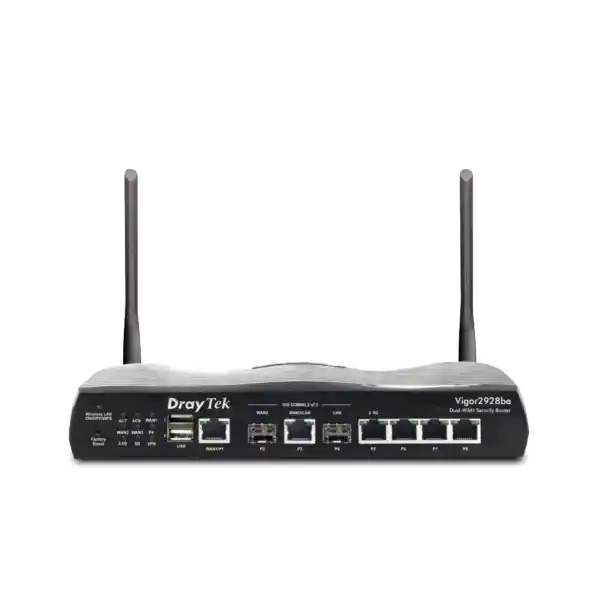
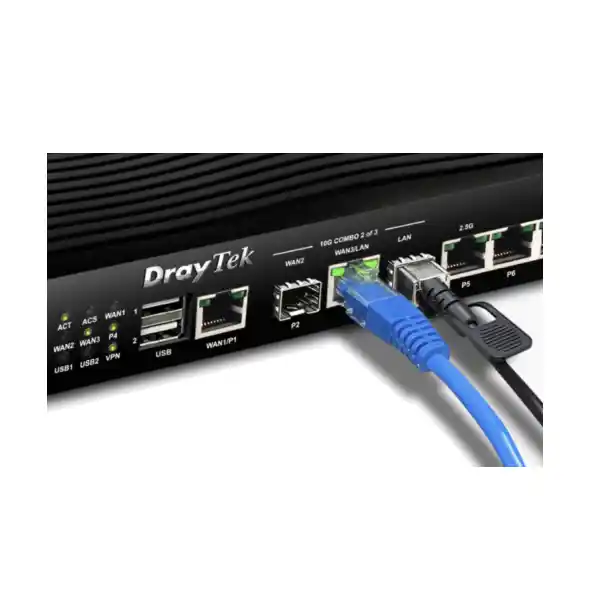
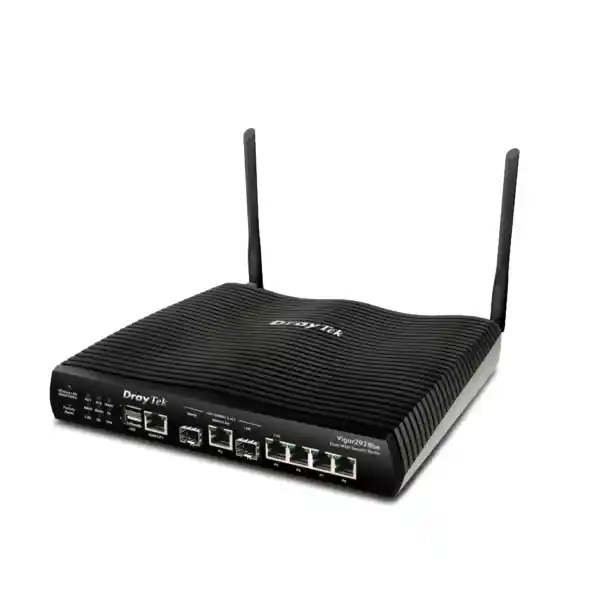
The Vigor2928be is the wireless member of DrayTek’s Vigor2928 series. It is a multi-WAN VPN security router built around a 10G-capable edge architecture and an integrated dual-band Wi-Fi 7 radio system. The published interface map includes one fixed 1GbE RJ-45 WAN, one 10G SFP+ interface assigned as a fixed WAN, one 10GbE RJ-45 interface that can be switched between WAN and LAN roles, one fixed 10G SFP+ LAN interface, one 2.5GbE RJ-45 interface that can be switched between LAN and WAN, three fixed Gigabit LAN ports and two USB 2.0 ports. DrayTek notes an important port-activation constraint: only two of the three high-speed interfaces identified in its port note can operate simultaneously, and the specified SFP+ WAN and 10GbE RJ-45 interface cannot both act as WAN at the same time. That detail must be considered before promising a specific dual-10G topology.
The router is rated by DrayTek for up to 9.3 Gbps NAT throughput under its test conditions, supports a stated 100,000 NAT sessions and is recommended by the manufacturer for networks of roughly 50 hosts. It supports up to 50 VPN tunnels. DrayTek’s top-level product overview publishes IPsec throughput up to 580 Mbps, while the detailed specifications list 540 Mbps for single-direction AES-256 IPsec and 85 Mbps for single-direction WireGuard. Because these figures are not identical, a responsible UAE deployment should use the lower detailed figure as a conservative planning reference until the exact firmware, tunnel type, packet profile and enabled inspection features have been validated in the intended configuration.
The Vigor2928be is therefore best understood as a flexible business gateway with high-speed physical interfaces and broad routing functionality, rather than as a device where every traffic path will necessarily operate at 10 Gbps. Ethernet forwarding, encrypted VPN, content inspection, wireless access and application-aware policies stress different subsystems. Good network design separates interface capacity from application throughput and sizes the router according to the workloads that matter most.
Key specifications for UAE buyers and network architects
WAN and uplinks
1GbE fixed WAN, 10G SFP+ fixed WAN, 10GbE RJ-45 switchable WAN/LAN and 2.5GbE RJ-45 switchable LAN/WAN, subject to DrayTek’s simultaneous-port limitations.
LAN connectivity
Three fixed Gigabit RJ-45 LAN ports plus high-speed 10G SFP+ and switchable multi-gigabit interfaces for connection to core switches, servers, uplink trunks or high-throughput endpoints.
Wireless
Dual-band 802.11be Wi-Fi 7 with 4×4 MU-MIMO on 2.4 GHz and 5 GHz, OFDMA, Airtime Fairness, Band Steering, WMM, WPA3 support and mesh-root capability.
Routing performance
Published maximum NAT figure of 9.3 Gbps and 100k session headline, with real throughput dependent on traffic direction, policy services, packet size, firmware and feature mix.
VPN
Up to 50 tunnels with IPsec, IKEv1/IKEv2, IKEv2-EAP, IPsec-XAuth, OpenVPN and WireGuard support, plus local, RADIUS, TACACS+ and TOTP authentication options.
Segmentation and management
Eight LAN subnets, eight 802.1Q VLANs, policy routing, inter-VLAN routing, BGP, OSPFv2/v3, local RADIUS, SNMP, syslog, VigorACS and virtual AP/switch controllers.
10G architecture: where the Vigor2928be fits in a modern branch
The strongest reason to consider the Vigor2928be is not simply that a 10G logo appears in the specification. It is that the router can bridge a practical transition between legacy Gigabit access networks and a new generation of multi-gigabit ISP services, Wi-Fi access, NAS storage and core switching. Many UAE offices now contain a mixture of 1GbE endpoints, 2.5GbE wireless access points, high-speed workstations and fiber handoffs from service providers. Replacing every component at once is rarely economical. A gateway with 1G, 2.5G, 10G copper and 10G optical options gives the designer more freedom to phase upgrades while preserving a consistent policy boundary.
The 10G SFP+ capability is particularly useful where the ISP presents service through an optical handoff or where the router must uplink to a fiber aggregation switch. SFP+ also allows physical separation over longer distances than standard copper Ethernet when correct optical modules and fiber types are used. The 10GbE RJ-45 interface, by contrast, can be useful for short copper runs to a compatible core switch or server. The switchable 2.5GbE port creates another useful option for connecting a multi-gigabit access switch or accepting a secondary Ethernet WAN without consuming the highest-speed interface.
Interface planning should start with a port-role matrix. Document the primary WAN medium, secondary WAN medium, desired LAN uplink, whether 10G fiber is required on the LAN side, whether a 10G copper device must attach directly, and which ports DrayTek permits to operate concurrently. Do this before ordering optics and before committing to a topology. A common mistake is to read the individual port list as if every listed high-speed port were simultaneously independent. The manufacturer’s note means topology validation matters.
For environments that need integration assistance, FourTeck’s UAE IT services team can be used as a reference point for broader LAN, VLAN, switching and rollout requirements around the edge router rather than treating the router as an isolated purchase.
WAN resilience, load balancing and failover design
Multi-WAN is valuable only when the policy design matches business priorities. The Vigor2928be supports failover and load-balancing capabilities intended to distribute or redirect traffic across available uplinks. In a typical UAE branch, the primary circuit may be a high-speed fiber service and the backup path may be a secondary Ethernet service, a separate provider circuit or a USB-attached cellular connection. The objective should be defined in operational terms: keep voice and cloud applications alive when the primary line fails, spread non-critical sessions across links, reserve one ISP for specific destinations, or route business-critical VPN traffic through the most stable path.
Load balancing does not mean that a single ordinary TCP session automatically becomes the sum of two ISP speeds. Most multi-WAN routing distributes different sessions according to policy and load-balancing logic. A speed test, one file transfer or one VPN flow may remain constrained to the capacity of its selected path. This distinction is important when users expect two 1 Gbps circuits to create one 2 Gbps application stream. The advantage is aggregate utilization and resilience across many sessions, not magical bonding unless a separate bonding technology exists end to end.
Failover design should consider health-detection targets, retry intervals, DNS behavior, session persistence and the public-IP change seen by remote services. Stateful applications can disconnect when traffic moves from one ISP to another because the external source address changes. Site-to-site VPNs may need alternate peer definitions or dynamic DNS. Hosted services may require policy NAT on both paths. VoIP providers may restrict source addresses. Cloud security platforms may use allowlists. These dependencies should be captured before deployment.
The Vigor2928be also supports Dynamic DNS and DrayDDNS, which can help provide hostname-based reachability when an ISP uses changing public addresses. Where fixed public IPs are available, they remain preferable for many business VPN and inbound-service use cases because they reduce dependency on DNS propagation and make external policy documentation clearer.
Wi-Fi 7 on the Vigor2928be: practical meaning for business sites
The “be” designation identifies the wireless model, and DrayTek lists 802.11be 4×4 MU-MIMO operation on both 2.4 GHz and 5 GHz. Published maximum link rates are 1,376 Mbps on 2.4 GHz and 5,764 Mbps on 5 GHz. These are radio link rates rather than guaranteed application throughput. Actual user throughput depends on channel conditions, channel width, client capability, distance, interference, protocol overhead, retransmissions, encryption, neighboring networks and the wired path behind the access point. In dense office environments, consistent latency and airtime efficiency can matter more than a peak single-client number.
DrayTek highlights Wi-Fi 7 features including enhanced OFDMA and Multi-Link Operation. The specification also lists Airtime Fairness, Band Steering and WMM. These mechanisms help the wireless system allocate airtime more efficiently and steer compatible clients toward the better-performing band or traffic class. The platform supports modern wireless security modes including WPA3, WPA3/WPA2 transition operation, WPA2 and OWE. The right security selection depends on the client estate. WPA3 is desirable for capable managed devices, while mixed environments may require transition modes during migration.
The router should not automatically be assumed to replace a purpose-built multi-AP wireless design. Integrated Wi-Fi is convenient for a smaller office or a communications room located near users, but physical placement still determines coverage. If the router must live in a metal rack, electrical room or server closet, the built-in radio may not be positioned where users need it. In larger floors, dedicated ceiling access points with wired backhaul can provide better cell geometry, capacity and roaming behavior.
DrayTek lists the Vigor2928be as capable of acting as a mesh root and as a virtual AP controller for up to 20 APs, with mesh management for up to seven APs. That makes the gateway useful as a control point in a wider DrayTek wireless design. The same architecture can keep the routing and security policy at the edge while distributed APs handle the radio coverage where people actually work.
A proper wireless quote should therefore include floor area, wall materials, expected concurrent clients, voice-over-Wi-Fi requirements, application mix, client radio capabilities and whether 2.4 GHz must be retained for IoT or legacy devices. Coverage drawings and survey data are more reliable than choosing access-point quantities from square-meter figures alone.
VPN architecture for branches, remote users and service access
The Vigor2928be supports site-to-site and teleworker VPN scenarios with IPsec, IKEv1/IKEv2, IKEv2-EAP, IPsec-XAuth, OpenVPN and WireGuard listed in the manufacturer specifications. The maximum tunnel count is 50. Authentication options include local accounts as well as RADIUS, TACACS+ and TOTP, while IKE authentication can use pre-shared keys or X.509 certificates. These options are useful because different organizations have different identity and interoperability requirements. A new greenfield site can standardize on modern tunnel profiles, while an established customer may need compatibility with an existing head-office firewall or legacy branch equipment.
Throughput requires careful interpretation. DrayTek’s overview states IPsec throughput up to 580 Mbps, while its detailed table lists 540 Mbps for AES-256 single-direction IPsec and 85 Mbps for single-direction WireGuard. Those figures are much lower than the 9.3 Gbps headline NAT figure, which is normal: cryptographic processing and tunnel overhead are different workloads from plain routed NAT traffic. If a customer needs to replicate terabytes of data between sites or continuously push multi-gigabit encrypted traffic, a platform selected mainly for 10G interface density may not be the correct VPN concentrator. If the requirement is branch ERP traffic, cloud access, remote administration, file services and normal office workloads across tens or hundreds of megabits, the Vigor2928be can be a much more natural fit.
Site-to-site design should document interesting traffic, local and remote subnets, NAT exemptions, tunnel selectors, routing precedence, failover behavior and overlapping address spaces. The Vigor platform supports translated local networks for site-to-site VPN, which can help when two acquired branches use the same RFC1918 subnet and immediate renumbering is impractical. That technique solves a specific connectivity problem but increases troubleshooting complexity, so renumbering remains the cleaner long-term design when feasible.
For remote users, identity is as important as encryption. TOTP-based authentication can add a second factor to supported account workflows. Administrators should also restrict management exposure, use role-based privileges and avoid publishing unnecessary services directly to the internet. The router includes VPN status and backup/restore functions that help operations teams maintain repeatable configurations.
When comparing edge-security and VPN platforms for Dubai deployments, the broader Firewall Dubai portfolio can help buyers evaluate whether the Vigor2928be’s routing-led feature set is appropriate or whether a deeper UTM/NGFW inspection platform is required.
Firewalling, VigorShield and identity-aware control
The Vigor2928be includes a stateful firewall feature set with filtering, port knocking, MAC filtering, IPv6 address security and defenses listed for ARP spoofing and IP spoofing. DrayTek also integrates its VigorShield framework, including URL/IP reputation and threat-protection services. Reputation services are useful at the edge because they add context beyond a static rule that merely permits or denies an address or port. When threat intelligence identifies known malicious destinations or suspicious sources, the gateway can apply policy based on that changing reputation data.
No reputation feed should be treated as a substitute for endpoint security, patching, secure DNS, identity controls and backup. Edge security is most effective when used as one layer in a defense-in-depth architecture. A business laptop can be compromised through phishing without an inbound firewall exploit; a cloud account can be stolen even if the local router is perfectly patched; an internal device can move laterally if every VLAN is allowed to communicate freely. The Vigor2928be’s VLANs, policies and user/group capabilities should be used to reduce those trust relationships rather than leaving the LAN flat.
The identity and access management functions listed by DrayTek include users and groups, access policies, group policies, conditional access policy, resources and account status. These features can help administrators tie network access decisions to users rather than relying only on source IP addresses. In a branch environment, that can simplify policies for contractors, employees, administrators and guest users. Network identity should still be integrated with an organization’s broader account lifecycle so that terminated or changed accounts are removed consistently.
Port knocking is another useful mechanism when used correctly. It can keep selected services from appearing openly available until a predefined sequence or condition is met, reducing exposure to routine scanning. It is an exposure-reduction control, not a replacement for strong authentication or patched services. Public management should still be minimized. Administrative access should preferably come from trusted networks or VPN, with logging and alerting enabled.
For procurement, confirm whether any cloud-delivered security feature, reputation database or advanced service requires a subscription in the target region and firmware release. Feature availability and licensing can change over a product’s lifecycle, so the commercial quote should state what is included at purchase, what is renewable and what remains available without renewal.
VLAN segmentation and eight-subnet design
DrayTek specifies eight LAN subnets and up to eight 802.1Q VLANs for the Vigor2928be. That scale is well suited to a small or mid-sized branch where the network needs meaningful segmentation without the complexity of a large campus architecture. A typical design might separate corporate users, IP phones, guest Wi-Fi, CCTV, building-management devices, servers, network-management interfaces and a restricted IoT segment. The exact labels matter less than the trust boundaries: devices with different security profiles or business purposes should not automatically share unrestricted layer-3 access.
802.1Q tagging lets the router carry multiple logical networks over a shared physical trunk to a managed switch. Access ports on the switch then place endpoints into the correct VLAN. This design avoids dedicating one physical router port to every subnet and supports expansion through downstream switches. The trunk’s bandwidth must still be sized correctly. If several high-throughput VLANs share a 1GbE trunk, their aggregate traffic can congest even though the router has 10G interfaces elsewhere. In a multi-gigabit environment, a 10G or suitable 2.5G uplink to the core switch may be preferable.
The router supports inter-VLAN routing, which is convenient but should be paired with explicit firewall policy. Segmentation is not achieved merely by assigning different VLAN IDs. If policy permits unrestricted communication among them, the security boundary disappears at layer 3. Define permitted flows such as users to print services, phones to call-control systems, CCTV cameras to recording servers and management stations to network devices. Deny unnecessary lateral communication by default where operationally practical.
The DHCP feature set includes multiple IP subnets, custom DHCP options and IP-to-MAC binding. Custom options can help with IP telephony, provisioning and specialized devices. Bindings can provide stable addressing for known endpoints, though they should not be confused with strong device authentication. For stronger network admission requirements, DrayTek lists wired 802.1X support and a local RADIUS server, enabling more structured access control when supported switches and endpoints are available.
A clean deployment document should include a VLAN table listing ID, subnet, gateway, DHCP scope, DNS servers, tagging rules, allowed inter-VLAN services and security owner. This turns the router configuration into an auditable network design instead of a collection of ad-hoc rules.
Advanced routing: static routes, policy routing, BGP and OSPF
The Vigor2928be goes beyond basic default-route internet access. The manufacturer lists IPv4 and IPv6 static routing, policy routes, inter-VLAN routing, RIP v1/v2, BGP and OSPFv2/v3. This opens design options for organizations with multiple routers, private WAN links, redundant paths or controlled route exchange. Not every branch needs dynamic routing, but having it available can simplify integration when the router participates in a broader enterprise network.
Static routes are appropriate where topology is simple and stable. They are predictable and easy to audit, but they do not adapt automatically when a next hop becomes unavailable unless paired with tracking or alternate logic. Policy-based routing adds another dimension by selecting paths according to protocol, source or destination address and port criteria. This can send voice traffic over a low-latency ISP, direct backups over a secondary circuit, keep a business application on a provider with a required public IP, or prevent guest traffic from consuming the premium WAN path.
OSPF can be useful where internal networks contain multiple layer-3 devices and routes change over time. Instead of maintaining static routes on every router, OSPF exchanges reachability information and recalculates paths according to topology and cost. BGP is more commonly associated with service-provider and larger enterprise networks, but branch use cases exist when a customer receives routes from an upstream network, connects to complex private WAN services or needs controlled route advertisement. BGP should not be enabled casually: route filters, prefix limits, neighbor authentication where applicable and change control are essential.
Routing features also interact with VPN and multi-WAN policy. A route learned dynamically may not be the route intended for a specific encrypted tunnel. A policy route can override the normal routing table. NAT may change source addresses before a packet reaches a policy decision. The implementation sequence should be documented and tested with traceroutes, route-table inspection and packet capture rather than inferred from topology diagrams alone.
For organizations with more complex topology, the Vigor2928be can operate as the branch edge while a dedicated layer-3 core handles campus routing. In a smaller office, the Vigor itself may perform inter-VLAN routing and internet edge functions. The choice depends on traffic volume, fault domains, administrative model and how much east-west traffic should traverse the firewall.
QoS, traffic shaping and application performance
Raw bandwidth does not guarantee application quality. A 1 Gbps or faster WAN can still deliver poor voice and video performance if large uploads fill queues and create latency. The Vigor2928be includes traffic-shaping policies, IP-based bandwidth limits, IP-based session limits, QoS by IP address, port and application, application-aware QoS, default policies and VoIP prioritization. These controls allow administrators to manage contention rather than relying only on additional bandwidth.
QoS is most effective when configured around the actual bottleneck. If the ISP uplink is 500 Mbps, shaping slightly below the true available rate can keep queues under the router’s control rather than allowing uncontrolled buffering in the provider network. If the bottleneck is a 100 Mbps remote VPN tunnel, prioritization must consider the encrypted path. If congestion occurs on a wireless channel, WAN QoS cannot create airtime that does not exist. End-to-end performance analysis should identify where packets are delayed.
Application prioritization is useful for real-time traffic such as SIP and conferencing, but every priority rule has a cost: giving one class preference means another class waits during congestion. Avoid classifying broad traffic sets as high priority. Reserve priority for workloads that are latency-sensitive and modest in bandwidth. Backups, software distribution and cloud synchronization usually tolerate delay better than voice, interactive remote desktops and transaction systems.
Session limits can help control devices or applications that create excessive numbers of simultaneous connections. This is particularly useful on guest networks and in environments where peer-to-peer or poorly behaved applications can consume connection-table resources. Bandwidth limits can prevent one user from monopolizing the WAN without blocking access entirely. Together, these controls can produce a more predictable experience than simple first-come, first-served forwarding.
Before deploying QoS, capture a baseline: WAN utilization by direction, latency under load, packet loss, top applications and business-critical flows. After policy activation, repeat the same tests. A configuration that appears sophisticated in the interface is not useful unless it measurably improves the service the business cares about.
Centralized management with VigorACS and virtual controllers
Operational efficiency becomes more important as the number of sites grows. DrayTek lists VigorACS management support from the V5.4.0 firmware line for the Vigor2928be, as well as a virtual AP controller for up to 20 access points and switch management for up to 10 devices. These capabilities allow the branch router to become part of a managed ecosystem rather than a standalone appliance that must be configured individually at each location.
Central management is valuable for standardization. A multi-site organization can define naming conventions, firmware policies, configuration templates, monitoring thresholds and backup routines. It also reduces the risk that one branch quietly diverges from the approved design because a local change was never documented. Remote diagnostics, logs and configuration status become especially valuable in the UAE when sites are distributed across different emirates or when a service provider supports customers with limited on-site IT staff.
The router exposes standard operational interfaces including SNMP v1, v2c and v3 plus syslog. SNMPv3 should generally be preferred where monitoring infrastructure supports it because it offers stronger security than earlier community-string methods. Syslog should be sent to a central server with adequate retention so that events remain available after a router reboot or device replacement. The logs should be time-synchronized using reliable NTP sources; without accurate time, correlating router events with endpoint or server logs becomes much harder.
Configuration backup is another essential operational control. The Vigor2928be supports configuration backup and restore. Backups should be taken before material changes and retained in a protected repository. A backup is only useful if administrators know which firmware it was created under, whether credentials are included or protected, and how to recover the unit after failure. Change records should describe why a modification was made, not merely what was changed.
For managed deployments, FourTeck can help connect router provisioning to the customer’s broader support model. The FourTeck UAE site provides the regional point of reference for wider network, infrastructure and integration requirements.
Hotspot, guest access and branch customer Wi-Fi
The Vigor2928be includes hotspot web-portal functionality with four profiles listed in the specification. Supported authentication approaches include click-through access, social login, SMS PIN, RADIUS and an external portal server. This is useful for retail, clinics, training centers, serviced offices, hospitality-adjacent businesses and customer-facing branches where guest users require internet access but should remain separate from corporate systems.
Guest networking should begin with isolation. Place guests in a dedicated VLAN and subnet, apply firewall rules that prevent access to private internal networks, use a DNS policy appropriate to the organization and limit bandwidth so a few devices cannot impair business applications. If guests need access to local resources such as casting devices or printers, permit only the minimum required destinations and protocols rather than opening the entire corporate LAN.
A captive portal adds an onboarding layer but should not be confused with encryption. Wireless encryption and portal authentication solve different problems. A public SSID can use OWE for encrypted open access where client support permits, while authenticated corporate SSIDs can use WPA3 or suitable enterprise authentication. The portal can present terms, branding or access steps, but sensitive application traffic should still rely on modern end-to-end TLS.
SMS PIN or social login may involve external providers and data-processing considerations. UAE organizations should document what personal data is collected, why it is collected, who receives it, how long it is retained and what local policy or legal requirements apply. The router feature enables the workflow; governance still belongs to the organization.
For high-density guest sites, integrated router Wi-Fi may not provide sufficient capacity or coverage by itself. Use the Vigor2928be as the policy and gateway platform, then deploy managed access points according to an RF design. This separates the guest-access control plane from the physical radio-placement problem and makes expansion easier.
Physical specifications, environment and installation planning
DrayTek lists the Vigor2928be at approximately 241 x 210 x 44 mm, with a 12 V DC, 2.8 A power input and maximum power consumption of 33.6 watts. The specified operating temperature range is 0°C to 45°C, storage range is -25°C to 70°C, and operating humidity is 10% to 90% non-condensing. These figures matter in UAE installations because communications rooms can become significantly hotter than office areas if air-conditioning fails or if network equipment is installed in confined cabinets.
Do not treat the 45°C upper operating figure as a target condition. Electronic reliability is generally improved by stable, moderate temperatures and clean airflow. Avoid placing the router directly above high-heat equipment, against blocked vents or inside a sealed wall cabinet exposed to solar heat. Where the router supports business-critical connectivity, put its power adapter on a correctly sized UPS and ensure the upstream ONT, media converter, access switch and any modem needed for failover are also protected. Backing up only the router does not preserve connectivity if the optical termination loses power.
Cable management is especially important around 10G interfaces. Copper 10G links are more sensitive to cable category, run length and termination quality than ordinary office Gigabit connections. Fiber links require the correct SFP+ optics, connector type, wavelength and fiber grade. DAC cables can be efficient for short in-rack links where supported. Procurement should match the transceiver and cable specification to both ends of the link rather than ordering a generic “10G SFP” module.
The two external Wi-Fi antennas should be installed firmly and oriented according to the deployment environment, but the router’s location still dominates RF results. Metal racks, walls, low-e glass, elevator cores and dense partitions can attenuate signals. If the ideal routing location is poor for Wi-Fi, use dedicated access points rather than compromising the edge topology merely to move the router closer to users.
Label every WAN and LAN cable, record ISP circuit IDs, photograph the final port layout and retain a port-role document. These small steps dramatically reduce recovery time when another engineer attends the site months later.
Sizing the Vigor2928be correctly: NAT, VPN, sessions and users
Router sizing should never use a single number. The Vigor2928be’s published 9.3 Gbps NAT figure indicates strong plain-routing capability, but the same device has materially lower published encrypted VPN throughput. The manufacturer also publishes a 100,000-session headline and recommends the platform for around 50 hosts. These metrics describe different resource dimensions. A 20-user design studio moving large files may stress throughput while creating a modest session count. A 50-user office using many SaaS applications can create large numbers of short-lived sessions without saturating a 1 Gbps link. A surveillance network may generate steady bandwidth but few destinations. A branch performing heavy encrypted replication may be constrained by VPN processing before NAT capacity matters.
Start with WAN speed by direction. Record committed and burst rates for each ISP. Then estimate concurrent users and devices—not only employees, but phones, printers, cameras, IoT, guest clients and servers. Identify peak application behavior. Cloud backup, Microsoft 365 synchronization, large CAD files, video conferencing and off-site replication can create very different traffic patterns. Determine whether security inspection and reputation filtering will be enabled and whether the service subscription is part of the quote.
For VPN, calculate the sustained encrypted throughput required during peak periods. If a remote site has a 1 Gbps internet circuit but the business only needs 100 Mbps of ERP and file traffic through the tunnel, interface speed is not the sizing constraint. If nightly backups must move hundreds of gigabytes within a narrow window, calculate the actual transfer time at the conservative VPN rate and include protocol overhead. Do not size from circuit speed alone.
For wireless, count active clients per radio area and consider traffic concurrency. Link rates are not additive application guarantees. A 5.764 Gbps PHY headline does not mean every wireless user receives multi-gigabit application throughput at once. Airtime is shared, channel conditions vary and the wired uplink or WAN may be slower. In high-density areas, multiple lower-power AP cells often outperform one high-power radio.
Finally, leave headroom. A router that meets today’s average utilization at 90% capacity is poorly sized for growth, failover or unexpected load. Good design preserves capacity for traffic peaks, security features, firmware changes and the temporary condition where one WAN carries traffic normally spread across two.
Recommended deployment topologies
Topology A: multi-gigabit office edge
Use the ISP handoff on the most appropriate WAN interface, connect a 10G-capable managed switch to the LAN-side SFP+ or compatible multi-gigabit port, and trunk corporate, voice, guest and infrastructure VLANs to the router. Use dedicated APs where coverage requires them, while retaining integrated Wi-Fi for local coverage if the router placement is suitable.
This topology is ideal where the edge must support a faster-than-Gigabit core while most desktops remain on 1GbE access ports.
Topology B: resilient dual-provider branch
Terminate separate internet services on compatible WAN ports, create health checks, define preferred routes for business applications and specify failover behavior for VPN. Where public IP-dependent services exist, configure secondary reachability explicitly instead of assuming sessions will survive an address change.
This design prioritizes continuity and aggregate bandwidth across many user sessions.
Topology C: VPN-connected branch
Build site-to-site IPsec toward headquarters, route business subnets through the tunnel and send guest internet directly through local breakout. Apply QoS to interactive applications and monitor tunnel status. Use certificates or strong key management appropriate to the organization’s security standard.
This topology fits distributed businesses that need secure access to central services without backhauling every internet flow.
Topology D: integrated small-office wireless
Use the Vigor2928be as router and primary Wi-Fi platform in a compact office where its physical location provides good RF coverage. Separate staff and guest SSIDs into VLANs, apply WPA3 where client support allows, restrict guest lateral access and reserve bandwidth for business applications.
This reduces equipment count while retaining enterprise-style routing and policy controls.
UAE ISP handoff and procurement considerations
A correct router quote in the UAE requires more than model selection. Confirm how the service provider presents the circuit: copper Ethernet, optical handoff, provider-managed ONT, tagged VLAN, static IP block, PPPoE credentials or DHCP. Ask whether the provider requires a specific VLAN ID or CPE registration. If an SFP+ handoff is offered, verify whether the ISP supports customer-provided optics and whether the router can terminate the service directly. Some provider designs require the carrier’s own termination device even when the downstream handoff is Ethernet.
Public addressing should also be documented. A dynamic public address is adequate for many outbound-only branches and can work with DDNS for selected remote-access scenarios. A static address is preferable when inbound VPN peers, allowlists, hosted services or third-party security systems depend on stable addressing. If the provider uses carrier-grade NAT, inbound reachability may not be possible without a different service option.
For dual-WAN resilience, use genuinely independent failure domains where the business case justifies it. Two circuits from the same carrier entering through the same building path can fail together. A secondary service from another provider or a cellular backup may reduce correlated risk. Power remains a shared dependency, so UPS planning must include the provider equipment and any intermediate switches.
Procurement should identify the exact regional power adapter, warranty route, included antennas and accessories, required SFP+ modules, patch leads and mounting needs. The Vigor2928be package includes the router, antennas, an Ethernet cable, power adapter and quick-start documentation according to the manufacturer, but actual distributor bundle contents should be confirmed on the commercial quote.
FourTeck’s regional network portfolio can be reviewed through FourTeck Global for organizations coordinating UAE branches with sites in other countries. The local bill of materials should still be prepared for the exact ISP and site conditions in the Emirates.
Security hardening checklist for production deployment
A new router should not move from carton to production with only an ISP address and Wi-Fi password. Begin by updating to the approved firmware release after reviewing release notes and ensuring that the file is intended for the exact hardware model. Change administrative credentials, create named administrator accounts where operational policy requires accountability, restrict management to trusted subnets and disable management protocols that are not needed. HTTPS and SSH should be favored over clear-text services where supported and operationally practical.
Apply role-based privileges so routine operators do not automatically receive full administrative rights. Configure brute-force protection and management access lists. Where remote administration is required, prefer VPN access to direct public exposure. If a service must be reachable from the internet, restrict source addresses whenever possible and monitor attempts. Port knocking can add stealth for supported services but should complement, not replace, authentication and patching.
Build segmentation before onboarding users. Create VLANs, inter-VLAN firewall rules and separate guest access. Disable broad any-to-any policies after initial testing. For internal infrastructure, allow management only from a controlled admin subnet. Cameras, IoT devices and printers usually require much less east-west access than ordinary user endpoints. Denying unnecessary lateral traffic limits the impact of a compromised device.
Enable centralized syslog, secure SNMP where used and alerting for relevant events. Back up the final configuration and store it away from the router. Record the firmware version, ISP details, public addresses, VLAN table, VPN peers and recovery procedure. Test the backup WAN by creating a controlled outage rather than waiting for the first real failure. Test VPN failover separately because an internet failover can succeed while a tunnel does not automatically re-establish.
For Wi-Fi, choose WPA3 where the client estate allows it, use strong credentials or centralized authentication, and separate guest access. Disable legacy modes that are not required by business devices. Review WPS policy according to the organization’s security standard. If WPS is retained for operational reasons, limit who can physically access the router and document the process.
Finally, set a maintenance schedule. Firmware reviews, account audits, rule cleanup, log checks and failover tests are operational tasks, not one-time installation steps. Security posture degrades when configuration is never revisited.
Migration from an older Gigabit router
Replacing an existing edge router is often more complex than installing a new one because the old device contains years of implicit business logic. Before migration, export and review the existing configuration. Inventory WAN addressing, PPPoE credentials, VLANs, DHCP reservations, DNS settings, port forwards, one-to-one NAT rules, VPN peers, static routes, policy routes, QoS settings, management ACLs, remote logging, DDNS and any unusual application-layer gateway requirements.
Do not blindly reproduce every legacy rule. Migration is an opportunity to remove unused port forwards, retired VPNs and obsolete subnets. For each rule, identify the business owner and destination system. If no one can explain why an inbound service exists, investigate before carrying it to the new router. Old firewall rules often survive long after the applications they once supported have disappeared.
Create a cutover plan with a rollback point. Preconfigure the Vigor2928be offline where possible, including VLANs and core policy. Schedule a maintenance window appropriate to the business. Record the old router’s physical connections before unplugging anything. If the ISP service locks to a previous device MAC address or requires a CPE reboot, include that step. Validate internet access, DNS, public IP, inbound services, VPN, voice, key SaaS platforms and guest Wi-Fi in a defined test sequence.
When moving to multi-gigabit service, test the entire path. A 10G router connected to a 1G core switch remains a 1G path for users behind that switch. A 2.5G AP on a 1G switch port is likewise constrained. Cabling may also limit negotiated speed. Confirm interface counters and negotiated link rates on both ends rather than relying on cable labels.
After cutover, retain the old router for a controlled rollback period if policy allows, but remove sensitive credentials before disposal or redeployment. Update network diagrams and monitoring systems immediately so the documentation reflects the live environment.
How the Vigor2928be differs from a full next-generation firewall
The Vigor2928be includes meaningful firewall, reputation, threat-protection, segmentation, identity and VPN functions, but buyers should distinguish a sophisticated business router from platforms engineered primarily as high-throughput next-generation firewalls. If an organization requires deep SSL inspection at multi-gigabit rates, extensive application-control databases, advanced sandboxing, enterprise endpoint integration, large-scale SD-WAN analytics or regulated security reporting, the correct comparison may involve dedicated NGFW appliances rather than only routers.
Conversely, many branches do not need the cost or operational burden of a heavyweight security stack. They need resilient internet, VLANs, secure VPN, practical content controls, QoS, Wi-Fi integration and centralized management. In that context, the Vigor2928be can provide an effective balance. The crucial step is to define requirements before choosing product categories. “Firewall” can mean basic stateful policy to one customer and a full security-services platform to another.
Create a requirements matrix covering WAN speed, inspected throughput, encrypted throughput, threat-prevention functions, identity source, remote-access method, number of sites, logging retention, compliance needs and management model. Then evaluate whether the Vigor2928be meets each requirement with headroom. Do not score products only by the number of features printed on a datasheet; assess whether the required features can run together at the traffic level the business expects.
A branch with 50 users, two ISPs, moderate VPN traffic and separate guest/voice VLANs may value the Vigor’s integrated routing features and 10G-ready interfaces. A data center edge handling several gigabits of inspected encrypted traffic may require a different class of appliance. Both are valid designs when matched to the workload.
FourTeck can evaluate adjacent firewall and routing options through its UAE security practice rather than forcing every requirement into one model. This is particularly important when customers are standardizing across branches with different traffic profiles.
Performance interpretation and test methodology
DrayTek explicitly notes that published throughput figures are maximum values obtained in internal testing under optimal conditions, with hardware acceleration enabled where available, and that real performance varies according to network conditions and active applications. That caveat should be taken seriously. Router benchmarks are useful for comparing architectural capability, but they are not service-level guarantees for a live branch.
Packet size affects routing throughput because many networking tasks operate per packet. A stream of large packets can achieve a higher bits-per-second rate at the same packets-per-second load than an application generating many small packets. Bidirectional traffic can also stress a device differently from a one-way test. Security inspection, logging, QoS classification, VPN encryption and wireless forwarding add processing steps. Therefore, a test result obtained with plain NAT should not be reused as a prediction for AES-256 VPN or threat-protected traffic.
For acceptance testing, define the scenario. If the contract is for a 2 Gbps internet service, test wired WAN-to-LAN throughput with a suitable multi-gigabit client and server path. If the requirement is a 300 Mbps site-to-site VPN, test the tunnel using the intended encryption and representative traffic. If voice quality is the priority, test latency, jitter and packet loss while the WAN is loaded. If Wi-Fi performance is important, test several client types in the actual office, not one laptop beside the router.
Use interface counters to check errors, drops and negotiation speed. Measure CPU and session utilization where the management interface exposes it. Compare tests with optional services enabled and disabled to understand their impact. Keep results with date, firmware version and configuration summary so later changes can be compared fairly.
This disciplined approach protects both customer and integrator. It replaces vague expectations such as “10G router means 10G everywhere” with measurable acceptance criteria tied to real business traffic.
Operational monitoring and troubleshooting strategy
A well-deployed Vigor2928be should be observable. At minimum, monitor WAN link state, negotiated speed, public addressing, latency to reliable targets, packet loss, interface utilization, VPN status, system events and configuration changes. SNMP can feed network-monitoring platforms, while syslog can centralize event records. Alerts should be tuned so that administrators receive actionable signals rather than a continuous stream of low-value notifications.
When a user reports that “the internet is slow,” troubleshoot by layer. Confirm whether the problem affects one device, one VLAN, one SSID or the entire site. Check local link speed and wireless signal. Test the gateway latency. Compare primary and backup WAN performance. Inspect utilization and packet loss. If only a VPN application is affected, test the tunnel separately from ordinary internet traffic. If only one SaaS service is slow, compare DNS resolution and routing to other destinations.
The Vigor2928be provides operational tables for WAN, ARP, routes, DHCP, IPv6 neighbors, LLDP neighbors, DNS cache, SFP information, sessions and running services. These views help determine whether the gateway sees the same network state the engineer expects. SFP information is especially useful for fiber troubleshooting, though the exact detail available depends on module compatibility.
Packet capture can be invaluable when routing or firewall behavior is unclear. Capture on the relevant side of the policy boundary and look for whether packets arrive, whether addresses are translated, whether replies return and whether retransmissions occur. For VPN, verify both encrypted outer traffic and expected inner subnets. Avoid capturing unnecessary sensitive payloads and follow the organization’s privacy and security procedures.
Document recurring faults. A monitoring system that shows the same ISP dropping every afternoon is more useful than repeated router reboots. Good troubleshooting separates symptoms from causes and uses the gateway’s visibility to identify where the path actually fails.
Who should choose the DrayTek Vigor2928be?
The Vigor2928be is a strong candidate for an organization that needs more than a consumer or basic SMB router but does not necessarily require a large-enterprise security appliance. It is particularly relevant when the network is moving beyond 1 Gbps, needs flexible copper and fiber uplinks, uses multiple internet circuits, operates several VLANs, depends on branch VPN and values centralized management of DrayTek switches or access points.
Professional offices can use the router to isolate staff, guest and voice networks while maintaining VPN access to cloud or headquarters systems. Design and media firms can benefit from multi-gigabit LAN uplinks where local storage or large transfers demand more than Gigabit Ethernet. Retail branches can use guest portals and policy routing. Clinics can segment administrative, clinical, guest and device networks. Training centers can apply session and bandwidth limits to student traffic. Small multi-site enterprises can standardize a repeatable branch design and manage it through centralized tooling.
The model is less appropriate when requirements clearly exceed its intended scale. If hundreds of users must traverse the device, if encrypted traffic must sustain multiple gigabits, if the customer requires large numbers of VLANs, if full 10G threat inspection is mandatory or if the site needs carrier-grade routing scale, choose a different platform. Likewise, if a branch only has a modest 100 Mbps internet circuit, a handful of users and no high-speed LAN requirement, a smaller model may deliver better value.
The presence of Wi-Fi 7 should also be evaluated in context. It is useful for a compact branch and modern clients, but it should not drive selection if the router will be mounted in a location unsuitable for wireless coverage. In a larger office, the Vigor2928be may still be the right router even if dedicated ceiling APs provide all production Wi-Fi.
The best fit is therefore a network that can actually use the combination: multi-gigabit edge connectivity, flexible WAN roles, structured segmentation, manageable VPN demand and integrated operational controls.
Frequently asked technical questions
Does the Vigor2928be route at 10 Gbps?
It has 10G-capable interfaces and DrayTek publishes maximum NAT performance of 9.3 Gbps under test conditions. That does not mean every security, VPN or wireless workload reaches the same rate. Size against the feature path you intend to use.
How many VPN tunnels are supported?
DrayTek lists a maximum of 50 VPN tunnels. Protocol support includes IPsec, IKE variants, OpenVPN and WireGuard. Throughput depends on protocol, encryption and traffic conditions.
How many VLANs can be configured?
The published specification lists eight 802.1Q VLANs and eight LAN subnets. This is suitable for structured branch segmentation but should be checked against future growth requirements.
Is Wi-Fi 7 integrated?
Yes. The “be” model includes dual-band 802.11be wireless on 2.4 GHz and 5 GHz with 4×4 MU-MIMO, OFDMA and other business wireless features. Actual client performance varies by environment.
Can every high-speed port be active at once?
No. DrayTek publishes a simultaneous-use limitation for specified high-speed ports and notes that the SFP+ WAN and 10GbE RJ-45 port cannot both act as WAN simultaneously. Validate the desired port-role combination before ordering.
Can it manage DrayTek APs and switches?
Yes. The specification lists virtual AP control for up to 20 APs, mesh management for up to seven APs, and switch management for up to 10 devices, plus VigorACS support.
Decision recap: match the router to the workload, not the label
Choose the DrayTek Vigor2928be when the design needs a business routing platform that can connect to 10G and multi-gigabit infrastructure, maintain multiple WAN paths, segment up to eight VLANs, support dozens of VPN tunnels and provide integrated Wi-Fi 7 for suitable spaces. The platform is especially compelling for organizations already using DrayTek switching, access points or VigorACS because the router can participate in a more unified operational model.
Do not select it only because the site has a 10 Gbps interface somewhere. Confirm the real internet bandwidth, encrypted VPN requirement, number of users, number of VLANs, desired security services and physical topology. Remember the published difference between NAT capability and VPN capability. Account for the port-role limitation in the 10G design. Verify subscription requirements for cloud reputation or security features. Treat integrated Wi-Fi as an RF component that must be positioned correctly, not as an automatic replacement for a surveyed AP deployment.
For UAE deployments, also verify local ISP handoff, public addressing, transceivers, power protection, warranty route and the exact bill of materials. These details determine whether a technically capable router becomes a reliable production system.
Quotation input checklist for FourTeck UAE
To prepare an accurate Vigor2928be quotation and deployment scope, provide the following information. This avoids under-sizing, missing optics and incorrect WAN assumptions.
Consult FourTeck for Vigor2928be supply, sizing and deployment in the UAE
FourTeck can support the DrayTek Vigor2928be as part of a complete branch-network design covering ISP handoff, copper and fiber uplinks, VLAN architecture, Wi-Fi integration, VPN migration, failover policy, switch connectivity, logging and operational documentation. A properly scoped deployment should identify how the router will be used, which performance path is critical and which accessories or services are required from day one.
For buyers who need a broader infrastructure solution rather than a router-only purchase, FourTeck can align the edge gateway with switching, wireless, security and support services. This is valuable when migrating from a legacy Gigabit network to multi-gigabit access because the router is only one part of the end-to-end path.
Use this product page as the technical starting point, then provide the quotation inputs above so the proposed bill of materials reflects the actual UAE site. For regional product and service coordination, visit the FourTeck UAE website or the specialist IT Services UAE practice. Network-security options can also be reviewed through Firewall Dubai, while multi-country projects can reference FourTeck Global.

Reviews
There are no reviews yet.