
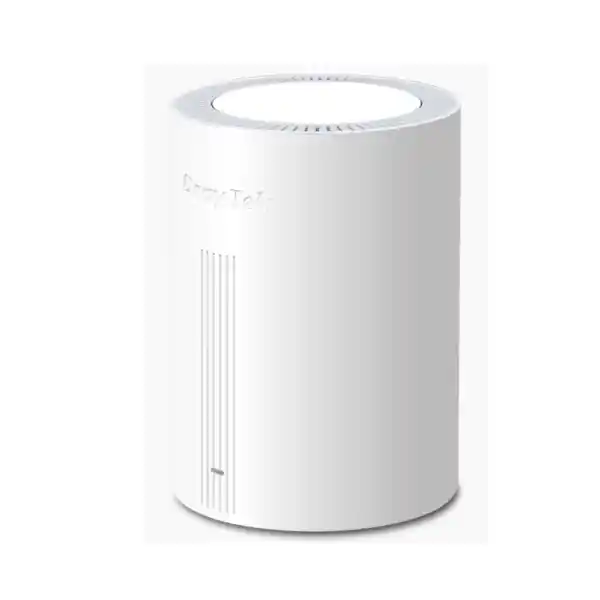
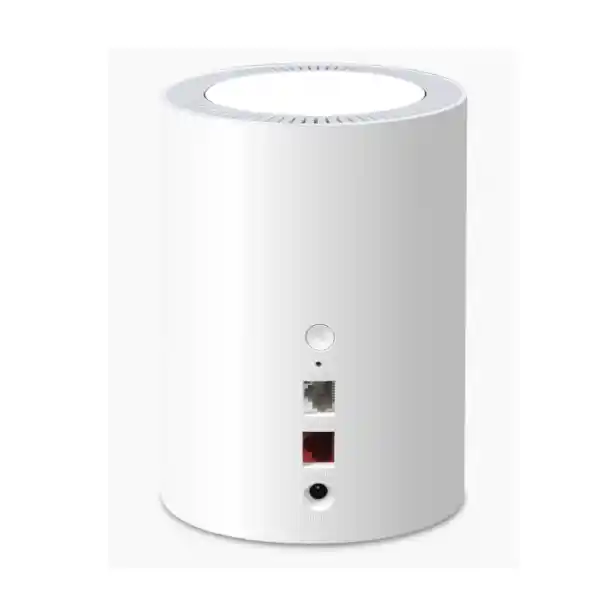
DrayTek VigorAP 805 UAE – AX3000 WiFi 6 Access Point with 2.5GbE
The DrayTek VigorAP 805 is a dual-band WiFi 6 access point built for organizations and advanced home networks that want faster client efficiency, practical roaming, VLAN-aware SSIDs, mesh expansion and multigigabit wired connectivity in a compact desktop design. For UAE deployments, it is a strong fit for offices, clinics, retail counters, villas, training rooms, managed apartments, hospitality spaces and branch locations where a visible tabletop access point is easier to deploy than a ceiling-mounted unit.
What the VigorAP 805 is designed to solve
The VigorAP 805 is best understood as a compact business-grade WiFi 6 access point rather than a simple consumer wireless extender. Its architecture combines concurrent 2.4 GHz and 5 GHz radios, WiFi 6 scheduling features, multiple SSIDs, VLAN tagging, client steering, roaming assistance, mesh capability and management tools. That combination matters in real networks because wireless quality is rarely determined by peak radio speed alone. A successful office or hospitality deployment must also control how clients share airtime, how traffic is segmented, how users move between access points, how administrators discover problems and how the wired uplink carries aggregate traffic back into the LAN.
In practical UAE installations, the VigorAP 805 can act as the main access point for a small branch or as one node in a wider DrayTek wireless environment. The cylinder desktop format works well on reception desks, shelves, counters, AV furniture, office credenzas or structured areas where a ceiling installation is inconvenient. That design choice can reduce installation complexity in rented premises, heritage interiors, temporary offices or locations where cabling above a false ceiling is not practical. It also makes placement changes easier during wireless tuning because the unit can be moved without disturbing ceiling tiles or mounting hardware.
The access point supports a 2.5GbE LAN interface in addition to a 1GbE interface. This is important when a WiFi 6 deployment serves several active devices simultaneously. A single client will not always saturate a multigigabit uplink, but a group of laptops, phones, tablets and collaboration devices can create aggregate traffic above the practical ceiling of a traditional 1GbE uplink. The 2.5GbE port gives the access layer more headroom when connected to a compatible multigigabit switch, router or local network segment.
WiFi 6 radio design and AX3000 performance
The VigorAP 805 is an AX3000-class access point. Its maximum advertised wireless link rates are 600 Mbps on 2.4 GHz and 2400 Mbps on 5 GHz. These numbers are PHY link rates rather than guaranteed application throughput. Actual user throughput depends on client capability, channel width, modulation, interference, distance, wall construction, airtime contention, retransmissions, protocol overhead, Ethernet backhaul, Internet speed and the performance of the destination service. This distinction is essential for enterprise design because the objective is not to chase a theoretical number; the objective is to create sufficient usable capacity, predictable latency and stable coverage for the intended user population.
WiFi 6 introduces mechanisms such as OFDMA and MU-MIMO that help an access point use radio airtime more efficiently when many compatible clients are active. OFDMA can divide a channel into smaller resource units so the radio can serve multiple devices more efficiently instead of treating every transmission as a large single-client event. MU-MIMO can also help the access point communicate with multiple supported clients in parallel under appropriate conditions. The performance benefit depends on client support and traffic patterns, but these technologies are valuable in modern offices where dozens of devices may generate short bursts of traffic at the same time.
The 2.4 GHz band remains useful for reach, compatibility and low-bandwidth devices. Smart sensors, printers, handheld terminals and older clients often use this band, and its propagation characteristics can help in spaces where 5 GHz coverage becomes weak. The 5 GHz band is normally the preferred choice for business laptops, phones, tablets and performance-sensitive applications because it offers more channel capacity and higher link rates. With band steering enabled, the VigorAP 805 can encourage compatible dual-band clients toward 5 GHz, helping preserve 2.4 GHz capacity for devices that actually need it.
Channel planning remains a critical design task. A faster access point placed on a congested channel can perform worse than a slower radio on a clean channel. In multi-AP environments, administrators should survey neighboring networks, use sensible non-overlapping channel plans, consider channel-width tradeoffs and avoid placing multiple nearby access points on identical high-power settings unless the design specifically requires it. The goal is to create smaller, controlled cells with enough overlap for roaming, not maximum transmitter power everywhere.
OFDMA for busy client populations
OFDMA is especially relevant when many clients exchange small packets rather than one client performing a single long transfer. Collaboration tools, cloud applications, messaging, browsing, background synchronization and mobile devices produce a mixture of short bursts and waiting periods. By using channel resources more granularly, WiFi 6 can reduce wasted airtime and improve responsiveness when compatible clients are present. The improvement is most visible when the RF environment is well designed and the wired network is not a bottleneck.
MU-MIMO and client concurrency
MU-MIMO contributes to efficiency by allowing supported devices to be served more intelligently than in purely sequential legacy operation. It should not be interpreted as multiplying throughput by the number of users, because performance still depends on spatial conditions, client capability, interference and traffic demand. In a correctly designed network, however, MU-MIMO is one of the tools that helps the access point manage a mixed population of modern business devices with less contention.
2.5GbE uplink and 1GbE secondary LAN connectivity
The wired side of an access point is frequently overlooked during WiFi upgrades. Organizations may replace an older AP with a modern WiFi 6 model but keep a 1GbE-only access path, creating a bottleneck once several wireless clients generate substantial traffic. The VigorAP 805 addresses this by providing one 2.5G/1G/100M/10M RJ-45 interface and one additional 1G/100M/10M RJ-45 interface. When the 2.5GbE port is connected to a compatible multigigabit switch or router, the AP gains extra wired headroom for aggregate wireless traffic.
That does not mean every installation requires a 2.5GbE switch on day one. Small offices with modest Internet services may initially operate the AP on a 1GbE network and still gain the benefits of WiFi 6, WPA3, roaming and improved client management. The multigigabit port becomes more valuable when local traffic is heavy, Internet services exceed 1 Gbps, large files are transferred to on-premises storage, many clients are active together or the network is being designed for a longer equipment lifecycle. Planning the cable plant and switch ports for 2.5GbE can therefore protect the access layer from becoming the first upgrade bottleneck later.
The second 1GbE interface can support practical local connectivity scenarios where an additional wired connection is useful. Network architects should still design topology carefully and confirm the intended port behavior for the deployment mode. In managed environments, it is good practice to document which port is used for upstream connectivity, which VLANs are expected on the trunk, whether the secondary interface is used, and what addressing method the AP itself uses for management.
Power is supplied by DC, with the documented input specified as 12V DC at 1A and a maximum power consumption of 12 watts. The product specification lists no PoE input. This matters during procurement because many enterprise AP deployments assume Power over Ethernet by default. The VigorAP 805 is better suited to locations where local power is available, and the power-adapter requirement should be included in site readiness checks before installation.
SSID design, VLAN segmentation and access policy
A business WLAN should separate users and devices according to trust and function rather than placing every wireless client in one flat broadcast domain. The VigorAP 805 supports multiple SSIDs and 802.1Q tag-based VLAN operation, allowing an administrator to map different wireless networks to different VLANs. For example, a company can create an employee SSID mapped to an internal corporate VLAN, a guest SSID mapped to an Internet-only VLAN, an IoT SSID mapped to a restricted device network and a voice or operational SSID reserved for specialized endpoints.
This design becomes more effective when paired with a capable firewall or router. The AP handles the wireless identity and VLAN tagging, while the gateway enforces policy between segments. Guest devices can be prevented from reaching internal systems, IoT equipment can be limited to approved services, management interfaces can be isolated, and business endpoints can receive access appropriate to their role. FourTeck can integrate the wireless layer with broader UAE network and security projects through Firewall Dubai when the requirement includes gateway policy, VPN connectivity, segmentation or secure Internet access.
The VigorAP 805 supports up to 16 SSIDs in total with eight per band according to the product specification. Creating the maximum number is rarely necessary. Every SSID creates management overhead and consumes some airtime through beaconing and related traffic. A well-designed enterprise WLAN normally uses the smallest practical set of SSIDs and relies on VLAN policy, authentication and role design to create separation. Keeping the design concise makes troubleshooting easier and reduces the chance of inconsistent configuration across multiple access points.
For UAE organizations with multiple branches, standardized SSID names, VLAN IDs and security profiles simplify support. A branch template might include Corporate, Guest and Devices networks with consistent tagging across all locations. The exact VLAN values, DHCP scopes and firewall rules should be documented centrally. If a branch uses a different addressing plan, the logical wireless policy can still remain consistent while the routing layer adapts to local requirements.
WPA3, enterprise authentication and practical wireless security
The VigorAP 805 supports modern wireless security choices including WPA3 and mixed WPA3/WPA2 modes, with personal and enterprise authentication options. WPA3 is important because it improves protection compared with older wireless security methods and is appropriate for modern client fleets that support it. In mixed environments, administrators may need a transitional mode while older devices are replaced. The security target should be chosen according to device compatibility, business risk and the authentication architecture already in use.
For employee access, WPA2-Enterprise or WPA3-Enterprise-style authentication with a RADIUS service can provide stronger identity control than a single shared password. Rather than distributing one passphrase to an entire office, users or devices can authenticate through centralized credentials or certificates. This improves accountability and can make employee departure or device revocation easier to manage. The access point platform supports RADIUS authentication capabilities, and DrayTek documentation also describes RADIUS functions within the VigorAP family. The exact enterprise authentication design should be validated against the selected firmware version and client ecosystem before rollout.
For guest access and lower-trust device networks, isolation at the VLAN and firewall layer remains essential. A strong WiFi password protects association to the SSID, but it does not replace routing policy. Guest clients should normally be prevented from initiating connections toward business systems, management subnets and infrastructure interfaces. IoT devices should have only the access required for their function. Printers, digital signage, cameras and smart controllers often remain deployed for years, so putting them on restricted segments can reduce risk if their software becomes outdated.
MAC filtering is available for access-control scenarios, but it should not be treated as a substitute for encryption or identity-based authentication because MAC addresses can be observed and imitated. It is more useful as an administrative allow or deny mechanism for controlled device lists. The strongest wireless security design combines encrypted association, appropriate authentication, network segmentation, least-privilege firewall rules, protected management access, regular firmware maintenance and monitoring.
Assisted roaming, 802.11r, 802.11k and 802.11v
Roaming becomes important when a wireless user moves through a building covered by more than one access point. The client device ultimately decides when to leave one AP and join another, and some clients remain attached to a weak signal longer than network administrators would prefer. The VigorAP 805 includes roaming features intended to improve this behavior, including AP-assisted roaming and support for technologies such as 802.11r, 802.11k and 802.11v.
AP-assisted roaming can use conditions such as received signal strength or basic link rate to encourage a weakly connected client to move toward a better access point. This is useful in offices with corridors, meeting rooms, clinics, warehouses with administrative zones or hospitality spaces where users physically move while maintaining calls, collaboration sessions or cloud applications. Effective roaming requires overlapping coverage, consistent SSID and security design, appropriate channel planning and client support. If AP cells do not overlap correctly, no protocol can create seamless movement through a physical coverage gap.
802.11r can reduce some of the authentication delay involved in moving between compatible access points, which is relevant for latency-sensitive applications. 802.11k helps clients learn about neighboring APs, while 802.11v can provide network-assisted transition information. Support on the access point does not guarantee every endpoint will use each mechanism. Older phones, specialized devices and some embedded clients may behave differently. A professional rollout should therefore test the actual device types used by the organization rather than relying only on protocol checklists.
For voice and real-time applications, roaming design should include packet-loss and latency testing while a device moves between cells. Coverage should be measured at working height, not only near the access point. Doors, glass partitions, concrete, metal shelving, elevator cores and interior finishes can change signal behavior. A site survey or structured validation can identify weak zones and excessive overlap before the WLAN is placed into full production.
Band Steering
Band steering can guide dual-band clients toward the 5 GHz radio, where wider channels and higher data rates are normally available. This helps reserve 2.4 GHz for devices that need its compatibility or propagation characteristics. Steering should be tested with the client fleet because endpoint behavior varies, and aggressive policies can sometimes cause slower association on unusual legacy devices.
Airtime Fairness
Airtime fairness helps prevent slow clients from consuming disproportionate radio time. Wireless performance is limited by airtime, not simply by the number of connected devices. A legacy or distant client can take much longer to transmit a frame than a nearby high-rate client, so fairness mechanisms can improve overall user experience in mixed-device environments.
Airtime fairness and why slow clients affect everyone
One of the most important concepts in WiFi design is that clients share a common radio medium. When a low-rate client transmits, it can occupy the channel for longer than a high-rate client sending an equivalent amount of data. In a network with many devices, a few weak or legacy clients can therefore reduce total efficiency even if the access point itself supports very high maximum speeds. Airtime fairness is designed to reduce this imbalance by distributing transmission opportunities more evenly.
This feature is particularly useful in classrooms, waiting areas, branch offices, retail spaces and hospitality environments where many clients are active and most traffic is downlink-heavy. It can help prevent the fastest devices from waiting excessively behind clients operating at much lower rates. The feature does not eliminate RF problems. If a device has very weak signal because the AP is too far away or hidden behind dense construction, the correct solution may still be better access-point placement, additional APs or lower cell sizes.
Airtime fairness also interacts with roaming strategy. If a client remains attached to a distant AP, it may fall to a low modulation rate and consume additional airtime. Assisted roaming can help move that device to a closer AP, while airtime fairness limits how strongly the slow client affects others during the transition. Together with band steering, sensible minimum data rates and correct channel planning, these controls help administrators shape client behavior without relying on raw transmit power.
It is wise to enable performance features methodically rather than turning on every advanced option at once. Establish a baseline, measure client behavior, then introduce changes and compare results. This approach helps identify whether a specific feature improves or worsens the actual application experience. Wireless networks are shared systems with many independent client implementations, so controlled tuning is more reliable than assuming one settings profile is ideal everywhere.
Mesh Root and Mesh Node deployment
The VigorAP 805 supports mesh operation as a Root or Node. Wireless mesh can be valuable when Ethernet cabling cannot reach every access-point location. A Root AP connects to the wired network, while one or more Nodes use wireless backhaul to extend coverage. DrayTek’s mesh workflow can synchronize wireless settings from the Root to Nodes, reducing repetitive configuration and making it easier to expand a network in spaces where cabling is difficult.
Mesh should be used deliberately. A wired backhaul normally provides the most predictable capacity because it does not consume the same wireless medium for both client traffic and upstream transport. In a mesh path, the backhaul itself uses radio airtime, and multi-hop designs can reduce available throughput or increase latency depending on signal quality and topology. Mesh is therefore most effective when cabling is impractical, Node-to-Root signal is strong and the application load is appropriate for wireless backhaul.
In UAE villas, retail spaces, temporary sites and offices with finished interiors, mesh can shorten deployment time by avoiding new cable routes. It can also provide an incremental expansion path: begin with a wired Root AP and add a Node where a coverage gap appears. For business-critical areas, FourTeck would normally assess whether a wired uplink is feasible before defaulting to mesh. Where mesh is selected, the backhaul path should be tested under expected client load and with doors or partitions in normal operating positions.
Mesh placement differs from client coverage placement. A Node may provide strong client signal in a room but still perform poorly if its own backhaul to the Root passes through too much attenuation. The correct location balances both relationships: strong enough backhaul to the Root and strong enough client coverage in the target area. Administrators should avoid placing a Node only where the client signal finally disappears, because by that point the Node may also have a weak upstream path.
Virtual AP Controller and local multi-AP management
The VigorAP 805 includes Virtual AP Controller capability for managing a group of access points. The product specification identifies support for up to 20 devices under the virtual controller function. This is valuable for small and medium environments that want coordinated configuration without deploying a separate dedicated hardware wireless controller. A root or management AP can provide a central view and help distribute settings across the wireless estate.
Centralized configuration reduces the risk of drift. When every access point is configured manually, SSID names, passwords, VLAN assignments, roaming settings or radio parameters can diverge over time. A management workflow makes it easier to keep APs aligned and simplifies common tasks such as changing an SSID credential, reviewing client lists or maintaining consistent radio policies. For a multi-floor office or a chain of similarly designed small sites, configuration standardization has significant operational value.
The virtual controller is not a replacement for sound IP management and documentation. Each AP still needs reliable management connectivity, correct time, firmware discipline and suitable security around its administrative interface. Network teams should define a management VLAN or subnet, restrict administrator access, change default credentials, use secure protocols and document recovery procedures. Configuration backup should be part of the maintenance process, especially before major firmware upgrades or topology changes.
For larger estates or multi-site management, DrayTek also provides software platforms such as VigorConnect and VigorACS. The best management choice depends on device count, number of locations, remote-support requirements and whether administrators need centralized alarms, reporting and scheduled maintenance. A small office may be well served by local management, while a distributed business can benefit from higher-level centralized visibility.
VigorConnect and VigorACS management options
VigorConnect is designed for centralized discovery, provisioning and monitoring of supported DrayTek access points and switches on the network. For administrators responsible for several APs, discovery and auto-provisioning can shorten deployment and make status checking more consistent. VigorConnect can provide a hierarchy view and monitoring functions that are more practical than logging into each AP separately.
VigorACS extends centralized management to remote environments and can support provisioning, monitoring, alarms, maintenance and reporting for compatible DrayTek devices. This becomes relevant when a business has multiple branches or when a managed service provider needs visibility into customer sites. Remote management can reduce site visits for configuration changes and troubleshooting, provided that the management system is implemented securely and access is restricted to authorized administrators.
When centralized platforms are used, the network should be designed so management traffic is dependable and appropriately protected. DNS, routing, firewall policy and outbound connectivity can all affect registration and monitoring. Administrators should also verify the minimum firmware versions supported by the selected management platform. The VigorAP 805 product information notes VigorConnect and VigorACS support beginning with DrayOS 5-era firmware. Firmware should be standardized across the AP estate where possible to simplify feature compatibility and troubleshooting.
FourTeck can support broader managed-network projects through IT Services UAE, covering planning, configuration, structured rollout and operational support. For organizations that prefer direct procurement plus internal administration, the VigorAP 805 can still be deployed as a standalone access point and later integrated into a centralized management strategy as the network grows.
Client capacity: what “256 users” means in network design
DrayTek lists the VigorAP 805 with support for up to 256 clients shared across the 2.4 GHz and 5 GHz bands. This value represents a connection-capacity limit, not a promise that 256 simultaneously busy clients will each receive high throughput. Wireless sizing must account for application demand. Two hundred idle or lightly active mobile devices can create a very different load from 60 users participating in high-definition video meetings, syncing large files and accessing cloud desktops.
A better sizing method starts with the applications. Estimate how many concurrent users will perform bandwidth-intensive work, how many voice or video sessions will run, what latency targets matter and how much traffic is local versus Internet-bound. Then consider RF constraints: available channels, neighboring networks, wall attenuation, client radio capabilities and physical user density. In high-density environments, adding more access points with lower cell sizes can be more effective than relying on one AP with a high client-count specification.
Client distribution between bands is also important. Many modern laptops and phones should be encouraged toward 5 GHz, leaving 2.4 GHz for older or low-power devices. If a large IoT estate is restricted to 2.4 GHz, that radio may become the practical bottleneck even when the total number of connected devices is below 256. Separate SSIDs, band steering and careful channel selection help distribute traffic, but the design must reflect the real device population.
In conference spaces, classrooms or event rooms, temporary peaks can be significant. A room may appear lightly loaded most of the day and then suddenly receive dozens of active clients. Capacity planning should include these peak scenarios. Site surveys and post-install validation provide the evidence needed to decide whether one VigorAP 805 is enough or whether additional APs should divide the user population across more radio cells.
Best-fit UAE deployment scenarios
Small and medium offices: The access point can provide WiFi 6 coverage for staff laptops, phones, printers and meeting-room devices while separating corporate, guest and IoT traffic. The desktop form factor is suitable for offices where ceiling work is restricted or where the AP can be positioned centrally on open furniture.
Clinics and professional practices: Reception areas, consultation rooms and staff spaces often require separate wireless access for business systems and visitors. VLAN-mapped SSIDs can support this separation while assisted roaming helps mobile staff devices move between coverage zones. Security policy should be enforced by the network gateway, especially where sensitive systems are present.
Retail and showrooms: A VigorAP 805 can support POS-adjacent devices, tablets, staff phones, digital displays and guest WiFi. The 2.5GbE uplink provides capacity for busy mixed traffic when connected to a multigigabit LAN. Physical placement should account for shelving, stock, glass, metal fixtures and customer movement.
Villas and premium residential networks: The unit’s cylinder design is less visually intrusive than many industrial-looking access points. It can operate as a Root or Mesh Node where cable routes are limited. For large homes, multiple APs should be placed based on wall construction and floor layout rather than attempting to maximize the range of a single device.
Training rooms and classrooms: OFDMA, airtime fairness and client-steering features are useful where many devices generate short bursts of cloud traffic. Capacity planning should consider session peaks, simultaneous video and application downloads. Multiple APs may be required in high-density rooms.
Hospitality and waiting areas: Guest access can be placed on a dedicated VLAN while administrative devices remain separate. Roaming is useful across connected spaces, and centralized management helps maintain consistent settings when several APs are deployed.
Desktop placement, antenna behavior and RF planning
The VigorAP 805 uses internal antennas and is intended for indoor desktop deployment. The published specification lists five internal antennas, with two serving 2.4 GHz and three serving 5 GHz, and antenna gain values of 4.5 dBi at 2.4 GHz and 4.9 dBi at 5 GHz. Internal antennas keep the enclosure clean and reduce the chance of accidental antenna movement, but placement remains fundamental to performance.
A desktop AP should not be hidden inside a metal cabinet, placed directly behind large displays, surrounded by dense electronics or positioned at floor level if the goal is broad room coverage. A more open, elevated position normally improves propagation. Keep reasonable distance from microwave sources, high-power RF equipment, thick structural columns and large metal objects. In warehouses or workshops, shelving and machinery can create reflections and shadowing that require a dedicated survey.
Building materials in the UAE vary widely. Lightweight gypsum partitions may cause relatively moderate attenuation, while reinforced concrete, stone, elevator shafts and certain coated glass can reduce 5 GHz propagation substantially. A floor plan alone cannot reliably predict every coverage boundary. Where wireless service is business-critical, active measurements should be taken after installation and, for larger sites, a predictive or on-site survey should guide AP quantity and placement.
Transmit power should be tuned to match the client capability and cell plan. An AP transmitting at maximum power can be heard by a phone at a long distance even when the phone cannot transmit back at the same strength. This asymmetric link can create the appearance of coverage without stable two-way communication. In multi-AP networks, excessive power also increases co-channel interference and may encourage sticky clients. Balanced power and planned cell overlap are generally more effective than simply maximizing range.
Channel width strategy: 20, 40, 80 and 160 MHz considerations
The VigorAP 805 supports 20/40 MHz operation on 2.4 GHz and 20/40/80/160 MHz channel widths on 5 GHz according to DrayTek documentation. Wider channels can increase the maximum PHY rate for compatible clients, but they consume more spectrum. In a dense environment with many neighboring access points, using the widest possible channel everywhere can reduce overall network efficiency because fewer non-overlapping channels remain available.
For 2.4 GHz, conservative channel widths are normally preferred because the band has limited usable spectrum and is frequently crowded by neighboring WiFi and non-WiFi devices. A 20 MHz design often provides better coexistence in offices and apartment environments. On 5 GHz, 80 MHz can offer a good balance for many modern deployments, while 160 MHz is most useful when compatible clients, clean spectrum and the required channel availability align. Wider is not automatically better.
Multi-AP designs should coordinate channel reuse. Adjacent APs should avoid using the same channel when other clean channels are available. If channel reuse is unavoidable, physical separation and appropriate transmit power can reduce contention. Automatic channel selection can simplify management, but it should still be reviewed in important installations to ensure the algorithm produces a sensible plan in the actual RF environment.
Network architects should also understand that regulatory channel availability and transmit power can vary by country. A UAE deployment should use the correct regional setting and approved firmware so the device operates within applicable local requirements. Importing a unit intended for a different regulatory domain can create channel, power or support complications. FourTeck can quote region-appropriate equipment and confirm the intended installation context before supply.
WiFi scheduling, WMM and service prioritization
WiFi scheduling allows administrators to define periods when wireless service is enabled or disabled. This can be useful in training centers, retail sites, showrooms or offices that want guest or public SSIDs active only during business hours. Scheduling can reduce unnecessary exposure and simplify policy, although it should be implemented carefully so critical operational devices are not disconnected unexpectedly.
WMM support helps classify and prioritize wireless traffic categories such as voice and video. This is important for collaboration applications, IP calling and other real-time services where latency and jitter matter more than raw bulk throughput. WMM cannot create bandwidth that does not exist, and it does not replace end-to-end QoS policy, but it can help the wireless segment treat latency-sensitive traffic appropriately.
For organizations using cloud voice or video heavily, wireless QoS should align with the rest of the LAN and WAN. The access point may prioritize frames locally, but congestion at a switch, firewall or Internet circuit can still degrade the session. A full quality-of-service design considers WiFi, wired switches, uplinks, firewalls, VPN paths and service-provider connectivity. FourTeck also supports integrated communication environments through IP Phone solutions where wireless and voice requirements need to be evaluated together.
Performance validation should use the real applications that matter to the business. A speed test is useful for identifying gross throughput problems, but it does not measure roaming interruptions, packet loss during calls, cloud application latency or performance under many simultaneous users. Test plans should include voice calls while walking, video meetings, file access, guest browsing and representative IoT or operational traffic.
DHCP, static addressing and management-plane design
The VigorAP 805 supports DHCP and static IP configuration for its network presence, and its specification also lists DHCP client, server and relay capabilities. In most business deployments, the AP management address should be predictable. This can be achieved with a static address or a DHCP reservation. Predictability helps monitoring systems, documentation and support teams locate the device quickly.
Where multiple APs are installed, placing management interfaces on a dedicated VLAN can improve security and organization. Administrator access to that VLAN can be restricted at the firewall, reducing exposure from guest or general client networks. Secure management protocols should be preferred, default passwords should be replaced, and role-based access should be used where available. SNMP, syslog and centralized management can then be integrated according to the organization’s operational model.
The product platform provides tools such as DHCP and ARP tables, client views, LLDP neighbor information, ping, trace and web CLI functions. These are useful during troubleshooting because wireless problems often cross layers. A client complaint described as “WiFi is slow” may actually be caused by DNS, DHCP, routing, an overloaded Internet circuit, a switch uplink or application-server latency. Visibility into both the wireless station and the surrounding IP network shortens diagnosis.
Configuration backup is an important maintenance practice. Before firmware upgrades or significant changes, save the current configuration and record the installed firmware version. If the network uses multiple access points, maintain a configuration baseline and change log. Standardized naming, location tags and inventory data make remote support easier, especially for businesses with several UAE branches.
Monitoring, logs, notifications and troubleshooting workflow
Modern wireless operations depend on visibility. The VigorAP 805 platform includes monitoring functions for clients, DHCP information, ARP data, LLDP neighbors, system logs and Internet detection, along with notification capabilities in DrayOS 5. These tools help administrators move from guesswork toward evidence. When a user reports a connection issue, support staff can inspect whether the device associated successfully, what signal level it had, whether it obtained an IP address and whether upstream connectivity was available.
A sensible troubleshooting sequence begins with the physical and radio layers. Confirm the AP is powered, the LAN link is active and the client can see the expected SSID. Then review association and signal strength. If association succeeds, check DHCP assignment, gateway reachability and DNS. Only after these basics are confirmed should support teams investigate application-specific problems. This layered method prevents unnecessary configuration changes when the root cause is outside the WiFi system.
Syslog collection becomes particularly useful in multi-AP environments because events can be retained centrally. Roaming actions, client disconnects, authentication failures and management events can then be correlated with user reports. If a problem occurs intermittently, historical logs provide evidence that may no longer be visible on the live status page.
Notifications can help network administrators react to important events such as a mesh node going offline or unusual login activity. Alerting should be tuned so administrators receive meaningful signals rather than a constant stream of low-value messages. For managed-service environments, integrating AP alerts into an operational workflow can reduce downtime and provide faster escalation when a device or site becomes unavailable.
Firmware lifecycle and change management
The VigorAP 805 runs DrayOS 5-generation firmware, and DrayTek continues to publish firmware and documentation updates. Firmware maintenance matters because access points are infrastructure devices exposed to large numbers of client connections and network protocols. Updates can include security corrections, stability improvements, compatibility changes and new management features. Production environments should therefore include firmware review in the normal maintenance cycle.
Updates should be tested and scheduled rather than applied casually during busy hours. Review release notes, confirm that the firmware is intended for the exact model and region, back up configuration, identify a rollback path and select a maintenance window. In multi-AP networks, staged deployment can reduce risk: update a test AP or a small subset first, verify client compatibility, then expand the rollout if no issues are found.
Wireless clients are highly diverse, and a firmware change can interact with specific drivers or embedded devices in unexpected ways. A short validation plan should include the organization’s most important client types. Test association, authentication, VLAN assignment, roaming, voice or video, mesh operation where used and management connectivity. This is especially important in clinics, warehouses, retail operations and specialized environments where some endpoints may use older WiFi chipsets.
Centralized tools such as VigorACS or VigorConnect can simplify scheduled maintenance when many devices are deployed. Even then, configuration backups and inventory records remain valuable. The network team should know the AP’s serial number, location, management address, connected switch port, firmware version and support status. Good documentation reduces recovery time when hardware is replaced or a site is redesigned.
Physical specifications and environmental planning
The VigorAP 805 measures approximately 110 x 110 x 153 mm and weighs about 355 grams. Its indoor operating temperature is specified from 0 to 40 degrees Celsius, with storage from -20 to 60 degrees Celsius and non-condensing operating humidity from 10 to 90 percent. These limits should be respected when selecting an installation position.
In the UAE, indoor ambient temperatures are generally controlled, but equipment cabinets, enclosed shelves and spaces near windows can become significantly warmer than the occupied room. Because the unit is a desktop design, avoid trapping it inside an unventilated enclosure. Leave free space around the device so heat can dissipate. Do not treat the AP as an outdoor product; exterior terraces, warehouses without climate control and exposed construction areas may exceed the intended environmental range.
The documented package includes an Ethernet cable, power adapter and quick start guide. Site preparation should confirm that a suitable power outlet is available at the planned AP position. If power must cross public areas or counters, cable routing should be secured and protected from accidental removal. The Ethernet path should also be verified for the target speed. Existing copper cabling may support 2.5GbE depending on cable category, condition, length and termination quality, but certification or testing is recommended when the site relies on multigigabit performance.
Procurement should account for spare units or replacement strategy where WiFi is operationally critical. A compact branch with one AP has a single wireless failure point. Keeping a preconfigured spare or having a rapid replacement agreement can reduce downtime. In larger sites with overlapping AP coverage, redundancy is naturally better, but the network should still be designed so the failure of one unit does not overload neighboring cells beyond acceptable performance.
How the VigorAP 805 fits into a secure branch architecture
A typical secure branch design places the VigorAP 805 behind a managed switch and business firewall. The AP advertises SSIDs for corporate, guest and device networks, tagging each SSID to the appropriate VLAN. The switch carries these VLANs toward the firewall, and the firewall enforces inter-VLAN policy, Internet access, content controls, VPN routing and logging. This separation gives the wireless layer a clear role while allowing the security gateway to control trust boundaries.
The corporate SSID may use enterprise authentication and gain access to internal applications. The guest SSID can be Internet-only with no route to business subnets. The device SSID can allow printers, scanners or IoT systems to reach only required services. A dedicated management VLAN can carry the AP’s administrative interface, visible only to IT staff or management systems. This model scales from a small office to a multi-branch architecture because the same logical roles can be repeated at each site.
For organizations evaluating a broader refresh, FourTeck’s UAE technology portfolio can combine wireless, switching, security and infrastructure procurement under one design. The advantage of treating WiFi as part of the network rather than as an isolated purchase is consistency: VLANs, IP addressing, switch ports, firewall rules and management access are planned together instead of being reconciled after installation.
Branch architectures should also consider WAN dependence. If most applications are cloud-hosted, the Internet circuit may become the performance limit before the WLAN does. A 2.5GbE AP connected to a fast LAN cannot compensate for an undersized or unstable WAN. Conversely, a multi-gigabit Internet circuit may be wasted if the wired access layer is limited to 1GbE or the wireless channel plan is congested. End-to-end sizing prevents these mismatches.
Deployment methodology for a single-site UAE office
A professional deployment begins with requirements rather than hardware placement. Count users and device types, identify critical applications, document guest-access needs, define VLANs, confirm authentication requirements and record the Internet circuit speed. Next, inspect the floor plan and construction materials. Determine where Ethernet and power are available and identify likely RF obstacles such as reinforced walls, server rooms, lifts, metal partitions or dense shelving.
For a single VigorAP 805 installation, select a central open position with practical wired access. Configure the management IP, administrator credentials, regional settings and current approved firmware. Create only the required SSIDs, map them to VLANs and apply the intended security mode. Configure band steering and airtime fairness according to the client population. If the AP is part of a larger roaming environment, align SSID, security and roaming parameters with the other access points.
After installation, validate from multiple locations. Measure signal strength and throughput on representative client devices, but also test real applications. Confirm that corporate users reach permitted resources, guests cannot reach internal networks, IoT devices obtain the expected VLAN and roaming behaves correctly where multiple APs are present. Check the wired link speed to verify that the 2.5GbE uplink negotiated as expected when connected to multigigabit infrastructure.
Finally, document the result. Record AP name, serial number, IP address, switch port, power location, SSIDs, VLAN IDs, firmware version and administrative ownership. Save a configuration backup and note any site-specific tuning. Good documentation transforms a working installation into a maintainable one. Without it, future troubleshooting may require rediscovering basic facts every time support is requested.
Deployment methodology for multi-AP roaming environments
Multi-AP designs require more planning because each access point becomes part of a shared RF system. Start by estimating coverage and capacity separately. Coverage asks whether users can maintain a usable signal everywhere they need service. Capacity asks whether enough radio airtime exists for the number and type of active clients. A site may have excellent signal everywhere and still perform poorly if too many users share one channel or one AP.
Place APs so adjacent cells overlap enough for roaming but not so much that clients remain attached to distant radios unnecessarily. Use different non-overlapping channels where possible. Set transmit power based on cell size and client capability rather than maximizing it globally. Keep SSID, authentication and VLAN configuration consistent across APs for the networks that require roaming. Enable 802.11r, 802.11k, 802.11v and assisted-roaming features only after confirming client compatibility and business requirements.
Decide whether backhaul will be wired or mesh. Wired Ethernet is preferred for predictable throughput and low latency. Mesh is valuable where cabling is impractical, but Node placement must protect backhaul quality. If Virtual AP Controller functions are used, designate the management role clearly and standardize firmware. For broader centralized operations, evaluate VigorConnect or VigorACS according to scale.
Validation should include a walk test. Keep a continuous voice call or real-time session active while moving through the building. Observe which AP the client uses, how long transitions take and whether packets drop. Repeat with several common device types because roaming behavior is client-dependent. If sticky clients remain connected too long, tune RSSI thresholds carefully. Aggressive thresholds can cause instability if coverage overlap is insufficient, so adjustments should be incremental and evidence-based.
Common design mistakes to avoid
Using maximum transmit power everywhere: This can increase co-channel interference and create asymmetric links in which the AP is heard farther than the client can reliably transmit. Power should match the cell plan.
Assuming the 256-client figure equals 256 high-bandwidth users: Connection capacity and application capacity are different. Size for traffic demand, not only association count.
Ignoring the wired uplink: A WiFi 6 AP can be constrained by a 1GbE path, an old switch, poor cabling or a slow firewall. The 2.5GbE port is most valuable when the rest of the network can use it.
Creating too many SSIDs: Excessive SSIDs increase management overhead and consume airtime. Keep the WLAN architecture simple and rely on VLANs and authentication where possible.
Putting guest users on the corporate subnet: Guest access should be isolated through VLAN and firewall policy. Wireless encryption alone does not provide segmentation.
Hiding the desktop AP in a cabinet: RF energy is affected by the enclosure and nearby materials. Place the unit openly and with appropriate height.
Deploying mesh only at the coverage edge: A mesh Node also needs a strong upstream relationship to its Root. Place it where both backhaul and client coverage are healthy.
Skipping post-install testing: A configuration can look correct in the interface and still perform poorly in the real environment. Validate signal, throughput, VLANs, roaming and applications.
Leaving management exposed: Change passwords, restrict management access, use secure protocols and maintain firmware. Infrastructure management should not be reachable from guest or untrusted networks.
Sizing examples for realistic deployments
Example 1 – Boutique office with 20 staff: Twenty employees may generate 50 or more wireless devices once phones, laptops, meeting-room systems and printers are counted. One centrally located VigorAP 805 may be sufficient if the floor plate is compact, wall attenuation is moderate and the RF environment is clean. A corporate SSID and guest SSID can be separated by VLAN, with most laptops steered to 5 GHz. The 2.5GbE uplink provides growth headroom even if the current Internet circuit is below 1 Gbps.
Example 2 – Clinic with multiple rooms: Although total user count may be modest, concrete or specialized partitions can create coverage shadows. Two or more APs may be required for stable roaming. Business devices and patient guest access should remain separated. A wired backhaul is preferred where possible because consultation-room traffic may include cloud applications and real-time communication.
Example 3 – Training room with 60 students: Client count alone is within the AP’s published limit, but simultaneous downloads, video sessions and cloud logins can create high airtime demand. One AP may become the capacity bottleneck. A high-density design could divide users across multiple APs and channels, using lower transmit power and careful placement. The correct quantity depends on room size, neighboring networks and application profile.
Example 4 – Villa with limited cabling: One wired Root VigorAP 805 can serve a central area, while a Mesh Node extends coverage to a zone without Ethernet. Node placement should prioritize a strong wireless backhaul rather than simply choosing the farthest room. Where future renovation is possible, a wired uplink can later replace mesh backhaul for greater capacity.
Technical specification summary
| Category | DrayTek VigorAP 805 |
|---|---|
| Wireless class | AX3000 dual-band WiFi 6 |
| 2.4 GHz maximum link rate | 600 Mbps |
| 5 GHz maximum link rate | 2400 Mbps |
| LAN ports | 1 x 2.5G/1G/100M/10M RJ-45 plus 1 x 1G/100M/10M RJ-45 |
| Maximum clients | Up to 256 shared across 2.4 GHz and 5 GHz |
| SSID capacity | Up to 16 total, 8 per band |
| Security | WPA3, WPA3/WPA2, WPA2/WPA, WPA2, WPA and legacy WEP options; Personal and Enterprise authentication |
| WiFi efficiency | OFDMA, MU-MIMO, WMM, airtime fairness, band steering |
| Roaming | AP-assisted roaming, 802.11r, 802.11k, 802.11v and pre-authentication features |
| Operating modes | Access Point, Mesh Root, Mesh Node, Range Extender |
| VLAN | 802.1Q tag-based VLAN |
| Management | Web UI, SNMP, syslog, TR-069, Virtual AP Controller, VigorConnect, VigorACS |
| Virtual AP Controller | Up to 20 devices |
| Power | 12V DC at 1A, maximum power consumption 12W; no PoE input listed |
| Dimensions | 110 x 110 x 153 mm |
| Weight | 355 g |
| Environment | Indoor desktop use; 0 to 40°C operating temperature; 10 to 90% non-condensing humidity |
Published link-rate figures are theoretical maximum connection rates. Real throughput varies with client capability, radio conditions, channel selection, network load, security settings and upstream infrastructure. Feature behavior may change with firmware or regional release, so deployment should use the current UAE-appropriate firmware and documentation.
Why the 2.5GbE interface matters for future-ready WiFi
Wireless link rates have moved beyond the practical ceiling of single-gigabit Ethernet, which means the LAN connection to an access point has become a meaningful design choice. The VigorAP 805’s 2.5GbE interface allows aggregate traffic from many clients to exceed the limitations of a 1GbE uplink when the rest of the network supports multigigabit speeds. This is particularly relevant for local file transfers, high-speed broadband, media workflows and offices where many WiFi 6 devices are active at once.
2.5GbE is also attractive because it can often use existing structured copper cabling, subject to cable quality, length and installation condition. That can provide a practical upgrade path without immediately replacing the entire horizontal cabling system. However, the switch port, patch panel, patch leads and endpoint negotiation must all support the target speed. If the link falls back to 1GbE, administrators should inspect the cable path and switch configuration before assuming an AP problem.
Future readiness should be balanced with current requirements. A 300 Mbps Internet circuit does not become faster merely because the AP uses a 2.5GbE LAN port. The value is headroom, local-network capacity and the ability to grow without replacing the AP solely because the wired interface is too slow. In environments that expect faster ISP services or increasing local traffic over the next several years, this headroom can extend the useful service life of the wireless investment.
Procurement considerations for UAE businesses
Wireless procurement should include more than the access point itself. Confirm the exact regional model, power adapter, firmware track, warranty terms and management requirements. Because the VigorAP 805 uses DC power rather than PoE input, each intended installation point needs nearby electrical power. The network switch should be reviewed for 2.5GbE compatibility if multigigabit uplink performance is part of the objective.
Organizations should also identify whether installation, configuration and post-deployment validation are required. A standalone unit for a small office can be straightforward, but VLAN-aware multi-SSID deployments need matching switch and firewall configuration. Multi-AP roaming adds channel planning and RF tuning. Mesh adds backhaul considerations. Central management adds system-registration and monitoring requirements. Defining these services at quote stage avoids receiving hardware that cannot be integrated immediately.
For larger projects, request quantities by location and include floor plans or basic site information. Number of users alone is not enough to determine AP count. Room layout, construction materials, user density and application demand can change the design significantly. A small concrete clinic may need more APs than a larger open-plan office with the same user count.
FourTeck can provide product supply and project-oriented network support in the UAE. When requesting a quotation, include the number of APs, expected client count, Internet speed, existing switch model, firewall model, VLAN requirements, whether Ethernet is available at each location, and whether centralized management is needed. These details allow a more accurate bill of materials and reduce deployment surprises.
Comparison logic: when VigorAP 805 is the right class of access point
The VigorAP 805 is a strong fit when a desktop indoor AP is preferred, WiFi 6 capacity is required, a 2.5GbE uplink is desirable, local DC power is available and enterprise functions such as VLANs, WPA3, roaming and centralized management matter. It is particularly appealing in sites where ceiling installation is difficult or visually undesirable.
A different AP class may be better when Power over Ethernet is mandatory, when the device must be ceiling-mounted, when outdoor weather protection is required, when tri-band or WiFi 7 operation is needed, or when extremely high-density environments demand more radio capacity. Network design should therefore start with deployment constraints rather than selecting a model based only on headline speed.
Within a mixed DrayTek environment, the VigorAP 805 can also be selected for desktop zones while ceiling-mount models serve corridors or large shared areas. Consistency in management and roaming can be valuable even when physical AP formats differ. The important point is to keep channel planning, SSID policy, firmware strategy and VLAN design coordinated across the entire WLAN.
For a simple home or micro-office with only a few devices, many consumer routers can provide basic WiFi. The VigorAP 805 becomes more compelling when the owner needs business controls, segmentation, managed roaming, multigigabit LAN connectivity or an expansion path into a multi-AP system. That difference should guide procurement expectations.
Operational checklist after installation
After the VigorAP 805 is installed, confirm that the management interface is reachable only from intended networks and that the administrator password is unique. Verify the current approved firmware and save a configuration backup. Check that system time and logging are correct, because accurate timestamps make troubleshooting much easier.
For each SSID, confirm the security mode, passphrase or enterprise authentication, VLAN mapping and client isolation policy. Connect a test device and verify its IP address, gateway, DNS, Internet access and reachability to internal resources. Guest devices should fail to reach protected business subnets. Corporate clients should reach only the services authorized by the firewall.
Verify radio settings on both bands. Check channel selection, width, transmit power and band steering. Look for unexpected neighboring networks on the same channels. If multiple APs are deployed, confirm that adjacent radios do not all use the same channel unless the design requires channel reuse. Test roaming with more than one client type.
Confirm wired negotiation. If the AP is expected to use 2.5GbE, check the switch port status. If it negotiates at 1GbE or 100 Mbps, investigate the switch capability, cable category, termination and patch leads. Confirm that the uplink VLAN configuration matches the SSIDs configured on the AP.
Finally, monitor the environment during real business use. Wireless behavior changes with user density. A network that looks excellent during installation on an empty weekend may behave differently on a busy weekday. Review client counts, airtime behavior, logs and user feedback, then tune gradually.
Decision recap: what you gain with the DrayTek VigorAP 805
Quotation input checklist for a correct UAE bill of materials
For the fastest and most accurate quotation, prepare the following information before contacting FourTeck. These inputs allow the wireless requirement to be matched to switching, firewall, cabling and management needs instead of treating the access point as an isolated item.
Consultation panel: supply, design and deployment support
FourTeck can assist with DrayTek VigorAP 805 supply for UAE projects together with network assessment, VLAN planning, switch compatibility review, firewall integration, multi-AP design, roaming configuration and deployment validation. The objective is to ensure that the access point is matched to the site rather than purchased solely from a headline speed figure.
If you already know the quantity, request a quotation with the installation emirate and required delivery schedule. If the correct AP count is uncertain, provide the floor plan, user count and existing network details so the design can be reviewed. For larger environments, include the expected number of simultaneous voice or video sessions, guest density and any devices that are limited to 2.4 GHz.
For projects that combine WiFi with broader infrastructure, FourTeck can coordinate the access point with switching, firewall segmentation and IT services. This is often the most reliable approach because radio performance and network policy are interdependent. A well-positioned access point still requires the correct VLAN trunk, gateway rules, DHCP services and upstream bandwidth to deliver a dependable user experience.
Specifications and feature availability should be confirmed against the current DrayTek firmware and the exact regional model at the time of order. Wireless link rates are maximum theoretical rates; real throughput depends on environmental and client factors. Contact FourTeck with your site details for a deployment-specific recommendation.

Reviews
There are no reviews yet.