
DrayTek VigorSwitch G2282x for High-Performance Business Networks in Dubai and the UAE
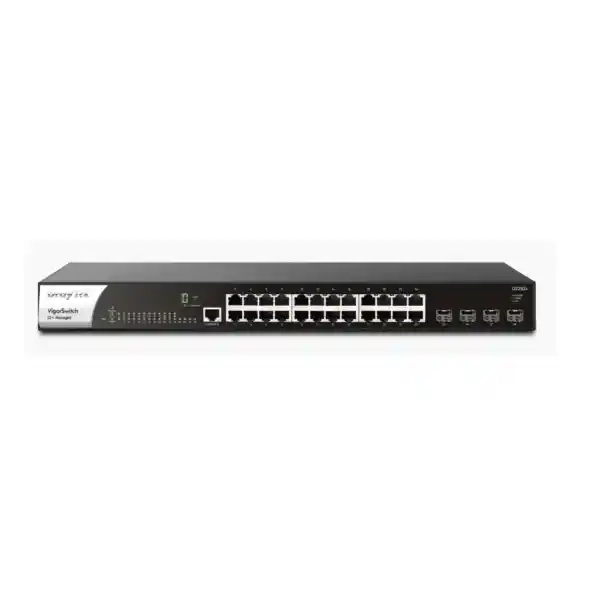
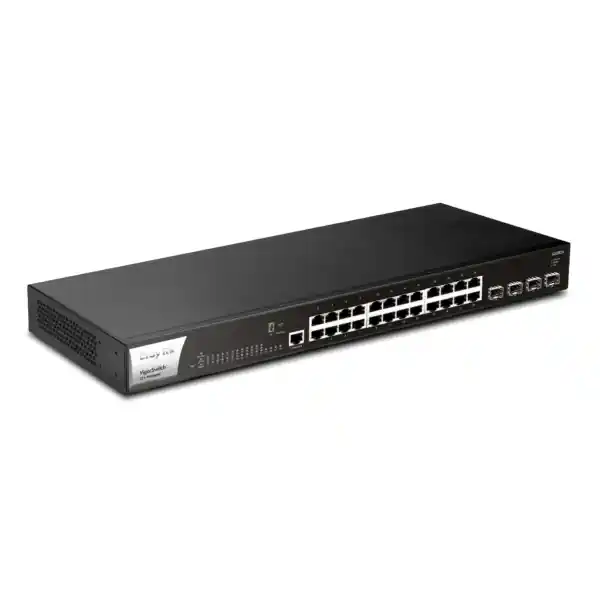
The DrayTek VigorSwitch G2282x is designed for organizations that have outgrown basic Gigabit switching but do not want every access layer decision pushed upstream to a router or expensive chassis core. It combines twenty-four 10/100/1000Base-T copper access ports with four dedicated SFP+ interfaces that operate at 1Gbps or 10Gbps, giving network teams a practical way to connect users, servers, access points, IP telephony systems, cameras, storage, downstream switches and fiber uplinks while preserving substantial aggregation headroom. With a published switching capacity of 128 Gbps and forwarding performance of 95.2 Mpps, the platform is sized to move traffic at wire speed across its interface set under normal enterprise design conditions.
Why the VigorSwitch G2282x fits modern UAE network refresh projects
A large percentage of business traffic never needs to cross the Internet firewall. Video streams move from cameras to recorders, handsets register to an IP PBX, workstations access local file services, backup jobs run between servers and storage, management platforms poll infrastructure, and staff devices communicate with local applications. If all communication between VLANs is forced through a perimeter router, the router becomes responsible for both security-edge workloads and routine east-west LAN movement. The VigorSwitch G2282x addresses that design problem by adding Layer 2+ capabilities such as static routing, VLAN routing and DHCP services to the switching layer. Inter-VLAN traffic can therefore be forwarded locally when the security policy and architecture permit it, reducing avoidable load on the edge gateway and improving deterministic LAN performance.
For Dubai offices, schools, clinics, hotels, retail groups, warehouses, mixed-use properties and distributed branches, the model is especially practical when the copper access layer is still predominantly 1GbE but uplink congestion is the limiting factor. Each desktop, printer, phone, camera or conventional access point can stay on standard Gigabit Ethernet, while SFP+ interfaces carry aggregated traffic toward servers, a NAS platform, a core switch or another floor. This is often a more economical refresh path than replacing every endpoint and every horizontal cable purely to obtain multi-gigabit access speeds that current devices may not use.
FourTeck can position the G2282x as a standalone managed switch or as part of a broader DrayTek infrastructure. For UAE projects that also require gateway security, structured rollout, rack integration, VLAN redesign or post-deployment support, customers can coordinate through FourTeck UAE, review broader engineering support at FourTeck IT Services UAE, and align switching with server and storage connectivity through Server Dubai. For firewall-led network designs and routed segmentation requirements, Firewall Dubai provides a related solution path.
24-port Gigabit access layer
Twenty-four 10/100/1000Mbps RJ-45 ports provide conventional copper access for PCs, servers, NVRs, printers, wireless access points, controllers, IP phones, cameras and downstream devices. Auto-negotiation allows connected equipment to establish the appropriate Ethernet rate, while standards-based switching keeps deployment compatible with a wide range of vendor environments. The port count is well suited to one rack zone, one department, one floor segment or a compact server-room access block where administrators need comprehensive managed features without consuming the space and cost of a larger 48-port platform.
Four dedicated 10G SFP+ uplinks
The four SFP+ slots operate at 1Gbps or 10Gbps and are intended for fiber transceivers or suitable direct-attach connectivity. Their dedicated nature matters: network designers can reserve multiple high-speed paths for upstream aggregation, server or NAS connectivity, switch-to-switch trunks, or redundant topology without sacrificing copper user ports. Where a single 1Gbps uplink would create contention between dozens of endpoints, a 10Gbps path substantially increases the available uplink envelope and improves the probability that edge clients can use their access links without hitting an immediate aggregation bottleneck.
Layer 2+ routing and DHCP
Static routing, VLAN routing and DHCP server functions let the switch take on selected local Layer 3 responsibilities. DrayTek specifies DHCP address assignment for up to eight VLANs and support for up to 512 routes in the VLAN-routing context. This is useful when local devices must keep communicating even if an Internet gateway is unavailable, or where administrators want the switch to handle high-volume inter-VLAN communication while retaining the perimeter firewall for WAN security, VPN, policy enforcement and Internet-bound sessions.
Stacking and operational scale
With stacking support introduced in firmware 2.10.1, up to four compatible VigorSwitch G2282x/P2282x units with the supported port configuration can operate as one logical system. A four-unit stack can provide up to 96 copper Ethernet access ports and eight 10G SFP+ uplinks in the documented stacking design. Unified administration, configuration synchronization, firmware coordination and resilient master behavior reduce the burden of operating multiple independent switch interfaces in growing deployments.
Hardware architecture and forwarding capacity
The G2282x is specified with a 128 Gbps switching capacity and a 95.2 Mpps forwarding rate measured with 64-byte frames. Those figures are consistent with a non-blocking design target for twenty-four 1GbE full-duplex copper ports plus four 10GbE full-duplex SFP+ ports. In planning terms, the switch fabric is not merely sized around the sum of nominal ingress port speeds; it must account for bidirectional forwarding. This distinction matters when comparing business-class switches, because a chassis can advertise fast interfaces while still having an oversubscribed internal fabric. The G2282x published capacity supports its role as a high-throughput access or light aggregation switch.
The switch maintains a MAC address table of up to 16K entries, a 12 Mbit packet buffer and support for jumbo frames up to 12 KB. A larger MAC table gives the device room to learn endpoint identities across segmented environments without excessive churn. The packet buffer helps absorb transient bursts when frames arrive faster than an egress port can transmit them, which can happen when several Gigabit edge ports simultaneously send toward one destination. Jumbo-frame capability can benefit controlled storage, backup or server workloads where every device in the path is configured consistently, although administrators should avoid enabling oversized frames indiscriminately because mismatched MTU settings can create hard-to-diagnose application problems.
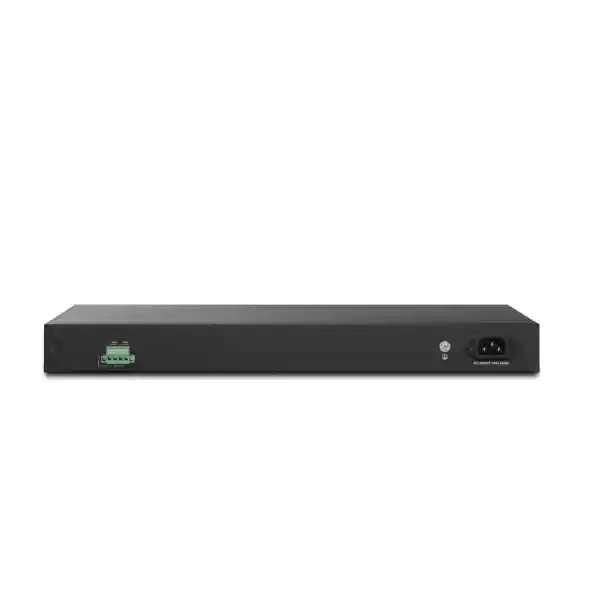
The physical platform is a 1U rack-mountable unit measuring approximately 440 mm wide, 205 mm deep and 44 mm high, with a published weight of about 2.69 kg. Maximum power consumption is specified at 36 watts. The primary input is AC 100–240 V at 0.7 A, and a DC 12 V at 3 A backup power input is also provided. The operating temperature range is listed as 0°C to 50°C with 10% to 90% non-condensing operating humidity. These parameters should be considered during UAE rack design: while data rooms may be well cooled, cabinet airflow, UPS sizing, cable density and ambient heat around network closets still influence long-term reliability.
Detailed specification reference
| Category | DrayTek VigorSwitch G2282x specification | Design relevance |
|---|---|---|
| Copper interfaces | 24 x 10/100/1000Base-T RJ-45 | Standard Gigabit access for business endpoints and downstream devices. |
| Optical / high-speed interfaces | 4 x 1Gbps/10Gbps SFP+ | High-speed switch, server, storage and backbone uplinks. |
| Console | 1 x RJ-45 console port | Direct administrative access during staging and recovery. |
| Switching capacity | 128 Gbps | Sized for the aggregate full-duplex interface set. |
| Forwarding rate | 95.2 Mpps at 64-byte frames | Indicates high packet-processing capability for small-frame traffic. |
| Packet buffer | 12 Mbit | Absorbs temporary egress contention and microbursts. |
| MAC table | 16K entries | Supports sizeable endpoint populations and segmented LANs. |
| Jumbo frame | Up to 12 KB | Useful for controlled server/storage workloads with end-to-end MTU consistency. |
| VLAN scale | Up to 256 VLANs; tag, MAC, protocol, management, voice and surveillance VLAN types | Supports granular segmentation for users, services, voice, CCTV and management. |
| Link aggregation | Up to 8 groups; up to 8 member ports; static and LACP | Combines links for capacity and resilience where peer equipment supports it. |
| Multicast | IGMP Snooping v2/v3, IGMP Querier, MLD Snooping v1/v2, up to 256 multicast groups | Controls multicast flooding for surveillance, streaming and IPv6 environments. |
| QoS | 8 queues; SPQ and WRR; CoS, DSCP, CoS-DSCP and IP precedence; rate limiting | Prioritizes voice, control, business applications and latency-sensitive flows. |
| Power | AC 100–240 V primary; DC 12 V / 3 A backup input; max 36 W | Supports a more resilient rack power design when a compatible DC source is engineered. |
Specifications are based on DrayTek published information for the VigorSwitch G2282x family and may change with firmware or regional hardware revisions. Transceivers, direct-attach cables, DC backup supplies and related accessories should be selected against the exact regional datasheet and project bill of materials.
VLAN engineering: separating users, servers, voice, surveillance and management
802.1Q tagged VLANs
The most common enterprise design uses IEEE 802.1Q tags to carry multiple broadcast domains over shared trunk links. On the G2282x, a trunk toward a firewall, router, core switch, hypervisor or another managed switch can transport several VLANs while access ports present a single untagged network to ordinary endpoints. This lets a twenty-four-port device support multiple departments or functions without requiring a dedicated physical switch for each network.
A practical UAE office might place corporate workstations in one VLAN, guest Wi-Fi in another, IP phones in a voice VLAN, CCTV cameras in a surveillance VLAN, building-management devices in an IoT VLAN, servers in a protected services VLAN and switch administration in a dedicated management VLAN. Logical separation reduces broadcast scope, simplifies policy design and makes it easier to apply different addressing, access-control and monitoring practices to each device class.
MAC- and protocol-based segmentation
Beyond conventional tag-based VLANs, the switch supports MAC-based and protocol-based VLAN assignment. These options can help when endpoint behavior or legacy requirements make physical-port segmentation inconvenient. MAC-based assignment can associate known devices with a VLAN regardless of the access port used, while protocol-oriented segmentation can classify certain traffic types into defined logical domains. They should be introduced carefully because operational teams must maintain accurate policy and troubleshooting documentation.
The VigorSwitch also includes a management VLAN function so administrators can isolate switch control-plane access from ordinary client networks. Restricting management interfaces to an administrative segment, then protecting that segment with ACLs and upstream firewall policy, is preferable to exposing the web interface broadly across user VLANs.
Voice VLAN and LLDP-MED
Voice deployments often require a handset to discover its correct VLAN and receive priority handling without a technician manually configuring every phone. The G2282x supports a voice VLAN and LLDP-MED, allowing compatible endpoints to be identified and mapped into the desired policy. When combined with QoS marking and upstream configuration, this makes it easier to maintain predictable latency and jitter for IP telephony.
In mixed ports where a workstation is connected through a phone’s integrated PC bridge, voice and data can share a physical switch interface while remaining logically separated. Network engineers should still validate handset behavior, LLDP-MED support, DHCP options and PBX requirements before large-scale rollout.
Surveillance VLAN automation
Surveillance traffic can become one of the largest steady-state consumers of access-layer bandwidth. The switch can recognize supported IP camera traffic, place surveillance devices into a dedicated VLAN workflow and apply Class of Service handling. This reduces the administrative friction of separating cameras from general client traffic and gives operations teams a clearer framework for securing and monitoring CCTV infrastructure.
A surveillance VLAN should normally be paired with restrictive routing policy. Cameras usually require communication with NVRs, time services, management systems and carefully controlled administration endpoints; they rarely need unrestricted access to corporate users. The switch provides the segmentation tools, while the exact security boundary should be implemented through coordinated ACL and firewall policy.
Wire-speed VLAN routing and where to place the Layer 3 boundary
DrayTek positions the G2282x as an L2+ switch because it goes beyond pure Ethernet switching without attempting to replace every feature of an enterprise router or next-generation firewall. The device can route between VLANs and maintain static routes, which is valuable for internal traffic that does not need deep security inspection. Consider a design where engineering users access a local file server, cameras stream to an NVR, phones communicate with an on-premises PBX and several server VLANs exchange backup traffic. If every packet travels from the access switch to the firewall and then back to another VLAN on the same LAN, the firewall interfaces and processing resources carry traffic that could potentially be forwarded locally.
Using the switch as the gateway for selected VLANs can shorten the forwarding path and preserve firewall capacity for Internet sessions, VPN, intrusion prevention, web filtering and inter-zone traffic that genuinely requires security inspection. This does not mean all VLANs should be routed freely. The correct boundary depends on the organization’s threat model and compliance obligations. A payment environment, guest network, security-camera network or contractor segment may still need stateful firewall control between zones. By contrast, trusted server subnets with well-understood access relationships may benefit from local Layer 3 forwarding plus switch ACLs.
The G2282x includes ACL support for MAC, IPv4 and IPv6 contexts. ACLs can permit or deny traffic based on defined criteria, providing deterministic filtering close to the source. They are useful for restricting management access, preventing unauthorized inter-VLAN reachability, isolating infrastructure subnets and reducing unnecessary lateral exposure. ACLs are not a substitute for every firewall capability: they do not inherently provide the same application awareness, threat inspection, session intelligence or advanced logging. A sound design uses each control where it is strongest.
For branch environments, local DHCP services can improve continuity because internal clients can continue receiving addresses even when an upstream gateway is being maintained or is temporarily unavailable. DrayTek documents DHCP server operation across up to eight VLANs, including the ability to bind an IP address to a MAC address for important systems. Reservations are useful for printers, controllers, monitoring appliances, management hosts or other devices that benefit from predictable addressing without requiring manual static configuration on the endpoint.
Resilience: STP, RSTP, MSTP, LACP and stacking
Spanning Tree families
Ethernet redundancy must be controlled because an unmanaged Layer 2 loop can circulate broadcast and unknown-unicast frames continuously, causing a broadcast storm and destabilizing an entire segment. The G2282x supports classic STP, faster-converging RSTP and MSTP. RSTP is commonly appropriate for straightforward redundant topologies, while MSTP becomes useful when multiple VLAN groups need separate spanning-tree instances or when a larger campus design requires more granular path engineering.
Loop protection complements spanning-tree design by helping identify problematic edge conditions. Administrators should still document uplink roles, root-bridge placement and failure behavior rather than simply enabling every protection feature with default priorities.
LACP and static aggregation
The switch supports up to eight link-aggregation groups with as many as eight member ports per group, using either static aggregation or IEEE 802.3ad LACP. Aggregation can increase total bandwidth between compatible devices and preserve connectivity if one member link fails. It is particularly useful for server bonds, NAS appliances, hypervisors and switch-to-switch trunks where traffic can be distributed across multiple conversations.
It is important to distinguish aggregate bandwidth from single-flow speed. A single TCP session normally follows one member according to the hashing algorithm, so combining two 10GbE links does not automatically turn one transfer into a 20Gbps stream. The gain appears when multiple flows can be balanced across members and when resilience is required.
Logical stacking
DrayTek added stacking support to the G2282x line beginning with firmware 2.10.1. Up to four supported units can be grouped and administered as one logical switch system. Configuration and firmware synchronization help keep VLAN, QoS and operating parameters consistent, while unified monitoring reduces the number of separate management touchpoints.
For expansion planning, a stack can scale the access layer without abandoning the original switch. DrayTek documents up to 96 copper ports and eight 10G SFP+ uplinks in a four-unit stack. Stack compatibility is defined by the supported port configuration, so project teams should validate firmware and model pairing before procurement.
Dual-source power approach
The chassis includes a fixed AC input and a separate 12 V DC backup socket. In a properly engineered installation, the secondary source can provide another power path if AC input is interrupted. This is meaningful for environments where the switch supports essential local systems such as IP cameras, control networks, servers or operational workstations.
Power resilience must be designed as a complete system. A backup socket alone does not guarantee uptime; the DC supply, UPS runtime, circuit separation, rack cooling and upstream devices must all be considered. FourTeck can incorporate these dependencies into a UAE network bill of materials rather than treating the switch as an isolated component.
Security controls for access-layer enforcement
A managed switch is an important enforcement point because every wired endpoint enters the network through an access port. The G2282x includes 802.1X and MAC authentication, RADIUS and TACACS+ integration, IP Source Guard, DHCP Snooping, Dynamic ARP Inspection, ACLs, storm control, denial-of-service defenses, loop protection and IP conflict prevention. These capabilities help network administrators reduce trust at the physical edge and build a more deterministic relationship between a port, an authenticated user or device, its assigned address and the traffic it is allowed to generate.
802.1X and RADIUS
802.1X can require a supplicant to authenticate before normal network access is granted. In an enterprise deployment, the switch acts as the authenticator and consults a RADIUS service for the policy decision. This helps prevent someone from simply connecting an unknown laptop to an active office socket. MAC authentication can provide an alternative path for devices that do not support interactive 802.1X, though MAC-based identity should be treated as weaker because MAC addresses can be observed and impersonated.
DHCP Snooping
DHCP Snooping differentiates trusted and untrusted paths for DHCP replies and builds a binding view of legitimate address assignments. It can help stop a rogue device on an access port from responding to client DHCP requests and presenting itself as the default gateway or DNS server. The resulting bindings also support complementary controls such as Dynamic ARP Inspection and IP Source Guard.
Dynamic ARP Inspection
ARP has no built-in authentication, which allows malicious or misconfigured systems to advertise incorrect IP-to-MAC relationships. Dynamic ARP Inspection can validate ARP traffic against trusted binding information and reject invalid messages. When correctly configured, it reduces exposure to common local spoofing techniques that attempt to redirect traffic through an unauthorized host.
IP Source Guard and conflict prevention
IP Source Guard limits a port’s ability to send traffic using source addresses that do not match legitimate assignments. DrayTek’s IP conflict detection and prevention functions additionally monitor for duplicate or conflicting addresses and can block a problematic host. This is valuable in mixed networks where accidental static IP duplication and deliberate misuse can both cause service disruption.
Access-layer security requires staged implementation. Turning on DHCP Snooping, DAI or 802.1X without identifying trusted uplinks, DHCP relay behavior, authentication fallback and device exceptions can interrupt production services. A disciplined rollout normally begins with an inventory and monitoring phase, followed by pilot enforcement on a controlled set of ports, then broader deployment with documented recovery procedures.
QoS design for voice, video and business applications
Quality of Service does not create bandwidth; it decides how scarce bandwidth is allocated when congestion occurs. The G2282x provides eight QoS queues and supports Strict Priority Queuing and Weighted Round Robin scheduling, together with classification based on CoS, DSCP, CoS-to-DSCP relationships and IP precedence. Rate limiting is also available. This feature set gives network engineers the tools to protect latency-sensitive applications while preventing bulk transfers from monopolizing constrained links.
For IP telephony, a common design places voice in a dedicated VLAN and maps trusted voice markings into a high-priority queue. LLDP-MED can help compatible phones learn their VLAN assignment, while the switch can recognize voice devices and apply policy consistently. The uplink and every intermediate switch must preserve the intended markings; otherwise, priority can disappear as soon as traffic leaves the first access switch. Firewalls, WAN routers and service-provider circuits also need a compatible QoS strategy if the call traverses a congested WAN.
Surveillance video is different. Camera streams are often continuous and bandwidth-heavy but may tolerate more delay than real-time voice. Giving all video the highest priority can starve interactive business traffic. Instead, administrators can classify surveillance into an assured but bounded queue, apply rate controls where necessary and size uplinks based on measured camera bitrates. The four 10G SFP+ interfaces are helpful here because many camera feeds can converge on NVR or storage infrastructure without forcing the entire camera estate through a single Gigabit bottleneck.
Business-critical application QoS should be based on evidence rather than assumptions. Monitoring should identify which applications experience congestion, what their packet sizes and burst characteristics look like, and which interfaces are actually constrained. QoS is most effective when it is simple enough to operate: a small number of clearly defined classes, consistent markings, documented trust boundaries and periodic review usually outperform an overly complex policy that no one can troubleshoot.
ONVIF-aware surveillance operations
Automatic discovery and topology
The G2282x can recognize ONVIF-compatible surveillance devices and present a topology view showing connected cameras and recorders. In a property, hotel, warehouse or multi-floor office, this is operationally useful because the network team can associate a camera with its switch path rather than relying on a separate spreadsheet that may be out of date. Faster topology visibility can reduce the time spent tracing patch-panel labels when a device stops responding.
Video viewing and device maintenance
For supported ONVIF devices, the switch interface can provide access to live camera imagery and basic maintenance functions such as device information, network settings, time settings, reboot and factory reset. These tools do not replace a full VMS or NVR platform; instead, they give the network administrator a practical troubleshooting window into whether a camera is connected, reachable and delivering imagery.
Snapshot alerts
DrayTek includes ONVIF snapshot alerting so administrators can receive notification when a monitored camera becomes unavailable and use the latest snapshot as context for the affected location. In security operations, knowing which field of view has disappeared can accelerate incident triage. The model itself is non-PoE, so automatic power-cycling functions that depend on PoE apply to PoE-capable members of the family rather than the G2282x’s copper ports.
Multicast discipline
Where surveillance or media systems use multicast, IGMP Snooping, IGMP Querier support, multicast filtering and MVR functions help prevent streams from flooding every port in a VLAN. The switch supports up to 256 multicast groups. IPv6 environments can use MLD Snooping to provide similar membership-aware forwarding for IPv6 multicast traffic.
IPv6 readiness without abandoning IPv4 operations
Most UAE business networks continue to operate substantial IPv4 infrastructure, yet modern operating systems, cloud services and service providers increasingly support or prefer IPv6. The G2282x is designed to function in dual-stack environments rather than forcing a binary migration. DrayTek lists IPv6 capabilities including MLD Snooping, IPv6 ACL support and an IPv6 DNS resolver. This means administrators can introduce IPv6 in controlled segments while retaining the established IPv4 addressing, DHCP and routing model where required.
MLD Snooping is the IPv6 counterpart to IGMP-aware multicast forwarding. Without snooping, multicast frames may be sent broadly to ports that do not need them. By listening to membership signaling, the switch can constrain distribution to interested receivers. This is relevant because IPv6 uses multicast extensively for normal network operations, including neighbor discovery and other control functions.
IPv6 security policy should not be treated as an afterthought. An organization that carefully filters IPv4 while allowing unrestricted IPv6 can unintentionally create a parallel path around intended controls. When dual stack is enabled, switch ACLs, router policy, firewall rules, management access and monitoring should all explicitly account for both address families. If IPv6 is not part of the current architecture, administrators should still understand default endpoint behavior and decide whether to disable, contain or prepare for it rather than assuming it is absent.
Management, monitoring and lifecycle operations
The day-to-day value of a managed switch depends as much on visibility and administration as on raw forwarding performance. The G2282x provides local management through HTTP and HTTPS, along with Telnet and SSH v2 for command-line administration where appropriate. Configuration backup and restore, dual-image capability, two-level administrator privileges and multiple administrator accounts help formalize operational access. In production networks, HTTPS and SSH should normally be preferred over clear-text protocols, and management access should be limited to trusted subnets.
SNMP v1, v2c and v3 support allows external monitoring systems to poll interface counters, errors, hardware state and other operational metrics. SNMPv3 is generally preferable where the monitoring platform supports it because it provides stronger authentication and privacy options than community-string-based legacy versions. RMON groups 1, 2, 3 and 9 are supported, and syslog integration can forward event messages to a centralized log collector. SNTP keeps system time synchronized so event records can be correlated across infrastructure.
Hardware monitoring is especially useful in hot-climate regions. The switch can report temperature and hardware status and send email alerts for events including port state, port speed, system restart, IP conflict, hardware monitor conditions, device checks and ONVIF camera snapshots. Temperature monitoring is not a substitute for environmental sensors and proper HVAC, but it provides another data point for identifying a network closet that is gradually becoming too warm.
DrayTek supports centralized switch management through compatible VigorRouter Switch Management, VigorConnect and VigorACS. In a DrayTek ecosystem, a VigorRouter can discover managed switches, apply switch profiles, provision VLAN settings, display a hierarchy view and perform maintenance tasks such as reboot or configuration backup without logging into every switch separately. VigorACS extends centralized provisioning, alarm, reporting and remote maintenance for organizations with multiple sites or managed-service requirements.
Firmware lifecycle management should be part of the operations plan. As of September 2026, DrayTek’s UK support portal lists firmware 2.10.3 for the VigorSwitch G2282x, released March 10, 2026. Before upgrading a production switch, administrators should review the release notes, confirm model and region, export a known-good configuration, schedule a maintenance window and ensure console or local recovery access is available. A switch firmware update can affect the entire connected edge, so it deserves the same change-control discipline as a firewall or server update.
10GbE uplink design: fiber, DAC and aggregation choices
Fiber between rooms or buildings
SFP+ optics are the natural choice when the uplink must cross floors, long corridors, campus pathways or electrically noisy areas. Fiber provides distance options beyond copper Ethernet and avoids conductive paths between buildings. The exact transceiver type must match the installed fiber plant, connector system, wavelength and distance. Multimode optics are common inside buildings, while single-mode optics support longer links. Both ends of the connection must use compatible optical standards and clean, correctly polarized fiber.
Direct-attach copper in the rack
For short 10GbE connections inside the same rack or adjacent cabinets, a compatible passive SFP+ direct-attach cable can be economical and simple. DAC avoids separate optical modules and fiber patch cords and can connect the switch to a server, NAS appliance or neighboring switch. Compatibility and supported length still matter, so the cable should be selected from a validated bill of materials rather than treated as a generic patch lead.
Separate northbound and server traffic
Four SFP+ ports create several topology options. One or two can provide redundant uplinks to a core or firewall cluster while others connect directly to high-throughput servers or storage. In a smaller branch, one 10G link may serve the core and another the local NAS. In a larger access block, two links could form an LACP uplink while remaining ports connect to another switch tier. Port allocation should follow measured traffic patterns and failure requirements rather than a fixed template.
Avoid hidden bottlenecks
A 10GbE uplink only solves the part of the path where it is installed. A server with a 1GbE NIC, a firewall with constrained inter-VLAN throughput, slow storage, an oversubscribed wireless system or a WAN circuit can still be the limiting factor. Good design traces an application flow end to end, identifies each interface and processing boundary, and then upgrades the component that actually restricts the required performance.
Deployment patterns for Dubai and UAE organizations
The VigorSwitch G2282x is not limited to one network role. Its combination of standard Gigabit edge interfaces, several 10G uplinks and Layer 2+ controls lets it sit at different points in a small or medium architecture. The best position depends on endpoint density, traffic direction, security boundaries, power requirements and whether Power over Ethernet is needed.
Corporate office access switch
Use the copper ports for staff workstations, printers, conferencing endpoints and non-PoE infrastructure. Carry corporate, guest, voice and management VLANs over 10GbE uplinks to a core or firewall. This suits offices where PoE is provided by separate switches or injectors and the priority is high-capacity wired aggregation.
Server and NAS access
Connect conventional 1GbE management and application interfaces to copper ports while dedicating SFP+ links to high-throughput storage, backup targets or hypervisors. VLAN routing can keep selected east-west flows local, and LACP can provide aggregate capacity where servers support bonded interfaces.
Surveillance aggregation
Use the G2282x to aggregate non-PoE camera switches, NVRs and security workstations. ONVIF visibility, surveillance VLAN support, multicast controls and 10GbE uplinks can improve manageability when many video streams converge toward centralized recording infrastructure.
Hospitality or multi-floor aggregation
On a hotel or mixed-use property, the switch can aggregate floor networks, back-office systems and local services while preserving segmentation between staff, guest, voice, CCTV and facilities networks. Fiber SFP+ uplinks can traverse risers where distance and electrical isolation favor optical media.
School or training center
Computer labs generate bursts of concurrent traffic when classes start, software is distributed or content is accessed from local servers. Multiple VLANs can separate staff, students, labs, administration, CCTV and guest services, while high-speed uplinks reduce contention between access blocks and centralized resources.
Branch-office resilient LAN
DHCP and local VLAN routing can keep internal services functioning during a gateway maintenance event. The backup DC input can be integrated into a resilient power architecture, and centralized DrayTek management can reduce support overhead across multiple UAE branches.
Sizing methodology: how many G2282x switches does a project need?
Switch sizing should start with endpoints and traffic, not with a simple port count. A rack may have twenty devices today, but planned Wi-Fi, cameras, meeting-room systems, building controls and additional users can consume remaining ports quickly. A practical design usually reserves capacity for growth and maintenance. If every one of twenty-four access ports is occupied on day one, a single failed patch position or new endpoint forces an immediate expansion. Leaving a deliberate spare-port percentage is generally more economical than redesigning the rack during normal growth.
The second variable is PoE. The G2282x is the non-PoE member of the 2282x family. It is an excellent choice for endpoints that have their own power source or where PoE is delivered elsewhere, but it does not provide PoE power on its twenty-four copper ports. If the project requires the switch to power IP phones, wireless access points or cameras directly, the PoE-capable P2282x or another appropriate PoE model may be the better fit. Mixing non-PoE and PoE switches in the same rack can also be cost-effective when only some device classes require powered ports.
The third variable is uplink oversubscription. Imagine twenty-four clients that can each send at 1Gbps but all reach servers through a single 1Gbps uplink. The access ports are fast individually, yet their aggregate traffic competes for one narrow path. Moving the uplink to 10GbE changes that ratio dramatically. If the workload is still heavier, multiple 10GbE links can be distributed by role or combined using LACP, subject to peer support and traffic patterns. For most office environments, not every user transmits at line rate simultaneously, so measured utilization is a better guide than theoretical maximum demand.
The fourth variable is Layer 3 policy. If the switch will host VLAN gateways, the engineering team must estimate inter-VLAN flow and define which communications can be handled locally versus which must traverse a firewall. This affects IP addressing, default gateways, ACLs, static routes, DHCP scopes and failure behavior. The G2282x is capable of wire-speed VLAN routing in its intended design, but architecture still determines whether local routing is operationally and security-wise appropriate.
Finally, consider physical infrastructure. Count rack units, PDU outlets, UPS runtime, fiber termination positions, patch-panel ports, cooling capacity and cable-management space. The G2282x consumes one rack unit and has a 205 mm chassis depth, but installed depth includes power and patching clearances. UAE server rooms often have strong cooling, while small communications closets may be less controlled; confirming ambient temperature and airflow before installation improves reliability.
G2282x versus a basic unmanaged switch
An unmanaged Gigabit switch can connect devices and forward Ethernet frames, which is sufficient for very small flat networks. The difference becomes significant when the organization needs segmentation, resilient uplinks, authentication, monitoring, QoS or centralized control. The G2282x can define multiple VLANs, apply 802.1X access policy, inspect DHCP behavior, protect ARP relationships, aggregate links, run spanning tree, constrain multicast, prioritize application classes, route selected VLAN traffic and report detailed operational state. These functions turn the switch from a passive connectivity box into an active part of the network architecture.
Managed features also shorten troubleshooting. Port counters and status can reveal speed mismatches, link flaps or utilization. MAC tables show where endpoints are learned. LLDP identifies neighboring infrastructure and compatible media endpoints. Port mirroring can copy traffic to a diagnostic tool. SNMP and syslog feed centralized monitoring. When a business application is slow, these data points help determine whether the issue is a physical link, congestion, a VLAN error, upstream policy or the application itself.
The operational tradeoff is that management features require disciplined configuration. A flat unmanaged switch has little to misconfigure because it offers little control. A managed L2+ platform should therefore be deployed with configuration backups, naming conventions, standardized VLAN IDs, documented trunks, protected management access and change control. FourTeck can deliver the G2282x as part of a configured solution rather than merely supplying hardware, which is particularly useful for organizations without a dedicated in-house network engineer.
G2282x versus the PoE-capable P2282x
The G2282x and P2282x share the same general 24-port Gigabit plus 4-port 10G SFP+ architecture and many management capabilities. The major procurement difference is Power over Ethernet. The G2282x does not provide PoE on its copper interfaces, while the P2282x is designed to power compatible endpoints and carries a published PoE budget. If most connected devices are desktops, servers, printers, NAS systems or downstream switches with independent power, paying for a large PoE budget may provide little value. In that case, the G2282x keeps the focus on switching, routing and uplink performance.
If the switch will directly connect and power IP cameras, Wi-Fi access points or desk phones, the PoE model can simplify cabling and centralize power backup at the rack. A single Ethernet cable carries both data and power, and a UPS supporting the PoE switch can keep endpoint devices online during short mains interruptions. The selection should therefore be based on the powered-device count, individual wattage class, total PoE budget, future growth and whether high-power PoE standards are required by any endpoint.
Some networks benefit from both models. A rack can use PoE switches for cameras and access points while a G2282x handles servers, uplinks, aggregation or non-powered user ports. This separates PoE budget from pure switching capacity and can reduce total project cost. When asking FourTeck for a quotation, provide the number and model of powered endpoints so the engineering team can determine whether the G2282x, P2282x or a mixed design is appropriate.
Migration planning from an older Gigabit switch
Replacing an existing switch is not simply a matter of moving patch leads. A production migration should begin by exporting or documenting the current configuration and mapping every physical port to its purpose. Identify access VLANs, tagged uplinks, voice settings, LACP groups, spanning-tree roles, management IP addresses, DHCP dependencies, ACLs, monitoring targets and any static MAC or port-security rules. Record current port speed and error counters before the change; this baseline can expose cabling or endpoint issues that might otherwise be blamed on the new hardware.
Next, decide whether the G2282x will reproduce the existing design or improve it. A refresh is an opportunity to consolidate inconsistent VLAN IDs, create a dedicated management network, move inter-switch trunks to 10GbE, enable authentication, standardize QoS and remove unused legacy configuration. Trying to modernize every control during the same maintenance window can increase risk, so organizations may prefer a staged approach: first establish functional equivalence, then enable additional security and routing features after baseline stability is confirmed.
During staging, configure the management interface, administrator accounts, time synchronization, SNMP/syslog destinations, VLAN database, trunks, access ports and spanning-tree priorities before the switch enters the rack. Label SFP+ modules and fiber pairs, verify transmit/receive orientation and confirm optical compatibility. For LACP uplinks, configure both sides consistently and test member behavior. If VLAN gateways are moving from a router to the switch, update DHCP default gateways and static routes in a controlled sequence to avoid asymmetric routing.
After cutover, validate more than link lights. Test DHCP in each client VLAN, DNS resolution, default gateway reachability, inter-VLAN policy, Internet access, voice registration, camera recording, management access, monitoring alerts and failover behavior. Check port counters for errors or unexpected speed negotiation. Confirm that redundant paths do not create loops and that the intended spanning-tree root remains in place. A documented acceptance test turns a hardware replacement into a verifiable network change.
UAE procurement, rack integration and support considerations
Enterprise procurement in Dubai and the wider UAE should consider more than the switch unit price. Confirm the required SFP/SFP+ optics or DAC cables, rack-mount hardware, UPS capacity, DC backup design, patch cords, fiber termination, console connectivity and any spare components. The G2282x includes rack-mount capability, but optical uplinks are application-specific and should be selected according to the fiber plant. A quotation that excludes transceivers may appear less expensive while still being incomplete for installation.
Warranty and firmware support should also be checked against the exact regional supply channel. DrayTek publishes ongoing firmware for the G2282x, and centralized management functions may depend on minimum firmware versions. Procurement teams should record serial numbers, firmware baselines and asset locations during delivery so later support requests can be handled efficiently.
For projects spread across Emirates, consistent configuration templates reduce support variation. Standardize VLAN numbering, management subnets, administrator roles, SNMP settings, NTP/SNTP sources, syslog targets, uplink conventions and port descriptions. A switch installed in Abu Dhabi should be recognizable to an engineer who normally supports Dubai, Sharjah or another site. Naming and documentation are inexpensive controls with significant operational value.
FourTeck can support the lifecycle from hardware selection to implementation planning, configuration, migration and ongoing infrastructure services. When the G2282x is part of a wider firewall, server, Wi-Fi, voice or surveillance deployment, a single network design should define how these systems exchange traffic instead of treating each product category independently.
Frequently asked technical questions
Is the DrayTek VigorSwitch G2282x a PoE switch?
No. The G2282x provides data switching on its 24 Gigabit RJ-45 ports but does not supply PoE power. Organizations that need PoE for cameras, access points or phones should evaluate the P2282x or another suitable PoE model.
How many 10GbE ports are available?
There are four SFP+ interfaces. Each supports 1Gbps or 10Gbps operation with compatible modules or direct-attach connectivity. They are suitable for switch uplinks, servers, storage or aggregation roles.
Can it route between VLANs?
Yes. The switch provides VLAN routing and static routing capabilities. This allows selected inter-VLAN traffic to be forwarded at the switching layer, subject to the architecture and security policy defined by the network administrator.
Does it have a DHCP server?
Yes. DrayTek documents DHCP server operation for up to eight VLANs, including address reservations through IP-to-MAC binding. This can support local continuity and simplify branch addressing.
Can several G2282x units be stacked?
Yes, stacking is supported from firmware 2.10.1 onward. DrayTek documents stacks of up to four compatible units, with centralized management and configuration synchronization. Model and firmware compatibility should be validated before deployment.
Does it support LACP?
Yes. The G2282x supports static aggregation and LACP with up to eight aggregation groups and up to eight member ports per group. Peer equipment must be configured compatibly.
Which spanning-tree versions are supported?
The switch supports STP, RSTP and MSTP, allowing network designers to select an appropriate loop-prevention and redundancy model for simple or more complex Layer 2 topologies.
Can it authenticate wired users?
Yes. 802.1X and MAC authentication are supported, with RADIUS and TACACS+ listed among the authentication services. This enables stronger access control than simply trusting every active wall port.
Does the switch support IPv6?
Yes. DrayTek lists IPv6-related functions including MLD Snooping, IPv6 ACL and IPv6 DNS resolver support, making the switch suitable for dual-stack network designs.
Can the switch help manage ONVIF cameras?
Yes. It can discover supported ONVIF devices, display surveillance topology, provide viewing access and expose basic maintenance functions. It also supports surveillance VLAN features and snapshot alerts.
Does it have redundant power?
The chassis has a primary AC input plus a DC 12 V backup power socket. A resilient design still requires a suitable independent DC source and UPS/power architecture; the socket by itself does not constitute complete power redundancy.
Can it be centrally managed?
Yes. The G2282x supports DrayTek VigorRouter switch management and can integrate with VigorConnect and VigorACS at supported firmware levels. Local web and CLI administration remain available for standalone deployments.
Configuration blueprint for a typical business deployment
A well-structured configuration begins with the management plane. Assign the switch a management address from a dedicated infrastructure subnet, restrict administrative protocols to that VLAN and create named administrator accounts with the minimum privilege required. Configure SNTP, syslog and SNMP before user traffic is migrated so monitoring is available from the first production hour. Export the baseline configuration once the management plane is verified.
Next, create VLANs with names that describe business function rather than arbitrary numbers. For example, a company might use separate VLANs for corporate data, voice, guest wireless, CCTV, servers and management. Set access ports to the appropriate untagged VLAN and define SFP+ uplinks as tagged trunks carrying only the VLANs needed across that path. Avoid trunking every VLAN everywhere, because unnecessary Layer 2 extension increases failure scope and complicates troubleshooting.
If the G2282x will route locally, create VLAN interfaces and gateway addresses, then establish static routes toward the firewall or upstream router. Define ACLs before enabling broad inter-VLAN routing. A useful design principle is to start from required communication: users may need DNS, authentication and application servers; phones may need PBX, NTP and provisioning; cameras may need NVR and management; guest users may need Internet access only. Translating these requirements into explicit policy produces a more secure network than allowing all VLANs to communicate and attempting to block exceptions later.
Configure DHCP scopes only for the VLANs that the switch will serve, and reserve predictable addresses for infrastructure endpoints as needed. If DHCP remains on a server or firewall, use relay architecture where appropriate and enable DHCP Snooping with the correct trusted uplink. Then introduce DAI and IP Source Guard after bindings and exception devices are understood. This sequence reduces the chance of locking out statically addressed systems.
For resilience, set the intended spanning-tree root based on topology rather than allowing bridge priorities to be accidental. Create LACP groups consistently on both ends and verify member links enter the bundle. If stacking will be used, align firmware versions and test management failover before production. Finally, apply QoS classifications, voice VLAN and LLDP-MED policy, then test with real calls and application traffic under load.
A production-ready configuration is accompanied by a port map, VLAN table, IP plan, uplink diagram, administrator-access policy, backup file and recovery procedure. Those documents are as important as the settings themselves because they allow another engineer to understand the network months later without reverse-engineering every decision.
Performance validation after installation
After commissioning, validate the switch against the original design objectives. Begin with physical health: confirm every expected port negotiates at the intended speed and duplex, and investigate CRC errors, alignment errors or repeated link transitions. A Gigabit endpoint that negotiates at 100Mbps may indicate a cabling fault, damaged pair or endpoint limitation. On fiber links, monitor optical diagnostics where supported by the transceivers and check for marginal receive levels rather than waiting for complete failure.
Measure utilization on SFP+ uplinks during actual busy periods. A 10GbE link that remains below a few percent confirms substantial headroom; a link that regularly approaches saturation may need LACP, traffic redistribution or a revised aggregation design. Peak traffic is more informative than daily averages because application complaints often occur during short bursts that disappear when averaged across hours.
Validate segmentation by testing both permitted and denied paths. Confirm that users can reach required servers but cannot access management interfaces, guests cannot reach internal networks, cameras can reach recorders but not ordinary workstations, and administrators can access the switch only from designated networks. Test IPv4 and IPv6 separately if dual stack is active. Review ACL hit behavior and logs to ensure the policy is functioning as intended rather than merely configured.
For voice, place concurrent calls while generating background data load and monitor latency, loss and subjective quality. For surveillance, verify recording continuity from multiple cameras and ensure multicast or broadcast behavior does not flood unrelated ports. For storage, run representative backup or file-transfer workloads and confirm jumbo frames only if the entire path has been explicitly designed for them.
Finally, test failure scenarios that matter to the business. Disconnect one member of an LACP group, interrupt an alternate spanning-tree path, reboot a stacked member during an approved window, or simulate loss of the primary power source if the backup design is safe to test. A resilience feature provides value only when the team knows how the network behaves during a failure.
What to include in a FourTeck quotation request
The fastest way to receive an accurate network quotation is to provide enough design context to identify accessories and engineering scope. A request for “one G2282x” is sufficient for a hardware-only price but not for a complete installed solution. If the switch will use 10GbE uplinks, specify whether those links are within the rack, between rooms, between floors or between buildings. State the fiber type if known, along with approximate distance and connector format. If unknown, FourTeck can help determine the appropriate optical path.
List the endpoint types and quantities. Distinguish PCs, printers, servers, access points, cameras, phones, NVRs, PBX appliances and downstream switches. Indicate which endpoints require PoE, because that immediately determines whether a non-PoE G2282x can serve the access role directly or whether the project should include PoE switches. Mention expected future growth so the design does not consume every port on installation day.
Describe VLAN and security requirements at a business level. Examples include separating guest Wi-Fi from internal users, isolating cameras, keeping finance systems in a restricted subnet, providing a management VLAN, authenticating wired users with RADIUS or routing selected server traffic locally. Network engineers can translate these needs into VLAN, ACL, 802.1X and routing configuration.
Finally, identify the operational scope: supply only, pre-configuration, onsite installation, migration, rack cleanup, structured cabling coordination, documentation, monitoring integration or ongoing support. This allows the quotation to separate hardware from professional services and reduces scope ambiguity during implementation.
Decision recap: when the DrayTek VigorSwitch G2282x is the right choice
Quotation input checklist
For an accurate Dubai or UAE quotation, include the following information in your request. Providing these details allows FourTeck to size the switch, uplinks, optics, power design and implementation scope as one solution rather than quoting isolated components.
Plan your DrayTek VigorSwitch G2282x deployment with FourTeck UAE
For a hardware-only supply request, a multi-switch refresh, or a complete VLAN and 10GbE network redesign, share your site requirements with FourTeck. Our team can help validate whether the non-PoE G2282x is the correct access or aggregation platform, select SFP+ connectivity, define VLAN and routing roles, and integrate the switch with firewalls, servers, surveillance and centralized management. A well-scoped design reduces surprise costs and makes the migration easier to verify.
Confirm PoE requirementConfirm SFP+/fiber typeConfirm VLAN/routing designConfirm rack power and UPS plan

Reviews
There are no reviews yet.