
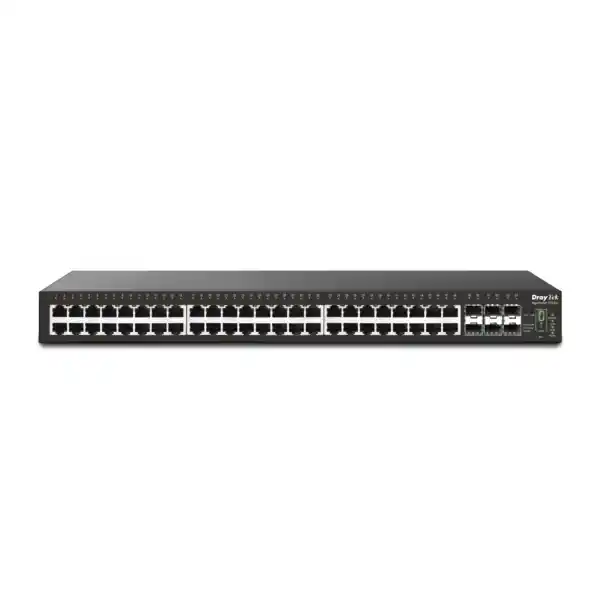
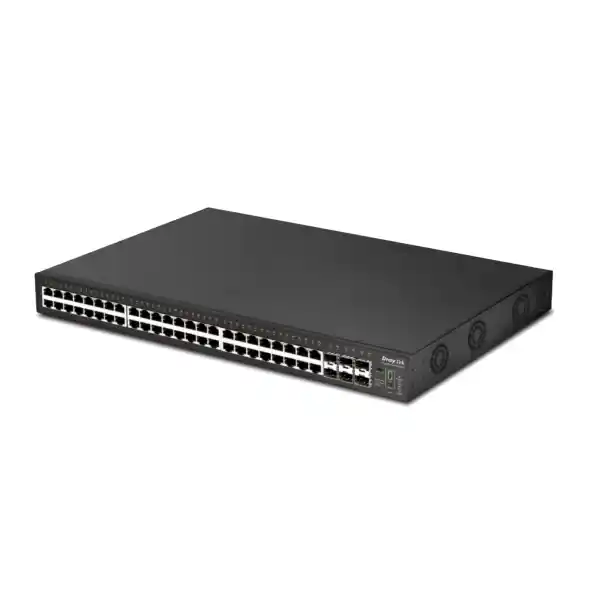
DrayTek VigorSwitch P2542x UAE
A 48-port Gigabit PoE/PoE+ Layer 2+ managed switch with six 10G-capable SFP+ interfaces, a 400-watt PoE budget, 216 Gbps switching capacity, VLAN routing, resilient stacking, surveillance-aware controls and centralized management for dense business networks.
A high-density PoE switching platform for UAE enterprise access networks
The DrayTek VigorSwitch P2542x is designed for organizations that need a large number of powered edge connections without separating access switching, PoE injection and aggregation into several independent devices. Forty-eight 10/100/1000 Mbps RJ-45 interfaces support IEEE 802.3af PoE and IEEE 802.3at PoE+, allowing the switch to carry data and electrical power over the same structured cabling to compatible endpoints. Six SFP+ interfaces support 1 Gigabit and 10 Gigabit fiber connectivity, giving network designers substantial uplink flexibility for servers, distribution switches, building-to-building links, storage networks or resilient fiber paths. The result is a practical architecture for offices, clinics, schools, hotels, retail groups, warehouses and surveillance-heavy properties where port density and predictable PoE power allocation directly affect the quality of the deployment.
For UAE sites, this combination can be particularly useful when a communications room serves many ceiling access points, IP phones, security cameras, door controllers and other Ethernet-powered systems. Instead of assigning a separate access switch to each endpoint category, an administrator can use VLANs, access control policies and QoS to separate traffic logically while retaining a consolidated physical platform. The 400-watt PoE budget is not a claim that every port can continuously draw 30 watts at the same time; rather, it is the total available power pool that must be sized against the real endpoint inventory. That distinction matters when planning forty-eight-port deployments. A mixed estate of phones, cameras and moderate-power access points can fit comfortably within the budget, while a design dominated by high-draw PoE+ endpoints may require power calculations, staggered allocation or a higher-budget switching model.
The switching fabric is specified at 216 Gbps with a forwarding rate of 160.7 Mpps for 64-byte frames, supported by a 16 Mbit buffer and jumbo frames up to 12 KB. Those figures place the P2542x in a role where it can operate not only as a basic edge switch but also as an aggregation point for a substantial number of access devices. Six 10G-capable SFP+ interfaces are especially important here. They allow the design to avoid a common bottleneck in high-density switches: dozens of Gigabit endpoints feeding into only one or two Gigabit uplinks. Administrators can use 10G fiber for upstream connectivity and can also apply link aggregation where architecture and peer-device capabilities permit.
FourTeck can position the VigorSwitch P2542x as part of a broader UAE network build that includes firewalling, switching, Wi-Fi, IP telephony, server connectivity and managed IT operations. For customers building an integrated perimeter and LAN design, the Firewall Dubai solutions portal provides related security infrastructure context, while FourTeck UAE covers wider enterprise technology requirements.
Hardware architecture and port map
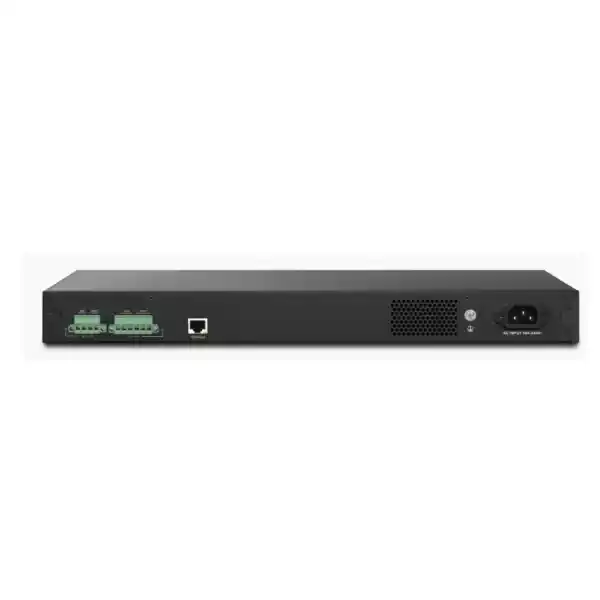
The physical layout is aimed at dense rack deployment. Forty-eight copper access ports consume a single rack unit while the SFP+ interfaces provide fiber connectivity without sacrificing copper port count. For network teams managing a large floor or several logical endpoint groups from one cabinet, that density can reduce rack consumption and simplify patching. The slide switch for Link/PoE LED indication helps technicians read front-panel status during commissioning and support work, while the stack ID indicator and stacking control support deployments that use multiple compatible switches as a coordinated system.
Power is another important element of the hardware design. The unit accepts 100–240 V AC input and also includes DC power inputs intended for backup use. DrayTek documents separate DC inputs associated with system and PoE failover. In a production design, the exact backup power architecture should be engineered with compatible power sources, rack UPS capacity and the required level of service continuity. Network resilience is strongest when switch power, upstream fiber, firewall connectivity and critical servers are treated as one availability chain rather than as isolated components.
Operating temperature is specified from 0 to 50°C, with 10 to 90 percent non-condensing operating humidity. These ratings make proper rack ventilation essential in UAE environments where communications rooms can experience high ambient heat if cooling is insufficient. The switch should be installed with front-to-rear airflow planning, clean cable management, unobstructed ventilation and UPS sizing that includes both the base switch load and the expected PoE delivery load. Designers should avoid treating the switch’s maximum electrical rating as a normal operating assumption; actual consumption depends on PoE draw, port utilization and connected optics.
Understanding the 400-watt PoE budget
PoE planning is one of the most important engineering tasks for the P2542x because the switch exposes forty-eight powered ports while the shared PoE budget is 400 watts. IEEE 802.3af devices may require significantly less power than IEEE 802.3at PoE+ devices, and real products often draw below their maximum class under ordinary operating conditions. The correct approach is to build a device schedule that records model, quantity, expected consumption, maximum consumption, required PoE standard, installation location and business criticality. The total expected draw should then be compared with the switch budget while leaving sensible engineering headroom for device start-up behavior, future additions and environmental variation.
Consider a typical mixed environment. Forty IP phones at modest draw could consume far less power than forty high-performance wireless access points. A surveillance deployment could include fixed cameras with moderate requirements plus a smaller number of higher-draw PTZ cameras. Access control devices, intercoms and small IoT gateways may consume only a fraction of a PoE+ allocation. The P2542x therefore works best when the power budget is mapped to the actual endpoint profile instead of assuming a uniform draw across all forty-eight ports. This is also why PoE monitoring, port priority and scheduling are operationally valuable rather than merely convenient features.
PoE scheduling allows administrators to define time-based power availability for selected devices. In suitable use cases, noncritical access points, signage devices or selected cameras can be powered down during defined periods. Scheduling can reduce unnecessary energy consumption and can also provide a controlled mechanism for recurring power cycles. However, it should be used carefully. Critical security devices, emergency communications, door systems and infrastructure that supports after-hours maintenance may need continuous availability. A professional configuration should document which endpoints are allowed to follow schedules and which must remain powered at all times.
PoE priority helps when total requested power approaches the available budget. Critical endpoints can be prioritized over lower-value devices so that a power-constrained condition is less likely to affect essential services first. Administrators should assign priority based on business impact rather than simply by port number. A voice gateway, reception phone, core wireless access point or high-priority camera may deserve a different policy from a convenience endpoint. During commissioning, the network team should test power behavior by verifying endpoint negotiation, actual consumption, reboot recovery and priority handling under representative load.
The P2542x supports PoE up to 802.3at rather than 802.3bt PoE++. That distinction should be checked during design because modern high-performance Wi-Fi, advanced PTZ cameras and some edge appliances may require power levels beyond PoE+. When endpoints need 802.3bt, an alternative switch or dedicated power strategy may be appropriate. For mixed estates where the majority of devices are 802.3af or 802.3at, the P2542x offers a strong density-to-uplink combination while keeping the power architecture straightforward.
Six 10G SFP+ interfaces for aggregation and resilient uplinks
The six SFP+ slots are a defining capability of the VigorSwitch P2542x. Each slot supports 1G or 10G operation, giving designers flexibility to connect to upstream switches, servers, storage networks or inter-building fiber at a bandwidth appropriate to the deployment. In a forty-eight-port access switch, uplink capacity matters because traffic from many endpoints can converge at the same time. Wireless access points may aggregate dozens of clients, cameras can produce sustained video streams, phones generate latency-sensitive voice traffic, and workstation traffic may include cloud synchronization, backups and large file transfers. Multiple 10G uplinks provide room to design around those traffic patterns instead of forcing all flows through a single oversubscribed path.
Link aggregation can combine multiple physical connections into a logical group. The switch supports static aggregation and LACP, with up to eight groups and up to eight members per group. Aggregation can increase available bandwidth across multiple flows and can improve resilience when the peer device is configured consistently. It does not mean that a single ordinary flow automatically becomes the sum of every link in the group; traffic distribution depends on hashing behavior and flow characteristics. Network teams should therefore size aggregation based on total traffic patterns, redundancy needs and the capabilities of the upstream switch or server rather than treating LACP as a simple multiplier for every session.
For fiber deployments, optic selection must match both ends of the link. The network design should specify 1G or 10G speed, fiber type, wavelength, connector type, distance, compatible transceiver model and patching standard. Single-mode optics are typically selected for longer distances, while multimode optics are common inside buildings and campuses where distances permit. Direct-attach copper or other short-reach options may be appropriate in supported rack-to-rack scenarios. Because transceiver interoperability can vary by platform and firmware, it is good practice to validate optic compatibility during procurement rather than assuming any generic SFP+ module will behave identically.
A robust UAE campus design may dedicate separate uplinks for core connectivity, server traffic, stack interconnection or ring resilience. The right allocation depends on topology. The important point is that the P2542x offers more than the minimal pair of uplinks found on many access switches, which can simplify migration, redundancy and staged capacity growth. Where wider infrastructure assistance is needed, FourTeck’s IT Services UAE resources can support broader implementation planning, while organizations with regional requirements can reference FourTeck Africa for cross-market infrastructure coordination.
Layer 2+ switching, VLAN architecture and local routing
The VigorSwitch P2542x is positioned as a Layer 2+ managed switch, meaning it goes beyond basic Ethernet forwarding and includes selected Layer 3 capabilities that can improve local network architecture. Its feature set includes static routing, VLAN routing and DHCP server functions. In practice, this allows administrators to create VLAN interfaces and move appropriate inter-VLAN traffic through the switch rather than forcing every local flow to traverse the perimeter router or firewall. This can reduce unnecessary gateway load and can keep local communication available for selected segments even if an upstream gateway is unavailable, provided the application path and addressing design support that behavior.
A common business design may use separate VLANs for corporate workstations, voice, wireless guest access, surveillance cameras, building management systems and network administration. The switch supports up to 512 VLANs and multiple VLAN classification methods, including IEEE 802.1Q tag-based VLANs as well as MAC-based and protocol-based VLAN capabilities. Management, voice and surveillance VLAN functions help administrators map logical services to the correct forwarding and priority behavior. The design objective should not be to create as many VLANs as possible. Each additional segment introduces routing, firewall policy, DHCP, monitoring and documentation requirements. Segmentation should therefore reflect security boundaries, broadcast control, operational ownership and application needs.
VLAN routing should be used with a clear security model. A Layer 3 switch can route traffic quickly between VLANs, but fast forwarding is not a substitute for security inspection. If traffic between user devices, servers, cameras and sensitive systems must be controlled by application-aware firewall rules, that traffic may need to cross a security gateway rather than being routed locally on the switch. A sensible architecture may use switch-based routing for low-risk internal networks while sending higher-risk inter-zone flows through a firewall. The correct choice depends on regulatory obligations, threat model and operational simplicity.
DHCP server capability can be useful in branch or contained network designs where the switch is intended to provide local addressing. However, many enterprise environments centralize DHCP on servers, routers or firewall platforms. When enabling DHCP on the P2542x, network administrators should document address pools, exclusions, default gateway, DNS settings, lease times and failover expectations. DHCP snooping and related edge security controls should be evaluated as part of the same architecture to reduce the risk of unauthorized address assignment.
QinQ support is relevant for service-provider-like or multi-tenant designs where customer VLAN tags must be encapsulated inside an outer service VLAN. Although QinQ can solve specific segmentation and transport problems, it adds operational complexity and should be introduced only with a documented VLAN numbering scheme, peer configuration and troubleshooting process. For most UAE office networks, standard 802.1Q segmentation with carefully planned trunks and access ports will be the primary design model.
Spanning Tree, loop protection and resilient Layer 2 design
Ethernet loops can disrupt an entire broadcast domain within seconds, so resilient Layer 2 design requires more than plugging redundant cables between switches. The VigorSwitch P2542x supports STP, RSTP and MSTP. Traditional STP establishes a loop-free topology but converges relatively slowly by modern standards. RSTP improves convergence behavior and is widely used for enterprise access networks. MSTP allows multiple spanning-tree instances to map groups of VLANs to different logical trees, which can be useful in larger environments that need to use redundant links more efficiently.
The protocol choice should align with the existing network. Introducing MSTP into an environment that is otherwise built around a simple RSTP design may create unnecessary operational overhead. Conversely, a multi-VLAN campus with several distribution paths may benefit from the additional control MSTP provides. Whatever protocol is selected, administrators should define the intended root bridge, configure edge ports correctly, protect against accidental topology changes and document which uplinks are expected to block under normal conditions. Redundancy is valuable only when failover behavior is predictable.
Storm control and DoS defense features add another layer of protection against traffic patterns that can overwhelm switching resources or endpoints. Storm control can limit excessive broadcast, multicast or unknown unicast traffic. These controls should be tuned rather than blindly maximized; thresholds that are too strict may interfere with legitimate discovery or bursty applications, while thresholds that are too permissive provide little practical protection. Baseline traffic measurement helps establish sensible values.
The switch also supports loop-oriented monitoring and common management alarms. During commissioning, engineers should deliberately test redundant paths, disconnect uplinks, verify convergence and confirm that monitoring systems record the event. A topology that looks resilient on a diagram may behave differently when optics fail, links flap, power is interrupted or a configuration is inconsistent. Controlled acceptance testing is therefore a core part of enterprise deployment rather than an optional final step.
Stacking for simpler multi-switch operations
DrayTek supports stacking for the P2542x family, with a maximum of four stackable devices and line or ring topology options. In a dense deployment, stacking can reduce the management burden of operating several independent switches because a master unit can coordinate configuration, monitoring and firmware synchronization. DrayTek identifies the VigorSwitch G2542x, P2542x and P2542xh as compatible within the supported stacking framework, subject to firmware and configuration requirements. All members of a stack should use the same supported firmware level, and stack planning should be completed before production rollout rather than improvised after endpoints are connected.
A line topology is straightforward but places greater importance on the path between members because a break may divide the stack. A ring provides an additional path and can improve resilience when implemented correctly. The physical port allocation used for stacking should be included in capacity planning because interfaces committed to stack links are not available for other uplink purposes. Network teams should also plan the master role, replacement procedure, spare strategy and firmware update process. Centralization makes everyday administration easier, but it also means that change control must consider the stack as one coordinated system.
Stacking does not remove the need for upstream redundancy. A stack can simplify access-layer management while still depending on one firewall, one distribution switch or one fiber path. A resilient design evaluates the entire chain: endpoint, access port, access switch, stack path, uplink, distribution layer, security gateway, WAN connectivity and application service. For critical sites, dual uplinks to redundant upstream devices may be more valuable than simply adding another stack member. The six SFP+ interfaces provide flexibility to allocate ports across stacking and upstream connectivity according to the desired architecture.
Operations teams should maintain an updated rack diagram, stack membership list, port map, optic inventory and backup configuration. When a switch is replaced, technicians should know which unit ID it should take, which firmware version is required and how its configuration will be synchronized. This level of documentation turns stacking from a convenience feature into a supportable enterprise operating model.
QoS for voice, video, Wi-Fi and business applications
A forty-eight-port access switch commonly carries traffic with very different service expectations. Voice needs low delay and low jitter, surveillance video often generates sustained streams, interactive business applications need responsive forwarding, and backups or software downloads can consume large amounts of bandwidth without requiring the same latency treatment. The VigorSwitch P2542x supports multiple QoS classification methods, including 802.1p Class of Service, DSCP, IP precedence and queue scheduling options such as strict priority and weighted round robin.
QoS works best when classification is consistent from endpoint to switch to upstream network. Marking packets on one access port achieves little if the next switch, router or WAN service ignores the marking. Administrators should define a small set of traffic classes, map trusted applications into those classes and configure queue behavior according to real business priorities. Overly complicated QoS policies are difficult to troubleshoot and can create unintended starvation. A straightforward design with validated voice and critical-application handling is usually more reliable than a large number of theoretical classes.
Voice VLAN and surveillance VLAN functions can simplify endpoint classification by identifying relevant device traffic and applying appropriate segmentation or priority behavior. LLDP and related discovery capabilities help network devices exchange identity and configuration information. In IP telephony deployments, the combination of VLAN separation, QoS and PoE is especially useful because the same switch can deliver electrical power to handsets while placing voice traffic in a dedicated logical network. Administrators should still verify how each handset model discovers its voice VLAN, whether PCs are connected through phone pass-through ports and how authentication is applied.
For surveillance, the switch’s ONVIF-friendly functions are designed to recognize compatible camera devices, present surveillance topology information and support operational tasks such as device maintenance and video-oriented monitoring. This can reduce support effort in camera-heavy sites, but it should complement rather than replace a dedicated video management system where recording, retention, analytics and operator workflows are required. The switch is the network and power foundation; the VMS remains responsible for surveillance application functions.
Access security, authentication and management-plane protection
Managed switches sit at a sensitive point in the network because they connect users and devices while also carrying administrative credentials, VLAN configuration and traffic policy. The VigorSwitch P2542x supports 802.1X port access control, RADIUS and TACACS+ integration, ACL functionality, management access controls and encrypted administration options such as HTTPS and SSH. These features allow network teams to move beyond a shared local administrator password and implement a more accountable access model.
802.1X can require endpoints to authenticate before receiving normal network access. In enterprise environments, the switch acts as the authenticator while a RADIUS platform makes the access decision. Successful deployments require careful planning for devices that do not support interactive authentication, including printers, phones, cameras, building systems and headless IoT devices. Some environments use MAC-based alternatives or dedicated device VLANs for these endpoints. The security goal is to avoid a situation where any device plugged into any wall outlet automatically joins a trusted corporate network.
Administrative access should be separated from ordinary user traffic whenever practical. A dedicated management VLAN, restricted source networks and strong authentication can reduce exposure. Unencrypted Telnet or HTTP services should normally be disabled if secure alternatives are available and compatible with the operational workflow. SNMP should be configured with appropriate versions and access controls; SNMPv3 provides authentication and privacy functions that are preferable for sensitive environments. Syslog or centralized monitoring should capture configuration changes, authentication failures and major switch events.
ACLs can restrict traffic based on defined matching rules. They are useful for management-plane protection, endpoint containment and simple segmentation policies, but they require disciplined rule order and documentation. A permissive rule placed before a restrictive rule can neutralize the intended control. Engineers should keep rule sets readable, comment their purpose in external documentation and test both permitted and denied traffic during change windows.
Security hardening should also include changing default credentials, removing unused management services, backing up the configuration, maintaining approved firmware, documenting local accounts and reviewing management access periodically. Physical security matters as well: an unlocked rack with exposed console access can undermine strong remote authentication. The network room, patch panels, UPS and switch console should therefore form part of the same control environment.
Centralized management with Vigor Router SWM and VigorACS
DrayTek provides multiple management approaches for the VigorSwitch P2542x. The local web interface supports direct configuration, while supported DrayTek routers can use Switch Management functionality for discovery, provisioning, monitoring, rebooting PoE devices and quick VLAN configuration. VigorACS extends centralized operations across multiple locations with provisioning, monitoring, alarms, scheduled maintenance and remote maintenance functions for supported DrayTek devices.
The right management method depends on scale. A single-site deployment with one or two switches may be adequately managed through the local GUI and standard monitoring systems. A multi-branch organization can benefit from centralized visibility because configuration consistency becomes harder as the number of devices increases. Central management can standardize VLAN assignments, simplify firmware planning and help support teams see device health without connecting individually to every branch. It also creates a requirement to secure the management platform, protect administrative credentials and maintain accurate site-to-device mappings.
Monitoring should focus on actionable data. Useful metrics include port state, speed and errors; PoE draw and warnings; uplink utilization; hardware health; IP conflicts; device availability; and topology changes. Alert thresholds should distinguish between expected behavior and meaningful incidents. For example, an access port used by a desk phone may legitimately go down outside business hours, while a core uplink or camera aggregation port should trigger immediate investigation. Monitoring platforms are most effective when alert severity is tied to service impact.
Configuration backups and maintenance scheduling should be part of the management process. Before major changes or firmware updates, administrators should export a known-good configuration, confirm release compatibility, document rollback steps and schedule work when service impact can be controlled. If the switch participates in a stack, firmware and stack compatibility should be reviewed as one change set. After updates, engineers should verify PoE delivery, VLAN trunks, routing, link aggregation, spanning tree state and monitoring reachability rather than assuming a successful reboot equals a successful change.
For managed-service customers, the P2542x can fit into a broader operational model covering firewall health, switching, wireless, backup connectivity and endpoint support. A complete service design should state who owns firmware updates, who receives alerts, what response times apply, how spare hardware is handled and what documentation is maintained. Technology features create value only when they are supported by repeatable operational processes.
Surveillance network design with ONVIF-aware switching
Surveillance is a natural use case for a forty-eight-port PoE+ switch because cameras need both connectivity and power. The P2542x can support dense IP camera deployments while the six 10G SFP+ ports provide high-bandwidth paths toward recording servers, distribution switches or centralized security infrastructure. Video networks differ from ordinary office networks in traffic profile: cameras send continuous or near-continuous streams, often for twenty-four hours a day, so sustained bandwidth and storage paths matter more than short bursts.
Sizing should begin with camera bitrate rather than camera count alone. Resolution, frame rate, codec, scene complexity and recording mode affect network throughput. Forty cameras configured for modest H.265 streams may create a very different load from forty high-resolution cameras with high frame rates and constant recording. Engineers should calculate aggregate ingress from camera ports, uplink bandwidth toward the NVR or VMS, and the recording server’s network interface capacity. A 10G uplink provides substantial headroom, but the recording platform and storage subsystem must also be sized accordingly.
PoE power is equally important. Fixed cameras may require relatively little power, while IR illumination, heaters, PTZ motors or advanced analytics can increase draw. Each camera model should be mapped to its maximum documented consumption. For sites with critical security coverage, engineers should preserve PoE headroom and use UPS protection so that a short utility interruption does not disable the entire camera estate. UPS runtime calculations must include the network switch’s own consumption plus the PoE load delivered to endpoints.
Segmentation improves security. Cameras should normally occupy dedicated VLANs, with access restricted to NVRs, VMS servers, administrator stations and necessary infrastructure services. Camera interfaces should not be broadly reachable from user networks unless there is a defined operational reason. The switch’s surveillance VLAN and ONVIF-aware capabilities can assist with classification and visibility, but firewall or ACL policy should still define permitted flows. Default camera passwords should be replaced, camera firmware maintained and unused services disabled according to the manufacturer’s guidance.
Physical topology also matters. In large properties, it may be better to distribute switches across IDF rooms and use fiber backhaul rather than pulling every camera copper run to one distant cabinet. Ethernet distance limits, cable pathway capacity, lightning exposure and building layout should drive placement. The P2542x’s 10G SFP+ capacity makes it well suited to this distributed approach because an access-layer camera switch can aggregate many edge streams into high-speed fiber toward the security core.
Wireless access point deployments and PoE capacity planning
Wireless networks increasingly depend on the wired access layer. Every ceiling access point ultimately needs Ethernet backhaul, power and a path to the gateway or controller. The P2542x can supply PoE/PoE+ to up to forty-eight compatible access points and aggregate their traffic through 10G uplinks. Whether all forty-eight ports should be used for access points depends on the AP model, expected PoE draw and the fact that the copper ports operate at Gigabit speed. High-end modern APs with 2.5G or faster Ethernet interfaces may be better paired with a multigigabit switch if client density and radio throughput justify it.
For Gigabit-connected access points, the P2542x offers an efficient way to consolidate a large WLAN footprint. Engineers should calculate the total PoE requirement using the access point’s maximum documented consumption, especially if radios change power mode depending on available PoE. An AP that can operate on PoE but disables features unless PoE+ is available should be treated according to its preferred power state. The 400-watt shared budget must leave room for the real design rather than simply dividing 400 by 48 and assuming every AP can use the result.
VLAN trunking is central to enterprise wireless. An AP may carry management traffic, corporate SSIDs, guest access and IoT networks across a tagged trunk. The switch port configuration must match the access point’s expected native or untagged VLAN and tagged VLAN list. Incorrect native VLAN settings can make an AP appear online while preventing controller discovery or client address assignment. Commissioning should therefore validate management reachability and actual client traffic for every SSID rather than only checking that the access point powers on.
Wireless performance is also influenced by uplink oversubscription. Dozens of access points can generate high aggregate throughput even when each individual AP rarely reaches a full Gigabit. The six 10G ports provide architectural freedom to build multiple uplinks or LACP groups toward distribution. Network teams should monitor actual utilization and add capacity based on measured traffic growth. This is more reliable than assuming theoretical maximum radio rates directly translate to sustained wired throughput.
Because wireless networks are often business-critical, PoE reboot capability can be operationally useful. A remote technician can power-cycle a problematic access point without dispatching staff to the ceiling or telecommunications room. Rebooting should remain a troubleshooting step after configuration and connectivity checks, not a substitute for diagnosing recurring faults. Frequent PoE resets can indicate cabling, firmware, power-budget or RF management problems that need deeper investigation.
IP telephony, voice VLANs and branch communications
IP phones are among the most predictable PoE workloads, which makes the P2542x a practical access platform for offices with many desks. Forty-eight PoE+ ports can power a large handset estate while voice VLAN functionality and QoS help separate and prioritize call traffic. In many desk environments, a PC connects through the phone’s integrated Ethernet switch, so one wall outlet carries both voice and user data. The switch port must then be configured to present the correct data VLAN and voice VLAN in a way the handset understands.
Voice quality depends on the complete network path. The access switch can prioritize packets, but congestion or misconfiguration on the firewall, WAN or service provider network can still cause jitter, delay or packet loss. A voice deployment should therefore include end-to-end QoS policy, WAN capacity review and failover testing. The switch’s role is to preserve classification and provide reliable local forwarding; it cannot compensate for an undersized internet circuit or an incorrectly configured SIP environment.
PoE greatly simplifies handset installation because desktop power adapters are unnecessary. It also centralizes backup power: when the switch is connected to a properly sized UPS, phones can remain operational during short utility interruptions. This is especially valuable for reception, security, operations and emergency contact points. UPS runtime should be calculated using the combined switch and handset load. A forty-eight-phone system may consume a meaningful portion of the switch’s PoE budget and UPS capacity even though each phone individually draws relatively little power.
For sites integrating telephony with other infrastructure, the switch can coexist with wireless and surveillance devices on separate VLANs. The network team should document port roles and maintain consistent templates so that phone, PC, camera and access-point connections are not configured manually in different ways across the rack. Configuration standardization reduces troubleshooting time and makes future expansion safer.
Technical specification overview
| Switching capacity | 216 Gbps |
| Forwarding rate | 160.7 Mpps at 64-byte frames |
| Packet buffer | 16 Mbit |
| Copper interfaces | 48 × 10/100/1000 Mbps RJ-45 with PoE/PoE+ |
| Fiber interfaces | 6 × SFP+ supporting 1G/10G |
| PoE budget | 400 watts shared across supported powered ports |
| PoE standards | IEEE 802.3af and IEEE 802.3at |
| Jumbo frame | Up to 12 KB |
| VLAN capacity | Up to 512 VLANs |
| Spanning Tree | STP, RSTP and MSTP |
| Link aggregation | Static and LACP; up to 8 groups with up to 8 members per group |
| Stacking | Up to 4 devices; line or ring topology |
| Layer 3 functions | Static routing, VLAN routing and DHCP server |
| Authentication | 802.1X, RADIUS and TACACS+ |
| Management protocols | Web management, HTTPS, SSH, SNMP and related enterprise management functions |
| Form factor | 1U rackmount |
| Dimensions | 440 × 346 × 44 mm |
| Weight | Approximately 5.49 kg |
| Operating temperature | 0 to 50°C |
| Operating humidity | 10 to 90%, non-condensing |
Specification values should be reconfirmed against the current regional datasheet, firmware release and approved accessory list at the time of quotation because manufacturer specifications and software capabilities can evolve.
Port security and edge-device onboarding strategy
The access layer is where unmanaged endpoints physically enter the network, so port-level security deserves deliberate design. A network built on the P2542x can use 802.1X authentication for supported users and devices, ACLs for policy enforcement, VLAN assignment for segmentation and management controls for switch administration. These functions should be integrated into a documented onboarding process that explains what happens when a new laptop, phone, camera, access point or building controller is connected.
For employee workstations, 802.1X with RADIUS can tie network access to device or user identity. For cameras and IoT devices that cannot perform normal supplicant authentication, administrators may use dedicated VLANs and tightly restricted policy. Voice handsets may need special handling because a phone and workstation can share one physical switch port. The network policy should avoid creating exceptions so broad that authentication becomes meaningless. Where MAC-based authorization is used, teams should recognize that MAC addresses are not strong credentials and should combine them with segmentation and monitoring.
Unused ports should be administratively disabled or assigned to an isolated VLAN where practical. Trunking should be enabled only on ports that genuinely require multiple VLANs. Native VLAN choices should be standardized, and management traffic should not share arbitrary access networks. These practices reduce accidental exposure and make configuration reviews easier. Templates can be created for common roles such as workstation, phone-plus-PC, camera, access point, printer, uplink and server connection.
Edge security also includes visibility. Port descriptions should identify the connected room, rack, outlet or endpoint. DHCP and ARP information can help correlate IP addresses with physical ports. Centralized logs should record authentication failures and topology changes. When an incident occurs, the ability to map an IP address to a switch port and then to a patch-panel location saves valuable time.
UAE deployment engineering: rack, cooling, UPS and cabling
The UAE operating environment makes physical infrastructure planning especially important. Although the P2542x is rated for operation up to 50°C, network rooms should be maintained well below maximum equipment limits to improve reliability and protect adjacent devices, optics and UPS batteries. Dedicated cooling, clean airflow and sensible rack spacing help avoid localized hot spots. The switch should not be installed in a closed cabinet with insufficient ventilation simply because the room itself is air-conditioned.
UPS sizing should account for both switch consumption and PoE output. If the switch powers dozens of phones, cameras or access points, the UPS sees the combined load. Runtime targets should be based on business requirements: a reception phone system may need continuity through short outages, while a security camera network may require longer runtime or generator-backed power. Network teams should test real UPS runtime under representative PoE load rather than relying only on theoretical calculations.
Structured cabling quality directly affects Gigabit Ethernet and PoE performance. Existing Cat5e or better cabling may support many deployments, but cable condition, length, termination quality and patch-panel workmanship should be verified. PoE causes current to flow through copper pairs, so poor connections can create heat and voltage drop. High-density bundles deserve special consideration, particularly when many ports deliver higher PoE loads. Cable certification provides a better basis for troubleshooting than assuming that a link is healthy because it negotiates at 1 Gbps.
Fiber links should be documented with endpoint labels, optic types and measured loss where required. Dust contamination can cause intermittent optical problems that are difficult to diagnose. Cleaning and inspection procedures should be part of fiber maintenance, and spare compatible optics should be kept for critical sites. If the design uses a ring or dual uplink path, fiber routes should be physically diverse where possible; two cables placed in the same tray provide limited protection against construction damage.
Rack organization should reserve space for patch panels, horizontal managers, UPS or PDU components and future expansion. The P2542x occupies one rack unit, but forty-eight copper patch leads plus six fiber links can create substantial cable density. Clear labeling and consistent color conventions reduce support errors. A well-designed rack makes the switch easier to maintain and lowers the chance of disconnecting the wrong uplink during troubleshooting.
Sizing the P2542x for offices, hotels, schools and multi-tenant sites
A single product can fit very different environments, but the design criteria change by sector. In an office, the main drivers may be IP phones, wireless access points, printers and user workstations. In a hotel, the network may need to support room access points, IP phones, CCTV, digital signage and back-of-house systems. A school may prioritize classroom access points, cameras, interactive systems and administrative devices. A warehouse may combine ruggedized access points, cameras, scanners and automation equipment. Multi-tenant properties add stronger segmentation requirements because traffic from different organizations or services must remain isolated.
The forty-eight copper ports make the P2542x suitable for dense access closets, but port count should not be the only sizing metric. PoE budget, uplink bandwidth, failure domain and growth capacity matter equally. Filling all forty-eight ports on day one can be economical, but it leaves no room for expansion without another switch. Many engineers reserve 10 to 20 percent port capacity when budget permits. The same principle applies to PoE: a design operating continuously near the 400-watt limit has less flexibility for higher-power replacement devices or emergency additions.
Failure domain is another consideration. A single forty-eight-port switch is efficient, but if it fails, many endpoints are affected at once. Critical environments may distribute essential systems across more than one switch so that one hardware failure does not remove every camera or phone in a zone. Stacking simplifies management but does not make every failure impossible. Power supplies, uplinks, optics, cables and software changes can all create service impact. Resilience should therefore be designed according to the cost of downtime.
For multi-floor buildings, using fiber between telecommunications rooms is often preferable to attempting long copper runs. Each floor can have a local access switch with 10G uplinks to a central distribution layer. The P2542x’s SFP+ density makes it possible to support redundant uplinks, stack connectivity and local server attachments within one chassis. This modular building-block approach scales more cleanly than a single oversized cabinet serving the entire property.
Migration from older Gigabit PoE switches
Organizations replacing an older forty-eight-port PoE switch should treat the project as a controlled migration rather than a simple hardware swap. The P2542x introduces six 10G SFP+ interfaces, modern management features, stacking support and a defined 400-watt PoE budget, but the existing network may have accumulated years of undocumented VLANs, static routes, trunk settings and endpoint exceptions. Copying old configuration line by line can carry obsolete design choices into the new platform.
The migration process should begin with discovery. Export the current switch configuration, map every active port, record VLAN membership, capture uplink aggregation settings, list PoE devices, identify management IP addresses and document spanning-tree roles. Compare the old PoE budget with measured endpoint draw. Verify every existing optic and determine whether it is compatible with the new SFP+ interfaces. If the previous switch used 1G uplinks, the project is an opportunity to evaluate 10G migration rather than reproducing the old bottleneck.
A staged cutover minimizes risk. Configure management, VLANs, trunks, routing, QoS and security policies before moving production endpoints. Test one uplink and a small set of representative devices first: a phone, workstation, camera and access point. Confirm DHCP, DNS, internet access, internal routing, voice registration and monitoring. Once the template is validated, additional ports can be migrated in controlled groups. This approach catches tagging or PoE issues before they affect an entire floor.
Rollback planning is equally important. The old switch should remain available until the new environment has passed acceptance tests. Cable labels should make it possible to restore the previous connection order. Configuration backups should be taken after successful migration. If the P2542x participates in a stack, replacement and master-election behavior should be understood before the old hardware is decommissioned.
After migration, the team should remove unused legacy VLANs and accounts, update network diagrams, record firmware versions and establish monitoring baselines. A successful hardware replacement is not only one where every link light turns green; it is one where the new environment is documented, supportable and aligned with the intended security and capacity model.
Firmware lifecycle, maintenance and operational governance
DrayTek currently lists the VigorSwitch P2542x as an available product with full lifecycle status. That is relevant for organizations that want a platform with an active support horizon rather than a product already approaching end of sale. Even so, lifecycle status should be rechecked during procurement because product availability and support dates change over time. Firmware maintenance should also follow the release stream appropriate to the regional model and deployment.
Firmware updates can deliver security fixes, feature improvements and compatibility changes, but production upgrades should be governed by change management. Administrators should review release notes, confirm stack compatibility, back up configuration, choose a maintenance window and verify post-upgrade behavior. In a stacked environment, all members should run a compatible firmware version. If central management software is used, its compatibility with the target switch firmware should also be reviewed.
A maintenance plan should specify how often the switch configuration is backed up, how firmware is approved, where spare optics are stored and how alert thresholds are reviewed. Support documentation should include the serial number, rack location, management address, uplink destinations, stack role, PoE-critical ports and warranty or support entitlement. This information can be maintained in a CMDB, network documentation platform or structured asset register.
Operational governance is particularly important in environments where several teams touch the same network. Security staff may own cameras, facilities may own access control, IT may own switching and a telecom provider may own phones. Without change coordination, one team can unintentionally affect another service by changing a VLAN or power-cycling a port. A clear ownership matrix and change process prevent the switch from becoming an unmanaged shared dependency.
Periodic review should include unused ports, stale VLANs, local accounts, SNMP settings, PoE utilization, uplink errors, stack health and temperature. Capacity trends can show when a new switch, higher PoE budget or additional uplink is needed. Proactive review is less expensive than discovering limitations during a major office expansion or after deploying a new generation of access points.
Where the P2542x fits—and where another model may fit better
The P2542x is a strong fit when the requirement centers on many Gigabit PoE/PoE+ endpoints and high-speed 10G aggregation. Its forty-eight powered copper ports are well aligned with phones, cameras, printers, conventional access points and general enterprise devices. Six SFP+ ports offer substantial uplink flexibility, and Layer 2+ features allow local routing, segmentation and centralized management.
A different switch may be more appropriate when endpoints require 2.5GbE or faster copper access. Some modern Wi-Fi access points can exceed 1 Gbps of real aggregate throughput and are designed with multigigabit Ethernet interfaces. Connecting such devices to a Gigabit port works only if the AP supports 1G fallback, and it can limit wired backhaul performance. Similarly, endpoints that require IEEE 802.3bt PoE++ need a switch capable of the required power class because the P2542x is an 802.3af/at platform.
The higher-budget P2542xh is a related option when the forty-eight-port topology is desirable but the 400-watt budget is insufficient. It offers a larger PoE power pool while retaining a similar high-density access and SFP+ aggregation concept. Choosing between the P2542x and higher-power alternatives should be based on a device-by-device power worksheet rather than assumption. Paying for unused PoE capacity may not be necessary, but undersizing power can create operational risk.
For environments with only a small number of PoE endpoints, a twenty-four-port or smaller switch may reduce cost and power consumption while still meeting requirements. The correct architecture is the one that balances current port count, growth, PoE draw, uplink needs, redundancy and management consistency. FourTeck can quote the P2542x alongside suitable alternatives when the final bill of materials is based on the site survey and endpoint schedule.
Procurement considerations for Dubai and UAE organizations
Enterprise switch procurement should include more than the chassis itself. A complete bill of materials may require SFP or SFP+ optics, fiber patch leads, rack mounting accessories, console connectivity, UPS capacity, PDU outlets, patch panels, copper patch cords and spare components. The optic requirement is particularly important because the switch’s six SFP+ slots do not automatically define the transceiver needed. Each fiber link must be matched to distance and media type.
Organizations should confirm the regional power cord, warranty process, approved firmware channel and any support entitlement included with the product. If the switch will be managed through VigorACS or another platform, software licensing and hosting requirements should be included in the commercial scope. If professional installation is required, the statement of work should define rack mounting, cable patching, VLAN configuration, migration, testing and documentation so that responsibilities are clear.
Delivery planning should consider whether the project can tolerate a partial shipment. A switch arriving without the correct optics may not be usable for production. Likewise, a replacement project can be delayed if the existing rack lacks available power or if UPS capacity is inadequate. Pre-installation checks can therefore save time: rack units, cabinet depth, grounding, power outlets, UPS load, cooling, copper certification and fiber type should all be confirmed before the engineer arrives on site.
For multi-site UAE projects, configuration consistency is a major procurement advantage. Standardizing on a switch family can simplify spares, technician training and firmware management. However, standardization should not override local needs. A small branch with eight phones does not require the same chassis as a hotel floor with dozens of powered endpoints. The P2542x works best as part of a tiered standards catalog where port density and power requirements determine the selected model.
Commercial comparisons should therefore look at total deployment cost rather than unit price alone. Rack space, PoE injectors, uplink modules, management effort and future expansion can change the real cost of a solution. A forty-eight-port PoE switch with six 10G uplinks can reduce the need for separate aggregation or power components in the right design, while an oversized deployment can waste budget if requirements are modest.
Commissioning and acceptance testing checklist
A production switch should be tested systematically before handover. The first stage is physical verification: confirm model, serial number, rack mounting, power feeds, UPS connection, airflow, grounding where applicable and cable labeling. Confirm that the switch boots without hardware alarms and that management access is available from the authorized administration network.
Next validate Layer 2 configuration. Check every required VLAN, trunk, access port, native VLAN, LACP group and spanning-tree state. Confirm that redundant links behave as intended by disconnecting one path and observing convergence. Verify that user-facing ports do not accidentally accept trunk traffic and that unused ports are disabled or isolated according to policy. Where voice or surveillance VLAN features are used, connect representative devices and confirm automatic classification works as designed.
PoE testing should confirm that each device negotiates power correctly and remains stable after a switch reboot. Record total PoE draw under representative load and compare it with the 400-watt budget. Test priority behavior for critical ports if configured. If PoE scheduling is used, validate the schedule with a noncritical device before applying it widely. Confirm that remote PoE restart functions operate without disrupting unrelated endpoints.
Layer 3 testing should verify VLAN interfaces, static routes and DHCP functions where enabled. Test both permitted and denied inter-VLAN paths. If a firewall is expected to inspect certain traffic, confirm that switch routing does not bypass the intended security path. Test DNS, internet connectivity, internal applications and management reachability from each relevant VLAN.
Monitoring and logging should be verified before handover. Generate a test port-down event, authentication failure or PoE warning and confirm it reaches the monitoring platform. Confirm SNMP, syslog and centralized management access as applicable. Export the final switch configuration and store it with the project documentation.
Finally, handover documentation should include rack diagram, port map, VLAN table, management address, administrator process, firmware version, optic inventory, PoE budget worksheet and support contacts. Acceptance testing closes the gap between successful installation and supportable operation.
Frequently asked technical questions
Does the P2542x provide PoE on all 48 copper ports?
Yes. The forty-eight Gigabit RJ-45 access interfaces support PoE/PoE+. The total shared PoE power budget is 400 watts, so endpoint power requirements must be calculated across the complete switch.
Are the six fiber interfaces 10G only?
The SFP+ interfaces support 1G and 10G operation. Optic type and speed must be compatible with the far-end device and the intended fiber medium.
Can the switch route between VLANs?
Yes. The Layer 2+ feature set includes VLAN routing and static routes. Security-sensitive inter-zone traffic may still be better routed through a firewall when inspection and policy enforcement are required.
Does it support PoE++?
No. The P2542x supports IEEE 802.3af and 802.3at PoE/PoE+. Endpoints requiring 802.3bt PoE++ should be matched to a suitable PoE++ switch or alternative power method.
Can multiple P2542x switches be stacked?
Yes. DrayTek supports up to four compatible switches in line or ring stacking topology, subject to supported firmware and configuration requirements.
Is it suitable for CCTV?
Yes, particularly for 802.3af/at IP camera estates. ONVIF-friendly functions, surveillance VLAN support, PoE monitoring and 10G uplinks are useful in camera-heavy networks when bandwidth and PoE are properly sized.
Is 400 watts enough for 48 devices?
It depends entirely on the endpoint mix. Forty-eight low-power phones may fit comfortably, while forty-eight high-draw PoE+ devices may exceed the budget. A per-device power worksheet is required.
Can it be centrally managed?
Yes. The switch supports DrayTek management approaches including compatible Vigor Router Switch Management and VigorACS, in addition to local and protocol-based administration methods.
Decision recap: when the DrayTek VigorSwitch P2542x is the right choice
Choose the P2542x when the network requires a dense concentration of Gigabit PoE/PoE+ endpoints and needs more uplink flexibility than a basic access switch can provide. The combination of forty-eight powered copper ports, six 10G-capable SFP+ slots and 216 Gbps switching capacity makes it suitable for access closets that aggregate phones, cameras, standard Gigabit wireless access points and general enterprise devices.
The switch is particularly attractive when Layer 2+ capabilities are useful. VLAN routing can move suitable internal traffic locally, DHCP server features can support contained branch designs, and stacking can simplify the administration of multiple compatible units. QoS, voice VLAN, surveillance VLAN, 802.1X, ACLs, link aggregation and spanning-tree options provide the controls required to integrate the switch into structured business networks rather than operating it as a simple unmanaged port expander.
The two most important design checks are PoE power and access-port speed. The 400-watt shared PoE budget is substantial but must be compared with the actual endpoint list. The copper ports are Gigabit, so multigigabit Wi-Fi or high-throughput edge devices may require a different access platform. These checks should be completed before quotation so that the selected switch matches both present equipment and planned upgrades.
For UAE deployments, physical design is equally important: adequate cooling, UPS runtime, structured cabling quality, fiber specification and rack organization determine whether the switch performs reliably over time. When those elements are engineered together, the P2542x can serve as a flexible, supportable access and aggregation platform for a wide range of commercial networks.
Quotation input checklist
To prepare an accurate UAE quotation and configuration, collect the following information before finalizing the bill of materials. This avoids selecting the right switch but the wrong optics, power architecture or endpoint mix.
Plan your DrayTek VigorSwitch P2542x deployment with FourTeck UAE
FourTeck can assist with switch sizing, PoE budget validation, SFP+ selection, VLAN planning, rack and UPS requirements, firewall integration, Wi-Fi uplink design, surveillance switching, migration and post-installation support. Share the endpoint list, site topology and fiber distances so the quotation can include the correct switch, optics and implementation scope.
For broader enterprise infrastructure planning, visit FourTeck UAE, review security integration through Firewall Dubai, or coordinate implementation resources through IT Services UAE. Regional organizations can also use FourTeck Africa for wider deployment requirements.

Reviews
There are no reviews yet.